

Page 1
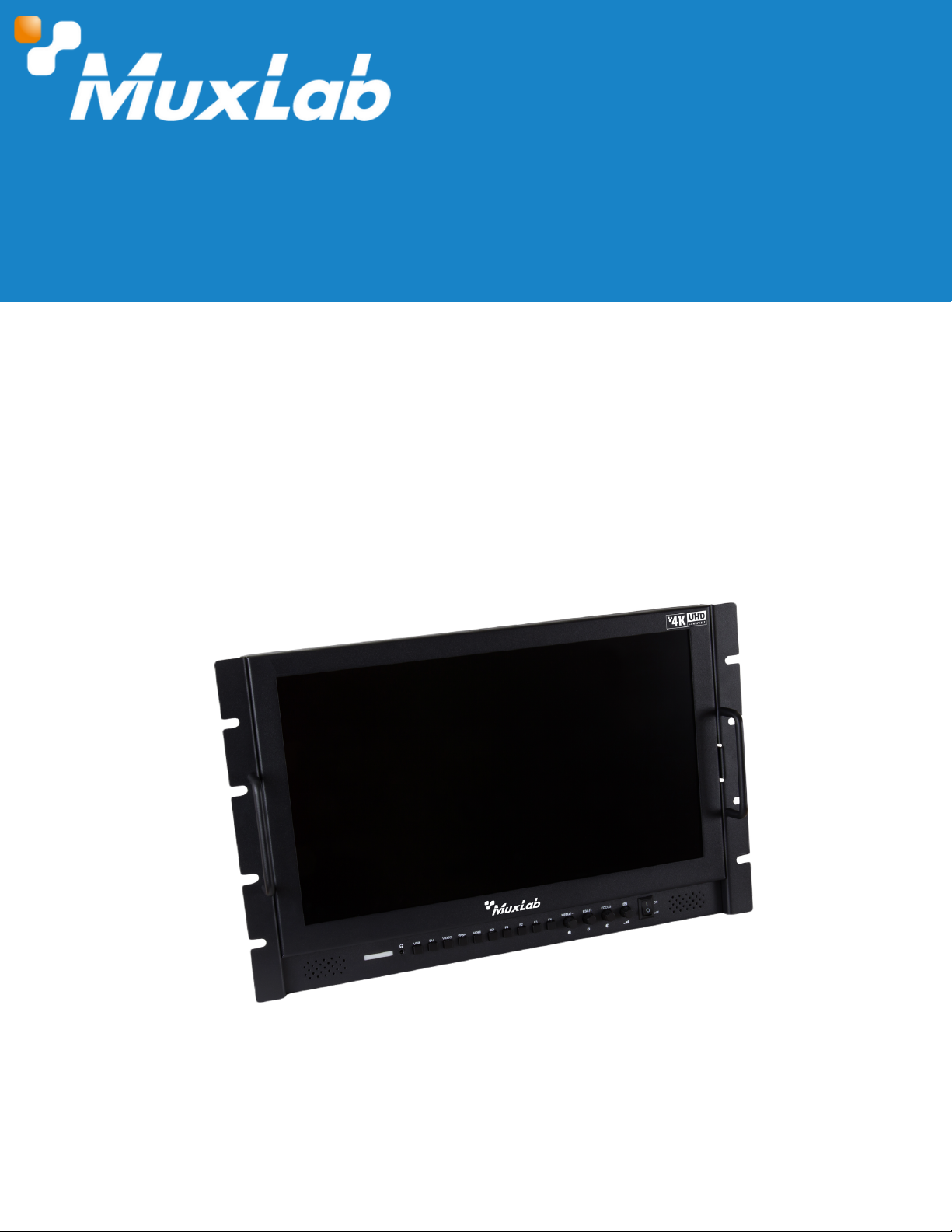
HDMI/3G-SDI Single Display 17.3", 4K/30
User Manual
500842
© MuxLab Inc. 2024 1 94-001014-A/SE-001014-A
Page 2

HDMI/3G-SDI Single Display 17.3", 4K/30
Table of Contents
1. Safety Precautions....................................................................................................................................................3
2. Introduction................................................................................................................................................................4
3. Features.......................................................................................................................................................................4
4. Package Contents...................................................................................................................................................4
5. Specifications............................................................................................................................................................5
6. Operation Controls and Functions....................................................................................................................6
6.1. Front Panel..........................................................................................................................................................6
6.2. Rear Panel..........................................................................................................................................................7
6.3. Power Input Selection....................................................................................................................................7
6.4. TALLY Indicator Pinout....................................................................................................................................8
7. On Screen Display Menu (OSD) Instructions..................................................................................................8
7.1 On Screen Display Menu (OSD) Functions...............................................................................................9
8. Troubleshooting........................................................................................................................................................11
9. Application Diagram.............................................................................................................................................12
© MuxLab Inc. 2024 2 94-001014-A/SE-001014-A
Page 3
1. Safety Precautions
To ensure the best performance from the product, please read all instructions carefully before
using the device. Save this manual for future reference.
Follow basic safety precautions to reduce the risk of fire, electrical shock, and injury.
Do not dismantle the housing or modify the module. It may result in electrical shock or
burns.
Do not open or remove the housing of the device as you may be exposed to dangerous
voltage or other hazards.
To prevent fire or shock hazard, do not expose the unit to rain, moisture and do not install
this product near water. Keep the product away from liquids.
Spillage into the housing may result in fire, electrical shock, or equipment damage. If an
object or liquid falls or spills on the housing, unplug the module immediately.
Do not use liquid or aerosol cleaners to clean this unit. Always unplug the power to the
device before cleaning.
Using supplies or parts not meeting the product specifications may cause damage,
deterioration or malfunction.
There are No adjustable components in the monitor. Refer all servicing to qualified service
personnel.
Install the device in a place with adequate ventilation to avoid damage caused by
overheat.
Unplug the power when left unused for a long period of time.
Information on disposal of devices: do not burn or mix with general household waste,
please treat them as normal electrical waste.
Copyright Notice
All contents in this manual are copyrighted, and cannot be cloned, copied, or translated
without the express permission of MuxLab Inc. Product specifications and information in this
document are for reference only, and the content may be updated from time to time without
prior notice.
© MuxLab Inc. 2024 3 94-001014-A/SE-001014-A
HDMI/3G-SDI Single Display 17.3", 4K/30
Page 4
3. Features
17.3-inch LCD display
Supports HDMI (4K/30), 3G-SDI, DVI-I (VGA) and CVBS with Audio
Fits 19-inch rackmount @ 7 RU
Tri-color Tally light indicator
Supports Center Marker, Safe Frames, Check Field, Focus Assist,
Aspect Ratio, Image Flip, P2P & Image Freeze
Stereo Earphone output, built-in speaker
Customizable buttons tailored to customer needs
2. Introduction
The HDMI/3G-SDI Single Display 17.3", 4K/30 features a 17.3-inch IPS LCD display that can be
conveniently and securely rack-mounted into a 19" 7RU rack. This monitor adopts digital signal
processing circuit which enables it to achieve high brightness, low power consumption and
stable performance.
The unit supports input and loop-out of HDMI signals up to 4K/30, SDI signals up to 3G-SDI,
DVI-I (VGA) and CVBS signals with Audio. The unit supports a tri-color Tally light indicator per
display, customizable buttons allowing customers to tailor them to their needs, and advanced
functions such as Center Marker, Safe Frames, Check Field, Focus Assist, Aspect Ratio, Image
Flip, P2P, and Image Freeze.
© MuxLab Inc. 2024 4 94-001014-A/SE-001014-A
4. Package Contents
One (1) HDMI/3G-SDI Single Display 17.3", 4K/30
One (1) 12VDC power adapter 36W
One (1) Tally - DB9 adapter
One (1) USB cable adapter
One (1) User manual (available via download)
HDMI/3G-SDI Single Display 17.3", 4K/30
Page 5
© MuxLab Inc. 2024 5 94-001014-A/SE-001014-A
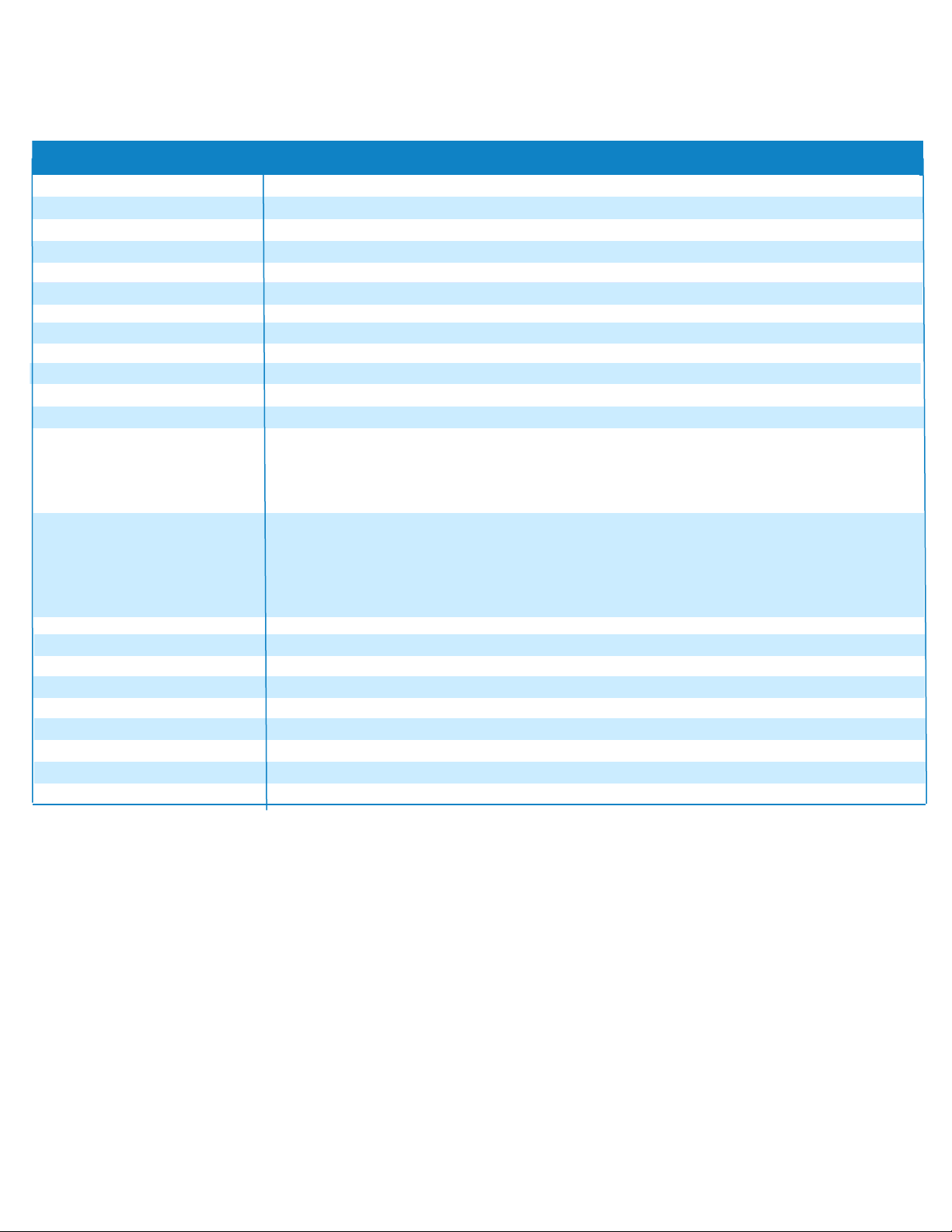
5. Specifications
HDMI/3G-SDI Single Display 17.3", 4K/30
17.3" IPS
300cd/m²
LED
89°/89°(L/R) 89°/89°(U/D)
Screen Size
16.7M
0.1989(H) x 0.1989(V) mm
16:9
Specification
Display Colors
Dot Pitch
Aspect Ratio
Contrast
Backlight
Viewing Angle
3G-SDI, HDMI, YPbPr, Video, Audio(L/R), DVI-I (VGA), Tally, USB UpgradeInputs
700:1
Brightness
Response Time
Tr + Tf = 25ms
SDI Support Format
480i/576i
720p (60/59.94/50/30/29/25/24/23.98)
1080i (60/59.94/50)
1080p (60/59.94/50/30/29.97/25/24/24sF/23.98/23.98sF)
HDMI Support Format
480i/576i/480p/576p
720p (60/59.94/50/30/29/25/24/23.98)
1080i (60/59.94/50)
1080p (60/59.94/50/30/29.97/25/24/24sF/23.98/23.98sF)
4K UHD 3840x2160p (30/29.97/25/24/23.98Hz, 4096x2160 (24Hz)
Power Consumption ≤26W
Input Voltage Range
9.0 to 24 VDC
Power Source
100/240VAC to 12VDC @ 3A power supply
Working Temperature
0°C to 50°C
Storage Temperature -20°C to 60°C
Dimensions 481.6L X 297H X 35D mm
Weight
3.40kg
Warranty 2 years
Order Information 500842 HDMI/3G-SDI Single Display 17.3", 4K/30 (UPC: 627699008423)
Outputs 3G-SDI, HDMI, YPbPr, Video
Audio
3.5mm Stereo Headphone, Speaker
Page 6
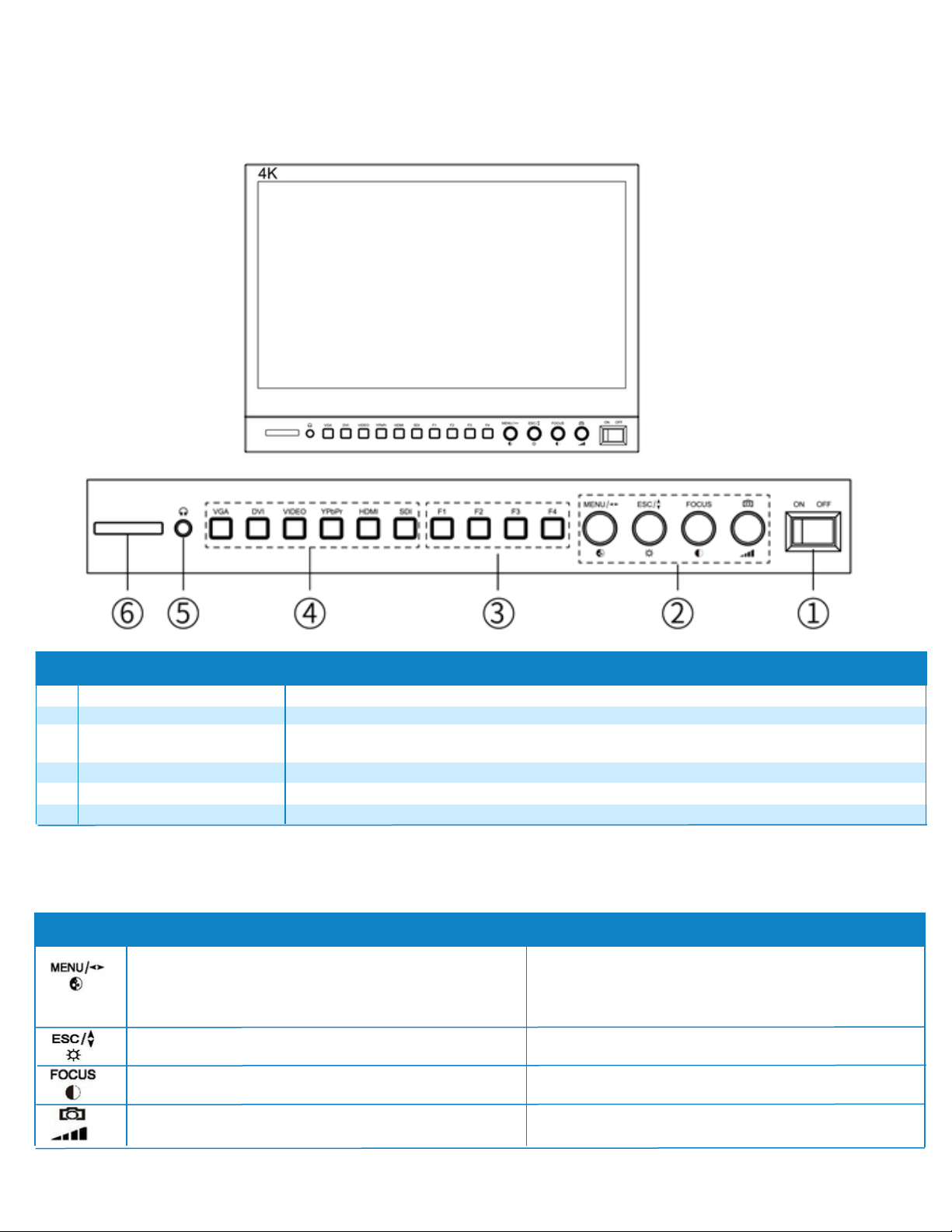
3
2
3.5mm Stereo Headphone Jack output
© MuxLab Inc. 2024 6 94-001014-A/SE-001014-A
6. Operation Controls and Functions
6.1 Front Panel
Front Panel
1
Four user-defined function buttons to operate on user presets.
No
4
Name Description
See table below.
Power Switch
Multifunctional Knobs
5 Audio output
Video input selection: VGA (DVI to VGA signal), DVI, VIDEO, YPbPr, HDMI and SDI
6
Tally
User defined
Function Buttons
Input Selection Buttons
Tally Indicator
Power ON/OFF Switch
Knobs Function when OSD is not displayed
Rotate knob to adjust image Saturation.
Press it to enter the OSD menu.
Rotate knob to select menu items up or down.
Press it to exit the OSD menu.
Rotate knob to adjust image Brightness.
Rotate knob to select or adjust the selected
menu item.
Press it to exit (confirm) the current menu
settings.
Function when OSD is displayed
Rotate knob to adjust image Contrast.
Press it to enter “Focus Assist” function.
/
Multifunctional Knobs
Rotate knob to adjust Volume.
Press it to enter “Camera Mode” Function.
/
HDMI/3G-SDI Single Display 17.3", 4K/30
Page 7
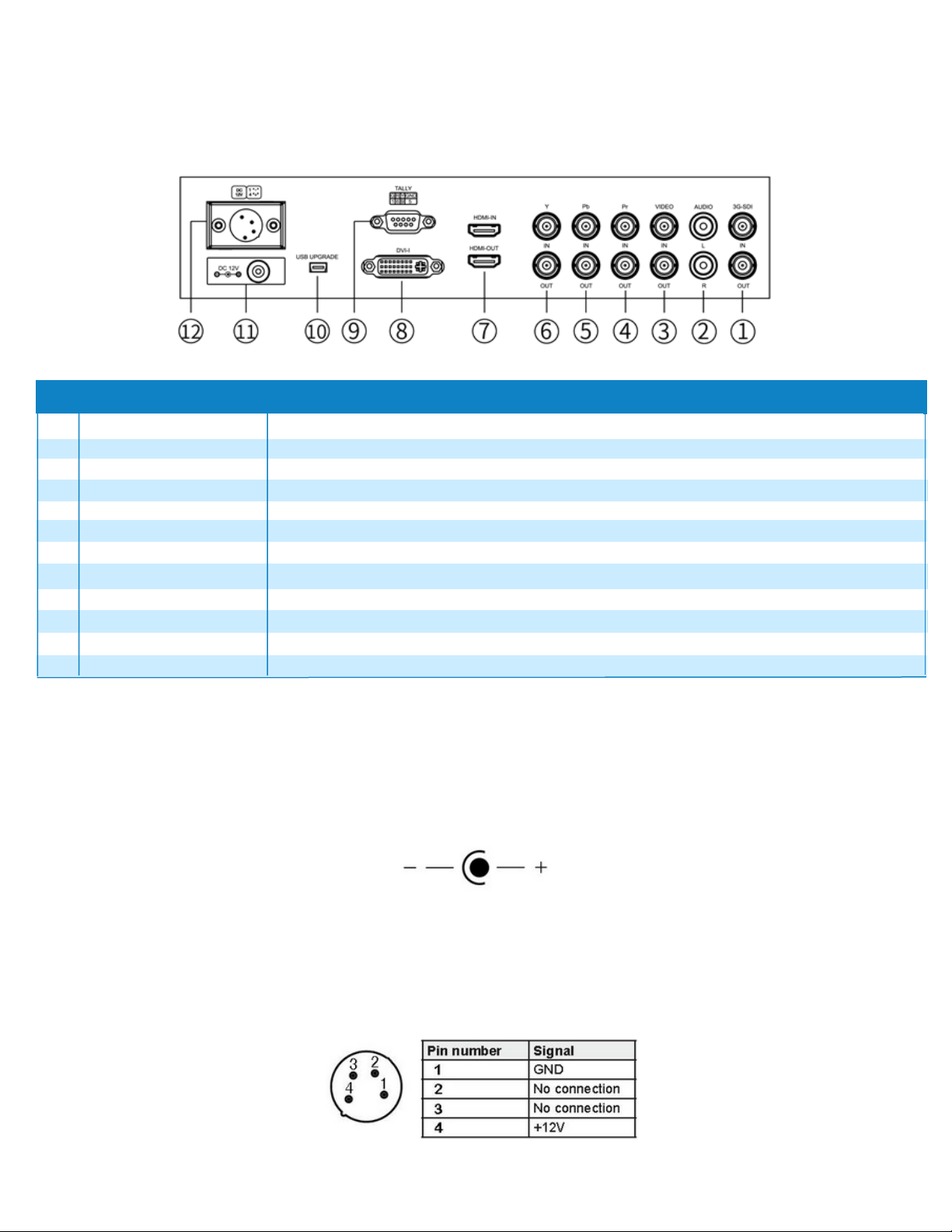
3
2
Component video Pb input & output signal in YPbPr
© MuxLab Inc. 2024 7 94-001014-A/SE-001014-A
1
Composite Video signal input & output
No
4
Name Function Description
SDI signal input & output
Audio Left and Right channel input
3G-SDI IN/OUT
AUDIO L/R:
5
Pb IN/ OUT:
Component video Pr input & output signal in YPbPr
USB upgrade port
6
Y IN/ OUT: Component video Y input & output signal in YPbPr
7 HDMI IN/ OUT:
8 DVI-I signals input
TALLY indicator input port
9
HDMI signal input & output
Rear Panel
VIDEO IN/ OUT:
Pr IN/ OUT:
TALLY
(VGA input from this port after conversion module signal conversion)
10
11
12
Direct DC plug-in power supply input port
4-pin XLR DC power input
USB UPGRADE
Power input
Power input
6.2 Rear Panel
6.3 Power Input Selection
There are two ways of power supply to our monitor:
A. The direct plug-in DC power input port. Please use DC5.5*2.1m DC power plug, power input
polarity as shown:
Please use the qualified power supply with output power no less than 21W 9-24VDC.
B. Via 4 pin XLR interface power supply. The polarity of the 4-pin XLR power input is shown below.
HDMI/3G-SDI Single Display 17.3", 4K/30
Page 8
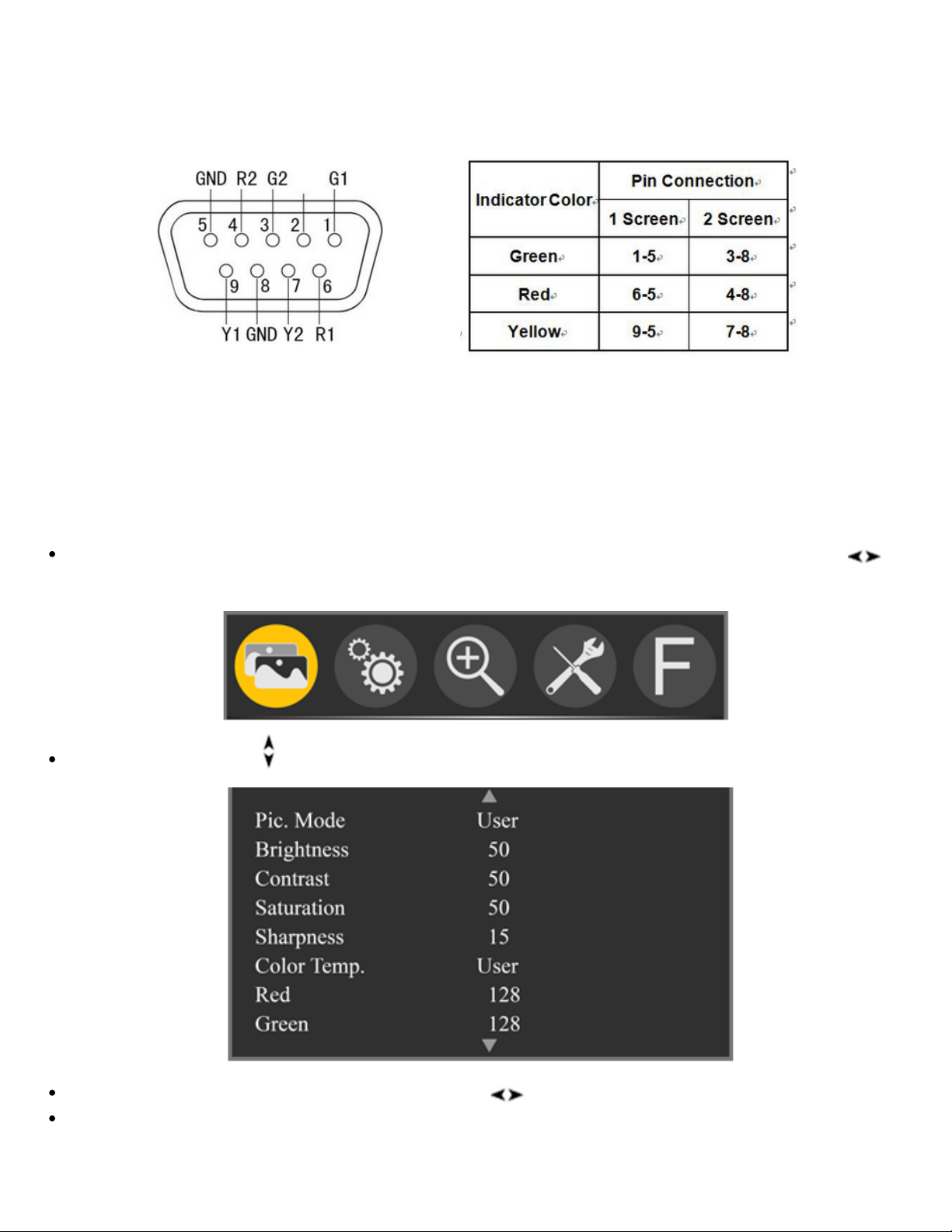
© MuxLab Inc. 2024 8 94-001014-A/SE-001014-A
Note: Pin 5 and 8 are sharing GND connection.
6.4 TALLY Indicator Pinout
7. On Screen Display Menu (OSD) Instructions
The display has a number of buttons for controlling and adjusting setting for display.
Pressing the MENU knob will enter the On Screen Display (OSD), turning the knob to
select secondary menu.
Turning the Esc knub to navigate the secondary menu.
After selecting the item, rotate the Menu knob to ajust the item parameter.
Pressing the ESC knob will exit the OSD menu.
HDMI/3G-SDI Single Display 17.3", 4K/30
Page 9
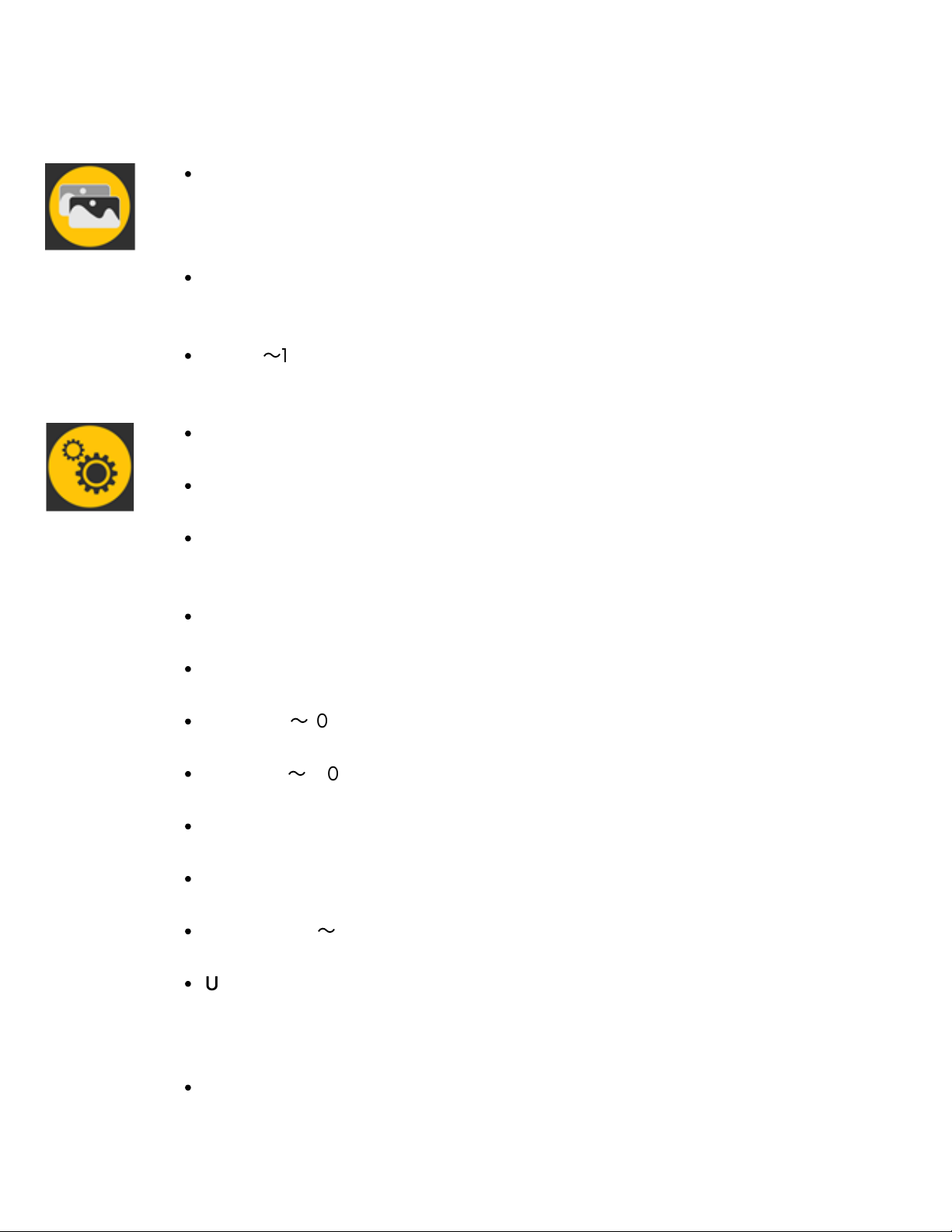
© MuxLab Inc. 2024 9 94-001014-A/SE-001014-A
7.1 On Screen Display Menu (OSD) Functions
Pic. Mode: Standard, Mild, User, Dynamic, Under "User- ", you can adjust the
Brightness (0 ~ 100), Contrast (0 ~ 100), Saturation (0 ~ 100), and Sharpness
(0 ~ 100).
Color Temp. : 6500, 9300, User; Under "User", you can adjust the Red, Green
and Blue values of the image.
Tint: 0〜100
Language: Language selection.
Aspect Ratio: Auto, 4:3, 16:9, Just Scan, Panorama, P2P.
No Signal: Screen color when no video signal; Blue Screen, Red Screen, Green
Screen, Black Screen, White Screen
VGA Self-adj: This function can be realized under DVI to VGA signal.
OSD Trans. : Off, Low, Middle, High
OSD H: 0〜100
OSD V: 0〜100
OSD Time: Off, 10Sec, 20Sec, 30Sec
Camera Mode: Off, 480P, 1080i
Backlight: 0〜100
USB Upgrade: Download upgrades to a USB disk, then connect it to the
Upgrade USB port, then press confirm. After the upgrade, the monitor will
automatically restart. Do NOT plug any USB cable into this port.
Reset: reset to the original settings.
HDMI/3G-SDI Single Display 17.3", 4K/30
Page 10
© MuxLab Inc. 2024 10 94-001014-A/SE-001014-A
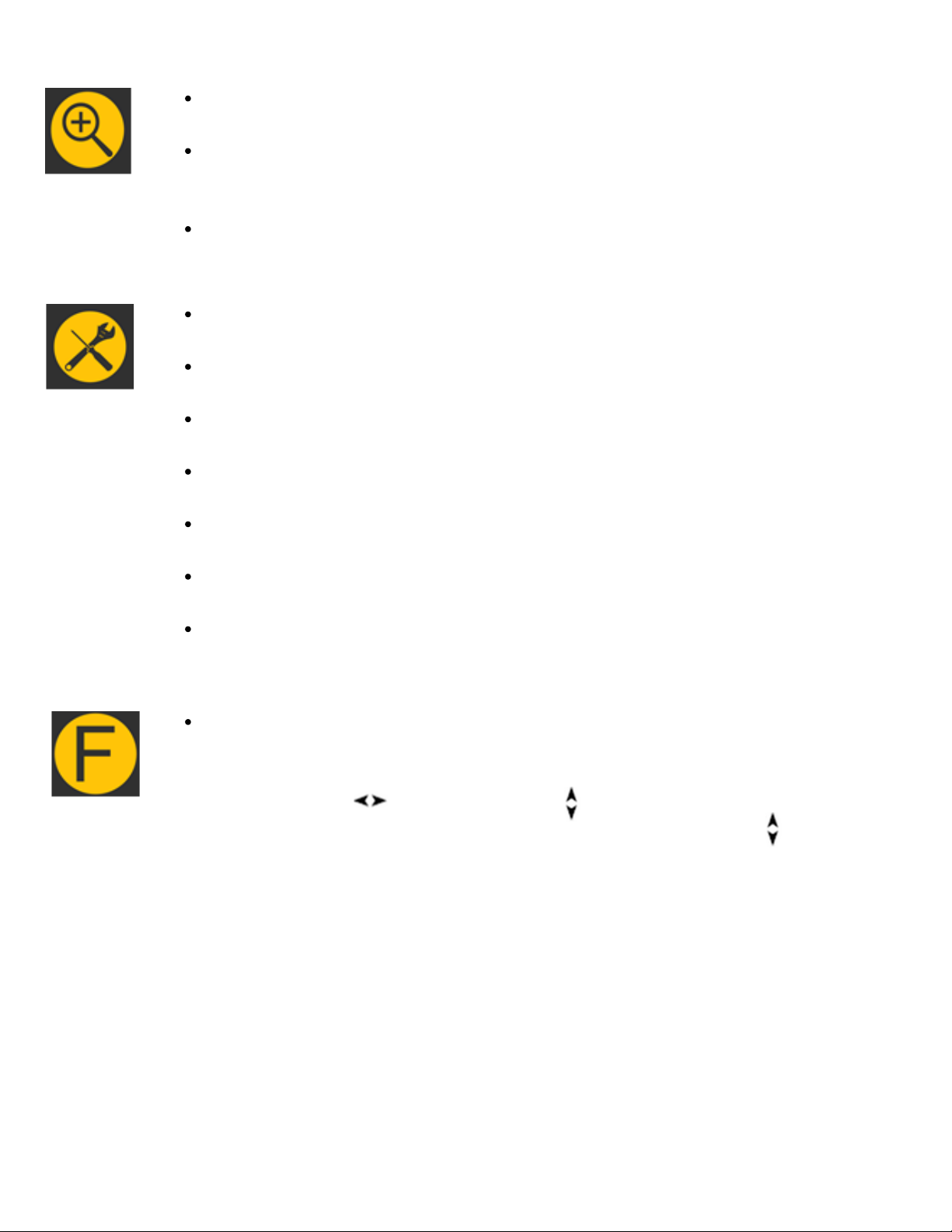
Zoom: Off, 4X, 9X, 16X.
Zoom Mode: Off, Mode1, Mode2; In Mode 1 and Mode 2, you can customize
the Zoom All (0-100).
Scan Mode: Under Scan, Over Scan
Center Marker: Off, On
Safe Frames: Off, 80%, 85%, 90%, 93%, 96%, 2.35:1
Image Freeze: Off, On
Image Flip: Off, H Flip, V Flip, H_V Flip
OSD Flip: Off, On
Check Field: Off, Mono, Red, Green, Blue,
Focus Assist: Off, On; Superimpose red highlight over parts of the monochrome
image in focus.
F1 to F4: Center Marker, Safe Frames, Check Field, Focus Assist, Aspect Ratio,
Image Flip, P2P, Image Freeze, Zoom, Backlight, Color Temp., VGA Self-adj
can be pre-selected for each Function button.
Choose F, rotate button, then rotate button to select one of options as
definition function. Press “MENU” button to confirm and rotate button back
to next F setting.
HDMI/3G-SDI Single Display 17.3", 4K/30
Page 11
© MuxLab Inc. 2024 11 94-001014-A/SE-001014-A
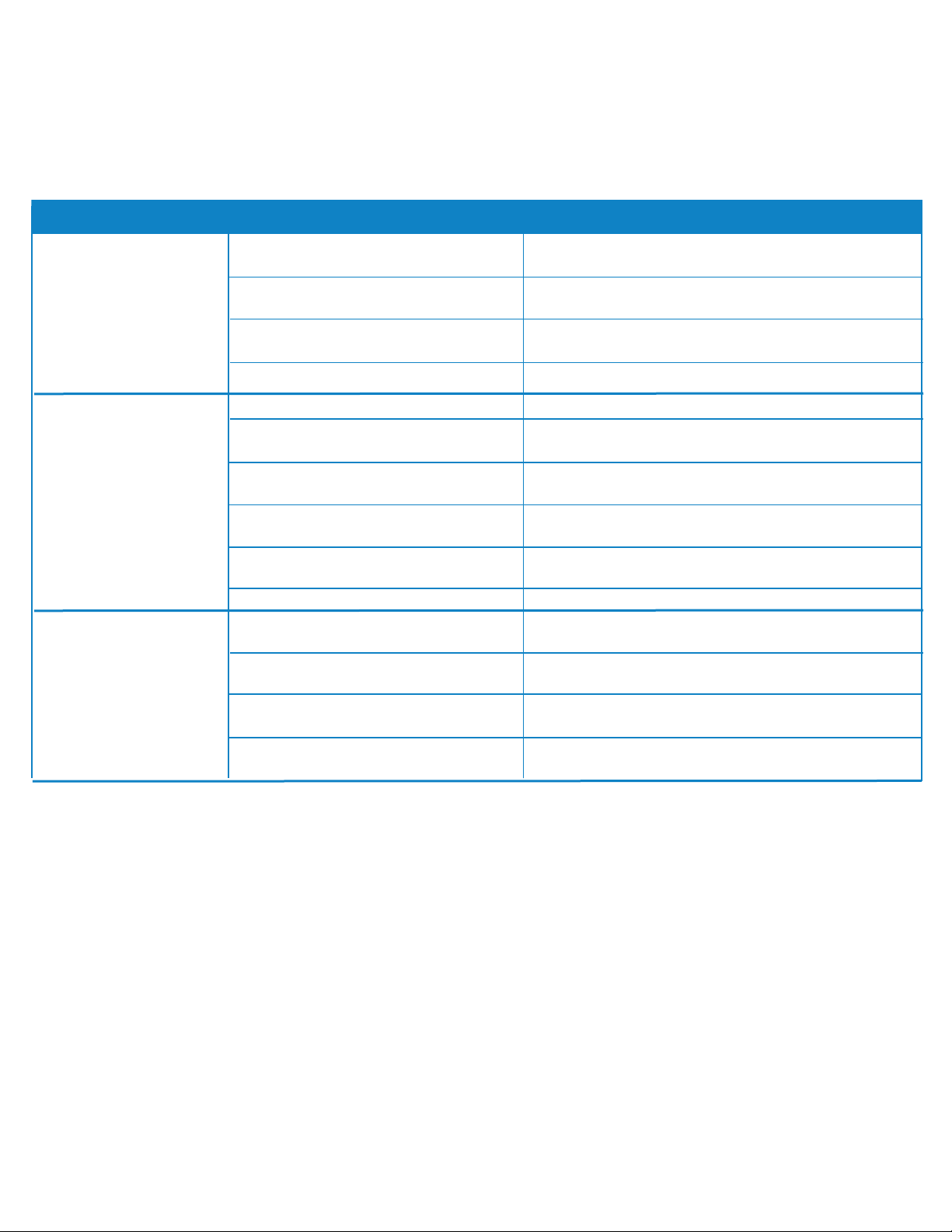
Symptom Probable Cause
Video cable off or connect
incorrectly
Check the quality of the cable and make sure to
select the correct input interface
Possible Solution
No Image
Without video signal input
Check that the signal source and output
interface connection are correct.
Monitor cannot be powered on
Check whether the power is connected, put the
power switch to “on” position
Supply voltage instability
The power adapter is not connected properly.
Image/color display
abnormal
Video cable poor contact
Change video cable
Video signal interfered by
external environment
Move to another environment and try again
Video input signal amplitude too low
Check signal source video output, or change
signal source and try again.
Menu color saturation adjustment
closing
Enter menu to check color, or reset to factory
settings
Check Field set in mono or black &
white
Reset Check Field, back to the color
Image deformation Reset the image ratio
Speaker without sound
Audio cable off or improper
connection
Confirm connected with the corresponding input
port
Volume adjustment was closed
Reset the volume control and adjust to a proper
position
HDMI cable poor Connected
Check the quality of cable, or change cable and
try again
No sound after switch video signal
This monitor is with audio signal only in audio
input and HDMI state
8. Troubleshooting
If there is any problem when using the unit, please try following ways to inspect and solve
If you still cannot diagnose the problem, please call MuxLab Customer Technical Support at 877689- 5228 (toll-free in North America) or (+1) 514-905-0588 (International).
HDMI/3G-SDI Single Display 17.3", 4K/30
Page 12
HDMI/3G-SDI Single Display 17.3", 4K/30
500842
Follow us:
2321 Cohen | St-Laurent , H4R 2N7 | Québec, Canada Tel: 514-905-0588 | Fax:
514-905-0589 | Toll free: 1-877-689-5228 [email protected] |
[email protected] | www.muxlab.com
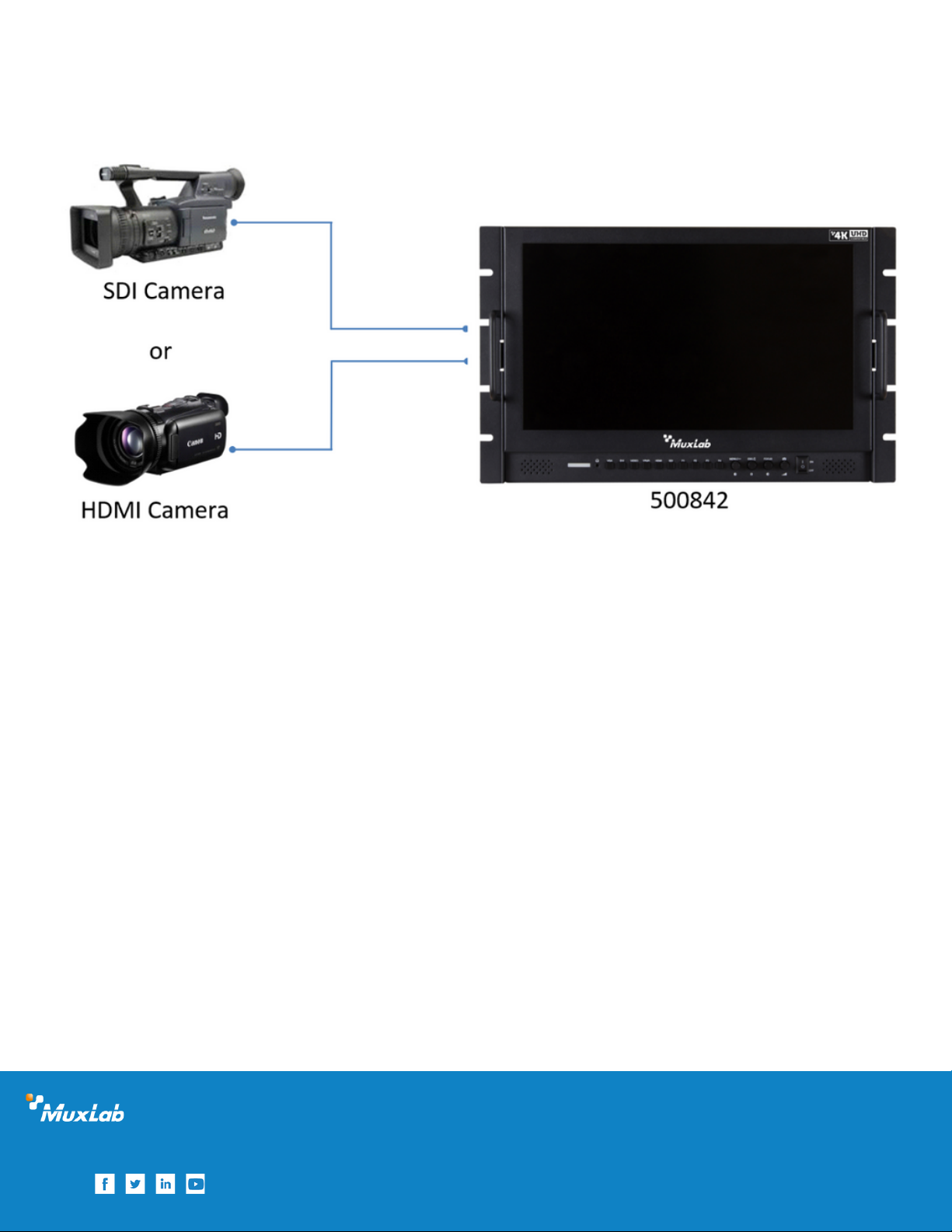
9. Application Diagram
HDMI/3G-SDI Single Display 17.3", 4K/30
 Loading...