

Page 1
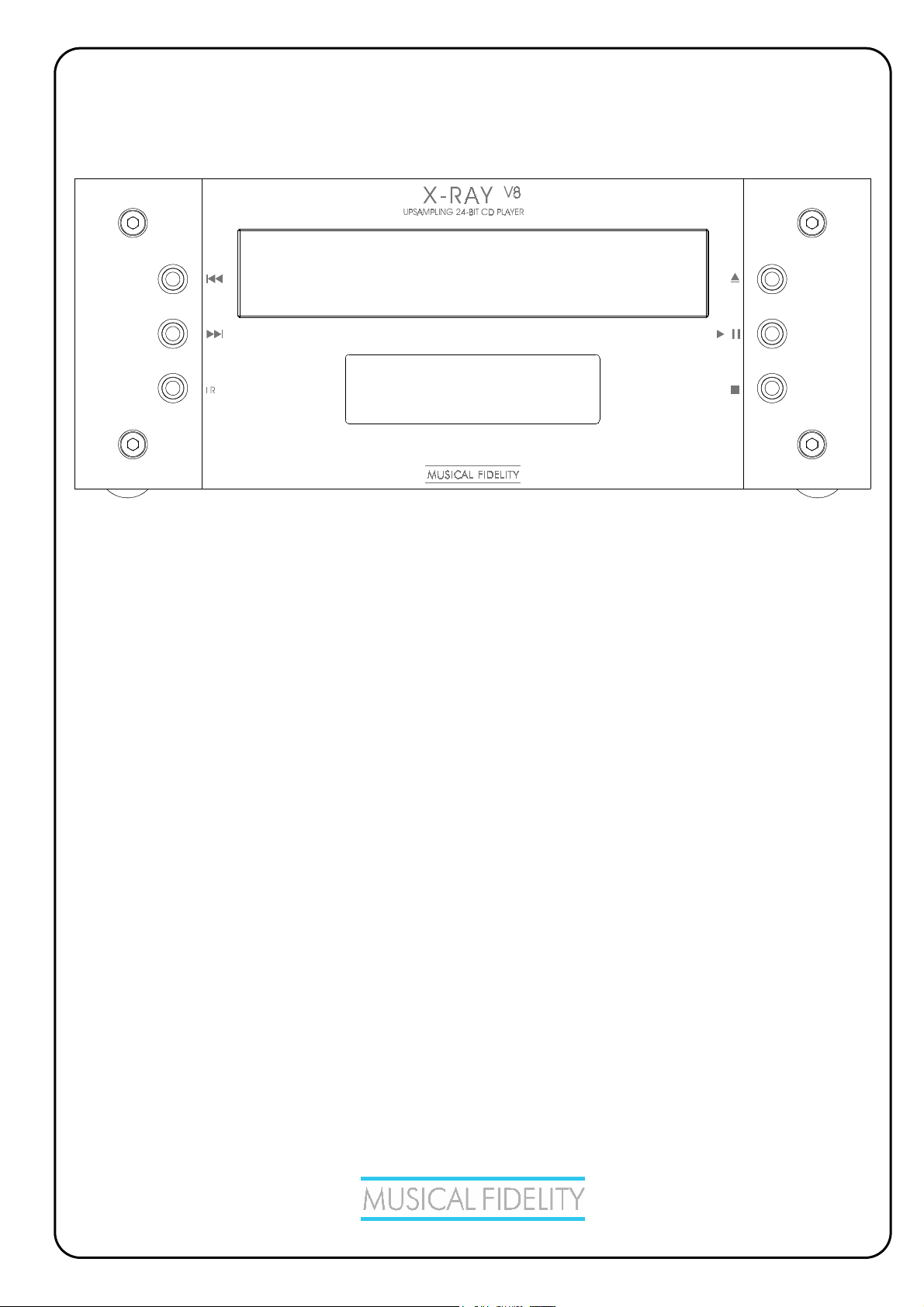
V8
X-RAY
X-V8 SERIES COMPACT DISC PLAYER
INSTRUCTIONS FOR USE
Thank you for purchasing the Musical Fidelity X-RAY V8
This model uses the top quality CD transport, ultra low jitter 24 Bit DAC technology and further jitter
reduction techniques to achieve both an excellent technical specification and unparalleled CD sound quality.
V8
The X-RAY
Used properly and carefully, it should give many years of outstanding musical reproduction.
Dust regularly with a soft duster or soft brush, but be careful when using cleaning or polishing agents - they
is a perfect answer to CD requirements in a small, beautifully engineered package.
may harm the surface finish.
If you have any questions about your audio system,
Please consult your dealer who is there to help and advise.
Page 2
X-RAY
V8
CONTENTS
PAGE
3,4 Safety information
-
Laser product labelling
-
Laser type
-
Radio-frequency interference
5 General advice
- - Installation precautions
User information
6 Item disposal information
7 Installation
8 Facilities and connections
- EU disposal information
-
Introduction
-
Installation
-
Audio connection
-
Notes on using compact discs
-
Cleaning
- Illustrations - front and rear panels
9 Remote control
- Operation and illustration
10 CD basic operation
- Loading, playback, and track selection
11,12 CD special features
- Repeat, shuffle, scan, programming
13 CD problems?
- Basic CD player fault finding
14 CD specifications
15 Manual history
Issue 2: 17
th
July 2006
Page 2 of 15
Page 3
V8
X-RAY
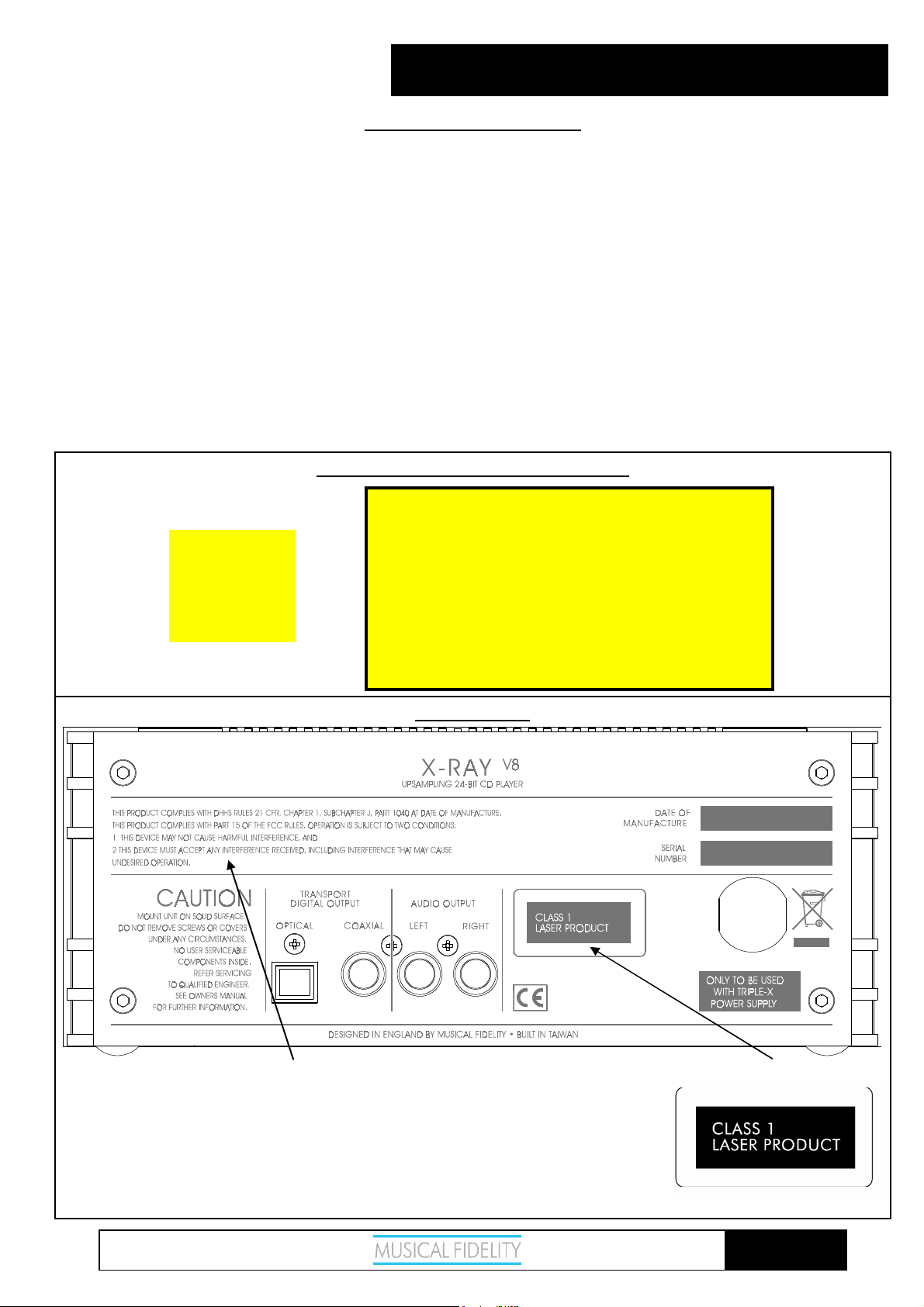
CLASS 1 LASER PRODUCT
The X-RAY V8 is a CD player which has been designed and manufactured according to FDA regulations "title 21, CFR,
chapter 1, sub-chapter J, based on the Radiation Control for Health and Safety Act of 1968", and is classified as a Class
1 laser product. There is no hazardous radiation during normal use because invisible radiation emitted inside this
product is completely confined within the protective housing. However you must observe the following important
warnings:
CAUTION!
THIS CD PLAYER USES INVISIBLE LASER LIGHT. WHEN THE PLAYER OPERATES, LASER LIGHT
IS RADIATED INTERNALLY. DO NOT REMOVE THE PROTECTIVE HOUSINGS.
USE OF CONTROLS OR ADJUSTMENTS OR PERFORMANCE OF PROCEDURES OTHER THAN
THOSE SPECIFIED HEREIN MAY RESULT IN HAZARDOUS RADIATION EXPOSURE CAUSING EYE
INJURY.
IF THIS PRODUCT DEVELOPS A FAULT, PLEASE CONTACT YOUR AUTHORISED MUSICAL
FIDELITY SERVICE AGENT. DO NOT ATTEMPT TO SERVICE IT YOUR-SELF AND DO NOT
CONTINUE TO USE THIS PRODUCT IN A FAULTY STATE.
INTERNAL LASER WARNING LABELS
CAUTION - INVISIBLE LASER RADIATION WHEN OPEN AND
INTERLOCKS DEFEATED. AVOID EXPOSURE TO BEAM.
VORSICH! - UNSICHTBARE LASERSTRAHLUNG TRITT AUS,
WENN DECKEL GEÖFFNET UND WENN
CAUTION!
CLASS 1
LASER
PRODUCT
SICHERHEITSVERRIEGELUNG ÖBERBRÖCT IST.
NICHT DEM STRAHL AUSSETZEN!
VARNING - OSYNLIG LASERSTRALNING NÄR DENNA DEL
AR ÖPPNAD OCH SPÄRR ÄR URKOPPLAD.
STRALEN AL FARLIG.
ADVARSEL - USYNLIG LASERSTRAKING VED ABNING, NAR
SIKKERHEDSAFBRYDEREER UDE AF FUNCTION UNDGA
UDSÆTTELSE FOR STRALING.
VAROITUSI - SUOJAKOTELOA EI SAA AVATA LAITE SISÄLTÄÄ
LASERDIODIN, JOKA LAHETTÄÄ (NAKYMATONTA)
SILMILLE VAARALLISTA LASERSATEILYA.
SAFETY INFORMATION
REAR PANEL
THIS PRODUCT COMPLIES WITH DHHS RULES 21 CFR, CHAPTER 1,
SUBCHAPTER J, PART 1040 AT DATE OF MANUFACTURE.
THIS PRODUCT COMPLIES WITH PART 15 OF THE FCC RULES.
OPERATION IS SUBJECT TO TWO CONDITIONS:
1. THIS DEVICE MAY NOT CAUSE HARMFUL INTERFERENCE, AND
2. THIS DEVICE MUST ACCEPT ANY INTERFERENCE RECEIVED,
INCLUDING INTERFERENCE THAT MAY CAUSE UNDESIRED
OPERATION.
Issue 2: 17
th
July 2006
Page 3 of 15
Page 4
V8
X-RAY
LASER INFORMATION:
Manufacturer : Sharp
Optical pick-up :
Pick-up type : GH6C005B
Wavelength : 780nm
RADIO - FREQUENCY INTERFERENCE (RFI)
This equipment uses and can radiate radio frequency energy, and if not installed and operated in accordance with the
instructions, may cause interference to radio communications.
However, it is designed to radiate minimal levels of RFI, and accordingly been testing to North American standards
(FCC regulations - limits for a class B digital device pursuant to part 15 of the rules). These requirements are intended
to provide reasonable protection against excessive interference in a residential installation.
Conversely, the product has also been checked to ensure that its own operation is not adversely affected by normal
background levels of RFI received externally.
However, if interference is experienced, for instance to radio or TV broadcasts, the user is recommended to try one or
more of the following measures:
• Identify the source of interference by turning off power to the CD player or other equipment individually, and
checking whether the problem disappears.
• Re-orientate or relocate the receiving aerial.
• Move the CD player away from the receiver.
• Connect the CD player to a mains outlet on a different circuit from the receiver.
• Consult a dealer or experienced TV/radio technician for help.
If a problem persists, please contact Musical Fidelity's service department.
SAFETY INFORMATION
Issue 2: 17
th
July 2006
Page 4 of 15
Page 5
V8
X-RAY
INSTALLATION PRECAUTIONS and USER INFORMATION
Your new X-RAY V8 is designed and built to provide trouble-free performance, but as with all electronic devices it is
necessary to observe a few precautions:
Heed all warnings shown on the back of the product.
V8
Only connect the X-RAY
to a mains outlet having the same voltage as marked at the back of the unit.
Always ensure that when disconnecting and reconnecting your audio equipment the mains supply is switched
off.
Position the mains lead and signal interconnects where they are not likely to be walked on or trapped by items
placed on them.
Do not use near water, or place water-filled containers on the X-RAY
V8
plants. If water does spill inside, immediately pull out the mains plug from the wall socket and inform
your dealer, who should then check the unit before further use. Entry of liquid into the X-RAY
dangerous, and may cause electric shock or fire hazard.
Do not place the unit near direct heat sources such as radiators, direct sunlight or other equipment.
Do not remove any covers or try to gain access to the inside. There are no internal adjustments or fuses you
can replace yourself. Refer all service work to an authorised Musical Fidelity agent.
Note: Unauthorised opening of the equipment will invalidate any warranty claim.
Dust regularly with a soft cloth or soft brush but be careful when using cleaning or polishing agents - they may
harm the surface finish.
The electronics in modern hi-fi equipment is complex and may, therefore, be adversely affected or damaged by
lightning. For protection of your audio system during electrical storms, remove the mains plugs and disconnect any
aerial lead.
If after-sales service is required, to help your dealer identify the X-RAY
the rear panel of the unit.
V8
please quote the serial number located on
GENERAL ADVICE
, for example, a flower vase or potted
V8
is
Issue 2: 17
th
July 2006
Page 5 of 15
Page 6
V8
X-RAY
DISPOSAL
The crossed out wheeled bin label that appears on the
back panel of
disposed of as normal household waste. To prevent possible harm
to the environment please separate the product from other waste to
ensure that it can be recycled in an environmentally safe manner.
Please contact your local government office or your retailer for
available collection facilities.
sur le pan
être traité comme un déchet domestique commun. Afin de protéger
l'environnement, ce produit électronique devra être géré
séparément et donc recyclé selon les nouvelles normes
Européennes Rohs concernant les déchets d'appareils électroniques.
Prière de contacter les services concernés gouvernementaux ou
votre point de vente pour l'élimination et l'enlèvement de déchets
électroniques équipés de composants électroniques.
aparece en
se debe reciclarse como basura normal de la casa. Para prevenir
daños posible al ambiente separe por favor el producto de otras
basura para asegurarse de que puede ser reciclada de una manera
ambientalmente segura. Entre en contacto por favor a su oficina
gubernamental local o a su minorista para las instalaciones
disponibles de la colección.
dell'appare
tramite la procedura normale di smaltimento dei rifiuti domestici.
Per evitare eventuali danni all'ambiente, separare questo prodotto
da altri rifiuti domestici in modo che possa venire riciclato in base
alle procedure di rispetto ambientale. Per maggiori dettagli
sulle aree di raccolta disponibili, contattate l'ufficio govenativo
locale od il rivenditore del prodotto.
darauf hin
Hauskehricht entsorgt werden darf. Um Schäden und
Verschmutzungen an Umwelt und Mensch zu vermeiden, muss das
Produkt fachgerecht entsorgt und von anderem Abfall getrennt
werden. Wenden Sie sich bei Fragen hierzu an Ihren Fachhändler
oder an eine öffentliche Informationsstelle.
the product indicates that the product must not be
DISPOSITION
La poubelle sur roulettes barrées X, qui apparaît en logo
neau arrière du produit, indique que celui-ci ne doit pas
DISPOSAL
La etiqueta cruzada hacia fuera del compartimiento que
el panel trasero del producto indica que el producto no
RIFIUTI
L'etichetta del cassonetto barrato riportato sul retro
cchio indica che il prodotto non deve essere smaltito
FACHGERECHTE ENTSORGUNG:
Das auf der Geräterückseite angebrachte Label deutet
, dass das Produkt nicht mit konventionellem
ITEM DISPOSAL INFORMATION
AFVAL
Het label op de achterzijde van dit apparaat, een
afvalbak o
apparaat niet samen met gewoon huishoudafval mag worden
weggegooid. Om mogelijke schade aan onze leefomgeving te
voorkomen dient dit apparaat, gescheiden van gewoon
huishoudelijk afval, te worden afgevoerd zodat het op een
milieuvriendelijke manier kan worden gerecycled. Neem voor
beschikbare inzamelplaatsen contact op met uw gemeentelijke
reinigingsdienst of met uw elektronica leverancier.
takalevyssä
talousjätteenä. Ympäristön suojelemiseksi on tuote pidettävä
erillään muusta jätteestä ja se on kierrätettävä ekologisesti
kestävällä tavalla. Ota yhteyttä laitteen myyjään tai Pirkanmaan
Ympäristökeskukseen lähimmän kierrätyskeskuksen löytämiseksi.
af appar tet indikerer at dette produkt ikke må kasseres som normal
husholdni
De separere dette produkt fra andet affald, og sikre at det bliver
genbrugt på en miljørigtig måde. Kontakt venligst de lokale
myndigheder eller din forhandler for oplysning om nærmeste
tilgængelige opsamlingssted for elektronikaffald.
ΤΡΟΧΗ ΤΟ Α∆Ο ΑΠΟΡΡ ΑΤΩΝ ΣΤΗΝ ΠΙΣΩ ΟΨΗ
ΤΟΥ ΜΗΧ
∆ΗΛΩΝΕΙ ΟΤΙ ΤΟ ΠΡΟΙΟΝ
∆ΙΑΧΕΙΡΙΣΘΕΙ ΣΑΝ ΣΥΝΗΘΙΣΜΕΝΟ ΟΙΚΙΑΚΟ ΑΠΟΒΛΗΤΟ.
ΠΡΟΣ ΑΠΟΦΥΓΗ ΕΝ∆ΕΧΟΜΕΝΗΣ ΕΠΙΒΑΡΥΝΣΗΣ ΤΟΥ
ΠΕΡΙΒΑΛΛΟΝΤΟΣ, ΞΕΧΩΡΙΣΤΕ ΤΟ ΠΡΟΙΟΝ ΑΠΟ ΤΑ
ΑΛΛΑ
ΑΠΟΡΡ
ΤΟΥ ΜΕ ΤΟΝ ΠΡΕΠΟΝΤΑ ΤΡΟΠΟ.
ΠΑΡΑΚΑΛΟΥΜΕ
ΥΠΗΡΕΣΙΑ ΑΝΑΚΥΚΛΩΣΗΣ Η ΜΕ ΤΟ ΚΑΤΑΣΤΗΜΑ
ΑΓΟΡΑΣ ΓΙΑ ΠΕΡΙΣΣΟΤΕΡΕΣ ΛΕΠΤΟΜΕΡΕΙΕΣ.
p wielen met een kruis doorgehaald, geeft aan dat dit
HÄVITTÄMINEN
Yliruksattua jäteastiaa kuvaava tarra tuotteen
kertoo, että tuotetta ei saa käsitellä normaalina
AFSKAFNING
Logoet med en skraldespand med kryds over på bagsiden
a
ngsaffald. For at forebygge mulig skade på miljøet, bedes
∆ΙΑ∆ΙΚΑΣΙΑ ΑΠΟΡΡΙΨΗΣ
ΤΟ ΣΗΜΑ ΜΕ ΤΟΝ
ΛΑ
ΙΜΑΤΑ ΩΣΤΕ ΝΑ ΕΞΑΣΦΑΛΙΣΘΕΙ Η ΑΝΑΚΥΚΛΩΣΗ
Κ ΙΜ
ΑΝΗΜΑΤΟΣ
ΝΑ ΕΠΙΚΟΙΝΩΝΗΣΕΤΕ ΜΕ ΤΗΝ ΤΟΠΙΚΗ
∆ΙΑΓΕΓΡΑΜΜΕΝΟ
ΑΥΤΟ ∆ΕΝ ΠΡΕΠΕΙ ΝΑ
Issue 2: 17
th
July 2006
Page 6 of 15
Page 7
V8
X-RAY
INTRODUCTION
Congratulations on the purchase of your new X-RAY
CD player.
The X-RAY
distortion, exemplary linearity and ultra low noise. Its
case design complements the Xwhich include a DAB/FM tuner and integrated amplifier
all in the same convenient size.
Great attention has been paid to internal layout,
isolating each circuit section to prevent possible
interaction.
The CD digital data streams are first up-sampled to
192kHz, which moves noise, jitter and distortion
artefacts well above the audio band. They are then
passed through a new, low noise, low distortion 24-bit
dual-differential digital-to-analogue converter, which
allows simpler filtering of the analogue output. This in
turn gives an improved audio response without the need
for sharp filters that degrade sound quality. The result is
a CD player which has a smoother response than
previously possible with none of the “hardness” of other
units.
The resultant performance achieved by this unit is
among the best in the world. It has excellent signal to
noise ratio, low distortion, wide bandwidth, huge
dynamic range, extraordinary resolution and fine detail.
UPGRADE PATH
Early in 2007 two interesting new Xare coming.
- The TRIPLE-X170 PSU is an upgrade Power Supply
Unit. It increases the power of your X-T100 to 85+85
wpc and improves its peak current. The TRIPLE-X170
PSU will power the X-T100, X-RAY
simultaneously. Any product connected to it will sound
better.
- The X-DAC
Analogue Converter with a tube output. Its performance
is verging on state-of-the-art and sounds extraordinary.
The X-DAC
supply outlets for the X-RAY
the X-RAY
have is a mini KW25 system (the KW25 Transport/DAC
received incredible reviews which recon it’s probably
the best CD player ever).
V8
has extremely low jitter, vanishingly low
V8
V8
is self-powered and also has power
V8
is paired with the X-DACV8, what you
V8
V8
series components
V8
series products
V8
and X-PLORAV8
is a super-performance Digital to
V8
and X-PLORAV8. When
INSTALLATION
INSTALLATION
Position the X-RAY
where there is no risk of it being knocked, or subjected
to vibration such as from loudspeakers.
Protect your X-RAY
moved from a cold place to a warm room, or in
generally humid conditions, moisture can form on the
pickup lens inside the player, preventing the laser beam
from reading the disc. If this happens, remove the CD,
close the disc drawer, and leave the unit switched on for
an hour or so to allow sufficient time for the moisture to
evaporate.
AUDIO CONNECTIONS
Outputs: Connect your amplifier inputs to the RCA
sockets on the back panel marked as LEFT and RIGHT
outputs.
If desired, the unit can also be attached to an external
DAC of your choice. The unit outputs COAX and
OPTICAL digital signal stream at 44.1kHz.
POWER CONNECTION
The power lead should be connected to a Musical
Fidelity power supply unit designed for this product,
such as the TRIPLE-X (see your dealer for more
information). The connector from this CD player mates
with the 5-way socket labelled X-RAYV8 on the rear of
the power supply unit. The connector should fit
comfortably with a small click when properly seated.
Do not force the connector.
NOTES ON USING COMPACT DISCS
Always hold discs by the edges and make sure they
remain clean - do not touch the surface. Keep discs
away from direct sunlight and heat sources, such as
radiators. Clean discs with a cloth before playing them,
but do not use solvents such as benzene, thinners, or
antistatic spray intended for analogue records.
After playing, always return the disc to its case for
storage.
CLEANING
Before cleaning the unit, switch off power at the mains
switch and remove the mains plug from the wall socket.
Clean the cabinet and remote control unit using a moist
cloth. We do not advise using solvents, white spirit or
thinners as they could damage the surface finish.
V8
on a stable, horizontal surface
V8
from humidity - if the unit is
Issue 2: 17
th
July 2006
Page 7 of 15
Page 8
V8
X-RAY
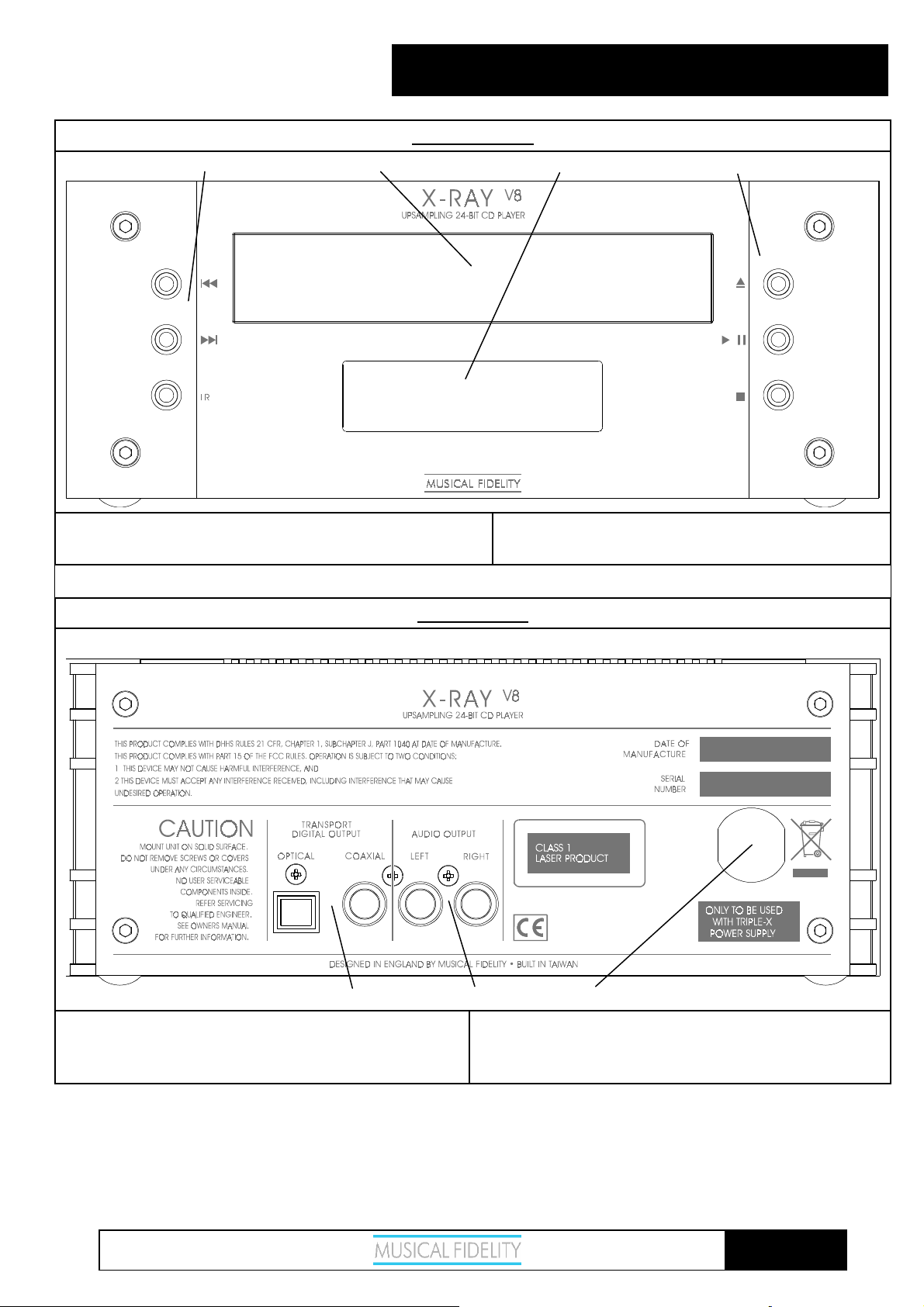
1. PREVIOUS/NEXT buttons and IR lens
2. CD drawer
1 2 3 4
FACILITIES AND CONNECTION
FRONT PANEL
3. DISPLAY
4. EJECT, PLAY/PAUSE, STOP buttons
5 6 7
5. DIGITAL OPTICAL & COAXIAL outputs
6. LEFT AND RIGHT Audio outputs
REAR PANEL
7. POWER CABLE for connection to Triple-X psu
only
Issue 2: 17
th
July 2006
Page 8 of 15
Page 9
V8
X-RAY
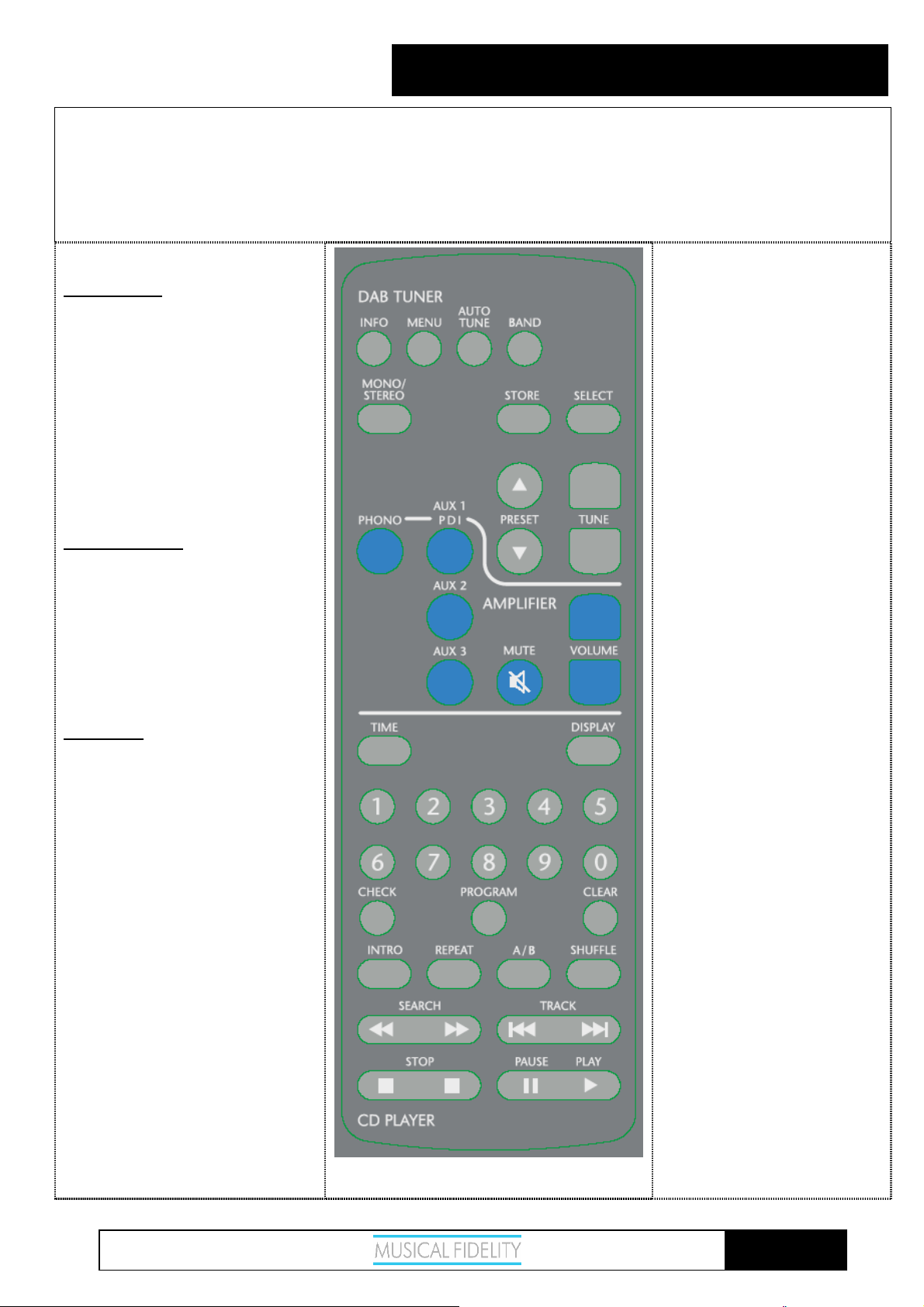
The remote control shown below enables functions to be operated from a convenient distance. Equivalent buttons on the remote
control have the same functions as those on the front panel of the unit. Other functions are only available by remote control.
As the handset uses an invisible infra-red light beam, the front edge must be pointed directly towards the receiver window at the
front of the player, without visual obstruction between them.
If the range of the remote control greatly decreases, replace the batteries with new ones. Do not mix old and new batteries - two are
required, size AAA, LR03 or SUM-4.
Please dispose of used batteries in accordance to local regulations.
REMOTE CONTROL
Tuner Buttons:
INFO – To access broadcast information
MENU – to choose options
AUTO TUNE – finds previous/next
broadcast
MONO/STEREO – Option for weaker
FM stations
Amplifier Buttons:
PHONO – Selects Phono input
AUX 1 – Select Source AUX1 or PDI
AUX 2 – Select source AUX 2
AUX 3 – Select source AUX 3
CD Buttons:
TIME – Displays Track Time/Time
remaining
0-9 Buttons – Used to select track
numbers
CHECK – Check pre programmed
tracks
PROGRAM – Programs selection and
order of tracks
BAND – Selects DAB or FM
STORE – Stores station as preset
SELECT – To choose preset/DAB
station
PRESET ↑ ↓ selects preset
TUNE ↑ ↓ steps up/down band
MUTE – Mutes unit until pressed
again
VOLUME UP/DOWN – sets
volume level
DISPLAY – Dims display
CLEAR – Clears selected pre
programmed track
A/B Sets repeat start/end to repeat
section of track
SHUFFLE – Plays back tracks in
random order
TRACK – Next/previous track
INTRO – Player plays first 10 seconds
of each track
REPEAT – Repeats whole disk or
selected tracks
SEARCH – Fast forward/backward
through track
STOP – Stop playing/Eject CD
Issue 2: 17
th
July 2006
PAUSE/PLAY – Stop/start CD
playback
Page 9 of 15
Page 10
V8
X-RAY
LOADING AND PLAYING COMPACT DISCS
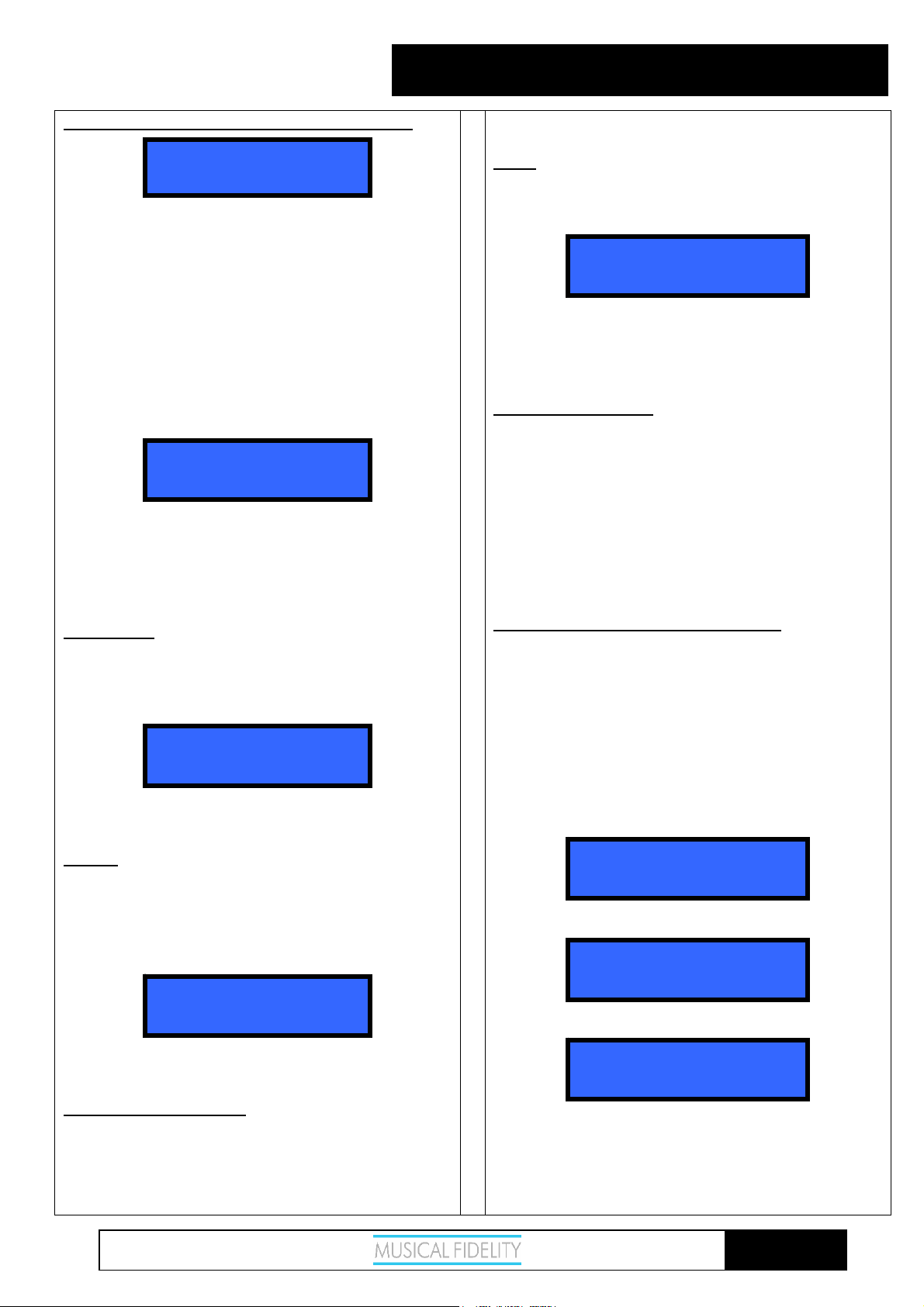
NO DISC
To load a disc, press the OPEN/CLOSE button to open
the transport drawer.
When the drawer is fully extended, insert the disc with
the label facing upwards and then press either the
OPEN/CLOSE or PLAY/PAUSE button to close the
transport drawer again.
If OPEN/CLOSE has been pressed, the disc drawer
closes and the unit scans the contents of the disc. After
a short delay, the display window then shows the total
number of tracks available on the CD, and total playing
time. In the following example there are 7 tracks, lasting
a total of 41 minutes 56 seconds :
STOP 7 41:56
If mains power to the unit is switched on with a disc
already loaded, it will automatically search for the disc.
The display then indicates STOP, and shows the
number of tracks available on the CD and total playing
time, as in the above example.
DISC PLAY
If PLAY/PAUSE is pressed, the unit will begin playing
from track 1, confirmed by the word PLAY appearing
on the left of the display, with 1 in the centre and
elapsed time on the right.
When all tracks on the CD have been played, the display
shows STOP and total number of tracks on the disc.
PAUSE
Pressing the PLAY/PAUSE button on the front panel
whilst a disc is playing pauses playback of the disc.
PAUSE appears in the display window instead of
PLAY. The disc will continue spinning, but the track
does not advance and the CD's output is muted.
PLAY 1 0:01
PAUSE 1 0:03
CD BASIC OPERATION
beginning of the current track.
STOP
Playback can be stopped at any time by pressing the
STOP button once. On the remote control, press either
end of the button, not the middle part.
STOP 7
Pressing the STOP button a second time on front panel
or remote opens the transport drawer.
If a disc is loaded but not playing, pressing STOP once
will also eject the drawer.
TRACK SELECTION
To change track, the track skip buttons PREVIOUS and
NEXT on the front panel can be pressed to jump
forwards or backwards one track in either direction.
Corresponding TRACK buttons on the remote control
are marked |<< and >>|.
If the unit has stopped playing, a specific track can be
accessed directly by pressing either PREVIOUS or
NEXT to obtain the required track number, then
pressing PLAY/PAUSE.
TRACK SELECTION (Remote control)
Simply press the PLAY button to start a CD playing
from the first track.
Alternatively, a specific track can be selected directly by
pressing one of the ten track number buttons grouped in
the centre-section of the remote control. The chosen
track then plays after a short delay of about 5 seconds.
To play a track number with two digits, press the second
digit button on the remote control within this delay
period, example for track 17:
Press 1:
PLAY 1
Press 7 within about 5 seconds:
PLAY 17
After a small pause, machine plays selected track:
Pressing PLAY/PAUSE again resumes playback from
the same place.
PAUSE (Remote control)
On the remote control, PLAY and PAUSE buttons have
separate functions at each end of the same button.
Pressing PLAY will only control disc play, and Pressing
PAUSE will not resume play. Note that if the disc is
already playing, pressing the PLAY button reverts to the
Issue 2: 17
th
July 2006
PLAY 17 0:01
If a track number is chosen which is not available on the
disc, for example pressing button number 9 if the CD
has only 7 tracks, an INVALID TRACK message is
briefly displayed (along with elapsed time of last track
played).
Page 10 of 15
Page 11
V8
X-RAY
REPEAT PLAYBACK
The REPEAT button on the remote control allows the
repeated playback of either one track or all tracks on the
disc.
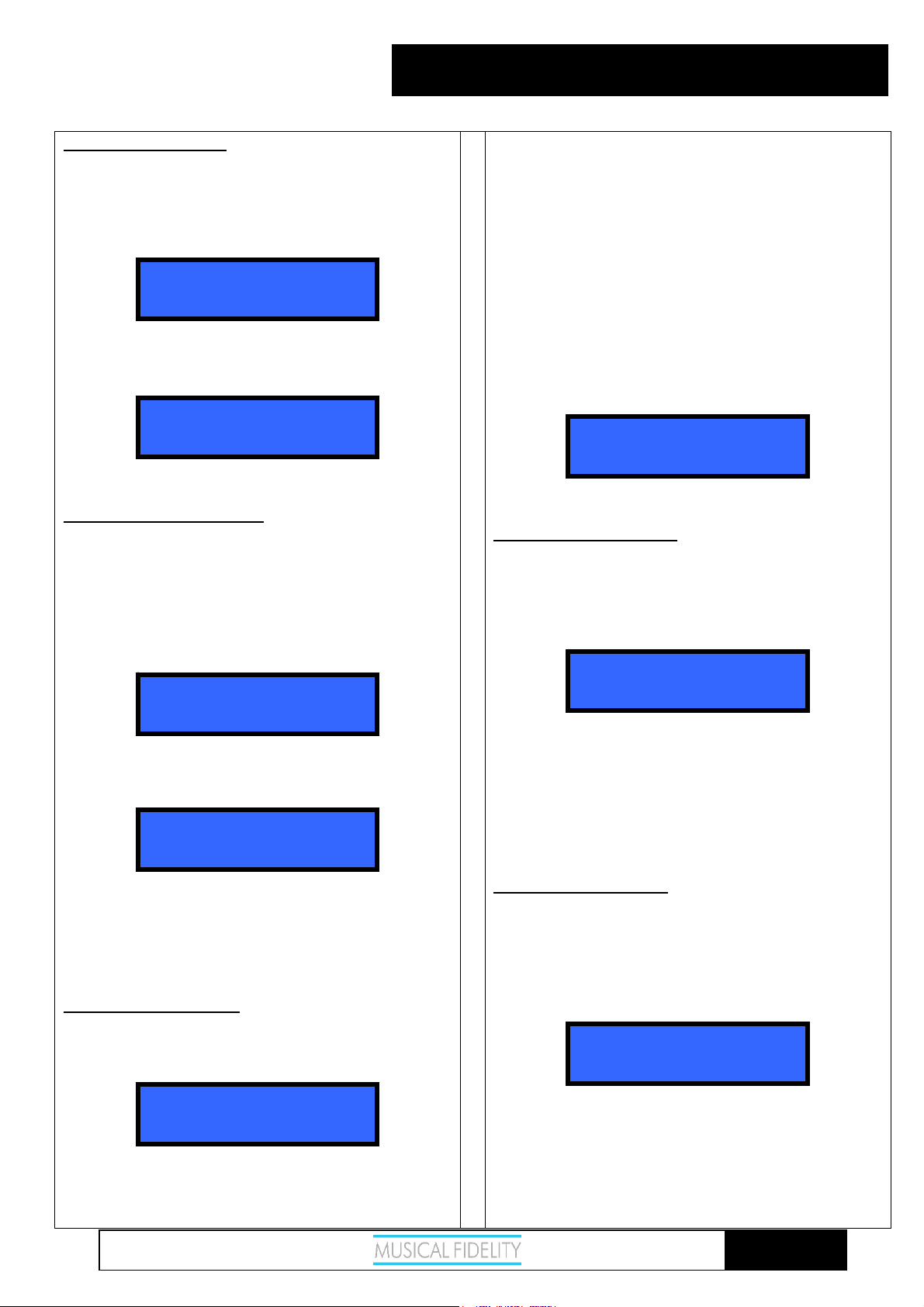
By pressing the REPEAT button once, only the current
track is repeated, and the display shows
PLAY 1 0:12
repeat track
If the REPEAT button is pressed a second time,
“repeat disc” is displayed instead, and the entire disc is
then played repeatedly.
PLAY 1 0:24
repeat disk
Pressing REPEAT a third time cancels repeat mode.
A-B REPEAT PLAYBACK
“A-B repeat” provides the option of playing just a
certain section of the disc over and over again.
Find the beginning of the required section either by
listening, or using the display time as a guide.
When the desired starting point is reached, press button
A / B on the remote control.
The display will show
PLAY 1 0:34
repeat a-
When the disc has reached the end of the required
section, press the A / B button again, to display and the
unit
PLAY 1 1:55
repeat a-b
continuously plays the selected part of the disc in this
case, the segment of track 1 from 34 seconds to 1 minute
55 seconds.
To cancel A-B repeat mode, press A / B on the remote
control.
SHUFFLE PLAYBACK
The SHUFFLE feature allows tracks on the discs to be
played in random sequence rather than the normal
consecutive order.
CD SPECIAL FEATURES
This function is obtained by pressing SHUFFLE on the
the remote control with the unit either stopped or
playing. If the X-RAY
continue in random order until all tracks on the disc
have been played.
Shuffle play is cancelled by pressing the SHUFFLE
button a second time. The unit resumes normal play
function, continuing to the end of the disc in normal
order starting from wherever it was left by the previous
random selection.
From stop mode, pressing PLAY/PAUSE also begins
shuffle play.
If REPEAT is then pressed whilst in shuffle mode, a
repeat shuffle function is obtained
PLAY 7 0:39
repeat shuffle
Pressing >>| selects the next track in random order.
SCAN INTRODUCTION
The scan-introduction function allows play back of just
the start of each track on the disc, for instance to locate a
preferred track by ear.
Press INTRO on the remote control, and if the player
has stopped, the display will show
STOP 74
scan intro
The first ten seconds (approximately) of each track on
the CD can then be played in sequence by pressing
either PLAY/PAUSE on the front panel, or PLAY on
the remote control.
Press INTRO again to cancel introduction search mode.
If INTRO mode is cancelled while the X-RAY
playing, the remainder of the entire disc will be played.
PROGRAMMED PLAY
The built-in program memory allows you to store up to
25 track numbers and then play them back in the held
order. Each track is stored as a “step” in the program.
With the CD loaded and the player stopped, first press
PROGRAM on the remote control. The following is
then displayed :
STOP 74
program 1 track 0
V8
is already playing, play will
V8
is still
PLAY 1 0:34
shuffle disc
Tracks are also played in a different order each time the
disc is restarted, or another disc loaded.
Issue 2: 17
th
July 2006
On the remote control, press the numeric button of the
track number corresponding to the first track you wish
to store (number 3 for example).
Page 11 of 15
Page 12
V8
X-RAY
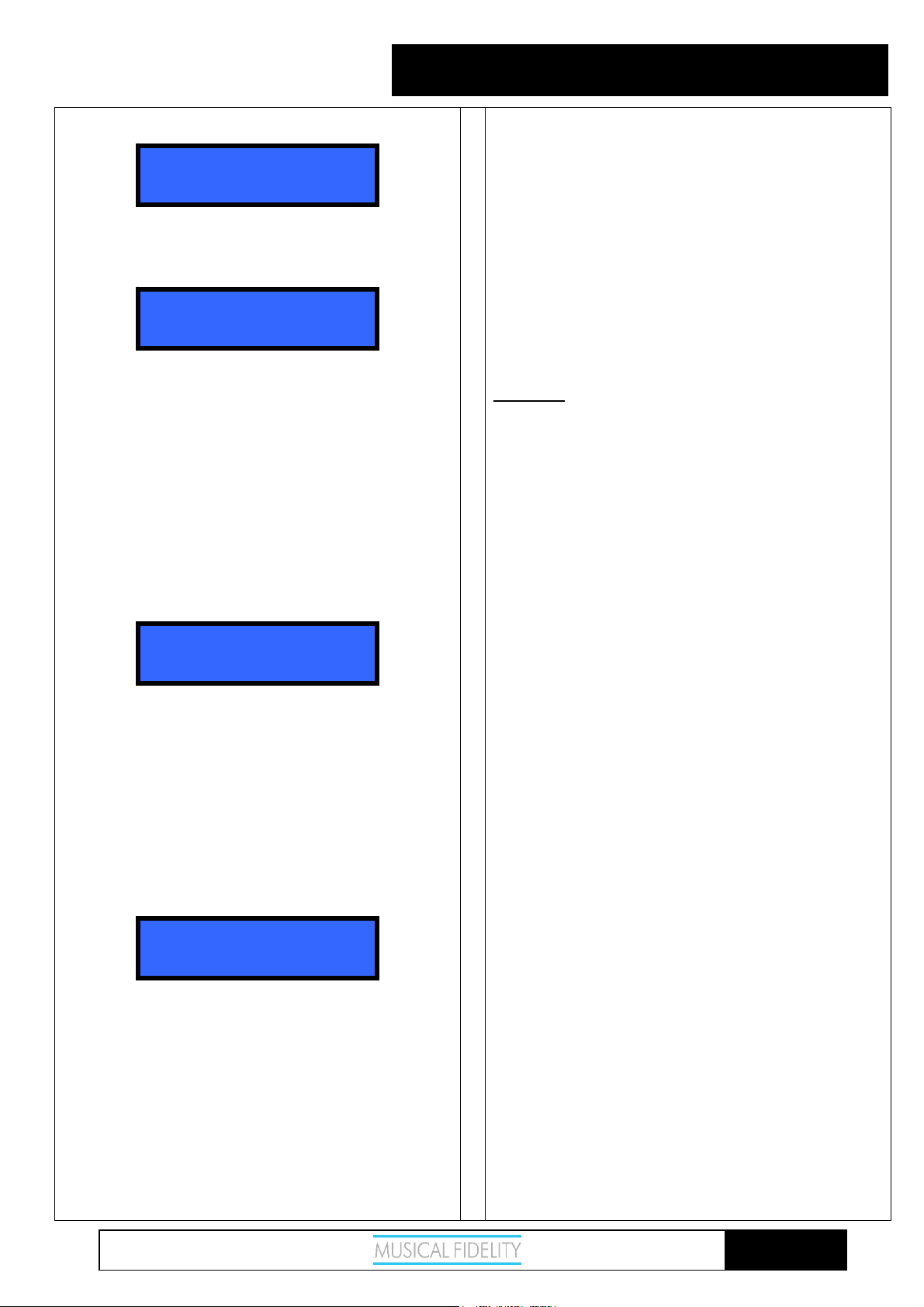
That track number will now appear in the display:
STOP 74
program 1 track 3
Press PROGRAM again on the remote control - the
next program step is selected, (program 2) and the track
number revert to 0 ready for a new entry.
STOP 74
program 2 track 0
Continue entering track numbers in the same way up to
a maximum of 25. If more than 25 tracks are attempted
the memory will not accept any extra ones, and the
display reverts to “program 1”.
Remember that when entering a single-digit track
number, there is a delay of about two seconds before the
display accepts the entry - this is to allow time for a
second button to be pressed when a double-digit number
is required.
If an incorrect entry is made, say track 99 when there
are only 7 tracks available on the disc, a brief error
message is displayed
CD SPECIAL FEATURES
When all programmed tracks have been played, the CD
player stops. The same track selection can then be
played again by pressing the PLAY/PAUSE button on
the front panel, or PLAY on the remote control.
To repeat a programmed sequence continually, press
REPEAT whilst playing the program.
To cancel this mode, press PROGRAM.
Note: The program contents will be cleared if you
switch off the power, or open the disc drawer and load
another disc. If, however, the same disc is loaded
again with the power still switched on, the program
sequence is retained in the memory.
DISPLAY
X-RAY
levels by pressing the DISPLAY button on the remote
control.
The original setting is maximum brightness, but by
pressing the DISPLAY button once, brightness is
reduced, and a further press turns the display off. This
controls display in CD, TUNER, and external source
modes.
V8
display brightness can be controlled in three
INVALID TRACK
program 2 track 9
If at any time you wish to add a track to the list, press
the CLEAR button to obtain the next step number.
Alternatively, to delete a previous entry, press CLEAR
a second time to remove the last entry. Repeated
pressing of CLEAR will then erase each step in reverse
order. So to delete an entire program sequence from the
memory, press CLEAR repeatedly until “program 1” is
shown in the display.
When the last track number has been entered, press
PROGRAM a final time, then the PLAY button to start
the program sequence.
PLAY 1 0:41
play program
If you wish to check the selection before playing back
your program, the CHECK button can be pressed to
step through each program entry in turn.
If during this check sequence the PLAY button is
pressed, the remaining part of your programmed
selection will play to the end of the sequence.
Otherwise, to play all the programmed tracks from the
beginning of the sequence, press PLAY/PAUSE, or
PLAY on the remote control.
The >>| button may be pressed to jump to the next
track in the programmed sequence, or
|<< button to obtain the previous track in the sequence.
Issue 2: 17
th
July 2006
Page 12 of 15
Page 13
V8
X-RAY
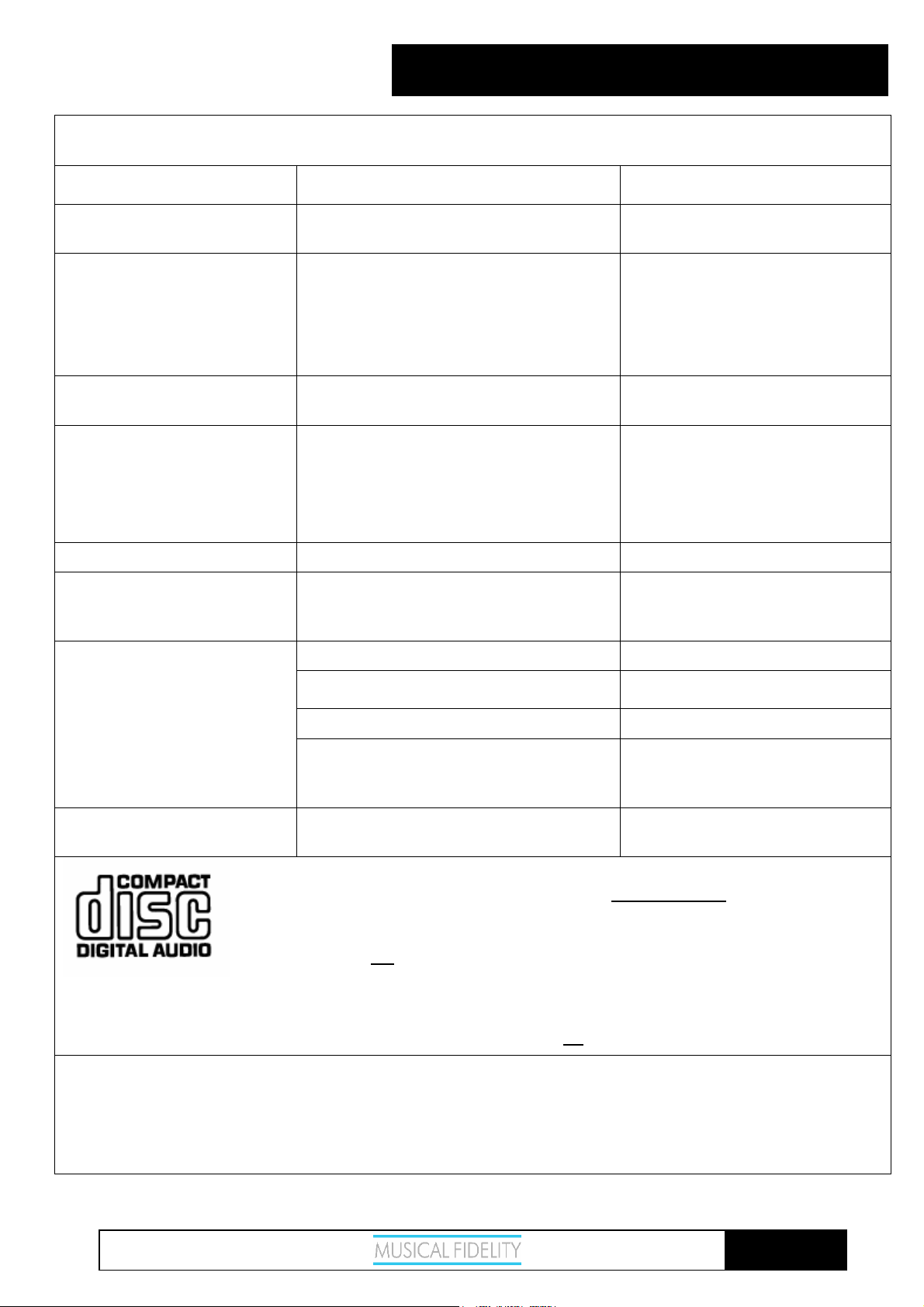
Basic problem-solving with a CD player is similar to troubleshooting other electrical or electronic equipment. Always
check the most obvious possible causes first, such as the following examples:
Problem Probable Cause Remedy
CD PROBLEMS?
No power / display Power plug is not inserted into psu correctly Plug in securely fully into power
supply’s X-RAY
No playback when disc is
loaded, “NO DISC” displayed
Disc is loaded with label side down
Incorrect disc type
Dirty disc
Moisture/humidity or cold affecting laser
lens
No audio output, or too low
Incorrect or missing connections Check connections and make sure
level output
Miss-tracking (sound jumping) Player is receiving vibration or shock
Disc is dirty
Moisture/humidity or cold affecting laser
lens.
Re-load with label side up
Please load a standard audio CD
Clean disk and try again
Leave unit on for an hour to allow
moisture to evaporate.
they are secure.
Change position of player away
from loudspeakers
Clean disc surface
Leave unit on for an hour to allow
V8
rear socket
moisture to evaporate.
Hum Audio connector plug is not fully pushed in Insert plug securely
Interference noise heard from
radio tuner
Player is positioned too near the tuner Keep a reasonable distance between
player and tuner, or switch off player
power
Remote control does not work
Power supply switch is set to off Set switch to on
Battery(ies) fitted the wrong way round Insert batteries correctly
Batteries are flat Change batteries for a new set
Remote control is not pointed directly
towards the front panel of the player
Ensure there is no obstruction
between the remote control and
player front
Remote control range has
Batteries are running out Change batteries – for a new set
greatly reduced
This product contains a PHILIPS CD mechanism, which complies with the PHILIPS/SONY red
book CDDA standard. It is guaranteed to play all disks similarly marked
Please note that due to “piracy” concerns, some record companies/pressing plants are creating
disks that do not adhere to this standard. Such disks may –or- may not play in some –or- all CD
player products of any
contained therein has been deliberately manipulated often causing audio degradation and/or
playability problems.
We also advise caution with using cheap CD-R, and/or CD-RW disks for audio, and to ensure all home-generated CDs
intended for playback on this unit are recorded as CDDA AUDIO CDs (i.e. not
manufacturer. We advise caution in using these disks, as the information
MP3, WAV, etc.) on good quality media.
without any problems.
Remember - the most vulnerable part of a CD playing system is the disc itself. The most likely cause of a disc not
playing is that the disc itself is faulty, scratched or simply dirty. Never open the case of the unit yourself, as this will
invalidate the guarantee. If none of the above actions affect a cure, please contact your dealer or Musical Fidelity
service agent.
Issue 2: 17
th
July 2006
Page 13 of 15
Page 14
V8
X-RAY
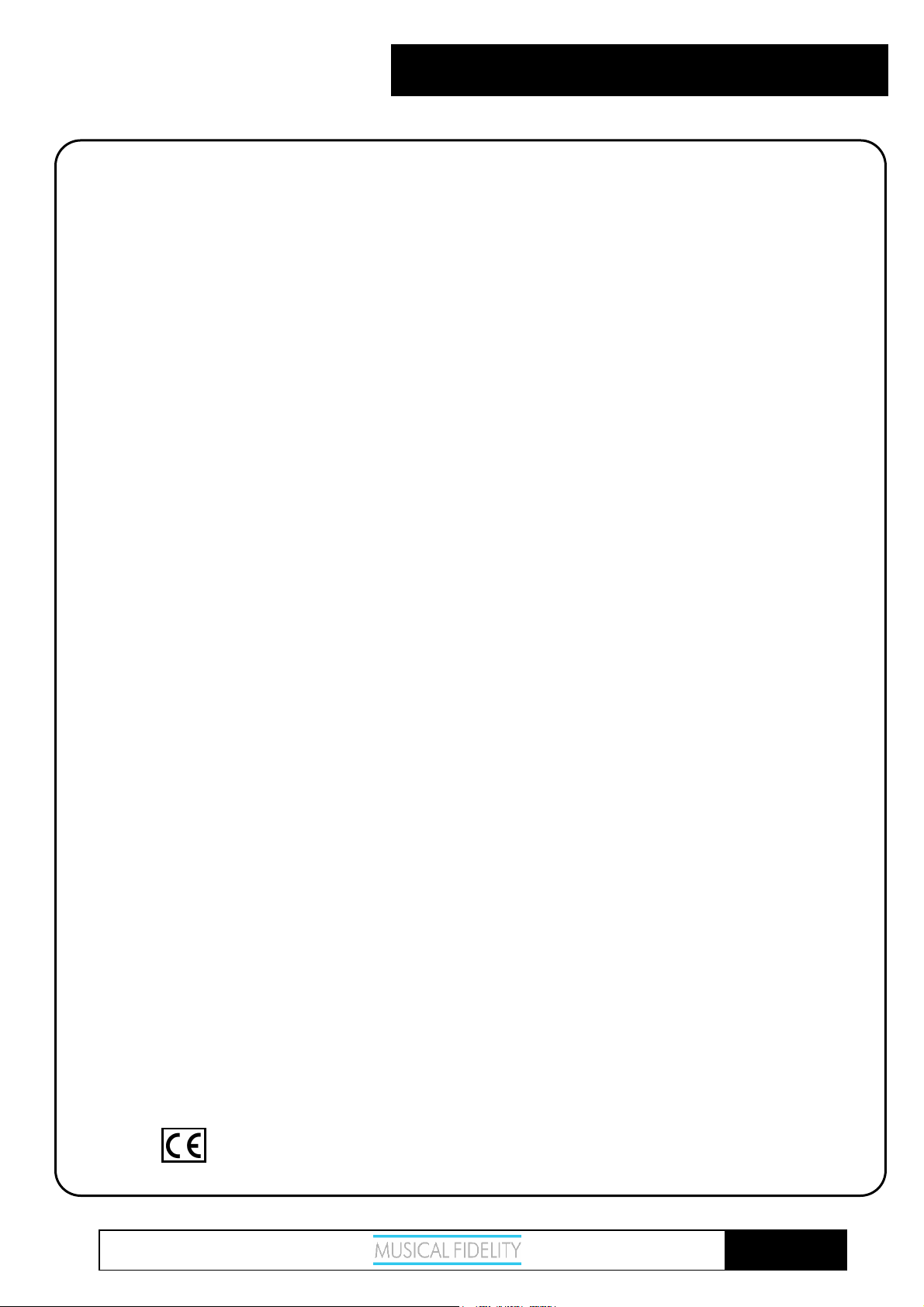
CD:
Disc mechanism Philips
Total correlated jitter < 135 pS
DAC:
DAC circuits 24 bit Delta-Sigma (Bit stream) dual differential 8X over sampling
Up sampling 192 kHz
Total correlated jitter < 135 pS
Linearity < 0.1dB down to -96dB
Output digital 0dB level 2.15VRMS at 1 kHz nominal
Analogue output impedance 47 Ohms
Frequency response 10Hz to 20 kHz -0.2dB max
Channel separation > 105dB 20Hz to 20 kHz
Signal / noise ratio > 115dB “A” weighted
Total harmonic distortion < 0.003% 10Hz to 20 kHz
Connections:
Digital outputs 1 optical (Toslink), 44.1 kHz
1 S/PDIF (RCA connector), 44.1 kHz
Line level outputs: 1 pair RCA
Power requirement: For use only with suitable Musical Fidelity power supply e.g. Triple-X.
Weight:
4.0 kg, 8.8 lbs unit only, unboxed
5.25 kg, 11.5 lbs in shipping carton
Dimensions:
219 mm, 8.6 inches wide
88 mm, 3.5 inches high including feet
340 mm, 13.4 inches deep including terminals
Standard accessories:
Remote control (X 2 batteries size LR03 or AAA, manganese alkaline type
V8
series, universal type),
Musical Fidelity reserves the right to make
improvements which may result in specification or
feature changes without notice.
CD SPECIFICATIONS
Issue 2: 17
th
July 2006
Page 14 of 15
Page 15
X-RAY
V8
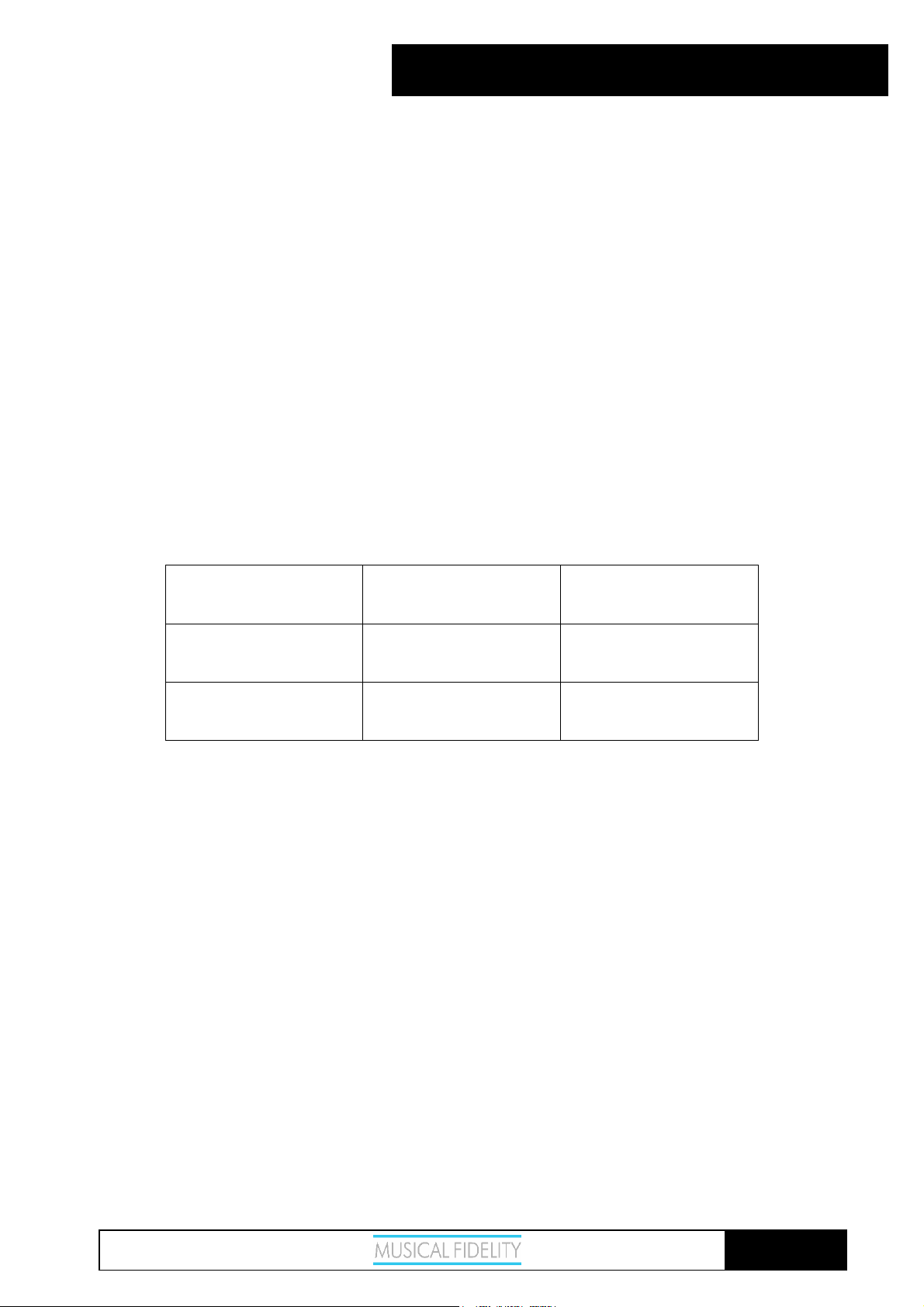
MANUAL REVISION
RELEASE DATE CHANGES
Issue 1 14th July 2006 1st release
Issue 2 17th July 2006 Remote control updated
Issue 2: 17
th
July 2006
Page 15 of 15
 Loading...