

Page 1
V90-BLU5 HD Bluetooth Link
Instructions
Introduction
Thank you for purchasing the V90-BLU5 HD Bluetooth
receiver.
It is designed to add high quality Bluetooth connectivity to
any existing high fidelity equipment. This allows material
stored on devices such as Bluetooth-capable mobile phones
to be controlled and played back through an existing hifidelity setup. It can also function as a neutral pass-through
for both digital and analogue signals when the Bluetooth
source is not in use.
We sincerely hope that it will bring you many years of
outstanding listening pleasure.
Installation Precautions
Your new V90-BLU5 HD is designed and built to provide
trouble-free performance, but as with all electronic devices,
it is necessary to observe a few precautions:
Do not use the V90-BLU5 HD near water. The unit must not
be exposed to dripping or splashing liquids.
Keep the V90-BLU5 HD away from heat sources such as
radiators. No naked flame sources should be placed on the
unit.
Product Note:
This Hi-fi product has been tested to ensure that its operation
is not adversely affected by normal background levels of
Radio Frequency Interference (R.F.I.), and that it does not
itself generate excessive amounts of interference. However,
if a problem persists, please contact your Musical Fidelity
agent.
The V90-BLU5 HD will operate in accordance with its
specifications within the following environmental range:
Temperature 5 to 45 degrees Celsius
Humidity 10 to 90% non condensing
Connections
All connections must be made before the unit is plugged in.
Always switch off the equipment attached to the V90-BLU5
HD before connecting or disconnecting power, changing
leads or inputs.
Inputs
Choose which inputs the unit will be using.
Digital optical – Use a normal TOSLINK cable (not supplied)
for best quality connection from other digital audio devices.
Digital coaxial – Use a normal coaxial cable (not supplied) for
best quality connection from other digital audio devices.
Analogue – Use standard RCA cables (not supplied) to
connect analogue signals from other sources.
Aerial – Plug in supplied aerial
Outputs
Choose which outputs the unit will be using.
Note: When using the digital or analogue inputs, presence of
a valid Bluetooth signal will cause the unit to automatically
switch to playing the Bluetooth music.
Also note the V90 BLU5 HD
does not
convert its digital inputs
into analogue outputs - nor vice versa
Digital optical – Use a normal TOSLINK cable (not supplied)
for best quality connection from other digital audio devices.
Digital coaxial – Use a normal coaxial cable (not supplied) for
best quality connection from other digital audio devices.
Analogue – Use standard RCA cables (not supplied) to
connect analogue signals from other sources.
Power
Plug the unit into its power supply and plug the power supply
into a convenient wall mains outlet.
The unit may also be powered from the V90 AMP DC
OUTPUT socket using the supplied DC connecting lead.
USE AND FEATURES
To use the V90-BLU5 HD as a hi-fi Bluetooth receiver simply
plug the analogue outputs into existing an integrated, pre- or
power amplifier input e.g. AUX. The unit gives a standard
300mV nom line output and should work with all reputable
equipment.
If digital input/output is required, this is also catered for, in
both coaxial and optical forms. The unit accepts and passes
through up to 192kHz signals on coaxial, up to 96kHz on
optical. Either coaxial or optical type can be connected into
unoccupied digital inputs/outputs on a suitable Digital to
Analogue Converter or home theatre receiver, etc.
To use the V90-BLU5 HD as a hi-fi Bluetooth feed-in simply
break the existing setup at a convenient point, e.g. between
source and pre-amplifier. This applies for both analogue or
digital signals. Plug the outputs from preamplifier into V-90
BLU5 HD inputs and then the V90-BLU5 HD outputs should
be connected to the power amplifier inputs (see note above).
The unit will then automatically switch over to Bluetooth as
soon as a connected device is present and play the music
coming through its Bluetooth function.
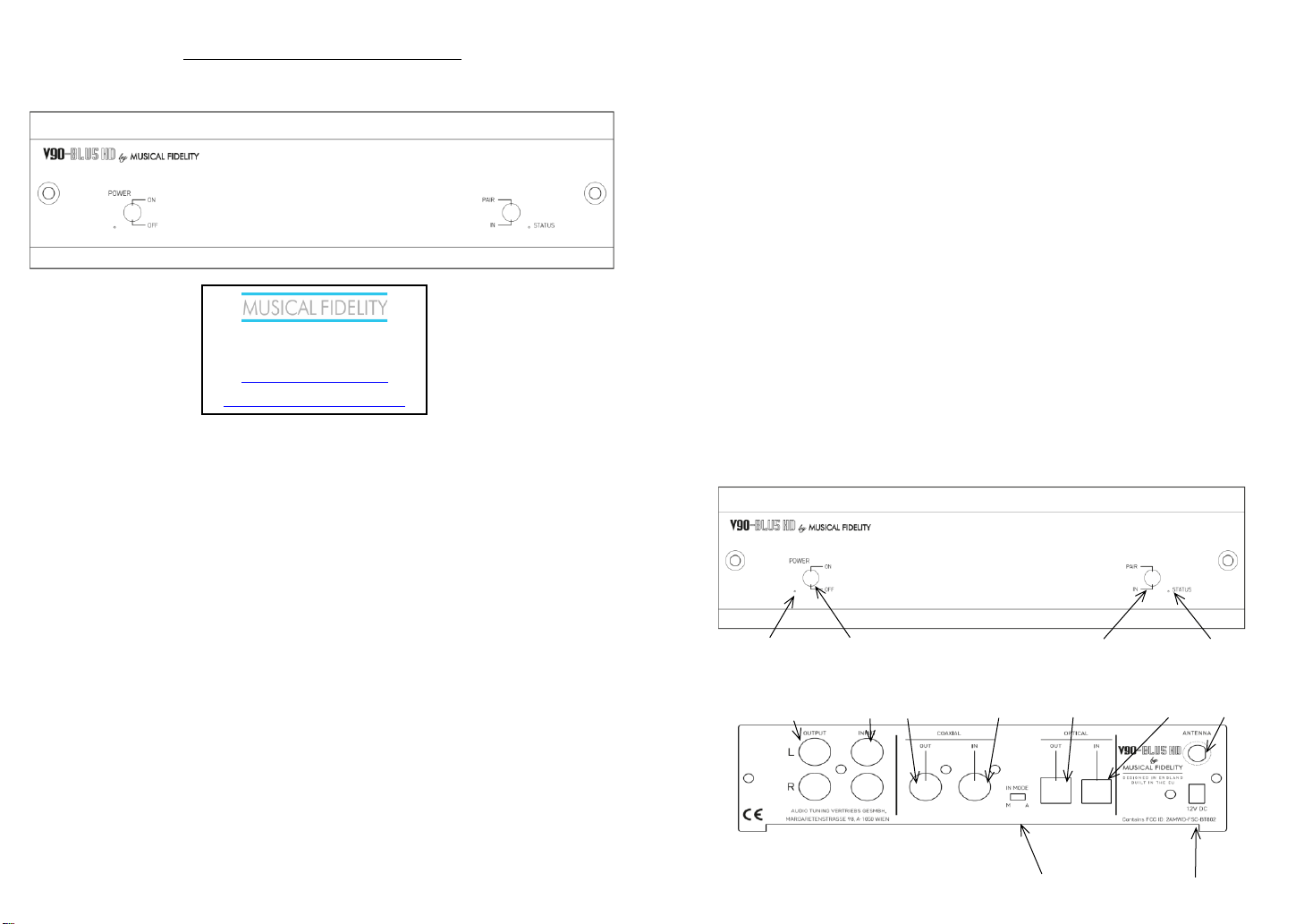
STATUS LED
The status LED is provided so it is possible to see which input
is active. It has 4 states when the V90-BLU5 HD is switched
on:
GREEN – Bluetooth connection active and playing
ORANGE – Coaxial input
RED - Optical input
No light - Analogue input
IN MODE SWITCH
There are two ways how the input selector behave.
M for Manual and A for Auto mode. In manual mode is input
selected by the switch on the front panel - Bluetooth has
always priority so if the stream on Bluetooth is started,
selected input is automatically overrided and Bluetooth is set
as active (pressing again input switch selects another input)
Auto mode - when the device is on it searches signal in turns
in both digital inputs (optical and coaxial). Bluetooth has
highest priority. Scan mode is indicated by the "Status" LED,
orange and red lits every 5 seconds. The search order is
indicated by the color of the "Status" LED. To change the
search order, press the Input switch. If the signal is present
on both digital inputs, then pressing Input changes the
search sequence and switch to another digital input.
The Bluetooth source has always priority, and if there is an
active Bluetooth streaming, device will automatically switch
to Bluetooth.
If the audio transmission via the Bluetooth connection is
terminated:
- in the auto mode the device will switch to the scan mode
and, if there is an audio source at the optical or coaxial input,
it will switch the audio input to the found source.
- in the manual mode inputs does not automatically switch
Connecting and playing a Bluetooth device takes top priority
and therefore will override the priority switch (as well as the
analogue input) at all times.
Power LED Power on/off switch
Pair/input switch Status LED
(momentary action)
Analogue feed through Coax digital feed through Optical digital feed through Antenna SMA
Output Input Output Input Output Input Socket
Digital feed through priority switch Power input socket
Audio Tuning Vertriebs GmbH
Margaretenstrasse 98
A-1050 Vienna
http://www.musicalfidelity.com/
For warranty, please register product on
http://www.musicalfidelity.com/register
Page 2
BLUETOOTH
Pairing device.
The V90-BLU5 HD always connects automatically to the last
paired source.
For pairing a new device:
1. Press the switch Pair, the status LED starts blinking green.
2. Turn on the Bluetooth device and in the list of available
devices select "V90-BLU5 HD", If pairing is successful, the
green LED will lit. Device is paired and ready to use.
Note: pairing mode is active for 60s, it can be also
deactivated by pressing the Pair switch again.
The range of the built-in Bluetooth receiver is dependant on
the connected device, e.g. the mobile phone or Bluetooth
enabled computer.
Nearby radio-frequency interference can also have an effect
on Bluetooth. Make sure the unit is positioned as far away as
possible from any potential sources of electrical and electromagnetic interference, as well as other Bluetooth or Wi-Fi
devices
The device contained within this unit is Class 2 which works
up to 90ft. (30 Meters) assuming clear line of sight with a
similarly specified Class 2 transmitter devices. Walls,
partitions and local interference will reduce this range
somewhat.
If the device (phone, computer, etc) to be linked has a
different class Bluetooth device that can manage e.g. only
15ft. (5 Meters), then the link will be limited to the SHORTER
of the two ranges, i.e. 15ft. (5 Meters).
Reset to factory setting
Press and hold the switch in the position Pair while the device
is off. Turn on the device and still hold the switch Pair until
the red LED turns to orange and the release the switch.
Item disposal information for Europe
DISPOSAL
The crossed out wheel ed bin label that appears on the b ack panel of the product
indicates that the product must not be disposed of as normal household waste. To
prevent possible harm to the environment please separate the product from other waste
to ensure that it can be recycled in an environmentally safe manner. Please contact your
local government office or your retailer for avail able collection facilities.
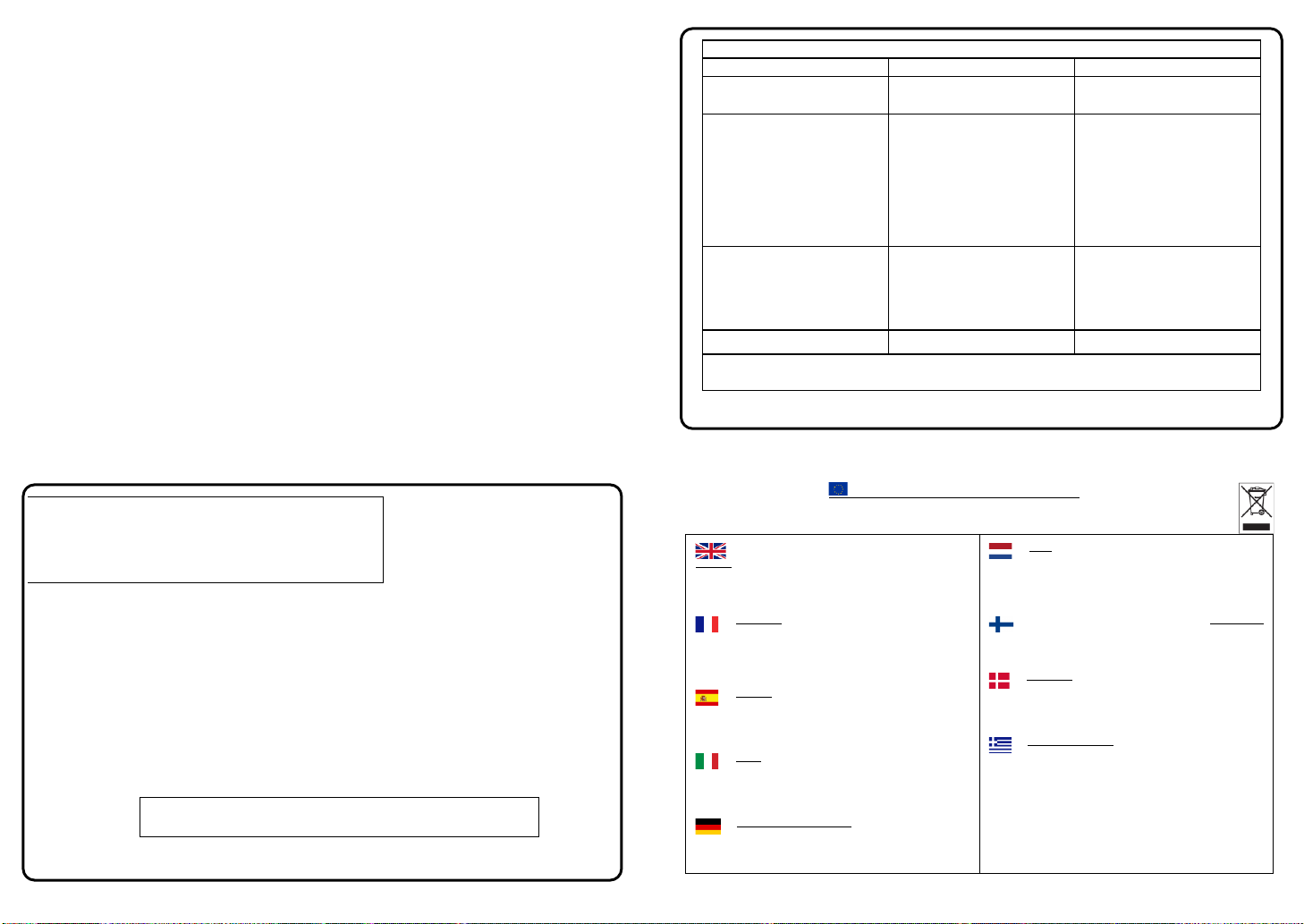
DISPOSITION
La poubelle sur roulettes b arrées X, qui apparaît en lo go sur le panneau
arrière du produit, indi que que celui-ci ne doit pas être traité comme u n
déchet domestique commun. Afi n de protéger l'environnement, ce produit électronique
devra être géré séparément et donc recy clé selon les nouvelles normes Européennes
Rohs concernant les déchets d'appareils électroniques. Prière de contacter les services
concernés gouvernementaux o u votre point de vente pour l'élimination et l'enlèvement
de déchets électroniques équipés de composa nts électroniques.
DISPOSAL
La eti queta cruzada hacia f uera del compartimiento que aparece en el
panel traser o del producto indica que el producto no se debe reciclarse
como basura normal de la casa. Para preve nir daños posible al ambiente separe por
favor el producto de otras basura para asegurarse de qu e puede ser reciclada de una
manera ambientalmente segura. Entre en contacto por favor a su oficina gubernamental
local o a su minorista para las instalaciones dispo nibles de la colección.
RIFIUTI
L'etichetta del cassonetto barrato riportato sul retro dell'apparecchio indica
che il prodotto non deve essere smaltito tramite la procedura normale di smaltimento
dei rifiuti domestici . Per evitare eventuali danni all'ambiente, separare questo prodotto
da altri rifiuti domestici in modo che possa venire ri ciclato in base alle procedure di
rispetto ambi entale. Per maggiori dettagli sulle aree di raccolta disponibili, contattate
l'ufficio govenativo locale od il rivenditore del pr odotto.
FACHGERECHTE ENTSORGUNG:
Das auf der Geräterückseite angebrachte Label deutet darauf hin, dass
das Produkt nicht mit konventionellem Hauskehricht entsor gt werden darf.
Um Schäden und Verschmutzungen an Umwelt und Mensch zu ver meiden, muss das
Produkt fachger echt entsorgt und von anderem Ab fall getrennt werden. Wenden Sie
sich bei Fragen hierzu an Ihren Fachhändler oder an eine öffentliche Informationsstelle.
AFVAL
Het label op de achterzijde van dit apparaat, een afvalbak op wielen met
een kruis doorgehaald, geeft aan d at dit apparaat niet samen met gewoon
huishoudafval mag worden weggegooid. Om m ogelijke schade aan onze leefomgeving
te voorkomen dient dit apparaat, gescheiden van gewoon huishoudelijk afval, te worden
afgevoerd zod at het op een milieuvriendelijke manier kan worden gerecycled. Neem
voor beschikbare inzamelplaatsen co ntact op met uw gemeentelijke reinigingsdienst of
met uw elektronica leverancier.
HÄVITTÄMINEN
Yliruksattua jäteastiaa kuvaava tarr a tuotteen takalevyssä kertoo, että
tuotetta ei saa käsi tellä normaalina talousjätteenä. Ympäris tön
suojelemiseksi on tuote pidettävä erillään muusta jätteestä ja se on kierrätettävä
ekologisesti kestävällä tav alla. Ota yhteyttä laitteen myyj ään tai Pirkanmaan
Ympäristökeskukseen lähimmän kierrätysk eskuksen löytämiseksi.
AFSKAFNING
Logoet med en skraldespand med kryds over på bagsiden af apparatet
indikerer at dette produkt ikke må kasseres som normal husholdningsaffald.
For at forebygge muli g skade på miljøet, bedes De separere dette produkt fra andet
affald, og sikre at det bliver genbrugt på en miljørigtig måd e. Kontakt venligst de lokale
myndigheder eller di n forhandler for oplysning om nærmeste tilgængelige
opsamlingssted for elektronikaffald.
ΔΙΑΔΙΚΑΣΙΑ ΑΠΟΡΡΙΨΗΣ
ΤΟ ΣΗΜΑ ΜΕ ΤΟΝ ΔΙΑΓΕΓΡΑΜΜΕΝΟ ΤΡΟΧΗΛΑΤΟ ΚΑΔΟ
ΑΠΟΡΡΙΜΑΤΩΝ ΣΤΗΝ ΠΙ ΣΩ ΟΨΗ ΤΟΥ ΜΗΧΑΝΗΜΑΤΟΣ ΔΗΛΩΝΕΙ ΟΤΙ
ΤΟ ΠΡΟΙΟΝ ΑΥΤΟ ΔΕΝ Π ΡΕΠΕΙ ΝΑ ΔΙΑΧΕΙΡΙΣΘΕΙ ΣΑΝ ΣΥΝΗΘΙΣΜΕΝΟ ΟΙΚΙΑΚΟ
ΑΠΟΒΛΗΤΟ. ΠΡΟΣ ΑΠΟΦΥΓΗ ΕΝΔΕΧΟΜΕΝΗΣ ΕΠΙΒΑΡΥΝΣΗΣ ΤΟΥ
ΠΕΡΙΒΑΛΛΟΝΤΟΣ, ΞΕΧΩΡΙΣΤΕ ΤΟ ΠΡΟΙΟΝ ΑΠΟ ΤΑ ΑΛΛΑ ΑΠΟΡΡΙΜΑΤΑ ΩΣΤΕ ΝΑ
ΕΞΑΣΦΑΛΙΣΘΕΙ Η ΑΝΑΚΥΚΛΩΣΗ ΤΟΥ ΜΕ ΤΟΝ Π ΡΕΠΟΝΤΑ ΤΡΟΠΟ.
ΠΑΡΑΚΑΛΟΥΜΕ ΝΑ ΕΠΙΚΟΙΝΩΝΗΣΕΤΕ ΜΕ ΤΗΝ ΤΟΠΙΚΗ ΥΠΗΡΕΣΙΑ
ΑΝΑΚΥΚΛΩΣΗΣ Η ΜΕ ΤΟ ΚΑΤΑΣΤΗΜΑ ΑΓΟΡΑ Σ ΓΙΑ Π ΕΡΙΣΣΟΤΕΡΕΣ
ΛΕΠΤΟΜΕΡΕΙΕΣ.
Specifications:
Bluetooth Radio Specification v5.0
Bluetooth audio specification
Qualcomm® aptX™, Qualcomm® aptX™ HD
THD
0.01% “A” wtd.
Carrier frequency 2.402 to 2.480 GHz
Signal to noise
80dB“A” wtd.
Transmission power +10dBm (max)
Separation
78dB
Class 2 up to 30M (90ft) range
AF Freq. response
+0, -1dB
Bluetooth digital out
96kHz upsampled
Loop digital output
same as digital input
Loop line output
same as line input
Connections:
Line level input:
1 pair RCA connectors
Line level 300mV nominal
Line level output:
1 pair RCA connectors
Line level 300mV nominal
Coaxial digital input
1 RCA connector
32 to 192kHz sample rate
Coaxial digital output
1 RCA connector
32 to 192kHz sample rate
Optical input
1 TOSLINK style receptacle
32 to 96kHz sample rate
Optical output
1 TOSLINK style receptacle
32 to 96kHz sample rate
Power input
1.3mm DC power socket
6-12V DC regulated
Dimensions:
Length
117mm
4⅔”
including terminals and volume
Width
170mm
6⅔”
Height
47mm
1⅔”
including “feet”
Weight:
Unit
590g
1¼ lbs net
1.05Kg
2¼ lbs Gross
Accessories
(supplied)
Power lead
Bluetooth Aerial
Leaflet
2 way
1.3mm DC plug
50 ohm SMA
Instructions
1 off
1 off
1 off
Musical Fidelity reserves the right to make improvements which may
result in specification or feature changes without notice. E&OE.
Manual issue 2 – 22/03/21
Fault-finding
Problem
Probable Cause
Remedy
No power
Mains supply not switched on.
Power plug is not fully inserted
Supply is plugged in and unit
switched on (blue LED lit)
Plug into rear socket securely
No sound
Wrong connections between input
source and the V90-BLU5 HD
Volume turned right down
Check leads are connected and
secure.
Check other source is not playing
and lead connections.
Check volume is adjusted on
sending/connected device is set
accordingly. Take care not to turn
up too high!
Not connecting
Aerial not connected
Aerial not tightened
Bluetooth not enabled on sending
device
Connect aerial
Make sure aerial connection is
secure
Enable the Bluetooth function and
connect with V90-BLU5 HD
Hum
Audio connector not secure
Insert plug so full contact is made.
If none of these actions affect a cure, please contact the dealer, or an authorised Musical Fidelity service agent.
Remember; never open the case of the V90-BLU5 HD, as this will invalidate the guarantee.
Page 3
V90-BLU5 HD Bluetooth Link
Gebrauchsanweisung
Einleitung
Vielen Dank, dass Sie sich für den Bluetooth-Empfänger
V90-BLU5 HD entschieden haben. Es wurde entwickelt, um
jedem vorhandenen High-Fidelity-Gerät eine hochwertige
Bluetooth-Konnektivität hinzuzufügen. Es kann auch als
neutraler Durchschleifer für digitale und analoge Signale
fungieren, wenn die Bluetooth-Quelle nicht verwendet wird.
Wir hoffen aufrichtig, dass es Ihnen viele Jahre
herausragenden Hörvergnügens bringen wird.
Vorsichtsmaßnahmen bei der Installation
Ihr neuer V90-BLU5 HD ist so konzipiert und gebaut, dass er
eine störungsfreie Leistung bietet. Wie bei allen
elektronischen Geräten müssen jedoch einige
Vorsichtsmaßnahmen beachtet werden: Verwenden Sie den
V90-BLU5 HD nicht in der Nähe von Wasser. Das Gerät darf
keinen tropfenden oder spritzenden Flüssigkeiten
ausgesetzt werden. Halten Sie den V90-BLU5 HD von
Wärmequellen wie Heizkörpern fern. Offene Flammen
dürfen nicht in die Nähe des Geräts gestellt werden.
Produkthinweis:
Dieses HiFi-Produkt wurde getestet, um sicherzustellen,
dass sein Betrieb nicht durch normale Hintergrundpegel von
Hochfrequenzstörungen beeinträchtigt wird und dass es
selbst keine übermäßigen Störungen erzeugt. Wenn ein
Problem besteht, wenden Sie sich bitte an Ihren Musical
Fidelity-Vertreter.
Der V90-BLU5 arbeitet gemäß seinen Spezifikationen
innerhalb des folgenden Umgebungsbereichs:
Temperatur 5 bis 45 Grad Celsius
Luftfeuchtigkeit 10 bis 90% nicht kondensierend
Verbindungen
Alle Verbindungen müssen hergestellt werden, bevor das
Gerät an den Strom angeschlossen wird. Schalten Sie immer
die an den V90-BLU5 HD angeschlossenen Geräte aus,
bevor Sie die Stromversorgung anschließen oder trennen,
Kabel oder Eingänge umstecken.
Eingänge
Wählen Sie aus, welche Eingänge das Gerät verwenden soll.
Digital optisch – Verwenden Sie ein normales TOSLINKKabel (nicht im Lieferumfang enthalten), um eine optimale
Verbindung mit anderen digitalen Audiogeräten herzustellen.
Digital koaxial – Verwenden Sie ein normales Koaxialkabel
(nicht im Lieferumfang enthalten), um eine optimale
Verbindung mit anderen digitalen Audiogeräten herzustellen.
Analog – Verwenden Sie Standard-Cinch-Kabel, um analoge
Signale von anderen Quellen anzuschließen.
Antenne - Stecken Sie die mitgelieferte Antenne ein
Ausgänge
Wählen Sie aus, welche Ausgänge das Gerät verwenden
soll.
Hinweis: Wenn Sie die digitalen oder analogen Eingänge
verwenden, schaltet das Gerät bei Vorhandensein eines
gültigen Bluetooth-Signals automatisch auf die Wiedergabe
der Bluetooth-Musik um. Beachten Sie auch, dass der V90
seine digitalen Eingänge nicht in analoge Ausgänge
umwandelt - und auch nicht umgekehrt.
Digital optisch – Verwenden Sie ein normales TOSLINKKabel (nicht im Lieferumfang enthalten), um eine Verbindung
von anderen digitalen Audiogeräten in bester Qualität
herzustellen.
Digital koaxial – Verwenden Sie ein normales Koaxialkabel
(nicht im Lieferumfang enthalten), um eine optimale
Verbindung mit anderen digitalen Audiogeräten herzustellen.
Analog – Verwenden Sie Standard-Cinch-Kabel, um analoge
Signale von anderen Quellen anzuschließen.
Strom
Schließen Sie das Gerät für die Stromversorgung an eine
Steckdose an.
VERWENDUNG UND FUNKTIONEN
Um den V90-BLU5 HD als HiFi-Bluetooth-Empfänger zu
verwenden, schließen Sie einfach die Analogausgänge an
einen vorhandenen integrierten Vor- oder
Leistungsverstärkereingang an, z. AUX. Das Gerät liefert
einen Standard von 300 mV.
Wenn ein digitaler Ein- / Ausgang erforderlich ist, gibt es
koaxiale als auch in optische Optionen. Das Gerät akzeptiert
und leitet koaxiale Signale mit bis zu 192 kHz und optische
Signale mit bis zu 96 kHz durch
Um den V90-BLU5 HD als HiFi-Bluetooth-Feed-In zu
verwenden, unterbrechen Sie einfach das vorhandene Setup
an einer geeigneten Stelle, z.B. zwischen Quelle und
Vorverstärker. Dies gilt sowohl für analoge als auch für
digitale Signale. Stecken Sie die Ausgänge des
Vorverstärkers in die V-90 BLU5-HD Eingänge, und dann
sollten die V90-BLU5 HD Ausgänge mit der Endstufe
verbunden werden. Das Gerät schaltet dann automatisch auf
Bluetooth um, sobald ein verbundenes Gerät vorhanden ist,
und spielt Musik über Bluetooth ab.
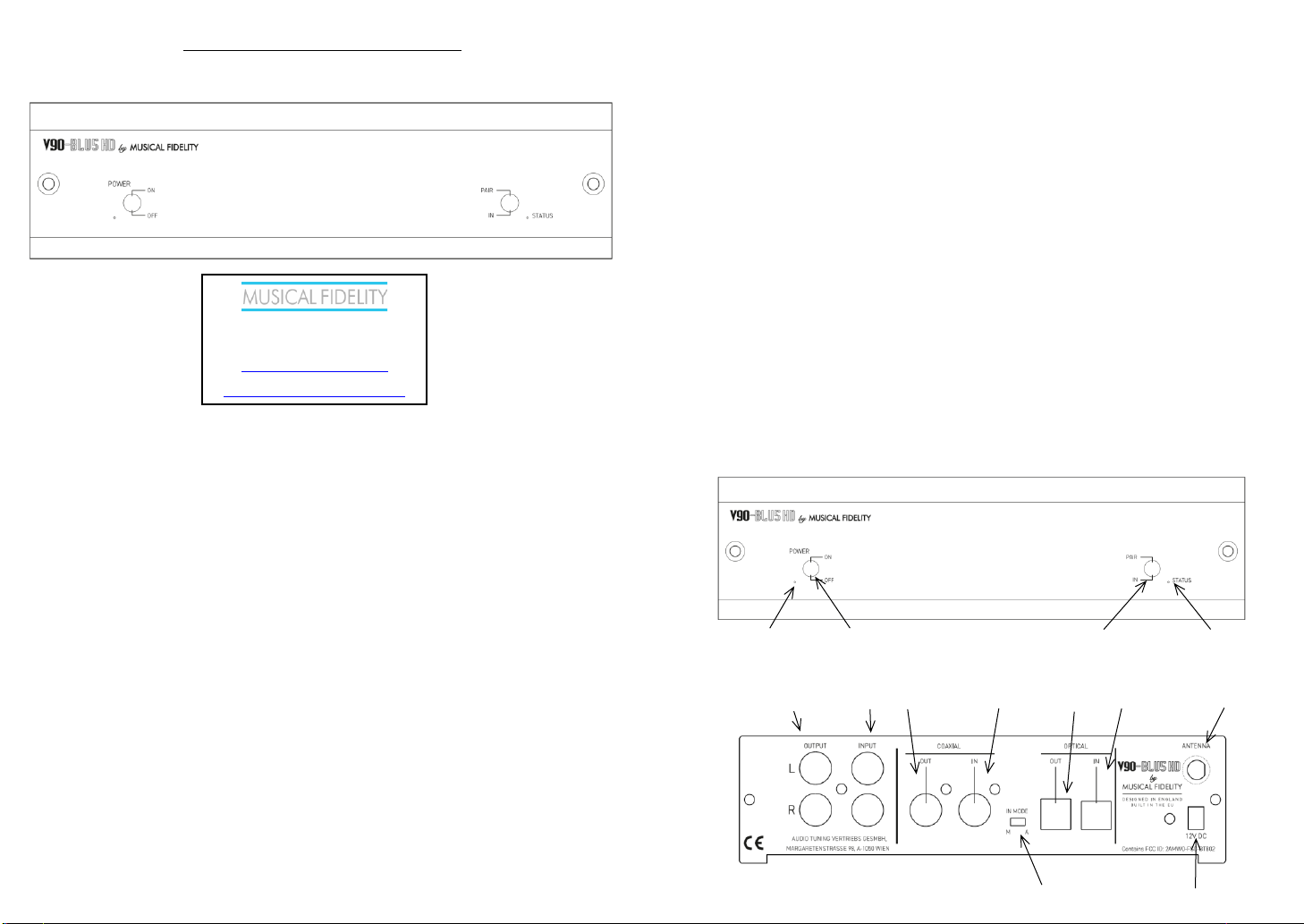
STATUS LED
Die Status-LED ist vorhanden, damit Sie sehen können,
welcher Eingang aktiv ist. Es hat 4 Zustände, wenn der V90BLU5 HD eingeschaltet ist:
GRÜN – Bluetooth aktiv
ORANGE – Koaxialer Eingang
ROT – Optischer Eingang
Kein Licht – Analoger Eingang
AUTOMATISCHE EINGANGSERKENNUNG
Es gibt zwei Möglichkeiten, wie sich der Eingangswähler
verhält.
M für Manuell und A für Automatisch. Im manuellen Modus
wird der Eingang über den Schalter auf der Vorderseite
ausgewählt. Bluetooth hat aber immer Priorität. Wenn der
Stream über Bluetooth gestartet wird, wird der ausgewählte
Eingang automatisch überschrieben und Bluetooth wird als
aktiv gesetzt (erneutes Drücken des Eingangsschalters
wählt einen anderen Eingang aus). Auto-Modus - Wenn das
Gerät eingeschaltet ist, sucht es abwechselnd nach Signalen
in beiden digitalen Eingängen (optisch und koaxial).
Bluetooth hat höchste Priorität. Der Scan-Modus wird durch
die LED "Status" angezeigt. Alle 5 Sekunden leuchten
orange und rot. Die Suchreihenfolge wird durch die Farbe der
LED "Status" angezeigt. Drücken Sie den Eingangsschalter,
um die Suchreihenfolge zu ändern. Wenn das Signal an
beiden Digitaleingängen vorhanden ist, ändert das Drücken
von Input die Suchsequenz und wechselt zu dem anderen
Digitaleingang.
Die Bluetooth-Quelle hat immer Priorität. Wenn ein
Bluetooth-Streaming aktiv ist, wechselt das Gerät
automatisch zu Bluetooth.
Wenn die Audioübertragung über die Bluetooth-Verbindung
beendet ist:
- Im Auto-Modus wechselt das Gerät in den Scan-Modus.
Wenn sich am optischen oder koaxialen Eingang ein Signal
befindet, schaltet es den Audioeingang auf die gefundene
Quelle um.
- Im manuellen Modus schalten die Eingänge nicht
automatisch um.
Das Anschließen und Spielen eines Bluetooth-Geräts hat
höchste Priorität und überschreibt daher jederzeit den
Prioritätsschalter (sowie den Analogeingang).
Strom LED Strom ein/aus Schalter
Pair/Input Schalter Status LED
Analog Schleifung Koax Digital Schleife Optisch Digital Schleife Antenne SMA
Ausgang Eingang Ausgang Eingang Ausgang Eingang Stecker
Eingangserkennnungsschalter Netzteilbuchse
Audio Tuning Vertriebs GmbH
Margaretenstrasse 98
A-1050 Vienna
http://www.musicalfidelity.com/
For warranty, please register product on
http://www.musicalfidelity.com/register
Page 4
BLUETOOTH
Pairing
Der V90-BLU5 HD stellt immer automatisch eine Verbindung
zur zuletzt gekoppelten Quelle her.
So koppeln Sie ein neues Gerät:
1. Drücken Sie den Schalter Pair. Die Status-LED beginnt
grün zu blinken.
2. Schalten Sie das Bluetooth sendende Gerät ein und
wählen Sie in der Liste der verfügbaren Geräte "V90 -BLU5
HD". Wenn das Pairing erfolgreich ist, leuchtet die grüne
LED. Das Gerät ist gekoppelt und einsatzbereit.
Hinweis: Der Pairing-Modus ist 60 Sekunden lang aktiv. Er
kann auch durch erneutes Drücken des Pair-Schalters
deaktiviert werden.
Die Reichweite des eingebauten Bluetooth-Empfängers
hängt vom angeschlossenen Gerät ab, z.B. das Mobiltelefon
oder Computer.
Hochfrequenzstörungen in der Nähe können sich auch auf
Bluetooth auswirken. Stellen Sie sicher, dass das Gerät so
weit wie möglich von potenziellen Quellen elektrischer und
elektromagnetischer Störungen sowie anderen Bluetoothoder Wi-Fi-Geräten entfernt ist
Der in diesem Gerät enthaltene Empfänger funktioniert mit
Bluetooth v5.0 bis zu 240m bei klarer Sichtlinie mit ähnlich
spezifizierten Bluetooth v5.0-Sendegeräten. Wände,
Trennwände und lokale Störungen verringern diesen
Bereich.
Wenn das zu verbindende Gerät (Telefon, Computer usw.)
ein Bluetooth-Gerät einer anderen Klasse ist, das z.B. nur 5
Meter Reichweite hat, dann wird die Verbindung auf den
KURZEN Bereiche begrenzt, daher 5 Meter.
Auf Werkseinstellung zurücksetzen
Halten Sie den Schalter in der Position Pair gedrückt,
während das Gerät ausgeschaltet ist. Schalten Sie das Gerät
ein und halten Sie den Schalter gedrückt, bis die rote LED
orange leuchtet und der Schalter losgelassen wird.
Informationen zur Artikelentsorgung für Europa
DISPOSAL
The crossed out wheel ed bin label that appears on the b ack panel of the product
indicates that the product must not be disposed of as normal household waste. To
prevent possible harm to the environment please separate the product from other waste
to ensure that it can be recycled in an environmentally safe manner. Please contact your
local government office or your retailer for availa ble collection facilities.
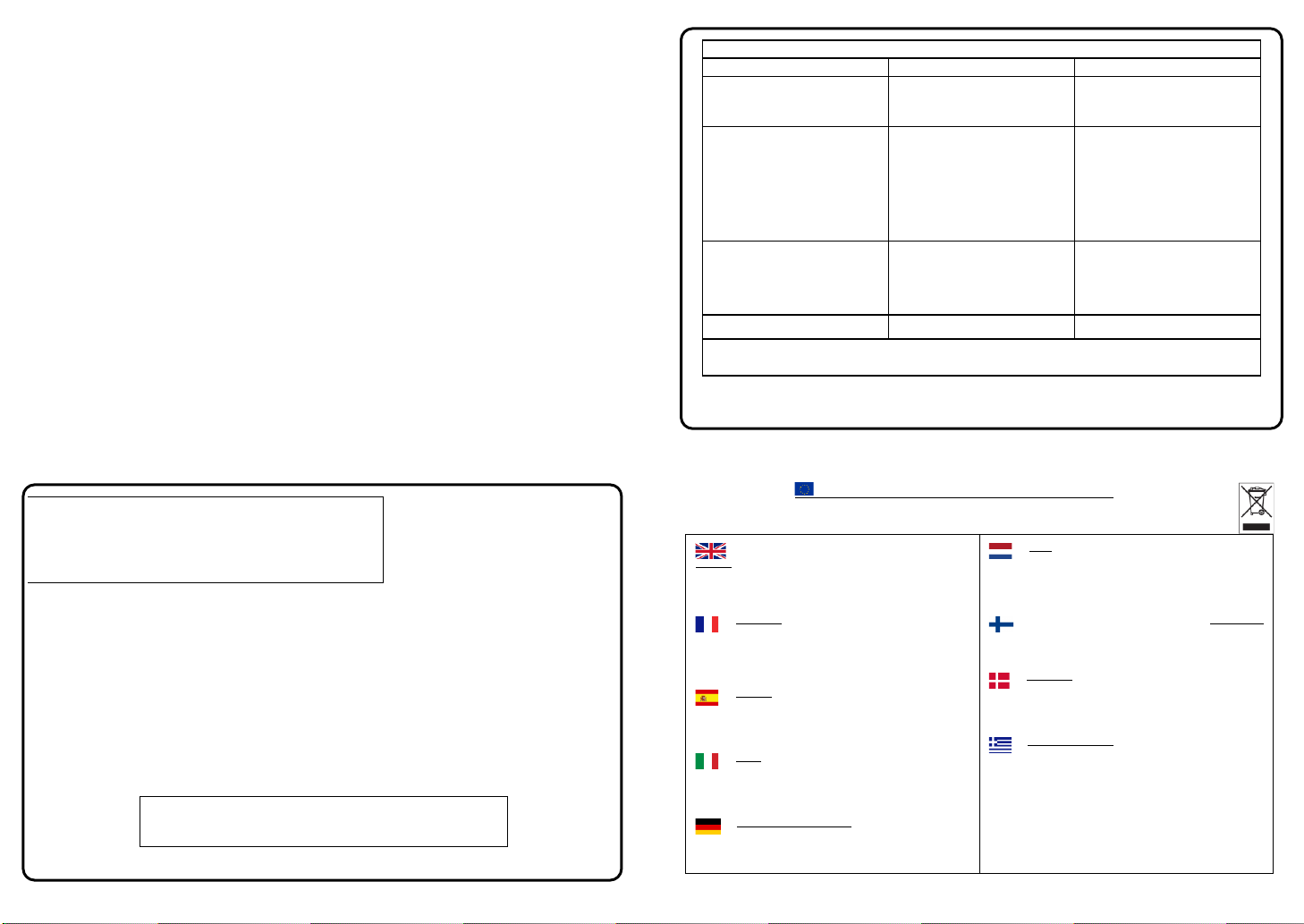
DISPOSITION
La poubelle sur roulettes b arrées X, qui apparaît en lo go sur le panneau
arrière du produit, indi que que celui-ci ne doit pas être traité comme u n
déchet domestique commun. Afin de protéger l'environnement, ce pr oduit électronique
devra être géré séparément et donc recy clé selon les nouvelles normes Européennes
Rohs concernant les déchets d'appareils électroniques. Prière de contacter les services
concernés gouvernementaux ou votre point de vente p our l'élimination et l'enlèvement
de déchets électroniques équipés de composa nts électroniques.
DISPOSAL
La eti queta cruzada hacia f uera del compartimiento que aparece en el
panel traser o del producto indica que el producto no se debe reciclarse
como basura normal de la casa. Para preve nir daños posible al ambiente separe por
favor el producto de otras basura para asegurarse de qu e puede ser reciclada de una
manera ambientalmente segura. Entre en contacto por favor a su oficina gubernamental
local o a su minorista para las instalaciones dispo nibles de la colección.
RIFIUTI
L'etichetta del cassonetto barrato riportato sul retro dell'apparecchio indica
che il prodotto non deve essere smaltito tramite la procedura normale di smaltimento
dei rifiuti domestici . Per evitare eventuali danni all'ambiente, separare questo prodotto
da altri rifiuti domestici in modo che possa venire riciclato in base alle procedure di
rispetto ambi entale. Per maggiori dettagli sulle aree di raccolta disponibili, contattate
l'ufficio govenativo locale od il rivenditore del pr odotto.
FACHGERECHTE ENTSORGUNG:
Das auf der Geräterückseite angebrachte Label deutet darauf hin, dass
das Produkt nicht mit konventionellem Hauskehricht entsor gt werden darf.
Um Schäden und Verschmutzungen an Umwelt und Mensch zu ver meiden, muss das
Produkt fachger echt entsorgt und von anderem Abfal l getrennt werden. Wenden Sie
sich bei Fragen hierzu an Ihren Fachhändler oder an eine öffentliche Informationsstelle.
AFVAL
Het label op de achterzijde van dit apparaat, een afvalbak op wielen met
een kruis doorgehaald, geeft aan d at dit apparaat niet samen met gewoon
huishoudafval mag worden weggegooid. Om m ogelijke schade aan onze leefomgeving
te voorkomen dient dit apparaat, gescheiden van gewoon huishoudelijk afval, te worden
afgevoerd zod at het op een milieuvriendelijke manier kan worden gerecycled. Neem
voor beschikbare inzamelplaatsen co ntact op met uw gemeentelijke reinigingsdienst of
met uw elektronica leverancier.
HÄVITTÄMINEN
Yliruksattua jäteastiaa kuvaava tarr a tuotteen takalevyssä kertoo, että
tuotetta ei saa käsi tellä normaalina talousjätteenä. Ympäris tön
suojelemiseksi on tuote pidettävä erillään muusta jätteestä ja se on kierrätettävä
ekologisesti kestävällä tav alla. Ota yhteyttä laitteen myyj ään tai Pirkanmaan
Ympäristökeskukseen lähimmän kierrätysk eskuksen löytämiseksi.
AFSKAFNING
Logoet med en skraldespand med kryds over på bagsiden af apparatet
indikerer at dette produkt ikke må kasseres som normal husholdningsaffald.
For at forebygge muli g skade på miljøet, bedes De separere dette produkt fra andet
affald, og sikre at det bliver genbrugt på en miljørigtig måd e. Kontakt venligst de lokale
myndigheder eller di n forhandler for oplysning om nærmeste tilgængelige
opsamlingssted for elektronikaffald.
ΔΙΑΔΙΚΑΣΙΑ ΑΠΟΡΡΙΨΗΣ
ΤΟ ΣΗΜΑ ΜΕ ΤΟΝ ΔΙΑΓΕΓΡΑΜΜΕΝΟ ΤΡΟΧΗΛΑΤΟ ΚΑΔΟ
ΑΠΟΡΡΙΜΑΤΩΝ ΣΤΗΝ ΠΙ ΣΩ ΟΨΗ ΤΟΥ ΜΗΧΑΝΗΜΑΤΟΣ ΔΗΛΩΝΕΙ ΟΤΙ
ΤΟ ΠΡΟΙΟΝ ΑΥΤΟ ΔΕΝ Π ΡΕΠΕΙ ΝΑ ΔΙΑΧΕΙΡΙΣΘΕΙ ΣΑΝ ΣΥΝΗΘΙΣΜΕΝΟ ΟΙΚΙΑΚΟ
ΑΠΟΒΛΗΤΟ. ΠΡΟΣ ΑΠΟΦΥΓΗ ΕΝΔΕΧΟΜΕΝΗΣ ΕΠΙΒΑΡΥΝΣΗΣ ΤΟΥ
ΠΕΡΙΒΑΛΛΟΝΤΟΣ, ΞΕΧΩΡΙΣΤΕ ΤΟ ΠΡΟΙΟΝ ΑΠΟ ΤΑ ΑΛΛΑ ΑΠΟΡΡΙΜΑΤΑ ΩΣΤΕ ΝΑ
ΕΞΑΣΦΑΛΙΣΘΕΙ Η ΑΝΑΚΥΚΛΩΣΗ ΤΟΥ ΜΕ ΤΟΝ Π ΡΕΠΟΝΤΑ ΤΡΟΠΟ.
ΠΑΡΑΚΑΛΟΥΜΕ ΝΑ ΕΠΙΚΟΙΝΩΝΗΣΕΤΕ ΜΕ ΤΗΝ ΤΟΠΙΚΗ ΥΠΗΡΕΣΙΑ
ΑΝΑΚΥΚΛΩΣΗΣ Η ΜΕ ΤΟ ΚΑΤΑΣΤΗΜΑ ΑΓΟΡΑ Σ ΓΙΑ Π ΕΡΙΣΣΟΤΕΡΕΣ
ΛΕΠΤΟΜΕΡΕΙΕΣ.
Spezifikationen:
Bluetooth Radio Specification v5.0
Bluetooth Audio Spezifikation
Qualcomm® aptX™, Qualcomm® aptX™ HD
THD
0.01% “A” wtd.
Carrier frequency 2.402 to 2.480 GHz
SNR
80dB“A” wtd.
Transmission power +10dBm (max)
Kanaltrennung
78dB
Class 2 up to 30M (90ft) range
Frequenzgang
+0, -1dB
Bluetooth Digital out
96kHz up-sampled
Loop Digital Output
Gleich Digital Input
Loop Line Output
Gleich Line Input
Verbindungen:
Hochpegeleingang:
1 Paar RCA
Line Level 300mV nominal
Hochpegelausgang:
1 Paar RCA
Line Level 300mV nominal
Digital koaxial In
1 RCA
32 bis 192kHz Samplerate
Digital koaxial Out
1 RCA
32 bis 192kHz Samplerate
Digital optisch In
1 TOSLINK
32 bis 96kHz Samplerate
Digital optisch Out
1 TOSLINK
32 bis 96kHz Samplerate
Strom
1.3mm DC Rundstecker
6-12V DC
Maße:
Länge
117mm
Inkl. Stecker und Poti
Breite
170mm
Höhe
47mm Inkl. Füße
Gewicht:
netto
590g 1.05Kg
verpackt
Inkludiertes
Zubehör
Stromkabel
Bluetooth Antenne
Anleitung
1.3mm DC
50 ohm SMA
Anleitung
1 Stück
1 Stück
1 Stück
Musical Fidelity behält sich das Recht vor, Verbesserungen
vorzunehmen, die ohne vorherige Ankündigung zu Spezifikationsoder Funktionsänderungen führen können. E&OE.
Anleitung Ausgabe 1 – 22/03/21
Fehlerbehebung
Problem
Ursache
Behebung
Kein Strom
Netzversorgung nicht
eingeschaltet
Der Netzstecker ist nicht
vollständig eingesteckt
Netzteil anstecken und Gerät
einschalten (blaue LED leutet)
Stecker vollständig anstecken
Bein Ton
Falsche Verbindungen zwischen
Eingangsquelle und V90-BLU5
Lautstärke zu leise eingestellt
Überprüfen Sie, ob die Kabel
sicher angeschlossen sind.
Überprüfen Sie, ob die Quelle
spielt und Kabel richtig
angeschlossen sind.
Überprüfen Sie die Lautstärke am
verbundenen Gerät. Aufapssen,
nicht zu laut einzustellen!
Keine Verbindung
Antenne nicht angeschlossen
Antenne nicht fest angeschlossen
Bluetooth am Sender nicht
eingeschaltet
Antenne anstecken
Antenne festschrauben
Bluetooth einschalten und mit V90-
BLU5 HD pairen
Rauschen
Kabel nicht sicher gesteckt
Kabel volsltändig anstecken
Wenn keine dieser Maßnahmen hilft, wenden Sie sich bitte an den Händler oder einen autorisierten Musical
Fidelity-Kundendienst. Öffnen Sie niemals das Gehäuse des V90-BLU5 HD, da dies die Garantie ungültig macht.
 Loading...