

Page 1
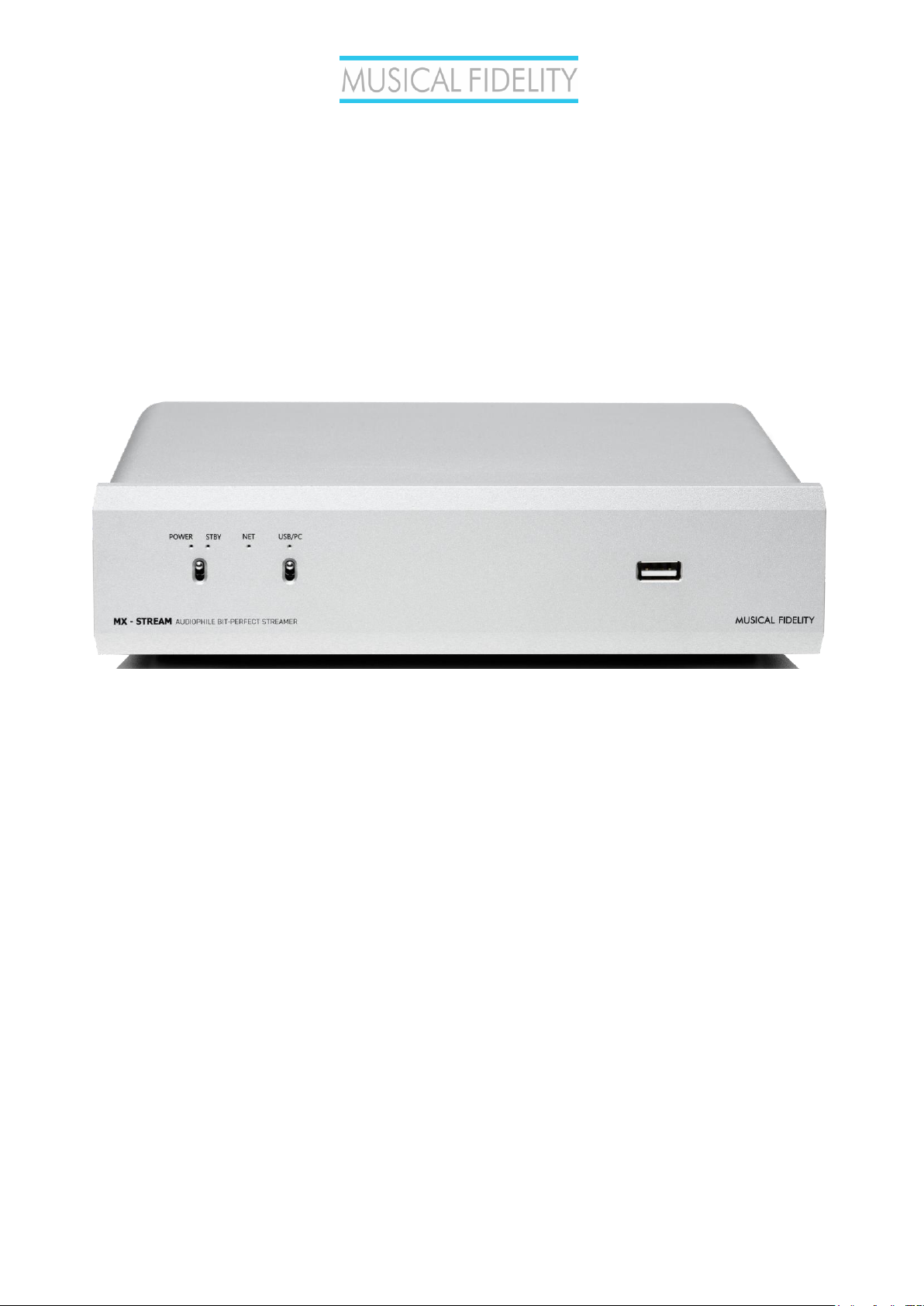
MX-Stream
Audiophile Bit-Perfect Streamer
Quick Guide
for full manual go to:
https://www.musicalfidelity.com/mx-stream
The MX-Stream is a universal, transport-only network device that can take any online or network
streaming service to your integrated amplifier or DAC. All you need is an existing USB Class 2.0 Audio
input. The MX-Stream’s digital audio circuitry is a complete custom design from scratch. We have
separate power supplies and high-end voltage stabilization components for all the different PCB units.
We have advanced re-clocking – even the main CPU is operated by an audio optimized clock, which is
completely unheard in typical streaming solutions, as they typically run with standard CPU clocks like
those in regular computers. Every incoming digital signal is cleaned up from the very beginning. All audio
files that come in and out, are the best they can be by eliminating all unwanted noise that can be found
in common streaming solutions. With an optimized software, we were able to push this high-tech
hardware design to its absolute limits. All of this resulted in the first near-zero jitter streamer we have
ever seen.
The MX-Stream is the perfect add-on for any integrated amplifier or DAC with USB B input. Not only is
the technology inside the MX-Stream complete cutting-edge high-end, every analog circuit in integrated
analog amps displays increased performance, when digital circuits and power supplies are kept separate
from the analog circuitry. By squeezing in a lot of digital circuits, additional high frequency distortion
across the entire system can be observed. Coming from the other direction, huge power supplies for pre
and power amps with lots of magnetic radiation impact digital circuit performance negatively. By
keeping streaming and amplification separate we can achieve our true high-end sound vision to greater
effect and at a more affordable cost, while also guaranteeing the longest lifetime of our amplifiers and
streamers.
Page 2

MX-Stream Audiophile Bit-Perfect Streamer
- 2 - Issue 1
Safety instructions
Warning of a hazard for the user, the unit or possible misuse.
Important notice.
AC outlet voltages vary from country to country. Before connecting to the mains, make sure that the
voltage in your area meets the voltage requirements printed on the power supply.
The power supply is used to connect/disconnect the unit from the mains. Make sure that the power
supply is easily accessible at all times. Never handle the device, the power supply while your hands are
wet or damp. Avoid letting liquids enter the device or the power supply. Never place any item
containing liquid, such as a flower vase on or near the device. Never spill any liquid on the device or the
power supply. Never place any naked flame sources, such as lighted candles on or near the device. The
product shall not be used in damp or wet locations, next to a bathtub, sink, swimming pool or any
other similar conditions.
Make all connections whilst the unit is disconnected from the mains.
Never connect or disconnect power supply to or from the unit whilst the power supply is connected to
the mains. Never use any other power supply than the one supplied with the unit.
Page 3
MX-Stream Audiophile Bit-Perfect Streamer
- 3 - Issue 1
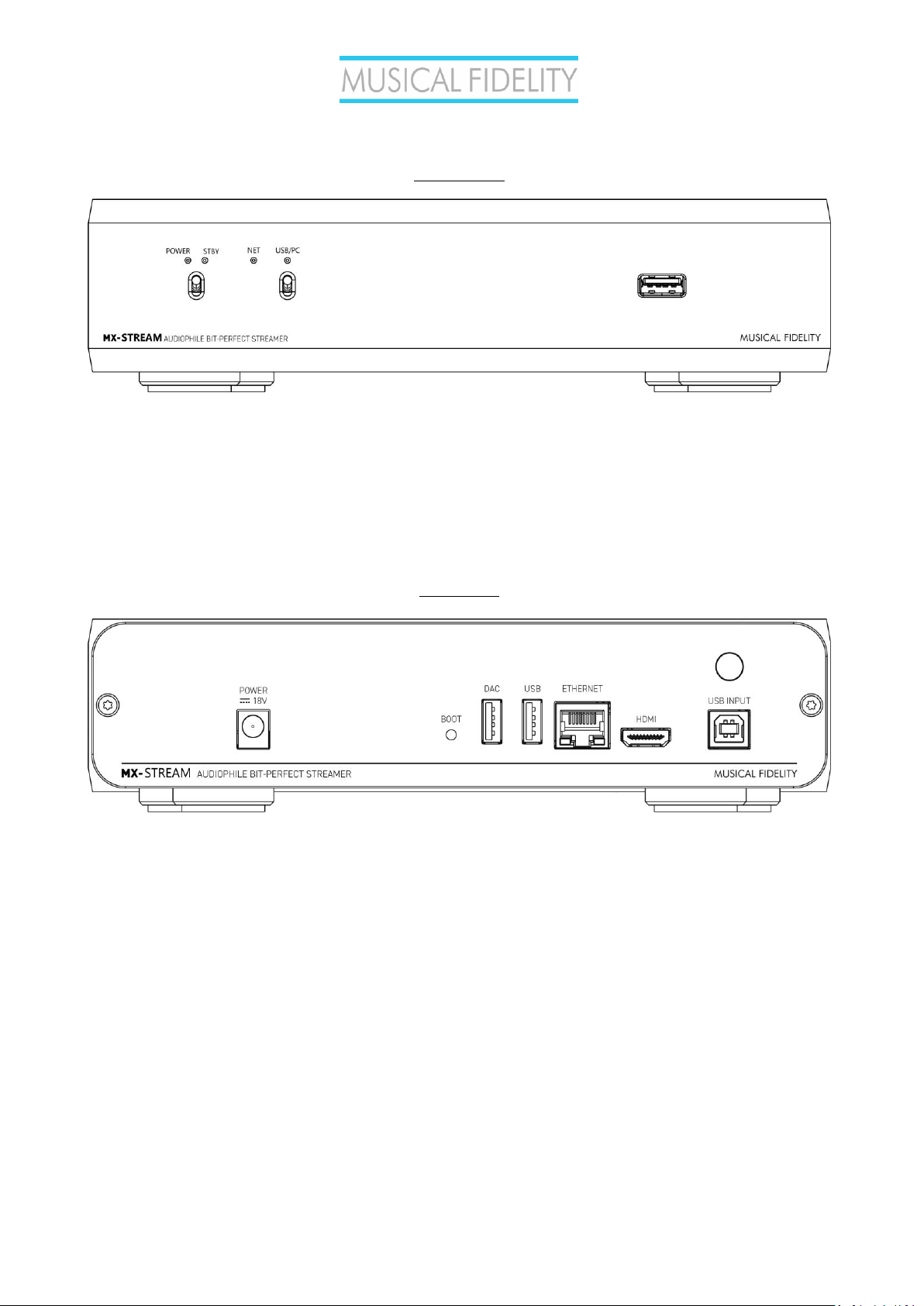
FRONT VIEW
POWER: lights up when unit is turned ON
STBY: lights up, when unit is tuned OFF
POWER/STBY Switch: turns the unit ON and OFF
NET: LED OFF – unit is off or booting up after power switch has been pressed; BLINKING ALTERNATELY – unit has
successfully booted up/no network connection established; CONSTANTLY LIGHTING UP – unit has successfully
booted up/ network connection established
USB/PC: indicates USB/PC bypass input is ON
USB A input: connect external hard drive, mouse, keyboard, touchscreen, USB turntable, USB CD drive, etc…
REAR VIEW
POWER 18V: connect included power supply
BOOT: puts MX Stream into bootloader mode (see full online manual)
DAC: connection for DAC
USB: connection for USB devices like: external hard drive/USB stick, mouse, keyboard, touchscreen, USB turntable,
USB CD drive, etc…
ETHERNET: connect network cable
HDMI: connect HDMI cable for video output (audio output is only available on the DAC output)
USB INPUT: connect PC, laptop, phone etc. to bypass those devices to the DAC connected to the MX Stream
ANTENNA: connect the supplied WIFI/Bluetooth antenna
Page 4
MX-Stream Audiophile Bit-Perfect Streamer
- 4 - Issue 1
Installation and first use
Setting up network connection
The unit can be connected to the network/internet via wired or wireless connection.
1. Wired connection: Connect a LAN cable from your router to the socket Ethernet on the back panel. Download the
MX-Stream App (available for Android and iOS). Make sure your mobile device is on that same router’s network,
open the App and it will automatically find and connect to the MX-Stream. You can now control your MX-Stream.
2. Wireless connection:
Make sure the supplied antenna is mounted to its connector on the back panel
- Turn the MX-Stream on and wait until the NET LED is blinking alternately in short intervals. This means the
boot up sequence has been completed, but a network/internet connection is NOT established.
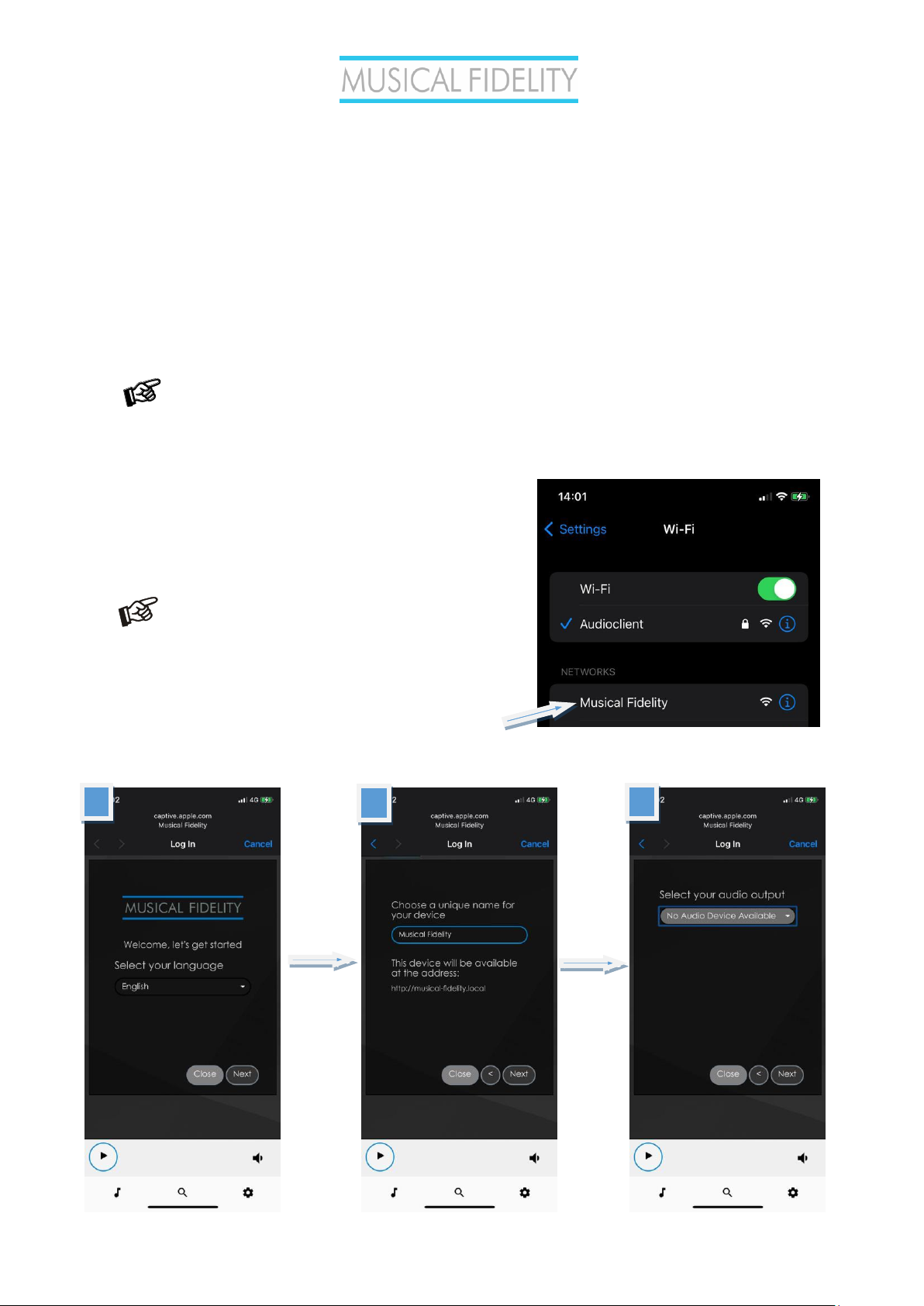
- Open the Network Settings on your mobile phone and you
will now find a network called Musical Fidelity. Connect to
that network and a welcome page will open automatically
(similar like signing in to a hotel room WIFI).
Should you encounter problems at this step, for
example if the signing in process isn’t initiated
automatically, we recommend trying with different
devices (other phones, tablets or also laptops work).
The sign-in typically opens automatically, but there
are some background circumstances which could
“confuse” your device, which won’t make it open the
sign-in automatically.
- Go through the first config wizard:
1 2 3
Page 5
MX-Stream Audiophile Bit-Perfect Streamer
- 5 - Issue 1
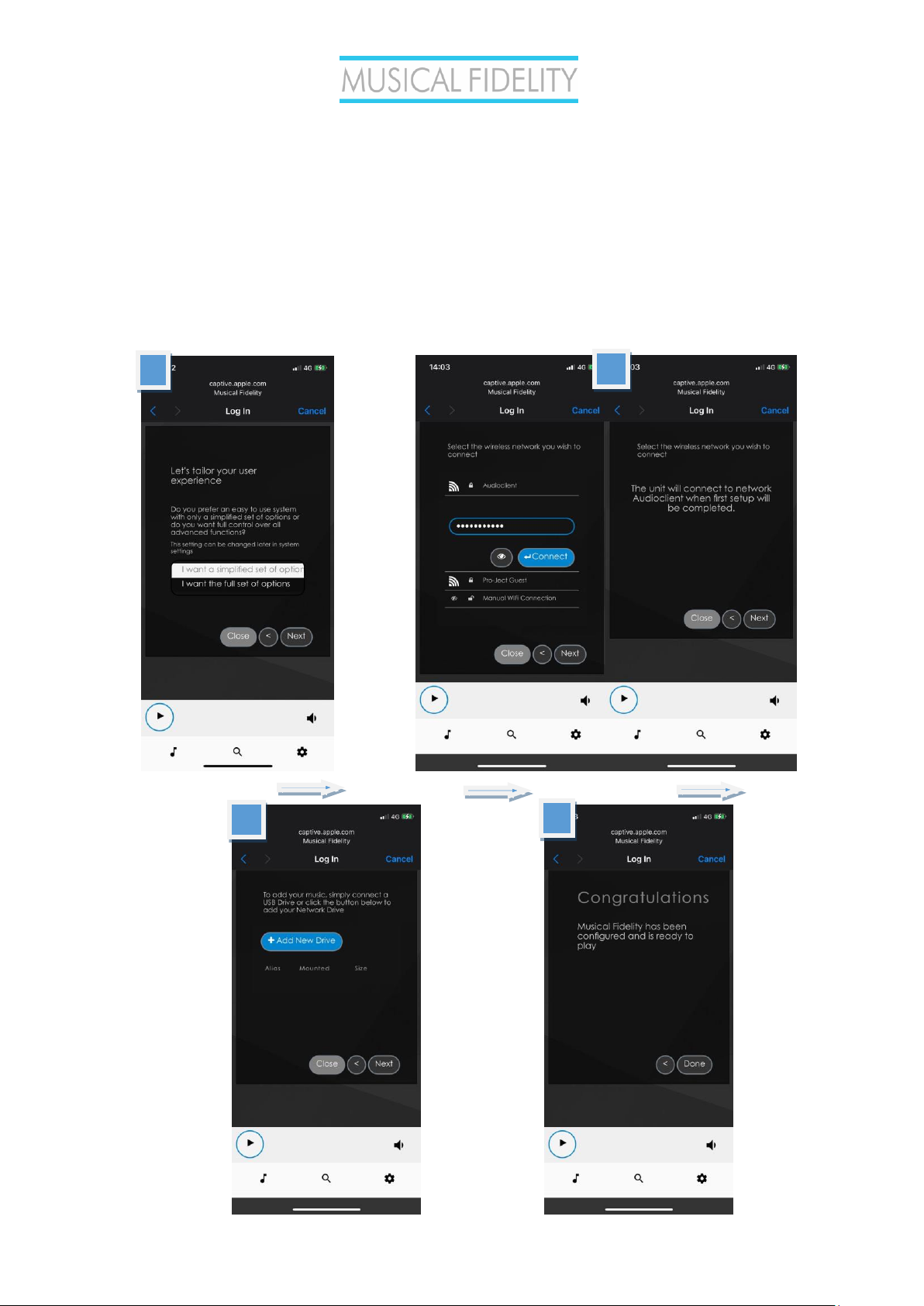
1. Language - select your system language
2. Name - choose a unique name of the unit
3. Output - select the connected DAC which you want to use
4. Simple/Full Options - choose between a simplified or the full options menu. Both options will set you off with bit-
perfect playback quality. Beginners might find the simplified options easier to navigate, while expert users will benefit
from all the control and digital playback transparency that the full set has on offer.
5. Network - here you can connect to a wireless network, a list of available WiFi networks is shown. Select your
desired WiFi network, type in the password and tap on the “Connect” button. The unit will reconnect to selected WiFi
network when first setup will be completed.
6. Music - manage all the network music locations, add NAS drives
4
5
6
7
Page 6
MX-Stream Audiophile Bit-Perfect Streamer
- 6 - Issue 1
After the first setup assistant is complete the MX-Stream will connect to the specified WiFi network and close its
internal Musical Fidelity network (the network you have just connected to for the WiFi setup in the previous step).
Your MX-Stream is fully operational, once the NET LED on the front panel lights up constantly.
Your phone will automatically connect to your home WiFi again. To make sure, quickly check your phone’s settings
and see if it is correctly connected to your home WiFi. Download the MX-Stream App (available for Android and iOS),
open the App and it will automatically find and connect to the MX-Stream. You are now ready to control your MXStream.
Once you have your MX-Stream up and running, make sure that one of the first things you do is to
search for a new Firmware Update under Settings -> System -> System Update.
BT Connection
Pairing with Android devices
Open Settings and tap on BT. Turn on BT and tap on Scan. All found devices will show up now, tap on Stream Box S2
Ultra and confirm the connection.
BT pairing with Apple devices
Open Settings and tap on BT, turn on BT if it is not activated yet. Your device will automatically start searching for
available devices. Tap on Stream Box S2 Ultra and confirm “Pairing” on your Apple device.
Control the MX-Stream
The control screen is divided into three parts: Browse, Playback and Queue
Browse works as a home page. Here you can go to any of the following pages.
Music library - here you can find all the available Music in your network and connected directly to the
streamer: USB or NAS. Your library will be created automatically and sorted using the available
metadata. (Some of these options are shown only when available)
Web radio – here you have access to a list of available internet radio stations. You also have access to
a list of selected internet radio stations under Pro-Ject Selection.
BT connection – enables the BT input. Play music from connected BT devices.
USB/PC – Activate the USB/PC bypass input. You can connect a PC/Laptop/Phone or other streaming
devices with a USB audio output to the USB B input on the MX-Stream. The input will be detoxed and
cleaned up by the MX-Stream and forwarded to your connected DAC.
Shairport-Sync – This option lets you connect to Apple devices using the Airplay protocol. You need to
select this input first and then the MX-Stream will show up as an Airplay option on your Apple devices.
Page 7
MX-Stream Audiophile Bit-Perfect Streamer
- 7 - Issue 1
The following icons are shown after a successful login into the respective services under Settings > Sources
Tidal – gives you access to the Tidal streaming service
Spotify – gives you access to the Spotify streaming service
Qobuz – gives you access to the Spotify streaming service
Playback: This page shows the currently playing music. You also see information about the Artist and the Album.
Additionally, you will see the Album Cover, given it is available. Here you also have the option to add tracks to your
Favourites or to a playlist and to change your playback volume. Changing volume is also possible with your
phone’s or tablet’s volume buttons.
Queue: This page shows the list of tracks in the current queue. At the upper right corner you also have the options
for playback (shuffle, repeat), also you can save the current queue as a playlist.
Musical Fidelity Logo - tap on this button to go back to the home page (Browse)
Settings – gives you access to all general settings. The following menus are accessible here:
Sources: here you have access to all options for Network Drives and attached storages via USB. Also, you can
enter your account information for the supported streaming services. Additional settings can be found for Album Art
and Music Library. Under Functionalities Control you have the ability to enable or disable certain services. This is
especially useful to enhance the performance of the unit.
Streaming services’ icons appear on the home page (Browse) only after the login information is
successfully entered
Playback Options: Here you have the option to choose your desired Output Device (USB DAC) and other settings
for Playback, Volume and Audio Resampling. The default playback options ensure 1:1 bit-perfect playback.
Appearance: Here you can change the language of the unit, switch between background images or set your own
images as background.
Network: Here you can find all information about your network. You can assign your unit a static IP address, pick a
wireless network and activate/deactivate the hotspot function of the unit. You can also make settings on your DNS
Server.
System: General settings can be made here. You can also enable/disable the video output via the HDMI socket.
Under System Updates you can search for new software for the unit and download it. You can also set the unit
back to Factory Settings.
Alarm: Here you can set a time for an alarm clock. This function needs an already existing playlist.
Page 8

MX-Stream Audiophile Bit-Perfect Streamer
- 8 - Issue 1
Sleep: With the sleep timer you can set a time value after which the unit either turns off or stops the music.
Shutdown: Power off or reboot the unit.
Warranty
The manufacturer accepts no responsibility for damage caused by not adhering to these instructions for
use. Modification or changes to any part of the product by unauthorized persons release the
manufacturer from any liability over and above the lawful rights of the customer.
Should a problem be encountered which cannot be identified or resolved, please contact point of
purchase/dealer for further advice. Only if the problem cannot be resolved there, the unit should be
sent to the responsible distributor in your country. Warranty is valid in country of purchase and for
original purchaser only and is not internationally nor personally transferable.
Copyright, trademarks
Musical Fidelity is a division of Audio Tuning Vertriebs
GmbH.
This guide was produced by: Musical Fidelity
Copyright © 2022. All rights reserved.
The information was correct at the time of going to
press. The manufacturer reserves the right to make
changes to the technical specification without prior
notice as deemed necessary to uphold the ongoing
process of technical development.
Windows® is a registered trademark of the Microsoft group of companies. Mac® and Mac OS® are trademarks of Apple
Inc., registered in the U.S. and other countries. BT® is a trademark owned by the BT SIG, Inc., Apple is registered
trademark of Apple Inc., Android™ is a trademark of Google Inc.
Contains FCC ID: VVXLM811-0451
Page 9
MX-Stream Audiophile Bit-Perfect Streamer
- 9 - Issue 1
Technical specifications
Internal Memory 16 GB
Audio Formats PCM 32bit/352.8kHz, DSD256
Internet Radio TuneIn
Streaming Services TIDAL, Spotify, Qobuz, HIGHRESAUDIO
Supported data protocols RAAT (Roon), Shairport, DLNA, UPNP
Inputs 2 x USB A (maximum combined current draw 1A), USB
B (PC-Detox), Network (Ethernet, WiFi), BT
Supported WiFi standards 802.11 b/g/n/d/e/h/i
BT BT Classic + EDR v2.1, v3.0, v4.0 and Low Energy
Outputs Audio optimized USB A, HDMI (video)
Outboard Power supply 18V/1A DC (included)
Accessories Wi-Fi antenna
Dimensions W x H x D (D with sockets) 220 x 56 x 215 (223) mm
Weight (without power supply): 1910g without power supply
a Division of Audio Tuning Vertriebs GmbH
Margaretenstrasse 98
A-1050 Vienna
AUSTRIA
+43 1 544 858 0400
http://www.musicalfidelity.com
Musical Fidelity reserves the right to make improvements which may result in
specification or feature changes without notice. E+OE.
Page 10

MX-Stream Audiophile Bit-Perfect Streamer
- 10 - Issue 1
DISPOSAL
The crossed out wheeled bin label that appears
on the back panel of the product indicates that the product
must not be disposed of as normal household waste. To
prevent possible harm to the environment please separate
the product from other waste to ensure that it can be
recycled in an environmentally safe manner. Please contact
local government office or retailer for available collection
facilities.
DISPOSITION
La poubelle sur roulettes barrées X, qui apparaît
en logo sur le panneau arrière du produit, indique que celuici ne doit pas être traité comme un déchet domestique
commun. Afin de protéger l'environnement, ce produit
électronique devra être géré séparément et donc recyclé
selon les nouvelles normes Européennes Rohs concernant les
déchets d'appareils électroniques. Prière de contacter les
services concernés gouvernementaux ou votre point de
vente pour l'élimination et l'enlèvement de déchets
électroniques équipés de composants électroniques.
DISPOSAL
La etiqueta cruzada hacia fuera del
compartimiento que aparece en el panel trasero del
producto indica que el producto no se debe reciclarse como
basura normal de la casa. Para prevenir daños posible al
ambiente separe por favor el producto de otras basura para
asegurarse de que puede ser reciclada de una manera
ambientalmente segura. Entre en contacto por favor a su
oficina gubernamental local o a su minorista para las
instalaciones disponibles de la colección.
RIFIUTI
L'etichetta del cassonetto barrato riportato sul
retro dell'apparecchio indica che il prodotto non deve essere
smaltito tramite la procedura normale di smaltimento dei
rifiuti domestici. Per evitare eventuali danni all'ambiente,
separare questo prodotto da altri rifiuti domestici in modo
che possa venire riciclato in base alle procedure di rispetto
ambientale. Per maggiori dettagli sulle aree di raccolta
disponibili, contattate l'ufficio govenativo locale od il
rivenditore del prodotto.
FACHGERECHTE ENTSORGUNG:
Das auf der Geräterückseite angebrachte Label
deutet darauf hin, dass das Produkt nicht mit
konventionellem Hauskehricht entsorgt werden darf. Um
Schäden und Verschmutzungen an Umwelt und Mensch zu
vermeiden, muss das Produkt fachgerecht entsorgt und von
anderem Abfall getrennt werden. Wenden Sie sich bei
Fragen hierzu an Ihren Fachhändler oder an eine öffentliche
Informationsstelle.
AFVAL
Het label op de achterzijde van dit apparaat, een
afvalbak op wielen met een kruis doorgehaald, geeft aan dat
dit apparaat niet samen met gewoon huishoudafval mag
worden weggegooid. Om mogelijke schade aan onze
leefomgeving te voorkomen dient dit apparaat, gescheiden
van gewoon huishoudelijk afval, te worden afgevoerd zodat
het op een milieuvriendelijke manier kan worden gerecycled.
Neem voor beschikbare inzamelplaatsen contact op met uw
gemeentelijke reinigingsdienst of met uw elektronica
leverancier.
HÄVITTÄMINEN
Yliruksattua jäteastiaa kuvaava tarra tuotteen
takalevyssä kertoo, että tuotetta ei saa käsitellä normaalina
talousjätteenä. Ympäristön suojelemiseksi on tuote pidettävä
erillään muusta jätteestä ja se on kierrätettävä ekologisesti
kestävällä tavalla. Ota yhteyttä laitteen myyjään tai
Pirkanmaan Ympäristökeskukseen lähimmän
kierrätyskeskuksen löytämiseksi.
AFSKAFNING
Logoet med en skraldespand med kryds over på
bagsiden af apparatet indikerer at dette produkt ikke må
kasseres som normal husholdningsaffald. For at forebygge
mulig skade på miljøet, bedes De separere dette produkt fra
andet affald, og sikre at det bliver genbrugt på en miljørigtig
måde. Kontakt venligst de lokale myndigheder eller din
forhandler for oplysning om nærmeste tilgængelige
opsamlingssted for elektronikaffald.
ΔΙΑΔΙΚΑΣΙΑ ΑΠΟΡΡΙ ΨΗΣ
ΤΟ ΣΗΜΑ ΜΕ ΤΟΝ ΔΙΑΓΕΓΡΑΜΜΕΝΟ
ΤΡΟΧΗΛΑΤΟ ΚΑΔΟ ΑΠΟΡΡΙΜΑΤΩΝ ΣΤΗΝ ΠΙΣΩ
ΟΨΗ ΤΟΥ ΜΗΧΑΝΗΜΑΤΟΣ ΔΗΛΩΝΕΙ ΟΤΙ ΤΟ ΠΡΟΙΟΝ
ΑΥΤΟ ΔΕΝ ΠΡΕΠΕΙ ΝΑ ΔΙΑΧΕΙΡΙΣΘΕΙ Σ ΑΝ ΣΥΝΗΘΙΣΜΕΝΟ
ΟΙΚΙΑΚΟ ΑΠΟΒΛΗΤ Ο. ΠΡΟΣ ΑΠΟΦΥΓΗ ΕΝΔΕΧΟΜΕΝΗ Σ
ΕΠΙΒΑΡΥΝΣΗΣ ΤΟΥ ΠΕΡΙΒΑΛΛΟΝΤΟΣ, ΞΕΧΩΡΙΣΤΕ ΤΟ
ΠΡΟΙΟΝ ΑΠΟ ΤΑ ΑΛΛΑ ΑΠΟΡΡΙΜΑΤΑ ΩΣΤΕ ΝΑ
ΕΞΑΣΦΑΛΙΣΘΕΙ Η ΑΝΑΚΥΚΛΩΣΗ ΤΟΥ ΜΕ ΤΟΝ
ΠΡΕΠΟΝΤΑ ΤΡΟΠΟ. ΠΑΡΑΚΑΛΟΥΜΕ ΝΑ
ΕΠΙΚΟΙΝΩΝΗΣΕΤΕ ΜΕ ΤΗΝ ΤΟΠΙΚΗ ΥΠΗΡΕΣΙΑ
ΑΝΑΚΥΚΛΩΣΗΣ Η ΜΕ ΤΟ ΚΑΤΑΣΤΗΜΑ ΑΓΟΡΑΣ ΓΙΑ
ΠΕΡΙΣΣΟΤΕΡΕΣ ΛΕΠΤΟΜΕΡΕΙΕΣ.
 Loading...