

Page 1
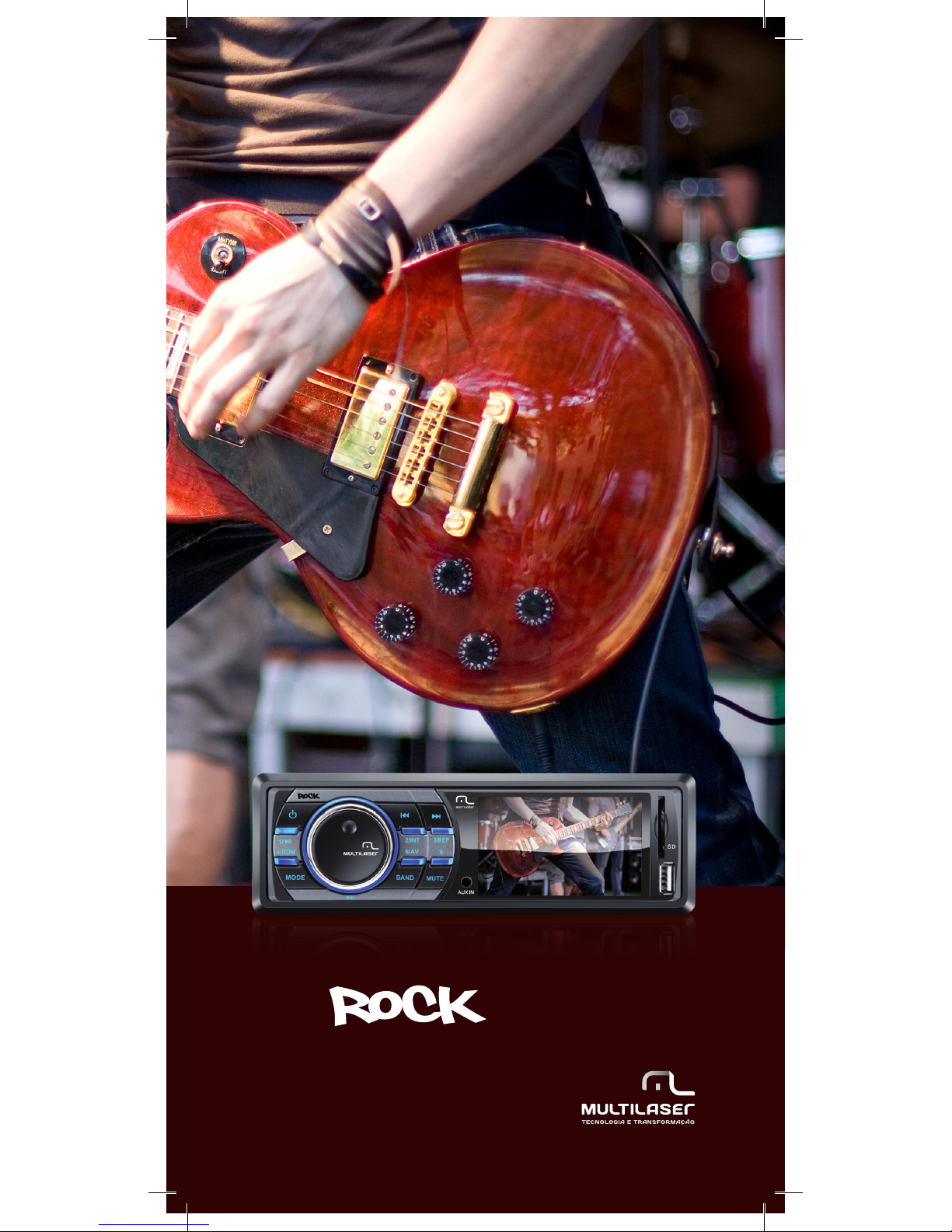
Manual do usuário
User’s Manual . Manual del usuário
som .
Page 2
2
Índice (português)
Instruções do painel frontal ..................................................................................................... 3
Funções principais .................................................................................................................. 3
Operação básica ..................................................................................................................... 4
Operação do Rádio FM ............................................................................................................ 5
Reprodução de música ........................................................................................................... 6
Reprodução de vídeo .............................................................................................................. 6
Entrada auxiliar ...................................................................................................................... 7
Instalação ............................................................................................................................... 7
Avisos de atenção ................................................................................................................... 8
Precauções ............................................................................................................................ 9
Índice de desempenho .......................................................................................................... 11
Solução de problemas .......................................................................................................... 12
Index (english)
Front Panel Instruction .......................................................................................................... 13
Main functions ...................................................................................................................... 13
Basic Operation .................................................................................................................... 14
FM Radio Operation .............................................................................................................. 15
Music playback .................................................................................................................... 16
Video playback ..................................................................................................................... 16
AUX in .................................................................................................................................. 17
Installation ........................................................................................................................... 17
Warnings .............................................................................................................................. 18
Precautions .......................................................................................................................... 19
Performance index ............................................................................................................... 21
Troubleshooting .................................................................................................................... 22
Indice (español)
Instrucciones del Panel Frontal .............................................................................................. 23
Funciones principales ........................................................................................................... 23
Operación básica .................................................................................................................. 24
Operación de la Radio FM ..................................................................................................... 25
Reproducción de música ....................................................................................................... 26
Reproducción de vídeo .......................................................................................................... 26
Entrada auxiliar .................................................................................................................... 27
Instalación ............................................................................................................................ 27
Avisos de atención ................................................................................................................ 28
Precauciones ........................................................................................................................ 29
Índice de desempeño ............................................................................................................ 31
Solución de problemas ......................................................................................................... 32
Page 3
3
www.multilaser.com.br
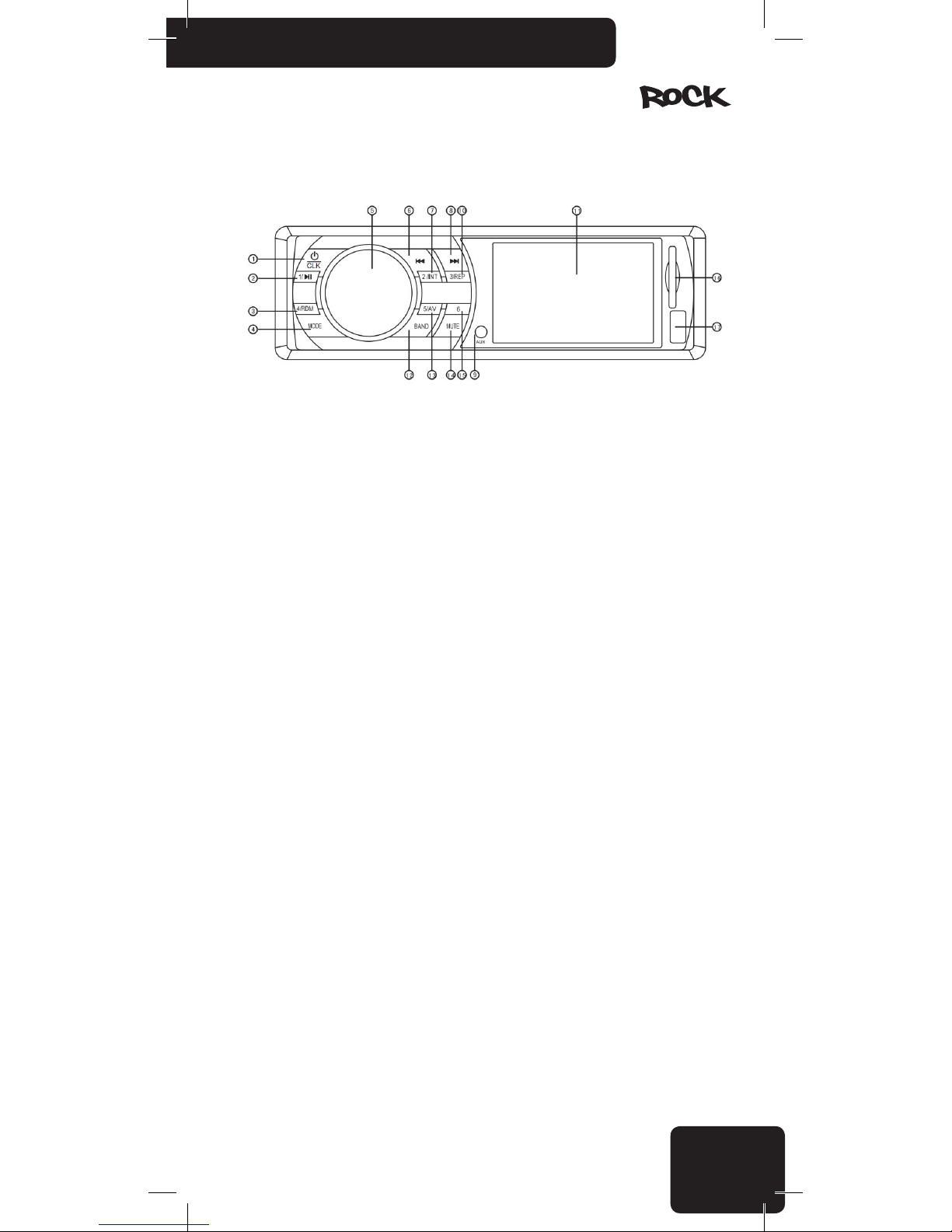
Instruções do painel frontal
1. Liga/Desliga e configuração do Relógio
2. Posição 1 da programação FM/ reprodução/ pausa
3. Posição 4 da programação FM/ reprodução aleatória
4. Troca do modo (FM/USB/SD/AUX)
5. SEL (Botão giratório para controle do volume e navegação no menu)
6. Botão “Anterior” / Retorno rápido
7. Posição 2 da programação FM/ introdução da faixa
8. Botão “Próximo” / Avanço rápido
9. AUX-IN
10. Posição 3 da programação FM/ repetir a faixa atual
11. Tela TFT
12. Seleção de banda entre FM1/FM2/FM3 e sintonia/ armazenamento automático
13. Posição 5 da programação FM/ troca entre áudio e vídeo
14. Mudo (desliga os altofalantes)
15. Posição 6 da programação FM
16. Entrada para cartão SD
17. Porta USB
Funções principais
• Suporta pendrive, cartão SD e cartão MMC de no máximo 32GB;
• Suporta áudio nos formatos WMA, MP3, WAV, OGG, AAC,RA, FLAC, AC3, MP2, etc.
• Suporta a decodicação para múltiplos vídeos incluindo AVI, MP4, TS, ASF, RMVB, FLV, RMVB,
PMP, MPG, etc.
• Suporta múltiplos formatos de imagens tais como JPEG, GIF, BMP, PNG, etc.
• Suporta a exibição de letra de músicas e ID3;
• Suporta saída de vídeo e áudio CVBS;
• Suporta rádio FM.
Page 4
4
Operação básica:
1. Ligar/desligar
Pressione o botão CLK para ligar o aparelho. De modo semelhante, pressione-o e mantenha-o
pressionado por 2 segundos enquanto ele estiver ligado para desligá-lo.
• Dar a partida no motor do seu veículo pode criar utuações de voltagem; consequentemente
somente ligue o aparelho quando o motor já estiver funcionando. De modo inverso, primeiro desligue
o motor e somente então desligue o aparelho.
• Quando desligar o aparelho, ele se lembrará das últimas congurações de volume e tom.
2. Troca de modo
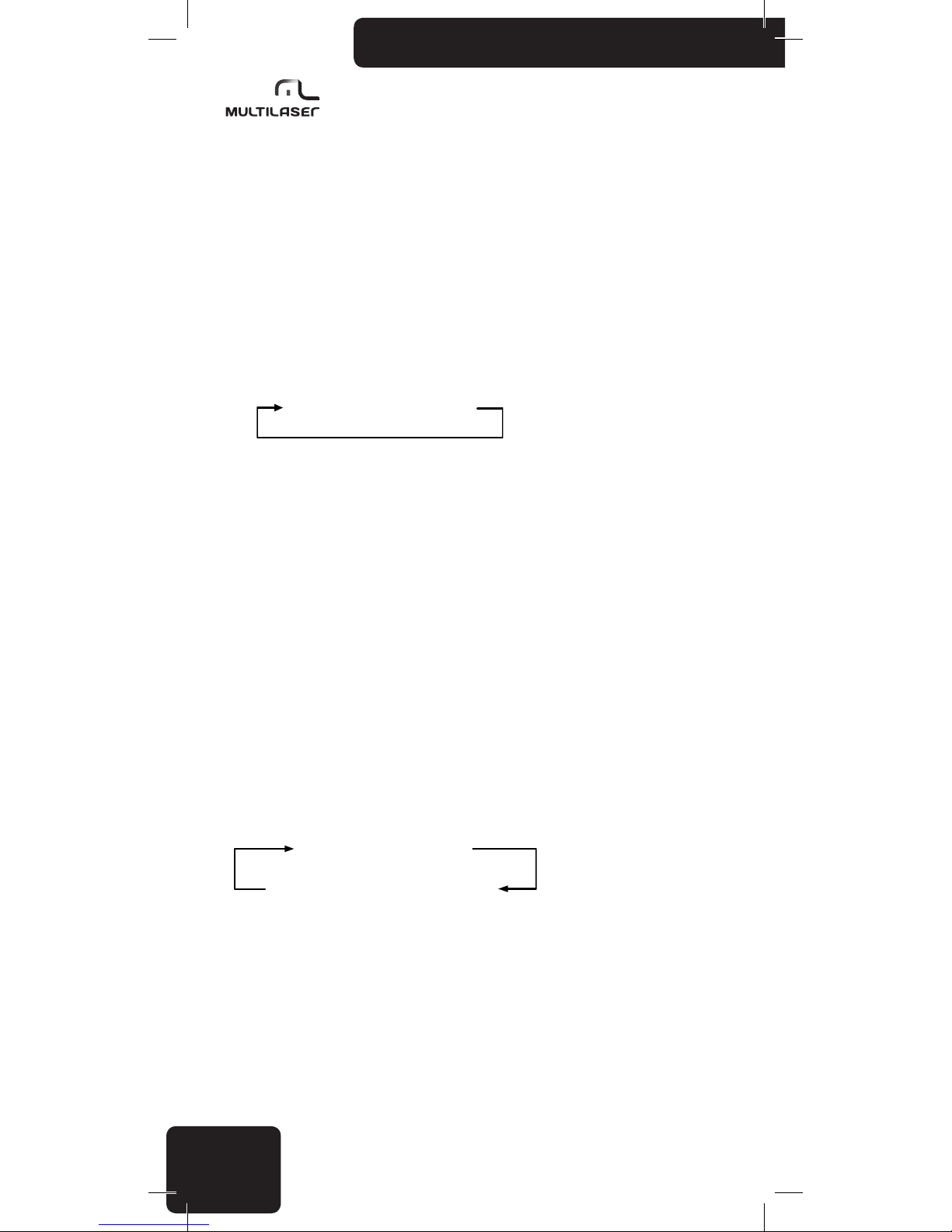
Você seleciona entre as seguintes fontes de sinal pressionando o botão MODE:
Rádio FM SD,MMC USB AUX
• Quando você liga o aparelho ele retorna para a última fonte de sinal utilizada
• Se os soquetes USB e SD estiverem vazios, somente os modos de rádio FM e AUX estarão
disponíveis
• Se unidades externas estiverem conectadas tanto na porta USB como no soquete SD, então
a porta USB terá a prioridade. Neste caso você não poderá selecionar a entrada SD pressionando o
botão MODE.
• O aparelho sempre iniciará a reprodução pela última unidade externa conectada. Por exem-
plo, se você tiver um cartão de memória conectado à porta USB e conectar um cartão SD, o cartão
SD se tornará ativo e a reprodução começará automaticamente.
3. Configuração de volume
Gire o botão SEL para ajustar o volume para o nível desejado.
• Se o aparelho não estiver atualmente no modo de controle do volume, então mantenha
pressionado o botão giratório até encontrar o modo VOL.
• Você pode ajustar o volume entre 0 e 64. Quando o volume está congurado para “0”, os
altofalantes desligam.
• Se você não zer nenhuma alteração durante 3 segundos, o aparelho retornará automatica-
mente para a função anterior.
Pressione o botão SEL repetidamente para selecionar a configuração que você deseja ajustar:
BAS TRE BAL FAD EQ
BACKLIGHT VOLUME LOUD ON/OFF
Você pode ajustar as configurações girando o botão.
• Se você não zer nenhuma alteração durante 3 segundos, o aparelho retornará automatica-
mente para a função anterior.
• Como padrão o botão giratório ajusta o volume.
Page 5
5
www.multilaser.com.br
BASS Ajusta o tom grave (-7....00...+7)
TREBLE Ajusta o tom agudo (-7....00...+7)
BALANCE Ajusta o balanço esquerdo / direito (L15...01/00/R01...15)
FADER Ajusta o balanço dianteiro / traseiro (R15...01/00/F01...15)
EQ Ajusta a equalização POP/CLASSIC/ROCK/EQ OFF
LOUD OFF/ON Ajusta LOUD OFF /LOUD ON
VOLUME Controle do volume (00-64)
BACKLIGHT Ajusta a iluminação traseira (00-15)
4. Mudo
Você pode emudecer imediatamente a reprodução sem desligar o aparelho ou alterar a
configuração do volume pressionando o botão MUTE. Pressionando o botão novamente ou girando o
botão do volume o aparelho retorna ao volume original.
Quando o aparelho está emudecido, a tela de exibição mostra um ícone de altofalante com
linhas cruzadas em vermelho e o texto “MUTE”.
5. Configurar a data e a hora
Com o aparelho ligado, pressione o botão “ /CLK” brevemente, a data e a hora atual serão
mostradas na tela. Então, pressione e mantenha pressionado o botão 3/REP por 2 segundos, o item
“Hora” piscará, você pode ajustar o valor desejado pressionando os botões e , pressionando o
botão 3/REP repetidamente muda apara a conguração do outro item. Finalmente, pressione o botão
3/ REP por 2 segundos para confirmar o ajuste.
Quando a data e hora estão sendo mostradas, se você não pressionar qualquer botão por 10
segundos ou pressionar o botão “ /CLK” novamente, a tela reverterá para o modo original.
Operação do Rádio FM
Quando você liga o aparelho, o receptor de FM liga se esta foi a última fonte de sinal selecionada, ou se você tiver removido o último cartão de memória USB ou cartão SD usado.
Se necessário, use o botão MODE para selecionar a função de receptor de FM.
1. Sintonia e armazenamento automático
Para iniciar uma varredura e armazenar as estações de FM disponíveis atualmente, pressione
e mantenha pressionado o botão BAND por 2 segundos. Você pode acompanhar o processo de
varredura e memorização na tela.
Se houverem canais sucientes disponíveis, o aparelho se deslocará para FM2 e FM3 após
preencher as seis posições da primeira banda FM1.
• O aparelho pode armazenar até 18 estações de rádio FM. (FM1/FM2/FM3 com 6 canais
cada).
• Tenha em mente que o receptor pode desconsiderar estações mais fracas e você não poderá
inuir na ordem na qual as estações são armazenadas.
• Se você desejar armazenar uma estação em uma posição particular, você precisa sintonizar
a sua frequencia manualmente e armazená-la.
• Se você estiver usando o receptor em um local distante do local onde você originalmente
armazenou uma estação (por exemplo, quando você está viajando), talvez você precise localizar a
mesma estação em uma frequencia diferente. A mesma estação muitas vezes vai ao ar em freqüências diferentes em locais geograficamente diferentes!
Page 6
6
2. Seleção de uma frequencia armazenada
Pressione e mantenha pressionado brevemente o botão correspondente a posição da estação
(1...6). Certique-se de ter selecionado a banda correta (FM1/FM2/FM3) pressionando primeiro
BAND.
3. Sintonia manual, armazenamento de frequencias
Pressione brevemente o botão e para sintonizar manualmente a estação desejada ou
pressione e mantenha pressionado os botões e para varrer automaticamente as estações
mais fortes. A varredura para quando o aparelho encontra a próxima estação disponível.
4. Função procurar rádio
Quando você estiver escutando o rádio, pressione e mantenha pressionado 2/INT por 2
segundos, então o aparelho entra no modo “iniciar procura FM”. O aparelho tocar os primeiros 10
segundos de cada estação de rádio disponível. O modo procurar rádio será abandonado quando 2/
INT for novamente pressionado.
Reprodução de música
(dispositivos de armazenamento usb, sd ou mmc)
1. Se você desejar ouvir faixas MP3 de um dispositivo de armazenamento USB/SD/MMC e o
receptor de FM estiver atualmente ativo, simplesmente conecte a placa de memória USB ou insira o
cartão de memória. O aparelho detecta esta situação e inicia a reprodução automaticamente. A tela
então exibe o número da faixa, o nome da música e o tempo transcorrido.
• Se tanto a placa de memória USB como o cartão SD/MMC estiverem conectados ao mesmo
tempo, o aparelho irá reproduzir as faixas do último dispositivo que você inseriu.
• Se o aparelho não emitir nenhum som ou não reconhecer a memória USB/SD/MMC, remova
o dispositivo de armazenamento e conecte-o novamente. Se ele ainda não funcionar, pressione o
botão MODE para selecionar a fonte de sinal.
2. Pressione o botão 1/ para alternar entre reprodução e pausa.
3. Pressione e repetidamente para mudar para a próxima faixa ou para a faixa anterior.
Se você pressionar e mantiver pressionados estes botões, poderá saltar 10 faixas para frente
ou para trás. Se houver menos de 10 faixas restantes no início ou no m da lista de reprodução, o
aparelho irá para a primeira u para a última faixa.
4. Durante a reprodução, pressione 2/INT para a função de introdução da faixa, o aparelho to-
cará os 10 primeiros segundos de cada faixa MP3 disponível. Se você escolher tocar a faixa inteira,
pressione 2/INT novamente para sair do modo de introdução e continuar tocando a faixa atual.
Se você pressionar o botão 4/RDM durante a reprodução, o aparelho tocará todas as faixas
disponíveis em uma ordem aleatória. Isto pode tornar uma coleção de faixas bem conhecidas
novamente excitantes. Se você pressionar o botão novamente, a reprodução irá continuar na ordem
original.
Se você pressionar o botão 3/REP durante a reprodução, o aparelho mudará o modo de repetição (repetir uma, repetir pasta, repetir todas).
Reprodução de vídeo
1. Durante a reprodução de música, pressionar o botão 5/AV muda para reproduzir vídeo USB/
SD.
2. Durante a reprodução de vídeo, pressione e repetidamente para mudar para a
próxima faixa ou para a faixa anterior. Se você pressionar e mantiver pressionados estes botões por
alguns segundos, poderá avançar rapidamente ou retroceder rapidamente a faixa atual.
3. Durante a reprodução de vídeo, pressionando brevemente o botão 2/INT, a tela mostrará
Page 7
7
www.multilaser.com.br
a lista de reprodução de vídeo, pressione e repetidamente para selecionar a faixa que você
deseja, então pressione o botão para reproduzir/pausar a faixa.
4. Durante a reprodução de vídeo, pressione brevemente o botão 3/REP para mudar para o
modo de saída CVBS, o sinal de vídeo será emitido através do soquete de vídeo RCA e o dispositivo
de exibição externo reproduzirá o vídeo, durante a reprodução externa, a tela do aparelho será
desligada. Pressione o botão 3/REP novamente para desligar a saída CVBS e retornar para o que era
exibido anteriormente.
Entrada auxiliar
Você pode conectar qualquer dispositivo com uma saída de fone de ouvido ao painel frontal
através de um conector estéreo de 3,5 mm.
Você pode ouvir estes dispositivos portáteis em boa qualidade através dos altofalantes do rádio
do carro se selecionar o modo AUX pressionando o botão MODE.
Você pode conectar aparelhos musicais, aparelhos de multimídia, aparelhos de CD/DVD
dispositivos de navegação, telefones celulares, ditafones etc.
Instalação
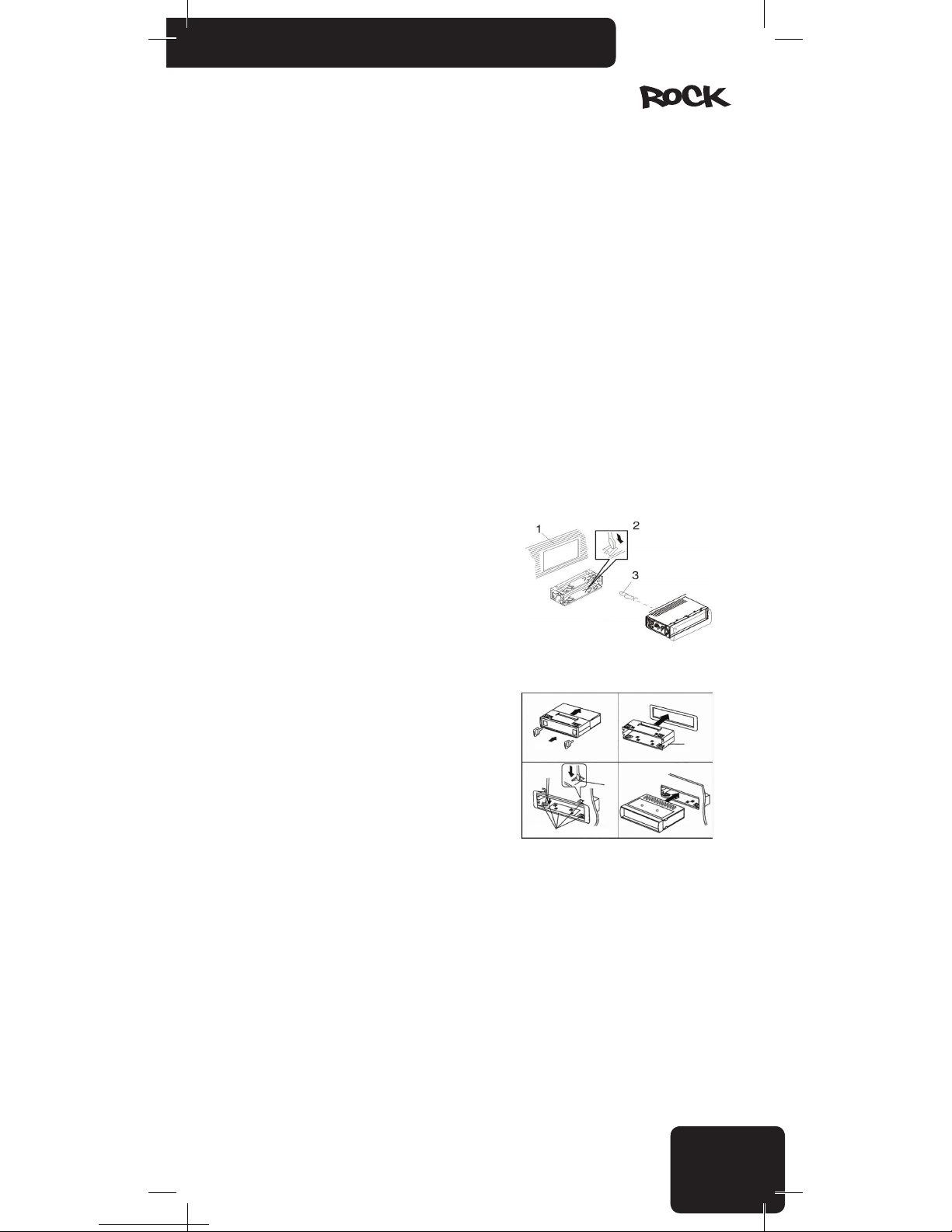
Método de montagem frontal DIN
1. Painel
2. Suporte
Depois de inserir o suporte no painel, selecione a aba
apropriada de acordo com a espessura do material do painel e dobre-a para dentro para prender o suporte no lugar.
3. Parafuso
1. Este aparelho deverá ser instalado por profissionais se possível.
2. Execute a ligação dos cabos em estrito acordo
com os desenhos e especificações. Ligações erradas
podem danificar o dispositivo.
3. O cabo de energia deverá ser conectado após
conectar as outras peças.
4. Todos os fios expostos deverão ser isolados para
evitar curto circuito.
5. Todos os fios soltos deverão ser presos após a
instalação.
Page 8
8
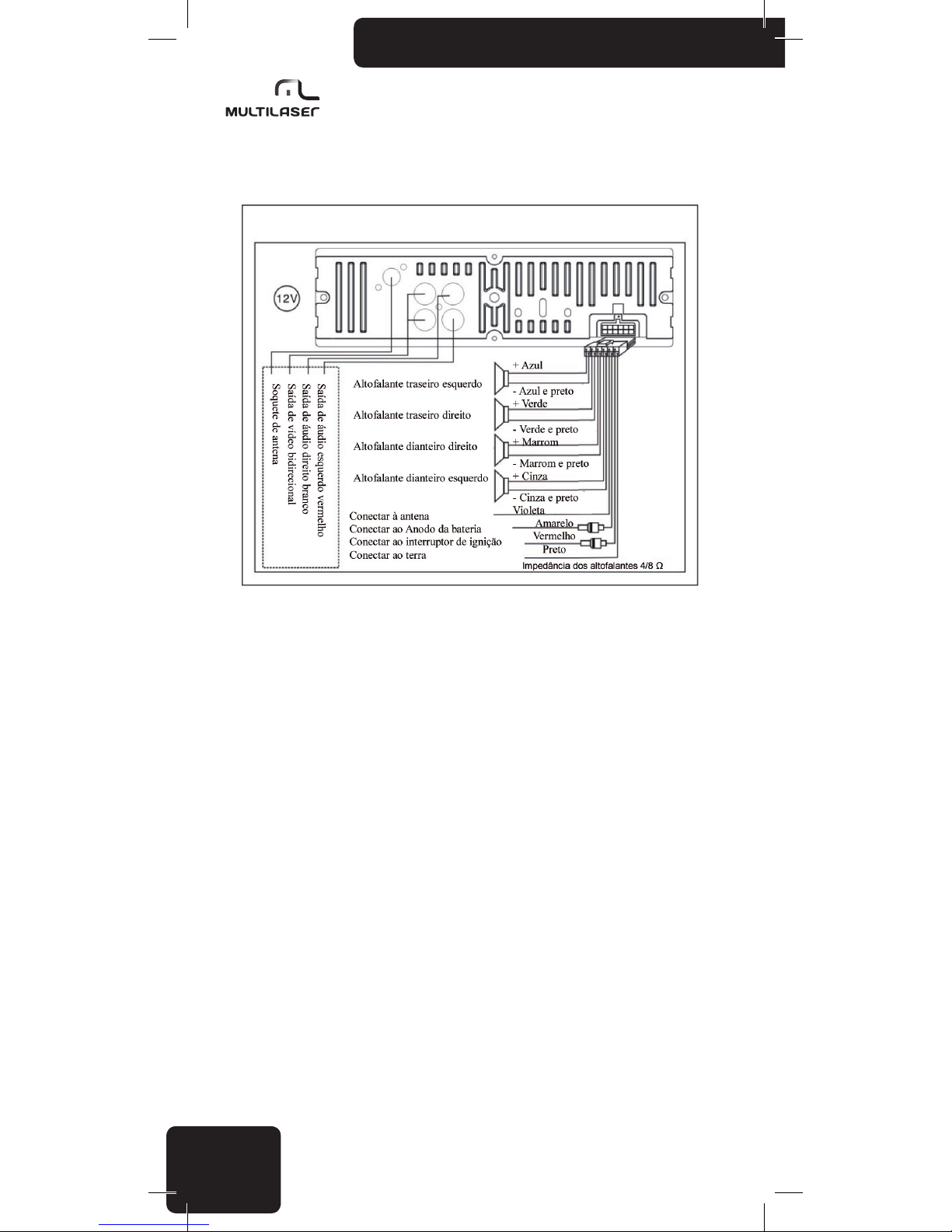
Diagrama de Conexões do Equipamento
Avisos de atenção
• Antes de começar a utilizar o aparelho, leia cuidadosamente estas instruções, depois
mantenha-as em local acessível para referencia futura.
• Se necessário, consulte um técnico antes de instalar o aparelho para evitar danicar o
produto ou o seu veículo.
• Enquanto estiver dirigindo, não faça nada que distrais a sua atenção da condução. Manipular
o aparelho enquanto está dirigindo pode resultar em acidentes. Se necessário, pare o carro enquan-
to estiver manipulando o aparelho.
• Não escute o aparelho muito alto. Ajuste um volume que permita que você escute os sons
externos enquanto estiver dirigindo. Volumes extremos também podem causar danos permanentes
à sua audição.
• Gaste o mínimo de tempo possível olhando para a tela de exibição. Isto pode distrair a sua
atenção da estrada e resultar em acidentes.
• Não desmonte ou altere indevidamente o aparelho, pois isto pode causar fogo, acidentes ou
choques elétricos. O uso ou a instalação incorreta pode configurar a invalidação da garantia.
• Somente para uso em carros com uma bateria de 12 V e aterramento negativo. Usar o
aparelho para qualquer outra nalidade pode resultar em choque elétrico, danos ou fogo. O aparelho
foi projetado exclusivamente para ser utilizado em veículos.
• Sempre use fusíveis fundíveis com valores adequados. Ao substituir um fusível, certique-se
de que o novo fusível tenha o mesmo valor nominal do que você está substituindo. Usar um fusível
diferente pode causar fogo ou danos.
• Não bloqueie as aberturas de ventilação do aparelho, pois isto pode causar o sobreaqueci-
mento dos circuitos, resultando em fogo. Instale o aparelho corretamente para assegurar a ventila-
ção adequada. As aberturas de ventilação em torno das laterais devem ser mantidas livres.
• Certique-se de conectar corretamente o aparelho. Conexões incorretas podem resultar em
fogo ou outros danos.
Page 9
9
www.multilaser.com.br
• Antes de conectar / instalar o aparelho desconecte o pólo negativo da bateria do carro.
Fazendo isto você pode evitar choques elétricos ou curtos circuitos.
• Enquanto estiver instalando o aparelho nunca encurte cabos ou danique a sua isolação.
Fazer isto pode resultar em curto circuito e fogo.
• Antes de fazer furos ou inserir parafusos no corpo do seu veículo certique-se de que não
irá danificar tubos fios elétricos no outro lado da cobertura.
• Não conecte a nenhum sistema elétrico do seu veículo que opere direção, freios ou qualquer
outra função de segurança. Fazer isto pode resultar na perda do controle sobre o veículo e pode
causar fogo.
• Não instale o aparelho ou seus acessórios em um local onde ele possa impedir você de controlar o veículo com segurança, por exemplo, entre o volante de direção e a alavanca de mudança.
• Certique-se de que os os não se enrolem em torno de objetos adjacentes. Disponha os
cabos e fios de modo que não atrapalhem você ao dirigir. Fios que interferem com o seu movimento
ou pendurados sobre a alavanca de mudança, freios, etc. podem ser extremamente perigosos. (Por
exemplo, o cabo de conexão de um reprodutor de mídia conectado à porta USB).
• Em caso de qualquer defeito, desligue o aparelho imediatamente e consulte o seu distribuidor. Muitos defeitos são muito fáceis de identicar (por exemplo, nenhum som, mau cheiro, fumaça,
um objeto externo dentro do produto etc.).
• Certique-se de que nenhum objeto externo entre na tomada USB ou na entrada do cartão
de memória, pois isto pode causar um dano fatal.
• Ao conduzir os cabos de conexão certique-se de que a sua isolação não tenha cado
danificada por qualquer objeto de metal afiado nas imediações.
• Não conecte nenhum cabo quando o dispositivo estiver funcionando. Nunca ligue o sistema
com o volume no nível máximo. O estampido ou outro pico de ruído que pode ser ouvido ao ligar o
aparelho pode causar danos imediatos e irreparáveis aos altofalantes.
• A garantia não é aplicável a danos causados por instalação ou uso irresponsável ou
inapropriado.
Precauções
Limpeza
Use um pano macio e seco e uma escova para limpeza normal. Para remover manchas mais
fortes, umedeça o pano levemente com água. Evite arranhar a superfície da tela; nunca esfregue a
tela quando ela estiver seca e nunca use um pano áspero para limpar a tela. Não use detergentes.
Tenha o cuidado para que nenhum líquido entre dentro do produto ou nos conectores!
Temperatura
Antes de ligar o aparelho assegure-se de que a temperatura dentro do carro esteja entre -20º
C e +55º C, pois o produto é garantido para funcionar corretamente somente dentro desta faixa de
temperatura. Condições de tempo extremas podem danicar o produto.
Definindo o local correto e a instalação
Ao instalar o produto, certique-se de que ele não estará exposto a qualquer um dos seguintes
agentes:
• luz direta do sol ou calor (por exemplo do sistema de aquecimento)
• umidade, alta umidade
• uma quantidade signicativa de poeira
• vibração forte
Page 10
10
Usando o conector USB/SD
• Você pode conectar uma placa de memória USB (“pendrive”), aparelho de áudio MP3,
aparelho de mídia MP4 ou dispositivos similares à porta USB do aparelho. A tomada de cartão de
memória pode alojar cartões SD/MMC. Formato de arquivo suportado para reprodução: arquivos de
áudio MP3.
• Em alguns casos, dispositivos USB/SD externos poderão não funcionar corretamente com
garantia. Ocasionalmente os fabricantes modificam o desenho interno dos seus produtos (por exem-
plo, substituem algum chip usado internamente), os quais não mudam os parâmetros técnicos do
produto, mas podem afetar a operação dos dispositivos para um chip similar, mas de uma geração
de produtos anterior. É possível, portanto que produtos de exatamente o mesmo tipo apresentem
resultados diferentes. Não use um hub USB; cabos de extensão não são permitidos. Não conecte
uma placa de memória USB e um cartão de memória SD ao mesmo tempo no aparelho.
• É recomendado armazenar as faixas que você deseja executar em uma pasta raiz. Você pode
definir a ordem de reprodução das faixas pelos arquivos restantes ou adicionando um número na
frente do nome do arquivo. Não recomendamos o uso de dispositivos de memória de mais de 8 GB
porque um grande número de faixas pode aumentar o tempo necessário para acessar cada faixa.
Armazene somente arquivos MP3 para reproduzir no dispositivo de armazenamento; a presença de
outros dados/arquivos pode diminuir a velocidade do aparelho ou interferir na reprodução.
• O aparelho detecta arquivos MP3 armazenados em subpastas também, até uma profundidade de 6 subpastas.
• Para proteger os seus conectores de precisão, é importante sempre inserir e remover
dispositivos USB/SD/MMC na direção reta. Se você inserir o dispositivo em ângulo, poderá danicar
o soquete de conexão e o próprio aparelho.
• Cartões SD são preferidos às placas de memória USB porque o seu desenho permite que
você conecte-os de um modo mais seguro e estável. Além disso, os cartões SD não se projetam
para fora do aparelho, o que reduz o risco de danicar o aparelho atingindo acidentalmente o
dispositivo conectado ou a cobertura magnética. Qualquer dano resultante de tais erros de usuário
não será considerado como um defeito de fabricação e não será coberto pela garantia.
• Você pode deixar os cartões SD com segurança no seu soquete; o cartão se encaixa embaixo
da tampa magnética fechada.
Atenção! O fabricante não tem responsabilidade por perda ou danos nos dados, mesmo se tais perdas ou danos ocorrerem
enquanto estiverem utilizando o aparelho. Antes de conectar o dispositivo de armazenamento, é recomendado criar uma cópia de
segurança dos dados e faixas no seu computador pessoal.
Uso apropriado das placas de memória USB/cartões SD
Para evitar defeitos e erros, observe o seguinte:
• Leia cuidadosamente as instruções do dispositivo de armazenamento USB/SD ou do repro-
dutor de mídia.
• Não toque nos conectores com as mãos ou com qualquer outro objeto; mantenha os
conectores limpos.
• Proteja os dispositivos USB/SD de choques fortes.
• Não curve, deixe cair, desmonte ou modique estes dispositivos e proteja-os da umidade!
Não armazene os dispositivos nos seguintes locais:
• Qualquer lugar dentro do veículo onde que exposto à luz direta do sol ou alta temperatura.
• Qual quer lugar com alta umidade ou onde estejam presentes materiais corrosivos.
• Coloque os dispositivos em um local onde eles não atrapalhem você ao dirigir.
Outras notas importantes:
• Os dispositivos de memória USB/SD podem não funcionar corretamente em temperaturas
extremamente altas ou baixas.
• Use somente dispositivos USB/SD de alta qualidade. Dependendo do seu tipo e condição,
mesmo estes produtos de alta qualidade podem as vezes não funcionar corretamente. A operação
apropriada destes dispositivos não é sempre garantida.
Page 11
11
www.multilaser.com.br
• Dependendo do tipo e condição do dispositivo USB/SD e das congurações utilizadas no sof-
tware que codicou os arquivos MP3, o aparelho poderá não detectar o reproduzir certos arquivos.
• O aparelho não é garantido para reproduzir arquivos protegidos contra cópias (proteção legal
de direito autoral).
• O dispositivo de memória USB/SD pode necessitar de certo tempo antes que a reprodução
possa iniciar. Se o dispositivo também possuir arquivos que não são de áudio, o tempo necessário
para a reprodução iniciar poderá ser significativo.
• O produto pode reproduzir arquivos com uma extensão .mp3. Não use esta extensão em
arquivos que não contenham som de áudio puro. O aparelho não poderá processar tais dados que
não são de áudio. O ruído emitido ao reproduzir tais arquivos pode danificar os altofalantes e/ou
amplificadores.
• Não remova o dispositivo USB/SD enquanto a reprodução estiver sendo executada. Para
protegê-lo de danos potenciais, primeiramente mude para uma fonte diferente de sinal pressionando
o botão MODE e somente então remova o dispositivo USB/SD.
• Se você conectar um reprodutor de áudio portátil ao invés de uma memória USB/SD através
da porta USB e o dispositivo tiver uma conguração MSC/MTP, selecione a opção MTP. As observa-
ções acima também se aplicam quando você estiver conectando um reprodutor de áudio.
Índice de desempenho
Sintonizador de FM
Faixa de frequencia de FM: 87,5 ~ 108,0 MHz
Sensibilidade utilizável: 3,0 µV
Sensibilidade: 30 dB S/N >10 dB
Frequencia de IF: 10,7 MHz
Separação de canal: >45 dB
Nível de sinal/ruído: >50 dB
USB/SD/MMC
Sistema USB: USB 1.1/2.0
Corrente máxima: 500 mA
Sistema de arquivos: FAT 12/16/32
Formatos de áudio: MP3, WMA, AAC, OGG, WAV, RAFLAC e MP2
Formatos de vídeo: AVI, MP4, TS, ASF, FLV, PMP, RMVB e MPG
Número de canais: 4-CH, estéreo
Separação de canal: >55 dB
Nível de sinal/ruído: >60 dB
Parâmetros gerais
Sistema de voltagem do carro: 12 Volts com Negativo aterrado no chassi
Voltagem de Operação: 14,4 V DC (11 ~ 15 V)
Canais do amplificador: 4 CH
Potencia de saída: 4x 45 W máx.
Impedância dos altofalantes: 4 ~ 8 Ohm
Faixa de frequencia: 20 ~ 20.000 Hz
Saída do preamplificador: 1,2 V (R x RCA)
Page 12
12
Parâmetros gerais (cont.)
Saída de vídeo (CVBS): 1.0 V (1x 2RCA)
Regulagem do tom: Baixo, agudo, clássico, pop, rock, EQ off
Temperatura de operação: -20ºC ~ +55ºC
Peso: 700g
Dimensões do chassi: 178 x 50 x 125 mm
Solução de problemas
Antes de passar esta lista de vericações, verique primeiramente o diagrama de conexão dos
os. Se algum dos problemas persistir depois que a lista de vericações tiver sido feita, consulte o
seu fornecedor de serviços mais próximo.
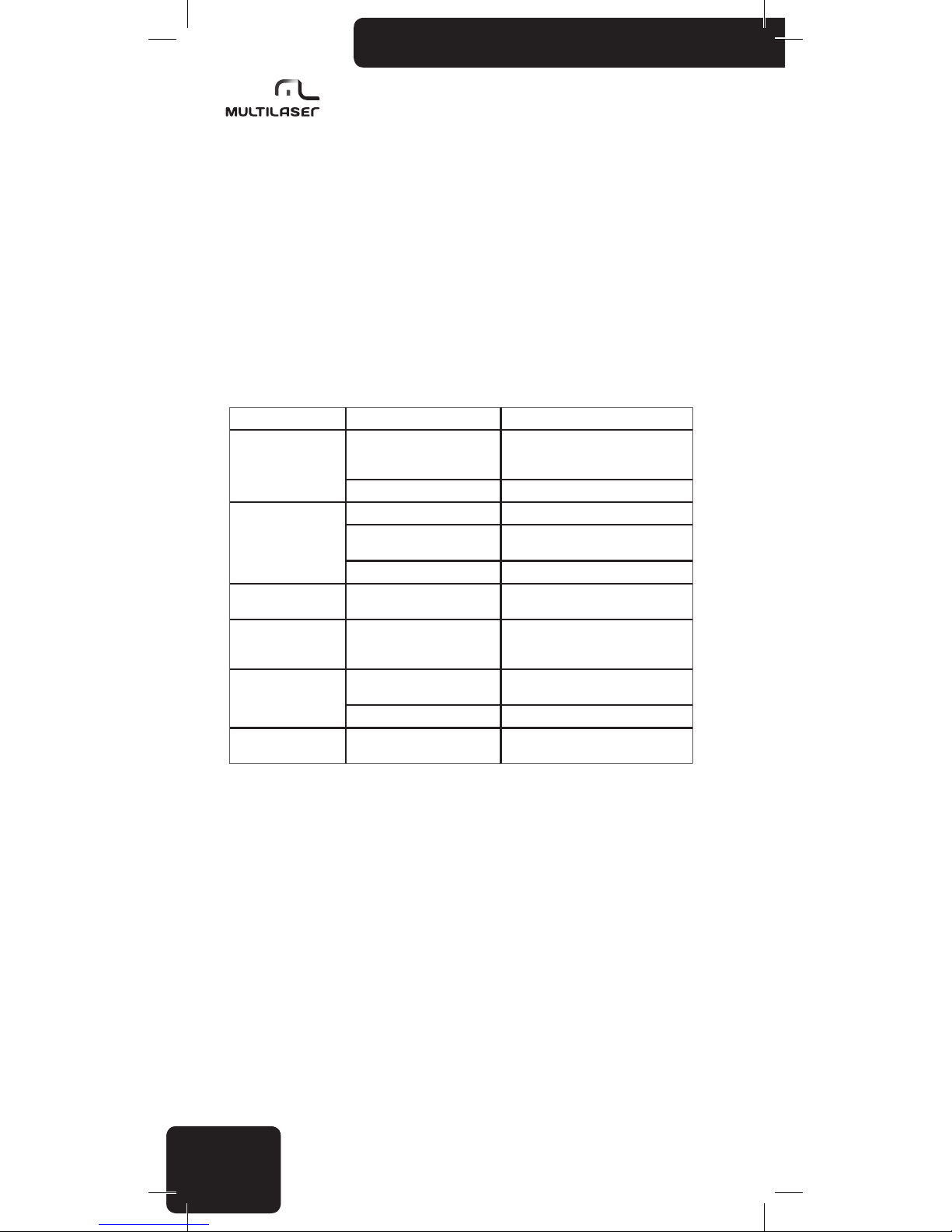
Sintoma Causas Solução
Não Liga
A chave de ignição do carro não
foi ligada
Se a fonte de energia está corretamente
conectada ao terminal de acessórios do
carro, mude a chave de ignição para ACC
O fusível está rompido Substitua o fusível por um novo
Nenhum Som
O volume está no mínimo Ajuste o volume para o nível desejado
Os fios não estão corretamente
conectados
Verifique a conexão dos fios
Estado emudecido Desligue a função de emudecimento
Som fugindo
O ângulo de instalação está
maior que 30°
Ajuste o ângulo de instalação para menos
de 30°
O botão de operação
não funciona
O microprocessador embutido
não está operando corretamente
devido à interferência
Pressione o botão RESET ou reinstale o
painel frontal corretamente.
O rádio ou a seleção
automática não
funciona
O cabo de antena não está
conectado corretamente
Conecte o cabo da antena corretamente
O sinal é muito fraco Selecione a estação manualmente
Imagem com cor
acromática
Erro no Sistema de Cor Ajuste o sistema de cor correspondente
Page 13
13
www.multilaser.com.br
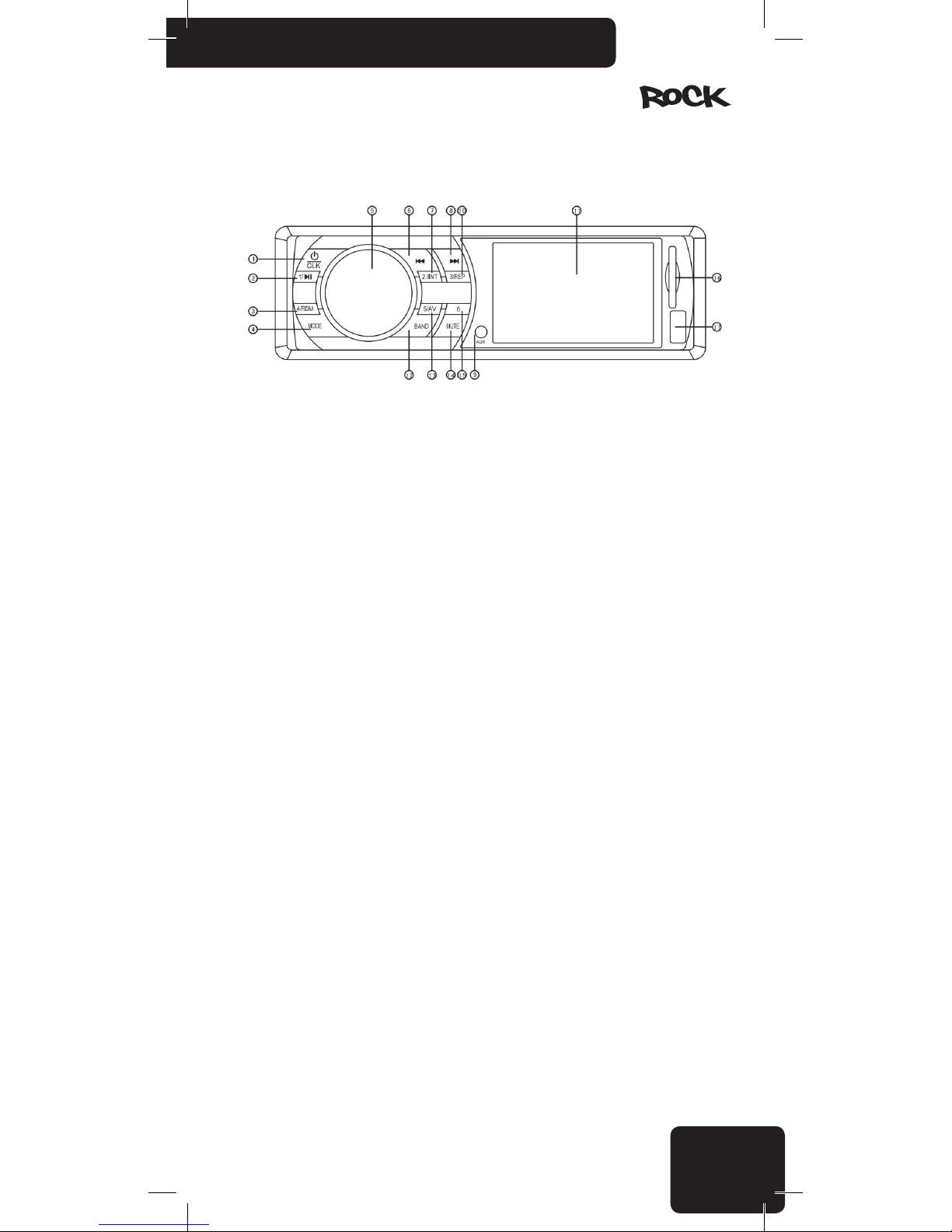
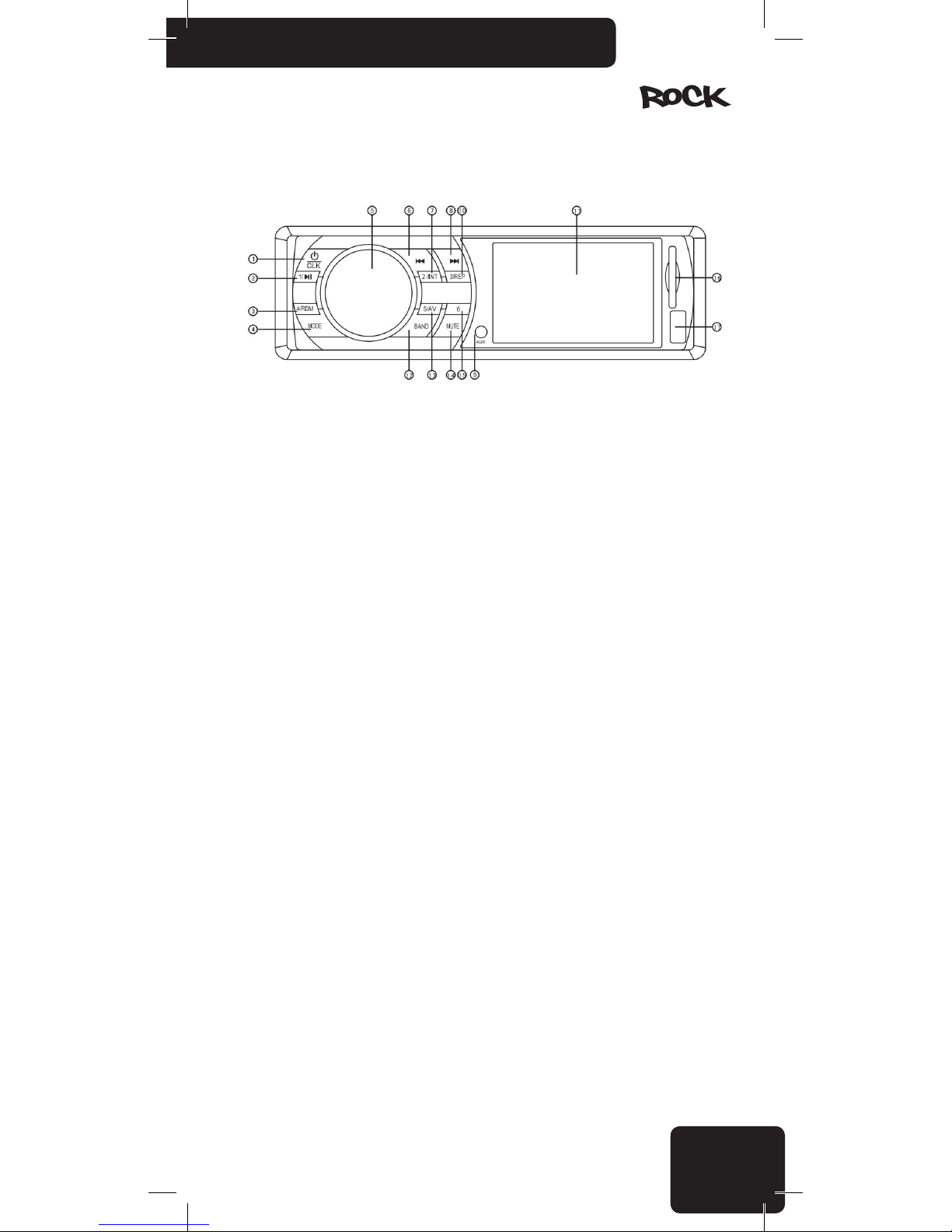
Front Panel Instruction
1. Power ON/ OFF and Clock setting
2. FM program slot 1/play/pause
3. FM program slot 4/ random playback
4. Mode switching( FM/USB/SD/AUX)
5. SEL ( Turning knob for volume control and menu navigation)
6. “Back” button/ Fast backward
7. FM program slot 2/ track intro
8. “Next” button/ Fast forward
9. AUX-IN
10. FM program slot 3/ repeat current track
11. TFT screen
12. Band selector among FM1/FM2/FM3 and automatic tuning/storage
13. FM program slot 5/ Audio and video switching
14. Mute( turn off speakers)
15. FM program slot 6
16. SD card slot
17. USB port
Main functions
• Support maximum capacity 32GB pendrive/ SD/ MMC card.
• Support audios in the formats of WMA, MP3, WAV, OGG, AAC, RA, FLAC, AC3, MP2, etc.
• Support the decoding of multiple videos including AVI, MP4, TS, ASF, RMVB, FLV, PMP, MPG etc.
• Support multiple picture formats such as JPEG, GIF, BMP, PNG, etc.
• Support lyric and ID3 display
• Support CVBS video and audio output
• Support FM radio.
Page 14
14
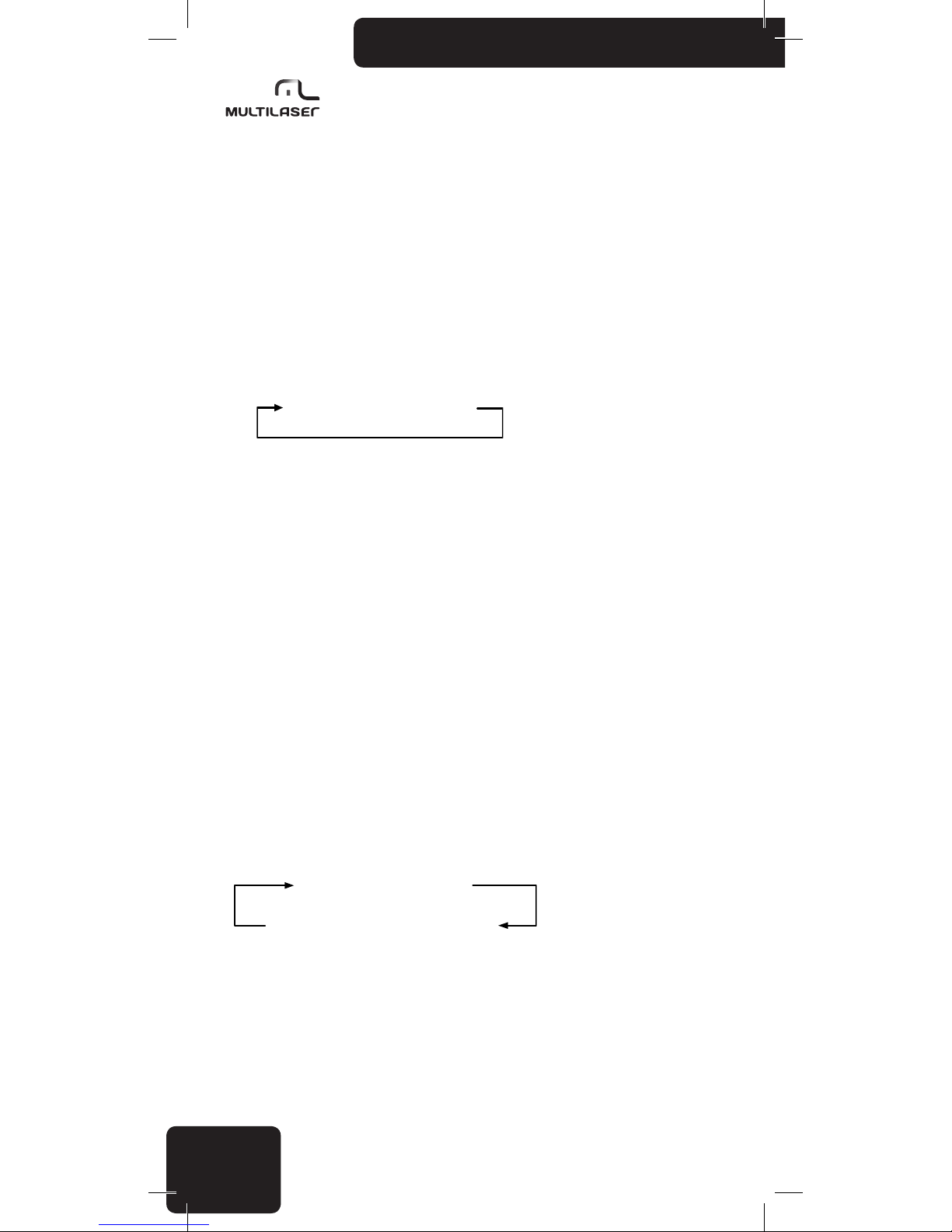
Basic Operation:
1. Power on/off
Press the /CLK button to turn the player on. Similarly, press it and hold this button for 2 seconds in power-on status to power off.
• Starting your vehicle’s engine can create voltage uctuations; therefore only turn on the
player when the engine is already running. Conversely, rst stop the engine, and only then turn off
the player when powering off.
• When you turn on the player, it remembers the last volume and tone settings.
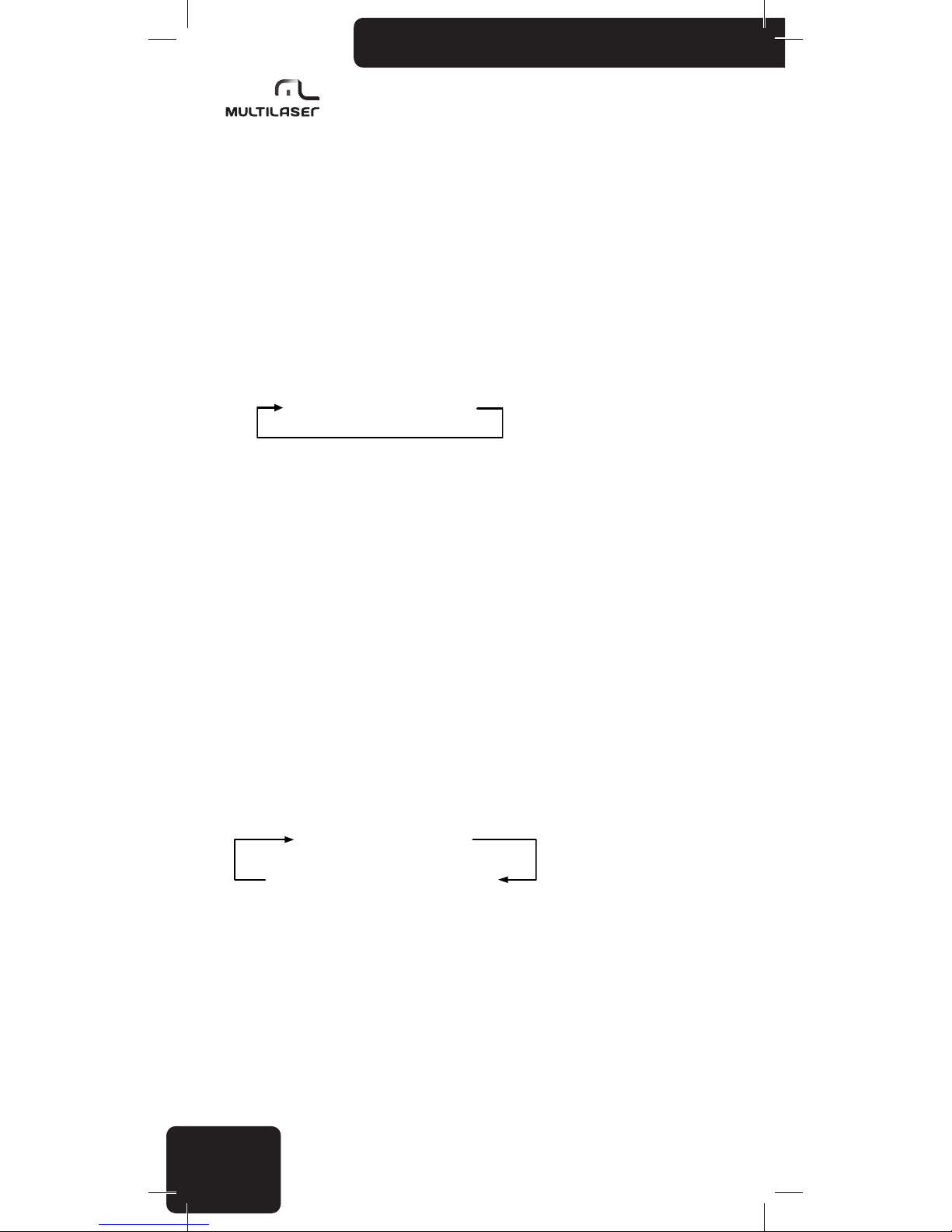
2. Mode switching
You choose from the following signal sources by pressing the MODE button:
Rádio FM SD,MMC USB AUX
• When you turn on the player it reverts to the last used signal source
• If the USB and SD sockets are empty, only the FM radio and AUX modes are available
• If an external unit is connected to both the USB port and the SD socket, then the USB port
takes precedence. In this case you cannot select the SD input by pressing the MODE button.
• The player always starts playback from the last connected external unit. E.g., if you have
a memory stick connected to the USB port and plug in an SD card, the card becomes active and
playback starts automatically.
3. Setting the volume
Turn the SEL button to adjust the volume to the desired level.
• If the player is currently not in the volume control mode, then keep pressing the turning knob
until you reach the VOL mode.
• You can adjust the volume between 0 and 64. When the volume is set to “0”,the speaker
switches off.
• If you make no change for 3 seconds, the player automatically reverts to the previous
function.
Press the SEL button repeatedly to select the setting you wish to adjust:
BAS TRE BAL FAD EQ
BACKLIGHT VOLUME LOUD ON/OFF
You can adjust the setting by turning the knob.
• If you make no change for 3 seconds, the player automatically reverts to the previous
function.
• By default the knob adjusts the volume.
Page 15
15
www.multilaser.com.br
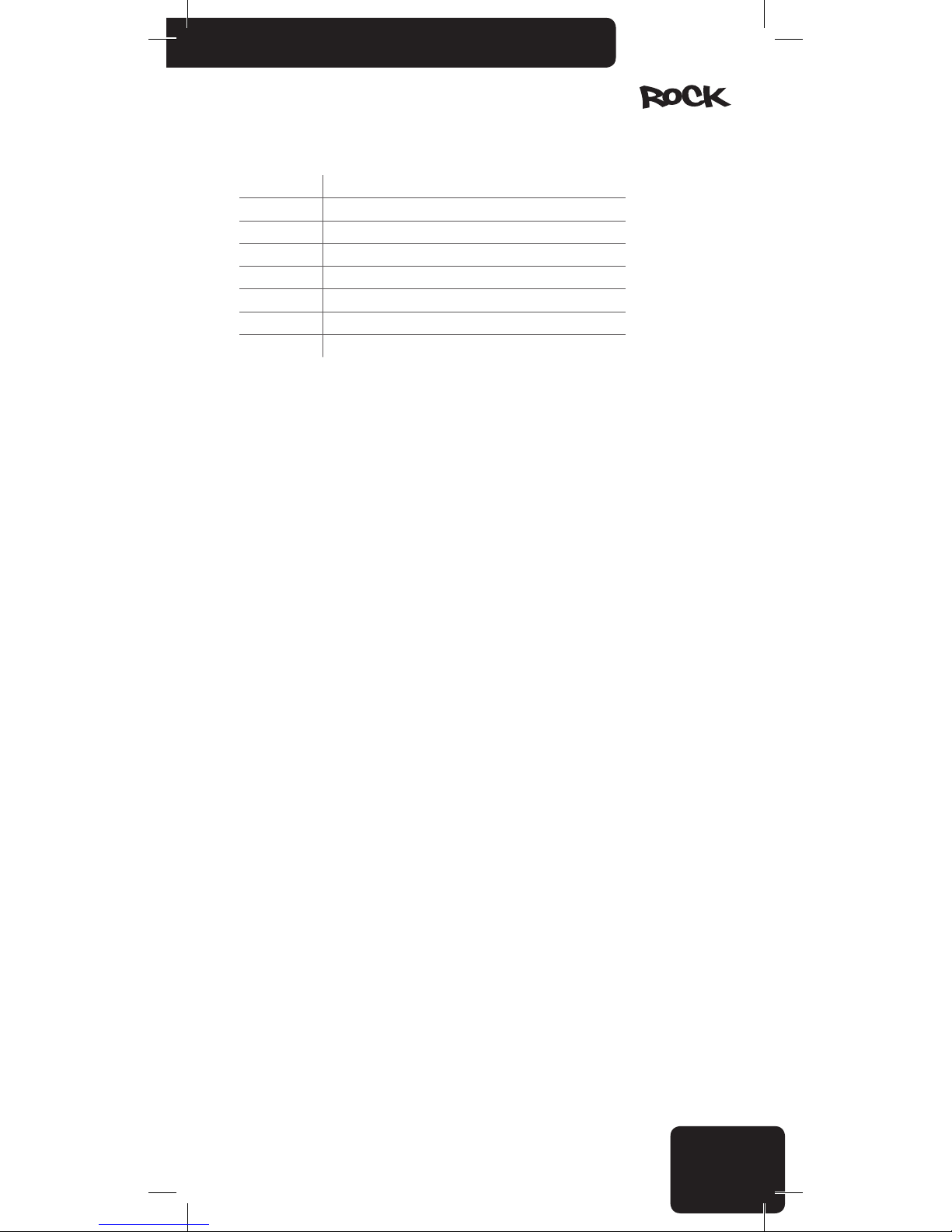
BASS Adjust bass tone (-7....00...+7)
TREBLE Adjust treble tone (-7....00...+7)
BALANCE Adjust left/right balance (L15...01/00/R01...15)
FADER Adjust front rear balance (R15...01/00/F01...15)
EQ Adjust POP/CLASSIC/ROCK/EQ OFF
LOUD OFF/ON Adjust LOUD OFF /LOUD ON
VOLUME Volume control (00-64)
BACKLIGHT Adjust back light (00-15)
4. Muting the player
You can immediately mute playback without turning off the player of changing the volume by
pressing the MUTE button. Pressing the button again or turning the volume button returns to the
original volume.
When the player is muted,the display shows a speaker icon crossed in red and “MUTE” text.
5. Setting the time and date
In the power-on status, press “ /CLK” button briey, the current date and time is show on the
display. Then, press and hold the 3/REP button for 2 seconds,the “Hour” item is blinking, you can
adjust the desired value by press the and ,buttons, press 3/REP button repeatedly switch to
other item setting. Finally, press 3/ REP for 2 seconds to conrm the adjustment.
When the date and time showing, if you do not press any button for 10 seconds or press “ /
CLK” button again, the display reverts to the original mode.
FM Radio Operation
When you turn on the player, the FM receiver will come on if it was the last selected signal
source, or if you have removed the last used USB stick or SD card.
If needed, use the MODE button to select the FM receiver function.
1. Automatic tuning and storage
To start a scan and store the currently available FM stations, press and hold the BAND button
for 2 seconds. You can follow the scanning and memorizing process on the display.
If there are enough channels available, the player will move on to FM2 and FM3 after lling in
the six slots of rst band FM1.
• The player can store up to 18 FM radio stations. (FM1/FM2/FM3 with 6 channels each).
• Keep in mind that the receiver may skip weaker stations, and you cannot inuence the order
in which the stations are stored.
• If you wish to store a station in a particular slot, you need to manually tune in to its frequency
and store it.
• If you are using the receiver at a distant place from the location where you originally stored
a station (e.g., when you are traveling), you may need to nd the same station again at a different
frequency. The same stations often air at different frequencies in different geographical locations!
Page 16
16
2. Selecting a stored frequency
Press and hold the button corresponding to the station’s slot (1...6) briey.Make sure to select
the right band (FM1/FM2/FM3) rst by pressing BAND.
3. Manual tuning, storing frequencies
Press the and button briey to manually tune in to the desired station, or press and hold
the e buttons to scan automatically for the stronger stations. The scan stops when the player
reaches the next available station.
4. Radio browse function
When you listen to the radio , press and hold 2/INT for 2 seconds, then it comes to the state of
“FM browse start” mode. the player plays the rst 10 seconds of every available radio stations.Radio
browse mode will be exited when 2/INT pressed again.
Music playback
(from usb/sd/mmc storage devices)
1. If you wish to listen to MP3 tracks from a USB/SD/MMC storage device and the FM receiver
is currently active, you simply need to connect the USB stick or insert the memory card. The player
detects this and starts playback automatically. The display then shows the track’s number,song
name and the elapsed time.
• If both a USB stick and an SD/MMC card is connected at the same time, the player will play
the tracks from the one you inserted last.
• If the player emits no sound or does not recognize the USB/SD/MMC memory, remove the
storage device and connect it again. If this does not work either, press the MODE button to select the
signal source.
2. Press 1/ button to toggle between playback and pause.
3. Press and repeatedly to move to the previous or next track.
If you press and hold these buttons, you can jump 10 tracks forward or backward. If there are
less than 10 tracks remaining at the start or end of the playlist, the player goes to the rst or last
track
4. During the playback, press 2/INT to track intro function, the player plays the rst 10 seconds
of every available MP3 track. If you choose to play an entire track, press 2/INT again to exit the intro
mode and continue playing the current track.
If you press 4/RDM button during playback, the player will play all available tracks in a random
order. This can make even a well-known collection of tracks exciting again. If you press the button
again, playback will continue in the original order.
If you press 3/REP button during playback, the player will change the repeat mode ( repeat one,
repeat folder, repeat all).
Video playback
1. During the music playback, press 5/AV button shift to USB/SD video play.
2. During the video playback, press and repeatedly to move to the previous or next
track.If you press and hold these buttons for a few seconds, you can fast-forward or fast-backward
the current track.
3. During the video playback, press and repeatedly to select the track you like, then
press 1/ button to play/pause the track.
4. During the video playback, press 3/REP briey to switch CVBS output mode, video signal will
be output through RCA video socket and the external display device will play the video, meanwhile,
Page 17
17
www.multilaser.com.br
the player’s display will be turned off. Press 3/REP button again to turn off CVBS output and return to
the previously display.
AUX in
You can connect any device with a headphone output to the front panel through a 3.5 mm
stereo jack.
You can listen to these portable devices in good quality through your car radio’s speakers if you
select the AUX mode by pressing the MODE button.
You can connect music players, multimedia players, CD/DVD players, navigation devices, cell
phones, Dictaphones etc.
Installation
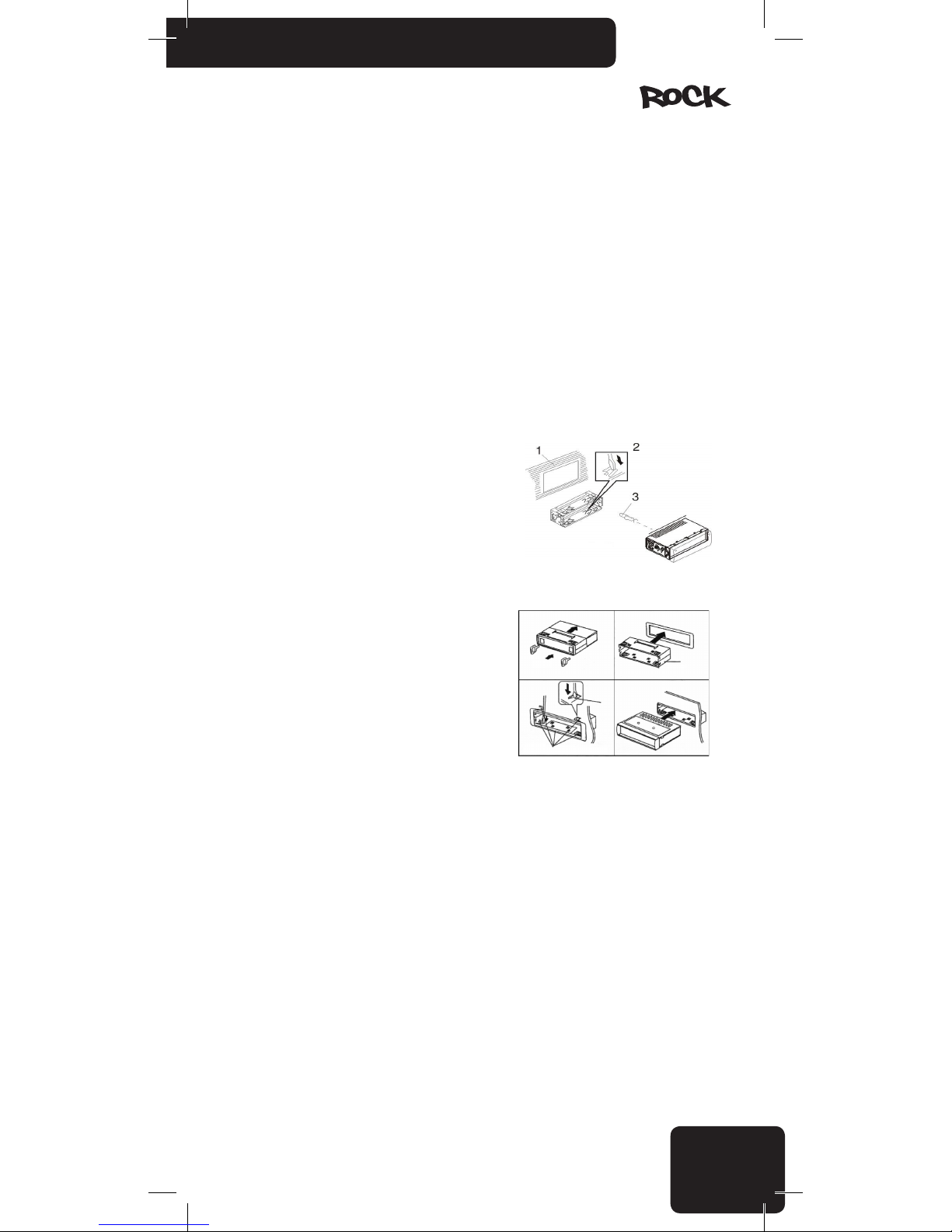
DIN front-mounting method
1. Dashboard
2. Holder
After inserting the holder into the dashboard,select
the appropriate tab according to the thickness of the
dashboard material and bend them inwards to secure the
holder in place.
3. Screw
This Player shall be installed by professionals if
possible.
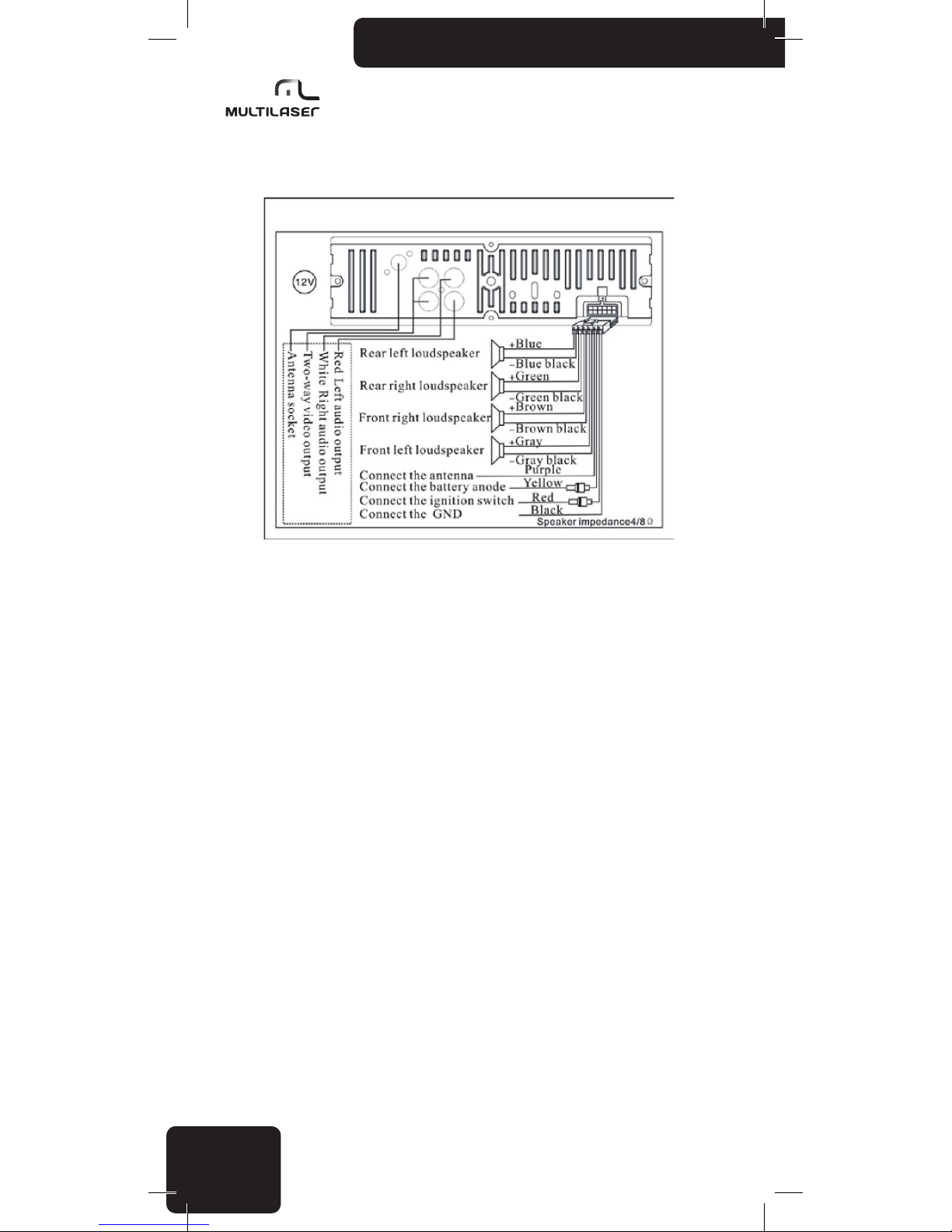
2.Please wire the cables in strict accordance with
the drawings and specications. Wrong wiring will cause
damage to the device.
3.The power cord shall be connected upon wiring
all other parts.
4.All exposed wires shall be insulated to prevent
short circuit.
5. All loose wires shall be xed upon installation.
Page 18
18
Equipment Wiring Diagram
Warnings
• Before starting to use the player, read these instructions carefully, then keep them in an
accessible place for future reference.
• If needed, consult a technician before installing the player to avoid damaging the product or
your vehicle.
• While underway, do not do anything that distracts your attention from driving. Manipulating
the player while driving can result in accidents. If needed, stop the car while manipulatingthe player.
• Do not listen to the player too loud. Set a volume that allows you hear external sounds while
driving. Extreme volumes can also cause permanent damage to your ears.
• Spend as little time as possible watching the display. Doing so can distract your attention
from the road, and result in accidents.
• Do not disassemble or tamper with the player, as that can cause re, accidents, or electric
shock. Incorrect use or installation renders the warranty void.
• Only for use in cars with a 12 V battery and a negative ground. Using the player for any other
purpose can result in electric shock, damage, or re. The player was designed exclusively for use in
vehicles.
• Always use melting fuses with the proper values. When replacing a fuse, make sure that the
new fuse has the same nominal value as the one you are replacing. Using a different fuse can cause
re or damage.
• Do not block the player’s cooling vents, as that can cause its circuits to overheat, resulting
in re. Install the player properly to ensure adequate ventilation. The air vents around the edge must
be left free.
• Make sure to connect the player correctly. Incorrect connections can result in re or other
damage.
• Before connecting/installing the player disconnect the negative pole of the car’s battery.
Doing so helps you prevent electric shock or short circuits.
• While installing the player never cut through cables or damage their insulation. Doing so can
result in short circuit and re.
Page 19
19
www.multilaser.com.br
• Before drilling holes or inserting screws into your vehicle’s body make sure you do not
damage tubes or electric wires on the other side of the cover.
• Do not connect to any electric systems of your vehicle that operate steering, brakes, or any
other safety function. Doing so can result in loss of control over the vehicle, and can cause re.
• Do not install the player or its accessories in a location where they can prevent you from
controlling the vehicle safely, e.g., between the steering wheel and the gear shift.
• Make sure that wires do not coil around neighboring objects. Arrange cables and wires in a
way that does not hinder you in driving. Wires that interfere with your movement or hang over the
gear shift, the brake etc. can be extremely dangerous. (E.g.,the connection cable of a media player
connected to the USB port.)
• In case of any malfunction, turn off the player immediately, and consult your distributor.
Many malfunctions are very easy to spot (e.g., no sound, bad smell, smoke, an external object inside
the product etc.).
• Make sure that no external objects get into the USB socket or the memory card slot, as these
can cause fatal damage.
• When leading the connection cables make sure that their insulation does not get damaged
by any sharp metal objects nearby.
• Do not connect any cables when the device is working. Never turn on the system with the
volume at the maximum level. The pop or other noise spike which can be heard when switching on
can cause irreparable damage to the speakers immediately.
• The warranty is not applicable to damage caused by irresponsible or improper installation
or use.
Precautions
Cleaning
Use a soft, dry cloth and a brush for regular cleaning. To remove stronger stains, wet the cloth
slightly with water. Avoid scratching the display’s surface;never wipe the display when it is dry, and
do not use a coarse cloth to clean the display. Do not use detergents. Make sure no liquid gets inside
the product or onto the connectors!
Temperature
Before turning on the player make sure that the temperature inside the car is between -20C
and +55ºC, as the product is only guaranteed to operate properly within this temperature range.
Extreme weather conditions can damage the product.
Finding the right location and installation
When installing the product, make sure it will not be exposed to any of the following:
• direct sunlight or heat (e.g. from the heating system)
• wetness, high humidity
• a signicant amount of dust
• strong vibration
Using the USB/SD connector
• You can connect a USB stick (“pen drive”), MP3 audio player, MP4 media player or similar
devices to the players USB port. The memory card slot can host SD/MMC cards. Supported le
format for playback: MP3 audio les.
• In some cases, external USB/SD devices may not be guaranteed to work properly. Manufacturers occasionally change the internal design of their products (e.g., replace a chip used inside),
Page 20
20
which does not change the product’s main technical parameters, but it can affect the operation of
devices designed for a similar but previous generation product. It is therefore possible that even
products of the exact same type yield different results. Do not use a USB hub; extension cords are
allowed. Do not connect both a USB stick and an SD card at the same time to the player.
• It is recommended to store the tracks you wish to play in the root folder. You can dene the
playback order of the tracks by renaming the les or adding a number at the front. We do not recommend the use of storage devices over 8GB because a large number of tracks can increase the time
needed to access each track. Only store MP3 les for playback on the storage device; the presence
of other data/les can slow down the player or interfere with playback.
• The player detects MP3 les stored in subfolders as well, up to a depth of 6 subfolders.
• In order to protect their precision connectors, it is important to always insert and remove
USB/SD/MMC devices in a straight position.
If you insert a device at an angle, you can damage the connection socket on the player itself.
• SD cards are preferred over USB sticks because their design allows you to connect them
in a safer and more stable way. In addition, SD cards do not stick out of the player, which reduces
the risk of damaging the player by accidentally hitting the connected device or the magnetic lid.
Any damage resulting from such user error is not considered as a manufacturing defect, and is not
covered by the warranty.
• You can leave SD cards safely in the socket; the card ts under the closed magnetic lid.
Warnings! The manufacturer takes no responsibility for lost or damaged data, even if such loss or damage occurs while using
the player. Before connecting the storage device, it is recommended to create a backup of the data and tracks on it on your personal
computer.
Proper usage of USB sticks/SD cards
To avoid malfunction and errors, please observe the following:
• Carefully read the instructions of the USB/SD storage device or media player.
• Do not touch the connectors with your hand or any object; keep the connectors clean.
• Protect the USB/SD device from strong shocks.
• Do not bend, drop, disassemble or modify these devices, and protect them from humidity!
Do not use or store the devices in the following locations:
• Anywhere inside the vehicle where they are exposed to direct sunlight or high temperature.
• Any place with a high humidity or where corrosive materials are present.
• Place the devices in a location where they do not hinder you in driving.
Further important notes:
• USB/SD memory devices may not function properly at extremely high or low temperatures.
• Only use high-quality USB/SD devices. Depending on their type and condition, even such
high-quality products may not always work properly. The proper operation of these devicesis not
always guaranteed.
• Depending on the type and condition of the USB/SD device and the settings used in the
software that encoded the MP3 les, the player may not detect or play back certain les.
• The player is not guaranteed to play copy-protected les (legal copyright protection).
• The USB/SD memory device may need a certain amount of time before playback can start. If
the device also includes non-audio les, the time needed for playback to start may be signicant.
• The product can play les with an .mp3 extension. Do not use this extension on les that
do not contain pure audio data. The player cannot process such non-audio data. The noise emitted
when playing such les can damage the speakers and/or ampliers.
• Do not remove the USB/SD device while playback is in progress. In order to protect it from
potential damage, rst switch to a different signal source by pressing the MODE button,and only
Page 21
21
www.multilaser.com.br
then remove the USB/SD device.
• If you connect a portable audio player instead of a USB/SD memory through the USB port,
and the device has an MSC/MTP setting, choose the MTP option. The remarks above also apply
when you are connecting an audio player.
Performance index
FM tuner
FM frequency range: 87,5 ~ 108,0 MHz
Usable sensitivity: 3,0 µV
Sensitivity: 30 dB S/N >10 dB
IF frequency: 10,7 MHz
Channel separation: >45 dB
Signal/noise level: >50 dB
USB/SD/MMC
USB system: USB 1.1/2.0
Max. Current: 500 mA
File system: FAT 12/16/32
Audio format: MP3, WMA, AAC, OGG, WAV, RAFLAC and MP2
Video format: AVI, MP4, TS, ASF, FLV, PMP, RMVB and MPG
Number of channels: 4-CH, stereo
Channel separation: >55 dB
Signal/noise level: >60 dB
General parameters
Car Voltage system: 12 Volt Negative GND chassis
Operation Voltage: 14,4 V DC (11 ~ 15 V)
Channels of amplifier: 4 CH
Power output: 4x 45 W máx.
Speaker impedance: 4 ~ 8 Ohm
Frequency range: 20 ~ 20.000 Hz
Pre-amp output: 1,2 V (R x RCA)
Video output (CVBS): 1.0 V (1x 2RCA)
Tone regulation: Bass, treble, classic, pop, rock, EQ off
T operation: -20ºC ~ +55ºC
Weight: 700g
Chassis dimensions: 178 x 50 x 125 mm
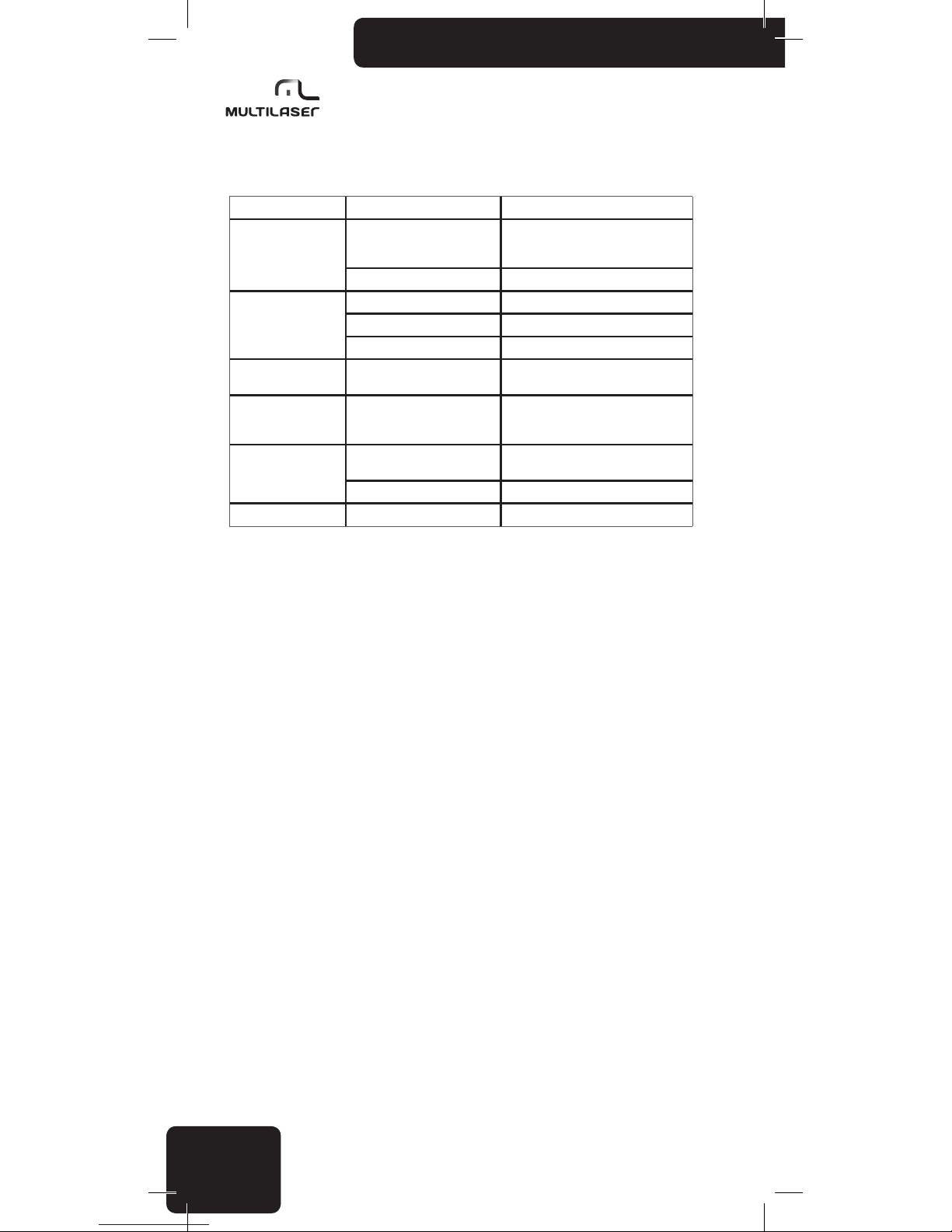
Troubleshooting
Before going through the check list, check the wiring connection diagram rstly. If any of the
Page 22
22
problems persist after checklist has been made,consult your nearest service dealer.
Symptom Causes Solution
No Power
The car ignition key has not been
switched on
If the power supply is properly connected
to the car accessory terminal,switch the
ignition key to ACC
The fuse is blown down Replace a new fuse
No Sound
Volume is at minimum Adjust volume to desired level
Wiring is not properly connected Checking wiring connection
Mute state Turn off the mute function
Sound Skipping
The installation angle is more
than 30°
Adjust the installation angle to less
than 30°
The Operation button
do not work
The built-in microcomputer is
not operating properly due to
interference
Press the RESET button or reinstall the
front panel properly.
The Radio or automatic
selection does not work
The antenna cable is not
connected correctly
Connect the antenna cable correctly
The signals are too week Select the station manually
Achromatic color image Color System error Adjust the corresponding color system
Page 23
23
www.multilaser.com.br
Instrucciones del Panel Frontal
1. Enciende/apaga y configuración del Reloj
2. Posición 1 de la programación FM/ reproducción/ pausa
3. Posición 4 de la programación FM/ reproducción aleatoria
4. Cambio del modo (FM/USB/SD/AUX)
5. SEL (Botón giratorio para control del volumen y navegación en el menú)
6. Botón “Anterior” / Retorno rápido
7. Posición 2 de la programación FM/ introducción de la frecuencia
8. Botón “Próximo” / Avance rápido
9. AUX-IN
10. Posición 3 de la programación FM/ repetir la frecuencia actual
11. Pantalla TFT
12. Selección de banda entre FM1/FM2/FM3 y sintonía/ almacenamiento automático
13. Posición 5 de la programación FM/ cambio entre audio y vídeo
14. Mute (desactiva los altavoces)
15. Posición 6 de la programación FM
16. Entrada para tarjeta SD
17. Puerto USB
Funciones principales
• Soporta pendrive/ tarjeta SD/ tarjeta MMC de 32GB como máximo.
• Soporta audio en los formatos WMA, MP3, WAV, OGG, AAC, RA, FLAC, AC3, MP2, etc.
• Soporta la decodicación para múltiples vídeos incluyendo AVI, MP4, TS, ASF, RMVB, FLV, PMP,
MPG, etc.
• Soporta múltiples formatos de imágenes tales como JPEG, GIF, BMP, PNG etc.
• Soporta la exhibición de letra de músicas e ID3
• Soporta salida de vídeo y audio CVBS
• Soporta radio FM
Page 24
24
Operación básica:
1. Encender/apagar
Presione el botón /CLK para encender el aparato. De modo semejante, mantenga presionado
durante 2 segundos hasta que se apague.
• Dar el arranque en el motor de su vehículo puede crear uctuaciones de voltaje; por
consiguiente solamente encienda el aparato cuando el motor ya esté funcionando. De modo inverso,
primero apague el motor y solamente después apague el aparato.
• Cuando apague el aparato, él guardará las últimas conguraciones de volumen y tono.
2. Cambio del modo
Presionando el botón MODE, usted selecciona entre las siguientes fuentes de señal:
Rádio FM SD,MMC USB AUX
• Cuando usted enciende el aparato él retorna a la última fuente de señal utilizada.
• Si las ranuras USB y SD se encuentran vacíos, solamente los modos de radio FM y AUX
estarán disponibles.
• Si las unidades externas se encuentran conectadas tanto en el puerto USB como en la ranura
SD, entonces el puerto USB tendrá la prioridad. En este caso usted no podrá seleccionar la entrada
SD presionando el botón MODE.
• El aparato siempre iniciará la reproducción por la última unidad externa conectada. Por
ejemplo, si usted tiene una tarjeta de memoria conectado al puerto USB y conecta una tarjeta SD, la
tarjeta SD se activará y la reproducción comenzará automáticamente.
3. Configuración del volumen
Gire el botón SEL para ajustar el volumen para el nivel deseado.
• Si el aparato no se encuentra actualmente en el modo de control del volumen, entonces
mantenga presionado el botón giratorio hasta encontrar el modo VOL.
• Usted puede ajustar el volumen entre 0 y 64. Cuando el volumen esté congurado para “0”,
los altavoces se apagan.
• Si usted no hace ninguna alteración durante 3 segundos, el aparato retornará automáticamente para la función anterior.
Presione el botón SEL repetidamente para seleccionar la conguración que usted desea
ajustar:
BAS TRE BAL FAD EQ
BACKLIGHT VOLUME LOUD ON/OFF
Usted puede ajustar las configuraciones girando el botón.
• Si usted no hace ninguna alteración durante 3 segundos, el aparato retornará automáticamente para la función anterior.
• Como predeterminado el botón giratorio ajusta el volumen.
Page 25
25
www.multilaser.com.br
BASS Ajusta el tono grave (-7....00...+7)
TREBLE Ajusta el tono agudo (-7....00...+7)
BALANCE Ajusta el balance izquierdo / derecho (L15...01/00/R01...15)
FADER Ajusta el balance delantero / trasero (R15...01/00/F01...15)
EQ Ajusta la ecualización POP/CLASSIC/ROCK/EQ OFF
LOUD OFF/ON Ajusta LOUD OFF /LOUD ON
VOLUME Control del volumen (00-64)
BACKLIGHT Ajusta la iluminación trasera (00-15)
4. Mudo
Usted puede enmudecer inmediatamente la reproducción sin apagar el aparato o alterar la
configuración del volumen presionando el botón MUTE. Presionando el botón nuevamente o girando
el botón del volumen el aparato retorna al volumen original.
Cuando el aparato está enmudecido, la pantalla de exhibición muestra un ícono de altavoz con
líneas cruzadas en rojo y el texto “MUTE”.
5. Configurar la fecha y la hora
Con el aparato encendido, presione brevemente el botón “ /CLK”, la fecha y la hora actual aparecerán en la pantalla. Luego, presione y mantenga presionado el botón 3/REP durante 2 segundos,
el ítem “Hora” parpadeará, usted puede ajustar el valor deseado presionando los botones y ,
presionando el botón 3/REP varias veces cambia la configuración para la configuración del otro ítem.
Finalmente, presione el botón 3/ REP durante 2 segundos para conrmar el ajuste.
Cuando la fecha y hora están siendo mostradas, si usted no presiona cualquier botón durante
10 segundos o presionar el botón “ /CLK” nuevamente, la pantalla volverá para el modo original.
Operación de la Radio FM
Cuando usted enciende el aparato, el receptor de FM se enciende si esta fue la última fuente
de señal seleccionada, o si usted ha retirado la última tarjeta de memoria USB o usado la tarjeta SD.
Si es necesario, use el botón MODE para seleccionar la función de receptor de FM.
1. Sintonía y almacenamiento automático
Para iniciar una exploración y almacenar las estaciones de FM disponibles actualmente,
presione y mantenga presionado el botón BAND durante 2 segundos. Usted puede acompañar el
proceso de exploración y memorización en la pantalla.
Si existen canales sucientes disponibles, el aparato se desplazará para FM2 y FM3 después
de llenar las seis posiciones de la primera banda FM1.
• El aparato puede almacenar hasta 18 estaciones de radio FM. (FM1/FM2/FM3 con 6 canales
cada uno).
• Recuerde que el receptor puede desconsiderar las estaciones más débiles y usted no podrá
inuir en el orden en el cual las estaciones son almacenadas.
• Si usted desea almacenar una estación en una posición particular, usted necesita sintonizar
su frecuencia manualmente y almacenarla.
• Si usted está usando el receptor en un lugar distante del local donde usted originalmente
almacenó una estación (por ejemplo, cuando usted está viajando), tal vez necesite localizar la misma
estación en una frecuencia diferente. ¡La misma estación muchas veces va al aire en frecuencias
diferentes en locales geográficamente diferentes!
Page 26
26
2. Selección de una frecuencia almacenada
Mantenga presionado brevemente el botón correspondiente a la posición de la estación (1...6).
Cerciórese de haber seleccionado la banda correcta (FM1/FM2/FM3) presionando primero BAND.
3. Sintonía manual, almacenamiento de frecuencias
Presione brevemente el botón y para sintonizar manualmente la estación deseada,
o mantenga presionado los botones y para explorar automáticamente las estaciones más
fuertes. La exploración para cuando el aparato encuentra la próxima estación disponible.
4. Función buscar radio
Cuando usted esté escuchando la radio, presione y mantenga presionado 2/INT durante 2
segundos, luego el aparato entra en el modo “iniciar búsqueda FM”. El aparato toca los primeros 10
segundos de cada estación de radio disponible. El modo procurar radio será abandonado cuando 2/
INT es presionado nuevamente.
Reproducción de música
(por dispositivos de almacenamiento usb/sd/mmc)
Si usted desea escuchar pistas MP3 de un dispositivo de almacenamiento USB/SD/MMC y
el receptor de FM está actualmente activo, conecte simplemente el dispositivo de memoria USB o
introduzca la tarjeta de memoria. El aparato detecta esta situación e inicia la reproducción automáticamente. La pantalla exhibe el número de la pista, el nombre de la música y el tiempo transcurrido.
• Si el dispositivo de memoria USB como la tarjeta SD/MMC estén conectados al mismo
tiempo, el aparato reproducirá las pistas del último dispositivo que usted introdujo.
• Si el aparato no emite ningún sonido o no reconoce la memoria USB/SD/MMC, retire el
dispositivo de almacenamiento y conéctelo nuevamente. Si él aún no funciona, presione el botón
MODE para seleccionar la fuente de señal.
2. Presione el botón 1/ para alternar entre reproducción y pausa.
3. Presione y repetidamente para cambiar a la próxima pista o a la pista anterior.
Si usted presiona y mantiene presionados estos botones, podrá saltar 10 pistas hacia adelante
o hacia atrás. Si existe menos de 10 pistas restantes en el inicio o en el nal de la lista de reproducción, el aparato para la primera o para la última pista.
4. Durante la reproducción, presione 2/INT para la función de introducción de la pista, el apara-
to tocará los 10 primeros segundos de cada pista MP3 disponible. Si usted elije tocar la pista entera,
presione 2/INT nuevamente para salir del modo de introducción y continuar tocando la pista actual.
Si usted presiona el botón 4/RDM durante la reproducción, el aparato tocará todas las pistas
disponibles en una orden aleatoria. Esto puede tornar una colección de pistas bien conocidas
nuevamente excitantes. Si usted presiona el botón nuevamente, la reproducción continuará en el
orden original.
Si usted presiona el botón 3/REP durante la reproducción, el aparato cambiará el modo de
repetición (repetir una, repetir carpeta, repetir todas).
Reproducción de vídeo
1. Durante la reproducción de música, cuando presiona el botón 5/AV este cambia para
reproducir vídeo USB/SD.
2. Durante la reproducción de vídeo, presione y varias veces para cambiar a la próxima
pista o para la pista anterior. Si usted presiona y mantiene presionados estos botones durante
algunos segundos, podrá avanzar rápidamente o retroceder rápidamente la pista actual.
3. Durante la reproducción de vídeo, presionando brevemente el botón 2/INT, la pantalla
mostrará la lista de reproducción de vídeo, presione y varias veces para seleccionar la pista
Page 27
27
www.multilaser.com.br
deseada, luego presione el botón 1/ para reproducir/pausar la pista.
4. Durante la reproducción de vídeo, presione brevemente el botón 3/REP para cambiar
al modo de salida CVBS, la señal de vídeo será emitido a través de la ranura de vídeo RCA y el
dispositivo de exhibición externo reproducirá el vídeo, durante la reproducción externa, la pantalla
del aparato se apagará. Presione el botón 3/REP nuevamente para borrar la salida CVBS y retornar a
la que estaba exhibiéndose anteriormente.
Entrada auxiliar
Usted puede conectar cualquier dispositivo con una salida de auricular conectada al panel
frontal a través de un conector estéreo de 3,5 mm.
Usted puede escuchar estos dispositivos portátiles con buena calidad a través de los altavoces
del radio del carro si seleccionar el modo AUX presionando el botón MODE.
Usted puede conectar aparatos musicales, aparatos de multimedia, aparatos de CD/DVD
dispositivos de navegación, teléfonos celulares, dictáfonos etc.
Instalación
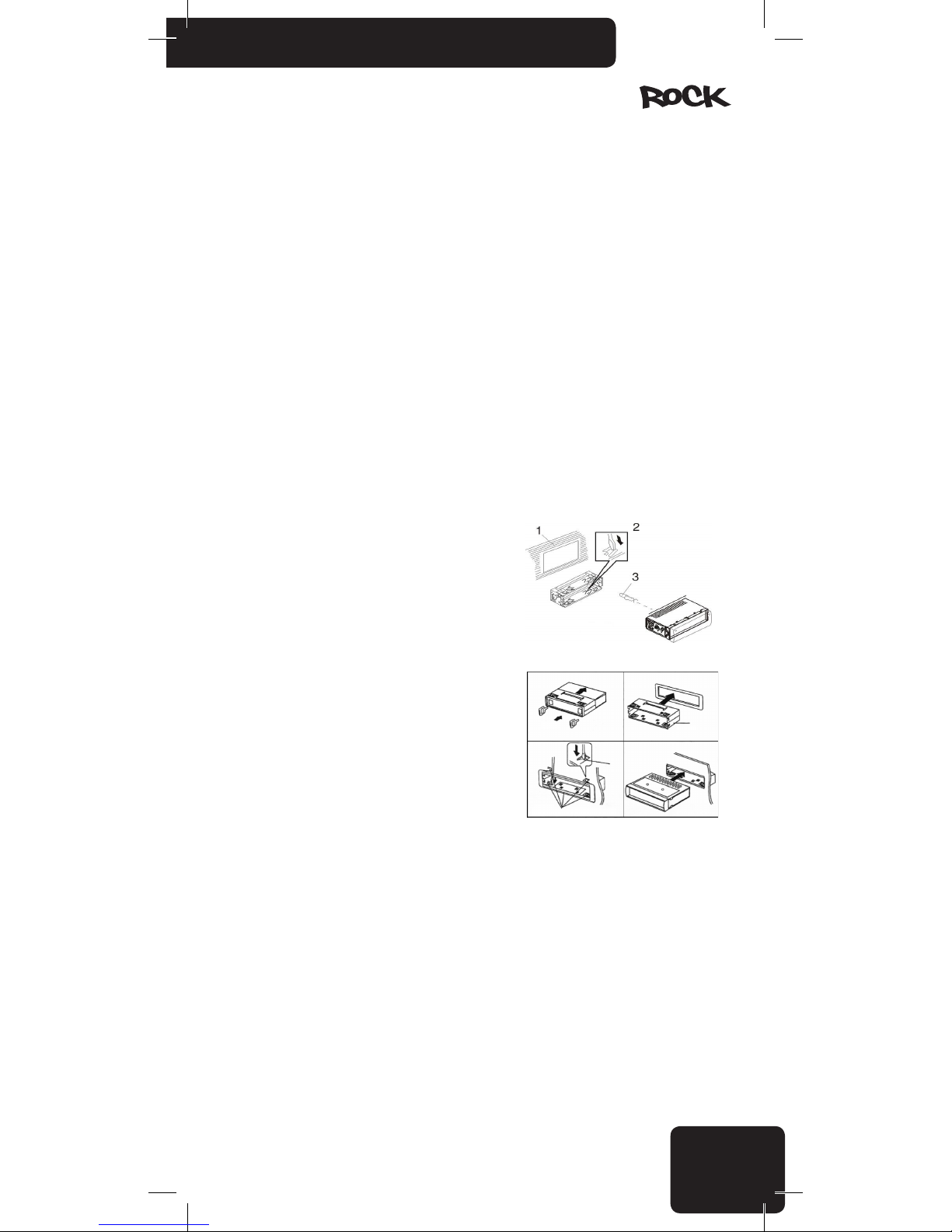
Método de montaje frontal DIN
1. Panel
2. Soporte
Después de insertar el soporte en el panel, seleccione
la pestaña apropiada de acuerdo con el espesor del
material del panel y dóblela hacia dentro para prender el
soporte en el lugar.
3. Tornillo
1. Este aparato deberá ser instalado por técnicos
capacitados.
2. Ejecute la conexión de los cables en estricto
acuerdo con los dibujos y especificaciones. Conexiones
erradas pueden damnificar el dispositivo.
3. El cable de energía deberá conectarse después de
conectar las otras piezas.
4. Todos los cables expuestos deberán ser aislados
para evitar cortocircuito.
5. Todos los cables sueltos deberán sujetarse después de la instalación.
Page 28
28
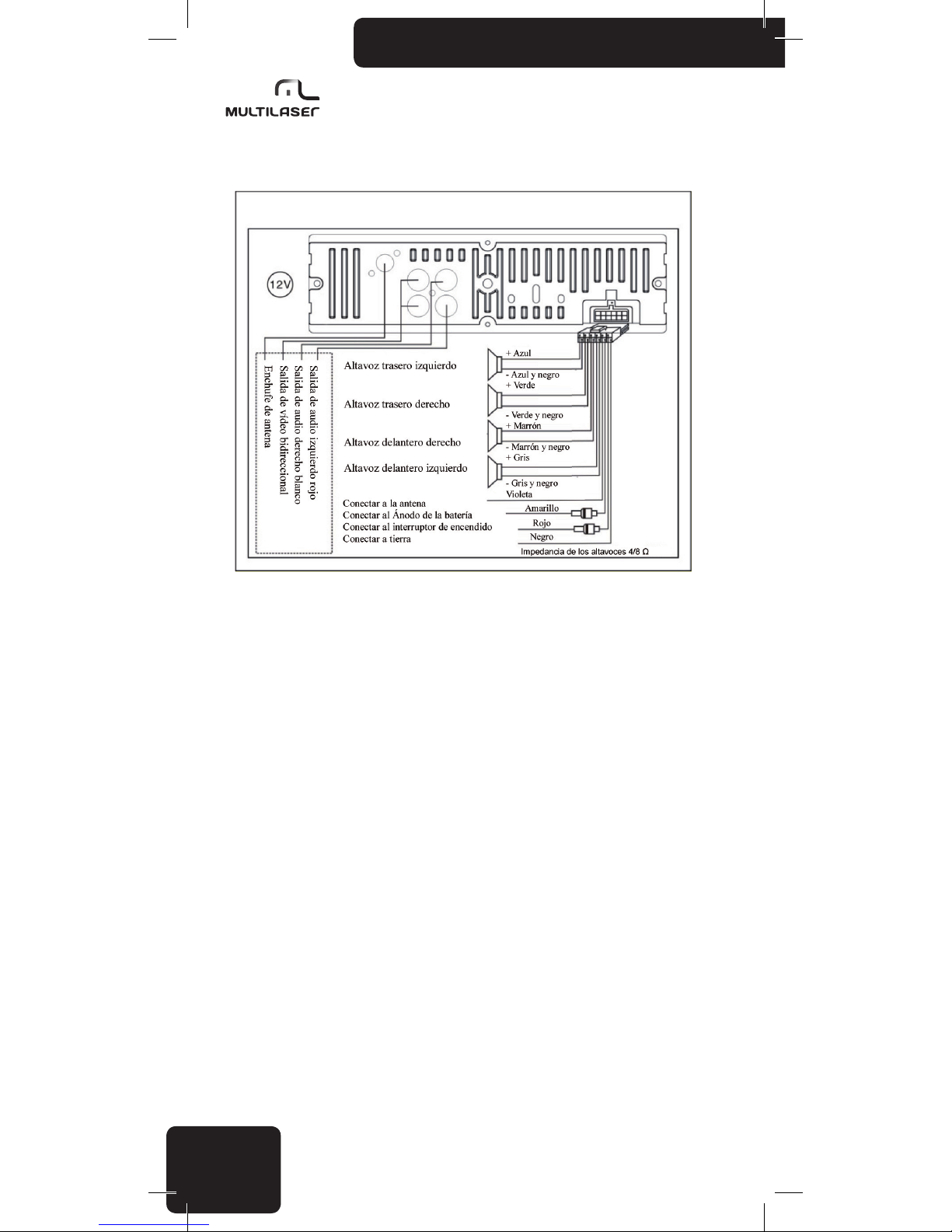
Diagrama de Conexiones del Equipo
Avisos de atención
• Antes de comenzar a utilizar el aparato, lea cuidadosamente estas instrucciones, después
manténgalas en un lugar accesible para referencia futura.
• Si es necesario, consulte a un técnico antes de instalar el aparato para evitar damnicar el
producto o su vehículo.
• Mientras se encuentre dirigiendo, no haga nada que distraiga su atención de la conducción.
Manipular el aparato mientras está dirigiendo puede causar accidentes. Si es necesario, pare el
vehículo mientras esté manipulando el aparato.
• No escuche el aparato muy alto. Ajuste un volumen que permita escuchar los sonidos
externos mientras se encuentre dirigiendo. Volúmenes extremos también pueden causar daños
permanentes a su audición.
• Gaste el tiempo mínimo posible mirando la pantalla de exhibición. Esto puede distraer su
atención de la carretera y resultar en accidentes.
• No desmonte o altere en forma indebida el aparato, ya que esto puede causar fuego,
accidentes o choques eléctricos. El uso o la instalación incorrecta pueden causar la pérdida de la
garantía.
• Solamente para uso en automóviles con una batería de 12 V y aterramiento negativo. Usar el
aparato para cualquier otra nalidad puede resultar en choque eléctrico, daños o fuego. El aparato
fue proyectado exclusivamente para ser utilizado en vehículos.
• Siempre use fusibles fundibles con valores adecuados. Al sustituir un fusible, cerciórese de
que el nuevo fusible tenga el mismo valor nominal del que usted está sustituyendo. Usar un fusible
diferente puede causar fuego o daños.
• No bloquee las aberturas de ventilación del aparato, ya que esto puede causar el sobrecalentamiento de los circuitos, resultando en fuego. Instale el aparato correctamente para garantizar
la ventilación adecuada. Las aberturas de ventilación en torno de las laterales deben mantenerse
libres.
• Cerciórese de conectar correctamente el aparato. Conexiones incorrectas pueden resultar en
fuego u otros daños.
Page 29
29
www.multilaser.com.br
• Antes de conectar / instalar el aparato desconecte el polo negativo de la batería del automó-
vil. Haciendo esto, puede evitar choques eléctricos o cortocircuitos.
• Mientras se encuentre instalando el aparato, nunca acorte los cables o dañe su aislamiento.
Hacer esto puede resultar en cortocircuito y fuego.
• Antes de hacer oricios o insertar tornillos en el cuerpo de su vehículo cerciórese de que no
causará daños a las tuberías, cables eléctricos al otro lado de la cobertura.
• No conecte a ningún sistema eléctrico de su vehículo que opere la dirección, frenos o
cualquier otra función de seguridad. Hacer esto puede resultar en la pérdida del control sobre el
vehículo y puede causar fuego.
• No instale el aparato o sus accesorios en un lugar donde él pueda impedirle de controlar el
vehículo con seguridad, por ejemplo, entre el volante de dirección y la palanca de cambios.
• Cerciórese de que los cables no se enrollen alrededor de objetos adyacentes. Disponga los
cables e hilos de modo que no le obstaculicen al dirigir. Cables que intereren con su movimiento
o colgados sobre la palanca de cambios, frenos, etc. pueden ser extremamente peligrosos. (Por
ejemplo, el cable de conexión de un reproductor de media conectado al puerto USB).
• En caso de cualquier defecto, apague el aparato inmediatamente y consulte a su distribuidor. Muchos defectos son muy fáciles de identicar (por ejemplo, ningún sonido, mal olor, humo, un
objeto externo dentro del producto etc.).
• Cerciórese de que ningún objeto externo entre en la toma USB o en la entrada de la tarjeta
de memoria, ya que esto puede causar un daño fatal.
• Al conducir los cables de conexión cerciórese de que su aislamiento no se haya damnicado
con algún objeto de metal afilado en las cercanías.
• No conecte ningún cable cuando el dispositivo esté funcionando. Nunca encienda el sistema
con el volumen en el nivel máximo. El estampido u otro pico de ruido que puede ser oído al encender el aparato pueden causar daños inmediatos e irreparables a los altavoces.
• La garantía no es aplicable a daños causados por instalación o uso irresponsable o inapro-
piado.
Precauciones
Limpieza
Use un paño suave y seco y una escobilla para limpieza normal. Para remover manchas
más fuertes, humedezca el paño ligeramente con agua. Evite arañar la supercie de la pantalla;
nunca frote la pantalla cuando ella esté seca y nunca use un paño áspero para limpiar la pantalla.
No use detergentes. ¡Tenga el cuidado para que ningún líquido entre dentro del producto o en los
conectores!
Temperatura
Antes de encender el aparato cerciórese de que la temperatura dentro del automóvil se
encuentre entre -20º C y +55º C, ya que el producto es garantizado para funcionar correctamente
solamente dentro de este rango de temperatura. Condiciones de tiempo extremas pueden damnificar el producto.
Definiendo el lugar correcto y la instalación
Al instalar el producto, cerciórese de que no estará expuesto a cualquiera de los siguientes
agentes:
• Luz directa del sol o calor (por ejemplo del sistema de calefacción)
• Humedad, alta humedad
• Una cantidad signicativa de polvo
• Vibración fuerte
Page 30
30
Usando el conector USB/SD
• Usted puede conectar una dispositivo de memoria USB (“pendrive”), aparato de audio MP3,
aparato de media MP4 o dispositivos similares al puerto USB del aparato. La entrada de tarjeta de
memoria puede alojar tarjetas SD/MMC. Formato de archivo soportado para reproducción: archivos
de audio MP3.
• En algunos casos, dispositivos USB/SD externos podrán no funcionar correctamente con
garantía. Ocasionalmente los fabricantes modican el dibujo interno de sus productos (por ejemplo,
substituyen algún chip usado internamente), los cuales no cambian los parámetros técnicos del
producto, pero pueden afectar la operación de los dispositivos para un chip similar, pero de una
generación de productos anterior. Po lo tanto, es posible, que productos del mismo tipo presenten
resultados diferentes. No use un hub USB; no son permitidos cables de extensión. No conecte en el
aparato un dispositivo de memoria USB y una tarjeta de memoria SD al mismo tiempo.
• Es recomendado almacenar las pistas que usted desea ejecutar en una carpeta raíz. Usted
puede denir el orden de reproducción de las pistas por los archivos restantes o agregando un
número delante del nombre del archivo. No recomendamos el uso de dispositivos de memoria de
más de 8 GB porque un gran número de pistas puede aumentar el tiempo necesario para acceder a
cada pista. Almacene solamente archivos MP3 para reproducir en el dispositivo de almacenamiento;
la presencia de otros datos/archivos puede disminuir la velocidad del aparato o interferir en la
reproducción.
• El aparato también detecta archivos MP3 almacenados en subcarpetas, hasta una profundidad de 6 subcarpetas.
• Para proteger sus conectores de precisión, siempre es importante introducir y retirar los
dispositivos USB/SD/MMC en dirección recta.
Si usted introduce o dispositivo en ángulo, podrá damnicar la ranura de conexión y el propio
aparato.
• Las tarjetas SD son preferidos a los dispositivos de memoria USB porque su dibujo permite
que usted los conecte de un modo más seguro y estable. Además de eso, las tarjetas SD no se
proyectan hacia fuera del aparato, lo que reduce el riesgo de damnicar el aparato alcanzando
accidentalmente el dispositivo conectado o la cobertura magnética. Cualquier daño resultante de
tales errores de usuario no será considerado como un defecto de fabricación y no será cubierto por
la garantía.
• Usted puede dejar las tarjetas SD con seguridad en su ranura; la tarjeta se encaja debajo de
la tapa magnética cerrada.
¡Atención!: El fabricante no tiene responsabilidad por pérdida o daños en los datos, incluso si tales pérdidas o daños ocurran
mientras estén siendo utilizando el aparato. Antes de conectar el dispositivo de almacenamiento, es recomendado crear una copia de
seguridad de los datos y pistas en su computadora personal.
Uso apropiado de los dispositivos de memoria USB/tarjetas SD
Para evitar defectos y errores, observe lo siguiente:
• Lea cuidadosamente las instrucciones del dispositivo de almacenamiento USB/SD o del
reproductor de media.
• No toque en los conectores con las manos o con cualquier otro objeto; mantenga los
conectores limpios.
• Proteja los dispositivos USB/SD de choques fuertes.
• ¡No curve, deje caer, desmonte o modique estos dispositivos y protéjalos de la humedad!
No almacene los dispositivos en los siguientes lugares:
• Cualquier lugar dentro del vehículo donde quede expuesto a la luz directa del sol o alta
temperatura.
• Cualquier lugar con alta humedad o donde estén presentes materiales corrosivos.
• Coloque los dispositivos en un lugar donde ellos no obstaculicen al dirigir.
Page 31
31
www.multilaser.com.br
Otras notas importantes:
• Los dispositivos de memoria USB/SD pueden no funcionar correctamente en temperaturas
extremamente altas o bajas.
• Use solamente dispositivos USB/SD de alta calidad. Dependiendo de su tipo y condición,
inclusive estos productos de alta calidad pueden a veces no funcionar correctamente. La operación
apropiada de estos dispositivos no es siempre garantizada.
• Dependiendo del tipo y condición del dispositivo USB/SD y de las conguraciones utilizadas
en el software que codicó los archivos MP3, el aparato podrá no detectar o reproducir ciertos
archivos.
• El aparato no es garantizado para reproducir archivos protegidos contra copias (protección
legal de derecho autoral).
• El dispositivo de memoria USB/SD puede necesitar de cierto tiempo antes que la reproducción pueda iniciar. Si el dispositivo también posee archivos que no son de audio, el tiempo necesario
para iniciar la reproducción podrá ser mayor.
• El producto puede reproducir archivos con una extensión .mp3. No use esta extensión en
archivos que no contengan sonido de audio puro. El aparato no podrá procesar tales datos que
no son de audio. El ruido emitido al reproducir tales archivos puede damnicar los altavoces y/o
amplificadores.
• No retire el dispositivo USB/SD mientras la reproducción esté siendo ejecutada. Para protegerlo de daños potenciales, primero cambie para una fuente diferente de señal presionando el botón
MODE y luego podrá retirar con seguridad el dispositivo USB/SD.
• Si usted conecta un reproductor de audio portátil en vez de una memoria USB/SD a través
del puerto USB y el dispositivo tiene una conguración MSC/MTP, seleccione la opción MTP. Las ob-
servaciones anteriores también se aplican cuando usted esté conectando un reproductor de audio.
Índice de desempeño
Sintonizador de fm
Pista de frecuencia de FM: 87,5 ~ 108,0 MHz
Sensibilidad utilizable: 3,0 µV
Sensibilidad: 30 dB S/N >10 dB
Frecuencia de IF: 10,7 MHz
Separación de canal: >45 dB
Nivel de señal/ruido: >50 dB
USB/SD/MMC
Sistema USB: USB 1.1/2.0
Corriente máxima: 500 mA
Sistema de archivos: FAT 12/16/32
Formatos de audio: MP3, WMA, AAC, OGG, WAV, RAFLAC and MP2
Formatos de vídeo: AVI, MP4, TS, ASF, FLV, PMP, RMVB and MPG
Número de canales: 4-CH, stereo
Separación de canal: >55 dB
Nivel de señal/ruido: >60 dB
Page 32
32
Parámetros generales
Sistema de voltaje del automóvil: 12 Volts con Negativo aterrado en el chasis
Voltaje de Operación: 14,4 V DC (11 ~ 15 V)
Canales del amplificador: 4 CH
Potencia de salida: 4x 45 W máx.
Impedancia de los altavoces: 4 ~ 8 Ohm
Pista de frecuencia: 20 ~ 20.000 Hz
Salida del preamplificador: 1,2 V (R x RCA)
Salida de video (CVBS): 1.0 V (1x 2RCA)
Regulación del tono: Bajo, agudo, clásico, pop, rock, EQ off
Temperatura de operación: -20ºC ~ +55ºC
Peso: 700g
Dimensiones del chasis: 178 x 50 x 125 mm
Solución de problemas
Antes de pasar esta lista de comprobaciones, verique primero el diagrama de conexión de
los cables. Si alguno de los problemas persiste después que la lista de vericaciones haya sido
realizada, consulte a su proveedor de servicios más próximo.
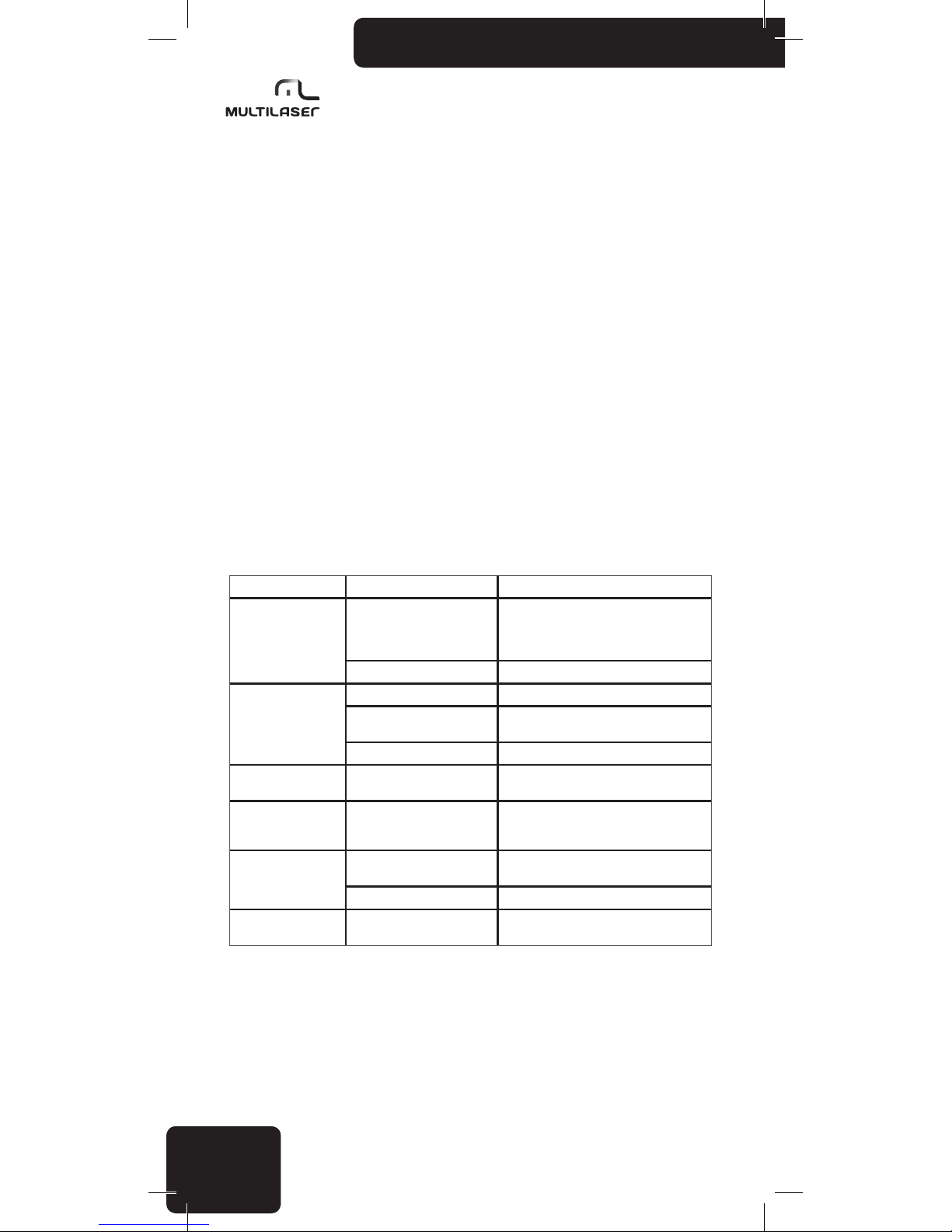
Síntoma Causas Solución
No Enciende
La llave de encendido del
automóvil no fue conectada
Si la fuente de energía está conectada
correctamente al terminal de accesorios
del automóvil, cambie la llave de encendido
para ACC
El fusible está quemado Sustituya el fusible por uno nuevo
Ningún Sonido
El volumen está en el mínimo Ajuste el volumen para el nivel deseado
Los cables no están conectados
correctamente
Verique la conexión de los cables
Estado mudo Desconecte la función de mudo
Sonido escapando
El ángulo de instalación es
mayor que 30°
Ajuste el ángulo de instalación para menos
de 30°
El botón de operación
no funciona
El microprocesador embutido
no está operando correctamente debido a la interferencia
Presione el botón RESET o reinstale correctamente el panel frontal.
La radio o la selección
automática no funciona
El cable de antena no está
conectado correctamente
Conecte correctamente el cable de la antena
La seña es muy débil Seleccione la estación manualmente
Imagen con color
acromática
Error en el Sistema de Color Ajuste el sistema de color correspondiente
Page 33
33
www.multilaser.com.br
Page 34
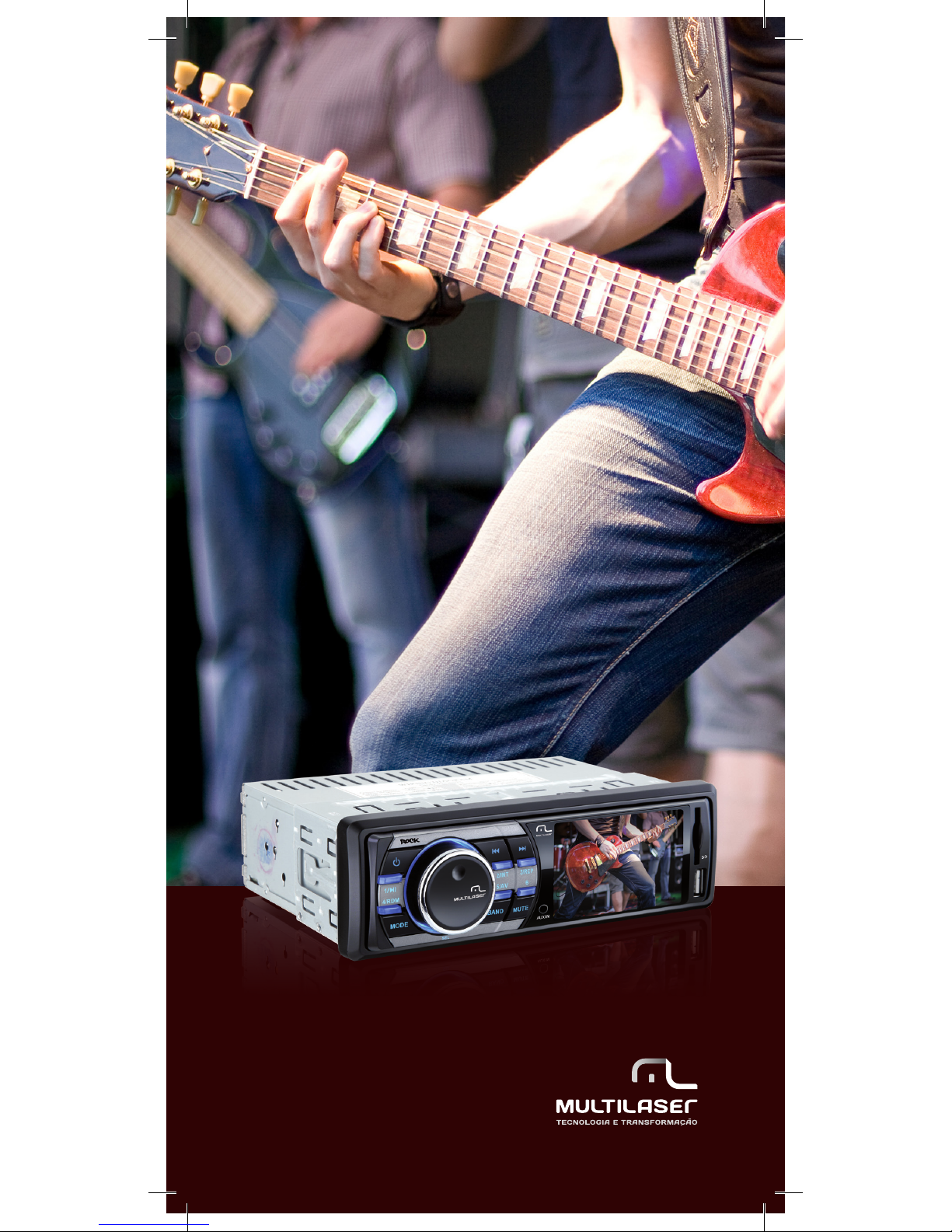
www.multilaser.com.br
 Loading...