

Page 1
Manual do Usuário
Celular FIT
Manual do Usuário
User’s Manual . Manual del Usuario
Som Automotivo Talk
Page 2

1
Termos de Garantia
Este produto é garantido contra defeitos de fabricação. Os casos abaixo não estão
cobertos pela garantia:
· Desgaste natural do equipamento.
· Danos causados por qualquer tipo de líquidos, temperaturas extremas (frio ou calor).
· Oxidação ou fungo devido à maresia ou umidade.
· Quando apresentar evidências de queda, impacto e tentativa de conserto por pessoas
não autorizadas.
· Danos causados ao visor de display devido à má utilização, pressionamento, queda ou
umidade.
· Utilização em desacordo com este manual de instruções.
Procurar uma elétrica especializada para efetuar a estalação. A Multilaser não se responsabiliza
por danos causados decorrentes d a instalação inadequada do aparelho. Em caso de defeito de
fabricação, desde que comprovado, a Multilaser limita-se a consertar ou substituir o produto
defeituoso.
“Este produto está homologado pela ANATEL, de acordo com os procedimentos regulamentados
pela Resolução n° 242/2000”
Resolução 506 - ANATEL
Este equipamento opera em caráter secundário, isto
é, não tem direito a proteção contra interferência
prejudicial, mesmo de estações do mesmo tipo, e não
pode causar interferência a sistemas operando em
caráter primário.
Para maiores informações, consulte o site da ANATEL:
www.anatel.gov.br.
Page 3

2
INDICE | PORTUGUÊS
1. Instruções de Segurança .............................................................................................................. 5
2. Esquema Elétrico do Painel Traseiro .............................................................................................6
3. Passos de Instalação e Remoção ................................................................................................. 7
3.1 Instalação ............................................................................................................................... 7
3.2 Desmontagem ........................................................................................................................8
4. Funções do Painel ........................................................................................................................9
5. Funcionamento Básico ............................................................................................................... 10
6. Bluetooth ....................................................................................................................................15
7. Especificações ............................................................................................................................ 17
8. Solução de Problemas ................................................................................................................ 18
INDEX | ENGLISH
1. Safety Instruction ........................................................................................................................ 21
2. Back Panel Wiring Diagram ........................................................................................................ 22
3. Installation and Removal Steps ..................................................................................................23
3.1 Installation ............................................................................................................................ 23
3.2 Dismantling .......................................................................................................................... 24
4. Front Panel Drawing ................................................................................................................... 25
5. The Basic Operation ................................................................................................................... 26
6. Bluetooth Function ......................................................................................................................30
7. Specification ............................................................................................................................... 31
8. Troubleshooting ..........................................................................................................................33
Page 4

3
INDICE | ESPAÑOL
1. Instrucciones de Seguridad ........................................................................................................ 35
2. Esquema Eléctrico del Panel Trasero ..........................................................................................36
3. Pasos de Instalación y Remoción ............................................................................................... 37
3.1 Instalación ............................................................................................................................ 37
3.2 Remoción ............................................................................................................................. 38
4. Dibujo del Panel Delantero .........................................................................................................39
5. Funcionamiento Básico ..............................................................................................................40
6. Función Bluetooth ....................................................................................................................... 45
7. Especificaciones ......................................................................................................................... 46
8. Resolución de Problemas ........................................................................................................... 47
Page 5

4
Português
Page 6

5
1. Instruções de Segurança
•Este dispositivo é compatível com um +sistema de alimentação veicular de +12V. Não tente
instalá-lo em caminhões ou ônibus com sistema de +24V, pois ele poderá ser danificado.
•Não substitua o fusível elétrico sem a orientação de um profissional. O uso incorreto dos fusíveis
pode causar danos e provocar incêndios.
•Para garantir a segurança e o uso normal do dispositivo, peça para que uma equipe profissional
realize a instalação. Não desmonte nem tente reparar o dispositivo. Para obter informações de
reparo, entre em contato com o suporte técnico da sua revendedora local de som automotivo.
•Evite deixar o produto em ambientes úmidos e que ele entre em contato com água a fim de
evitar choque elétrico provocado por curto circuito, como também para evitar quaisquer danos
ou incêndios.
Observação:
1. Quando o dispositivo funcionar de maneira anormal, aperte a tecla
Reset no painel, e o dispositivo será restaurado com as configurações
de fábrica.
2. Quando a temperatura interna do carro for maior ou menor que a
temperatura recomendada, ajuste-a e só depois ligue o dispositivo.
3. Evite impactos no dispositivo, caso contrário, seus componentes
estruturais poderão ser danificados.
4. Opere o dispositivo de acordo com o manual de instruções. Danos
decorrentes de operações ilegais não serão cobertos pela garantia.
1. Instruções de Segurança
Page 7
6
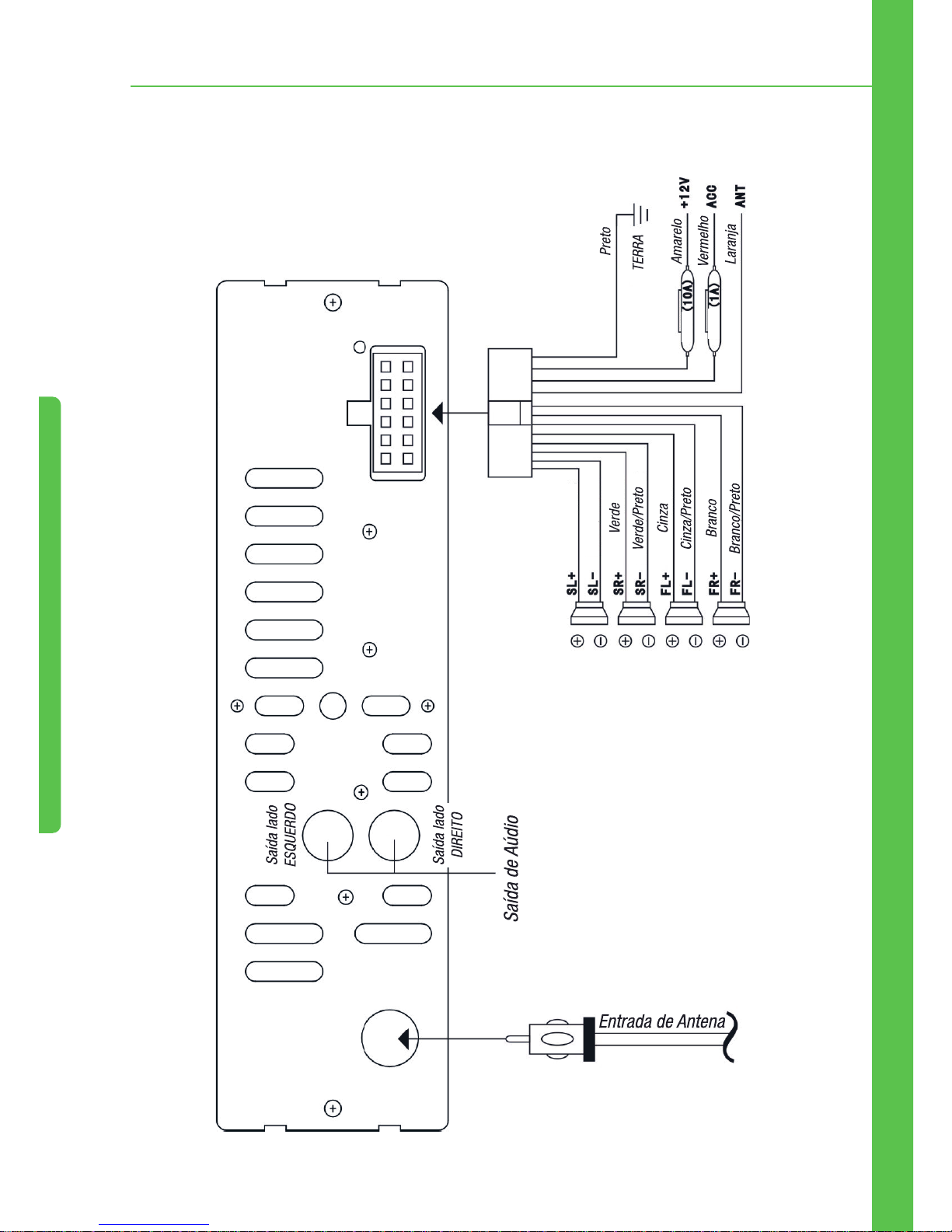
2. Esquema Elétrico do Painel Traseiro
2. Esquema Elétrico do Painel Traseiro
Fuse (10A) = Fusível 10A
Fuse (1A) = Fusível 1A
Roxo
Roxo/Preto
Page 8
7
3. Passos de Instalação e Remoção
3. Passos de Instalação e Remoção
3.1 Instalação
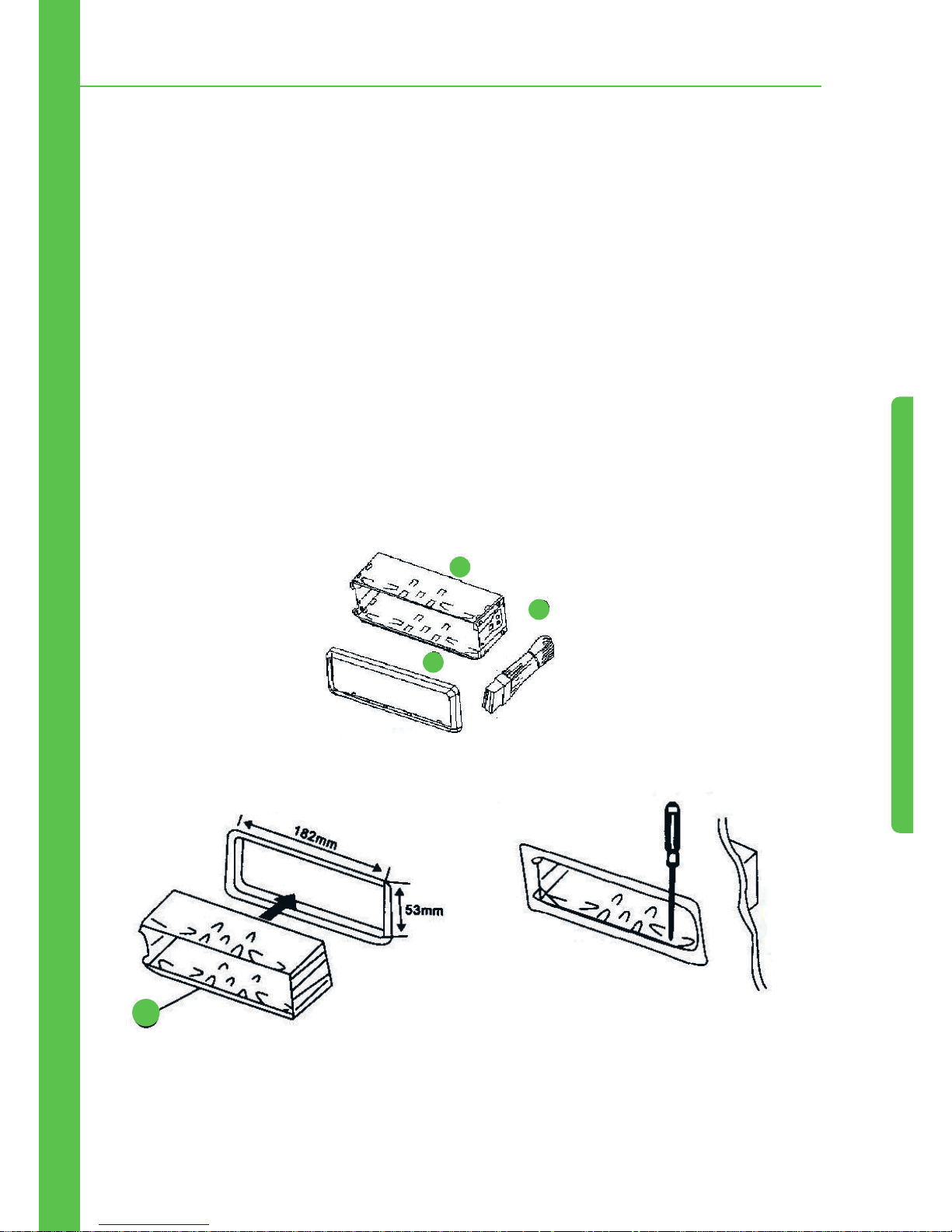
Para garantir uma instalação segura, consulte as ilustrações e o passo-a-passo detalhado:
1. Instale o dispositivo no lado direito do painel do carro e conecte-o aos chicotes elétricos/fios
(consulte o esquema elétrico como referência). Depois, verifique se o dispositivo está funcionando
corretamente.
2. Se ele estiver funcionando corretamente, envolva o fio com fita isolante para garantir que toda a
fiação esteja isolada de maneira adequada.
3. Pressione o conector do conjunto 1 para dentro, ajuste o conjunto 1 no painel e prenda-o.
4. Empurre o conjunto 2 no compartimento metálico e trave-o.
Lista de partes
1.
Insira a cinta de fixação.
1
2
3
1
2.
Dobre as linguetas para fora para encaixar
firmemmente, se necessário.
Page 9
8
3. Passos de Instalação e Remoção
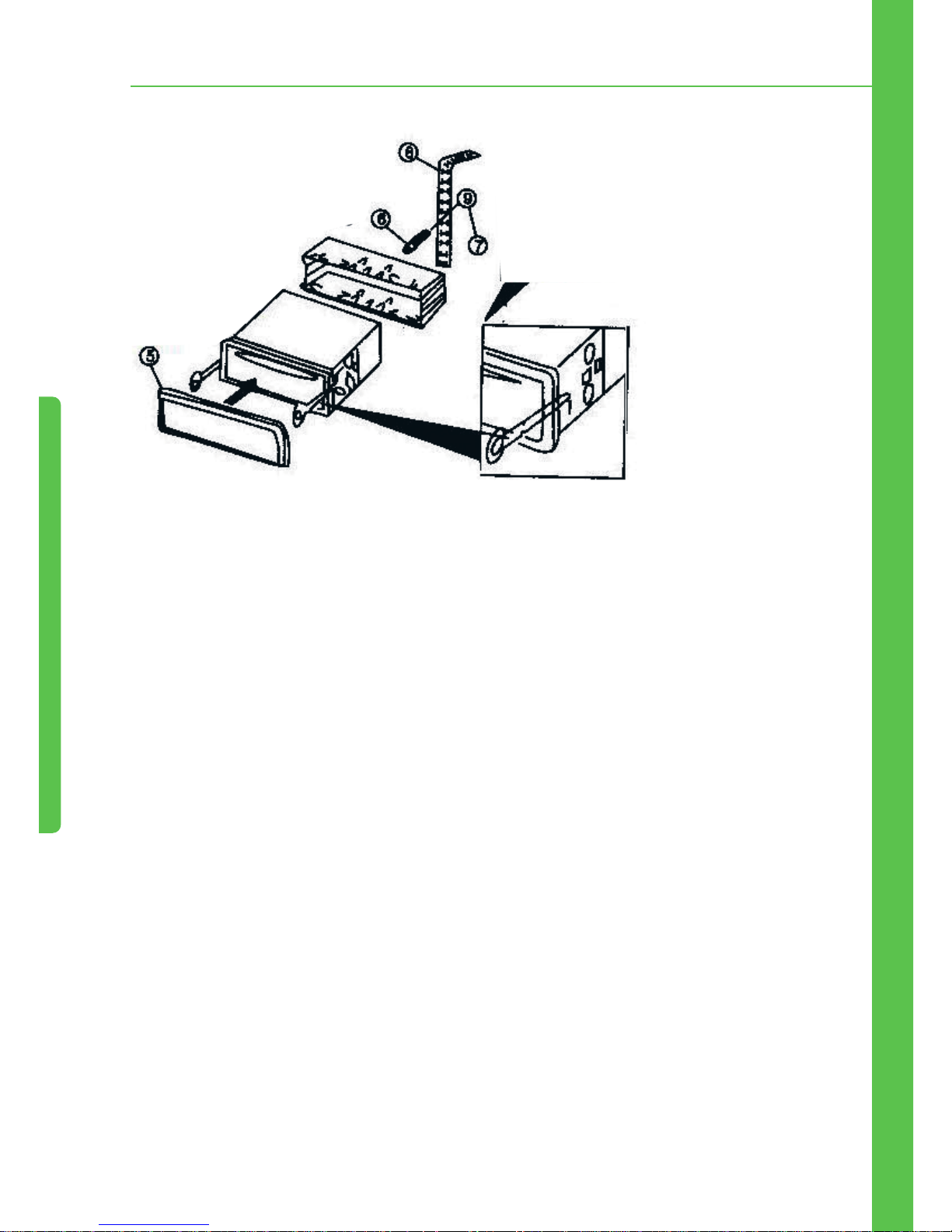
3. Aperte os parafusos do
suporte da parte traseira eo
chicote elétrico e fixe bem a
unidade
Para remover, insira a chave entre o
aparelho e a cinta de fixação e puxe o
aparelhodo painel
3.2 Desmontagem
Insira a chave de desmontagem no orifício até que a trava se abra; então, retire o aparelho e a
chave.
Observação:
1. Não instale o aparelho em um lugar que possa atrapalhar a
condução ou machucar o passageiro em caso de frenagem de
emergência.
2. Para fazer a instalação correta use apenas nossos acessórios para
evitar danos. Se for necessário o uso de brocas ou se houver alguma
mudança necessária durante o processo de instalação, entre em
contato com o revendedor mais próximo.
Page 10
9
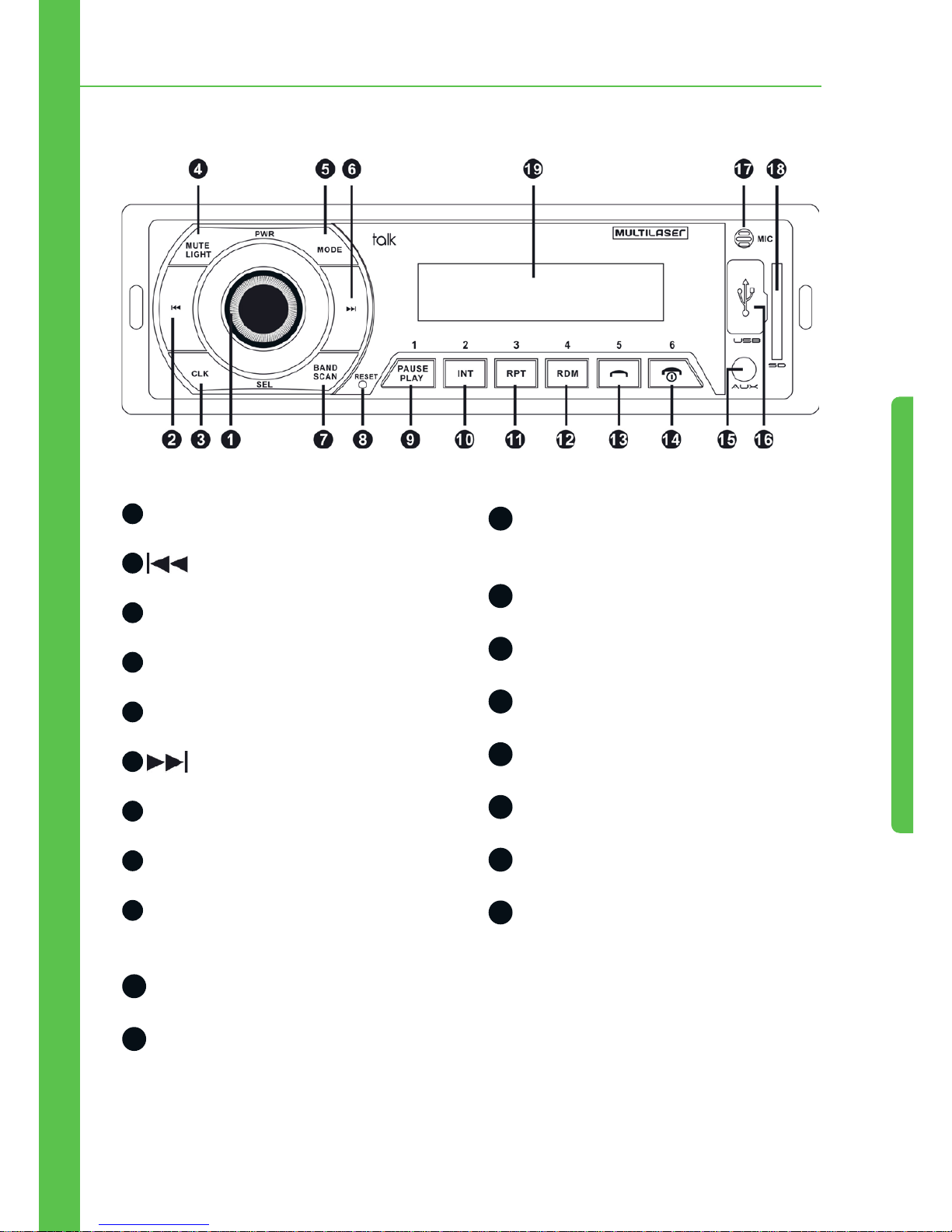
4. Funções do Painel
4. Funções do Painel
1
Codificador, Botão Liga/Desliga, EQ
2
PREV (VOLTAR)
3
Relógio
4
Mute/Light (Mudo/Luz)
5
Mode Switch (Seletor de modo)
6
NEXT (AVANÇAR)
7
Band-Scan (Banda/Varredura)
8
Reset (Restaurar)
9
Botão Numérico 1/Play, Pause
(Reproduzir/Pausar)
10
Botão Numérico 2/Introdução
11
Botão Numérico 3/Repetir
12
Botão Numérico 4/Reprodução
Aleatória
13
Botão Numérico 5/Atender Chamada
14
Botão Numérico 6/Encerrar Chamada
15
Entrada Auxiliar
16
Entrada USB
17
Microfone
18
Entrada de cartão SD
19
Tela de Exibição
Page 11

10
5. Funcionamento Básico
Ligar/Desligar
No modo de espera, pressione e segure o botão 1 (2 segundos) para desligar; pressione 1 para
ligar.
Modo
Quando o dispositivo estiver ligado, pressione o botão MODE para alternar entre as seguintes
funções:
FM > LIN > USB > SD > FM (Observação: certifique-se de que as funcionalidades desejadas estão
disponíveis, do contrário, não serão exibidas) Status padrão: FM.
Volume
Quando o dispositivo estiver ligado, gire o codificador para aumentar/diminuir o volume.
Pelo controle remoto, pressione o botão VOL- para diminuir o volume, e pressione o botão VOL+
para aumentar o volume.
Faixa de Volume: 0 ~ 40
Codificador de seleção
Pressione o botão repetidamente, para mostrar:
“BASS > TREBLE > BALANCE > FADER > EQ > LOUD > VOL”
•BASS (GRAVES): Controla os graves. Gire o codificador para aumentar/diminuir os graves. Faixa
de Graves: -7 ~ +7.
•TREBLE AGUDOS): Controla os agudos. Gire o codificador para aumentar/diminuir os agudos. Faixa
de Agudos:-7 ~ +7.
•BALANCE (EQUILÍBRIO): Controla o equilíbrio dos auto-falantes direito e esquerdo. Gire para a
esquerda para aumentar o lado esquerdo e diminuir o direito. Gire para a direita para aumentar o
lado direito e diminuir o esquerdo. Faixa de equilíbrio dos auto-falantes: Esquerdo 9 ~ Direito 9.
5. Funcionamento Básico
Page 12

11
•FADER (ATENUADOR): Controla o equilíbrio dos auto-falantes dianteiro e traseiro. Gire para a esquerda para aumentar o auto-falante traseiro e diminuir o dianteiro. Gire para a direita para aumentar o auto-falante dianteiro e diminuir o traseiro. Faixa de equilíbrio dos auto-falantes dianteiro e
traseiro: Dianteiro 9 ~ Traseiro 9
•EQ: (EQUALIZADOR): gire o codificador para alternar entre as funções POP > ROCK > JAZZ >
CLAS > NORM
•LOUD: Gire o codificador para direita ou para a esquerda para desligar esta função.
•VOL: Gire o codificador para aumentar/diminuir o volume. Faixa de Volume: 0 ~ 40
EQ
Com o dispositivo ligado, pressione o botão EQ seguidamente para alternar entre as funções abaixo:
“POP > ROCK > JAZZ > CLAS > NORM”
Mute (Mudo)
Quando o dispositivo estiver ligado, pressione o botão MUTE para ligar/desligar o mudo.
Botão Light (Luz)
Quando o dispositivo estiver ligado, a configuração padrão é a de luz acessa. Pressione e segure o
botão LIGHT(2 segundos) para desativar a luz, e pressione-o novamente para habilitar a luz.
Pelo controle remoto, aperte o botão LIGHT para habilitar/desativar a luz dos botões.
Função Relógio
Com o dispositivo ligado ou desligado, pressione o botão CLOCK para exibir o relógio (formato 24
horas), o qual sumirá se não houver nenhuma operação nos próximos 3 segundos (10 segundos em
modo de espera). Pressionar e segurar o botão por 2 segundos também fechará o relógio.
Método de ajuste das horas/minutos: Na função relógio, pressione e segure por 2 segundos o botão
CLOCK. O valor “00:” será exibido, pressione e para ajustar a hora, e depois pressione
o botão CLOCK novamente. O valor “:00” será exibido, pressione e para ajustar os
minutos. Em seguida, pressione e segure o botão por 2 segundos para terminar a configuração.
5. Funcionamento Básico
Page 13
12
Função FM
•Varredura Automática (SCAN)
Com o dispositivo ligado e na função FM, pressione e segure o botão BAND por 2 segundos para
ativar a varredura automática.
As estações de rádio são visualizadas por 1 segundo. Ao encontrar uma estação efetivam a mesma
é salva, e a varredura segue para a próxima estação.
Pelo controle remoto, pressione o botão SCAN para ativar a varredura automática.
Observações: Na função de varredura automática, todos os botões
ficam inoperantes, com exceção do botão BAND. Pressione-o
novamente para concluir a varredura automática.
•Band (Banda)
No modo rádio, pressione o botão BAND para alternar entre as bandas de rádio.
A função possui um total de 5 bandas, cada uma com 6 estações pré-definidas. Ajuste as estações
correspondentes com os botões numéricos 1-6.
Observações: As estações localizadas automaticamente estão salvas
nas 5 bandas
•Ajuste fino do ponto de frequência e busca semi-automática das estações
No modo rádio, pressione o botão PREV para voltar (0,1MHz) e pressione e segure o botão
PREV por 2 segundos para voltar as estações até parar e reproduzir uma estação válida.
Pressione o botão NEXT para avançar (0,1MHz), pressione e segure o botão NEXT por 2
segundos para avançar as estações até parar e reproduzir uma estação válida.
Funções de reprodução de música USB/ SD/ MMC
•Play/ pause (Reproduzir, pausar)
No modo de reprodução de música, pressione o botão por 2 segundos para pausar a
reprodução da música atual, e Pressione o botão por 2 dois segundos para continuar a
reproduzir a música atual.
•Reprodução de faixas por varredura
5. Funcionamento Básico
Page 14
13
No modo de reprodução de música, pressione o botão 2/INT por 2 segundos para entar na função
de varredura e reproduzir todas as faixas. Pressione o botão 2/INT novamente por 2 segundos
para sair da função varredura e reproduzir as faixas.
O tempo de varredura e pré-reprodução de cada faixa é de 5 segundos.
•Reprodução de faixas pelo repeat (repetição)
No modo de reprodução de música, pressione o botão 3/RPT por 2 segundos para entrar
na função de repetição da faixa atual. O ícone RPT piscará na tela. Pressione o botão 3/RPT
novamente para parar de repetir a faixa atual, e o ícone RPT parará de piscar.
•Reprodução de faixas pelo random (aleatórias)
No modo de reprodução de música, pressione o botão 4/RDM por 2 segundos para entrar no
modo de reprodução de faixas aleatórias. Pressione o botão 4/RDM novamente para sair do modo
de reprodução de faixas aleatórias.
•Voltar Para a Pasta Anterior
No modo de reprodução de música, pressione o botão por 2 segundos para voltar à
pasta anterior.
•Avançar Para a Próxima Pasta
No modo de reprodução de música, pressione o botão por 2 segundos para avançar para
a próxima pasta.
•VOLTAR/AVANÇAR / avanço rápido, retrocesso rápido das faixas
No modo de reprodução de música, pressione o botão PREV para voltar para as faixas
anteriores e pressione o botão PREV por 2 segundos para o retrocesso rápido da faixa.
Pressione o botão NEXT para avançar as faixas e pressione o botão NEXT por 2
segundos para o avanço rápido das faixas.
•Utilização dos Botões Numéricos
No modo de reprodução de música, os botões numéricos podem ser utilizados sozinhos, em
sequência ou misturados.
5. Funcionamento Básico
Page 15

14
Exemplo:
1. Pressione o botão 3/RPT para reproduzir a 3ª faixa. Os outros botões numéricos funcionarão
do mesmo modo.
2. Pressione o botão numérico 3/RPT duas vezes para reproduzir a 33º faixa. Os outros botões
numéricos funcionarão do mesmo modo.
3. Pressione o botão numérico 3/RPT e pressione o botão numérico 2/INT em seguida para
reproduzir a 32ª faixa. Os outros botões numéricos funcionarão do mesmo modo.
Função LINE IN Estéreo
•Modo Auxiliar
Com o dispositivo ligado, pressione o botão MODE para entrar nodo AUXILIAR. Conecte uma fonte
de áudio externo na entrada Auxiliar.
Observações: outros botões não terão funções quando estiverem
nesse modo, exceto os botões POWER, MOED, MUTEm, LOUD, CLOCK,
ENCODER.
5. Funcionamento Básico
Page 16

15
6. Bluetooth
•Sincronização do Bluetooth
Primeiro, ligue o Bluetooth. O nome do Bluetooth da unidade é: car kit, e a senha de sincronização
é: 0000.
É preciso inserir a senha apenas uma vez, e depois disso, o bluetooth será sincronizado e conectado
automaticamente.
•Atendendo Chamadas
Quando a chamada estiver tocando, pressione o botão para atendê-la.
Celulares suportam a função que liga o dispositivo e toca a chamada automaticamente em modo
de espera.
•Encerrando Chamadas, Rejeitando Chamadas
No modo de chamada, pressione o botão para encerrar a ligação.
Quando a chamada estiver tocando, pressione o botão para rejeitar a chamada.
•Rediscando
No modo Bluetooth, pressione o botão para rediscar o último número discado.
•Chamada confidencial
Durante uma chamada, pressione o botão 3/RPT para transferir do modo de chamada pelo
Bluetooth para o modo de chamada pelo celular (o áudio do carro ficará mudo automaticamente),
e pressione o botão 3/RPT novamente para transferir do modo de chamada pelo celular para o
modo de chamada pelo Blueetooth.
•Chamada de voz
No modo bluetooth, pressione o botão 2/INT para ativar a função de chamada de voz (o celular
deve suportar está função).
•Reprodução de música pelo celular
6. Bluetooth
Page 17

16
No modo bluetooth, pressione o botão para iniciar/parar a reprodução de MP3 pelo
dispositivo ( celular deve estar em modo de música )
Pressione o botão e retorne para música anterior, e pressione o botão para avançar
até a música desejada.
•Desconectar/conectar o celular pelo Bluetooth
Toque o botão 4/RDM para interromper a função Bluetooth, toque o botão 4/RDM novamente para
conectar o Bluetooth (apenas para os celulares sincronizados pelo Bluetooth)
6. Bluetooth
Page 18
17
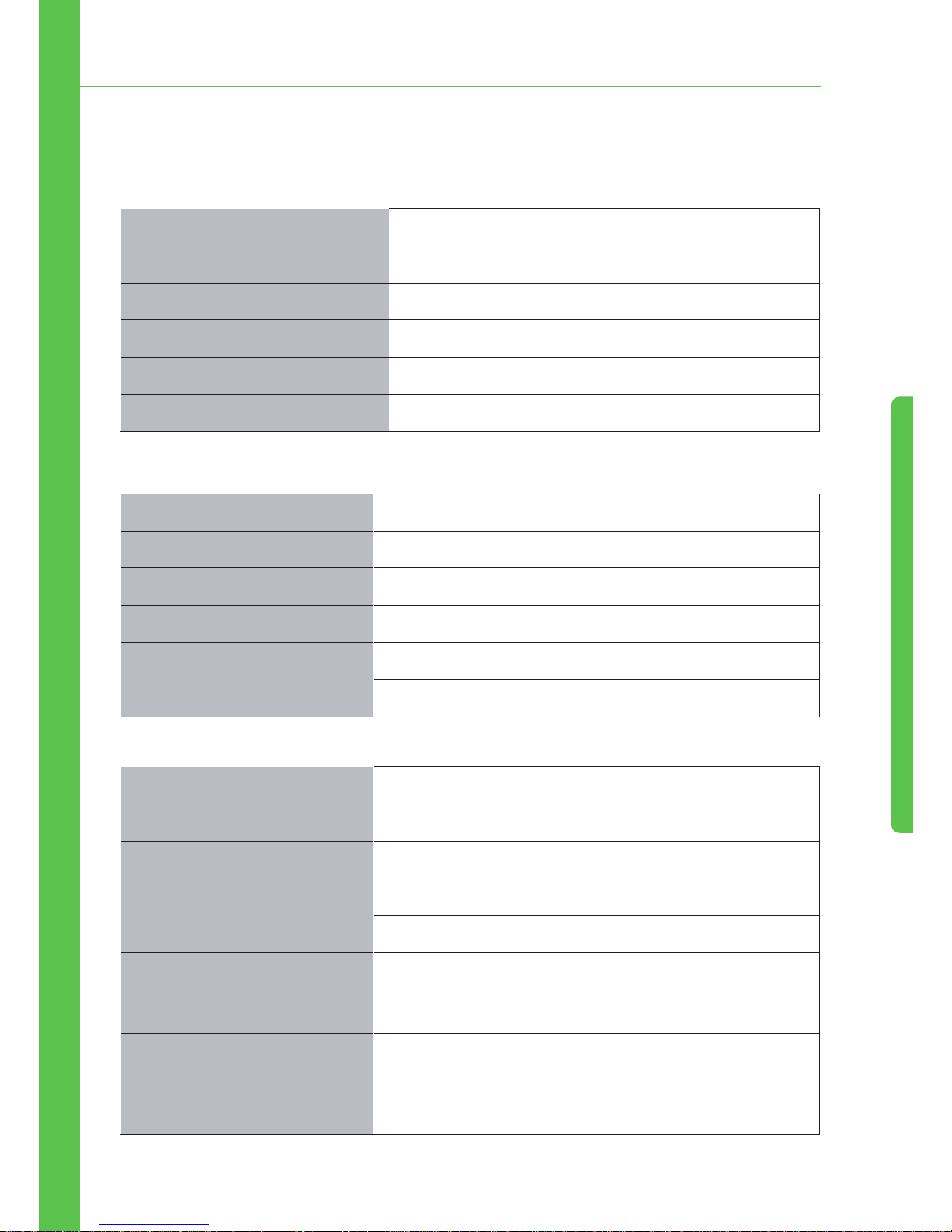
7. Especificações
Padrão Bluetooth Padrão Bluetooth v2.1
Taxa de Frequência 2402 ~ 2480 MHz
Modulação GFSK
Potência Máxima de Transmissão RF 4dBm
Faixa de Controle da Potência RF 24dB
Sensibilidade de Recepção -82dBm
Saída Máxima de Potência 45*4(4 ohms)
Impedância dos Auto-Falantes 4 ~ 8 ohms
Frequência de Resposta 2402 ~ 20KHz
Relação sinal-ruído >.65dB
Controle de Volume Graves ±9dB(100Hz)
Agudos ±9dB(10KH)z
Faixa de Sintonização 87,5MHz ~ 108,0MHz
Sensibilidade do Uso <25 dB
Separação <33 dB
Distorção harmônica >.0,7 % (estéreo)
>.0,5 % (mono)
Seletividade de sinal <60 dB
Desequilíbrio do áudio <0,1 dB
Requisitos de Potência Bateria de carro CC +12V
(terra/negativo)
Dimensões Aproximadas 178*50*130 mm(l/a/d)
7. Especificações
Page 19
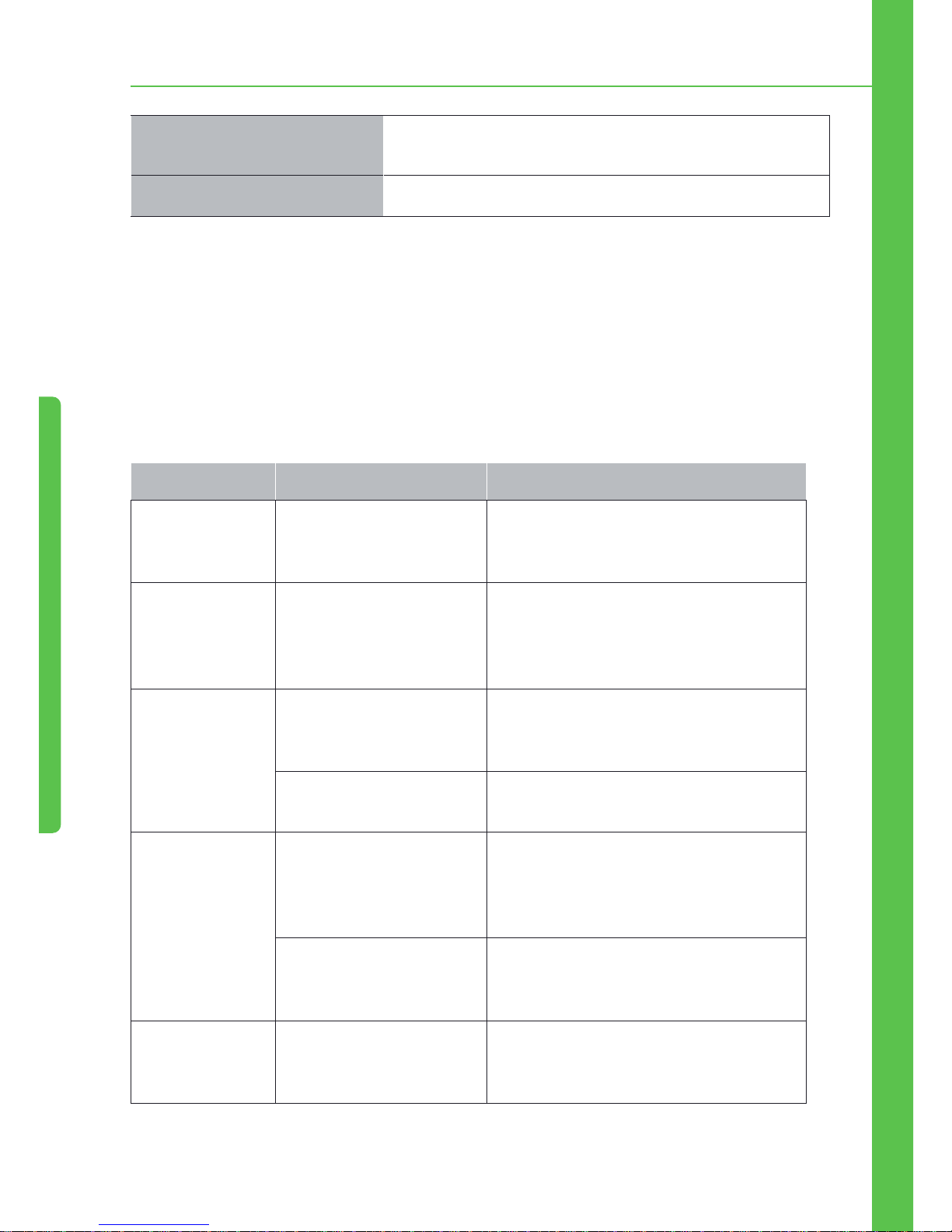
18
Dimensões de Montagem
Aproximadas.
187*57*137 mm(l/a/d)
Peso Aprox. 0,7 kg
8. Solução de Problemas
Se você encontrar alguns dos problemas mostrados na tabela abaixo, verifique primeiramente se os
fios estão conectados corretamente. Se os fios estiverem conectados corretamente, mas mesmo
assim o dispositivo apresentar problemas, entre em contato com o serviço técnico mais próximo e
não tente desmontar o dispositivo sozinho.
Problemas Causa Provável Soluções
Sem conexão
Bluetooth
Sem função Bluetooth
quando o celular está ligado
Verifique se o Bluetooth do celular está ligado,
e se ele está sincronizado e conectado com o
Bluetooth do dispositivo
Falha ao
reproduzir mp3
no celular
O reprodutor de música do
celular não está ligado
O reprodutor de música do celular precisa
primeiramente estar ligado, só assim o áudio
do carro poderá reproduzir música pelo
Bluetooth
Falha ao tentar
ligar o dispositivo
O dispositivo não está
recebendo alimentação
Se a fonte de alimentação do veículo estiver
instalada corretamente, gire o botão de
tensão para ACC
O fusível está queimado Certifique-se de que não haja curto-circuito
na linha e substitua o fusível
Sem som O dispositivo está com
a função MUTE (mudo)
acionada, ou o volume está
totalmente desligado
Ajuste o volume para a altura desejada
Os fios estão conectados
incorretamente
Verifique o esquema elétrico e certifiquese de que os fios estejam conectados
corretamente
Falha ao ler o
pendrive ou
cartão USB
Mau contato Retire o dispositivo e insira-o novamente
7. Especificações / 8. Solução de Probelmas
Page 20

19
Ruídos e distorção
no som
Os cabos dos auto-falantes
estão pressionados pelos
parafusos
Verifique os cabos dos auto-falantes
Os cabos dos auto-falantes
estão em curto-circuito
Conecte os cabos corretamente
Falha no Rádio A antena não está estendida,
ou a conexão está incorreta
Conecte a antena corretamente e estenda-a
o máximo possível
Sinal fraco Gire a antena na direção apropriada.
Dispositivo não
funciona
A CPU não está funcionando
normalmente
Desligue o dispositivo e ligue-o novamente
Os arquivos estão
danificados
Pule este arquivo e selecione próximo
8. Solução de Probelmas
Page 21

20
English
Page 22

21
1. Safety Instruction
•This machine is suitable for +12V vehicle power supply system, please do not install the unit to a
+24V truck or bus, otherwise the machine will be damaged.
•Please do not replace the power fuse without professional guidance. Improper use of fuses may
cause damage or fire.
•To ensure safety and normal use, please install by professional staff. Do not disassemble or repair
the machine by yourself. Please contact your local professional car audio sales stations for any
consultation.
•To avoid electric shock caused by short circuit , or any unnecessary damage and fire, please
prevent the product from a wet environment and water.
Note:
1. When the machine is abnormal in operation, please tip the Reset key
on the panel, the machine will resume to factory settings.
2. When the inside temperature of car is higher or lower, please adjust
the interior temperature, and then use the machine.
3. Avoid the machine suffered a strong impact, which will damage to
structural components of the machine.
4. Operate the unit in accordance with the instruction manual, illegal
operation in damage is not covered under warranty.
1. Safety Instruction
Page 23
22
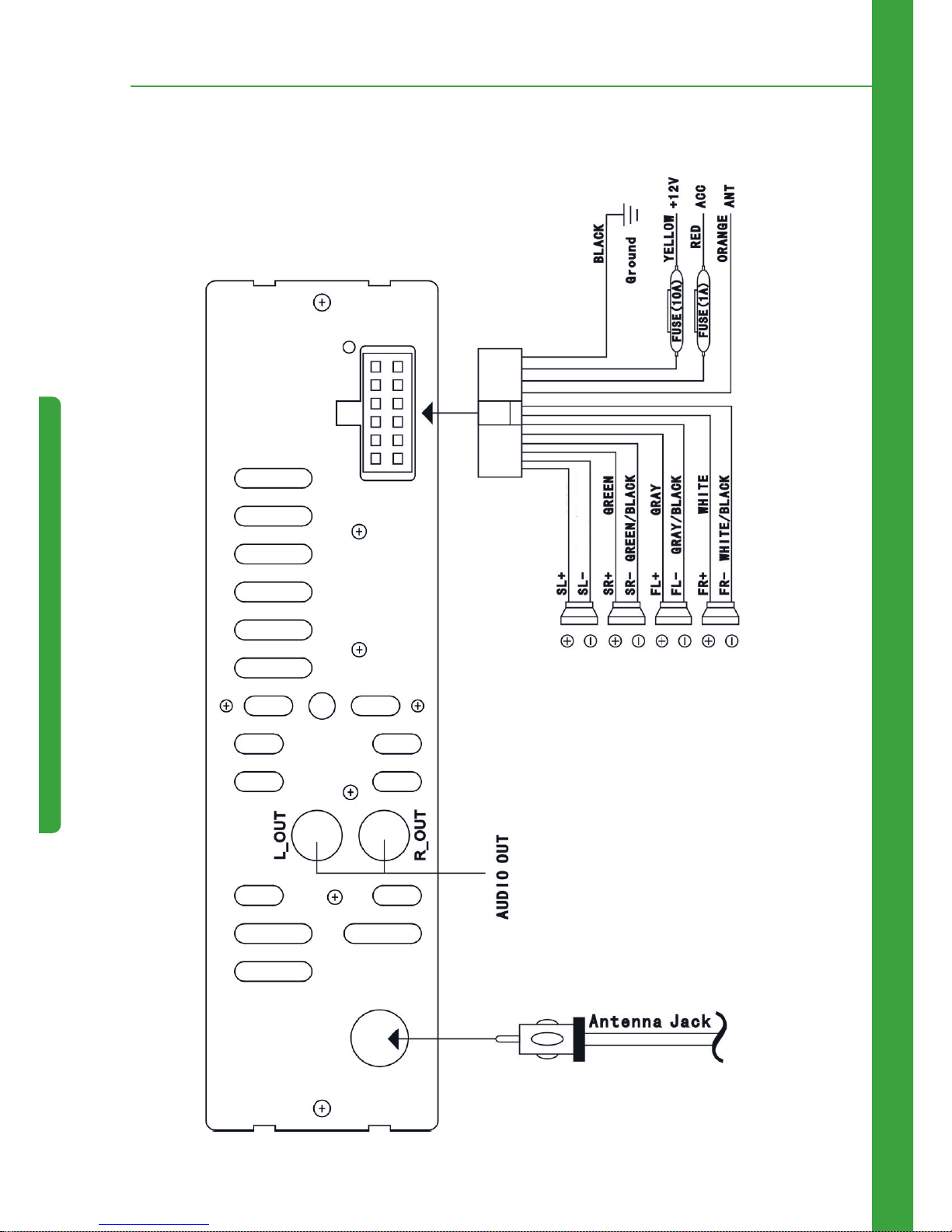
2. Back Panel Wiring Diagram
2. Back Panel Wiring Diagram
Fuse (10A)
Fuse (1A)
PURPLE
PURPLE/BLACK
Page 24
23
3.Installation and Removal Steps
3. Installation and Removal Steps
3.1 Installation
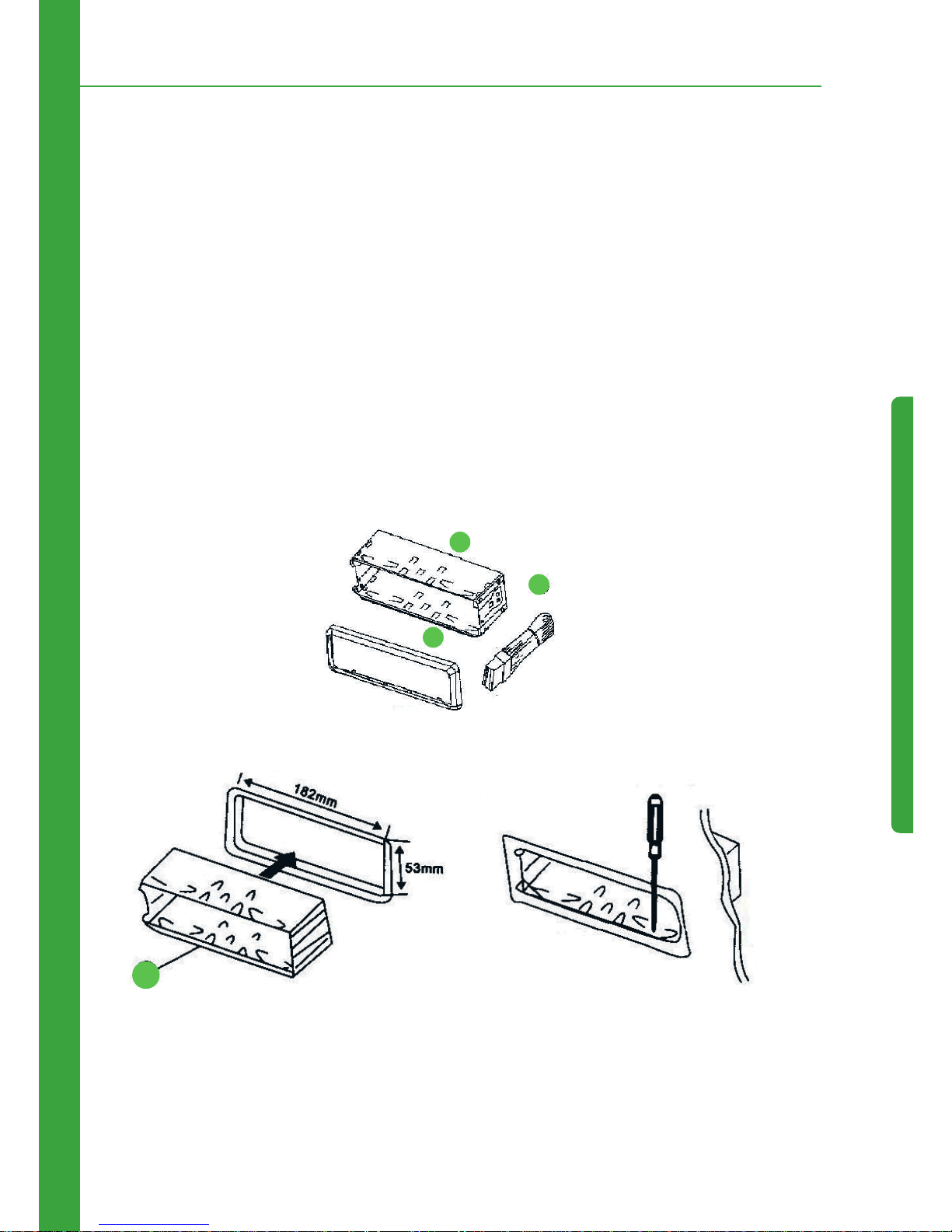
This is security installation, please refer to the illustration and detailed step-by-step installation:
1. Put the machine on the right location in the car, connect the machine with reference to the wiring
diagram , test if machine can work properly.
2. After test OK, wrap the connect wire with insulating tape to ensure that the wiring completely
insulated.
3. Press hook of sets 1 inward, set sets 1 into the dashboard and fix it.
4. Push machine 2 into metal frame and lock it.
Part list
1.
Put in the mounting sleeve
1
2
3
1
2.
Bend these clown outward for a tight fit, if
necessary.
Page 25
24
3. Passos de Instalação e Remoção
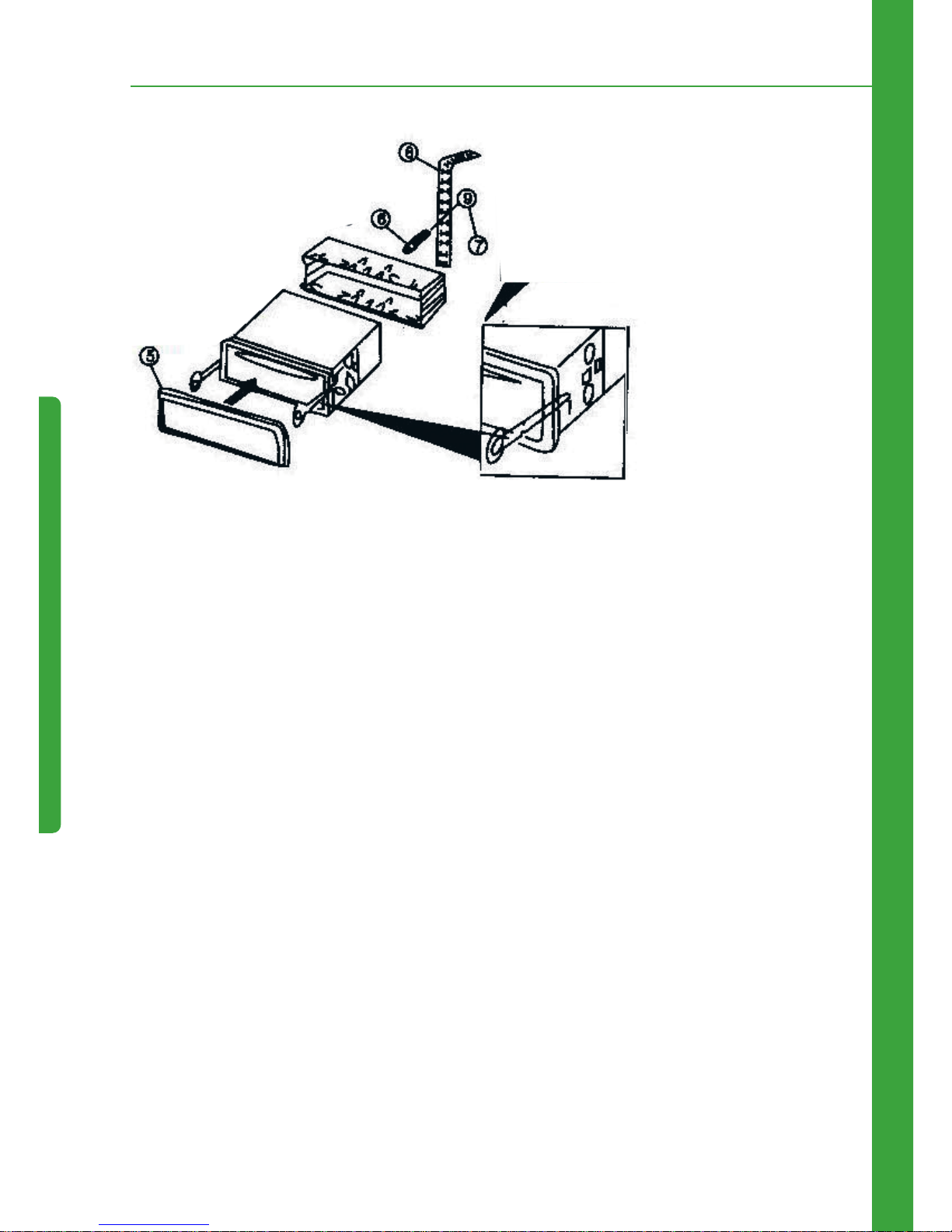
3. Faster the rear
bracket serows and
back side hamess ,
and fix the unit well.
Remooac, inset key into the set then pull
the set out trow dash board.
3.2 Dismantling
Insert the dismantling key into the key hole of device until the hook lock is open, then get the device
and key out.
Remark:
1. Don’t install the device in the place of impeding driving or may hurt
passenger by emergency brake..
2. In order to install the device properly, please use our accessories
only, or else it may cause unnecessary damages. If it needs to drill or
have any necessary changes during the installastion process, please
contact with the nearby dealer.
Page 26
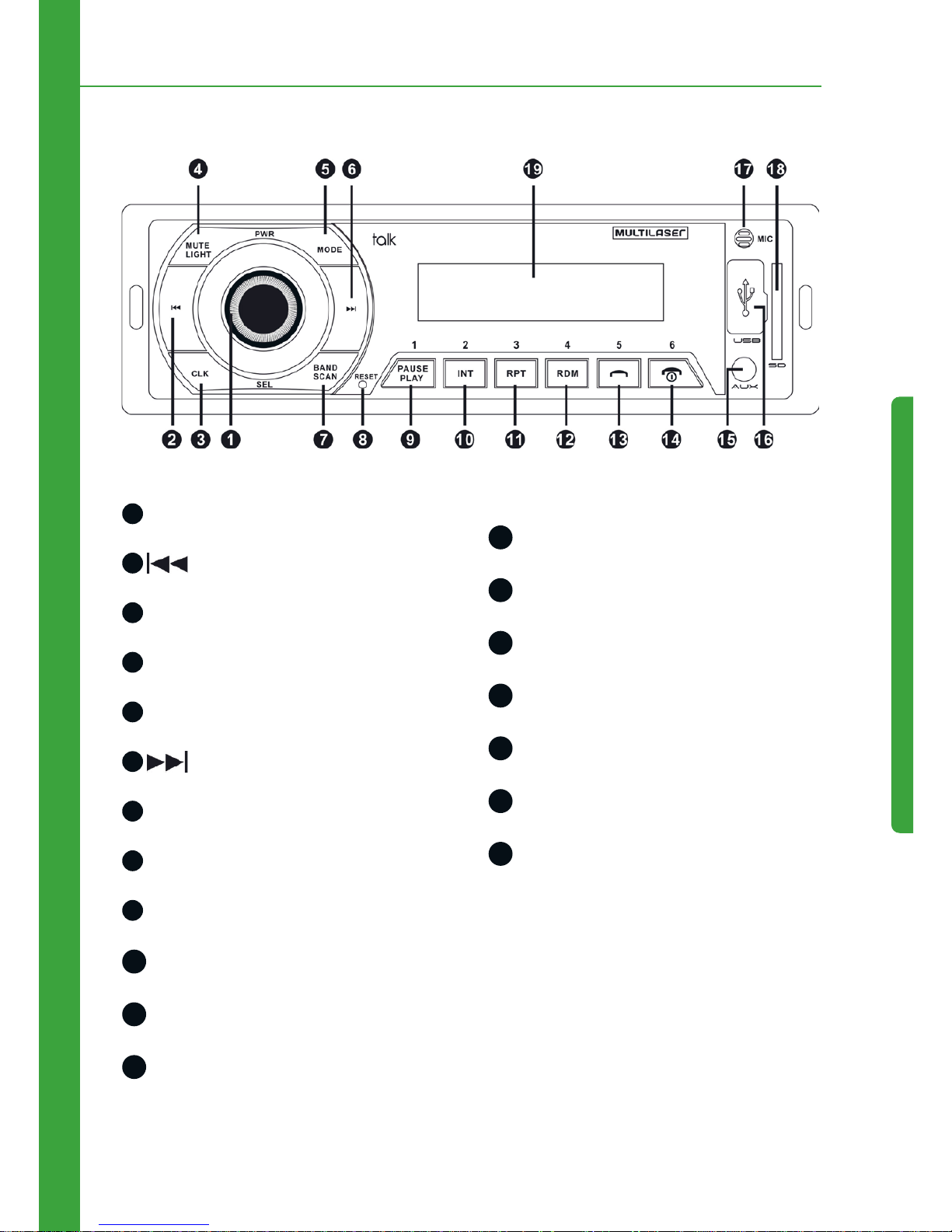
25
4. Front Panel Drawing
4. Front Panel Drawing
1
Encoder, Power on/off, EQ
2
PREV
3
Clock
4
Mute/Light
5
Mode Switch
6
NEXT
7
Band-Scan
8
Reset
9
Numeric 1/Play, Pause
10
Numeric 2/Int
11
Numeric 3/Rpt
12
Numeric 4/Random Play
13
Numeric 5/Answering Phones
14
Numeric 6/Hang up
15
AUX socket
16
USB socket
17
Microphone head
18
SD socket
19
Display screen
Page 27

26
5. The Basic Operation
Power on/off
In standby status, long press 1 to power it off, short press 1 into power it on
Mode
In the state of power on, short press MODE button to shift cycle in the following states
FM > LIN > USB > SD > FM (Remark: Make sure facility those state requested are in the unit, if not,
would skip without display) Default: FM state
Vol
In the state of power on, rotary encoder to let the volume up/down.
By remote, short press VOL- button to minus volume, short press VOL+ button to plus volume.
Vol Class:
Vol Class: 0 ~ 40
Encoder SEL
In the state of power on, continuously short press encoder, come out cycle as:
“BASS > TREBLE > BALANCE > FADER > EQ > LOUD > VOL”
•BASS: Control Bass, rotary encoder to let the Bass up/down. Bass Class: -7 ~ +7.
•TREBLE: Control Treble, rotary encoder to let the Treble up/down. Treble Class:-7 ~ +7.
•BALANCE: Control R/L speaker balance, turn left to plus L and minus R, turn right to plus R and
minus L. R/L speaker balance Class: L9 ~ R9.
•FADER: Control B/F speaker balance, turn left to plus Back speaker and minus Front speaker, turn
right to plus Front speaker and minus Back speaker. B/F speaker balance Class: F9 ~ B9
•EQ: rotary encoder to shift cycle as POP > ROCK > JAZZ > CLAS > NORM
5. The Basic Operation
Page 28

27
•LOUD: Turn it left or right to turn it on or off.
•VOL: rotary encoder to let the volume up/down. Vol Class: 0 ~ 40
EQ
In state of power on, continuously short press EQ button to shift cycle as bellow:
“POP > ROCK > JAZZ > CLAS > NORM”
Mute
In the state of power on, short press MUTE button to turn ON/OFF the loudness effect..
Button Light
In the state of power on, default button light turn on, long press MUTE(2 seconds) to turn off, and
again long press MUTE(2 seconds) to turn on.
By remote, short press LIGHT button to turn ON/OFF button light
Clock Function
In state of power on or standby, short press CLOCK button to display clock (24-hour), would close
clock if no operation within 3 seconds(10 seconds when in standby state), long press (2 seconds)
also can close clock.
Hour/Minute adjust method: In clock state, long press (2 seconds) CLOCK button “00:” glitter, press
and to adjust hour, then short press CLOCK button “:00” glitter, press and
to adjust minute. Then long press(2 seconds) to finish the setting.
FM Function
•Automatic Scan
In power on state and FM mode, long press (2 seconds) BAND button to automatic scan.
Pre-view 1 second and save when search effective radio station, then go on for next.
By remote, short press SCAN button to automatic scan.
5. The Basic Operation
Page 29
28
Remark: In state of automatic scan, all buttons unwork except BAND
button, short press again to close automatic scan
•Band
In radio mode, short press BAND button to cycle select radio bands.
Totally 5 bands, preset 6 stations each band, adjust corresponding stations with number buttons
1-6.
Remarks: Stations by automatic searching are saved into the 5 bands
•Fine adjustment of frequency point and semi-auto searching stations
In radio mode, short press button PREVto backward (0.1MHz), long press (2 seconds) button
to backward search stations until stopping and playing at a valid one, short press the button
NEXT to forward (0.1MHz), long press (2 seconds) the button to forward search stations
until stopping and playing at a valid one.
USB/ SD/ MMC Music Playing Function
•Play/ pause
In music playing mode, long press (2 seconds( the button to pause playing the current
music, and Long press (2 seconds) the button to continue playing the current music.
•Song playing by scan
In music playing mode, long press (2 seconds) the button 2/INT to enter state of scanning and
Playing all songs, long press (2 seconds) the button 2/INT to exit the state of scanning and Playing
songs.
The time of scanning and pre-playing each song is 5 seconds.
•Song playing by repeat
In music playing mode, long press (2 seconds) the button 3/RPT to enter mode of repeat playing
the current song, the icon of RPT in screen will wink, and long press (2 seconds) the button 3/RPT
to exit song replaying mode, the icon RPT will stop winking.
•Song playing by random
5. The Basic Operation
Page 30
29
In music playing mode, long press (2 seconds) the butto 4/RDM RDM to enter mode of playing
songs by random, and long press (2 seconds) the button 4/RDM to exit the mode of playing songs
by random
•Folder backward
Folder backward to backward the folder
•Folder forward
In music playing mode, long press (2 seconds) the button to forward the folder.
•PREV/NEXT / fast forward/fast rewind songs
In music playing mode, short press the button PREV to backward songs, long press (2
seconds) the button PREV to fast rewind play songs, short press the button NEXT to
forward songs, long press (2 seconds) the button NEXT to fast forward play songs
•Number buttons usage
In music playing mode, number buttons can be used alone or continuously, also by mixed.
Example of operation:
1. Short press number button 3/RPT to play the 3rd song, the other number buttons are in the
same way.
2. Continuously and short press twice number button 3/RPT to play the 33rd songs, and other
number buttons are in the same way.
3. Short press number button 3/RPT and short press number button 2/INT to play 32rd song,
other number buttons are in the same way.
Stereo LINE IN function
•AUX mode
In power on state, short press button MODE to enter AUX mode, insert external audio source to AUX.
Remarks: other buttons have no function, except button POWER,
MOED, MUTE, LOUD, CLOCK, ENCODER.
5. The Basic Operation
Page 31
30
6. Bluetooth Function
•Bluetooth match
Turn on Bluetooth first: the Bluetooth name in the unit is: car kit, the matched password is: 0000
Input passport for the first match, auto match and connect afterwards.
•Call answering
Under ringing state, short press button to answer call.
Mobile supports the function that in stand-by state, automatically power on and ringing.
•Call ending/ Call refusage
In calling state, short press button to end the calling.
In the ringing state, short press button to refuse calling.
•Redial
In Bluetooth state, short press button to redial the last dialed out number.
•Private call
During a call, short press button 3/RPT to transfer from the mode of calling by Bluetooth to the
mode of mobile calling (car audio will mute automatically), and short press the button 3/RPT to
transfer from the mode of mobile calling to the mode of Bluetooth calling.
•Voice call
In Bluetooth state, short press button 2/INT to start voice calling function ( mobile must support
the function).
•Mobile mp3 playing
In bluetooth state, short press button to play / pause mp3 in mobile ( mobile must be adjust
into state of music playing).
6. Bluetooth Function
Page 32
31
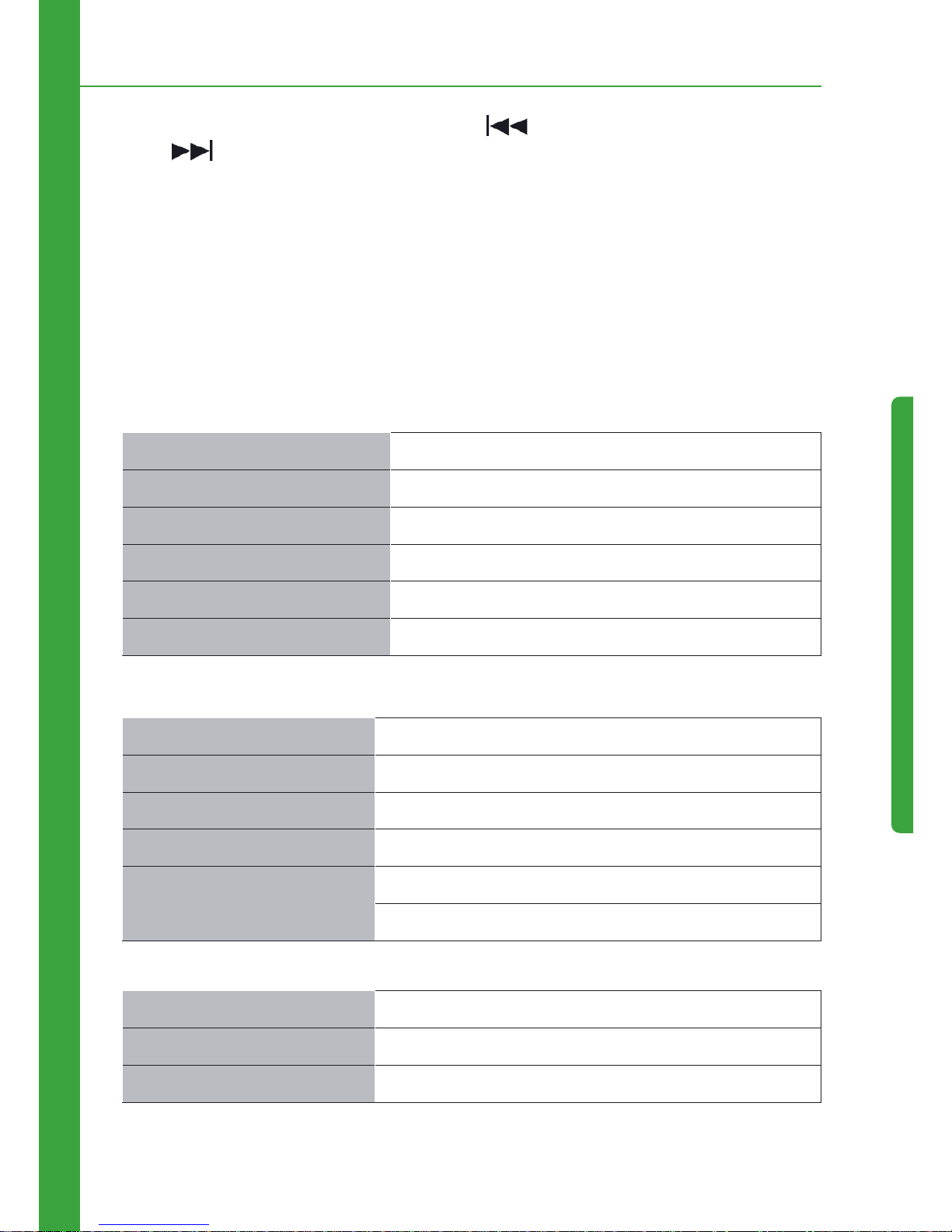
In bluetooth music playing state, short press button PREV to backward songs, and short press
button NEXT to forward songs.
•Disconnect /connect mobile phone Bluetooth
Short press 4/RDM to stop Bluetooth function , short press 4/RDM again to connect Bluetooth
(only for the matched mobile phone Bluetooth
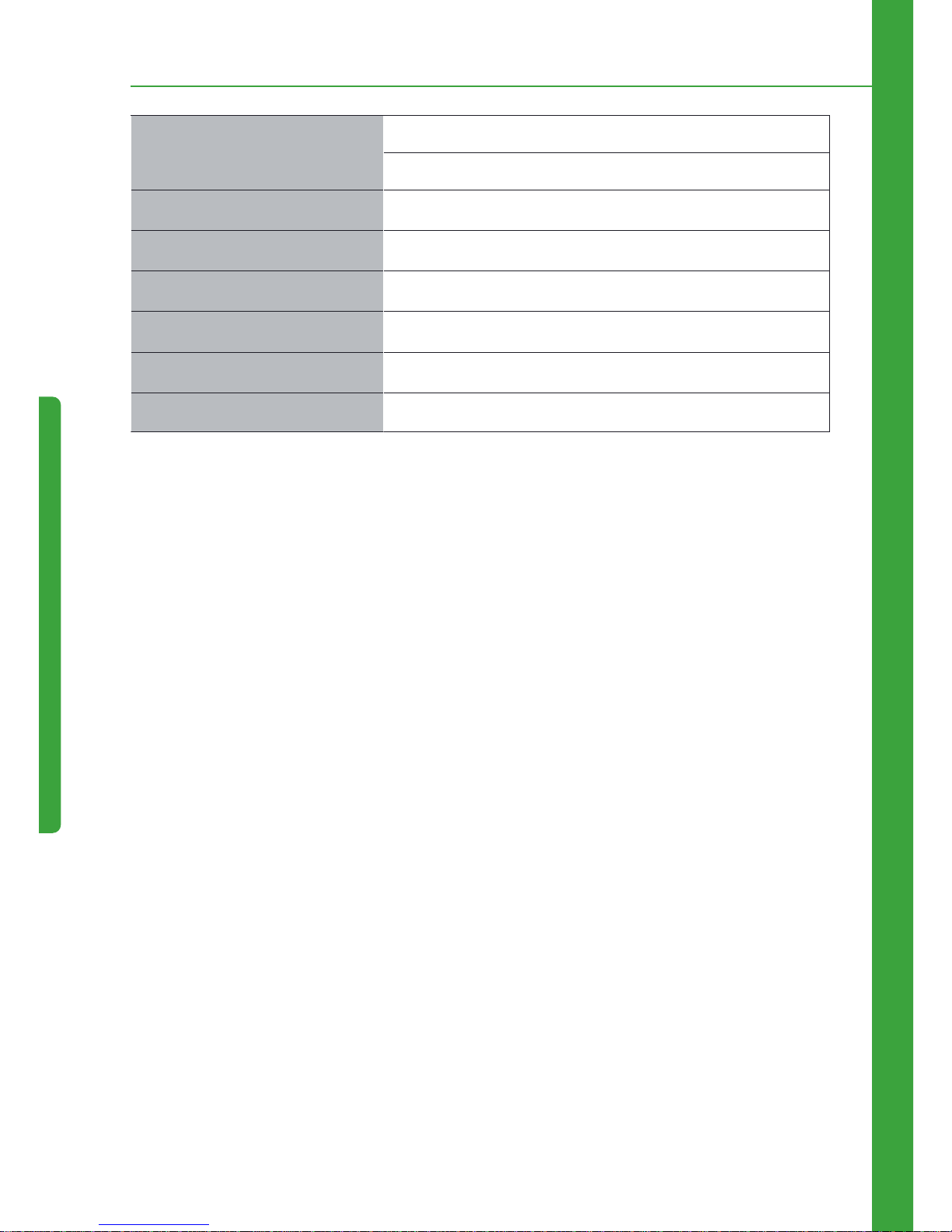
7. Specification
Bluetooth Standard Bluetooth v2.1 Standard
Frequency Range 2402 ~ 2480 MHz
Modulation GFSK
Maximum RF Transmit Power 4dBm
RF power control range 24dB
Receive Sensitivity -82dBm
Maximum power output 45*4(4 ohms)
Speaker Impedance 4 ~ 8 ohms
Frequency response 2402 ~ 20KHz
Signal-to-noise ratio >.65dB
Volume control Graves ±9dB(100Hz)
Agudos ±9dB(10KH)z
Turning range 87,5MHz ~ 108,0MHz
Usable sensitivity <25 dB
Separation <33 dB
6. Bluetooth Function/7. Specification
Page 33
32
Harmonic distortion >.0,7 % (stEreo)
>.0,5 % (mono)
Signal selectivity <60 dB
Audio unbalancedness <0,1 dB
Power requirements +12V DC car battery (negative earth)
Dimensions Approx. 178*50*130 mm(l/a/d)
Mounting dimensions Approx 187*57*137 mm(l/a/d)
Mass Approx. 0.7 kg
7. Specification
Page 34

33
8. Troubleshooting
If you come up against some problems shown in the following table, please first check if wires are
properly connected. If wires are properly connected but there are still problems, please contact the
nearest service agents and do not disassemble the machine by yourself.
Faults Analyze Causes Solutions
No bluetooth No Bluetooth function when
mobile power on
Check if Bluetooth in mobile is turned on, and
if it is matched and connected with the one
in the unit
Failure of playing
mp3 in mobile
Not turn on music player
in mobile
Music player in mobile needs to be turned on
first, car audio then can be played music by
Bluetooth
Failure of being
powered on
It is not powered on If the vehicle power is properly installed, turn
the shift knob to ACC.
Fuse is burnt. Make sure no short circuit occurs on the line
and replace the fuse.
No sound It is mute or the volume is
at zero.
Adjust the volume to your required level.
Wires are improperly
connected.
Check the wiring diagram and make sure
wires are properly connected.
Failure of reading
U disk or card
Poor contact Please pull out the device and reinsert it.
Noises and sound
distortion
Speaker cables are pressed
by screws.
Check the speaker cables.
Speaker cables are shortcircuited.
Properly connect wires.
Failure of Radio Antenna is not pulled out or
connection is wrong.
Properly connect the antenna and pull it out
as long as possible.
Weak signal Rotate the antenna to proper direction.
Stop working CPU can not work normally. Turn off the power and power it on again.
Files are damaged. Skip this file and please select next file.
8. Troubleshooting
Page 35

34
Español
Page 36

35
1. Instrucciones de Seguridad
•Este dispositivo es compatible con un +sistema de alimentación vehicular de +127. No intente
instalar en camiones o autobuses con sistema de +24V, pues puede dañarse.
•No sustituir el fusible sin la orientación de un profesional. El mal uso de los fusibles puede causar
daños y provocar incendios.
•Para garantizar la seguridad y el uso normal del dispositivo, pídale a un profesional para realizar la
instalación. No desmonte ni intente reparar el dispositivo. Para obtener informaciones sobre reparación, entrar en contacto con el soporte de su distribuidor local de audio para automóvil.
•Evite dejar la unidad en ambientes húmedos y no deje que entre en contacto con agua para evitar
una descarga eléctrica provocada por un cortocircuito, sino también para evitar cualquier daño o
incendios.
Nota:
1. Cuando el dispositivo funcionar anormalmente, presione la tecla
Reset en el panel, y el dispositivo se restablecerá la configuración de
fábrica.
2. Cuando la temperatura interna del vehículo es superior o inferior
a la temperatura recomendada, ajuste y luego conecte el dispositivo.
3. Evite impactos en el dispositivo, de lo contrario los componentes
estructurales pueden ser dañados.
4. Opere el dispositivo de acuerdo con el manual de instrucciones. Los
daños causados por las operaciones ilegales no están cubiertos por
la garantía.
1. Instrucciones de Seguridad
Page 37
36
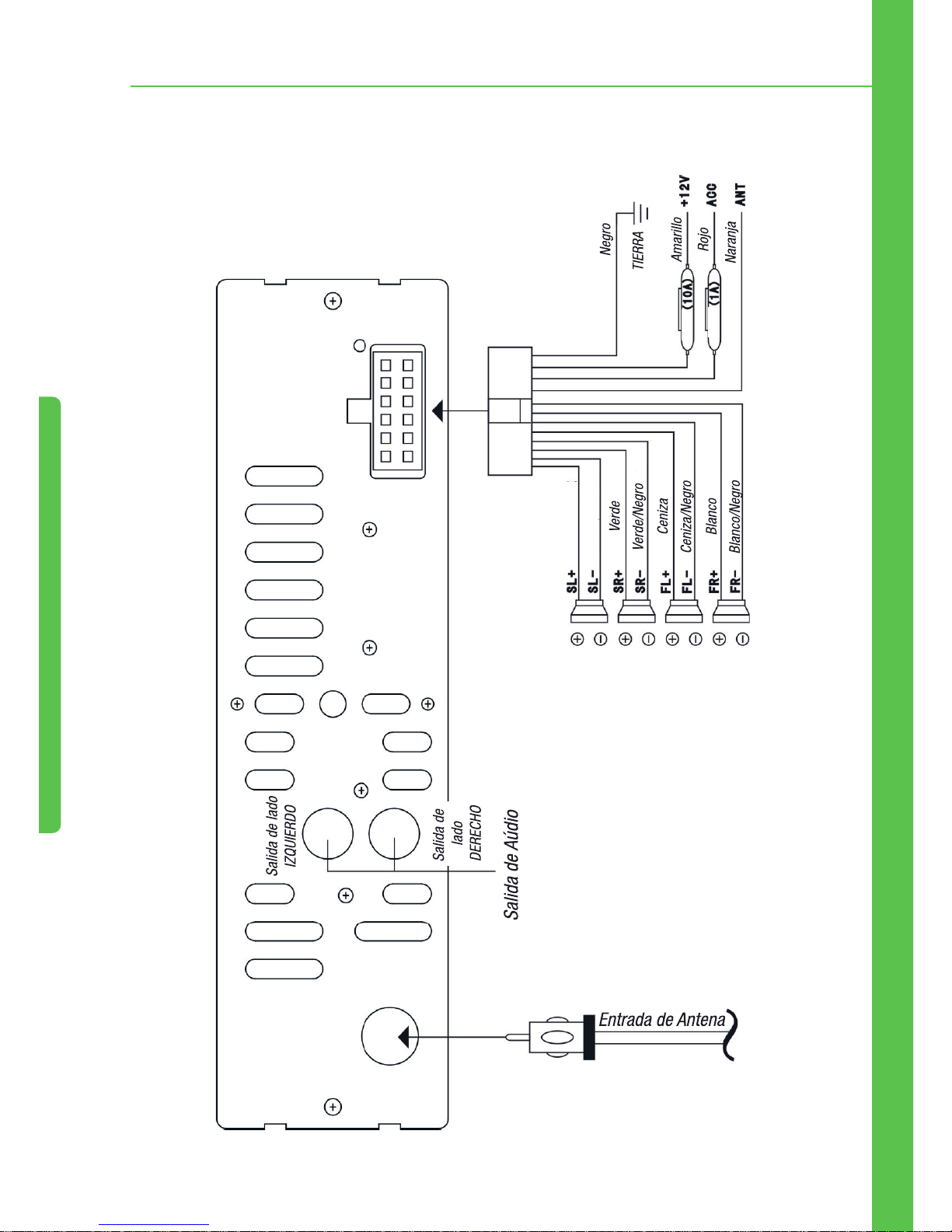
2. Esquema Eléctrico del Panel Trasero
2. Esquema Eléctrico del Panel Trasero
Fuse (10A) = Fusible 10A
Fuse (1A) = Fusible 1A
Púrpura
Púrpura/Negro
Page 38
37
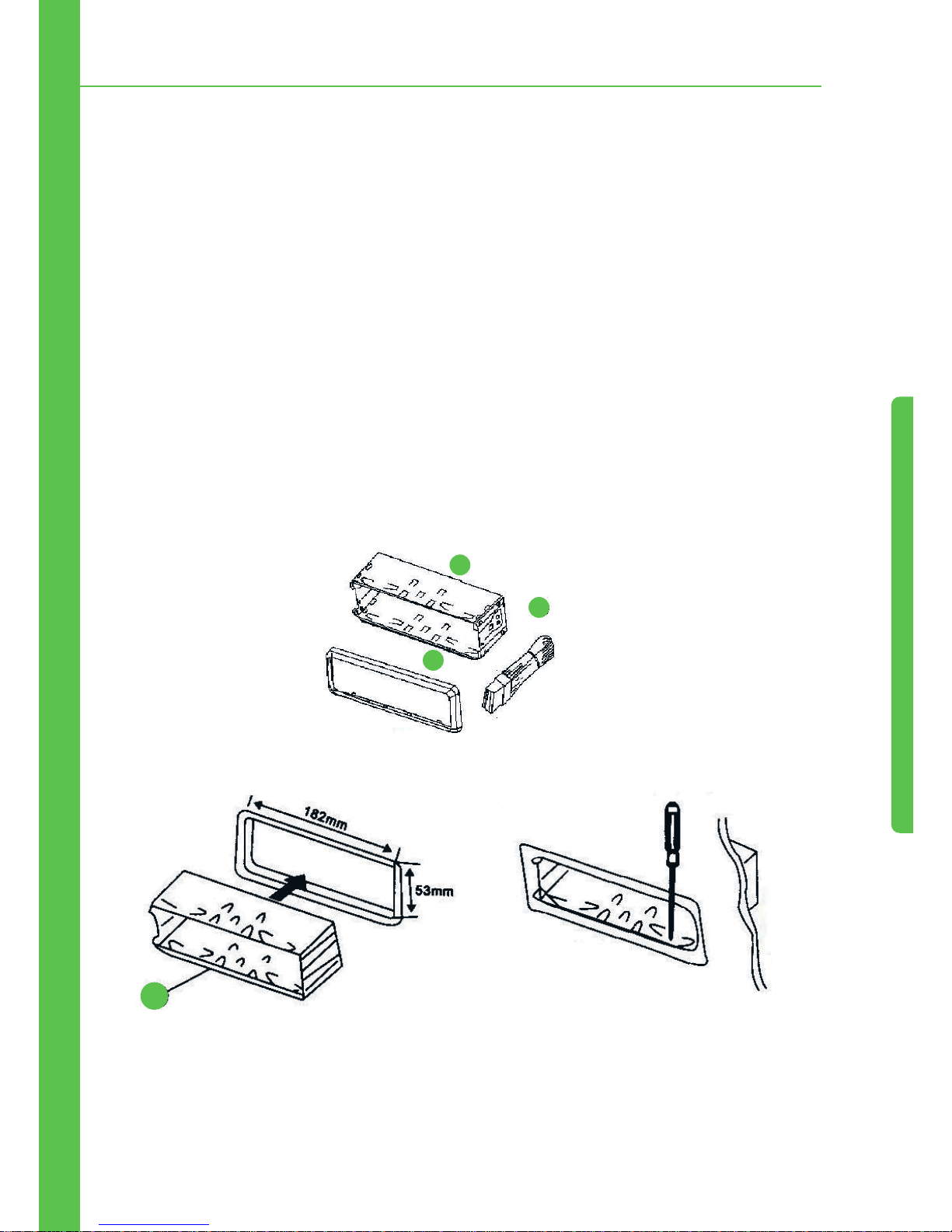
3. Pasos de Instalación y Remoción
3. Pasos de Instalación y Remoción
3.1 Instalación
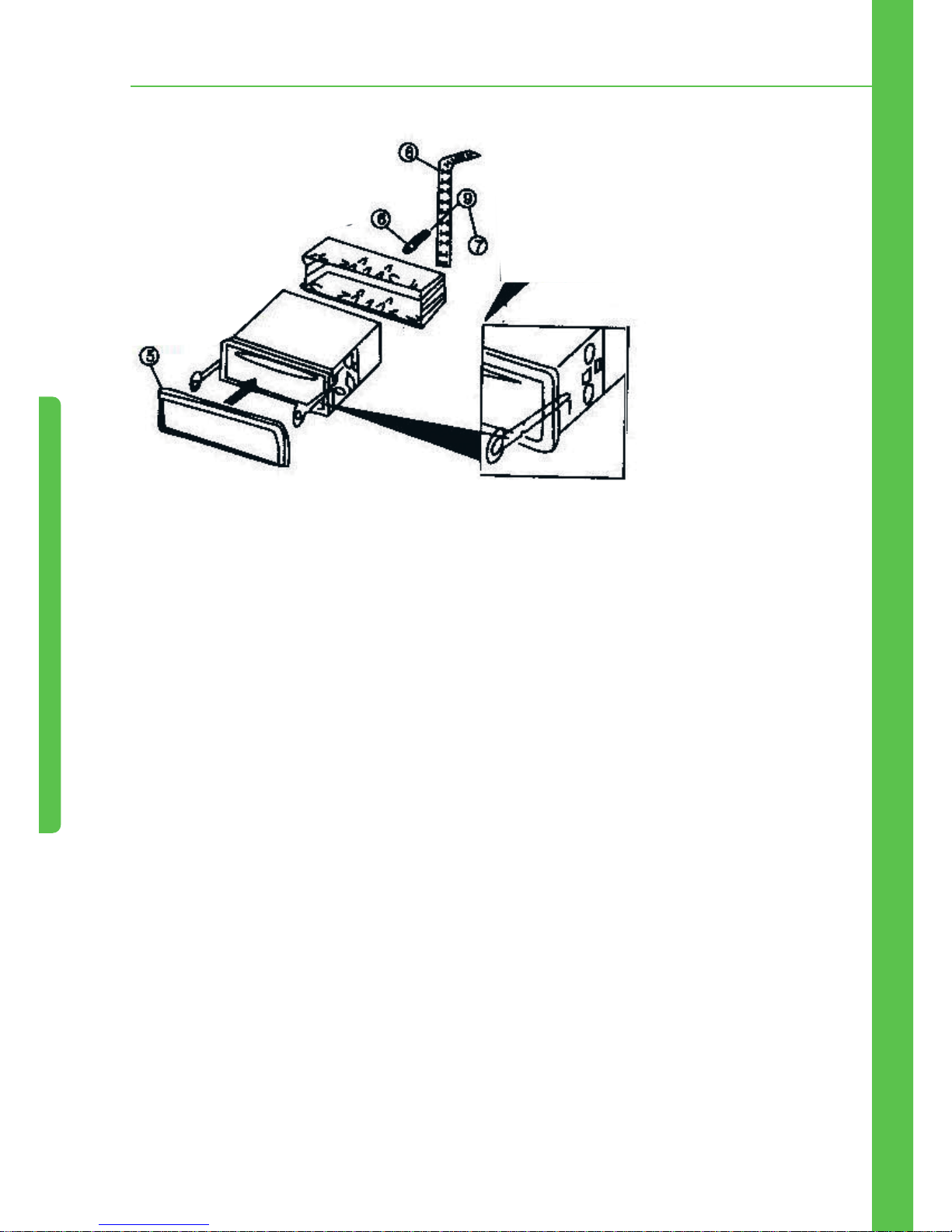
Para asegurar una instalación segura, consulte las ilustraciones y el paso a paso detallado:
1. Instale el dispositivo en el lado derecho del panel del automóvil y conectarlo al arneses/hilos
(véase esquema eléctrico como referencia). A continuación, asegúrese de que el dispositivo está
funcionando correctamente.
2. Si está funcionando correctamente, envuelva el cable con cinta una aislante para asegurar que
todos los hilos estén debidamente aislados
.
3. Presione el conector del conjunto 1 interiormente, ajuste el conjunto 1 en el panel y fíjelo.
4. Empuje el conjunto 2 en la cajá de metal y bloquee.
Lista de Piezas
1.
Insértelo em el compartimento de montaje
1
2
3
1
2.
Según se requiera, doble esta traba para fuera
para obtener una mejor fijación
Page 39
38
3. Pasos de Instalación y Remoción
3. Apriete las trabas traseras
del soporte y las trabas
laterales para que la unidad
este bien fijada
Para retirarla, inserte el destornillador
em la entrada y elimine el conjunto de
papel
3.2 Remoción
Inserte el destornillador en la entrada de dispositivo hasta que el conector se suelte, luego tirar la
llave y el dispositivo para fuera.
Nota:
1. No instale el dispositivo en un local que interfiere con la dirección
del vehículo que puede herir los pasajeros cuando el freno de
emergencia se activa.
2. Para instalar correctamente el dispositivo, utilice sólo accesorios
nuevos. Otros productos pueden causar daños no cubiertos. Si tiene
que hacer algún agujero o modificaciones durante el proceso de
instalación, por favor póngase en contacto con su distribuidor más
cercano.
Page 40
39
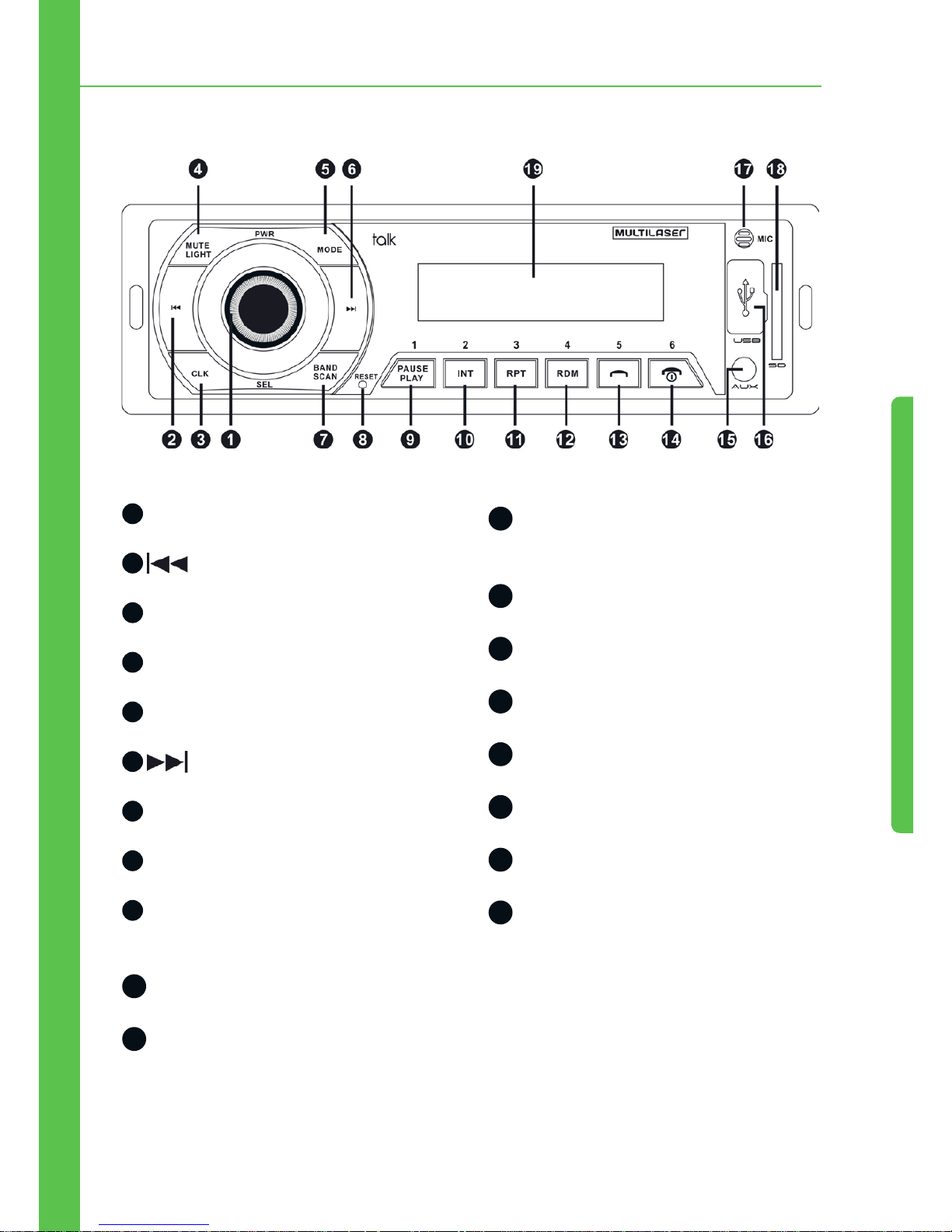
4. Dibujo del Panel Delantero
4. Dibujo del Panel Delantero
1
Codificador, Botón On/Off, EQ
2
PREV (VOLVER)
3
Reloj
4
Mute/Light (Mudo/Luz)
5
Mode Switch (Selector de modo)
6
NEXT (AVANZAR)
7
Band-Scan (Banda/Scan)
8
Reset (Restaurar)
9
Botón Numérico 1/Play, Pause
(Reproducir/Pausar)
10
Botón Numérico 2/Introducción
11
Botón Numérico 3/Repetir
12
Botón Numérico 4/Reproducción
Aleatoria
13
Botón Numérico 5/Contestas Llamada
14
Botón Numérico 6/Cerrar Llamada
15
Entrada Auxiliar
16
Entrada USB
17
Micrófono
18
Entrada de tarjeta SD
19
Pantalla de Visualización
Page 41

40
5. Funcionamiento Básico
Botón On/Off
En el modo de esper, presione y mantenga pulsado el botón 1 para apagar el dispositivo, y
presione 1 de nuevo para activarlo.
Mode (Modo)
Cuando el dispositivo está conectado, pulse el MODE para cambiar entre las siguientes funciones:
FM > LIN > USB > SD > FM (Observación: Asegúrese de que el dispositivo tiene todas estas
funciones disponibles, de lo contrario, se saltará la función)no será exhibida en la pantalla: función
FM
Volumen
Cuando el dispositivo está conectado, gire el codificador para subir/bajar el volumen.
Con el controle remoto, presione el botón VOL- para bajar el volumen, y presione el botón VOL+
para subir el volumen.
Rango de Volumen: 0 ~ 40
Codificador de SELECCIÓN
Con el dispositivo encendido, presione el botón de abajo para alternar entre las funciones:
“BASS > TREBLE > BALANCE > FADER > EQ > LOUD > VOL”
•BASS (GRAVES): Controla los graves. Gire el codificador para subir/bajar los graves. Rango de
Graves:-7 ~ +7.
•TREBLE (AGUDOS): Controla los agudos. Gire el codificador para subir/bajar los agudos. Rango
de Agudos:-7 ~ +7.
•BALANCE (EQUILIBRIO): Controla el balance de los altavoces izquierdo y derecho. Gire para la
izquierda para subir el lado izquierdo y bajar el derecho. Gire para la izquierda para subir el lado
derecho y bajar el izquierdo. Rango de equilibrio de los altavoces: Izquierdo 9 ~ Derecho 9
5. Funcionamento Basico
Page 42

41
•FADER (ATENUADOR): Controla el equilibrio de los altavoces delantero y trasero. Gire para la izquierda para aumentar los altavoces traseros y bajar el delantero. Gire para la derecha para subir
los altavoces delanteros y bajar el trasero. Rango de equilibrio de los altavoces delantero y trasero:
Delantero 9 ~Trasero 9
•EQ (ECUALIZADOR): gire el codificador para alternar entre las funciones POP > ROCK > JAZZ >
CLAS > NORM
•LOUD: Gire el codificador para derecha o para la izquierda para apagar esta función.
•VOL: Gire el codificador para subir/bajar el volumen. Rango de Volumen: 0 ~ 40
EQ
Con el dispositivo conectado, presione el botón EQ seguidamente para cambiar entre las funciones
abajo:
“POP > ROCK > JAZZ > CLAS > NORM”
Mute (Mudo)
Cuando el dispositivo está conectado, presione el botón MUTE para conectar/desconectar el mudo.
Botón Light (Luz)
Cuando el dispositivo está conectado, la configuración estándar es de luz encendida. Presione y
mantenga pulsado el botón LIGHT(2 segundos) para apagar la luz, y púlselo de nuevo para activar
la luz.
Con el control remoto, presione el botón LIGHT para activar / desactivar la luz de los botones.
Función de Reloj
Con el dispositivo conectado y desconectado, presione el botón CLOCK para mostrar el reloj (formato
24 horas), que desaparecerá si ninguna operación en los próximos 3 segundos (10 segundos en
modo de espera). Presionar y mantener pulsado el botón por 2 segundos también cerrará el reloj.
Método de ajuste de horas/minutos: En la función reloj, presione y mantenga pulsado por 2
segundos el botón CLOCK. El valor “00:” será exhibido, presione y para ajustar la
5. Funcionamento Basico
Page 43

42
hora, y después presione el botón CLOCK nuevamente. El valor “:00” será exhibido, presione
y para ajustar os minutos. Em seguida, pressione e segure o botão por 2 segundos para
terminar a configuração.
Función FM
•Escaneo automático
Con el dispositivo conectado y en la función FM, presione y mantenga pulsado el botón BAND por 2
segundos para activar el escaneo automático.
Las estaciones de radio se muestran en 1 segundo. Al encontrar una emisora la misma se guarda,
el escaneo continua para la próxima estación.
Con el control remoto, presione el botón SCAN para activar el escaneo automático.
Observaciones: la función de escaneo automático, todos los botones
quedan inoperantes, excepto el botón BAND. Púlselo de nuevo para
completar el escaneo automático.
•Band (Banda)
En el modo radio, presione el botón BAND para cambiar entre las bandas de radio.
La función tiene un total de 5 bandas, cada una con 6 estaciones pre-definidas. Ajuste las
estaciones correspondientes con los botones numéricos 1-6.
Observaciones: Las estaciones localizadas automáticamente se
guardan en las 5 bandas.
•Ajuste fino del punto de frecuencia y busca semiautomática de las estaciones
En el modo radio, presione el botón PREV para volver (0,1MHz) y presione y mantenga
pulsado el botón PREV por 2 segundos para volver las estaciones hasta parar y reproducir
una estación válida. Presione el botón NEXT para avanzar (0,1MHz), presione y mantenga
pulsado el botón NEXT por 2 segundos para avanzar las estaciones hasta parar y reproducir
una estación válida.
Funciones de reproducción de música USB/ SD/ MMC
•Play/ pause (Reproducir, pausar)
5. Funcionamento Basico
Page 44
43
En el modo de reproducción de música, presione el botón por 2 segundos para pausar la
reproducción de la música actual, y Presione el botón por 2 dos segundos para continuar
a reproducción de la música actual.
•Reproducción de músicas por escaneo
En el modo de reproducción de música, presione el botón 2/INT por 2 segundos para entrar en
la función de escaneo y reproducir todas las músicas. Presione el botón 2/INT nuevamente por 2
segundos para salir de la función escaneo y reproducir las músicas.
El tiempo de escaneo y pre-reproducción de cada música es de 5 segundos.
•Reproducción de músicas por repeat (repetición)
En el modo de reproducción de música, presione el botón 3/RPT por 2 segundos para entrar en la
función de repetición de la música actual. El icono RPT parpadeará en la pantalla. Presione el botón
3/RPT nuevamente para parar de repetir la música actual, y el icono RPT dejará de parpadear.
•Reproducción de músicas por random (aleatorias)
En el modo de reproducción de música, presione el botón 4/RDM por 2 segundos para entrar en
el modo de reproducción de músicas aleatorias. Presione el botón 4/RDM nuevamente para salir
del modo de reproducción de músicas aleatorias.
•Volver a la Carpeta Anterior
En el modo de reproducción de música, presione el botón por 2 segundos para volver a
la carpeta anterior.
•Avanzar a la carpeta siguiente
En el modo de reproducción de música, presione el botón por 2 segundos para avanzar
para la carpeta siguiente.
•VOLVER/AVANZAR / avanzar rápidamente, retroceder rápido las músicas
En el modo de reproducción de música, presione el botón PREV para volver para las músicas
anteriores y presione el botón PREV por 2 segundos para retroceder rápido de música.
Presione el botón NEXT para avanzar las músicas y presione el botón NEXT por 2
segundos para avanzar rápidamente las músicas.
5. Funcionamento Basico
Page 45

44
•Utilización de los Botones Numéricos
En el modo de reproducción de música, los botones numéricos pueden ser utilizados solos, en
secuencias o mezclados.
Ejemplo:
1. Presione el botón 3/RPT para reproducir la 3ª música. Los otros botones numéricos funcionarán
del mismo modo.
2. Presione el botón numérico 3/RPT dos veces para reproducir la 33º música. Los otros botones
numéricos funcionarán del mismo modo.
3. Presione el botón numérico 3/RPT y presione el botón numérico 2/INT después para
reproducir la 32ª música. Los otros botones numéricos funcionarán del mismo modo.
Función LINE IN Estéreo
•Modo Auxiliar
Con el dispositivo encendido, presione el botón MODE para entrar en el modo AUXILIAR. Conecte
una fuente de audio externo en la entrada Auxiliar.
Observaciones: otros botones no funcionarán cuando se está en
este modo, excepto los botones POWER, MOED, MUTE, LOUD, CLOCK,
ENCODER.
6. Función Bluetooth
•Sincronización del Bluetooth
Primero, conecte el Bluetooth. El nombre del Bluetooth de la unidad es: car kit, y la contraseña de
sincronización es: 0000.
Debe ser introducida una contraseña una sola vez, y después, el bluetooth está conectado y
sincronizado automáticamente.
•Contestando Llamadas
Cuando la llama está sonando, presione el botón para contestarla.
5. Funcionamento Basico 6. Función Bluetooth
Page 46
45
Celulares soportan la función que conecta el dispositivo y cambia la llamada automáticamente en
modo de espera.
•Finalizando Llamadas, Rechazando Llamadas
En el modo de llamada, presione el botón para cerrar la llamada.
Cuando la llamada esté sonando, presione el botón para rechazar la llamada.
•Remarcando
En el modo Bluetooth, presione el botón para remarcar el último número llamado.
•Llamada confidencial
Durante una llamada, presione el botón 3/RPT para transferir del modo de llamada por el Bluetooth
para el modo de llamada para celular (el audio del automóvil quedará mudo automáticamente), y
presione el botón 3/RPT nuevamente para transferir del modo de llamada por el celular para el
modo de llamada por Bluetooth.
•Llamada de voz
No modo bluetooth, pressione o botão 2/INT para ativar a função de chamada de voz (o celular
deve suportar está função).
•Reprodução de música pelo celular
No modo bluetooth, pressione o botão para iniciar/parar a reprodução de MP3 pelo
dispositivo ( celular deve estar em modo de música )
Pressione o botão e retorne para música anterior, e pressione o botão para avançar
até a música desejada.
•Desconectar / conectar el celular Bluetooth
Pulse brevemente lo butón 4/RDM para detener la función Bluetooth, pulse brevemente lo butón
4/RDM otra vez para conectar Bluetooth (sólo para el celular Bluetooth emparejado)
6. Función Bluetooth
Page 47
46
7. Especificaciones
Estándar Bluetooth Estándar Bluetooth v2.1
Tasa de Frecuencia 2402 ~ 2480 MHz
Modulación GFSK
Potencia Máxima de Transmisión RF 4dBm
Rango del Control de la Potencia RF 24dB
Sensibilidad de Recepción -82dBm
Salida Máxima de Potencia 45*4(4 ohms)
Impedancia de los Altavoces 4 ~ 8 ohms
Frecuencia de Respuesta 2402 ~ 20KHz
Relación señal - ruido >.65dB
Control de Volumen Graves ±9dB(100Hz)
Agudos ±9dB(10KH)z
Rango de Sintonización 87,5MHz ~ 108,0MHz
Sensibilidad de Uso <25 dB
Separación <33 dB
Distorsión harmónica >.0,7 % (estéreo)
>.0,5 % (mono)
Selectividad de señal <60 dB
Desequilibrio de audio <0,1 dB
Requisitos de Potencia Batería de automovíl CC +12V
(tierra/negativo)
Dimensiones Aproximadas 178*50*130 mm(l/a/d)
7. Especificaciones
Page 48

47
Dimensiones de Montaje
Aproximadas
187*57*137 mm(l/a/d)
Peso Aprox. 0,7 kg
8. Resolución de Problemas
Si encuentra algún de los problemas mostrados en la siguiente tabla, primero asegúrese de que los
cables están conectados correctamente. Si los cables están conectados correctamente, pero aún
así el dispositivo tiene problemas, busque el técnico de servicio más cercano y no intente desmontar
el dispositivo solo.
Fallas Causa Probable Solución
Sin conexión
Bluetooth
Sin función Bluetooth
cuando el celular está
conectado
Verifique si el Bluetooth está conectado,
y se está sincronizado y conectado con el
Bluetooth del dispositivo
Falla al reproducir
mp3 en el celular
El reproductor de música
del teléfono no está
conectado
El reproductor de música del teléfono debe
estar conectado en primer lugar, sólo así
audio del automóvil puede reproducir música
a través de Bluetooth
Falla al intentar
conectar el
dispositivo
El dispositivo no está
recibiendo alimentación
Si la fuente de alimentación del vehículo se
ha instalado correctamente, gire el botón de
tensión para ACC
El fusible está quemado Asegúrese de que no hay cortocircuito en la
línea y cambie el fusible
Sin sonido El dispositivo está
con la función MUTE
(mudo) accionada, o el
volumen está totalmente
desconectado
Ajuste el volumen para la altura deseada
Los cables no están
correctamente conectados
Consulte el esquema de cableado y
asegúrese de que los cables están
conectados correctamente
Error al leer la
tarjeta o la unidad
flash USB
Mal contacto Retire el dispositivo y vuelva a colocarlo
7. Especificaciones / 8. Resolución de roblemas
Page 49

48
El ruido y la
distorsión en el
sonido
Los cables de los altavoces
están presionados por
tornillos
Compruebe el cableado de los altavoces
Los cables de los altavoces
están en cortocircuito
Conecte los cables correctamente
Falha no Rádio La antena no está extendida,
o la conexión no es correcta
Conectar la antena correctamente y extienda
tanto como sea posible
Señal débil Gire la antena en la dirección apropiada.
El dispositivo no
funciona
La CPU no está funcionando
normalmente
Desconecte el aparato y vuelva a conectarlo
Los archivos están dañados Omitir este archivo y seleccione Siguiente
8. Resolución de roblemas
Page 50

www.
multilaser
.com.br
 Loading...