

Page 1
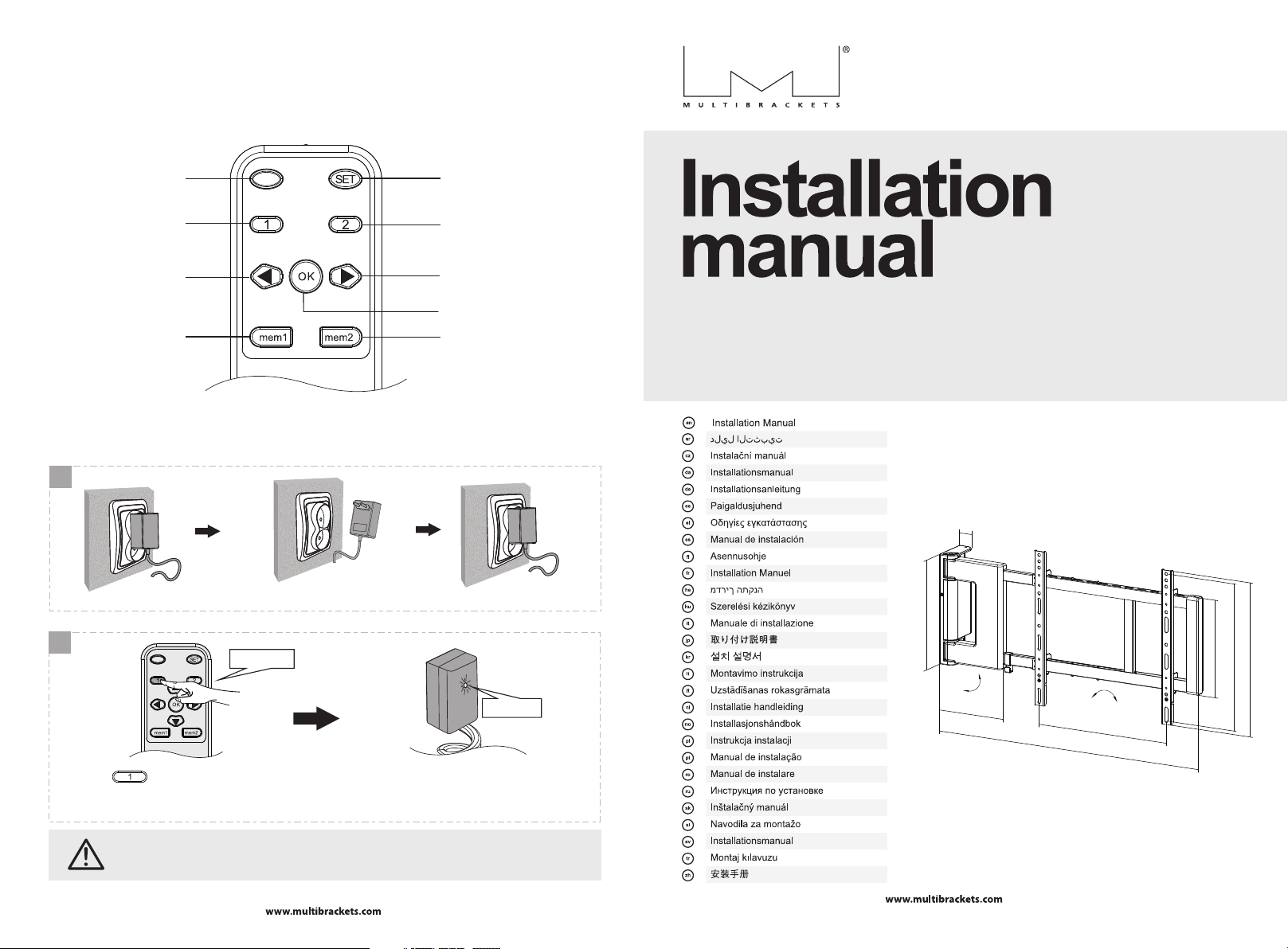
Factory Reset instruction
Light Indic ato r
Position 1
Open
Memory 1
Set but ton
Posit ion 2
Close
Stop
Memory 2
M Motorized Swing Mount Large
EAN: 7350022734500
remote control
1
44mm
Unp lug and r eplug first
310mm
2
4 times
flas h
90°
193mm
-1.5°
min200mm-max425mm
min740mm-max1001mm
+1.5°
275mm
435mm
min200mm-max415mm
Press the button on the remote for 3 seconds before releasing it. Please do not press any buttons before
this step or els e the mount needs unpl ugging and replugging. Rep eat this step for 4 times and the IR receiver LED
light wil l blink. The mount wil l find the minimum and maximum swivel ing angle autom atically.
Ple ase keep the power on durin g the resetting.
11
revision 1.0
Page 2
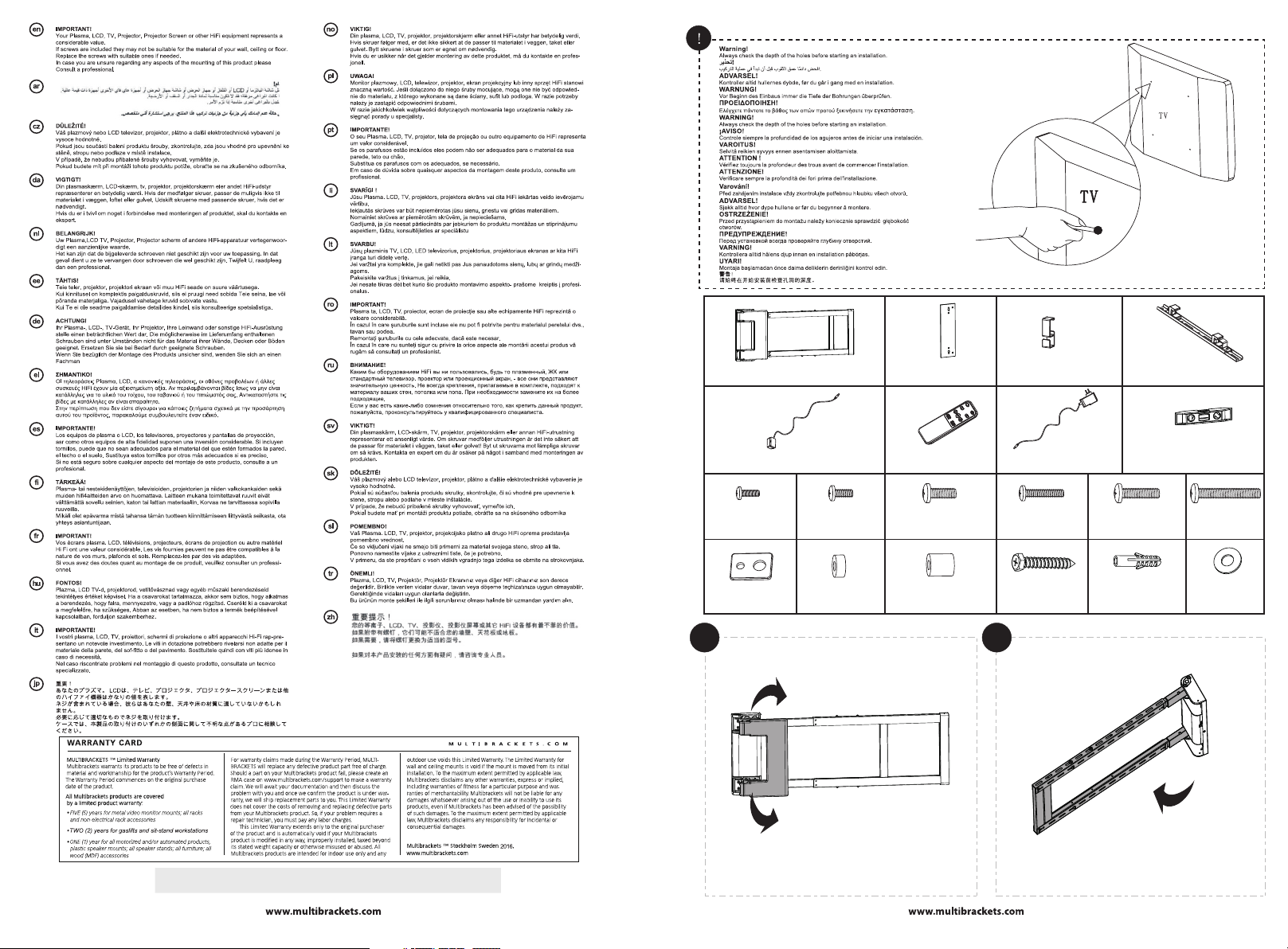
motorized wall mount (x1)
A
wall template (x1)
B
cable clip (x2)
C
adapter bracket (x2)
D
The co ntent of th is manual i s subject t o change wi thout fur ther noti ce. The lat est versi on of this
manu al can be fou nd online u nder the pr oduct nam e on the webs ite:www. multib rackets .com
M5x 14 (x4)
M-A
(x4 )
was her
M-G
IR receiver ( x1)
E
M6x 14 (x4)
sma ll spac er (x8)
M-B
M-H
remote cont rol (x1)
F
M8x 20 (x4)
M-C
spa cer (x8 )
big
M-I
1 2
power suppl y (x1)
G
M6x 30 (x4)
M-D
ST6 .3x55 (x5 )
W-A
M8x 30 (x4)
M-E
con crete a nchor
W-B
bubble leve l (x1)
H
M8x 50 (x4)
D6 wa sher (x 3)
(x5 )
90°
M-F
W-C
21
Page 3
3
4-1
Wall
X
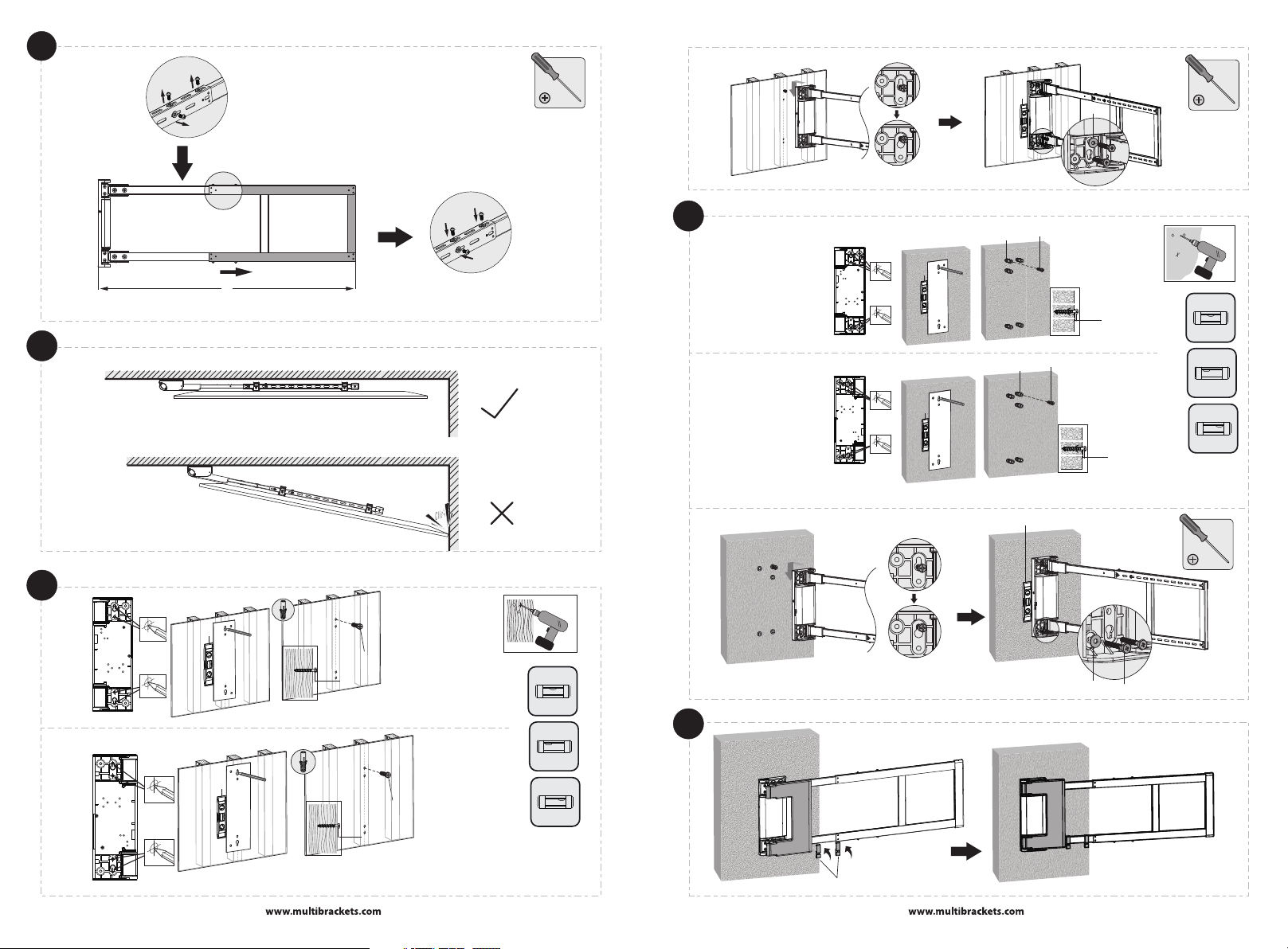
(740mm 1001mm)< X <
The s win g arm n eeds to be ad jus ted
accord ing t o the size of T V.
X= +260mm
TV( L)/ 2
L:The le ngt h of TV
4-2b
H
W-A
W-B
H
W-A
W-B
H
H
W-C
7mm
7mm
W-A
√
X
X
4-2a
3
X
H
W-A
7mm
√
X
H
W-A
7mm
X
X
5
C
W-C
W-A
4
Page 4
6
7a
7b
M-A
M-B
M-C
M-G
8
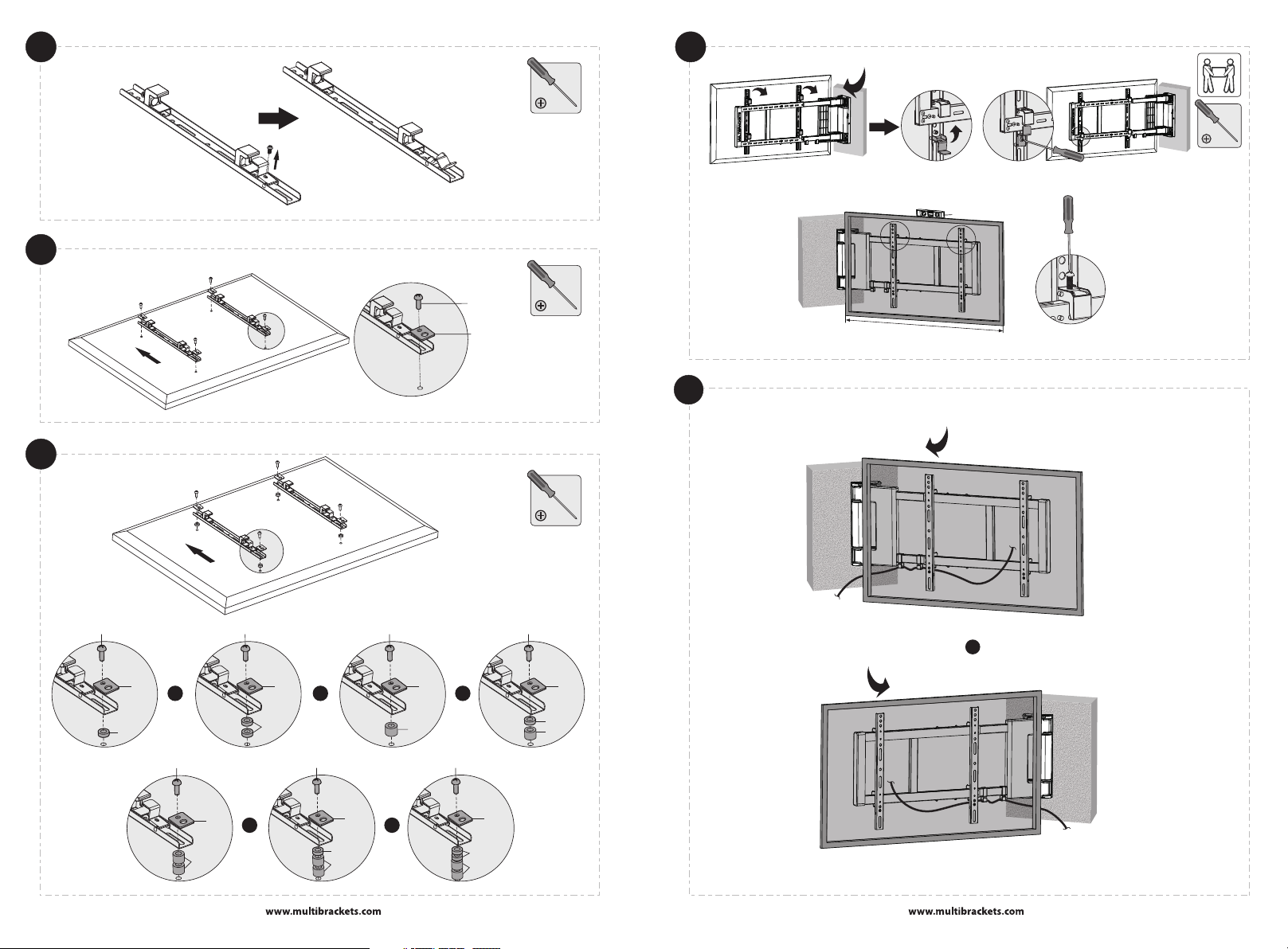
90 °
H
S
c
r
ee
n
Ma
x
Wi
d
t
h: 13
7
0
mm
9
90 °
M-H
M-I
M-G
M-D/M- E
oror
M-I
M-G
M-F
or
90 °
M-H
M-I
M-G
or
M-G
M-H
M-I
6
M-C
M-G
M-H
M-F
M-C/M- D/M -E M-D /M- E
M-G
or
M-H
M-G
M-I
or
M-F
5
Page 5
10
11
E
Light I ndi cat or
Do not op en th e cov er pl eas e.
G
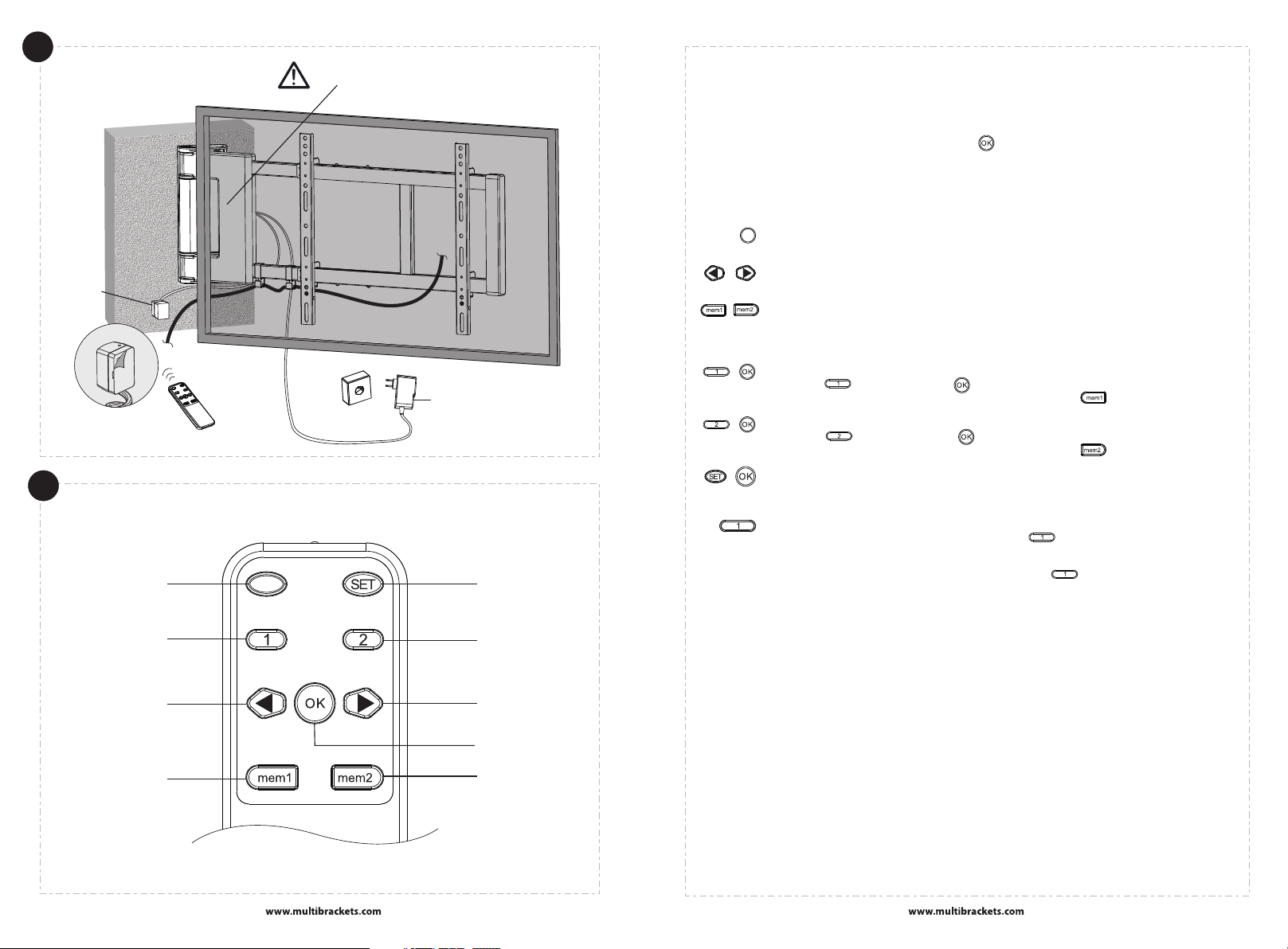
REMOTE CONTROL OVERVIEW
Set but ton
RMT-01
REMOTE CONTROL OPERATION
Connect the TV mount to power, then press the " " button. After the TV mount adjusts to the
position that aligns with the wall, you can operate the remote control.
REMOTE CONTROL BUTTON EXPLANATION
STOP BUTTON
OK
Stop the move men t of th e TV mo unt .
MOVEMENT BUTTONS
The two butto ns en abl e the a dju stm ent o f you r TV. The adjus tme nt ra nge i s 90 de gre es.
MEMORY BUTTONS
The TV mou nt ca n store up to 2 a uto mat ic ad justment pos iti on. Ad jus t the TV t o you r des ired
positi on. P res s and h old any of th e two b utt ons f or 3s. The bu zze r wil l beeps twi ce, a nd th e
LED indi cat or tu rns o n for 1s. The p osi tio n is succes sfu lly s tor ed.
ACTIVATE AUTOMATIC ADJUSTMENT
+
Press th e " " but ton , the n press " " but ton . Afte r the buzzer bee ps on ce, t he TV wa ll
mount wi ll au tom ati cally swivel t o the p osi tio n stored th rou gh " ".
ACTIVATE AUTOMATIC ADJUSTMENT
+
Press th e " " but ton , the n press " " but ton . Afte r the buzzer bee ps on ce, t he TV wa ll
mount wi ll au tom ati cally swivel t o the p osi tio n stored th rou gh " ".
ENTER LEARN MODE
+
The lear nin g mod e all ows your TV r emo te co ntrol to co ntr ol th e TV mount, i n cas e you l ose
the orig ina l TV remote cont rol . The instr uct ion o f how t o use learning m ode i s in th e next section .
RESET
Reconn ect t he mo unt t o power. Pre ss an d hol d the " " 3 t imes (eac h tim e for 3 s). Th e
TV mount w ill a uto mat ically reset t he ad jus tme nt range. ( As fo r cus tom izing the adju stm ent
range, y ou ca n hol d the TV m oun t to fi x it in a d esired po sit ion u nti l the motor stop s.) I n ord er
to reset t he pr evi ous l earning mode , pre ss an d hol d the " " 5 ti mes ( eac h tim e for 3s).
Posit ion 1
Open
Memory 1
remot e con tro l
Posit ion 2
Close
Stop
Memory 2
7
Maintenance
• Check that the bracket is secure and safe to use at regular intervals(at least every three months).
• Please contact your distributor if you have any questions.
Note: Function or not may vary from brand of TV Remote. IR standard: RC5 (Philips) is required.
Note: The remote control should use NO.7 AAA battery.
8
Page 6
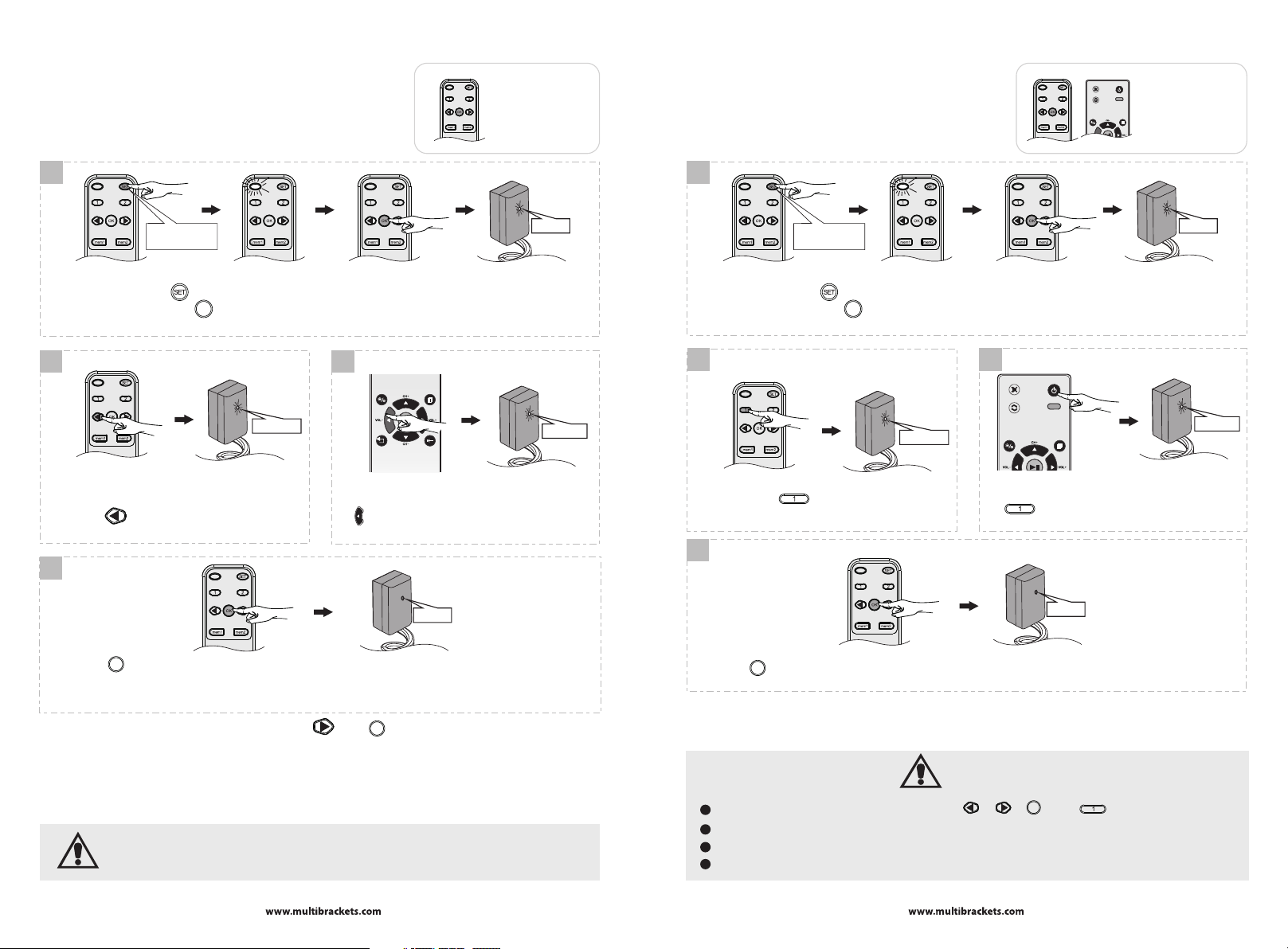
LEARN MODE (A):
How to program the buttons of TV remote
with the included remote control?
1
For this progamming
sequence the included
remote is needed!
LEARN MODE (B):
How to program “Power” button on
the TV remote?
• Left a nd Righ t movem ent is do ne w/o pro gram ming.
1
For this progamming
sequence two remotes
are needed!
Press and hold
it for 5 seconds
Pre ss and ho ld the " " button for 3s. When the LE D indicator on the remote control ligh tens
con tinu ousl y, press the " " button. The bu zzer w ill beep once . After th e IR receiver light en, th e
sys tem enters le arning mod e.
OK
tur n on
2 3
slo w flash
Press the " " button. The buzzer will beep twice,
and the IR receiver will flash slowly.
Target your TV remote control at the IR receiver, and
press a button that is correspondent with the function
of " " button. Then, the buzzer beeps three times,
and the IR receiver flashes quickly.
fas t flash
4
tur n off
O
Pre ss the " " button. The buzzer wil l beeps 4 times , and the I R receiver tu rn off. The duplication is
suc cess ful.
Not e: If the buzze r only be eps on ce, it in dica tes th at the TV remote can't support the le arni ng mode.
K
Press and hold
it for 5 seconds
Pre ss and ho ld the " " button for 3s. When the LE D indicator on the remote control ligh tens
con tinu ousl y, press the " " button. The bu zzer w ill beep once . After th e IR receiver light en, th e
sys tem enters le arning mod e.
OK
tur n on
2 3
slo w flash
Long press the " " button for 3s. The buzzer
will beep twice, and the IR receiver will flash slowly.
Target your TV remote control at the IR receiver, and
press a button that is correspondent with the function
of " " button. Then, the buzzer beeps three
times, and the IR receiver flashes quickly.
fas t flash
4
tur n off
O
Press the " " button. The buzzer will beeps 4 times, and the IR receiver turn off. The duplication is successful.
Not e: If the buzze r only be eps on ce, it in dica tes th at the TV remote can't support the le arni ng mode.
K
• Repeat the same process to duplicate the functions of " " and " " buttons
Not e:
If the opera tion o f any of the steps shown above is over 20s, the sy stem will automatically
exi t the lea rning mode .
OK
9
IMPORTANT:
The l earn ing mo de onl y dupl icate the fu nctions of " ", " ", " " and " " button s.
1
2
No al l of the TV r emot e cont rols a re com patible with the learning mode.
3
Ple ase se lect the but tons on the TV remote control that won 't act ivat e chan ges in b oth TV an d TV mount.
4
Wit h lear n mode t here i s no nee d to switch betwee n remo te con trol s.
OK
10
 Loading...