

Page 1
Owner’s manual
iWa225
Smart in-wall Bluetooth® 2x25W amplifier
Designed by MTX in Phoenix, AZ - USA
mtxaudio.eu facebook.com/MTXEuropetwitter.com/MTXEurope
Page 2
Thank You !
Thank you for purchasing the MTX iWa225 high-end, high-definition audio amplifier. The iWa225 is designed to deliver a deeper dimension
that brings your music to life. No other system provides the exacting measure of clarity in such a small unit. Whether you are listening from
your iPad, iPhone, iPod or computer, the iWa225 delivers outstanding sound quality. Congratulations for making a smart choice and enjoy
the ultimate audio experience with MTX.
In the Box
1x iWa225 amp with its built in power supply
1x Bluetooth antenna
1x Power cable
1x IR (Infra red) receiver
1x Remote control
1x This owner’s manual
Specifications
• Power : 2x25W RMS @4Ω 0,1%THD+N or 2x13W RMS @8Ω 0,1%THD+N
• Compatible load : 4Ω to 8Ω
• Inputs : Bluetooth and Aux (RCA)
• Remote : IR receiver with 100cm cable
• Power supply : 100~120V - 200~240V, 50 - 60Hz
• Dimensions : 8x20x8cm
• Weight : 920g (amp only)
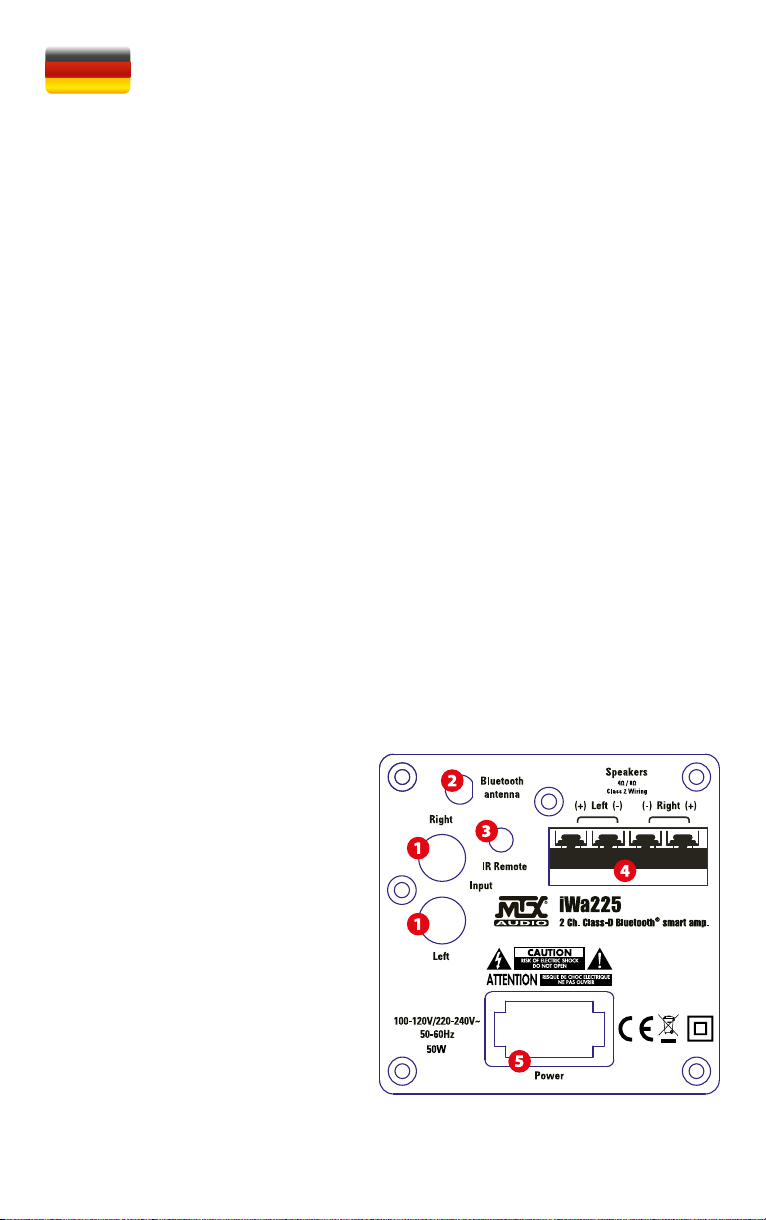
Connections
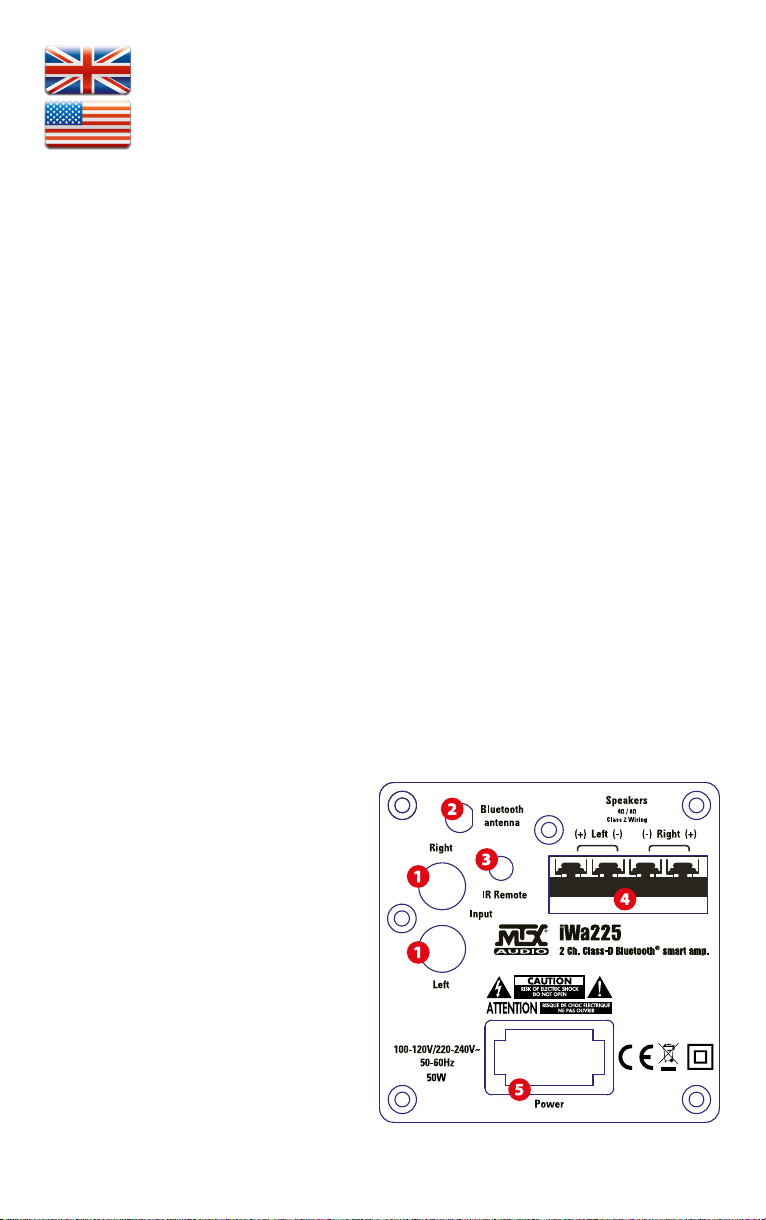
1. RCA Inputs - These RCA inputs are used with your external
music source. MTX recommends only high quality RCA cables to
decrease the possibility of radiated noise entering the system.
2. Bluetooth antenna connector - Connect the provided antenna. Note the BT input will not work properly without the
antenna. It also requires that the IR receiver and IR remote
control are in sight.
3. IR (Infra red receiver connector - Connect the provided IR
sensor. Note that without IR sensor, the remote control will not
be functional.
4. Speakers connectors - Connect your 4Ω or 8Ω speakers to it.
Be carefull with the polarities. Reverse polarity strongly degrades the level of serious and sound quality.
5. Power supply connector - use the provided power cord
and connect it to a 110V or 220V wall plug. You don’t need to
change any setting.
Page 3
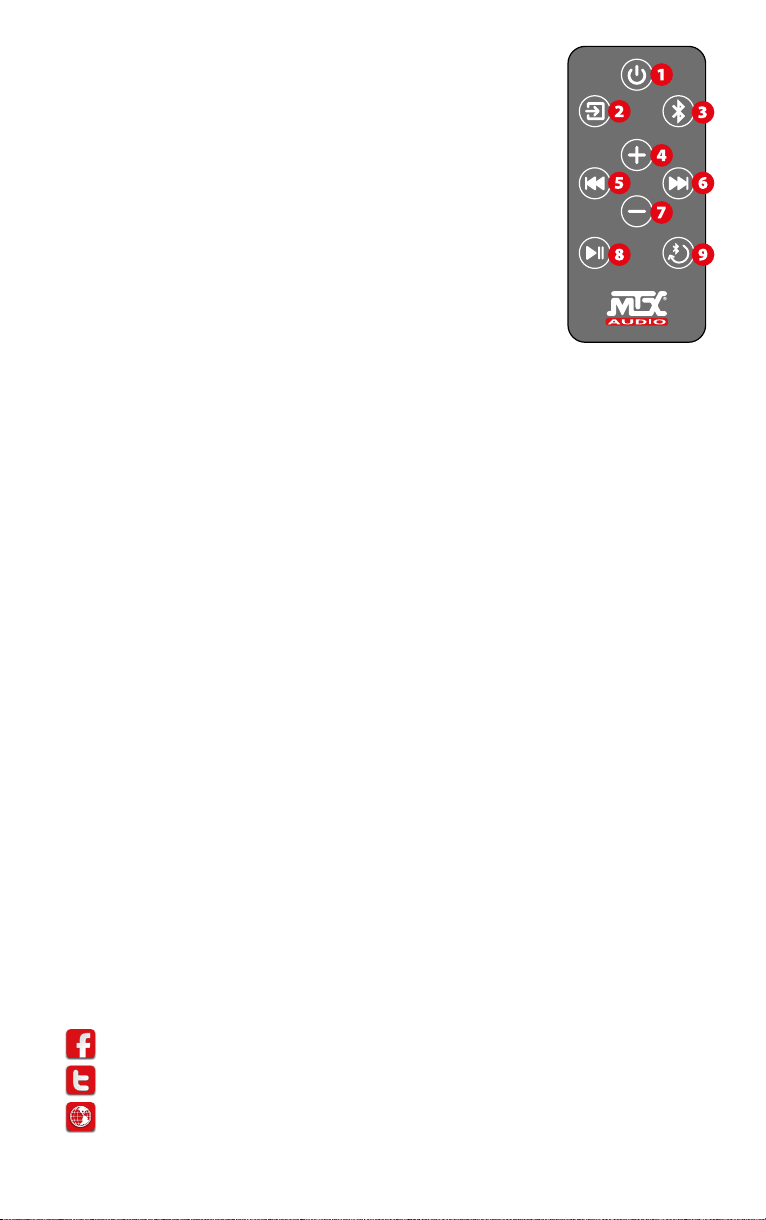
Remote control keys
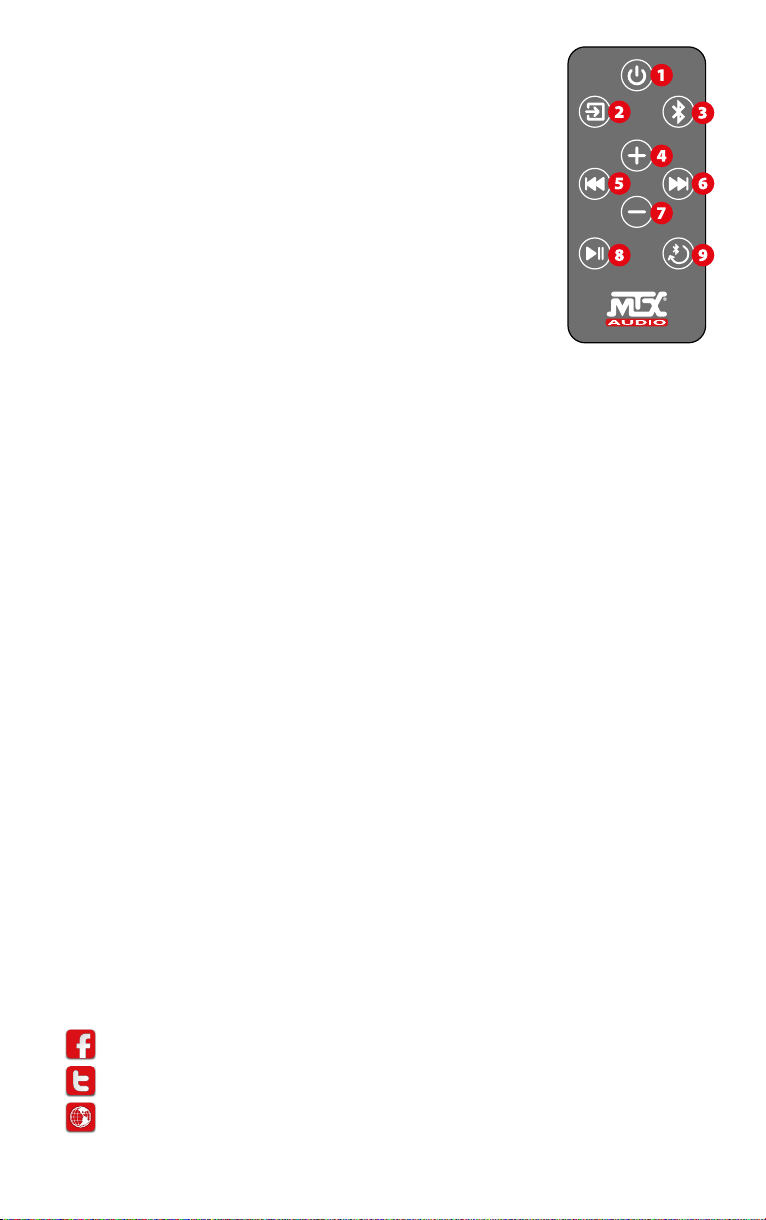
1. Power OFF : use to switch off the unit. Note that it doesn’t switch on the unit…
2. Aux input : push once to switch on the iWa225 and use the AUX input.
->The right red LED will switch on
3. Bluetooth input : Push once to switch on the iWa225 and to use the BT input.
->The left blue LED will switch on
4. Volume UP : use it to raise the volume level
5. Skip backward : push once to go back in track (only available in BT)
6. Skip forward : push once to go next (only available in BT)
7. Volume Down : use it to reduce the volume level
8. Play/Pause : push once to play or pause the track(only available in BT mode)
9. BT paring : Push once to pair a new device to with your iWa225.
Push once to release the BT connexion.
Quick start
1. Screw the antenna
2. Connect the speakers. It is important to respect the speaker polarities to get a good sound and a good bass response. Note that the
minimum speaker load is 4Ω
3. Connect the RCA inputs if available
4. Connect the IR sensor and make it visible for the IR remote control
5. Connect the power cable to a wall socket. Your iWa225 is ready
6. On the remote control, remove the battery protection to activate it
7. Press the Aux input or the BT input on the remote control. The amp is on.
8. If you use the Aux input, adjust the volume level.
9. If you use the Bluetooth input, go to the next paragraph.
Bluetooth paring
1. First connexion : push the Bluetooth key (n°3) on the remote control. The unit is switching on and the blue LED is now on.
2. Push once on the “BT paring/release” key (n°9) on the remote control. The blue LED is now flashing blue. The unit is ready to pair.
3. On your BT device (Cell phone, iPad, computer…), go to the BT preferences and tap on “MTX iWa225” to pair the devices together.
4. When it is done, go to your music app and play a track.
Note 1 : After 1 minute without BT signal, the unit will switch to Aux automatically if it detects signal on Aux.
Note 2 : You have to be in BT input to release BT.
Note 3 : You can always release the MTX iWa225 and make it available for an other BT device by simply pushing the “BT paring” (n°9) key
on the remote control. You don’t need to disconnect the devices, just push once “BT paring” (n°9).
Recycling
Do not trash this product. You must deliver it to the applicable collection point for recycling. The iWa225 is made of highly recyclable components and materials.
How to Stay Tuned :
https://www.facebook.com/MTXEurope
https://twitter.com/MTXEurope
http://www.mtxaudio.eu
Page 4
Merci !
Merci d’avoir acheté l’amplificateur haute définition MTX iWa225. Il a été conçu pour vous simplifier la musique au maximum. Il offre une
dimension plus profonde à la musique. Aucun autre système de cette taille ne fournit de tels résultats. Que vous écoutiez depuis votre iPad,
votre iPhone, votre iPod ou votre ordinateur, l’iWa225 délivre une qualité sonore exceptionnelle et reste toujours incroyablement simple à
utiliser. Félicitations pour votre choix, et profiter de l’expérience audio ultime avec MTX.
Dans la boite :
1x amplificateur iWa225 avec son alimentation intégrée
1x Antenne Bluetooth
1x Câble d’alimentation
1x Récepteur infra rouge
1x Télécommande infra rouge
1x Ce manuel
Caractéristiques
• Puissance : 2x25W RMS @4Ω 0,1%THD+N or 2x13W RMS @8Ω 0,1%THD+N
• Impédances compatibles : 4Ω à 8Ω
• Entrées : Bluetooth et Auxiliaire (RCA)
• Remote : IR receiver with 100cm cable
• Power supply : 100~120V - 200~240V, 50 - 60Hz
• Dimensions : 8x20x8cm
• Weight : 920g (amp only)
Branchements
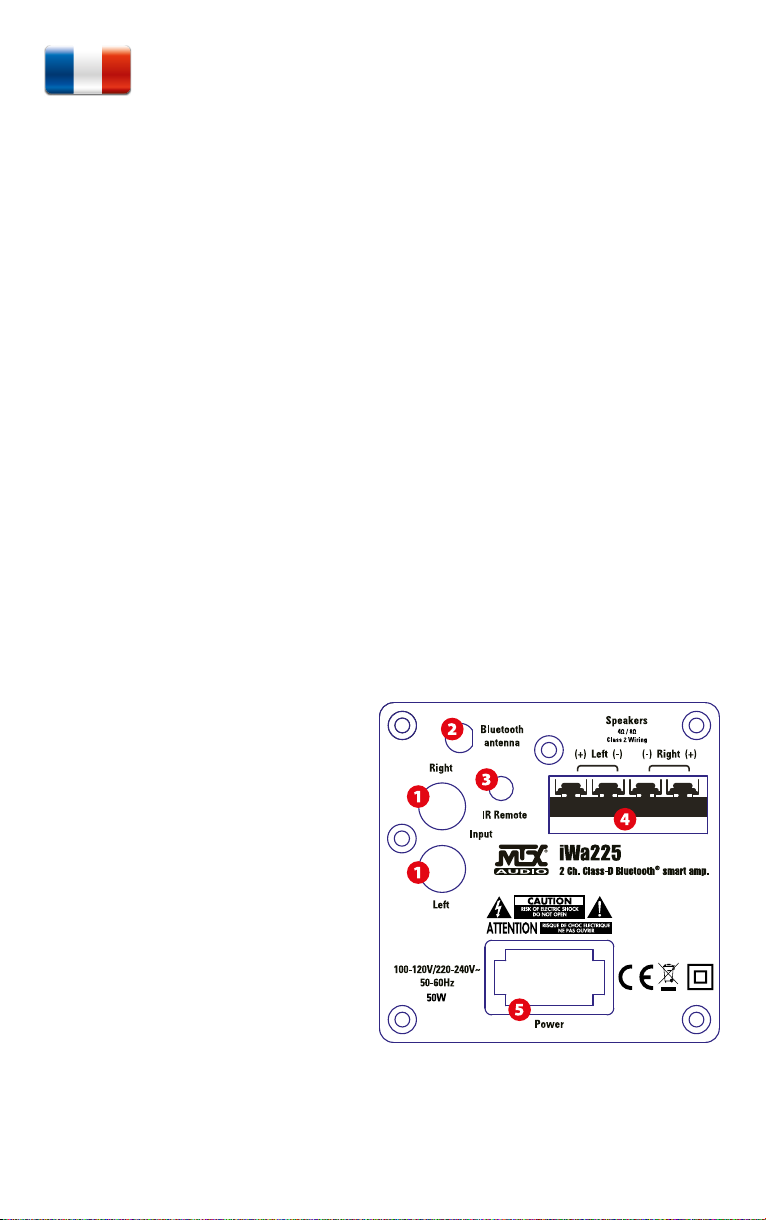
1. Connecteurs RCA - Ce sont les entrées RCA qui se connectent
à votre source musicale. Nous vous recommendons l’utilisation
de câble RCA de haute qualité pour éviter les parasites.
2. Connecteur pour l’antenne Bluetooth - Connectez-y l’antenne fournie. Notez que l’entrée BT ne fonctionnera pas correctement sans antenne.
3. Connecteur pour recepteur infra rouge - Connectez-y le recepteur infra rouge fourni. Notez que sans ce récepteur, la télécommande ne fonctionnera pas. Il faut aussi que le récepteur
IR et la télécommande IR soient en vue.
4. Connecteurs haut-parleurs - Connectez-y vos haut-parleurs
4Ω ou 8Ω. Atention à bien respecter les polarités. Une inversionde polarité dégrade fortement le niveau du grave et la
qualité sonore.
5. Connecteur d’alimentation - Connectez-y le câble d’alimentation fournie. L’ampli est compatible 110V 220V. Aucun
réglage n’est nécéssaire pour passer de 110V à 220V.
Page 5
Remote control keys
1. OFF: Appuyer une fois éteindre l’appareil. Notez que ce bouton n’allume pas l’amplificateur...
2. Source Auxiliaire : Appuyer une fois pour allumer l’iWa225 et/ou utiliser l’entrée AUX.
-> Le voyant rouge de droite se met en marche
3. Source Bluetooth : Appuyez une fois pour allumer l’iWa225 et/ou utiliser l’entrée Bluetooth.
-> La LED bleue de gauche se met en marche
4. Volume (+) : Appuyer une ou plusieurs fois pour augmenter le volume sonore.
5. Retour : Appuyer une fois pour revenir au début de la piste, puis à la précédente (Seulement
disponible en BT)
6. Avancer: Appuyer une fois pour aller à la piste suivante (Seulement disponible en BT)
7. Volume (-) : Appuyer une ou plusieures fois pour diminuer le volume sonore.
8. Lecture / Pause : Appuyez une fois pour lire ou mettre en pause la piste actuelle (uniquement
disponible en mode BT)
9. Appairage et remise à zéro du Bluetooth :
Appuyez une fois pour associer un nouveau périphérique à votre iWa225.
Appuyez une fois pour libérer la connexion BT et se connecter avec un nouvel appareil.
Démarrage rapide
1. Visser l’antenne Bluetooth
2. Connecter les haut-parleurs. Il est très important de respecter les polarités pour avoir un bon grave et une bonne qualité sonore.
Attention, l’impédance minimum est 4Ω par canal.
3. Connecter le câble RCA si cette entrée est utilisée.
4. Connecter le récepteur infra-rouge.
5. Connecter le câble d’alimentation de l’ampli à une prise murale. Votre iWa225 est prêt.
6. Prenez la télécommande et retirez le plastique de protection de la batterie pour l’activer.
7. Enfoncer la touche Aux (n°2) ou la touche Bluetooth (n°3) de la télécommande pour allumer l’ampli.
8. Si vous utilisez l’entrée Aux, vous pouvez augmenter le volume car il part de très bas.
9. Si vous utilisez l’entrée Bluetooth, passez au paragraphe suivant pour l’appairage.
Appairage avec un périphérique Bluetooth
1. Première connexion : Appuyer sur le bouton Bluetooth n°3 de la télécommande. L’ampli et la LED bleue s’allument.
2. Appuyer une fois sur la touche n°9 (appairage et remise à zéro du Bluetooth). La LED bleue clignote. L’ampli est prêt à être appairé.
3. Sur votre périphérique Bluetooth, aller dans les réglages BT et connectez-vous à l’appareil “MTX iWa225”
4. Aller à votre application musicale et lancez une piste.
Note 1 : Après 1 minute sans signal BT, l’ampli passe en entrée AUX automatiquement s’il détecte du signal sur l’entrée Aux.
Note 2 : Vous devez être sur l’entrée BT pour utiliser la touche n°9 “Appairage et remise à zéro du Bluetooth”
Note 3 : Vous pouvez toujours libérer le MTX iWa225 de son périphérique BT et le rendre disponible pour un autre appareil BT en appuyant
simplement sur la touche n°9 (Appairage et remise à zéro du Bluetooth). Vous n’avez pas besoin de débrancher les appareils connectés, il
suffit d’appuyer une fois sur la touche n°9 pour connecter un autre appareil.
Recyclage
Le iWa225 est fait de composants et de matériaux hautement recyclables. Ne jetez pas ce produit. Vous devez le remettre au point de collecte
approprié pour le recyclage.
Pour restez connecter
https://www.facebook.com/MTXFrance
https://twitter.com/MTXFrance
http://www.mtxaudio.fr
Page 6
Vielen Dank !
Danke, dass Sie sich für den MTX iWa225 High End Audio Verstärker entschieden haben. Der iWa225 gibt Ihre Musik mit einer besonderen
Lebendigkeit wieder und verbindet hohe Detailtreue mit kleinsten Abmessungen in ganz besonderer Art und Weise. Egal ob Sie über ein
iPad, iPhone, iPod oder Ihren Computer hören: Der iWa225 verwöhnt Sie stets mit hervorragende Klangqualität. Sie haben also eine sehr
gute Wahl getroffen. Viel Spaß mit Ihrem neuen MTX Verstärker.
Im Lieferumfang
1 x iWa225 Verstärker mit integriertem Netzteil
1 x Bluetooth Antenne
1 x Stromkabel
1 x IR (Infrarot) Empfänger
1 x Fernbedienung
1 x diese Bedienungsanleitung
Technische Daten
• Leistung: 2x25W RMS @4Ω 0,1%THD+N oder 2x13W RMS @8Ω 0,1%THD+N
• Impedanzbereich: 4Ω bis 8Ω
• Eingänge: Bluetooth und Aux (RCA)
• Fernbedienung: IR Empfänger mit 75cm Kabel
• Netzteil: 100~120V - 200~240V, 50 - 60Hz
• Abmessungen: 8x20x8cm
• Gewicht: 920g (nur der Verstärker)
Anschlüsse
1. RCA Eingänge (Cinch) - Die RCA Eingänge werden in Verbindung mit einer externen Musikquelle verwendet. MTX empfiehlt
ausschließlich hochwertige Cinchkabel – diese verhindern das
Eindringen von Störgeräuschen.
2. Bluetooth Antennenanschluss – schließen Sie hier die mitgelieferte Antenne an. Bitte beachten Sie, dass Bluetooth ohne
die Antenne nicht vernünftig funktioniert.
3. IR (Infrarot-Empfänger Anschluss – schließen Sie hier
den mitgelieferten IR Sensor an. Bitte beachten Sie, dass die
Fernbedienung ohne IR Sensor nicht funktioniert. IR Empfänger und IR Fernbedienung müssen Sichtkontakt haben.
4. Lautsprecher Anschlüsse – Schließen Sie hier Ihre 4Ω oder
8Ω Lautsprecher an. Achten Sie dabei auf die Polarität. Vertauschte Polarität reduziert ganz erheblich die Klangqualität.
5. Stromanschluss – verwenden Sie das mitgelieferte Stromkabel zum Anschluss an eine 110V oder 220V Steckdose. Die
Umschaltung erfolgt automatisch.
Page 7
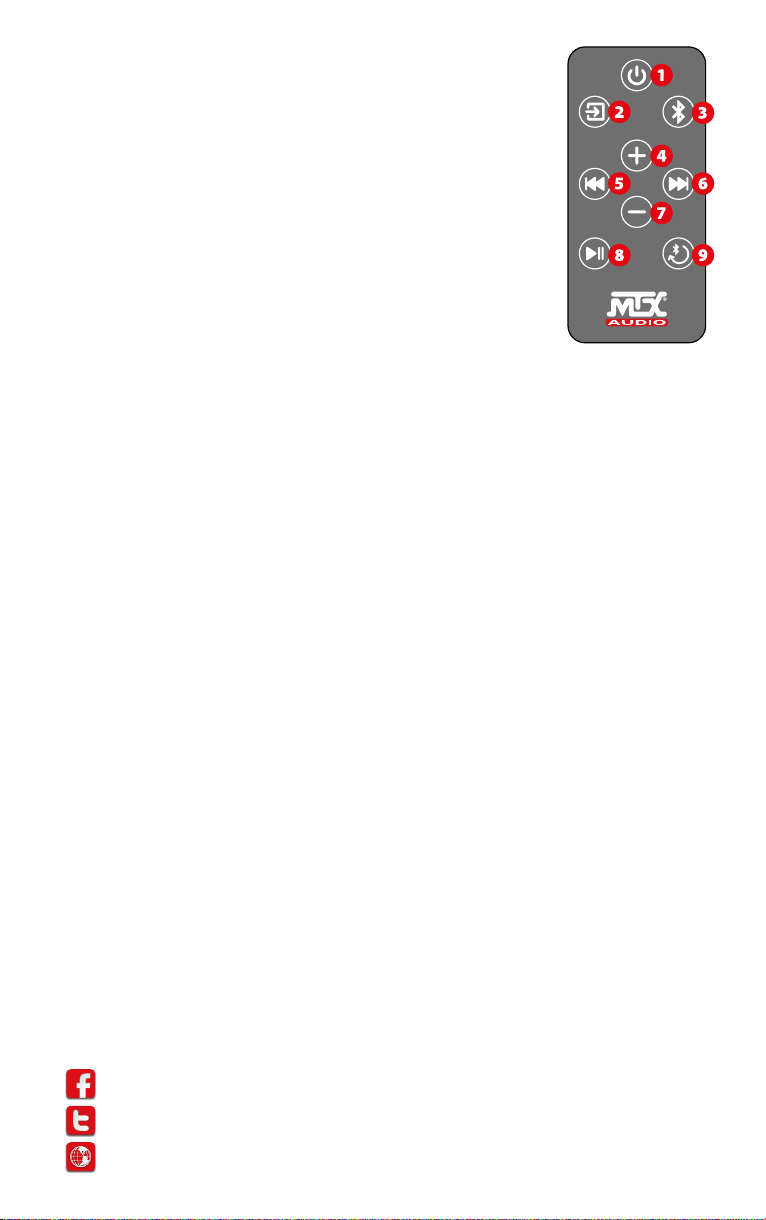
Tasten der Fernbedienung
1. Power AUS: Ausschalten des Verstärkers. Einschalten geht hierüber nicht…
2. Aux Eingang: Einmal drücken zum Einschalten und Auswahl des AUX Einganges.
->Die rechte, rote LED leuchtet.
3. Bluetooth Eingang: Einmal drücken zum Einschalten und Auswahl des BT Einganges.
->Die linke, blaue LED leuchtet.
4. Lautstärke HÖHER: Lauter
5. Rückwärts springen: Einen Track zurück springen (nur im BT Modus)
6. Vorwärts springen: Einen Track vorwärts springen (nur im BT Modus)
7. Lautstärke GERINGER: Leiser
8. Play/Pause : Einmal drücken für Wiedergabe oder Pause (nur im BT Modus)
9. BT Paring : Einmal drücken, um ein neues Gerät am iWa225 anzumelden.
Einmal drücken, um die BT Verbindung zu trennen.
Schnelleinstieg
1. Schrauben Sie die Antenne fest.
2. Schließen Sie die Lautsprecher an. Bitte beachten Sie unbedingt die Polarität, um eine gute Basswiedergabe und eine gute Klangqualität zu erzielen. Die minimale Impedanz beträgt 4Ω.
3. Schließen Sie die Cinchkabel an, wenn verfügbar.
4. Schließen Sie den IR Sensor an und sorgen Sie für freie Sicht auf den Sensor für die Fernbedienung.
5. Schließen Sie das Stromkabel an eine Steckdose an. Ihr iWa225 ist nun betriebsbereit.
6. Entfernen Sie die Batteriesicherung an der Fernbedienung um diese zu aktivieren.
7. Wählen Sie den Aux Eingang oder den BT Eingang über die Fernbedienung. Der Verstärker ist eingeschaltet.
8. Wenn Sie den Aux Eingang verwenden: Passen Sie die Lautstärke an.
9. Wenn Sie den Bluetooth Eingang verwenden: Lesen Sie den nächsten Abschnitt.
Bluetooth Verbindung
1. Erste Verbindung: Drücken Sie den Bluetooth Knopf (n°3) an der Fernbedienung. Das Gerät schaltet sich ein und die blaue LED leuchtet
jetzt.
2. Drücken Sie einmal auf den “BT Paring/Release” Knopf (n°9) an der Fernbedienung. Die blaue LED blinkt nun. Das Gerät ist bereit für
eine Verbindung.
3. Wählen Sie an Ihrer BT Quelle (Telefon, iPad, Computer…) in den Bluetooth Einstellungen “MTX iWa225”, um eine Verbindung
herzustellen.
4. Wechseln Sie danach in Ihre Musik App und geben Sie Musik wieder.
Anmerkung 1 : Nach einer Minute ohne BT Signal schaltet das Gerät automatisch auf Aux.
Anmerkung 2 : Um eine BT Verbindung trennen zu können, müssen Sie sich im BT Modus befinden.
Anmerkung 3 : Sie können den MTX iWa225 jederzeit trennen, um ihn für eine anderes Gerät verfügbar zu machen. Drücken Sie einfach
auf den “BT Paring” (n°9) Knopf an der Fernbedienung. Sie müssen das Gerät nicht in den Einstellungen trennen, drücken Sie einfach
einmal “BT Paring” (n°9).
Recycling
Entsorgen Sie dieses Produkt NICHT über den Hausmüll. Bringen Sie es zu einem entsprechenden Recyclinghof. Der iWa225 besteht aus
hochwertigen, recyclebaren Materialien.
So bleiben Sie auf dem Laufenden :
https://www.facebook.com/MTXEurope
https://twitter.com/MTXEurope
http://www.mtxaudio.eu
Page 8
Designed and Engineered by MTX in Phoenix - AZ, USA.
Assembled in PRC.
© 2016 Mitek. All rights reserved.
MTX is a registered trademark of Mitek.
Due to continual product development, all
specifications are subject to change without notice.
Mitek - MTX
4545 East Baseline Rd. Phoenix, AZ 85042, USA
MTX is proud to be an American
Audio Company since 1971.
 Loading...