

Page 1
OWNER’S MANUAL
800-362-6224 I www.mtgsmarttouch.com
Page 2
QUESTIONS? Call us at 800-362-6224 I www.mtgsmarttouch.com
2
SMART TOUCH SYSTEM I DRIVER’S SIDE DIAGRAM
TABLE OF CONTENTS
INTRODUCTION
Welcome Letter ....................................................................3
Overview ..............................................................................4
DRIVER’S SIDE
Driver’s Side Diagram/Smart Touch System......................5
Driver’s Side Start-Up Screen ............................................6
Driver’s Side Intercom/In Motion/Partition........................7
Driver’s Side Climate/Environment....................................8
Driver’s Side Lighting..........................................................9
Driver’s Side Settings ........................................................10
PASSENGER’S SIDE
Passenger’s Side Diagram/Smart Touch System..............11
Passenger’s Side Entertainment/Start-Up Screen ..........12
Passenger’s Side Lighting..................................................13
Passenger’s Side Intercom/Climate ..................................14
Passenger’s Side Partition/Dim ........................................15
Personalized Customer Setup ..........................................16
WARRANTY ........................................................................17
Page 3
WELCOME TO THE SMART TOUCH SYSTEM
QUESTIONS? Call us at 800-362-6224 I www.mtgsmarttouch.com
3
SMART TOUCH SYSTEM I WELCOME
Page 4
WELCOME TO THE SMART TOUCH SYSTEM
QUESTIONS? Call us at 800-362-6224 I www.mtgsmarttouch.com
4
SMART TOUCH SYSTEM I DRIVER’S SIDE DIAGRAM
SMART TOUCH HAS BEEN ENGINEERED
TO OEM SPECIFICATIONS AND IS MANUFACTURED TO ISO STANDARDS.
Designed and manufactured by a Detroit
company that develops products for
Ford and General Motors, Smart Touch
has been put through vigorous bench,
heat chamber, and in-vehicle testing
that includes vibration, humidity, salt
spray, EMD, EMC, reverse battery, and
intense load testing to ensure the highest quality design and manufacturability.
Both the IOM, or brain of the system, as
well as the driver and passenger touch
screens have custom injection molded
enclosures to ensure the finest fit and
finish to our system.
Smart Touch has the flexibility to
match any builders' needs. Every vehicle built can be customized through our
advanced programming technology, or
software set-ups can be easily stored
and then loaded through a single code
for a production manufacturing environment.
Smart Touch is also available with our
proprietary/ patent-pending wireless
design that enables users to download
an app to control any function in the
vehicle with their iPad or smartphone.
Smart Touch is currently available to
all vehicle builders, comes with a 3year/36,000-mile warranty, and is supported though MTG's friendly technical
support team.
Page 5
WELCOME TO THE SMART TOUCH SYSTEM
QUESTIONS? Call us at 800-362-6224 I www.mtgsmarttouch.com
5
SMART TOUCH SYSTEM I DRIVER’S SIDE DIAGRAM
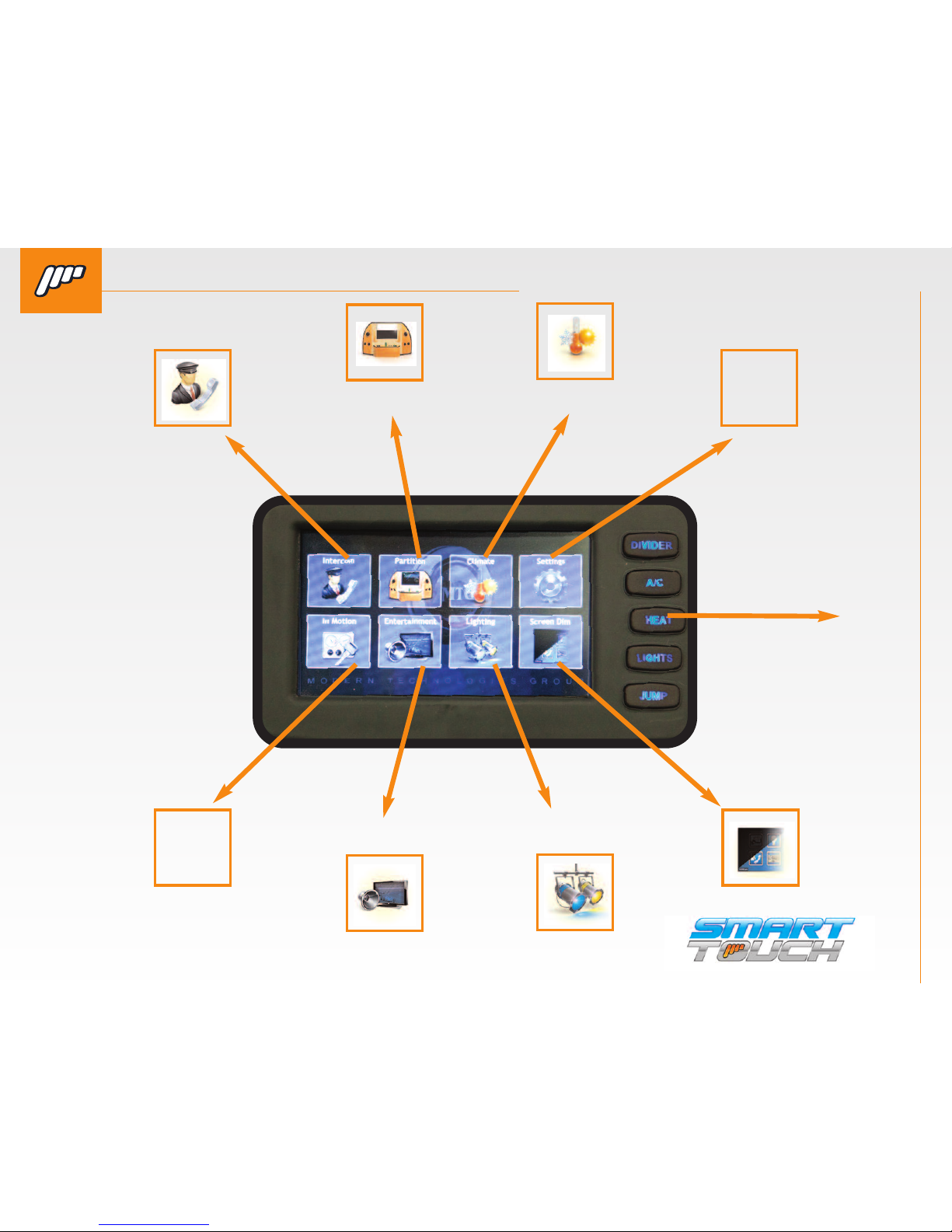
INTERCOM
IN MOTION
SCREEN DIM
SETTINGS
OVERRIDE
BUTTONS
PARTITION
ENTERTAINMENT
CLIMATE
LIGHTING
Need this
icon
Page 6
WELCOME TO THE SMART TOUCH SYSTEM
QUESTIONS? Call us at 800-362-6224 I www.mtgsmarttouch.com
6
SMART TOUCH SYSTEM I DRIVER’S SIDE DIAGRAM
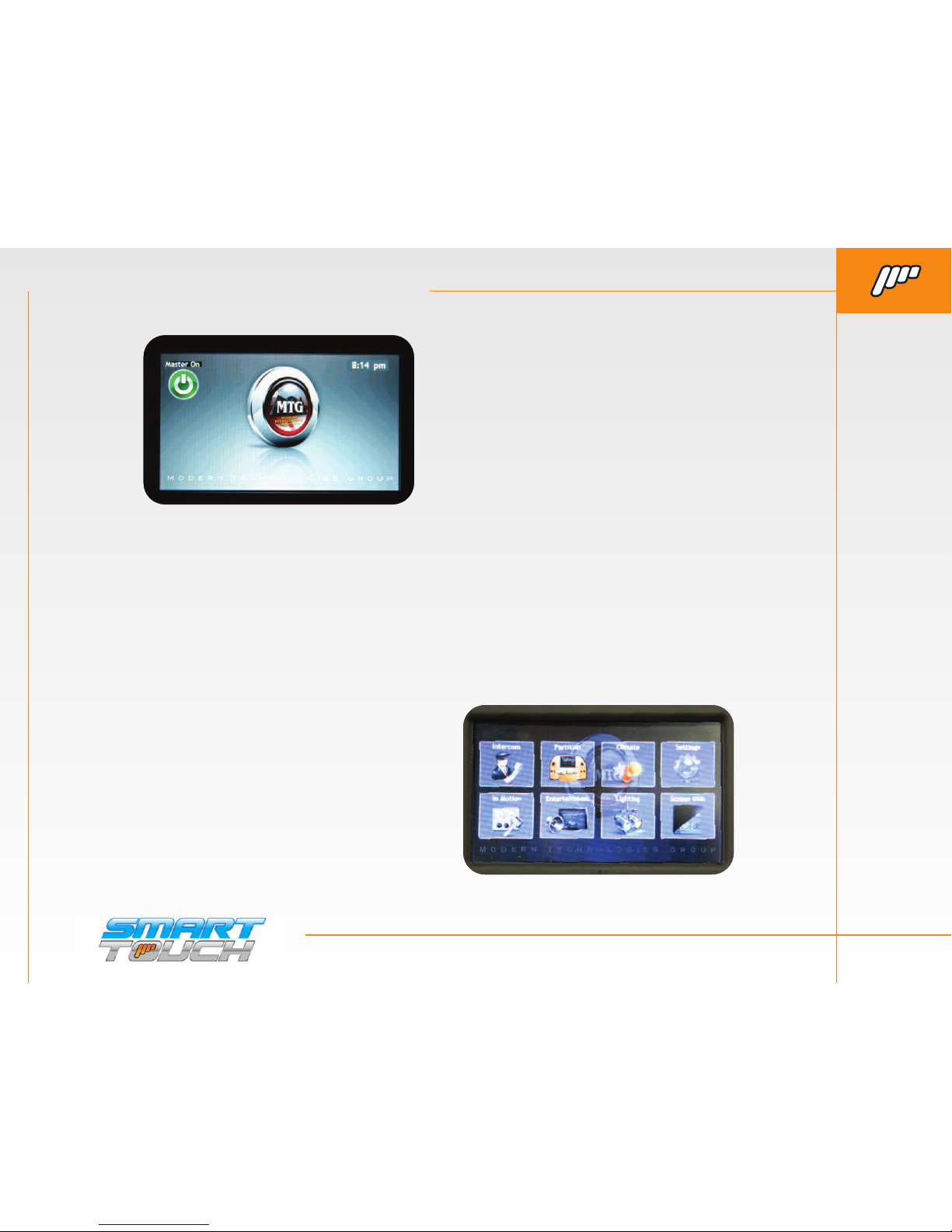
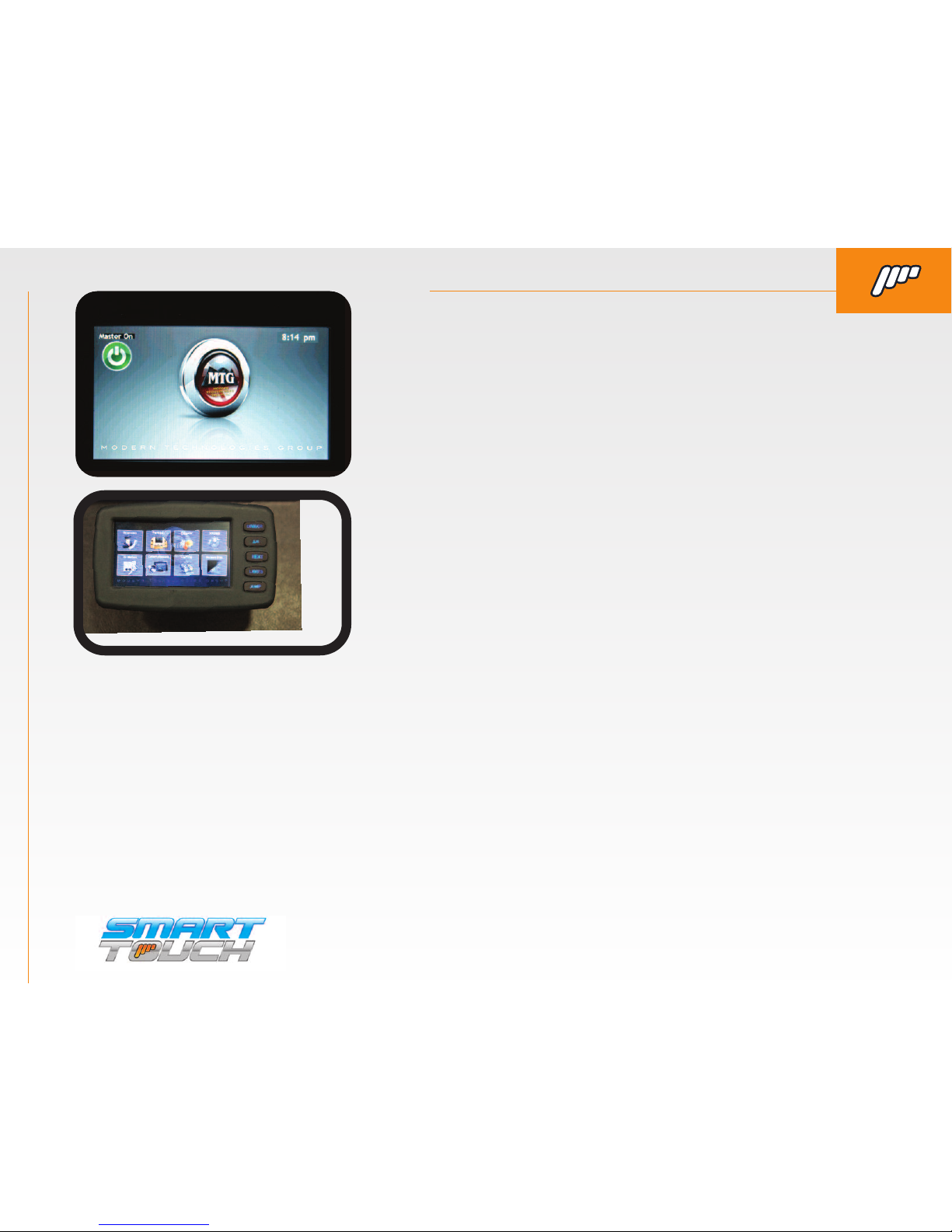
SMART TOUCH SYSTEM DRIVER’S SIDE START-UP SCREEN
QUESTIONS? Call us at 800-362-6224 I www.mtgsmarttouch.com
SMART TOUCH DRIVER’S SIDE START UP-SCREEN
IT WOULD BENEFIT YOU TO BE SITTING IN DRIVER’S AREA AND BE
ABLE TO GO THROUGH THE FUNCTIONS WHEN YOU READ THEM.
This will help you better understand the controllers and how they
operate. To start your Smart Touch experience, press the “Master
On” button.
Page 7
WELCOME TO THE SMART TOUCH SYSTEM
QUESTIONS? Call us at 800-362-6224 I www.mtgsmarttouch.com
7
SMART TOUCH SYSTEM I DRIVER’S SIDE DIAGRAM
SMART TOUCH SYSTEM DRIVER’S SIDE: NTERCOM, IN MOTION & PARTITION
QUESTIONS? Call us at 800-362-6224 I www.mtgsmarttouch.com
SMART TOUCH SYSTEM DRIVER’S SIDE: INTERCOM, IN MOTION & PARTITION
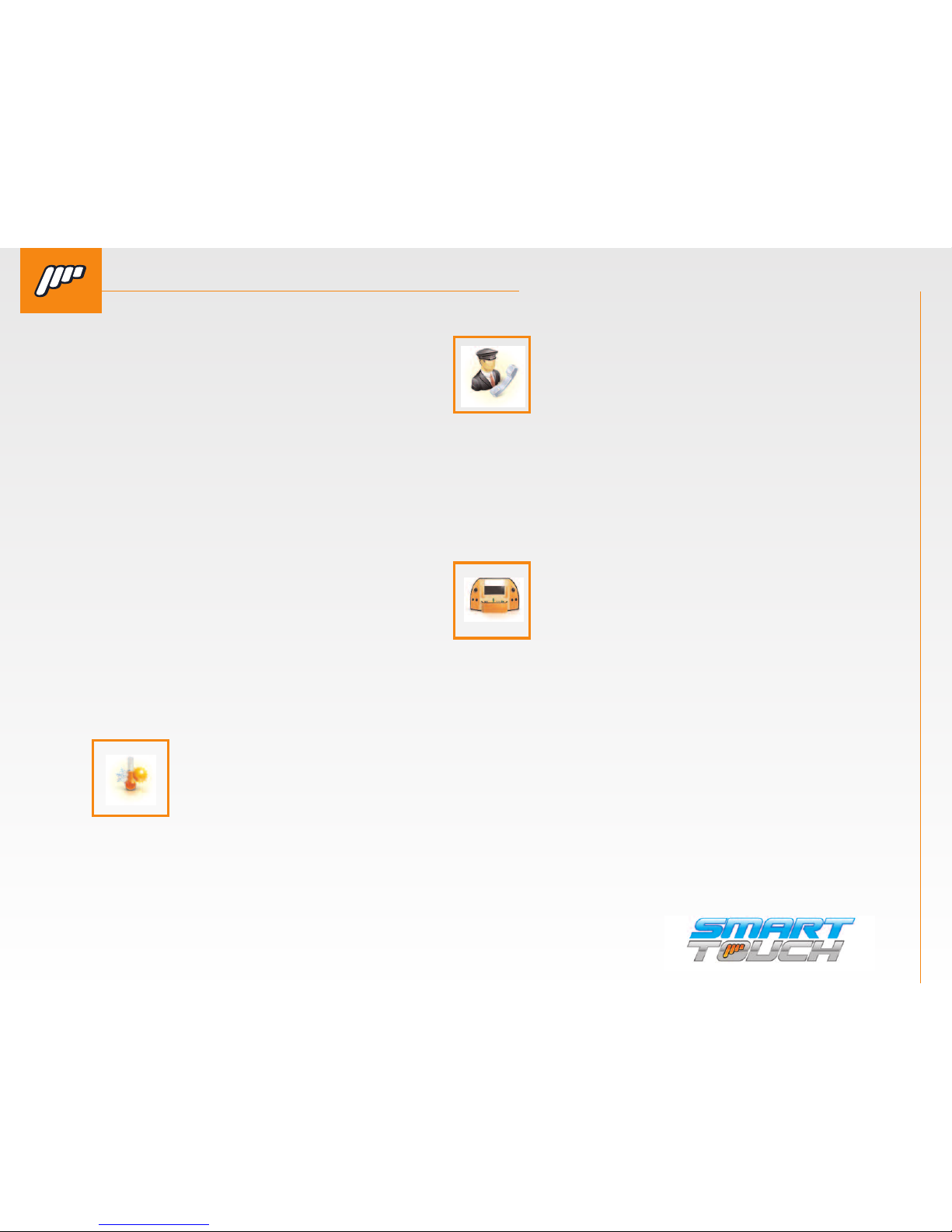
INTERCOM. By pressing this button, you
will bring up the hands-free intercom in
the limousine. To activate, press the button with the chauffeur icon. You will also
be able to adjust the volume up or down.
PARTITION. By pressing this button you will enter
the Privacy/Moonroof menu. Your vehicle may not
have all of the controls pictured. When the parti-
tion is locked from thedriver’s screen you will
have “lock” buttons on the up and down arrows.
While the intercom is
active the icon will be out-
lined allowing them to see
the status even if they
are in a different menu.
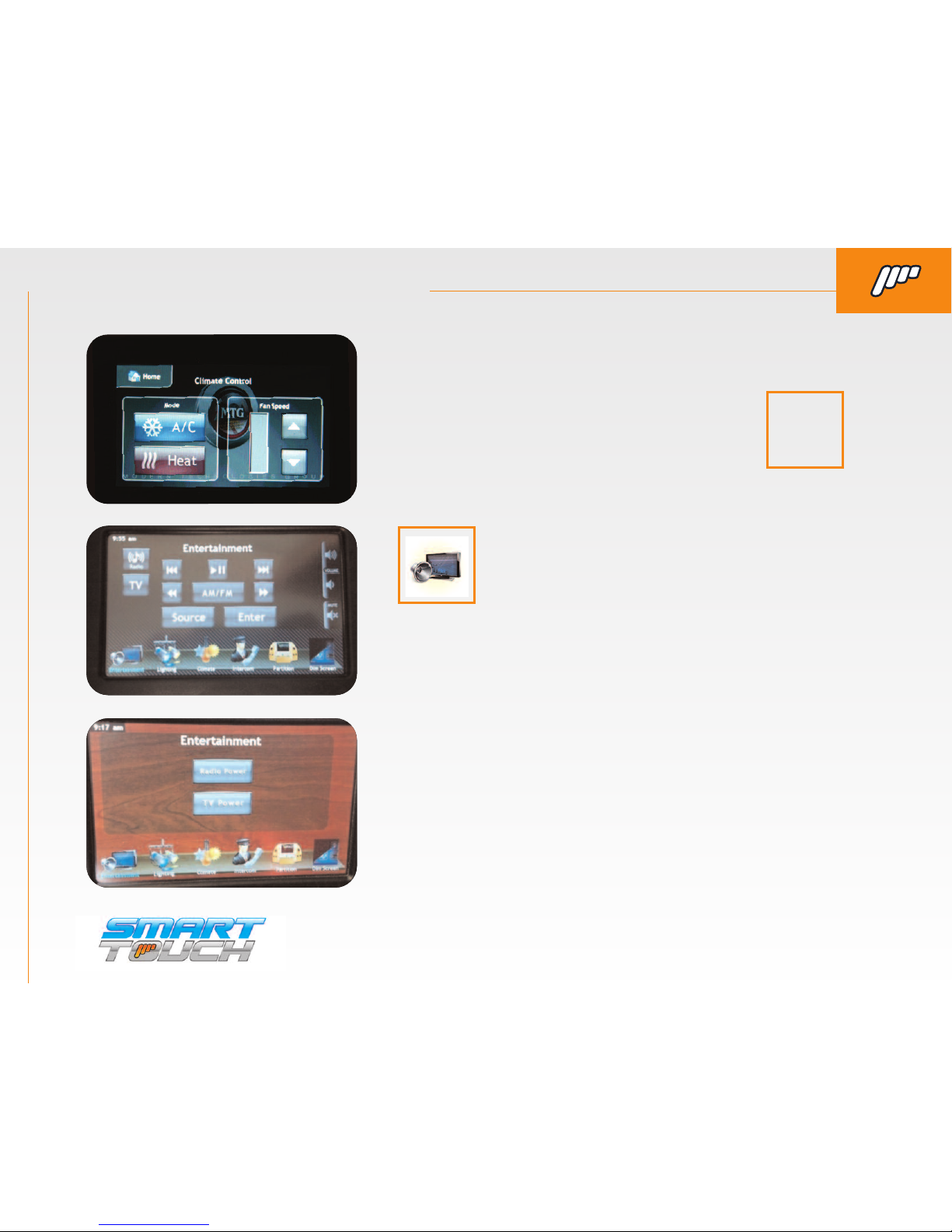
CLIMATE. By pressing this button you will enter the
Climate menu. This will allow you to adjust the fan
speed and switch between Heat and A/C.
Page 8
WELCOME TO THE SMART TOUCH SYSTEM
QUESTIONS? Call us at 800-362-6224 I www.mtgsmarttouch.com
8
SMART TOUCH SYSTEM I DRIVER’S SIDE DIAGRAM
SMART TOUCH SYSTEM DRIVER’S SIDE: CLIMATE, ENTERTAINMENT & LIGHTING
QUESTIONS? Call us at 800-362-6224 I www.mtgsmarttouch.com
SMART TOUCH SYSTEM DRIVER’S SIDE: CLIMATE & ENTERTAINMENT
ENTERTAINMENT. By pressing this button you will enter
the Audio/Video menu. There will be 2 different menus
for the Audio/Video button (see left). One of them will
have radio and TV On and Off buttons. The other menu
would be if the optional IR Radio/DVD controls are connected and programmed.
SCREEN 1. Here are the examples of the menus that
would be displayed if the IR remote control is connected.
This will give you control over basic functions of the
Radio/DVD.
SCREEN 2. This screen display would be if you don’t have
the optional IR remote learning module installed in the
vehicle. You would have a basic ON/OFF output for both
the Radio and DVD/TV outputs.
Screen 1
U
Screen 2
U
IN MOTION. This screen displays the most com-
monly used features that a driver would need to
operate whendriving (Privacy (partition), fan
speed, heat/ac, intercom and radio power). The-
controller will always default to this screen even
if the driver navigates into another menu.
Need this
icon
Page 9
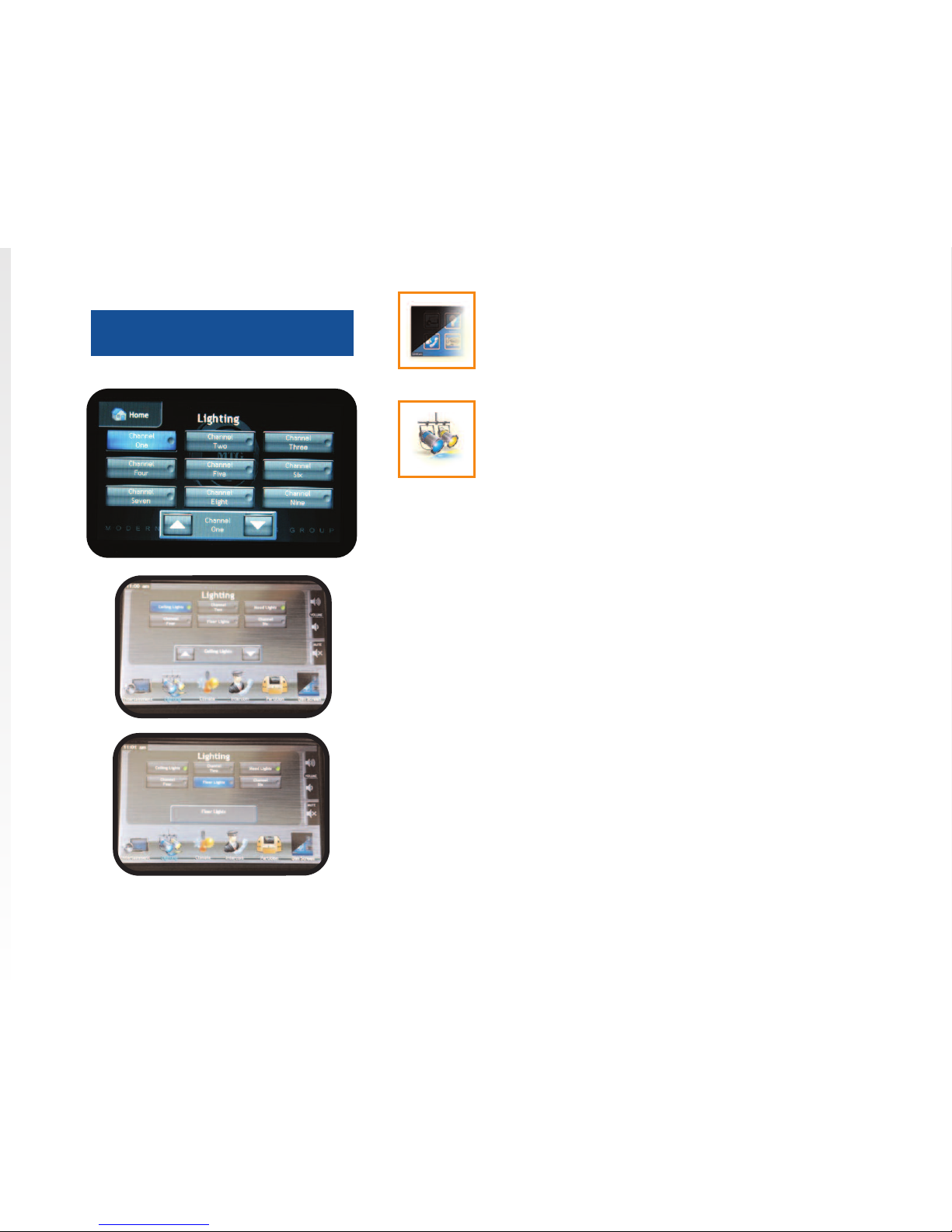
LIGHTING. By pressing this button you will enter
the Lighting menu. This menu will allow you to adjust all of the lighting that is the limo. Some of the
outputs will have a dimming option and some of
them will have a basic On/Off toggle.
With the dimmer option you will be able to adjust the lighting outputs
brightness and turn it On or Off. For example, above is displaying that
the ceiling button has been pressed once and is displaying the dimmer
you would press the ceiling button again to turn Off the ceiling lights.
* If you have the MTG Lytesync products controlling
a dance floor or any kind of RGB lighting in the vehicle you will have a button labeled Light Show in
the Lighting menu. When you press the light show
button it will then display the screen on the left.
This will give you controls to change the light show
patterns along with dimming the lights. If there are
multiple Lytesync products connected It will allow
you to “sync” your lighting to the same pattern.
* For use with RGB Controller
Dimmer Output Display
U
Toggled Output Display
U
BY PRESSING THE “DIM LCD” BUTTON YOU CAN ADJUST
THE BRIGHTNESS OF THE SCREEN.
Page 10
WELCOME TO THE SMART TOUCH SYSTEM
QUESTIONS? Call us at 800-362-6224 I www.mtgsmarttouch.com
10
SMART TOUCH SYSTEM I DRIVER’S SIDE DIAGRAM
SMART TOUCH SYSTEM DRIVER’S SIDE: SETTINGS
QUESTIONS? Call us at 800-362-6224 I www.mtgsmarttouch.com
SMART TOUCH SYSTEM DRIVER’S SIDE: SETTINGS
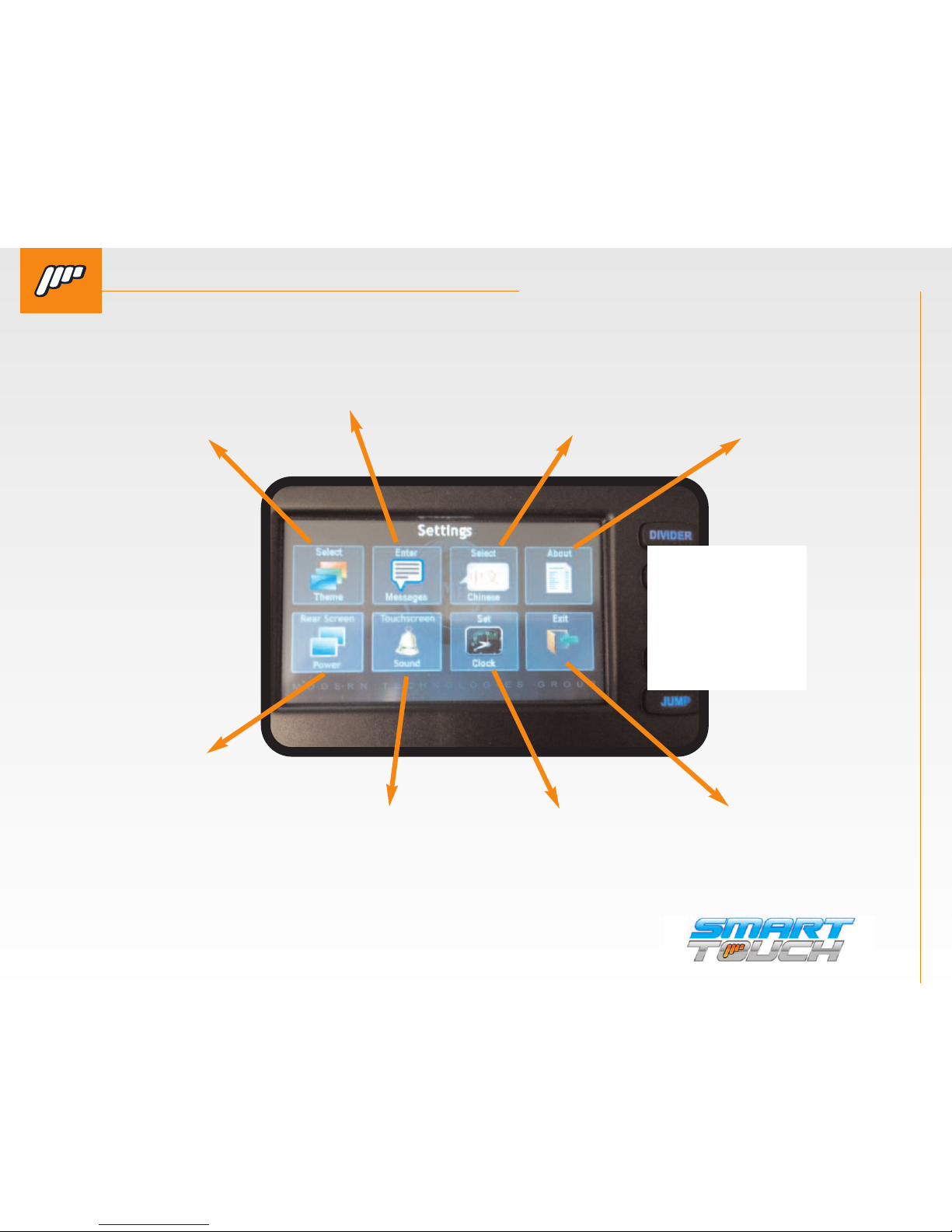
SELECT THEME
Allows you to change
the “theme” or
background that is
displayed on the
passenger controller.
REAR SCREEN POWER
Allows the driver to turn
the passenger screen off
in case they have customers that are improperly using the controls.
SCREEN DIM
This is short description
for screen dim
ABOUT
Displays the serial
number to the
system and the
software version.
ENTER
Allows the driver to enter a custom message for his clients. See
next page for description of how
this works.
TOUCHSCREEN SOUND
This disables the beeping
sound on both the driver
and passenger control.
Older versions might not
have this option.
SELECT CHINESE
Switches the display of the
system from English to Chinese. More languages will
be available in the future.
SET CLOCK
Allows you to adjust the
time and date.
NEW
SCREENSHOT
with new
diagnostics
Page 11
WELCOME TO THE SMART TOUCH SYSTEM
QUESTIONS? Call us at 800-362-6224 I www.mtgsmarttouch.com
11
SMART TOUCH SYSTEM I DRIVER’S SIDE DIAGRAM
SMART TOUCH SYSTEM PASSENGER’S SIDE OVERVIEW
QUESTIONS? Call us at 800-362-6224 I www.mtgsmarttouch.com
SMART TOUCH SYSTEM PASSENGER’S SIDE OVERVIEW
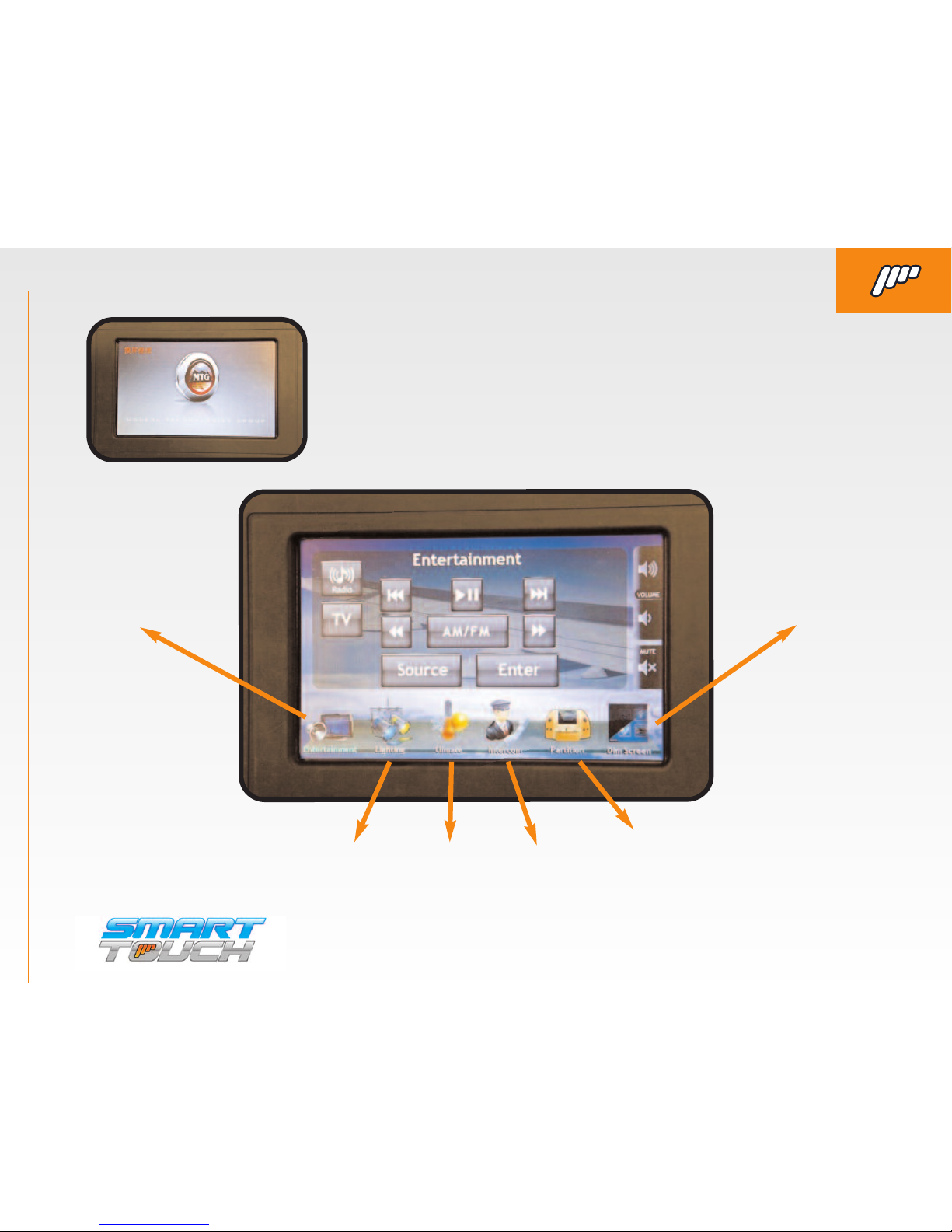
ENTERTAINMENT SCREEN IS THE DEFAULT SCREEN FROM THE “STARTUP SCREEN”.
Along the bottom of the screen there are six icons. These are used to control other functions of
the Smart Touch system such as lighting, intercom, and climate, etc..
ENTERTAINMENT DIM SCREEN
LIGHTING CLIMATE INTERCOM PARTITION
THE PASSENGER CONTROL WILL POWER ON AND DISPLAY
THE COACH BUILDER’S LOGO.
If you would like to have your com-
pany’s logo on this screen contact MTG at 1-800-362-6224 for details.
Page 12
WELCOME TO THE SMART TOUCH SYSTEM
QUESTIONS? Call us at 800-362-6224 I www.mtgsmarttouch.com
12
SMART TOUCH SYSTEM I DRIVER’S SIDE DIAGRAM
SMART TOUCH SYSTEM PASSENGER’S SIDE: ENTERTAINMENT/START UP SCREEN
QUESTIONS? Call us at 800-362-6224 I www.mtgsmarttouch.com
SMART TOUCH SYSTEM PASSENGER’S SIDE: ENTERTAINMENT / START UP SCREEN
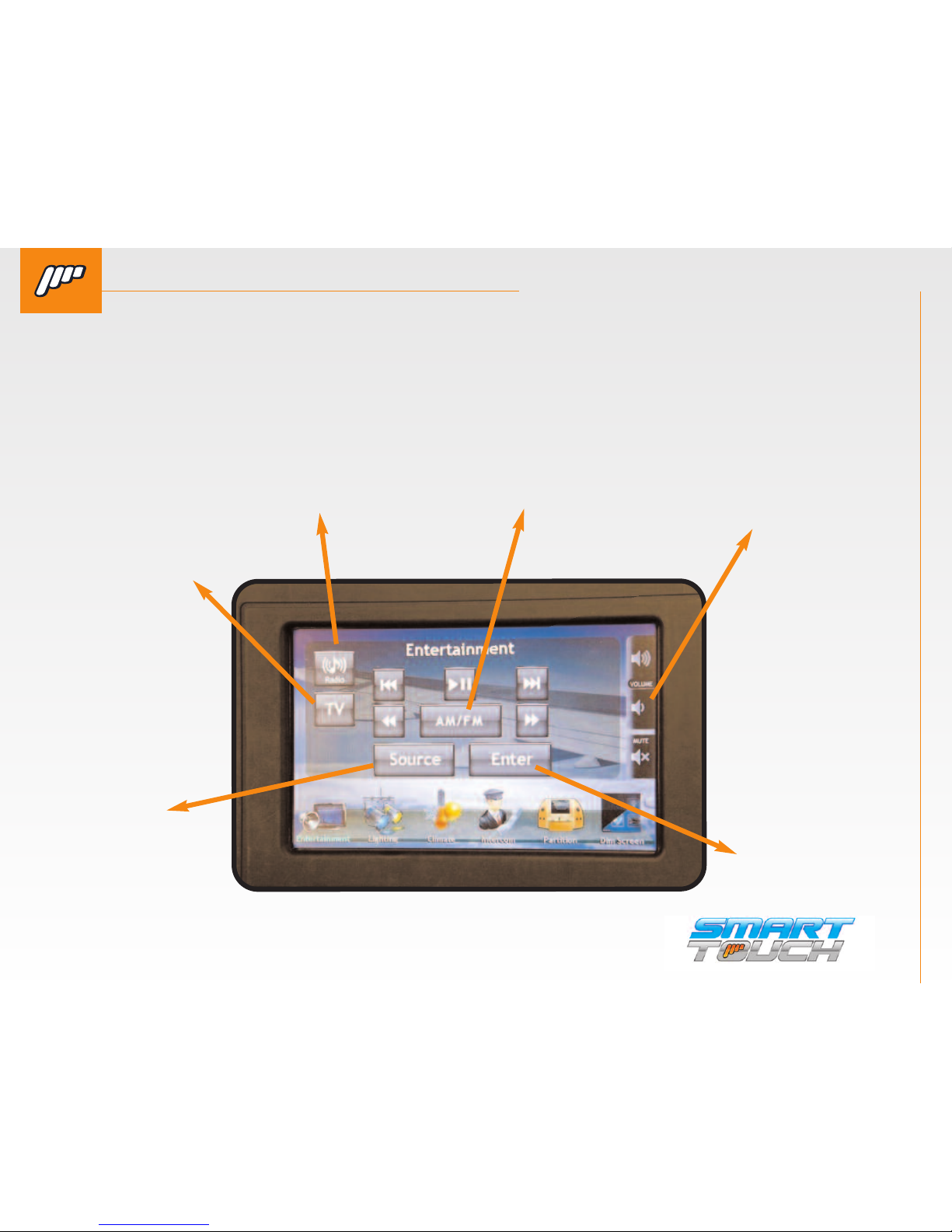
ENTERTAINMENT SCREEN IS THE DEFAULT SCREEN FROM THE “STARTUP SCREEN”.
Along the bottom of the screen there are six icons. These are used to control other functions of
the Smart Touch system such as lighting, intercom, and climate, etc..
SOURCE
Allows you to
change the
“theme” or
background
that is displayed on the
passenger
controller.
TV
Allows you to change
the “theme” or
background that is
displayed on the
passenger controller.
ENTER
Displays the serial
number to the
system and the
software version.
VOLUME
Switches the display of the system from English
to Chinese. More
languages
RADIO
Allows the driver to enter a custom message for his clients. See
next page for description
AM/FM
Switches the display of the
system from English to Chinese. More languages
Page 13
WELCOME TO THE SMART TOUCH SYSTEM
QUESTIONS? Call us at 800-362-6224 I www.mtgsmarttouch.com
13
SMART TOUCH SYSTEM I DRIVER’S SIDE DIAGRAM
SMART TOUCH SYSTEM PASSENGER’S SIDE: LIGHTING
QUESTIONS? Call us at 800-362-6224 I www.mtgsmarttouch.com
SMART TOUCH SYSTEM PASSENGER’S SIDE: LIGHTING
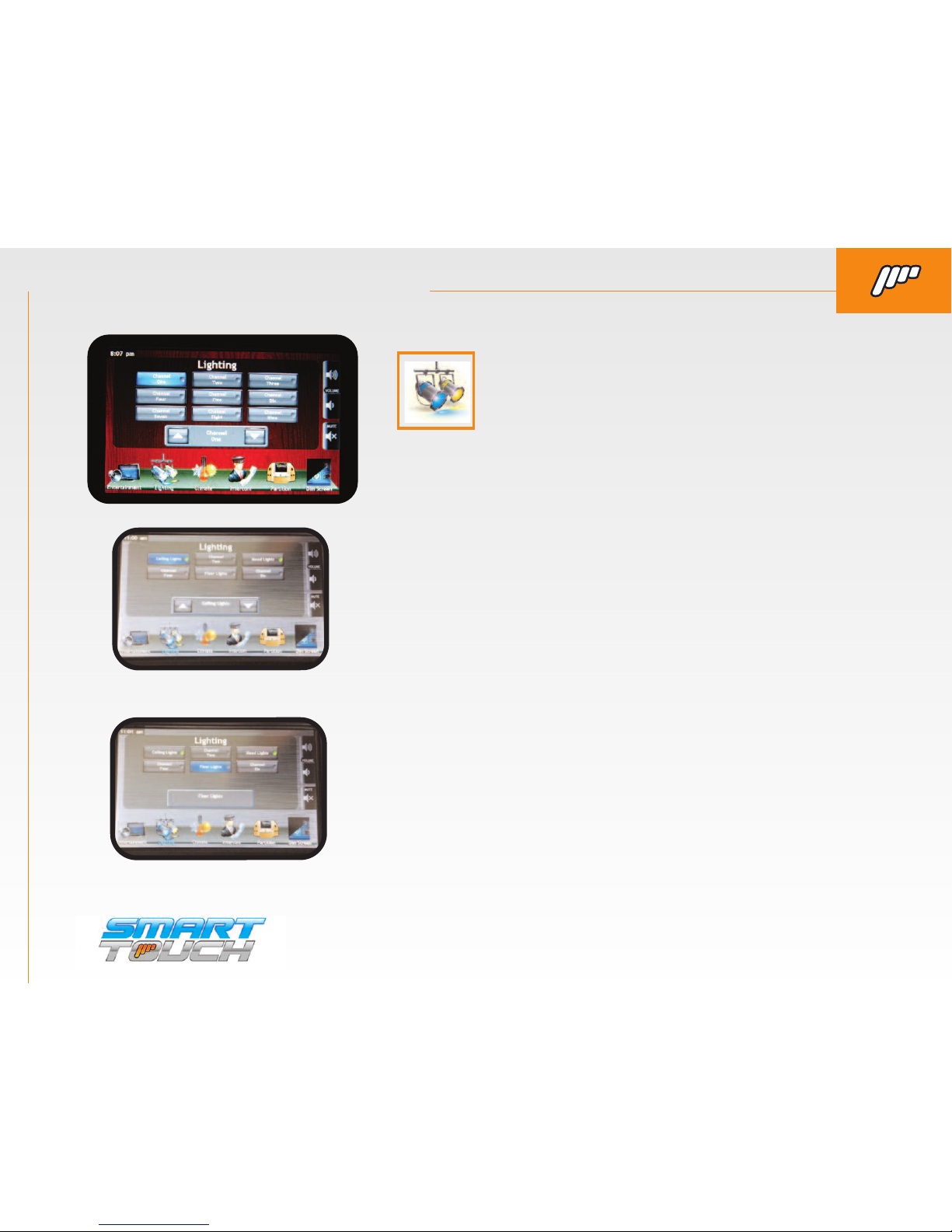
LIGHTING. By pressing this button you will enter the
Lighting menu. This menu will allow you to adjust all of
the lighting that is the limo. Some of the outputs will
have a dimming option and some of them will have a
basic On/Off toggle.
With the dimmer option you will be able to adjust the lighting outputs
brightness and turn it On or Off. For example, above is displaying that
the ceiling button has been pressed once and is displaying the dimmer
you would press the ceiling button again to turn Off the ceiling lights.
* If you have the MTG Lytesync products controlling
a dance floor or any kind of RGB lighting in the vehicle you will have a button labeled Light Show in
the Lighting menu. When you press the light show
button it will then display the screen on the left.
This will give you controls to change the light show
patterns along with dimming the lights. If there are
multiple Lytesync products connected It will allow
you to “sync” your lighting to the same pattern.
* For use with RGB Controller
Dimmer Output Display
U
Toggled Output Display
U
Page 14
WELCOME TO THE SMART TOUCH SYSTEM
QUESTIONS? Call us at 800-362-6224 I www.mtgsmarttouch.com
14
SMART TOUCH SYSTEM I DRIVER’S SIDE DIAGRAM
SMART TOUCH SYSTEM PASSENGER’S SIDE: CLIMATE/INTERCOM
QUESTIONS? Call us at 800-362-6224 I www.mtgsmarttouch.com
SMART TOUCH SYSTEM PASSENGER’S SIDE: INTERCOM/CLIMATE
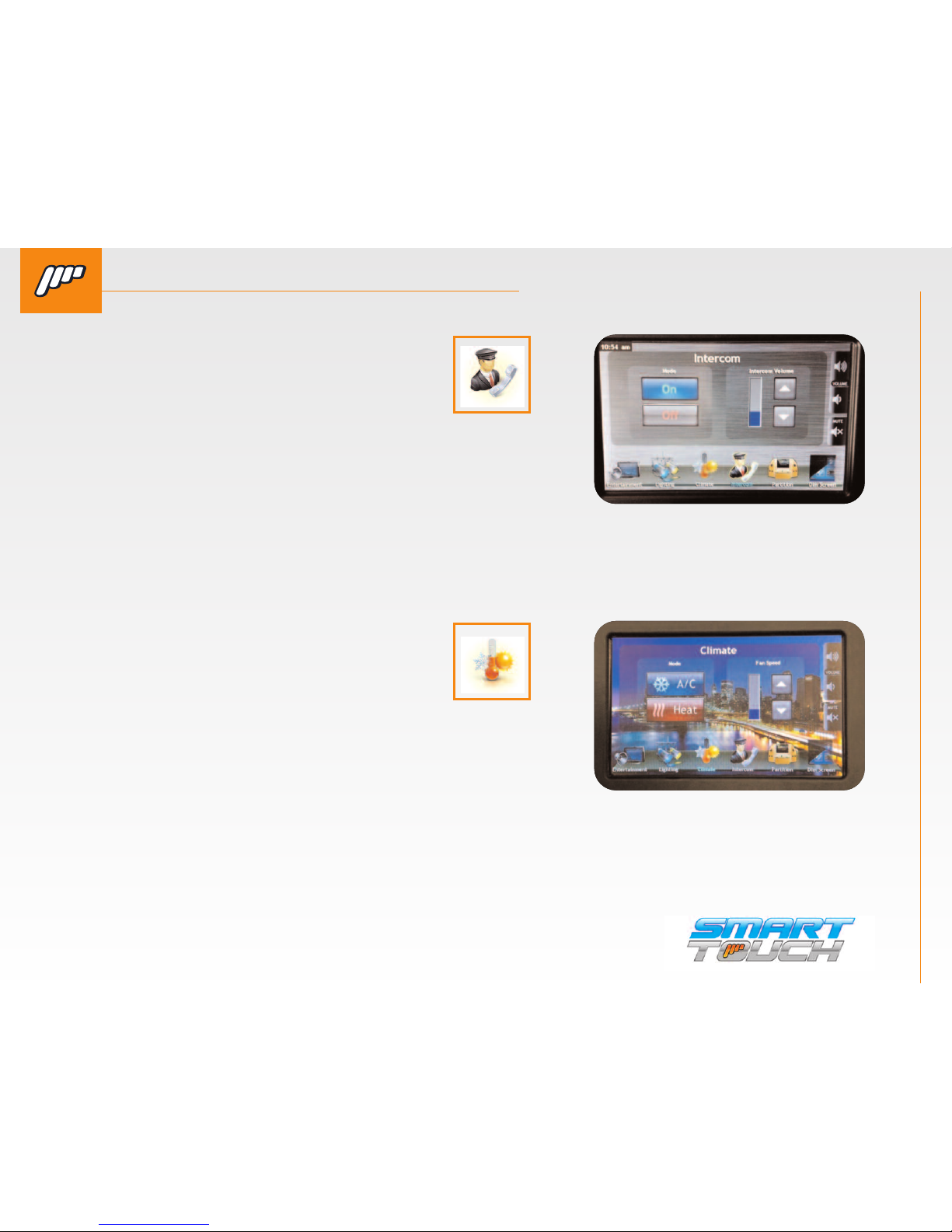
INTERCOM. By pressing this button you
will activate the hands free intercom in
the limousine. You will also be able to
adjust the volume up or down.
While the intercom is active the icon
will be outlined allowing them to see the
status even if they are in a different menu.
CLIMATE. By pressing this button you
will enter the Climate menu. This will
allow you to adjust the fan speed and
switch between Heat and A/C.
Page 15
WELCOME TO THE SMART TOUCH SYSTEM
QUESTIONS? Call us at 800-362-6224 I www.mtgsmarttouch.com
15
SMART TOUCH SYSTEM I DRIVER’S SIDE DIAGRAM
SMART TOUCH SYSTEM PASSENGER’S SIDE: ; PARTITION/DIM
QUESTIONS? Call us at 800-362-6224 I www.mtgsmarttouch.com
SMART TOUCH SYSTEM PASSENGER’S SIDE: PARTITION/DIM
BY PRESSING THE “DIM LCD” BUTTON YOU CAN ADJUST
THE BRIGHTNESS OF THE SCREEN.
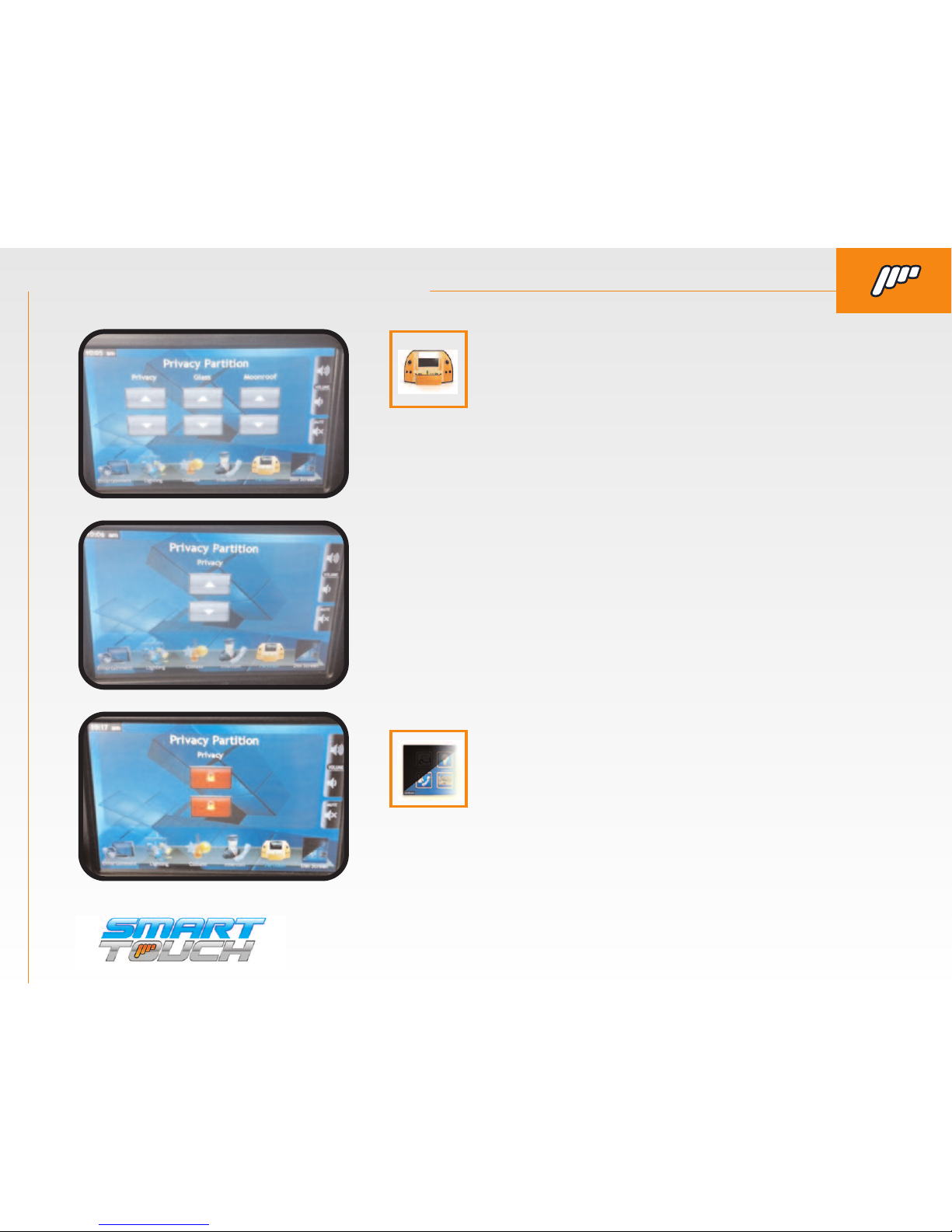
PARTITION. By pressing this button you will enter
the Privacy/Moonroof menu. Your vehicle may not
have all of the controls pictured below.
(This is the most commonly used screen
with only privacy partition controls on it.)
When the partition is locked from the driver’s screen you
will have “lock” buttons on the up and down arrows.
Page 16
THE SMART TOUCH SYSTEM I WARRANTY
QUESTIONS? Call us at 800-362-6224 I www.mtgsmarttouch.com
16
SMART TOUCH SYSTEM I WARRANTY
800-362-6224 I www.mtgsmarttouch.com
...Redefining the Way You Ride.
WARRANTY
MTG stands behind all of our products. If for any reason the product did not perform to specifications or is defective in
material, MTG will repair or replace the item free of charge at our discretion, upon inspection. No refunds will be issued
for warranties. When returning a defective product, please make sure that the product is returned with all accessories included in original shipment. MTG warranties all of its products; however, we cannot be responsible for labor charges, or
any incidental or consequential damages resulting from use of any product or arising out of any breach of this warranty.
Please be advised that installation errors, abuse, or shipping damage are not reasons for return. MTG’s warranty is
backed by the manufacturer's warranty, which may be limited due to cause or length of period covered.
NOTE: All prices printed in this catalog are subject to change without notification. By ordering products from MTG, indi-
cates buyer agrees to the above terms and conditions.
DAMAGES/SHORTAGES
All damages must be reported upon receipt and inspection of shipment. MTG/MastrAir will allow up to 48 hours to file a
claim. In the event of a damaged shipment, do not dispose of any packing material. Product must remain in the condition
in which it was received, pending inspection from carrier. Failure to comply will result in denial of claim. For shortages,
this must reported within 48 hours of receipt of shipment to ensure satisfaction. When reporting a damage or shortage,
please contact our returns department. All issues will be handled by our staff as quickly as possible.
RETURNS
MTG has an unconditional 30-day return policy. If you are dissatisfied for any reason with your order, please contact the
returns department. Please be advised that video produced items, custom orders, product cut to size, or sold by the foot
are non-refundable, as well as items that have been primed or painted. Any customer in receipt of incorrect product, due
to a mistake by MTG, will receive a Call Tag to retrieve the item. If you wish to return product for any reason, you must
receive an RMA (Return Materials Authorization) number prior to shipping. Returns made after 30 days from ship date
are subject to a 10% restock fee. Credit only will be applied to account for all returns after 30 days. MTG is not responsible for freight charges on return product. Any item returned without authorization is subject to refusal or a 10% restock
fee. Any refused order will be subject to a 10% restock fee in addition to any freight charges incurred and may result in
credit restrictions on future orders.
 Loading...