

Page 1

Notebook User's Manual
Preface
1
Page 2

1-2
Notebook User's Manual
Content
1 Preface ...............................................................................................1-1
Copyright Notice ............................................................................................................ 1-4
Trademarks .................................................................................................................... 1-4
Revision History ............................................................................................................. 1-4
FCC-B Radio Frequency Interference Statement ....................................................... 1-5
FCC Conditions .............................................................................................................1-5
CE Conformity ...............................................................................................................1-5
Battery Regulations ....................................................................................................... 1-6
WEEE Statement ........................................................................................................... 1-6
Chemical Substances Information ............................................................................... 1-6
RoHS Statement ............................................................................................................ 1-7
Japan JIS C 0950 Material Declaration ................................................................... 1-7
India RoHS ................................................................................................................. 1-7
Turkey EEE regulation .............................................................................................. 1-7
Ukraine restriction of hazardous substances .......................................................... 1-7
Vietnam RoHS ........................................................................................................... 1-7
Upgrade and Warranty ................................................................................................ 1-8
Acquisition of Replaceable Parts ................................................................................. 1-8
Safety Instructions ......................................................................................................... 1-9
MSI Highlights ...............................................................................................................1-11
2 Introductions .................................................................................... 2-1
Unpacking ...................................................................................................................... 2-2
Product Overview .......................................................................................................... 2-3
Top-open View .......................................................................................................... 2-3
Front Side View .........................................................................................................2-5
Right Side View .........................................................................................................2-6
Left Side View ............................................................................................................ 2-7
Rear Side View .......................................................................................................... 2-8
Bottom Side View ...................................................................................................... 2-9
How to Use the Keyboard ........................................................................................... 2-10
Windows Key ........................................................................................................... 2-10
Quick Launch Keys ..................................................................................................2-11
Disable or Enable Touchpad ..................................................................................2-11
Enter Sleep Mode .....................................................................................................2-11
Switch Display ......................................................................................................... 2-12
Page 3

1-3
Preface
Adjust the Brightness Level of the Display ............................................................ 2-12
Adjust the Sound Level of the Speaker .................................................................. 2-12
Adjust the Brightness Level of the Keyboard Backlight LED................................ 2-13
Video: How to Use [Fn] Buttons ............................................................................. 2-13
Specifications ............................................................................................................... 2-14
3 How To Get Started .........................................................................3-1
Begin to Use the Notebook ........................................................................................... 3-2
How to Use the Notebook Comfortably ....................................................................... 3-3
How to Manage Power Supply .....................................................................................3-4
AC/DC Adapter ..........................................................................................................3-4
Battery ........................................................................................................................3-4
How to Set Up a Power Plan in Windows 10 ...............................................................3-6
Choose or Customize a Power Plan ........................................................................3-6
Create Your Own Power Plan ...................................................................................3-8
How to Use the Touchpad .......................................................................................... 3-10
About HDD and SSD................................................................................................... 3 -11
About M.2 SSD Slot .................................................................................................... 3 -11
How to Connect the Internet ....................................................................................... 3 -12
Wireless LAN ...........................................................................................................3 -12
Wired LAN ............................................................................................................... 3-14
How to Set Up Bluetooth Connection ........................................................................ 3 -19
Activating Bluetooth Connection ............................................................................ 3-19
How to Connect External Devices .............................................................................3-23
Video: How to Use RAID Function ............................................................................. 3-24
How to Select Boot Mode in BIOS ............................................................................. 3-25
Video: How to Restore Windows 10 Operating System on MSI Notebooks ........... 3-26
Video: How to Use MSI One Touch Install ................................................................ 3-27
Page 4

1-4
Notebook User's Manual
Copyright Notice
The material in this document is the intellectual property of MICRO-STAR
INTERNATIONAL. We take every care in the preparation of this document, but no
guarantee is given as to the correctness of its contents. Our products are under
continual improvement and we reserve the right to make changes without notice.
Trademarks
All trademarks are the properties of their respective owners.
Revision History
▶ Version: 2.0
▶ Date: 11, 2015
Page 5
1-5
Preface
FCC-B Radio Frequency Interference
Statement
This equipment has been tested and found to comply with the limits for a Class
B digital device, pursuant to part 15 of the FCC rules. These limits are designed
to provide reasonable protection against harmful interference in a residential
installation. This equipment generates, uses and radiates radio frequency energy,
and, if not installed and used in accordance with the instructions, may cause
harmful interference to radio communications. However, there is no guarantee that
interference will not occur in a particular installation. If this equipment does cause
harmful interference to radio or television reception, which can be determined
by turning the equipment off and on, the user is encouraged to try to correct the
interference by one or more of the following measures:
▶ Reorient or relocate the receiving antenna.
▶ Increase the separation between the equipment and receiver.
▶ Connect the equipment into an outlet on a circuit different from that to which
the receiver is connected.
NOTE
▶ The changes or modifications not expressly approved by the party responsible
for compliance could void the user’s authority to operate the equipment.
▶ Shield interface cables and AC power cord, if any, must be used in order to
comply with the emission limits.
FCC Conditions
This device complies with part 15 of the FCC Rules. Operation is subject to the
following two conditions:
▶ This device may not cause harmful interference.
▶ This device must accept any interference received, including interference that
may cause undesired operation.
CE Conformity
This device is in compliance with the essential safety
requirements and other relevant provisions set out in the
European Directive.
Page 6

1-6
Notebook User's Manual
Battery Regulations
European Union: Batteries, battery packs, and accumulators
should not be disposed of as unsorted household waste. Please
use the public collection system to return, recycle, or treat them
in compliance with the local regulations.
廢電池請回收
Taiwan: For better environmental protection, waste batteries
should be collected separately for recycling or special disposal.
California, USA: The button cell battery may contain perchlorate material and
requires special handling when recycled or disposed of in California.
For further information please visit: http://www.dtsc.ca.gov/hazardouswaste/
perchlorate/
WEEE Statement
European Union: Under the European Union ("EU") Direc-
tive on Waste Electrical and Electronic Equipment, Directive
2002/96/EC, which takes effect on August 13, 2005, products
of "electrical and electronic equipment" cannot be discarded as
municipal waste anymore and manufacturers of covered elec-
tronic equipment will be obligated to take back such products at
the end of their useful life.
Chemical Substances Information
In compliance with chemical substances regulations, such as the EU REACH
Regulation (Regulation EC No. 1907/2006 of the European Parliament and the
Council), MSI provides the information of chemical substances in products at:
http://www.msi.com/html/popup/csr/evmtprtt_pcm.html
Page 7

1-7
Preface
RoHS Statement
Japan JIS C 0950 Material Declaration
A Japanese regulatory requirement, defined by specification JIS C 0950, mandates
that manufacturers provide material declarations for certain categories of electronic
products offered for sale after July 1, 2006.
http://www.msi.com/html/popup/csr/cemm_jp.html
http://tw.msi.com/html/popup/csr_tw/cemm_jp.html
India RoHS
This product complies with the "India E-waste (Management and Handling) Rule
2011" and prohibits use of lead, mercury, hexavalent chromium, polybrominated
biphenyls or polybrominated diphenyl ethers in concentrations exceeding 0.1 weight
% and 0.01 weight % for cadmium, except for the exemptions set in Schedule 2 of
the Rule.
Turkey EEE regulation
Conforms to the EEE Regulations of the Republic Of Turkey.
Ukraine restriction of hazardous substances
The equipment complies with requirements of the Technical Regulation, approved
by the Resolution of Cabinet of Ministry of Ukraine as of December 3, 2008 №
1057, in terms of restrictions for the use of certain dangerous substances in
electrical and electronic equipment.
Vietnam RoHS
As from December 1, 2012, all products manufactured by MSI comply with Circular
30/2011/TT-BCT temporarily regulating the permitted limits for a number of
hazardous substances in electronic and electric products.
Page 8

1-8
Notebook User's Manual
Upgrade and Warranty
Please note that certain components, such as memory cards, HDD, SSD, ODD, and
Bluetooth/WiFi combo card, etc., preinstalled in the product may be upgradable or
replaceable by user’s request depending on the models users purchased.
For any further information on the product users purchased, please contact the
local dealer. Do not attempt to upgrade or replace any component of the product if
users do not understand the component location or how to assembly/disassembly,
since it may cause the product damaged. It is recommended that user contact the
authorized dealer or service center for product service.
Acquisition of Replaceable Parts
Please be noticed that the acquisition of replaceable parts (or compatible ones) of
the product users purchased in certain countries or territories may be fulfilled by
the manufacturer within 5 years at most since the product has been discontinued,
depending on the official regulations declared at the time. Please contact the
manufacturer via http://www.msi.com/support/ for the detailed information about the
acquisition of spare parts.
Page 9
1-9
Preface
Safety Instructions
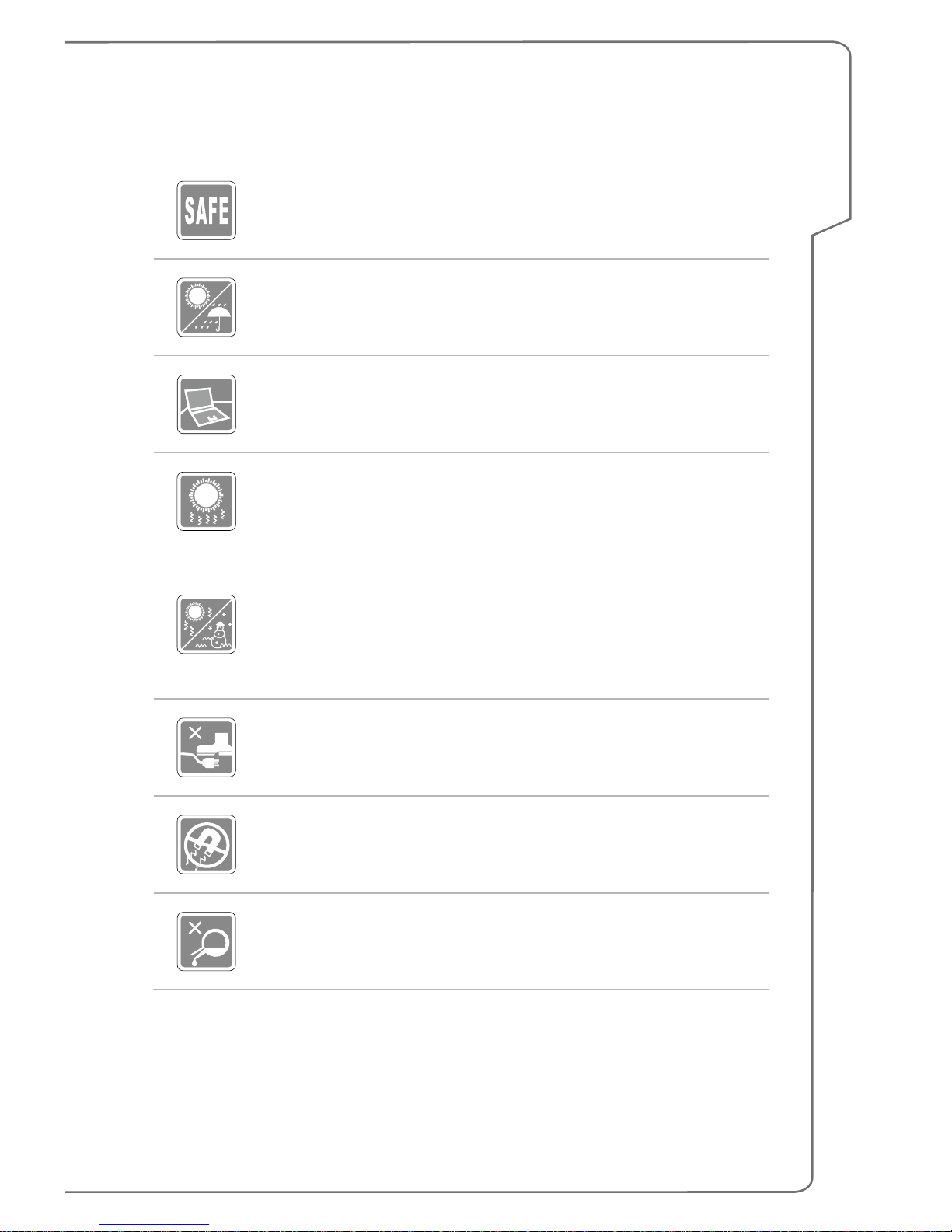
Read the safety instructions carefully and thoroughly. All cautions
and warnings on the equipment or user’s manual should be noted.
Keep the notebook away from humidity and high temperature.
Lay the notebook on a stable surface before setting it up.
Do not cover the ventilators of the notebook to prevent the
notebook from overheating.
• Do not leave the notebook in an unconditioned environment
with a storage temperature above 60ºC (140ºF) or below 0ºC
(32ºF), which may damage the notebook.
• This notebook should be operated under maximum ambient
temperature of 35ºC (95ºF).
Place the power cord in a way that people are unlikely to step on
it. Do not place anything on top of the power cord.
Always keep the strong magnetic or electrical objects away from
the notebook.
Never pour liquid onto the notebook, since it may damage the
equipment or cause an electrical shock.
Page 10

1-10
Notebook User's Manual
If any of the following situations arises, get the equipment checked
by a service personnel:
• The power cord or plug is damaged.
• Liquid has penetrated into the equipment.
• The equipment has been exposed to moisture.
• The equipment has not worked well or you can not get it work
according to User’s Manual.
• The equipment was dropped and damaged.
• The equipment has obvious signs of breakage.
Green Product Features
• Reduced energy consumption during use and stand-by
• Limited use of substances harmful to the environment and
health
• Easily dismantled and recycled
• Reduced use of natural resources by encouraging recycling
• Extended product lifetime through easy upgrades
• Reduced solid waste production through take-back policy
Environmental Policy
• The product has been designed to enable proper reuse of parts
and recycling and should not be thrown away at its end of life.
• Users should contact the local authorized point of collection for
recycling and disposing of their end-of-life products.
• Visit the MSI website and locate a nearby distributor for further
recycling information.
• Users may also reach us at [email protected] for
information regarding proper disposal, take-back, recycling, and
disassembly of MSI products.
Page 11
1-11
Preface
MSI Highlights
Explore more exclusive features of MSI notebooks for all series, please visit:
http://www.msi.com and https://www.youtube.com/user/MSI
SteelSeries Engine only in MSI GAMING notebook
MSI collaborates with SteelSeries to develop an exclusive
SteelSeries Engine in gaming notebooks. SteelSeries
Engine is the Apps to combine frequently used functions for
gamers in multiple devices management.
MSI GAMING Notebook is the first gaming Notebook
featuring XSplit Gamecaster live stream app!
MSI gaming notebook features XSplit Gamecaster, the
easiest live streaming and recording solution for gamers.
See the basic tutorial of XSplit Gamecaster.
Sound by Dynaudio on MSI Gaming Notebooks
MSI partners with Dynaudio, the Danish sound specialists,
in its gaming notebooks to present you an authentic fidelity
audio performance.
Color Your Life with True Color
MSI has partnered with Portrait Displays, Inc. in developing
more accurate, high precision panel quality.
MSI True Color Technology guarantees that each panel in a
MSI notebook comes with the finest precision in color.
Page 12

Notebook User's Manual
1-12
Page 13

Introductions
2
Notebook User's Manual
Page 14

2-2
Notebook User's Manual
Congratulations on becoming an user of this notebook, the finely designed
notebook. You will have a delightful and professional experience in using this
exquisite notebook. We are proud to tell users that this notebook is thoroughly
tested and certified by our reputation for unsurpassed dependability and customer
satisfaction.
Unpacking
First, unpack the shipping carton and check all items carefully. If any item contained
is damaged or missing, please contact your local dealer immediately. Also, keep
the box and packing materials in case you need to ship the unit in the future. The
package should contain the following items:
▶ Notebook
▶ Quick Start Guide
▶ AC/DC adapter and AC power cord
▶ Optional carry bag
▶ Optional all-in-one application disk, containing the full version of user’s manual,
drivers, utilities, and so on.
Page 15
Introductions
2-3
Product Overview
This section provides the description of basic aspects of the notebook. It will help
you to know more about the appearance of this notebook before using it. Please be
aware that the figures shown here are for reference only.
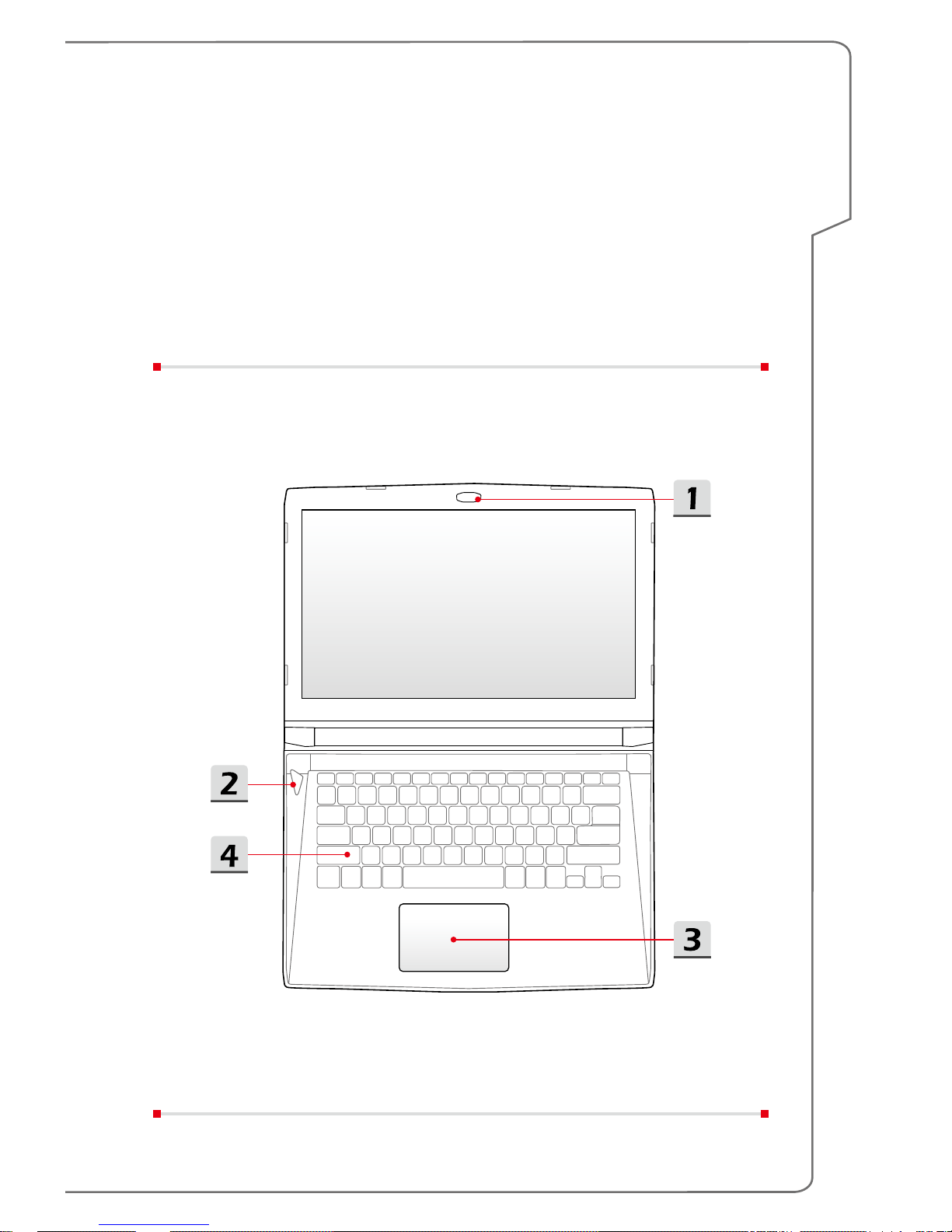
Top-open View
The figure of top-open view and description shown below will lead you to browse
the main operating area of your notebook.
Page 16
2-4
Notebook User's Manual
1. Webcam/ Webcam LED/ Internal Microphone
• This built-in webcam can be used for picture taking, video recording or
conferencing, and so on.
• Webcam LED indicator, next to the webcam, glows when webcam function is
activated; LED goes out when this function is turned off.
• The built-in microphone and its function is the same with microphone.
2. Power Button / Power LED/ GPU Mode LED
Power
Power Button
• Use this button to turn the notebook power ON and OFF.
• Use this button to awake the notebook from the sleep
state.
Power LED/ GPU Mode LED
• Glowing red when the notebook power is turned on, and
the UMA GPU mode is selected.
• Glowing amber when the optionally supported discrete
GPU mode is selected.
• LED goes off when this function is turned off.
3. Touchpad
This is the pointing device of the notebook.
4. Keyboard
The built-in keyboard provides all the functions of a full-sized keyboard. Refer to
How to Use the Keyboard for details.
Page 17
Introductions
2-5
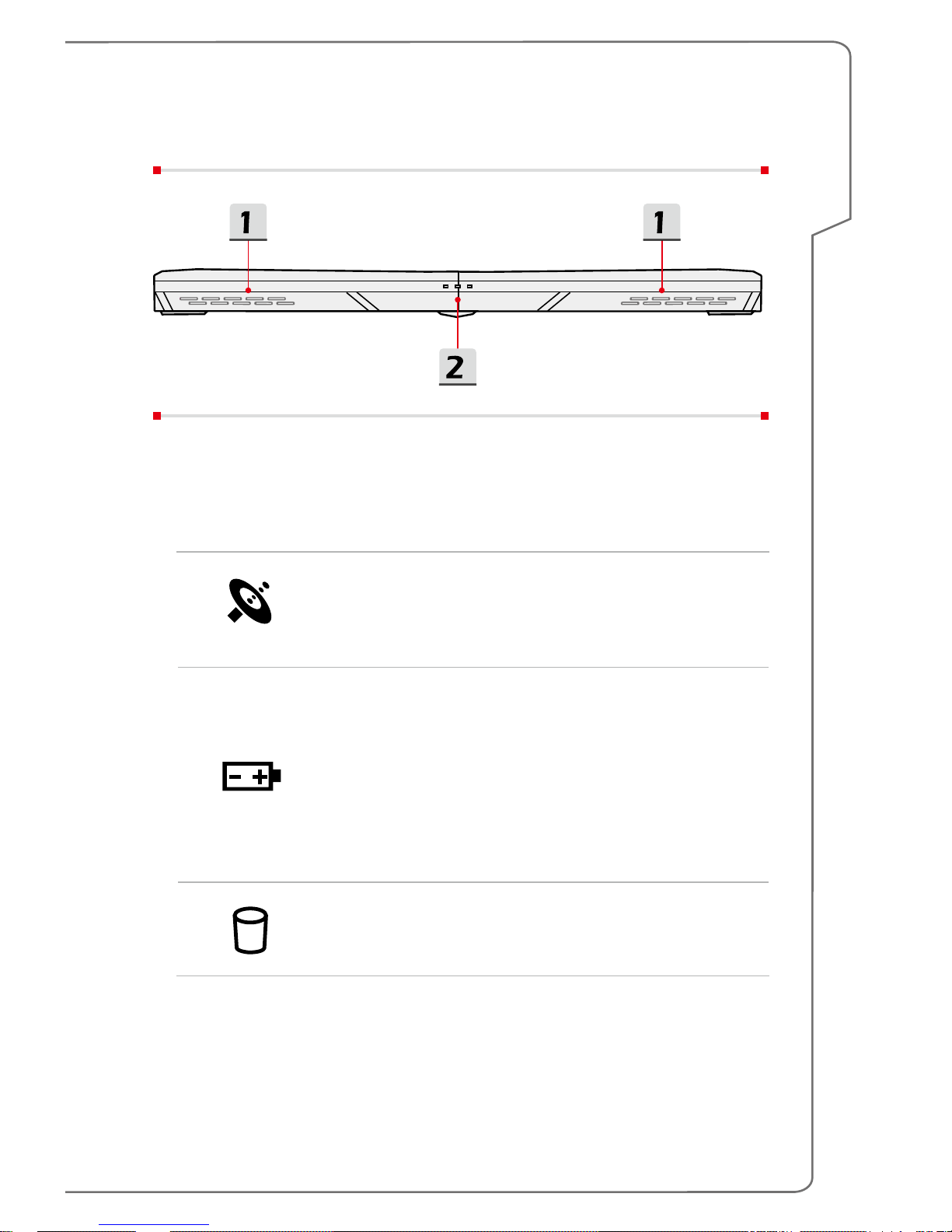
Front Side View
1. Stereo Speakers
This notebook may be equipped with built-in stereo speakers which deliver the
high quality sound, and supports the HD audio technology.
2. Status LED
WLAN(WiFi)
Wireless LAN (WiFi)
• LED glows when Wireless LAN (WiFi) function is
enabled.
• LED goes out when this function is disabled.
Battery Status
• LED glows when the battery is being charged.
• Continuously blinking if the battery fails.
• Always consult an authorized retailer or service center
for purchasing or replacing an equivalent type of
battery recommended by the manufacturer.
• Battery LED goes out when it is fully charged or when
the AC/DC adapter is disconnected.
Drive Activity Indicator
LED blinks when the system is accessing the internal
storage drives.
Page 18

2-6
Notebook User's Manual
Right Side View
1. USB 3.1 Port (Type C)
USB 3.1, the SuperSpeed+ USB, delivers the higher interface speeds for
connecting various devices, such as storage devices, hard drives, or video
cameras, and offers more advantages over high-speed data transferring.
The slim and sleek USB Type C connector features reversible plug orientation
and cable direction, and supports scalable performance to future-proof solution,
including USB 3.x, DisplayPort, PCIe, Audio, and Thunderbolt 3 (Optional).
2. USB 3.0 Port
USB 3.0, the SuperSpeed USB, delivers the higher interface speeds for
connecting various devices, such as storage devices, hard drives, or video
cameras, and offers more advantages over high-speed data transferring.
3. HDMI Connector
HDMI (High-Definition Multimedia Interface) technology is the industry-leading
interface and de-facto standard connecting high-definition (HD) and ultra high-
definition (UHD) equipment.
Page 19

Introductions
2-7
Left Side View
1. RJ-45 Connector
This connector is used to connect a LAN cable for network connection.
2. Power Connector
This connector is to connect the AC/DC adapter and supply power for the
notebook.
3. USB 3.0 Port
USB 3.0, the SuperSpeed USB, delivers the higher interface speeds for
connecting various devices, such as storage devices, hard drives, or video
cameras, and offers more advantages over high-speed data transferring.
4. Card Reader
The built-in card reader supports various types of memory cards. Check the
Specifications for details.
5. Audio Port Connectors
Microphone
Used for an external microphone.
Headphone out/ S/PDIF-out
• A connector for speakers or headphones.
• Used for speakers or headphones. The S/PDIF
connector is also provided for digital audio transmission
to external speakers through an optical fiber cable.
Page 20

2-8
Notebook User's Manual
Rear Side View
1. Ventilator
The ventilator is designed to cool the system. DO NOT block the ventilator for air
circulation.
2. Mini-DisplayPort
The Mini-DisplayPort is a miniaturized version of the DisplayPort, with a suitable
adapter, the Mini-DisplayPort may be used to drive displays with a VGA, DVI or
HDMI interface.
Page 21
Introductions
2-9
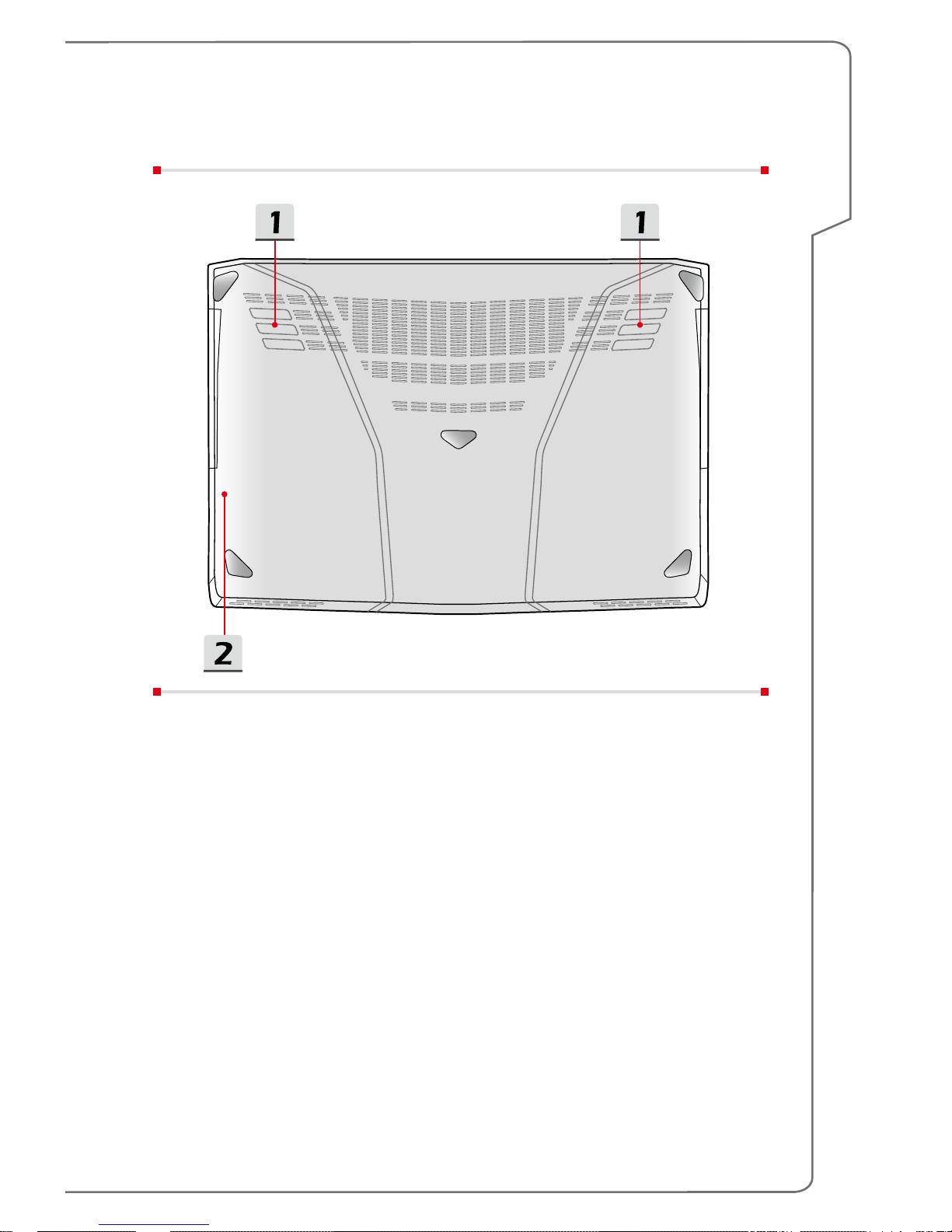
Bottom Side View
1. Ventilator
The ventilator is designed to cool the system. DO NOT block the ventilator for air
circulation.
2. Battery Reset Hole
Whenever the system firmware (EC) is upgraded or the system hangs, please
1) power off the notebook; 2) remove the AC power; 3) use a straightened
paperclip to insert this hole for 10 sec; 4) connect the AC power; 5) power on the
notebook.
Page 22
2-10
Notebook User's Manual
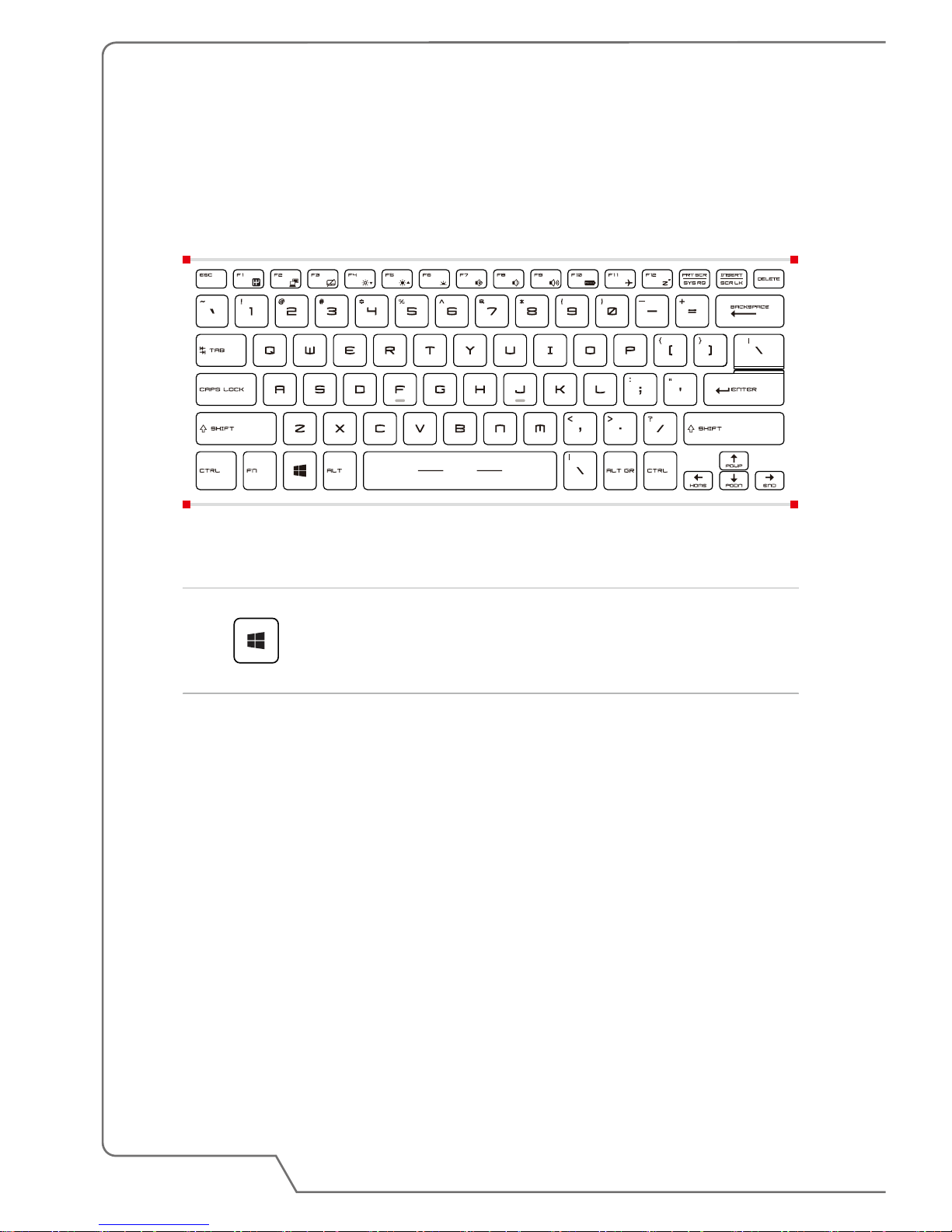
How to Use the Keyboard
This notebook provides a full functioned keyboard. To ensure that the keyboard
will be functional properly, it is a must to install SCM application before using the
keyboard function keys.
€
Windows Key
You can find the Windws Logo key on the keyboard which
is used to perform Windows-specific functions, such as
opening the Start menu and launching the shortcut menu.
Page 23

Introductions
2-11
Quick Launch Keys
Use the [Fn] combination keys on the keyboard to activate the specific applications
or tools. With the help of these keys, users will be able to do work more efficiently.
+
Shift
• Press Fn and F1 keys to switch among Sport / Comfort /
Green modes and shift the performance.
• This function will only be activated when AC Power is
connected, and the default setting is Sport mode.
+
ECO Engine
(Power Saving)
• Press Fn and F10 keys repeatedly to switch among
various power saving modes provided by ECO Engine, or
to turn this function off recurrently.
+
Airplane mode
• Press Fn and F11 keys repeatedly to turn Airplane mode
on or off recurrently.
• Refer to the Airplane mode switch icon under [Start/
Settings/ Change PC settings/ Network / Airplane
mode] on the desktop to check the device status.
Disable or Enable Touchpad
+
Enable or disable the touchpad function. (Optional)
Enter Sleep Mode
+
Force the computer into sleep state (depending on the
system configuration). Press the Power button to wake up
the system from sleep state.
Page 24

2-12
Notebook User's Manual
Switch Display
+
Switch the display output mode between the LCD, external
monitor and both.
Adjust the Brightness Level of the Display
+
Increase the LCD brightness.
+
Decrease the LCD brightness.
Adjust the Sound Level of the Speaker
+
Increase the built-in speaker’s volume.
+
Decrease the built-in speaker’s volume.
+
Mute the built-in speakers.
Page 25
Introductions
2-13
Adjust the Brightness Level of the Keyboard Backlight
LED
+
Enable or disable the keyboard backlight LEDs.
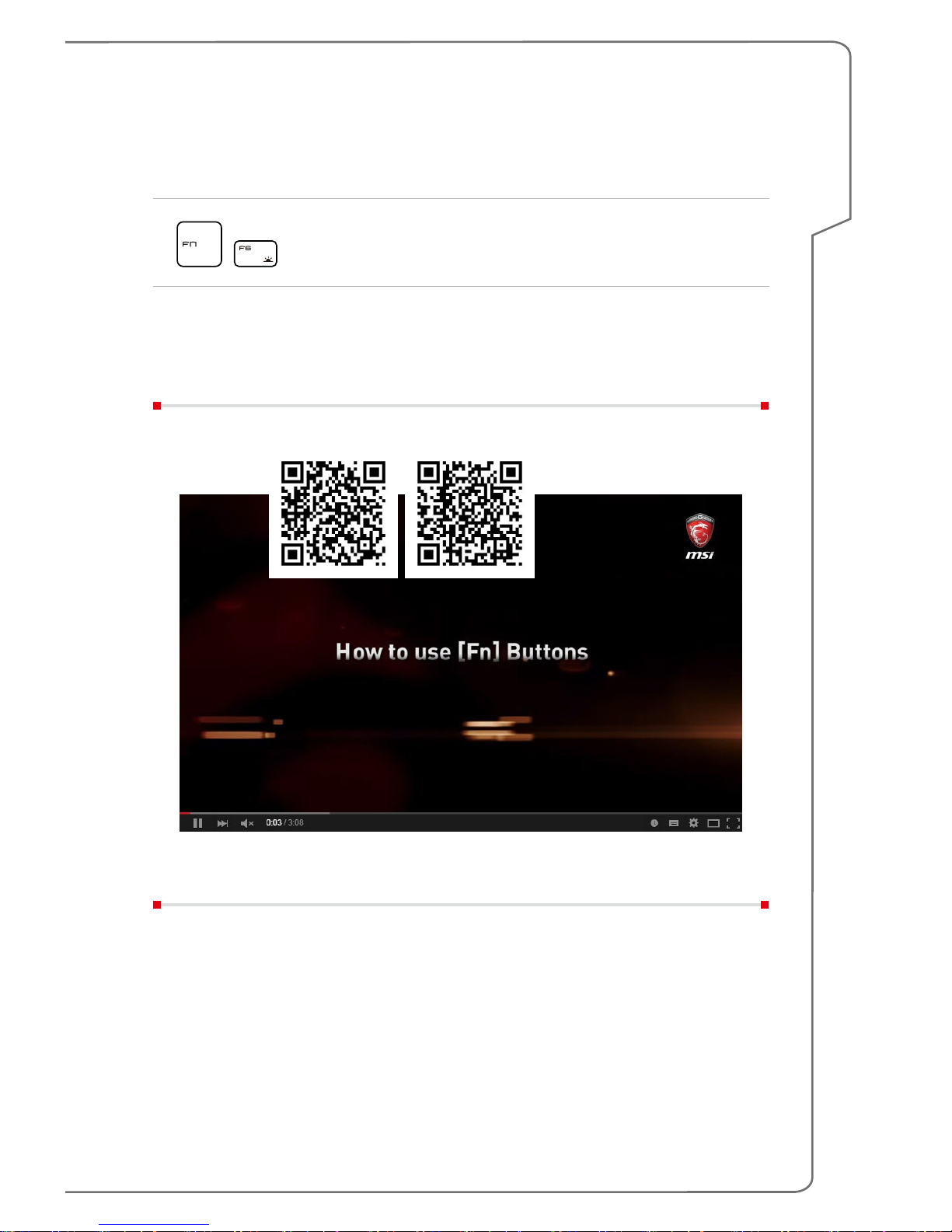
Video: How to Use [Fn] Buttons
Watch the instruction video at: https://www.youtube.com/watch?v=u2EGE1rzfrQ
YouTube Youku
Page 26

2-14
Notebook User's Manual
Specifications
The specifications listed here is reference only, and may change without notice. The
actual products sold are different from areas.
Visit MSI official website at www.msi.com, or contact the local retailers to learn the
correct specifications of the product user purchased.
Physical Characteristic
Dimension 345 (W) x 245(D) x 21.8-22.8 (H) mm
Weight 1.6 kg with battery
CPU
Package BGA
CPU Processor Type Intel
®
Quad Core Mobile Processor
Core Chip
Platform Controller
Hub
Intel
®
PCH-H
Memory
Technology DDR4, 2133MHz
Memory SO-DIMM slots x 2
Maximum Up to 32GB
Power
AC/DC Adapter (1)
(optional)
150W, 19.5V
Input: 100~240V 50~60Hz
Output: 19.5V
7.7A
AC/DC Adapter (2)
(optional)
120W, 19.5V
Input: 100~240V 50~60Hz
Output: 19.5V 6.15A
Battery Type 6-cell
RTC Battery Yes
Page 27

Introductions
2-15
Storage
HDD form factor 2.5" HDD
SSD
M.2 SSD NVMe PCI-e (optional)
M.2 SATA SSD
I/O Port
USB
x 2 (version 3.0)
x 1 (version 3.1) (Type C)
Mic-in x 1
Headphone-out x 1 (S/PDIF-Out supported)
RJ45 x 1
HDMI x 1 (v1.4)
Mini-DisplayPort x 1 (v1.2)
Card Reader x 1 (SD3.0/ SD/ MMC)
Communication Port
LAN Supported
Wireless LAN Supported
Bluetooth Supported
Display
LCD Type 14" eDP FHD
Video
Graphics
NVIDIA
®
GeForce® discrete graphics with NVIDIA®
Optimus™ supported
VRAM GDDR5, based on GPU structure
Webcam
Full HD Type 30fps@1080p
Audio
Internal Speaker 2 speakers
Page 28

2-16
Notebook User's Manual
Page 29
How To Get Started
3
Notebook User's Manual
Page 30
3-2
Notebook User's Manual
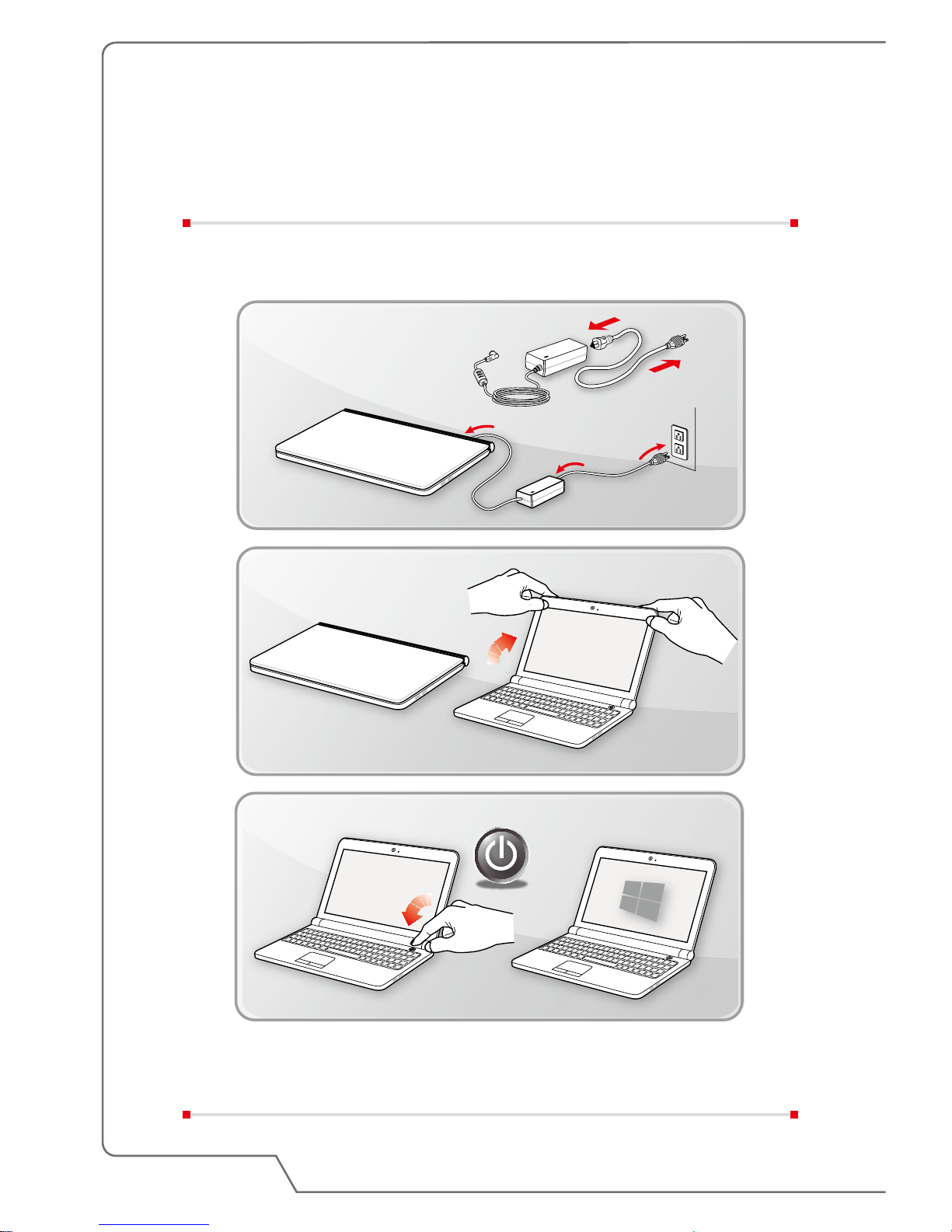
Begin to Use the Notebook
For a new user of this notebook, we would like to suggest you follow the illustrations
below to begin to use the notebook.
Page 31
How To Get Started
3-3
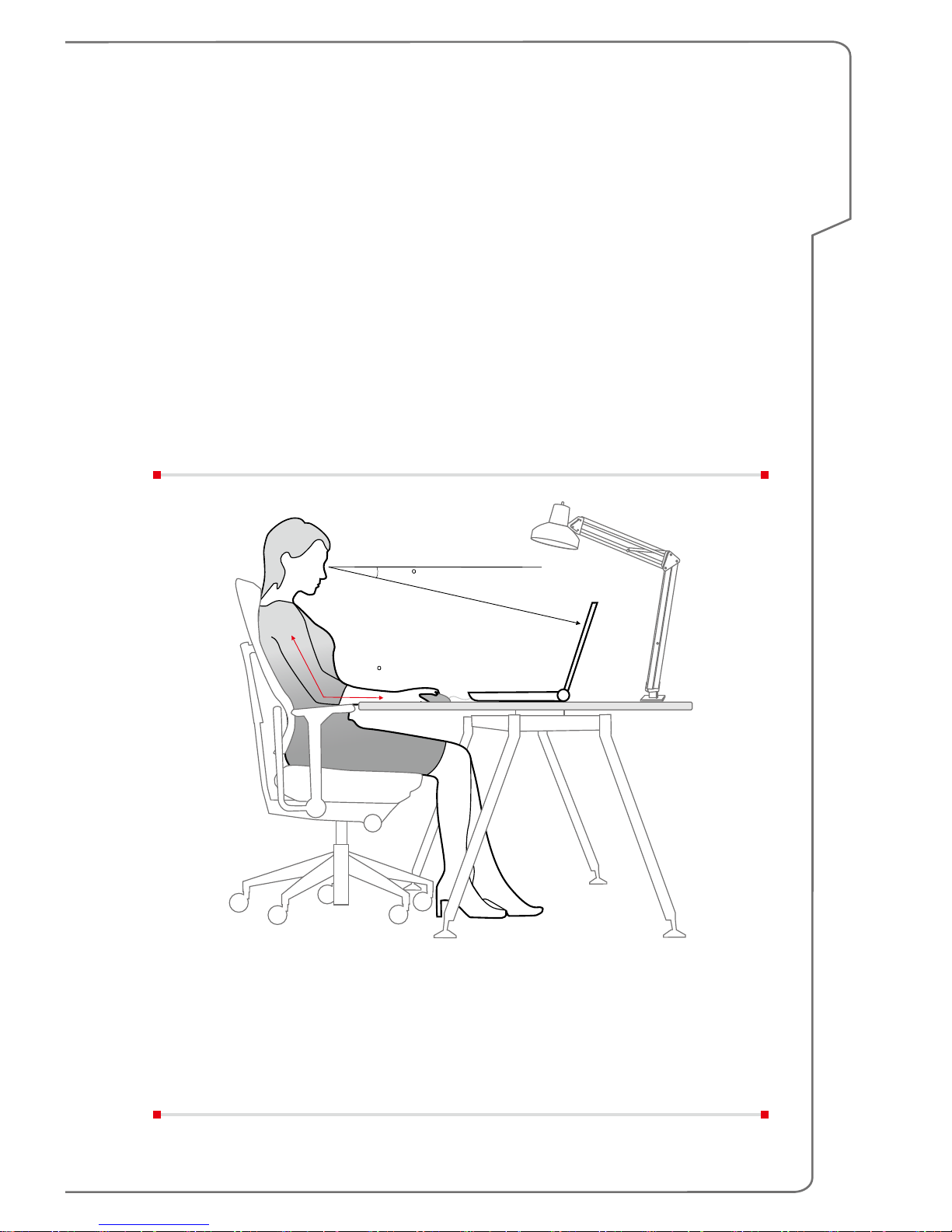
How to Use the Notebook Comfortably
If you are a beginner to the notebook, please read the following instructions to
assure your own safety, and make yourself comfortable during the operations.
▶ Good illumination is essential in the work area.
▶ Choose a chair and desk with good ergonomics and adjust their heights
according to your posture.
▶ Adjust the backrest to support your lower back comfortably when you are
sitting upright.
▶ Place your feet flat on the floor with your knees bent to a 90 degrees.
▶ Adjust the angle/position of the LCD panel to have an optimal view.
▶ Stretch and relax your body regularly. Always take a break after working for a
period of time.
38-76 cm
15-20
90-120
Page 32

3-4
Notebook User's Manual
How to Manage Power Supply
This section provides users basic safety precautions to take when using an AC/DC
adapter and battery power properly.
AC/DC Adapter
Ensure that your notebook is connected to an AC power source via the AC adapter
before turning it on for the first time. If the notebook automatically shuts down due
to low battery power, it is likely to cause system failure. Below are some Dos and
Don'ts of an AC/DC adapter.
▶ Dos
• Use the adapter that shipped with your notebook only.
• Always be aware of heat coming from the in use AC/DC adapter.
• Unplug the AC power cord before disassembly the notebook.
▶ Don'ts
• Cover an in-use adapter since it can generate heat.
• Have the AC power cord plugged after powering off the system when the
notebook is going to be left unused for a longer time.
Battery
When you get a new notebook or a new notebook battery, it is important to know
how to charge and care for your battery in order to get the most out it for as long as
you can.
Be aware of that the battery may not be replaced by users.
▶ Safety guidelines
• Danger of explosion if battery is incorrectly replaced. Replace only with the
same or equivalent type recommended by the manufacturer.
• Discard used batteries according to manufacturer's instruction.
• Always unplug the AC power cord before installing any module to the
notebook.
▶ Battery type
• This notebook may be equipped with a high-capacity Li-ion or Li-polymer
battery pack depending on the model you have.
• The rechargeable battery pack is an internal power source of the notebook.
• To keep the battery safely, always keep the battery away from liquid and the
place which has extreme temperature changes.
Page 33

How To Get Started
3-5
▶ Battery charging behavior
To optimize battery life and avoid a sudden power loss, read the tips below:
• Suspend system operation if the system will be idle for a while or shorten the
suspend timer’s time period.
• Turn off the system if you won’t be using it for a period of time.
• Disable unnecessary settings or remove idle peripherals.
• Connect an AC/DC adapter to the system whenever possible.
▶ How to charge the battery properly
Please pay attention to the following tips before recharging the battery:
• If a charged battery pack is not available, save your work and close all
running programs and shut down the system.
• Plug in an AC/DC adapter.
• You can use the system, suspend system operation or shut down and turn
off the system without interrupting the charging process.
• The Li-ion or Li-polymer battery has no memory effect. It is unnecessary
to discharge the battery before recharging. However, to optimize the life of
battery, we suggest that consuming the battery power completely once a
month is necessary.
• The actual charging time will be determined by the applications in use.
Page 34

3-6
Notebook User's Manual
How to Set Up a Power Plan in Windows 10
A power plan is a collection of hardware and system settings that manages how
your computer uses and conserves power. Power plans can save energy, maximize
system performance, or balance energy conservation with performance. The default
power plans — Balanced and Power saver — meet most people's needs. But you
can modify settings for existing plans or create your own plan.
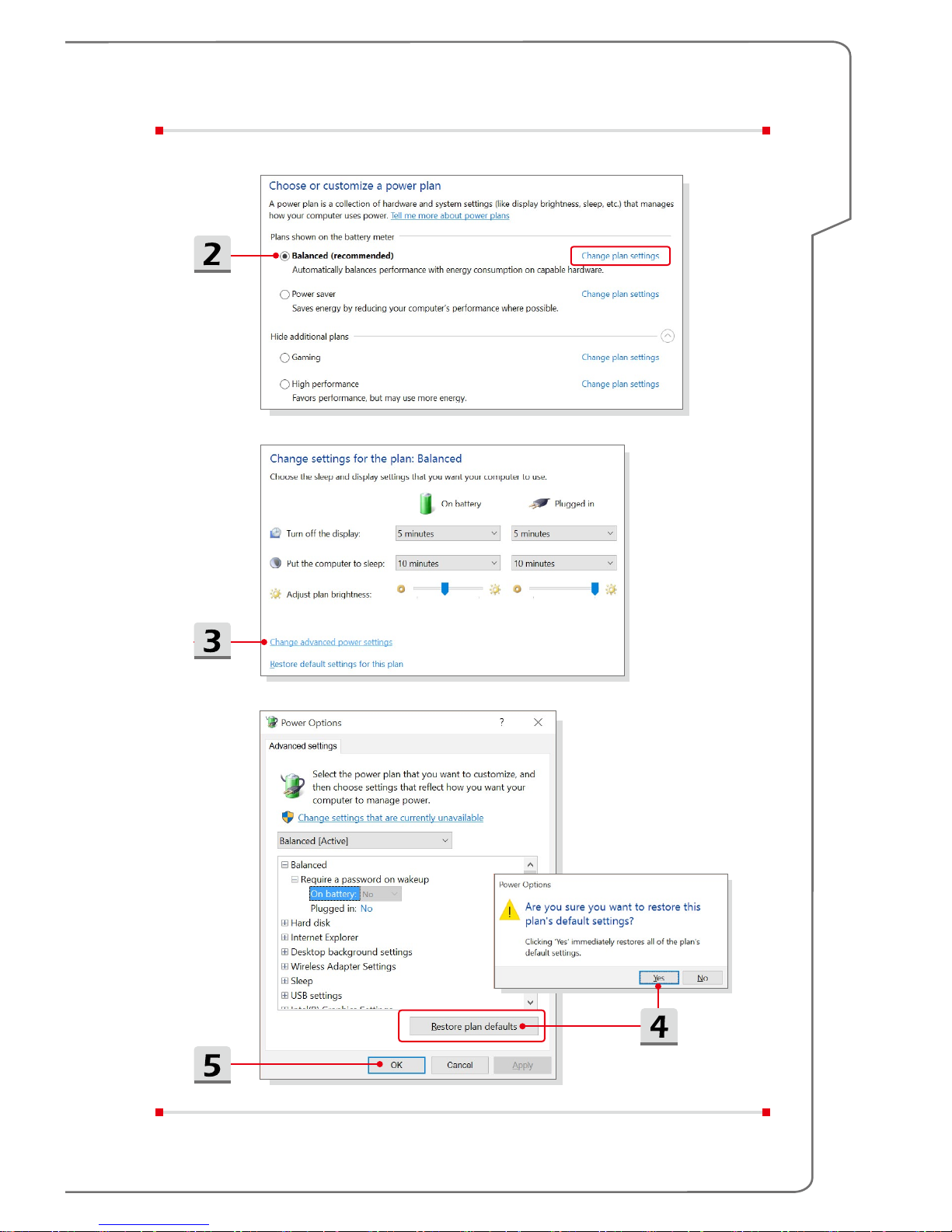
Choose or Customize a Power Plan
1. Find [Windows] icon in the lower-left corner of the screen. Right click it to show
selection menu. Select [Power Options] in the menu.
2. Choose a Power Plan by left clicking on one of the selections from the Power
Plan list. The Power Plan of [Balanced] is selected as an example here. Click
on the [Change plan settings] to the right of the power plan to customize a
power plan.
3. Choose the sleep and display settings you want your computer to use. Click
on [Change advanced power settings] to make changes to the selected power
plan settings to meet your needs.
4. To restore the selected Power Plan back to its default settings, click on
[Restore plan defaults] and then click [Yes] to confirm.
5. Click [OK] to finish.
Page 35
How To Get Started
3-7
Page 36

3-8
Notebook User's Manual
Create Your Own Power Plan
You can create your own power plan and customize it as your requirement.
However, it will be recommended to use ECO Engine power saving function to
optimize the battery life while using this notebook. Please refer to the section of
System Control Manager (SCM) in the Notebook Software Application Manual for
details.
1. Select Power Options in the menu. Click [Create a power plan] in the left pane.
2. Select an existing plan that meet your needs most, and give the plan a name.
Click [Next] to continue.
3. Change the settings for the new power plan. Click [Create] to make the
customized power plan taking effect.
4. Now you have a new power plan that is automatically set as active.
Page 37

How To Get Started
3-9
Page 38

3-10
Notebook User's Manual
How to Use the Touchpad
The touchpad integrated in your notebook is a pointing device that is compatible
with standard mouse, allowing you to control the notebook by pointing the location
of the cursor on the screen.
▶ Configure the Touchpad
You can customize the pointing device to meet your personal needs. For
example, if you are a left-handed user, you may want to swap the functions of
the two buttons. In addition, you can change the size, shape, moving speed
and other advanced features of the cursor on the screen.
To configure the touchpad, you can use the standard Microsoft or IBM PS/2
driver in your Windows operating system. The Mouse Properties in Control
Panel allows you to change the configuration.
▶ Position and Move
Place your finger on the touchpad (usually using the forefinger), and the
rectangular pad will act as a miniature duplicate of your display. When you
move your fingertip across the pad, the cursor on the screen will move
simultaneously to the same direction. When your finger reaches the edge of
the pad, lift your finger and place it on a proper location of the touchpad to
continue the movement.
Page 39

How To Get Started
3-11
▶ Point and Click
When you have moved and placed the cursor over an icon, a menu item or
a command that you want to execute, simply tap slightly on the touchpad or
press the left button to select. This procedure, called as point and click is the
basics of operating your notebook. Unlike the traditional pointing device such
as the mouse, the whole touchpad can act as a left button, so that your each
tap on the touchpad is equivalent to pressing the left button. Tapping twice
more rapidly on the touchpad is to execute a double-click.
▶ Drag and Drop
You can move files or objects in your notebook by using drag-and-drop. To do
so, place the cursor on the desired item and slightly tap twice on the touchpad,
and then keep your fingertip in contact with the touchpad on the second tap.
Now, you can drag the selected item to the desired location by moving your
finger on the touchpad, and then lift your finger from the touchpad to drop
the item into place. Alternately, you can press and hold the left button when
you select an item, and then move your finger to the desired location; finally,
release the left button to finish the drag-and-drop operation.
About HDD and SSD
This notebook may be equipped with hard disk drive (HDD) or solid state drive
(SSD) depending on the models users purchased.
The hard disk drive and solid state drive are the data storage devices used for
storing and retrieving digital information. Most SSDs use NAND-based flash
memory, and have higher data transfer rates, lower power consumption, and faster
read/write speed than HDDs.
Do not attempt to remove or install the HDD and SSD when the notebook is
powered on. Please consult an authorized retailer or service center for the
replacement of the HDDs and SSDs.
About M.2 SSD Slot
The notebook may be equipped with M.2 SSD slots for M.2 SSD cards, which are
compatible with SATA or PCIe interfaces, providing diverse features and usages to
users. Consult an authorized retailer or service center for correct specifications and
installations.
Page 40

3-12
Notebook User's Manual
How to Connect the Internet
Wireless LAN
Wireless LAN is a wireless broadband connection that allows you to connect to the
Internet without using any cables. Follow the instructions below to set up a Wireless
LAN connection.
▶ Wireless LAN Connection
1. Go to the desktop. Find the
icon in the lower-right corner of the task
bar and click on it to unfold the settings menu.
2. There are [Wi-Fi] and [Airplane mode] two options in the Network settings,
select [Wi-Fi] here.
3. Choose one Wireless LAN connection from the network list to connect to
the Internet. Click [Connect] to continue.
4. A security key may be required for connecting the selected network. Then
click [Next].
Page 41

How To Get Started
3-13
▶ Check the Wireless LAN status
When Airplane mode is enabled, Wireless LAN connection will be turned off.
Before setting up a Wireless LAN connection, make sure that Airplane mode is
turned off.
1. Go to the desktop. Find the
icon in the lower-right corner of the task
bar and click on it to unfold the settings menu.
2. Check if Wireless LAN mode is available in the Network settings.
3. Or, find the [SCM] icon in the lower-right corner of the task bar and click on
it to bring out the main window of System Control Manager, please check if
Wireless LAN mode is turned on.
Page 42

3-14
Notebook User's Manual
Wired LAN
Using cables and network adapters to connect to the Internet. Before setting up the
connection of Dynamic IP/PPPoE or Broadband (PPPoE) or Static IP, contact your
Internet Service Provider (ISP) or network administrator for assistance of setting up
Internet connection.
▶ Dynamic IP/PPPoE Connection
1. Go to the desktop. Find the
icon in the lower-right corner of the task
bar, and then right click on it to select [Open Network and Sharing Center].
2. Choose [Change adapter settings].
3. Right click on [Ethernet] to select [Properties] from the drop-down menu.
4. In the Ethernet Properties window, select [Networking] tab and check
[Internet Protocol Version 4 (TCP/IPv4)]. Then click [Properties] to continue.
5. Select [General] tab, click [Obtain an IP address automatically] and [Obtain
DNS server address automatically]. Then click [OK].
Troubleshoot problems
Open Network and Sharing Center
Page 43

How To Get Started
3-15
Page 44

3-16
Notebook User's Manual
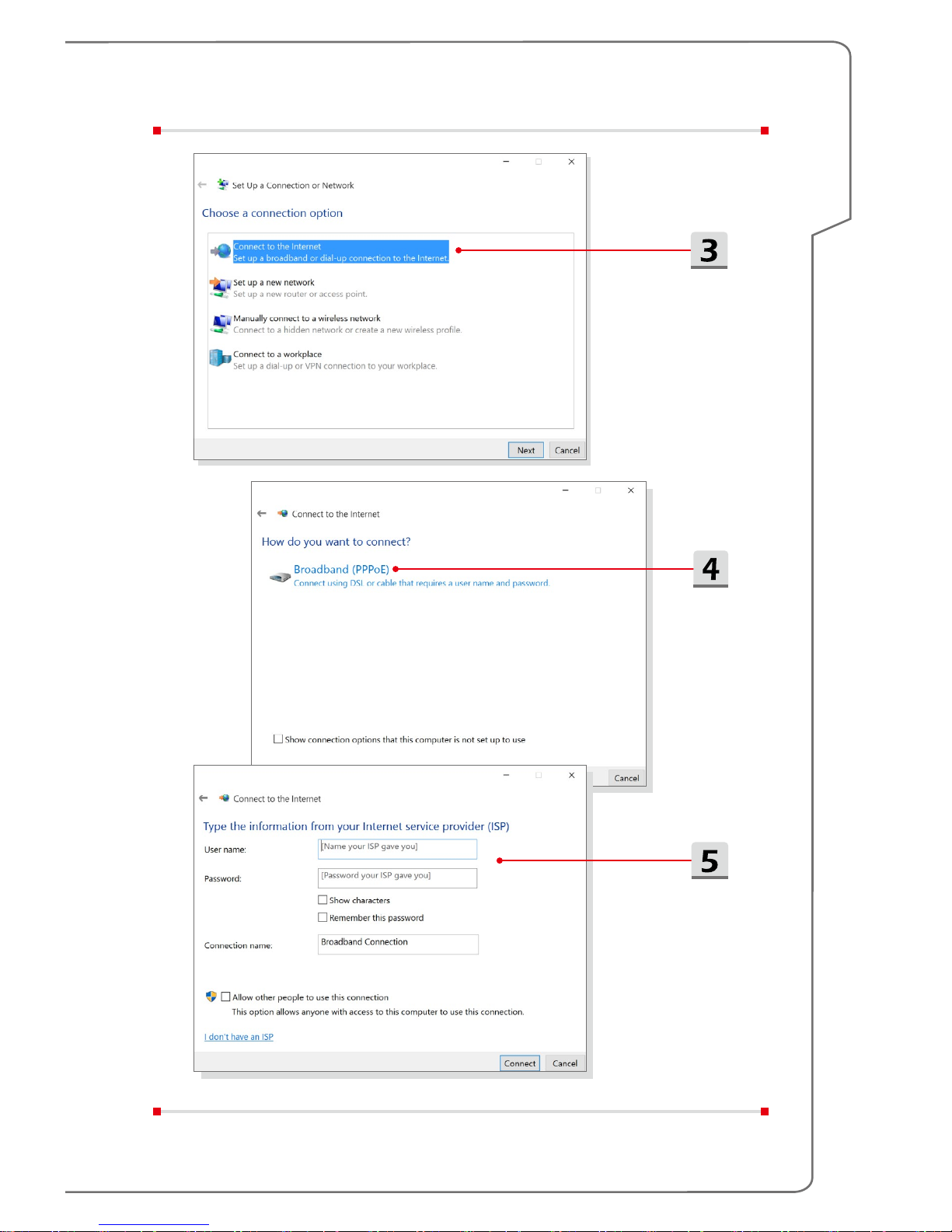
▶ Broadband (PPPoE) Connection
1. Go to the desktop. Find the
icon in the lower-right corner of the task
bar, right click on it to select [Open Network and Sharing Center].
2. Select [Set up a new connection or network] under [Change your
networking settings].
3. Select [Connect to the Internet], and then click [Next].
4. Click [Broadband (PPPoE)].
5. Fills User name, Password, and Connection name fields. Then click
[Connect].
Troubleshoot problems
Open Network and Sharing Center
Page 45
How To Get Started
3-17
Page 46
3-18
Notebook User's Manual
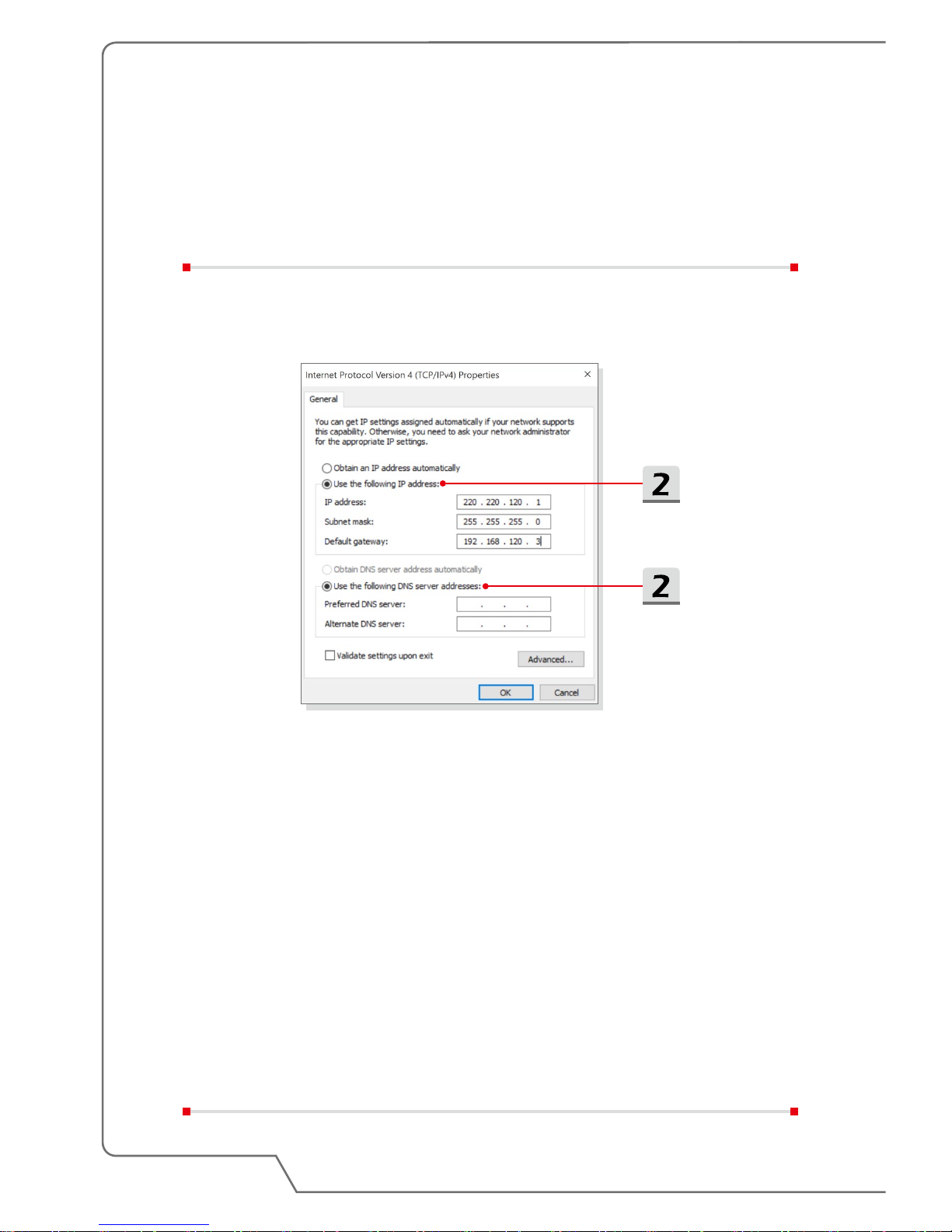
▶ Static IP Connection
1. Follow the previous steps 1 to 4 in Dynamic IP/PPPoE Connection.
2. Select [General] tab and click [Use the following IP address] and [Use the
following DNS server addresses]. You will be asked to fill the IP address,
Subnet mask, and Default gateway, and then click [OK].
Page 47

How To Get Started
3-19
How to Set Up Bluetooth Connection
Bluetooth pairing is a process in which two Bluetooth devices communicate with
each other through an established connection.
Activating Bluetooth Connection
▶ Checking the Bluetooth status
When Airplane mode is enabled, Bluetooth connection will be turned off.
Before setting up a Bluetooth connection, make sure that Airplane mode is
turned off.
1. Go to the desktop. Find the
icon in the lower-left corner of the screen
and click on it.
2. Select [Settings], and then go to [Devices/ Bluetooth] to check if the
Bluetooth connection is available.
3. Switch [On] the Bluetooth connection if it is set to [Off].
4. Or, find the [SCM] icon in the lower-right corner of the task bar and click
on it to bring out the main window of System Control Manager. Check if
Bluetooth connection is switched on.
Page 48

3-20
Notebook User's Manual
Page 49

How To Get Started
3-21
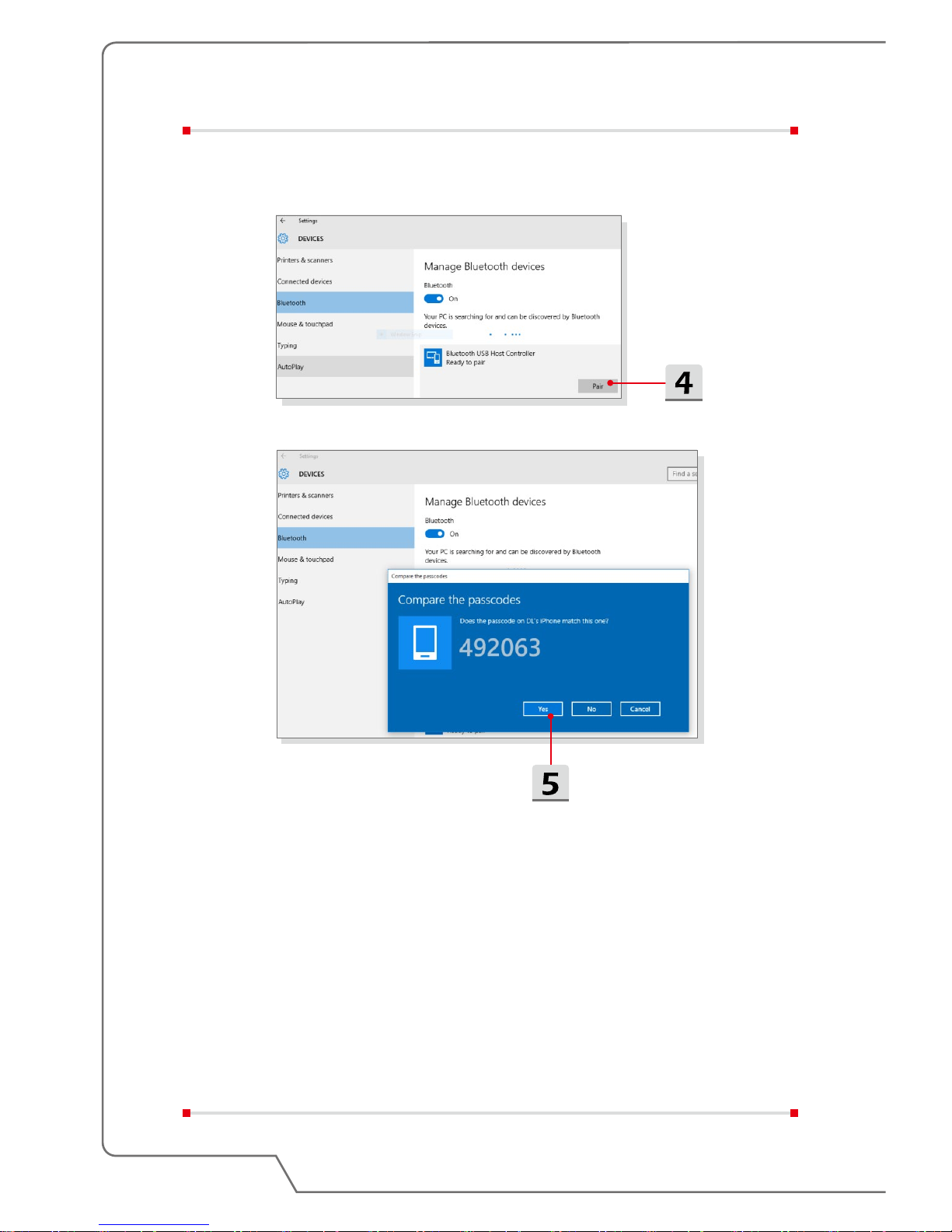
▶ Pairing the Bluetooth devices
1. Go to the desktop. Find the [Bluetooth] icon in the lower-right corner of the
task bar and click on it.
2. Choose [Add a Bluetooth Device].
3. Select one Bluetooth connection from the network list.
4. Click [Pair] to continue.
5. Match the passcode between the notebook and the selected Bluetooth
device, click [Yes] to finish.
Page 50
3-22
Notebook User's Manual
Page 51

How To Get Started
3-23
How to Connect External Devices
This notebook may be equipped with various connecting I/O (input/output) ports,
such as USB, HDMI, DisplayPort, and mini DisplayPort. Users will be able to
connect diverse peripheral devices to the notebook.
To connect these devices, refer to the instruction manuals of each device first, and
then connect the device to the notebook. This notebook is capable to auto detect
the connected devices, and if there is no detection of the devices, please manually
enable the devices by going to [Start Menu/ Control Panel/ Hardware and Sound/
Add a device] to add the new devices.
Page 52
3-24
Notebook User's Manual
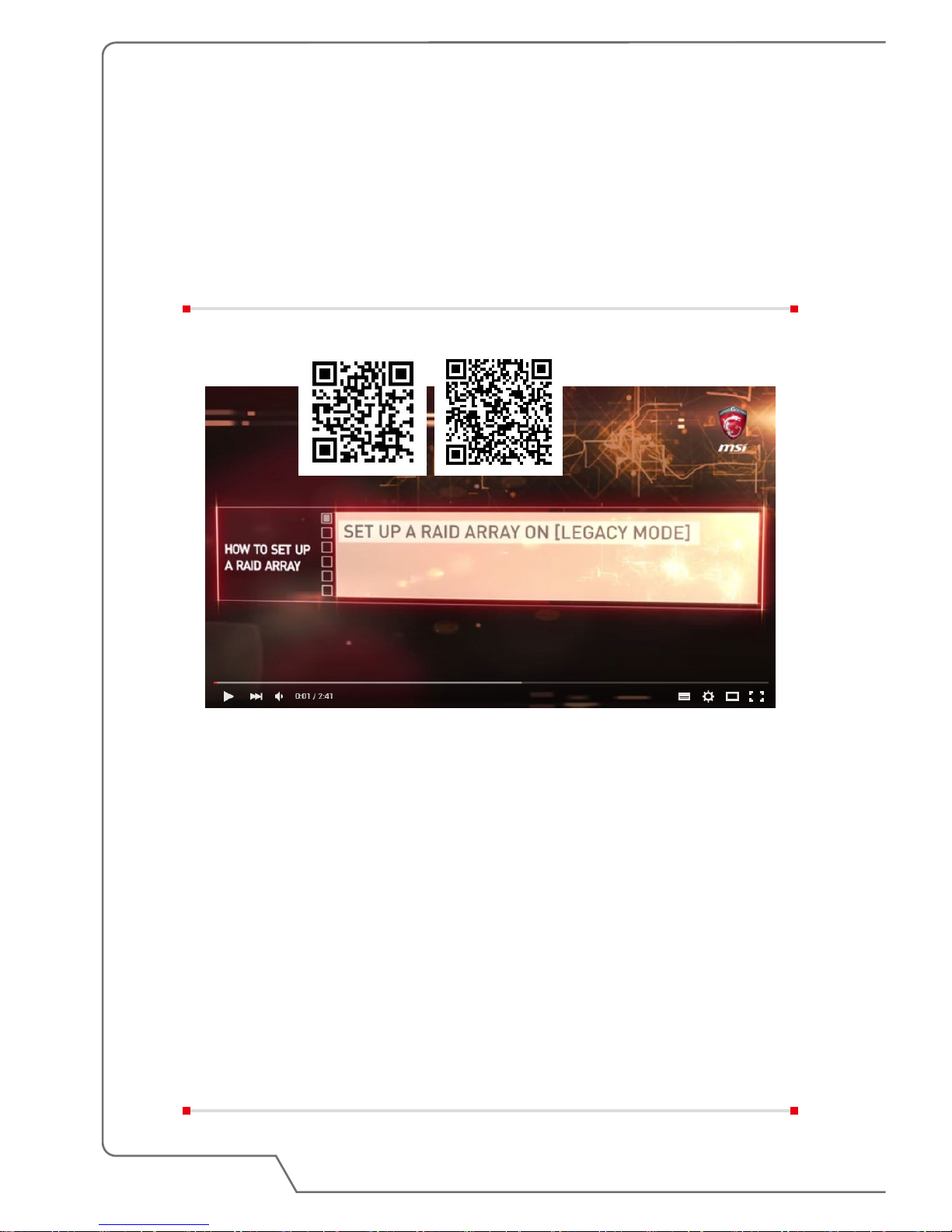
Video: How to Use RAID Function
This notebook may support RAID function of different levels. RAID allows users to
store data on multiple hard disk drives or solid state drives. Contact the local dealer
for further and correct information and be noted that the supported RAID functions
may vary depending on the models users purchased.
Watch the instruction video at: https://youtu.be/u2C35-ctFbw
YouTube Youku
Page 53

How To Get Started
3-25
How to Select Boot Mode in BIOS
1. Power on the system. As soon as the first logo screen appears, press the DEL
key immediately and enter the BIOS menu.
2. Move the cursor to [Boot] tab, and select [Boot mode select] in Boot
Configuration.
3. For operating systems support UEFI-based BIOS (Windows 10 and Windows
8.1), it is suggested to select [UEFI].
4. For Windows 7 or previous versions of Windows, select [Legacy] mode.
Page 54
3-26
Notebook User's Manual
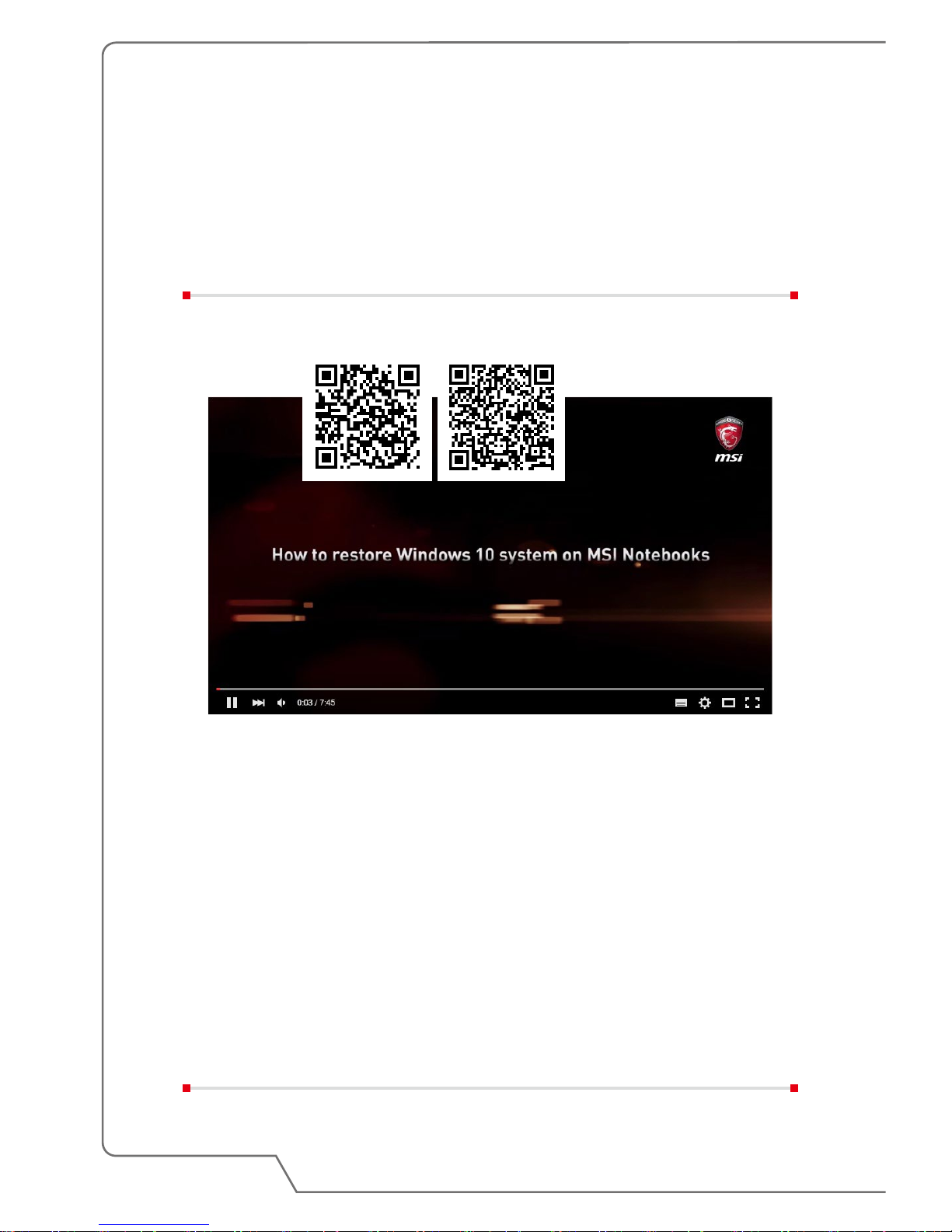
Video: How to Restore Windows 10 Operating
System on MSI Notebooks
Watch the instruction video at: https://www.youtube.com/watch?v=hSrK6xAQooU,
to restore the Windows 10 operating system by using [F3 Recovery] and [Windows
10 Settings] when it is needed.
YouTube Youku
Page 55
How To Get Started
3-27
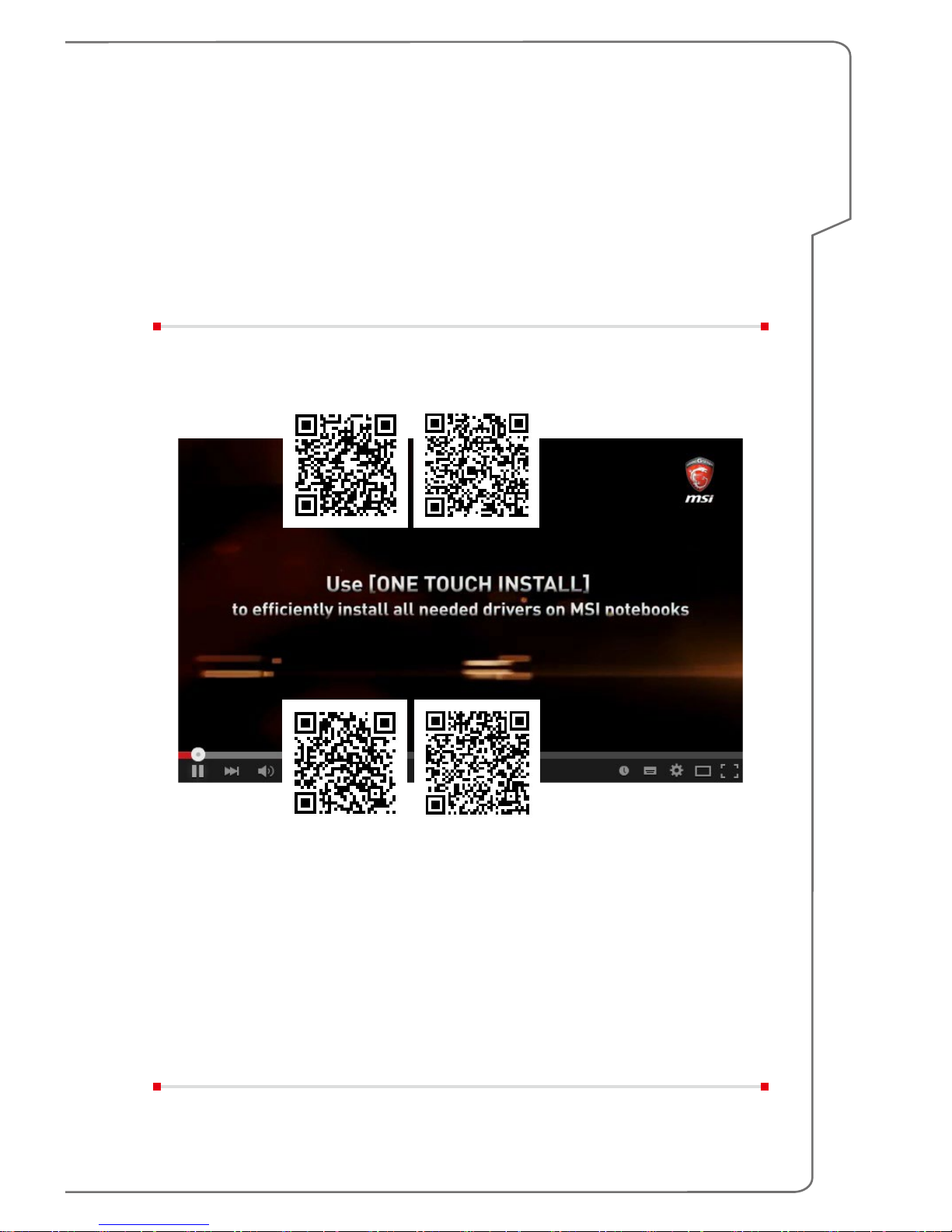
Video: How to Use MSI One Touch Install
MSI "One Touch Install", the one-click installer application, allows users to
efficiently install all needed drivers on MSI notebooks with single click.
Watch the instruction video at:
Windows 10/ 8.1: https://www.youtube.com/watch?v=ERItRaJUKQs
Windows 7: https://www.youtube.com/watch?v=43lnM4m-500
YouTube Youku
Windows 10/ 8.1
YouTube Youku
Windows 7
Page 56

Notebook User's Manual
3-28
 Loading...