

Page 1
GB
DECLARATION OF CONFORMITY
We, the undersigned
Company: TE-GROUP nv
Address: Kapelsestraat 61, 2950 Kapellen - BELGIUM
declare, that the following equipment:
Product Name: BLUE STEREO 200
Product Type: Bluetooth® stereo headset
Is in conformity with the Directions of the European Union
EC R&TTE Directive 1999/5/EC
Conformity of the Bluetooth® headset with the above-mentioned directions is guaranteed by the CE-symbol.
QRG / Blue Luxe / 04-09 / V01
GETTING STARTED
CHARGING THE BATTERY
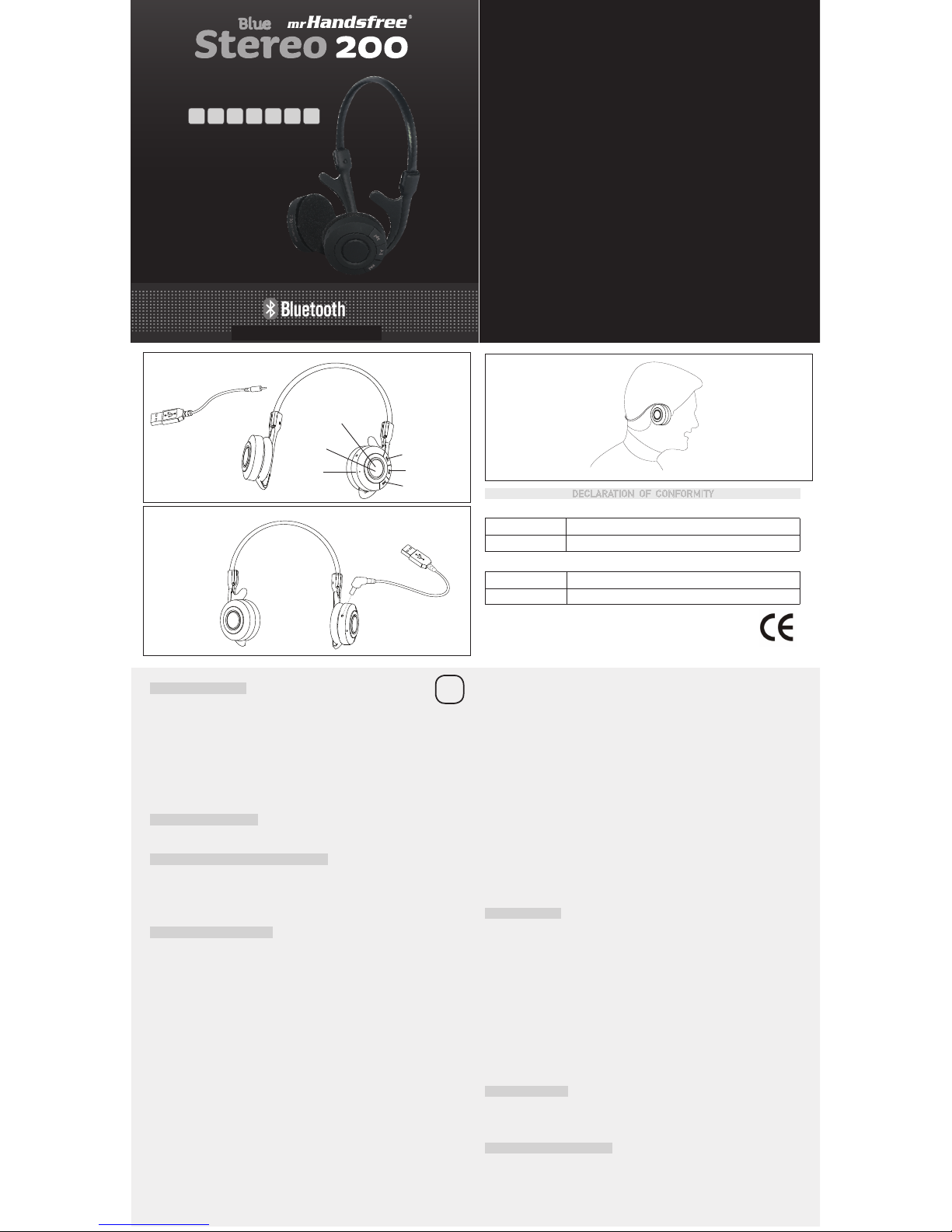
1. Plug the USB cable (7) into the headphone. (see ILLUSTRATION II)
2. Plug the other end of the USB cable (7) into your computer.
3. The red indicator (1) on the headphone will light up.
4. When the battery is fully charged, the red indicator (1) will turn off and the blue indicator
(1) will turn on.
Important!
• For first time use it is very important to charge the battery of the Blue STEREO 200
headphone for 24 hours. This ensures the good sound quality of your headphone.
• For first time use it is also possible that the battery capacity is too low. It could take some
time before the red indicator lights up.
WEARING THE HEADPHONE
The Blue Stereo 200 is designed to be comfortably worn with the neckband behind your
head. (SEE ILLUSTRATION III)
MAIN FUNCTIONS MULTIFUNCTIONAL BUTTON
PHONE FUNCTIONS:
Turn on/off / Pairing / Voice dialing / Redial / Answering, ending and rejecting calls / 2nd call
MUSIC FUNCTIONS:
Play, pause and stop the music / Pause the music and answer a call / Jump to next track /
Jump to previous track
PHONE FUNCTIONS
TURNING HEADPHONE ON / OFF
To turn the headphone on:
Press and hold the MF-button (2) for 5 seconds. You will hear a beep and the blue indicator
(1) of the headphone flashes. The headphone is now turned on.
To turn the headphone off:
Press and hold the MF-button (2) for 5 seconds. You will hear a beep and the blue indicator
(1) of the headphone lights up 2 times. The headphone is now turned off.
PAIRING THE HEADPHONE
You are required to pair the Blue STEREO 200 headphone with your mobile phone once
before using it.
1. The Blue STEREO 200 headphone must be turned off before initiating pairing. Press and
hold the MF-button (2) until the blue indicator (1) lights up constantly. The headphone is
now ready for pairing.
2. Initiate the pairing process on your Bluetooth
®
mobile phone to pair with the Blue
STEREO 200 headphone. (Refer to the manual of your mobile phone.)
3. Select <<
Blue STEREO 200>> out of the list with found devices on your mobile phone.
You will be asked to enter the PIN-code to complete pairing, enter 0000 and confirm it.
When the pairing has been successful, the blue indicator (1) of the headphone will flash
every 5 seconds.
Note:
1. If the Blue STEREO 200 headphone is not in pairing mode, your mobile phone won’t find the
headphone. Please set the headphone into pairing mode before making your mobile phone
search for the headphone.
2. If no pairing is possible for a period of time (approx. two minutes), the headphone will
automatically leave pairing mode. You may need to start all over again.
MAKING CALLS
Once the Blue STEREO 200 headphone is successfully paired with your mobile phone, you
can use it to make and receive calls.
The Blue STEREO 200 headphone can be used with voice dialing if your mobile phone
supports this feature.
1. Using voice dialing:
Press the MF-button (2) 1x, wait for a beep and say the name of the person you want to call.
2. Using the phone keys to make a call:
Enter and dial the number on the mobile phone as you normally do. Once the call has been
set up, the sound will be transmitted to your headphone automatically.
3. Redial:
Press and hold the MF-button (2) for 2 seconds until you hear a long beep and the phone
will dial the last dialed number.
ANSWERING / ENDING CALLS
When the Blue STEREO 200 headphone is turned on and there is an incoming call, you will
hear a musical tone.
- Press the MF-button (2) to answer the call.
- Press the MF-button (2) to end the call.
When the headphone is turned off: first accept the call on your mobile phone, then press
and hold the MF-button (2) for 5 seconds to turn the headphone on. Then press the MFbutton (2) to accept the connection with the headphone.
Note:
Due to the different designs of some mobile phones, an auto-disconnect may happen even when
the Blue STEREO 200 headphone is turned on. In that case, the headphone won’t ring when there
is an incoming call. Press the MF-button (2) for 1 sec. to reconnect the headphone with your
mobile phone for an incoming call.
REJECTING CALLS
Press and hold the MF-button (2) for 2 seconds to reject the call.
2ND CALL
Press and hold the MF-button (2) for 2 seconds to put the active call on hold and answer the
2nd call. To switch back to the 1st call, press and hold the MF-button (2) again for 2 seconds.
MUSIC FUNCTIONS
Once the Blue STEREO 200 headphone is successfully paired, you can use it to listen to your
favorite music wirelessly in stereo.
PLAY THE MUSIC
Select the music you would like to listen to and press the Music-button (6) once.
PAUSE THE MUSIC
Press the Music-button (6) once to pause the music – press again to resume playing.
STOP THE MUSIC
Press the Music-button (6) for 2 seconds to stop the music.
ANSWER A CALL WHEN PLAYING MUSIC
Press the MF-button (2) to pause the music and answer the call.
The music will resume after the call has ended.
JUMP TO THE NEXT/PRE VIOUS SONG
Press the (+) button (5) once to select and play the next song.
Press the (-) button (4) once to select and play the previous song.
ADJUST THE VOLUME
- Press and hold the (+) button (5) to increase the volume. When the maximum level of the
speaker is reached, you will hear a beep tone.
- Press and hold the (-) button (4) to decrease the volume. When the minimum level of the
speaker is reached, you will hear a beep tone.
CONNECTING WITH A PC OR PDA
You are allowed to connect the Blue STEREO 200 headphone with a Bluetooth® enabled PC
or PDA that is supported with headphone and/or handsfree profiles. Please refer to the user
manual of your Bluetooth® enabled PC or PDA for setup information.
A more detailed manual can be downloaded from www.mrhandsfree.com.
ILLUSTRATION III
QUICK REFERENCE GUIDE
ED GRI
FGB NL
www.mrhandsfree.com
ILLUSTRATION I
ILLUSTRATION II
ILLUSTRATION I
ILLUSTRATION II
ILLUSTRATION I
ILLUSTRATION II
ILLUSTRATION III
(1) Indicator light
(2) MF-Button
(3) Microphone
(4) (-) button
(6) Music button
(5) (+) button
ILLUSTRATION I
(7) USB cable
 Loading...