

Page 1

Please read this manual carefully before installation and keep it for future reference.
User Manual
Advantage Series
Please keep this manual where the operator can easily find it.
Inside you will find helpful hints on how to use and maintain your
unit properly.
Page 2

READ BEFORE OPERATION
When using this air conditioner in the European Union, the following informations must be followed:
•This appliance can be used by children aged 8 years and above and persons with reduced physical,
sensory or mental capabilities, or lack of experience and knowledge if they have been given
supervision or instruction concerning use of the appliance in a safe way and understand the hazards
involved. Children shall not play with the appliance. Cleaning and user maintenance shall not be made
by children without supervision.
DISPOSAL: Do not dispose of this product as unsorted municipal waste. Collection of such waste
separately for special treatment is legally required.
It is prohibited to dispose of this appliance in domestic household waste. For disposal, there are several
possibilities:
A) The municipality has established collection systems, where electronic waste can be disposed of at
least free of charge to the user.
B) When buying a new product, the retailer will take back the old product at least free of charge.
C) The manufacturer will take back the old appliance for disposal at least free of charge to the user.
D) As old products contain valuable resources, they can be sold to scrap metal dealers.
Wild disposal of waste in forests and landscapes endangers your health when hazardous substances
leak into the ground-water and find their way into the food chain.
1
Page 3

CONTENTS
SAFETY PRECAUTIONS
Warnings ....................................................................................................................................
Cautions .....................................................................................................................................
NAMES OF PARTS
Indoor unit .................................................................................................................................
Outdoor unit ..............................................................................................................................
Display window ..........................................................................................................................
OPERATING INSTRUCTIONS
Operating temperature.............................................................................................................
Manual operation ......................................................................................................................
Airflow directional control ........................................................................................................
How the air conditioner works ................................................................................................
Special functions ........................................................................................................................
3
4
5
5
5
6
6
7
8
9
CARE AND MAINTENANCE
Before maintenance...... ............................................................................................................
Cleaning the unit.........................................................................................................................
Cleaning the air filter and air freshening filter .......................................................................
Preparation for extended non-operation................................................................................
Pre-season inspection................................................................................................................
TROUBLESHOOTING TIPS
Troubleshooting tips..................................................................................................................
Troubleshooting guide ..............................................................................................................
11
11
11
12
12
13
14
2
Page 4

SAFETY PRECAUTIONS
To prevent injury to the user or other people and property damage, the following instructions must be
followed. Incorrect operation due to ignoring of instructions may cause harm or damage. The
seriousness is classified by the following indications.
WARNING This symbol indicates the possibility of death or serious injury.
CAUTION
•Meanings of symbols used in this manual are as shown below.
•Do not extend the cable and never use multiple
plugs. A poor electrical connection, poor
insulation or voltage which is higher than
permitted can cause fire.
•Do not expose your body directly to the cool air
for prolonged period.
•Never poke fingers, sticks or other objects in the
air inlet and outlet vents.
•Never attempt to repair, relocate, modify the air
conditioner yourself. Always contact your service
provider if required.
•Never pull the plug out by pulling on the cable.
Hold the plug firmly and pull it out of the plug
socket, otherwise there is a risk of damaging the
cable.
•Do not operate your air conditioner in a wet
room such as a bathroom or laundry room.
This symbol indicates the possibility of injury or damage to property.
Strictly prohibited.
Be sure to follow the instructions.
WARNING
•Remove all dirt from the power plug and plug it
firmly. Soiled plugs can cause fire or an electric
shock.
•In the event of any abnormalities such as smell of
burning, immediately switch off the device and
pull the plug. Contact your service provider.
•Always switch off the device and pull the plug
before you start to clean it.
•Use specified power cord.
•Contact the authorized installer for installation of
this unit.
•Contact an authorized service technician for
repair or maintenance of this unit.
•This appliance is not intended for use by
persons(including children) with reduced physical,
sensory or mental capabilities, or lack of
experience and knowledge, unless they have
been given supervision or instruction concerning
use of the appliance by a person responsible for
their safety.
•Children should be supervised to ensure that
they do not play with the air conditioner.
3
Page 5

SAFETY PRECAUTIONS
CAUTION
•Never touch any switches with a wet hand. It
may cause an electric shock.
•Never use the device for any other purpose than
the intended use.
•Never place food, precision instruments, plants,
animals, paint, etc. on the unit.
•Do not expose plants or animals directly to the
air flow.
•Never clean the air conditioner with water.
•Never use combustible cleaning agents as these
could cause a fire or deformation.
•Never place any burning objects close to the
device if they could be directly affected by the
emitted air.
•Never step onto the outdoor unit and never place
anything on it.
•Never use an unsteady or rusty base.
•Never install the air conditioner in places where
combustible gas can be emitted. Emmitted gas
may collect and cause an explosion.
•Never allow the air conditioner to run for too
long with the doors or windows open, or if the
humidity is very high.
•If the air conditioner is to be used in conjunction
with other heaters, the air should be refreshed
periodically, otherwise there is a risk of lack of
oxygen.
•Always pull out the power plug if the unit is not
going to be used for any lengthy period of time.
Collections of dust can cause fire.
•Always switch off the air conditioner and pull out
the power plug during a storm, otherwise,
electrical parts may get damaged.
•Check that the drainage line is correctly
connected. If not, water will escape.
•Check that the condensation water can run off
unhindered. It may cause water damage if the
condensation water cannot run off properly.
•The air conditoner must be earthed in
accordance with the local codes.
•For electrical safety purposes we recommend
that you install an earthleakage circuit-breaker.
•If the power cord is damaged, it must be replaced
by the manufacturer, its service agent or similary
qualified persons in order to avoid a hazard.
4
Page 6

NAMES OF PARTS
1
Air outlet
5
Air inlet
2
4
3
7
6
8
Air inlet
(side)
Air inlet (
Air o utlet
Display window
Energy saving display (optional):
Displays when the energy saving feature is
activated. (Not available when the unit does not
have energy saving mode.)
WIFI control display (optional):
Displays when the WIFI control feature is activated.
(Not available when the unit does not have this
function.)
NOTE:
A guide on using the infrared remote is included in this
literature package.
rear)
9
10
Names of parts
Indoor unit:
1. Front panel
2. Air inlet
3. Air filter
4. Air outlet
5. Horizontal air flow grille
6. Vertical air flow louver(inside)
7. Display window
Outdoor unit:
8. Connecting pipe
9. Connecting cable
10. Stop valve
NOTE:
All the pictures in this manual are for explanation
purposes only. The actual shape of the indoor unit
you purchased may be slight different on front panel
and display window. The actual shape shall prevail.
Display window
Digital display:
•Displays the temperature settings when the air
conditioner is operational.
•Displays the room temperature in FAN mode.
•Displays the self-diagnostic codes.
•Displays “ON” for three seconds when Timer ON,
Fresh, Swing, Turbo or Silence feature is activated.
•Displays “OF” for three seconds when Timer OFF is
set.
•Displays “OF” for three seconds when Fresh,
Swing, Turbo or Silence feature is cancelled.
•Displays “dF” under defrosting operation.
•Displays “cF” when anti-cold air feature is
activated under heating mode.
•Displays “SC” during self clean operation (if
applicable).
•Displays “FP” under 8°C heating operation (if
applicable).
(Optional)
According to the operation mode, the “°C”
indicator displays different colors:
•Under Cool or Dry mode, it displays as cool colors.
•Under Heat mode, it displays as a warm color.
5
Page 7
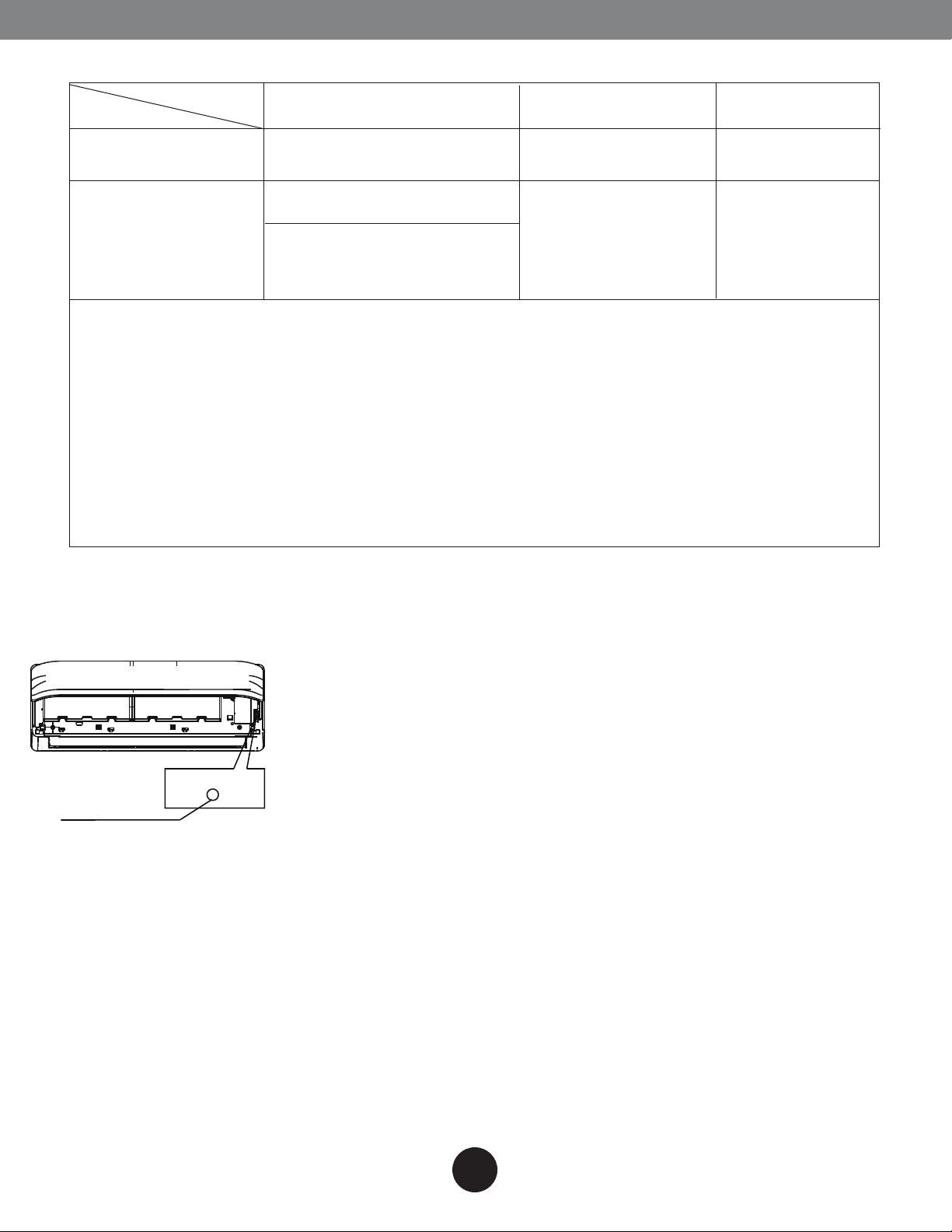
Operating temperature
OPERATING INSTRUCTIONS
Mode
Temperature
Room temperature
Outdoor temperature
NOTE:
1. Optimum performance will be achieved within these operating temperatures. If air conditioner
is used outside of the above conditions, certain safety protection features might come into
operation and cause the unit to function abnormally.
2. If the air conditioner runs for a long time in cooling mode and the humidity is high (over 80%),
condensed water may drip out of the unit. Please sets the vertical air flow louver to its maximum
angle (vertically to the floor), and set HIGH fan mode.
Suggestion: For the units with an Electric Heater, when the outside ambient temperature is below
32°F (0°C), we strongly recommend you to keep the machine plugged in order to guarantee it
running smoothly.
Cooling operation
62°F~90°F
(17°C~32°C)
32°F~122°F
(0°C~50°C)
5°F~122°F / -15°C~50°C
(For the models with low
ambient cooling system)
Heating operation Drying operation
32°F~86°F
(0°C~30°C)
5°F~86°F
(-15°C~30°C)
50°F~90°F
(10°C~32°C)
32°F~122°F
(0°C~50°C)
Manual operation
Units are equipped with a switch to run emergency operation mode. It can be accessed by opening the
front panel. This switch is used for manual operation in case the remote control fails to work or
maintenance necessary.
AUTO/COOL
Manual switch
NOTE: The unit must be turned off before operating the manual control button. If the unit is operational,
continue pressing the manual control button until the unit is off.
1) Open and lift the front panel up to an angle until it remains fixed with a clicking sound.
2) One press of the manual control switch will lead to the forced AUTO operation. If press the switch twice
within five seconds, the unit will operate under forced COOL operation.
3) Close the panel firmly to its original position.
CAUTION:
•This switch is used for testing purposes only. Please do not use it unless necessary.
•To restore the remote controller operation, use the remote control directly
6
Page 8
OPERATING INSTRUCTIONS
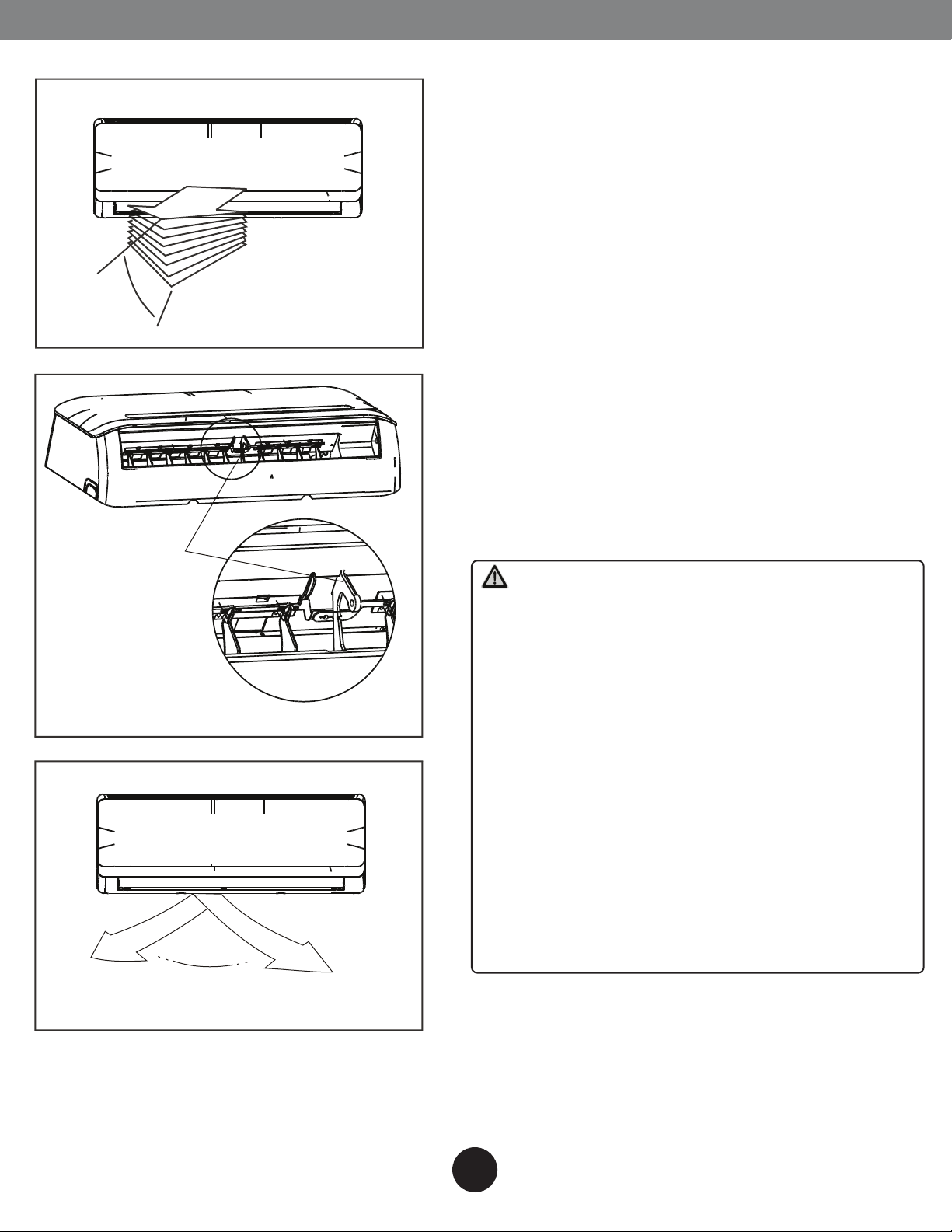
Airflow directional control
Range
•Adjust the air flow direction properly, otherwise
it might cause discomfort or cause uneven room
temperatures.
•Adjust the horizontal louver using the remote
control.
•Adjust the vertical louver manually.
Adjusting vertical air flow(Up--Down)
Perform this function while the unit is in operation.
Use the remote control to adjust the vertical air
flow direction. The horizontal louver can move
slightly for each press, or continuously swing up
and down automatically. Please refer to the
“REMOTE CONTROL USER MANUAL” for details.
Adjusting horizontal air flow (left - right)
•Move the deflector rod manually to adjust the air
flow in the direction you prefer.
IMPORTANT: Do not put your fingers into the panel of
the blower and suction side.The high-speed fan inside
may cause injury.
Deector rod
CAUTION
•Do not operate the air conditioner for long
periods with the air flow direction set downward
in cooling or dehumidifying mode. Otherwise,
condensation may occur on the surface of the
horizontal louver causing moisture to drop on to
the floor or on furnishings.
•After a quick restart, the horizontal louver may
remain static for approximately 10 seconds.
•Open angle of the horizontal louver should not be
set too small, as COOLING or HEATING
performance may be reduced due to too
restricted air flow area.
•Do not move the horizontal louver manually,
otherwise the horizontal louver will be out of sync.
But if this happens, please cease operating,
unplug power for a few seconds,then restart the
air conditioner.
Range
7
Page 9
OPERATING INSTRUCTIONS
How the air conditioner works
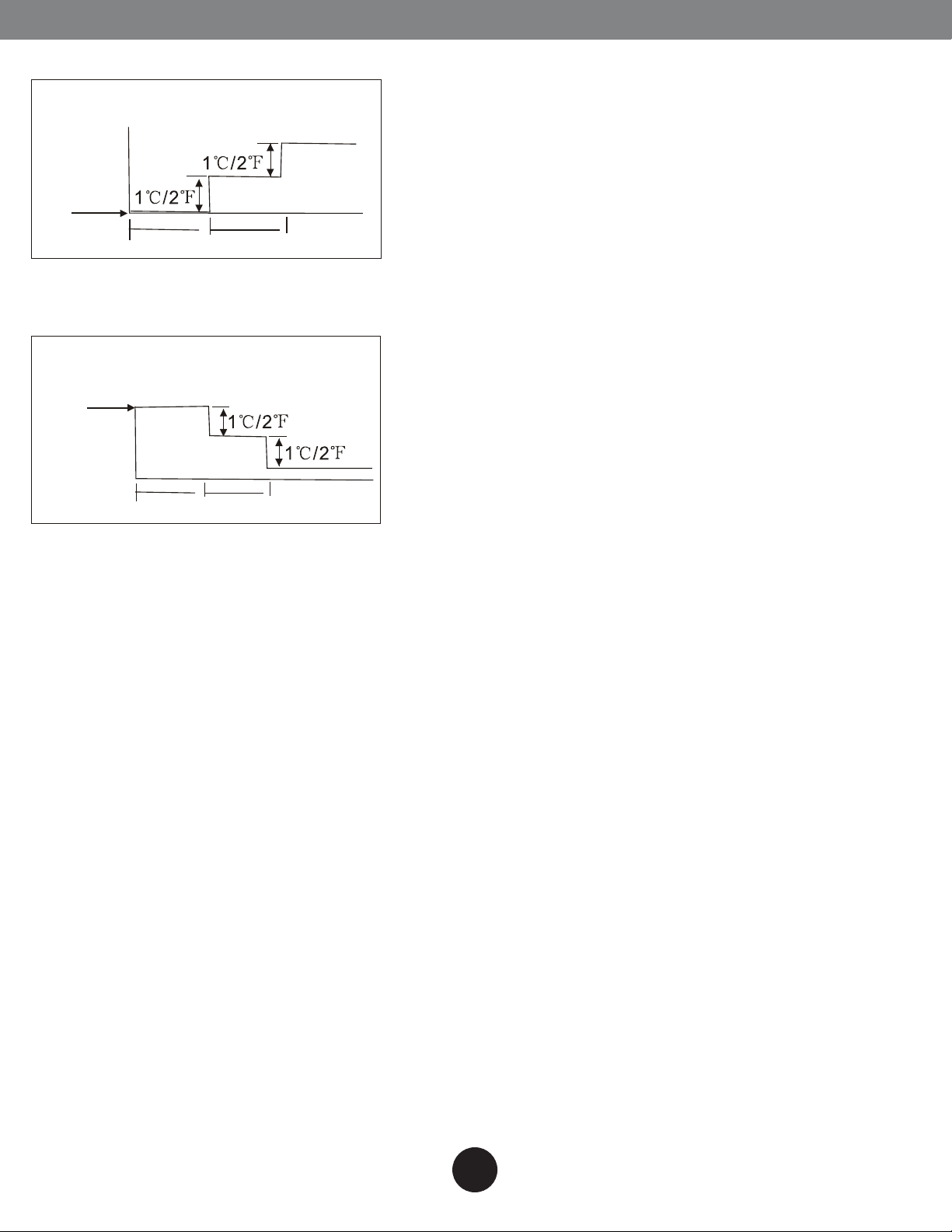
SLEEP operation
7 hours timer o
Set
Temperature
1 hour
1 hour
Cooling
SLEEP operation
7 hours timer o
Set
Temperature
1 hour
1 hour
Heating
Basic operation modes: AUTO/COOL/DRY/HEAT (Model
dependent)
AUTO operation
•When you set the air conditioner in AUTO mode, it will
automatically select cooling, heating(cooling/heating
models only), or fan only operation depending on set
temperature and the room temperature.
•The air conditioner will control room temperature
automatically to the temperature point you set.
•If you feel uncomfortable in the AUTO mode, you can set
your desired temperature.
SLEEP operation
When selected, the set temperature will increase (cooling)
or decrease (heating) by 1°C/2°F per hour for the first 2
hours. Thereafter it keeps this new temperature for 5
hours before switching off.
DRYING operation
The temperature is regulated while dehumidifying by
repeating turning on and off of the cooling operation or
fan only. The fan speed is LOW.
HEATING operation
This air conditioner operates on the heat-pump principle,
absorbing heat from air outdoors and transferring that
heat to the indoor unit. As a result, the operating
performance is reduced as outdoor air temperature
drops. If you feel that the heating performance is
insufficient, we recommend you to use this air conditioner
in conjunction with other kinds of heating appliance.
Optimal operation
To achieve optimal performance, please note the
following:
•Adjust the air flow direction correctly so that it is not
torwards people.
•Adjust the temperature to achieve moderate comfort
levels. Excessively low or high temperature waste energy.
•Improve performance by keeping windows and doors
closed.
•Limit energy usage(run time) by using the TIMER function.
•Do not put any object near air inlet or air outlet, as the
efficiency of the air conditioner may be reduced and may
cause the air conditioner to stop running.
•Inspect the air filters periodically, and clean them when
needed.
8
Page 10

OPERATING INSTRUCTIONS
Special functions
Refrigerant Leakage Detection (optional)
When refrigerant leakage is detected, the indoor unit will display “EC” code or flash LEDs(model
dependent).
Louver Angle Memory Function (optional)
Within the scope of safety angle, the horizontal louver angle is memoriesed and will return to the
position last selected by user. If it exceeds, it will memorize the boundry of safety angle. This will not
happen when Turbo or manual control buttons are pressed or after a power interruption. So we
strongly suggest that the open angle of the horizontal louver should not be set too small, in case the
condensed water forms and drips from the horizontal louver.
Self Clean Function (optional)
Airborne bacteria use the moisture on the indoor heat exchanger to grow. Regular drying of the
exchanger prevents this growth. By simply pressing the SELF CLEAN button, the system will
automatically manage the process. This cleaning action may be done as frequently as desired.
•For cooling models, only the indoor fan is active in low speed for 30 minutes and the unit turns off
automatically.
•For cooling & heating models, the unit will operate as in the following sequence:
FAN mode at Low fan speed--Heating operation with LOW fan speed ---FAN operation--Stop
Operation---Turn off.
Note:
•This function is only activated in COOLING or DRY mode.
•Before activation the air conditioner, it is recommended to run the air conditioner under cooling operation
for about 30 minutes.
•Pressing the SELF CLEAN or ON/OFF button again during the cleaning cycle will cancel the operation and turn
the unit off.
Clean Air Function (optional)
Improving the quality of indoor air is one of the purposes of an air conditioner. This air conditioner is
equipped with ionizer or Plasma Dust Collector(model dependent). With the anions generated by
Ionizer, the air circulation of the air conditioner fills the room with refreshing, natural and healthy air.
The Plasma Dust Collector generates a high voltage ionization zone, through which the air is converted
to plasma. Inside the air most of the dust, smoke, and pollen particles are captured by the electrostatic
filter.
Anti-Mildew Function (optional)
When turns off the unit on COOL, DRY, AUTO (Cool) mode, the air conditioner will continue operating
for about 10 minutes (depending on models) with soft wind.This will help to dry up the condensed
water inside the evaporator, and prevent the mildew growth. Under Anti-mildew operation, do not
restart the air conditioner until the unit is completely off.
Anto-Restart Function (optional)
In event of power interruption such as a blackout, the air conditioner stops once. But it restarts
automatically and performs previous operation when the power supply is resumed.
9
Page 11

OPERATING INSTRUCTIONS
WIFI Control Function (optional)
For the unit with WIFI control function, connect the WIFI module and communication module with
display board, so the unit can be controlled either by remote control or by mobile telephone.
Air Filter Reminding Function (optional)
Cleaning filter reminding function:
After 240 hours of operation, the indoor display window will display and flash “CL”, this feature is a
reminder to clean the Air Filter for more efficient operation. After 15 seconds, the system will revert
back to the previous display again. When the “CL” indicator appears and flashes, please press the LED
button on remote control 4 times or press the Manual Control button 3 or more times to clear the
registered hours, otherwise the “CL” indicator will display and flash again for another 15 seconds the
next time the unit is started.
Replacing filter reminding function:
After 2880 hours of operation, the indoor display window will display and flash “nF”, this feature is a
reminder to replace the Air Filter for more efficient operation. After 15 seconds, the system will revert
back to the previous display again. When the “nF” indicator appears and flashes, please press the LED
button on remote control for 4 times or press the Manual Control button for 3 or more times to clear
the registered hours, otherwise the “nF” indicator will display and flash again for another 15 seconds at
the next time of starting the unit.
Mute Operation (optional)
Press the LED button on the remote control can turn off the indoor screen display, and also turn off the
air conditioner buzzer, which create a comfortable and quiet environment.
10
Page 12
Filter Tab
CARE AND MAINTENANCE
Before mainatenance
•Turn the system off before cleaning. To clean, wipe with
a soft, dry cloth. Do not use bleach or abrasives.
NOTE: Power supply must be disconnectd before attampting
to clean or service!
CAUTION
•Do not use a chemically treated cloth or duster to clean
the unit.
•Do not use benzine, thinner, polishing powder, or similar
solvents for cleaning. These may cause the plastic surface
to crack or deform.
•Never use water hotter than 40°C/104°F to clean the
front panel, it could cause deformation or discoloration.
Cleaning the unit
Wipe the unit with a soft dry cloth only. If the unit is very
dirty, wipe it with a cloth soaked in warm water.
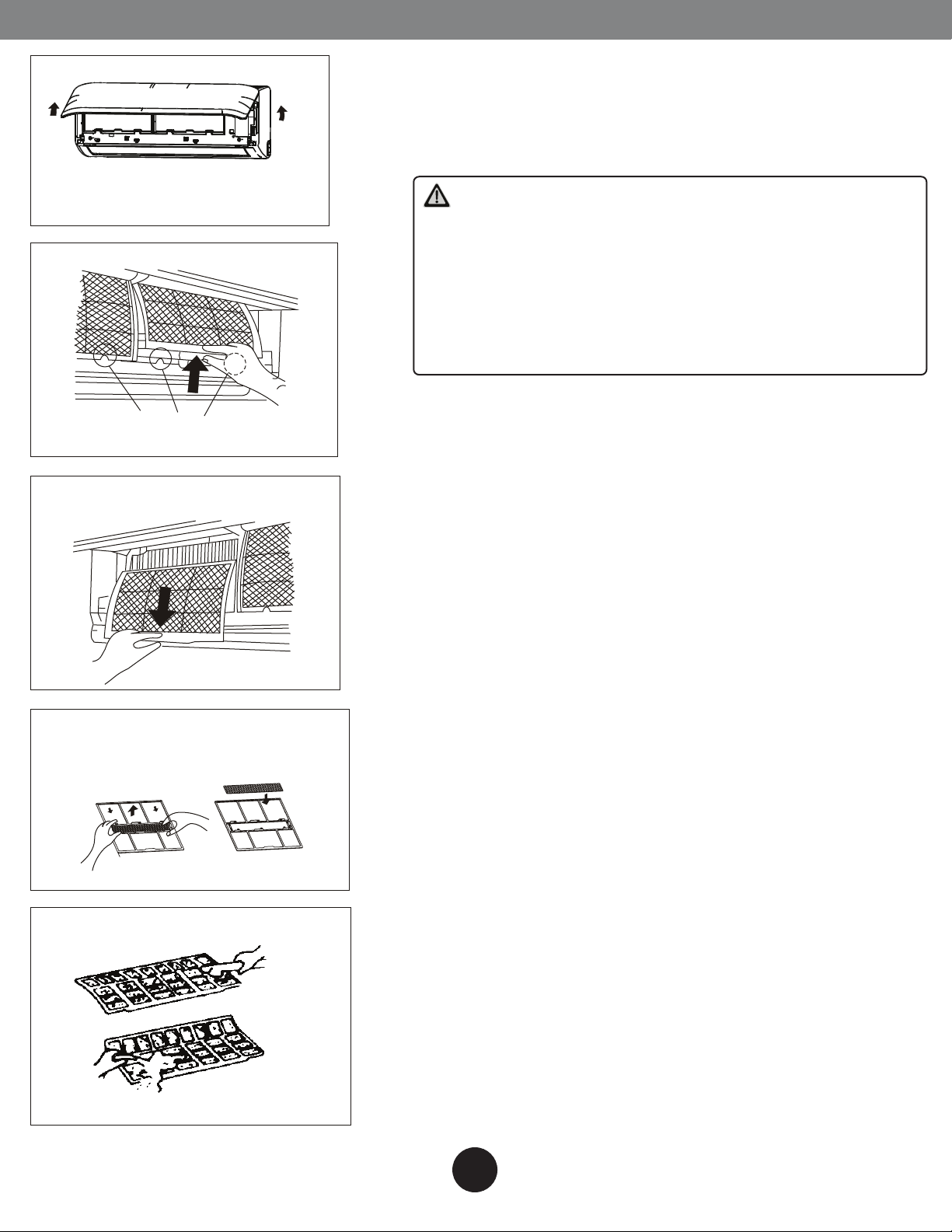
Air freshening lter
Cleaning the air filter and air freshening filter
A clogged air filter reduces the cooling efficiency of this
unit. Please clean the filter once every 2 weeks.
1. Open the front panel by carefully lifting both ends at
the same time. At a certain angle, a clicking sound is
heard and it becomes self-supporting.For some models,
please use the suspension bars to prop up the panel.
2. Use the tab provided to move the filter first up a little,
then slightly towards you. Now extract the filter by gently
drawing downwards.
3. Unclip the small air freshening filter from the large air
filter. Clean it with vacuum, and replace it occasionally.
4. Clean the large air filter with soapy water. Rinse with
fresh water. Shake off excess water and dry it up in cool
place, replace it occasionally.
11
Page 13
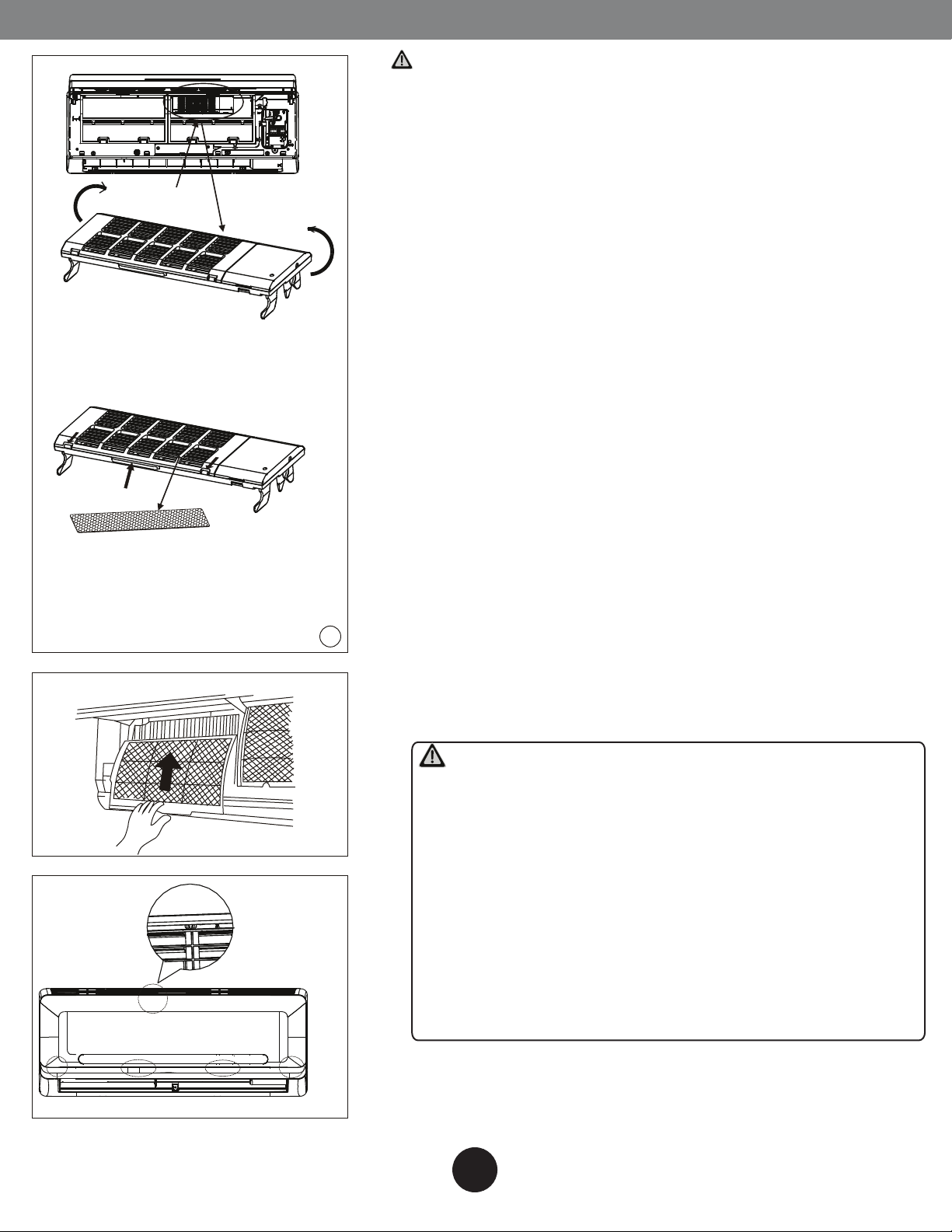
Plasma
(optional)
CARE AND MAINTENANCE
For the models with the Plasma filter, do not touch the
plasma for 10 minutes after you open the panel. Clean the
Plasma according to the describtion in the figure to the
left.
5. Refit the small air freshening filter onto the large air
filter.
6. Re-insert into unit in the reverse order described in
point 2 above.
7. Close the front panel. Make sure the buckles are fully fit
and the panel is completely closed.
Open the panel and take down the
Plasma lter by holding the upper
of the Plasma and lifting it upwards
according to the arrows.
Dust collector lter(optional)
Releasing the buckles as indicated
with arrows and open the cover of the
Plasma, clean or replace the lter
with vacuum.
Panel buckles
Preparation for extended non-operation
If you plan to idle the unit for a long time, perform the
following:
1. Clean the indoor unit and filters.
2. Operate the fan for about half a day to dry the inside of
the unit.
3. Stop the air conditioner and disconnect power.
4. Remove the batteries from the remote control. The
outdoor unit requires periodic maintenance and cleaning.
Do not attempt to do this yourself. Contact your dealer or
service provider.
Pre-season inspection
•Damaged or disconnected wires.
2
•Clean the indoor unit and filters.
•Check water or oil leaks.
•Check if the air outlet or inlet is blocked after the air
conditioner has not been used for a long time.
CAUTION
•Do not touch the metal parts of the unit when removing
the filter. Injuries can occur when handling sharp metal
edges.
•Do not use water to clean inside the air conditioner.
Exposure to water can destroy the insulation, leading to
possible electric shock.
•When cleaning the unit, first make sure that the power
and circuit breaker are turned off.
•Do not wash air filter with hot water at more than
104°F / 40°C. Shake off moisture completely and dry it in
the shade. Do not expose it directly to the sun, it may
shrink.
12
Page 14
TROUBLESHOOTING
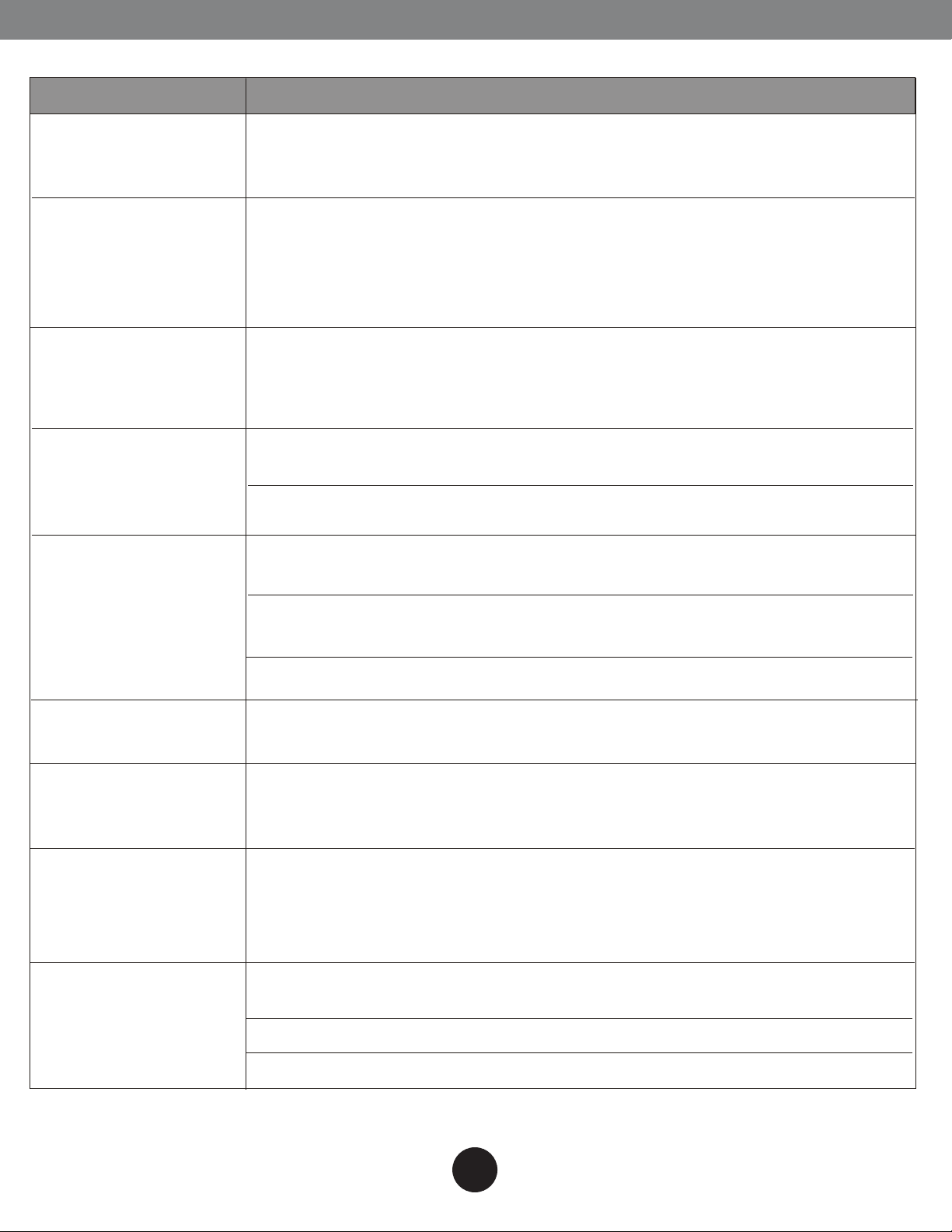
The following events may occur during normal operation, and may not indicate malfunction.
Symptom
Operation is delayed
after restart
Fan speed changeso, very slow and
then normal
Heating operation
stops suddenly and
defrost-light blinks
Mist coming out of
the indoor unit
Cause
To prevent blowout of the fuse, the compressor will not operate while the
protection circuit is working for about 3 minutes after sudden OFF--ON
operation of the power supply.
Automatically happens in heating mode :
--prevents cold air blowing onto occupants when heating operation starts
--perform automatic defrosting operation,
--perform low temperature heating operation
In HEAT mode, the indoor unit temporarily stops for maximum of 10
minutes to perform the automatic defrosting operation.
In COOL mode, a mist generated by condensation formed with sudden
cooling process may be emitted.
Mist may generate due to moisture from defrosting process when the air
conditioner restarts in HEAT mode operation after defrosting.
Low volume sounds
are emitted by the
air conditioner
Dust discharges from
the unit
Emits a peculiar
odor
Changes to fan only
while cooling or
heating mode
Operation is erratic,
unpredictable or
unresponsive
Hissing sound-- during operation or immediately after stopping the air
conditioner, refrigerant owing sound may be head.
Squeaking sound-- normal expansion and contraction of plastic and metal
parts caused by temperature change during the operation.
Rushing air-- when louver resets its position.
May occur when air conditioner is used for the rst time or has not been
used for a long time.
Various smells generated from interior textile, furniture, or cigarette smoke
absorbed into the air conditioner may be emitted. If not the case call your
suitable contractor.
Room temperature reaches the temperature setting of the remote control.
If not the case call your suitable contractor.
Interference from cell phone towers and remote boosters may cause the
unit to malfunction
Disconnect the power and then re-connect.
Press the ON/OFF button on the remote controller to restart operation.
NOTE: If the problem is not resolved, please contact a local dealer or the nearest customer service center. Be
sure to inform them of the detailed malfunctions and unit model number.
13
Page 15
TROUBLESHOOTING
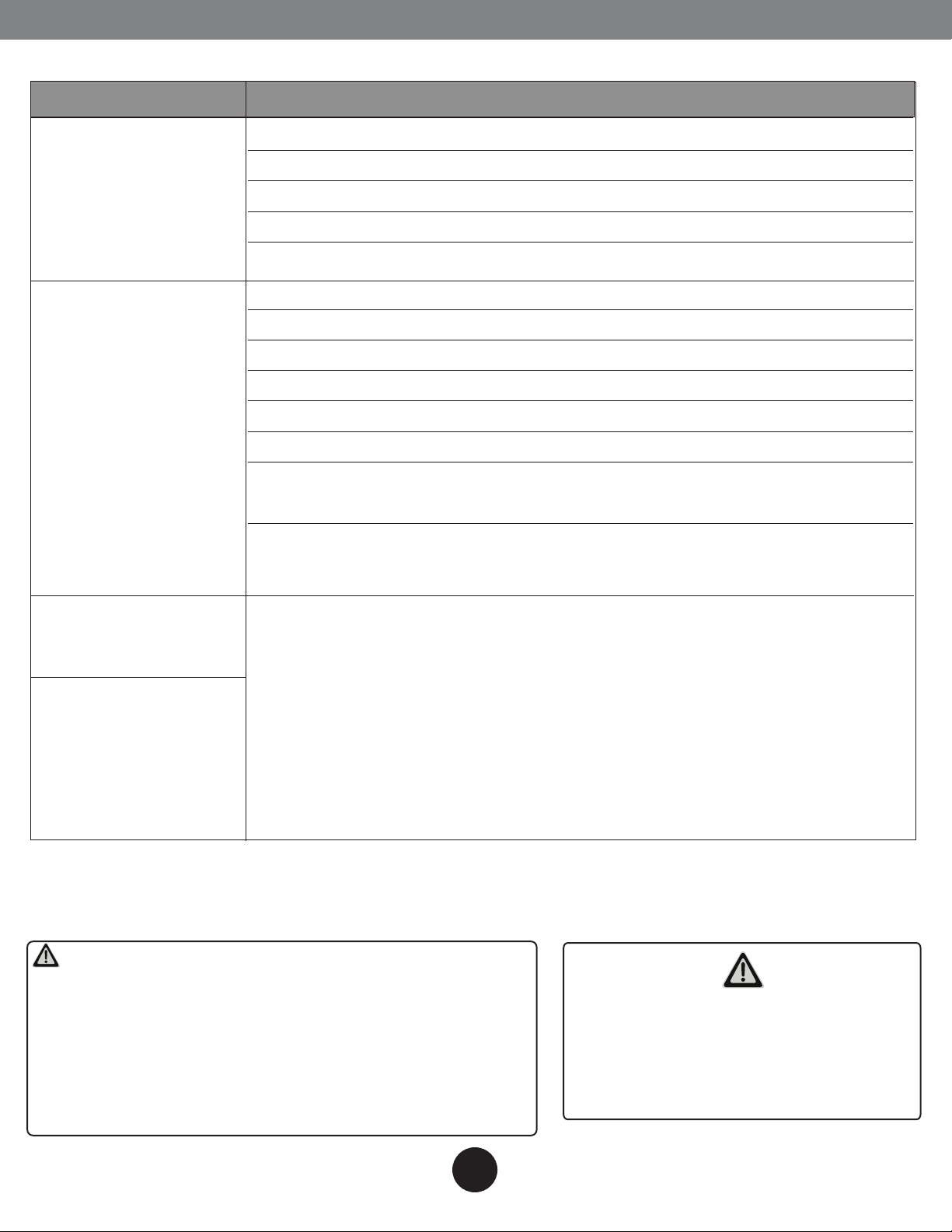
Before you call for or request servicing, troubleshoot a problem by performing following checks:
Symptom
Unit will not operate
Poor cooling or
heating performance
Diagnostic
-- Is there a power failure?
-- Has a switch been turned o, a circuit breaker tripped or a fuse blown?
-- Is the timer operating?
-- Are the batteries used in the remote controller exhausted?
-- Are the batteries used in the remote controller loaded properly?
-- Are the air lters dirty?
-- Is air ow unrestricted in & out of indoor & outdoor units?
-- Are the temperature and mode settings correct?
-- Are the windows or doors left opened?
-- Is fan speed on high and louvers allowing maximum ow?
-- Is direct or strong sunlight shinning into the room in cooling operation?
-- Are there other heating apparatus or computers operating, or too many
people in the room in cooling operation?
-- Is the SILENCE function is activated? Under SILENCE operation,
noise reduction is prioritized and the air-conditioning performance may
become lower.
Indicator lamps
continue ashing
The unit may stop operation or continue to run in a safety condition
--
Error code appears
in the indoor unit,
such as: E0,E1,E2....
P1,P2,P3.....or F1, F2,
F3.....
If the problem persists even if you perform these checks or diagnostics, immediately stop operation
and contact the authorized service center. Be sure to inform them of the detailed malfunctions and unit
model number.
(depending on models). Waiting for about 10 minutes, the fault may be
recovered automatically, if not, disconnect the power and then connect it
in again. If the problem still exists, disconnect the power and contact the
nearest customer service center.
CAUTION
In the case of ANY of the following, turn off the unit
immediately!
-- Power cord is damaged or abnormally warm.
-- Burning odors are smelled.
-- Loud or abnormal sounds are heard.
-- A power fuse blows or a circuit breaker trips frequently.
-- Water or other objects fall into or out of the unit.
DO NOT ATTEMPT TO CORRECT THESE
ITEMS YOURSELF!
CONTACT AN AUTHORIZED SERVICE
PROVIDER!
14
Page 16
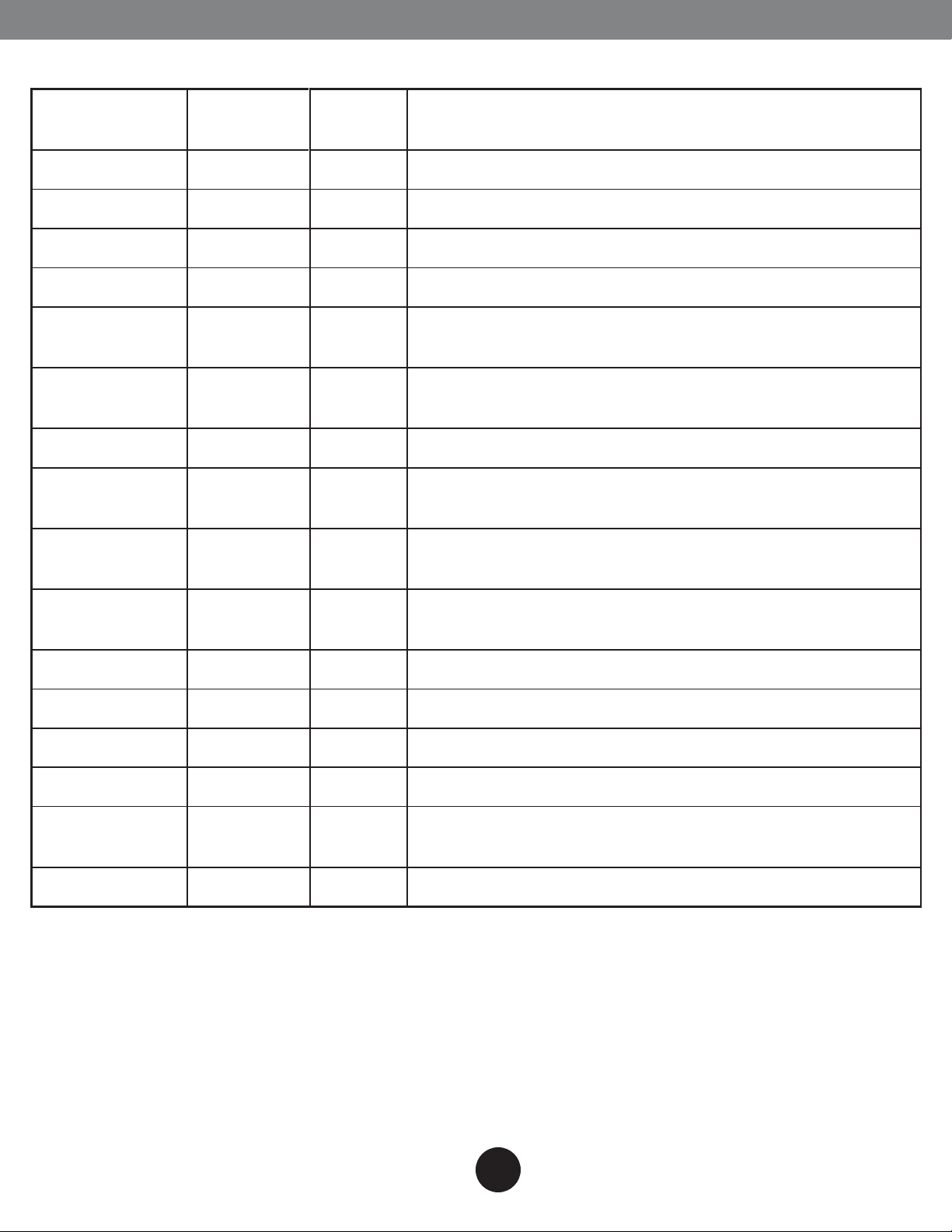
Indoor Unit Error Display
TROUBLESHOOTING
Operation
lamp
1 time
2 times
3 times
4 times
5 times
6 times
7 times
2 times
3 times
Timer lamp Display LED STATUS
X E0 Indoor unit EEPROM parameter error
X E1 Indoor / outdoor units communication error
X E2 Zero-crossing signal detection error
X E3 Indoor fan speed has been out of control
Indoor room temperature sensor T1 open circuit or short
X E4
circuit
Evaporator coil temperature sensor T2 open circuit or
X E5
short circuit
X EC Refrigerant leakage detection
Outdoor ambient temperature sensor T4 open circuit or
O F1
short circuit
Condenser coil temperature sensor T3 open circuit or
O F2
short circuit
4 times
5 times
6 times
1 times
2 times
3 times
5 times
O F3
O F4 Outdoor unit EEPROM parameter error
O F5 Outdoor fan speed has been out of control
Compressor discharge temperature sensor T5 open
circuit or short circuit
P0 IPM malfunction or IGBT over-strong current protection
P1 Over voltage or over low voltage protection
High temperature protection of compressor top
P2
diagnosis and solution(only for 9k,12k models)
P4 Inverter compressor drive error
O(light) X(off) (flash)
15
Page 17
Advantage Series
The design and specifications are subject to change without prior notice.
Consult with the sales agency or manufacturer for details.
 Loading...