

Page 1

User Guide
MP8869S Evaluation Kit (EVKT-8869S)
Page 2
2
MP8869S Evaluation Kit User Guide rev 1.0
MonolithicPower.com
7/17/2018
MPS Proprietary Information. Patent Protected. Unauthorized Photocopy and Duplication Prohibited.
© 2018 MPS. All Rights Reserved.
USER GUIDE – MP8869S EVALUATION KIT (EVKT-8869S)
Table of Contents
Overview ................................................................................................................................................ 3
Section 1. Hardware Specifications ........................................................................................................ 5
1.1 Personal Computer Requirements .............................................................................................. 5
1.2 EV8869S-L-00A Specifications ................................................................................................... 5
1.3 EVKT-USBI2C-02 Specifications ................................................................................................ 5
Section 2. Software Requirements ......................................................................................................... 5
2.1 Software Installation Procedure .................................................................................................. 6
Section 3. Evaluation Kit Test Set-Up ..................................................................................................... 7
3.1 Hardware Set-Up ........................................................................................................................ 7
3.2 Powering up the EVB ................................................................................................................. 7
3.3 Software Set-Up ......................................................................................................................... 7
3.4 Troubleshooting Tips ............................................................................................................... 10
Section 4. Ordering Information ............................................................................................................ 11
Page 3
3
MP8869S Evaluation Kit User Guide rev 1.0
MonolithicPower.com
7/17/2018
MPS Proprietary Information. Patent Protected. Unauthorized Photocopy and Duplication Prohibited.
© 2018 MPS. All Rights Reserved.
USER GUIDE – MP8869S EVALUATION KIT (EVKT-8869S)
Overview
Introduction
The EVKT-8869S is an evaluation kit for the MP8869S. The MP8869S is a highly integrated, high-
frequency, synchronous, step-down switcher with an I2C control interface. The MP8869S is optimized
to support up to 12A continuous/15A peak output current over an input supply range from 2.85V to 18V
with excellent load and line regulation. This kit allows for quick evaluation of the MP8869S. By using the
I2C, users can set the current limit, slew rate, work mode, and output voltage. This device also features
telemetry, which provides output voltage and output current monitoring via I2C.
Kit Contents
EVKT-8869S kit contents: (items below can be ordered separately).
#
Part Number
Item
Quantity
1
EV8869S-L-00A
MP8869SGL evaluation board
1
2
EVKT-USBI2C-02
Includes one USB to I2C communication interface, one USB
cable, one ribbon cable
1
3
Tdrive-8869S
USB flash drive that stores the GUI installation file and
supplemental documents
1
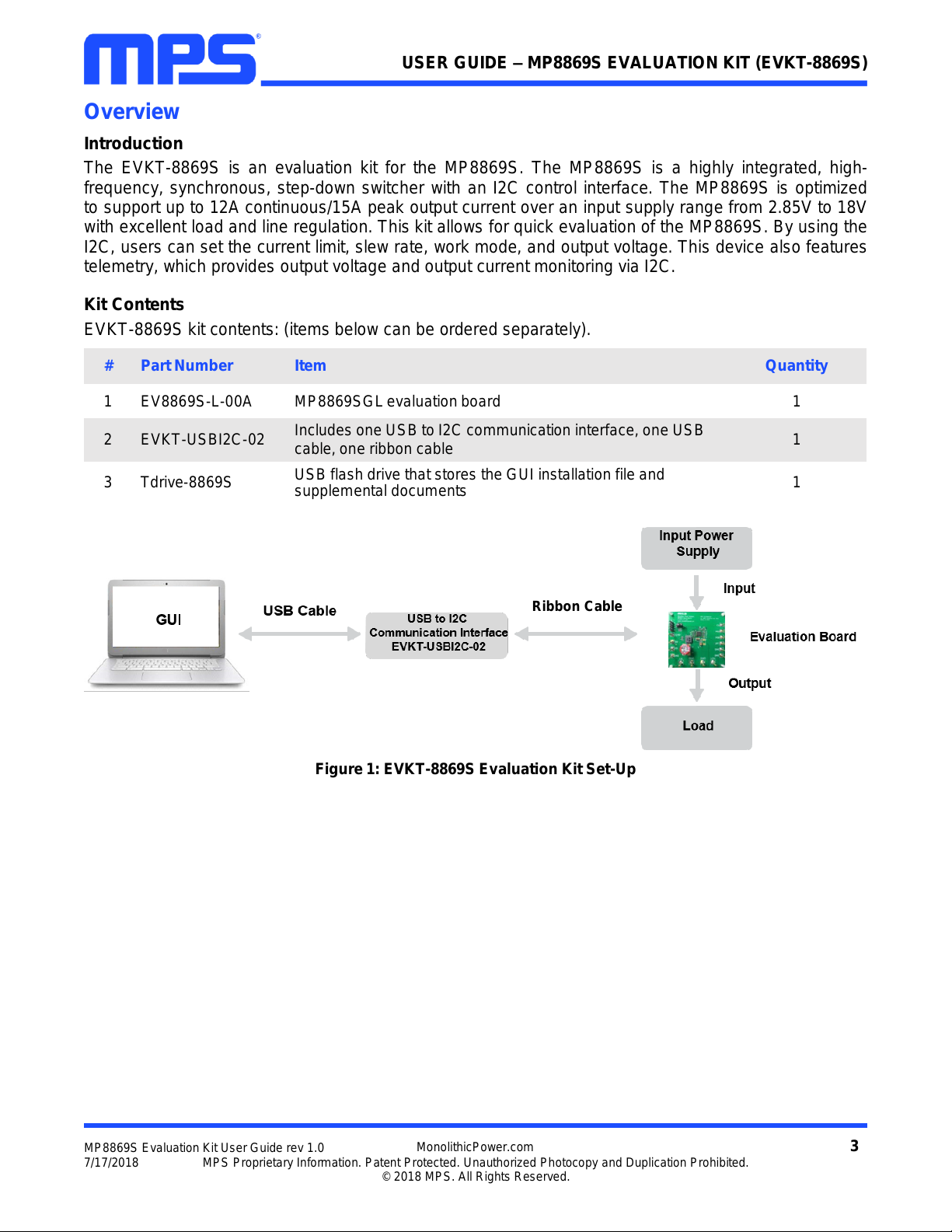
Figure 1: EVKT-8869S Evaluation Kit Set-Up
Ribbon Cable
Page 4
4
MP8869S Evaluation Kit User Guide rev 1.0
MonolithicPower.com
7/17/2018
MPS Proprietary Information. Patent Protected. Unauthorized Photocopy and Duplication Prohibited.
© 2018 MPS. All Rights Reserved.
USER GUIDE – MP8869S EVALUATION KIT (EVKT-8869S)
Features and Benefits
The MP8869S is highly customizable. Users can program the MP8869S via the MPS I2C GUI.
All changes made in I2C mode will NOT be retained once the EVB is powered down.
Features adjustable under each method are outlined below.
I2C
•
Adjustable output voltage
•
Slew rate
•
Selectable OVP, OCP mode
•
Selectable PFM mode
•
Selectable PG deglitch time
•
Selectable frequency
•
Soft stop
•
Adjustable current limit
•
Output current/voltage monitor
•
System enable (EN bit)
•
Status indication: OC, OTEW, OT, PG
Kit Specifications
Features
Specification
Supply for Board
2.85V - 18V
Operating Input Voltage
2.85V - 18V
Output Voltage (V
OUT
)
1V
Continuous Output Current (I
OUT
)
12A
Peak Output Current (I
OUT
)
15A
Operating Systems Supported
Windows XP, 7, or later
System Requirements
Minimum 22.2MB free
GUI Software
3 Register Controls: VSEL, System1, System2
EVB Size (L x W)
8.5cm x 8.5cm
Page 5
5
MP8869S Evaluation Kit User Guide rev 1.0
MonolithicPower.com
7/17/2018
MPS Proprietary Information. Patent Protected. Unauthorized Photocopy and Duplication Prohibited.
© 2018 MPS. All Rights Reserved.
USER GUIDE – MP8869S EVALUATION KIT (EVKT-8869S)
Section 1. Hardware Specifications
1.1 Personal Computer Requirements
The following must be minimally met to use the EVKT-8869S.
•
Operating System of Windows XP, 7, or later
•
Net Framework 4.0
•
PC with a minimum of one available USB port
•
At least 22.2 MB of free space
1.2 EV8869S-L-00A Specifications
The EV8869S-L-00A is an evaluation board for the MP8869SGL. For more information, please refer to
the EV8869S-L-00A datasheet.
Figure 2: EV8869S-L-00A Evaluation Board
1.3 EVKT-USBI2C-02 Specifications
The EVKT-USBI2C-02 refers to the communication interface, which connects the EVB, the PC, and its
supporting accessories. It provides I2C and PMBus capabilities. Together with MPS Virtual Bench Pro
and GUI tools, it provides a quick and easy way to evaluate the performance of MPS digital products.
For more details, refer to the EVKT-USBI2C-02 datasheet.
Figure 3: EVKT-USBI2C-02 Communication Interface
Section 2. Software Requirements
Feature
Specification
Supply for Evaluation Board
2.85V - 18V
Operating Input Voltage
2.85V - 18V
Output Voltage (V
OUT
)
1V
Continuous Output Current (I
OUT
)
12A
Peak Output Current (I
OUT
)
15A
EVB Size (L x W)
8.5cm x 8.5cm
Page 6
6
MP8869S Evaluation Kit User Guide rev 1.0
MonolithicPower.com
7/17/2018
MPS Proprietary Information. Patent Protected. Unauthorized Photocopy and Duplication Prohibited.
© 2018 MPS. All Rights Reserved.
USER GUIDE – MP8869S EVALUATION KIT (EVKT-8869S)
2.1 Software Installation Procedure
Programming occurs through the MPS I2C GUI. Follow the instructions below to install the software.
Note: In the near future, this software can be downloaded from the MPS website. For now, it is provided
on a USB thumb drive.
1. Plug the thumb drive into the computer using any available USB port.
2. Locate the folder containing the thumb drive contents.
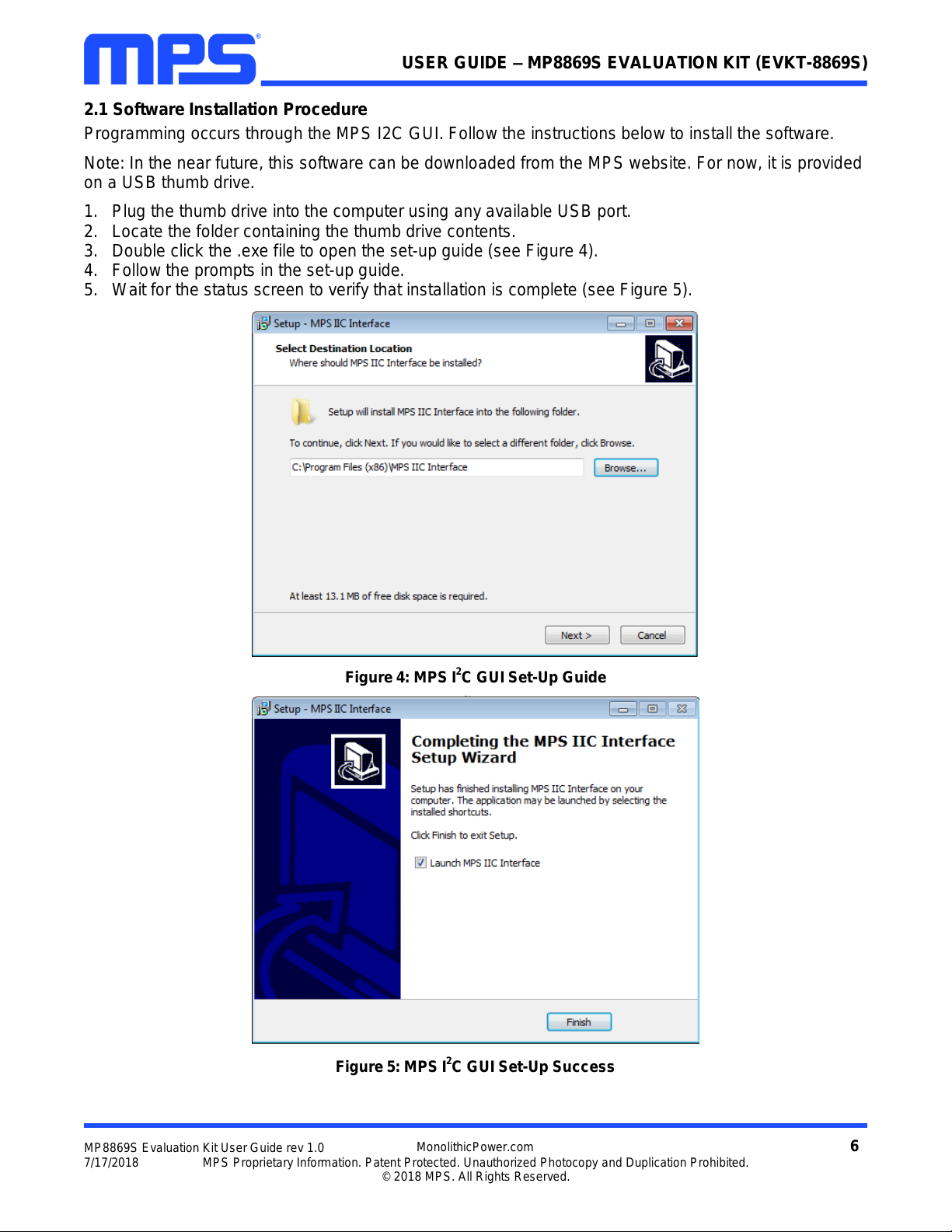
3. Double click the .exe file to open the set-up guide (see Figure 4).
4. Follow the prompts in the set-up guide.
5. Wait for the status screen to verify that installation is complete (see Figure 5).
Figure 4: MPS I2C GUI Set-Up Guide
Figure 5: MPS I2C GUI Set-Up Success
Page 7
7
MP8869S Evaluation Kit User Guide rev 1.0
MonolithicPower.com
7/17/2018
MPS Proprietary Information. Patent Protected. Unauthorized Photocopy and Duplication Prohibited.
© 2018 MPS. All Rights Reserved.
USER GUIDE – MP8869S EVALUATION KIT (EVKT-8869S)
Section 3. Evaluation Kit Test Set-Up
3.1 Hardware Set-Up
The hardware must be configured properly prior to use. Use the USB cable to connect the EVKT-
USBI2C-02 communication interface to the PC, and follow the instructions below to set up the EVB.
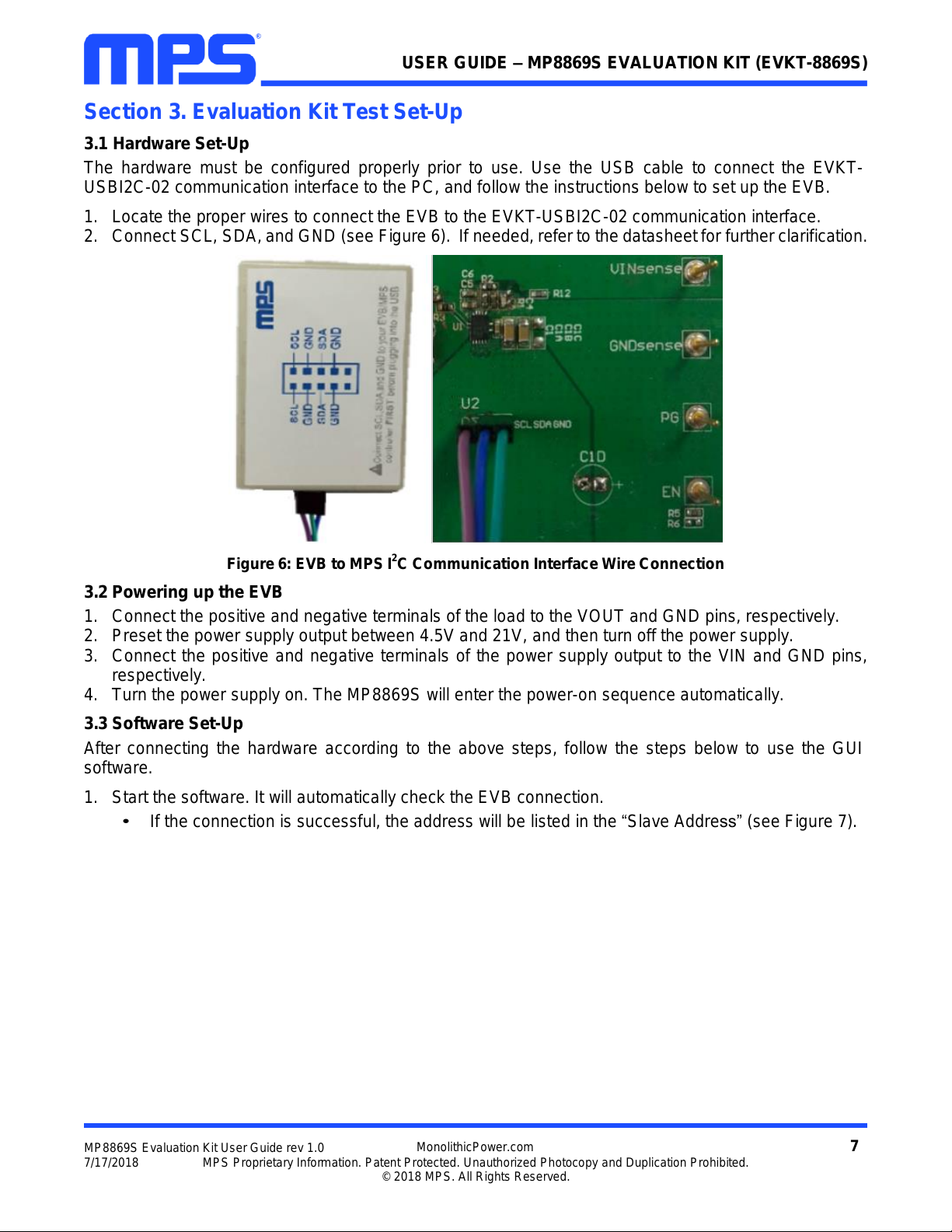
1. Locate the proper wires to connect the EVB to the EVKT-USBI2C-02 communication interface.
2. Connect SCL, SDA, and GND (see Figure 6). If needed, refer to the datasheet for further clarification.
Figure 6: EVB to MPS I2C Communication Interface Wire Connection
3.2 Powering up the EVB
1. Connect the positive and negative terminals of the load to the VOUT and GND pins, respectively.
2. Preset the power supply output between 4.5V and 21V, and then turn off the power supply.
3. Connect the positive and negative terminals of the power supply output to the VIN and GND pins,
respectively.
4. Turn the power supply on. The MP8869S will enter the power-on sequence automatically.
3.3 Software Set-Up
After connecting the hardware according to the above steps, follow the steps below to use the GUI
software.
1. Start the software. It will automatically check the EVB connection.
•
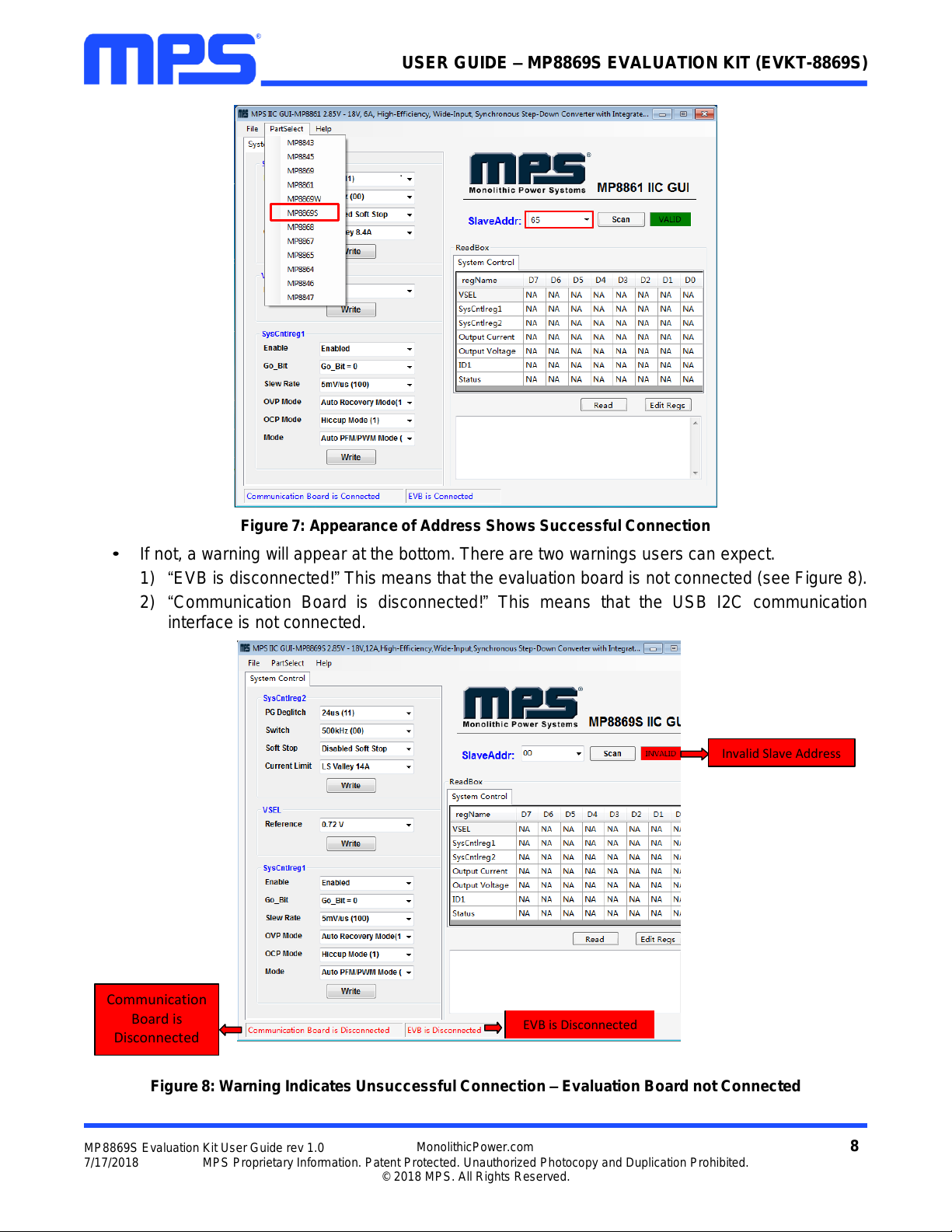
If the connection is successful, the address will be listed in the “Slave Address” (see Figure 7).
Page 8
8
MP8869S Evaluation Kit User Guide rev 1.0
MonolithicPower.com
7/17/2018
MPS Proprietary Information. Patent Protected. Unauthorized Photocopy and Duplication Prohibited.
© 2018 MPS. All Rights Reserved.
USER GUIDE – MP8869S EVALUATION KIT (EVKT-8869S)
Figure 7: Appearance of Address Shows Successful Connection
•
If not, a warning will appear at the bottom. There are two warnings users can expect.
1) “EVB is disconnected!” This means that the evaluation board is not connected (see Figure 8).
2) “Communication Board is disconnected!” This means that the USB I2C communication
interface is not connected.
Figure 8: Warning Indicates Unsuccessful Connection – Evaluation Board not Connected
Communication
Board is
Disconnected
Invalid Slave Address
EVB is Disconnected
Page 9
9
MP8869S Evaluation Kit User Guide rev 1.0
MonolithicPower.com
7/17/2018
MPS Proprietary Information. Patent Protected. Unauthorized Photocopy and Duplication Prohibited.
© 2018 MPS. All Rights Reserved.
USER GUIDE – MP8869S EVALUATION KIT (EVKT-8869S)
2. If the connection is successful, proceed to Step 3. Otherwise, check connections between the EVB,
communication interface, and PC. Re-plug the USB into the computer and restart the GUI.
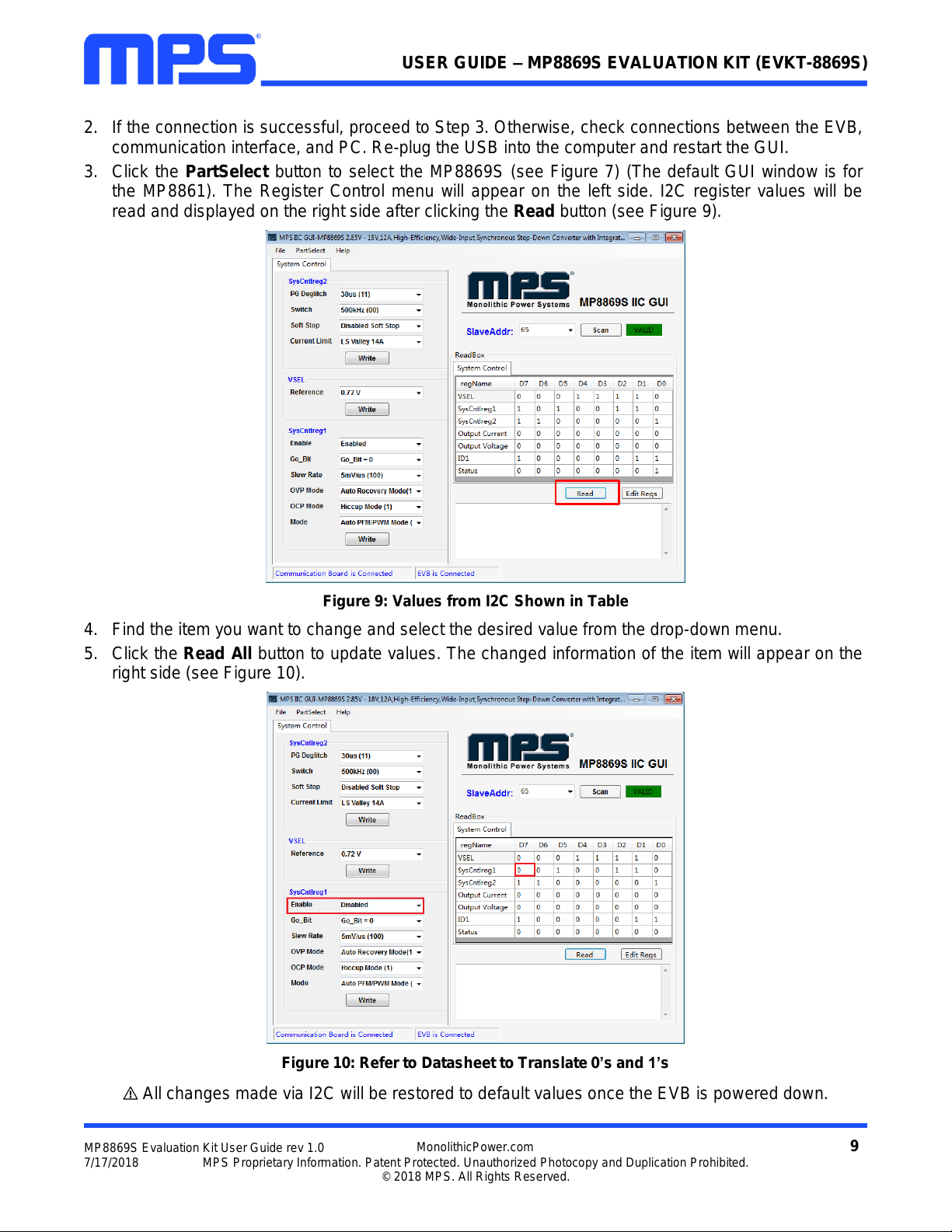
3. Click the PartSelect button to select the MP8869S (see Figure 7) (The default GUI window is for
the MP8861). The Register Control menu will appear on the left side. I2C register values will be
read and displayed on the right side after clicking the Read button (see Figure 9).
Figure 9: Values from I2C Shown in Table
4. Find the item you want to change and select the desired value from the drop-down menu.
5. Click the Read All button to update values. The changed information of the item will appear on the
right side (see Figure 10).
Figure 10: Refer to Datasheet to Translate 0’s and 1’s
All changes made via I2C will be restored to default values once the EVB is powered down.
Page 10
10
MP8869S Evaluation Kit User Guide rev 1.0
MonolithicPower.com
7/17/2018
MPS Proprietary Information. Patent Protected. Unauthorized Photocopy and Duplication Prohibited.
© 2018 MPS. All Rights Reserved.
USER GUIDE – MP8869S EVALUATION KIT (EVKT-8869S)
3.4 Troubleshooting Tips
Note: USBI2C-02 and USBI2C-01 drivers are not compatible. USBI2C-02 uses USBXpress and USBI2C
uses Cyusb3. USBI2C-02 is the recommended device for MPS PMBus and I2C.
EVKT-USBI2C-01
In case that the USBI2C-01 driver is not properly
installed, manual installation is required. Follow the
steps below.
1. Open the Device Manager and select update driver
software (see Figure 11).
2. Click “Browse my computer for driver software”, find
the driver located on thumb drive and install.
EVKT-USBI2C-02
In the case that the USBI2C-02 driver is not properly
installed, manual installation is required. Follow the
steps below.
Note: Check driver version. Find “USBXpress” Device in
the Device Manager under USB controllers.
Right click and view properties. Check to make sure the
driver version matches the newest version (see Figure
12).
1. Browse the thumb drive contents and open the
driver’s folder.
2. Install the correct USBXpress “.exe” file.
Choose either 32 bit or 64 bit operating system.
32-bit: USBXpressInstaller_x86.exe
64-bit: USBXpressInstaller_x64.exe
3. Connect the EVKT-USBI2C-02 Dongle to the PC
with the USB cable.
•
No Supply
The MP8869S’s input pin has an under-voltage lockout
(UVLO) detection circuit. If the input voltage (AVIN) is lower than the UVLO rising threshold, the
MP8869S’s functions are disabled.
•
Shutdown Event
If the MP8869S detects that the input voltage is lower than the UVLO falling threshold (enter no supply
state) or over-temperature protection is triggered (enter power-off state), the MP8869S switches to no
supply state or power-off state, regardless of the current state.
•
Thermal Recovery
If the MP8869S is in a power-off state due to the die temperature exceeding the thermal protection
threshold, the MP8869S enters a power-on sequence when the die’s temperature decreases.
•
Shutdown Sequence
When the input voltage is lower than the UVLO falling threshold or the IC is over-temperature, the
MP8869S enters the shutdown sequence directly.
Figure 12: Correct Driver Version
Figure 11: Updating the Driver Software
Page 11
11
MP8869S Evaluation Kit User Guide rev 1.0
MonolithicPower.com
7/17/2018
MPS Proprietary Information. Patent Protected. Unauthorized Photocopy and Duplication Prohibited.
© 2018 MPS. All Rights Reserved.
USER GUIDE – MP8869S EVALUATION KIT (EVKT-8869S)
Section 4. Ordering Information
The components of the evaluation kit can be purchased separately depending on user needs.
Part Number
Description
EVKT-8869S
Complete evaluation kit
Contents of EVKT-8869S
EV8869S-L-00A
MP8869SGL evaluation board
EVKT-USBI2C-02
Includes one USB to I2C communication interface, one USB cable,
one ribbon cable
Tdrive-8869S
USB thumb drive that stores the GUI installation file and supplemental
documents
Order directly from MonolithicPower.com.
 Loading...