

Page 1

MAGBES Technical Reference Manual
The MAGBES Manageable GigaBit Ethernet Switch is an Industrial 5-Port Gigabit Switch available in several
mechanical and electrical variants:
Electrical Variants:
● 5 Copper ports (4 x RJ45 and one 2.54mm Header)
● 3 Copper ports (2 x RJ45 and one 2.54mm Header) and 2 x SFP (Small Form factor Pluggable)
Mechanical Variants:
● Stand Alone Switch.
● PC/104 Stackable Switch.
● PIP Build-In Switch.
Supported Functions
● Configuration via Web Interface
● Automatic or manual Port Settings
● Switch Statistics
● Port Based VLAN
● IEEE 802.1Q VLAN
● Quality of Service
● MAC Authentication
● SNMP Support
● IEEE 802.1D Spanning Tree
● Port Monitoring
2012 by MPL AG 1 MEH-10134-201 Rev. D
High-Tech • Made in Switzerland
MAGBES
Technical Reference Manual
Page 2
TABLE OF CONTENTS
1 INTRODUCTION............................................................................................................. 6
1.1 ABOUT THIS MANUAL.........................................................................................................6
1.2 MANUAL REVISIONS............................................................................................................6
1.2.1 RELATED PRODUCTS.................................................................................................. 6
1.2.2 REVISION HISTORY.....................................................................................................6
1.3 RELATED DOCUMENTATION.............................................................................................. 6
2 ACCESSING MAGBES MANAGEMENT SOFTWARE ..................................................7
2.1 Factory default system configuration parameters............................................................. 7
2.2 Login...................................................................................................................................... 7
3 SYSTEM CONFIGURATION...........................................................................................8
3.1 System Status....................................................................................................................... 8
3.2 System Setup........................................................................................................................ 9
3.3 System Admin .................................................................................................................... 10
3.4 System Configuration........................................................................................................ 11
4 SWITCH CONFIGURATION......................................................................................... 12
4.1 Port Status.......................................................................................................................... 12
4.1.1 Port Configuration (Copper).......................................................................................... 13
4.1.2 Port Configuration (SFP).............................................................................................. 15
4.1.2.1 SFP Diagnostic.....................................................................................................................16
4.2 Switch Statistics................................................................................................................. 18
4.2.1 Detailed Switch Statistics.............................................................................................. 19
4.3 Port Based VLAN................................................................................................................ 21
4.3.1 Port Based VLAN Example........................................................................................... 22
4.4 IEEE 802.1Q VLAN.............................................................................................................. 23
4.4.1 Configuring IEEE 802.1Q VLAN Groups...................................................................... 24
4.4.2 Configuring the Ports for IEEE 802.1Q VLAN ..............................................................25
4.4.3 IEEE 802.1Q VLAN Example....................................................................................... 26
4.4.4 Important Notes using IEEE 802.Q VLAN.................................................................... 28
4.5 Quality Of Service (QoS).................................................................................................... 29
4.5.1 Priority Mapping for MAC, VID, IEEE 802.1ac and Default Priority .............................30
4.5.2 Priority Mapping for ToS / TC and DSCP.................................................................... 31
4.5.3 Replace Priority............................................................................................................ 32
4.6 MAC Authentication........................................................................................................... 33
4.7 IEEE 802.1X Source MAC checking..................................................................................36
4.8 SNMP Configuration........................................................................................................... 37
4.9 Spanning Tree Protocol .................................................................................................... 38
4.9.1 Spanning Tree Example............................................................................................... 38
4.10 Configuring Spanning Tree Protocol.............................................................................. 41
4.10.1 Bridge Configuration................................................................................................... 41
4.10.1.1 Bridge parameters............................................................................................................... 42
4.10.2 STP Port Options........................................................................................................ 43
4.10.2.1 STP Port Parameters.......................................................................................................... 43
4.10.3 STP Configuration Parameters...................................................................................44
4.10.3.1 Root Bridge selection.......................................................................................................... 44
4.10.3.2 Alternate Root Bridge Selection.......................................................................................... 44
4.10.3.3 Path Modification................................................................................................................. 44
4.10.3.4 Performance Parameters.................................................................................................... 45
4.10.3.5 Edge Ports..........................................................................................................................45
2012 by MPL AG 2 MEH-10134-201 Rev. D
High-Tech • Made in Switzerland
MAGBES
Technical Reference Manual
Page 3
4.10.4 Important Notes for the Spanning Tree....................................................................... 46
4.10.4.1 Forwarding Loop when disabling STP................................................................................46
4.10.4.2 Forwarding Loop with unidirectional Links..........................................................................46
4.10.4.3 STP and VLAN....................................................................................................................46
4.10.4.4 STP and DHCP................................................................................................................... 46
4.11 Port Monitoring................................................................................................................. 47
5 TELNET COMMAND LINE INTERFACE......................................................................48
5.1 Login.................................................................................................................................... 48
5.2 Commands.......................................................................................................................... 48
5.3 Help Command................................................................................................................... 49
5.4 System................................................................................................................................. 49
5.4.1 IP Settings.................................................................................................................... 49
5.4.2 DHCP Options.............................................................................................................. 49
5.4.3 System Information....................................................................................................... 50
5.4.4 System wide settings.................................................................................................... 50
5.5 Port Configuration.............................................................................................................. 51
5.6 SFP Support........................................................................................................................ 53
5.7 Switch Statistics................................................................................................................. 54
5.8 Port based VLAN................................................................................................................ 55
5.9 IEEE802.1Q VLAN............................................................................................................... 56
5.9.1 IEEE802.1Q VLAN Administration................................................................................ 56
5.9.2 EEE802.1Q VLANs......................................................................................................57
5.9.3 EEE802.1Q VLAN ports............................................................................................... 58
5.10 QOS.................................................................................................................................... 59
5.11 MAC Address Authentication.......................................................................................... 62
5.12 SNMP Configuration......................................................................................................... 64
5.13 Spanning Tree................................................................................................................... 65
5.14 Firmware update procedure:...........................................................................................68
5.15 Configuration file handling.............................................................................................. 68
5.15.1 Upload a configuration file.......................................................................................... 68
5.15.2 Load the uploaded configuration file...........................................................................69
5.15.3 Save the configuration file or the current configuration as alternate configuration......69
5.15.4 Apply the configuration file.......................................................................................... 69
5.15.5 Download the current configuration as configuration file............................................69
6 CONFIGURATION FILE................................................................................................70
6.1 File format........................................................................................................................... 70
6.2 File rules.............................................................................................................................. 70
6.2.1 Root tag........................................................................................................................ 70
6.2.2 System section............................................................................................................. 70
6.2.2.1 System ID.............................................................................................................................. 70
6.2.2.2 IP Settings.............................................................................................................................70
6.2.2.3 Jumbo Frame........................................................................................................................ 71
6.2.2.4 Telnet CLI.............................................................................................................................. 71
6.2.2.5 Web UI.................................................................................................................................. 71
6.2.2.6 Hostname..............................................................................................................................71
6.2.2.7 Location................................................................................................................................. 71
6.2.2.8 Password..............................................................................................................................71
6.2.2.9 Login Timeout.......................................................................................................................71
6.2.3 Port section................................................................................................................... 71
6.2.3.1 Port........................................................................................................................................ 71
6.2.4 Port-Based VLAN section.............................................................................................72
6.2.4.1 PVLAN..................................................................................................................................72
6.2.5 IEEE802.1Q VLAN section...........................................................................................72
2012 by MPL AG 3 MEH-10134-201 Rev. D
High-Tech • Made in Switzerland
MAGBES
Technical Reference Manual
Page 4
6.2.5.1 QVLAN.................................................................................................................................. 72
6.2.6 QOS............................................................................................................................. 72
6.2.6.1 IEEE802.1p Priority mapping section....................................................................................72
6.2.6.2 DSCP Priority mapping section.............................................................................................72
6.2.6.3 QOS port settings.................................................................................................................. 73
6.2.7 MAC Address authentication section............................................................................73
6.2.8 SNMP section............................................................................................................... 73
6.2.9 Spanning Tree section.................................................................................................. 74
7 OS INFORMATION....................................................................................................... 75
7.1 OS Copyright and Disclaimer............................................................................................ 75
8 COPYRIGHT.................................................................................................................76
9 DISCLAIMER................................................................................................................76
10 TRADEMARKS........................................................................................................... 76
11 SUPPORT...................................................................................................................76
11.1 SERIAL NUMBER AND REVISION................................................................................... 76
11.2 CONTACT MPL AG........................................................................................................... 76
2012 by MPL AG 4 MEH-10134-201 Rev. D
High-Tech • Made in Switzerland
MAGBES
Technical Reference Manual
Page 5
TABLE OF FIGURES
Figure 1: MAGBES Login....................................................................................................................................... 7
Figure 2: System Status......................................................................................................................................... 8
Figure 3: System Setup......................................................................................................................................... 9
Figure 4: System Admin....................................................................................................................................... 10
Figure 5: System Configuration............................................................................................................................ 11
Figure 6: Port Status............................................................................................................................................ 12
Figure 7: Port Configuration (Copper)..................................................................................................................13
Figure 8: Port Configuration (SFP)....................................................................................................................... 15
Figure 9: SFP Diagnistics.................................................................................................................................... 16
Figure 10: Switch Statistics.................................................................................................................................. 18
Figure 11: Detailed Switch Statistics.................................................................................................................... 19
Figure 12: Port Based VLAN................................................................................................................................ 21
Figure 13: Port Based VLAN Example................................................................................................................. 22
Figure 14: Port Based VLAN Example MAGBES Configuration.......................................................................... 22
Figure 15: IEEE 802.1Q VLAN............................................................................................................................. 23
Figure 16: Add new IEEE 802.1Q VLAN.............................................................................................................. 24
Figure 17: Edit IEEE 802.1Q VLAN..................................................................................................................... 24
Figure 18: IEEE 802.1Q VLAN Port Settings....................................................................................................... 25
Figure 19: Edit IEEE 802.1Q VLAN Settings....................................................................................................... 25
Figure 20: IEEE 802.1Q VLAN Example.............................................................................................................. 26
Figure 21: IEEE 802.1Q VLAN Example MAGBES Configuration.......................................................................27
Figure 22: Quality Of Service (QoS).................................................................................................................... 29
Figure 23: Priority Mapping for MAC, VID, IEEE 802.1ac and Default Priority ....................................................30
Figure 24: Priority Mapping for ToS / TC Differentiated Services Code Point (DSCP).........................................31
Figure 25: Port Settings for QoS.......................................................................................................................... 32
Figure 26: MAC Authentication............................................................................................................................ 33
Figure 27: MAC Address Properties.................................................................................................................... 34
Figure 28: List known MAC address page........................................................................................................... 35
Figure 29: IEEE 802.1X Source MAC checking...................................................................................................36
Figure 30: SNMP Configuration........................................................................................................................... 37
Figure 31: Spanning Tree Example..................................................................................................................... 38
Figure 32: Spanning Tree Example, STP on....................................................................................................... 39
Figure 33: STP Bridge Configuration................................................................................................................... 41
Figure 34: STP Port Options................................................................................................................................ 43
Figure 35: Port Monitoring................................................................................................................................... 47
2012 by MPL AG 5 MEH-10134-201 Rev. D
High-Tech • Made in Switzerland
MAGBES
Technical Reference Manual
Page 6
1 INTRODUCTION
1.1 ABOUT THIS MANUAL
This manual and the MAGBES User Manual provide all the information necessary to handle and configure the
MAGBES.
The manual is written for technical personnel responsible for integrating the MAGBES into their systems.
1.2 MANUAL REVISIONS
1.2.1 RELATED PRODUCTS
Manual
Revisions
Related To
A
• MAGBES Management Firmware V 0.0.1
B
• MAGBES Management Firmware V 0.0.1
C
• MAGBES Management Firmware V 0.0.9
D
• MAGBES Management Firmware V 0.2.0
1.2.2 REVISION HISTORY
Manual
Revisions
Date Description
A 2008-02-27
Initial release of this document.
B 2008-06-02
Fixed some typos
C 2010-02-09
Changed to reflect current Firmware
D 2012-07-05
Changed to reflect current Firmware
1.3 RELATED DOCUMENTATION
The following documents are related to this manual. For detailed Information about a specific MAGBES feature
or setting please refer to this additional manual.
Reference Description Available from
[1] MAGBES User Manual MPL AG: www.mpl.ch
2012 by MPL AG 6 MEH-10134-201 Rev. D
High-Tech • Made in Switzerland
MAGBES
Technical Reference Manual
Page 7
2 Accessing MAGBES Management Software
The MAGBES is manageable via a Web Interface. To access the MAGBES an IP Address is necessary. This
address may be fixed, or retrieved from a DHCP Server.
To login a Password is required, which should be changed after the first login.
On first power-up or after loading the “Factory Default Values” (either by pressing the “Default” switch for more
than 4 sec, or clicking the Load Factory Default button on the System Configuration Page), the MAGBES uses
following IP Parameters:
2.1 Factory default system configuration parameters
Parameter First 12 seconds after Power-Up After the first 12 seconds
IP Address DHCP 192.168.1.254
Netmask DHCP 255.0.0.0
Gateway DHCP 0.0.0.0
Login user name admin
Login Password 1234
System Name Magbes
Location
Notes:
● After Power-Up, the MAGBES waits for a valid Link before starting the DHCP Client.
● If no DHCP server has been found 12 seconds after the detection of a valid link, the IP address
192.168.1.254 will be used.
● The “Login user name” is not changeable.
● The “System Name” and “Location” are changeable and should contain useful information for the
Network Administrator to identify the Switch.
● If using DHCP, the IP Address of the switch can be found in the log file of the DHCP Server.
2.2 Login
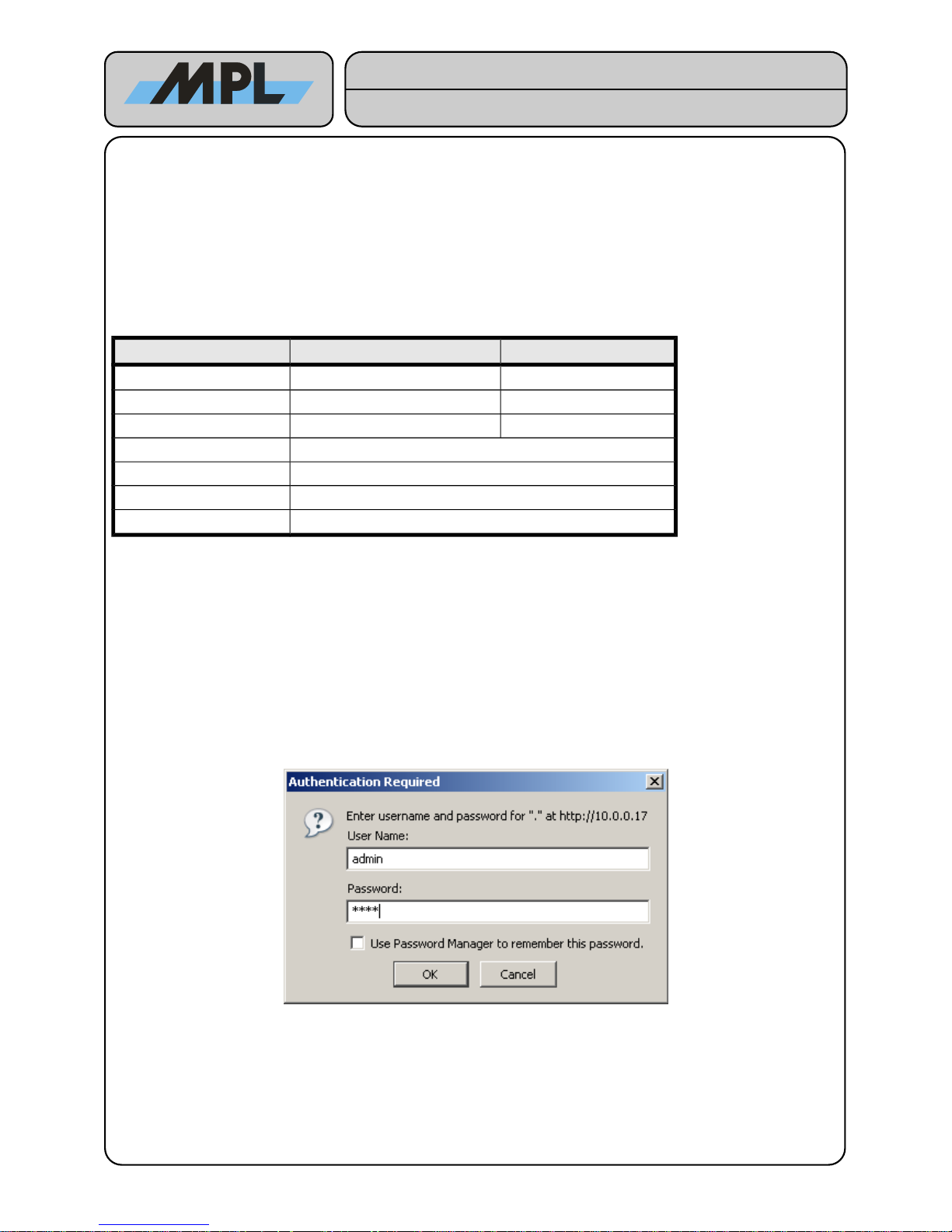
After entering the IP Address in the address field of your Internet browser, you have to login as “admin” User:
Enter the Password to access the MAGBES Management Web Interface.
2012 by MPL AG 7 MEH-10134-201 Rev. D
Figure 1: MAGBES Login
High-Tech • Made in Switzerland
MAGBES
Technical Reference Manual
Page 8
3 System Configuration
3.1 System Status
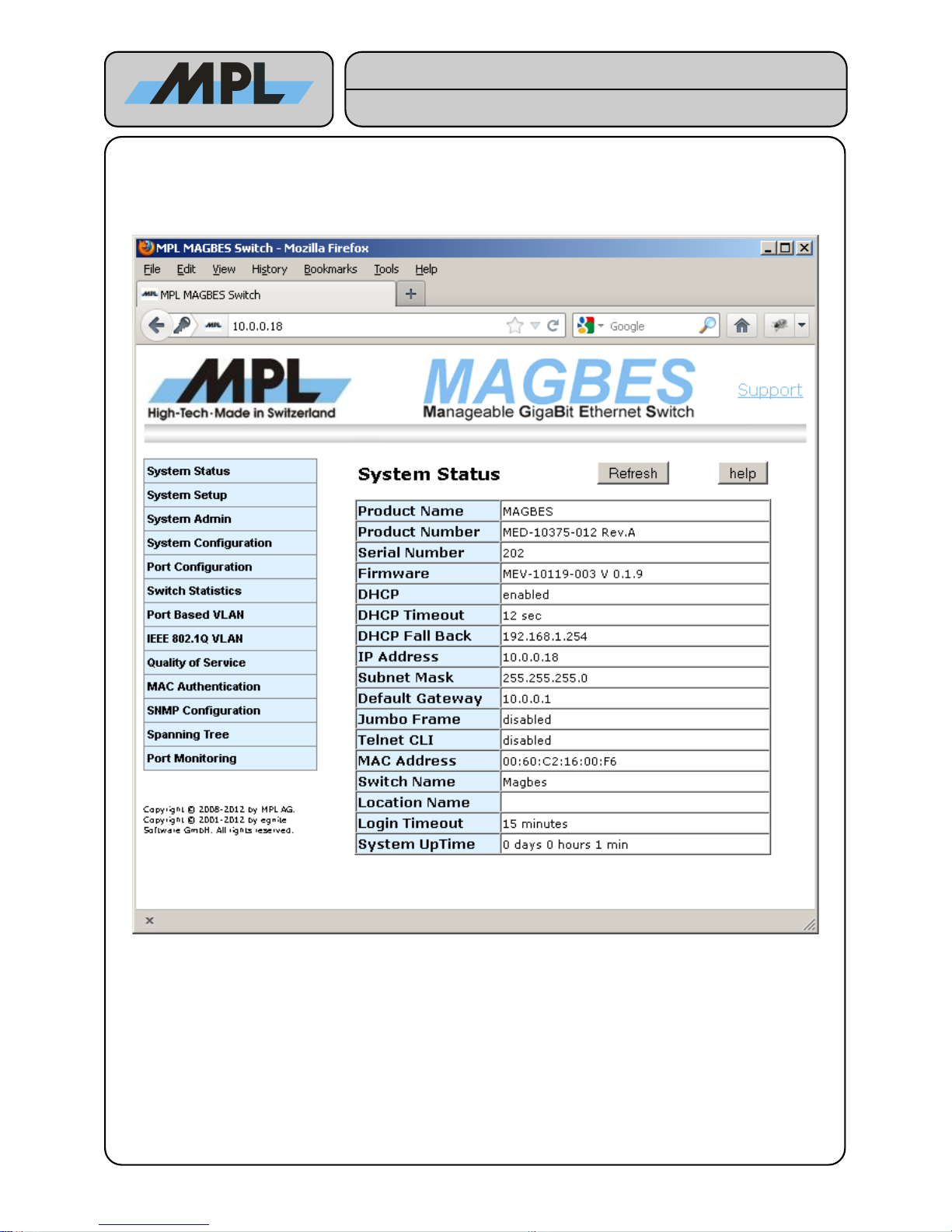
The System Status shows information about the MAGBES Revisions and the System Configuration:
● The Product Name, Product Number, Serial Number, and the Firmware are used to identify the
MAGBES.
● The DHCP, DHCP Fall Back, IP Address, Subnet Mask, and Default Gateway show the Network
configuration.
● The Switch Name, Location Name and Login Timeout are configurable.
2012 by MPL AG 8 MEH-10134-201 Rev. D
Figure 2: System Status
High-Tech • Made in Switzerland
MAGBES
Technical Reference Manual
Page 9
3.2 System Setup
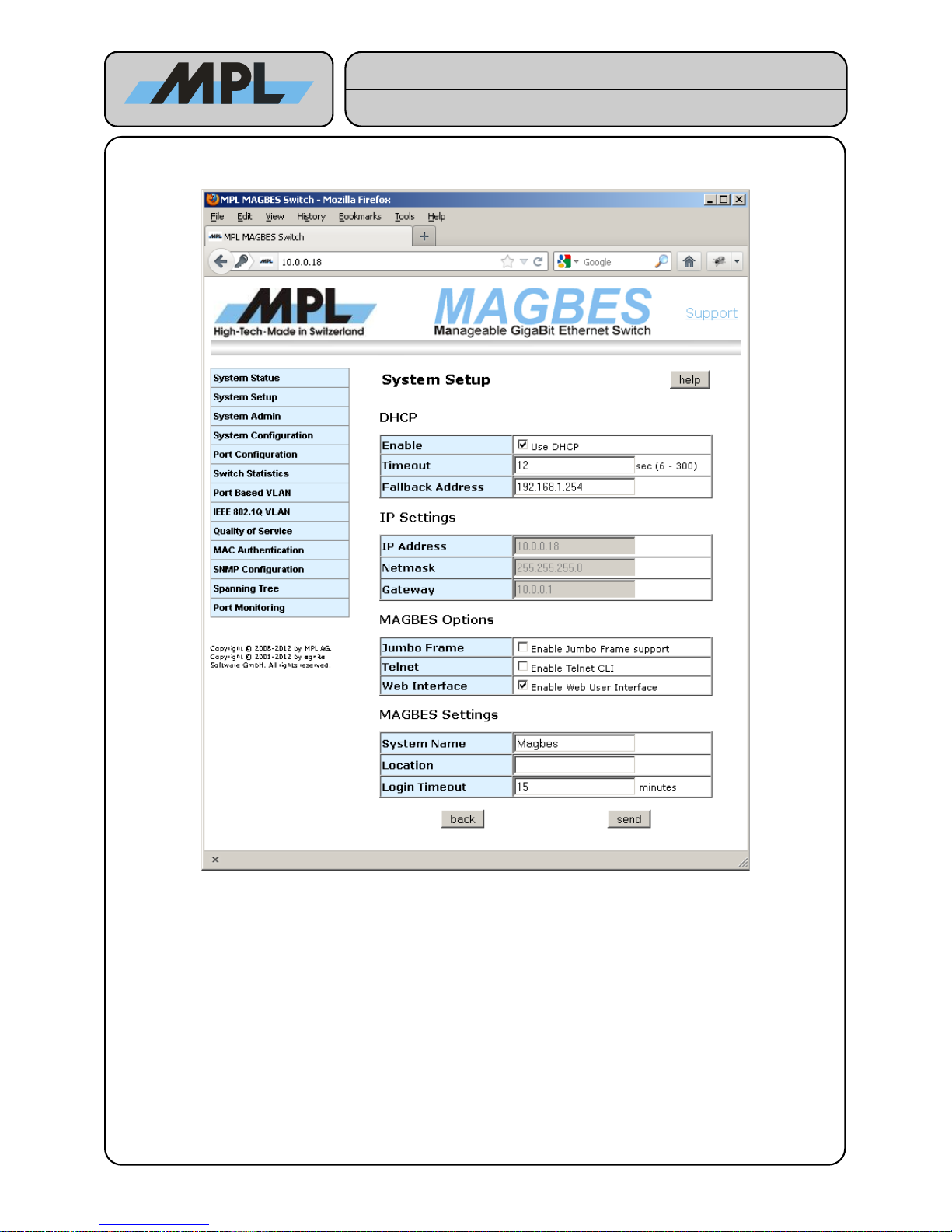
On this page the System Parameters can be configured.
Notes:
● The DHCP Fallback Address will be used if DHCP Timeout sec have been elapsed after valid link
detection and no DHCP offer has been received.
● If using DHCP the IP Address, Netmask, and Gateway Settings are ignored.
● Jumbo Frame support is only available on MAGBES-11, MAGBES-12 and MAGBES-13.
● Telnet CLI enables the Telnet Command line Interface. See chapter 5 Telnet Command Line Interface
for further information.
● If disable both Web Interface and Telnet Command Line Interface, the MAGBES will disable the
configuration interface of the MAGBES. This means that the MAGBES will not use any IP address but
will still do the configured jobs as long as they don't require an IP Address (SNMP will not work). To
revert in the configurable mode the "default switch" has to be pressed for at least 4 sec.
● System Name (max Length 15 chars) and Location (max Length 15 chars) are only used to inform
the Network Administrator, on which MAGBES she/he is logged in.
● If the Login Timeout is elapsed without any activity on the Web Interface, the user is automatically
logged out.
2012 by MPL AG 9 MEH-10134-201 Rev. D
Figure 3: System Setup
High-Tech • Made in Switzerland
MAGBES
Technical Reference Manual
Page 10
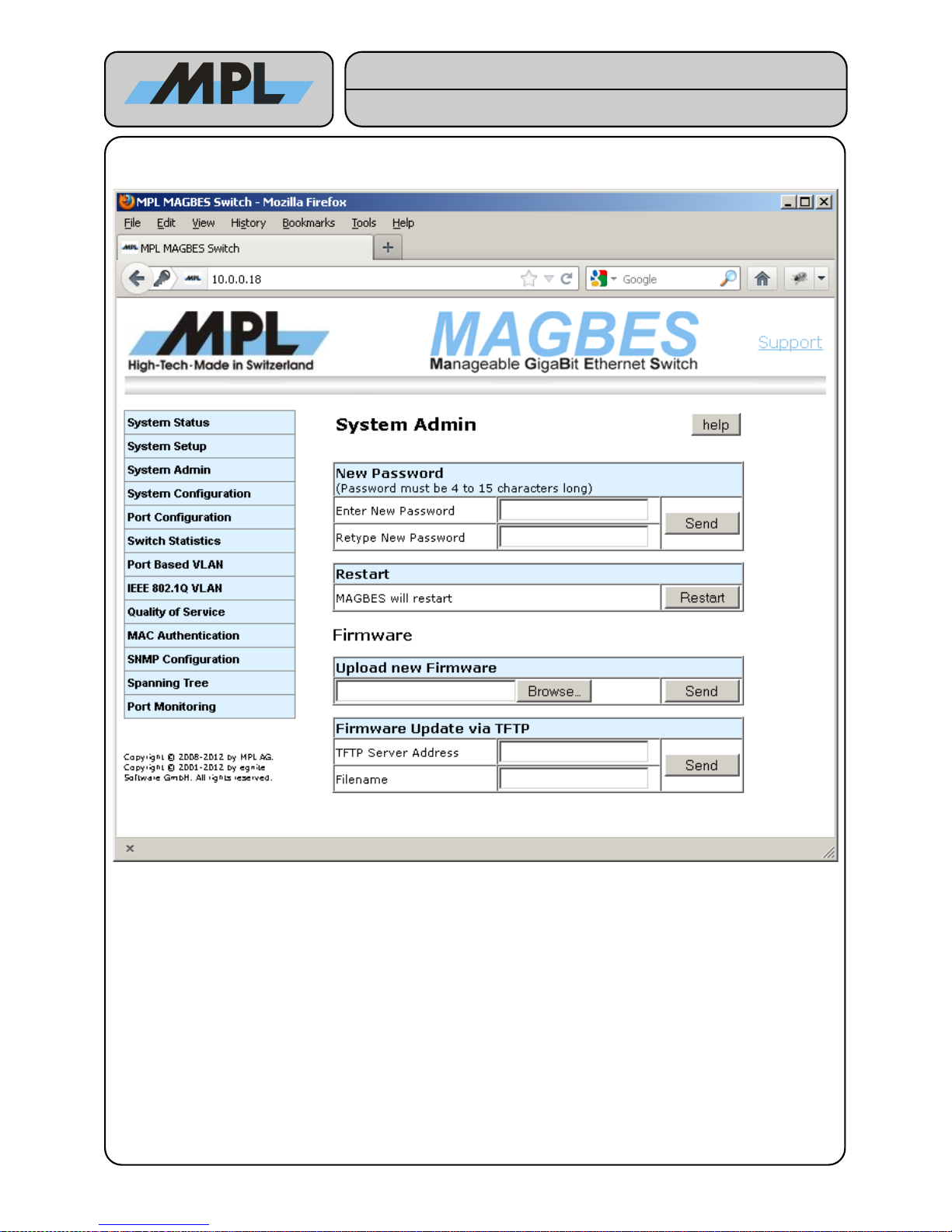
3.3 System Admin
This page allows to change the Password, Restart the MAGBES and Update the Firmware.
● The Password must be between 4 and 15 characters long. This is used for the login (see Figure 2:
System Status). The Password must be retyped to ensure that no typos have been filled in. If you have
forgotten the Password you have to set the MAGBES to default as it is described in the MAGBES User
Manual.
● Restart forces the MAGBES to restart (reset). No configuration will change.
● Firmware Update can be done either via a direct File Upload, or loading the firmware from a TFTP
Server. Please note that after updating the Firmware all configuration are lost.
2012 by MPL AG 10 MEH-10134-201 Rev. D
Figure 4: System Admin
High-Tech • Made in Switzerland
MAGBES
Technical Reference Manual
Page 11
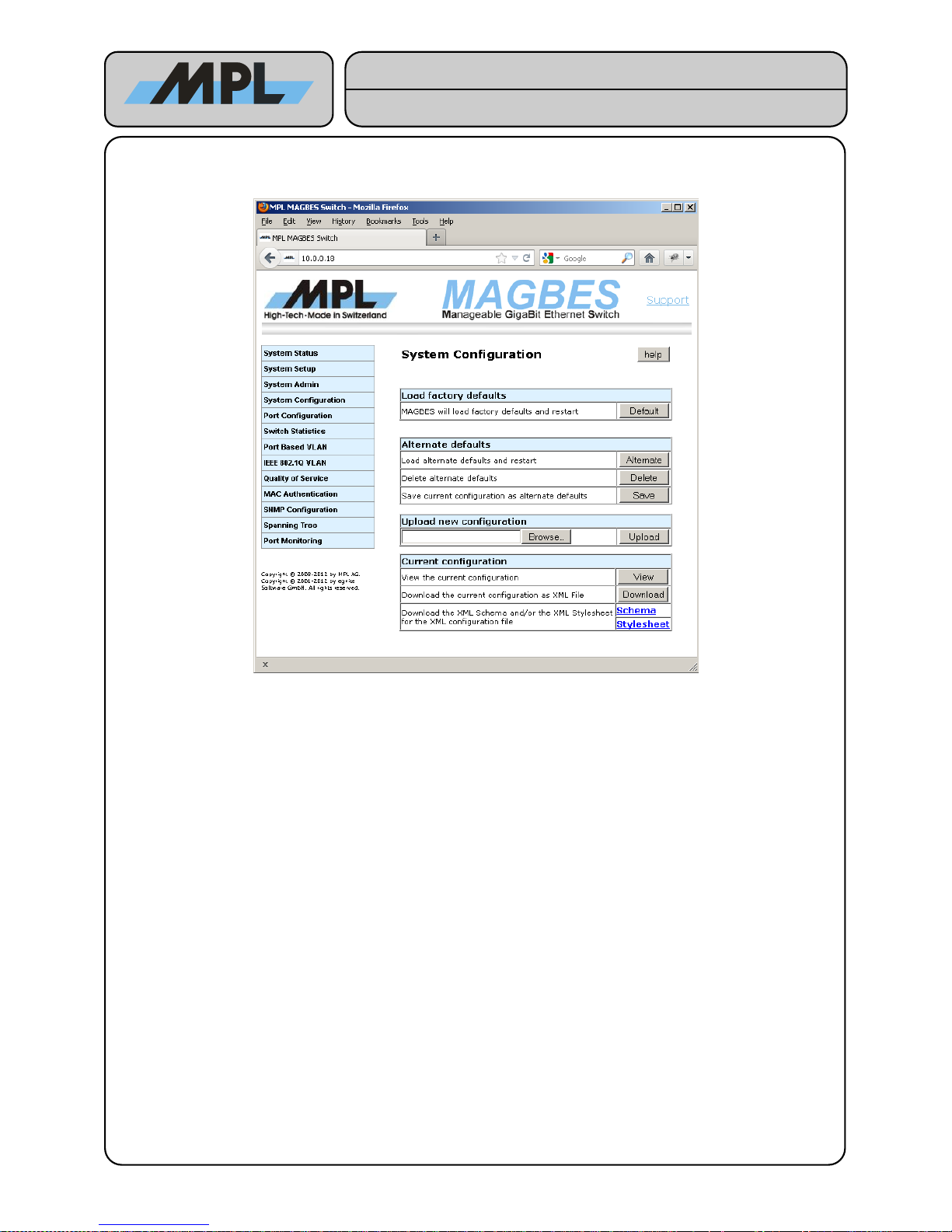
3.4 System Configuration
This page allows to change the configuration of the entire switch:
● Default forces the MAGBES to load factory defaults and restart. The same effect has the pressing of
the “Default Switch” for more than 4 seconds.
The MAGBES allows the use of a customer specific default configuration. This is called the Alternate defaults
in this Manual.
● Alternate: Loads the alternate defaults and restarts. The same effect has the pressing of the “Default
Switch” (less than 4 seconds). If no alternate defaults are stored, the MAGBES uses the factory default
for this purpose.
● Delete: Invalidate the alternate defaults.
● Save: Save the current configuration as alternate defaults.
The configuration of the MAGBES can also be uploaded. See chapter 6 Configuration File for further information
on configuration file support.
● Upload: Uploads the chosen configuration file. After the upload, the file will be validated and a new
page allows to select one of the following actions:
● Apply: The new configuration will be saved and the MAGBES will restart.
● Discard: The new configuration will be discarded and the previous configuration restored.
● Save: The new configuration will be saved as alternate defaults.
The current configuration can also be viewed or downloaded for modifications.
● View: Shows the current configuration, using the XML configuration file along the XML Stylesheet.
● Download: Allows to download the XML configuration file.
For offline viewing and validation of the configuration file, MAGBES allows also to download the
appropriate XML Stylesheet and XML Schema file.
WARNING: Upload, viewing and download XML files uses much memory. Using large XML files may
lead to an “out of RAM” condition, which may lead to a restart of the MAGBES. So it is not
recommended to use this feature in a production network.
2012 by MPL AG 11 MEH-10134-201 Rev. D
High-Tech • Made in Switzerland
MAGBES
Technical Reference Manual
Figure 5: System Configuration
Page 12
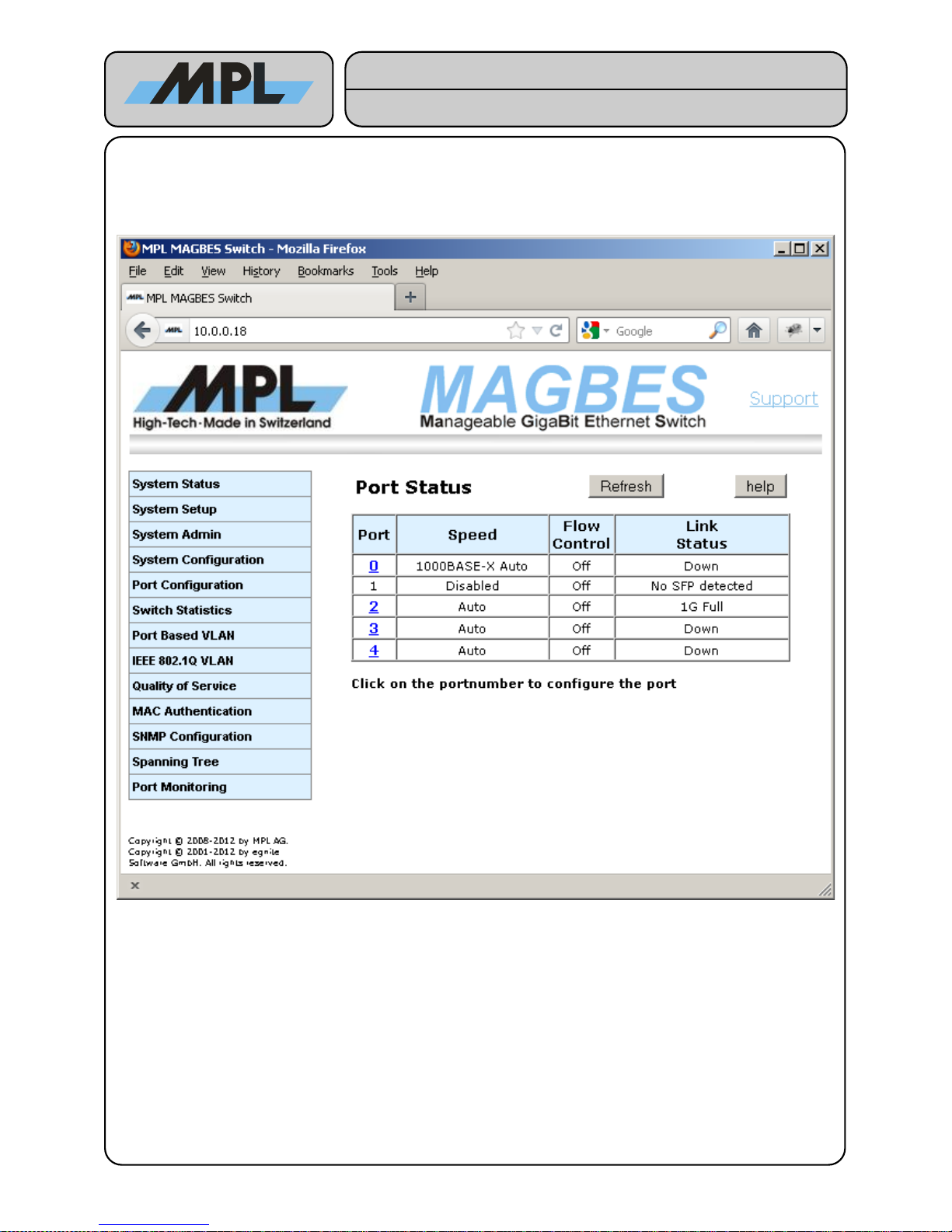
4 Switch Configuration
4.1 Port Status
By clicking on the Port number you can configure the port.
2012 by MPL AG 12 MEH-10134-201 Rev. D
Figure 6: Port Status
High-Tech • Made in Switzerland
MAGBES
Technical Reference Manual
Page 13
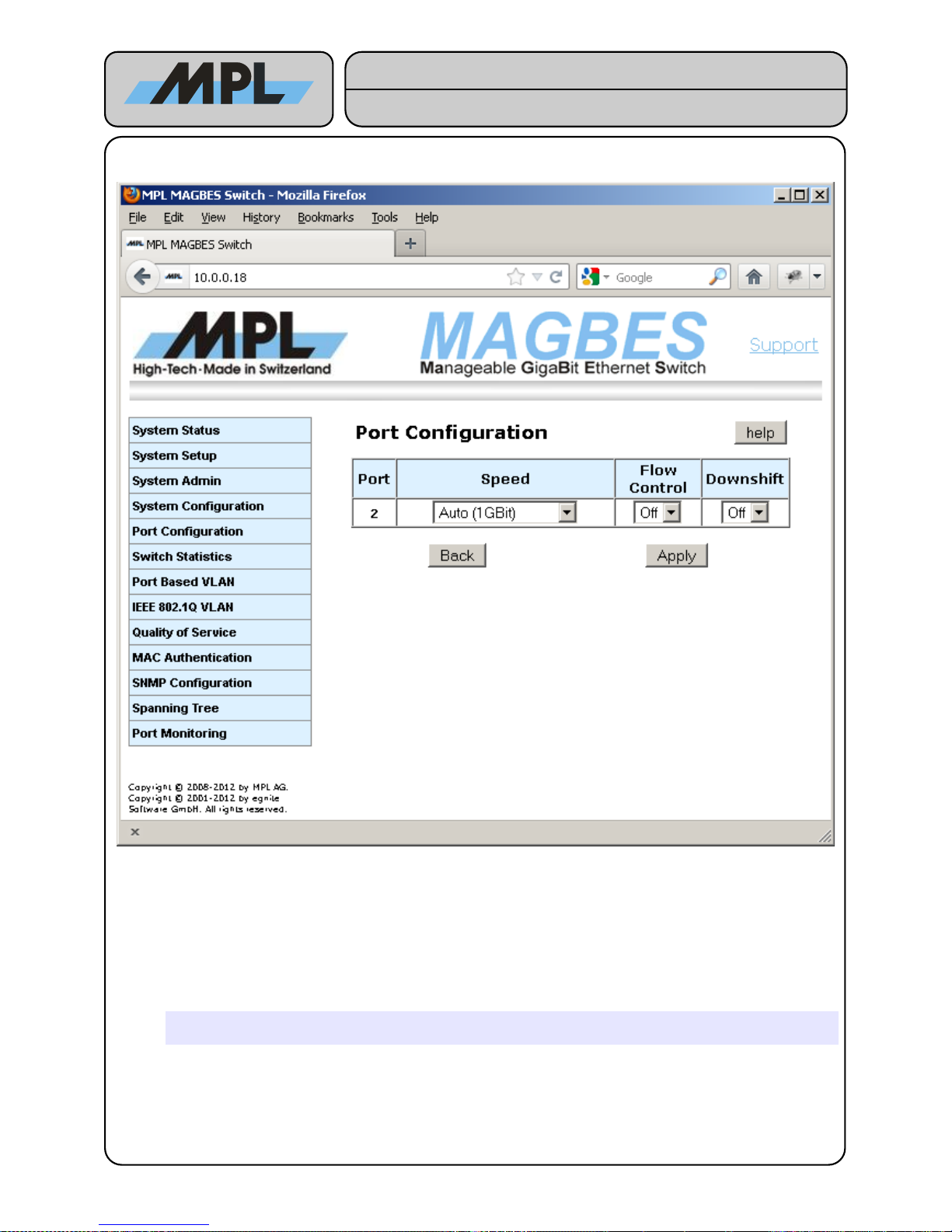
4.1.1 Port Configuration (Copper)
Speed:
Used to select the Speed and the duplex mode of the Port. Following choices are possible:
● Auto (1GBit): According IEEE 802.3 1000Base-T link are only possible with Auto-Negotiation. In this
Mode the Speed and duplex mode are negotiated between the two link partners. The Flow-Control
settings in this mode is used to advertise the ability of Flow-Control. If the Link partner doesn't support
this, the MAGBES will not use Flow-Control.
The Downshift setting is only active during the Auto Setting.
● 100MBit Full-Duplex, 100MBit Half-Duplex, 10MBit Full-Duplex, and 10MBit Half-Duplex: these
settings are used to force the MAGBES to these Speeds and Duplex-Modes.
Warning: When using one of these Modes, the Link Partner must be set to the exact same
settings.
● Disabled: If set to Disabled, the port enters a Power-Down Mode and doesn't receive or transmit any
Frames.
2012 by MPL AG 13 MEH-10134-201 Rev. D
Figure 7: Port Configuration (Copper)
High-Tech • Made in Switzerland
MAGBES
Technical Reference Manual
Page 14
Flow Control:
In Auto (1GBit) mode, this setting is only used to advertise the ability to use Flow-Control.
● Off: No Flow-Control is used
● On: Flow Control on a half duplex enabled port is used to throttle the throughput rate of an end station
to avoid packet dropping during network congestion. Only ports involved in the congestion are flow
controlled. If the half duplex flow control is not set, incoming packets may be discarded during network
congestion. Flow Control on a half duplex enabled port is not defined by IEEE.
Flow Control on a full duplex enabled port has the same purpose as on a half duplex enabled port.
IEEE 802.3 flow control requires the two link partners to auto-negotiate and advertise their flow control
capabilities. Flow-Control on full duplex ports is achieved by sending Pause-Frames to the Link partner.
Downshift:
● Off: No Downshift is used
● On: If both link partners support 1000Base-T, but are connected with an Ethernet Cable containing only
2 pairs instead of the required 4 pairs, they may negotiate to 1000Base-T but will fail to link. If downshift
is enabled MAGBES will advertise the next lower speed after the 1000Base-T link fails 3 times.
This feature is ignored in other modes than Auto (1GBit).
2012 by MPL AG 14 MEH-10134-201 Rev. D
High-Tech • Made in Switzerland
MAGBES
Technical Reference Manual
Page 15
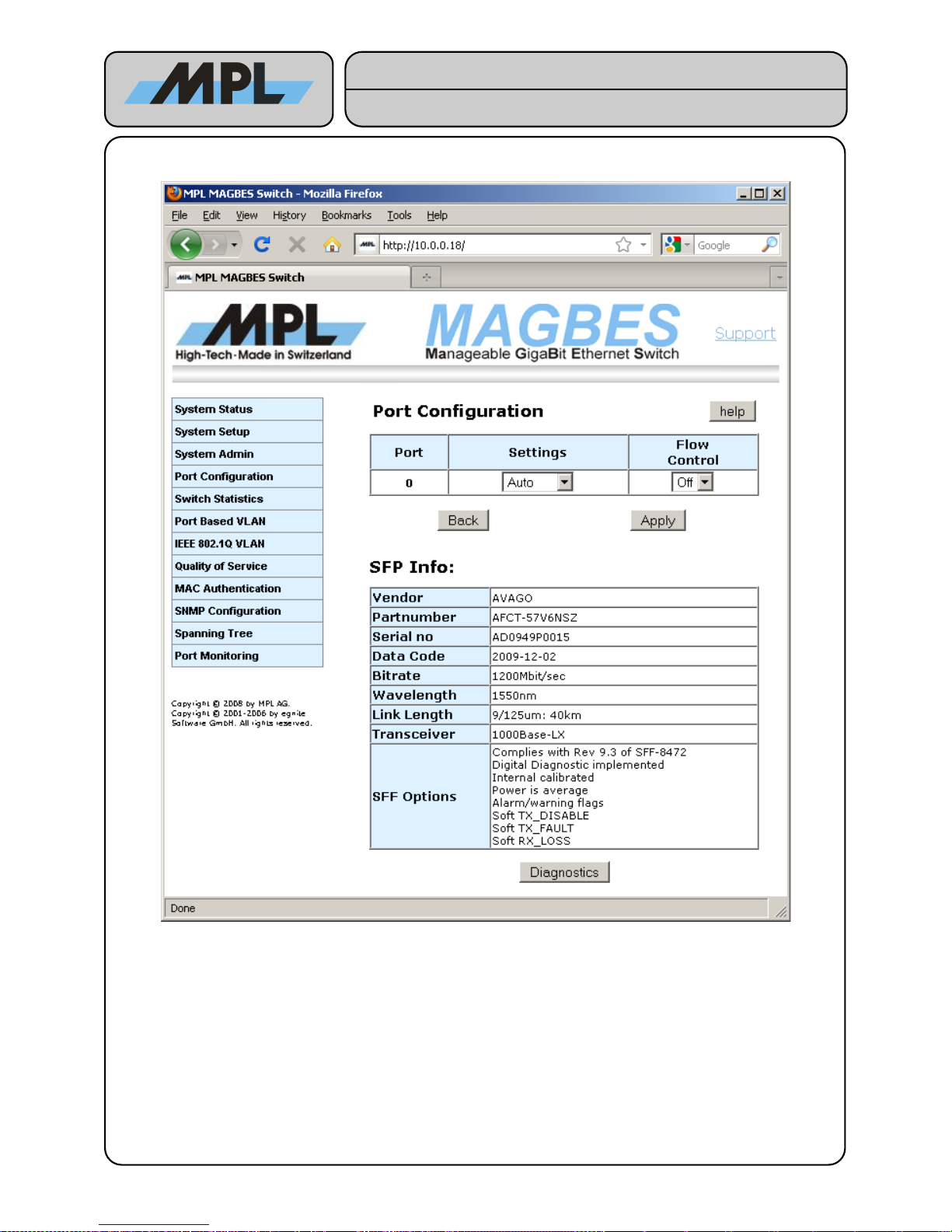
4.1.2 Port Configuration (SFP)
The Port Configuration for SFP works similar to the one for Copper with the difference, that the settings allow
only the SPF supported Speeds. If the SFP is not supported by the MAGBES the Settings drop down box is
fixed on Disabled.
● Most 100Base-FX, 1000Base-SX and 1000Base-LX SFP's are supported as long as they comply
Ethernet compatibility.
● Copper SFP is also supported, but this is only tested with the FINISAR FCLF-8520-3 A.
● The SFP Info shows the contents of the serial EEPROM of the SFP.
● If the EEPROM of the SFP has a wrong Checksum, the MAGBES tries to get as much information as
possible from the SFP and guess the possible Settings according this information. This mode is marked
with a red Checksum invalid.
● If no useful information can be retrieved, all Settings are possible. In this case the user is responsible to
choose the correct setting. Wrong Speed settings may damage the SFP! This mode is marked with a
red Checksum invalid
2012 by MPL AG 15 MEH-10134-201 Rev. D
Figure 8: Port Configuration (SFP)
High-Tech • Made in Switzerland
MAGBES
Technical Reference Manual
Page 16
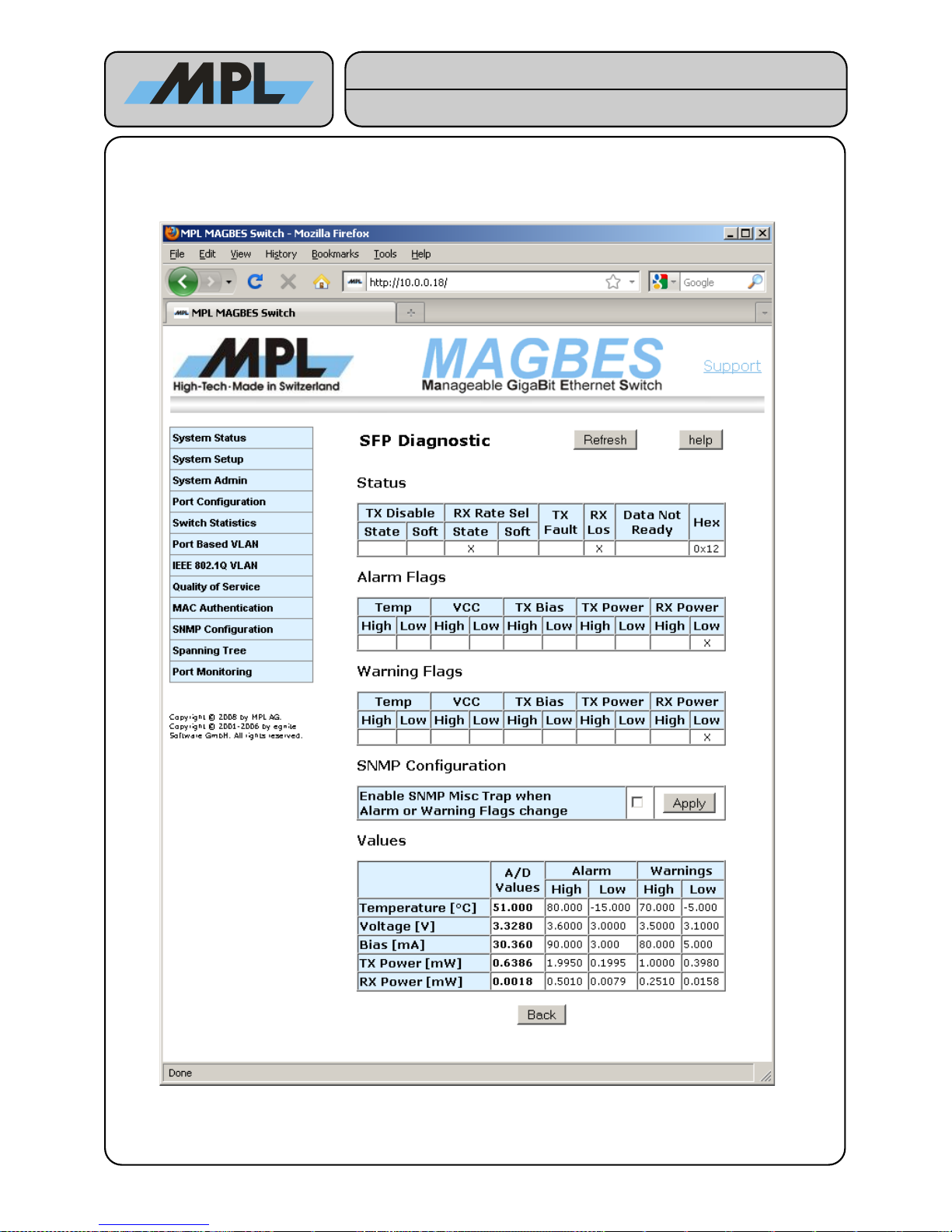
4.1.2.1 SFP Diagnostic
If the SFP supports Digital Diagnostics the button Diagnostics will be displayed. By pressing this button the
SFP Diagnostic page will be show.
2012 by MPL AG 16 MEH-10134-201 Rev. D
Figure 9: SFP Diagnistics
High-Tech • Made in Switzerland
MAGBES
Technical Reference Manual
Page 17
On the SFP Diagnostic page information from the SFP is shown:
Status:
The contents of the Status byte of the SFP:
● TX Disable: The State of the TX Disable Pin as well as the Software settings for the TX Disable of the
SFP.
● RX Rate Sel: The State of the RX Rate Select Pin as well as the Software settings for RX Rate Select
of the SFP.
● TX Fault: The State of the TX Fault Pin of the SFP.
● RX Los: The State of the RX Los Pin (Link Los) of the SFP.
● Data Not Ready: If set, the Data of the Diagnostic is not valid.
● Hex: The value of the status byte in hexadecimal.
Alarm Flags:
The state of the alarm flags of the SFP.
Warning Flags:
The state of the warning flags of the SFP.
TX Disable:
The State of the TX Disable Pin as well as the Software settings for the TX Disable of the SFP.
SNMP Configuration:
Enables a SNMP Misc Trap when Alarm or Warning Flags change. Please note that the SNMP must be
configured and enabled for this. Please refer to 4.8 SNMP Configuration for more information.
Values:
The A/D Values and the Alarm and Warnings threshold Values.
2012 by MPL AG 17 MEH-10134-201 Rev. D
High-Tech • Made in Switzerland
MAGBES
Technical Reference Manual
Page 18
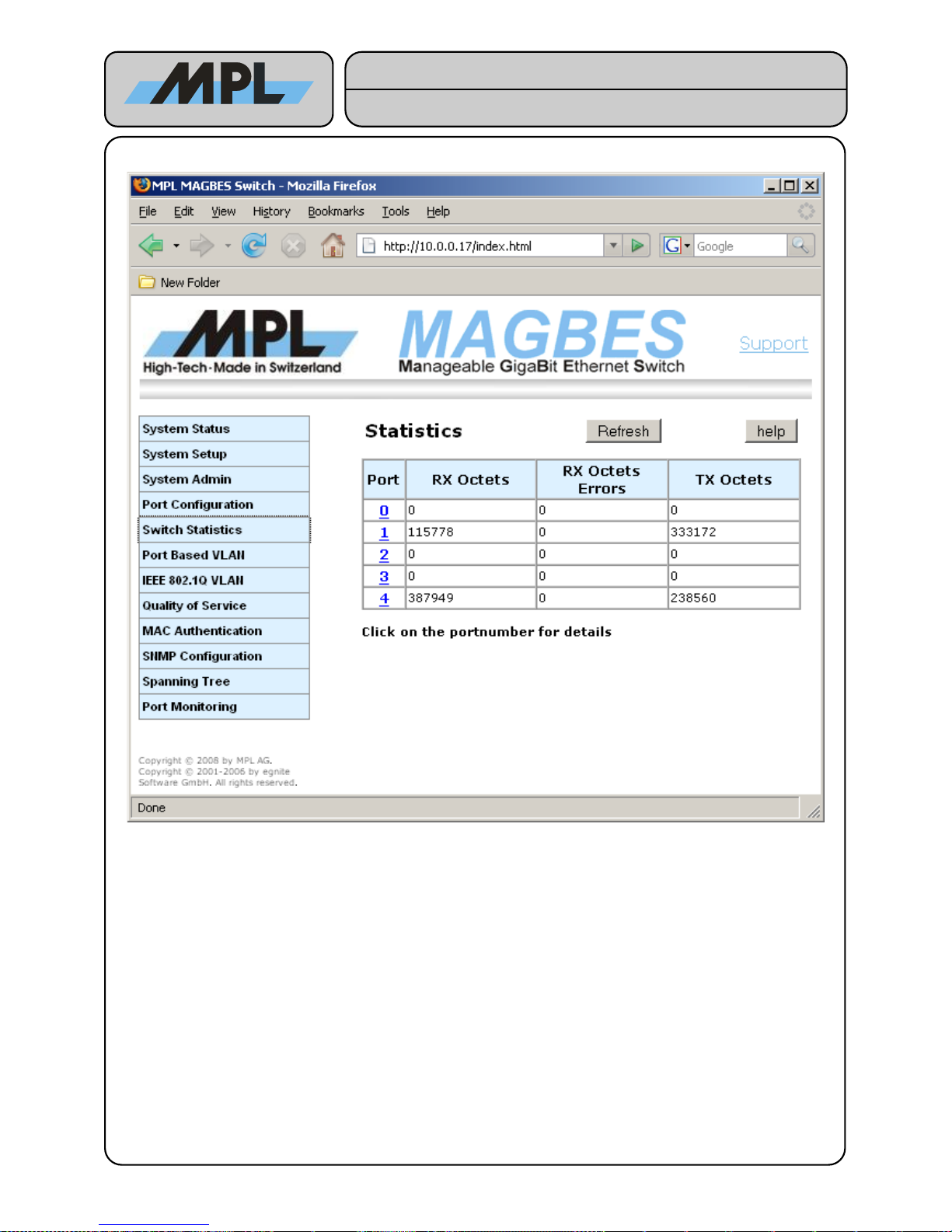
4.2 Switch Statistics
RX Octets:
The total length of all good Ethernet Frames received.
RX Octets Errors:
The total length of all bad Ethernet Frames received.
TX Octets:
The total length of all Ethernet Frames sent.
2012 by MPL AG 18 MEH-10134-201 Rev. D
Figure 10: Switch Statistics
High-Tech • Made in Switzerland
MAGBES
Technical Reference Manual
Page 19
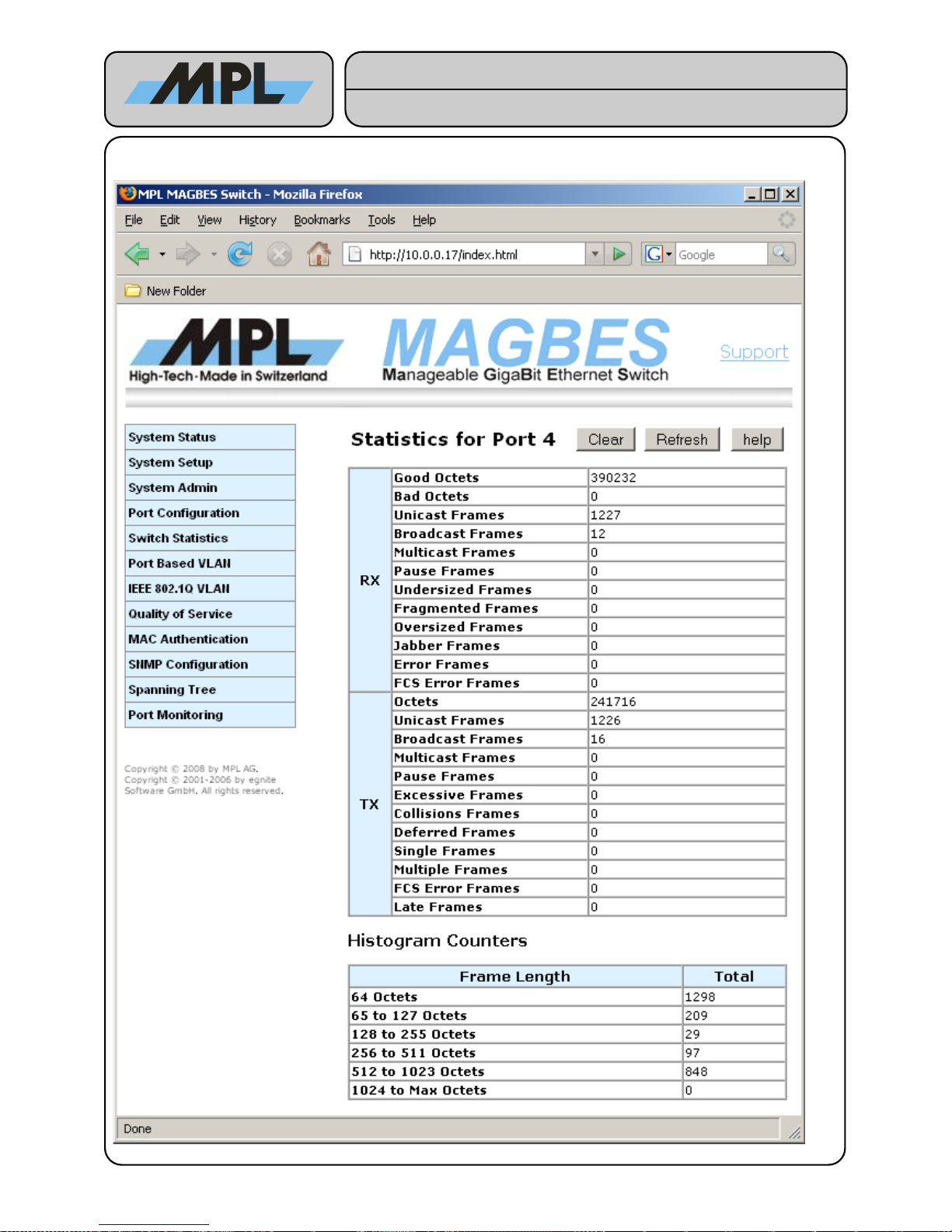
4.2.1 Detailed Switch Statistics
2012 by MPL AG 19 MEH-10134-201 Rev. D
Figure 11: Detailed Switch Statistics
High-Tech • Made in Switzerland
MAGBES
Technical Reference Manual
Page 20
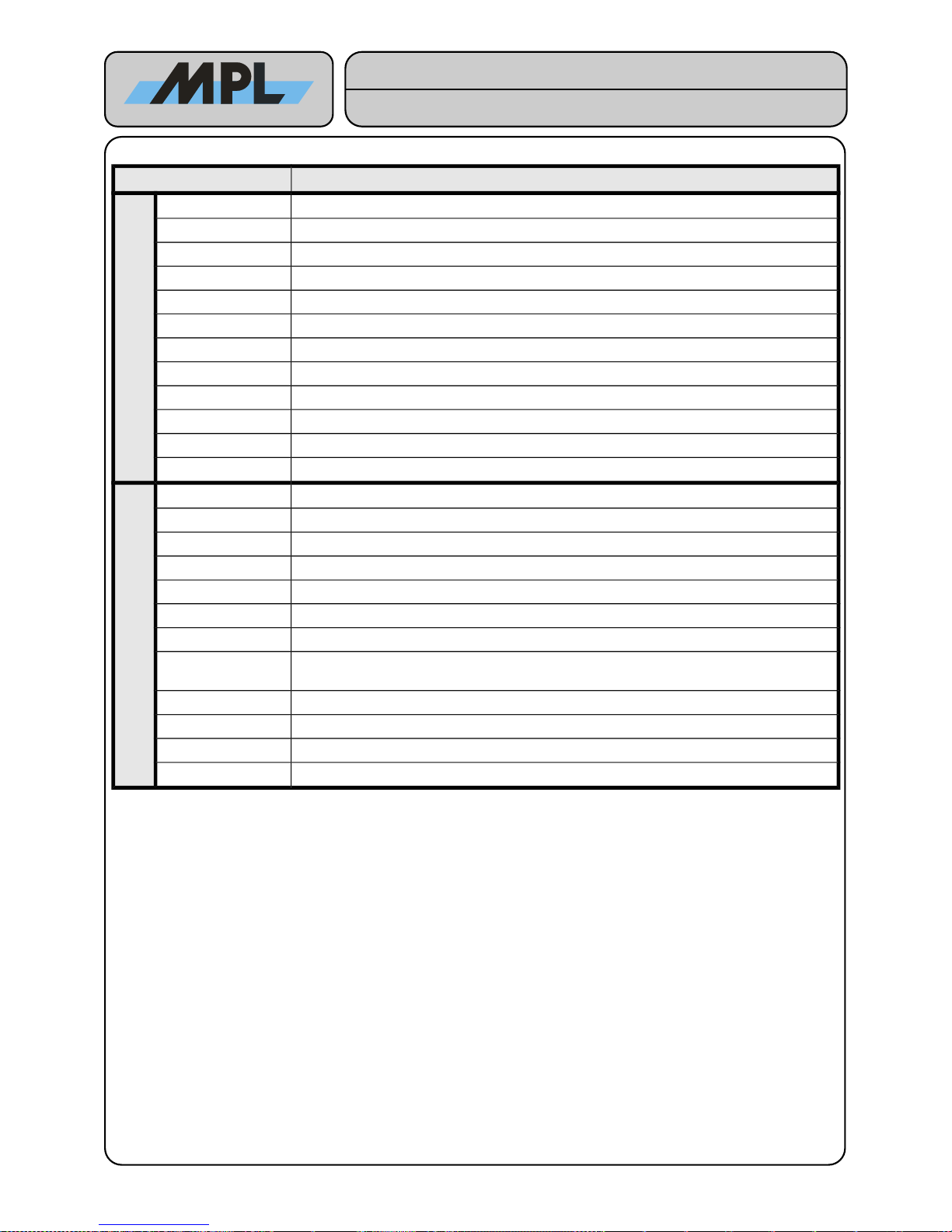
These Counter have following meaning:
Name Description
RX
Good Octets The total length of all good Ethernet Frames received.
Bad Octets The total length of all bad Ethernet Frames received.
Unicast Frames Good Frames received with a Unicast Destination Address.
Broadcast Frames Good Frames received with a Broadcast Destination Address.
Multicast Frames Good Frames received with a Multicast Destination Address.
Pause Frames The number of good Flow-Control Frames received.
Undersized Frames Received Frames with a length smaller than 64 octets with a valid FCS.
Fragmented Frames Received Frames with a length smaller than 64 octets with an invalid FCS.
Oversized Frames Received Frames with a length of more than Max Length octets with a valid FCS
Jabber Frames Received Frames with a length of more than Max Length octets with an invalid FCS
Error Frames Received Frames which have been marked as Error Frames by the Phy.
FCS Error Frames Received Frames with a length between 64 and Max Length and an invalid FCS.
TX
Octets The total length of all sent Ethernet Frames.
Unicast Frames Frames sent to a Unicast Destination Address.
Broadcast Frames Frames sent to a Broadcast Destination Address.
Multicast Frames Frames sent to a Multicast Destination Address.
Pause Frame The number of Flow-Control Frames sent.
Excessive Frames Frames dropped after 16 consecutive collisions (Half-Duplex Only)
Collisions Frames The number of Collision Frames. (Half-Duplex Only)
Deferred Frames
Frames successfully sent without collision but delayed because medium was busy (HalfDuplex Only)
Single Frames Frames successfully sent after exactly one collision (Half-Duplex Only).
Multiple Frames Frames successfully sent after more than one collision (Half-Duplex Only).
FCS Error Frames Frames sent with an invalid FCS.
Late Frames Frames where the collision is detected 512 bit-times into the transmission.
The Histogram Counters shows the total Frames (received and sent) with their length.
By clicking on the Clear button, all statistics Counters will be reset for this port.
2012 by MPL AG 20 MEH-10134-201 Rev. D
High-Tech • Made in Switzerland
MAGBES
Technical Reference Manual
Page 21
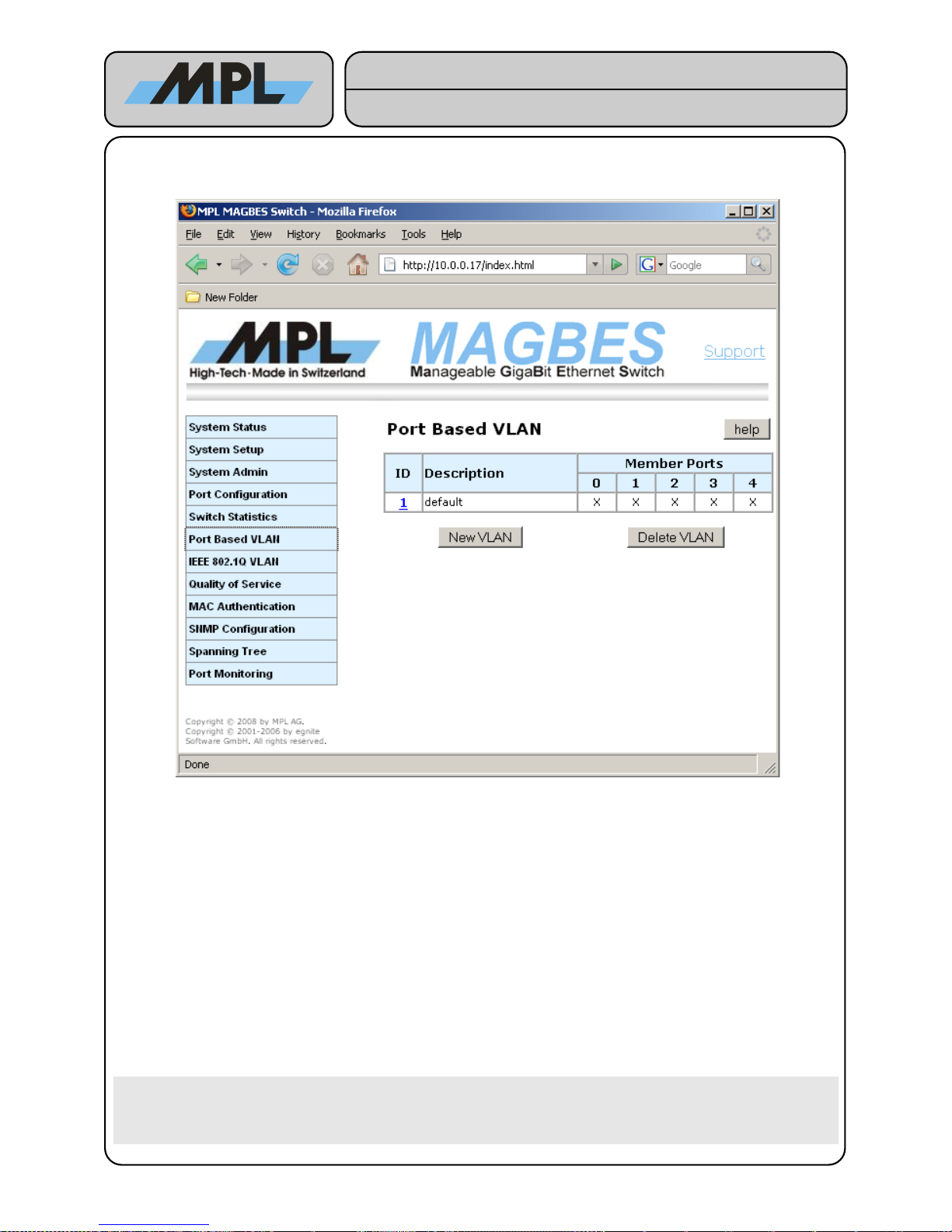
4.3 Port Based VLAN
VLAN (Virtual Local Area Network) are used to separate different LAN segments from each other. This has
following advantages:
● Smaller Broadcast Traffic. Broadcast Frames on one LAN segment are only forwarded to the same LAN
segment.
● Enhanced Security. It is not possible to send a frame from one LAN Segment to another.
Port based VLAN allows to create simple VLAN which exist only within the Switch. Frames are not modified
and the devices connected to the MAGBES do not need to support VLAN.
Parameter description:
ID: Is just an arbitrary Number and has no influence on the functionality of the Port Based VLAN.
Description: Used to identify the Port Based VLAN Segment. Up to 15 Characters Length.
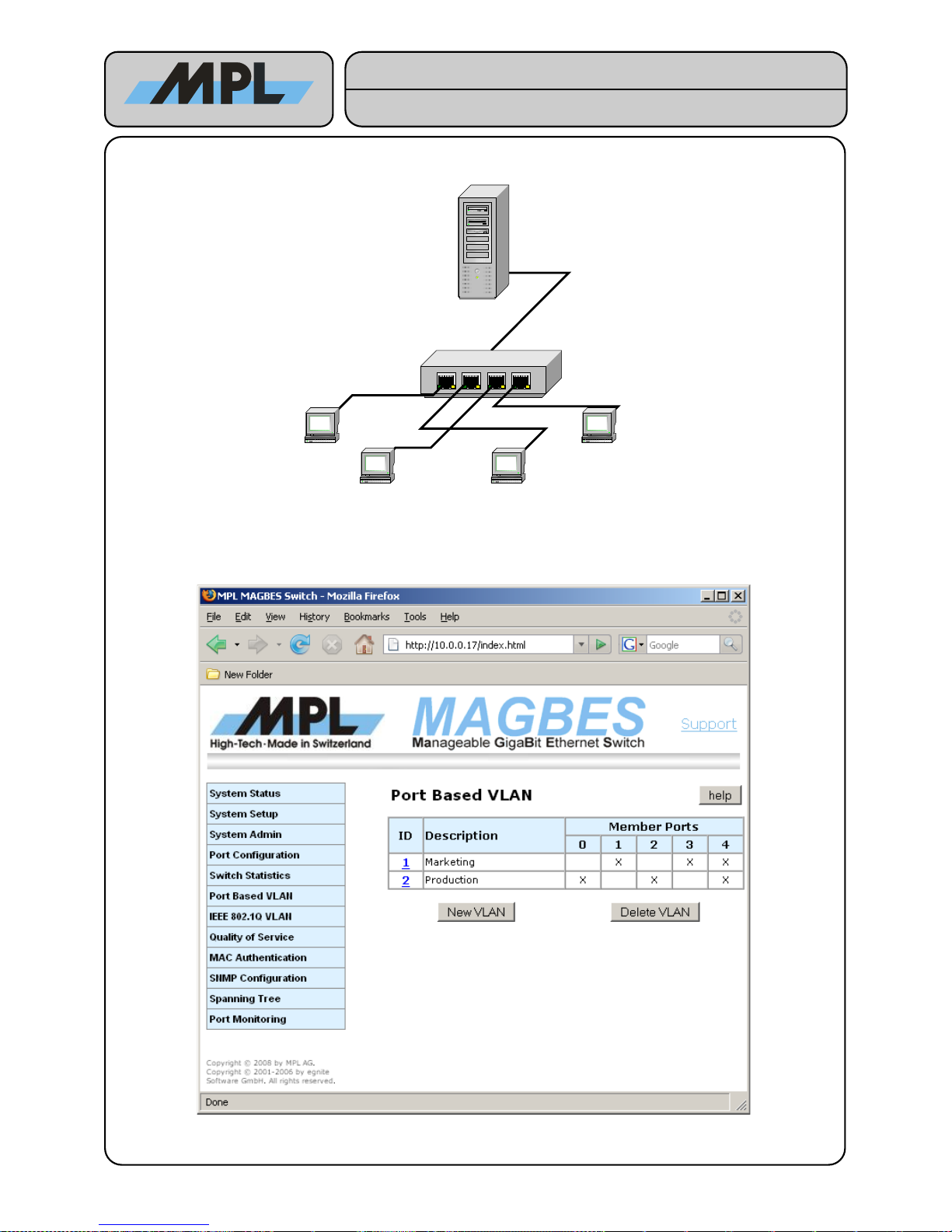
Member Ports: Each Port with an 'X' in the table is member of this VLAN. In the example above, this means
that Port0 (Marketing Workstation) can reach Port2 (Marketing Workstation) and Port4 (Server),
but it cannot reach Port1 (Production Workstation) or Port2 (Production Workstation).
Warning: Please make sure that the Port you use to configure the MAGBES is enabled in one
VLAN. Otherwise the connection to the internal CPU is lost, and you have to press the
Default Switch to enable access to the internal CPU again. Note that the internal CPU is
member of all IDs.
2012 by MPL AG 21 MEH-10134-201 Rev. D
Figure 12: Port Based VLAN
High-Tech • Made in Switzerland
MAGBES
Technical Reference Manual
Page 22
4.3.1 Port Based VLAN Example
In this example two simple VLAN are created:
● Marketing Workstation 1 has connection to Marketing Workstation 2 and to the Server / Router.
● Production Workstation 1 has connection to Production Workstation 2 and to the Server / Router.
This can be achieved with following configuration:
2012 by MPL AG 22 MEH-10134-201 Rev. D
Figure 13: Port Based VLAN Example
MAGBES 1
Server / Router
Production 1
Marketing 1 Production 2
Marketing 2
Figure 14: Port Based VLAN Example MAGBES Configuration
High-Tech • Made in Switzerland
MAGBES
Technical Reference Manual
Page 23
4.4 IEEE 802.1Q VLAN
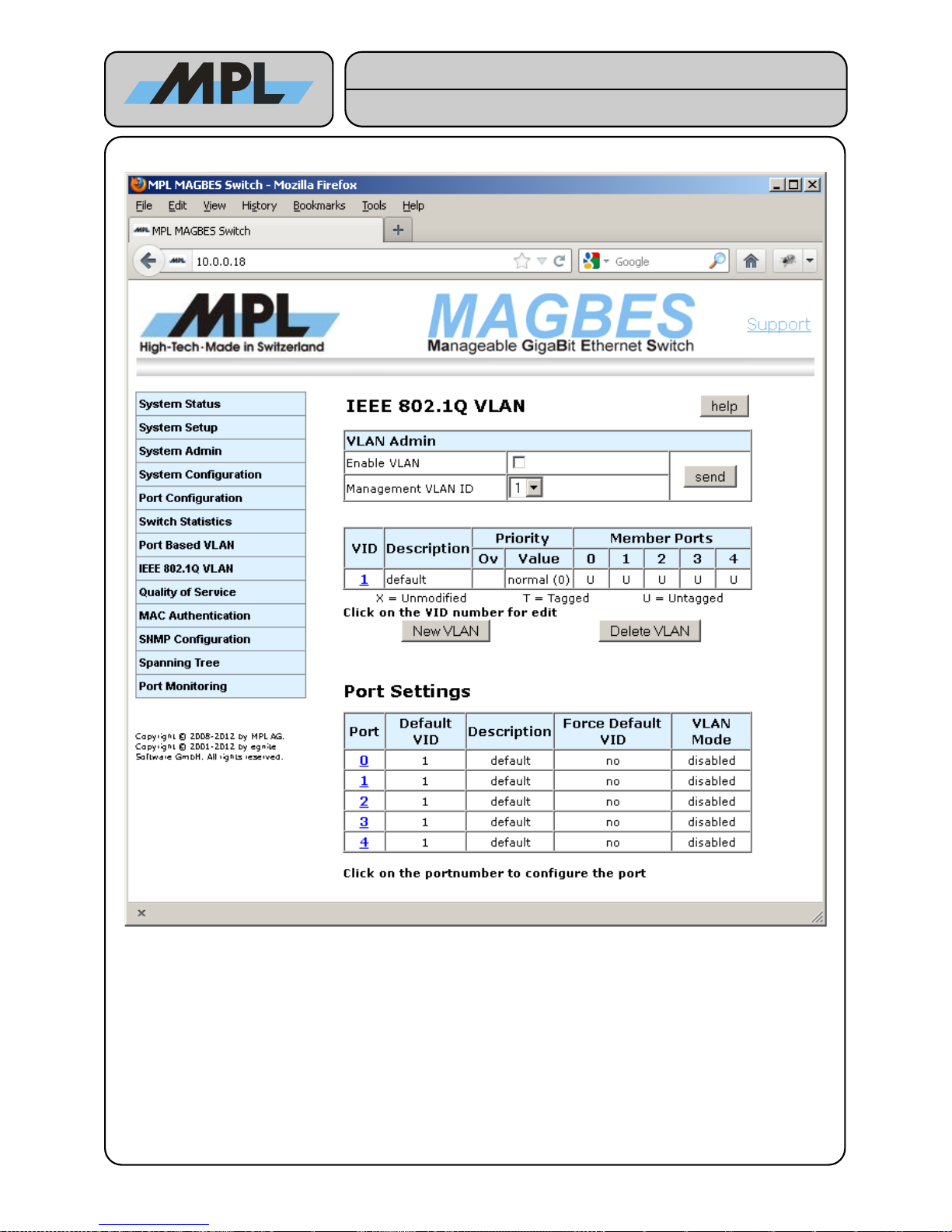
The IEEE 802.1Q VLAN allows to define VLAN over the entire Network. For this purpose a special tag is
inserted into the Frame containing information of the VLAN.
VLAN Admin
• Enable VLAN: If checked the VLAN is enabled and the management is only possible within the
"Management VLAN ID" VLAN. If not checked the VLAN is not enabled and the management is
possible from all VID. All changes to the VLAN configuration takes only place when check it and press
the send button.
• Management VLAN ID: The ID of the VLAN within management of the MAGBES is possible, if the
VLAN is enabled.
2012 by MPL AG 23 MEH-10134-201 Rev. D
Figure 15: IEEE 802.1Q VLAN
High-Tech • Made in Switzerland
MAGBES
Technical Reference Manual
Page 24
4.4.1 Configuring IEEE 802.1Q VLAN Groups
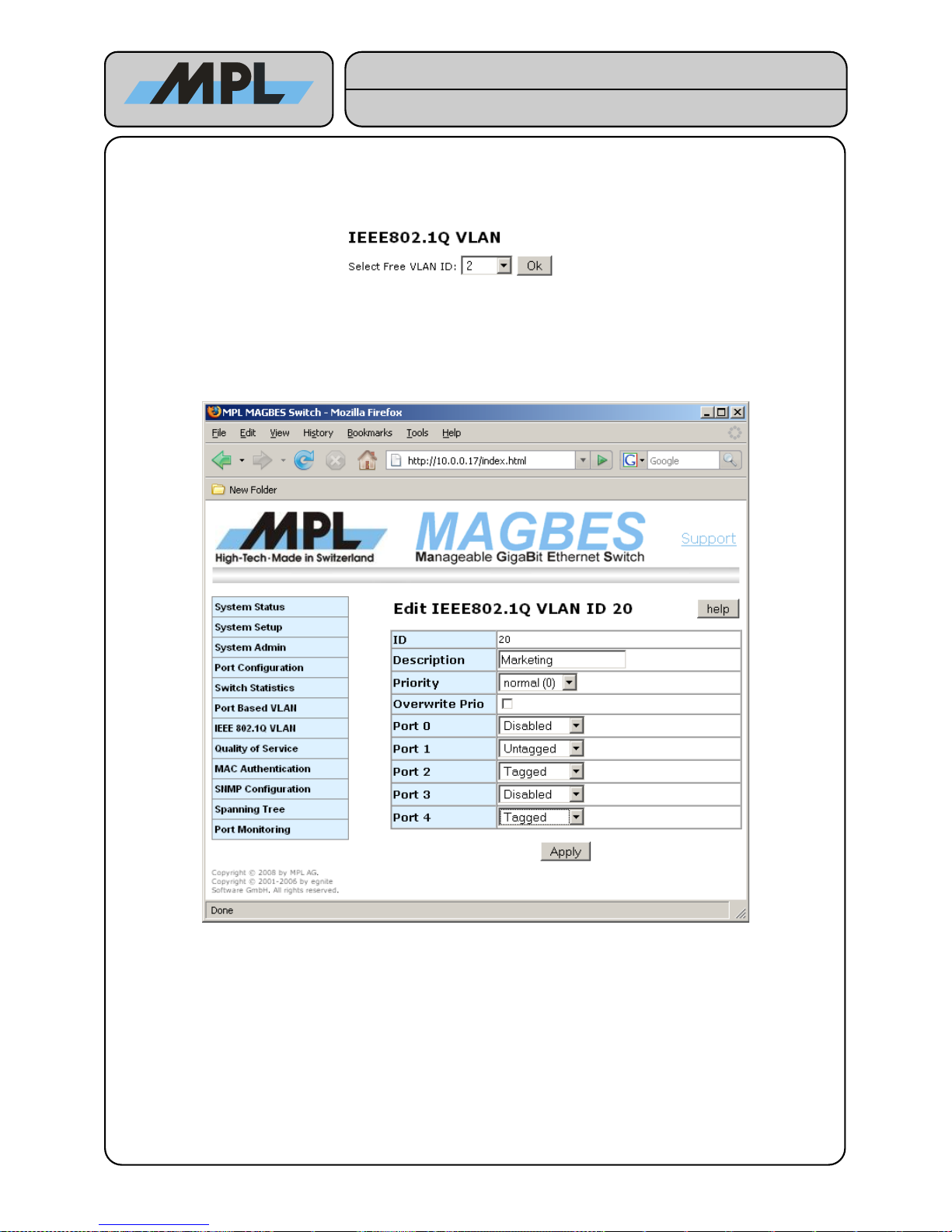
On the upper Form the IEEE 802.1Q VLAN Groups can be defined.
By clicking the New VLAN Button you can configure a new VLAN:
Since the VLAN ID's (VID) 0 and 4096 are reserved and the VID 1 is the Default VID you can only select a VID
between 2 and 4095. If the VID is already in use it will not be displayed in the Drop-Down list.
After selecting the VID and pressing OK you can configure the VLAN:
Description: Up to 15 Characters describing the VLAN segment.
Priority: If the Overwrite Prio is set, this selects the priority with which the Frame with this VID will be
forwarded to the destination port.
Overwrite Prio: see above.
Port X: Selects the mode the frame will egress the Port. Can be one of following:
● Disabled: The Frame will not egress on this port.
● Untagged: The Frame will egress on this port without the IEEE 802.1Q VLAN tag.
● Tagged: The Frame will egress on this port with the IEEE 802.1Q VLAN tag.
● Unmodified: The Frame will egress on this port as it was received.
After Pressing Apply the settings for this VLAN will be saved.
2012 by MPL AG 24 MEH-10134-201 Rev. D
Figure 16: Add new IEEE 802.1Q VLAN
Figure 17: Edit IEEE 802.1Q VLAN
High-Tech • Made in Switzerland
MAGBES
Technical Reference Manual
Page 25
4.4.2 Configuring the Ports for IEEE 802.1Q VLAN
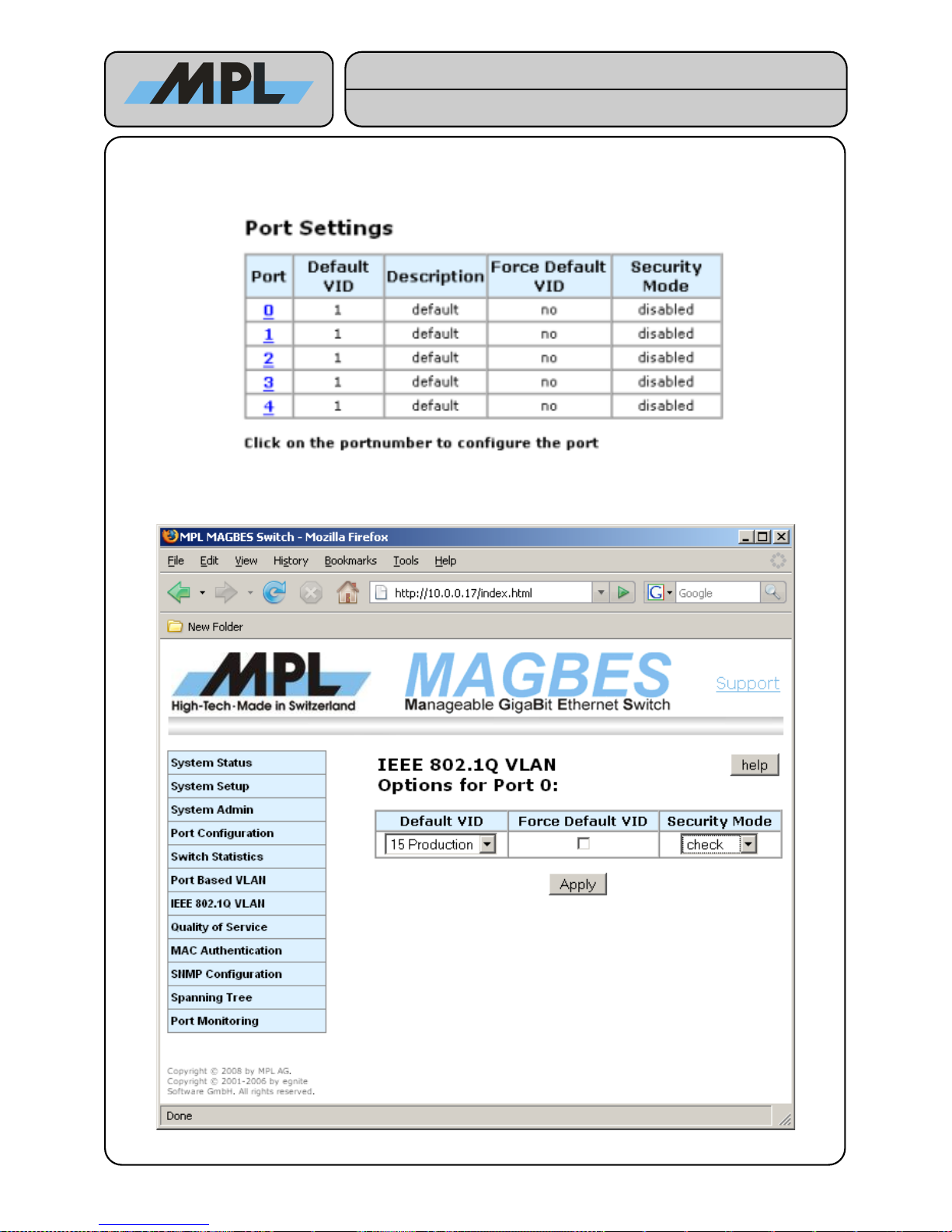
On the bottom Form you can define how the ingress frames on each port are treated:
By clicking on the port number you can configure the ports for the IEEE 802.1Q VLAN:
2012 by MPL AG 25 MEH-10134-201 Rev. D
Figure 18: IEEE 802.1Q VLAN Port Settings
Figure 19: Edit IEEE 802.1Q VLAN Settings
High-Tech • Made in Switzerland
MAGBES
Technical Reference Manual
Page 26
Default VID: This Drop-Down List shows all configured VLAN groups. Each frame ingress in this port without
a IEEE 802.1Q VLAN tag will be tagged with the selected VLAN Group.
Force Default VID: If enabled all frames will be tagged with the selected VLAN Group, whether the frames
ingress with or without a IEEE 802.1Q VLAN tag.
Security Mode: IEEE 802.1Q Security Features. Select one of following Options:
● Secure: The frame VID must be known by the switch and the ingress port must be a member of
the VLAN. The frame is only allowed to exit on those ports which are members of the VLAN.
● Check: The frame VID must be known by the switch, it doesn't matter from which port it entered
the switch. The frame is only allowed to exit on those ports which are members of the VLAN.
● Fallback: If frame VID is known by the switch it is only allowed to exit on those ports which are
members of the VLAN. If the VID is not known, the frame is allowed to exit on all ports.
● Disabled: The frame is allowed to exit on all ports.
4.4.3 IEEE 802.1Q VLAN Example
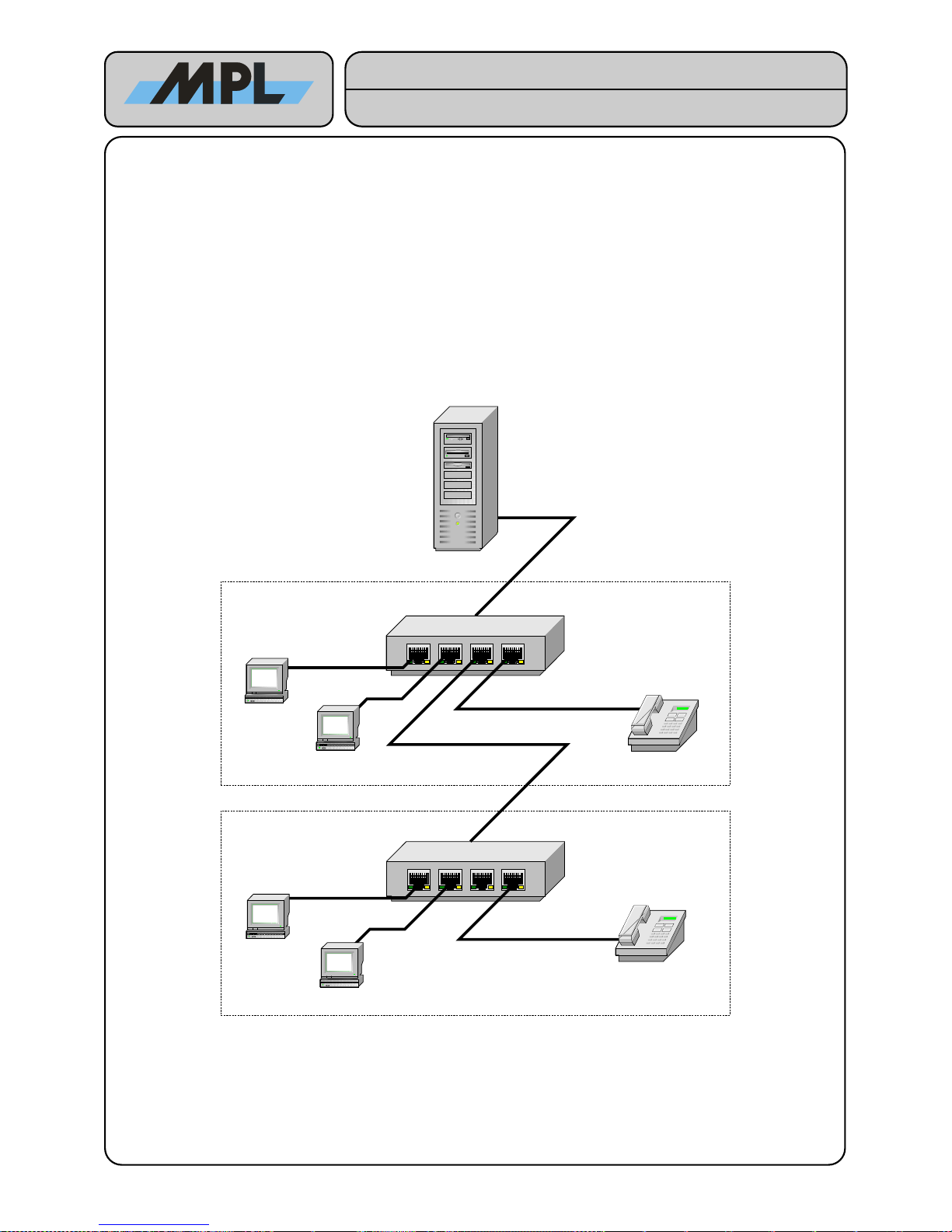
This example uses 3 VLANs:
● Production: Production 1 Workstation in Office 1, Production 2 Workstation in Office 2, and the
ServerRouter.
● Marketing: Marketing 1 Workstation in Office 1, Marketing 2 Workstation in Office 2, and the
Server/Router.
● VoIP: VoIP Phone 1 in Office 1 and VoIP Phone 2 Office 2 and will be routed on the Server/Router
2012 by MPL AG 26 MEH-10134-201 Rev. D
Figure 20: IEEE 802.1Q VLAN Example
MAGBES 1
Server / Router
MAGBES 2
Office 1
Office 2
Marketing 1
Production 1
VoIP Phone 1
Production 2
Marketing 2
VoIP Phone 2
High-Tech • Made in Switzerland
MAGBES
Technical Reference Manual
Page 27
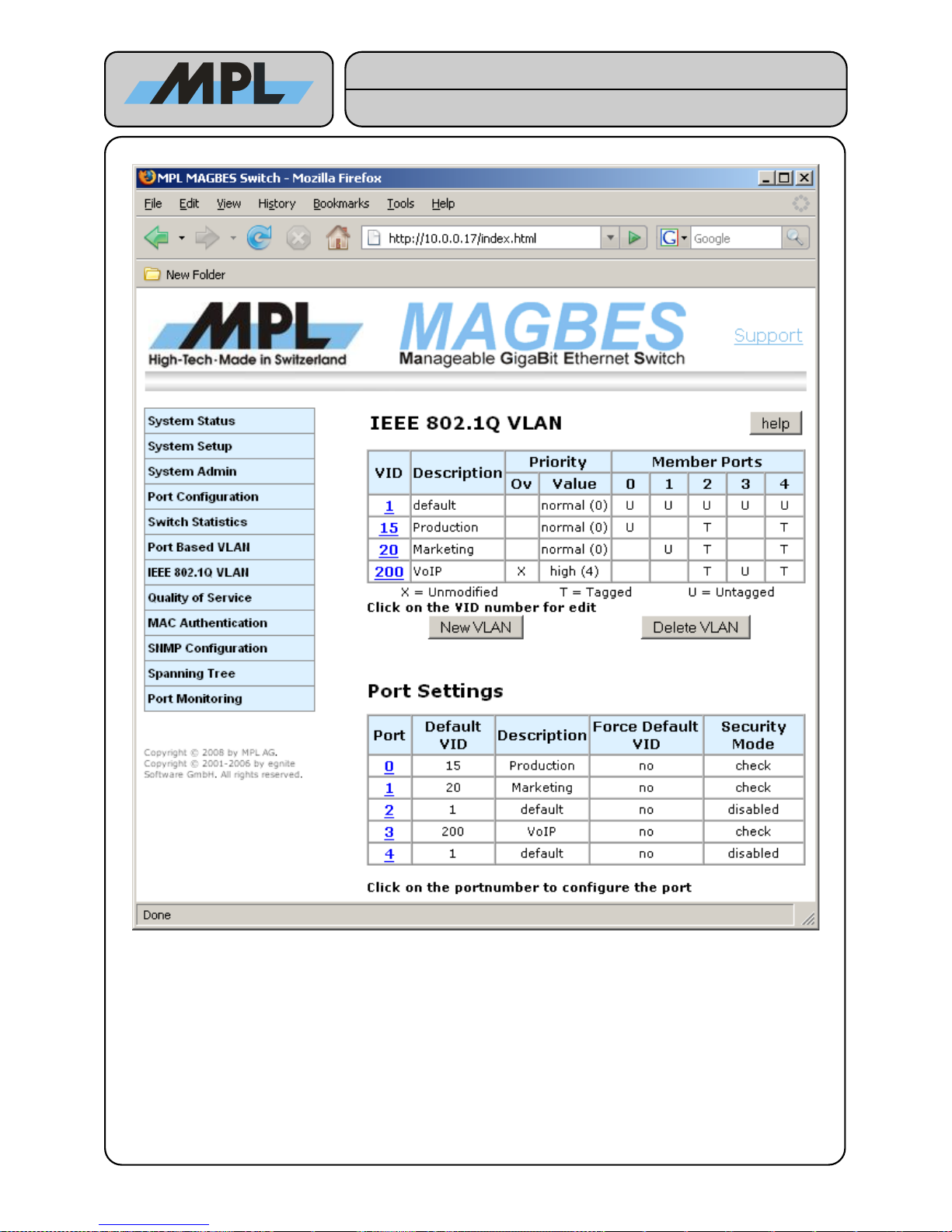
In this example MAGBES 1 and MAGBES 2 may be configured identically:
Production VLAN:
Server/Router to Production Workstation 1:
● Frame with VID 15 is sent from Server/Router to MAGBES 1 Port 4.
● MAGBES 1 forwards this frame to Port 0 (Production Workstation 1) and removes the VLAN
tag.
Production Workstation 1 to Server/Router:
● Production Workstation 1 sends an untagged Frame to MAGBES 1 Port 0.
● MAGBES 1 adds the VLAN tag with the VID 15 to the Frame and forwards this frame to Port 4
Server/Router.
2012 by MPL AG 27 MEH-10134-201 Rev. D
Figure 21: IEEE 802.1Q VLAN Example MAGBES Configuration
High-Tech • Made in Switzerland
MAGBES
Technical Reference Manual
Page 28
Server/Router to Production Workstation 2:
● Frame with VID 15 is sent from Server/Router to MAGBES 1 Port 4.
● MAGBES 1 forwards this frame to Port 2 MAGBES 2 with the VLAN tag.
● MAGBES 2 forwards this frame to Port 0 (Production Workstation 2) and removes the VLAN
tag.
Production Workstation 2 to Server/Router:
● Production Workstation 2 sends an untagged Frame to MAGBES 2 Port 0.
● MAGBES 2 adds the VLAN tag with the VID 15 to the Frame and forwards this frame to Port 4
MAGBES 1.
● MAGBES 1 forwards this frame with the VLAN tag to Port 4 Server/Router.
Production Workstation 1 to Production Workstation 2:
● Production Workstation 1 sends an untagged Frame to MAGBES 1 Port 0.
● MAGBES 1 adds the VLAN tag with the VID 15 to the Frame and forwards this frame to Port 2
MAGBES 2.
● MAGBES 2 forwards this frame to Port 0 (Production Workstation 2) and removes the VLAN
tag.
Marketing VLAN:
The Marketing VLAN works the same way as the Production VLAN.
VoIP VLAN:
The VoIP VLAN works also the same way, except that the Priority has been overwritten in order to have
a good Voice Quality.
4.4.4 Important Notes using IEEE 802.Q VLAN
When using IEEE 802.1Q VLAN the Port-Based VLAN on the MAGBES is still active. Please configure
the Port-Based VLAN to the default setting (All ports are member of the ID1 “default”), unless you use
the Port-Based VLAN for something special.
The Management CPU is member of the Management VLAN ID. To access the management functions,
the connection must be done either on a port with the default VID of the Management ID and must use
untagged Frames, or must ingress the MAGBES tagged with the Management VLAN ID.
2012 by MPL AG 28 MEH-10134-201 Rev. D
High-Tech • Made in Switzerland
MAGBES
Technical Reference Manual
Page 29
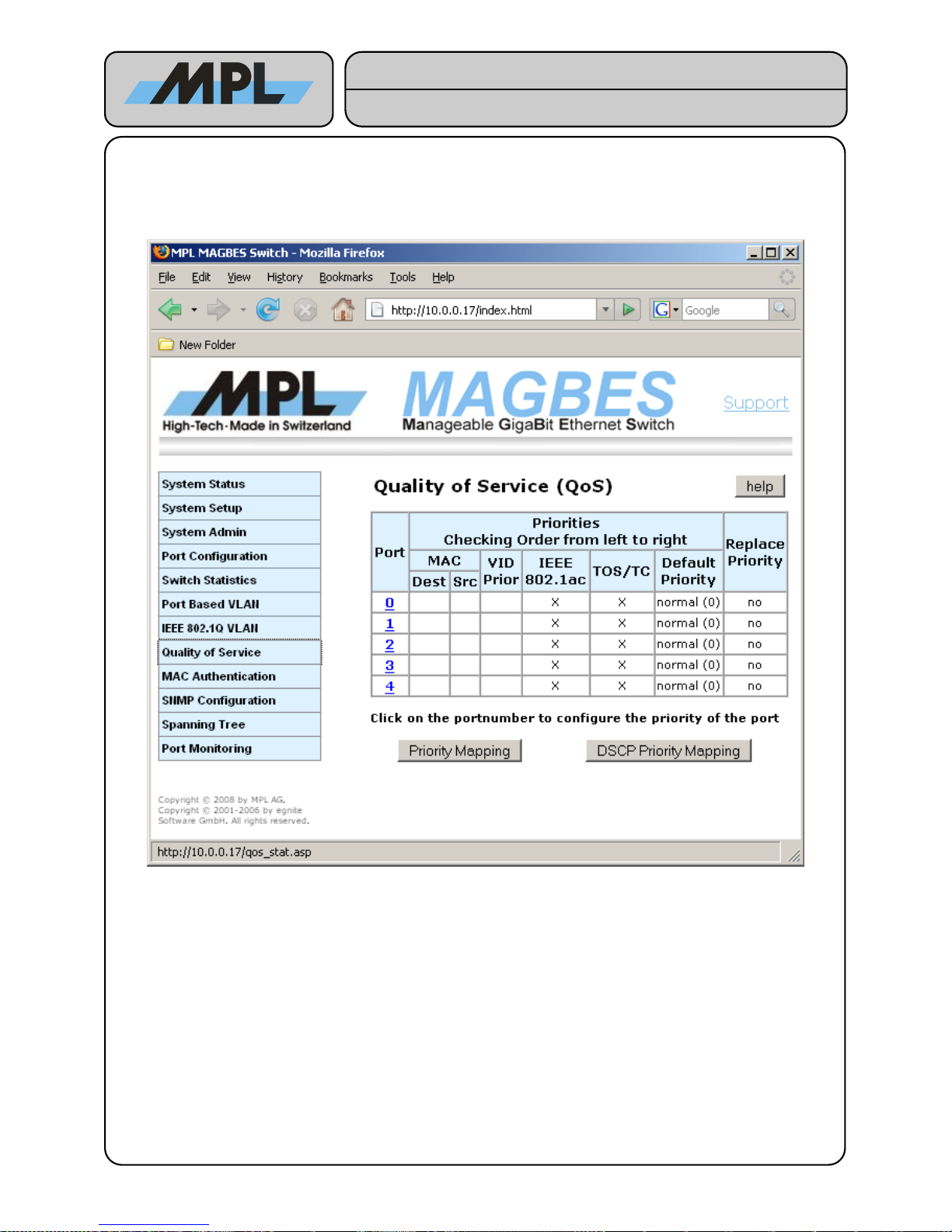
4.5 Quality Of Service (QoS)
The Quality of Service function is used to setup the MAGBES to treat the Ethernet traffic according the type of
the frames. This can be achieved by setting priorities to the frames.
MAGBES supports several different priority settings:
The priorities are checked on the ingress frames in following order:
Destination MAC: If a frame ingress on this port with a Destination MAC Address, which is found in the
Address Translating Unit (see MAC Authentication) and the entry in the Address Translating
Unit is marked as Overwrite Priority, the priority of the entry will be used for this frame.
Source MAC: If a frame ingress on this port with a Source MAC Address, which is found in the Address
Translating Unit (see MAC Authentication) and the entry in the Address Translating Unit is
marked as Overwrite Priority, the priority of the entry will be used for this frame.
VID Priority: If a frame ingress on this port with a IEEE 802.1Q VLAN tag, or if the ports default VLAN ID is
found in the VLAN Table and marked as Overwrite Priority, the priority of the VLAN ID will be
used for this frame.
IEEE 802.1ac: If a frame ingress on this port with a IEEE 802.1ac tag, the priority found in this tag will be used.
ToS/TC: If the Frame is a IPv4 the “Type of Service” (TOS/DiffServ) field, or if the Frame is a Ipv6 the
“Traffic Class” (TC) field, is used to determine the priority of the frame.
Default Priority: If none of the above priorities are enabled the frame will be used with the ports default priority.
2012 by MPL AG 29 MEH-10134-201 Rev. D
Figure 22: Quality Of Service (QoS)
High-Tech • Made in Switzerland
MAGBES
Technical Reference Manual
Page 30
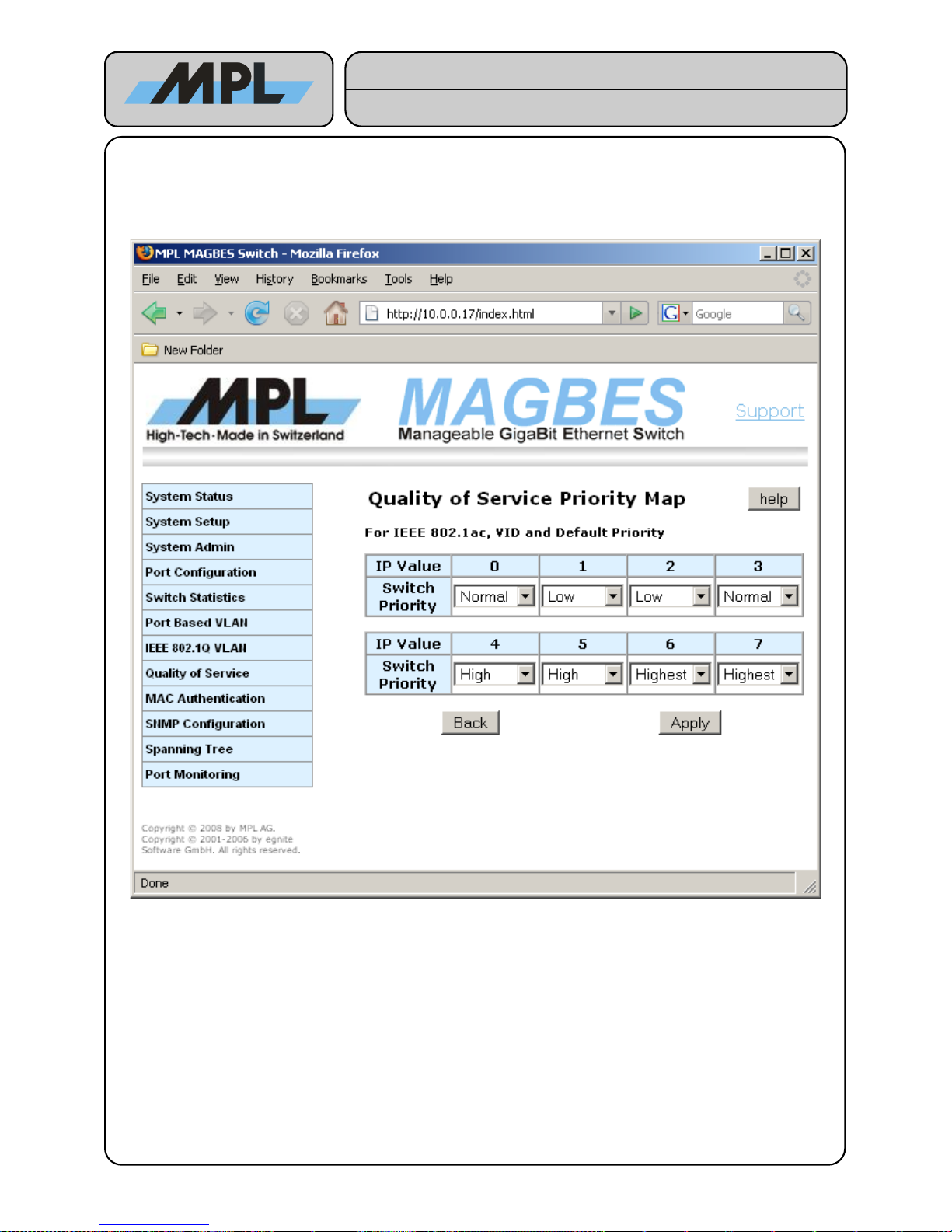
4.5.1 Priority Mapping for MAC, VID, IEEE 802.1ac and Default Priority
Since the MAGBES supports only 4 internal priorities, the 8 priorities found in the Destination MAC, Source
MAC, VID Priority or IEEE 802.1ac needs to be mapped to 4 internal priorities.
This can be done by clicking on the “Priority Mapping” Button:
IP Value: This is the value found either in the Destination MAC, Source MAC, VID Priority, IEEE 802.1ac,
or Default Priority.
Switch Priority: This is the priority with which the frame will be treated in the MAGBES. The Frame will egress
the MAGBES with the same priority settings it ingresses, unless “Replace Priority” is enabled.
2012 by MPL AG 30 MEH-10134-201 Rev. D
Figure 23: Priority Mapping for MAC, VID, IEEE 802.1ac and Default Priority
High-Tech • Made in Switzerland
MAGBES
Technical Reference Manual
Page 31
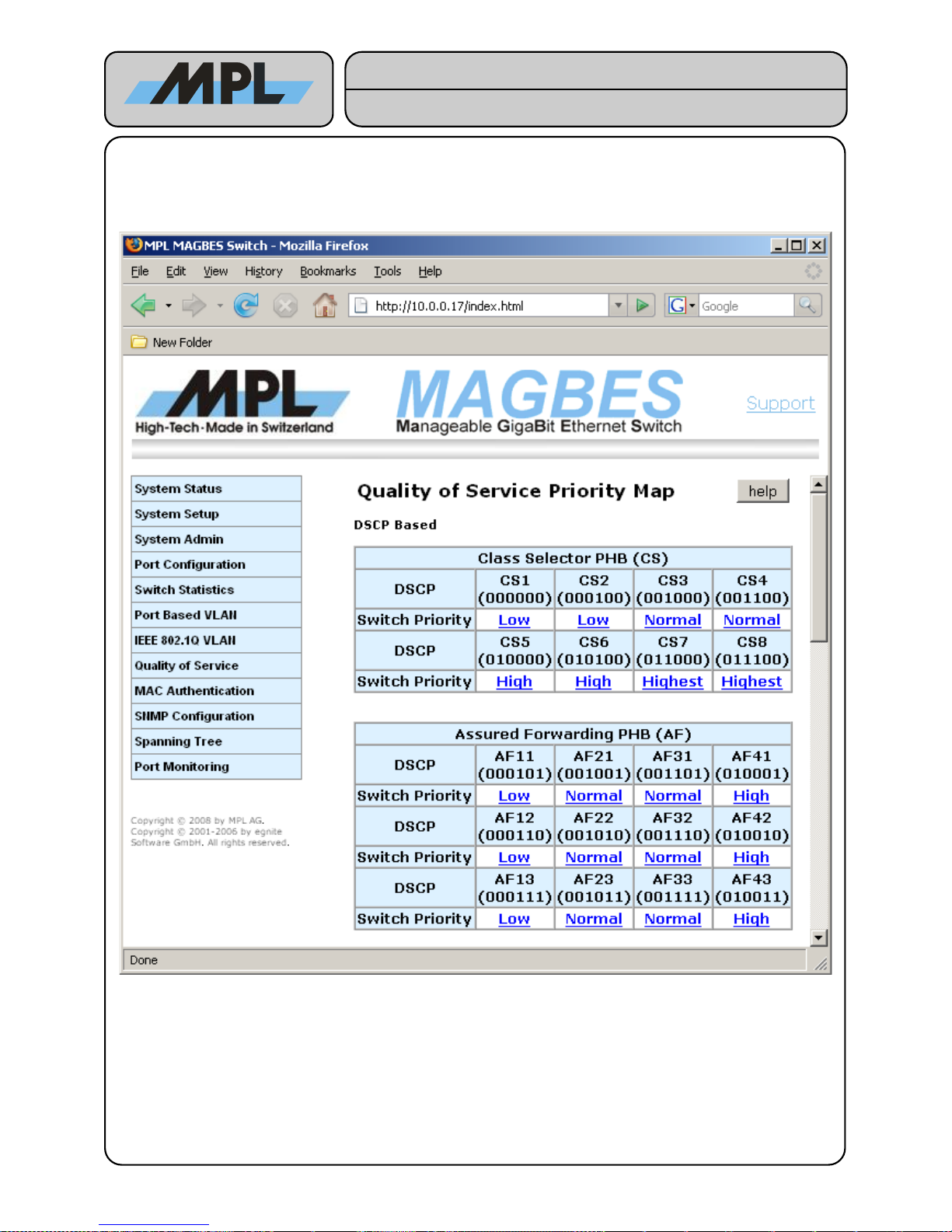
4.5.2 Priority Mapping for ToS / TC and DSCP
The IPv4 ToC / IPv6 TC supports 64 priorities called “Differentiated Services Code Point (DSCP)”, which is
divided into the Class Selector and the Drop Precedence. The mapping from the DSCP to the 4 internal
priorities can be modified by pressing the button “DCSP Mapping”
2012 by MPL AG 31 MEH-10134-201 Rev. D
Figure 24: Priority Mapping for ToS / TC Differentiated Services Code Point (DSCP)
High-Tech • Made in Switzerland
MAGBES
Technical Reference Manual
Page 32
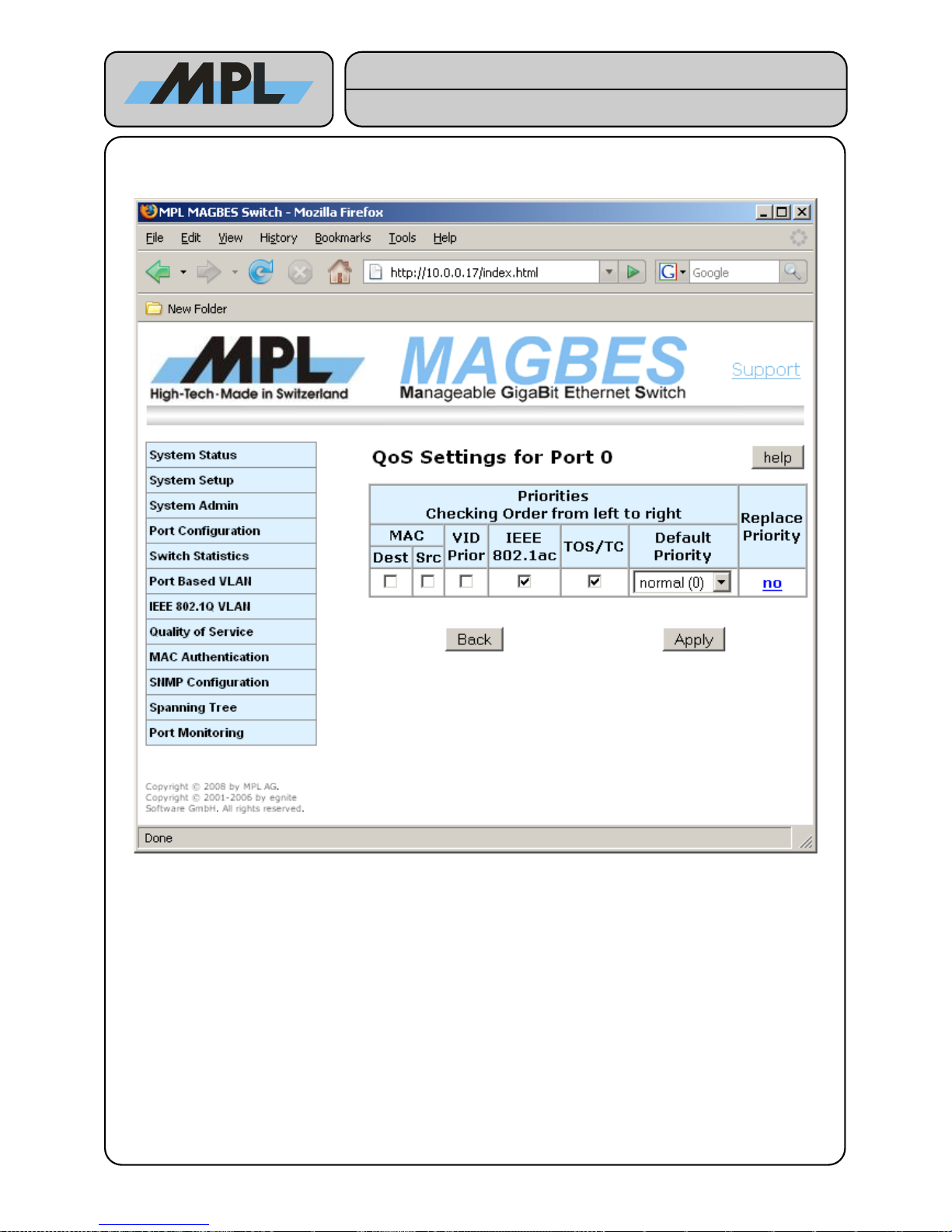
4.5.3 Replace Priority
The MAGBES supports the replacing of priority on a per Port basis
By clicking on the Replace Priority entry it is possible to configure MAGBES to egress a frame with another
priority as the frame was received.
2012 by MPL AG 32 MEH-10134-201 Rev. D
Figure 25: Port Settings for QoS
High-Tech • Made in Switzerland
MAGBES
Technical Reference Manual
Page 33
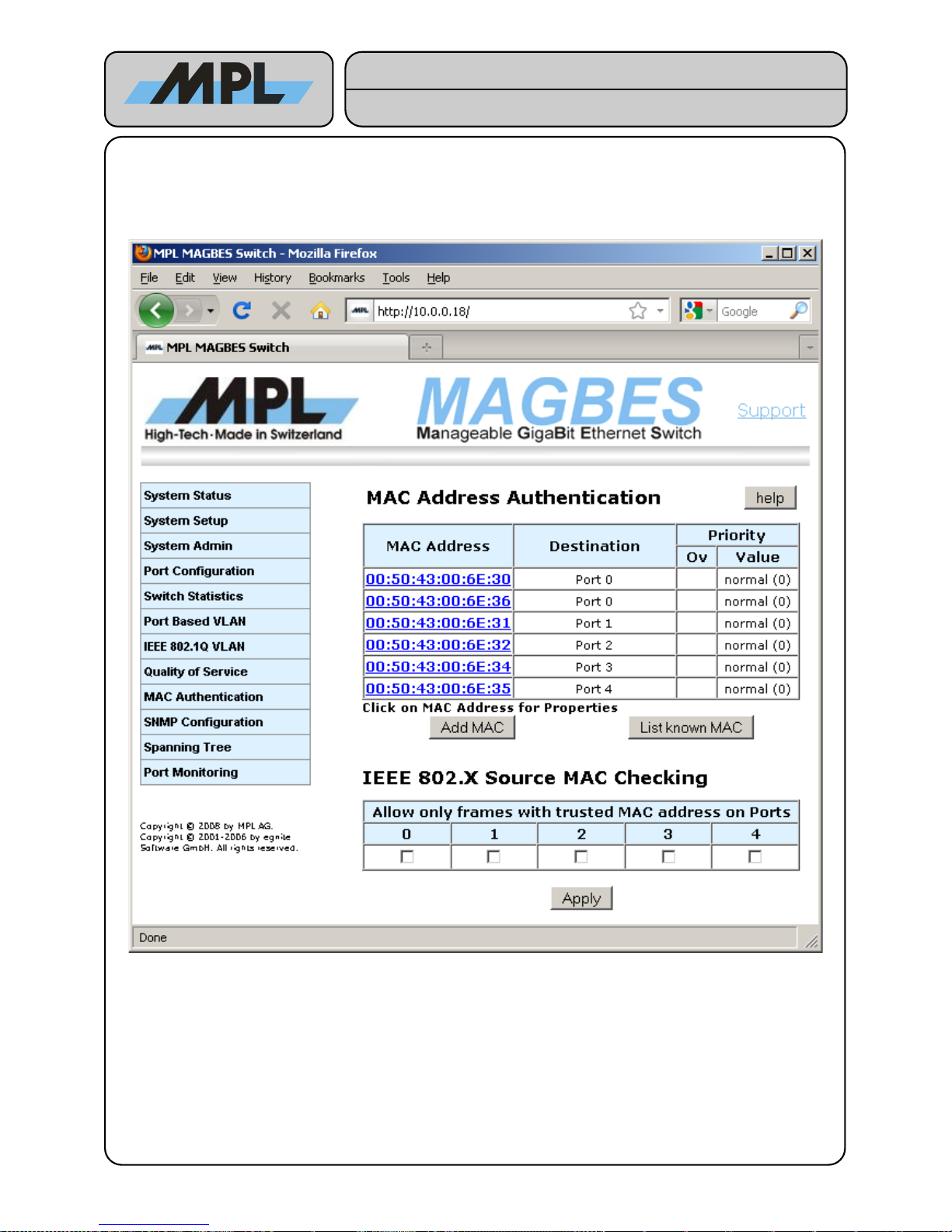
4.6 MAC Authentication
MAGBES supports MAC Authentication which can be used to reject any frame from a particular port, allowing
only a particular MAC address on a port, and changing the priority of a frame with a particular MAC address.
With the Button “Add MAC”, a new MAC Address can be loaded into the MAGBES. The MAC Address will be
stored into the Address Translating Unit as static (not aging) entry.
The Button “List known MAC” shows all MAC address (learned and statically added) on port based. This
allows to add a MAC address to the internal address base by click on the MAC address.
Click on the MAC address entry to change the destination and/or priority or completely delete the MAC address.
2012 by MPL AG 33 MEH-10134-201 Rev. D
Figure 26: MAC Authentication
High-Tech • Made in Switzerland
MAGBES
Technical Reference Manual
Page 34
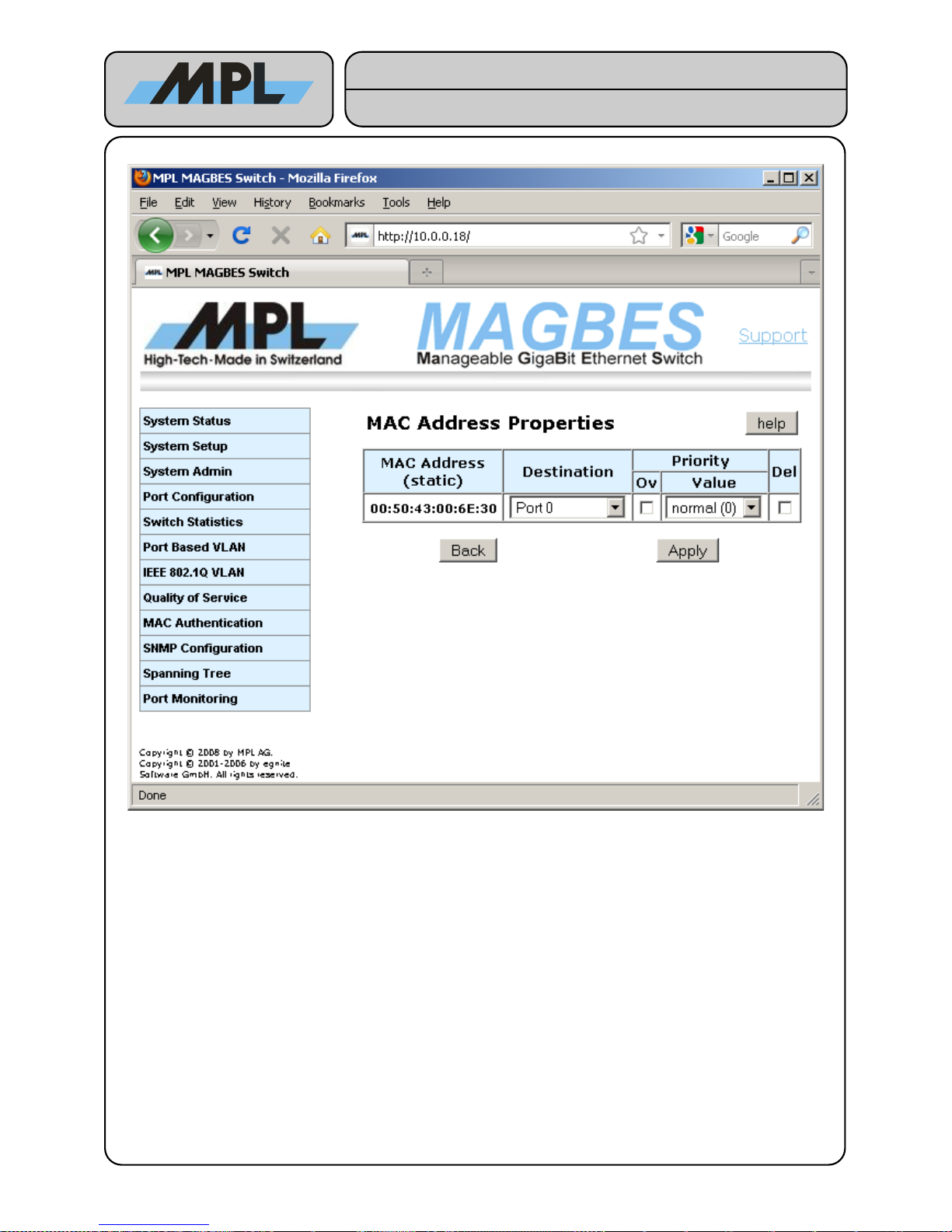
After entering a MAC address the properties have to be set:
Destination: The port where as the Frame with this Destination MAC address will egress. If it is marked as
“Unauthorized”, all Frames with this MAC address will be discarded.
Priority: If Overwrite (Ov) is set and the Source or Destination MAC address priority is enabled in the
Qos settings, the Frame will be treated with the priority selected in the Value field.
Del: Allows to delete the MAC address from the static MAC address base.
2012 by MPL AG 34 MEH-10134-201 Rev. D
Figure 27: MAC Address Properties
High-Tech • Made in Switzerland
MAGBES
Technical Reference Manual
Page 35
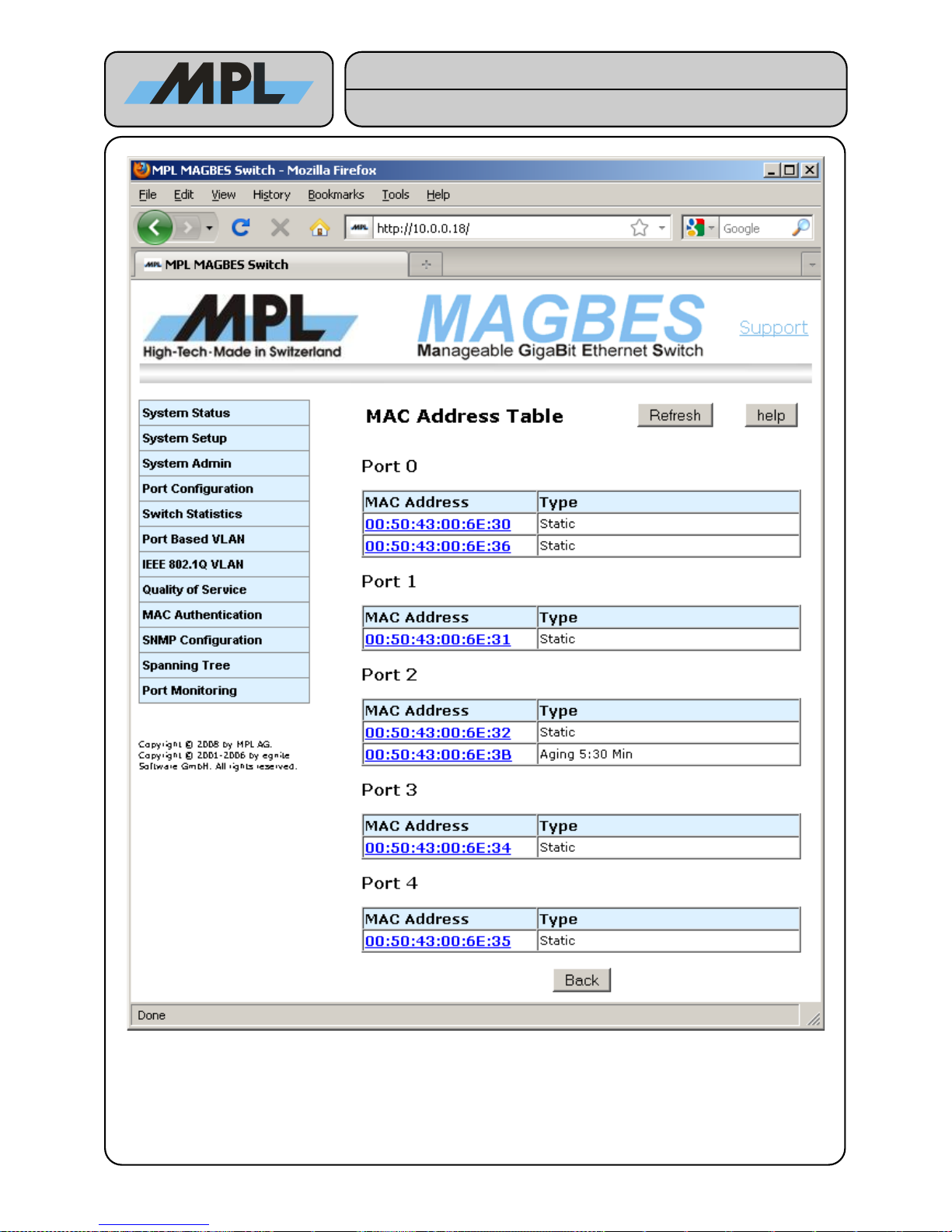
The “List known MAC” Page lists all MAC address (learned and static) on a port based table.
MAC Address: The address which is known on this port.
Type: Describes the type of the MAC address. Either “Static”, if added in internal address database,
or “Aging” if the MAC address is dynamic (automatic learned by the switch). By clicking on the
MAC address the properties page will be shown.
2012 by MPL AG 35 MEH-10134-201 Rev. D
Figure 28: List known MAC address page
High-Tech • Made in Switzerland
MAGBES
Technical Reference Manual
Page 36
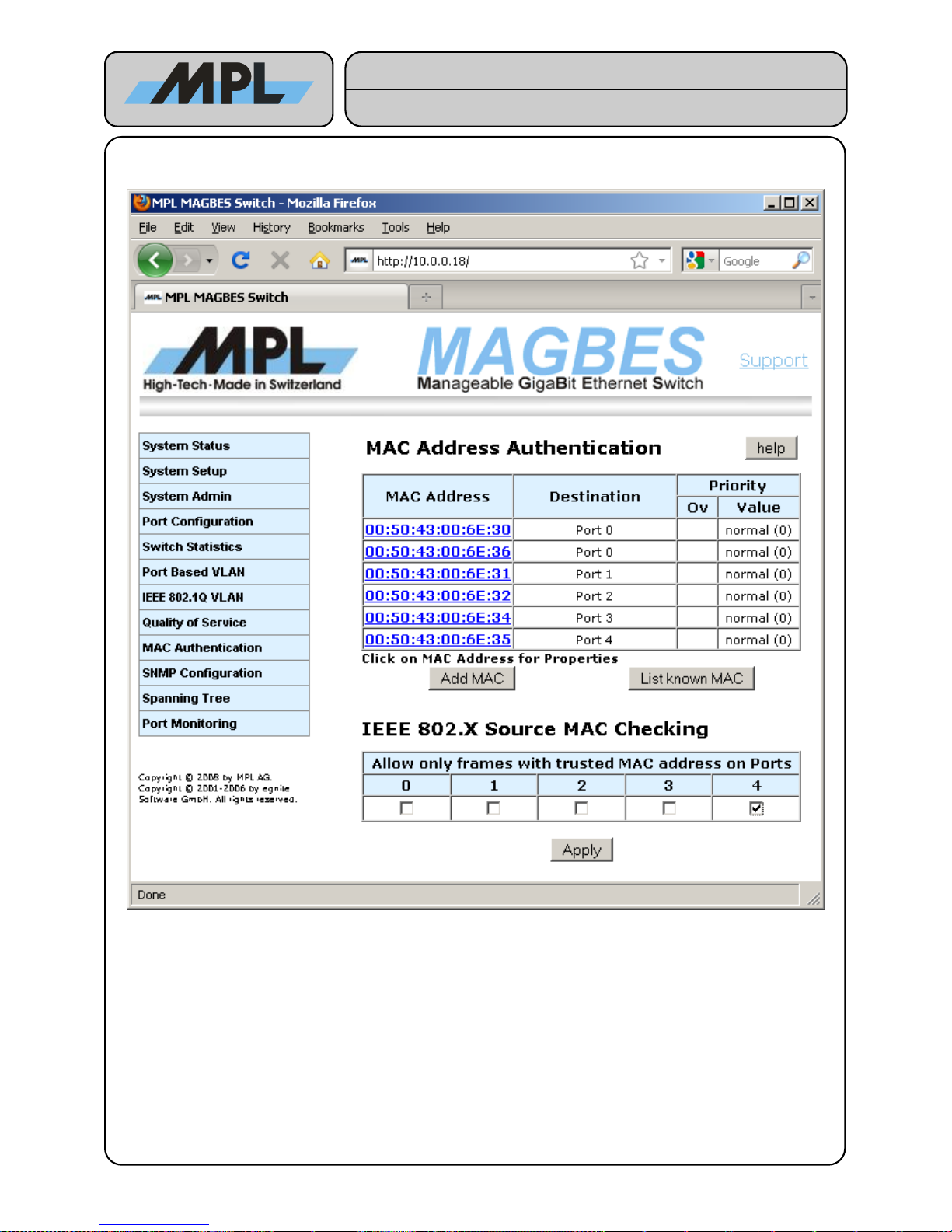
4.7 IEEE 802.1X Source MAC checking
Selecting a port in the table “IEEE 802.X Source MAC Checking” allows only authorized MAC address (i.e.
MAC address in the internal static database) to ingress and egress on this port.
The setting above allows only frames with the MAC address 00:50:43:00:6E:35 to ingress and egress on Port 4.
2012 by MPL AG 36 MEH-10134-201 Rev. D
Figure 29: IEEE 802.1X Source MAC checking
High-Tech • Made in Switzerland
MAGBES
Technical Reference Manual
Page 37
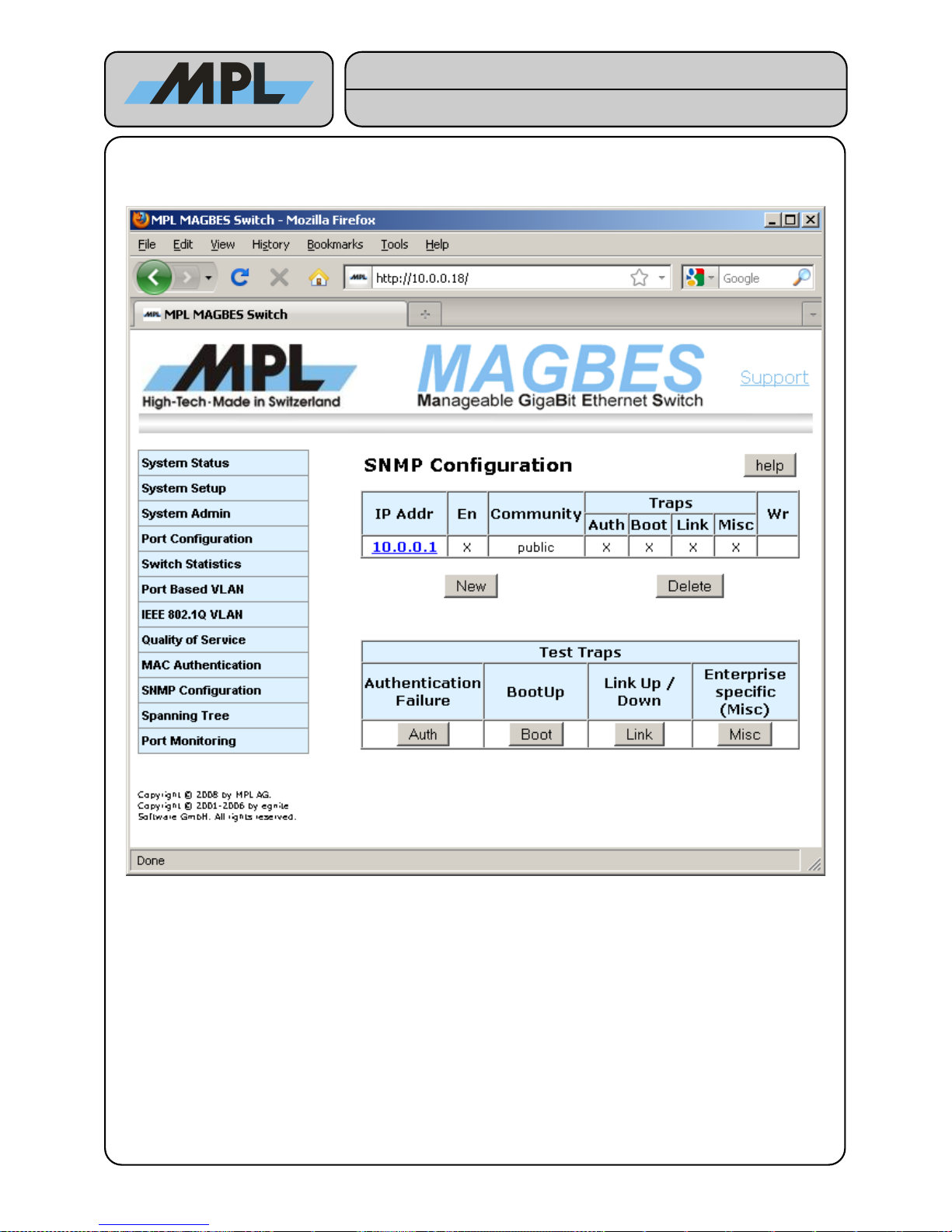
4.8 SNMP Configuration
The “Simple Network Management Protocol” allows to read and set some configuration parameters.
IP Addr: The IP Address of the host where a SNMP configuration tool is running.
En: If marked, the IP address is valid
Community: The MAGBES supports SNMPv1 only. This string is used to distinguish between different users
with different rights. Normally the string “public” is used for Read Only access, and the string
“private” is used for Read/Write access.
Traps: If enabled SNMPv1 Traps packets will be sent to the IP Address, if one of the events has been
detected. The Enterprise specific (Misc) trap is used for SFP Diagnostics Warnings / Alarms
(for more information see 4.1.2.1 SFP Diagnostic)
With the Test Traps you can simulate the traps events.
2012 by MPL AG 37 MEH-10134-201 Rev. D
Figure 30: SNMP Configuration
High-Tech • Made in Switzerland
MAGBES
Technical Reference Manual
Page 38
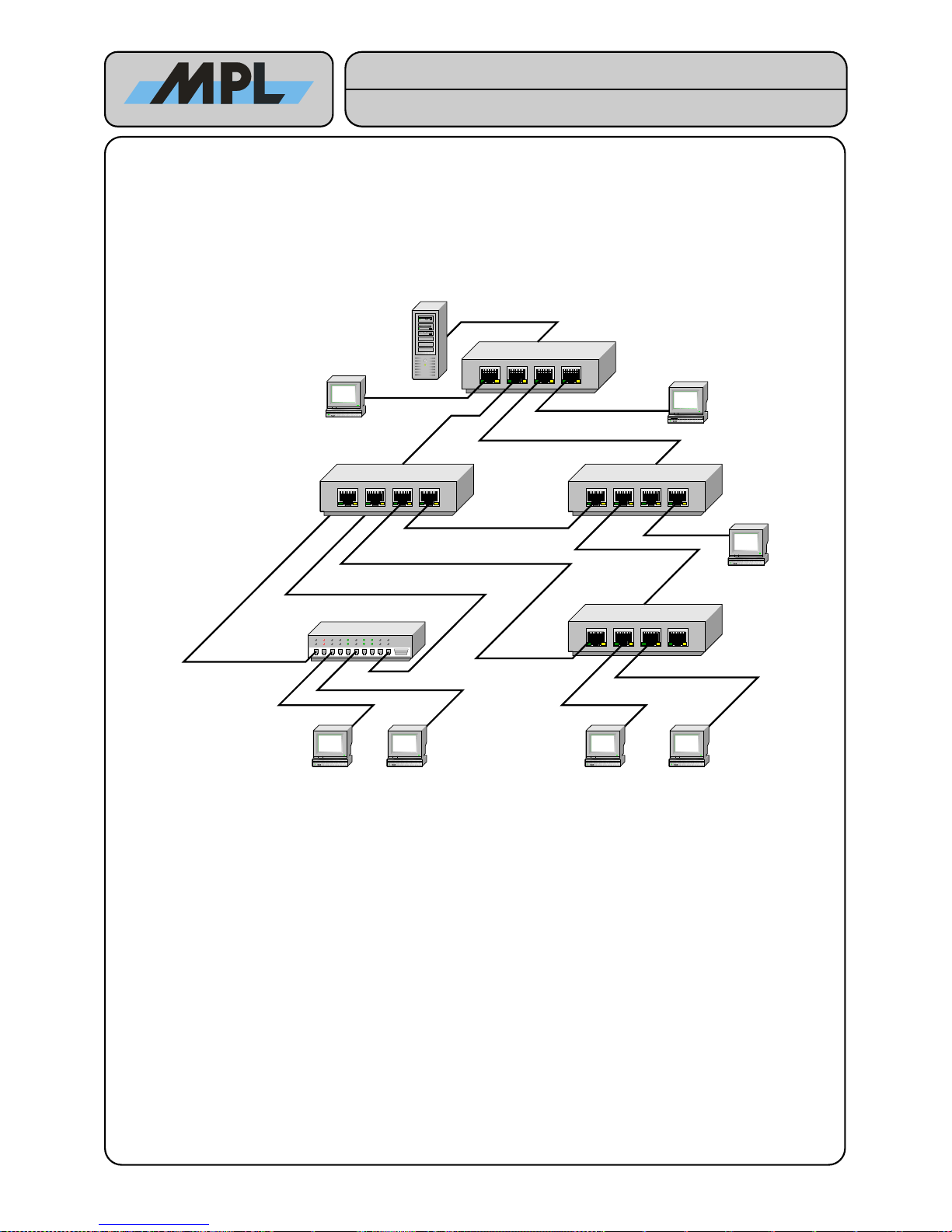
4.9 Spanning Tree Protocol
The Spanning Tree Protocol (STP) can be used for Network configuration which needs a high reliability.
In a normal Network configuration no loops must exists, otherwise a broadcast storm will occur and the network
will become unusable. This means that it is not possible to have redundancy links between the nodes of the
Network.
4.9.1 Spanning Tree Example
In this example Network you will have a broadcast storm unless you have enabled the STP. The STP will elect a
“Root Bridge” and enables only those links which have the smallest “Path Cost” to the “Root Bridge”.
2012 by MPL AG 38 MEH-10134-201 Rev. D
Figure 31: Spanning Tree Example
Server
Workstation
Workstation
Workstation W orkstation Workstation Workstation
Workstation
MAGBES 1
MAGBES 2
MAGBES 3
MAGBES 4
Unmanaged Switch
High-Tech • Made in Switzerland
MAGBES
Technical Reference Manual
Page 39
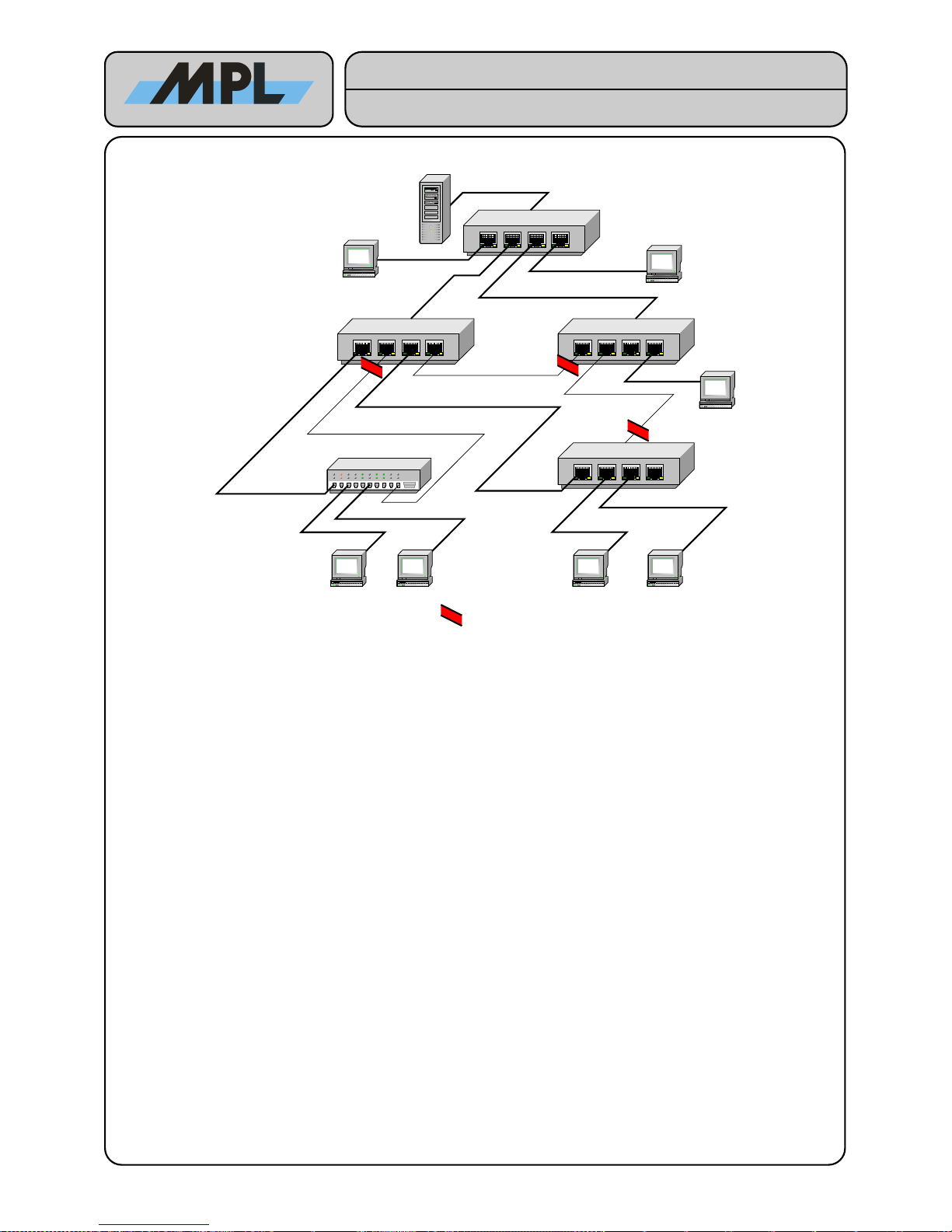
Assuming the MAGBES 1 is the “Root Bridge” the network would look as follows:
Now the Network is fully operable. The STP has disabled the forwarding of Frames on the Ports that cause
loops. MAGBES supports the “Rapid Spanning Tree Protocol” which assigns roles to the ports:
● Designated Port: A port that is normally forwarding and not a “Root Port”. If no STP device is attached
to the Port, which means it is connected to an endpoint device such as a Workstation, it is also an
“Edge Port”.
● Root Port: The only port of a device that has the lowest Path Cost to the Root Bridge. This port is
forwarding.
● Alternate Root Port: Ports that provides also a Path to the Root Bridge but with higher Path Cost.
These ports are listening.
● Backup Port: Ports that is connected to another port of the same device. These ports are listening.
MAGBES 1: All ports are Designated Ports. Ports 0, 3, and 4 are also Edge Ports.
MAGBES 2: Ports 0, 2, and 3 are Designated Ports. Port 4 is the Root Port. Port 1 is a Backup Port.
MAGBES 3: Ports 1 and 3 are Designated Ports. Port 4 is the Root Port. Port 0 is an Alternate Root Port.
MAGBES 4: Ports 1 and 2 are Designated Ports. Port 0 is the Root Port. Port 4 is an Alternate Root Port.
2012 by MPL AG 39 MEH-10134-201 Rev. D
Figure 32: Spanning Tree Example, STP on
Server
Workstation
Workstation
Workstation Workstation Workstation Workstation
Workstation
MAGBES 1
MAGBES 2
MAGBES 3
MAGBES 4
Unmanaged Switch
= Port is not forwarding Frames
High-Tech • Made in Switzerland
MAGBES
Technical Reference Manual
Page 40
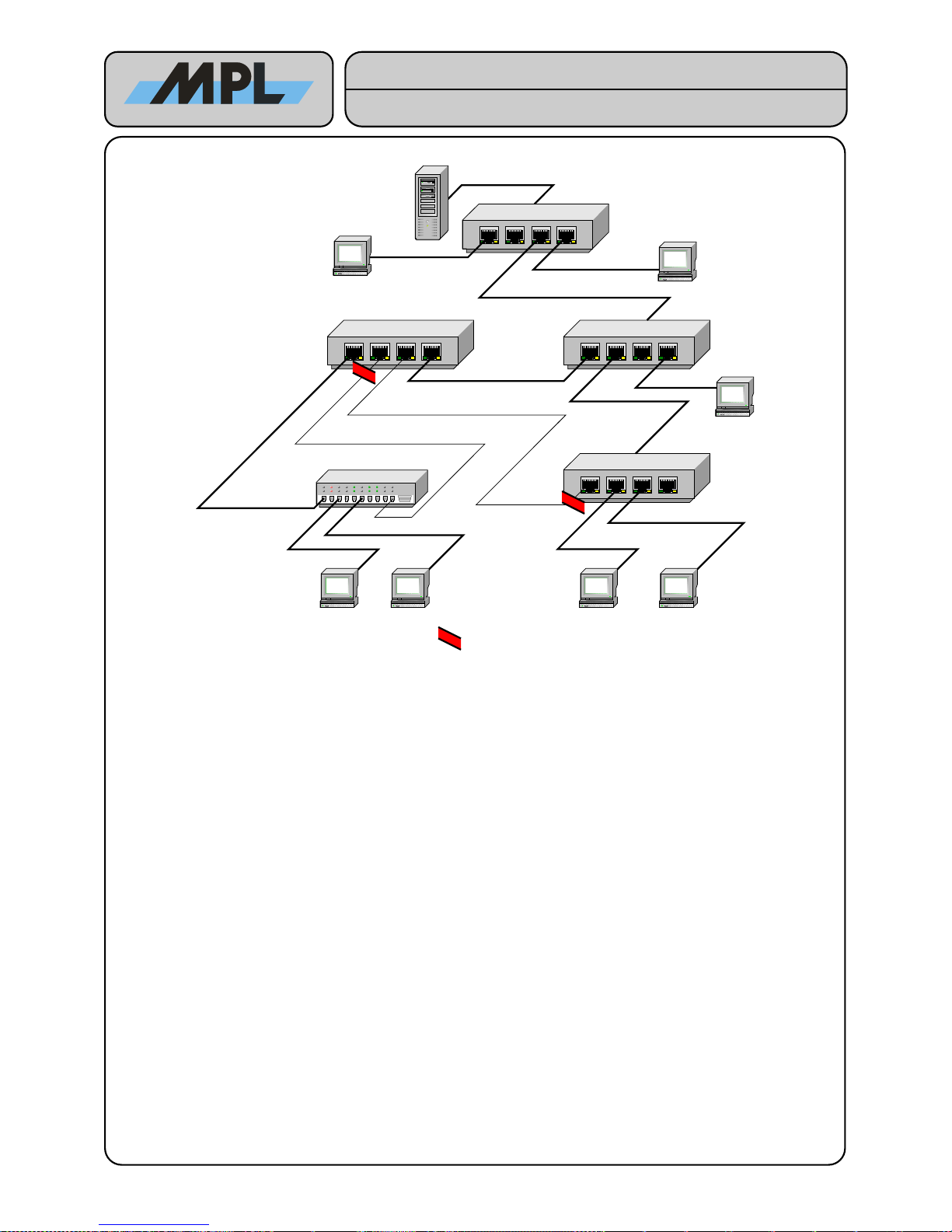
Assuming the link From MAGBES 1 to MAGBES 2 fails:
MAGBES-2 decides to use the Port4 as new Root Port and lets the MAGBES 3 know. MAGBES 3 changes the
Port Role of Port 0 from Alternate Root Port to Designated Port.
MAGBES 4 decides to use the Alternate Root Port 4 as new Root Port and sets the old Root Port 0 to the
Alternate Root Port.
2012 by MPL AG 40 MEH-10134-201 Rev. D
Server
Workstation
Workstation
Workstation Workstation Workstation Workstation
Workstation
MAGBES 1
MAGBES 2
MAGBES 3
MAGBES 4
Unmanaged Switch
= Port is not forwarding Frames
High-Tech • Made in Switzerland
MAGBES
Technical Reference Manual
Page 41
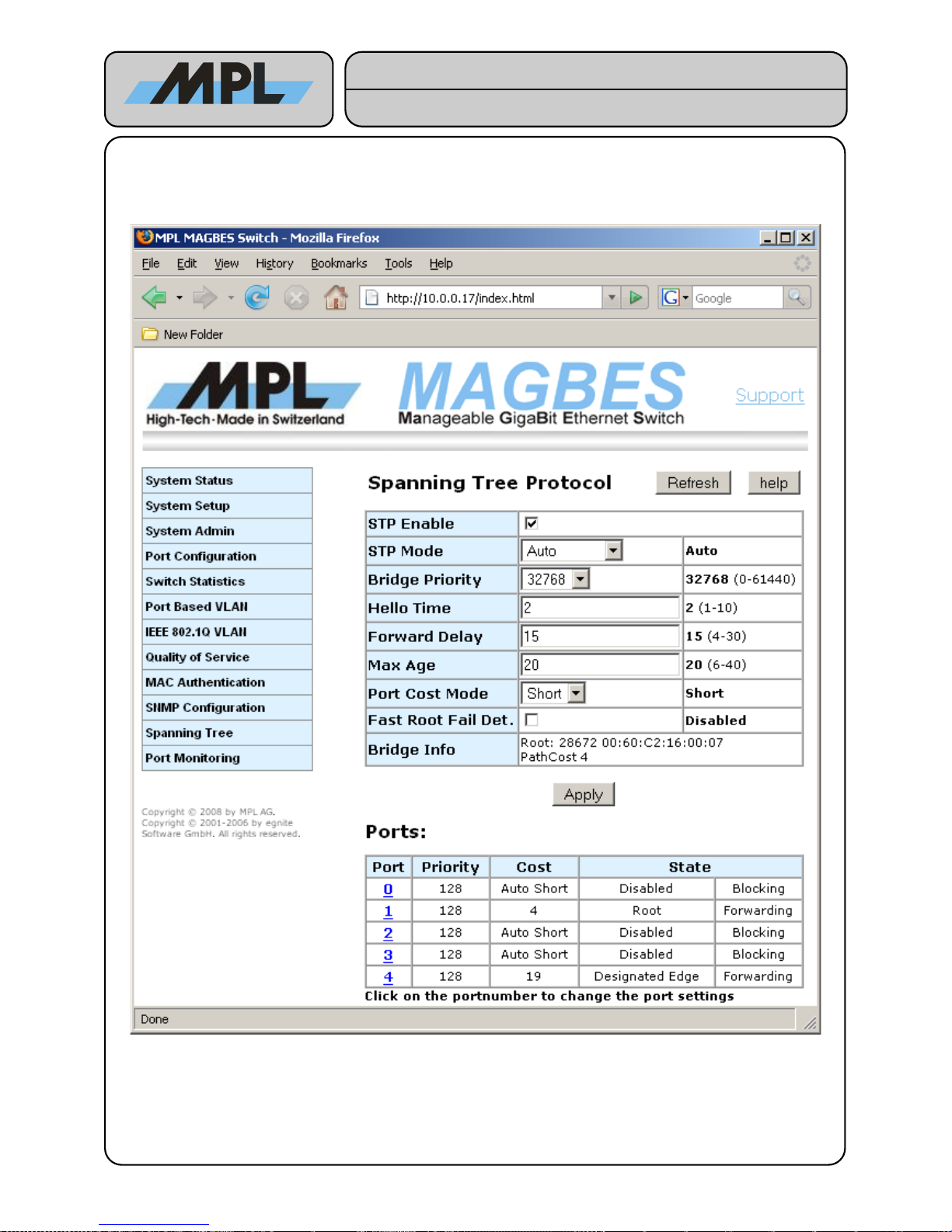
4.10 Configuring Spanning Tree Protocol
4.10.1 Bridge Configuration
2012 by MPL AG 41 MEH-10134-201 Rev. D
Figure 33: STP Bridge Configuration
High-Tech • Made in Switzerland
MAGBES
Technical Reference Manual
Page 42
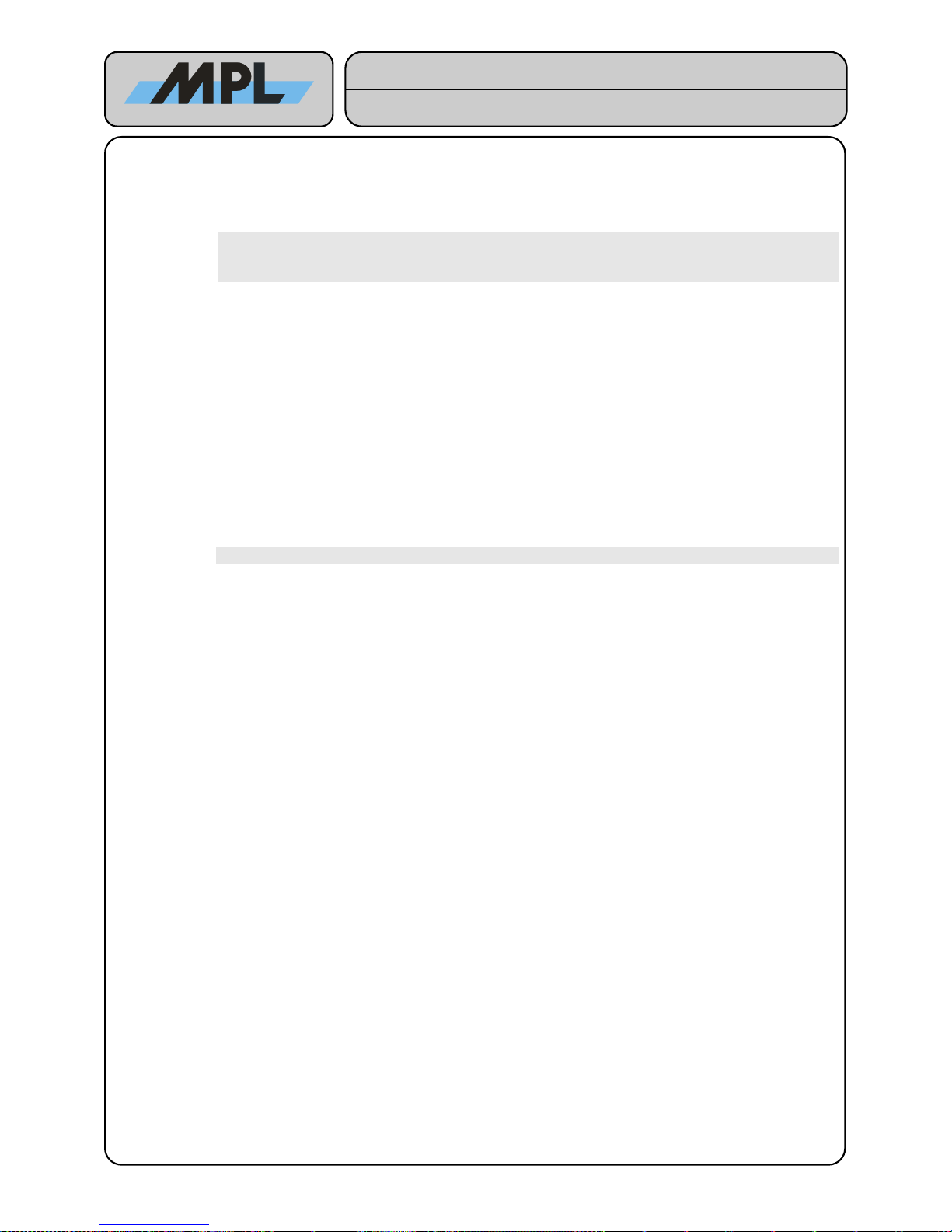
4.10.1.1 Bridge parameters
STP Enable: Enables / Disables the Spanning Tree Protocol. Please note that if you disable the STP all
ports will go immediately to forwarding. This can lead to forwarding loops, which may lead to an
unusable network.
If you disable the Spanning Tree Protocol make sure that no forwarding loops can be
created if all ports go to forwarding. If you have any blocked ports, it may be a good idea
to disable them on the “Port Configuration” page before disable the STP.
STP Mode: Select the STP Version. Choices are Auto, Force STP.
Auto uses the RSTP (Rapid Spanning Tree Protocol), if the neighbor bridge supports RSTP. If
the neighbor bridge supports STP only, only the port which is connected to the neighbor bridge
will use the STP protocol.
Force STP uses the STP on all ports.
Bridge Priority: Select the priority of the Bridge from 0 to 61440 in steps of 4096. The lower the value the
higher the priority.
Hello Time: The Time in seconds Spanning Tree information will be exchanged between the bridges.
Forward Delay: The Time in seconds the port will go from blocking to forwarding if the port uses the STP. This
parameter does not affect reconfiguration times on ports using RSTP.
Max Age: This value is the maximal age of the Spanning Tree Message if the bridge is the root bridge.
Port Cost Mode: Bridges supporting STP only uses a 16Bit (Short) value as port cost. The IEEE802.1D
specifies a 32Bit (Long) value. The recommended value is short to be compatible with the older
bridges.
Please make sure that the “Port Cost Mode” is the same on all Bridges in the network.
Fast Root Fail Det: If the MAGBES detects a Root Bridge Failure it will accelerate the outdating of the
information of the failing Root Bridge. This option is not according the IEEE802.1D Standard.
Bridge Info: Shows the current Root Bridge ID along with the Path cost. Please note that this information
may not immediately change after clicking “Apply”. Click on “Refresh” to get the actual
information.
The Ports table informs about the states of the ports:
● Priority shows the selected Port priority for the port.
● Cost: displays the actual port cost if the port is enabled and active. If the port is not active (no link), it
shows how the port cost will be calculated when the port becomes active.
● State: Shows the actual role and state of the port.
By clicking on the port numbers you can configure the parameters per port.
2012 by MPL AG 42 MEH-10134-201 Rev. D
High-Tech • Made in Switzerland
MAGBES
Technical Reference Manual
Page 43
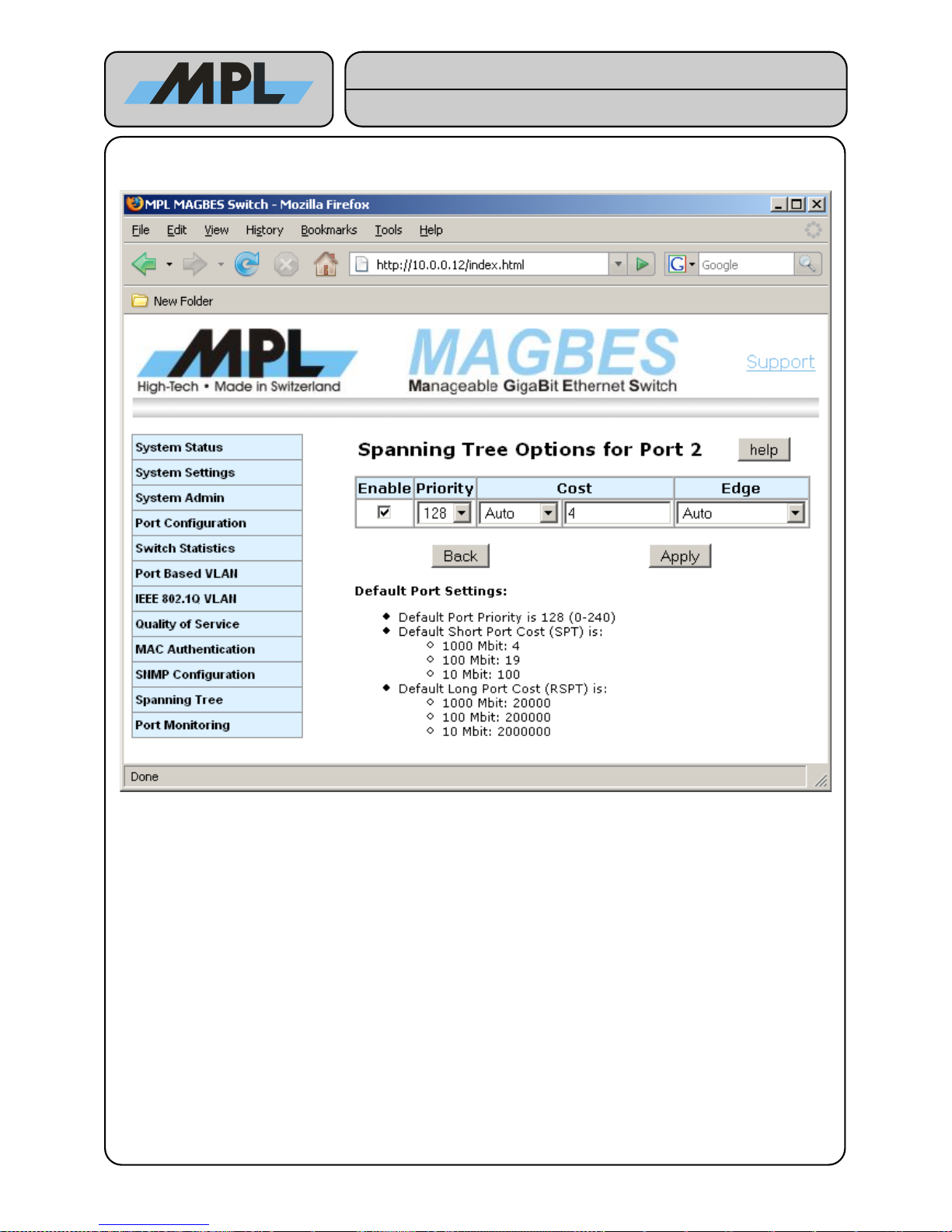
4.10.2 STP Port Options
4.10.2.1 STP Port Parameters
Enable: Enables Port for STP. If the port is disabled it will be set to blocked and no Frames will be
forwarded.
Priority: Port Priority for this port. Can be a value between 0 and 240 in 16 steps. The lower the value
the higher the priority.
Cost: Either Auto or Manual. If set to Auto the MAGBES calculates the Port Cost according the
detected Speed. If set to Manual the Value will be taken.
Edge: One of the following choices:
● Auto: MAGBES will automatic detect if the port is an Edge Port
● Force Edge: The Port will be forced to an Edge Port.
● Guarded Edge: The Port will be forced to an Edge Port, and every received STP
message will be discarded.
● No Edge: The port will be forced to be No Edge Port.
2012 by MPL AG 43 MEH-10134-201 Rev. D
Figure 34: STP Port Options
High-Tech • Made in Switzerland
MAGBES
Technical Reference Manual
Page 44
4.10.3 STP Configuration Parameters
To get a stable loop free network it may be necessary to adjust some of the parameters of the STP. The STP
will work without a modification of a parameter, but the resulting Spanning Tree may not make much sense.
Since you know your network topology, it is up to you to modify some parameters to get a Spanning Tree which
makes sense.
4.10.3.1 Root Bridge selection
The first thing is that you select the Root Bridge. Since the Bridge with the lowest ID will be elected as Root
Bridge you can adjust the Bridge Priority of this bridge. A good value for the Root Bridge Priority is 8192.
4.10.3.2 Alternate Root Bridge Selection
You may also select an “alternate Root Bridge”, i. e. a Bridge which takes over the job of the Root Bridge if the
old Root Bridge fails. Adjust the Bridge Priority to a value of 16348.
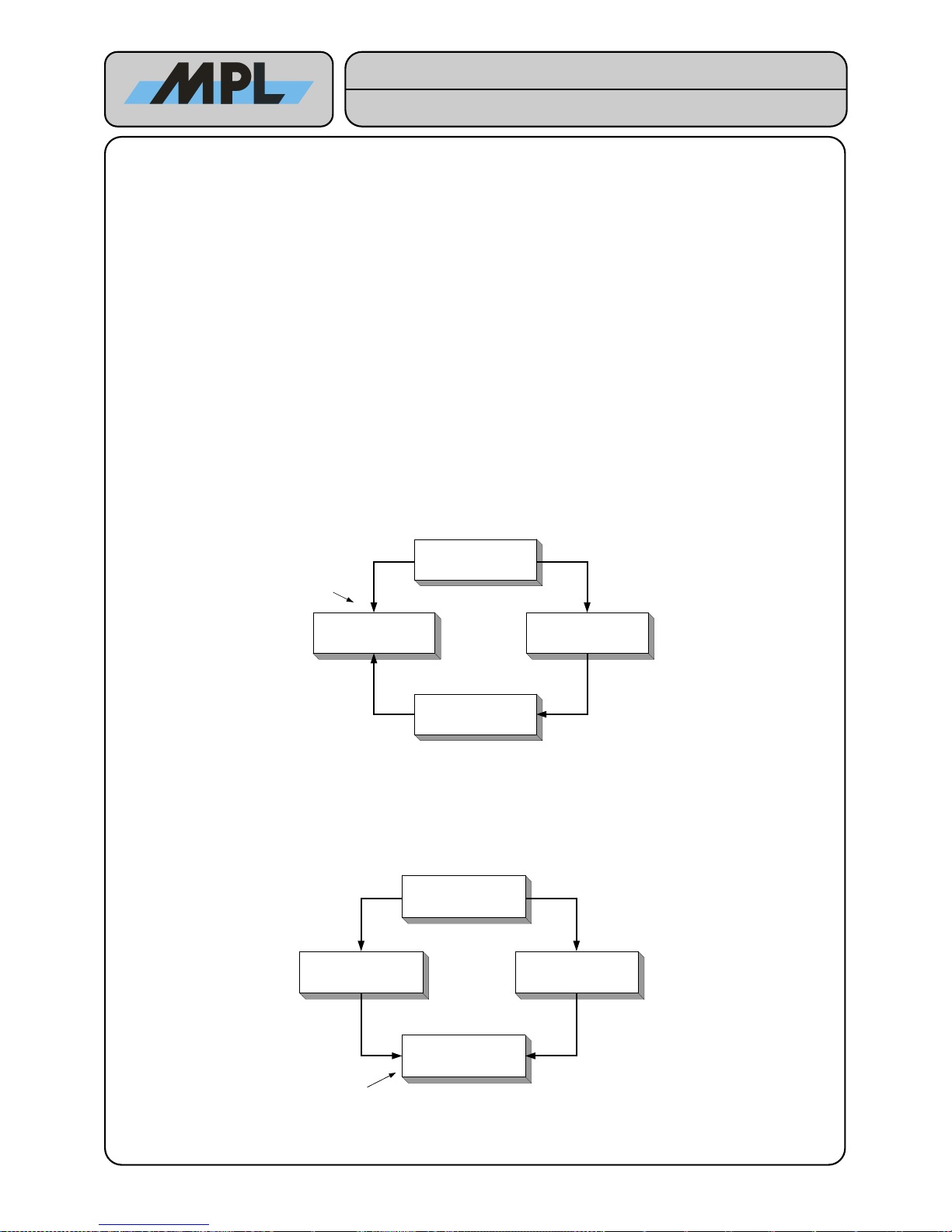
4.10.3.3 Path Modification
The Path to the Root Bridge that the STP calculates, is based on the lowest Root Path Cost. This Path may
make sense or not. If you like to changes the Path it is important to know how these Paths are calculated.
The Root Path Cost will be updated on every incoming STP message by adding the Port Cost to it.
If the received Root ID (Bridge Priority and MAC Address of the Root Bridge) on 2 or more ports is the same,
the one with the smallest Root Path Cost will be selected as root port. Example:
Since the Path cost on MAGBES 2 P1 is smaller than the one of P4, MAGBES 2 select P1 as Root Port. By
changing the Port Cost on MAGBES 2 P1 to 16 (Port Cost: Manual 16), MAGBES will use P4 as Root Port.
If the received Root ID on 2 or more ports is the same and the Root Path Cost are also the same the one with
the smallest Designated Bridge ID (Bridge Priority and MAC Address of the sending Bridge) will be selected as
root port. The other ports are selected as alternate port. Example:
Since the MAGBES 2 has a lower Bridge ID than the MAGBES 3, MAGBES 4 select P1 as Root Port. By
changing the Bridge Priority of MAGBES 2 to a higher value, MAGBES 4 will use P4 as Root Port.
2012 by MPL AG 44 MEH-10134-201 Rev. D
Root Port
MAGBES 2 MAGBES 3
MAGBES 4
MAGBES 1
Root Bridge
P1 P4
P1P1
P1
P4
P4
P4
Path Cost = 4
Path Cost = 8
Path Cost = 12
Path Cost = 4
Root Port
MAGBES 2 MAGBES 3
MAGBES 4
MAGBES 1
Root Bridge
P1 P4
P1P1
P1
P4
P4
P4
Path Cost = 4
Path Cost = 8
Path Cost = 8
Path Cost = 4
High-Tech • Made in Switzerland
MAGBES
Technical Reference Manual
Page 45
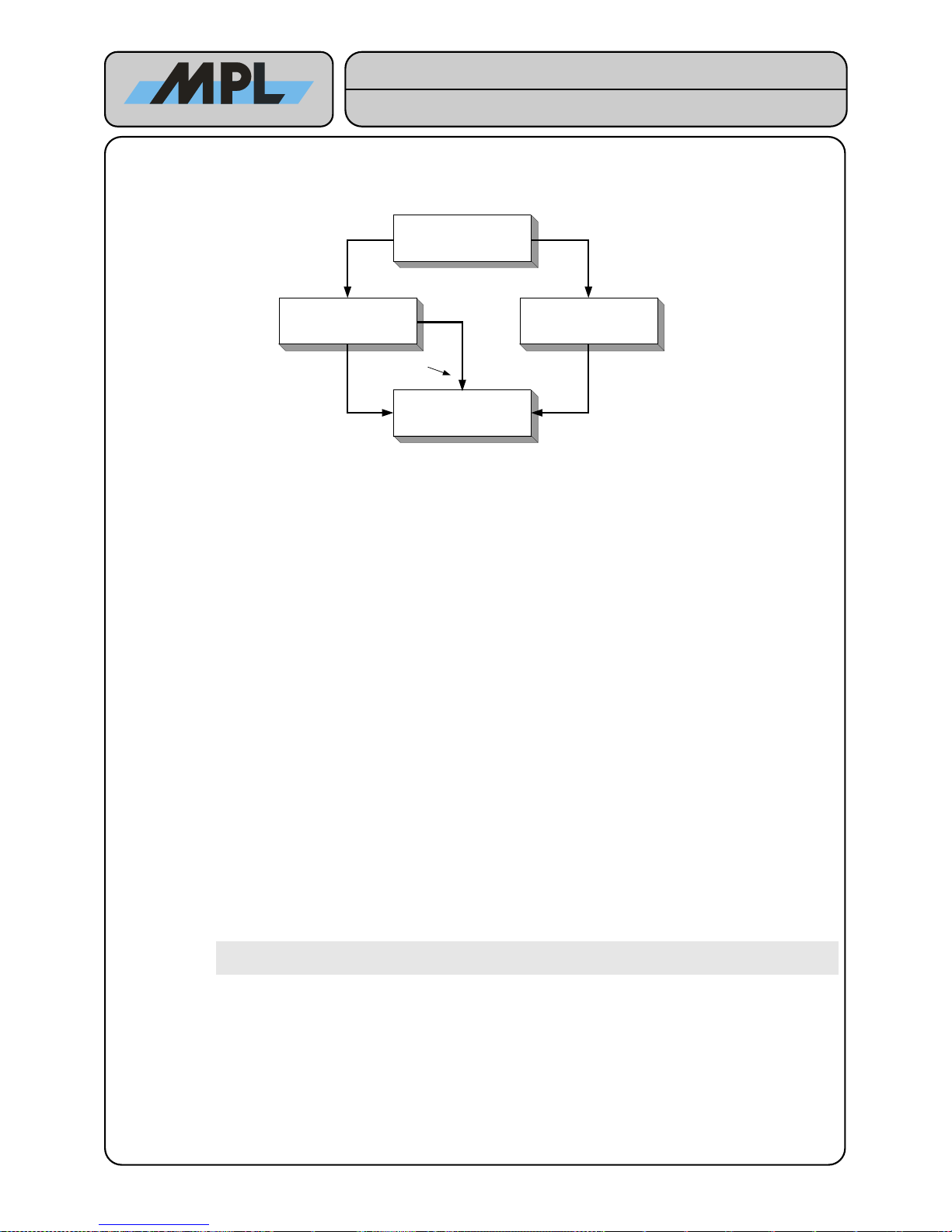
If the received Root ID on 2 or more ports is the same and the Root Path Cost are also the same the and the
Designated Bridge ID is also the same, the one with the smallest Port ID (Port Priority and Port number) will
be used as Root Port. Example:
Since the Port ID of MAGBES 2 P3 (128, 3) is smaller than the one of MAGBES 2 P4 (128, 4), MAGBES 4
selects P3 as Root Port. By changing the Port Priority of MAGBES 2 P4 to 112, MAGBES 4 will use P1 as
Root Port.
With the parameters Bridge Priority, Port Cost and Port Priority it is possible to adjust the Spanning Tree to
the desired topology.
4.10.3.4 Performance Parameters
The default Values for Hello Time, Forward Delay, and Max Age are valid for STP and RSTP Modes.
The Hello Time is the time interval with which the Spanning Tree messages are sent. Decreasing this time
results in faster link failure detection, but increases the CPU load and the Message traffic.
The Forward Delay is the time a port will be learning until it will be changed to forwarding.
The Max Age is the “max hops” value for RSTP messages. This is used to ensure that outdated messages will
not endless loop in the Spanning Tree. Decreasing this value will also decrease the number of RSTP enabled
Bridge on the network.
4.10.3.5 Edge Ports
Edge ports are ports where no other bridge is connected, i. e. a connection to a Workstation or Server. An Edge
port goes immediately to forwarding, because there is no risk of loops when connected to a Workstation or
Server.
Auto: The MAGBES will automatically detect if the port is connected to another RSTP enabled Bridge
Force Edge: The port is not connected to another RSTP Bridge.
Guarded Edge: The port is not connected to another RSTP Bridge and all Spanning Tree Messages received
on this port are discarded. This is useful to prevent the Spanning Tree from receiving false
messages which may lead to a reconfiguration of the Spanning Tree (DoS).
Warning: Enable “Force Edge” or “Guarded Edge” only if you are absolutely sure
that the port is NOT connected to another Bridge.
No Edge: The port is forced to be a No Edge port. Transitions from blocking to forwarding will be done
with the forward delay time.
2012 by MPL AG 45 MEH-10134-201 Rev. D
Root Port
MAGBES 2 MAGBES 3
MAGBES 4
MAGBES 1
Root Bridge
P1 P4
P1P1
P1
P4
P4
P4
Path Cost = 4
Path Cost = 8
Path Cost = 8
Path Cost = 4
P3
P3 Path Cost = 8
High-Tech • Made in Switzerland
MAGBES
Technical Reference Manual
Page 46
4.10.4 Important Notes for the Spanning Tree
4.10.4.1 Forwarding Loop when disabling STP
When disabling the STP all ports transition immediately to forwarding. This may lead to a forwarding loop in the
Network.
When disabling the Spanning Tree Protocol make sure that no forwarding loops can be created. If the
STP has a blocked port, it is recommended to disable the port on the “Port Configuration” page before
disabling the STP.
4.10.4.2 Forwarding Loop with unidirectional Links
If a link goes unidirectional, for example if an optical transmit or receive link fails, forwarding loops may be
created since the bridge does not receive any Spanning Tree messages, changing the ports role to designated
and transition the port to forwarding.
4.10.4.3 STP and VLAN
MAGBES currently supports only the RSTP according IEEE802.1D 2004. Since this is not a “per VLAN RSTP” it
is not possible to have a spanning tree for each VLAN. Instead all ports used for links between the Bridges
should be configured to be member of all VLAN ID's. This ensures that the Spanning Tree works for all VLAN's.
4.10.4.4 STP and DHCP
Since it may need some time to have connection to a DHCP server on Start-Up it is recommended that you use
a Fixed IP address for the MAGBES instead of DHCP.
2012 by MPL AG 46 MEH-10134-201 Rev. D
High-Tech • Made in Switzerland
MAGBES
Technical Reference Manual
Page 47
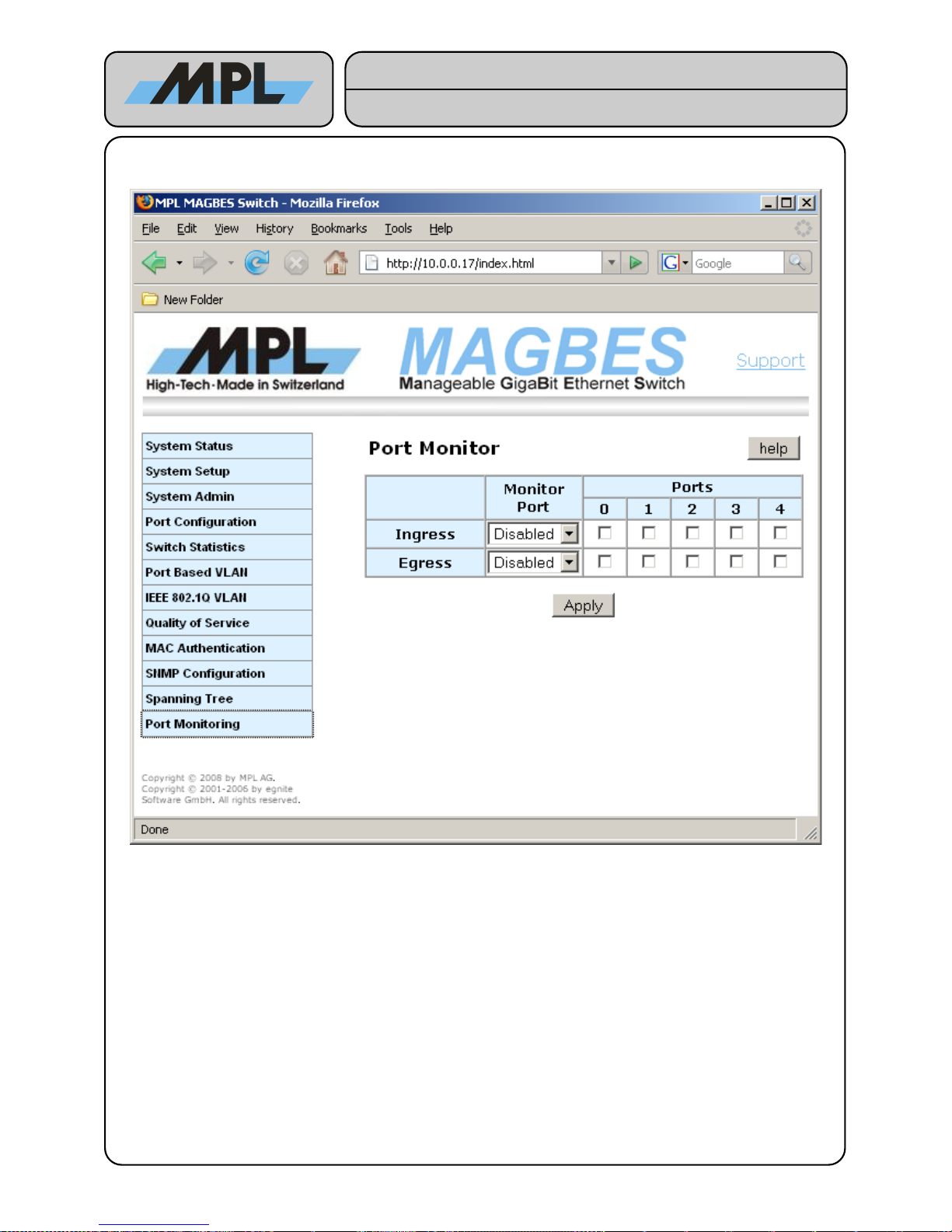
4.11 Port Monitoring
MAGBES supports Port Monitoring for Ingress and Egress frames. The Monitor Port selects the port where the
Ingress or/and Egress Frames from the Ports table are forwarded.
2012 by MPL AG 47 MEH-10134-201 Rev. D
Figure 35: Port Monitoring
High-Tech • Made in Switzerland
MAGBES
Technical Reference Manual
Page 48
5 Telnet Command Line Interface
The Telnet Command Line Interface can be accessed when the Telnet CLI is enabled. See Chapter 3.2
System Setup.
Notes:
● This chapter describes only how to configure the MAGBES via the CLI, the functionality of a specific
configuration is described in the web interface section.
● The implemented Telnet Server will only allow one connected client.
5.1 Login
After connecting the MAGBES with a “Telnet” command, MAGBES will ask for a password. This is the same as
the one used for the Web Interface.
MAGBES Admin Login
Password: ****
After login the Comand Line Interface prompt is shown:
CLI:
Notes:
● MAGBES uses a simple shell, there is no auto completion or scripting implemented. Supported is a
history buffer with up to 16 commands.
● If a single argument uses more than one word use either single or double quotes. So it is also possible
to use a quote within a string. For example:
location “don't know”
Don't use double quotes within a string, this will break the XML configuration features.
● Commands and arguments are case sensitive.
5.2 Commands
All available commands can be listed with the command 'help':
CLI: help
Available commands:
- config [create|load|save|apply] XML Configfiles
- default Load default Values
- dhcpconf [fallback] [timeout] Shows/Sets the Switch DHCP settings
- help Shows available commands
- hostname [hostname] Shows/Sets the Switch hostname
- ifconfig [ipaddr] [netmask] [gateway] Shows/Sets the Switch IP settings
- jumbo [on/off] Shows/Enable/Disable Jumbo Frames
- location [location] Shows/Sets the Switch location Name
- machine Shows hardware information
- mac MAC Address Authentication
- passwd Set new Password
- port show status and set configuration of the ports
- pvlan Port-based VLAN
- qos Quality of Service settings
- quit Terminate the session
- reset Reboot the switch
- sfp <port> show SFP Info
- snmp SNMP Configuration
- statistic show Statistic Info
- stp Spanning Tree Protocol
- telnet [on|off] Enable/disable the Telnet Interface
- tftpload <serverip> <filename> Load file to upload area using tftp
- update [prog] Update firmware from upload area
- uptime Shows switch uptime
- version Shows firmware version
- vlan IEEE 802.1Q VLAN
- webui [on|off] Enable/disable the Web Interface
use 'help command' for specific help
2012 by MPL AG 48 MEH-10134-201 Rev. D
High-Tech • Made in Switzerland
MAGBES
Technical Reference Manual
Page 49
5.3 Help Command
Each command has a build-in description which can be retrieved by 'help command'. For example:
CLI: help port
port
- Lists status and settings of all ports
port <nr>
- List status and settings of port 'nr'
port <nr> auto
- Sets port 'nr' to auto
port <nr> 100M
- Sets port 'nr' to 100M
port <nr> 10M
- Sets port 'nr' to 10M
port <nr> off
- Disables port 'nr'
port <nr> FD
- Sets port 'nr' to Full Duplex
port <nr> HD
- Sets port 'nr' to Half Duplex
port <nr> flow on
- Sets port 'nr' Flow control on
port <nr> flow off
- Sets port 'nr' Flow control off
port <nr> ds on
- Sets port 'nr' Down Shift on
port <nr> ds off
- Sets port 'nr' Down Shift on
Following chapters shows a short description of each command.
5.4 System
5.4.1 IP Settings
The IP settings can be set/displayed as follows;
CLI: ifconfig
IP Settings: DHCP IP Addr: 10.0.0.18 Netmask: 255.255.255.0 Gateway: 10.0.0.1
Static IP Address
CLI: ifconfig 10.0.0.19 255.255.255.0 10.0.0.1
IP Settings: Static IP Addr: 10.0.0.19 Netmask: 255.255.255.0 Gateway: 10.0.0.1
IP Settings accepted, please reboot the system
DHCP IP Address
CLI: ifconfig dhcp
IP Settings: DHCP IP Addr: 10.0.0.18 Netmask: 255.255.255.0 Gateway: 10.0.0.1
IP Settings accepted, please reboot the system
5.4.2 DHCP Options
DHCP Options settings:
CLI: dhcpconf
DHCP: Fall Back: 192.168.1.254 Timeout: 12 sec
2012 by MPL AG 49 MEH-10134-201 Rev. D
High-Tech • Made in Switzerland
MAGBES
Technical Reference Manual
Page 50
DHCP Fallback IP Address:
CLI: dhcpconf 192.168.1.250
DHCP: Fall Back: 192.168.1.250 Timeout: 12 sec
DHCP Fallback IP Address and Timeout:
CLI: dhcpconf 192.168.1.254 10
DHCP: Fall Back: 192.168.1.254 Timeout: 10 sec
5.4.3 System Information
Following commands are used for System information:
Hostname:
CLI: hostname
Switch Name: Magbes
Setting the Hostname
CLI: hostname 'name of host'
Switch Name: name of host
Location:
CLI: location
Location: none
Setting Location:
CLI: location "don't know"
Location: don't know
System Identification:
CLI: machine
Product Name: MAGBES
Product Number: MED-10375-012 Rev.A
Serial Number: 202
MAC Address: 00:60:C2:16:00:F6
Firmware ID:
CLI: version
Firmware: MEV-10119-003 V 0.2.0
Up time:
CLI: uptime
System UpTime: 0 days 0 hours 39 min
5.4.4 System wide settings
Jumbo frame:
CLI: jumbo
Jumbo Frames: disabled
The jumbo command uses the arguments [on/off]
CLI: jumbo on
Jumbo Frames: enabled
Password:
CLI: passwd
New Password (min 4 max 14)
Enter Password: ****
Retype Password: ****
Password accepted
2012 by MPL AG 50 MEH-10134-201 Rev. D
High-Tech • Made in Switzerland
MAGBES
Technical Reference Manual
Page 51
Telnet
CLI: telnet
Telnet: enabled
CLI: telnet off
Telnet: disabled
Settings accepted, please reboot the system
Web Interface:
CLI: webui
Webui: enabled
CLI: webui off
Webui: disabled
Settings accepted, please reboot the system
Reboot:
CLI: reset
Quit Telnet Session:
CLI: quit
Load alternate default values:
CLI: default
Load factory default values:
CLI: default fact
5.5 Port Configuration
Information of all ports:
CLI: port
port 0: Auto Status: 1000BASE-X FD
port 1: Auto Status: 1000BASE-X FD
port 2: Auto ds Status: Down
port 3: Auto Status: 1G-FD
port 4: 10M HD Status: Down
Information of one port:
CLI: port 3
port 3: Auto Status: 1G-FD
The information shows the portnumber, followed by the settings, followed by the status.
Possible settings for copper ports:
Auto Automatic
Auto ds Automatic with downshift
1G 1GBit Full-Duplex
100M FD 100MBit Full-Duplex
100M HD 100MBit Half-Duplex
10M FD 10MBit Full-Duplex
10M HD 10MBit Half-Duplex
Disabled Disabled
Additionally the parameter flow for enabled Flow-Control will be displayed.
Possible settings for SFP ports:
Auto Automatic
1000BASE-X 1GBit Full-Duplex
100BASE-FX 100MBit
Disabled Disabled
Additionally the parameter flow for enabled Flow-Control will be displayed.
2012 by MPL AG 51 MEH-10134-201 Rev. D
High-Tech • Made in Switzerland
MAGBES
Technical Reference Manual
Page 52
Possible status for Copper ports:
1G-FD 1GBit Full-Duplex
100M-FD 100MBit Full-Duplex
100M-HD 100MBit Half-Duplex
10M-FD 10MBit Full-Duplex
10M-HD 10MBit Half-Duplex
Down No Link
Possible status for SFP ports:
1000BASE-X 1000Base-X
100BASE-FX 100Base-FX
Disabled No Link
No SFP Detected No SFP Inserted
Checksum Error Inserted SFP Checksum Error.
Port Settings:
Set port to auto
CLI: port 1 auto
Setting accepted
Set port to 100MBit:
CLI: port 1 100M
Setting accepted
Set port to 10MBit:
CLI: port 1 10M
Setting accepted
Disable port:
CLI: port 1 off
Setting accepted
Set port to Full-Duplex:
CLI: port 1 FD
Setting accepted
Set port to Hal-Duplex:
CLI: port 1 HD
Setting accepted
Enable Flow-Control:
CLI: port 1 flow on
Setting accepted
Disable Flow-Control:
CLI: port 1 flow off
Setting accepted
Enable Downshift:
CLI: port 1 ds on
Setting accepted
Disable Downshift:
CLI: port 1 ds off
Setting accepted
Note:
● MAGBES does not check if a setting is possible or not. It is the user responsibility to configure the pors
correct.
2012 by MPL AG 52 MEH-10134-201 Rev. D
High-Tech • Made in Switzerland
MAGBES
Technical Reference Manual
Page 53
5.6 SFP Support
The sfp command is mainly used to get information of the inserted SFP.
Get Information from port 0:
CLI: sfp 0
Vendor:
AVAGO
Partnumber:
AFCT-57V6NSZ
Serial no:
AD0947P000Z
Data Code:
2009-11-20
Bitrate:
1200Mbit/sec
Wavelength:
1550nm
Link Length:
9/125um: 40km
Transceiver:
1000Base-LX
SFF Options:
Complies with Rev 9.3 of SFF-8472
Digital Diagnostic implemented
Internal calibrated
Power is average
Alarm/warning flags
Soft TX_DISABLE
Soft TX_FAULT
Soft RX_LOSS
For diagnostic purpose it is also possible to get a hex dump from the EERPOM contents:
CLI: sfp 0 raw
0000: 03 04 07 00 00 00 02 00 00 00 00 01 0C 00 28 FF ..............(.
0010: 00 00 00 00 41 56 41 47 4F 20 20 20 20 20 20 20 ....AVAGO
0020: 20 20 20 20 00 00 17 6A 41 46 43 54 2D 35 37 56 ...jAFCT-57V
0030: 36 4E 53 5A 20 20 20 20 20 20 20 20 06 0E 00 E5 6NSZ ....
0040: 00 1A 00 00 41 44 30 39 34 37 50 30 30 30 5A 20 ....AD0947P000Z
0050: 20 20 20 20 30 39 31 31 32 30 20 20 68 F0 01 13 091120 h...
0060: 38 00 00 00 60 9B 20 00 60 9B 20 00 00 0F 00 00 8...`. .`. .....
0070: 00 00 00 00 00 00 00 0A D2 C9 52 03 1C 00 00 00 ..........R.....
2012 by MPL AG 53 MEH-10134-201 Rev. D
High-Tech • Made in Switzerland
MAGBES
Technical Reference Manual
Page 54
If in the SFF Options Section the Digital Diagnostic implemented is displayed, the SFP supports
also the following command:
CLI: sfp 0 diag
Status:
0x12
Alarm Flags:
RX Power Low
Warning Flags:
RX Power Low
Alarm Warning
Actual High Low High Low
Temperature [°C] 48.000 80.000 -15.000 70.000 -5.000
Voltage [V] 3.3280 3.6000 3.0000 3.5000 3.1000
Bias [mA] 32.670 90.000 3.000 80.000 5.000
TX Power [mW] 0.6264 1.9950 0.1995 1.0000 0.3980
RX Power [mW] 0.0015 0.5010 0.0079 0.2510 0.0158
To enable the “Misc” SNMP Trap on Warnings and Alarms of the SFP the following command is used:
CLI: sfp 0 snmp on
To disable the “Misc” SNMP Trap on Warnings and Alarms of the SFP the following command is used:
CLI: sfp 0 snmp off
5.7 Switch Statistics
Overview of all ports:
CLI: statistic
Port 0: RX 1360 RX Errors 0 TX 7480
Port 1: RX 7480 RX Errors 0 TX 1360
Port 2: RX 166600 RX Errors 0 TX 171580
Port 3: RX 244000 RX Errors 0 TX 155820
Port 4: RX 171580 RX Errors 0 TX 166600
Statistic of on port:
CLI: statistic 4
Port 4
RX Good Octets: 19674
RX Bad Octets: 0
RX Unicast Frames: 0
RX Broadcast Frames: 3
RX Multicast Frames: 281
RX Pause Frames: 0
RX Undersized Frames: 0
RX Fragmented Frames: 0
RX Oversized Frames: 0
RX Jabber Frames: 0
RX Error Frames: 0
RX FCS Error Frames: 0
TX Good Octets: 19176
TX Unicast Frames: 0
TX Broadcast Frames: 0
TX Multicast Frames: 282
TX Pause Frames: 0
TX Excessive Frames: 0
TX Collisions Frames: 0
TX Deferred Frames: 0
TX Single Frames: 0
TX Multiple Frames: 0
TX FCS Error Frames: 0
TX Late Frames: 0
2012 by MPL AG 54 MEH-10134-201 Rev. D
High-Tech • Made in Switzerland
MAGBES
Technical Reference Manual
Page 55
Histogram Counters
Frame Length 64 Octets: 1
Frame Length 65 to 127 Octets: 563
Frame Length 129 to 255 Octets: 2
Frame Length 257 to 511 Octets: 0
Frame Length 513 to 1023 Octets: 0
Frame Length 1024 to Max Octets: 0
Clear all counters of one port:
CLI: statistic 4 clear
Port 4
RX Good Octets: 0
RX Bad Octets: 0
RX Unicast Frames: 0
RX Broadcast Frames: 0
RX Multicast Frames: 0
RX Pause Frames: 0
RX Undersized Frames: 0
RX Fragmented Frames: 0
RX Oversized Frames: 0
RX Jabber Frames: 0
RX Error Frames: 0
RX FCS Error Frames: 0
TX Good Octets: 0
TX Unicast Frames: 0
TX Broadcast Frames: 0
TX Multicast Frames: 0
TX Pause Frames: 0
TX Excessive Frames: 0
TX Collisions Frames: 0
TX Deferred Frames: 0
TX Single Frames: 0
TX Multiple Frames: 0
TX FCS Error Frames: 0
TX Late Frames: 0
Histogram Counters
Frame Length 64 Octets: 0
Frame Length 65 to 127 Octets: 0
Frame Length 129 to 255 Octets: 0
Frame Length 257 to 511 Octets: 0
Frame Length 513 to 1023 Octets: 0
Frame Length 1024 to Max Octets: 0
5.8 Port based VLAN
List all pVLANs:
CLI: pvlan
ID: 1 ' default' 0 1 2 3 4
ID: 2 ' Production' 1 2 4
ID: 3 ' Marketing' 0 3 4
This lists the ID, description and all member ports of each pVLAN.
2012 by MPL AG 55 MEH-10134-201 Rev. D
High-Tech • Made in Switzerland
MAGBES
Technical Reference Manual
Page 56
Delete a pVLAN:
CLI: pvlan del 3
CLI: pvlan
ID: 1 ' default' 0 1 2 3 4
ID: 2 ' Production' 1 2 4
Add a new pVLAN:
CLI: pvlan add "Marketing" 0 3 4
CLI: pvlan
ID: 1 ' default' 0 1 2 3 4
ID: 2 ' Production' 1 2 4
ID: 3 ' Marketing' 0 3 4
Modify the member ports of a pVLAN:
CLI: pvlan mod 3 1 3 4
CLI: pvlan
ID: 1 ' default' 0 1 2 3 4
ID: 2 ' Production' 1 2 4
ID: 3 ' Marketing' 1 3 4
Modify the description of a pVLAN;
CLI: pvlan desc 2 "Development"
CLI: pvlan
ID: 1 ' default' 0 1 2 3 4
ID: 2 ' Development' 1 2 4
ID: 3 ' Marketing' 1 3 4
5.9 IEEE802.1Q VLAN
The IEEE802.1Q VLAN settings is divided into 3 Sections:
● Administration
● VLAN
● Ports
5.9.1 IEEE802.1Q VLAN Administration
The VLAN admin allows to enable disable the VLANs and define the management VID.
Show the VLAN admin settings:
CLI: vlan
VLAN: disabled
Managment VID: 1
Enable / disable the VLAN:
CLI: vlan on
CLI: vlan
VLAN: enabled
Managment VID: 1
CLI: vlan off
CLI: vlan
VLAN: disabled
Managment VID: 1
2012 by MPL AG 56 MEH-10134-201 Rev. D
High-Tech • Made in Switzerland
MAGBES
Technical Reference Manual
Page 57
Setting Management VID:
CLI: vlan manvid 12
CLI: vlan
VLAN: disabled
Managment VID: 12
5.9.2 EEE802.1Q VLANs
Show all VLANs:
CLI: vlan list
1: ' default' Prio: normal-(0) 0U 1U 2U 3U 4U
15: ' Production' Prio: normal-(0) 0U 2T 4T
20: ' Marketing' Prio: normal-(0) 1U 2T 4T
200: ' VoIP' Prio: over-normal-(0) 0X 2T 4T
Add a VLAN:
CLI: vlan add 21 0X 2X 2T
CLI: vlan desc 21 test
CLI: vlan list
1: ' default' Prio: normal-(0) 0U 1U 2U 3U 4U
15: ' Production' Prio: normal-(0) 0U 2T 4T
20: ' Marketing' Prio: normal-(0) 1U 2T 4T
21: ' test' Prio: normal-(0) 0X 2T
200: ' VoIP' Prio: over-normal-(0) 0X 2T 4T
Notes:
● The portnotation is <nr><type>. <nr> is the portnumber and type is on of the following:
U: untagged.
T: tagged.
X: unmodified.
● To add a complete VLAN, the command vlan add and the comment vlan desc have to be used.
Modify the members of a VLAN:
CLI: vlan mod 21 0T 2X
CLI: vlan list
1: ' default' Prio: normal-(0) 0U 1U 2U 3U 4U
15: ' Production' Prio: normal-(0) 0U 2T 4T
20: ' Marketing' Prio: normal-(0) 1U 2T 4T
21: ' test' Prio: normal-(0) 0T 2X
200: ' VoIP' Prio: over-normal-(0) 0X 2T 4T
Modify the priority of a VLAN:
CLI: vlan prio 21 4
CLI: vlan list
1: ' default' Prio: normal-(0) 0U 1U 2U 3U 4U
15: ' Production' Prio: normal-(0) 0U 2T 4T
20: ' Marketing' Prio: normal-(0) 1U 2T 4T
21: ' test' Prio: high-(4) 0T 2X
200: ' VoIP' Prio: over-normal-(0) 0X 2T 4T
2012 by MPL AG 57 MEH-10134-201 Rev. D
High-Tech • Made in Switzerland
MAGBES
Technical Reference Manual
Page 58
Set the priority of a VLAN to overwrite:
CLI: vlan prio 21 4 ov
CLI: vlan list
1: ' default' Prio: normal-(0) 0U 1U 2U 3U 4U
15: ' Production' Prio: normal-(0) 0U 2T 4T
20: ' Marketing' Prio: normal-(0) 1U 2T 4T
21: ' test' Prio: over-high-(4) 0T 2X
200: ' VoIP' Prio: over-normal-(0) 0X 2T 4T
Delete a VLAN:
CLI: vlan del 21
CLI: vlan list
1: ' default' Prio: normal-(0) 0U 1U 2U 3U 4U
15: ' Production' Prio: normal-(0) 0U 2T 4T
20: ' Marketing' Prio: normal-(0) 1U 2T 4T
200: ' VoIP' Prio: over-normal-(0) 0X 2T 4T
5.9.3 EEE802.1Q VLAN ports
Show the settings for all ports:
CLI: vlan port
port 0: default VID: 15: ' Production' check
port 1: default VID: 20: ' Marketing' check
port 2: default VID: 1: ' default' disabled
port 3: default VID: 200: ' VoIP' check
port 4: default VID: 1: ' default' disabled
Setting a default VID for a port:
CLI: vlan port 0 vid 200
CLI: vlan port
port 0: default VID: 200: ' VoIP' check
port 1: default VID: 20: ' Marketing' check
port 2: default VID: 1: ' default' disabled
port 3: default VID: 200: ' VoIP' check
port 4: default VID: 1: ' default' disabled
Force the default VID for a port:
CLI: vlan port 0 force on
CLI: vlan port
port 0: default VID: 200: ' VoIP' forced check
port 1: default VID: 20: ' Marketing' check
port 2: default VID: 1: ' default' disabled
port 3: default VID: 200: ' VoIP' check
port 4: default VID: 1: ' default' disabled
2012 by MPL AG 58 MEH-10134-201 Rev. D
High-Tech • Made in Switzerland
MAGBES
Technical Reference Manual
Page 59
Set the VLAN mode for a port:
CLI: vlan port 0 mode disable
CLI: vlan port
port 0: default VID: 200: ' VoIP' forced disabled
port 1: default VID: 20: ' Marketing' check
port 2: default VID: 1: ' default' disabled
port 3: default VID: 200: ' VoIP' check
port 4: default VID: 1: ' default' disabled
Note:
● Valid modes are:
secure
check
fallback
disable
5.10 QOS
Show QOS settings for all ports:
CLI: qos
port 0: mac-dest mac-src vid highest-(7) replace
port 1: ieee tos normal-(0) replace
port 2: ieee tos normal-(0) no-replace
port 3: ieee tos normal-(0) no-replace
port 4: ieee tos normal-(0) no-replace
This lists all priority settings of each port (checking from left to right) followed by the default priority and the
information if the port replaces the priority mapping.
Set the QoS for a port:
CLI: qos 1 mac-dest mac-src vid ieee tos
CLI: qos
port 0: mac-dest mac-src vid highest-(7) replace
port 1: mac-dest mac-src vid ieee tos normal-(0) replace
port 2: ieee tos normal-(0) no-replace
port 3: ieee tos normal-(0) no-replace
port 4: ieee tos normal-(0) no-replace
Set default priority:
CLI: qos 1 defprio 4
CLI: qos
port 0: mac-dest mac-src vid highest-(7) replace
port 1: mac-dest mac-src vid ieee tos high-(4) replace
port 2: ieee tos normal-(0) no-replace
port 3: ieee tos normal-(0) no-replace
port 4: ieee tos normal-(0) no-replace
Show priority replacement map for a port:
CLI: qos 1 repl
Replace priority for port 1:
Ingress prio 0 => Replaced by prio 1
Ingress prio 1 => Replaced by prio 2
Ingress prio 2 => Replaced by prio 3
Ingress prio 3 => Replaced by prio 4
Ingress prio 4 => Replaced by prio 5
Ingress prio 5 => Replaced by prio 6
Ingress prio 6 => Replaced by prio 7
Ingress prio 7 => Replaced by prio 0
2012 by MPL AG 59 MEH-10134-201 Rev. D
High-Tech • Made in Switzerland
MAGBES
Technical Reference Manual
Page 60
Replace priority for a port:
CLI: qos 1 repl 0 7
CLI: qos 1 repl
Replace priority for port 1:
Ingress prio 0 => Replaced by prio 7
Ingress prio 1 => Replaced by prio 2
Ingress prio 2 => Replaced by prio 3
Ingress prio 3 => Replaced by prio 4
Ingress prio 4 => Replaced by prio 5
Ingress prio 5 => Replaced by prio 6
Ingress prio 6 => Replaced by prio 7
Ingress prio 7 => Replaced by prio 0
Shows the IP to switch priority mapping:
CLI: qos priomap
ip-prio: 0 switch-prio: normal
ip-prio: 1 switch-prio: low
ip-prio: 2 switch-prio: low
ip-prio: 3 switch-prio: normal
ip-prio: 4 switch-prio: high
ip-prio: 5 switch-prio: normal
ip-prio: 6 switch-prio: highest
ip-prio: 7 switch-prio: highest
Setting the IP to switch priority:
CLI: qos priomap 0 high
CLI: qos priomap
ip-prio: 0 switch-prio: high
ip-prio: 1 switch-prio: low
ip-prio: 2 switch-prio: low
ip-prio: 3 switch-prio: normal
ip-prio: 4 switch-prio: high
ip-prio: 5 switch-prio: normal
ip-prio: 6 switch-prio: highest
ip-prio: 7 switch-prio: highest
Shows the DSCP to switch priority mapping:
CLI: qos dscp
Class Selector PHB (CS):
Default-(000000) low
CS1-(001000) low
CS2-(010000) normal
CS3-(011000) normal
CS4-(100000) highest
CS5-(101000) high
CS6-(110000) highest
CS7-(111000) highest
Assured Forwarding PHB (AF):
AF11-(001010) low
AF21-(010010) normal
AF31-(011010) normal
AF41-(100010) highest
AF12-(001100) low
AF22-(010100) normal
AF32-(011100) normal
AF42-(100100) high
2012 by MPL AG 60 MEH-10134-201 Rev. D
High-Tech • Made in Switzerland
MAGBES
Technical Reference Manual
Page 61
AF13-(001110) low
AF23-(010110) normal
AF33-(011110) normal
AF43-(100110) highest
Expedited Forwarding PHB (EF):
EF-(101110) high
Other DSCP:
1-(000001) low
2-(000010) low
3-(000011) low
4-(000100) low
5-(000101) low
6-(000110) low
7-(000111) low
9-(001001) low
B-(001011) low
D-(001101) low
F-(001111) low
11-(010001) normal
13-(010011) normal
15-(010101) normal
17-(010111) normal
19-(011001) normal
1B-(011011) normal
1D-(011101) normal
1F-(011111) normal
21-(100001) high
23-(100011) high
25-(100101) high
27-(100111) high
29-(101001) high
2A-(101010) high
2B-(101011) high
2C-(101100) high
2D-(101101) high
2F-(101111) high
31-(110001) highest
32-(110010) highest
33-(110011) highest
34-(110100) highest
35-(110101) highest
36-(110110) highest
37-(110111) highest
39-(111001) highest
3A-(111010) highest
3B-(111011) highest
3C-(111100) highest
3D-(111101) highest
3E-(111110) highest
3F-(111111) highest
Set the DSCP to switch priority:
CLI: qos dscp 000000 high
CLI: qos dscp
Class Selector PHB (CS):
Default-(000000) high
2012 by MPL AG 61 MEH-10134-201 Rev. D
High-Tech • Made in Switzerland
MAGBES
Technical Reference Manual
Page 62
CS1-(001000) low
...
5.11 MAC Address Authentication
List all statically MAC address with their properties:
CLI: mac
00:50:43:00:6E:30 port-0 prio: high-(0)
00:50:43:00:6E:36 port-0 prio: high-(0)
00:50:43:00:6E:31 port-1 prio: high-(0)
00:50:43:00:6E:32 port-2 prio: high-(0)
00:50:43:00:6E:34 port-3 prio: high-(0)
00:50:43:00:6E:35 port-4 prio: high-(0)
List all known MAC address:
CLI: mac list
Port 0
00:50:43:00:6E:30 Static
00:50:43:00:6E:36 Static
Port 1
00:50:43:00:6E:31 Static
Port 2
00:50:43:00:6E:32 Static
Port 3
00:50:43:00:6E:34 Static
00:50:43:00:6E:3B Aging 3:08 Min
Port 4
00:50:43:00:6E:35 Static
List all known MAC address for a port:
CLI: mac list 0
Port 0
00:50:43:00:6E:30 Static
00:50:43:00:6E:36 Static
Add MAC address as statically entry for a port
CLI: mac add 00:60:c2:1b:01:77 0
CLI: mac list 0
Port 0
00:50:43:00:6E:30 Static
00:50:43:00:6E:36 Static
00:60:C2:1B:01:77 Static
Add MAC address with new default priority and priority overwrite as statically entry for a port
CLI: mac add 00:60:c2:1b:01:78 0 7 ov
CLI: mac list 0
Port 0
00:50:43:00:6E:30 Static
00:50:43:00:6E:36 Static
00:60:C2:1B:01:77 Static
00:60:C2:1B:01:78 Static Priority Overwrite highest(7)
2012 by MPL AG 62 MEH-10134-201 Rev. D
High-Tech • Made in Switzerland
MAGBES
Technical Reference Manual
Page 63
Add MAC address as statically entry as unauthorized MAC Address which will be discarded on all ports:
CLI: mac add 00:60:c2:1b:01:79 unauth
CLI: mac
00:60:C2:1B:01:79 Unauthorized prio: high-(0)
00:50:43:00:6E:30 port-0 prio: high-(0)
00:50:43:00:6E:36 port-0 prio: high-(0)
00:60:C2:1B:01:77 port-0 prio: high-(0)
00:60:C2:1B:01:78 port-0 prio: highest-(7) over
00:50:43:00:6E:31 port-1 prio: high-(0)
00:50:43:00:6E:32 port-2 prio: high-(0)
00:50:43:00:6E:34 port-3 prio: high-(0)
00:50:43:00:6E:35 port-4 prio: high-(0)
Modify settings for a MAC Address:
CLI: mac mod 00:50:43:00:6E:30 1 2
CLI: mac
00:60:C2:1B:01:79 Unauthorized prio: high-(0)
00:50:43:00:6E:36 port-0 prio: high-(0)
00:60:C2:1B:01:77 port-0 prio: high-(0)
00:60:C2:1B:01:78 port-0 prio: highest-(7) over
00:50:43:00:6E:30 port-1 prio: low-(2)
00:50:43:00:6E:31 port-1 prio: high-(0)
00:50:43:00:6E:32 port-2 prio: high-(0)
00:50:43:00:6E:34 port-3 prio: high-(0)
00:50:43:00:6E:35 port-4 prio: high-(0)
Delete a MAC Address:
CLI: mac del 00:60:C2:1B:01:79
CLI: mac
00:50:43:00:6E:36 port-0 prio: high-(0)
00:60:C2:1B:01:77 port-0 prio: high-(0)
00:60:C2:1B:01:78 port-0 prio: highest-(7) over
00:50:43:00:6E:30 port-1 prio: low-(2)
00:50:43:00:6E:31 port-1 prio: high-(0)
00:50:43:00:6E:32 port-2 prio: high-(0)
00:50:43:00:6E:34 port-3 prio: high-(0)
00:50:43:00:6E:35 port-4 prio: high-(0)
Show the IEEE 802.X Source MAC Checking mode for all ports:
CLI: mac source
Port 0 source-checking disabled
Port 1 source-checking disabled
Port 2 source-checking disabled
Port 3 source-checking disabled
Port 4 source-checking disabled
Set IEEE 802.X Source MAC Checking mode for a port:
CLI: mac source 0 on
CLI: mac source
Port 0 source-checking enabled
Port 1 source-checking disabled
Port 2 source-checking disabled
Port 3 source-checking disabled
Port 4 source-checking disabled
2012 by MPL AG 63 MEH-10134-201 Rev. D
High-Tech • Made in Switzerland
MAGBES
Technical Reference Manual
Page 64
CLI: mac source 0 off
CLI: mac source
Port 0 source-checking disabled
Port 1 source-checking disabled
Port 2 source-checking disabled
Port 3 source-checking disabled
Port 4 source-checking disabled
5.12 SNMP Configuration
Shows SNMP settings
CLI: snmp
10.0.0.1 enable public rw auth boot link misc
10.0.0.11 enable public rw auth boot link misc
Add a new SNMP configuration:
CLI: snmp add 192.168.112.201 private
CLI: snmp
10.0.0.1 enable public rw auth boot link misc
10.0.0.11 enable public rw auth boot link misc
192.168.112.201 disable private ro
Modify a SNMP configuration:
CLI: snmp mod 192.168.112.201 rw auth boot link misc
CLI: snmp
10.0.0.1 enable public rw auth boot link misc
10.0.0.11 enable public rw auth boot link misc
192.168.112.201 disable private rw auth boot link misc
Enable a SNMP configuration:
CLI: snmp enable 192.168.112.201
CLI: snmp
10.0.0.1 enable public rw auth boot link misc
10.0.0.11 enable public rw auth boot link misc
192.168.112.201 enable private rw auth boot link misc
Disable a SNMP configuration:
CLI: snmp disable 192.168.112.201
CLI: snmp
10.0.0.1 enable public rw auth boot link misc
10.0.0.11 enable public rw auth boot link misc
192.168.112.201 disable private rw auth boot link misc
Delete a SNMP configuration:
CLI: snmp del 192.168.112.201
CLI: snmp
10.0.0.1 enable public rw auth boot link misc
10.0.0.11 enable public rw auth boot link misc
2012 by MPL AG 64 MEH-10134-201 Rev. D
High-Tech • Made in Switzerland
MAGBES
Technical Reference Manual
Page 65
Test SNMP Traps
CLI: snmp test auth
Following traps can be tested:
● auth Authentication trap
● boot Booting trap
● link Link up/down trap
● misc Miscellaneous traps (SFP warning/alarm)
5.13 Spanning Tree
STP Info:
CLI: stp
STP disabled
Mode auto
Bridge Prio 32768
Hello Time 2
Forward Delay 15
Max Age 20
Port Cost Short
FRFD off
Info: RSTP not running
Enable/Disable the STP
CLI: stp off
CLI: stp on
CLI: stp
STP enabled
Mode auto
Bridge Prio 32768
Hello Time 2
Forward Delay 15
Max Age 20
Port Cost Short
FRFD off
Info: Root: 32768 00:60:C2:16:00:03 PathCost 4
Set STP mode
CLI: stp mode stp
CLI: stp
STP disabled
Mode force stp
Bridge Prio 32768
Hello Time 2
Forward Delay 15
Max Age 20
Port Cost Short
FRFD off
Info: RSTP not running
CLI: stp mode auto
CLI: stp
STP disabled
Mode auto
Bridge Prio 32768
Hello Time 2
2012 by MPL AG 65 MEH-10134-201 Rev. D
High-Tech • Made in Switzerland
MAGBES
Technical Reference Manual
Page 66
Forward Delay 15
Max Age 20
Port Cost Short
FRFD off
Info: RSTP not running
Set Bridge priority
CLI: stp prio +7
CLI: stp
STP disabled
Mode auto
Bridge Prio 61440
Hello Time 2
Forward Delay 15
Max Age 20
Port Cost Short
FRFD off
Info: RSTP not running
The Bridge priority is set in steps. Min priority is +7, max priority is -8, default is 0.
Hello time:
CLI: stp hello 3
Forward delay:
CLI: stp forward 20
Max age:
CLI: stp maxage 30
Port cost:
CLI: stp portcost short
CLI: stp portcost long
Fast root fail detection:
CLI: stp fastfail off
CLI: stp fastfail on
CLI: stp
STP disabled
Mode auto
Bridge Prio 32768
Hello Time 3
Forward Delay 20
Max Age 30
Port Cost Long
FRFD on
Info: RSTP not running
STP port status:
CLI: stp port
Port0: enabled Prio: 128 Cost: 4 State: Designated Forwarding
Port1: enabled Prio: 128 Cost: 4 State: Backup Blocking
Port2: enabled Prio: 128 Cost: 4 State: Designated Forwarding
Port3: enabled Prio: 128 Cost: 4 State: Root Forwarding
Port4: enabled Prio: 128 Cost: 4 State: Backup Blocking
2012 by MPL AG 66 MEH-10134-201 Rev. D
High-Tech • Made in Switzerland
MAGBES
Technical Reference Manual
Page 67
STP port settings:
CLI: stp port set
Port0: Edge: auto P2P: auto
Port1: Edge: auto P2P: auto
Port2: Edge: auto P2P: auto
Port3: Edge: auto P2P: auto
Port4: Edge: auto P2P: auto
Enable / disable a port:
CLI: stp port 4 off
CLI: stp port 3 on
Set port priority:
CLI: stp port 0 prio +7
CLI: stp port 1 prio -8
prio -8 max Priority (0)
prio +7 min Priority (240)
prio 0 default Priority (128)
Set port cost:
CLI: stp port 1 cost 4
CLI: stp port 0 cost auto
Allowed values:
● 'auto': auto calculation
● value: manual (range 4..2000000)
Set port edge mode:
CLI: stp port 0 edge force
Following modes are supported:
● auto Automatic detection.
● force Force edge mode.
● noedge Force no edge mode.
● guard Guarded edge mode.
Set point to point mode:
CLI: stp port 1 p2p off
Following modes are supported:
● auto Automatic detection.
● on Force p2p mode.
● off Force no p2p mode.
CLI: stp port
Port0: enabled Prio: 240 Cost: Auto Short State: No Link Blocking
Port1: enabled Prio: 000 Cost: Manual 4 State: No Link Blocking
Port2: enabled Prio: 128 Cost: Auto Short State: No Link Blocking
Port3: enabled Prio: 128 Cost: 4 State: Root Forwarding
Port4: disabled Prio: 128 Cost: Auto Short State: Disabled Blocking
CLI: stp port set
Port0: Edge: force edge P2P: auto
Port1: Edge: auto P2P: force false
Port2: Edge: auto P2P: auto
Port3: Edge: auto P2P: auto
Port4: Edge: auto P2P: auto
2012 by MPL AG 67 MEH-10134-201 Rev. D
High-Tech • Made in Switzerland
MAGBES
Technical Reference Manual
Page 68
5.14 Firmware update procedure:
The Firmware update via CLI is possible, but it requires a TFTP Server.
Several commands have to be issued for a Firmware update.
Load the firmware binary to the upload area using the TFTP protocol:
CLI: tftpload 10.0.0.1 mes-003.020
..................................................
.............................
File transfer complete.
Notes:
● The tftpload command must be followed by the server IP Address and the firmware filename.
● The '.' are used as progress indicator.
After the firmware has been successfully uploaded the command update is used to complete the firmware
update procedure:
CLI: update
Version 20
Revision 3
Checksum 3FE2
Size 408916
File system size 156672
File system files 52
Checksum OK.
CLI: update prog
Version 20
Revision 3
Checksum 3FE2
Size 408916
File system size 156672
File system files 52
Programming new Firmware, Flash FS len 156672
Programming new Firmware, len 252244
Notes:
● The update command without a parameter checks the image in the upload area.
● The update command with the parameter prog will write the firmware to the flash.
● Since the update process will kill the telnet server, no further messages will be displayed.
5.15 Configuration file handling
It is also possible to configure the entire MAGBES with a configuration file. See chapter 6 Configuration File for
further information on configuration file support.
5.15.1 Upload a configuration file
The configuration file will be loaded to the upload area in like a firmware binary.
CLI: tftpload 10.0.0.1 00-60-c2-16-00-f6.xml
.
File transfer complete.
Notes:
● The tftpload command must be followed by the server IP Address and the name of the configuration
file.
● The '.' are used as progress indicator.
2012 by MPL AG 68 MEH-10134-201 Rev. D
High-Tech • Made in Switzerland
MAGBES
Technical Reference Manual
Page 69
5.15.2 Load the uploaded configuration file
For further operation with the configuration file, it has to be checked and loaded in the volatile memory of the
MAGBES:
CLI: config load
Configuration accepted
Notes:
● This command checks the configuration file and if any errors are detected, they will be displayed.
Now there are 2 possibilities:
5.15.3 Save the configuration file or the current configuration as alternate configuration.
The configuration file previously uploaded with the command tftpload and checked/loaded with the command
config load can now be saved as alternate configuration.
If no configuration file has been loaded, the current configuration will be saved.
CLI: config save
Notes:
● The alternate configuration will be used when either the “default” button is pressed, or the command
default is issued.
● To revert to the factory default values the “default” button has to be pressed for longer than 4 sec or by
issuing the command default fact
5.15.4 Apply the configuration file.
The configuration file previously uploaded with the command tftpload and checked/loaded with the command
config load can now be applied as current configuration:
CLI: config apply
Configuration saved, Please reboot the MAGBES
5.15.5 Download the current configuration as configuration file
There is no transfer protocol implemented which allows to download the configuration directly. But since the
configuration file is a text (xml) file, the file will be displayed and can be saved with “copy & paste” as text file.
CLI: config create
<?xml version="1.0" encoding="utf-8"?>
<?xml-stylesheet type="text/xsl" href="/magbes_xsl.xsl" ?>
<magbes>
.....
Select and copy the output in the telnet client, and use your favorite text editor to paste the contents, and save
the file as xml file.
2012 by MPL AG 69 MEH-10134-201 Rev. D
High-Tech • Made in Switzerland
MAGBES
Technical Reference Manual
Page 70
6 Configuration File
The MAGBES supports also file based configuration. It is possible to upload and download Configuration files.
Additionally an alternate default configuration is also supported.
6.1 File format
The configuration file is an XML formatted file. This allows that configurations can be easily viewed and edited
with various tools and editors.
For a first validation of the configuration file an XML schema file is provided. Also provided is an XML stylesheet
file.
6.2 File rules
To simplify the file, not all information must be included, only the configuration items which are necessary for the
wanted functionality. File rules:
● Sections may be omitted in configuration files during upload. MAGBES does not change the settings of
the omitted sections.
● It is not possible to only add entries to a list (such as VLAN and MAC lists). This means the entire list
must be part of the configuration file.
When downloading the file all information is included, also some read-only information. File rules for read only
tags:
● Read only tags are ignored except the mac-addr and the serial-no in the <system-id> section. If
one of these 2 tags are found in the configuration file, the MAGBES will check this information with its
own MAC Address and/or Serial Number. If this matches, the configuration file will be accepted,
otherwise not.
● To use one configuration file for several MAGBES, the entire <system-id> can be ommited.
6.2.1 Root tag
The root tag is <magbes> and contains only the XML Schema and XML Stylesheet attributes.
6.2.2 System section
Main tag:
<system>
Contains system relevant information/settings:
6.2.2.1 System ID
<system-id mac-addr="00:60:C2:16:00:F6" firmware="MEV-10119-003 V 0.2.0" prodno="MED-10375-012 Rev.A" serial-no="202"></system-id>
The <system-id> tag contains following attributes:
● mac-addr is the MAC Address of the MAGBES. This value is read-only, but will be checked on
applying. This means, that if the MAC Address in the file is not the same as the one of the MAGBES,
the configuration will not be accepted.
● firmware is firmware identification string. This value is ignored by the MAGBES.
● prod-no is the product number identification string. This value is ignored by the MAGBES.
● serial-no is the serial number of the MAGBES. This value is read-only, but will be checked on
applying. This means, that if the serial number in the file is not the same as the one of the MAGBES,
the configuration will not be accepted.
6.2.2.2 IP Settings
<ip-settings netmask="255.255.255.0" gateway="10.0.0.1" dhcp="on" dhcptimeout="12" dhcp-fallback="192.168.1.254">10.0.0.18</ip-settings>
The <ip-settings> tag contains information about the Ethernet settings:
● netmask is the current Netmask.
● gateway is the current Gateway.
● dhcp is used to switch the DHCP client “on” or “off”. This setting takes precedence over the settings
of the IP Address, Netmask and Gateway. This means that the IP Address, Netmask and Gateway can
only be set if the DHCP client is off. If the DHCP client is on the IP Address, Netmask and Gateway
reflects the values retrieved via the DHCP protocol.
2012 by MPL AG 70 MEH-10134-201 Rev. D
High-Tech • Made in Switzerland
MAGBES
Technical Reference Manual
Page 71
● dhcp-timeout is the time the MAGBES tries to retrieve IP settings via the DHCP. If this time elapsed
after valid link detection, the MAGBES uses the dhcp-fallback IP Address.
● dhcp-fallback is the IP Address which will be used after the dhcp-timeout has elapsed.
● The value of the <ip-settings> tag is the IP Address.
6.2.2.3 Jumbo Frame
<jumbo-frame>on</jumbo-frame>
The <jumbo-frame> tag switches the jumbo frame support “on” or “off”
6.2.2.4 Telnet CLI
<telnet-cli>on</telnet-cli>
The <telnet-cli> tag switches the telnet based command line interface “on” or “off”
6.2.2.5 Web UI
<webui>on</webui>
The <webui> tag switches the Web based user interface “on” or “off”
6.2.2.6 Hostname
<host-name>Magbes</host-name>
The <host-name> tag contains the host name.
6.2.2.7 Location
<location></location>
The <location> tag contains the location string.
6.2.2.8 Password
<password>bFdVfUzG29dvZJgG+doDfQ==</password>
The <password> tag contains the password. The password is a base64 coded encrypted string.
Note:
There exist no external tool to decrypt or encrypt the password. The only way to get an encrypted
string of new password, is to enter the new password in the MAGBES and download the configuration
file.
6.2.2.9 Login Timeout
<login-time>15</login-time>
The <login-time> tag contains the login timeout in Minutes.
6.2.3 Port section
Main tag:
<port-configuration>
This section contains the settings for the ports:
6.2.3.1 Port
<port id="0" duplex="off" flow-control="off" downshift="off" snmptrap="off">auto</port>
The <port> tag contains the settings of a port:
● id is the port number. Allowed values are “0” to “4”
● duplex is the duplex setting of the port. Allowed values are “ on” or “off”. Note: If the port is set to
auto, this setting is ignored.
● flow-control is the flow control setting of the port. Allowed values are “on” or “off”
● downshift is the downshift setting of the port. Allowed values are “on” or “off”. Note: This setting is
only relevant if the port is set to auto.
● snmp-trap enables/disables the SNMP misc trap on SFP with diagnostic functions. Note: On Copper
port this setting is not allowed.
● The value of this tag is the speed setting of the port. Allowed values are disable, 10M, 100M, 1G and
auto.
2012 by MPL AG 71 MEH-10134-201 Rev. D
High-Tech • Made in Switzerland
MAGBES
Technical Reference Manual
Page 72
6.2.4 Port-Based VLAN section
Main tag:
<port-vlan>
This section contains the port-based VLAN settings:
6.2.4.1 PVLAN
<pvlan id="1" members="p0,p1,p2,p3,p4">default</pvlan>
The <pvlan> tag contains the settings of a port-based VLAN:
● id is the port based VLAN number. Allowed values are “1” to “7” without duplicates.
● members is a string containing the members of this VLAN. Each port is consist of a “ p” followed by its
port number. The ports a seperated by “,”.
● The value of this tag is the port-based VLAN name.
Up to 7 <pvlan> are supported.
6.2.5 IEEE802.1Q VLAN section
Main tag:
<ieee-8021Q-vlan enabled="no" admin-id="1">
This section contains the IEEE802.1Q VLAN settings. The tag <ieee-8021Q-vlan> has following attributes:
● enabled switches the IEEE802.1Q VLAN on/off. Allowed values are “no” to “yes”.
● admin-id is the VLAN ID which will be used to configure the MAGBES.
6.2.5.1 QVLAN
<qvlan vlan-id="1" untagged-members="p0,p1,p2,p3,p4" overwrite-prio="no"
priority="0">default</qvlan>
For each VLAN a tag <qvlan> exists:
● vlan-id is the IEEE802.1Q VLAN number. Allowed values are “1” to “4095” without duplicates.
● untagged-members is a string containing the untagged members of this VLAN. Each port is consist
of a “p” followed by its port number. The ports a seperated by “,”.
● tagged-members is a string containing the tagged members of this VLAN. Each port is consist of a
“p” followed by its port number. The ports a seperated by “,”.
● unmodified-members is a string containing the unmodified members of this VLAN. Each port is
consist of a “p” followed by its port number. The ports a seperated by “,”.
● overwrite-prio enables/disables the overwriting of the priority. Allowed are “yes” or “no”.
● priority setting the priority of the VLAN. Allowed are values between “0” and “7”.
● The value of this tag is the description of the VLAN.
6.2.6 QOS
6.2.6.1 IEEE802.1p Priority mapping section
Main tag:
<ieee-8021p-qos>
This section contains the IEEE802.1p priority mapping:
<ieee-prio ieee-tag="0">normal</ieee-prio>
For each IEEE priority (0 to 7) a <ieee-prio> exists:
● ieee-tag is the IEEE802.1p priority tag. Allowed values are “0” to “7”.
● The value of the <ieee-prio> tag contains the priority string which is used within the MAGBES.
Allowed values are “low”, “normal”, “high” and “highest”.
6.2.6.2 DSCP Priority mapping section
<qos-dscp>
This section contains the Differentiated Services Code Point Priority mapping:
<dscp-prio dscp="000000">low</dscp-prio>
For each DSCP priority (a 6bit value) a <dscp-prio> exists:
● dscp-prio is the DSCP priority tag. This is a 6bit binary value. Allowed values are “00000” to
“111111”, with out duplicates.
● The value of the <dscp-prio> tag contains the priority string which is used within the MAGBES.
Allowed values are “low”, “normal”, “high” and “highest”.
2012 by MPL AG 72 MEH-10134-201 Rev. D
High-Tech • Made in Switzerland
MAGBES
Technical Reference Manual
Page 73

6.2.6.3 QOS port settings
Main tag:
<qos-port>
The <qos_port> tag contains QOS aettings for each port:
<port-qos id="0" mac-dest="on" mac-src="on" vid-prio="on" ieee-802-1ac="off" tostc="off" def-prio="7">
For each port a <port_qos> tag exists:
● id is the port number. Valid values are “0” to “4”.
● Valid values for mac-dest, mac-src, vid-prio, ieee-802-1ac and tos-tc are “on“ or “off“.
● def-prio is the default priority for this port. Valid values are “0” to “7”.
If a priority remap table exists for the port this map is will be included in the tag <priority-remap>:
<port-qos id="0" mac-dest="on" mac-src="on" vid-prio="on" ieee-802-1ac="off" tostc="off" def-prio="7">
<priority-remap>
<priority ingress="1">2</priority>
<priority ingress="4">2</priority>
<priority ingress="5">0</priority>
</priority-remap>
</port-qos>
● ingress is the frame priority on ingress. Valid values are “0” to “7”.
● The value of the tag <priority> is the replaced priority of the frame. Valid values are “0” to “7”.
6.2.7 MAC Address authentication section
Main tag:
<mac-auth>
The tag <mac-address> contains the setting for each statically stored MAC Address:
<mac-address port="0" priority-overwrite="no" priority="1">00:50:43:00:6E:3C</mac-
address>
● port is the port number with which the MAC Address is associated. Valid values are “ 0” to “4” and
“unauthorized“ in case frames with this MAC Address should be discarded on all ports.
● priority-overwrite enables/disables the overwriting of the priority. Valid values are “yes” or “no”.
● priority sets the priority of the frame with the MAC Address. Valid values are “0” to “7”.
● The value of the <mac-address> tag is the MAC-Address in hexadecimal notation with “:” as
delimiter.
<mac-check>
The MAC Address checking can be set with the tag <port-mac> by a port by port base:
<port-mac id="0">on</port-mac>
● id is the port number. Valid values are “0” to “4”.
● The value of the <port-mac> is either “on“ for IEEE802.1X Source MAC Address checking enabled,
or “off“.
6.2.8 SNMP section
Main tag:
<snmp>
Each SNMP configuration is described by the tag:
<ip-address community="public" enabled="yes" auth-trap="on" boot-trap="on" linktrap="on" misc-trap="on" write-enable="yes">10.0.0.1</ip-address>
● community is the community string of the SNMP configuration.
● enabled is set to “yes” if enabled, or “no” if disabled.
● auth-trap, boot-trap, link-trap and misc-trap are set to “on” if the corresponding trap is
enabled, else they are set to “off”.
● write-enable is set to “yes” if the SNMP configuration is read/write, if read-only it is set to “no”.
● The value of this tag is the SNMP IP Address.
Note:
The MAGBES supports only 3 SNMP Entries.
2012 by MPL AG 73 MEH-10134-201 Rev. D
High-Tech • Made in Switzerland
MAGBES
Technical Reference Manual
Page 74
6.2.9 Spanning Tree section
Main tag:
<spanning-tree-protocol>
The STP settings are set within the tag <stp-enable>:
<stp-enable mode="force-stp" bridge-prio="57344" hello-time="4" forward-delay="10"
max-age="30" port-cost="long" fast-root-det="yes">no</stp-enable>
● mode is the STP mode, either “auto” or “force-stp”.
● bridge-prio is the bridge priority in 4096 increments from “0” to “61440”.
● hello-time is the hello time parameter from “1” to “10”.
● forward-delay is the forward delay parameter from “4” to “30”.
● max-age is the max age parameter from “6” to “40”.
● port-cost is the port cost mode, either “short” to “long”.
● fast-root-det is fast rootbridge fail detection and is either “yes” to “no”.
● The value of this tag is either “yes” for enable the STP or “no” for disable the STP.
The tag <port-stp> contains the port settings for each port:
<port-stp id="0" priority="128" port-cost="240" edge="edge" point-to-point="forcefalse">disabled</port-stp>
● id is the port number. Valid values are between “0” and “4”.
● priority is the STP port priority. Valid are values between “0” and “240” in 16 increments.
● port-cost is the port cost of this port. Either “auto” or a valid short or long value (detending on the
above port-cost setting).
● edge is the edge mode of the port. Valid is one of the following values: “ auto”, “edge”, “guarded-
edge” or “no-edge”.
● point-to-point is the point to point mode of the port. Valid is one of the following values: “ auto”,
“force-true” or “force-false”.
● The value of this tag enables/disables the port. Valid values are “yes” or “no”.
2012 by MPL AG 74 MEH-10134-201 Rev. D
High-Tech • Made in Switzerland
MAGBES
Technical Reference Manual
Page 75
7 OS Information
The MAGBES Firmware is based on the Ethernut Operating system.
7.1 OS Copyright and Disclaimer
Copyright (C) 2001-2006 by egnite Software GmbH. All rights reserved.
Redistribution and use in source and binary forms, with or without
modification, are permitted under the the following conditions:
1. Redistributions of source code must retain the above copyright
notice, this list of conditions and the following disclaimer.
2. Redistributions in binary form must reproduce the above copyright
notice, this list of conditions and the following disclaimer in the
documentation and/or other materials provided with the distribution.
3. All advertising materials mentioning features or use of this
software must display the following acknowledgement:
This product includes software developed by egnite Software GmbH
and its contributors.
THIS SOFTWARE IS PROVIDED BY EGNITE SOFTWARE GMBH AND CONTRIBUTORS
``AS IS'' AND ANY EXPRESS OR IMPLIED WARRANTIES, INCLUDING, BUT NOT
LIMITED TO, THE IMPLIED WARRANTIES OF MERCHANTABILITY AND FITNESS
FOR A PARTICULAR PURPOSE ARE DISCLAIMED. IN NO EVENT SHALL EGNITE
SOFTWARE GMBH OR CONTRIBUTORS BE LIABLE FOR ANY DIRECT, INDIRECT,
INCIDENTAL, SPECIAL, EXEMPLARY, OR CONSEQUENTIAL DAMAGES (INCLUDING,
BUT NOT LIMITED TO, PROCUREMENT OF SUBSTITUTE GOODS OR SERVICES; LOSS
OF USE, DATA, OR PROFITS; OR BUSINESS INTERRUPTION) HOWEVER CAUSED
AND ON ANY THEORY OF LIABILITY, WHETHER IN CONTRACT, STRICT LIABILITY,
OR TORT (INCLUDING NEGLIGENCE OR OTHERWISE) ARISING IN ANY WAY OUT OF
THE USE OF THIS SOFTWARE, EVEN IF ADVISED OF THE POSSIBILITY OF
SUCH DAMAGE.
2012 by MPL AG 75 MEH-10134-201 Rev. D
High-Tech • Made in Switzerland
MAGBES
Technical Reference Manual
Page 76

8 COPYRIGHT
Copyright © 2012 by MPL AG Elektronikunternehmen. All rights are reserved. Reproduction of this document in
part or whole, by any means is prohibited, without written permission from MPL AG Elektronikunternehmen.
9 DISCLAIMER
MPL AG makes no warranty or representation, either expressed, or implied, with respect to this product, its
quality, performance, merchantability, or fitness for a particular purpose.
In no event will MPL AG be liable for direct, indirect, special, incidental, or consequential damages resulting
from any defect in the product or its documentation, even if advised of the possibility of such damages. In
particular MPL AG shall have no liability for any parts connected to this product.
MPL AG reserves the right to make changes to any product herein to improve reliability, function or design.
10 TRADEMARKS
Brand or product names are trademarks and registered trademarks of their respective holders.
11 SUPPORT
11.1 SERIAL NUMBER AND REVISION
For support it is important that you know the product name, the product variant, the serial number and the
Firmware number of your MAGBES. This information can be found on the “System Status” page.
11.2 CONTACT MPL AG
In case of general information questions please feel free to contact us at our homepage ( www.mpl.ch) or per
email ([email protected]).
In case of sales information questions please send an email to [email protected].
If you have a technical problem with a MAGBES, please read first the User Manual and also this manual
carefully. If you can’t solve the problem on your own you can contact us for technical support per email at
Our local Distributor:
2012 by MPL AG 76 MEH-10134-201 Rev. D
High-Tech • Made in Switzerland
MAGBES
Technical Reference Manual
 Loading...