

Page 1
User Manual
WIRELESS
HEADSET
MF250
MF250 with Crystal Audio Quality
Page 2
ENCLOSURES
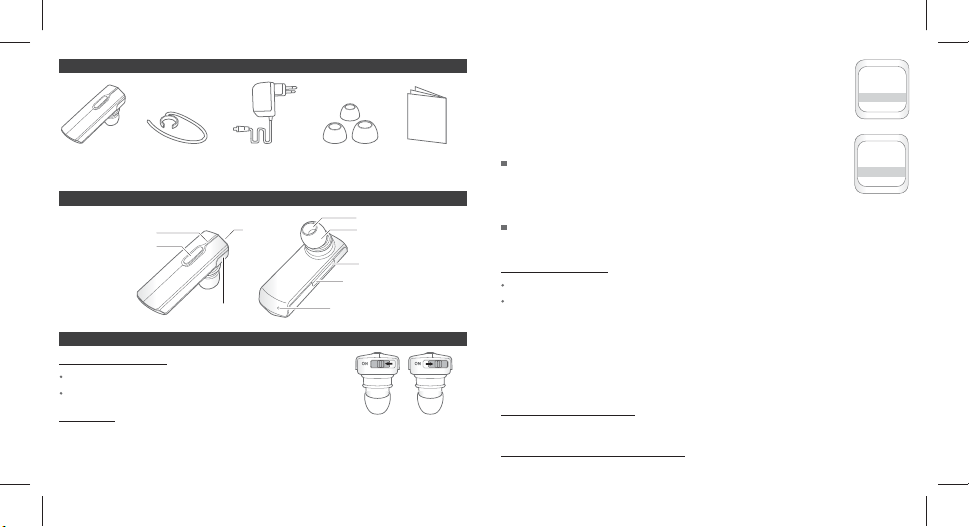
Bluetooth Headset Ear hook A/C power 3 di erent size ear rubber User manual
adapter (Small, Medium, Large)
Product Components Hands-Free Unit
Indication LED
Multifunction Button
Charging port
Slide ON/
OFF Button
Speaker
Ear Rubber
Volume Up Button
Volume Down Button
Microphone
HOW TO USE
POWER ON/ OFF
Power On : Please slide the button to ON side.
Power O : Please slide the button to opposite direction of ON.
PAIRING
Before you use headset, please pair your headset with mobile phone rst.
Power ON Power OFF
1. Slide the button to ON. [Ensure headset is turned ON]
-1-
2. Press and hold the Multi-Function Button for 4 sec. until Blue & Red LED
light ash repeatly.
3. Search the headset via your mobile phone. Please follow the instruction
of your mobile phone.
4. When you nd your headset, Please select it and con rm by “Yes” or “OK”
5. PIN Number is ‘0000’(4 zeros).
SIMPLE PAIRING: If your mobile phone supports bluetooth core spec 2.1,
then you don’t need to put PIN number to pair. (This
function is only available when your mobile phone
supports bluetooth version 2.1)
EASY PAIRING:
directly.
If you use headset for the rst time, headset will go pairing mode
Active Dev List
Model Name
MF250
4.reference
Input PIN Code
0000
5.reference
MAKING A CALL
Last number re-dial : Press Multi-Function button shortly.
Voice dial : Press Multi-Function button for 2 seconds.
Once your mobile phone in voice dialing mode, please follow the step as
your mobile phone instructed. You can de-activate voice dial mode by push
Multi-Function button for 2 seconds in voice dialing mode.
[Note] Please check if your mobile phone supports voice dialing function.
Please record voice tag rst before you use this function.
Please turn the headset o and try auto reconnection if the function does not work properly.
ANSWERING A CALL
Press the Multi-function button brie y to receive call.
REJECT AN INCOMING CALL
English English
-2-
Page 3

Press and hold Multi-Function button for 2 seconds.
ENDING A CALL
Press Multi-Function button shortly while you are on the line.
You can also ending a call from your mobile by push “END” button.
TRANSFERRING A CALL
Headset to mobile phone: Press and hold Multi-Function button for 2 seconds.
Mobile phone to headset: Press and hold Multi-Function button for 2 seconds.
MIC MUTE
Press and hold volume down button for 2 seconds. Then the MIC mute will be activated.
You can hear the status indication melody every 5 seconds in MIC mute mode.
You can de-activate the MIC mute mode by pushing volume down button for 2 seconds.
CALL WAITING [3way calling]
Before you use 3way calling function, please make sure that your mobile phone supports
“Handsfree pro le”. And please check with your network operator if they support Call
hold & Multiparty call service.
1. Connect to incoming call & disconnect your current call.
: Press and hold volume down button for 4 seconds.
2. Put your current call in waiting mode and receive incoming call.
: Press and hold volume up button for 4 seconds.
[TIP] Call waiting mode by pushing “Send” button on your mobile phone.
MULTIPOINT FUNCTION
The Headset Unit supports simultaneous connection with 2 mobile phones with full control of each unit.
-3- -4-
English English
[Note] This feature may not be compatible with certain mobile phones.
1. Multi-Point Connect
Set the device into the pairing-mode rst, and search the unit individually from 2
mobile phones. Make sure one mobile phone is connected properly to the unit before
trying the other one.
beep and LED ashing.
You can check connection with the mobile phones through
2. Making a phone call [To use the 2nd mobile phone]
Press the Volume Down button for about 2 seconds until a beep sound is heard to make
an last number redial from the second mobile phone.
Press the Volume Up button for about 2 seconds until a beep sound is heard to activate
voice dial of the second mobile phone.
[Note] Making a phone call [To use the 1st mobile phone] Follow the same instruction a section ‘Making a call’ described already.
3. Receiving a call
Press the Multi-Function button to receive incoming calls.
[Note] Each mobile phone plays di erent ring tones. When you are on the line with the mobile phone, the
connection with the other mobile phone will be disconnected. But it will be automatically
re-connected when you terminate the call and keep connection with 2 mobile phones.
RESET OF THE HEADSET
Press and hold Multi-Function button & Volume Down button for 3 seconds.
Then all device information and call list of your headset will be reset.
STATUS INDICATION
1. LED Indication
Status LED Indication
Page 4

Power On Blue LED blinks 3 times
Pairing Mode Blue & Red LED blink repeatedly
Connectable Mode Blue LED blinks 1 time every 5 seconds
Connected Mode Blue LED blinks 2 times every 5 seconds
Active Call Mode Blue LED blinks 3 times every 5 seconds
Charging in Progress Red LED turns on
Charging Complete Red LED turns o
2. Tone Indication
Status Tone Indication
Power On Turn-on melody
Connect 3 Short Beep
Incoming Call Ring melody
Active Call 2 Rising Beep
Ending a Call 2 Falling Beep
Low Battery Low Battery melody
SPECIFICATIONS
Model Name MF250
Bluetooth Core Spec Bluetooth Speci cation 2.1+EDR
Pro le HSP, HFP1.5
Carrier Frequency 2400 MHz to 2483.5 MHz
Modulation Method GFSK, 1Mbps, 0.5BT Gaussian
Maximum Data Rate Asynchronous : 2178.1 kbps / 177.1 kbps
Bluetooth Class Class 2
Hopping 1600 hops/sec, 1MHz Channel Space
Synchronous : 1306.9 kbps / 1306.9 kbps
-5- -6-
Transmit Power 0 dBm
Coverage Range 10 Meters
Receiver Sensitivity -82 dBm / 0.1 % BER
Continuous Talk Time 6 Hours
Standby Time 180 Hours
Weight 10 g
Dimension 18.1(H) x 51.3(L) x 9.5(H) mm
Charging Voltage DC 5.0 ~ 5.3 V
Charging Time 2 Hours
Operating Temperature -10° to +50°C
Storage Temperature -20° to +80°C
Battery Lithium Polymer 3.7V 90mAH
SAFETY AND GENERAL INFORMATION
1. Please read this guidebook carefully and follow the instruction.
2. To avoid any damage or malfunction of the unit, do not drop it from high place.
3. Keep away unit from humidity, water and any other liquid. And if the unit is exposed by water, moisture and other liquid directly,
then do not operate it normally to avoid any electrical shock, explosion and damage of the unit.
4. Do not place or keep the unit near the heat sources such as direct sun light, radiators, stoves or other apparatus which produce heat.
It may cause explosion, degrade of performance and reduce battery life.
5. Do not modify, repair & disassemble unit at discretion. [especially battery: it may cause an explosion]
6. Do not place the heavy objects on the unit.
7. Use only supplied and approved charger.
8. Replacement or service must be done at a quali ed service center or manufacturer.
9. Unplug this unit when unused for long period of time or during lightening storms.
[CAUTIONS] ELECTRIC SHOCK HAZARD :
FCC STATEMENT
This device complies with part 15 of the FCC Rules. Operation is subject to the following two conditions:
(1) This device may not cause harmful interference, and
(2) This device must accept any interference received , including interference that may cause undesired operation.
[Note] The manufacturer is not responsible for AzNY interference, for example RADIO or TV interference, caused by unauthoriz e d
modi cations to this equipment. Such modi cations could void the user’s authority to operate the equipment.
English English
The battery used in this device may present a risk of re or chemical burn if mis-treated.
Page 5

EU
This product is CE marked according to the provision of the R&TTE Directive (99/5/EC).
Here by MOVON Corporation, declares that this product is in compliance with the essential requirements and other relevant provisions
of Directive 1999/5/EC.
Please note that this product uses radio frequency bands not harmonized within EU. Within the EU this product is intended to be used
in Austria, Belgium, Denmark, Finland, France,Germany, Greece, Ireland, Italy, Luxembourg, The Netherlands, Portugal, Spain, Sweden, United Kingdom and within EFTA in Iceland, Norway and Switzerland. Bluetooth is a trademark owned by the Bluetooth SIG, Inc.
WARRANTY
The condition of this warranty and our responsibilities under this warranty are as follows:
Supplier’s warranty is non-transferable. And this warranty is limited to the original purchaser only.
- You must be able to prove the date of original purchase of the unit with a dated receipt.
- The warranty is not applicable if the product has been subject to physical abuse, improper installation, modi cation or repair by
unauthorized third party.
- The responsibility of supplier’s products shall be limited to the repair or replacement of the product at it’s sole discretion.
- Speci cally exempt from any warranty are limited-life consumable components subject to normal wear and tear such as batteries,
decorates and other accessories.
- A supplier will not take any responsibility if the failure of the unit has resulted from accident, abuse, misuse or any unauthorized
repair, modi cation or disassemble.
- Modi cation and repair of the unit should be done by authorized and quali ed service personnel, center or returned to the
manufacturer
-This warranty gives you speci c legal rights and you may also have other rights which vary under local laws.
WEEE SYMBOL INFORMATION
(Waste Electrical & Electronic Equipment)
(Applicable in the European Union and other European countries with separate collection systems) This marking shown on the product
or its literature, indicates that it should not be disposed with other household wastes at the end of its working life.
To prevent possible harm to the environment or human health from uncontrolled waste disposal, please separate this from other
types of wastes and recycle it responsibly to promote the sustainable reuse of material resources.
Household users should contact either the retailer where they purchased this product or their local government o ce, for details of
where and how they can take this item for environmentally safe recycling.
Business users should contact their supplier and check the terms and conditions of the purchase contract. This product should not be
mixed with other commercial wastes for disposal.
[IMPORTANT NOTE] To comply with RF exposure requirements, this device may not be co-located with any other transmitter or
antenna.
Correct Disposal of This Product
-7- -8-
English
Deutsch
 Loading...