

Page 1

Magnetic Wireless Charging Mount
A154-176-MAGWCH
User Manual
FCC Notice
This device complies with part 15 of the FCC Rules Operation is subject to the following two
conditions:(1) This device may not cause harmful interference, and (2) this device must accept
any interference received, including interference that may cause undesired operation
Document No: 000-UMD-P041-A154-001_02 www.mous.co
Revision No: 02
Date: November 17, 2017
Page 2
www.mous.co
Table of Contents
English (UK)
Français
Deutsch
Italiano
Español
Magyar
Polski
Română
Български
Hrvatski
Srpski
Português
Latviešu
Lietuvių kalba
Eesti
Nederlands
Svenska
Norsk
Suomi
Dansk
Ελληνικά
Slovenščina
Slovenčina
Čeština
Türkçe
Русский
Українська
Қазақ тілі
English (USA)
Español (Castellano)
简体中文
繁體中文(台灣)
Français (Canada)
Português (Brasil)
한국어
Document No: 000-UMD-P041-A154-001_02
Revision No: 02
Date: November 17, 2017
2
Page 3
Read me first
Please read this manual before using the device to ensure safe
and proper use.
• Images may differ in appearance from the actual product.
Content is subject to change
without prior notice.
• Before using the wireless charger, make sure it is
compatible with your device.
Instructional icons
Warning: situations that could cause injury to yourself
or others
Caution: situations that could cause damage to your
device or other equipment
Notice: notes, usage tips, or additional information
Document No: 000-UMD-P041-A154-001_02 www.mous.co
Revision No: 02
Date: November 17, 2017
Page 4

www.mous.co
Package contents
Check the product box for the following items:
• Wireless charge mount
• Quick start guide
• The items supplied with the device and any available
accessories may vary depending on the region or
service provider.
• The supplied items are designed only for this device
and may not be compatible with other devices.
• Appearances and specifications are subject to change
without prior notice.
• Use only mobile phone approved accessories. Using
unapproved accessories may cause the performance
problems and malfunctions that are not covered by the
warranty.
• Availability of all accessories is subject to change
depending entirely on manufacturing companies.
Document No: 000-UMD-P041-A154-001_02
Revision No: 02
Date: November 17, 2017
4
Page 5
www.mous.co
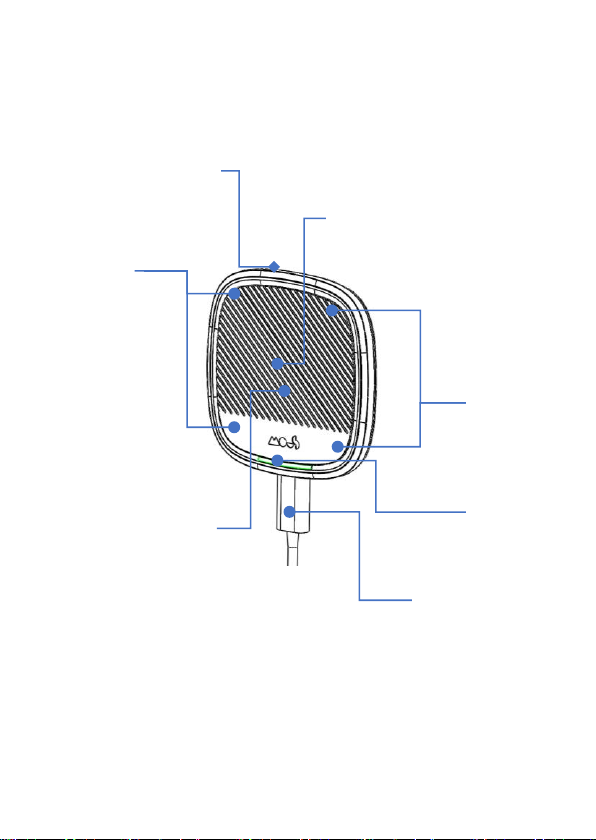
Device layout
Non-adhesive gel pad
(at the back)
magnets
Charging coil
magnets
Anti-slip pad
Document No: 000-UMD-P041-A154-001_02
Revision No: 02
Date: November 17, 2017
USB type C connector
Light indicator
5
Page 6
www.mous.co
Using the wireless charger
Charging your mobile device
Wireless charging
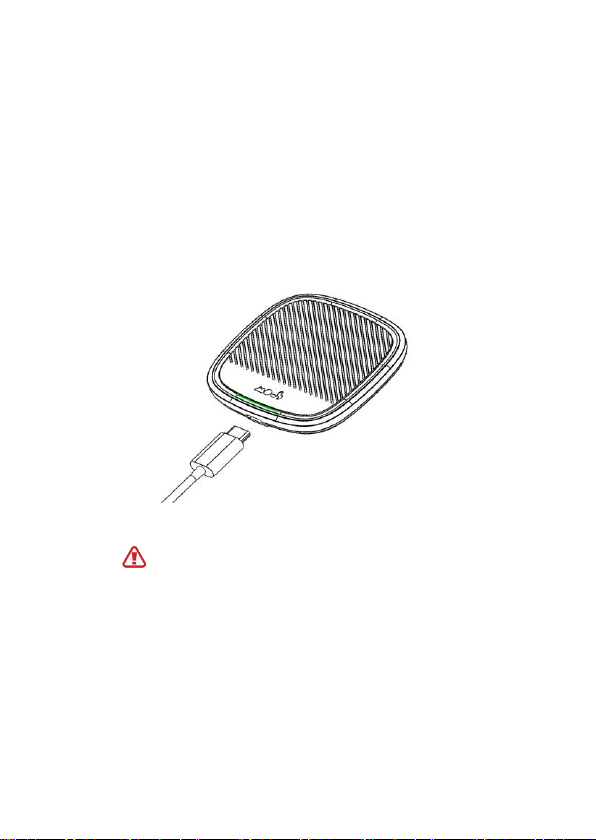
1 Connect a charger to the wireless charger.
When the charger is correctly connected to the wireless
charger, the indicator light flashes blue, and green and
then turns off.
Use only mobile phone approved chargers DC 5 V/2 A
Unauthorised chargers may cause damage, or the wireless charger may
malfunction. Use USB type C connector to power on the device.
Document No: 000-UMD-P041-A154-001_02
Revision No: 02
Date: November 17, 2017
6
Page 7
www.mous.co
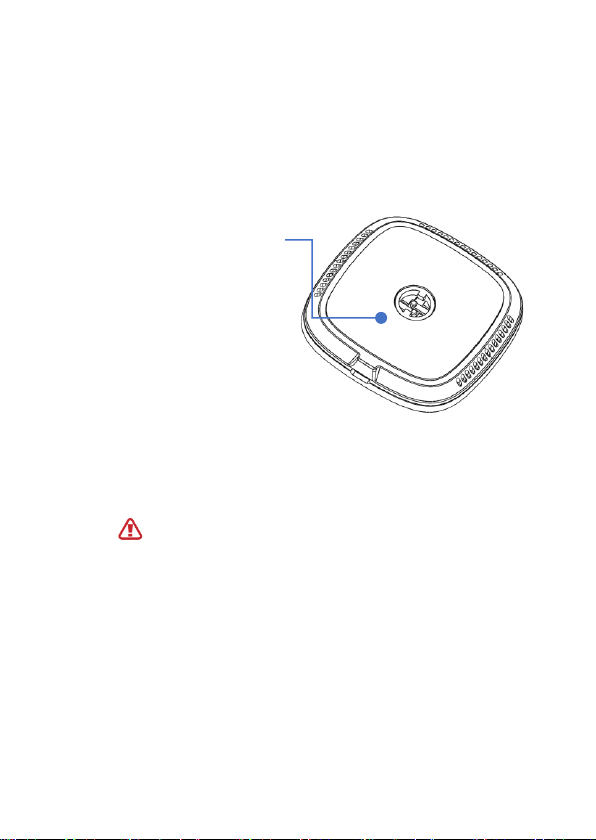
2 Mount the PUMMS wireless charging mount
• Peel off the protective plastic film found at the back of
the mount
• stick the mount on to your desired location
protective plastic
Do not stick the wireless charging device to a greasy and rough surface.
Document No: 000-UMD-P041-A154-001_02
Revision No: 02
Date: November 17, 2017
7
Page 8
www.mous.co
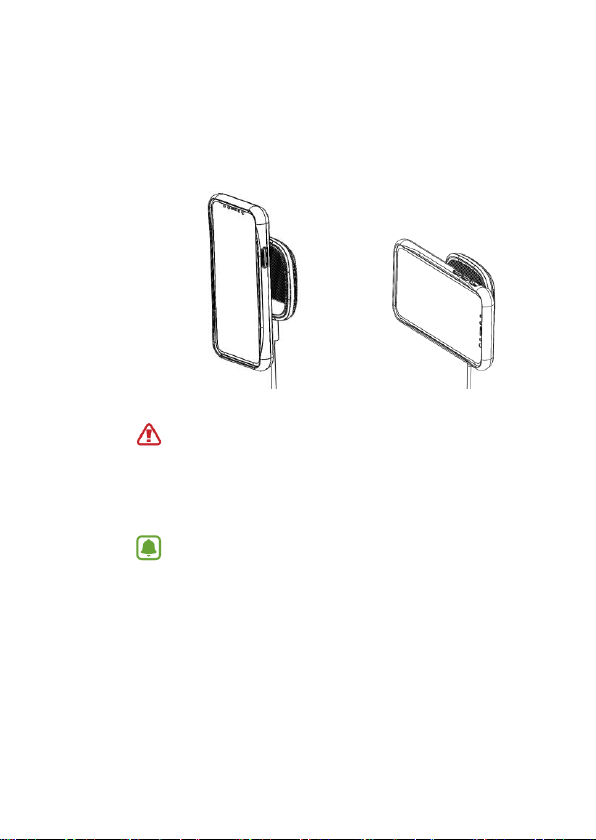
3 Place a supported mobile device to the mount
MOUS phone cases has compatible magnets that mates the wireless
charging mount and can be oriented in landscape and portrait.
Check the charging icon displayed on the mobile device’s screen for the
charging status.
• Do not place the wireless charging cover solely on the wireless
charger. Doing so may overheat the wireless charger and cause a
fire. It may also result in serious burn or device malfunction.
• If you place a mobile device on the wireless charger for an extended
period, the wireless charger may overheat and the fan inside it may
turn on.
• Do not cover or block the wireless charger’s air vent.
To charge a mobile device that does not have a built-in wireless
charging coil, attach a wireless charging cover to the mobile device.
Then, place the mobile device on the wireless charger.
Document No: 000-UMD-P041-A154-001_02
Revision No: 02
Date: November 17, 2017
8
Page 9

www.mous.co
4 When the mobile device is fully charged, remove it from
the wireless charger.
Do not place foreign materials, such as metal objects, magnets, and
magnetic stripe cards, between the mobile device and the wireless
charger. The mobile device may not charge properly or may be
damaged due to overheating.
• You may need to purchase a charger separately depending on
the wireless charger you bought.
• When the mobile device is not placed on the charging surface
properly, or depending on the location of the mobile device’s
wireless charging coil, your mobile device may not charge
properly.
• Depending on the location of the mobile device’s wireless
charging coil, your mobile device may not charge properly.
• Wireless charging may not work properly if you have attached a
thick case to your mobile device. If your case is thick, remove it
before placing your mobile device on the wireless charger.
• When a headset is connected to your mobile device, place the
mobile device in a landscape position on the wireless charger. If
you place the mobile device in a portrait position, it may not
charge.
• If you use the wireless charger in areas with weak network
signals, you may lose network reception.
• If you connect a charger to the mobile device during wireless
charging, the wireless charging feature will be unavailable.
• The wireless charger is compatible with Wireless Power
Consortium (WPC) certified devices.
• To save energy, unplug the charger when not in use. The charger
does not have a power switch, so you must unplug the charger
from the electric socket when not in use to avoid wasting power.
The charger should remain close to the electric socket and be
easily accessible while charging.
• The socket-outlet shall be installed near the equipment and shall
be easily accessible.
Document No: 000-UMD-P041-A154-001_02
Revision No: 02
Date: November 17, 2017
9
Page 10
www.mous.co
Fast wireless charging
Colour
Status
The wireless charger supports fast wireless charging. To begin fast wireless charging,
place a mobile device that supports fast wireless charging on the wireless charger.
Use only chargers that support fast charging.
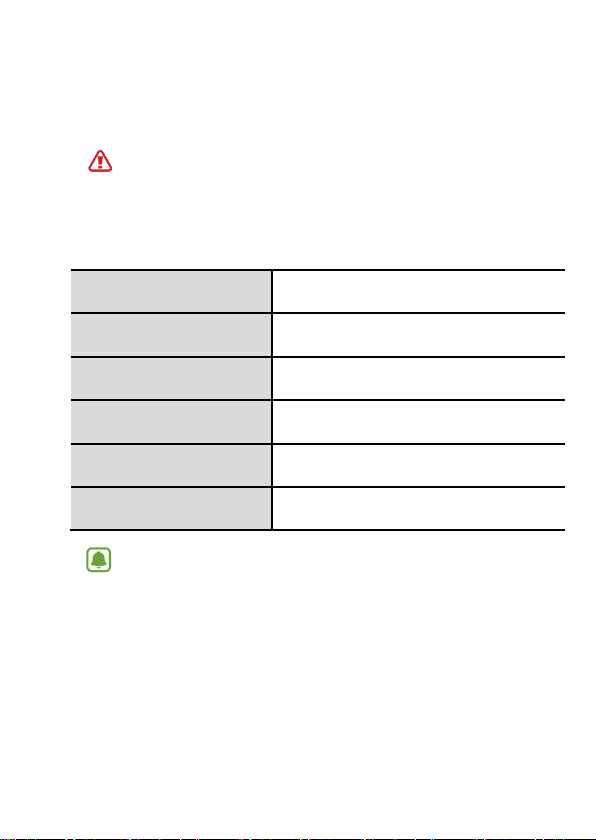
Indicator light identification
The indicator light alerts you to the wireless charger’s
status.
Blue → Green
Blue
Green
Flashing blue
Off
• If the indicator light does not work as described, disconnect the charger from
the wireless charger and reconnect it.
• The indicator light may work differently depending on the mobile device or
the wireless charging cover.
Document No: 000-UMD-P041-A154-001_02
Revision No: 02
Date: November 17, 2017
When connected to a power outlet
When charging
When fully charged
When not charging properly due to a general error
When the mobile device is removed from the
wireless charger or when the wireless charger is not
connected to a power outlet
10
Page 11

www.mous.co
FCC COMPLIANCE STATEMENT:
This device complies with part 15 of the FCC Rules.
Operation is subject to the following two conditions:
(1) This device may not cause harmful interference, and
(2) this device must accept any interference received, including interference that may
cause undesired operation.
Note: This equipment has been tested and found to comply with the limits for a Class
B digital device, pursuant to Part 15 of the FCC Rules. These limits are designed to
provide reasonable protection against harmful interference in a residential installation.
This equipment generates, uses and can radiate radio frequency energy and, if not
installed and used in accordance with the instructions, may cause harmful interference
to radio communications.
However, there is no guarantee that interference will not occur in a particular
installation. If this equipment does cause harmful interference to radio or television
reception, which can be determined by turning the equipment off and on, th e user is
encouraged to try to correct the interference by one or more of the following
measures:
Reorient or relocate the receiving antenna.
Increase the separation between the equipment and receiver.
Connect the equipment into an outlet on a circuit different from that to which the
receiver is connected.
Consult the dealer or an experienced radio/TV technician for help.
Warning: Changes or modifications to this unit not expressly approved by the part
responsible for compliance could void the user’s authority to operate the equipment.
Copyright
Copyright © 2017 MOUS Products Limited, UK
This manual is protected under international copyright laws.
No part of this manual may be reproduced, distributed, translated, or transmitted in
any form or by any means, electronic or mechanical, including photocopying,
recording, or storing
in any information storage and retrieval system, without the prior written permission
of MOUS Products Limited, UK.
Trademarks
• MOUS Products Limited, UK and the MOUS logo are registered trademarks of
MOUS Products Limited, UK.
• All other trademarks and copyrights are the property of their respective owners.
Document No: 000-UMD-P041-A154-001_02
Revision No: 02
Date: November 17, 2017
11
 Loading...