

Page 1
VB-Series Operating Instructions
Rev 2.6 (5/28/13)
Corporate Headquarters: 1080 North 11th Street, San Jose, CA95112 Phone: (408) 292-2214 Fax: (408) 292-2733
www.mountztorque.com
Operating the Tool
1. Select a bit. Retract the bit collar. Insert the bit and release the retracted
collar. To avoid damaging fasteners, make sure the proper bit is suitable for
the head of the fastener.
2. The torque limit is determined by the tension of the coil spring housed in
the torque adjustment nut. The tighter the coil spring is wound the higher
the torque limit is raised. See Torque Charts on page 2 to determine the
appropriate torque adjustment setting.
3. Rotate the torque adjustment nut to set the torque limit. Turn clockwise to
increase torque and counter clockwise to decrease torque. The scale
adjacent to the Torque Adjustment Nut is a reference guide. The torque
output from the driver can change depending on various fastening factors
like friction, type of joint, and the type material being used like a washer.
4. Make sure the FOR/STOP/REV switch is in the “Stop” position. Plug-in
power cord.
5. Turn driver on and check for proper rotation. FOR-clockwise,
REV-counterclockwise.
6. To apply torque, squeeze the lever (Push-to-Start models - place light
downward pressure on the nose of the driver). The driver will
automatically stop when the preset torque has been reached. Never
run the motor continuously for extended periods. Use tool intermittently:
(example 5 seconds on and 3.5 seconds off).
7. To remove the screw, turn the FOR/REV switch to REV.
CARE & Safety
1. The VB-Series screwdrivers are a precision torque control instrument and should be handled with care at all times.
2. Operate under safe conditions. Do not place in operation where such objects as hair, strings, clothing, etc. can become
tangled in the rotating bit.
4. Keep away from moisture. Never use in high humid, moist or damp environment.
5. Use the tool intermittently (example 5 seconds on & 3.5 seconds off).
6. Do not tighten more than 900 PCS of tapping screws during a period of 60 minutes.
7. When using the VB4504PS at high torque settings, please use a torque arm or Shock-Resistant stand with the tool. The
high impact on the operator’s hand may result in Carpal Tunnel Syndrome.
8. Never lubricate electrical parts.
9. Tool is not for tightening wood screws.
10. Use tool with proper voltage (120V).
11. While tools is in use, never change Forward and Reverse direction immediately.
12. Do not pull the cord as means to unplug the driver. Unplug driver using the plug-end.
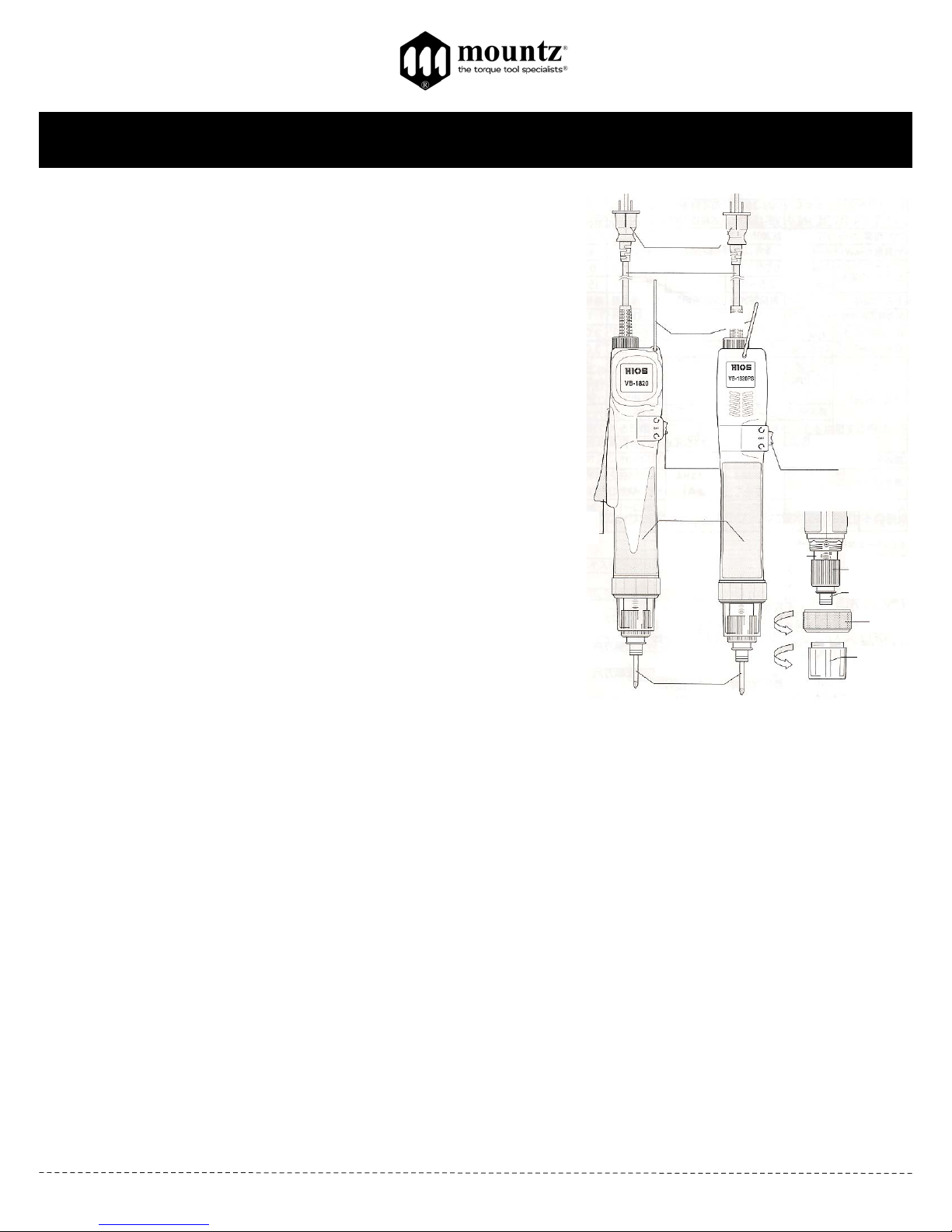
AC Plug
Cord
Hanger
For/Off/Rev
Switch
Lever
Torque
Adjusting Nut
Shaft Collar
Bit
Lever Model
Push-to-Start Model
Scale
Cover
Page 2
Corporate Headquarters: 1080 North 11th Street, San Jose, CA95112 Phone: (408) 292-2214 Fax: (408) 292-2733
www.mountztorque.com
Torque Reference Charts
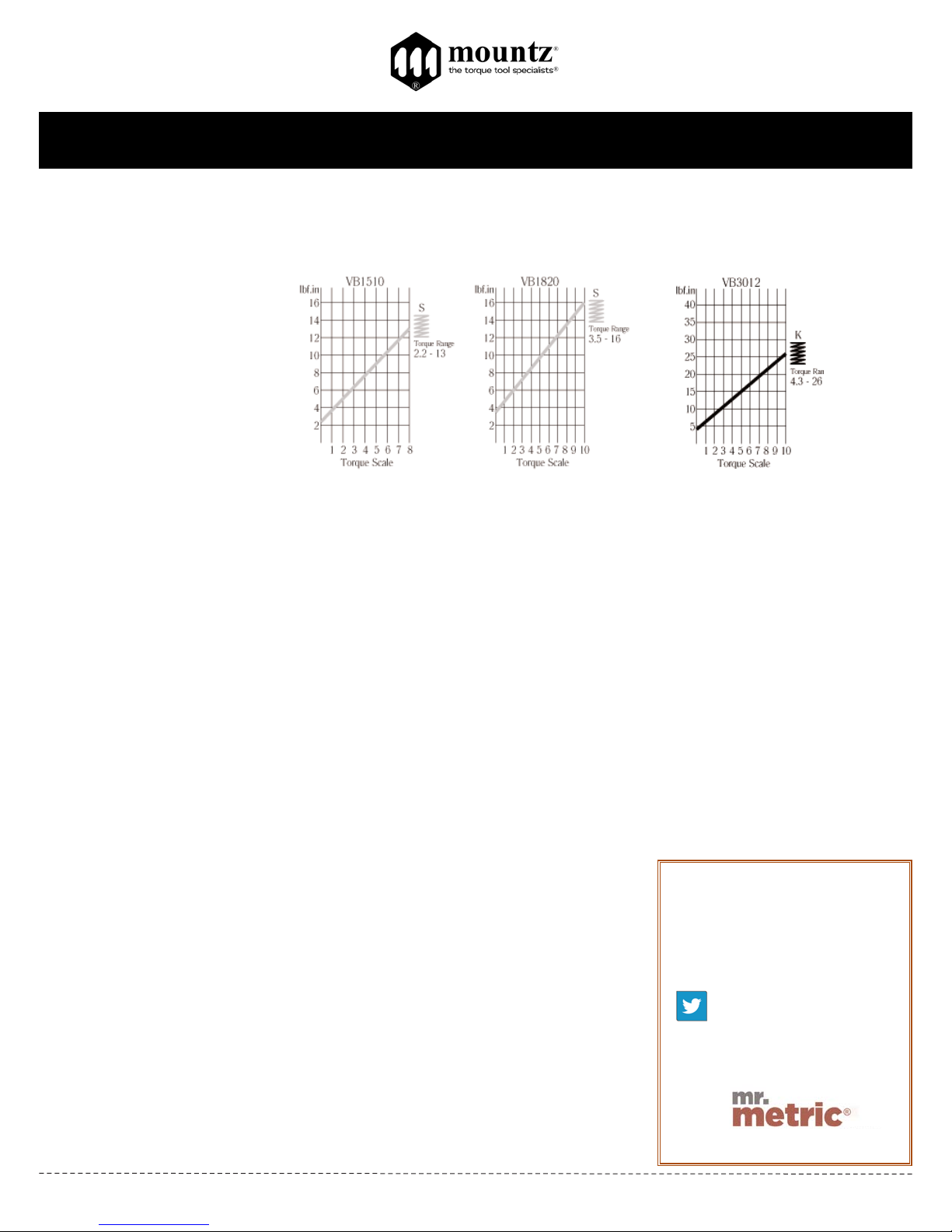
These charts are meant to be used as guidelines for setting the torque on the VB-Series electric screwdrivers. The drivers
have a torque scale on the torque adjustment nut showing reference numbers. These numbers determine the approximate
torque setting. Refer to the charts to determine the reference number setting for your torque requirement.
Torque ranges (lbf.in) approximate
tightening torque. Figures below
each chart indicate scale setting
on the tool.
Color of Springs:
K = Black
S = Silver
Extension Cords
Make sure your extension cord is in good condition. When using an extension cord, be sure to use heavy enough cord to
carry the current your tool will draw. An undersized cord will cause a drop in line voltage resulting in loss of power and over
heating. The table below shows the correct size to use depending on cord length and ampere rating. If in doubt, use the next
heavier gage. The smaller the gage numbers the heavier the cord.
Minimum Gage for Cord Sets *
Volts Total Length of Cord in Feet
120V 0-25 26-50 51-100 101-150
240V 0-50 51-100 101-200 201-300
Ampere Rating
More Not More
Than Than
06
610
10 12
12 16
Testing Power Tools:
1. Application Method: Use a torque tester in “Peak Mode” with a rotary torque sensor
between the power tool and the actual application. This is the best way to test
since you are using the actual joint as the test station. You will see the actual
torque applied to the fastener. Caution: Variances in tool performance may occur
do to the addition of the rotary torque sensor.
2. Simulated Method: Always use a quality joint rate simulator (run down adapter) with
a torque tester when testing power tools in a simulated application. Use Joint rate
and Breakaway methods to obtain most accurate torque readings in a
simulated rundown.
VB-Series Operating Instructions
Rev 2.6 (5/28/13)
Contact
Mountz Inc.
Phone: 408.292.2214
Fax: 408.292.2733
www.mountztorque.com
Twitter: @mountztorque
Looking for fasteners?
www.mrmetric.com
 Loading...