

Page 1
TorcoTronic Operating Instructions
Rev 1.0
Corporate Headquarters: 1080 North 11th Street, San Jose, CA 95112 Phone: (408) 292-2214 Fax: (408) 292-2733
www.etorque.com
Mountz, Inc
ISO 9001 (2000) company
ISO 9001
Page 2
2
1. Specifications
Measuring range 30 - 300 Nm 22 - 222 lbf.ft
Measuring units (computed)0.1 Nm - 0.1 lbf.ft. (1 Nm = 0.74 lbf.ft)
Lowest torque indicated0.3 Nm
Drive 1/2“ square joint
Accuracy ≤1% ± 1 digit of the current reading
Measurement display LCD, 4 digits / special characters, digital
Measurement transducer Bending beam with full bridge circuit 4 x 1200 Ohm, controlled by microcontroller
Power supply 3 AA size batteries (mignon), replaceable by customer. Suitable are:
- 3x 1.5 V alkaline approx. 2500 mAh (supplied)
- 3x 1.5 V ZnC approx. 1500 mAh
- 3x 1.2 V NiMH rechargable approx. 1300 mAh
- 3x 1.2 V NiCd rechargable approx. 900 mAh
(the mAh values vary with brand and type)
Battery life timeUsing 3x 1.5 V alkaline batteries:
display only: min. 1400 hsleep mode: max. 8500 h
T emperature +5°C to +35°C +40°F to +95°F
Calibration Automatic -0- calibration at the touch of a key
Direction of rotation Clockwise and anticlockwise
Dimensions L: 573 mm ∅: max. 40 mm
Weight3.1 lbs.
Reading memory 2000 readings
Memory bank1 bank, Data sequentiell stored
Data memory 8K Byte Eeprom
Interface RS232 serial
Transmission rate 1200 Baud
8 data bit
1 stop bit
no Parity
no protocoll
Jack 3.5mm jack 3 pole
RS232 - interface
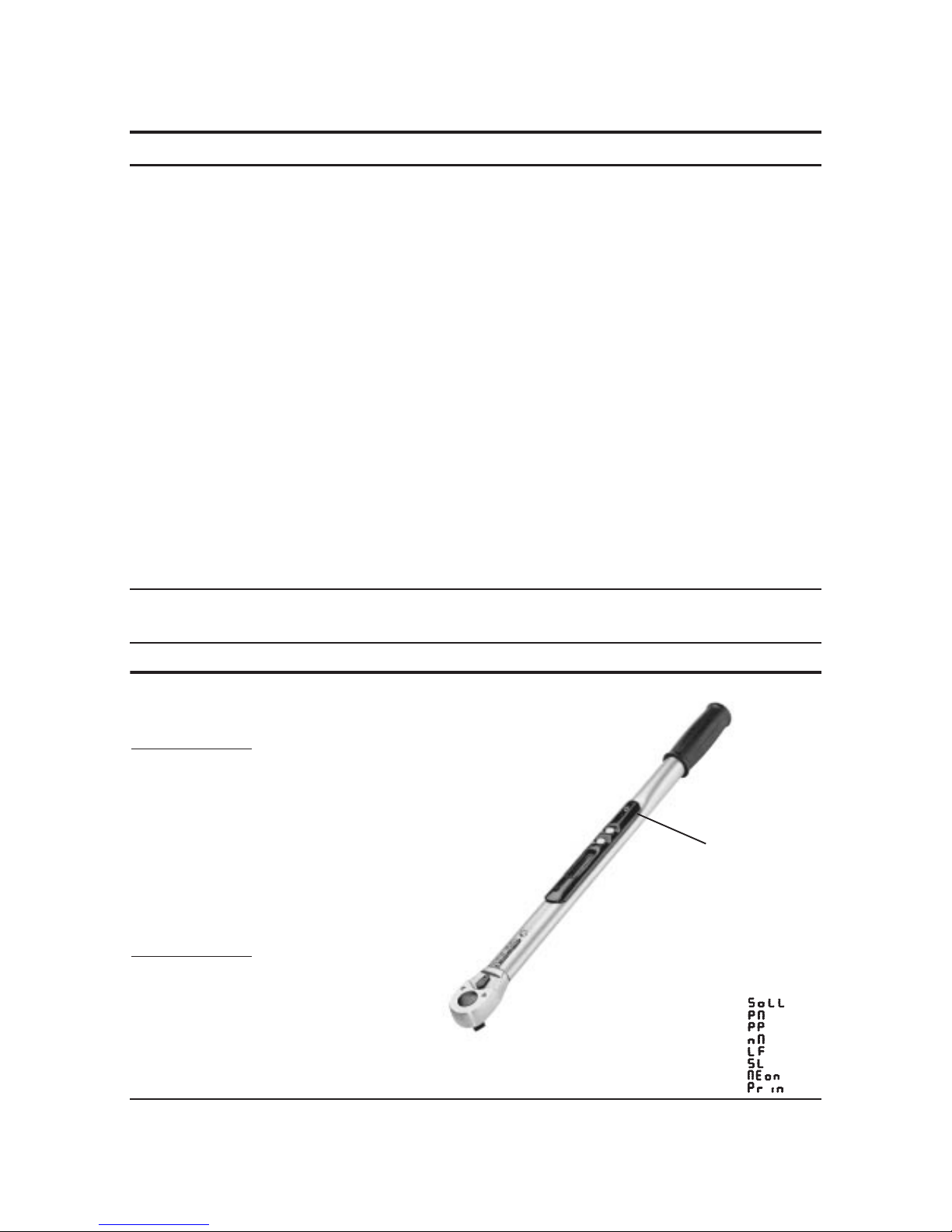
Function special characters
Rated value
Percent minus
Percent plus
Nm
Lbf.ft.
Sleep timer
Memory
Print
Technical Data
Page 3
Operation
Display
Comments
3
Operation
Display
Comments
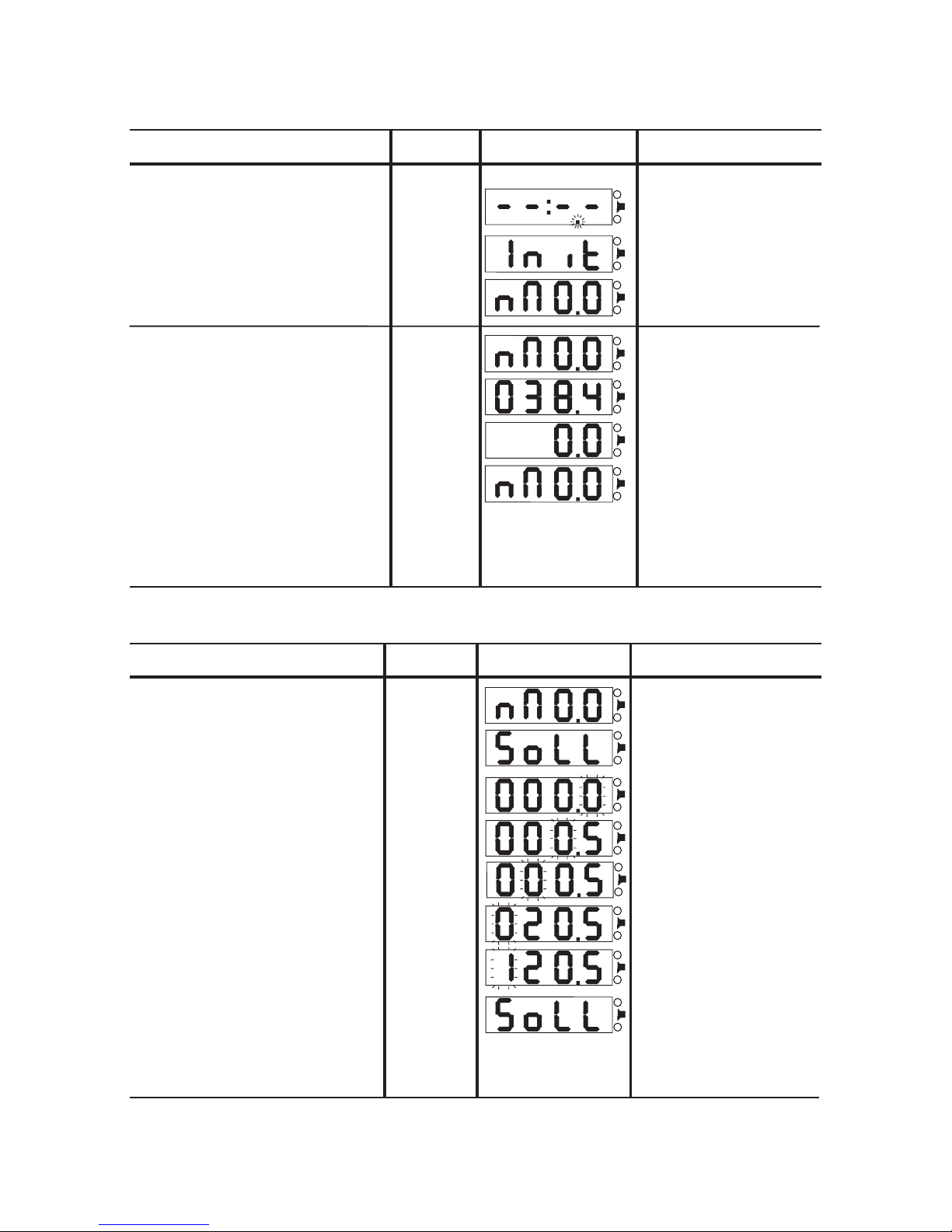
Setting a rated value
Select function ‘set rated value’
press 1x
MODE key 1
Display ‘operational’ T orque wrench operational
Display ‘Rated value’
Input starts with the decimal place
ones
1x MODE key 1
Set the rated value:120.5
hundreds
tens
tenths
2x MODE key 1
1x SELECT key 2
0x MODE key 1
1x SELECT key 2
5x MODE key 1
1x SELECT key 2
press 1x
SELECT key 2
Note:
Pressing the SELECT key 2 briefly
changes to the next digit. Holding the SELECT
key 2 down for approx. 1 sec. re-sets the rated
value to 000.0.
press 1x
SELECT key 2
The rated value is set
Continue with:
Percentages -> press 1x MODE key 1
Measuring -> hold 1x MODE key 1
Increase current digit MODE key 1
Go to the next digit SELECT key 2
2. Commissioning
Activate the torque wrench from sleep modepress any key
The decimal point flashes in sleep mode
Decimal point does not flash:
- torque wrench not operational
- replace exhausted batteries
T orque wrench is initializing
T orque wrench operational
Readings may be taken immediately
Measuring torque in Nm
tighten / loosen a
screw connection
Readings are displayed until cleared
using the SELECT key 2
press 1x
SELECT key 2
The displayed reading is clearedClear the displayed reading
T orcoTronic ready for next measurement
Note: The TorcoT ronics readings are peak values.
Is a series of screw connections loosened/
tightened without clearing the displayed reading,
one will get the maximum torque measurement
of all connections from that series.
Page 4
Operation
Display
Comments
4
Operation
Display
Comments
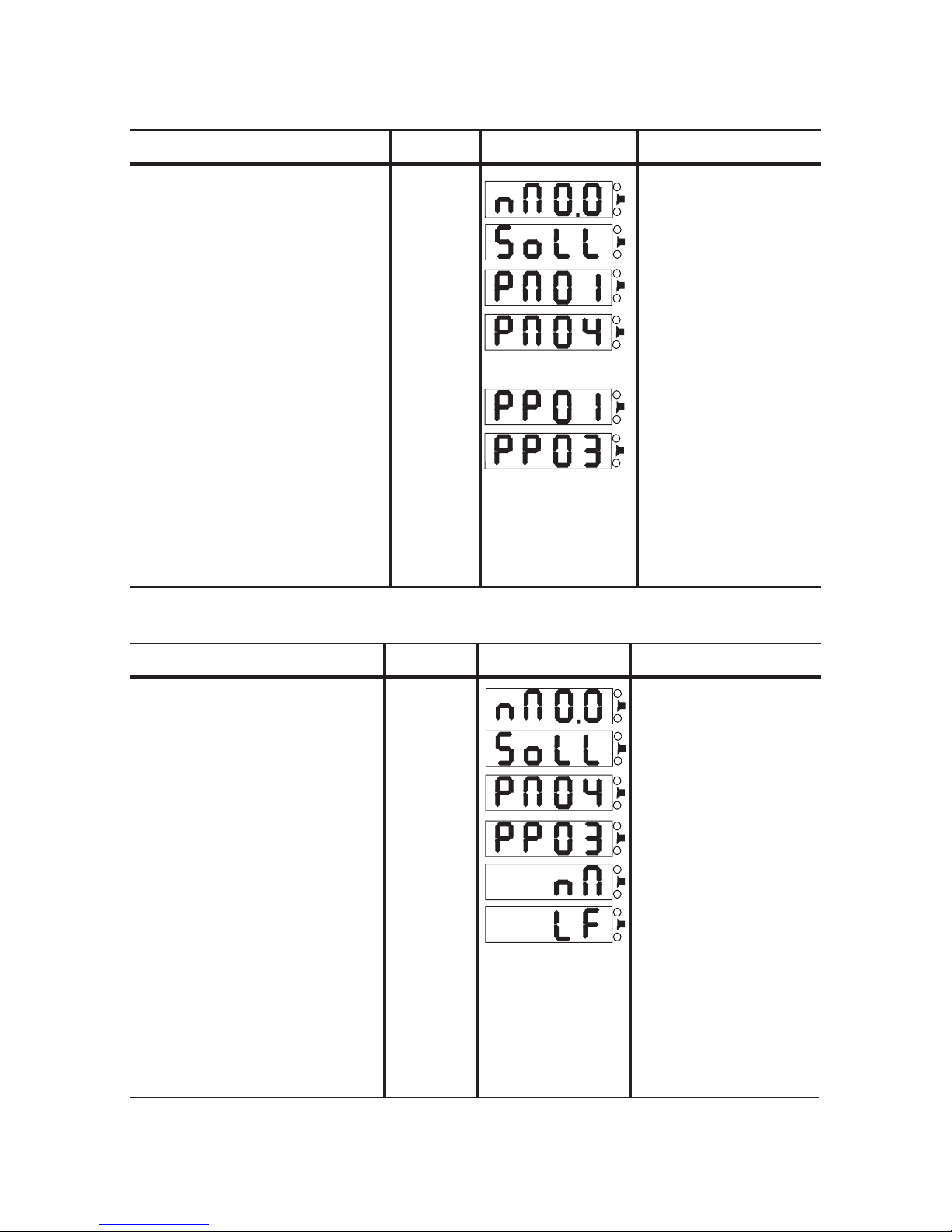
Changing Nm / lbf.ft.
Select function ‘set rated value’
press 1x
MODE key 1
Display ‘operational’ T orque wrench operational
Display ‘Rated value’
The unit of measurement Nm/lbf.ft. is set
Continue with:
Sleep timer -> press MODE key 1
Measuring -> hold MODE key 1
Select function ‘set permissible percent minus’ Display ‘Percent minus’
Select function ‘Nm/lbf.ft.’
Display ‘Percent plus’
press 1x
SELECT key 2
Select function ‘set permissible percent plus’
Display ‘Nm/lbf.ft.’
Select unit of measurement
press 1x
MODE key 1
press 1x
MODE key 1
press 1x
MODE key 1
T oggle setting using SELECT key 2
Setting the tolerance limits
Select function ‘set rated value’
press 1x
MODE key 1
Display ‘operational’ T orque wrench operational
Display ‘Rated value’
Enter lower tolerance limit in percentage of the rated
value
-4%
Set value using SELECT key 2
Setting: -4%
press 3x
SELECT key 2
The tolerance limits are set
Continue with:
Nm/lbf.ft. -> press MODE key 1
Measuring -> hold MODE key 1
Select function ‘set permissible percent minus’ Display ‘Percent minus’
Note: Holding the SELECT key 2 for approx. 1
sec. re-sets the current tolerance setting to 1%.
Select function ‘set permissible percent plus’ Display ‘Percent plus’
Set value using SELECT key 2
Setting: +3%
press 2x
SELECT key 2
Enter top tolerance limit in percentage of the rated value
+3%
press 1x
MODE key 1
press 1x
MODE key 1
Page 5
Operation
Display
Comments
5
Operation
Display
Comments
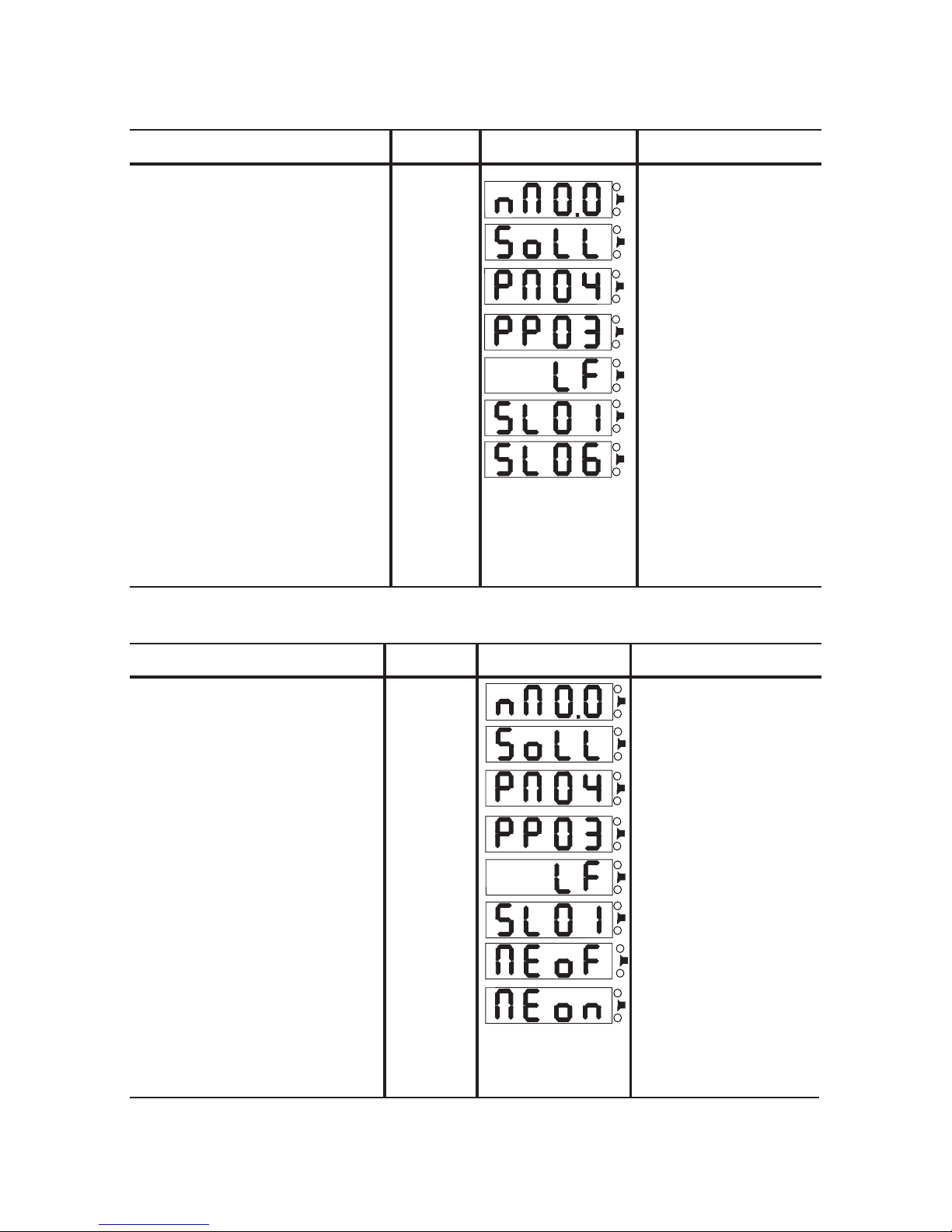
Select function
Memory store
Select function ‘set rated value’“
Display ‘operational’
Function ‘Memory’ switched on
Continue with:
Print -> press MODE key 1
Measuring -> hold MODE key 1
Select function ‘set permissible percent minus’
Select function ‘Nm/lbf.ft.’
Select function ‘set permissible percent plus’
Display ‘Memory’
Select function ‘Memory’
Select function ’set sleep timer’
Set function ‘Memory’
Function ‘Memory’ on
Note: Function „Memory“ on, the decimal Point
flash. Displayed reading stored in Memory if
SELECT key pressed.
Displayed -> Stor
Display ‘Sleep timer’
T orque wrench operational
Display ‘Rated value’
Display ‘Percent minus’
Display ‘Percent plus’
Display ‘Nm/lbf.ft.’
press 1x
MODE key 1
press 1x
MODE key 1
press 1x
MODE key 1
press 1x
MODE key 1
press 1x
MODE key 1
press 1x
MODE key 1
press 1x
SELECT key 2
Setting the sleep timer
The sleep timer is set
Continue with:
Measuring -> press MODE key 1
Set value using SELECT key 2
Setting: 6 minutes
Set sleep timer 6 minutes
Select function ’set sleep timer’ Display ‘Sleep timer’
Select function ‘set rated value’
press 1x
MODE key 1
Display ‘operational’
Select function ‘set permissible percent minus’
Select function ‘Nm/lbf.ft.’
press 5x
SELECT key 2
Select function ‘set permissible percent plus’
T orque wrench operational
Display ‘Rated value’
Display ‘Percent minus’
Display ‘Percent plus’
Display ‘Nm/lbf.ft.’
press 1x
MODE key 1
press 1x
MODE key 1
press 1x
MODE key 1
press 1x
MODE key 1
Note: Holding the SELECT key 2 for approx. 1
sec. re-sets the sleep timer setting to 1 minute.
Page 6
Operation
Display
Comments
6
Operation
Display
Comments
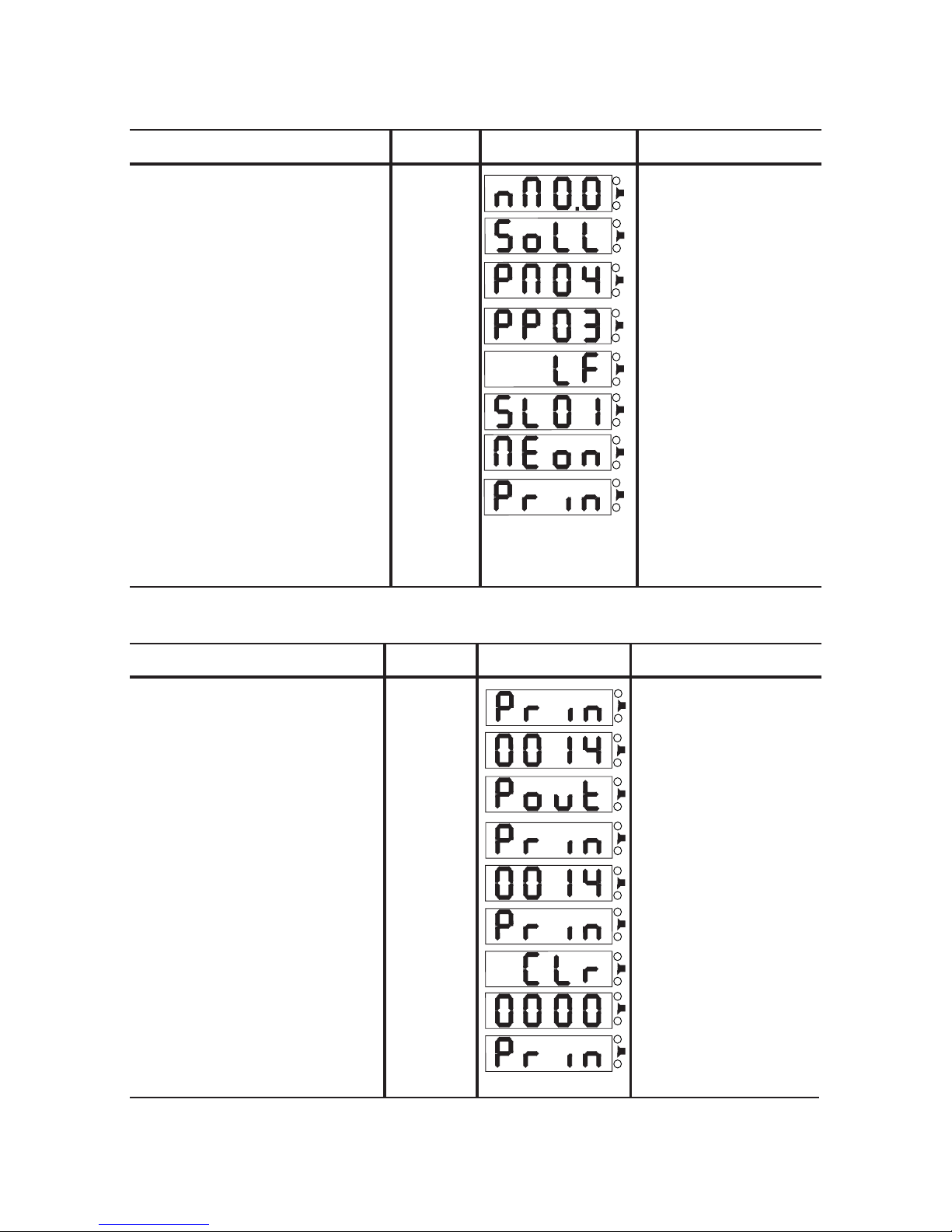
Print Memory
Clear Memory
Select number of stored readings
Select function ‘Print memory’
Select function ‘clear memory’
Select function ‘Print’
Display number of stored readings
Display printing stored readings
Display clear memory
Ready clear memory
Display number of stored readings
Ready printing
Diplay function ‘Print’
Display number of stored readings
Display function ‘Print’
Select number of stored readings
press 1x
SELECT key 2
press 1x
MODE key 1
press 1x
SELECT key 2
and hold down
press 1x
SELECT key 2
press 1x
MODE key 1
release
SELECT key 2
Select function ‘Print’ press 1x
SELECT key 2
Select function Print
Select function ‘set rated value’“
Display ‘operational’
Function ‘Print’ selected
Continue with:
Measuring -> press MODE key 1
Select function ‘set permissible percent minus’
Select function ‘Nm/lbf.ft.’
Select function ‘set permissible percent plus’
Display ‘Memory’
Select function ‘Memory’
Select function ’set sleep timer’
Select function ‘Print’
Display ‘Print’
Display ‘Sleep timer’
T orque wrench operational
Display ‘Rated value’
Display ‘Percent minus’
Display ‘Percent plus’
Display ‘Nm/lbf.ft.’
press 1x
MODE key 1
press 1x
MODE key 1
press 1x
MODE key 1
press 1x
MODE key 1
press 1x
MODE key 1
press 1x
MODE key 1
press 1x
MODE key 1
6
Page 7
Operation
Display
Comments
7
Operation
Display
Comments
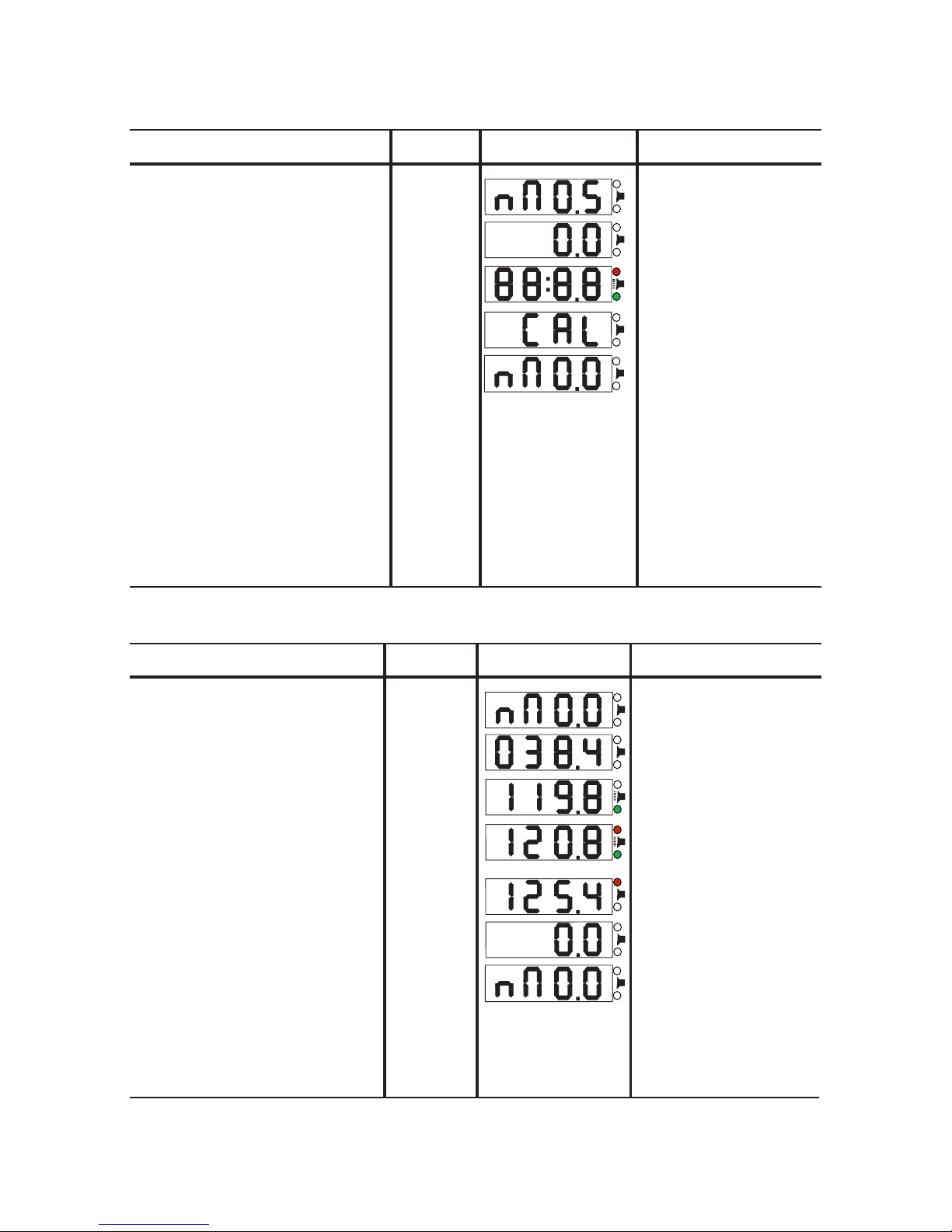
Measuring with rated value
Current torque reading below the rated value, but above
the lower tolerance limit
Display ‘operational’
Rated value and tolerance limits are set
Current torque reading above the rated value, but below
the top tolerance limit
Current torque reading above the rated value and above
the top tolerance limit
Current torque reading below the rated value and below
the lower tolerance limit
No signal
Signal: - green LED
- beeper
Signal: - green LED
- red LED
- beeper
Signal: - red LED
press 1x
SELECT key 2
The displayed reading is clearedClear the displayed reading
Display ‘operational’
T orque wrench operational
T orque wrench operational
Calibration
Recalibrate the torque wrench Reading is re-set to zero
Self test
Calibration in progress
Torque wrench operational
Display ‘operational’
T orque wrench operational
Non-zero reading without load
hold down
SELECT key 2
release
SELECT key 2
Page 8
Operation
Display
Comments
Operation
Display
Comments
8
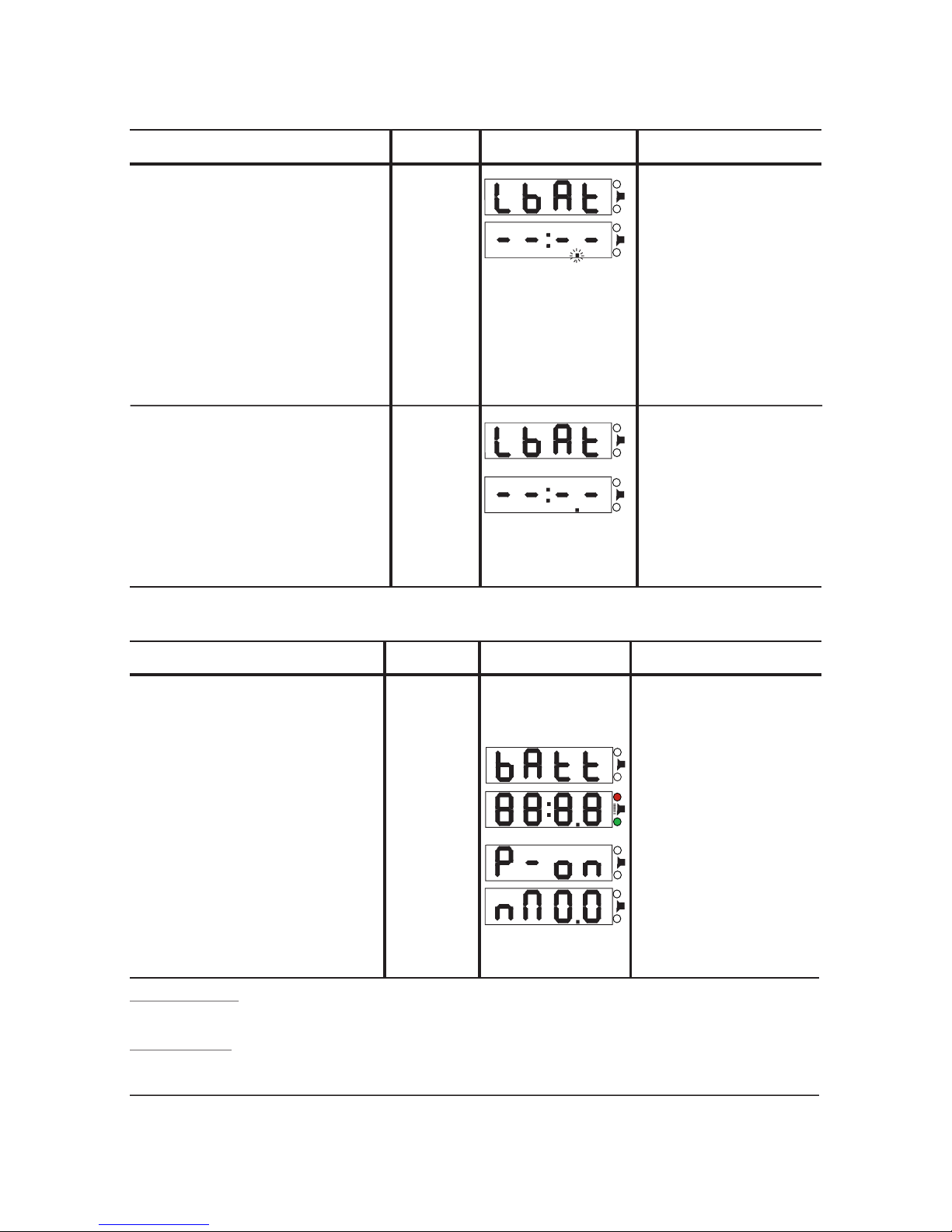
Replacing the batteries
1. Unscrew the battery compartment located at the handles end
2. Remove old batteries
3. Insert new batteries, ‘+’ terminal facing towards the LCD
4. Screw the battery compartment shut
Initialize the torqe wrench
Display after batteries have been
replaced
Self test
press
SELECT key 2
Initialization of the torque wrench starts
Service and inspection
- Clean with dry cloth only, do not immerse into benzine or solvents
- Advise: Return the torque wrench once a year to the manufacturer for inspection
The TorcoTronic was tested and found to comply with the CE standard.
Display ‘batteries changed’
T orque wrench operational
Battery level
Low battery
Display for approx. 6 sec. before torque
wrench enters sleep mode
Sleep mode, decimal point flashes
Batteries should be replaced
Sleep mode, decimal point does not flash
‘LbAt’ and ‘Sleep mode’ alternate
Batteries must be replaced
Batteries exhausted
Note: Should the ‘LbAt’ display appear during
measuring with rated value (higher power
consumption) it is possible to continue measuring
with display only (measuring with rated value
disabled) for a brief period. In case ‘LbAt’ is
displayed immediately after waking up the torque
wrench from sleep mode, the batteries are
exhausted and have to be replaced.
T orque wrench enters sleep mode
T orque wrench enters sleep mode
Display for approx. 6 sec. before torque
wrench enters sleep mode
 Loading...