

Page 1
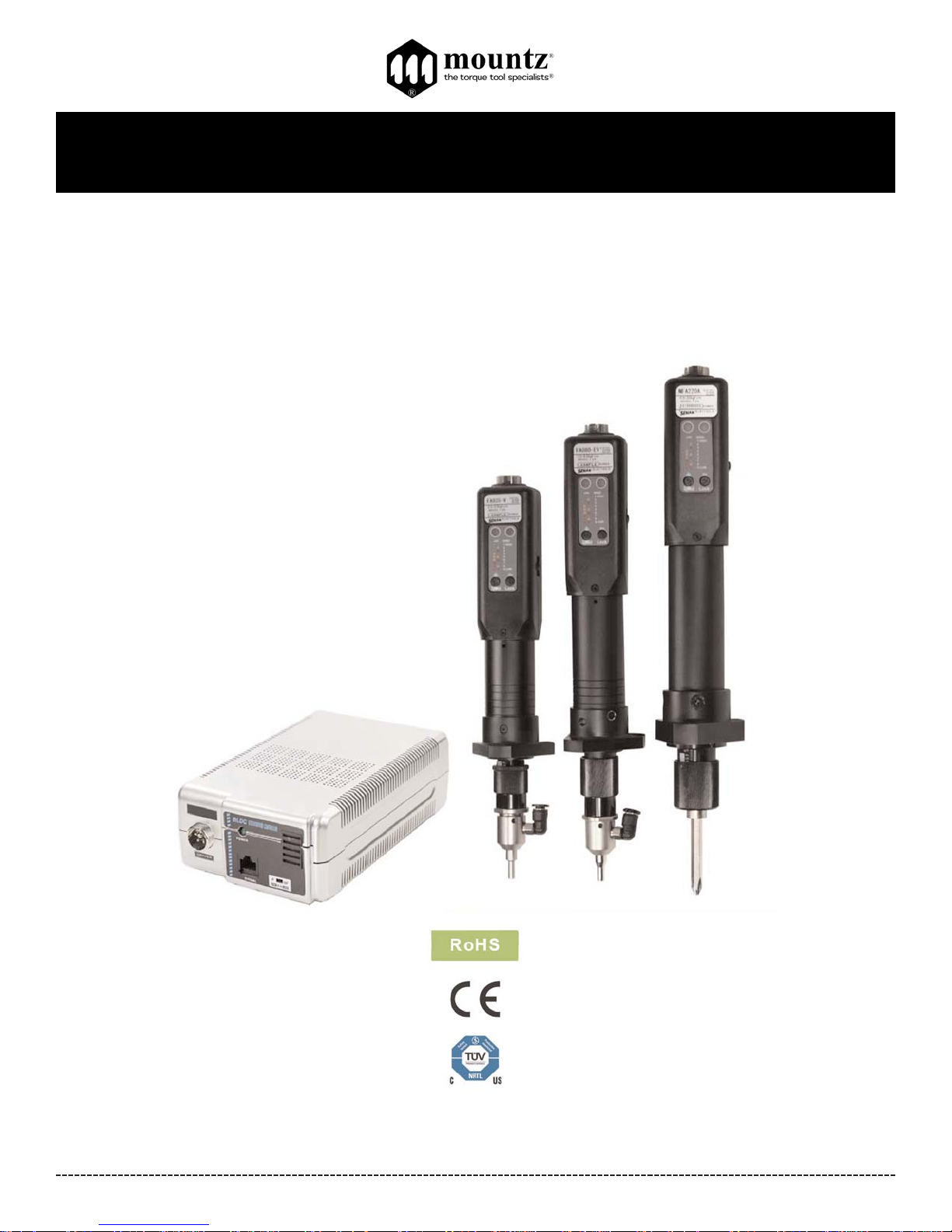
BFA-Series & NFA-Series
Operation Instructions
Corporate Headquarters: 1080 North 11th Street, San Jose, CA95112 Phone: (408) 292-2214 Fax: (408) 292-2733
www.mountztorque.com
Page 1
Rev 2.2 (4/13/17)
Page 2
BFA-Series & NFA-Series Operation Instructions
Key Features
- Various models that range from 0.9 - 39 lbf.in
- Robotic style electric screwdriver for automated and fixtured applications.
- Drivers include a front mounting flange.
- High performance brushless motor design provides durability and reduces the standard maintenance costs for electric
screwdrivers.
- Designed for high production environments. Minimal heat build-up even when tool is operated continuously.
- Over Heat Protection (OHP) and Over Current Protection (OCP) protect driver from damage or malfunction. Features a LED
display that signals the tool status for the operator to view.
- Can be connected with the Scout Screw Counter.
- Requires STC40-FA transformer (power supply).
- All models are ESD designed and prevent the occurrence of electrostatic discharge, which improves production yields,
manufacturing costs, product quality, product reliability, reputation and profitability.
- Ensures accuracy in fastening with precision automatic shut-off clutch once preset torque is achieved.
- External torque adjustment scale.
- Forward and reverse direction by switch. Start and stop output signals.
Corporate Headquarters: 1080 North 11th Street, San Jose, CA95112 Phone: (408) 292-2214 Fax: (408) 292-2733
www.mountztorque.com
Page 2
General Operation for BFA-Series and NFA-Series models
1. Attach power tool cable to the BFAor NFA screwdriver and the transformer. Make sure notch in plug lines up
with the notch on the socket. Tighten knurled ground ring.
2. Plug in power cord to the back of the transformer and power outlet. Flip power switch to “ON” position located
on the back of transformer.
3. Select a bit. Retract the bit collar. Insert the bit and release the retracted collar. To avoid damaging
fasteners, make sure the proper bit is suitable for the head of the fastener.
4. The torque limit is determined by the tension of the coil spring housed in the torque adjustment nut. The tighter the coil spring is
wound the higher the torque limit is raised. See charts on pages 9-10 to determine the appropriate torque
adjustment setting.
5. Rotate the torque adjustment nut to set the torque limit. Turn clockwise to increase torque and counter clockwise to
decrease torque. The scale adjacent to the Torque Adjustment Nut is a reference guide. The torque output from the
driver can change depending on various fastening factors like friction, type of joint, and the type material being used
like a washer.
6. Turn driver on and check for proper rotation. FOR-clockwise, REV-counterclockwise.
torque
adjustment nut
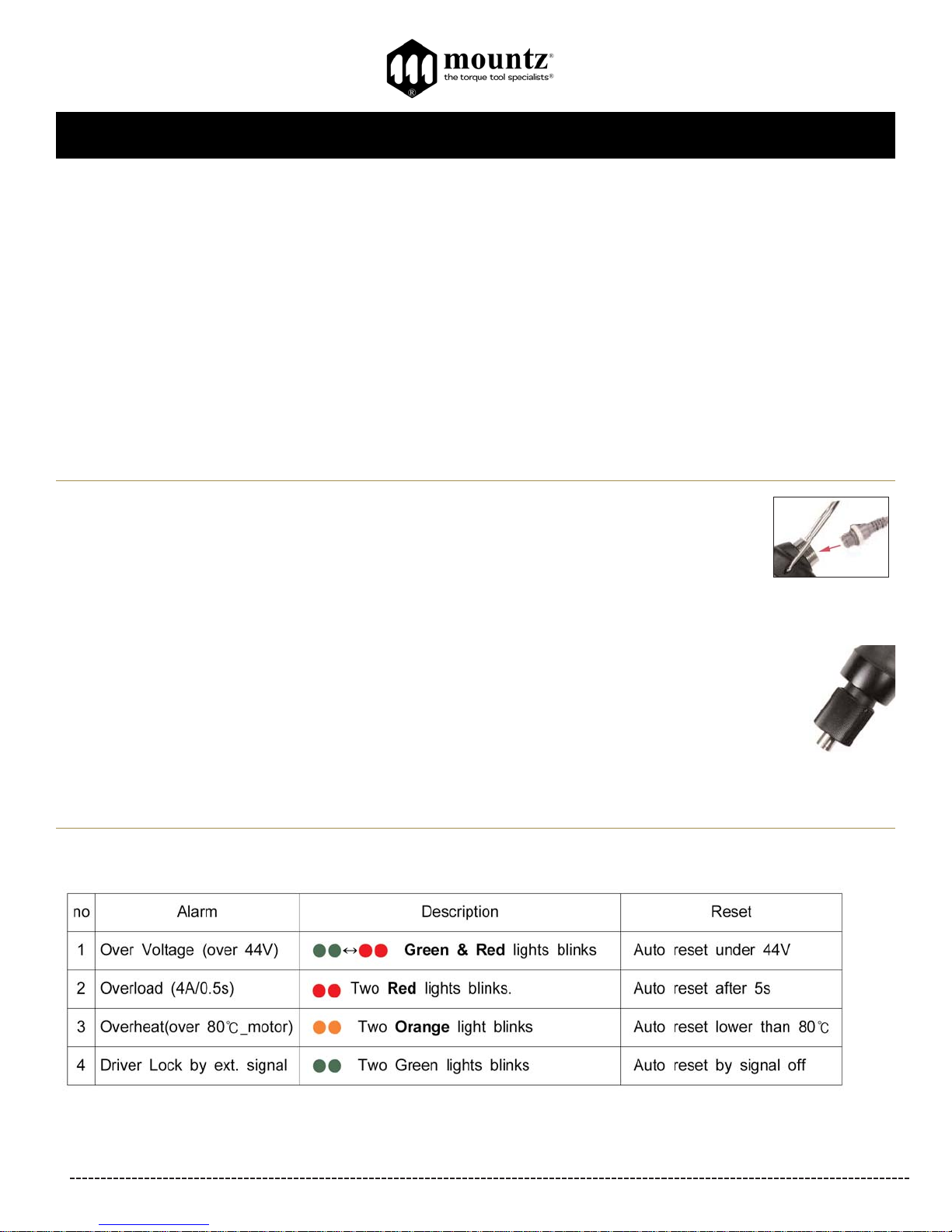
Alarm display on the screwdriver by LED
Page 3
BFA-Series & NFA-Series Operation Instructions
Corporate Headquarters: 1080 North 11th Street, San Jose, CA95112 Phone: (408) 292-2214 Fax: (408) 292-2733
www.mountztorque.com
Page 3
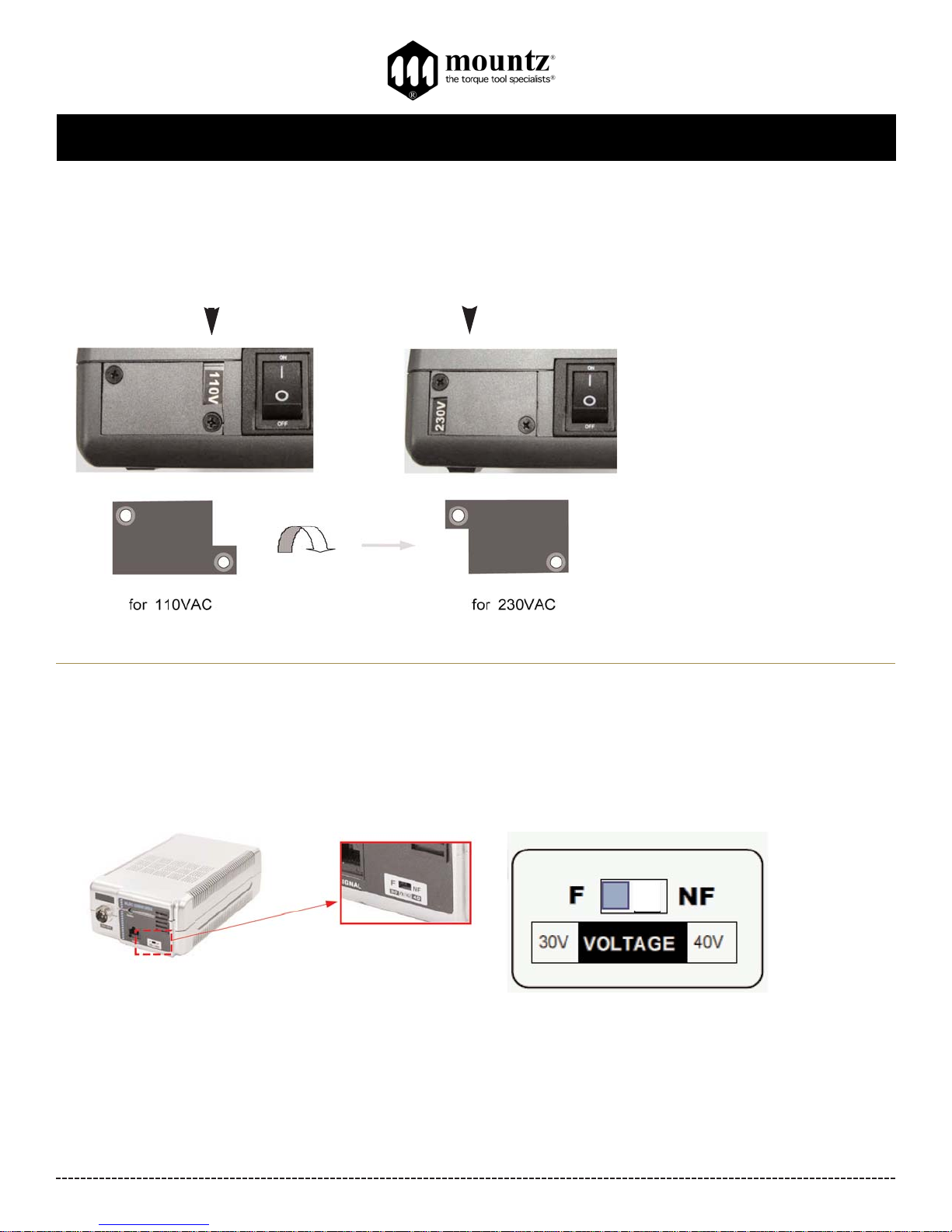
STC40-FA Input Voltage Selection
By changing the position of cover as below, the input power can be switched between 110V or 230V. For changing the
input voltage, loosen two screws and assemble the cover as below.
230VAC Selected110VAC Selected
Connecting Electric Screwdriver
Before connecting the electric screwdriver, make sure the little switch in the lower bottom right of the STC40-FA is positioned in the
proper setting (F or NF). See diagram. Only operate tool in proper “Mode” setting.
Select F mode for operating
BFA-Series - 30 VDC
Select for NF or operating
NFA-Series - 40 VDC
STC40-FA Specification
Max. Output: 12A
Output VDC: 30/40V
Input VAC: 110/230V (selectable)
Size inches (W x D x H): 4 3/8” x 7 1/2” x 2 3/8”
Weight: 1.8 lbs.
Intermittent Operation: 10s On / 30s Off
Fuse: 10 A 250V
Rated power: 2.5A 105W
Page 4
BFA-Series & NFA-Series Operation Instructions
Corporate Headquarters: 1080 North 11th Street, San Jose, CA95112 Phone: (408) 292-2214 Fax: (408) 292-2733
www.mountztorque.com
Page 4
Speed Selection for Electric Screwdriver
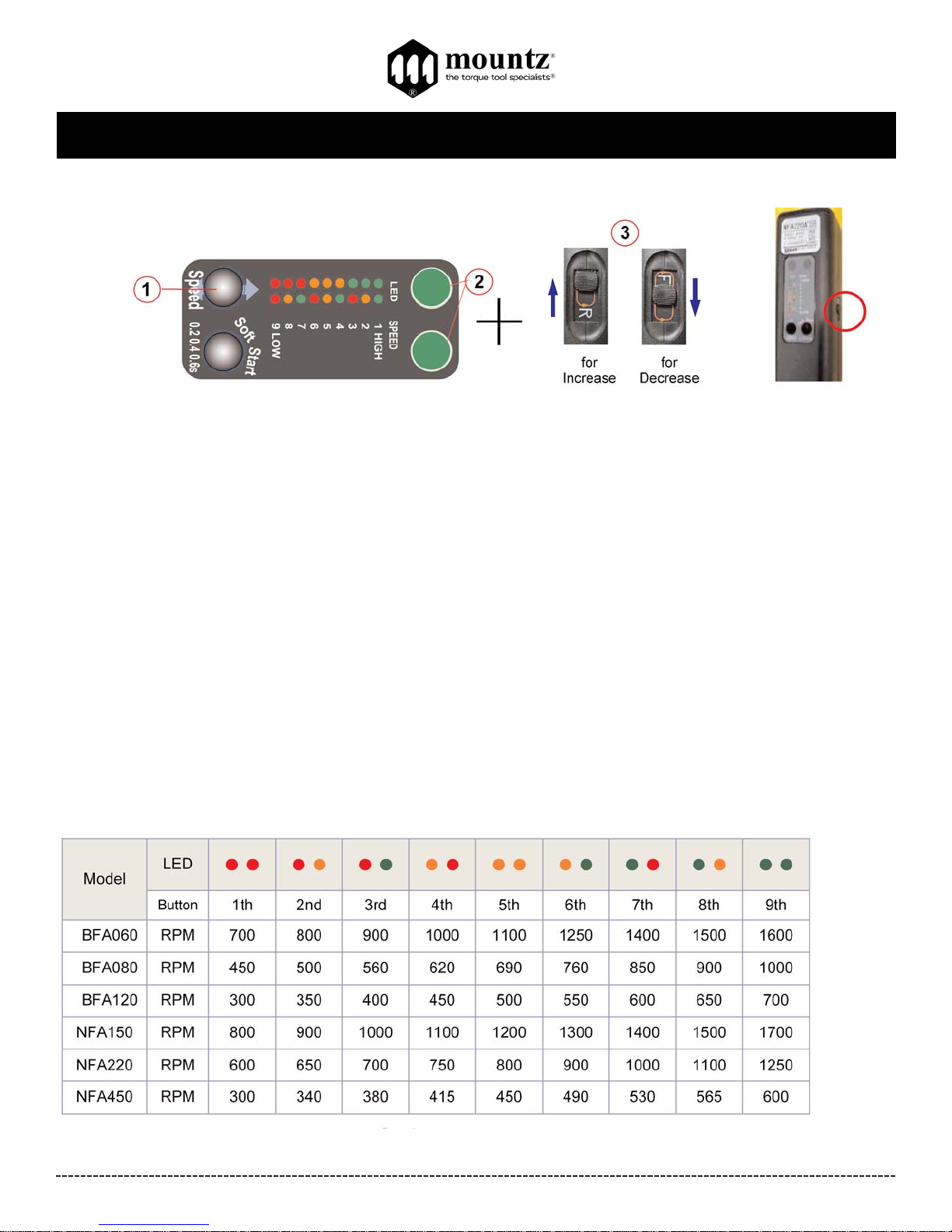
These models feature an adjustable RPM setting on the tool. The RPM settings can be adjusted to the preset increments as shown
label (see image above).
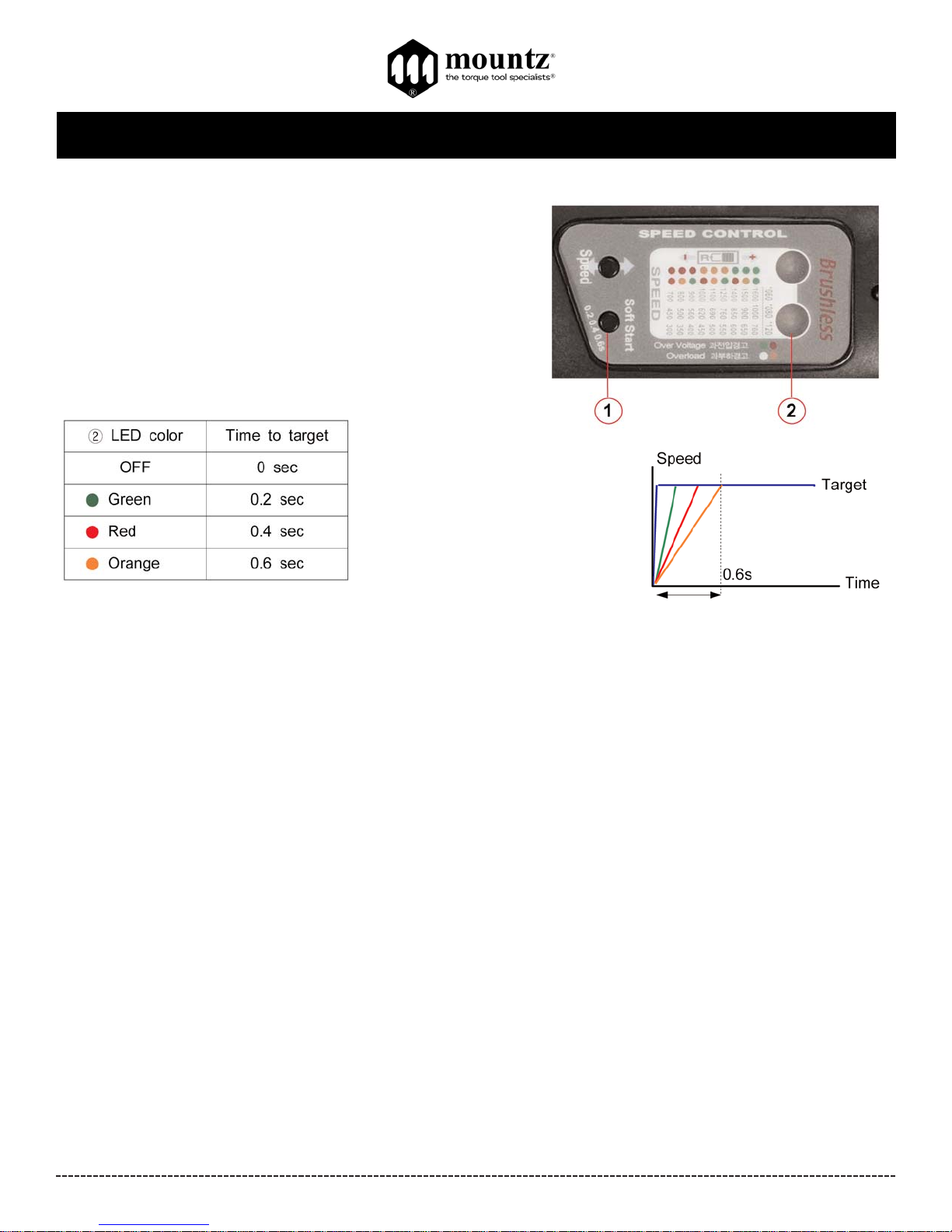
These models also feature a selectable Soft Start mode (from 0.2, 0.4 & 0.6 seconds).
How to Adjust Speed Setting
1.Press and hold the Speed button for 2 seconds.
2. Two LEDs will display colors that show the current speed selection of the brushless screwdriver.
3. Position the F/R slide switch in R or F to increase (+) or decrease (-) RPM setting of the tool Slide switch to "R" position to
increase speed. Slide switch to "F" to decrease speed. Then press the Speed button until the target speed is selected. The two
LEDs will display colors that show the current speed selection (see table below for reference) Note! The RPM settings can only be
adjusted to the preset increments as shown on the label (see chart below).
4. By starting the screwdriver, the selected speed is saved automatically.
Speed Selection Chart
Page 5
BFA-Series & NFA-Series Operation Instructions
Corporate Headquarters: 1080 North 11th Street, San Jose, CA95112 Phone: (408) 292-2214 Fax: (408) 292-2733
www.mountztorque.com
Page 5
How to Adjust Soft Start Setting
There are 3 different time settings for the Soft Start mode which are (0.2,
0.4 & 0.6 seconds). The default setting is OFF.
1. Press and hold the Soft Start button for 2 seconds.
2. Two LEDs will display colors that show the current soft start
selection of the brushless screwdriver.
3. Press Soft Start button until the target time is selected.
4. By starting the screwdriver, the selected soft start setting is saved
automatically.
The Soft Start button is “wrap around” button meaning you can toggle through the settings continuously by pressing the button
(OFF - 0.2s-0.4s-0.6s).
Page 6
BFA-Series & NFA-Series Operation Instructions
Corporate Headquarters: 1080 North 11th Street, San Jose, CA95112 Phone: (408) 292-2214 Fax: (408) 292-2733
www.mountztorque.com
Page 6
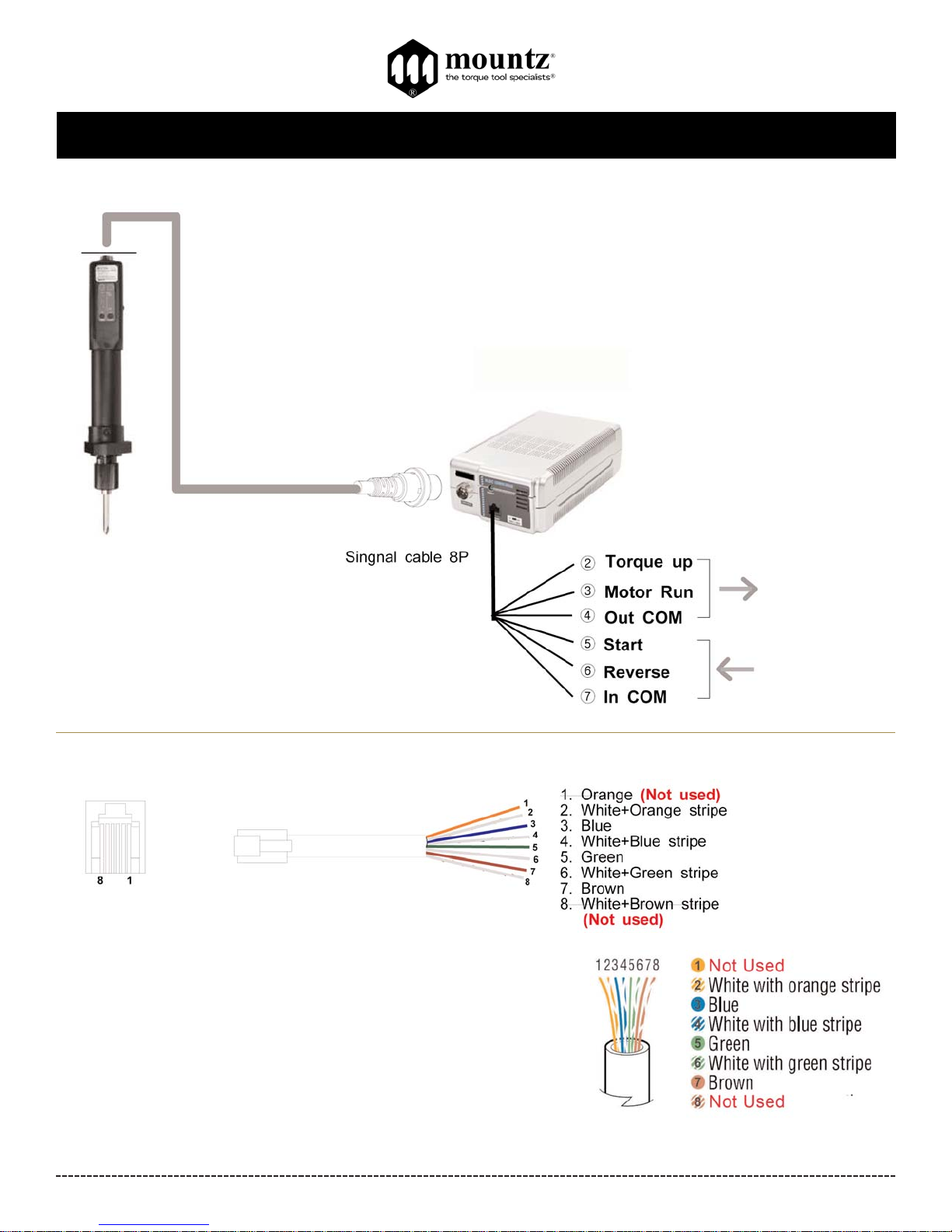
Connections
Standard 6P Cable
Item #14-PELZ932A
STC 40-FA
BFAor NFA Series
RJ-45
Modular Jack on
STC 40-FA
1.5m
Signal Cable 8P
Item # 14-PELZ911
Page 7
BFA-Series & NFA-Series Operation Instructions
Corporate Headquarters: 1080 North 11th Street, San Jose, CA95112 Phone: (408) 292-2214 Fax: (408) 292-2733
www.mountztorque.com
Page 7
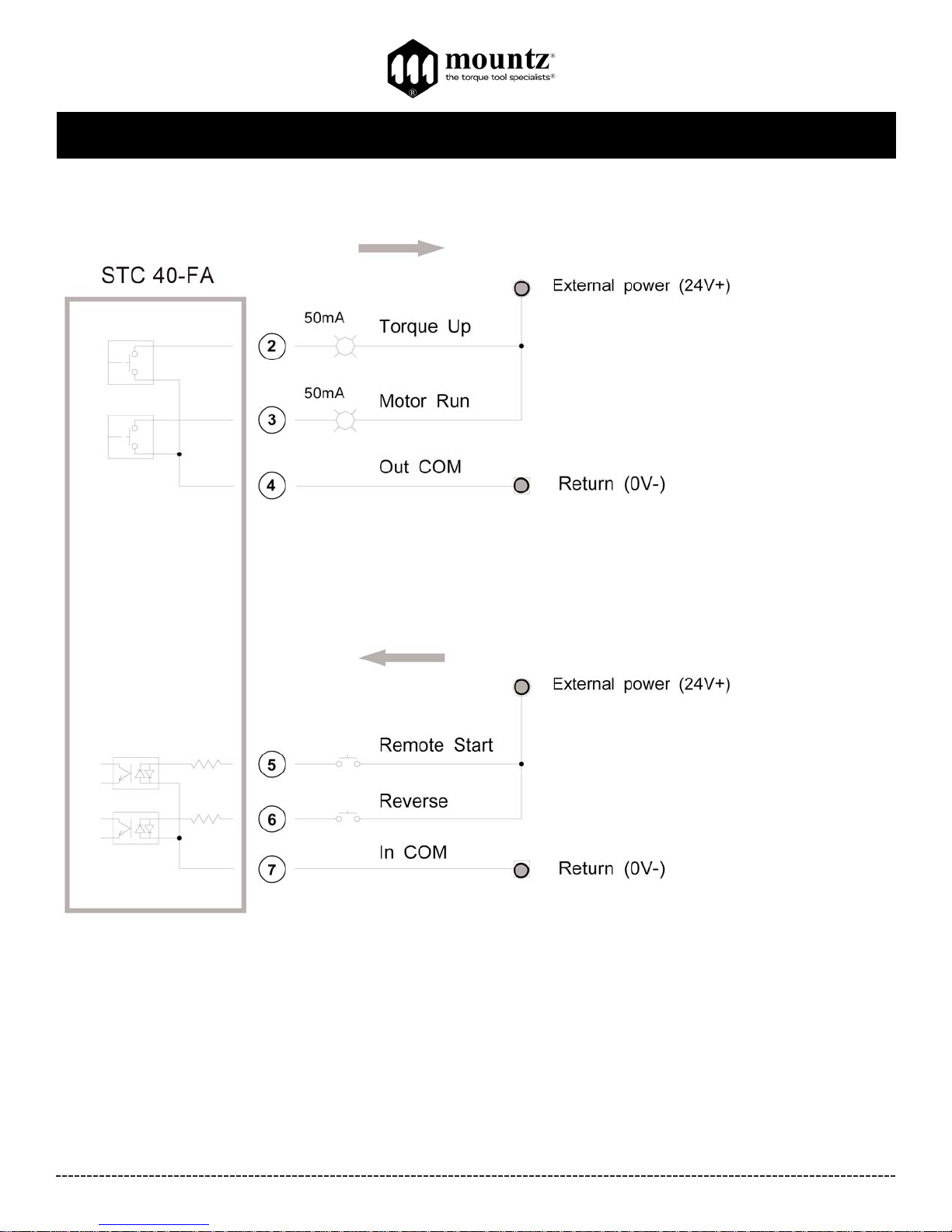
I/O Details
Positive (+) Common Wiring
Page 8
BFA-Series & NFA-Series Operation Instructions
Corporate Headquarters: 1080 North 11th Street, San Jose, CA95112 Phone: (408) 292-2214 Fax: (408) 292-2733
www.mountztorque.com
Page 8
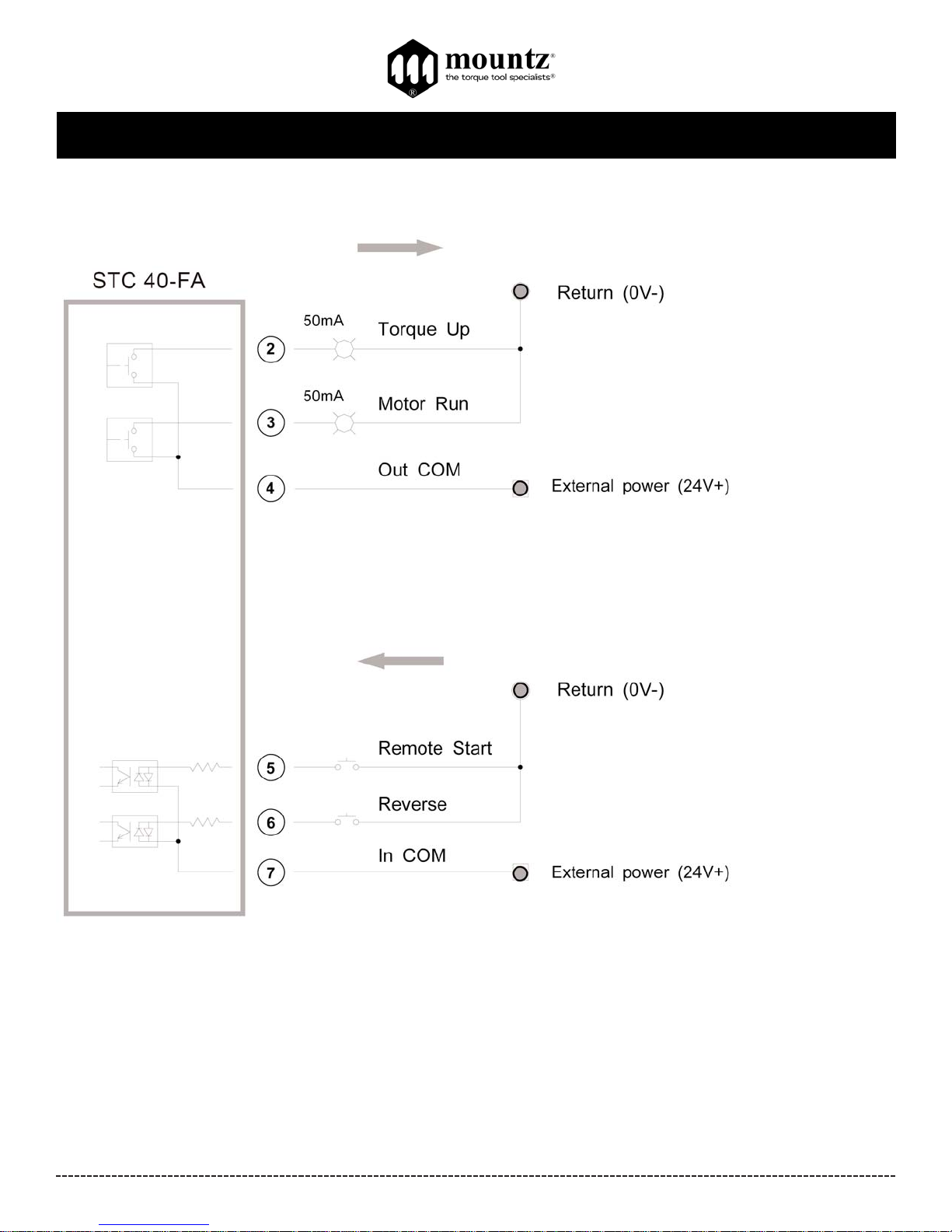
I/O Details
Negative (-) Common Wiring
Page 9
BFA-Series & NFA-Series Operation Instructions
Corporate Headquarters: 1080 North 11th Street, San Jose, CA95112 Phone: (408) 292-2214 Fax: (408) 292-2733
www.mountztorque.com
Page 9
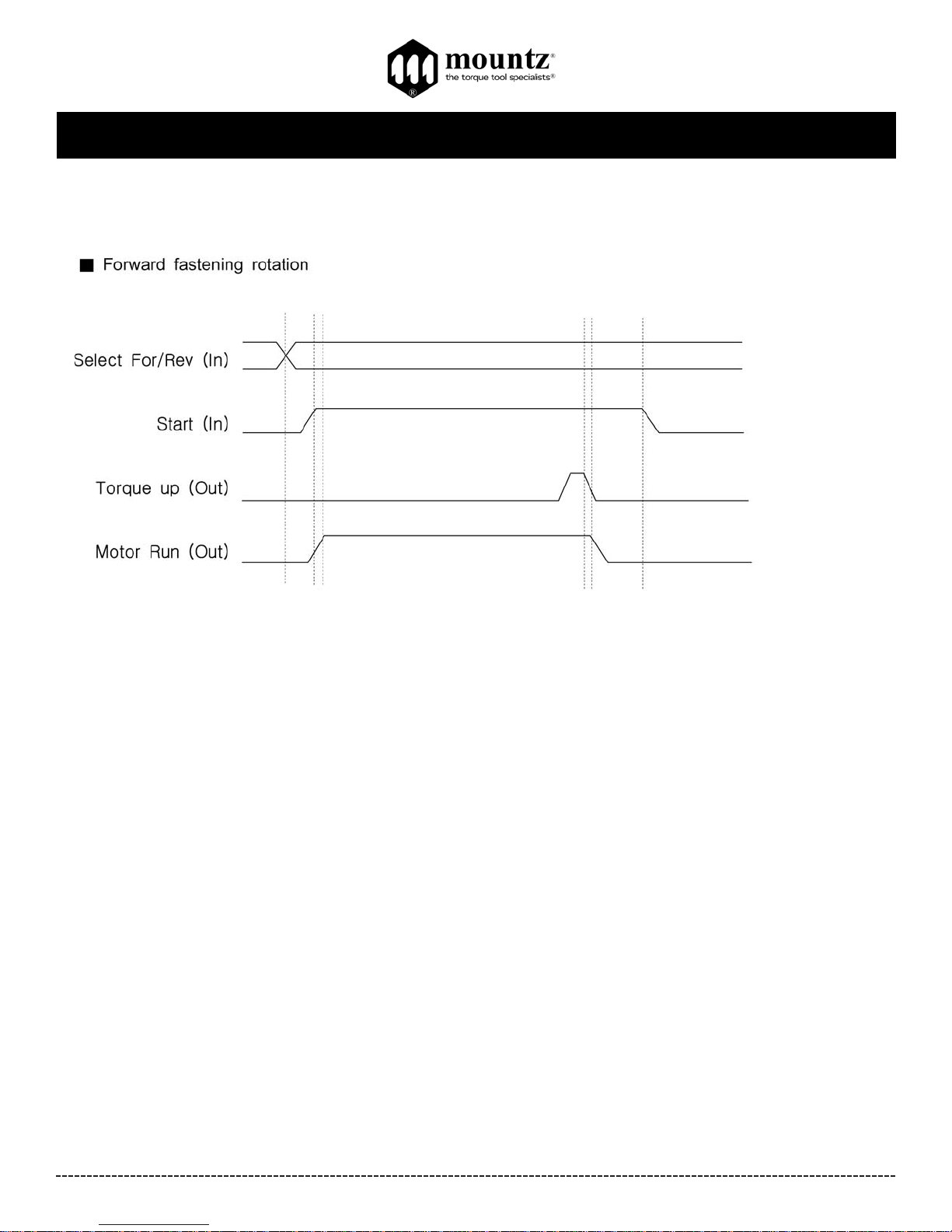
Timing Chart
Torque up and Motor Run output signals are effective with Forward fastening rotation only. The torque is not controlled for Reverse
rotation.
Page 10
BFA-Series & NFA-Series Operation Instructions
Corporate Headquarters: 1080 North 11th Street, San Jose, CA95112 Phone: (408) 292-2214 Fax: (408) 292-2733
www.mountztorque.com
Page 10
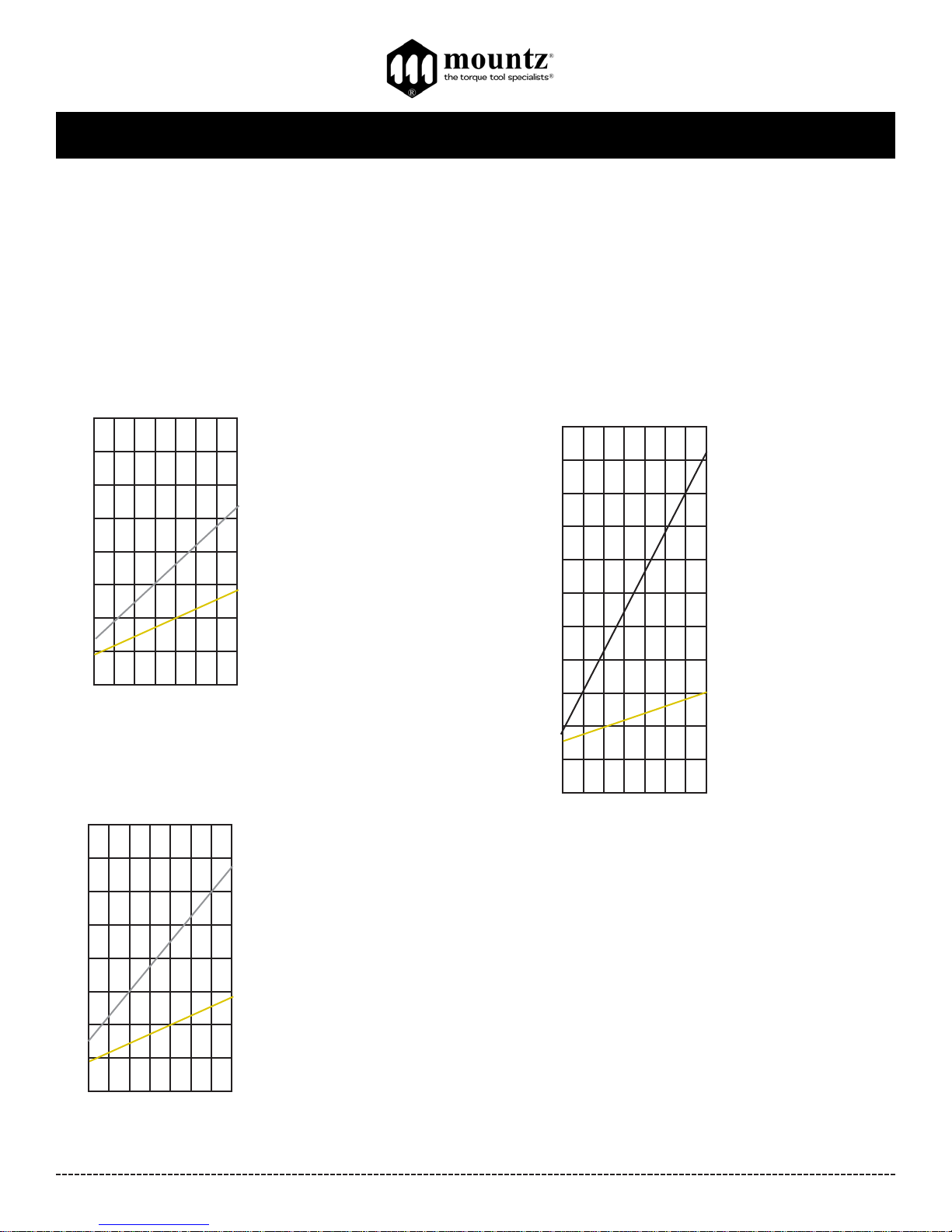
Torque Charts
These charts are meant to be used as guidelines for setting the torque on the BFA-Series electric screwdrivers. The
drivers have a torque scale on the torque adjustment nut showing reference numbers. These numbers determine the
approximate torque setting. Refer to the charts to determine the reference number setting for your torque requirement.
How to Read the Torque Charts
Torque ranges (lbf.in) approximate tightening torque, operated with no load at maximum speed. Verify torque setting
with a torque testing system.
BFA120
1 2 3 4 5 6
Torque Scale
1
2
3
4
5
6
7
8
lbf.in
7
K (Black)
Torque Range
2-10.4 lbf.in
9
10
11
G (Gold)
Torque Range
1.7-3 lbf.in
BFA060
1 2 3 4 5 6
Torque Scale
1
2
3
4
5
6
7
8
lbf.in
7
N (Natural)
Torque Range
1.3-5.2 lbf.in
B (Bronze)
Torque Range
0.9-1.7 lbf.in
BFA080
1 2 3 4 5 6
Torque Scale
1
2
3
4
5
6
7
8
lbf.in
7
S (Silver)
Torque Range
1.4-6.9 lbf.in
G (Gold)
Torque Range
0.9-2.8 lbf.in
Page 11
BFA-Series & NFA-Series Operation Instructions
Corporate Headquarters: 1080 North 11th Street, San Jose, CA95112 Phone: (408) 292-2214 Fax: (408) 292-2733
www.mountztorque.com
Page 11
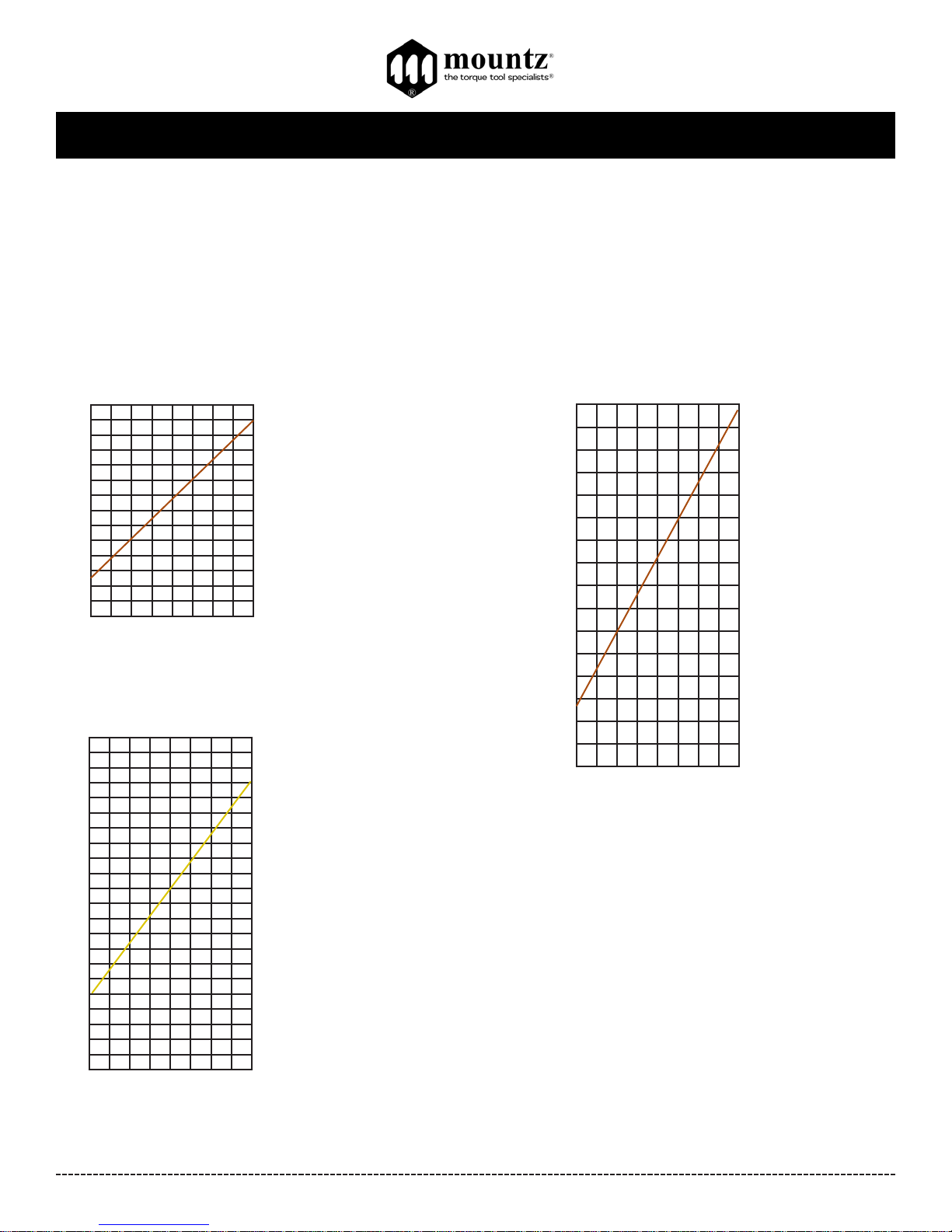
Torque Charts
These charts are meant to be used as guidelines for setting the torque on the NFA-Series electric screwdrivers. The
drivers have a torque scale on the torque adjustment nut showing reference numbers. These numbers determine the
approximate torque setting. Refer to the charts to determine the reference number setting for your torque requirement.
How to Read the Torque Charts
Torque ranges (lbf.in) approximate tightening torque, operated with no load at maximum speed. Verify torque setting
with a torque testing system.
NFA150
lbf.in
Z (Bronze)
Torque Range
2.6 - 13 lbf.in
1 2 3 4 5 6
Torque Scale
2
4
6
8
10
12
14
7
8
NFA220
lbf.in
G (Gold)
Torque Range
5.2 - 19 lbf.in
1 2 3 4 5 6
Torque Scale
2
4
6
8
10
12
14
16
7 8
18
20
22
lbf.in
Z (Bronze)
Torque Range
6.1 - 39 lbf.in
NFA450
1 2 3 4 5 6
Torque Scale
5
10
15
20
25
30
35
7 8
40
Page 12
BFA-Series & NFA-Series Operation Instructions
Corporate Headquarters: 1080 North 11th Street, San Jose, CA95112 Phone: (408) 292-2214 Fax: (408) 292-2733
www.mountztorque.com
Page 12
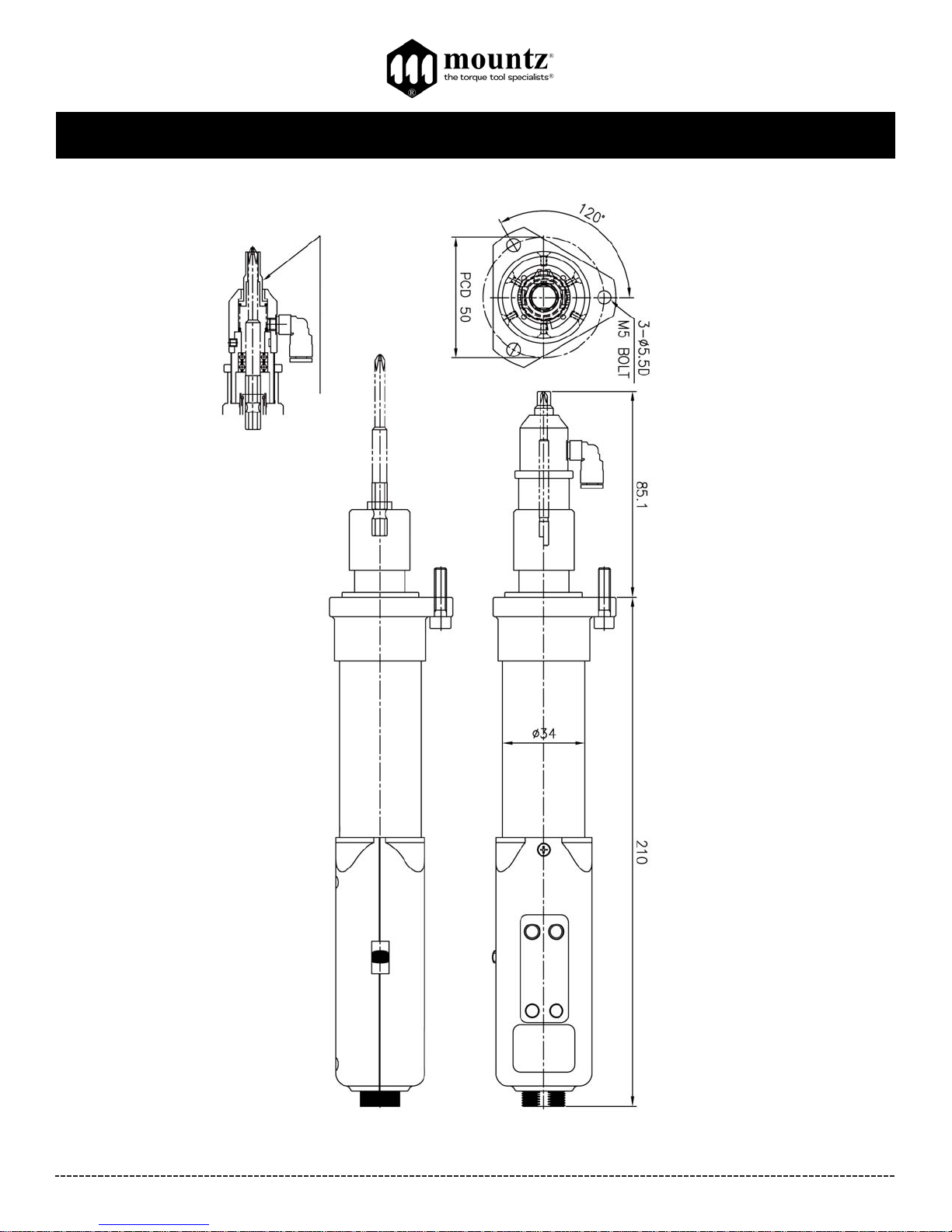
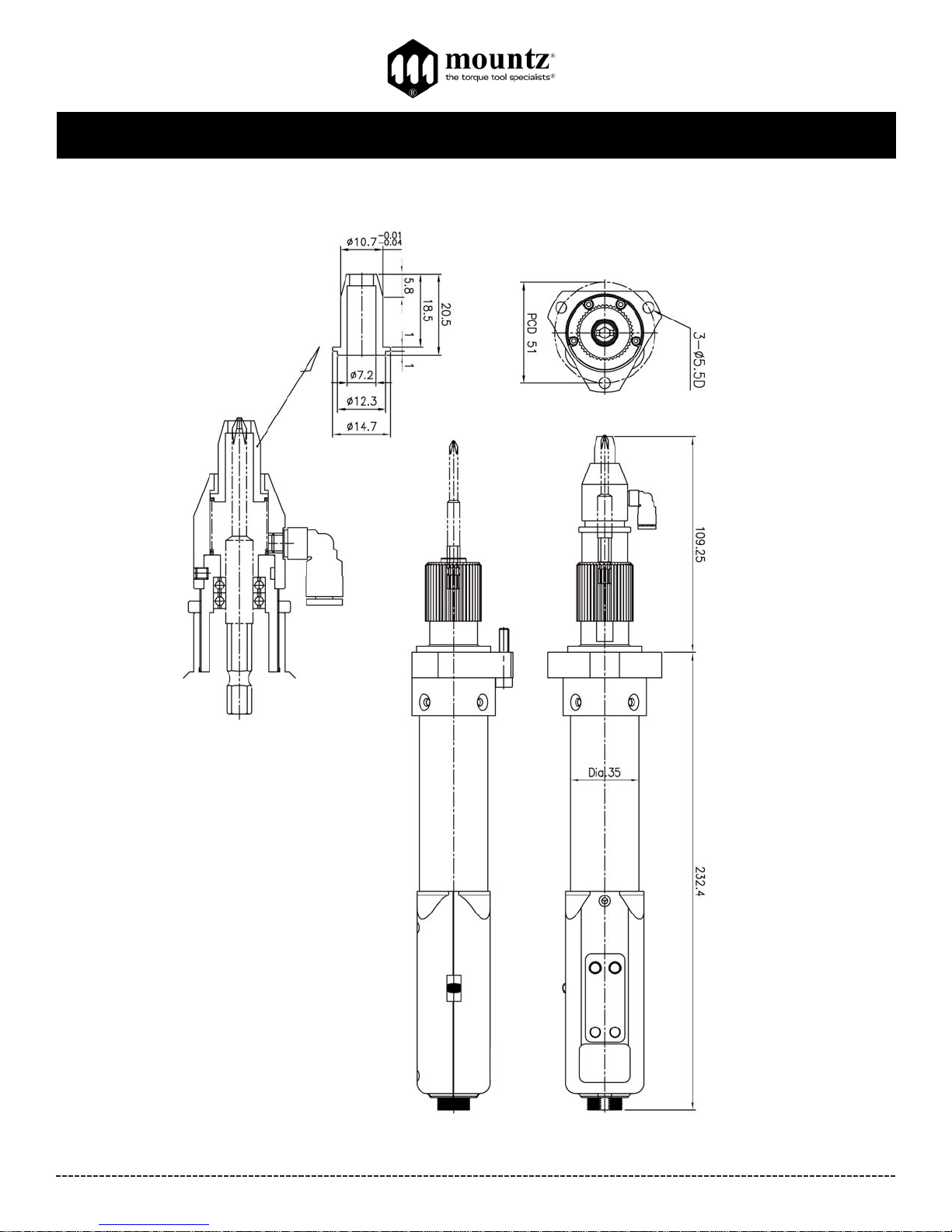
Dimensions for BFA-060, BFA-080 and BFA-120 models
V acuum Adapter -
Accessory
(sold separately)
Mouthpiece are
custom
designed and
bit purchased
separately.
Page 13
BFA-Series & NFA-Series Operation Instructions
Corporate Headquarters: 1080 North 11th Street, San Jose, CA95112 Phone: (408) 292-2214 Fax: (408) 292-2733
www.mountztorque.com
Page 13
Dimensions for NFA-120, NFA-220 and NFA-450 models
V acuum Adapter -
Accessory
(sold separately)
Mouthpiece are
custom designed
and bit purchased
separately.
Page 14
BFA-Series & NFA-Series Operation Instructions
Corporate Headquarters: 1080 North 11th Street, San Jose, CA95112 Phone: (408) 292-2214 Fax: (408) 292-2733
www.mountztorque.com
Page 14
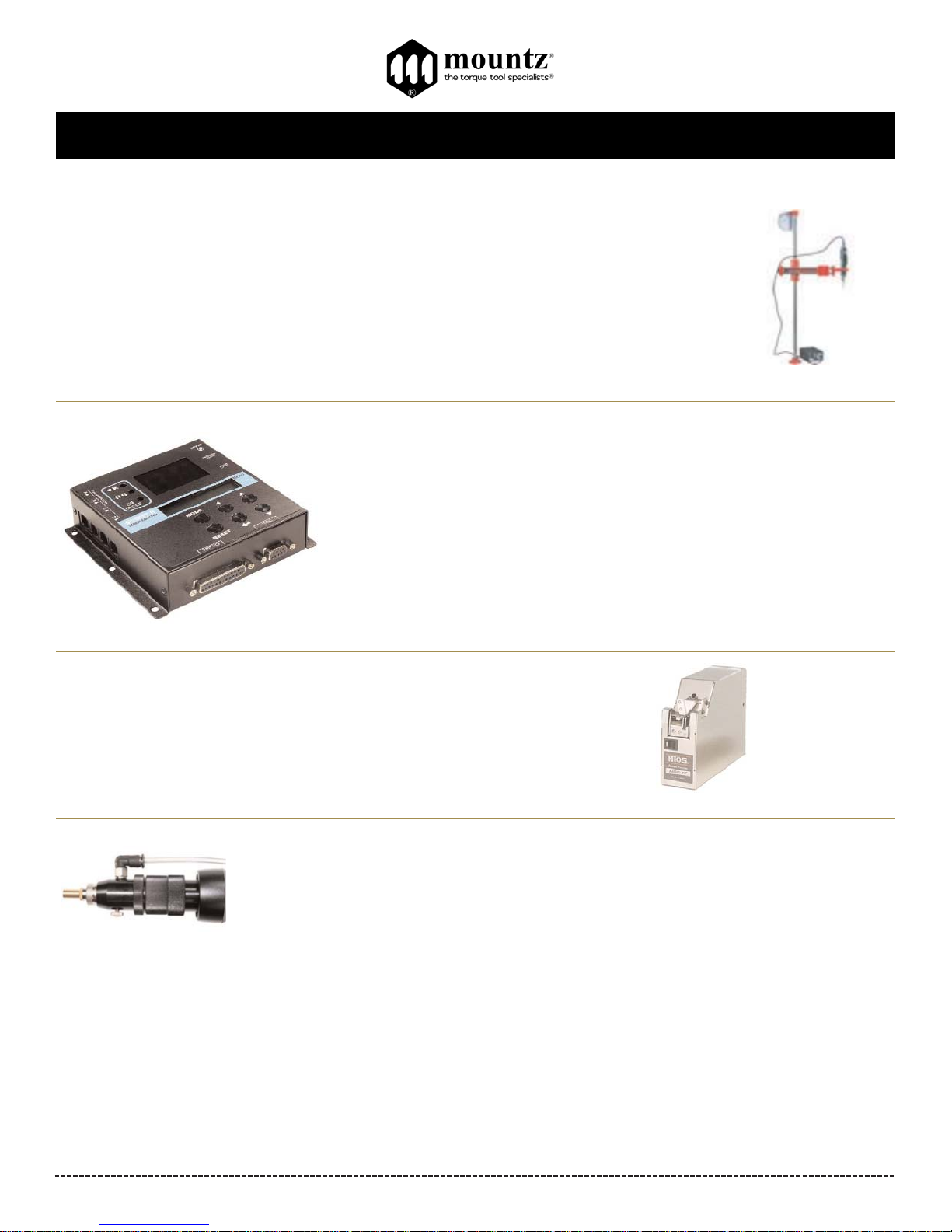
The EZ-Glider torque arms are designed to improve production and quality control during the assembly
process. The arms securely keep electric or pneumatic drivers in perpendicular alignment to help prevent
side loading or cross threading occurring during the assembly process. The EZ-Glider helps remove the
operator’s influence in the assembly process and strengthens quality control.
The ergonomic design of the EZ-Glider torque arms reduces RMI (repetitive motion injury) and CTS
(carpal tunnel syndrome). The effortless handling of the torque arm provides comfortable tool operation
and increased production. The torque arm can be installed in space-restricted areas
Accessories
Scout screw counter helps manufacturers detect and eliminate costly screw-fastening
errors during the assembly process. Using a screw counter is like putting the eyes and
ears of a quality control manager where they are needed most - right on the assembly
area. The scout is designed to detect cross threading, omissions, unfinished rundowns
and cycle complete. The screw counter takes the control of the assembly process out
of the operator's hands.
Item # 145790
Screw presenters are small, tabletop devices used to organize and automate work
areas and production cells. Screw presenters make assemblers and the assembly
process more efficient by mechanically presenting a screw to a fixed pick up point.
The inexpensive screw presenter is an alternative tool instead of the cumbersome
and very expensive screwfeeder systems.
Vacuum Adapter Kit
For: BFA060, BFA080, BFA120 models
Item # 145612
For: NFAmodels
Item # 145864
Vacuum adapter kits can be mounted on an electric screwdriver. The screwdriver is fitted with a suction head that holds the screw on
the bit, enabling the operator to pick it up with the tool itself. This is an effective, time saving device that works with most fasteners.
- Accepts different size screws and various length fasteners.
- Allows quick-change set-up at a low cost.
- Mounts with threaded torque nut. The driver remains externally adjustable while allowing semi-automatic pickup of non-ferrous
fasteners.
- Plug driver into vacuum supply or chose the Vacuum Ejector.
- Mouthpiece and bit purchased separately.
Page 15
BFA-Series & NFA-Series Operation Instructions
Corporate Headquarters: 1080 North 11th Street, San Jose, CA95112 Phone: (408) 292-2214 Fax: (408) 292-2733
www.mountztorque.com
Testing Power Tools:
1. Application Method: Use a torque analyzer in “Peak Mode” with a rotary transducer between the power tool and the actual
application. This is the best way to test since you are using the actual joint as the test station. You will see the actual
torque applied to the fastener. Caution: Variances in tool performance may occur do to the addition of the rotary transducer.
2. Simulated Method: Always use a quality joint rate simulator (run down adapter) with a torque analyzer when testing power
tools in a simulated application. Use Joint rate and Breakaway methods to obtain most accurate torque readings in a
simulated rundown.
Care
1. The BFA-Series and NFA-Series screwdrivers are a precision torque control instrument and should be handled with care at all
times.
2. Only use the transformers listed in the Mountz catalog or website for appropriate BFA-Series and NFA-Series driver model (If you
have any questions regarding the appropriate transformer set-up, contact Mountz Customer Service Department).
3. Operate under safe conditions. Do not place in operation where such objects as hair, strings, clothing, etc. can become
tangled in the rotating bit.
4. Keep away from moisture. Never use in high humid, moist or damp environment.
Service
Mountz Inc. features an experienced calibration and repair staff. Our trained technicians can calibrate and repair most any tool.
Mountz provides rapid service with quality that you can trust as we offer three state-of-the-art calibration lab and repair facilities that
can calibrate up to 20,000 lbf.ft.
Since 1965, Mountz’s in-depth knowledge of torque is reflected in our
tool’s craftsmanship and our ability to provide solutions to both common
and uncommon torque applications. We perform calibrations in accordance with ANSI/NCSL-Z540. Mountz is dedicated solely to the manufacturing, marketing and servicing of high quality torque tools.
Tool Service & Repair Capability
Torque Wrenches: Click, Dial, Beam, Cam-Over & Break-Over
Torque Screwdrivers: Dial, Micrometer, Preset & Adjustable
Torque Analyzers/Sensors: All brands
Electric Screwdrivers: All brands
Air Tools: All brands
Impact Wrenches, Drills, Pulse Tools, Grinders, Percussive Tools,
Air Screwdrivers, Nutrunners, DC Controlled Nutrunners
Torque Multipliers: All brands
Page 15
Mountz Service Locations
Eastern Service Center
19051 Underwood Rd.
Foley, AL 36535
Phone: (251) 943-4125
Fax: (251) 943-4979
Western Service Center
1080 N.11th Street
San Jose, CA 95112
Phone: (408) 292-2214
Fax: (408) 292-2733
www.mountztorque.com
Twitter: @mountztorque
Download a “Service Form” and include a copy
when you send the tools in to be serviced.
Looking for fasteners?
www.mrmetric.com
 Loading...