

Page 1
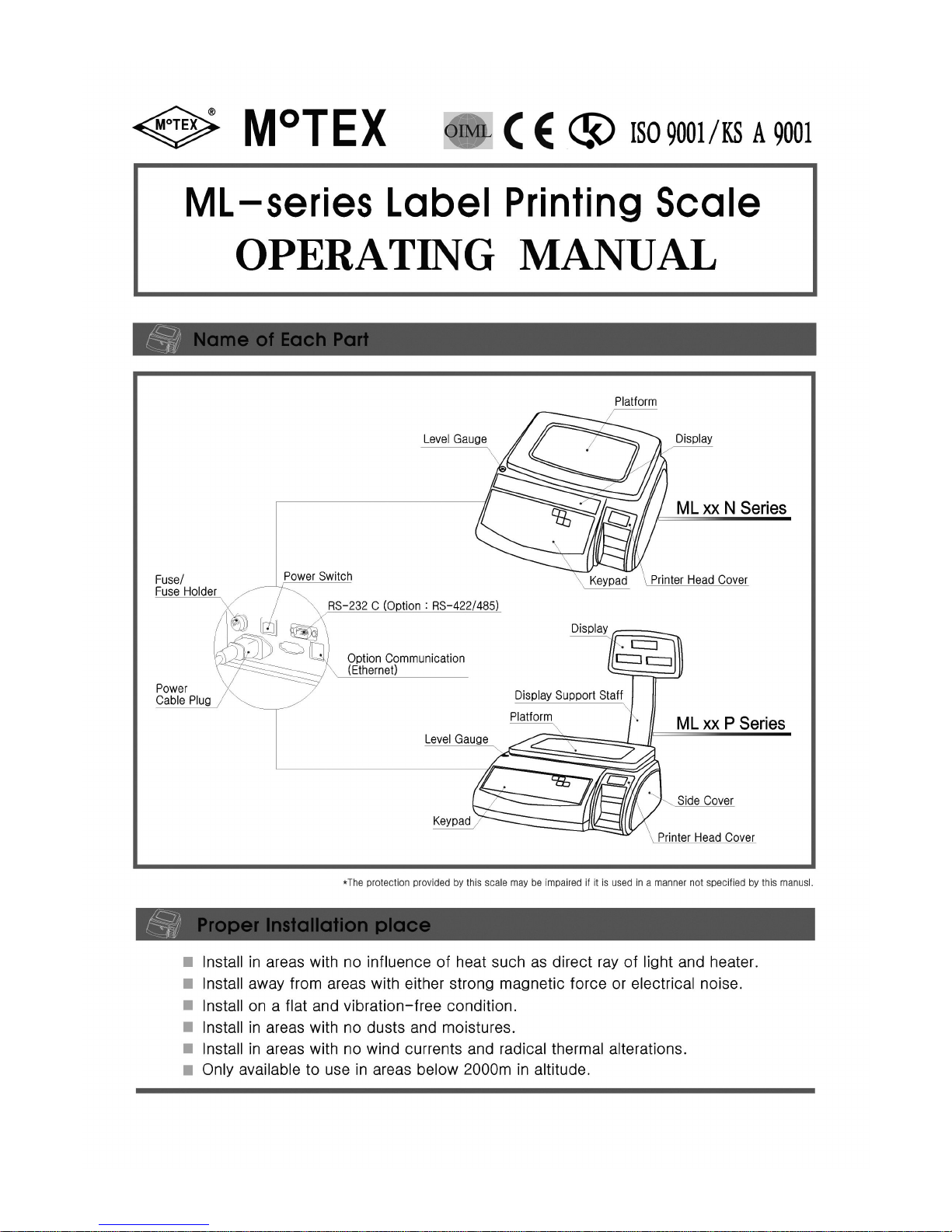
Page 2

- 2 -
Contents▣
. Function
Ⅰ
------------------ 1 ~ 2
Display and its Function
Keypad in Sales Mode
Keypad in Menu Mode
. Sale (Weighing) Mode
Ⅱ
1. General Function
------------------ 2 ~ 3
(1) Unit Price Mode (Weighing)
(2) Unit Price Mode (No Weighing)
(3) Auto Unit Price Mode
(4) Fixed Price Mode
(5) Auto Fixed Price Mode
2. Printing Option Setup of Manufacturing / Validity Date
-----------
4
3. Bar-code info. Modification
------------------ 4
4. Other Functions
------------------ 4 ~ 5
(1) Addition No. Modification
(2) advertisement No. Modification
(3) Fixed Price Modification
(4) Preset Page Change
(5) Date/Time Confirmation & Change
(6) Tare Setup
(7) Previous Command cancellation
(8) Registered Product Info. Printing (Bar-code Type)
(9) Preset Registered Product Info. Printing
. Menu Mode
Ⅲ
1. Registering Mode (20000)
(1) Product Info. Registration (21000)
------------------ 5 ~ 7
(2) Preset Registration (22000)
------------------ 8
(3) Additions Registration (23000)
------------------ 8 ~ 9
(4) Advertisement Registration (24000)
------------------ 9 ~ 10
(5) User Label Info. Registration (25000)
------------------ 10 ~ 11
(6) Additional Land Info. Registration (26000)
------------------ 12
(7) Product-Registration (29000)
------------------ 12
2. Controling Mode (30000)
(1) Scale Control (31000)
------------------ 13
Program Version Lookup (31100)①
Date/Time Setup (31200)②
Bar-code Type Selection (31300)③
Bar-code Output Info. Change (31400)④
Product Name Listing Selection (31500)⑤
Land Info. Printout Position (31600)⑥
Land Info. Display Option (31700)⑦
Sales Discount Setup (31800)⑧
Page 3

(2) Print Control (32000)
------------------ 13 ~ 14
Label Sensing (32100)①
Label-Front Sensing (32200)②
Label-Output Length (32300)③
Label-Length Adjustment (32400)④
Printing Concentration Adjustment (32500)⑤
(3) Label Control (33000)
------------------ 14
(4) Product Info. Printing (34000)
------------------ 14
Selected Product Info. Printing (34100)①
Product Info. Printing by Selected Sections (34200)②
Entire Product Info. Printing (34300)③
(5) Label Background Printing (35000)
------------------ 15
(6) Pos Flag Bundle Setup (36000)
------------------ 15
(7) Advertisement Registration No. Setup (37000)
------------------ 15
3. Communicating Mode (40000)
------------------ 15 ~ 16
(1) Communication Mode Lookup (41000)
(2) Scale No. Lookup (42000)
(3) Scale IP No. Lookup (43000)
(4) Ethernet Communication Mode Lookup (44000)
(5) Host IP No. Lookup (45000)
(6) Host Port No. Lookup (46000)
(7) Scale-to-Scale Communication (47000)
(8) Serial Communication Port Test (48000)
4. Total Sales Mode (50000)
------------------ 16 ~ 17
(1) Printing Total Sales (51000)
(2) Printing Total Sales for Selected Product (52000)
(3) Printing Total Sales in Sequence (53000)
(4) Printing Daily Total Sales (54000)
(5) Printing Daily Total Sales
for Selected Products (55000)
(6) Checking Memory for Total Sales (56000)
(7) Checking Memory for Daily Total Sales (57000)
(8) Deleting Total Sales Memory (58000)
. REFERENCEⅣ
Error Messages (Table-1)
------------------ 18
Land(Table-2)
------------------ 19
Label Paper setup Procedure
------------------ 20
TPH Setup Procedure
------------------ 20
Page 4
- 1 -
. FunctionⅠⅠⅠⅠ
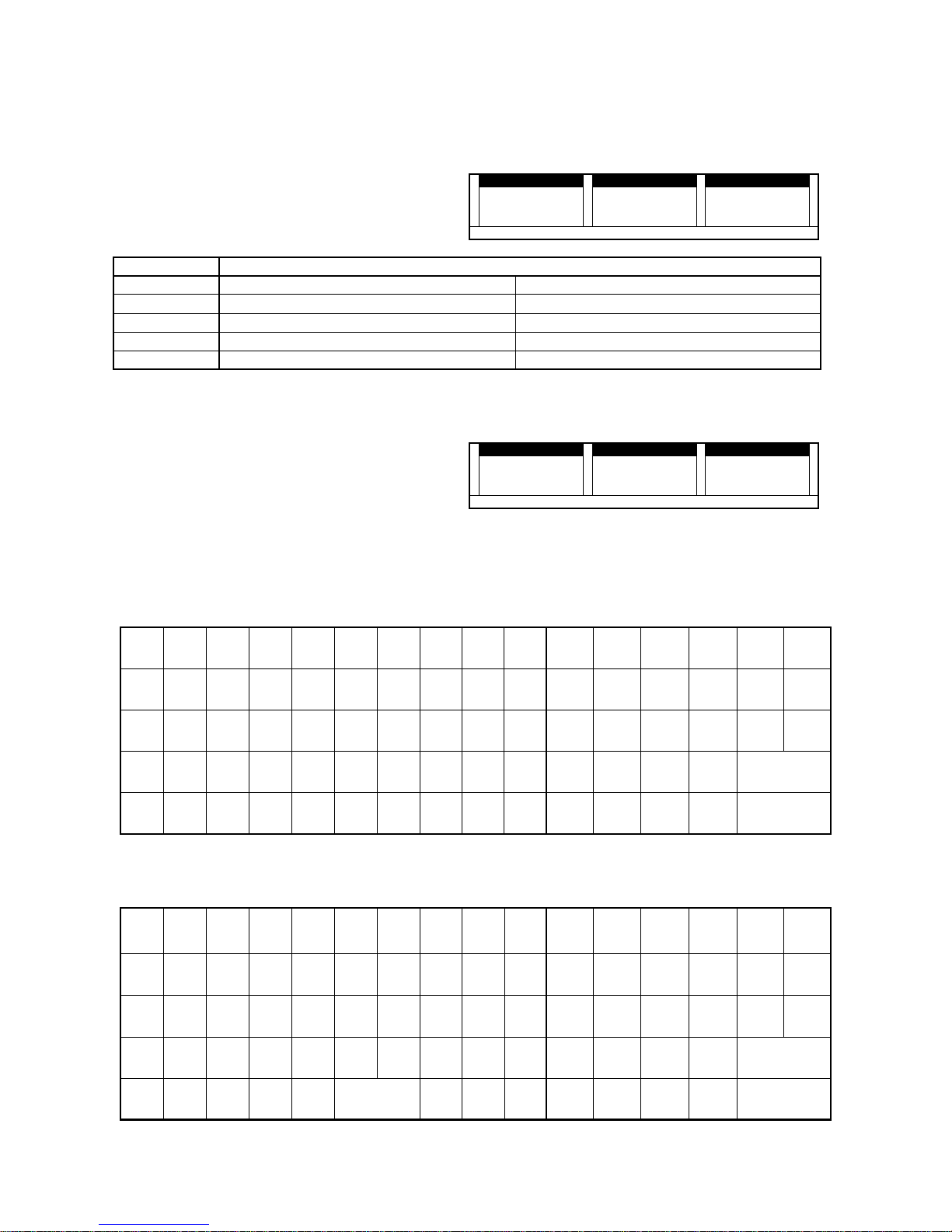
Display and its Functions●●●●
Main Display :
WEIGHT(5digit), UNIT PRICE(5digit), PRICE(6digit)
Sub Display :
AUTO, NET, ZERO, SHIFT, PLU, Function No.: 1, 2,
3, 4, 5, 6
WEIGHT kg UNIT WEIGHT $/kg PRICE $
8 8 8 8 8 8 8 8 8 8 8 8 8 8 8 8
■■■■
■■■■
■■■■
■■■■
■■■■
■■■■
■■■■
■■■■
■■■■
■■■■
■■■■
■■■■
■■■■
■■■■
■■■■
■■■■
AUTO NET ZERO Shift PLU 1 2 3 4 5 6
Indication
FUNCTION
AUTO Turns on when auto-print is set Auto/Manual Print
NET Turns on when Tare is set Tare/No Tare
ZERO
Turns on when Zero is set
Always on with nothing on Platform.
SHIFT Turns on when upper case is selected Upper Case/Lower Case
PLU Turns on when the product is called Call/No Call
Initial Weighing Condition (Initial Display)※※※※
"Zero Point (▄▄▄▄)" turns on and initial weighing
mode has been started.
WEIGHT kg UNIT WEIGHT $/kg PRICE $
0 0 0
■■■■
■■■■
■■■■
AUTO NET ZERO Shift PLU 1 2 3 4 5 6
KEYPAD IN SALE MODE●●●●
FEED SHIFT DATE AUTO ESC
RESET
7 8 9
SET LAND MENU
4 5 6
×
UNIT
PRICE
FIXED
PRICE
1 2 3
NET
●●●● P L U
0 00 C
ZERO
●●●● PRINT
KEYPAD IN MENU MODE●●●●
~
`
!
@
#
$
%^&
*
(
-
)
_
+
=
|
¥¥¥¥"'
FEED SHIFT ※※※※ AUTO ESC RESET
Q W E R T Y U I O P 7 8 9 SET ▲▲▲▲ MENU
A S D F G H J K L
:
;
4 5 6 ◀◀◀◀ ▼▼▼▼ ▶▶▶▶
Z X C V B N M
<
,
>
.
?
/
1 2 3 NET P L U●●●●
2nd F
(shift)
▲▲▲▲
←←←←
▼▼▼▼
→→→→{[
}
]
SPACE●●●● CAPS INS DEL 0 00 C ZERO PRINT●●●●
Page 5
- 2 -
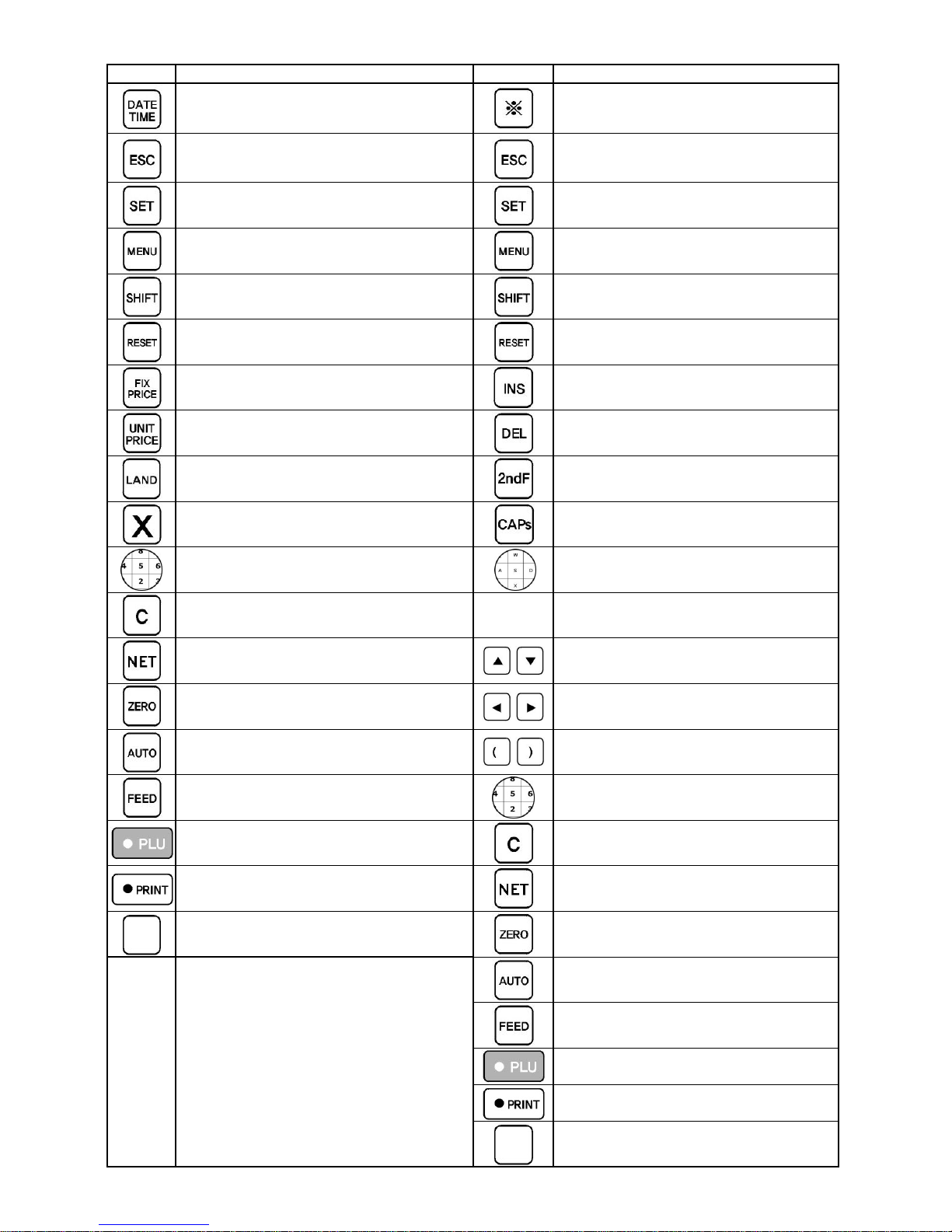
KEY
Key Pad in Weighing Mode
KEY
Key Pad in Control Mode
Check Date / Time Delete Counter Collection
Delete Sales Records Turn to Previous Input Mode
Input Current Mode Input Current Mode
Go into Menu Mode
Cancel Current Input, Turn to Menu and
Set up input
Select Term of Validity / Processing (undecided)
Reboot scale Reboot scale
Move to Fixed Price Mode Insert letters
Move to Unit Price Mode Delete letters
Change Land (Country of origin) Select Lower case
Multiply unit number by price (fixed price
mode)
Interchange Upper/Lowercase
Input Numbers (0-9) Input letters (including special characters)
Delete all numbers Input Space
Set on/off vessel or package setting
,
Direction Key in Menu Select
Set Zero Point
,
Direction Key in Menu Select
Issue labels automatically (fixed price) or
manually (weighed price)
,
Input brackets
Adjust printing positions of a label Input number
Call product Delete input data
Print labels Span Calibration
Call products directly Correct scale's zero point
Print labels continuously
Adjust printing positions of a label
(Not in use)
Print labels
Save registered product onto call keys
Page 6
- 3 -
. Sales ModeⅡⅡⅡⅡ
1. General Function
Sales Mode
Unit Price Mode ( Selling products by weighing )
Fixed Price mode ( Selling products by fixed price )
WEIGHT kg
WEIGHT kgWEIGHT kg
WEIGHT kg UnitPrice $/kg
UnitPrice $/kgUnitPrice $/kg
UnitPrice $/kg Price $
Price $Price $
Price $
0.
0.0.
0. 0000 0000 0000 0.
0.0.
0. 0000 0000 0.
0.0.
0. 0000 0000
AUTO NET ZERO Shift PLU 1 2 3 4 5 6
WEIGHT kg
WEIGHT kgWEIGHT kg
WEIGHT kg UnitPrice $/kg
UnitPrice $/kgUnitPrice $/kg
UnitPrice $/kg Price $
Price $Price $
Price $
9999 9999 4444
3.
3.3.
3.
0000 0000
■■■■ ■■■■ ■■■■ ■■■■ ■■■■
AUTO NET ZERO Shift PLU 1 2 3 4 5 6
< Sales : Unit Price Display > < Sales : Fixed Price Display >
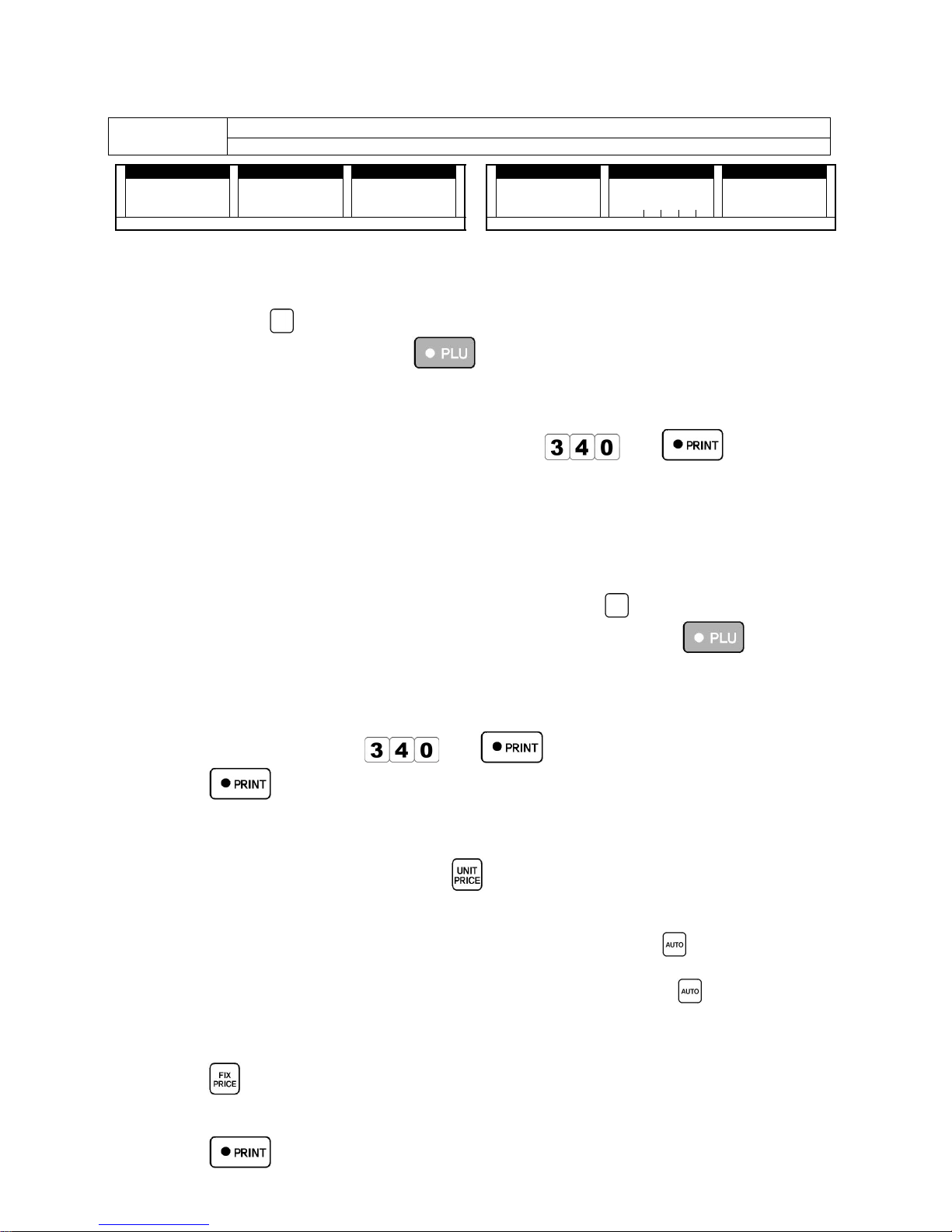
[1] Unit Price Mode : Selling by weighing the products.
Call the product.(You can call the product with 2 methods.)①
-Press product
(preset button)
-Press pre-registered number key
Weigh the product.②
Press PRINT.③
You can weigh the product first before you call it.※
Input unit price to be printed on the label. ex) key in※
and to set the unit
price as 340.
The price can be changed when you press number keys to set new price while the product is on※
the platform. Be noted that new price will be saved automatically.
Relevant Error※
Err-46 : When calling Un-preset product by using Preset Button.
Preset the product before calling the product by using (preset button)
Err-47 : When you call Un-registered product by using Preset number or
Register the product before you call the product by using Preset number and PLU key.
[2] Unit price Mode : Selling products by calling (Unit Price mode is used as Fixed Price Mode.)
Call the product.①
Input Unit Price. ex) Key in②
and to set the unit price as 340.
Press③
Since the label is printed when the product is not on the scale platform, the Unit Price will not be
changed.
Unit Price and Weight are not printed onto the label.
To save the number of setup , press②
in setup.③
[3] Auto Unit Price Mode : Selling products by weighing.
Call the product. Weight the products. Print labels by pressing① ② ③
.
Labels will be printed out automatically whenever you weigh products.
Check if the indicator of AUTO on the display turns on when you press
.
[4] Fixed Price Mode : Label printing without weighing the product.
Call the product.①
Press②
(On display: PLU number appears in the Unit Price Section, Sales price appears in the Price
Section.)
Press③
Fixed Price Change
Page 7

- 4 -
Call the product.①
Key in new② by using number keys.
③
or . New Fixed Price will be automatically saved.
When you sell many identical products. ex) selling 3 identical pencils.
Call the product.①
Press②
and to multiply the price by three times
Total price will show on the display and label will be printed.
[5] Auto Fixed Price Mode : Auto Label Issuing
The same labels will be issued continuously.
Call the product.①
Press②
.
(On display: PLU number appears in the Unit Price Section, Sales price appears in the Price
Section.)
Press③ .
To issue 30 pieces of labels, press④
Press to continue printing and Press to stop.
VAT(Value Added Tax) rate needs to be set in Menu 31800.
VAT rate / Price excluding VAT / Total price including VAT will be printed on Label.
Lock and Un-lock Scales.
You can lock or un-lock scales in Sales Mode. Scale is automatically in locked condition when you
reboot. press the password and press
, 'Unlock' or 'Lock' appears in turn.
2. Manufacturing/Validity Date Print Option Setup
Apply to Every Registered Product
Apply to Every Registered ProductApply to Every Registered Product
Apply to Every Registered Product
Apply to Selected Products (Preliminary
Apply to Selected Products (PreliminaryApply to Selected Products (Preliminary
Apply to Selected Products (Preliminary
Application)
Application)Application)
Application)
Print both Manuf./Validity
Date information
Press
PressPress
Press
→→→→
Print both Manuf./Validity
Date information
Product Call
→
→→→→
Print Only Validity Date
Info.
Press
PressPress
Press →→→→
Print Only Validity Date
Info.
Product Call
→
→→→→
Print Only Manuf. Date
Info.
Press
PressPress
Press
→→→→
Print Only Manuf. Date
Info.
Product Call
→
→→→→
Do Not Print Date Info.
Press
PressPress
Press
→→→→
Do Not print
Manuf./Validity Date Info.
Product Call
→
→→→→
Apply Validity Date to All
Registered Products.
Press
PressPress
Press
→→→→ →→→→
Input Validity Date
Input Validity DateInput Validity Date
Input Validity Date →→→→
[SET]
[SET][SET]
[SET]
Cancel Individual Date
Printing Option
Product Call
→
→→→→
Cancel the Validity Date
Application to All
registered Products
Press
PressPress
Press
→→→→
Setup Validity Time
Product Call →
→→→→
→ Input Validity
Time →→→→
Setup Validity Date
Product Call →
→→→→
→ Input Validity
Date →→→→
Page 8
- 5 -
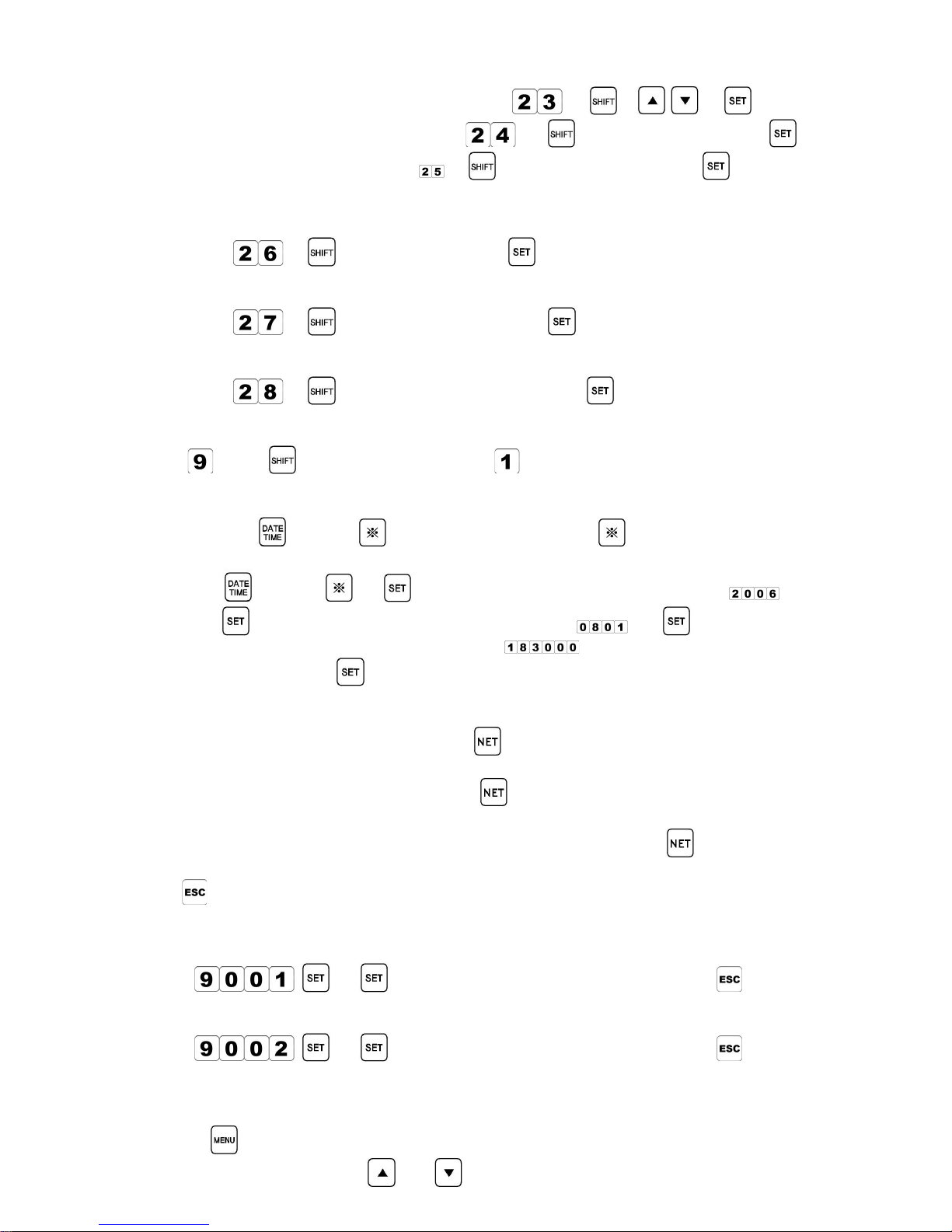
3. Bar-code Info. Modification
[1] Select Bar-code Type : Product Call Key in Numbers→
→ → , →
[2] Pos Flag Change : Product Call Key in Numbers→ → Key in Pos Flag Number→ →
[3] Pos code change : Product Call Numbers→ → Key in Pos code Number→ →
4. Other Functions
[1] Additions No. Change : Select pre-registered Addition No.
: Product Call →
→ Key in Addition No.→ →
[2] Advertisement No. Change : Select pre-registered Advertisement No.
: Product Call →
→ Key in Advertisement No.→ →
[3] Fixed Price Change : Change the number of the fixed Price.
: Product Call →
→ Key in Number of fixed amount→ →
[4] Preset page Change in Weighing (Sale) Mode
: Key in
key + Input Page No. such as→ (Option : 1, 2, 3..) [Enter]→
[5] Date/Time Confirmation and Change
Confirmation :①
Or Press to confirm the date Press→ again to return to previous
menu.
Change :②
Or Press → Input Year(To input the year 2006, press→ ) →
Input Month/Date (To input again 1, press→ ) → Input Hr./Min./Sec.→
(To input 6 hr 30 min 00 sec PM, press
: note that the time is inputted
within 24hr.) →
[6] Tare Setup
When you do not know Tare weight.①
: Place the container on the platform press→
When you know Tare weight.②
: Input the weight using number keys press→
: Note if the weight is under 6kg, only the even numbers can be inputted: 2,4,6, etc.
: To cancel Tare setup, remove the container from the platform and press
[7] Previous Commands Cancellation : How to cancel previous record of label printing.
Press
right after the label is issued, the only previous record will be deleted.
[8] Registered Product Info. Printing (Bar-cord Type) : Information of every registered product
will be printed.
: Press
→ : Information will be printed. To cancel, press
[9] Preset-Registered Product Info. Printing : to check other preset pages, change the page no.
: Press
→ : Information will be printed. To cancel, press
. MENU MODEⅢⅢⅢⅢ
Procedure
1. Press key in sale Mode to enter Manu Mode.
2. To select each function, use and keys.
Page 9
- 6 -
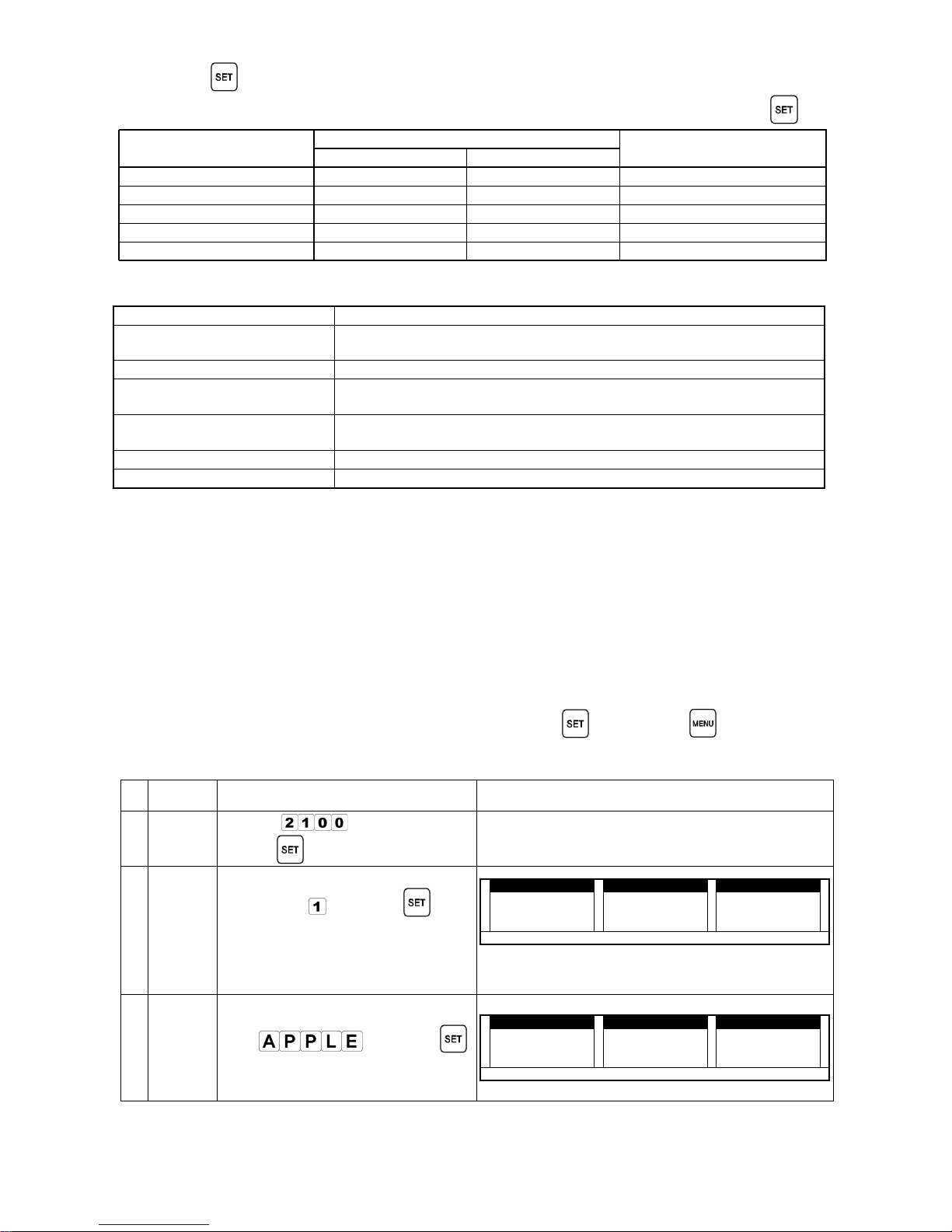
3. Press
to enter each function.
4. To return to Sale Mode from Menu Mode, set "10001" in the weight section and press
MODE
DISPLAY
REMARK
WEIGHT UNIT PRICE
0. INITIAL MODE
10001
SCALE
1. REGISTRATION MODE 20000 rEGIS
2. CONTROL MODE 30000 Contr
3. COMMUNICATION MODE
40000
onLIn
4. SALE TOTAL MODE 50000 rEPot
1. REGISTRATION MODE
Registration Mode
Registration ModeRegistration Mode
Registration Mode Explanation
ExplanationExplanation
Explanation
(1) Product Information
(21000)
Where you register product information.
(2) preset button (22000) Where you save registered products in preset button.
(3) Ingredients/Additions
(23000)
Where you register Ingredients/ additions.
(4) Advertisement (24000)
Where you register Store information (Tel./name) that should be
printed on the label.
(5) User Label(250000) Where you register User Label.
(6) Additional Land (27000) Where you register Land (country of origin) information.
Product Information Input (r-ItE : 21000) :⑴⑴⑴⑴
Follow next procedures to apply below information to the label.
- Product No. 1,
- Product 1stline : Apple
- Product 2ndline : Red apple
- Unit Price : $1
- Bar-code Type : 2-5-5
- Pos flag : 22
- Addition No. 1
In this mode, press [MENU] key to enter save selection; press
key to save, key not to save.
Newly changed information of registered products will be automatically saved.
No. CONTENT PROCEDURE DISPLAY
0
Mode
enter
Input [→
]
Press→
1
Input
product
No.
Input Product number→
( ex. key in
) Press→
You can use up to 5 digit:
1~99,999. as total product number.
6,000 different products can be
registered.
WEIGHT kg
WEIGHT kgWEIGHT kg
WEIGHT kg UnitPrice $/kg
UnitPrice $/kgUnitPrice $/kg
UnitPrice $/kg Price $
Price $Price $
Price $
2222 1111 0000 1111 0000 ---- ---- nnnn UUUU
MMMM
1111
AUTO NET ZERO Shift PLU 1 2 3 4 5 6
2
Input
product
name
(1st line)
Input letter/number→
( ex. ) Press→
Max 26 letter/number will be
registered.
WEIGHT kg
WEIGHT kgWEIGHT kg
WEIGHT kg UnitPrice $/kg
UnitPrice $/kgUnitPrice $/kg
UnitPrice $/kg Price $
Price $Price $
Price $
2222 1111 0000 2222 0000 5555 6666 9999
AUTO NET ZERO Shift PLU 1 2 3 4 5 6
Page 10
- 7 -
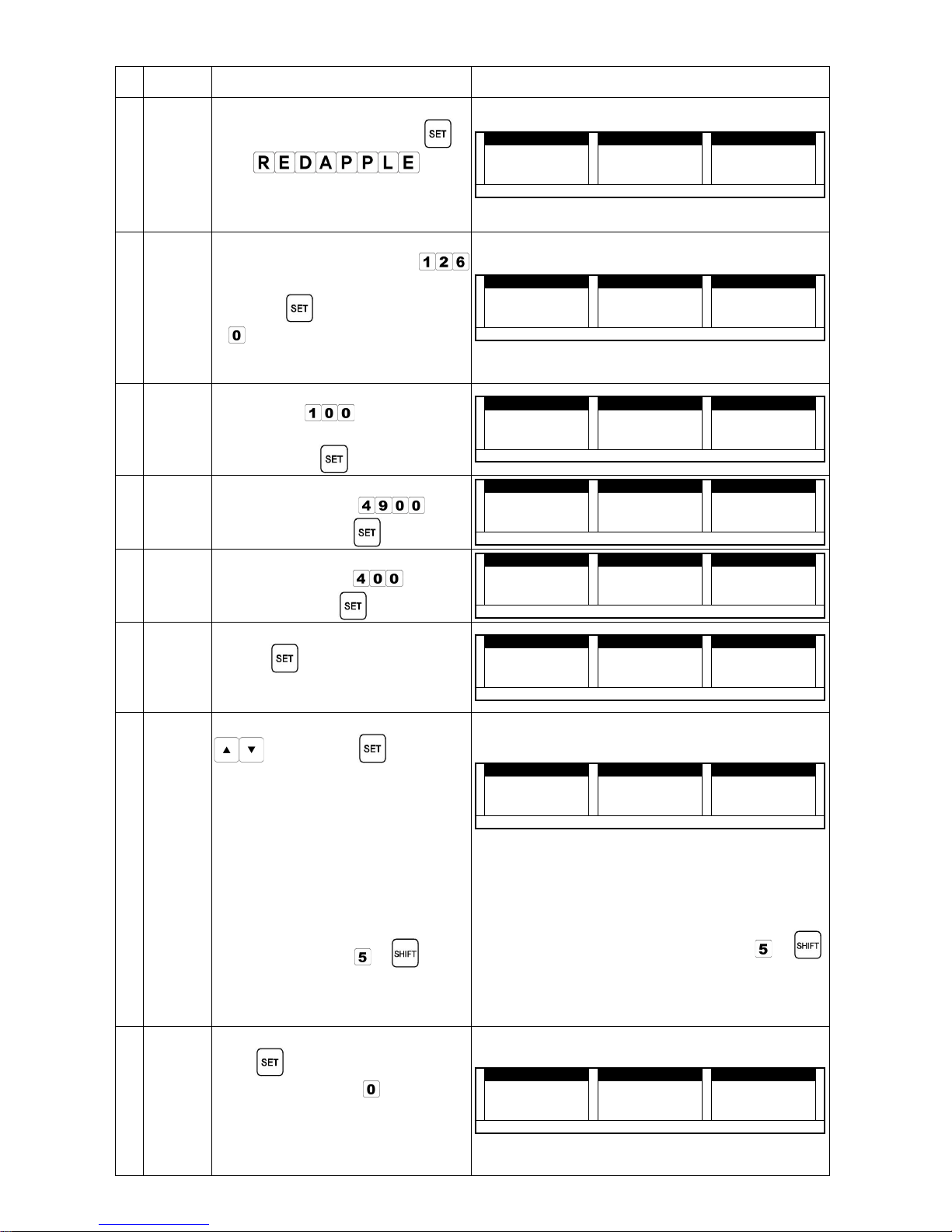
No. CONTENT PROCEDURE DISPLAY
3
Input
product
name
(2nd
line)
Input letter/number Press→ →
(ex. )
Max 26 letter/number will be
registered.
WEIGHT kg
WEIGHT kgWEIGHT kg
WEIGHT kg UnitPrice $/kg
UnitPrice $/kgUnitPrice $/kg
UnitPrice $/kg Price $
Price $Price $
Price $
2222 1111 0000 3333 0000 8888 6666 9999
AUTO NET ZERO Shift PLU 1 2 3 4 5 6
4
Input
land
name
(Product
Origin)
Input land number→
( ex. if SOUTH KOREA, key in
)
Press→
can not be inputted as Land
No.
Refer to LAND TABLE on 22 page.
WEIGHT kg
WEIGHT kgWEIGHT kg
WEIGHT kg UnitPrice $/kg
UnitPrice $/kgUnitPrice $/kg
UnitPrice $/kg Price $
Price $Price $
Price $
2222 1111 0000 4444 0000 ---- LLLL AAAA nnnn dddd 1111 2222 6666
AUTO NET ZERO Shift PLU 1 2 3 4 5 6
5
Input
Unit Price
Input Unit price in number key
→
(ex. key in [
] for unit price
of
$1.00) Press→
WEIGHT kg
WEIGHT kgWEIGHT kg
WEIGHT kg UnitPrice $/kg
UnitPrice $/kgUnitPrice $/kg
UnitPrice $/kg Price $
Price $Price $
Price $
2222 1111 0000 5555 0000 ---- UUUU nnnn IIII tttt 1111 0000 0000
AUTO NET ZERO Shift PLU 1 2 3 4 5 6
6
Input
Fixed
price
Input Fixed price with number→
keys. (ex. key in
for
fixed price) Press→
WEIGHT kg
WEIGHT kgWEIGHT kg
WEIGHT kg UnitPrice $/kg
UnitPrice $/kgUnitPrice $/kg
UnitPrice $/kg Price $
Price $Price $
Price $
2222 1111 0000 6666 0000 ---- ---- FFFF IIII 4444 9999 0000 0000
AUTO NET ZERO Shift PLU 1 2 3 4 5 6
7
Input
Fix
weight
Input fixed weight with number→
keys. (ex. key in
for fixed
weight) Press→
WEIGHT kg
WEIGHT kgWEIGHT kg
WEIGHT kg UnitPrice $/kg
UnitPrice $/kgUnitPrice $/kg
UnitPrice $/kg Price $
Price $Price $
Price $
2222 1111 0000 7777 0000 UUUU tttt
WWWW
gggg tttt 4444 0000 0000
AUTO NET ZERO Shift PLU 1 2 3 4 5 6
8
Input
Quantity
Input quantity with number keys.
→
Press→
(Maximum number for quantity is
99)
WEIGHT kg
WEIGHT kgWEIGHT kg
WEIGHT kg UnitPrice $/kg
UnitPrice $/kgUnitPrice $/kg
UnitPrice $/kg Price $
Price $Price $
Price $
2222 1111 0000 9999 0000 PPPP iiii EEEE CCCC EEEE 0000
AUTO NET ZERO Shift PLU 1 2 3 4 5 6
9
Input
Date
Press and Choose option by
→
Key Press→
Date Options.
ALLPrt : to print both①
Manufacturing /Validity Date
(Initialized)
LIMItE : to print Validity Date②
only
PACkPt : to print Manufacturing③
date only
no_Prt : not to print date④
You should take [ + ] firstly
before you choose above ~① ④
options to be applied to entire
products collectively.
WEIGHT kg
WEIGHT kgWEIGHT kg
WEIGHT kg UnitPrice $/kg
UnitPrice $/kgUnitPrice $/kg
UnitPrice $/kg Price $
Price $Price $
Price $
2222 1111 1111 0000 0000 PPPP dddd AAAA tttt EEEE AAAA LLLL LLLL PPPP rrrr tttt
AUTO NET ZERO Shift PLU 1 2 3 4 5 6
ALLP 2 = to print both Manufacturing / Validity⑤
Date
LIMI 2 = to print Validity Date only⑥
PACK 2 = to print Manufacturing date only⑦
no_P 2 = not to print date⑧
~ Options are not effected by [⑤ ⑧
+ ]
function.
10
Input
Validity
date
Input validity date in 3 digit→ →
Press
When you input [ ] as validity
date, it will turn to Validity Time
input mode.
Validity Date and Time can not be
inputted together.
WEIGHT kg
WEIGHT kgWEIGHT kg
WEIGHT kg UnitPrice $/kg
UnitPrice $/kgUnitPrice $/kg
UnitPrice $/kg Price $
Price $Price $
Price $
2222 1111 1111 1111 0000 LLLL dddd AAAA tttt EEEE 3333 6666 5555
AUTO NET ZERO Shift PLU 1 2 3 4 5 6
Page 11
- 8 -
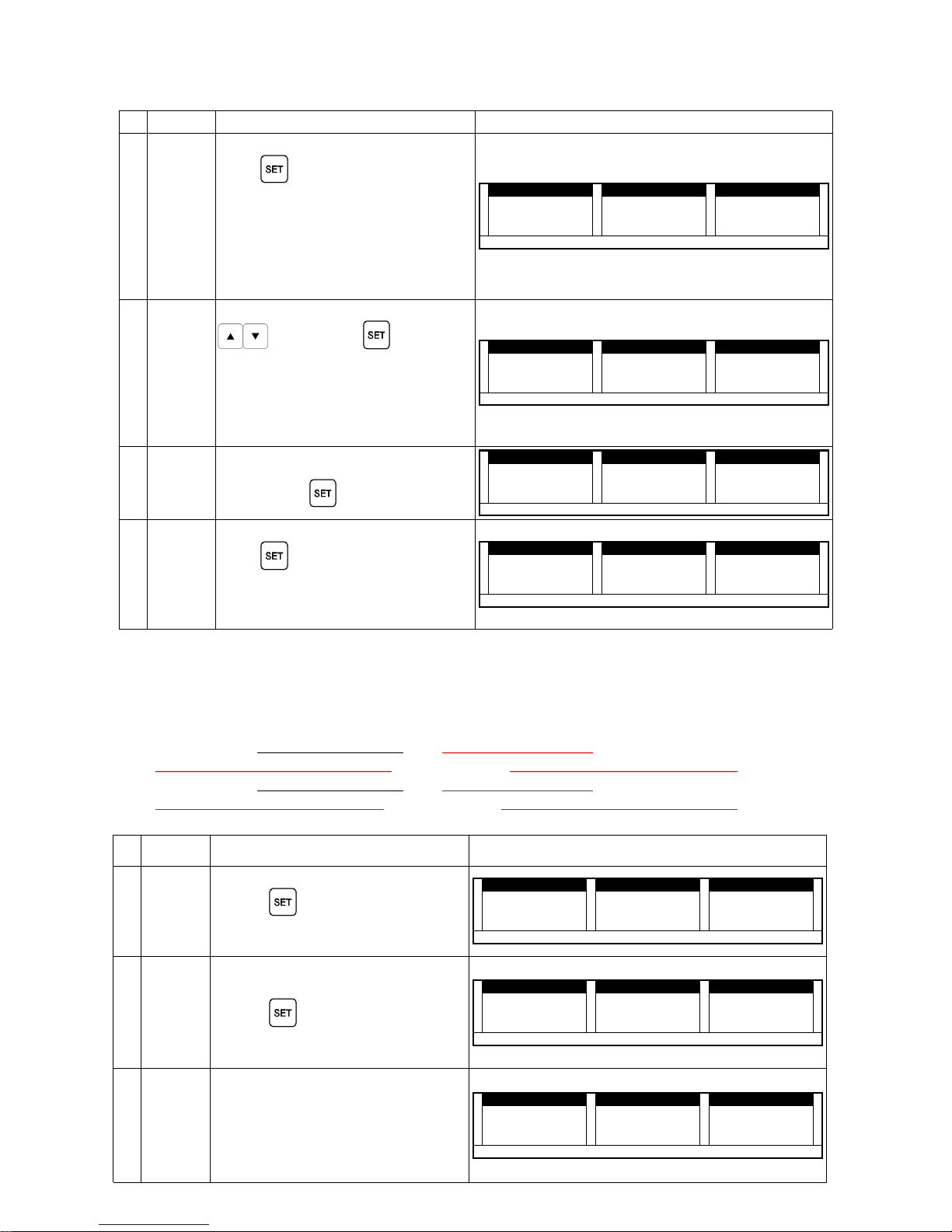
No. CONTENT PROCEDURE DISPLAY
11
Input
Validity
time
Input Validity time in 2 digit
→ →
Press
If the label length is shorter than
32mm, Validity time will not be
printed.
If the label length is shorter that
30mm, only Validity Date will be
printed.
WEIGHT kg
WEIGHT kgWEIGHT kg
WEIGHT kg UnitPrice $/kg
UnitPrice $/kgUnitPrice $/kg
UnitPrice $/kg Price $
Price $Price $
Price $
2222 1111 1111 2222 0000 LLLL tttt IIII
MMMM
EEEE 1111 2222
AUTO NET ZERO Shift PLU 1 2 3 4 5 6
12
Select
POS
type
Press and Choose POS type by→
Key Press→
POS Type Options.
EAN-13 (2-5-5 : P_code 5 digits)①
(2-4-6 : P_code 4 digits)
EAN--8 (P_code up to 7 digits②
regardless of the type.)
WEIGHT kg
WEIGHT kgWEIGHT kg
WEIGHT kg UnitPrice $/kg
UnitPrice $/kgUnitPrice $/kg
UnitPrice $/kg Price $
Price $Price $
Price $
2222 1111 1111 3333 0000 PPPP KKKK IIII nnnn dddd KKKK AAAA nnnn ---- 1111 3333
AUTO NET ZERO Shift PLU 1 2 3 4 5 6
13
Input
POS
FLAG
Input POS FLAG number in 2→
digits Press→
WEIGHT kg
WEIGHT kgWEIGHT kg
WEIGHT kg UnitPrice $/kg
UnitPrice $/kgUnitPrice $/kg
UnitPrice $/kg Price $
Price $Price $
Price $
2222 1111 1111 4444 0000 PPPP FFFF llll AAAA GGGG 2222 0000
AUTO NET ZERO Shift PLU 1 2 3 4 5 6
14
Input
POS
CODE
Input the number in 5 digits→ →
Press
Initial setup: 2-5-5
Use the electronically submitted
product code (5 digits) as Pos-code.
WEIGHT kg
WEIGHT kgWEIGHT kg
WEIGHT kg UnitPrice $/kg
UnitPrice $/kgUnitPrice $/kg
UnitPrice $/kg Price $
Price $Price $
Price $
2222 1111 1111 5555 0000 2222 ---- 5555 ---- 5555 0000 1111 2222 3333 4444
AUTO NET ZERO Shift PLU 1 2 3 4 5 6
TIP☞☞☞☞
In 2-5-5 type, the input price is over 6 digits, labels without bar-code will be printed out.
POS FLAG will be deleted if EAN-8 Bar-code type is selected.
When you change BAR-CODE TYPE, POS-CODE will be changed as follows.
In this case, Scanning cannot be done in POS. Your special attention is needed.
If you change① "2-5-5 Bar-code type"
into "2-4-6 Bar-code type".
"POS FLAG:21 / POS CODE:12345" is changed into "POS FLAG:21 / POS CODE:2345"
If you change② "2-4-6 Bar-code type" into "2-5-5 Bar-code type".
"POS FLAG:21 / POS CODE:1234" is changed into "POS FLAG:21 / POS CODE:12340"
No. CONTENT PROCEDURE DISPLAY
15
Input
Additions
No.
Input Registered Addition No.
→
Press→
You must register Addition info
before taking this step.
WEIGHT kg
WEIGHT kgWEIGHT kg
WEIGHT kg UnitPrice $/kg
UnitPrice $/kgUnitPrice $/kg
UnitPrice $/kg Price $
Price $Price $
Price $
2222 1111 1111 6666 0000 ---- ---- AAAA dddd dddd 1111
AUTO NET ZERO Shift PLU 1 2 3 4 5 6
16
Complete
Procedur-
es
Press→
WEIGHT kg
WEIGHT kgWEIGHT kg
WEIGHT kg UnitPrice $/kg
UnitPrice $/kgUnitPrice $/kg
UnitPrice $/kg Price $
Price $Price $
Price $
2222 1111 1111 6666 0000 ---- ---- AAAA dddd dddd SSSS AAAA vvvv EEEE
AUTO NET ZERO Shift PLU 1 2 3 4 5 6
17
Return to
sale
mode
System automatically returns to
sale mode.
Information of 1 product is saved.
Repeat same procedures to save
other product information. (up to
6,000 products)
WEIGHT kg
WEIGHT kgWEIGHT kg
WEIGHT kg UnitPrice $/kg
UnitPrice $/kgUnitPrice $/kg
UnitPrice $/kg Price $
Price $Price $
Price $
0000 0000 0000
AUTO NET ZERO Shift PLU 1 2 3 4 5 6
Page 12
- 9 -
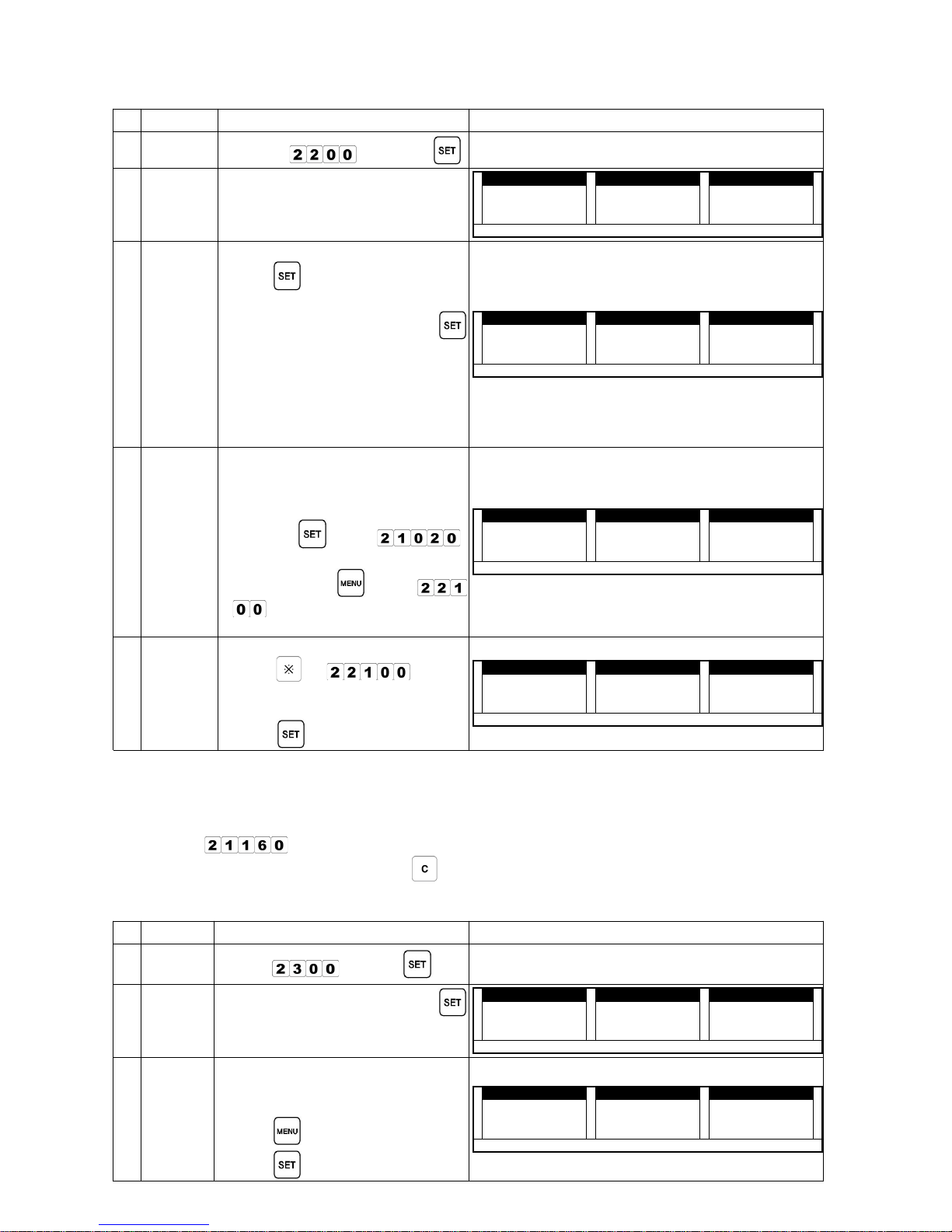
(2) Preset button Registration (r-PrS : 22000)
No. CONTENT PROCEDURE DISPLAY
0
Mode
change
Input [→
] Press→
1
Select
PLU
button
Select PLU among 50 choices on→
keypad
WEIGHT kg
WEIGHT kgWEIGHT kg
WEIGHT kg UnitPrice $/kg
UnitPrice $/kgUnitPrice $/kg
UnitPrice $/kg Price $
Price $Price $
Price $
2222 2222 1111 0000 0000 KKKK EEEE yyyy iiii nnnn 0000
AUTO NET ZERO Shift PLU 1 2 3 4 5 6
2
Input
product
No.
Input registered product No.→ →
Press
The system will automatically
return to the first step when
is pressed.
Repeat above procedures to save
more preset buttons.
Up to 150 product No. can be
saved in Preset (Total 3 pages
with each 50 product)
WEIGHT kg
WEIGHT kgWEIGHT kg
WEIGHT kg UnitPrice $/kg
UnitPrice $/kgUnitPrice $/kg
UnitPrice $/kg Price $
Price $Price $
Price $
2222 2222 2222 0000 0000 nnnn UUUU
MMMM
iiii nnnn 1111
AUTO NET ZERO Shift PLU 1 2 3 4 5 6
comments
When you try to preset
Unregistered products, PSE-01 will
show on the display.
If you want to register product①
info, press
to go
If you do not want to register②
product, press
to go
and input another product
no.
WEIGHT kg
WEIGHT kgWEIGHT kg
WEIGHT kg UnitPrice $/kg
UnitPrice $/kgUnitPrice $/kg
UnitPrice $/kg Price $
Price $Price $
Price $
2222 2222 2222 0000 0000 nnnn UUUU
MMMM
iiii nnnn PPPP SSSS EEEE ---- 0000 1111
AUTO NET ZERO Shift PLU 1 2 3 4 5 6
How to
turn page
To turn into next preset page,
Press→ in mode.
Key in page number that you→
want to save products in Preset
Press→
WEIGHT kg
WEIGHT kgWEIGHT kg
WEIGHT kg UnitPrice $/kg
UnitPrice $/kgUnitPrice $/kg
UnitPrice $/kg Price $
Price $Price $
Price $
2222 2222 3333 0000 0000 SSSS hhhh EEEE EEEE tttt 1111
AUTO NET ZERO Shift PLU 1 2 3 4 5 6
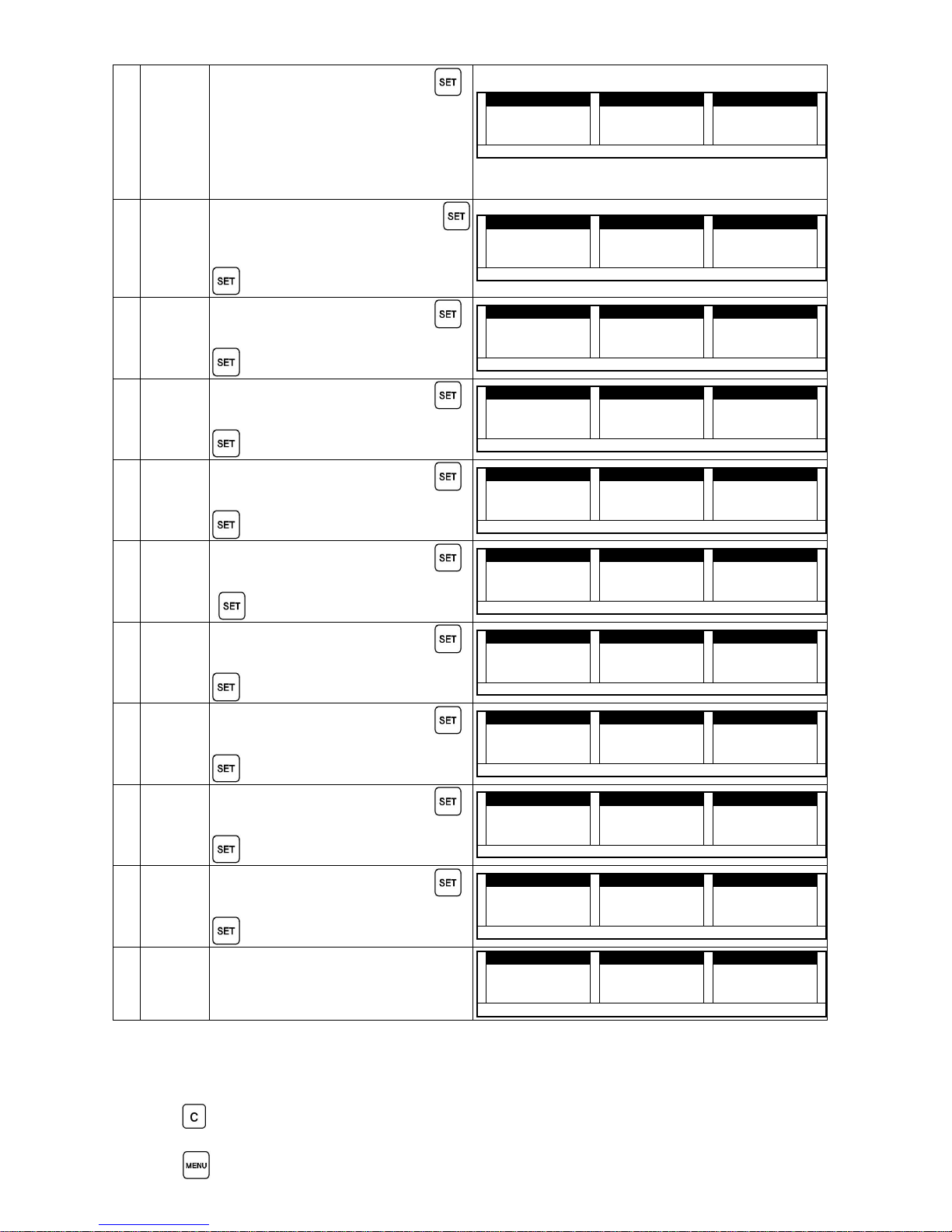
Addition Registration (r-Add : 23000)⑶⑶⑶⑶
The label can be printed without registration if the label size is 58×60b, or 60×70b.
For labels in different sizes, set up the User Label (customized label size) to print the labels.
Make sure that Additions No. has been registered before printing the labels; go to product registration's
setup 13 (
).
To change the input information, press
to cancel current information and input the new one.
Press [MENU] any time to save the information; the system will automatically return to weighing mode.
Maximum of 1800 Additions can be registered when all 8 lines are used.
No. CONTENT PROCEDURE DISPLAY
0
Mode
enter
Input→
Press→
1
Addition/
Ingredie-n
ts No.
Input Additions No. Press→ →
(Additions No. range : 1~1,800)
WEIGHT kg
WEIGHT kgWEIGHT kg
WEIGHT kg UnitPrice $/kg
UnitPrice $/kgUnitPrice $/kg
UnitPrice $/kg Price $
Price $Price $
Price $
2222 3333 1111 0000 0000 rrrr ---- AAAA dddd dddd 1111
AUTO NET ZERO Shift PLU 1 2 3 4 5 6
comments
If you put already registered
addition number, display will show
as right side of diagram.
Press
to cancel.
Press
to continue.
WEIGHT kg
WEIGHT kgWEIGHT kg
WEIGHT kg UnitPrice $/kg
UnitPrice $/kgUnitPrice $/kg
UnitPrice $/kg Price $
Price $Price $
Price $
2222 3333 1111 0000 0000 rrrr ---- AAAA dddd dddd PPPP AAAA dddd dddd ----
MMMM
AUTO NET ZERO Shift PLU 1 2 3 4 5 6
Page 13
- 10 -
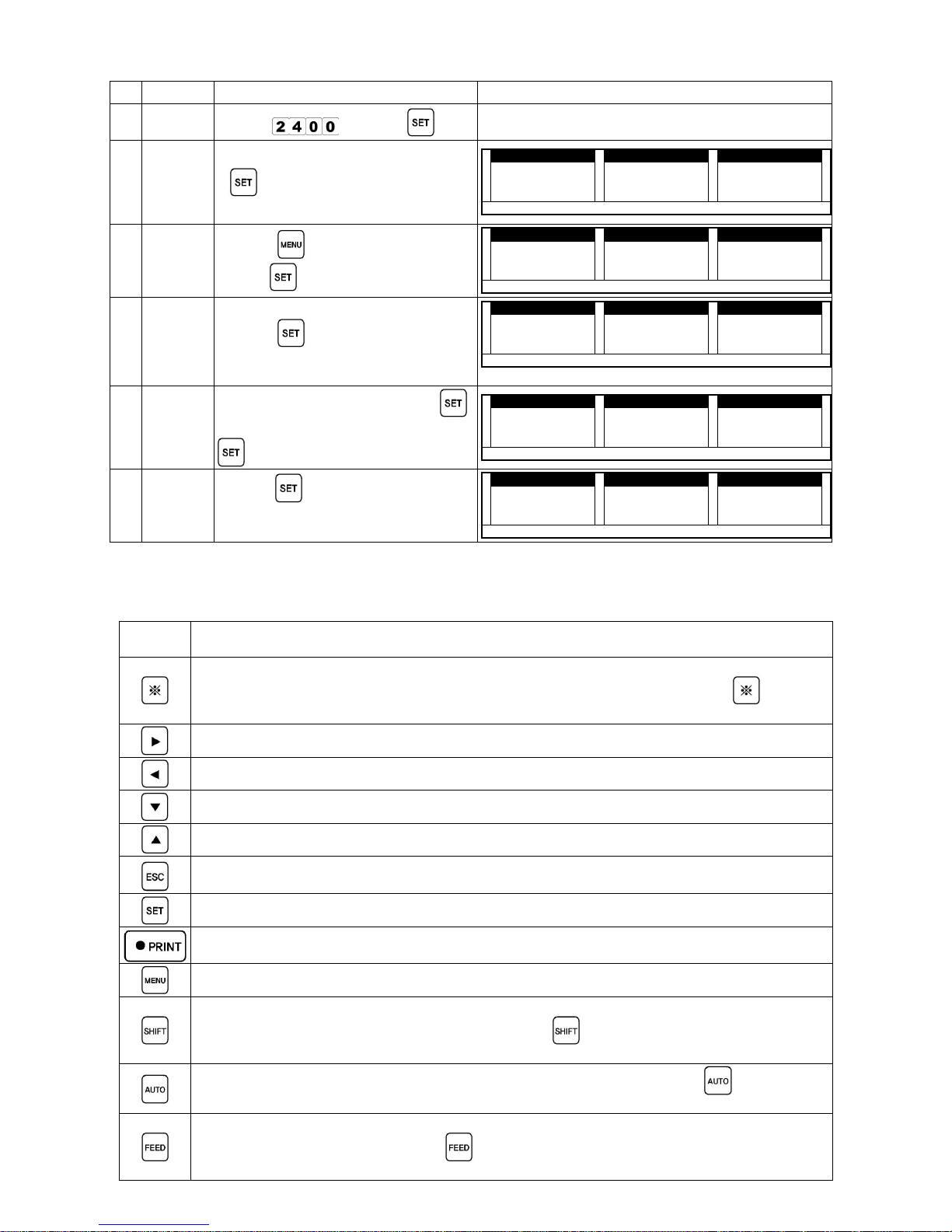
Advertisement Registration (r-Avd : 24000)⑷⑷⑷⑷
Set up user label to print the label.
Select Advertisement No. in mode (37000) to print the information.
Press
and input new information to change the current information.
Refer to product registration procedure to input letters/numbers.
Press to save the current information; the system returns to weighing mode automatically.
2
Addition
1stLine
→Input addition name Press→
Maximum of 46 characters can be
inputted (letters or numbers)
ex: motex
The process of Addition name
registration is same as Product info.
registration.
WEIGHT kg
WEIGHT kgWEIGHT kg
WEIGHT kg UnitPrice $/kg
UnitPrice $/kgUnitPrice $/kg
UnitPrice $/kg Price $
Price $Price $
Price $
2222 3333 2222 0000 1111 5555 8888 8888
AUTO NET ZERO Shift PLU 1 2 3 4 5 6
the number of input letter code of letter
3
Addition
2ndLine
Input letters/numbers Press→ →
If you want to skip this step, press
WEIGHT kg
WEIGHT kgWEIGHT kg
WEIGHT kg UnitPrice $/kg
UnitPrice $/kgUnitPrice $/kg
UnitPrice $/kg Price $
Price $Price $
Price $
2222 3333 2222 0000 2222 0000 0000
AUTO NET ZERO Shift PLU 1 2 3 4 5 6
4
Addition
3rdLine
→Input letters/numbers Press→
If you want to skip this step, press
WEIGHT kg
WEIGHT kgWEIGHT kg
WEIGHT kg UnitPrice $/kg
UnitPrice $/kgUnitPrice $/kg
UnitPrice $/kg Price $
Price $Price $
Price $
2222 3333 2222 0000 3333 0000 0000
AUTO NET ZERO Shift PLU 1 2 3 4 5 6
5
Addition
4thLine
→Input letters/numbers Press→
If you want to skip this step, press
WEIGHT kg
WEIGHT kgWEIGHT kg
WEIGHT kg UnitPrice $/kg
UnitPrice $/kgUnitPrice $/kg
UnitPrice $/kg Price $
Price $Price $
Price $
2222 3333 2222 0000 4444 0000 0000
AUTO NET ZERO Shift PLU 1 2 3 4 5 6
5
Addition
4thLine
→Input letters/numbers Press→
If you want to skip this step, press
WEIGHT kg
WEIGHT kgWEIGHT kg
WEIGHT kg UnitPrice $/kg
UnitPrice $/kgUnitPrice $/kg
UnitPrice $/kg Price $
Price $Price $
Price $
2222 3333 2222 0000 4444 0000 0000
AUTO NET ZERO Shift PLU 1 2 3 4 5 6
6
Addition
5thLine
Input letters/numbers Press→ →
If you want to skip this step, press
[
WEIGHT kg
WEIGHT kgWEIGHT kg
WEIGHT kg UnitPrice $/kg
UnitPrice $/kgUnitPrice $/kg
UnitPrice $/kg Price $
Price $Price $
Price $
2222 3333 2222 0000 5555 0000 0000
AUTO NET ZERO Shift PLU 1 2 3 4 5 6
7
Addition
6thLine
Input letters/numbers Press→ →
If you want to skip this step, press
WEIGHT kg
WEIGHT kgWEIGHT kg
WEIGHT kg UnitPrice $/kg
UnitPrice $/kgUnitPrice $/kg
UnitPrice $/kg Price $
Price $Price $
Price $
2222 3333 2222 0000 6666 0000 0000
AUTO NET ZERO Shift PLU 1 2 3 4 5 6
8
Addition
7thLine
Input letters/numbers Press→ →
If you want to skip this step, press
WEIGHT kg
WEIGHT kgWEIGHT kg
WEIGHT kg UnitPrice $/kg
UnitPrice $/kgUnitPrice $/kg
UnitPrice $/kg Price $
Price $Price $
Price $
2222 3333 2222 0000 7777 0000 0000
AUTO NET ZERO Shift PLU 1 2 3 4 5 6
9
Addition
8thLine
→Input letters/numbers Press→
If you want to skip this step, press
WEIGHT kg
WEIGHT kgWEIGHT kg
WEIGHT kg UnitPrice $/kg
UnitPrice $/kgUnitPrice $/kg
UnitPrice $/kg Price $
Price $Price $
Price $
2222 3333 2222 0000 8888 0000 0000
AUTO NET ZERO Shift PLU 1 2 3 4 5 6
10
Addition
9thLine
Input letters/numbers Press→ →
If you want to skip this step, press
WEIGHT kg
WEIGHT kgWEIGHT kg
WEIGHT kg UnitPrice $/kg
UnitPrice $/kgUnitPrice $/kg
UnitPrice $/kg Price $
Price $Price $
Price $
2222 3333 2222 0000 9999 0000 0000
AUTO NET ZERO Shift PLU 1 2 3 4 5 6
11
Comple
-tion
Additions Registration is completed.
Maximum of 600 additions can be
saved.
WEIGHT kg
WEIGHT kgWEIGHT kg
WEIGHT kg UnitPrice $/kg
UnitPrice $/kgUnitPrice $/kg
UnitPrice $/kg Price $
Price $Price $
Price $
0000 0000 0000
AUTO NET ZERO Shift PLU 1 2 3 4 5 6
Page 14
- 11 -
No. CONTENT PROCEDURE DISPLAY
0
Mode
enter
Input→
Press→
1
Advertise
ment No.
Input Advertisement No. Press→ →
(Advertisement No. range :
1~1,800)
WEIGHT kg
WEIGHT kgWEIGHT kg
WEIGHT kg UnitPrice $/kg
UnitPrice $/kgUnitPrice $/kg
UnitPrice $/kg Price $
Price $Price $
Price $
2222 4444 1111 0000 0000 rrrr ---- AAAA dddd vvvv 0000
AUTO NET ZERO Shift PLU 1 2 3 4 5 6
comment
s
Press→
to cancel registration.
press→
to continue registration.
WEIGHT kg
WEIGHT kgWEIGHT kg
WEIGHT kg UnitPrice $/kg
UnitPrice $/kgUnitPrice $/kg
UnitPrice $/kg Price $
Price $Price $
Price $
2222 4444 1111 0000 0000 rrrr ---- AAAA dddd vvvv PPPP AAAA dddd vvvv ---- MMMM
AUTO NET ZERO Shift PLU 1 2 3 4 5 6
2
Advertise
ment
1stLine
Input characters (letters/numbers)→
→Press
Maximum of 46 characters can
be inputted (letters/numbers).
WEIGHT kg
WEIGHT kgWEIGHT kg
WEIGHT kg UnitPrice $/kg
UnitPrice $/kgUnitPrice $/kg
UnitPrice $/kg Price $
Price $Price $
Price $
2222 4444 2222 1111 0000 0000 0000
AUTO NET ZERO Shift PLU 1 2 3 4 5 6
the number of input letter code of letter
3
Advertise
ment
2ndLine
→Input letters/numbers Press→
If you want to skip this step, press
WEIGHT kg
WEIGHT kgWEIGHT kg
WEIGHT kg UnitPrice $/kg
UnitPrice $/kgUnitPrice $/kg
UnitPrice $/kg Price $
Price $Price $
Price $
2222 3333 2222 2222 0000 0000 0000
AUTO NET ZERO Shift PLU 1 2 3 4 5 6
4
Complete
Press→
to complete registration.
Maximum of 180 Advertisements
can be saved.
WEIGHT kg
WEIGHT kgWEIGHT kg
WEIGHT kg UnitPrice $/kg
UnitPrice $/kgUnitPrice $/kg
UnitPrice $/kg Price $
Price $Price $
Price $
0000 0000 0000
AUTO NET ZERO Shift PLU 1 2 3 4 5 6
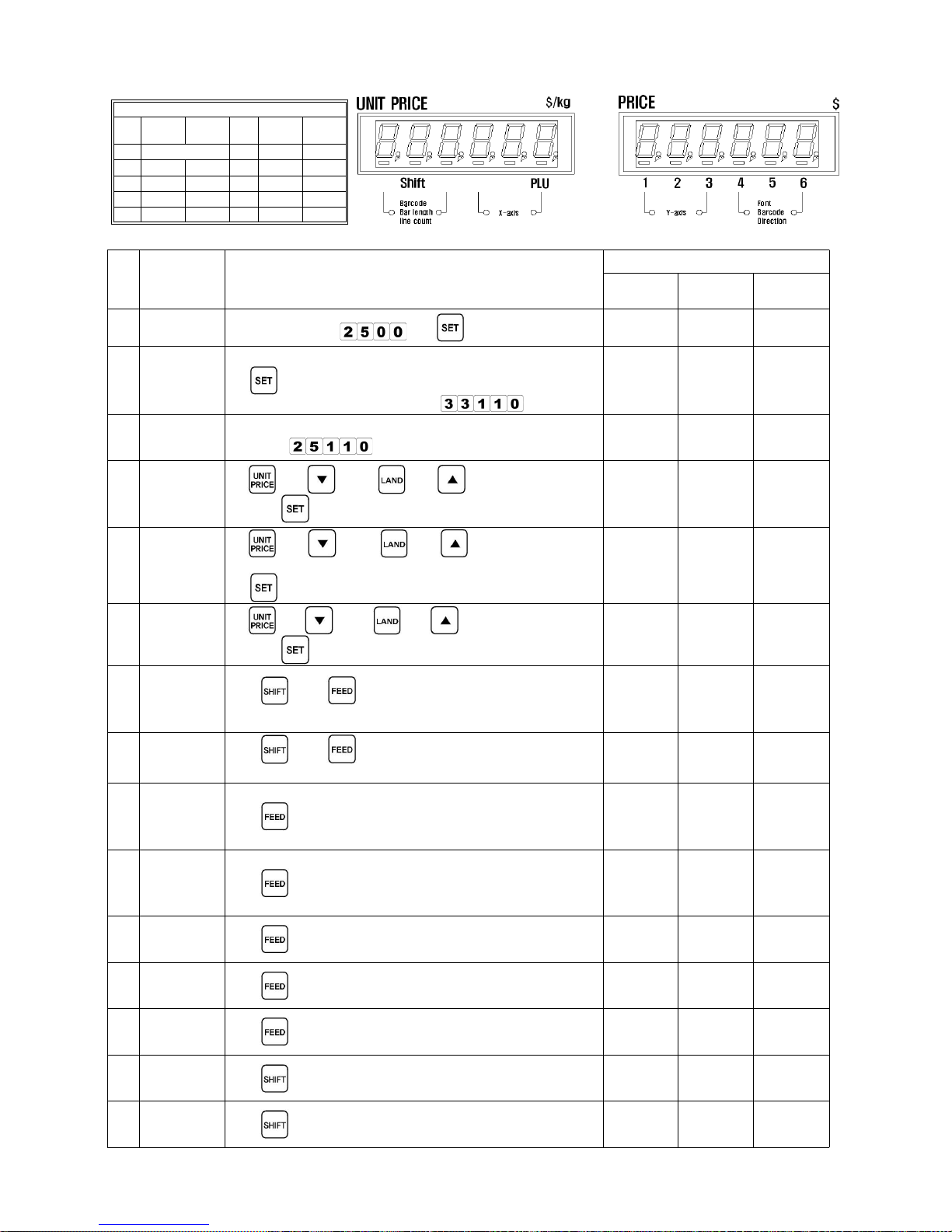
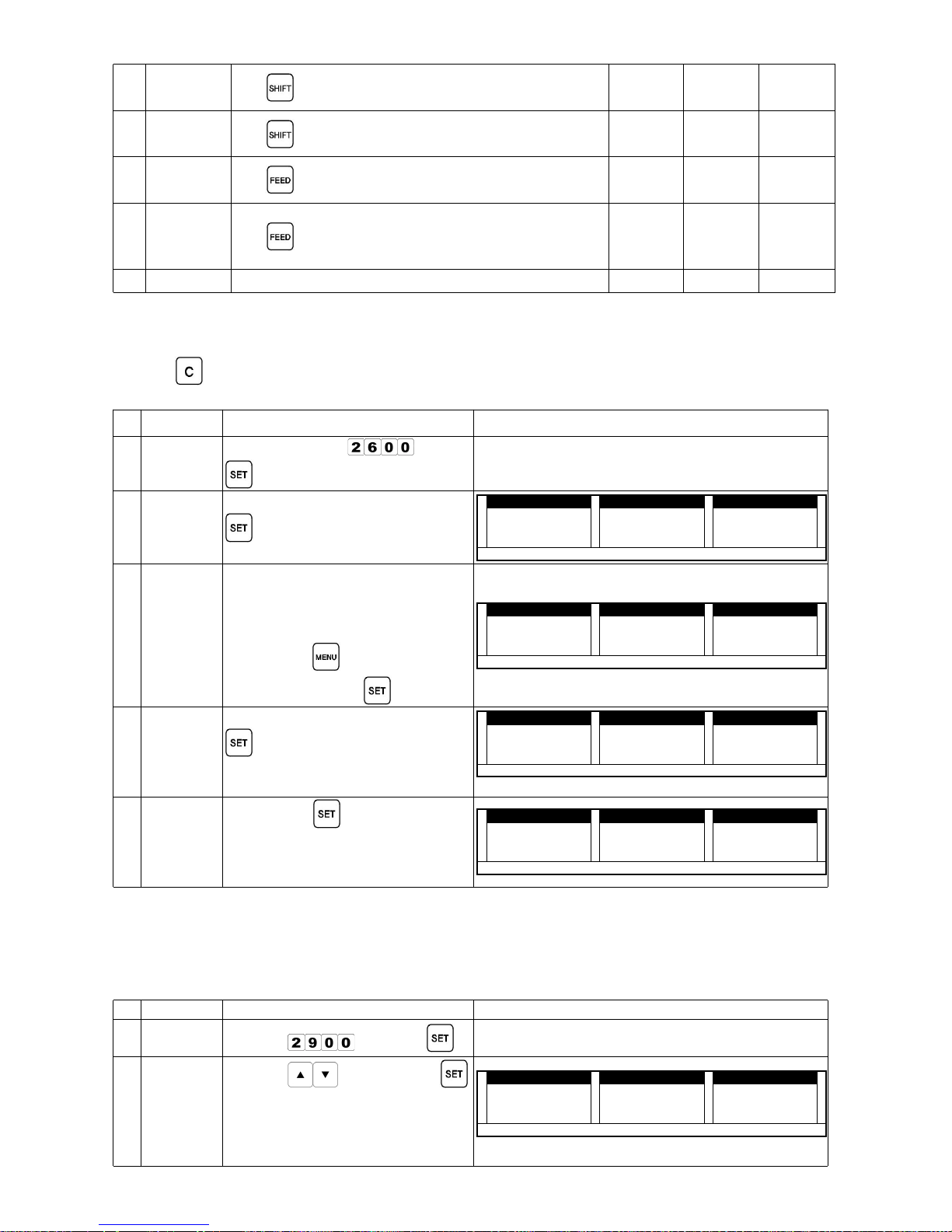
(5) USER LABEL (r-LbL : 25000)
Set up user label to print the label properly.
Press [MENU] to save the current information; the system will automatically returns to weighing mode .
Key
name
Functions
Controls the Changing amount when using direction keys.
(If initial amount is 10. Press to change the amount into 1. Press※
again to
change it back to 10.)
Move the printing position to the right.
Move the printing position to the left.
Move down the printing position.
Move up the printing position.
Return to the previous menu without saving the current condition.
Save current data and move to the next list in the menu.
Print the label for test.
Escape from the label registration menu.
When you input printing information, inputting position on the label can be selected as
Up or LEFT. Initially, the position is set as UP.
key will change selection to
LEFT and Up in turn.
Font selection key. The number goes up by one whenever you press
(Bar-code shifting direction keys can be used in Bar-code mode.)
Select the number of lines in Additions or Advertisement Registration. The number goes
up by one whenever you press
.(This key can be used to set the Bar-code
length in Bar-code mode.)
Page 15
- 12 -
[Table-1] FONT TABLE [Fig-1] DISPLAY CONTENTS
FONT SORT
No. X-AXIS Y-AXIS No. X-AXIS Y-AXIS
0 Do not print 5 16 32
1 8 16 6 16 48
2 8 32 7 32 32
3 16 16 8 32 48
4 16 24 9 18 40
[Table-2] User Label Registration : The diagram shows the value when the label size is 60mm (W) by 70mm (L).
No. CONTENT PROCEDURE
DISPLAY (EXERCISE)
WEIGHT
UNIT
PRICE
PRICE
0
Mode Enter
Press number→
→
1
Input
Number
Select the number between 1~60 as User Label No.→
→
Refer to Label Control Mode
25100 --nUM 0
Comment
If you input already registered number, display will
show as
25110 --nUM PLbL-M
2
Label
Length
Adjustment
→[
or ] or [ or ] Key to set length
size →
25200 LEn-L 70
3
Label Width
Adjustment
[→
or ] or [ or ] Key to set width
size
→
25300 LEn-W 60
4
Label Gap
Adjustment
[→
or ] or [ or ] Key to set the gap
size →
25400 --Edg 20
5
Product
Name
Position
No
and keys in
<General Control Key>
25501 0 3 5 5
6
Land Name
Position
No
and keys in
<General Control Key>
25502 0 7 8 4
7
Manufacturi
ng Date
Position
No
in <General Control Key>
25503 0 1 2 1 2
8
Validity
Date
Position
No
in <General Control Key>
25504 1 1 6 3 2 1 2
9
Unit Price
Position
No
in <General Control Key>
25505 2 3 2 3 2 1 2
10
Weight
Position
No
in <General Control Key>
25506 3 3 7 3 2 1 2
11
Price
Position
No
in <General Control Key>
25507 2 5 4 3 6 7 9
12
Bar-code
Position
No
in <General Control Key>
25508 7 1 4 3 6 6 0
13
Product No.
Position
No
in <General Control Key>
25509 3 9 4 2 6 4 2
Page 16
- 13 -
14
Advertiseme
nt Position
No
in <General Control Key>
25510 1 0 4 5 8 2
15
Addition
Position
No
in <General Control Key>
25511 8 0 1 6 0 1
16
VAT
Position
No
in <General Control Key>
25512 2 5 4 3 7 6 2
17
VAT
Applicable
Price
No
in <General Control Key>
25513 2 5 4 3 8 6 2
END 25110 PLbL-U
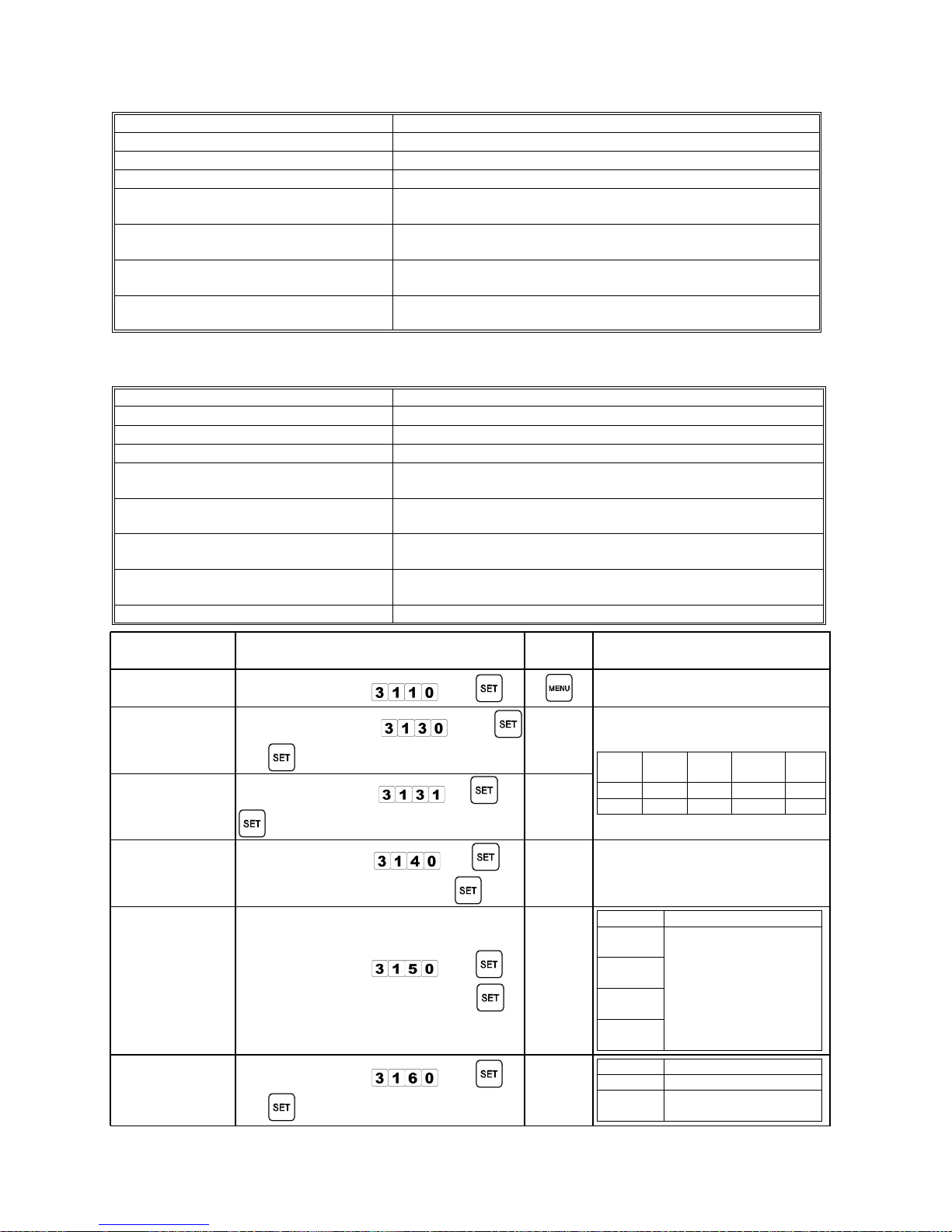
(6) Additional Land Registration (r-Lnd : 26000)
Press to delete current information and input new information.
Refer to Product Registration Procedure to input letters/numbers.
No. CONTENT PROCEDURE DISPLAY
0
Mode
Enter
Input number→
Press→
1 Land No.
Input land number Press→ →
(Land No. : 201~500)
WEIGHT kg
WEIGHT kgWEIGHT kg
WEIGHT kg UnitPrice $/kg
UnitPrice $/kgUnitPrice $/kg
UnitPrice $/kg Price $
Price $Price $
Price $
2222 6666 1111 0000 0000 rrrr ---- LLLL nnnn dddd 0000
AUTO NET ZERO Shift PLU 1 2 3 4 5 6
comments
When you put already registered→
Number the display will be
shown as the diagram on the
right.
Press→
to cancel the
registration. Press→
to continue.
WEIGHT kg
WEIGHT kgWEIGHT kg
WEIGHT kg UnitPrice $/kg
UnitPrice $/kgUnitPrice $/kg
UnitPrice $/kg Price $
Price $Price $
Price $
2222 6666 1111 0000 0000 rrrr ---- LLLL nnnn dddd PPPP LLLL nnnn dddd ----
MMMM
AUTO NET ZERO Shift PLU 1 2 3 4 5 6
2
Land
(Origins of
product)
Input letters/numbers
→
Press
→
Up to 46 characters can be→
registered including the product
name.
WEIGHT kg
WEIGHT kgWEIGHT kg
WEIGHT kg UnitPrice $/kg
UnitPrice $/kgUnitPrice $/kg
UnitPrice $/kg Price $
Price $Price $
Price $
2222 6666 1111 1111 0000 0000 0000
AUTO NET ZERO Shift PLU 1 2 3 4 5 6
3 Completion
Press→
(Registration is
completed)
→ The system automatically returns
to weighing mode.
WEIGHT kg
WEIGHT kgWEIGHT kg
WEIGHT kg UnitPrice $/kg
UnitPrice $/kgUnitPrice $/kg
UnitPrice $/kg Price $
Price $Price $
Price $
0000 0000 0000
AUTO NET ZERO Shift PLU 1 2 3 4 5 6
(7) Product-Registration Activation to register information (r-ItE : 29000)
In registering the product information, registration can be selectively activated.
See Product Registration Mode (r-ItE : 21000) to check Product Registration lists.
No. CONTENT PROCEDURE DISPLAY
0
Mode
enter
Input→
Press→
1 Registration
Press→ Key Press→
Do Activate : 1
Do not Activate : 0
Check each registration lists to→
activate the registration.
WEIGHT kg
WEIGHT kgWEIGHT kg
WEIGHT kg UnitPrice $/kg
UnitPrice $/kgUnitPrice $/kg
UnitPrice $/kg Price $
Price $Price $
Price $
2222 9999 0000 2222 0000 nnnn AAAA
MMMM
EEEE 1111 1111
AUTO NET ZERO Shift PLU 1 2 3 4 5 6
products Activate
Page 17
- 14 -
2. Scale Control Mode (Contr : 30000)
Control Mode
Function
(1) Scale Control (31000)
Control program version, Date/Time, Bar-code Type, Font.
(2) Print Control (32000) Control functions that are related to Printer.
(3) Label Control (33000) Control label paper exclusive for the scale.
(4) Registered Product
Information Print (34000)
Print out the information of the product.
(5) Background Print (35000)
Show the general phrase used for blank label
(with no background logos or colors.)
(6) Entire POS FLAG Registration
(36000)
Apply POS FLAG to the all registered products.
(7) Advertisement issue No. SET
(37000)
Select the advertisement(address) by selecting the
advertisement number.
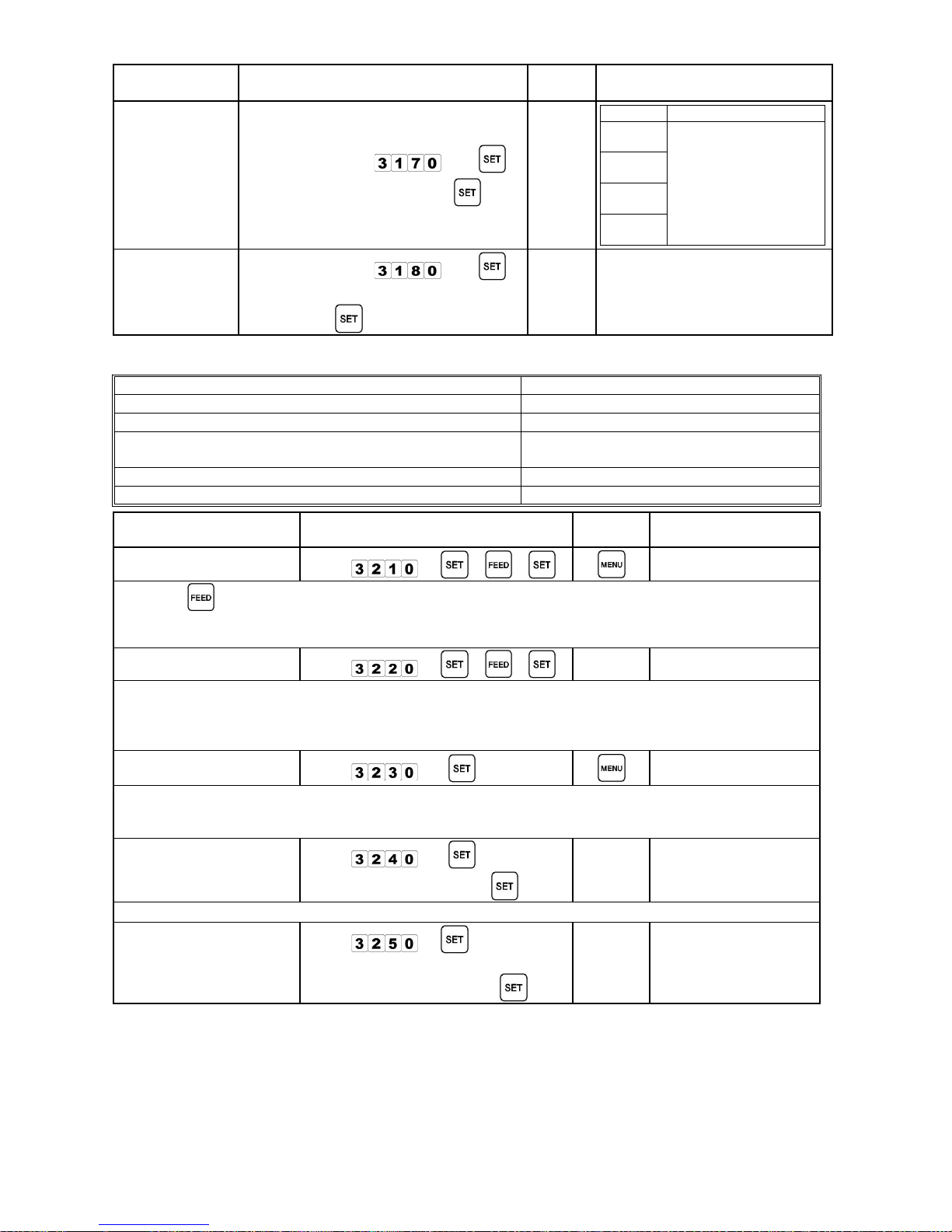
(1) Scale Control (SCALE : 31000)
MENU Function
Confirm Scale Version (31100)
①①①①
Scale Version Check
Modify Date/Time (31200)
②②②②
Check or alter Date/ Time information
Select Bar-code type (31300)
③③③③
Control bar code formats (2-5-5 and 2-4-6)
Change Bar-code Info. Output④④④④
(31400)
Change usage by selecting POS_code method(5 or 6) of bar
code
Select position for product⑤⑤⑤⑤
name(31500)
Select printing format for product name
Set Land Info. Printing⑥⑥⑥⑥
Position(31600)
Select land position
Set Land Info. Alignment Type
⑦⑦⑦⑦
(31700)
Select print-out format for Additional Land
Set VAT Rate (31800)
⑧⑧⑧⑧
Set VAT rate
FUNCTION NAME PROCEDURE
RETURN
KEY
REMARK
Confirm①①①①
Scale Version
Input the number
→
Select②②②②
2/4/6 Bar-code
Input the number
→
→
Bar-code Structure (EAN-13)
Type
Pos
flag
Pos
code
Output
Info.
check
2-5-5 00 00000 00000 1
2-4-6 00 0000 000000 1
Select 2/5/5③③③③
Bar-code
Input the number
→ →
Change④④④④
Bar-code
Info. Output
Input the number → →
Input the selected number →
1 : Price, 2 : Weight, 3 : Amount
Select⑤⑤⑤⑤
position for
product name
Input the number
→
Input the selected number→ →
No. Print Sample
1: AUTO
product
name
2: LEFT
product
name
3: CENTER
p r o d u c t
n a m e
4: RIGHT
product
name
Set Land⑥⑥⑥⑥
Info. Printing
Position
Input the number →
→ (or MENU)
Key Print Sample
SET Product Name (Land)
MENU
Product Name
(Land)
Page 18
- 15 -
FUNCTION NAME PROCEDURE
RETURN
KEY
REMARK
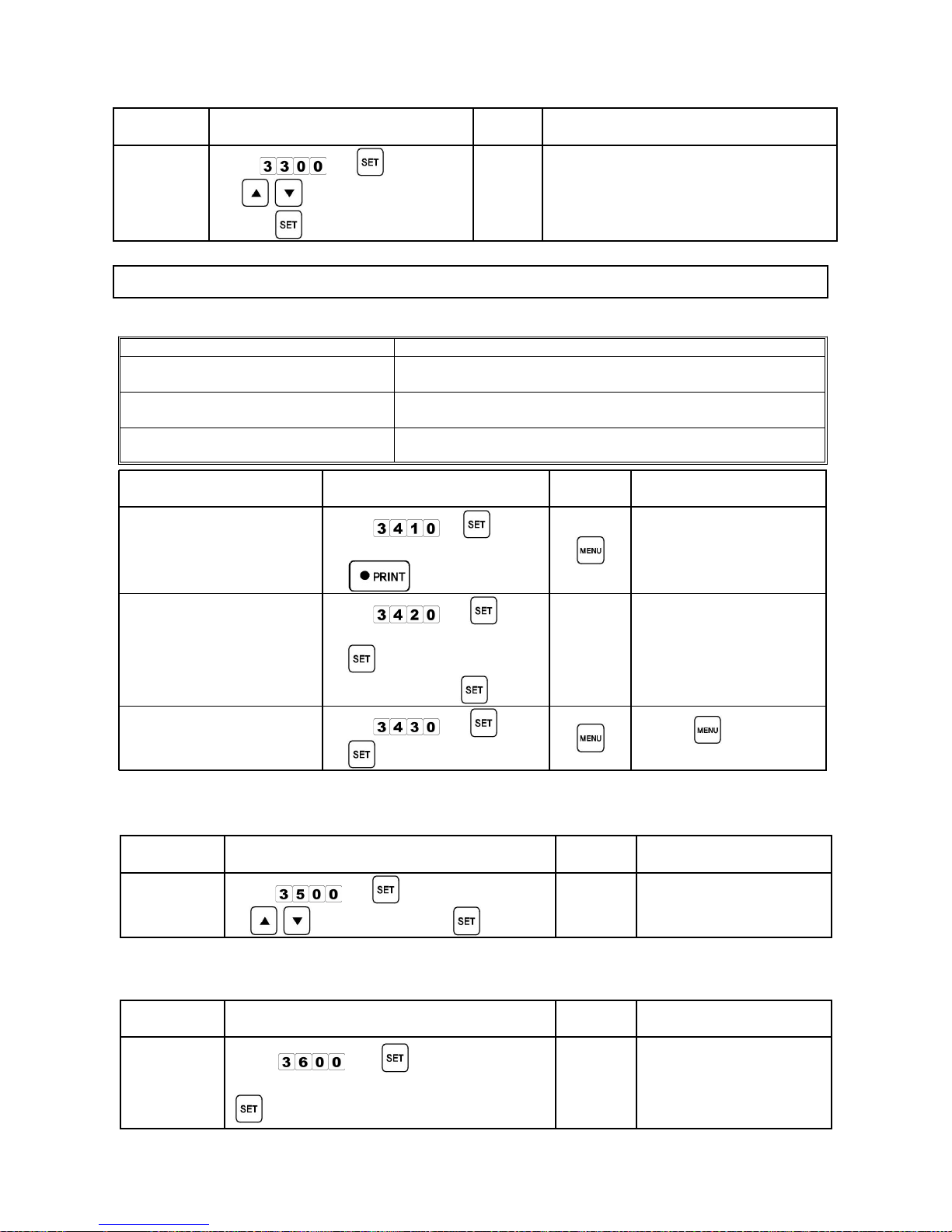
Set Land⑦⑦⑦⑦
Info. Alignment
Type
Input the number
→
Input the Selected No.→ →
No. Print Sample
1: AUTO
Land
Info.
2: LEFT
Land
Info.
3: CENTER
Land
Info.
4: RIGHT
Land
Info.
Set VAT⑧⑧⑧⑧
Rate
Input the number
→
Input VAT rate in number [no. : for→
VAT rate]→
(2) Print Control Mode (Print : 32000)
Control Mode
Function
Label Sensing (32100)①①①① Controls the label paper sensor value.
Label-Front Sensing (32200)②②②② Controls label-front sensor.
Label Output Length (32300)③③③③
Controls the TPH's label length to be
issued
Label-length adjustment (32400)
④④④④
Controls the label length
Printing concentration adjustment (32500)
⑤⑤⑤⑤
Controls the brightness (concentration)
MODE NAME METHOD OF USE
RETURN
KEY
REMARKS
Label Sensor Check①①①①
Input
→ → →
Press→ several times until 2~3 labels are printed.
Sensor value is "31" when label paper is not equipped, sensor value is “0” when sensor has an
error.
Front Sensor Check②②②②
Input
→ → →
It shows “10” or smaller numbers if label is positioned between the sensor, “20” or higher→
numbers if there is no label paper.
Use [AUTO] key to check label movement regardless of the scale's Front-sensor activation of→
Technical Manual.
Label-Issue Length
③③③③
Check
Input
→
The minimum label length for printing is “10M", and total length will be displayed on the "Price"
→
Section.
Press SPAN SWITCH to initiate the issuing length as "0".→
Label-Length④④④④
Adjustment
Input
→
Input desired length→ →
Add 2 to the actual label length : 2 stands for 2 mm, which is the gap between the labels.→
Printing⑤⑤⑤⑤
Concentration
(Brightness)
Adjustment
Input
→
Input numbers for→
brightness/concentration →
Concentration Control
Range : 0~19
Note☞☞☞☞
Default sensor value is "8". (Sensor Value can be changed according to the type of label paper.)
Sensor value will be automatically set if the standard size of label is selected.
To check the sensor value manually, refer to TECHNICAL MANUAL.
Page 19
- 16 -
(3) Label Control Mode (LAbEL : 33000)
MODE NAME PROCEDURE
RETURN
KEY
REMARKS
Label
LabelLabel
Label
Selection
SelectionSelection
Selection
Input
→
→ , key to select label
spec →
There will be a beep if you press
non-registered or greater numbers than
60
No. 1 is registered as a default.
Proper Label Type (10 types)
56×30, 56×40, 58×32, 58×30, 58×40, 58×60, 60×70, 60×32, 60×40, USedF(User Label)
56×30, 56×40, 58×32, 58×30, 58×40, 58×60, 60×70, 60×32, 60×40, USedF(User Label)56×30, 56×40, 58×32, 58×30, 58×40, 58×60, 60×70, 60×32, 60×40, USedF(User Label)
56×30, 56×40, 58×32, 58×30, 58×40, 58×60, 60×70, 60×32, 60×40, USedF(User Label)
(4) Product Info. Printing (ItEPt : 34000)
Control Mode
Function
Selective Product Info. Printing
①①①①
(34100)
Check the product information by selecting the product one
by one.
Partial Product Info. Printing
②②②②
(34200)
Check the product information by selecting the product
section by section.
Entire Product Info. Printing③③③③
(34300)
Check entire product information.
MODE NAME METHOD OF USE
RETURN
KEY
REMARKS
Selective Product Info.
Selective Product Info.Selective Product Info.
Selective Product Info.①①①①
Printing
PrintingPrinting
Printing
Input
→
Input product No.→
→
Partial Product Info.
Partial Product Info.Partial Product Info.
Partial Product Info.②②②②
Printing
PrintingPrinting
Printing
Input
→
Input starting product No.→
→ Input ending→
product No. →
Entire Product Info.
Entire Product Info.Entire Product Info.
Entire Product Info.③③③③
Printing
PrintingPrinting
Printing
Input
→
→
Press to stop
printing.
(5) Label Background Printing (n-PrI : 35000)
: Blank labels with no logos or other print on the background.
MODE NAME METHOD OF USE
RETURN
KEY
REMARK
Printing Info.
Printing Info.Printing Info.
Printing Info.
Issuance
IssuanceIssuance
Issuance
Input
→
→ , (select 0 or 1) →
0 : Do not print
1 : Print
(6) Pos-Flag Bundle Registration (r-PoS : 36000)
: Apply the same Pos-Flag to every registered product.
MODE NAME METHOD OF USE
RETURN
KEY
REMARK
Pos-Flag
Pos-FlagPos-Flag
Pos-Flag
application
applicationapplication
application
to every
to everyto every
to every
registered
registeredregistered
registered
product
productproduct
product
Input
→ Input Pos-Flag→
→
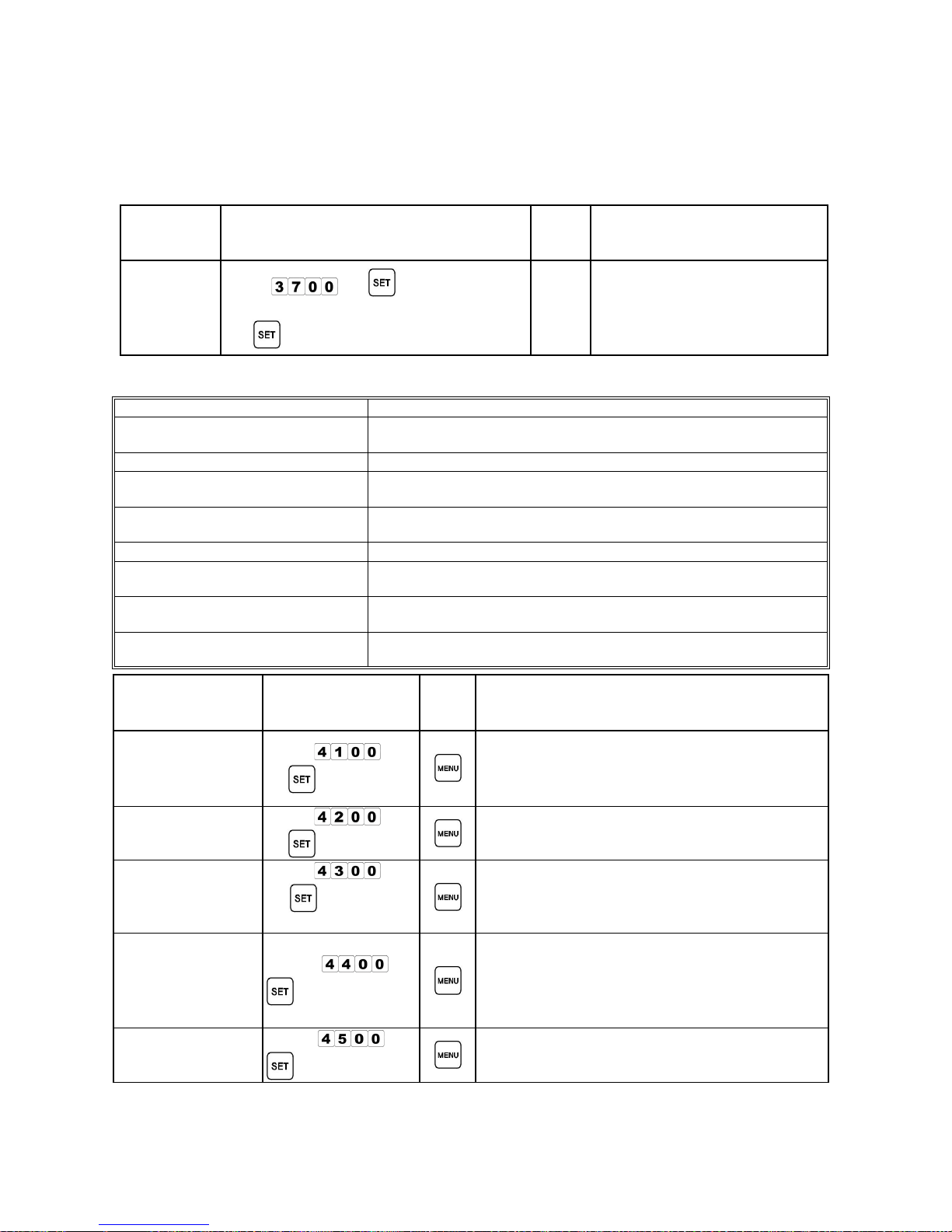
0 : Do not use
Page 20
- 17 -
→ When POS FLAG is entirely applied to the entire product, individual POS FLAG will be
ignored and the same
POS CODE will be applied to every product.
POS FLAG cannot be restored once the POS FLAG is applied to entire products.→
(7) Advertisement Registration No. SET (AdvPt : 37000)
: Advertisement No. can be modified in this mode.
Mode Name METHOD OF USE
RETUR
N
KEY
REMARKS
Advertisement
AdvertisementAdvertisement
Advertisement
output No.
output No.output No.
output No.
setup
setupsetup
setup
Input
→ Input→
Advertisement No. (select among 1~210)
→
Input advertisement No. as→
you register in "24000" mode.
If you input "0", no→
advertisement Info. will be
printed.
3. Communication Mode (onLIn : 40000)
Mode Name
Mode NameMode Name
Mode Name Function
FunctionFunction
Function
Communication Mode Lookup
Communication Mode LookupCommunication Mode Lookup
Communication Mode Lookup①①①①
(41000)
(41000)(41000)
(41000)
Shows the On/Off condition of Ethernet to RS232
communication.
Scale No. Lookup (42000)
Scale No. Lookup (42000)Scale No. Lookup (42000)
Scale No. Lookup (42000)②②②② Shows scale No. setup value for RS422 communication.
ETHERNET IP No. Lookup
ETHERNET IP No. LookupETHERNET IP No. Lookup
ETHERNET IP No. Lookup③③③③
(43000)
(43000)(43000)
(43000)
Shows the IP No. setup value for Ethernet communication.
ETHERNET MODE (44000)
ETHERNET MODE (44000)ETHERNET MODE (44000)
ETHERNET MODE (44000)④④④④
Shows the setup value of Ethernet communication's active
mode.
Host IP No. Lookup (45000)
Host IP No. Lookup (45000)Host IP No. Lookup (45000)
Host IP No. Lookup (45000)⑤⑤⑤⑤ Shows the Host IP when operated in Slave mode.
Host Port No. Lookup (46000)
Host Port No. Lookup (46000)Host Port No. Lookup (46000)
Host Port No. Lookup (46000)⑥⑥⑥⑥
Shows the port No. to be connected or in connection when
operated in Master or Slave mode.
Scale-to-Scale Communication
Scale-to-Scale CommunicationScale-to-Scale Communication
Scale-to-Scale Communication⑦⑦⑦⑦
(47000)
(47000)(47000)
(47000)
Transmits the data between the identical scales.
Serial Communication Port Test
Serial Communication Port TestSerial Communication Port Test
Serial Communication Port Test⑧⑧⑧⑧
(48000)
(48000)(48000)
(48000)
Checks the scale's serial port condition.
MODE NAME METHOD OF USE
RETUR
N
KEY
REMARKS
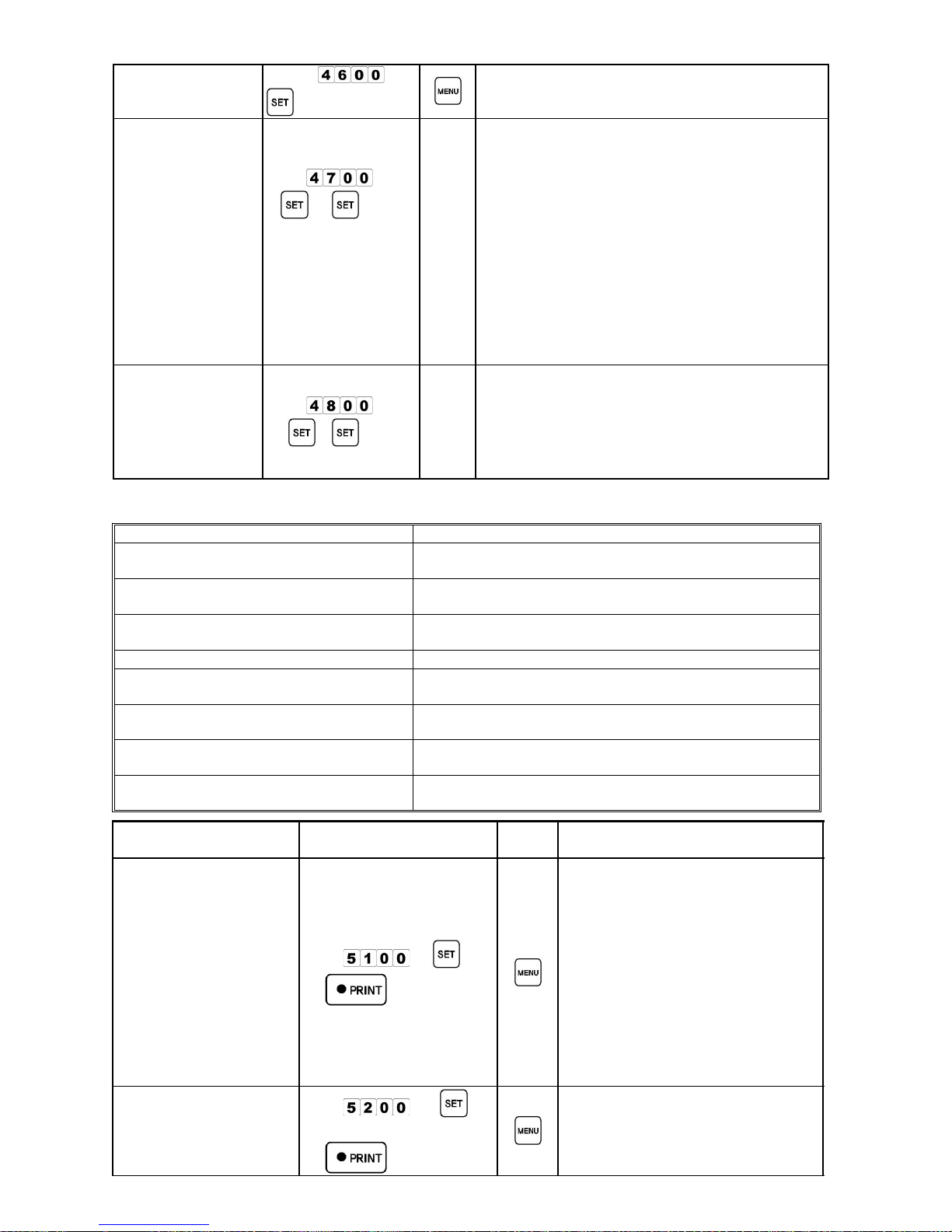
Communication①
Mode Lookup
Input
→
There are two communication modes : -EtHEr
& -rS232.
When -rS232 is selected for Ethernet scale, the
scale will not operate.
Scale No.②
Lookup
Input
→
Cannot be modified.
(Contact the seller to change the setup value)
Scale IP No.③
Lookup
Input
→ [ , ]→ ▼ ▲
repeatedly.
Cannot be modified
(Contact the seller to change the setup value)
Check IP1 > IP2 > IP3 and then IP4
Ethernet④
Communication
Mode Lookup
Input
→
Cannot be modified
(Contact the seller to change the setup value)
Ethernet has the following three modes :
(-Alone, -Slave, -Master)
Refer to the manual for each function.
Host IP⑤
No.Lookup
Input
→
Cannot be modified
(Contact the seller to change the setup value)
Page 21
- 18 -
Host Port⑥
No.Lookup
Input
→
Cannot be modified
(Contact the seller to change the setup value)
Scale-to-Scale⑦
Communication
Input
→ →
(Transmission
starts)
Keep other→
scale in scale
mode.
Auto-
Return
If Rom Switch 12 is 0,
the scale is in 1:1 communication mode.
If Rom Switch 12 is not 0,
the scale is in multi-communication mode.
Other scale no. will not be asked in 1:1
communication mode.
Other scale no. will be asked in
multi-communication mode.
Other scale no. is from 1~98,excluding own
scale No.
When Scale-to-Scale communication is
completed,
"Price" display section will show "End-"
Serial⑧
Communication
Port Test
Input
→ →
Auto-
Return
Start while the scale serial port's 2 and 3 are
connected.
"Price" display section will show 1 or 0 when
the test is over.
1 signifies regular operation, 0 signifies error
(Consult A/S)
4. Sale Total Mode (rEPot : 50000)
MODE NAME FUNCTIONS
Print Total Sales Info. (51000)①①①①
Prints the total sales records of entire registered
products.
Print Total Sales for Selected
②②②②
Products (52000)
Prints the total sales records for each selected products.
Print Total Sales in Sequence
③③③③
(53000)
Prints the total sales records for entire registered
products in sequence.
Print Daily Total Sales (54000)
④④④④
Prints the daily total sales records.
Print Daily Total Sales for⑤⑤⑤⑤
Selected products (55000)
Prints the daily total sales records for individual
registered product.
Check Memory for Total Sales⑥⑥⑥⑥
(56000)
Shows the memory used for sales counting of products.
Check Memory for Daily Total⑦⑦⑦⑦
Sales(57000)
Shows the memory used for daily sales counting.
Delete Total Sales Memory
⑧⑧⑧⑧
(58000)
Initiates the memory for sale total mode.
MODE NAME METHOD OF USE
RETURN
KEY
REMARK
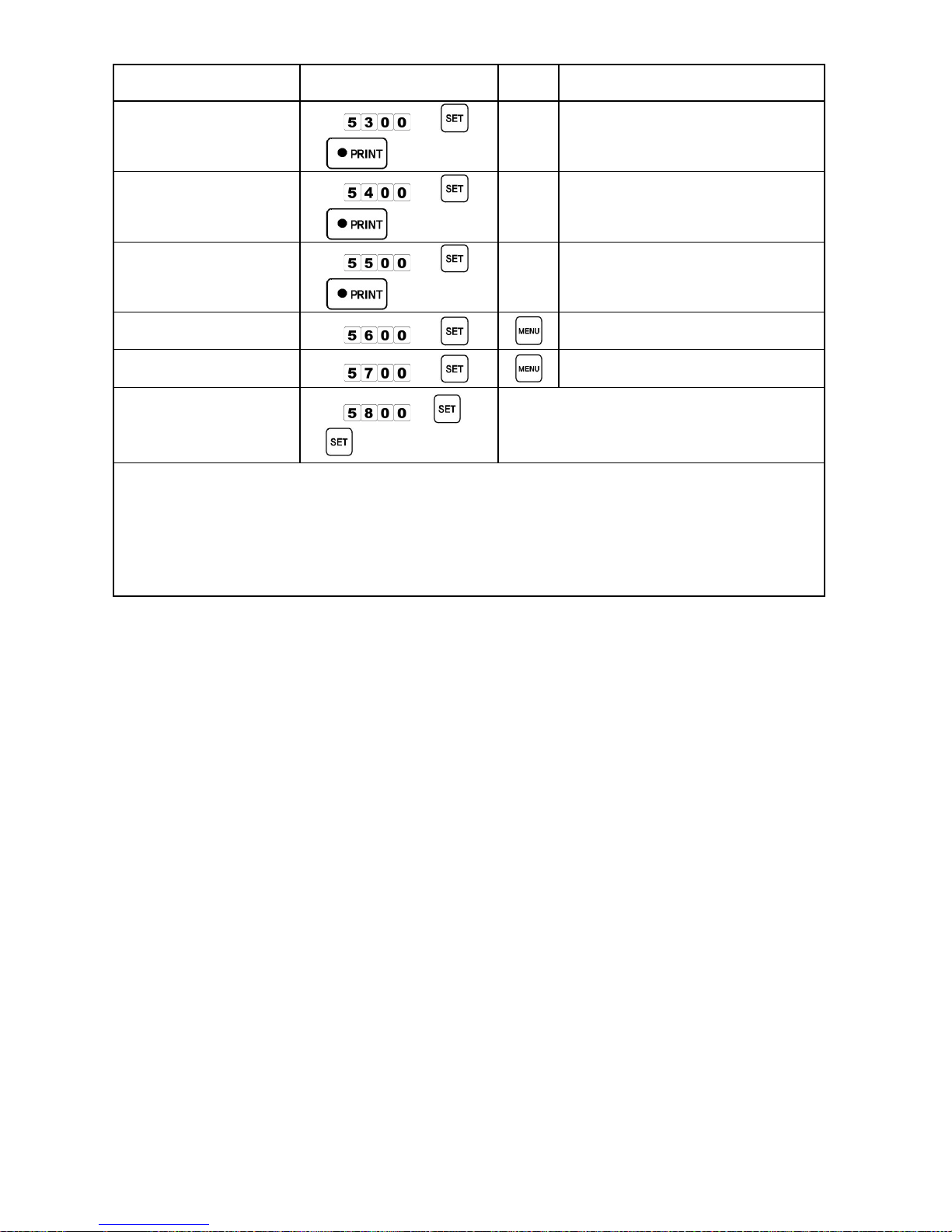
Print Total Sales Info.①
Input
→
→
Shows the total sales records and
does not include deleted product's
records.
Printing info. are : Date/Time,
Weight, Price, The number of
printing times
It will print the DATE as you
initiate total sales mode.
Delete the previous total sales
record while the date is
pre-registered. When starting the
total sale mode.
Print Total Sales for②
Selected Products.
Input
→
Input product No.→
→
For only one product
Page 22
- 19 -
MODE NAME METHOD OF USE
RETURN
KEY
REMARK
Print Total Sales in③
Sequence
Input
→
→
Total sales records for individual
product will be collected in sequence.
Print Daily Total Sales④
Input
→
→
Daily total sales record.
Print Daily Total Sales⑤
for Individual Products.
Input
→
→
Daily total sales records for
individual product.
Check Memory for
⑥
Total Sales
Input
→
Check Memory for
⑦
Daily Total Sales
Input
→
Delete Total Sales⑧
Memory
Input
→
→
Memory should be regularly deleted when
using sale total mode. Label issue error
"Err-27" will appear when the memory
exceeds.
To use total sale mode, make sure to let the technician know when first setting up
the scale.
If the price and weight values exceed 2,147,483,647 total sale mode cannot operate
properly.
If the issuing number exceeds 32,767 total sale mode cannot operate properly.
If any one of price, Weight, of issuance (print) exceeds 2,147,483,647 the system will
automatically turn to the default value “0”.
Page 23
- 20 -
. REFERENCEⅣⅣⅣⅣ
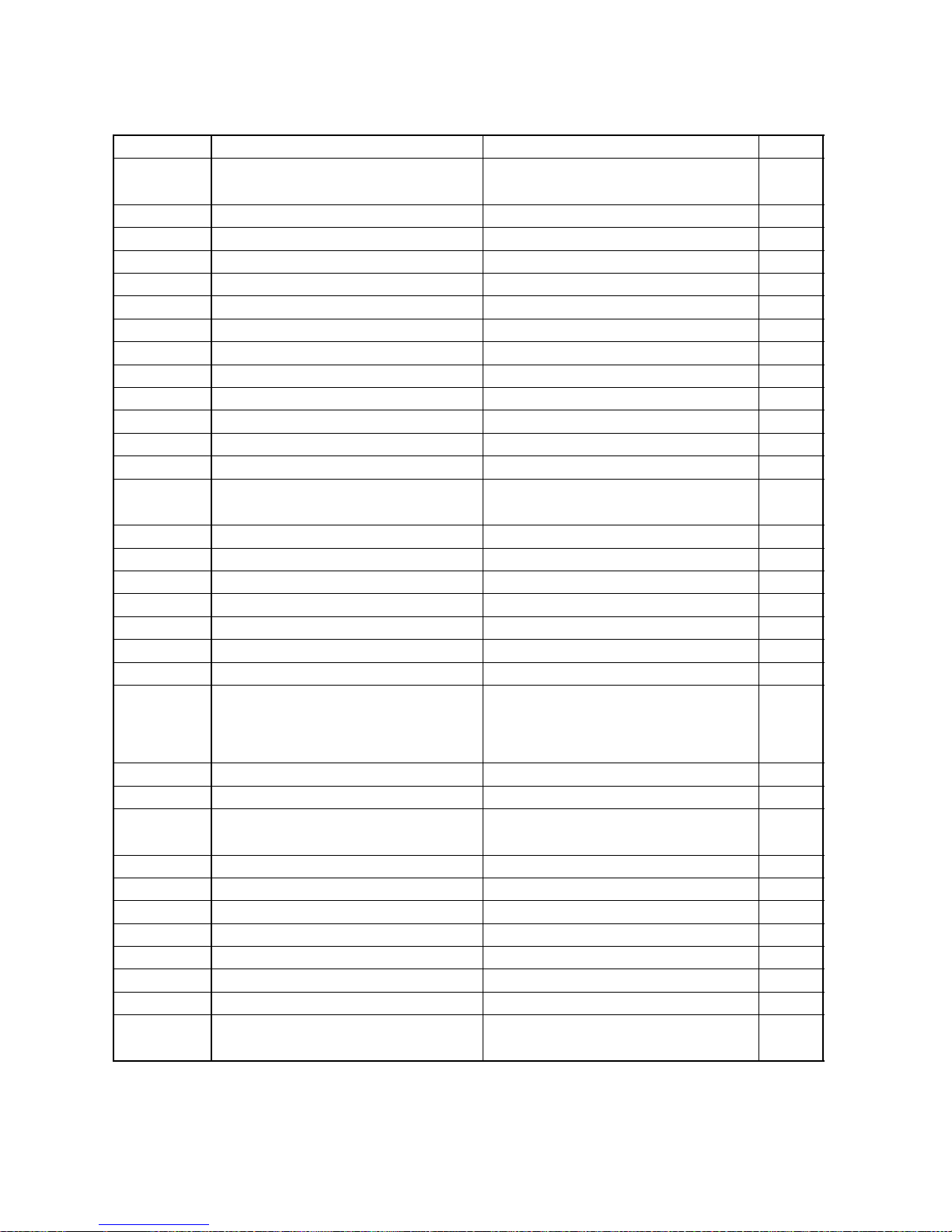
ERROR MASSAGE TABLE●●●●
Error-No. Explanation Response
REMARK
Err-01 Scale setting error
Check Span adjustment, load cell, and AD
board
Err-02 Printer connection error Printer check
Err-03 File system initializing error Check Memory and re-set span
Err-04 Data error Check Memory IC
Err-05 Printer information error Check Memory IC
Err-06 Date count error Reset Date and check batter
Err-07 Maximum weight exceeded Check Weighing board state and load cell
Err-08 Minimum weight unsatisfied Check AD
Err-09 AD chip err Check AD board and load cell
Err-10 AD connection (line) error Check AD board and load cell
Err-11 ADC output exceed Check AD board and load cell
Err-12 ADC output unsatisfied Reset Span and check memory
Err-13 AD running preparation error Check Booting range excess and load cell
Err-14 SPAN DATA error
Check Zero point range excess and load
cell
Err-15 Initial booting zero point DATA err Check Vessel range excess and load cell
Err-16 Zero value DATA error Move scale to a stable place
Err-17 Tare value Data error Check weighing board
Err-18 Weighing unstable (trembling) Move to a stable place - no tremble
Err-27 Sales result memory exceed error Delete sales result memory
Err-34 Label-paper error Place label paper correctly
Err-35 Print running error Check (auto clear) motor and print board
Err-36 Label-Front Sensor Error
Check sensor or cancel the Entire
sensor function in ROM SWITCH
(Refer to Technical Manual)
Err-37 Label-paper not feed well Pull label-print forward (FEED)
Err-38 Label-print out Refill label-paper
Err-39 Print brightness error
Check label-paper and adjust/ change
TPH
Err-40 Label size error Check and re-set label size
Err-41 Sensor distance error Check and re-set sensor distance
Err-43 Communication (download) error Check memory and network setting
Err-44 Communication time error Re-try network and check port setting
Err-45 Unregistered Product Register Product
Err-46 Unregistered Preset Register Preset
Err-47 Product call unavailable Re register product or change FLASH
Err-50 Ethernet Security Error
Check IP address, Ethernet board lad
state, and connector (line)
Page 24
- 21 -
LAND TABLE●●●●
No. Land No. Land No. Land No. Land
1 AL(ALABAMA) 51 ALBANIA 101 GEORGIA 151 NEPAL
2 AK(ALASKA) 52 ALGERIA 102 GERMANY 152 NEW ZEALAND
3 AZ(ARIZONA) 53 ANDORRA 103 GHANA 153 NORWAY
4 AR(ARKANSAS) 54 ANGOLA 104 GREECE 154 OMAN
5 CA(CALIFORNIA) 55 ANTARCTICA 105 GRENADA 155 PAKISTAN
6 CO(COLORADO) 56 U.A.E 106 GUAM 156 PANAMA
7 CT(CONNECTICUT) 57 ARGENTINA 107 GUATEMALA 157 PARAGUAY
8 DE(DELAWARE) 58 ARMENIA 108 GUINEA 158 PERU
9 FL(FLORIDA) 59 AUSTRALIA 109 HAITI 159 PHILIPPINE
10 GA(GEORGIA) 60 AUSTRIA 110 HONDURAS 160 POLAND
11 HI(HAWAII) 61 BAHAMAS 111 HONGKONG 161 PORTUGAL
12 ID(IDAHO) 62 BAHRAIN 112 HUNGARY 162 QATAR
13 IL(ILLINOIS) 63 BANGLADESH 113 ICELAND 163 ROMANIA
14 IN(INDIANA) 64 BELARUS 114 INDIA 164 RUSSIA
15 IA(IOWA) 65 BELGIUM 115 INDONESIA 165 RWANDA
16 KS(KANSAS) 66 BELIZE 116 IRAN 166 SAUDI ARABIA
17 KY(KENTUCKY) 67 BENIN 117 IRAQ 167 SENEGAL
18 LA(LOUISIANA) 68 BHUTAN 118 ISRAEL 168 SERBIA
19 ME(MAINE) 69 BOLIVIA 119 ITALY 169 SINGAPORE
20 MD(MARYLAND) 70 BOTSWANA 120 JAMAICA 170 SLOVAKIA
21 MA(MASSACHUSETTS) 71 BRAZIL 121 JAPAN 171 SLOVENIA
22 MI(MICHIGAN) 72 BRITAIN 122 JORDAN 172 SOMALIA
23 MN(MINNESOTA) 73 BRUNEI 123 KAZAKHSTAN 173 SOUTH AFRICA
24 MS(MISSISSIPPI) 74 BULGARIA 124 KENYA 174 SPAIN
25 MO(MISSOURI) 75 BURMA 125 NORTH KOREA 175 SRILANKA
26 MT(MONTANA) 76 BURUNDI 126 SOUTH KOREA 176 SUDAN
27 NE(NEBRASKA) 77 CAMBODIA 127 KUWAIT 177 SURINAME
28 NV(NEVADA) 78 CAMEROON 128 LAOS 178 SWAZILAND
29
NH(NEW
HAMPSHIRE)
79 CANADA 129 LATVIA 179 SWEDEN
30 NJ(NEW JERSEY) 80 CHAD 130 LEBANON 180 SYRIA
31 NM(NEW MEXICO) 81 CHILE 131 LIBERIA 181 TAIWAN
32 NY(NEW YORK) 82 COLOMBIA 132 LIBYA 182 TANZANIA
33
NC(NORTH
CAROLINA)
83 COMOROS 133 LUXEMBOURG 183 THAILAND
34 ND(NORTH DAKOTA) 84 CONGO 134 MACAU 184 TOGO
35 OH(OHIO) 85 COSTARICA 135 MAKEDONIA 185 TONGA
36 OK(OKLAHOMA) 86 CROATIA 136 MADAGASCAR 186 TURKEY
37 OR(OREGON) 87 CUBA 137 MALAWI 187 TUVALU
38 PA(PENNSYLVANIA) 88 DENMARK 138 MALAYSIA 188 UGANDA
39 RI(RHODE ISLAND) 89 DJIBOUTI 139 MALDIVES 189 UKRAINE
40
SC(SOUTH
CAROLINA)
90 DOMINICA 140 MALI 190 U.K
41 SD(SOUTH DAKOTA) 91 ECUADOR 141 MALTA 191 U.S.A
42 TN(TENNESSEE) 92 EGYPT 142 MEXICO 192 URUGUAY
43 TX(TEXAS) 93 ELSALVADOR 143 MOLDOVA 193 UZBEKISTAN
44 UT(UTAH) 94 ESTONIA 144 MONACO 194 VENEZUELA
45 VT(VERMONT) 95 ETHIOPIA 145 MONGOLIA 195 VIETNAM
46 VA(VIRGINIA) 96 FIJI 146 MOROCCO 196 YEMEN
47 WA(WASHINGTON) 97 FINLAND 147 MOZAMBIQUE 197 YUGOSLAVIA
48 WV(WEST VIRGINIA) 98 FRANCE 148 MYANMAR 198 ZAIRE
49 WI(WISCONSIN) 99 GABON 149 NAMIBIA 199 ZAMBIA
50 WY(WYOMING) 100 GAMBIA 150 NAURU 200 ZIMBABWE
Page 25
- 22 -
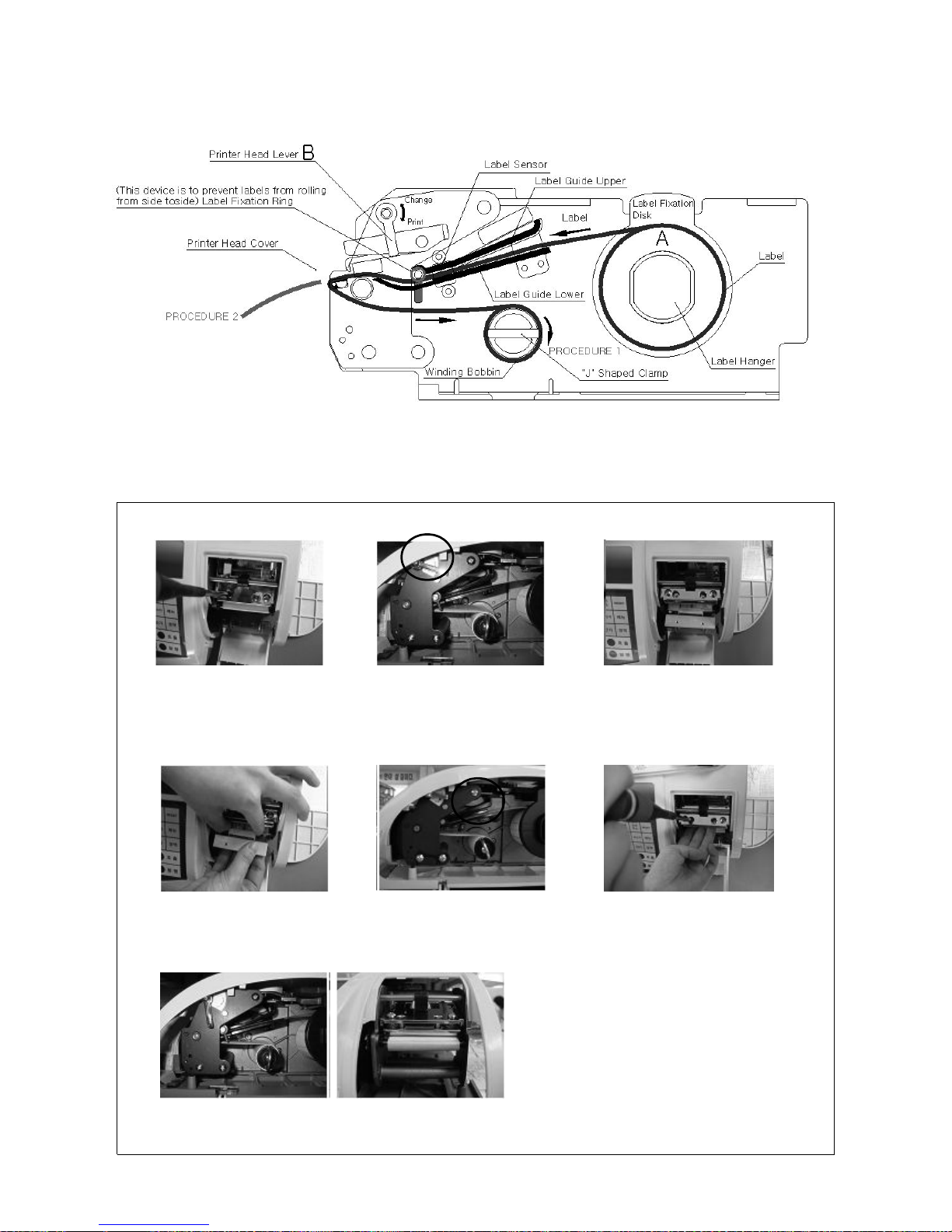
Label Paper Setup●●●●
TPH Setup●●●●
TPH Lever
Unfasten 2 volts using a Lift up the grip of TPH Take out TPH① ② ③
driver (Push TPH cable with right hand
while holding TPH with left hand)
TPH Cable
Change TPH Push TPH cable with right hand Fasten TPH with volts.④ ⑤ ⑥
holding TPH with left hand as
done at No. ③
Have the grip of TPH⑦
Make sure TPH is fixed properly printing label.
Page 26
- 23 -
Page 27
- 24 -
 Loading...