

Page 1
Page 2
Page 3

!
!
MOOV:%REVIEWER’S%GUIDE%
3%
E X E C U T I V E S U M M A R Y
MOOV NOW™ is the second generation hardware from the world’s first artificially
intelligent wearable fitness coach, Moov. Back with the most advanced technology
yet, six month-lasting battery life, third party heart rate monitor integration and a
sleeker design, our goal is to continue making exercise fun, efficient, and effective.
MOOV NOW™ holds a unique position among the current wearable fitness solutions.
While tracking your daily activity reminds you to go out and get active,
MOOV NOW™
translates your exact movements into coaching.
We know that data is not enough.
Improvements are made through actionable insights. Real-time audio and visual
coaching pushes you to improve throughout each workout, bringing your fitness and
workout experience to a whole new level.
MOOV NOW™ offers more than 10 guided programs with over 200 levels in sports
including running, cycling, swimming, body weight training, and cardio boxing.
Join the MOOVment, MOOV well.
M O O V N O W™
Since debuting Moov back in 2014, we have worked closely with our users to pinpoint
what features they liked, didn’t like, and wanted more of. MOOV NOW™ is the result of
their feedback: a more breathable, light-weight band for comfort, a 6 month-lasting
battery life, and the ability to adjust the amount of feedback Coach Moov gives.
Along with the accelerometer used in basic fitness trackers, MOOV NOW’s Omni
Motion™ sensor employs a gyroscope to detect rotation and a magnetometer for
sensing orientation. These sensors give MOOV NOW™ the ability to recreate motion in
3D, allowing Coach Moov to give feedback as you exercise so you can improve your
form to prevent injury and hold you accountable to goals.
Page 4

4%
MOOV:%REVIEWER’S%GUIDE!
!
W H Y A. I. C O A C H I N G D E L I V E R S R E S U L T S
Moov’s coaching philosophy is based on combining workout efficiency and results
with a passion for fitness and a desire to keep improving. We believe the best way
to get results is to enjoy the journey of achievement. Fitness is personal, and we
want working out with Moov to be a personalized experience, targeting how you
move and where you want to see improvement. Moov programs seek to find your
limit, whether it is endurance, power, strength, or cardio and push you to improve.
Our coaching method accelerates the path to these goals by creating workout
efficiency through intensity, intervals, form, variety and individualization.
Intensity: High intensity workouts provide more improvement in less time. Getting
your heart rate high keeps you burning fat even after you’ve finished working out.
Level up to increase difficulty and keep intensity high as you improve.
Intervals: Interval training has been proven as the most effective method for burning
fat and gaining strength fast. By pushing through high intensity intervals, users are
able to challenge themselves and unlock their potential, while earning a rest at the
end of each interval.
Form: With real-time form monitoring, Moov is able to target where you are losing
energy or risking injury so you can exercise longer and safer.
Variety: Don’t get bored with your workout. As your body gets used to a consistent
workout, it burns fewer calories. Explore the Moov programs to work your body in
new and interesting ways.
Individualization: Moov is focused on you and how you move. Moov is your
companion, telling you when you can do better and how to do get there. You are
capable of more than you think and Moov will push that limit.
W H O I S Y O U R M O O V C O A C H ?
Moov coaches a team of motivated individuals who want to get better. The Moov
coach is designed to make these individuals want to get up every day and work out
because it is enjoyable and brings them closer to their goals.
With a tough personality, Moov is able to push users toward their potential, while
instilling in them the desire to reach the next benchmark. We make each
achievement one you have earned, and don’t let you cheat or slide by.
Moov coaching is designed through extensive research and insights from
professionals to target common issues and provide the most effective and efficient
workouts. Just like a real coach, Moov is able to target an individual’s form and
technique, but accurate metrics take this analysis to the next level.
Page 5
!
!
MOOV:%REVIEWER’S%GUIDE%
5%
G E T T I N G S T A R T E D
Mobile Device Settings
MOOV NOW™ connects to your mobile device via Bluetooth LE so make sure your
Bluetooth is enabled by going into your phone’s Settings → Bluetooth → Swipe
“On”
Make sure your Location Services is enabled by going into your phone’s Settings →
Privacy → Location Services → Swipe “On”
Download the Moov App
The new Moov app will be available in the Apple App Store and the Google Play
Store this fall when MOOV NOW™ is shipped.
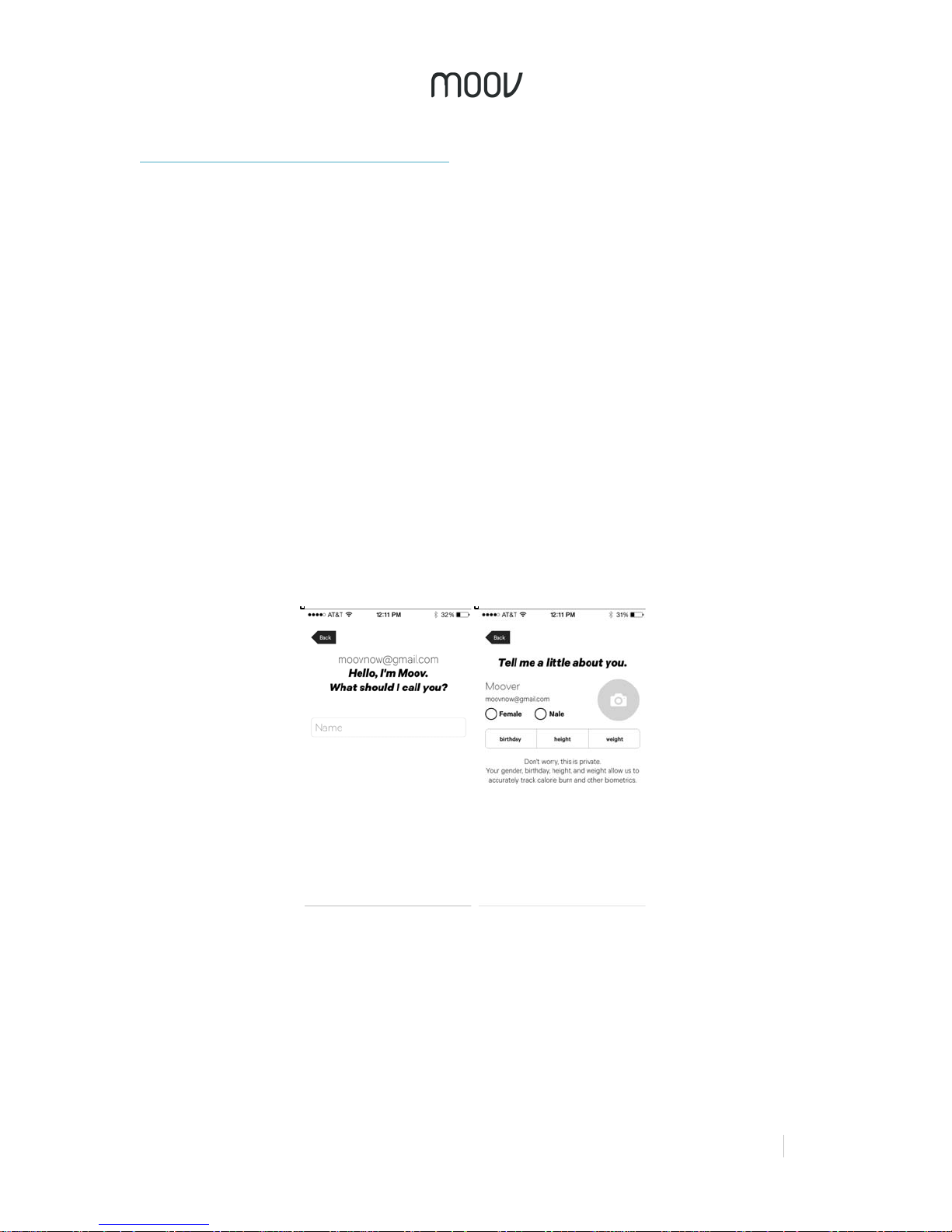
Create a Moov Account
When you first open the Moov app, you will be prompted to create a new Moov
account either by selecting “Connect with Facebook” or “Register with Email”. When
creating an account, Moov will ask you for your nickname, gender, age, and more.
By providing this information, Moov will be able to accurately track your calories
burned and other biometrics. Don’t worry, this information will always be kept private.
Remember to add a photo by clicking on the gray camera icon if you didn’t connect
via Facebook.
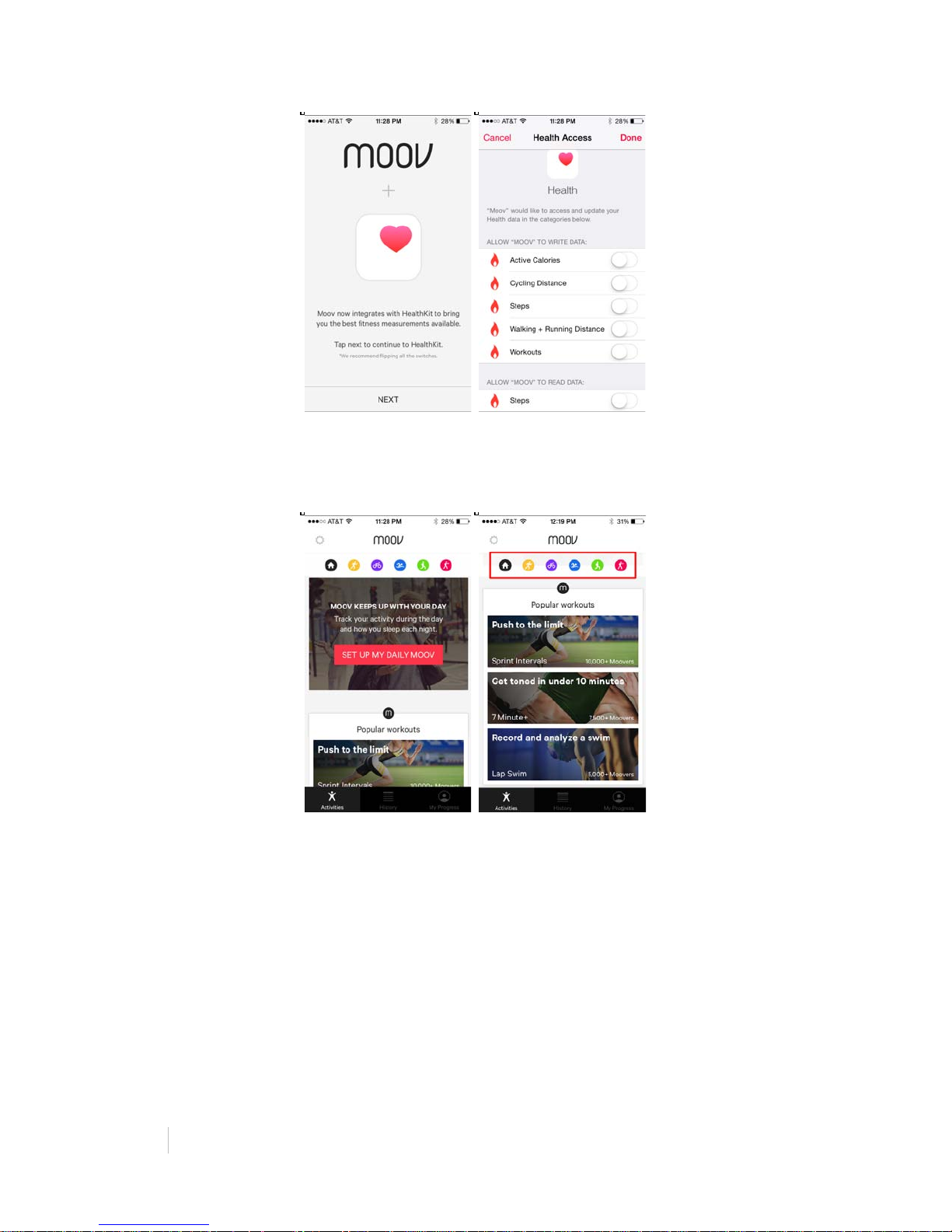
Once you sign in, you will be prompted to integrate with Apple Health. This will help
keep track of your active calories, steps, cycling distance, running and walking
distance, and all your workouts.
Page 6
6%
MOOV:%REVIEWER’S%GUIDE!
!
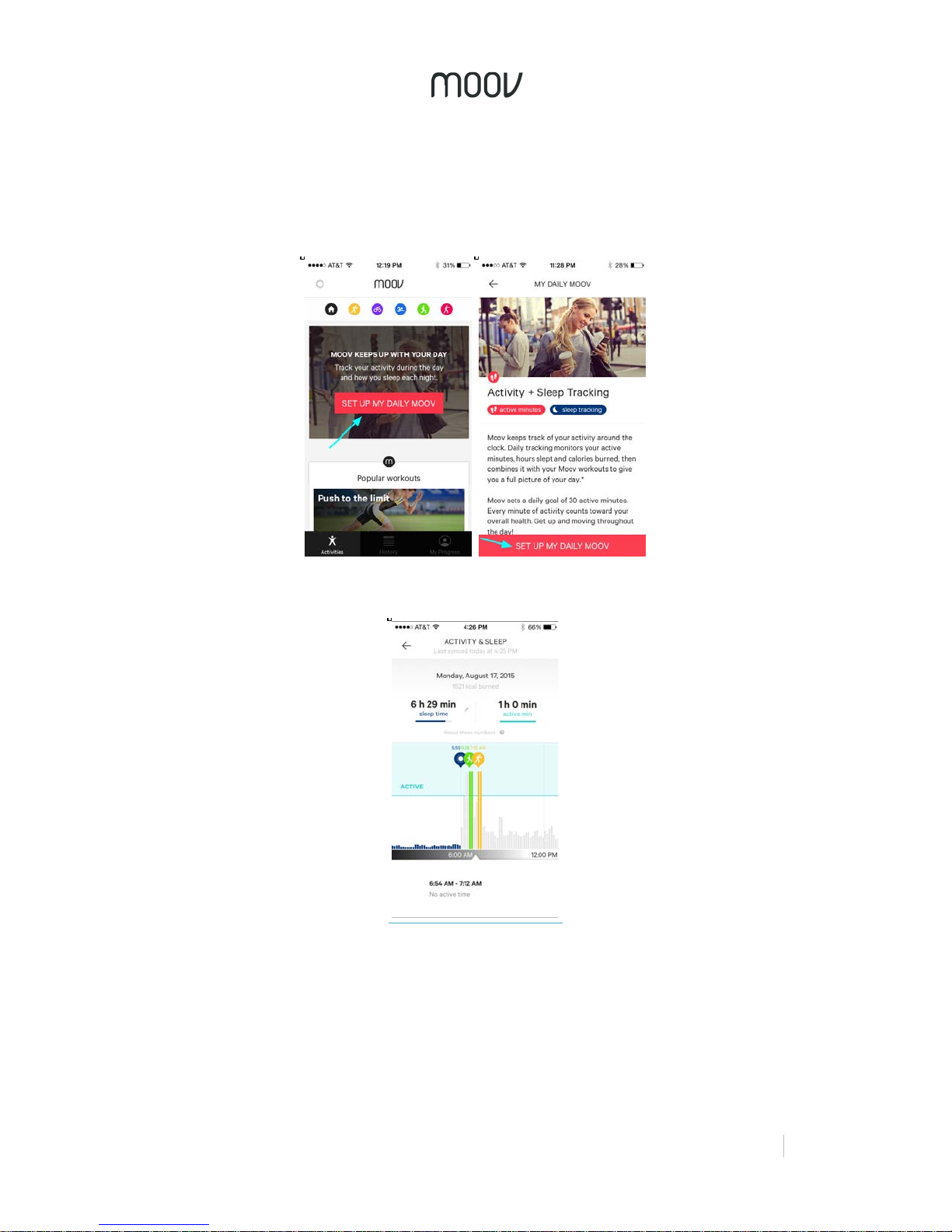
Once you have toggled all the switches, you will be brought to the Activity page,
where you will be prompted to set up your daily Moov. All the workout programs are
also listed on this page.
Daily Activity Tracking
Moov is designed to promote lifestyle transformations, making your whole day more
active and not just your workouts. We choose to encourage an active lifestyle
through a focus on active minutes in our daily activity tracking. The World Health
Organization recommends at least 150 minutes of moderate exercise each week.
From this, we derived a daily goal of 30 active minutes to provide a realistic goal that
can make a significant difference in your health.
Our algorithm is designed to go beyond steps. Active minutes take into account
intensity and other activities, such as swimming and cycling, that shouldn’t be
represented as steps. Our algorithm also keeps typing or moving your computer
mouse from counting as activity like it often does with classic step trackers (Moov
Page 7
!
!
MOOV:%REVIEWER’S%GUIDE%
7%
knows better!). Achieving active minutes requires a higher expenditure of energy that
will be more effective towards living a healthy lifestyle.
To set up your daily Moov, tap on “SET UP MY DAILY MOOV”. For best results,
wear Moov on your ankle or wrist.
Activity tracking shows your Moov workouts as part of your daily activity.
Sleep Tracking
Moov automatically tracks when you fall asleep, woke up and how much you tossed
and turned. In the morning you can see how much of your sleep registered as deep
sleep (about 45% is a good benchmark). Moov learns from your sleep patterns, so
the more you use it, the more accurate it will become.
Page 8
8%
MOOV:%REVIEWER’S%GUIDE!
!
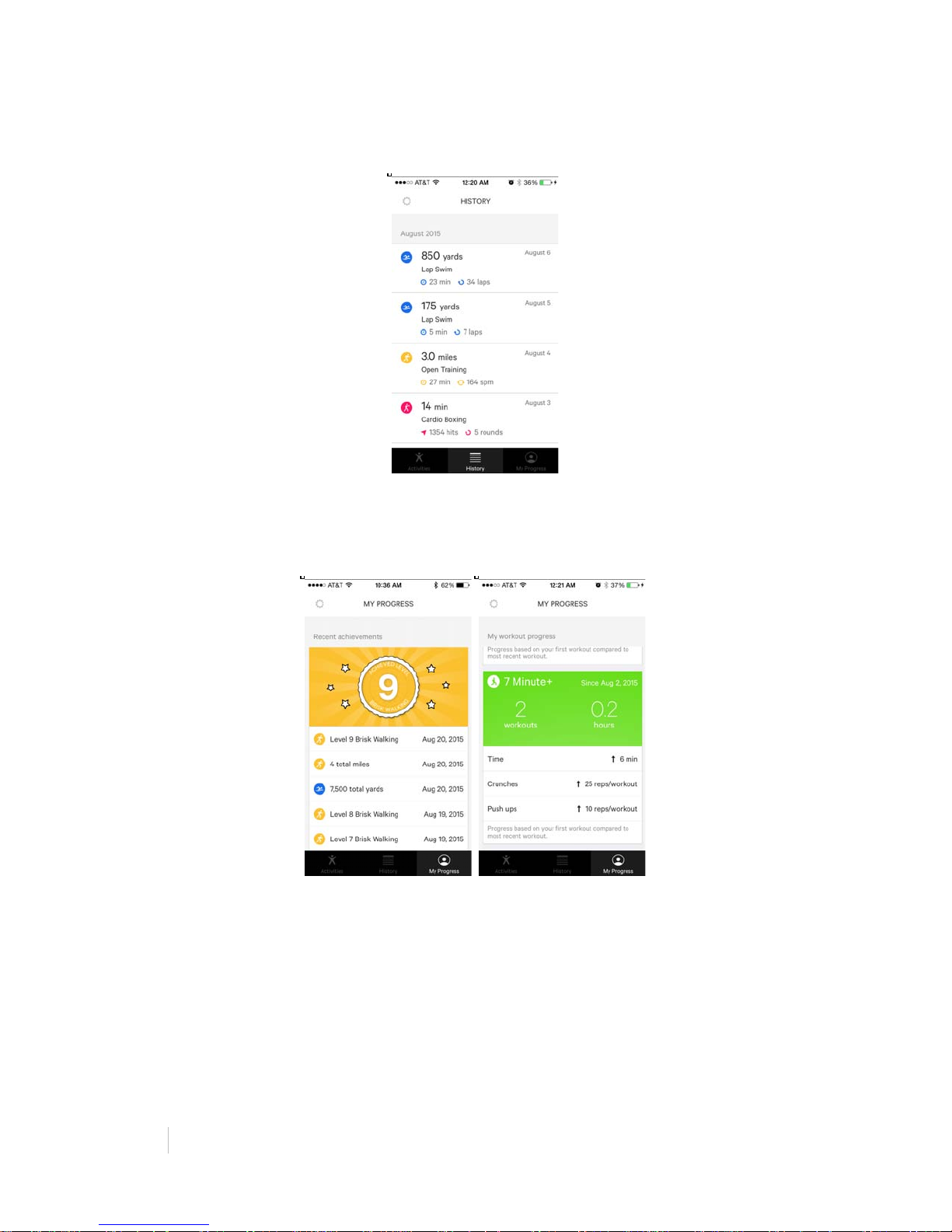
History
Quickly view all your past workouts under one tab.
My Progress
See how you’ve improved from previous workouts. Keeps track of the total time you
have worked out during the week and review your latest achievements.
Connecting your Moov
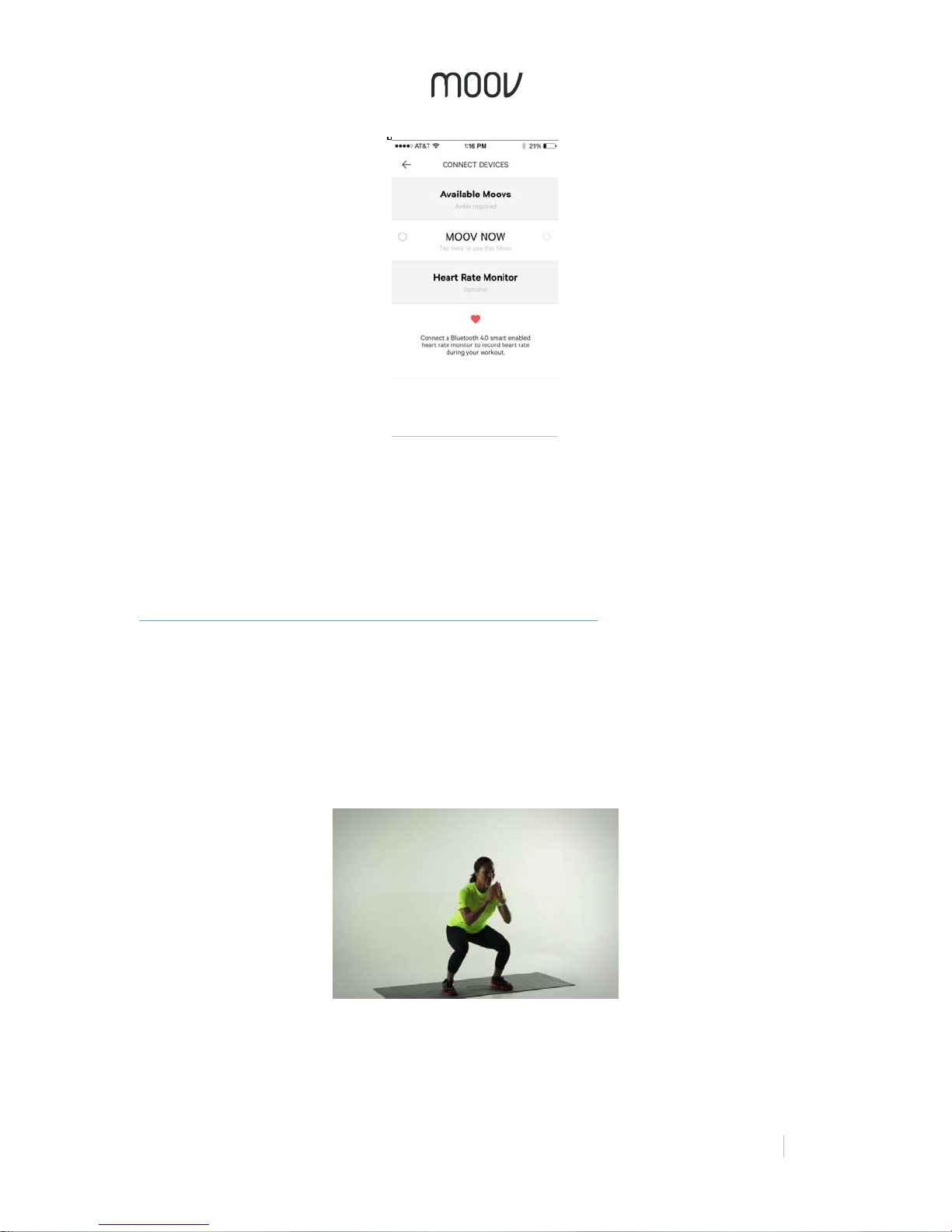
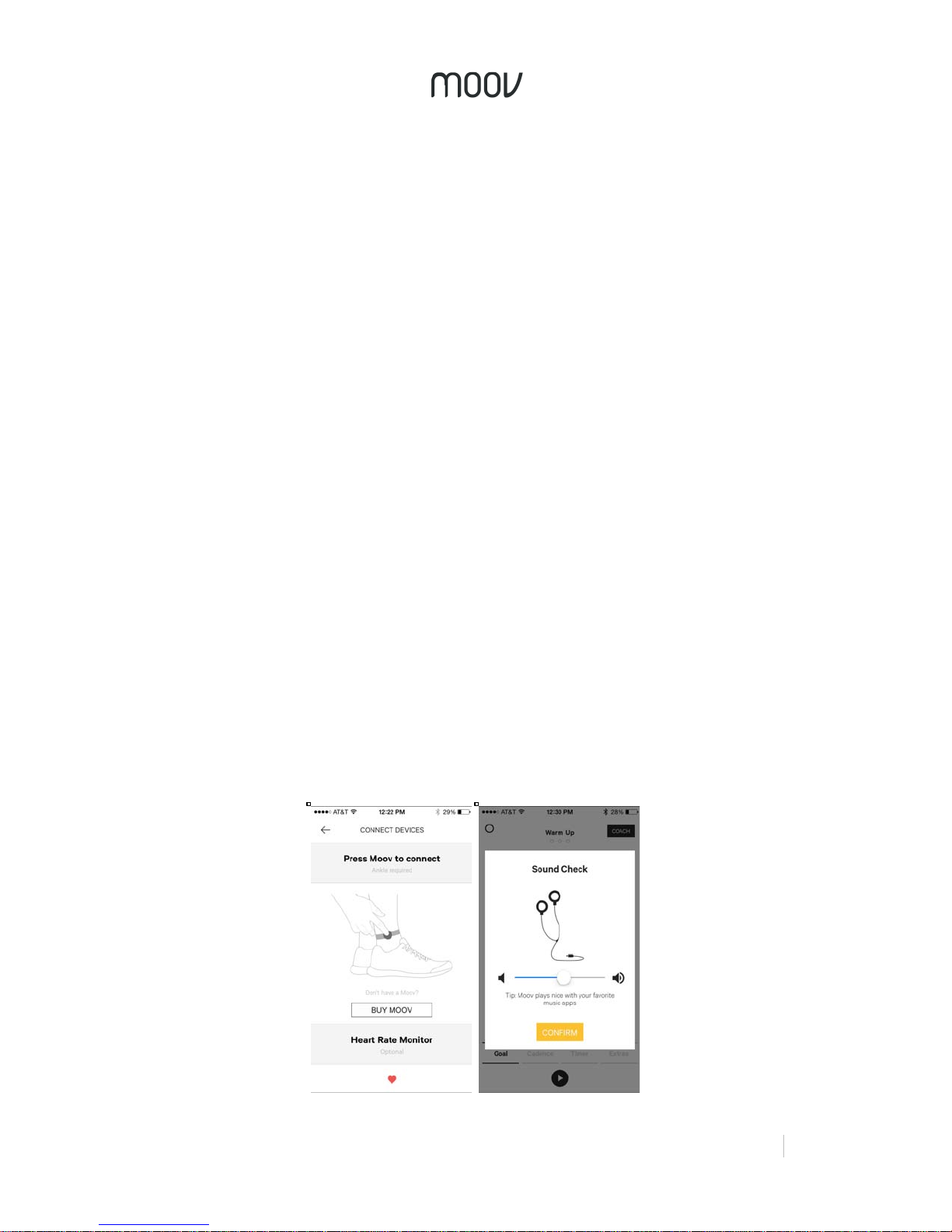
When you start a workout or set up your daily Moov, you will be taken to the
connection screen to connect your MOOV NOW™. As the screen indicates, press
the surface of your MOOV NOW™ to connect. Your MOOV NOW™ device will blink
and a screen should automatically pop up with all the available Moovs to connect to
within Bluetooth range. All unregistered Moovs will automatically be named “MOOV
NOW”. Click “MOOV NOW” to connect your new Moov To rename your Moov, click
on the gear in the connection bar.
Page 9
!
!
MOOV:%REVIEWER’S%GUIDE%
9%
For select programs, you will also be able to set up a heart rate monitor on this
screen. Moov supports many third-party Bluetooth Smart enabled heart rate
monitors, including Polar and Jabra.
M O O V 7 M I N U T E + W O R K O U T
Highlights
• Moov counts for you and lets you know when you’re almost done.
o “…14, 15, two more, 17, okay."
• Form coaching makes sure you get the most out of each rep.
o “Lift up with your core, not your arms.”
• Video coaching shows you how to do each move.
o “Match the coach’s form on each movement.”
Suggestions for Testing
• Do Moov 7 Minute+ every day and level up every time
• If accessible, connect your mobile device to a TV using Apple AirPlay
Page 10
10%
MOOV:%REVIEWER’S%GUIDE!
!
Moov 7 Minute+ workouts are based on the viral 7 minute workout published on the
American College of Sports Medicine Journal and popularized on NYTimes.com.
Research suggests that health benefits comparable to those of a long run can be
achieved in just a few minutes of high intensity exercise. Continue to see results as
you improve with Moov’s level system pushing you toward tangible and gradual
goals.
Putting on Moov
Before starting a workout, put your Moov on your wrist. Place your Moov into the
small strap and put it on with a snug and comfortable fit. To secure Moov, insert the
end of the band into the loop on the other end and then insert the clasp into the
wristband and press it into the band to ensure that the clasp is flat and in line with
the band.
Starting Your Workout
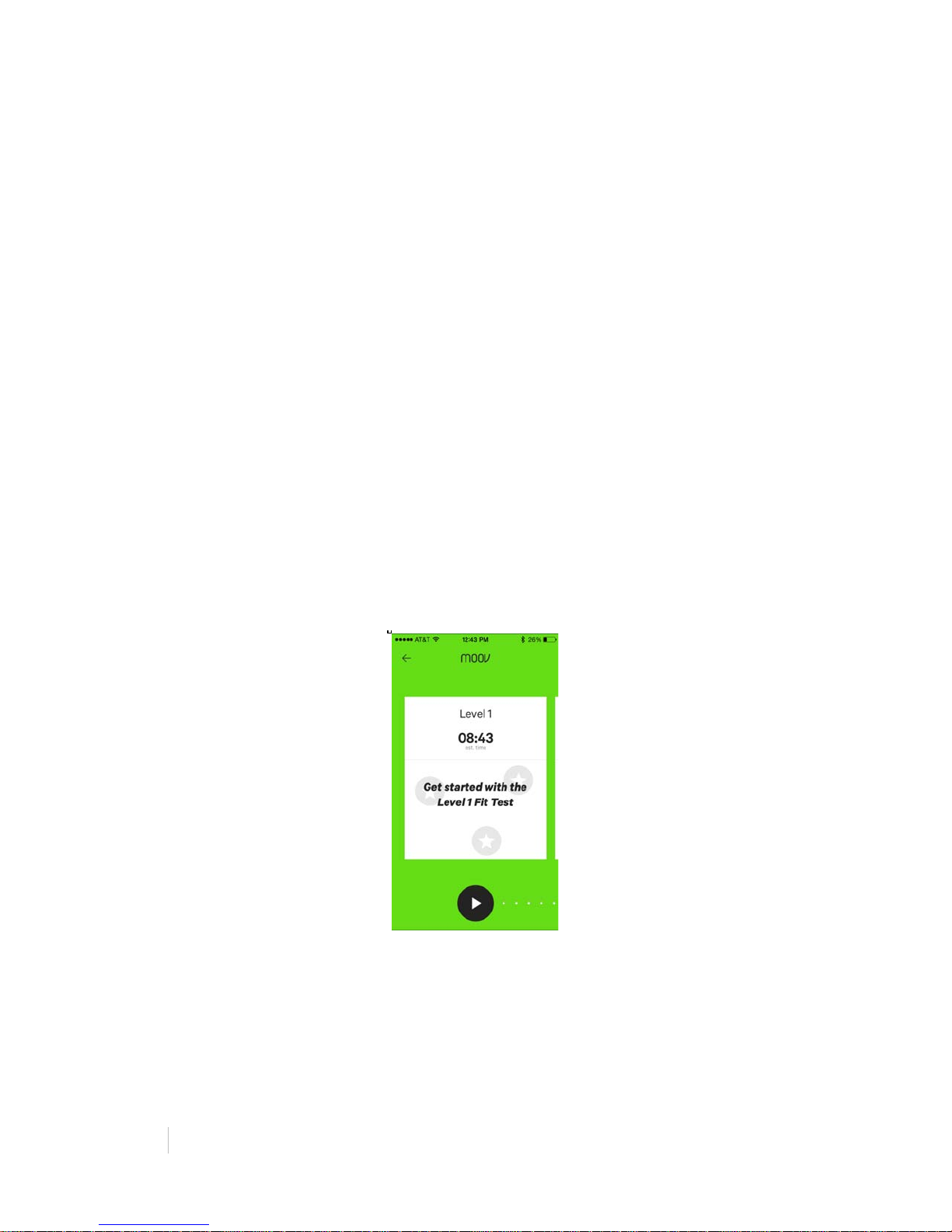
After your Moov is connected, you will be able to enter the program menu where you
can select a level and begin a workout. In order to unlock the first 12 levels, you
must first complete the Level 1 FitTest. Each level shows the estimated time to
complete the level. Levels increase in intensity with the number of reps for each
exercise.
Once you have completed a level, the selection screen will show each set and if you
passed it, as well as how many of the reps in that set you completed and how long it
took you to complete the level.
Swipe left or right to view different levels and press the play button at the bottom of
the screen to start your workout.
Programs & Coaching
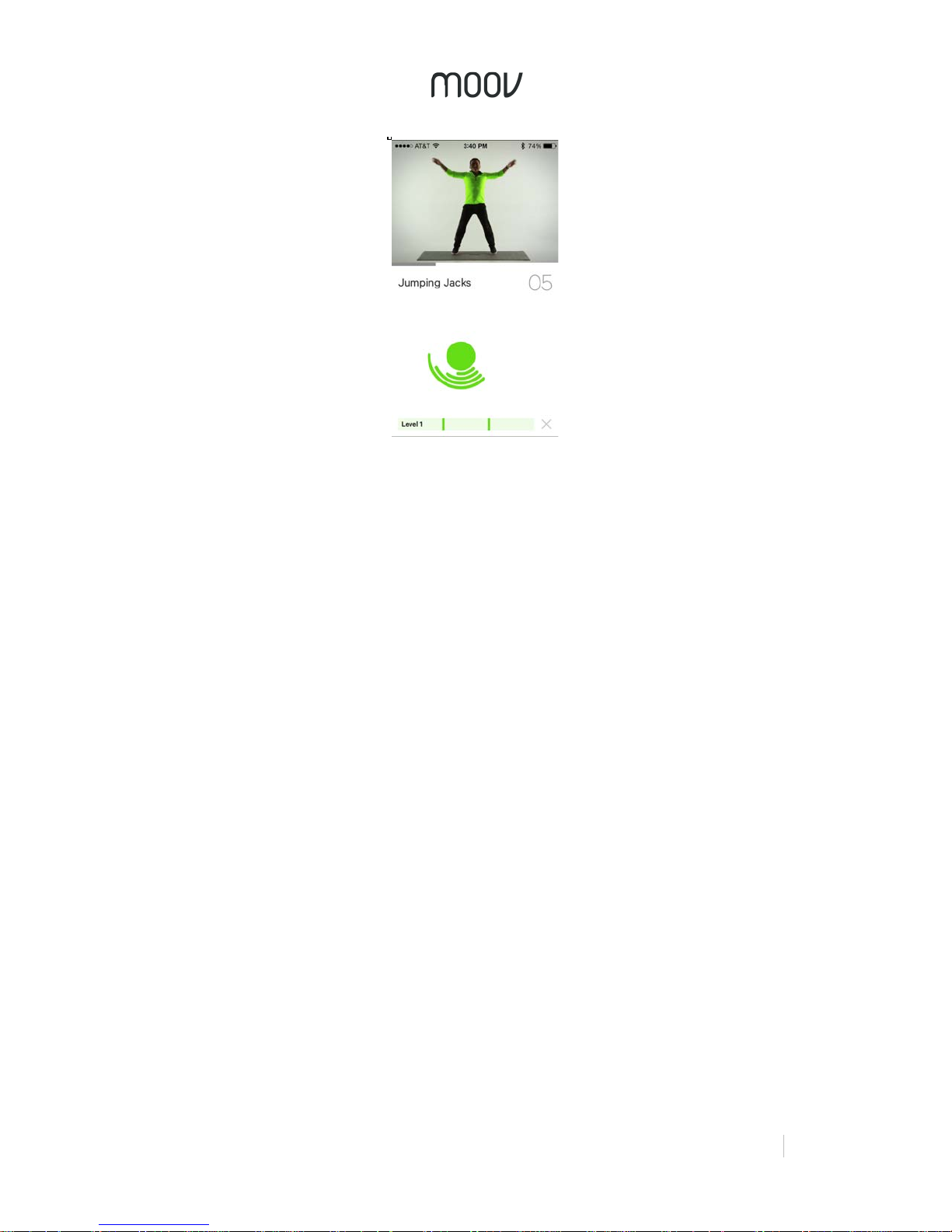
Moov 7 Minute+ programs consist of 3 sets of six exercises. With each set, the
number of reps in that set increases. Between each set is a 20 second rest to get
you cooled down. You can see which set you’re in and how far along in that set you
are by the progress bar at the bottom of the screen.
Page 11
!
!
MOOV:%REVIEWER’S%GUIDE%
11%
For every exercise, there is a video instruction at the top of the screen, as well as
audio coaching on form. The closer you follow the coach, the more accurately Moov
will be able to count your reps. When Moov asks, “Ready?” it detects whether a
stable start position has been achieved, and then tells you to start once your position
is steady.
Moov counts your reps and pushes you on to the next exercise once you have
completed all of the reps required for that set. You can see how Moov is registering
your movement by the Motion Indicator on the screen. As you do a rep, the Motion
Indicator wraps around the center circle to show that you have done the rep
completely. The circle in the center may turn red occasionally. This is to indicate that
Moov has detected improper form or cheating.
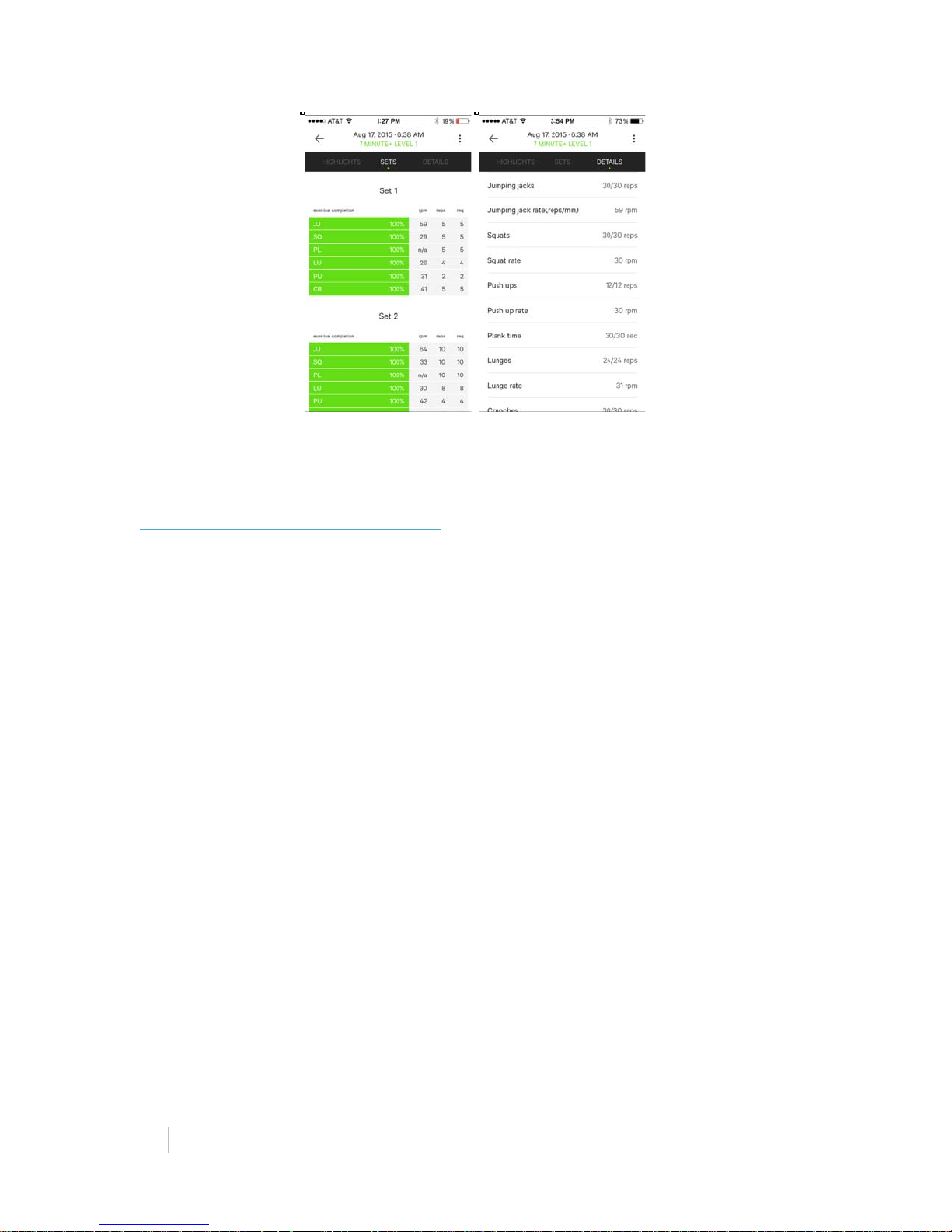
Activity Report
Once you complete the workout, you will be given an Activity Report. This report tells
you the time duration of the workout, the total number of reps completed, and
calories burned. You will also be shown each set and whether you passed, as well
as a breakdown of each exercise and how many reps you completed in relation to
how many were required for that level.
Page 12
12%
MOOV:%REVIEWER’S%GUIDE!
!
M O O V R U N & W A L K
Highlights
• Running faster is easy when you have someone to keep your goal in check.
o “You are running at 160 steps per minute. Visualize running on the hot
ground to increase your step rate. This can increase your running
efficiency.”
• See improvement in your form and technique during each run to reduce
injuries.
o "Land on the ball of your foot.”
• Coach Moov pushes you to finish strong if you’re falling behind.
o “Pick it up! You have 30 seconds to go. You can still meet your goal!”
Suggestions for Testing
• Run at least 3 or 5 intervals - the minimum number of intervals to complete a
level for Running Efficiency or Sprint Intervals program. This will take about
20 minutes.
• You can start at a level higher than level 1 if you like a challenge.
• Follow the Moov coach, if she asks you to swipe up on any screen during a
live run to a higher level, that means she believes in you. Don’t let her down.
Challenge a higher level and impress your Moov coach!
• You can even play music from other apps in the background while you train.
• Read through the summary on your Activity Report at the end of your workout
where you can find your improvements and progress over time.
• Try a higher level next time or another program.
Page 13
!
!
MOOV:%REVIEWER’S%GUIDE%
13%
Selecting a Moov Run & Walk Program
Moov Run & Walk programs include 3 coached running programs, 1 coached
walking program, and an Open Training program.
Running Efficiency: Run farther with the same effort. Form based goals teach you
where you’re wasting energy and how to prevent injury.
Sprint Intervals: Build muscle and burn fat running in powerful bursts. Get your heart
pumping and legs moving in high intensity intervals.
Speed Endurance: Keep your speed up over long distances. Pace based goals
motivate you to keep going when you start to tire out.
Brisk Walking: Get more out of your walk or cool down after a run. All fitness levels
can get their heart rate up and break a sweat with these fast intervals.
Open Training: Get more out of your free run with occasional pace and distance
status updates and a post-run Activity Report.
A pop up notification may ask you to “Allow Location Access”. Select “OK” and then
“Allow” on next pop up. By enabling location features/GPS, Moov will be able to track
your distance and pace.
Please note that Speed Endurance, which focuses on pace and distance, will only
work on mobile devices that have GPS. For example, if you’re using an iPod or iPad,
you will not be able to train with Speed Endurance.
Putting on Moov & Your Headphones
Before starting a program, the app will tell you to put your Moov on your ankle. Place
your Moov into the large strap and put it on with a snug and comfortable fit. To
secure Moov, insert the end of the band into the loop on the other end and then
insert the clasp into the wristband and press it into the band to ensure that the clasp
is flat and in line with the band.
Page 14
14%
MOOV:%REVIEWER’S%GUIDE!
!
Put on your headphones (make sure the volume is set at a comfortable level).
Now you’re ready to start Moov-ing! Click on “Start workout” to begin running. Each
run & walk program will start with a quick warm-up to loosen your muscles and help
prevent running injuries. Moov’s real time audio coaching will take it from here, have
a great workout!
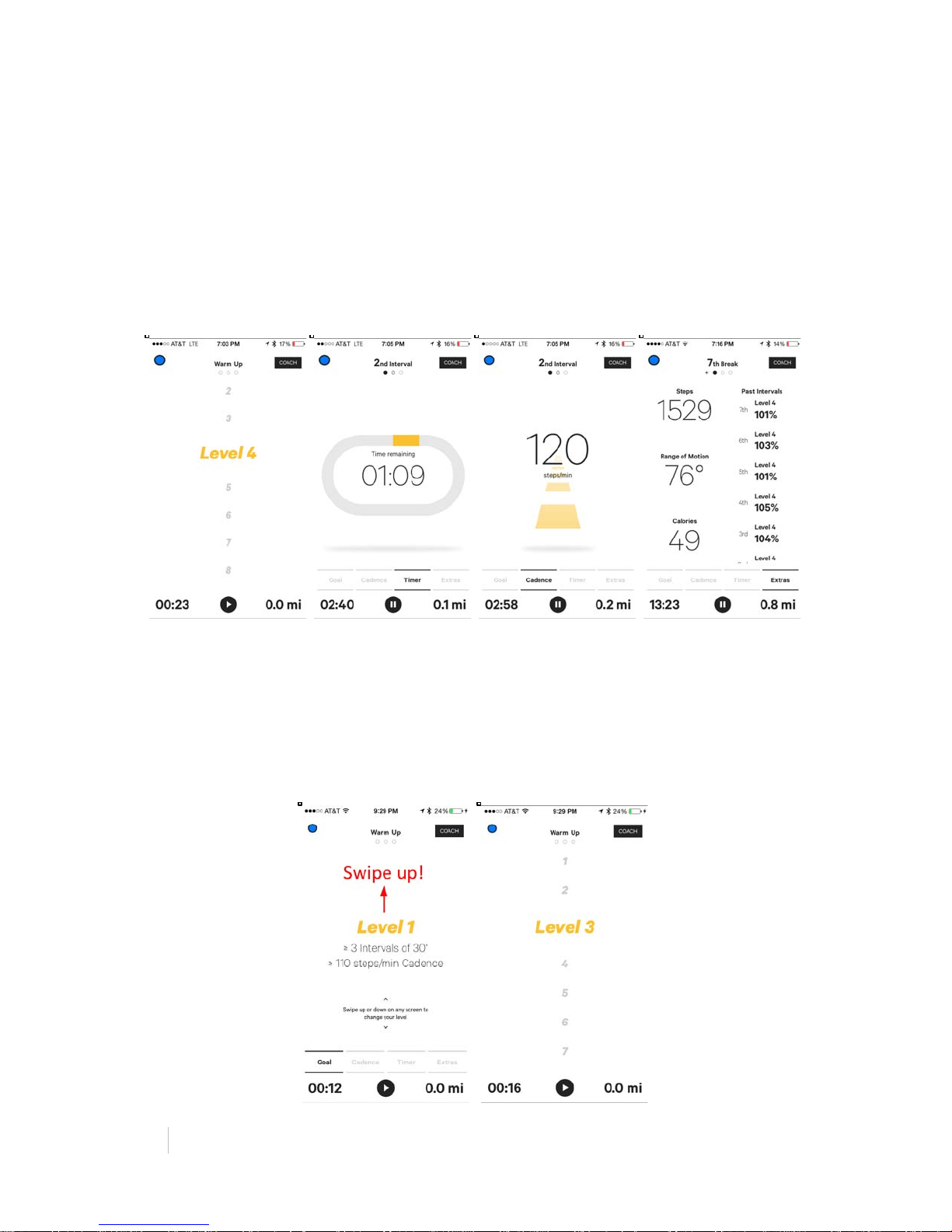
Live Screens
Moov’s live screens (Goal, Cadence, & Timer) will show you real time data based on
your running biomechanics. Swipe left and right to move between screens.
See your Interval Goal
Swipe to the far left on your screen to the “Goal” tab. Here you can see your current
level and interval goals.
Change your Difficulty Level
You can swipe the screen up/down to increase/decrease your difficulty level at any
time during your workout.
Page 15
!
!
MOOV:%REVIEWER’S%GUIDE%
15%
What interval/level am I on? How am I doing?
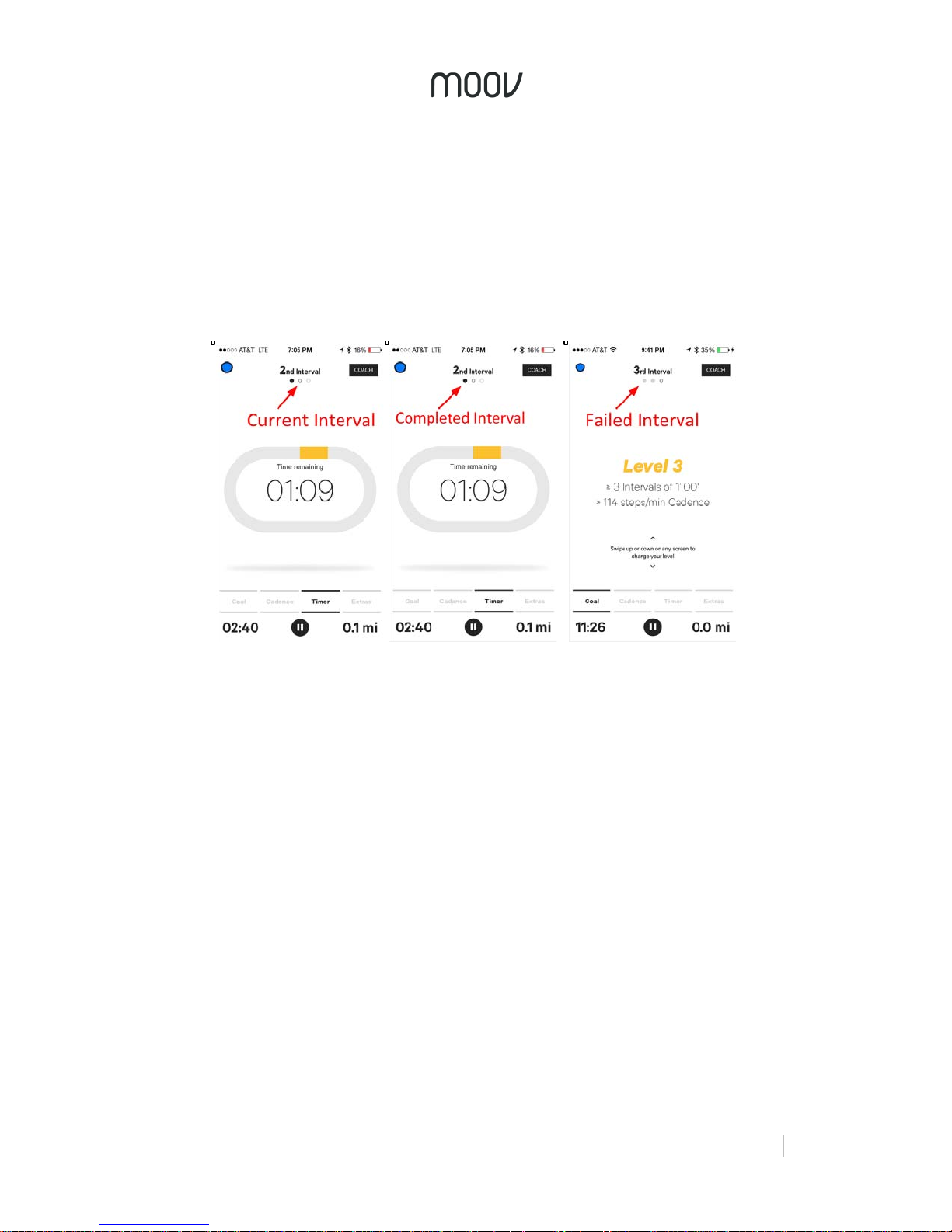
At the top, Moov will display your interval number. Each circle under the interval
number will represent an interval. During an interval, the current interval circle will be
outlined. After an interval, the interval circle will either be black if you passed or light
grey if you failed. If you failed an interval, no worries - your interval will still be
counted and now you have even more motivation to crush the next interval target! To
complete a level you’ll need to pass at least 3 intervals in that level. Moov will always
start with displaying the number of recommended intervals. After you finished the
recommended number of intervals, Moov will display “+” and a new set of intervals.
Your current level will be displayed at the top right corner. Remember you can
change your level at any time by swiping up or down the screen.
Step Counting, Calories, & More
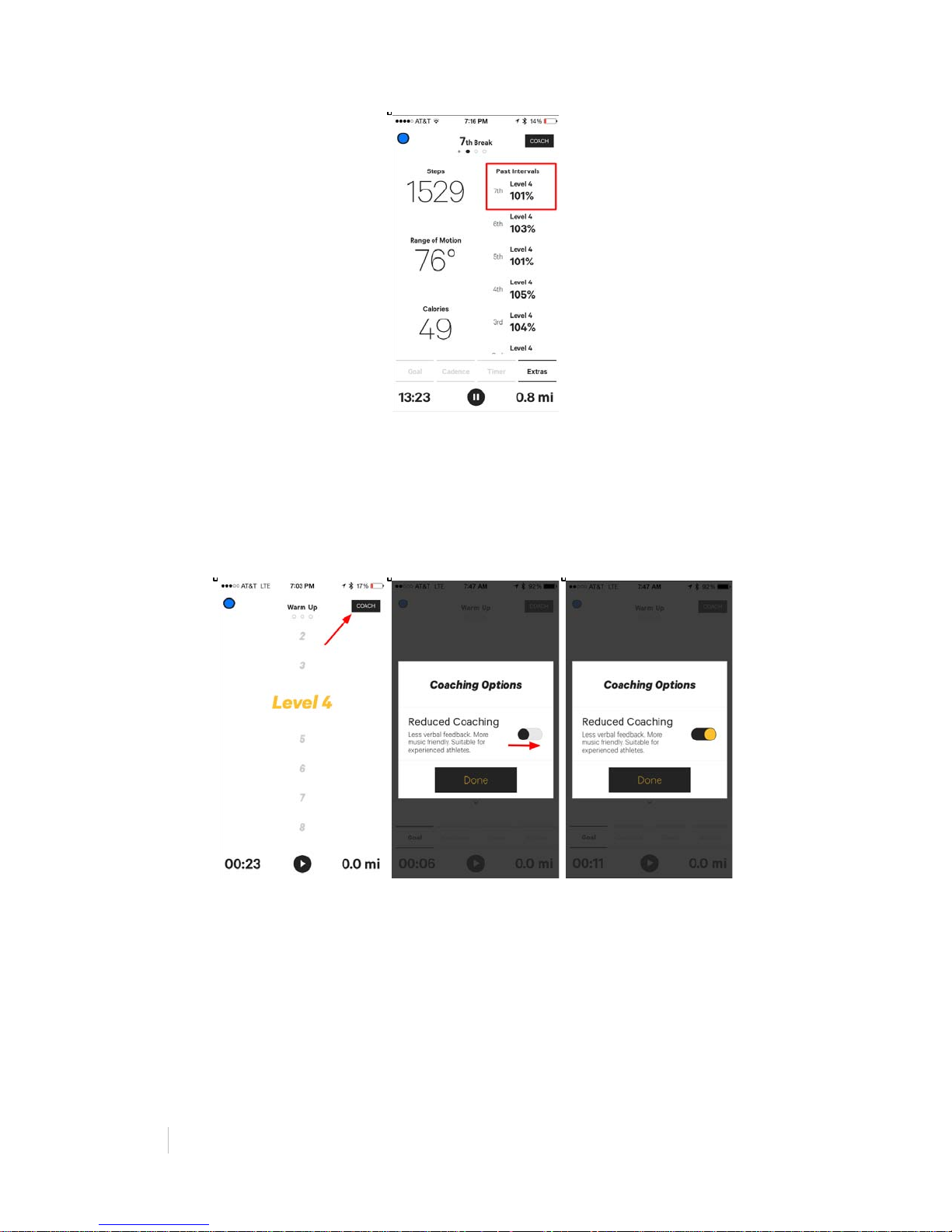
To see additional real-time data, swipe right to the “Extras” tab. Here you will see
your step count, range of motion, calories burned, and your performance % of your
past intervals.
Page 16
16%
MOOV:%REVIEWER’S%GUIDE!
!
Reduced Coaching
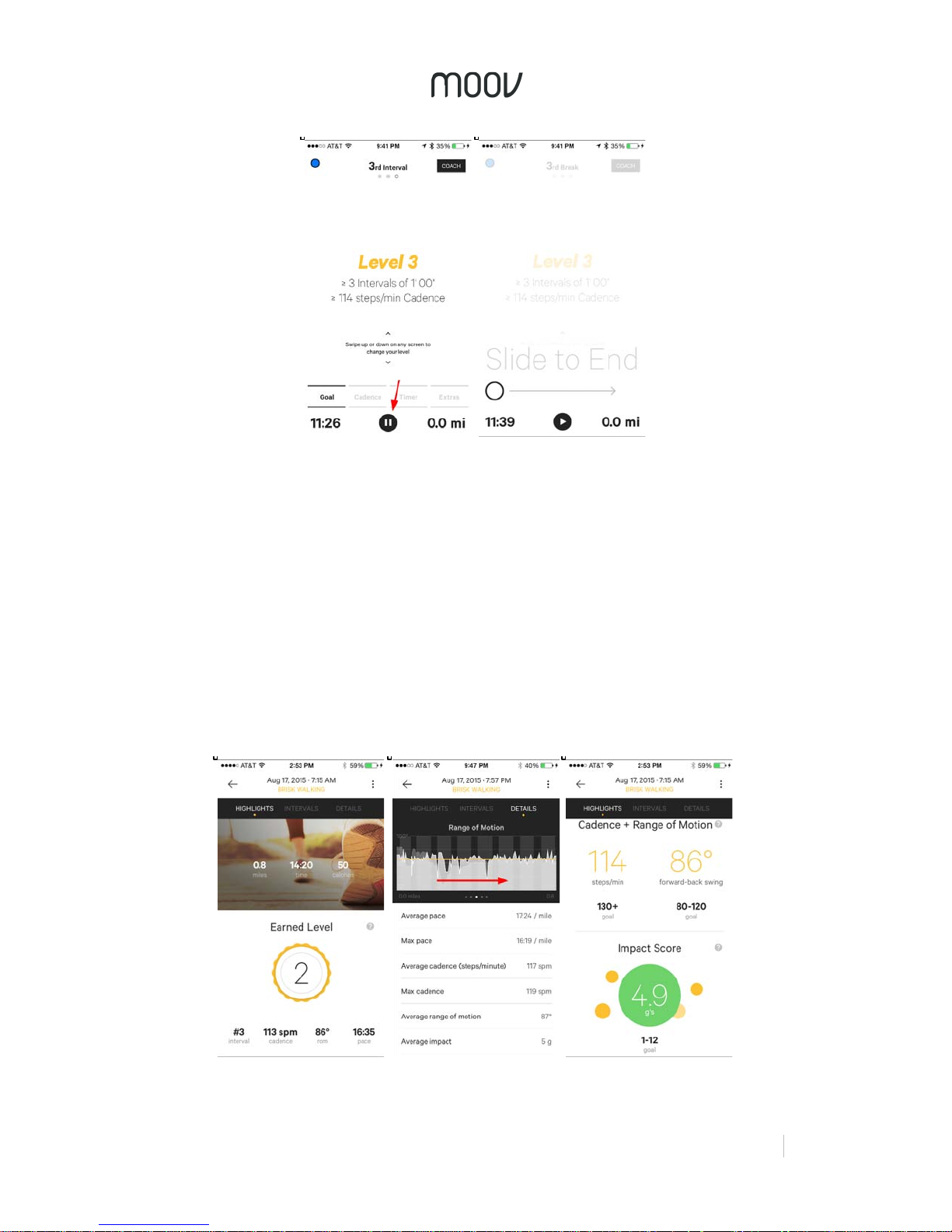
For days where you need less coaching, try the reduced coaching setting. It can be
used in all the running and walking programs except for Open Training. In the live
screen, tap the “Coach” button in the top right corner. You will be prompted with a
Coaching Options popup. Simply slide the toggle to the right to turn on reduced
coaching. The circle will turn yellow.
Ending Your Workout
Finished? Tap the “exit” button at the bottom of the screen, then swipe to end the
workout.
Page 17
!
!
MOOV:%REVIEWER’S%GUIDE%
17%
Please note that you will need to work out for at least one interval to get a postworkout activity report and to log your workout in your activity log. A popup will
appear saying, “There isn’t enough data to generate a report” if you haven’t reached
that minimum requirement. By tapping “OK” your workout will not be saved and you
will be redirected back to the home screen.
Activity Report
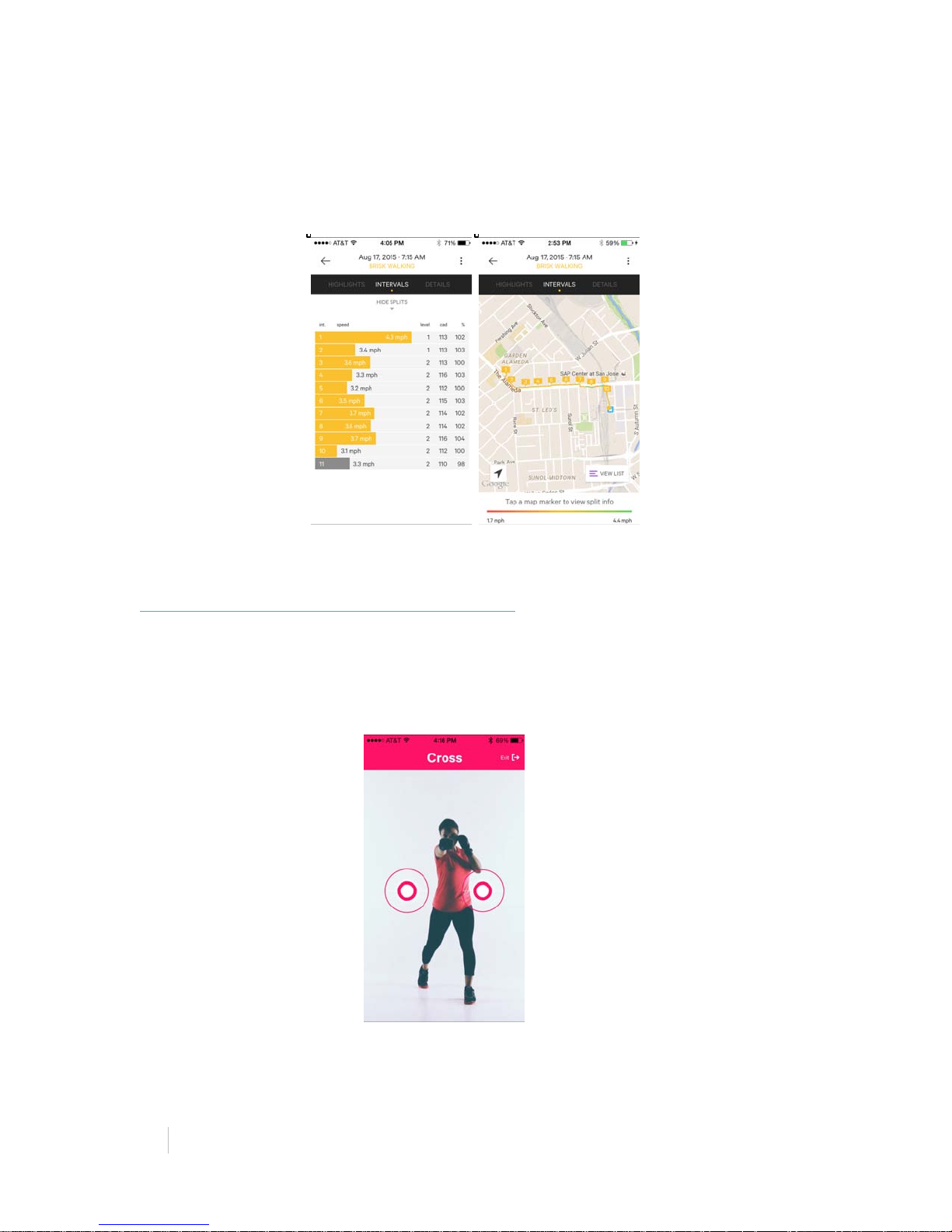
After your workout, you will get a detailed post report on your performance with
highlights and coaching suggestions.
Your Activity Report will provide you with a detailed analysis of your running
biomechanics and overall performance. Your report starts with a workout summary
and highlights; total workout time, number of steps, calories burned, distance, and
your interval results.
Page 18
18%
MOOV:%REVIEWER’S%GUIDE!
!
Scroll across on and down in the “Details” tab to see detailed information on your
cadence, impact, range of motion, pace and elevation.
Intervals are represented as splits seen in the yellow bars. Each bar has details
about each interval level, cadence, and level completion. You can also place your
intervals along your route.
M O O V C A R D I O B O X I N G
Highlights
• Basic Training Videos teach you to throw punches with proper form.
o “A cross is thrown with your rear hand. Reach forward and turn your
body. Keep your arm straight.”
• Coaching tips while you play keep your form in check.
o “Keep your chin down and eyes forward.”
• Earn score multipliers when you hit a streak.
Page 19
!
!
MOOV:%REVIEWER’S%GUIDE%
19%
Suggestions for Testing
• Use an iPad, if possible. The larger screen is easier to see while boxing.
• Start with the Basic Training videos to get a feel for what the icons mean and
the proper way to hit.
• Start at the “Light” level to figure out timing and get a feel for Moov.
• Level-up as you get more comfortable at different levels.
• Read through the summary on your Activity Report at the end of your workout
where you can find your punching stats such as hardest punch.
Moov Connection Screen
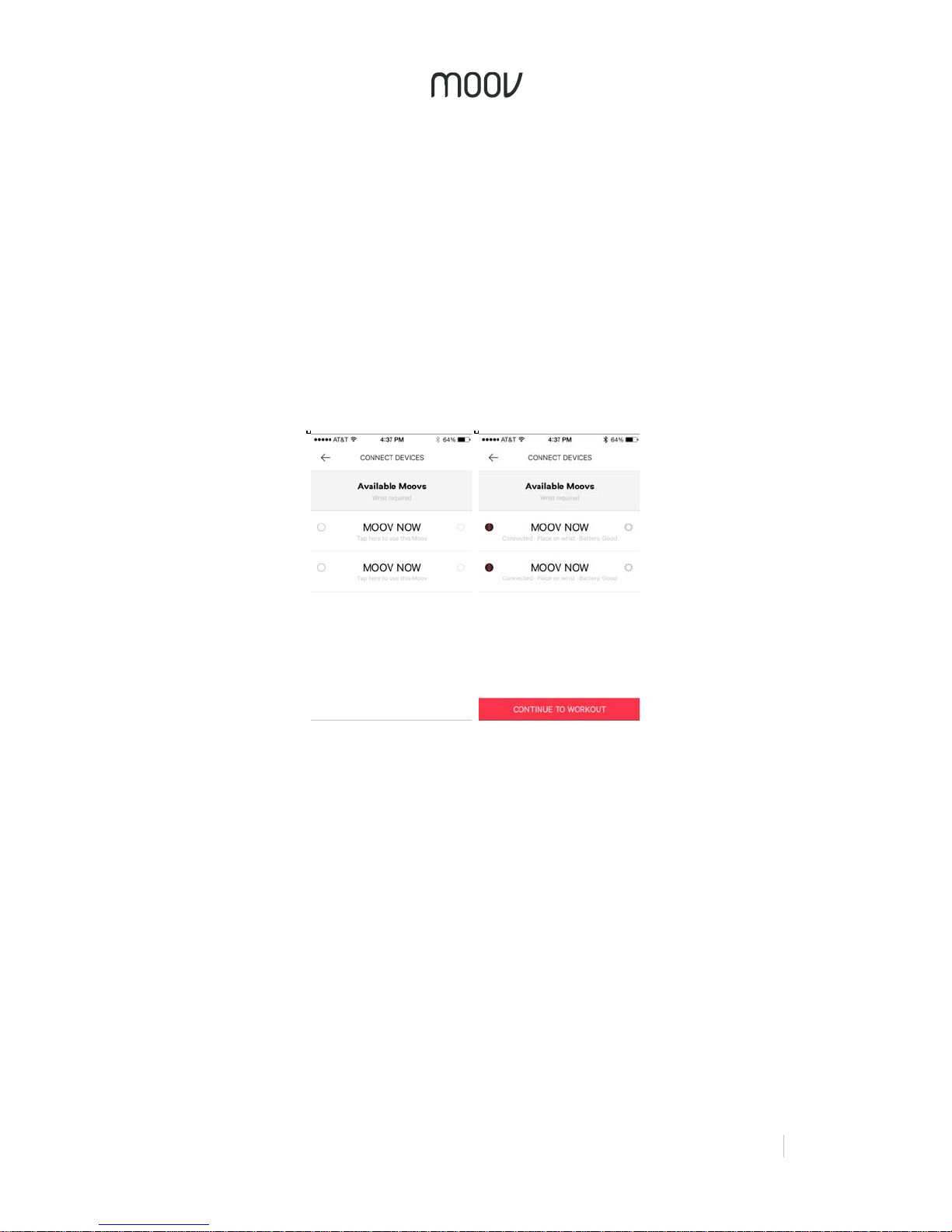
If you have already registered your Moovs, just tap the name of the Moovs you want
to connect. Tap 2 Moovs for Cardio Boxing. Once you see the circle filled and
battery level of your Moovs on the connection screen, they are connected.
Putting on Moov
You will need two Moovs for Cardio Boxing - one on each wrist. To secure Moov,
insert the end of the band into the loop on the other end and then insert the clasp
into the wristband and press it into the band a few times to ensure that the clasp is
flat and in line with the band.
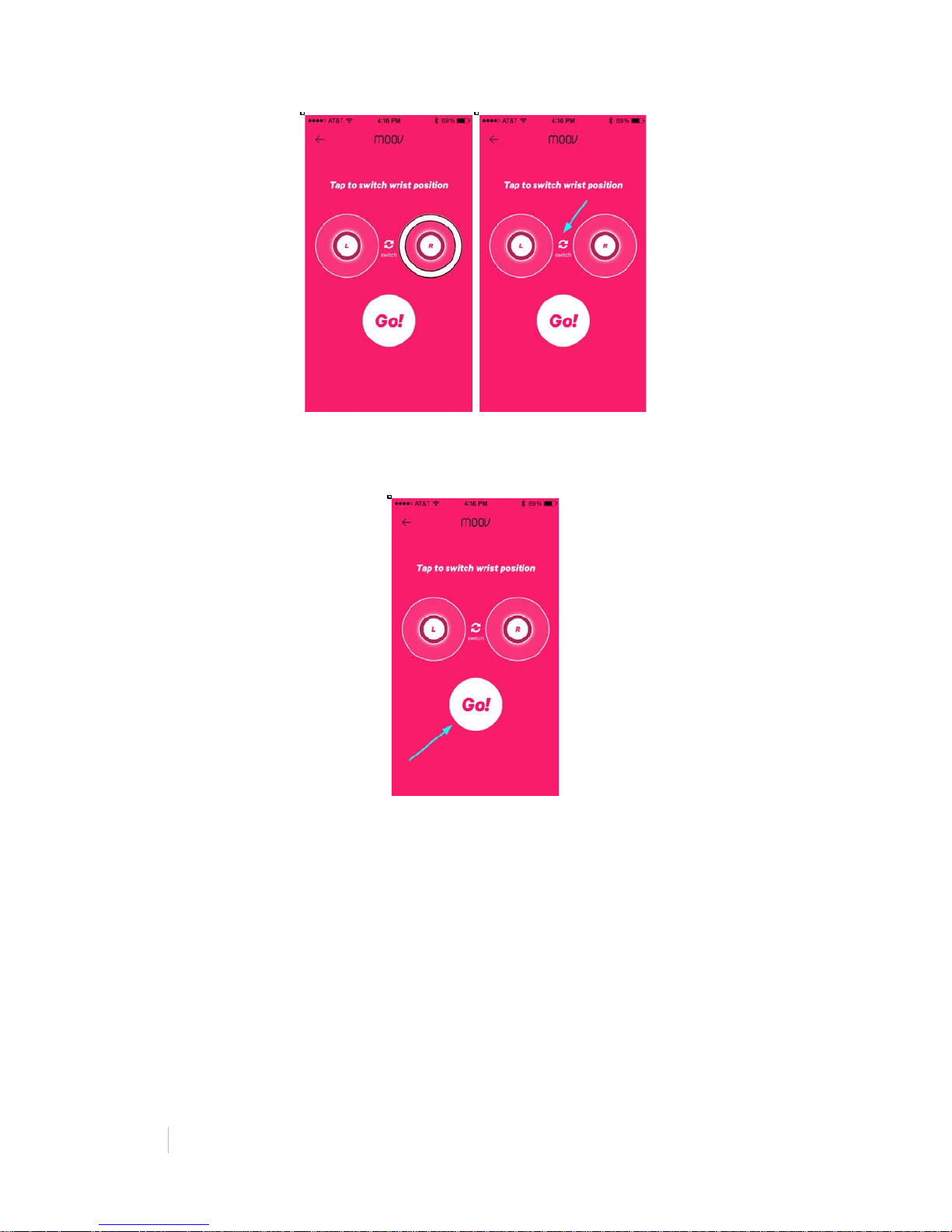
Check Your Moovs are on the Correct Wrists
Punch to check that your Moovs are assigned to the correct wrists. As you punch,
the circles around “L” and “R” will display movement. If your Moovs are assigned to
the incorrect wrists, tap “Switch” in between the two circles.
Page 20
20%
MOOV:%REVIEWER’S%GUIDE!
!
Once you have assigned your Moovs to the correct wrists, tap “Go!” to choose a
program.
Choosing a Program
Select a program to start. We recommend you start with the Basic Training so you
can learn how to properly throw a punch and the footwork that goes with it. Basic
Training also introduces you to the icons that you will see in the boxing programs.
Basic Training: These videos will teach you the proper form and footwork for each
punch, as well as the icons that go with these punches.
Light: Great as a warm-up and for new boxers. This program is great for perfecting
form, power and timing.
Semi-Pro: Learn some combos and get into quicker punches. Great for burning
calories and breaking a sweat.
Champion: Quick and challenging combos to challenge your mind and body. For the
Cardio Boxing expert.
Page 21
!
!
MOOV:%REVIEWER’S%GUIDE%
21%
Icons
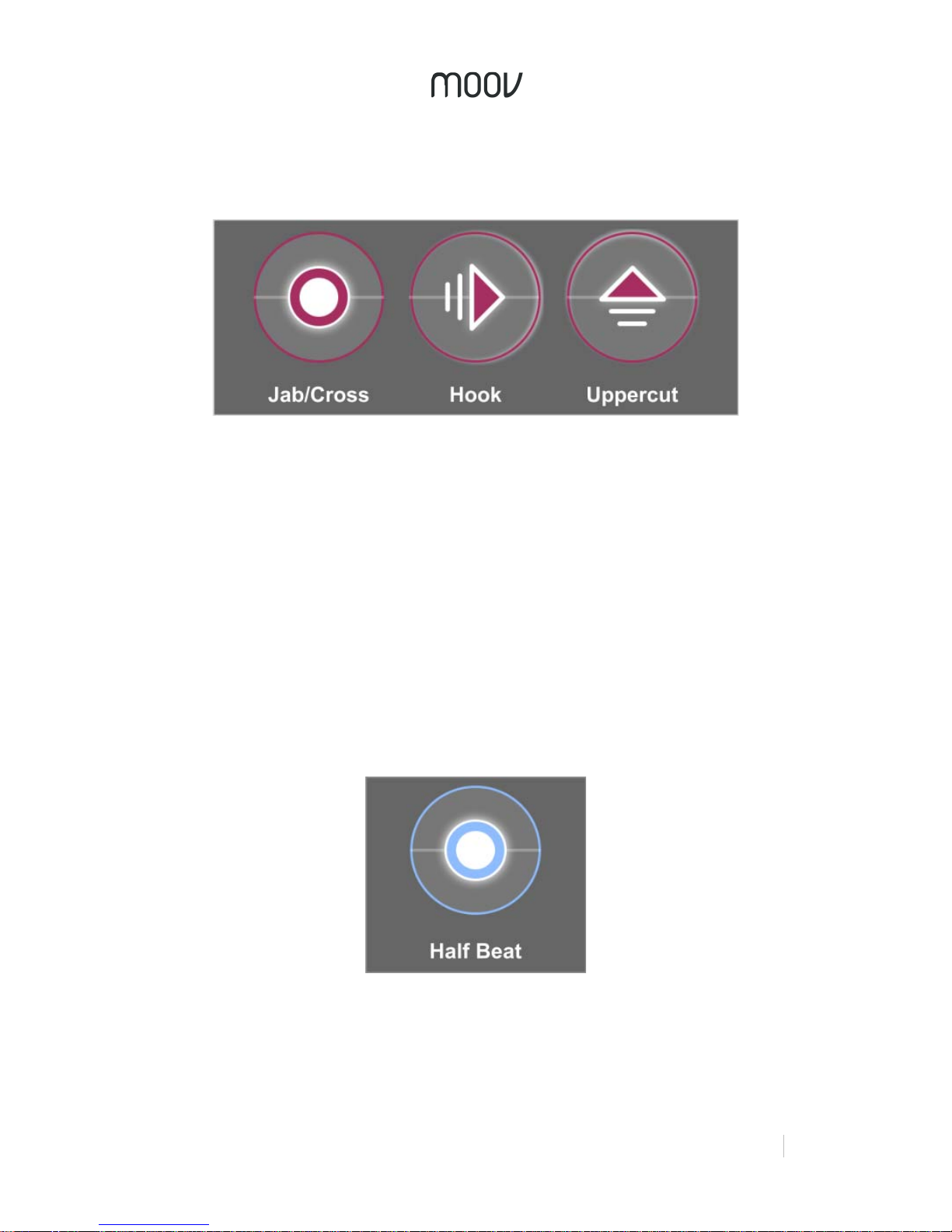
Jab, cross, hook, and uppercut are signaled within the program using the following
icons:
Jab: A jab is thrown with the leading arm. The punch is thrown straight ahead, fully
extending the arm.
Cross: A cross is typically thrown using the dominant arm, which is the back arm.
This punch crosses over your body’s centerline and targets the same point as a jab.
Hook: A hook can be thrown using either arm. Lift the elbow so your forearm is
parallel to the ground and your arm is bent about 90 degrees. Punch to the side of
the target by turning at the waist and pivoting your toes.
Uppercut: An uppercut can be thrown using either arm. The arm is brought low and
then strikes out and up with about a 90-degree bend at the elbow toward the
opponent’s chin.
Further instruction on these punches can be found in the Basic Training videos.
The blue icons that come up occasionally in fast sections indicate a hit on a half
beat. When you see these icons, prepare to hit fast!
Point System
Each punch is rated on a scale from 0-8000 points. The points awarded are based
on a combination of power, speed and timing. An 8000 point punch would be fast,
powerful and have perfect timing. The points from each punch add up to give you
your total score at the end of each round.
Page 22
22%
MOOV:%REVIEWER’S%GUIDE!
!
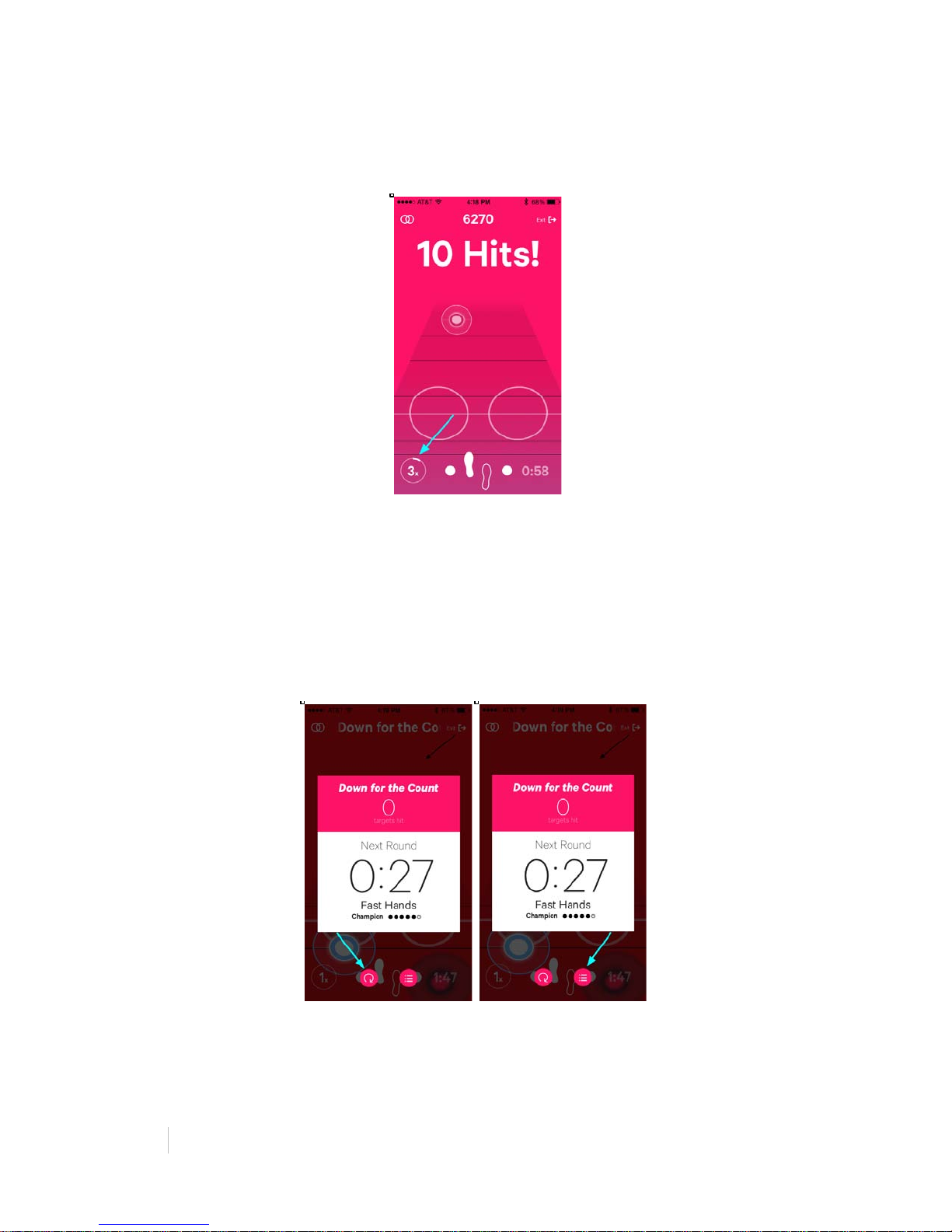
Hitting many targets in a row earns you a score multiplier. The score multiplier
increases from 1-6x as you hit more targets in a row. But beware, once you miss a
target you’re back to 1x.
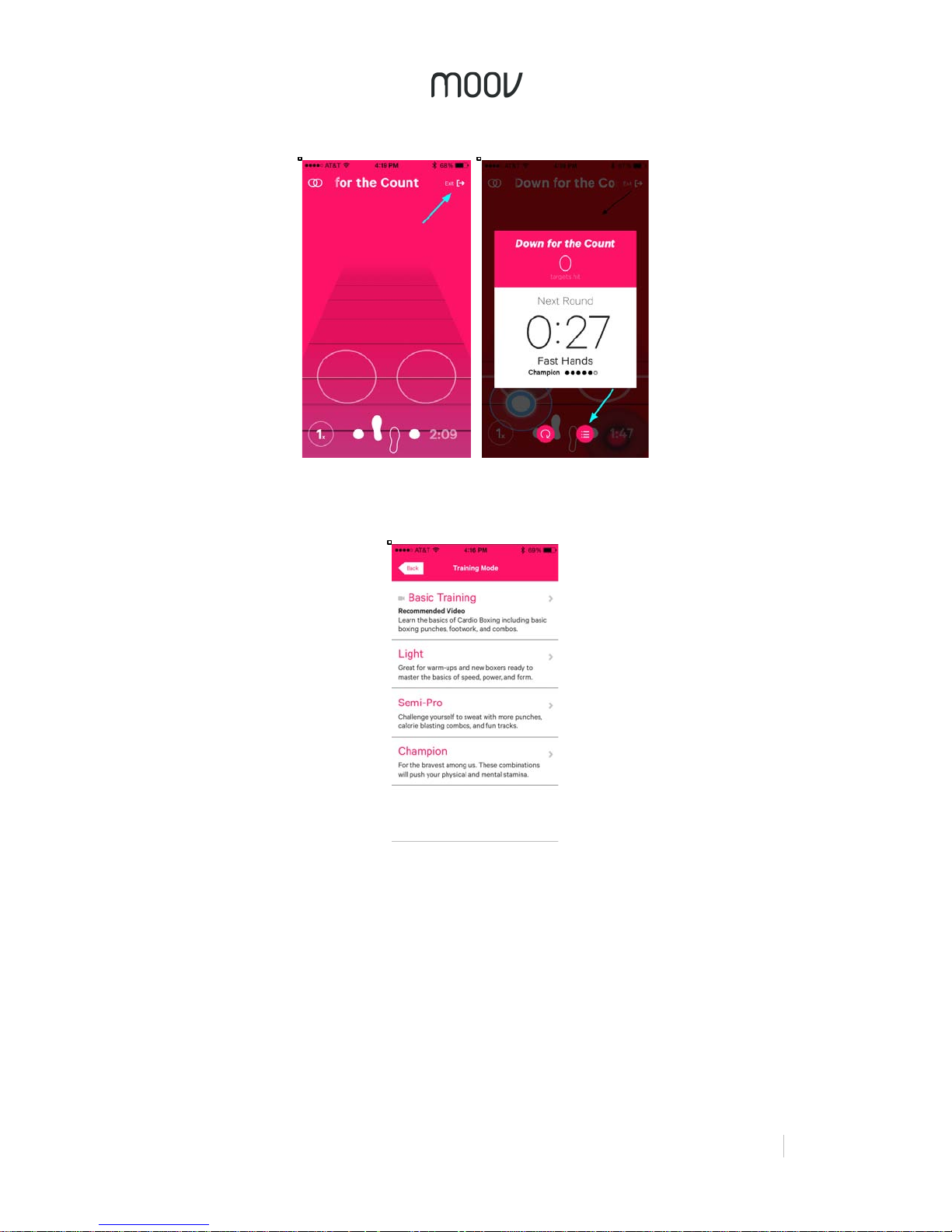
Going to the Next Round
When you finish a round, you will be brought to the Round Recap page. Here, you
can see some of your major stats for the round. You will be held on this page for a
30 second rest before beginning the next round.
If you want to change levels, tapping the icon on the bottom right will bring you back
to the program page. To play the round you just played again, tap the replay button
on the bottom left.
Ending Your Workout
To end your workout during a round, tap “Exit” on the top right of the page. Tapping
“Exit” will bring you to the Round Recap page. If you are at the end of the round, tap
the program list button on the bottom right.
Page 23
!
!
MOOV:%REVIEWER’S%GUIDE%
23%
This will bring you back to the program page. From here, tap “End Workout” to end
the workout and view your Activity Report.
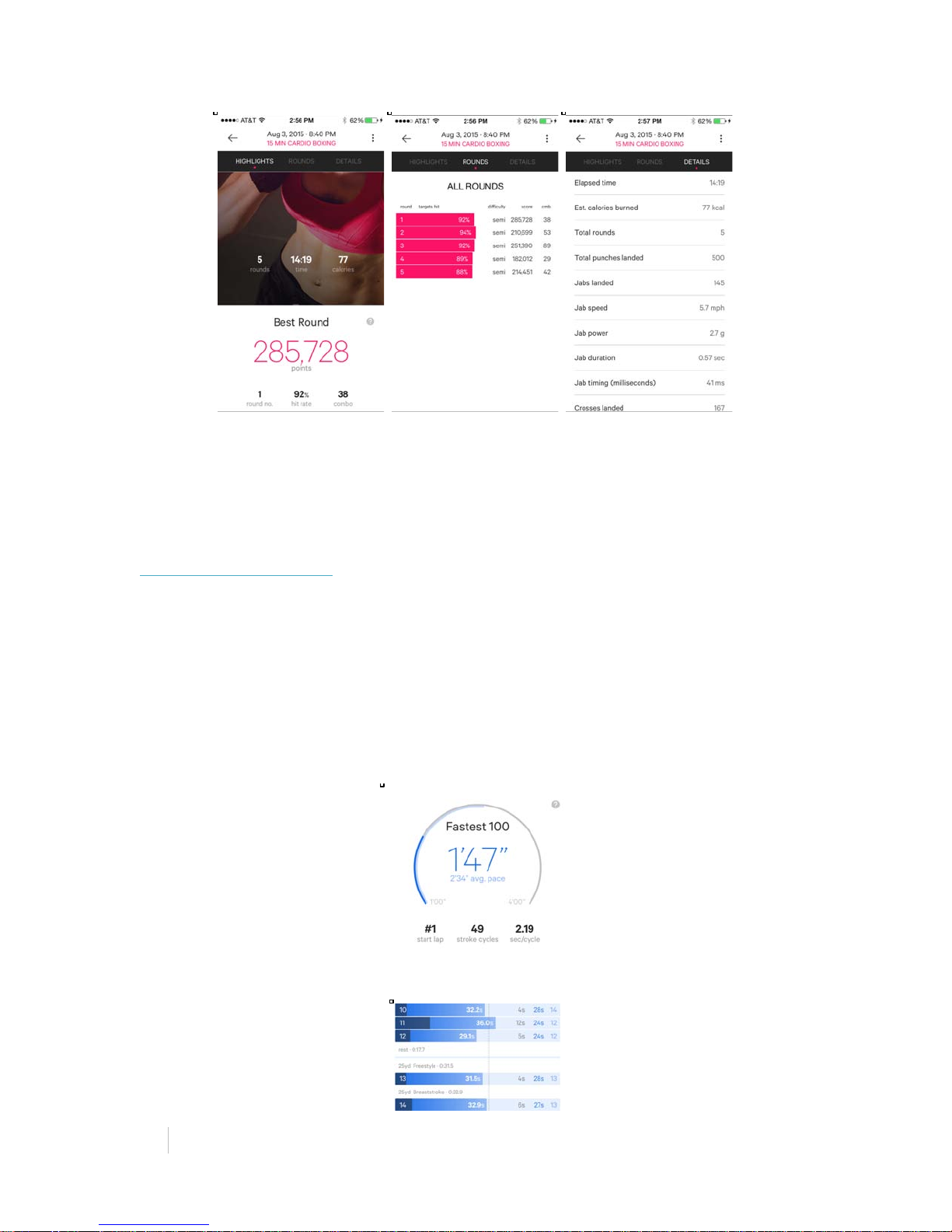
Activity Report
After your workout, you will get a detailed post report on your performance with
highlights and coaching suggestions. These statistics are beyond what even a real
coach could even give you. Here you can see a recap of your overall workout, as
well as data on technical aspects of your punches, broken down by hit. Scroll down
to see detailed information on your velocity, power, technique, timing, and duration.
Page 24
24%
MOOV:%REVIEWER’S%GUIDE!
!
M O O V S W I M
Highlights
• Moov knows which stroke you swim through our automatic stroke recognition
algorithm.
• Coaching tips in your Activity Report help you learn where to improve.
o “A longer distance/stroke will increase your efficiency. The longer you
travel in each stroke, the less movement you need to complete each
lap.”
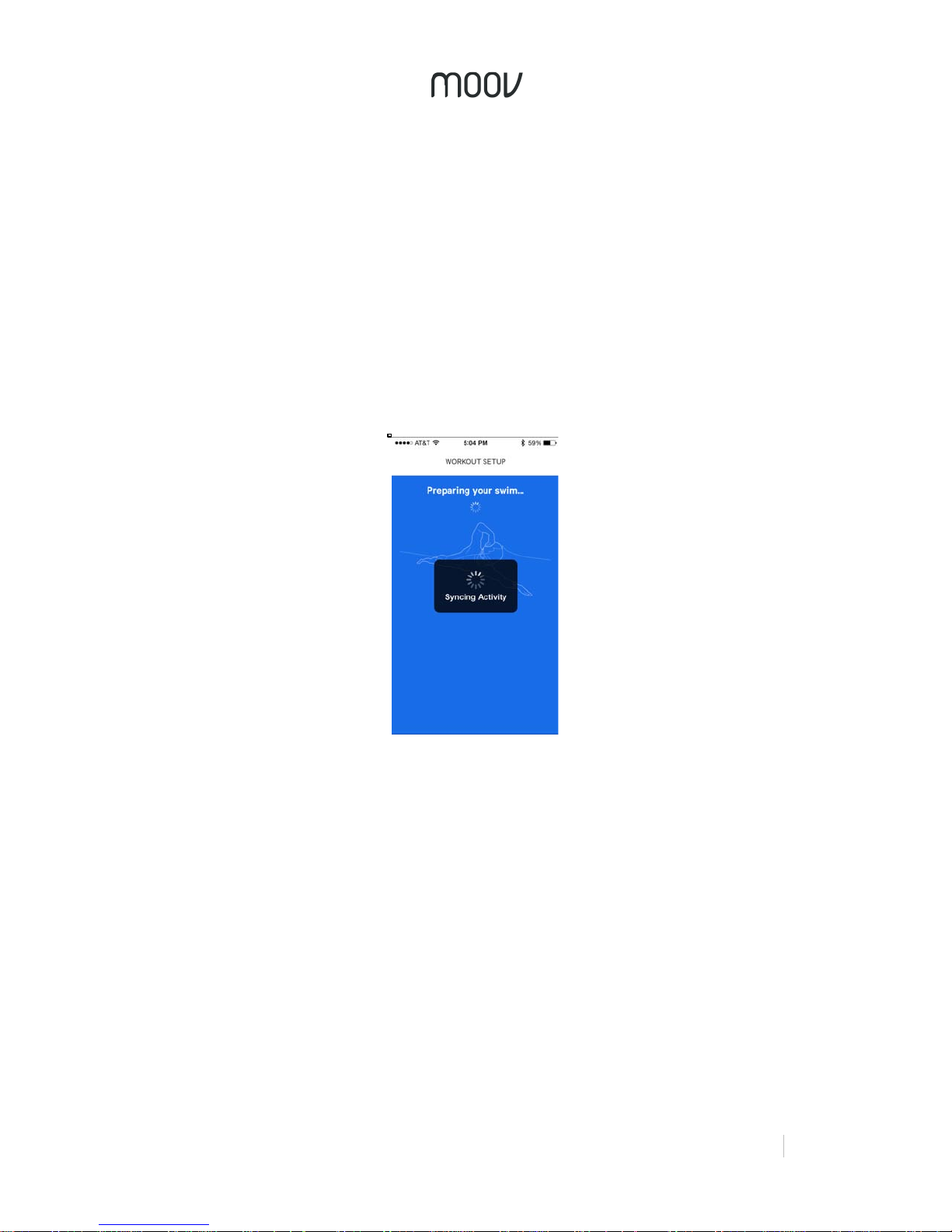
• Your Fastest 100 shows when you swam your best.
!
• Moov knows when you were resting and when you were swimming.
!
Page 25
!
!
MOOV:%REVIEWER’S%GUIDE%
25%
Suggestions for Testing
• Swim for 100 meters or yards continuously.
• Take rests and try different stroke styles.
• Look through your Activity Report to see a full analysis of your swim.
• Feel free to start your workout in the locker room and leave your phone safely
locked up.
Starting Your Swim
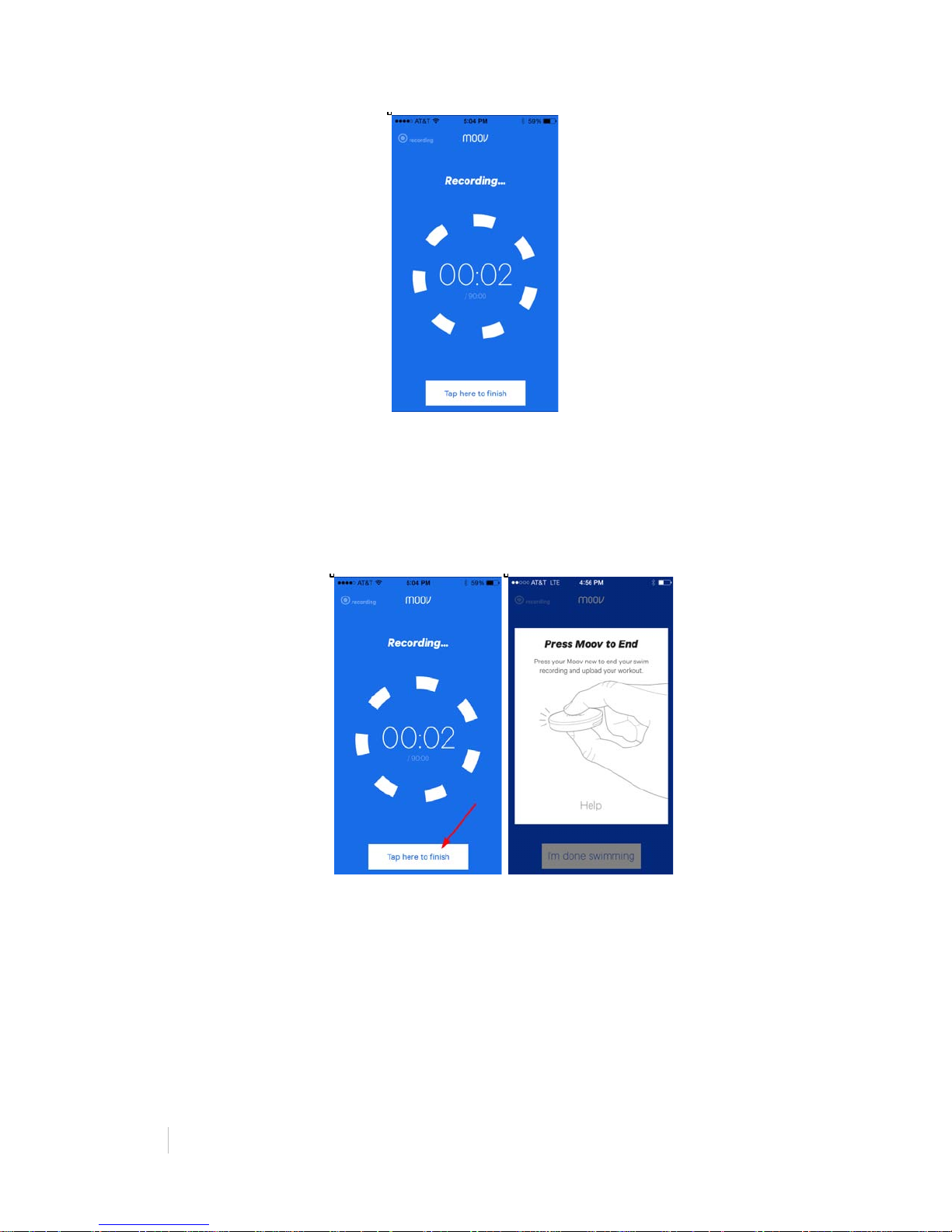
Attach your Moov to your wrist using the wristband and press”continue to workout”
and Moov will start recording. Moov can tell when you are swimming and when you
are not in the pool yet, so it’s okay to start recording in the locker room or when you
leave your house. Moov will start counting once you start swimming. Your daily
activity will be synced before you start your swim.
A timer screen will come up to show Moov is recording. Feel free to leave your
phone in your locker or car. You won’t need it again until you’re ready to end done
swimming.
Page 26
26%
MOOV:%REVIEWER’S%GUIDE!
!
Note: Your Moov can record up to 90 minutes of activity at a time.
End Your Swim
To end your workout, tap the bar on the bottom of the screen to finish and then press
the face of your Moov. It may take a couple of seconds for your mobile device to
react.
Uploading your swim can take a couple of minutes depending on the length of your
workout.
If you need to cancel your upload, no worries, your swim will still be saved on your
Moov and you can upload it later. The next time you connect your Moov you will be
prompted to upload your swim.
Activity Report
After uploading your swim, you are given a detailed report on your swim. Here, it is
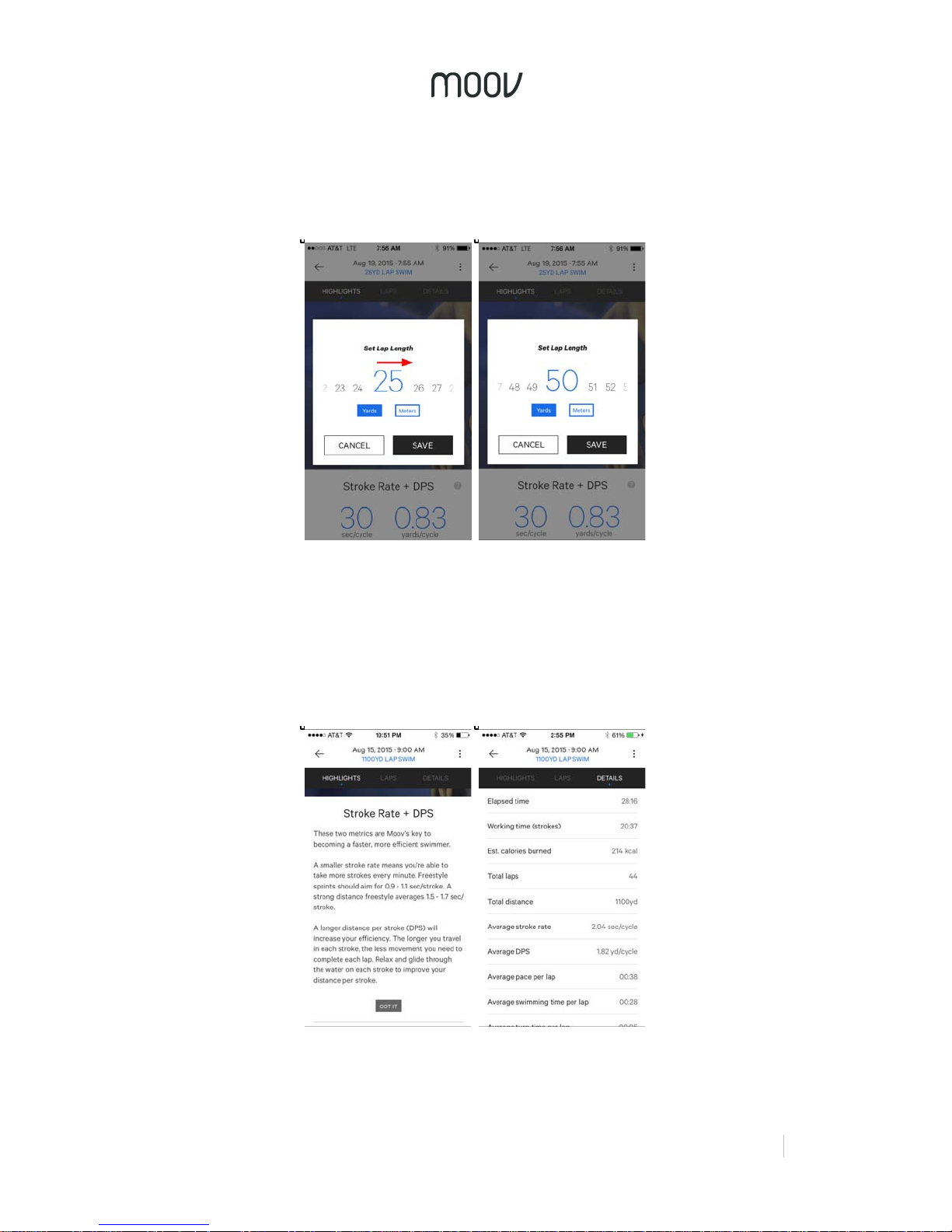
important you set the length of the pool. Slide the lap length distance and select
Page 27
!
!
MOOV:%REVIEWER’S%GUIDE%
27%
yards or meters to set your lap length.. If you do not know the length of the pool you
swam in, you can always edit it later. Your swim data, calorie count, and other
statistics will adjust with it. Once finished, tap “Save” to save your workout, and view
your report.
Your Activity Report includes detailed insights into your workout as well as an
overview, including total time of your swim (rest time and time before and after you
got in the pool are not included), the number of laps, calories burned, and distance.
Your report also displays your average stroke rate and average distance per stroke.
Click on the question marks next to your stats to get help understanding what these
numbers mean.
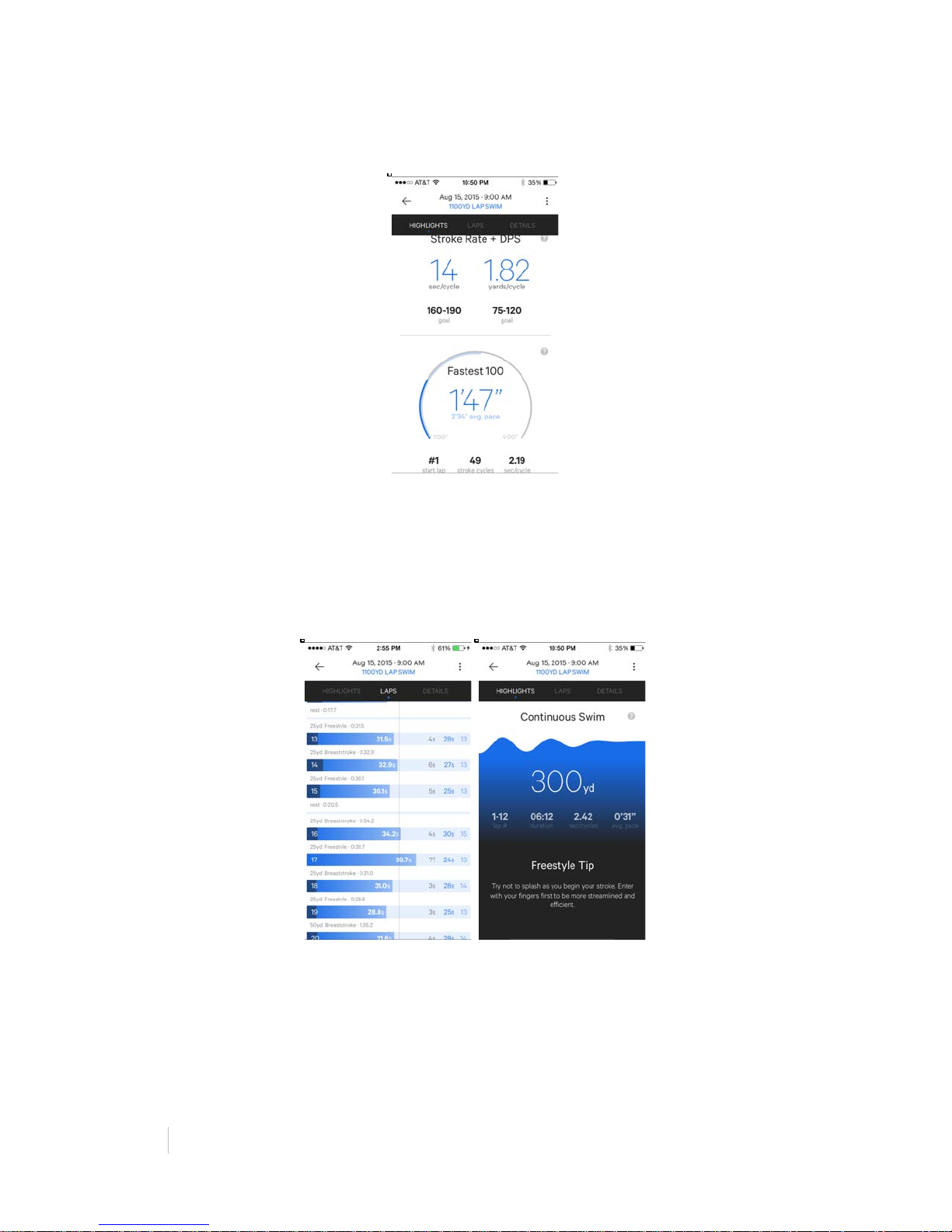
Moov highlights important details of your swim including your Fastest 100 (meters or
yards, depending on your lap length) and your longest Continuous Swim with no
Page 28
28%
MOOV:%REVIEWER’S%GUIDE!
!
rests. Below each of these highlights is the laps during which you accomplished
them and details about your strokes, pace, distance, and time.
The Laps tab gets into the details of your swim. Here you can see the swim time, flip
turn time, and number of strokes completed in each lap, as well as your average lap
for the whole workout. Laps are grouped based on order and stroke style. Moov can
also recognize certain sets, such as an individual medley (IM). Compare your lap
time to the Olympic 200m Freestyle average lap time scaled to the length of your
laps. Swipe left on the lap breakdown to see additional laps.
At the bottom of each report, a Pro Tip can be found with advice on how to improve
your next swim!
Page 29

!
!
MOOV:%REVIEWER’S%GUIDE%
29%
M O O V C Y C L I N G
Highlights
• Learn when and why you should be shifting gears.
o “Your cadence is very low. An easier gear will help you increase
cadence and reduce knee strain.”
• Moov knows the terrain you’re riding.
o “If you stand during a climb, try using a slightly tougher gear. Shift
back to an easy gear when you sit back.”
• Audio updates let you know your progress without looking down.
o “3 miles complete. Total time, 20 minutes, 15 seconds. Moving speed
for this mile, 16.4 miles per hour.”
Suggestions for Testing
• Mount your mobile device to your handlebars
• Ride with one headphone in if you feel comfortable
Putting on Moov & Your Headphones
Before starting a program, put your Moov on your ankle. Place your Moov into the large
strap, and put it on with a snug and comfortable fit. To secure Moov, insert the end of the
band into the loop on the other end and then insert the clasp into the ankle strap and
press it into the band to ensure that the clasp is flat and in line with the band.
If possible, mount your mobile device on your handlebars in order to experience the live
screens, which give you data like distance, speed, time, cadence Moov Power and your
route
Moov Cycling gives audio updates every mile or kilometer depending on how your units
are set. Wear headphones or turn your volume up loud in order to hear these updates.
Be sure to be safe with your headphone use! Try wearing only one headphone to make
sure you are aware of your surroundings on the road.
Live Screens & Audio Updates
Moov gives you the important data you need while cycling right on your phone and
provides occasional audio updates so you don’t even have to look down.
Audio updates occur at each mile/kilometer and let you know your distance, time,
average cadence, and average Moov power. Moov coaching also occurs over audio to
help you remember when to shift gears. Real-time coaching aims to teach you to save
energy so you can ride farther and faster.
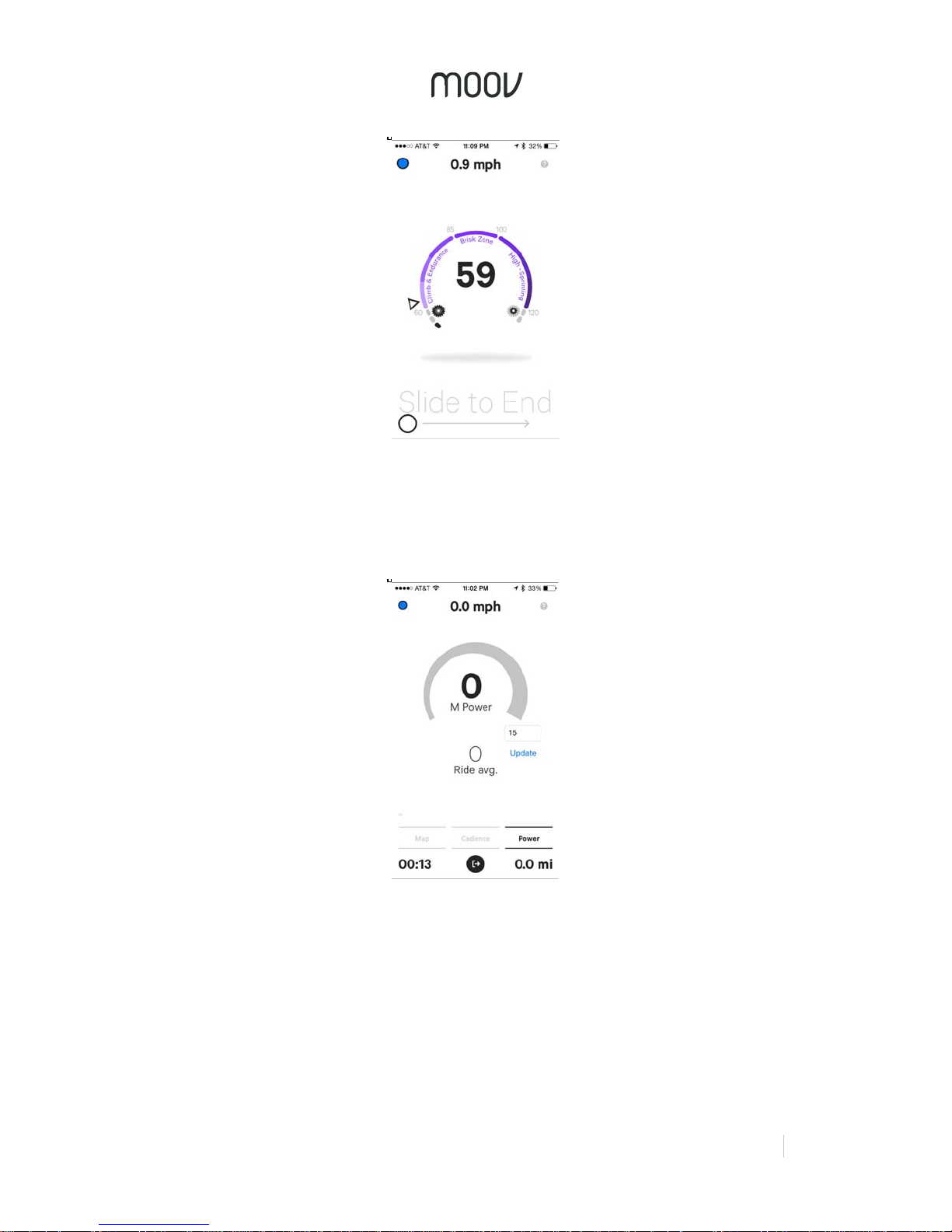
There are three live screens during your ride: map, cadence, and Moov Power. You can
see your time, distance, and speed on whichever screen you are on.
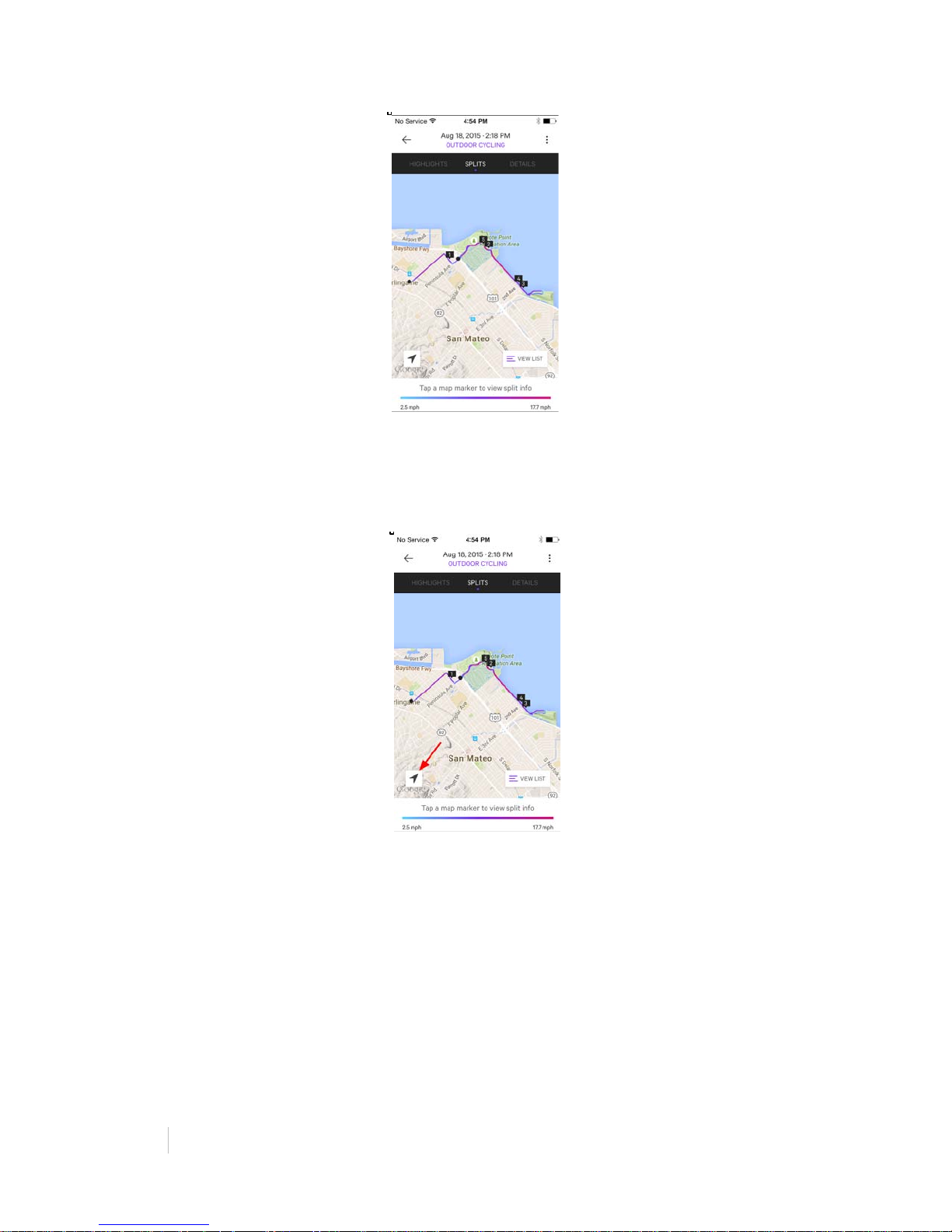
The Map screen shows you where you are and highlights the route you have traveled on
the map. The estimated grade (steepness) of where you are riding is also highlighted
here (IPhone 6 and 6 Plus only).
Page 30
30%
MOOV:%REVIEWER’S%GUIDE!
!
When you go to the map, the screen will automatically be locked so you can only see the
current selection on the map. This makes it easier to swipe between screens. To change
this, tap the map icon and you will be able to explore more of the map that isn’t
immediately in view. To go back to your current location, tap the location icon.
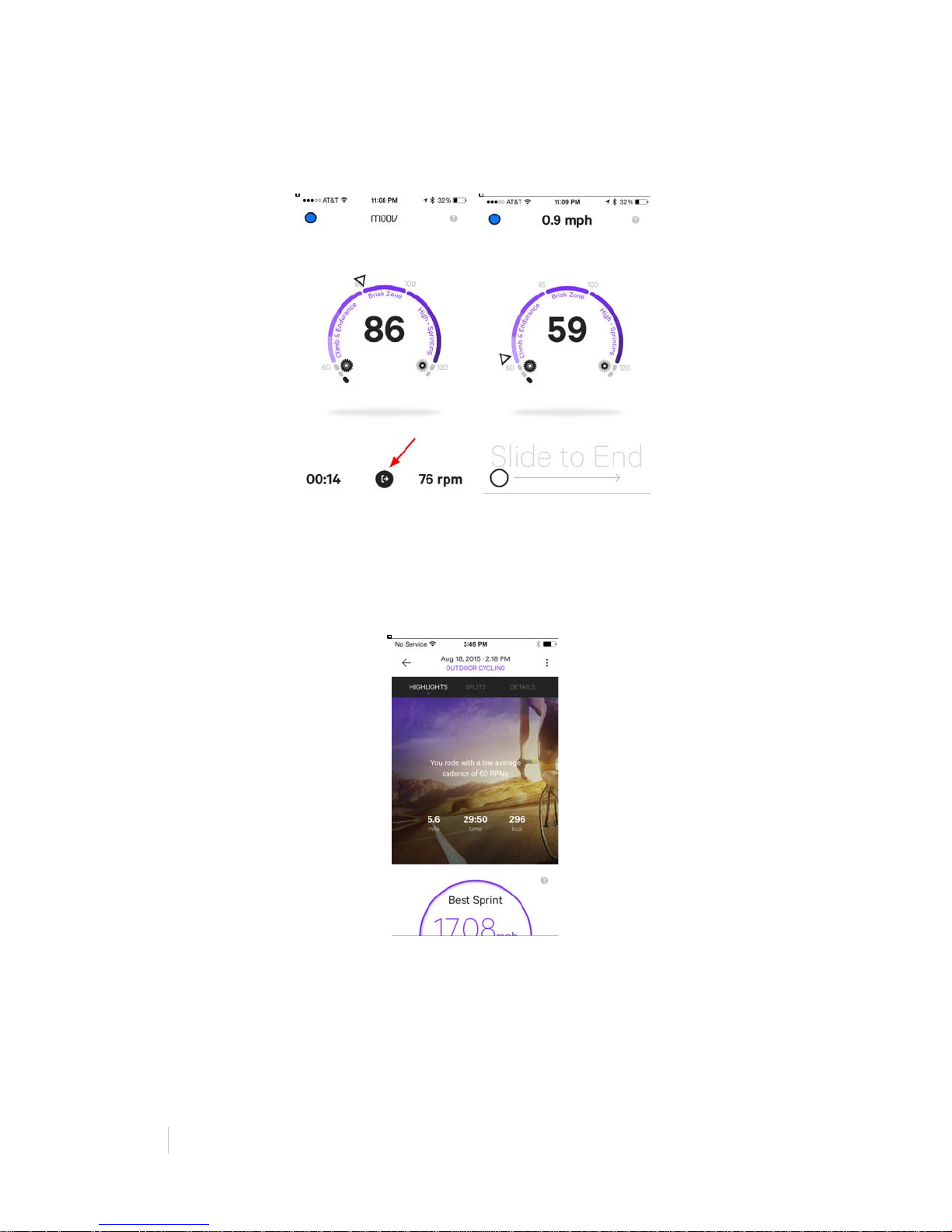
The Cadence screen shows your cadence in real-time and how it relates to different
exertion levels and terrain (Climb & Endurance, Brisk, and High - Sprinting). An arrow
moves based on your cadence to show which zone your in. Gear icons show when you
should be in high or low gear based on your cadence for the greatest efficiency.
Page 31
!
!
MOOV:%REVIEWER’S%GUIDE%
31%
The Moov power screen shows your real-time Moov Power (MP), as well as your
average power throughout your ride. Moov Power is based on a combination of speed,
elevation, cadence, and Moov technology to provide a measure of your exertion and
input. To assure accuracy of data, Moov Power is only available on iPhone 6 and 6 Plus
devices.
Page 32
32%
MOOV:%REVIEWER’S%GUIDE!
!
Ending Your Workout
Finished? Tap the “exit” button at the bottom of the screen and swipe to end the
workout.
Activity Report
After you finish your workout, you will be given an Activity Report with details and
highlights of your ride. When you first open your Activity Report, you will be on the
Highlights page, complete with your average cadence, total ride time, total distance, and
calories burned.
This page will also show your Route Difficulty, Fastest Sprint, Moov Power Surge, and
Toughest Climb.
Route Difficulty: The difficulty of a route based on distance, total elevation gain, intensity
of any climbs, and this number of climbs in a route. This is great for comparing routes
and monitoring your progress.
Page 33
!
!
MOOV:%REVIEWER’S%GUIDE%
33%
Fastest Sprint: Your top speed burst. Sprints are a great way to improve cardio strength,
train for explosive power, and burn calories faster.
Moov Power Surge: Your Moov Power (MP) is calculated based on a combination of
speed, elevation grade, cadence, and Moov technology. Moov Power Surge is when you
exerted the biggest burst of power (iPhone 6 and 6 Plus only).
Toughest Climb: Your biggest elevation gain with the highest average grade. See the
distance and time you spent pulling yourself up a hill and how much elevation you
gained.
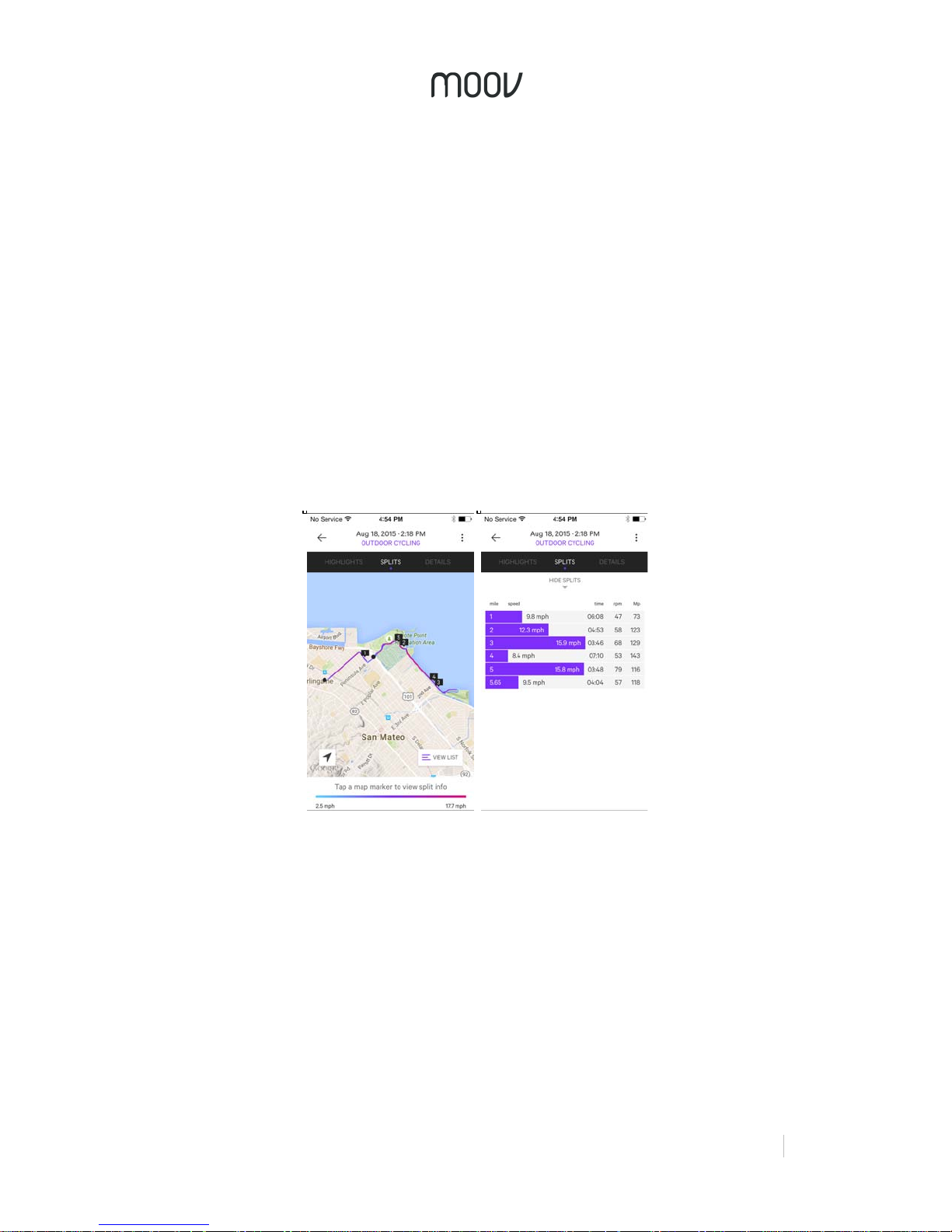
Tap Splits at the top of the report to view your route on the map. The color of the route
corresponds to when you were riding faster or slower, as shown by the key at the bottom
of the page.
To see your individual splits on the map, tap the marker number you want to view and
the map will zoom to that km/mi and your split information will appear on the bottom of
the screen. Tap “View List” on the bottom right to see all your split times and data.
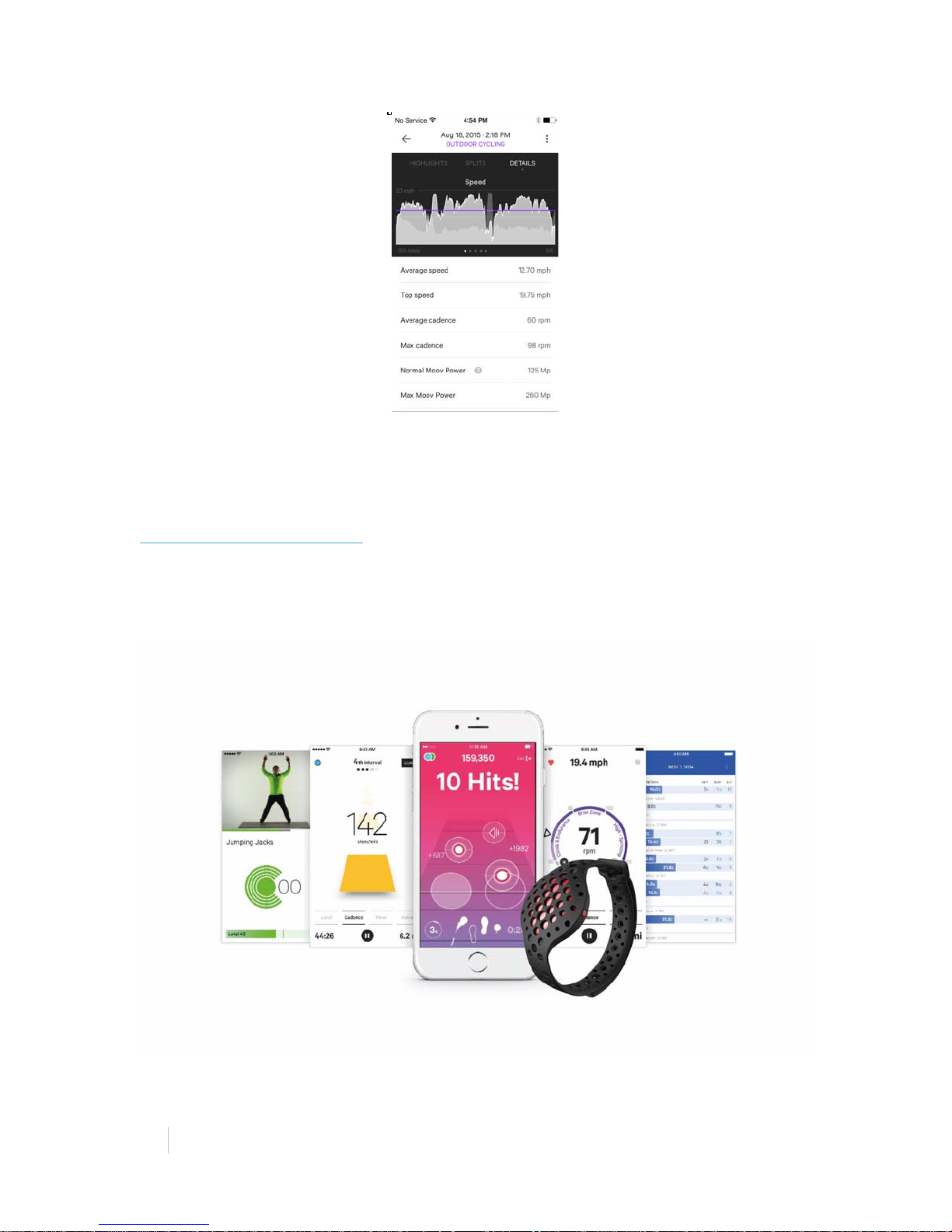
The Details tab breaks down all of your ride data and shows you graphical
representations of your speed, cadence, Moov Power, and elevation. The shadow graph
on the back of the graphs shows your elevation so you can compare your data to the
terrain.
Page 34
34%
MOOV:%REVIEWER’S%GUIDE!
!
Below this is all of the data about your ride including information about speed, cadence,
Moov Power, elevation, and time.
W H A T ’ S N E X T
Moov for Android & iOS
Moov will be available on the Apple App Store and the Google Play Store when
MOOV NOW™ ships this fall.
Page 35

!
!
MOOV:%REVIEWER’S%GUIDE%
35%
P E O P L E A R E T A L K I N G A B O U T M O O V
“Moov Now is a $100 fitness wearable that does what Apple Watch and Fitbit
cannot” - Jon Phillips, PC World
“More than any other startup I’ve written about – and that’s hundreds – Moov has
changed my life.” - Charlie Custer, Tech in Asia
“While Moov is all about the AI during your workout, you can still access all the data
behind that machine learning when you're back in the app. You can track your sleep,
review past workouts, and monitor your daily activity” - Sean O’Kane, The Verge
“The little tracker that was the brain child of a former Apple engineer and two
Microsoft veterans was designed to help novice users with little to no gym know-how
to get in shape.” - Dan Graziano, CNET
“By analyzing a 3D model of your form, Moov can push you, like an attentive coach,
to get the most out of your workout. It isn’t a fitness wearable for people who just
want to count how many calories they are losing. It’s for people who want to improve
their form, and track that improvement. It's an incredibly addictive cross between
Guitar Hero and Dance Dance Revolution.” - Nathan McAlone, Business Insider
“Moov made me want to box again, and the desire to keep exercising is just as
important as getting better at it.” - Valentina Palladino, Tom’s Guide
User Feedback
"I’ve been using Moov for the last 4 months and now I am able to run farther than I
have for the last 10 years. Using your coaching techniques, I know that I can
continue to be a better athlete by building more muscle and burning fat." - Abe
"Chaz" Hirschel
“Given the amount of money I have shelled out for a personal trainer in the past, this
is definitely not only a great economical choice, but it became the greatest game
changer to my health and fitness level so far.” – Amazon Review
“This tracker has changed my life. Went from a lazy idle unhealthy dude to an active
all-around athlete. I’m even going to run a marathon real soon. Before purchasing
this tracker, I didn’t even run on the treadmill because it seemed pointless and never
brought any results. Now I compete and actually look forward to going on daily runs
and all other sort of fitness activities.” – Amazon Review
"I’ve lost 20 pounds since I started using my Moov Run/Walk. I am committed to
losing another 20 pounds and I feel like the arrival of Moov Body Weight is perfect to
help me take my efforts to the next level." - Jerry Aubin
 Loading...