

Page 1

1 Connect
2 Activate
3 Listen
Quick Start Guide
USING YOUR MOOD MEDIA PROFUSION iS FOR
MOOD:
Page 2
2 ProFusion iS for iHeartRadio Quick Start Guide
Welcome
Thank you for choosing Mood Media to provide your iHeartRadio® internet
radio listening experience for your business!
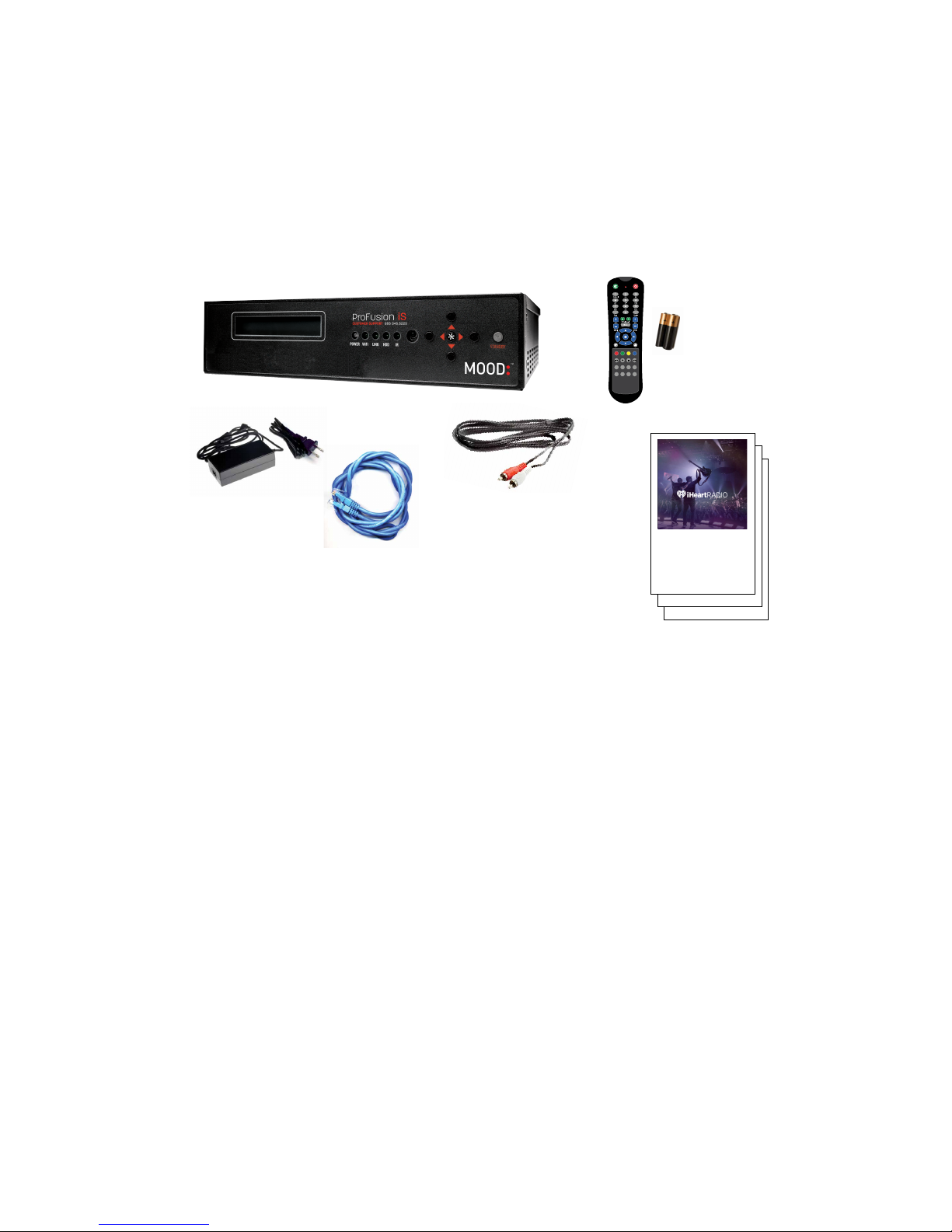
WHAT’S IN THE BOX?
1 ProFusion® iS player for iHeartRadio
2 Remote control and batteries
3 External power adaptor for the ProFusion iS
4 Ethernet cable
5 RCA audio cable
6 This Quick Start Guide, Feature Guide and
other important information about your
ProFusion iS
WHAT YOU WILL NEED
• A working amplifier/speaker system
• An open/active wired broadband internet connection (LAN, DSL, cable)
• A computer with Internet access
• An iHeartRadio internet radio account—don’t worry if you do not have
one yet. You will be prompted to create one during the setup process.
MOOD:
1
3
4
5
6
2
1 Connect
2 Activate
3 Listen
Quick Start Guide
USING YOUR MOOD MEDIA PROFUSION iS FOR
MOOD:
1 Connect
2 Activate
3 Listen
Quick Start Guide
USING YOUR MOOD MEDIA PROFUSION iS FOR
MOOD:
1 Connect
2 Activate
3 Listen
Quick Start Guide
USING YOUR MOOD MEDIA PROFUSION iS FOR
MOOD:
Page 3
Need Help? Call 855 345.5223 or visit iheartradioforbusiness.com 3
ProFusion iS
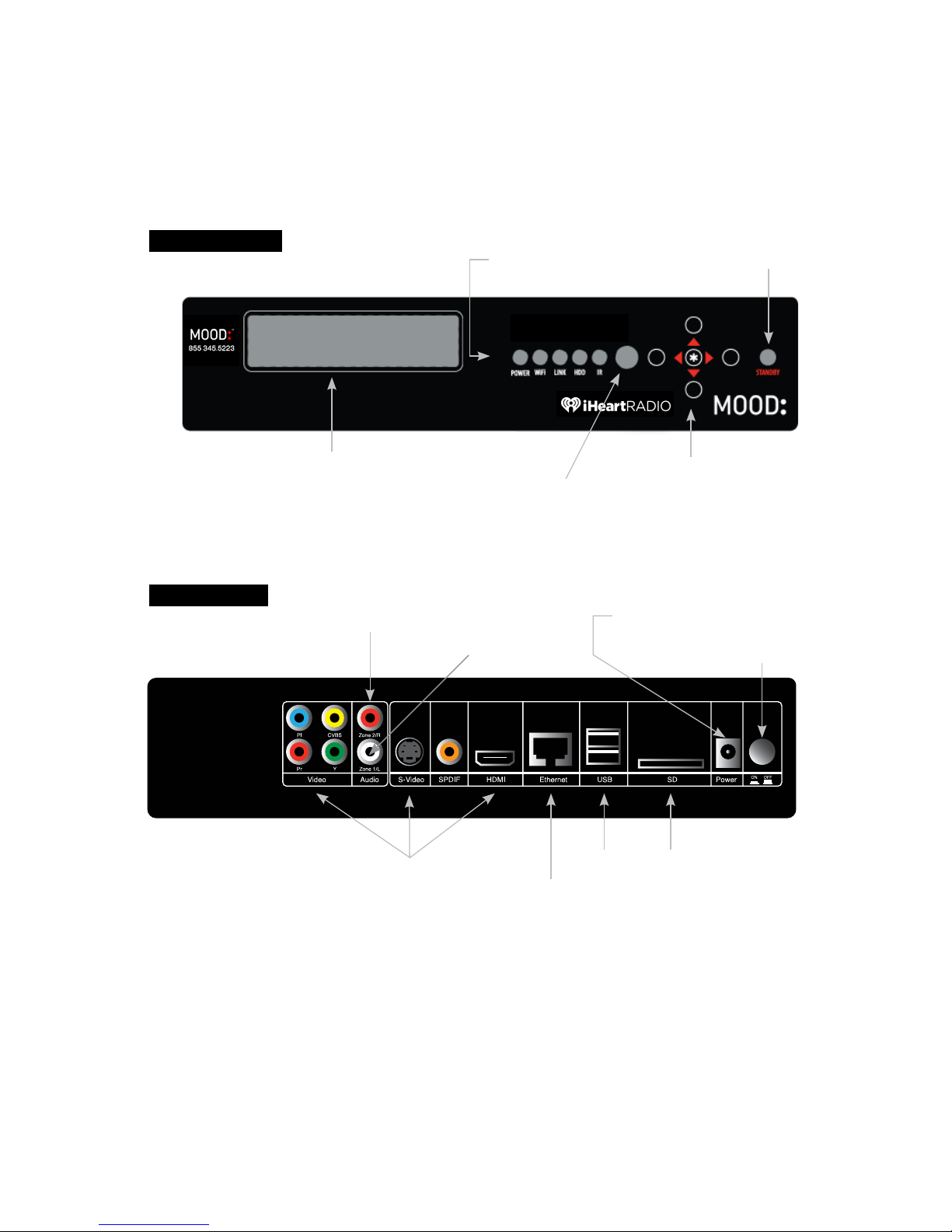
A QUICK LOOK AT
THE FRONT
THE BACK
NOTE: Video connection is not necessary for the activation process.
Status Lights Standby Button
LCD Display
Remote Sensor
Navigation Buttons
Audio Zone 2/R
Main Power Button
Video Outputs
Ethernet
USB
Power Adaptor Input
Storage Media
Audio Zone 1/L
ProFusion iS
Page 4
4 ProFusion iS for iHeartRadio Quick Start Guide
MOOD:
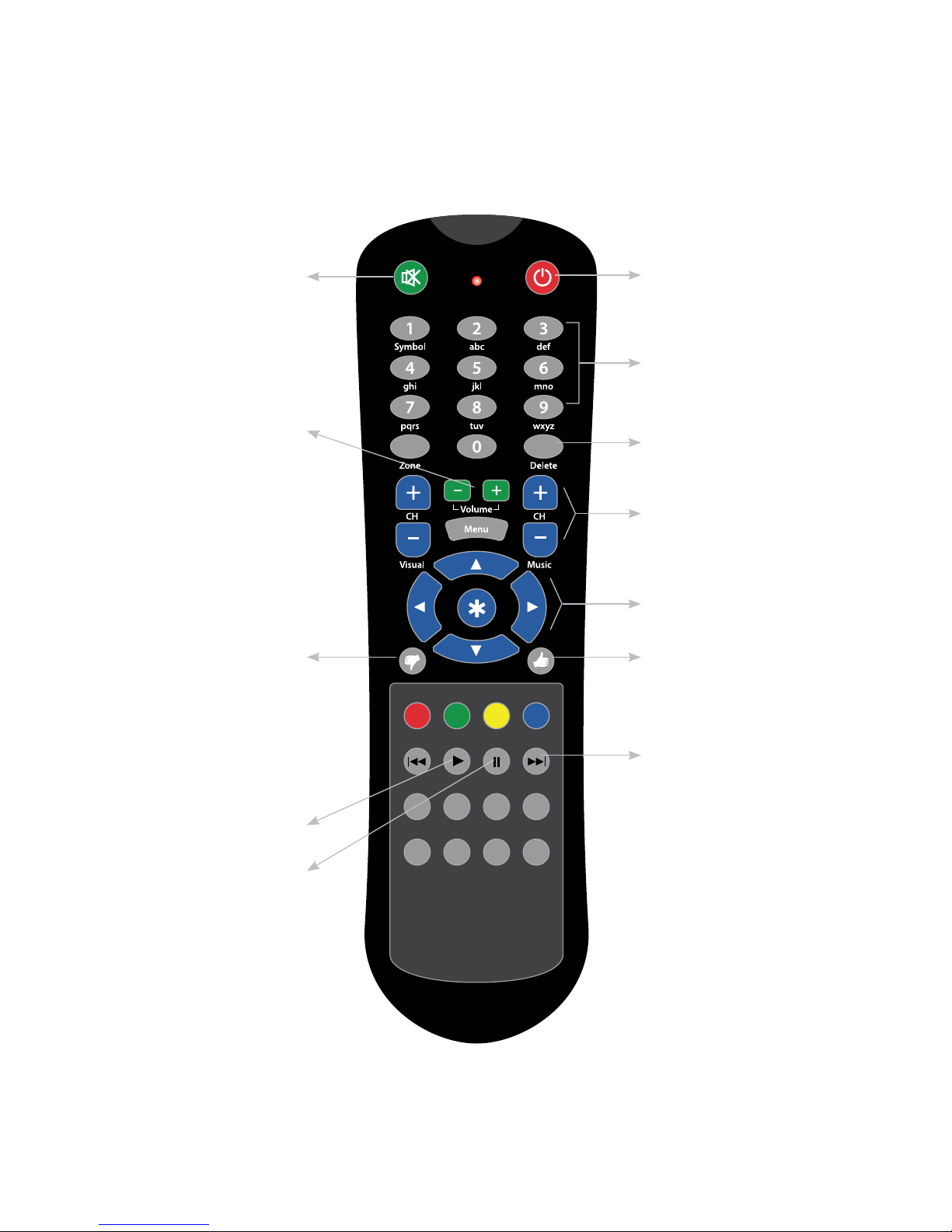
Remote Control
Mute/Unmute Standby toggle
Alpha/Numeric Entry
Delete
Change stations
Menu navigation
Like a song
Skip track
Play
Pause
Dislike a song
Volume Up/Down
Page 5
Need Help? Call 855 345.5223 or visit iheartradioforbusiness.com 5
1 Connect
If you do not have an existing music player you may skip steps 3 and 4.
1
Please refer to the cautionary information sheet included with
your ProFusion iS before proceeding.
2
Adjust the volume on your amplifier down completely. Then turn off
your amplifier and old music player. You’ll be prompted to increase the
amplifier volume later.
3
Disconnect the power and remove all cables from the old player.
4 Remove the old music player and its power supply.
5 Place your ProFusion iS in an area with adequate ventilation space.
6
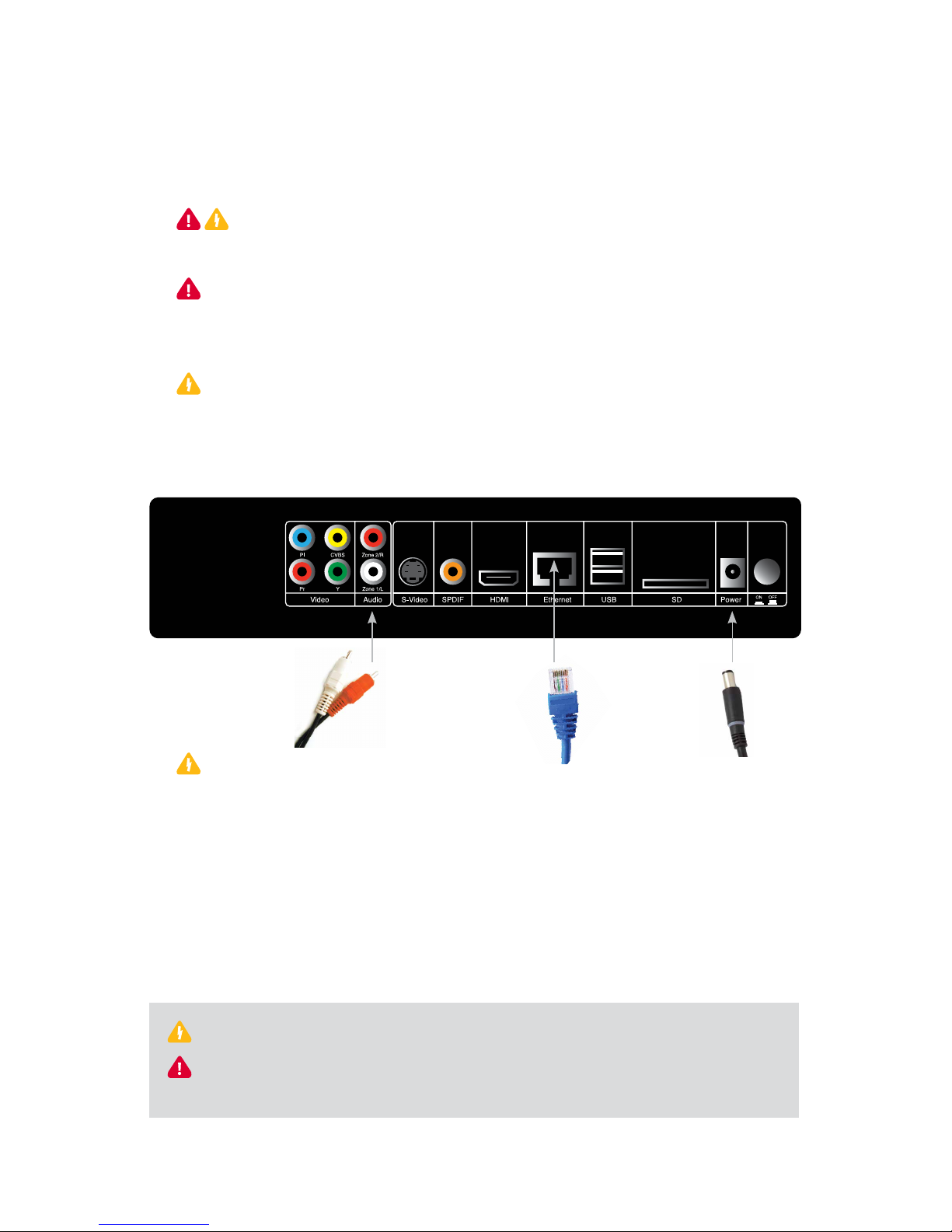
Connect the cables in this order:
A: Color coded RCA audio cables to the corresponding ProFusion iS
audio zones and to your sound system. If your old music player used
RCA plugs to connect to the amplifier, you may be able to reuse them.
B: Ethernet cable to your ProFusion iS and to your available
Ethernet port.
C: The external power adaptor to your ProFusion iS.
CAUTION: Certain parts may cause electrical shock and injury.
IMPORTANT: Please note these important operational instructions
and clarications.
6A
Your existing RCA
connectors may
be another color.
6B
6C
8
Page 6
6 ProFusion iS for iHeartRadio Quick Start Guide
Connect cont'd.
7 Plug the other end of the external power adapter into an ‘always on’
wall outlet.
NOTE: If a switch controls the outlet you are using, please ensure the switch is
always on.
8 Press the Main Power Button on the back of your ProFusion iS to the
‘On’ position.
9
Turn on your amplifier and increase the volume only slightly.
Please remember that you may need to adjust your amplifier volume to match
the level you are accustomed to. Due to normal differences between any
previous music player and your new ProFusion iS you may need to try different
volume settings on your amplifier. ProFusion iS volume is set to 100% from the
factory, so adjust your system slowly and carefully.
2 Activate
GET YOUR ACTIVATION CODE
Using the Navigation buttons on the front of your ProFusion iS:
1 Press . to access the menu.
2 Press the 1 button until the ‘>’ on the LCD display is next to
iHeartRadio Control. Press . again.
3 Verify the ‘>’ is next to
Activation. Press ..
4 Your activation code will be displayed. Please write it down and leave
your ProFusion iS on this menu for now.
Activation
Code: XXXXXXXXX
5 Using your personal computer, go to iheartradioforbusiness.com
Follow the links to activate your ProFusion iS. You will be asked to enter
your activation code and login or create a new iHeartRadio account.
Page 7

Need Help? Call 855 345.5223 or visit iheartradioforbusiness.com 7
6 After completing the online portion in step 5, return to your ProFusion
iS and press the 5 button. You will see:
> Activate
BACK
7 Make sure the ‘>’ is on Activate. Press . and you will see:
Activation
Successful!
NOTE: If there was a problem with the activation process, you will see “Activation
Failed - Message.” If you see this, please write down the message and contact Mood
Media at 855 345.5223.
For directions on connecting your Profusion iS to your wireless network, please refer to the
WiFi Setup Guide located at iheartradioforbusiness.com/get-support.
3 Listen
Follow the on-screen prompts on the player to select stations within
your iHeartRadio account or create a new station. You should hear your
iHeartRadio station playing within minutes.
If you have any questions or comments, please call us toll-free at
855 345.5223 or visit our website at:
www.iheartradioforbusiness.com.
Page 8

UPDATED 04.10.15
Copyright © 2015 Mood Media Corporation. All rights reserved.
iHeartRadio, the iHeartRadio logo, and the iHeartRadio trade dress are trademarks
or registered trademarks of iHeartRadio Media, Inc. Used with permission.
For Business
POWERED BY MOOD:
 Loading...