

Page 1
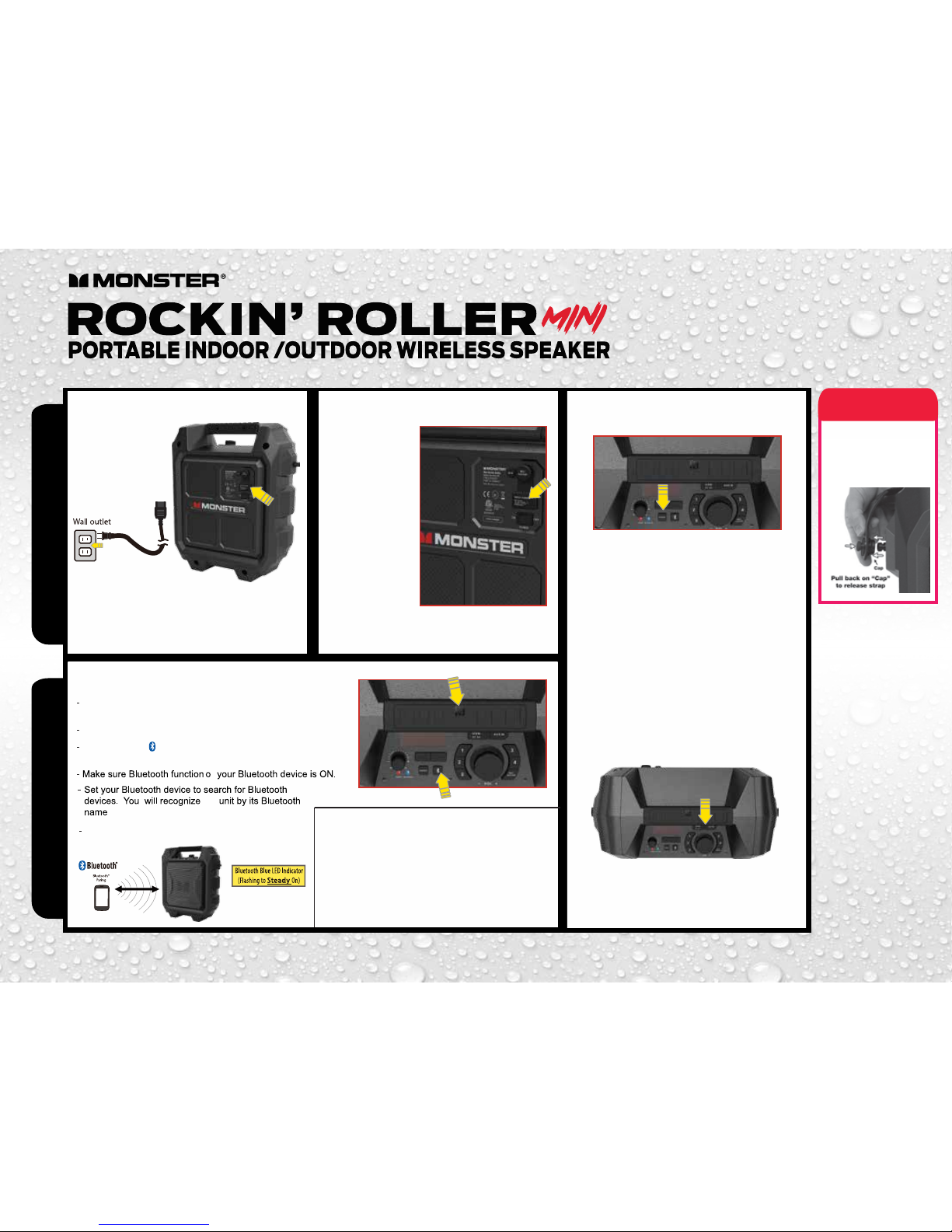
Quick Start Guide
Basic Set upBluetooth® Connection
For complete operational guidelines,
please refer to your user manual.
Connect the AC Power
1
• Connect the included AC Cable to the speaker
• Plug cord into a wall outlet.
• Charge battery for approximately 6 hours in power o
mode before you start using the unit for the rst time
Charging Unit FM / USB Charging
STRAP LOCK
RELEASE
INSTRUCTION
on the Rockin’ Roller Mini
2 3
Manual Bluetooth Pairing
Pairing Using NFC
- By connecting the AC
power, the battery will
begin to charge.
- If Red LED indicator
is flashing, this means
that battery levels are
low and need charging.
- If Red LED
indicator is on, this
means the battery
level is full
- Charge battery for
approximately 6 hours in
power off mode before you
start using the unit for the first time
n
Place the speaker and your Bluetooth device so they are
no more than 3 feet apart.
Press the source button until “BT” Mode is displayed on screen.
Press and hold “Bbutton on Speaker for 2 seconds to enter
into Bluetooth pairing mode. BT Blue LED will flash.
Rockin Roller Mini
Bluetooth LED turns solid once a Bluetooth device
has been paired.
the
4
A. Listening to FM radio
- Press the "Source" button to select FM source, the radio
station frequency is displayed on screen.
- Press and hold ( or ) to search a station with strong
reception automatically.
B. Store your favorite four radio stations manually
- Tune to a radio station.
- Press and hold a number key (1-4) to enter programming
mode; the correcsponding number blinks on the screen;
and the station to save the corresponding number.
- Repeat above step 1-2 to store more favorite station.
C. Select a favorite radio station
- Press "Source" button to select FM source.
- Press number 1-4 key to select one of your favorite
radio station to listen.
- To save as a preset press and hold the number
until a confirmation is displayed on the screen.
D. USB Charging mobile device
- The Monster Rockin’ Roller Mini has a built in USB battery
bank. In order to use this feature you must use your
mobile device’s USB cable (iPhone, iPad, or Android) and
connect it to the USB port on the Rockin’ Roller Mini.
Attention
• Turn on NFC function on your Bluetooth enabled device.
• Place your Bluetooth device on the silkscreen “NFC” on
the top surface of the Monster Rockin’ Roller Mini
• Confirm Bluetooth connection on your Bluetooth device.
Note: Blue LED indicator will be solid.
• Once paired you can play audio from your Bluetooth
device and audio can be heard from the unit.
Bluetooth Pairing
NFC Pairing
 Loading...