

Page 1
1
OPERATION AND MAINTENANCE MANUAL
MODULAR DECK OVEN
Colour control version
www.monoequip.com
Enter Serial Nos. here
In the event of an enquiry please quote these serial numbers.
DECK 1
DECK 2
DECK 3
DECK 4
DECK 5
FAN (IF FITTED)
Page 2
FG257 UK colour MODULAR DECK Rev A17 11-04-17
2
Page 3

FG257 UK colour MODULAR DECK Rev A17 11-04-17
3
Failure to adhere to the cleaning and maintenance instructions
detailed in this booklet could affect the warranty of this machine.
The oven should only be used for baking bread, pastries and cakes
(for other products please contact your oven supplier)
TO REDUCE RISK OF FIRE OR ELECTRIC SHOCK
DO NOT REMOVE COVERS (OR BACK)
NO USER SERVICEABLE PARTS INSIDE
REPAIR SHOULD BE DONE BY AUTHORISED PERSONNEL ONLY
Page 4

FG257 UK colour MODULAR DECK Rev A17 11-04-17
4
CONTENTS
Section - 1.0 Introduction
Section - 2.0 Overall Dimensions
Section - 3.0 Specifications
Section - 4.0 Safety
Section - 5.0 Installation
Section - 6.0 Isolation
Section - 7.0 Cleaning
Section - 8.0 Operating Conditions
Section - 9.0 Principles Of Operation (and baking advice)
Section - 10.0 Operating Instructions
Section - 11.0 Set up and Diagnostics menu
Section - 12.0 Troubleshooting
Section - 13.0 Service Information
Replacing light bulbs
Section - 14.0 Spares Information
Section - 15.0 Electrical Information
Section - 16.0 WARNING and INFORMATION LABELS
THIS SECTION IS FOR ENGINEERS ONLY AND THE CUSTOMER
SHOULD NOT ATTEMPT TO MAKE ALTERATIONS.
THIS SECTION IS FOR ENGINEERS ONLY AND THE CUSTOMER
SHOULD NOT ATTEMPT TO MAKE ALTERATIONS.
Page 5

FG257 UK colour MODULAR DECK Rev A17 11-04-17
5
1.0 INTRODUCTION
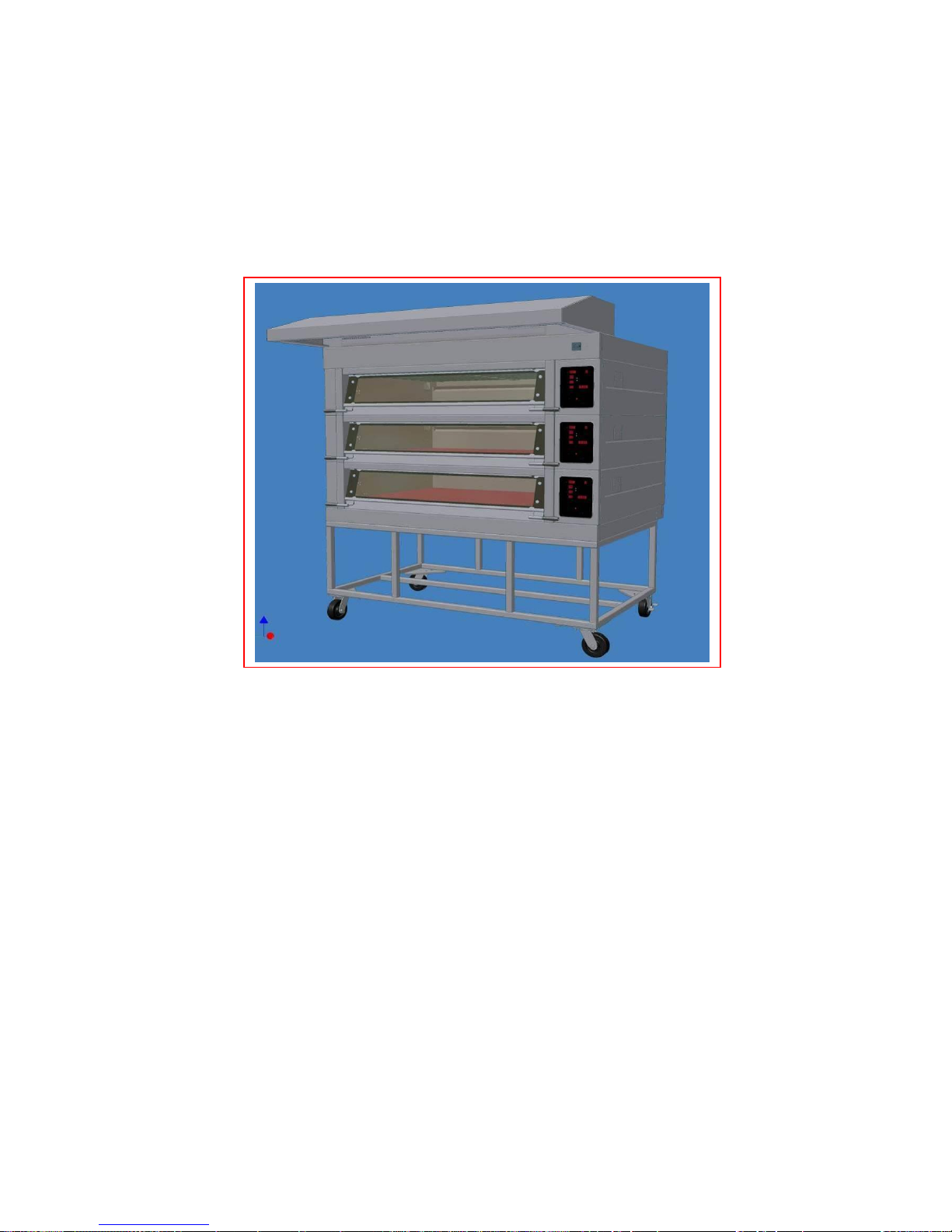
The electric modular Deck Oven is an easy to use practical, good-looking oven,
giving an excellent heat recovery rate and an even bake across a wide range of
bread and confectionery products.
Good looking and totally reliable
Conceived with the no nonsense requirements of both the independent and in-store
baker in mind, and designed to visually please as well as give reliable service for
many years. This oven will more than satisfy the most discerning customer.
Top quality specification
The external and internal contact surfaces are stainless steel.
Each modular deck is fitted with durable reinforced one-piece tiles, and an increase
in high-grade insulation and high temperature ceramic sealant, makes the oven more
efficient.
The oven comes with a patented integral steaming system, which reduces energy
consumption and the overall size of the oven (no drain required). The system
produces real steam with the advantages of spray steam. Pre-steam is also available
to reduce the affects of long loading times.
No drainage is required.
Supplied with an LCD screen. All programmable parameters have separate
indicators for easy programming and extra bake time, if required.
An energy saving 7-day timer is also standard.
The simplified electrical circuits aid reliability with overheat protection (on controllers
and oven) to ensure long life of controllers, all housed in splash-proof electrical
enclosures.
The lights are low voltage, sealed from the chamber and easily accessed from
outside the oven.
Fitted with a choice of hinged easy to clean glazed doors (using low energy-loss
reflective glass for high visibility) or metal doors, means low energy consumption and
the high kW rating gives good recovery.
(0-100% heating available both top and bottom)
As it is our policy to improve our machines continuously, we reserve the right
to change specifications without prior notice.
Page 6
FG257 UK colour MODULAR DECK Rev A17 11-04-17
6
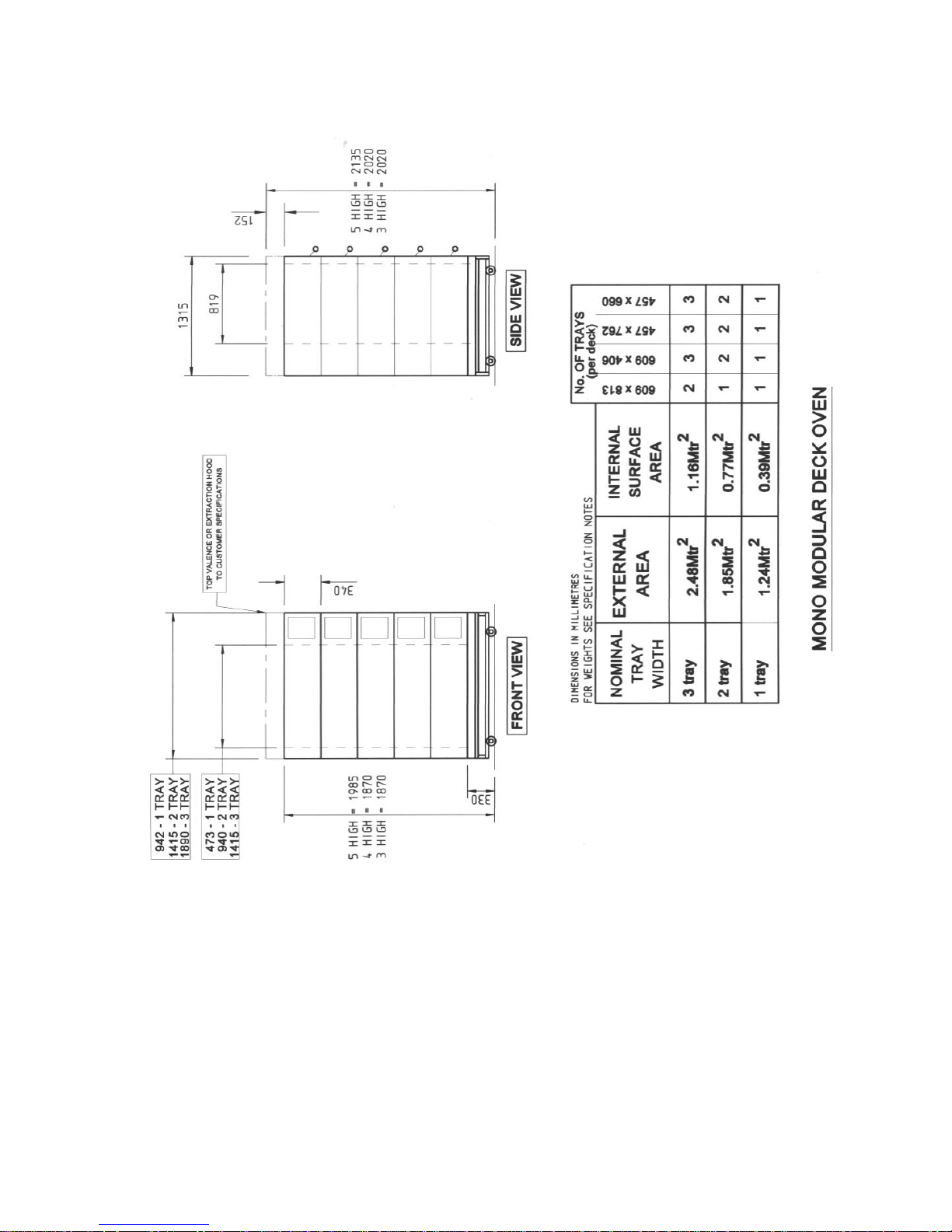
2.0 OVERALL DIMENSIONS
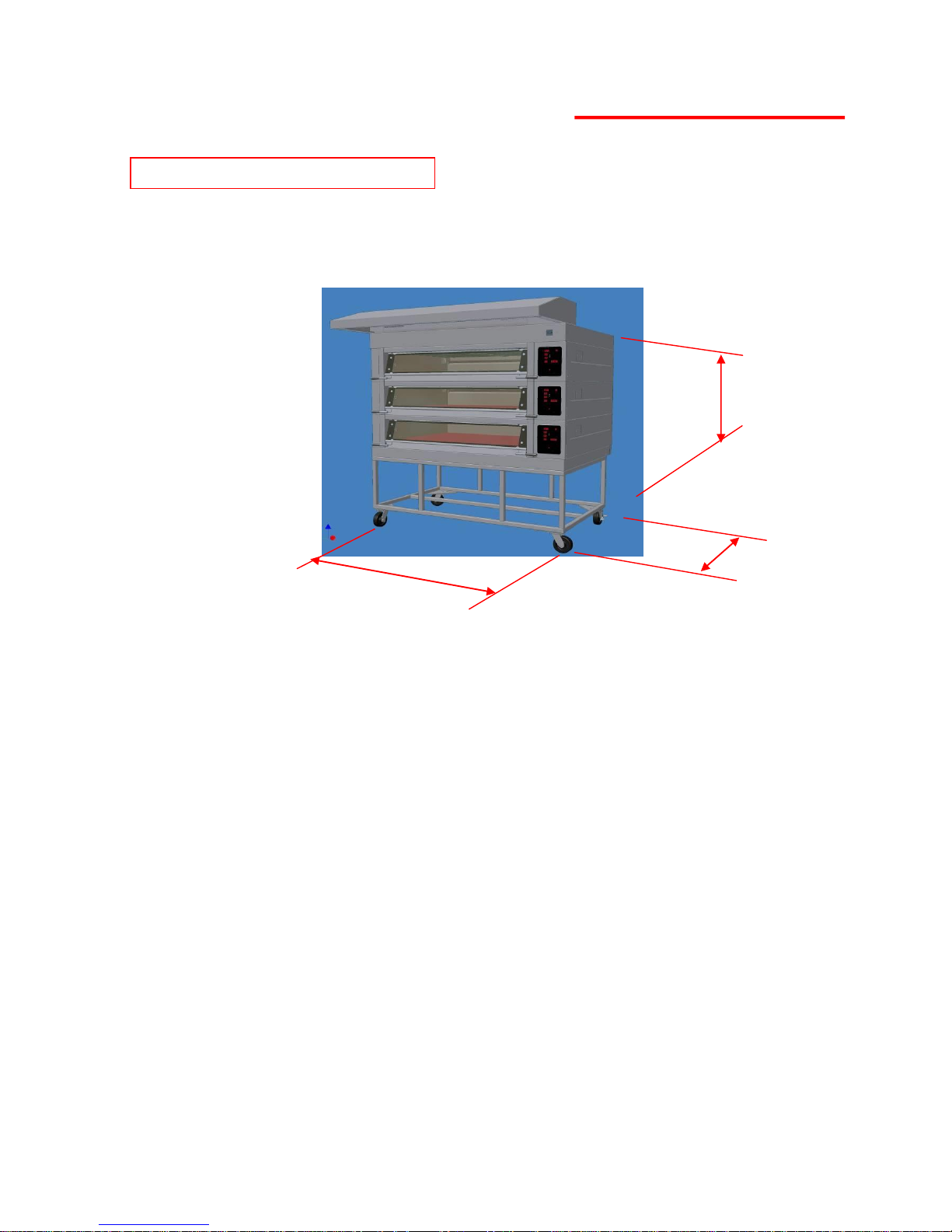
5 DECK oven ………… H = 2135mm
4 DECK oven ………… H = 2020mm
3 DECK oven ………… H = 2020mm
Ovens available with 1,2,3, 4, and 5 modules
812mm deep modules …... D = 1300mm
3 Tray wide oven ……. W = 1890mm
2 Tray wide oven ……. W = 1416mm
1 Tray wide oven ……. W = 940mm
ALL DIMENSIONS ARE APPROXIMATE
Page 7
FG257 UK colour MODULAR DECK Rev A17 11-04-17
7
3.0 SPECIFICATIONS
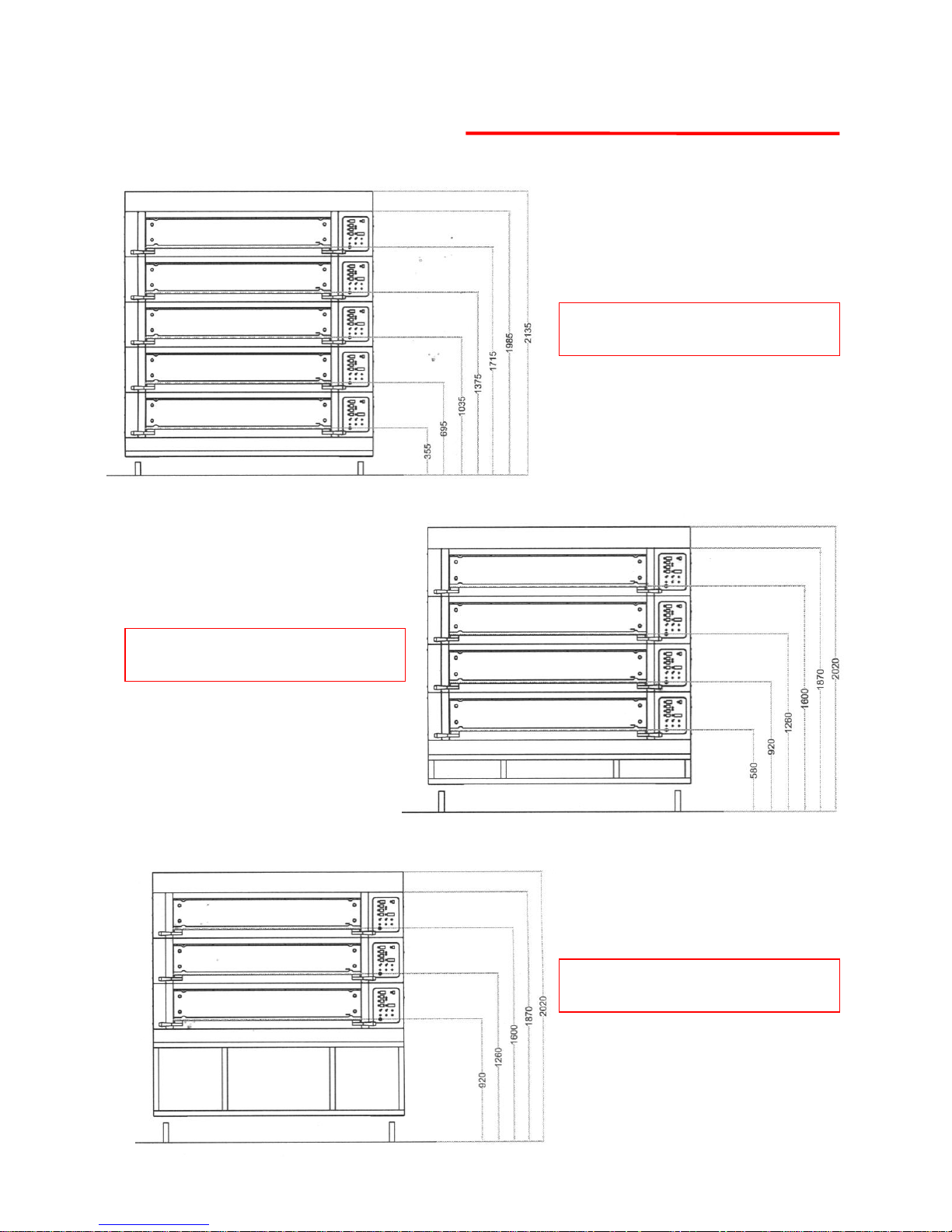
5 DECK OVEN
DECK PLATE HEIGHTS
4 DECK OVEN
DECK PLATE HEIGHTS
3 DECK OVEN
DECK PLATE HEIGHTS
Page 8
FG257 UK colour MODULAR DECK Rev A17 11-04-17
8
Page 9

FG257 UK colour MODULAR DECK Rev A17 11-04-17
9
ELECTRICAL LOADINGS:
SUPPLY REQUIRED PER MODULAR DECK:
3 TRAY WIDE 2 TRAY WIDE 1 TRAY WIDE
3 Phase N + Earth, 400V. 50Hz 9.0kW, 13Amp 6.0kW, 9Amp 3.0kW, 5Amp
NOISE LEVEL: Less than 80 Db
WEIGHT:
(ALL WEIGHTS ARE APPROXIMATE)
Total oven weight – 2 tray wide, 3 deck = 1569lbs (711kg)
(Including base frame) – 3 tray wide, 3 deck = 2345lbs (1064kg)
– 1 tray wide, 3 deck = TBA
Weight per oven chamber module – 2 tray wide = 421lbs (191.5kg)
– 3 tray wide = 575lbs (261kg)
– 1 tray wide = TBA
Weight per oven canopy module – 2 tray wide = 31lbs (14kg)
– 3 tray wide = 38lbs (17kg)
– 1 tray wide = TBA
Weight per fan module – 2 tray wide = 62lbs (28kg)
– 3 tray wide = 62lbs (28kg)
– 1 tray wide = TBA
Weight of product (max) per deck – 2 tray wide = 86lbs (39kg)
– 3 tray wide = 131lbs (60kg)
– 1 tray wide = TBA
Page 10

FG257 UK colour MODULAR DECK Rev A17 11-04-17
10
4.0 SAFETY
All maintenance must be made with the oven disconnected from the
power supply and then only by fully trained authorized persons.
Check all cover panels, and any pipefittings are securely positioned.
Check oven door handles are not damaged.
Do not operate a deck's steaming system with oven door open.
Always use oven gloves when loading or unloading the oven.
When products are removed from the oven, ensure:
(a) Tins are knocked out and stored directly onto a tin storage trolley or rack
(Do not leave hot tins on the floor or on tables).
(b)Trays are put into a rack and the rack is wheeled to a safe cooling area.
Do not store items on top of the oven.
Do not store items behind the oven.
Beware of hot surfaces. Do not touch oven front or door with bare skin.
All operatives must be fully trained
People undergoing training must be under direct supervision
The oven should only be used for baking bread, pastries and cakes (for other
products please contact your oven supplier)
No unauthorized modifications should be made to the oven.
Do not walk on the roof of the oven
DISPOSAL
Care should be taken when the oven comes to the end of its working life. All
parts should be disposed of in the appropriate place, either recycling or other
means as the law permits at the time.
NOTE: BAKERY STAFF MUST NOT UNDER ANY CIRCUMSTANCES REMOVE
PANELS TO ACCESS ANY PART OF THE DECK OVEN.
Panels should only be removed by a Mono maintenance engineer (or other fully
trained maintenance contractor) for repairs or maintenance, after isolating oven
from power supply.
The Bakery Manager or the Bakery Supervisor must carry out the above daily safety checks
Page 11

FG257 UK colour MODULAR DECK Rev A17 11-04-17
11
5.0 INSTALLATION
GENERAL
A hard smooth level floor is recommended on which to position the oven and
access for maintenance should be considered.
The oven is not designed to be ” built in” so sufficient clearance must be left in
front of the access panels (right hand side) to allow for servicing.
If not chosen as an oven option, it is recommended that an extraction hood be
placed above the oven to disperse excess steam and heat, which could have
an adverse effect on the bakery ceiling and ambient temperature.
A wall isolator must be available in order to completely isolate the oven.
THIS ISOLATOR MUST BE CLEARLY ACCESSIBLE TO THE OVEN OPERATOR
A chain retainer should be fitted, that is shorter than the power cables, to
protect them from strain if the oven is moved. (Fit to the wall or floor and the
base, using hole provided in castor fixing corner plates).
Installation must be made by a trained authorized engineer and all utilities
must conform to all local regulations.
The oven must be “run in” as stated in the initial start up instructions.
ELECTRICAL CONNECTIONS
SUPPLY REQUIRED PER MODULAR DECK:
(One main connection point for all deck supplies at top of oven)
3 TRAY WIDE 2 TRAY WIDE 1 TRAY WIDE
3 Phase N + Earth, 400V. 50Hz 9.0kW, 13Amp 6.0kW, 9Amp 3.0kW, 5Amp
Page 12
FG257 UK colour MODULAR DECK Rev A17 11-04-17
12
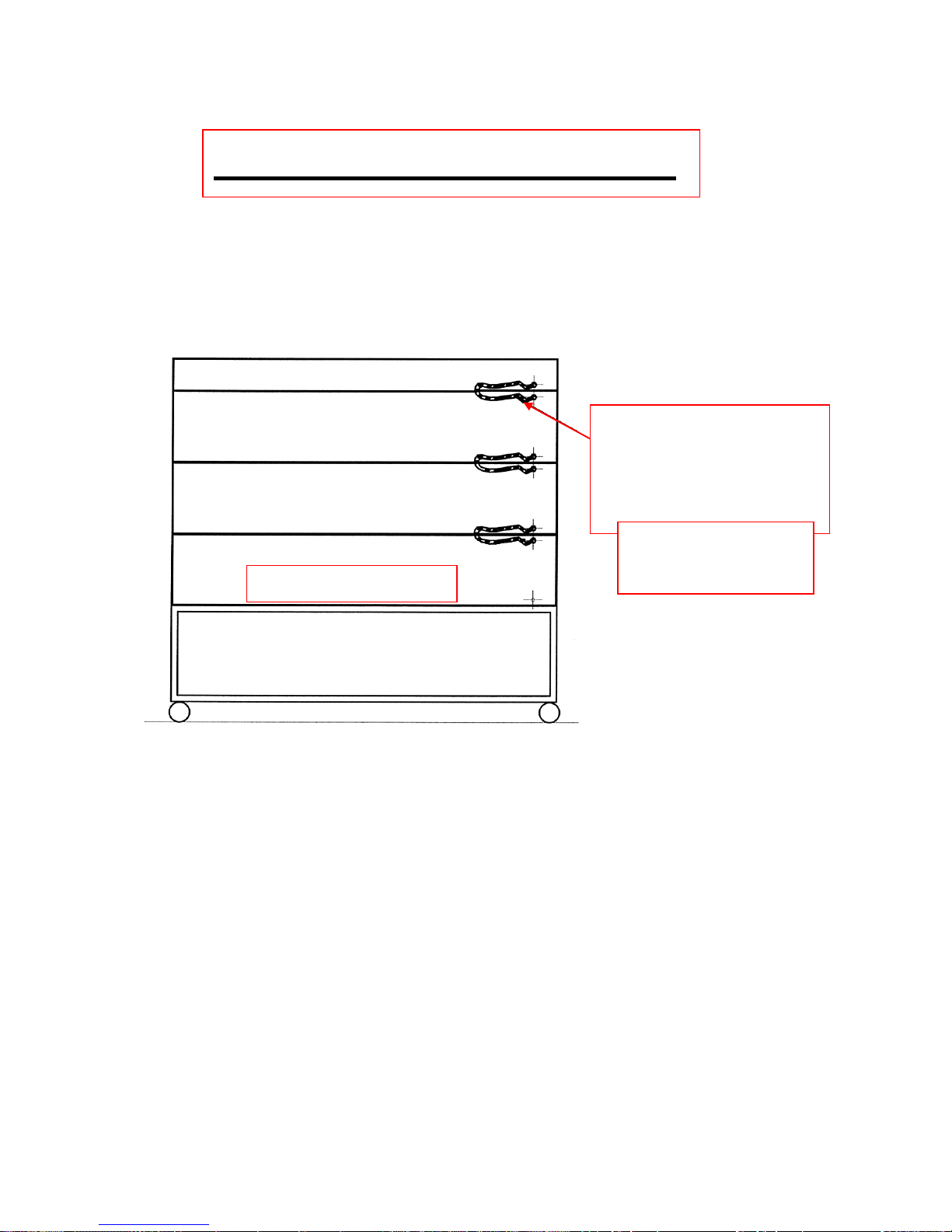
IMPORTANT OPERATION
EARTH (GROUND)
STRAPS MUST BE
CONNECTED
BETWEEN EACH
SECTION.
PART NUMBER
M158-25-11200
SUPPLIED
REAR VIEW OF OVEN
Page 13

FG257 UK colour MODULAR DECK Rev A17 11-04-17
13
WATER SUPPLY REQUIREMENTS
The set up procedure on the next page must be followed to
allow the steaming system to function correctly
All ovens with steam require a ¾” BSP hot or cold water supply at a pressure
of 2 - 3 bar (29 – 44 psi).
Only one water supply is required per oven. This should comply with local
water regulations.
A manifold supplies all decks from one connection point.
For proper operation of the steam system it is recommended that the water
supply follows the following specifications:
Hardness 0-4 grains per gallon
PH range 7.0 to 8.5
Chloride concentration 0 –20 ppm
Consult Mono for proper water filtration system information.
No drain is required for this oven.
A non-return check-valve is supplied fitted to the water inlet manifold.
Page 14
FG257 UK colour MODULAR DECK Rev A17 11-04-17
14
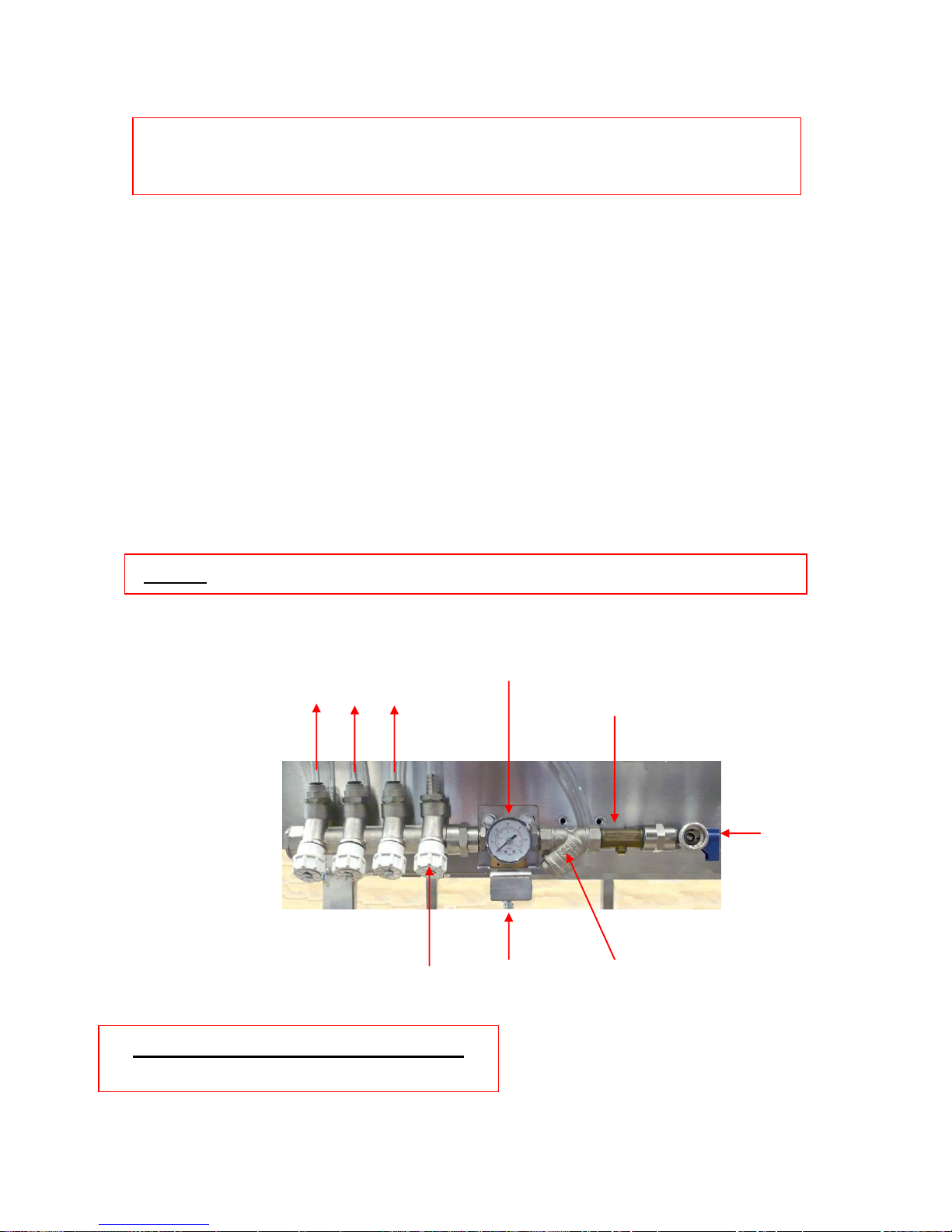
WATER SYSTEM SETUP PROCEDURE
It is imperative that the water delivery to the deck oven is checked for the
steam system to operate correctly
1. Flush out the main feed pipe to be used, until water runs clear and free from debris.
2. Connect main feed to oven.
3. Connect flexible hoses to each deck.
4. Place a container under the test valve.
5. Slowly open test valve fully and with the water flowing check the regulator is set to
0.75 bar. If not adjust using the screw above the valve.
Never use the oven above this setting
6. When the pressure has stabilised shut the test valve.
REPEAT 4,5 AND 6 AT THE END OF INSTALLATION.
NOTE. DYNAMIC PRESSURE, NOT STATIC, IS BEING MEASURED.
STOP TAP
ADJUSTING SCREW
SET TO 0.75 bar
TEST VALVE
FILTER
TO OVENS
WATER REGULATOR SET UP
LOCATED ON REAR OF OVEN
REGULATOR
DUAL CHECK VALVE BACKFLOW
PREVENTION DEVICE
Page 15
FG257 UK colour MODULAR DECK Rev A17 11-04-17
15
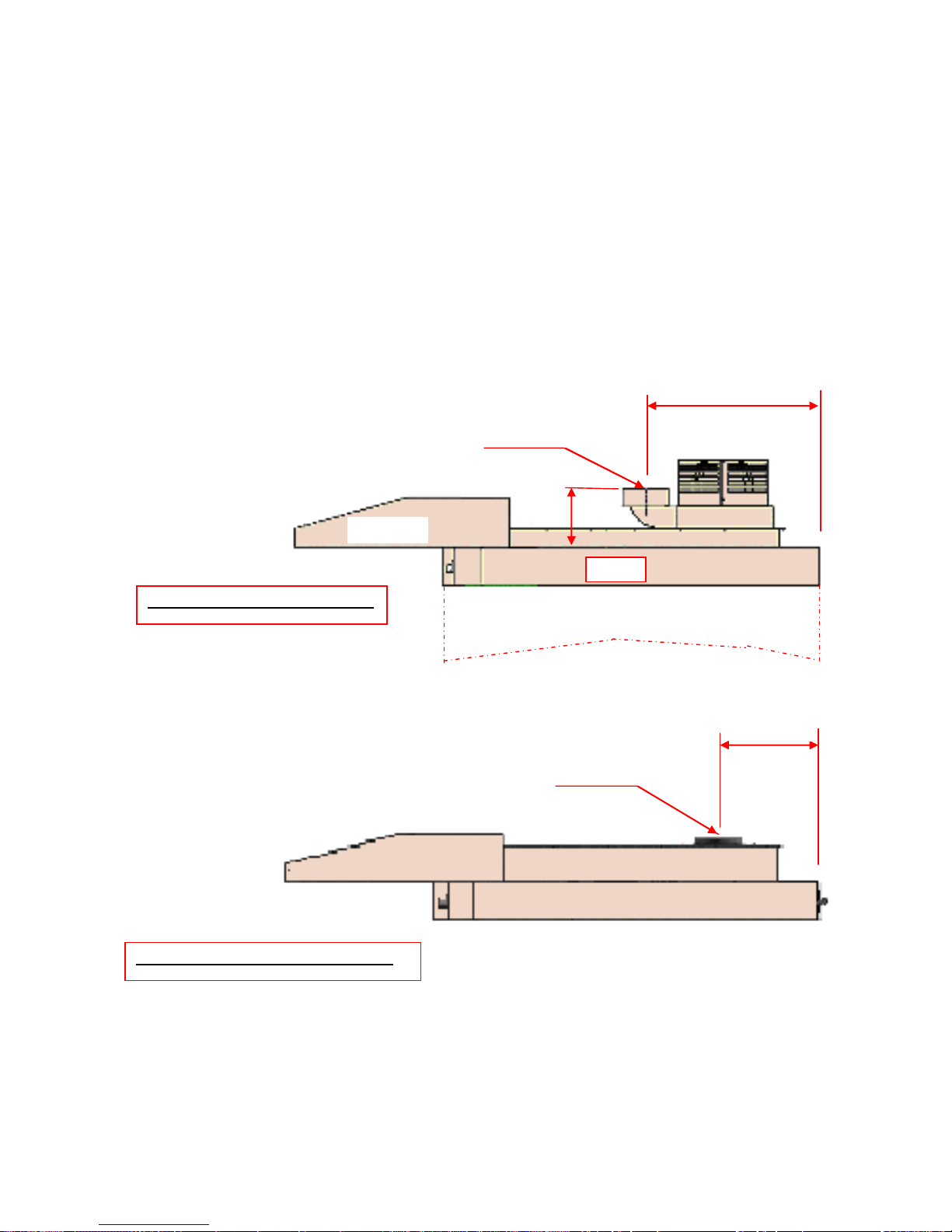
Exhaust Connections (IF CANOPY FITTED)
Ideally an exhaust duct should rise 2 metres above the bakery roof protected
from wind and birds by a duct protector.
It should be of a suitable material to take the high temperatures and humidity
expected.
It should be flexible and easily removable at the oven connection point.
This allows the oven to be moved for cleaning when required.
255mm Dia.SPIGOT
CONNECTION POINT
WITH EXTRACTION FAN FITTED
WITHOUT EXTRACTION FAN FITTED
CONNECTION POINT
330mm
585mm
240mm
255mm Dia.SPIGOT
ROOF
CANOPY
Page 16
FG257 UK colour MODULAR DECK Rev A17 11-04-17
16
INITIAL START UP
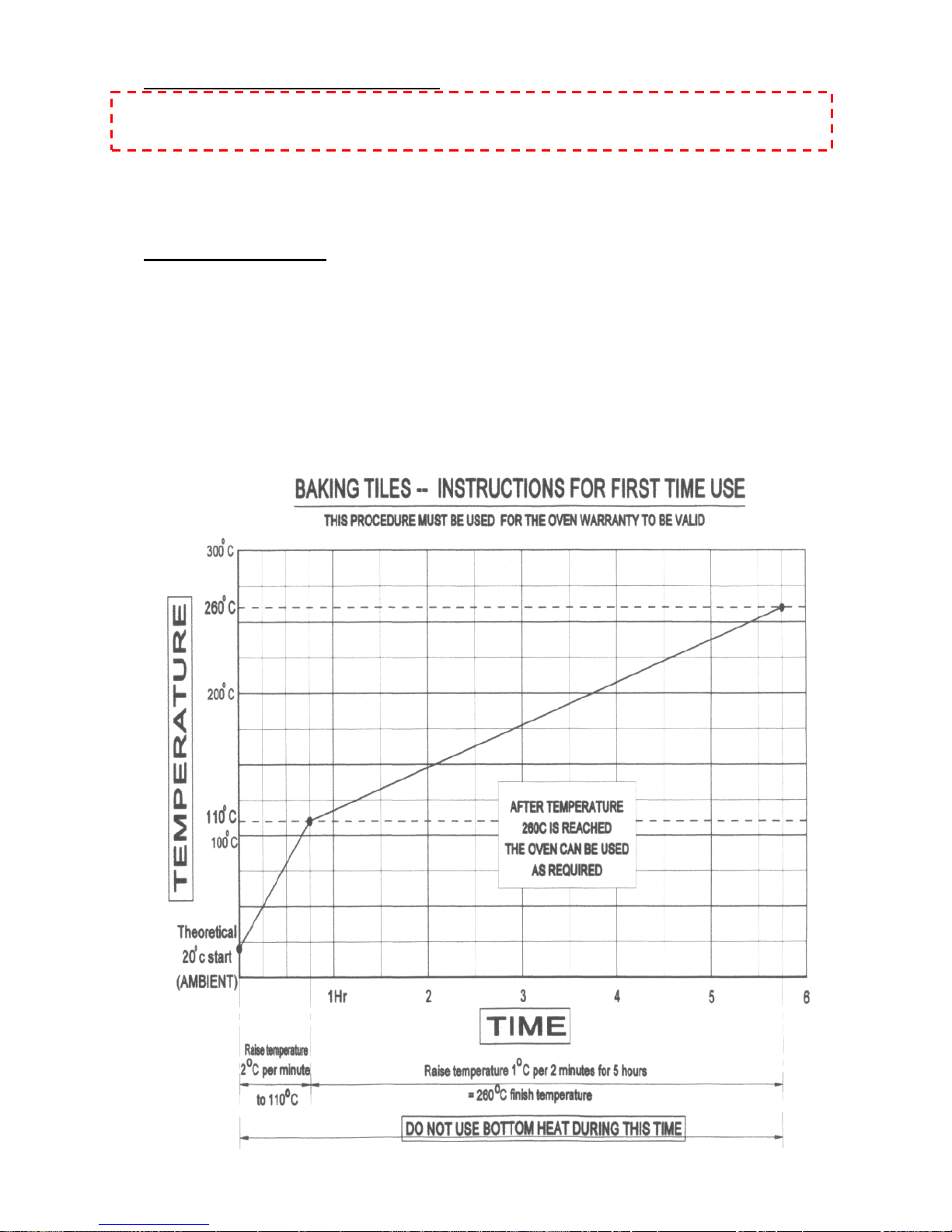
THIS PROCEDURE MUST BE ADHERED TO FOR THE OVEN
WARRANTY TO BE VALID.
In order for the oven to give good reliable service the deck tiles must be initially
brought up to temperature as stated below.
After this running in period the oven can be used as required.
Running in procedure
1. Turn the oven on and note the temperature shown.
(This will be the temperature inside the cooking chamber)
2. The temperature needs to rise to 110deg C, at no more than 2deg a minute.
DO NOT USE BOTTOM HEAT AT ANY TIME.
3. Take the temperature up to 260deg C, at no more than 1deg in 2 minutes.
THIS WILL TAKE 5 HOURS.
Page 17

FG257 UK colour MODULAR DECK Rev A17 11-04-17
17
6.0 ISOLATION
WARNING
THE “POWER OFF” BUTTON ON THE FRONT OF THE OVEN DOES
NOT ISOLATE THE POWER SUPPLY.
A WALL ISOLATOR MUST BE AVAILABLE IN ORDER
TO COMPLETELY ISOLATE THE OVEN.
THIS ISOLATOR MUST BE CLEARLY ACCESSIBLE
AND KNOWN TO THE OVEN OPERATOR
TO STOP THE OVEN IN AN
EMERGENCY SWITCH OFF AT THE
MAIN WALL ISOLATOR
Page 18

FG257 UK colour MODULAR DECK Rev A17 11-04-17
18
7.0 CLEANING
DAILY CLEANING INSTRUCTIONS
ISOLATE OVEN FROM MAINS SUPPLY BEFORE CLEANING.
After the oven has been allowed to cool, (this could take several hours),
sweep any debris out.
Use a vacuum cleaner with metal attachments (able to take heat) if available.
Brush down and wipe oven front, back and sides with a damp cloth.
Spot clean with a damp cloth, which has been soaked in a solution of mild
detergent, and hot water, paying particular attention to ensure excess water is
not applied around the area of the electrical panels.
NOTE: TAKE CARE WATER DOES NOT ENTER CONTROL PANEL
MOUNTING OR ROOF MOUNTED FAN.
WEEKLY CLEANING INSTRUCTIONS
ISOLATE OVEN FROM MAINS SUPPLY BEFORE CLEANING.
Complete daily cleaning as above.
Scrub oven wheels with a mild detergent and hot water using nylon cleaning
brush (excess water will rust metal).
Ensure the oven roof area is clear of debris and dust build up.
(DO NOT STAND ON THE OVEN ROOF)
Page 19

FG257 UK colour MODULAR DECK Rev A17 11-04-17
19
8.0 OPERATING CONDITIONS
It is recommended that a space of at least 6 feet be left in front of the oven for
ease of operation and safety.
Bakery utensils must not be used to operate the control panel buttons.
9.0 PRINCIPLE OF OPERATION
NOTE: REFER TO YOUR OWN COMPANY’S RECIPE MANUAL FOR OVEN
TEMPERATURE SETTINGS.
PLEASE ALSO REFER TO THE BAKING ADVICE ON THE NEXT PAGE
Products are baked in an insulated heated chamber.
The temperature is regulated by a thermocouple having an LCD read-out on the
front control panel.
Baking heat is radiant with top and bottom heat being adjusted by means of separate
controls. This enables heat to be “balanced” according to product requirement.
STEAM is provided from an integral steam unit, and is introduced into the chamber
on demand. This is automatically controlled by the programmed parameters.
Once steamed the oven will not steam again until the steam unit has recovered
heat, typically 3-8 minutes depending on the amount of steam selected.
All ovens are fitted with a steam damper that evacuates steam humidity into a vent
at the side of the oven.
Page 20

FG257 UK colour MODULAR DECK Rev A17 11-04-17
20
Baking Advice
For the best results from deck Ovens
Loading
1. Do not place the products too close together. If the loaves are close to
each other after oven spring (expansion), the loaves sides will be soft and may
collapse on cooling.
2. Place the product evenly within the oven. Product bunched together will be
paler than those widely spaced.
3. Product should not be placed too close to the edge of the tile. As it
expands towards the front one side of the loaf may enter the cooler air by the
door.
4. Door opening should be kept to a minimum because cold air enters the
oven cooling the sidewalls and roof causing the finished product to be lighter
locally at the front and wasting heat. If loading times are consistently long you
can alter the front top heat to put more heat at the front.
5. If the loading takes a long time product can form a skin, which causes an
imbalance and a less attractive finish. By using the pre-steam function before
loading this can be minimised. This function turns the elements off and injects
steam to increase the humidity.
Bake settings
1. A good starting point for baking breads in Mono deck ovens is 225C (437F)
Top heat 60-65 bottom heat 40.
2. For cookies etc, the heat in the oven can be turned almost off, however it may
still be necessary to place the trays with cookies etc onto upturned trays on
the oven sole.
3. Steam should be kept to a minimum, for energy efficiency, depending on the
product and finish. Times between 9 and 12 seconds should be adequate.
4. It is a good idea not to focus on the temperature recovery this can vary from
oven to oven.
Page 21

FG257 UK colour MODULAR DECK Rev A17 11-04-17
21
Is the product baked in the time and to the quality you require?
Below are some tips for modifying the bake so you get the product that you require.
If your product is light on top.
Either decrease the bottom heat and extend bake time or increase the top heat.
If the product sides are pale and the top dark.
When the products are spaced well apart drop the top heat and extend the bake.
If the bake time is too long.
First increase the top heat to speed recovery.
If this does not give sufficient savings increase the bake temperature.
To thicken the crust
Set the damper to open longer. Different ovens will require different lengths of time.
Page 22
FG257 UK colour MODULAR DECK Rev A17 11-04-17
22
10.0 OPERATING INSTRUCTIONS
RECALLING SET PROGRAMS
NEW PRODUCT PROGRAM ENTRY
SEVEN-DAY TIMER
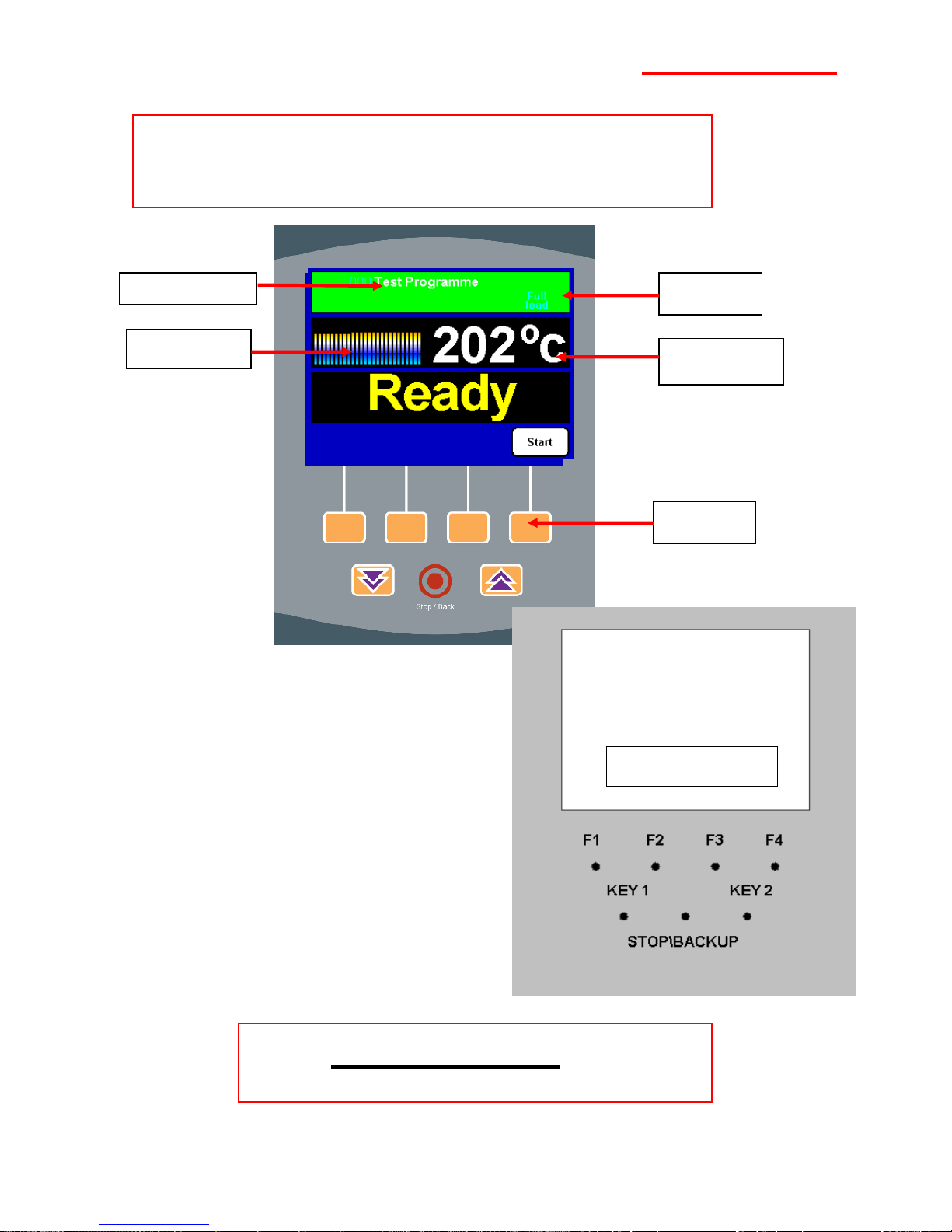
KEY POSITIONS
PROGRAM NAME
TEMPERATURE
GRAPH
½ OR FULL
BAKE
OVEN
TEMPERATURE
CONTROL
BUTTONS
Control Panel
(TO BE USED IN CONJUNCTION WITH THE FOLLOWING PAGES)
Page 23
FG257 UK colour MODULAR DECK Rev A17 11-04-17
23
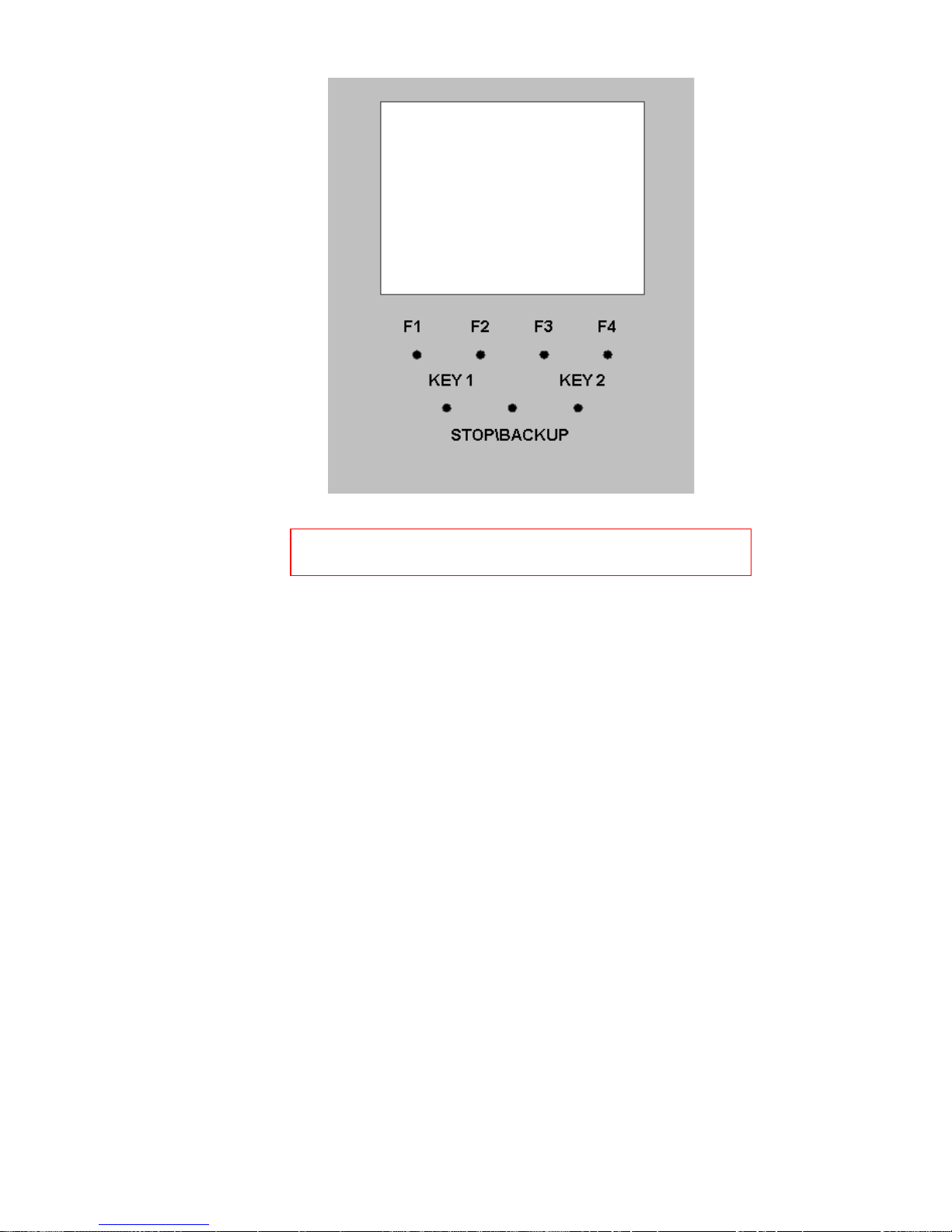
GENERAL LAYOUT OF CONTROLLER BUTTONS
Above shows the general layout of the controller keyboard.
The top row of buttons labelled F1, F2, F3 & F4 can have a number of uses.
The function of the buttons will depend on the screen the operator chooses, but
not all of the function buttons are active in every screen.
If a button is active it will have a symbol displayed above it on screen. For ease
of use, the symbols will indicate the operation they represent.
The buttons marked KEY1 & KEY2 are used to alter set values.
The final button is the stop or backup button. It can be used, for example, to stop
a bake if needed or go back through screens. All these operations will be
explained further in the section.
Page 24
FG257 UK colour MODULAR DECK Rev A17 11-04-17
24
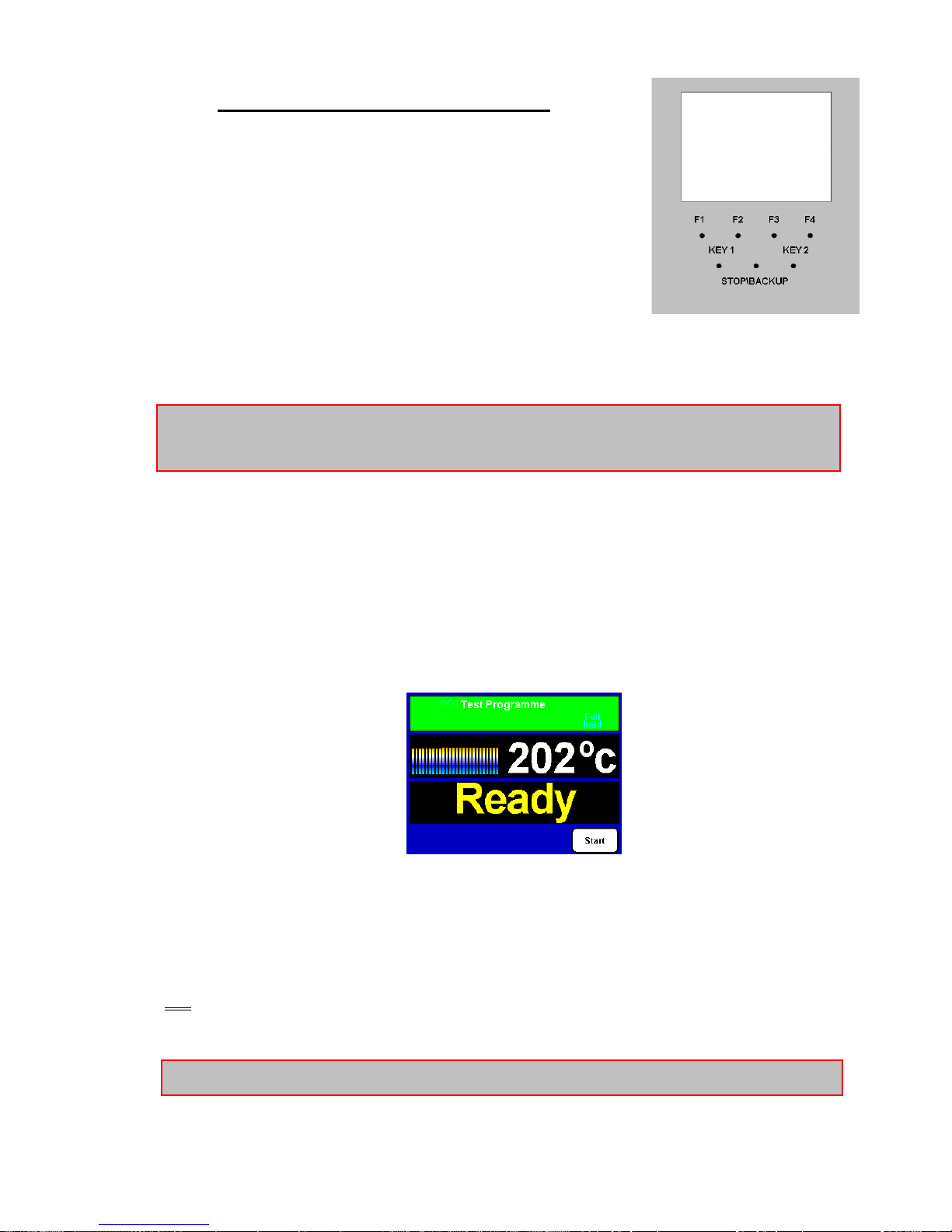
RECALLING SET PROGRAMS
Turn on power at main isolator.
Initially the oven will be in the off state with “select
product” above F4..
To display the available programs press button F4.
Use F2 or F3 to scroll up or down the list and
position the cursor over the desired product
program, then press either the half or full load buttons, (buttons F1 & F4
respectively)
TIP: To speed up the selection process use the quick scroll buttons key1 & key2.,
this moves the programs up or down 10 positions at a time.
The screen will display the current oven temperature, the selected program
number and the word “HEATING” displayed in large letters, along with
notification of either half or full bake depending on previous choice.
When the oven has reached the temperature specified in the product program
the screen will display, in large letters, the word “READY”
Place the product in the baking chamber, close door and press the
start button (F4).
o At the end of bake time, the buzzer will sound.
Press stop (o) and remove the product. Shut the door to conserve heat.
OR
press key F4 to increase bake by 2 minutes (press stop at any time to stop bake)
TIP: If you wish to cancel the bake, press the stop\backup button.
Page 25
FG257 UK colour MODULAR DECK Rev A17 11-04-17
25
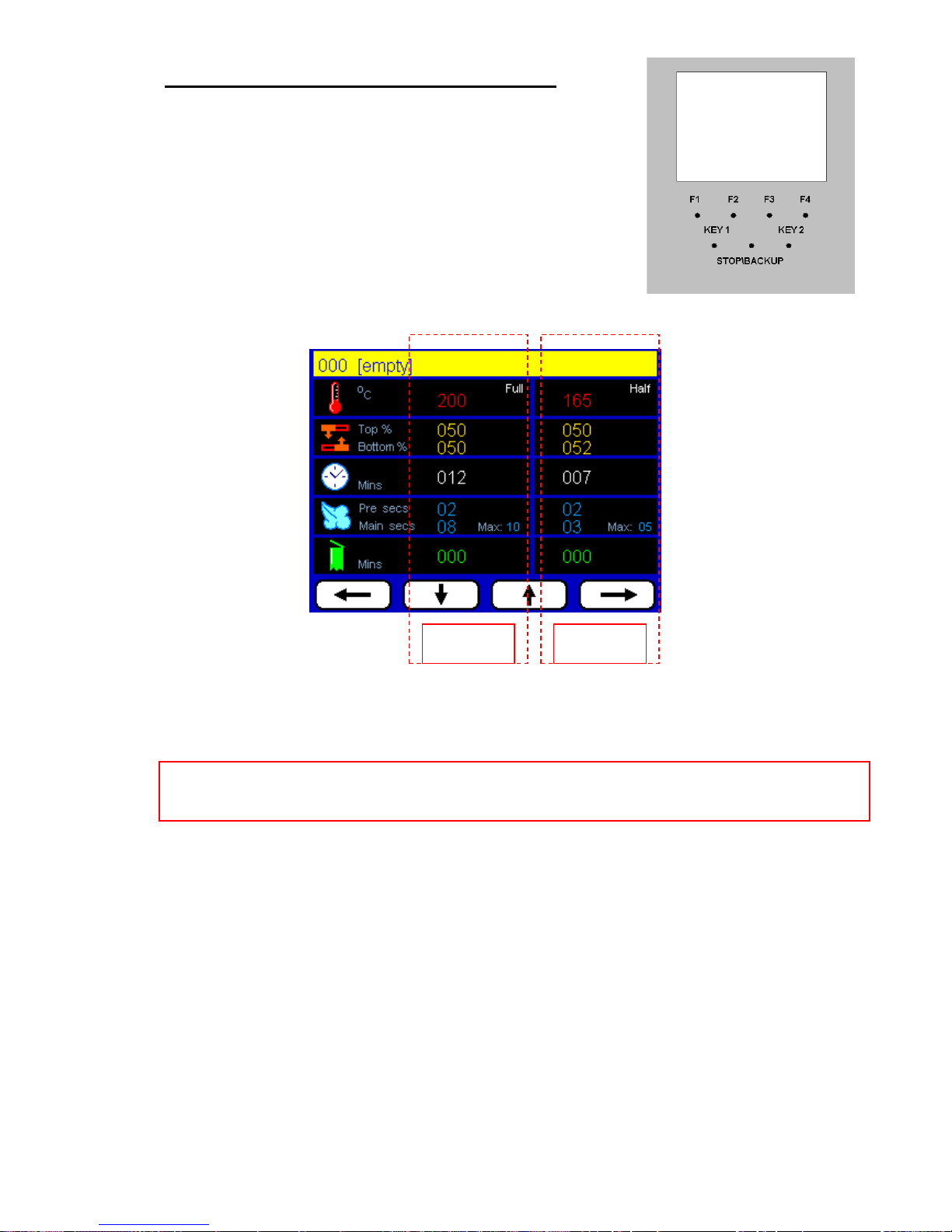
NEW PRODUCT PROGRAM ENTRY
o Turn on power at main isolator.
Press the edit program button F2.
Enter the password (default 111111)
Select an empty position by scrolling with the up\down
arrows KEYS F2 & F3.
Press the edit product button F1 again
Use the direction arrow buttons KEYS F1 to F4 to select a field.
Adjust the values in singular units up or down (buttons Key 1 & Key 2 respectively)
NOTE: The left hand column contains values relating to a full bake, while the right hand
column relates to half bake.
Next a name needs to be entered for the program;
Press F4 until the title area is highlighted. This will enable the title screen for editing.
Use the up\down buttons K1 and K2 to select the required character.
Once selected scroll across using button F4 to the next empty character field.
Repeat process for extra characters.
If amendments are required, scroll in the opposite direction-using button F1 and
correct by using the up\down arrows.
Once completed press the stop\backup button twice to return to the home screen
FULL BAKE
SETTINGS
HALF BAKE
SETTINGS
Page 26
FG257 UK colour MODULAR DECK Rev A17 11-04-17
26
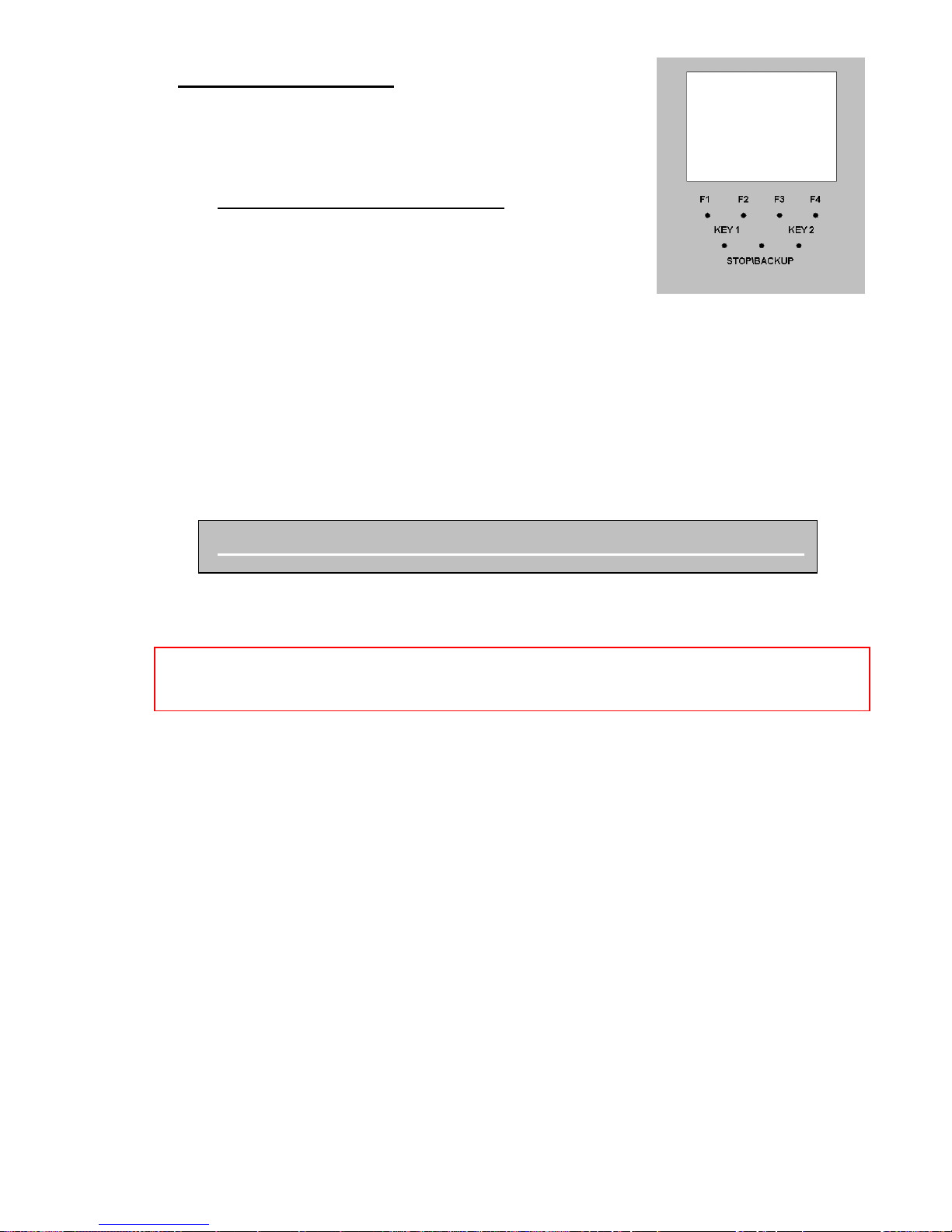
SEVEN-DAY TIMER
The controller can be programmed to switch the oven deck
on and off at preset times, automatically any day of the
week.
SETTING THE SEVEN DAY TIMER
With the main supply on, press the button F3.
To adjust the day pressing back (F1) until the day
changes to the one required.
Press next to highlight the “on” hour to be set and use the key1 or key2 to adjust .
Press next and highlight the “on” minutes to be set and use key1 and key2 to
adjust
If necessary, a finish time can be entered by scrolling to the required day, again
using up\down arrow buttons and adjusting the time as mentioned previously.
Once the required times have been set press the stop\backup button. This will
then return you to the home screen. This is the state the screen should be left in
to allow the seven-day timer to operate. (Oven power on, nothing selected)
The timer can be disabled by entering 00:00 in the time field.
NOTE: The seven-day timer will not work properly unless the correct time and date
have been entered previously. (Engineers set-up).
Page 27

FG257 UK colour MODULAR DECK Rev A17 11-04-17
27
ENGINEERS USE ONLY
DO NOT ATTEMPT TO MAKE ADJUSTMENTS UNLESS YOU
ARE FULLY AWARE OF THE RESULTS
11.0 SET-UP & DIAGNOSTIC MENU
Page 28
FG257 UK colour MODULAR DECK Rev A17 11-04-17
28
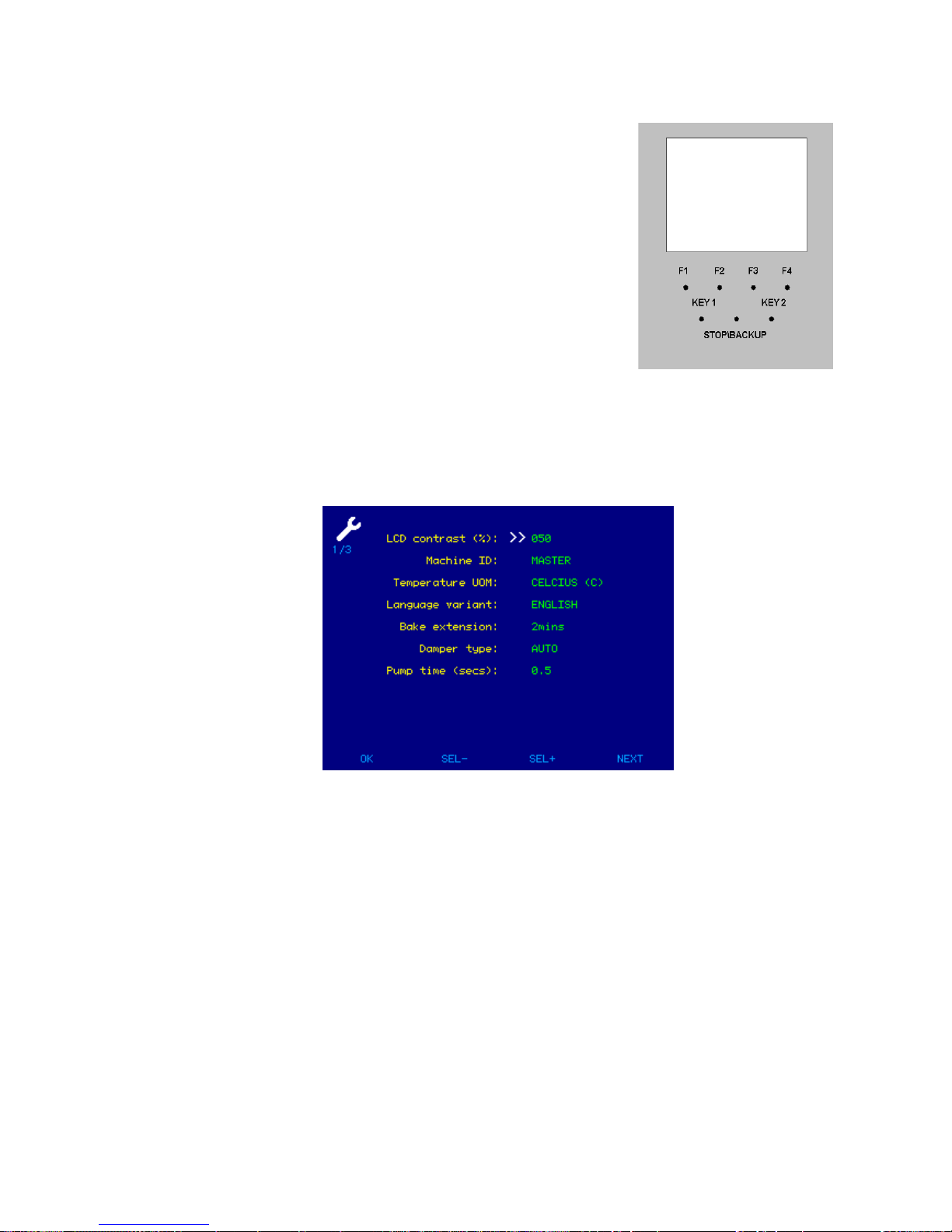
11.0 SET-UP & DIAGNOSTIC MENU
Turn on power at main isolator.
Initially the oven will be in the off state with “select product” above F4
Press the button F1.
Enter the six digit engineers password (default 222222)
Push F3 to go down to the item that requires changing. (F3 to go back up list)
Use key1 or key2 to adjust the setting.
Press ok (F1) to go out of the setting screen or next (F4) to go to the next screen.
Page 29
FG257 UK colour MODULAR DECK Rev A17 11-04-17
29
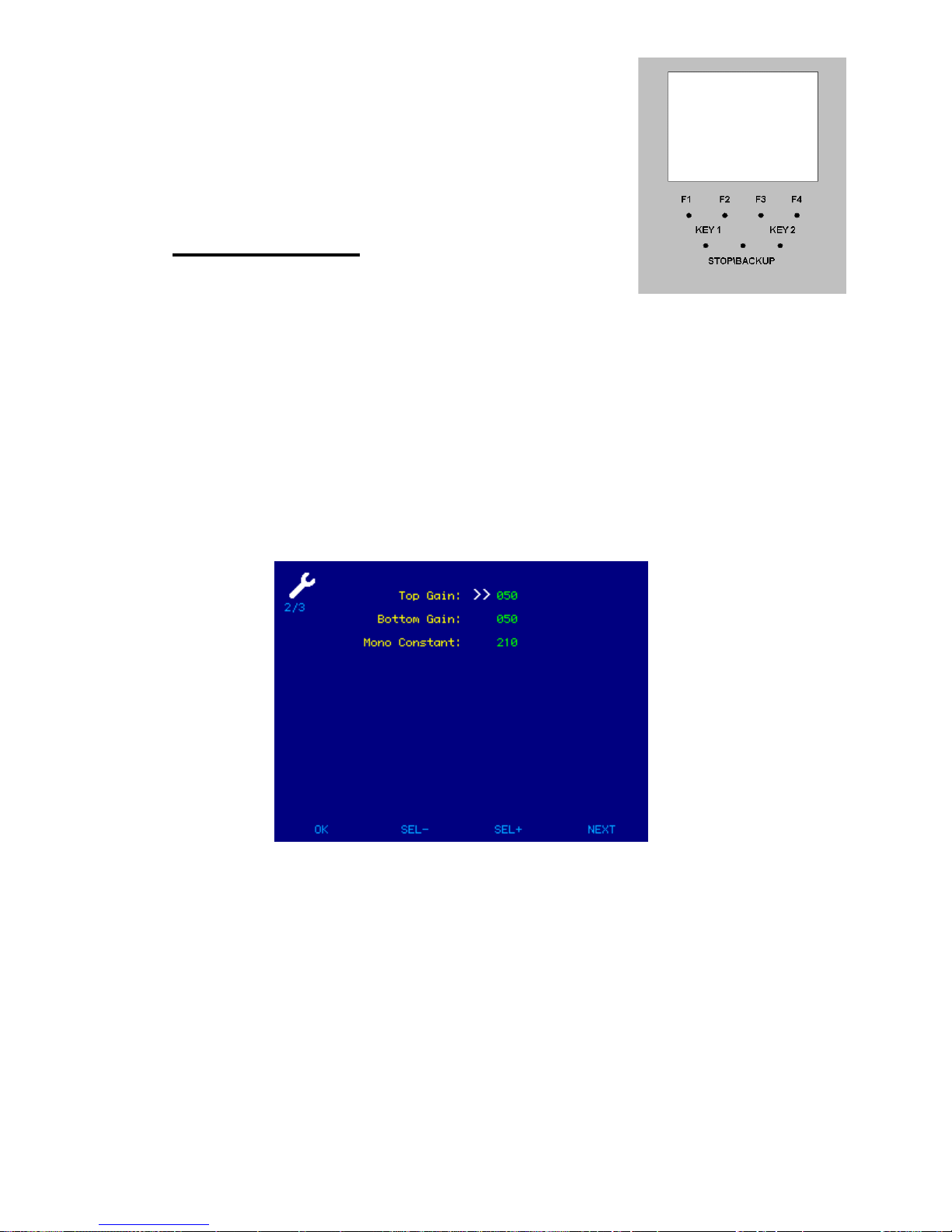
GAINS MENU
These are factory set gains, any values other
than that shown below will seriously affect the performance of the oven.
Top Gain- 50
Low Gain- 50
Mono Constant- 210
DO NOT CHANGE THESE SETTINGS UNLESS INSTRUCTED TO DO SO BY
“MONO”
Press next (F4) or ok (F1) to exit.
Page 30
FG257 UK colour MODULAR DECK Rev A17 11-04-17
30
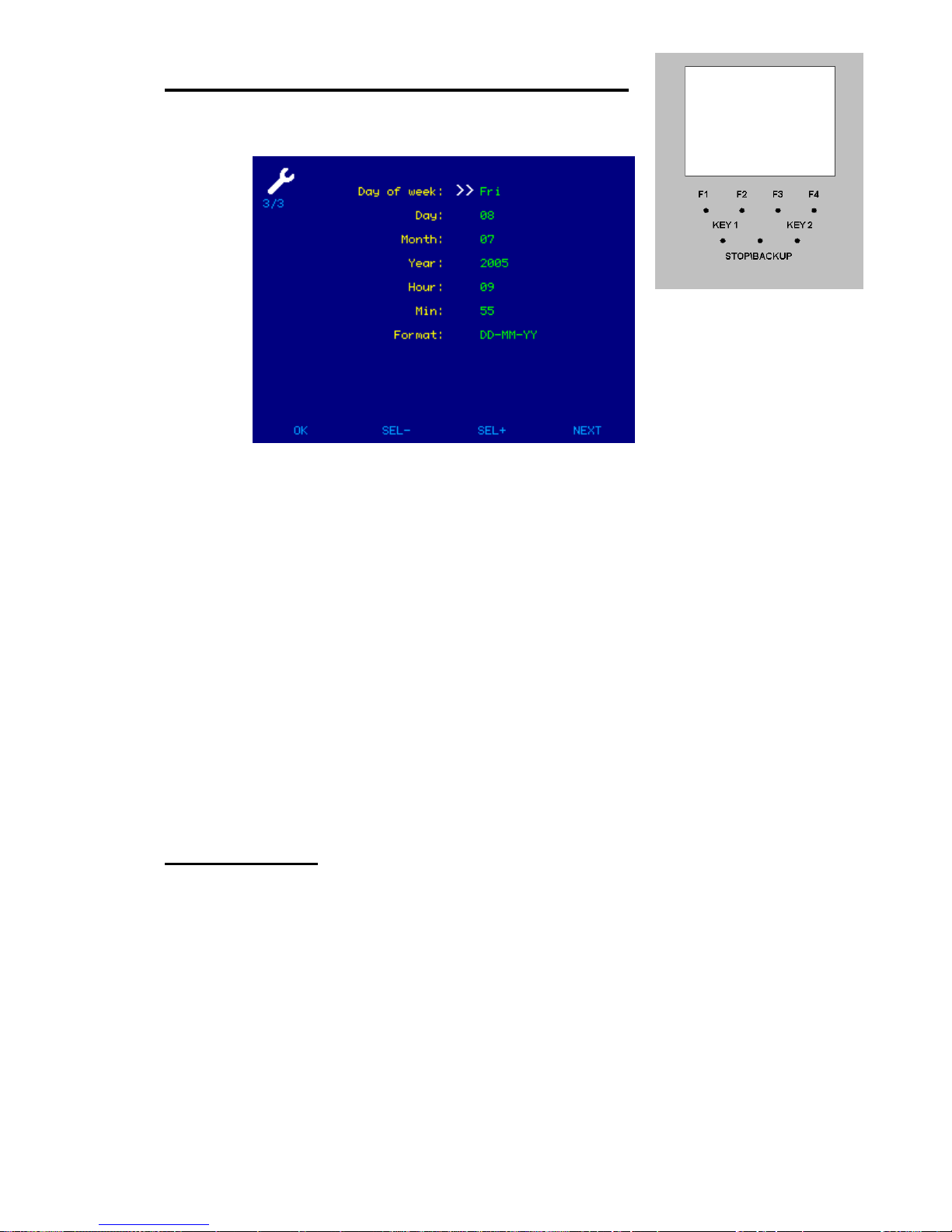
SETTING CURRENT TIME AND DATE
Use the up\down arrow buttons F2 & F3 to scroll through the fields.
With the desired field highlighted use the buttons represented by the arrow
symbols KEY1 & KEY2 to alter the value.
When the time and date are correct, press ok (F1) or next (F4) to go to the next screen.
PASSWORDS
EDITING DEFAULT 111111 SET-UP DEFAULT 222222
The passwords can be changed by highlighting the digit to change and changing it with
the arrow keys 1 & 2.
press DIAGS (F4) to go on to the next screen.
Page 31
FG257 UK colour MODULAR DECK Rev A17 11-04-17
31
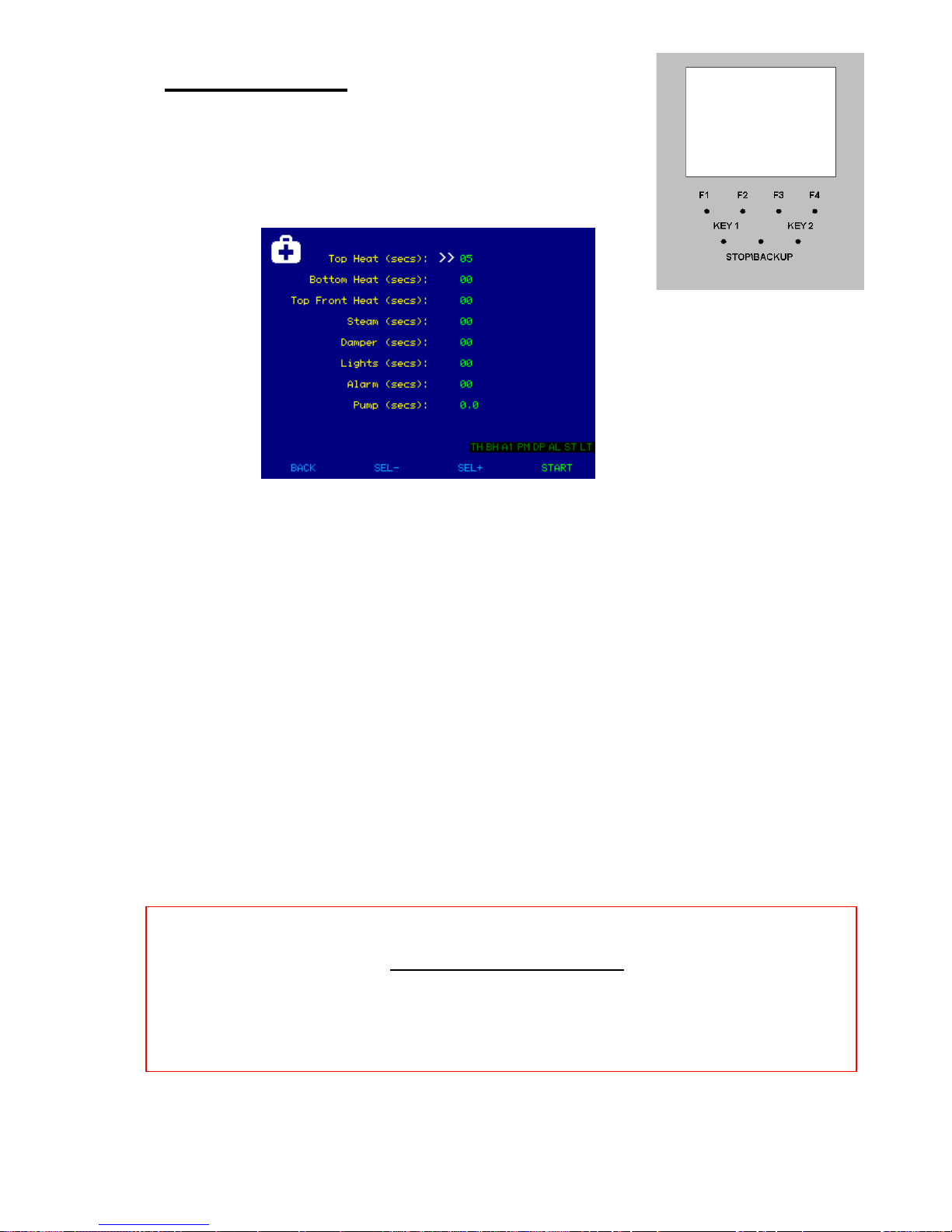
DIAGNOSTICS
Here items can be tested for correct operation.
Use F2 or F3 to highlight the item to be tested.
Use Key 1 or key2 to enter the length of test in seconds.
When ready to test, press start (F4) and test will commence.
Press Stop when tests are completed and oven will revert back to start screen.
SERIAL COMMUNICATIONS
Although the oven is capable of upload and download of information,
this has not yet been implemented
Page 32

FG257 UK colour MODULAR DECK Rev A17 11-04-17
32
12.0 TROUBLESHOOTING
NONE OF THE DECKS SWITCHED ON.
Is main oven power on?
Check if bakery main power supply time clock is working (if fitted).
Is 7-day timer clock set correctly to bring oven on at required time?
ONE DECK HAS NOT SWITCHED ON.
Check if individual deck timer is set to bring it on at required time.
UNEVEN OR PATCHY BAKE
Door is being opened too often or too long whilst loading.
(front pale, back burnt).
Faulty element.
All top or bottom deck elements not functioning.
Uneven loading.
No supply voltage across a phase.
TEMPERATURE GOING WELL OVER SET TEMPERATURE
When empty the temperature of a deck oven can exceed the set baking temperature.
This overheat is marginal when the deck is full of product. If the elements are
continuing to work after the set temperature has been reached call Mono service.
(Please allow up to 15deg.C difference before diagnosing a fault condition),
POOR RECOVERY OF SET TEMPERATURE WHEN LOADED
The doors may have been left open too long during loading, allowing heat to escape.
The damper may have been left open during loading or baking allowing heat to escape.
Top and/or bottom heat may not be working or set at a low value.
No supply voltage across a phase.
STEAM SYSTEM NOT OPERATING CORRECTLY
Check that the water supply is connected and the tap to each deck is in the on position.
If there is still a problem, Contact Mono.
Page 33

FG257 UK colour MODULAR DECK Rev A17 11-04-17
33
13.0 SERVICE
If a fault arises, please do not hesitate to contact the
Customer Service Department, quoting the machine serial number
on the silver information plate of the machine and on the front cover of this manual
.
.
MONO
Queensway
Swansea West Industrial Estate
Swansea. SA5 4EB UK
email:[email protected]
Spares Tel. +44(0)1792 564039
Web site:www.monoequip.com
Main Tel. +44(0)1792 561234
Fax. 01792 561016
Page 34
FG257 UK colour MODULAR DECK Rev A17 11-04-17
34
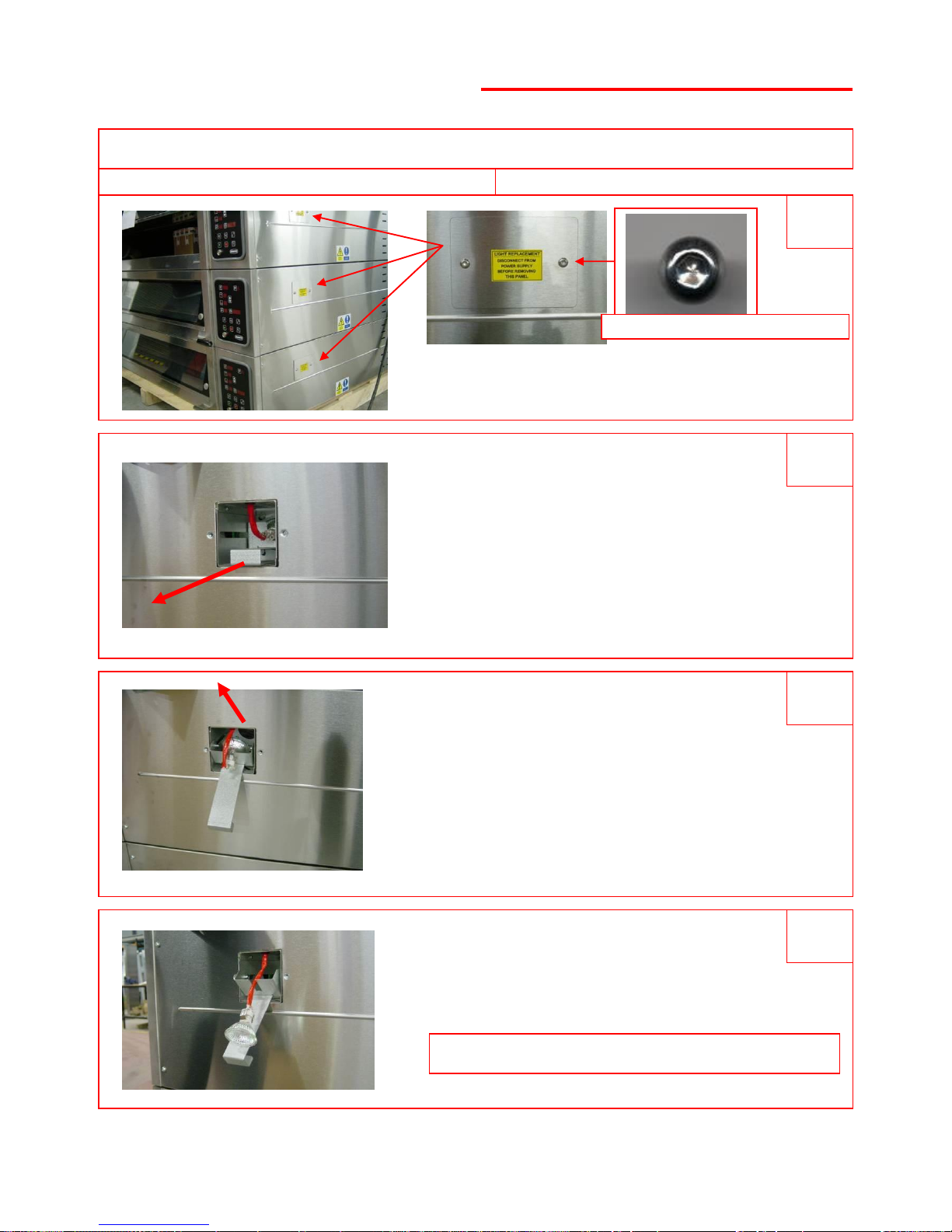
LIGHT REPLACEMENT
UNSCREW PLATE NEXT TO
LIGHT TO BE REPLACED
SLIDE FITTING OUT
REMOVE LIGHT FROM HOLDING SLOT
AND UNCLIP FROM CABLE
REPLACE LIGHT AND REFIT ALL PARTS
DISCONNECT FROM POWER SUPPLY BEFORE REPLACING LIGHT BULBS
RECONNECT POWER SUPPLY AND TEST
3 2 1
4
24v 20w LAMP PART NUMBER … B855-94-008
Page 35
FG257 UK colour MODULAR DECK Rev A17 11-04-17
35
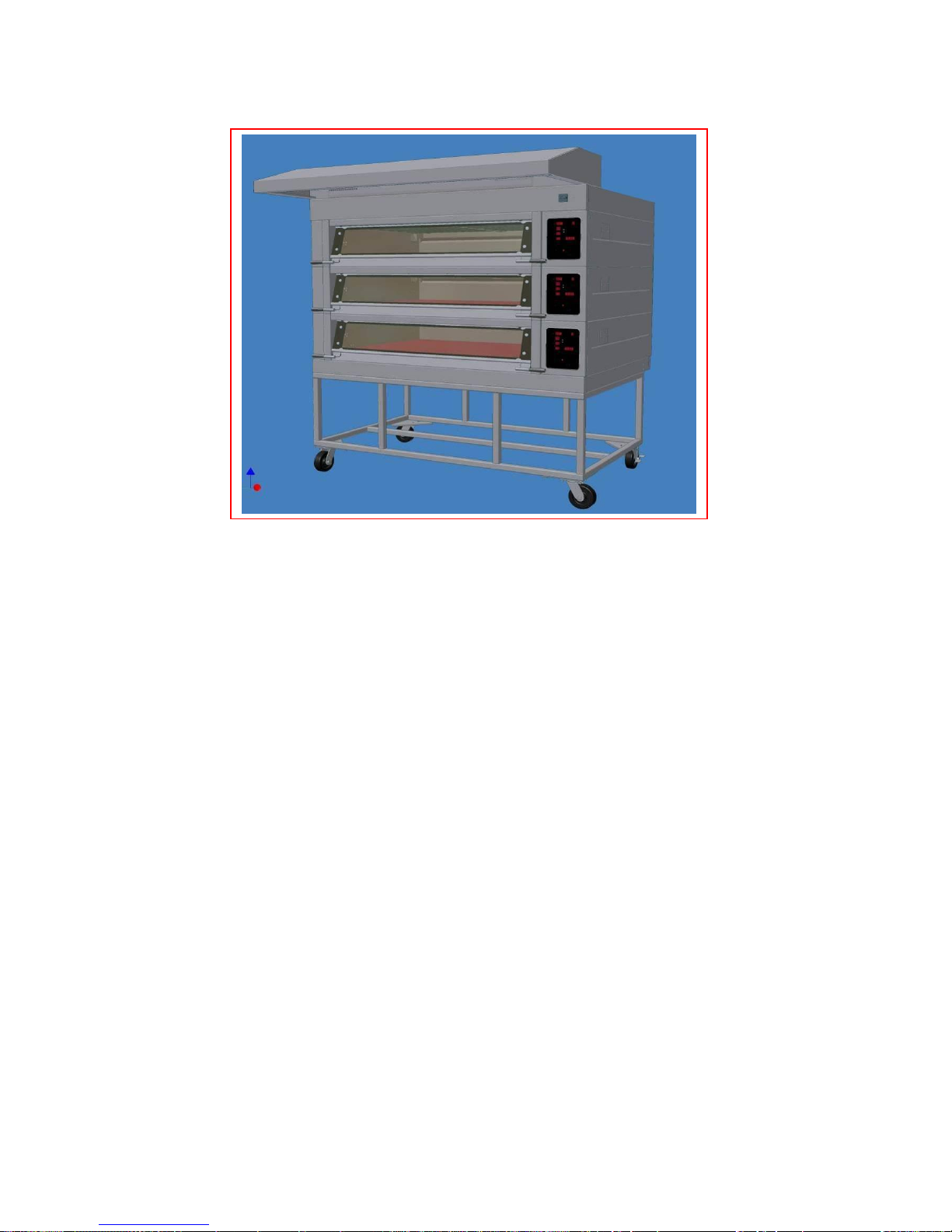
14.0 SPARES INFORMATION
Page 36

FG257 UK colour MODULAR DECK Rev A17 11-04-17
36
OVEN SPARES
FROSTED GLASS M257-02-00027
PLAIN GLASS M257-02-00028
DOOR BUMPER STOP M257-03-00027
BAKING TILE 3 ACROSS M257-02-00046
2 ACROSS M257-02-00047
1 ACROSS M257-02-00048
HINGE PIN RHS M257-03-00005
HINGE PIN LHS M257-03-00009
BLACK DOOR HANDLE A900-27-192
DOOR SPRING M257-03-00017
WIRE ROPE M257-03-00024
SPRING RETAINING PIN M257-03-00025
PULLEY M257-03-00015
PULLEY SPINDLE M257-03-00013
DAMPER DRIVE COUPLING M257-07-00007
ELEMENT GASKET M245-02-01300
24 v 20w DICHROIC LAMP B855-94-008
Page 37
FG257 UK colour MODULAR DECK Rev A17 11-04-17
37
TOP HEAT ELEMENT 1.0kW B854-04-093
TOP HEAT ELEMENT 0.6kW B854-04-091
BOTTOM HEAT ELEMENT 0.75kW B854-04-092
TOP HEAT ELEMENT 0.65kW B854-04-102
TOP HEAT ELEMENT 0.4kW B854-04-100
BOTTOM HEAT ELEMENT 0.5kW B854-04-101
TOP HEAT ELEMENT 0.325kW B854-04-111
TOP HEAT ELEMENT 0.2kW B854-04-109
BOTTOM HEAT ELEMENT 0.25kW B854-04-110
3 ACROSS
2 ACROSS
1 ACROSS
ELEMENT SPARES
Page 38
FG257 UK colour MODULAR DECK Rev A17 11-04-17
38
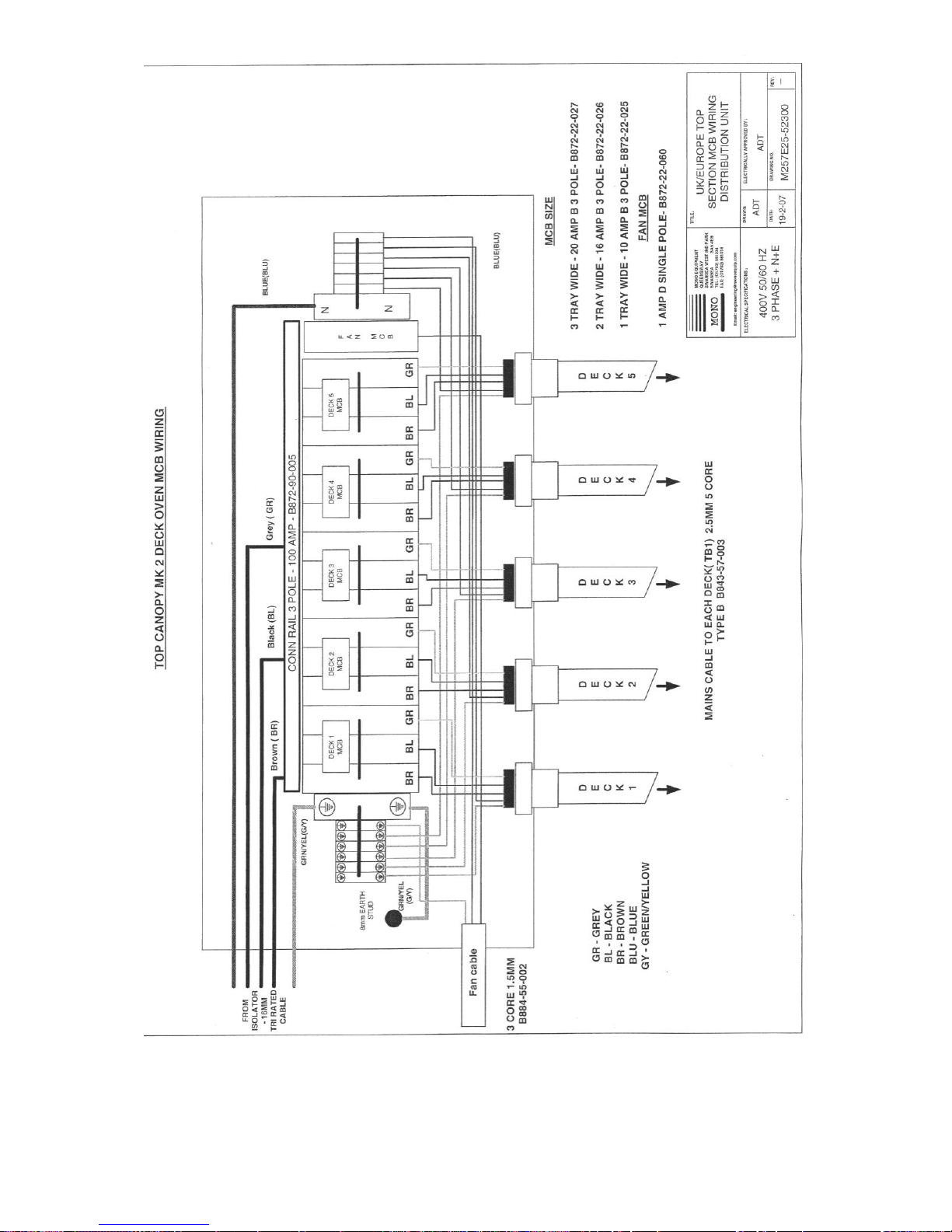
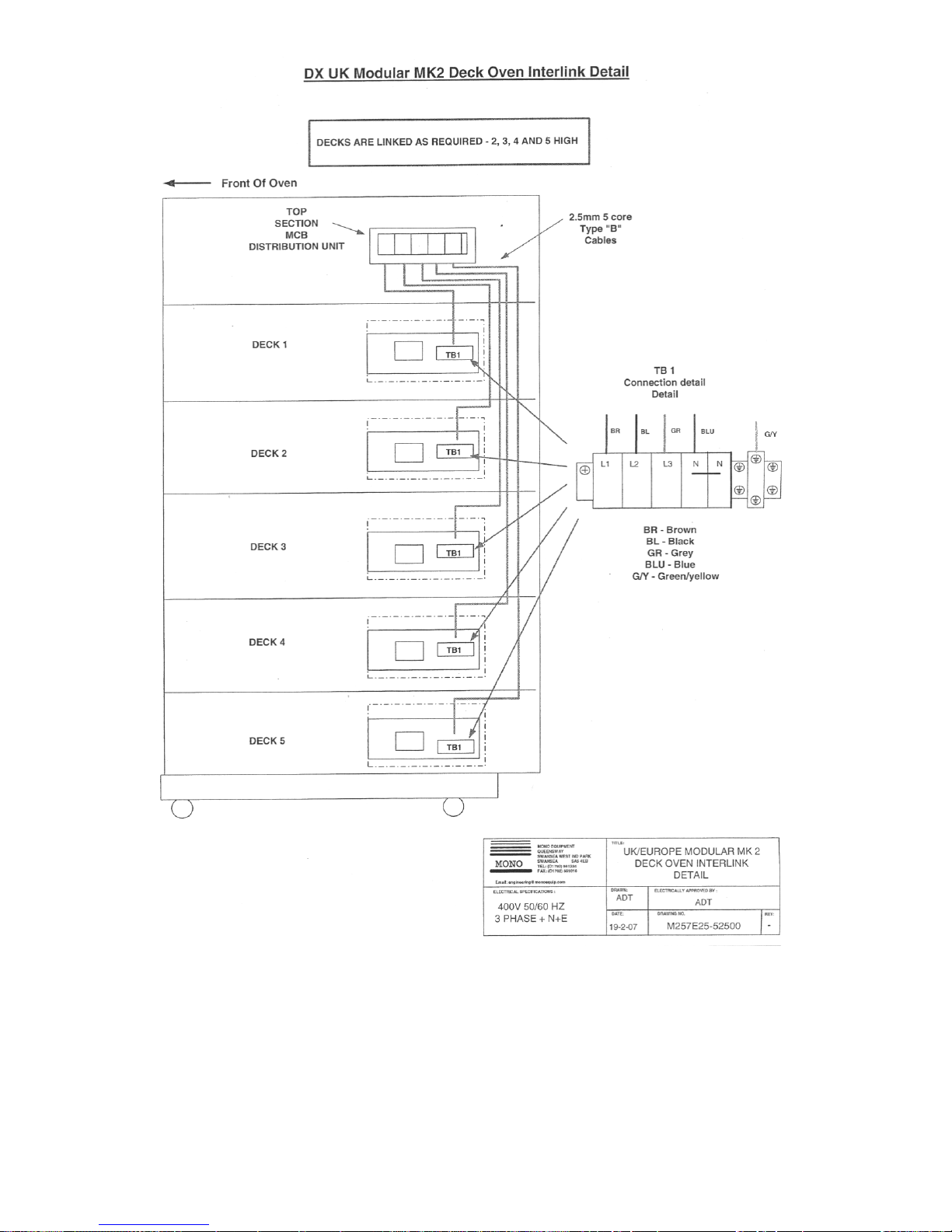
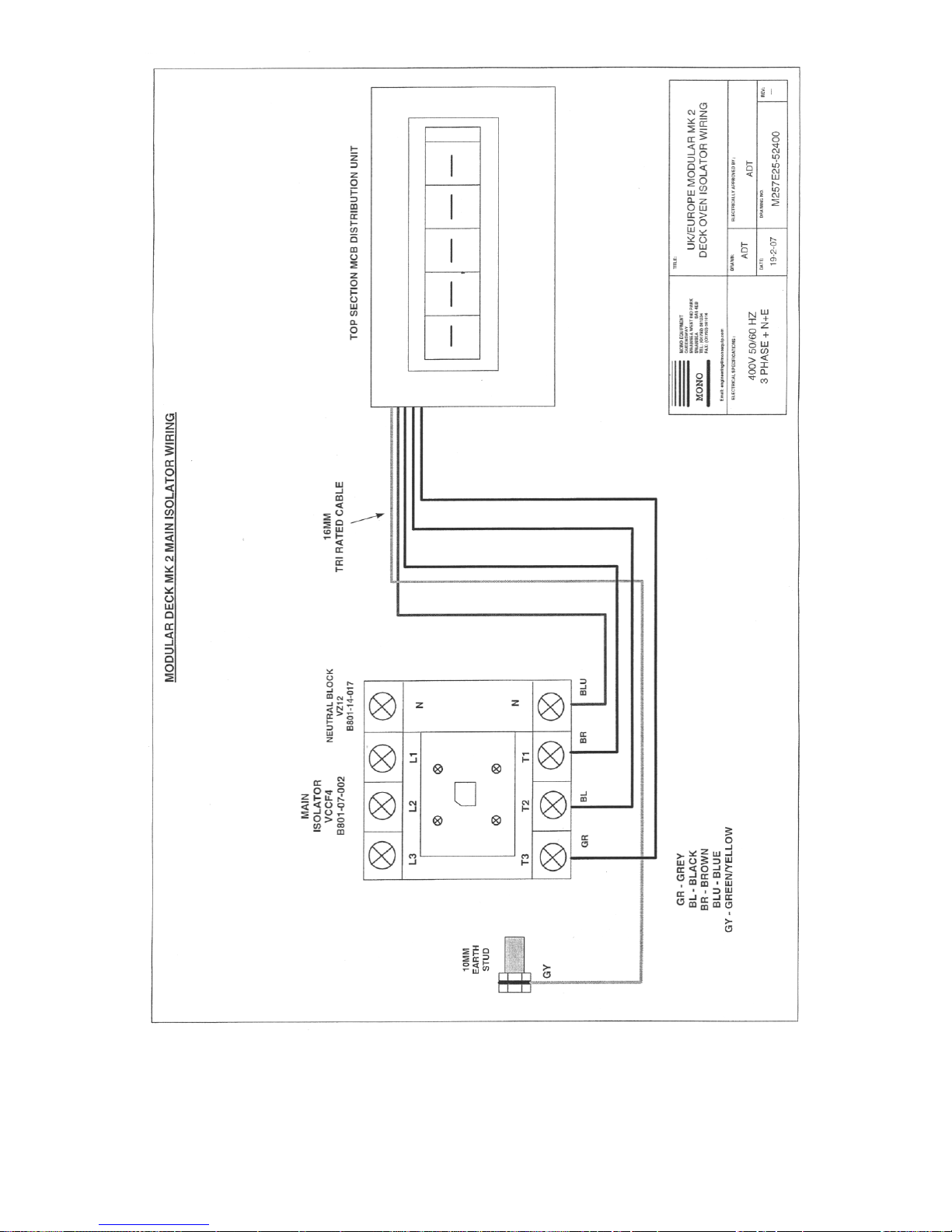
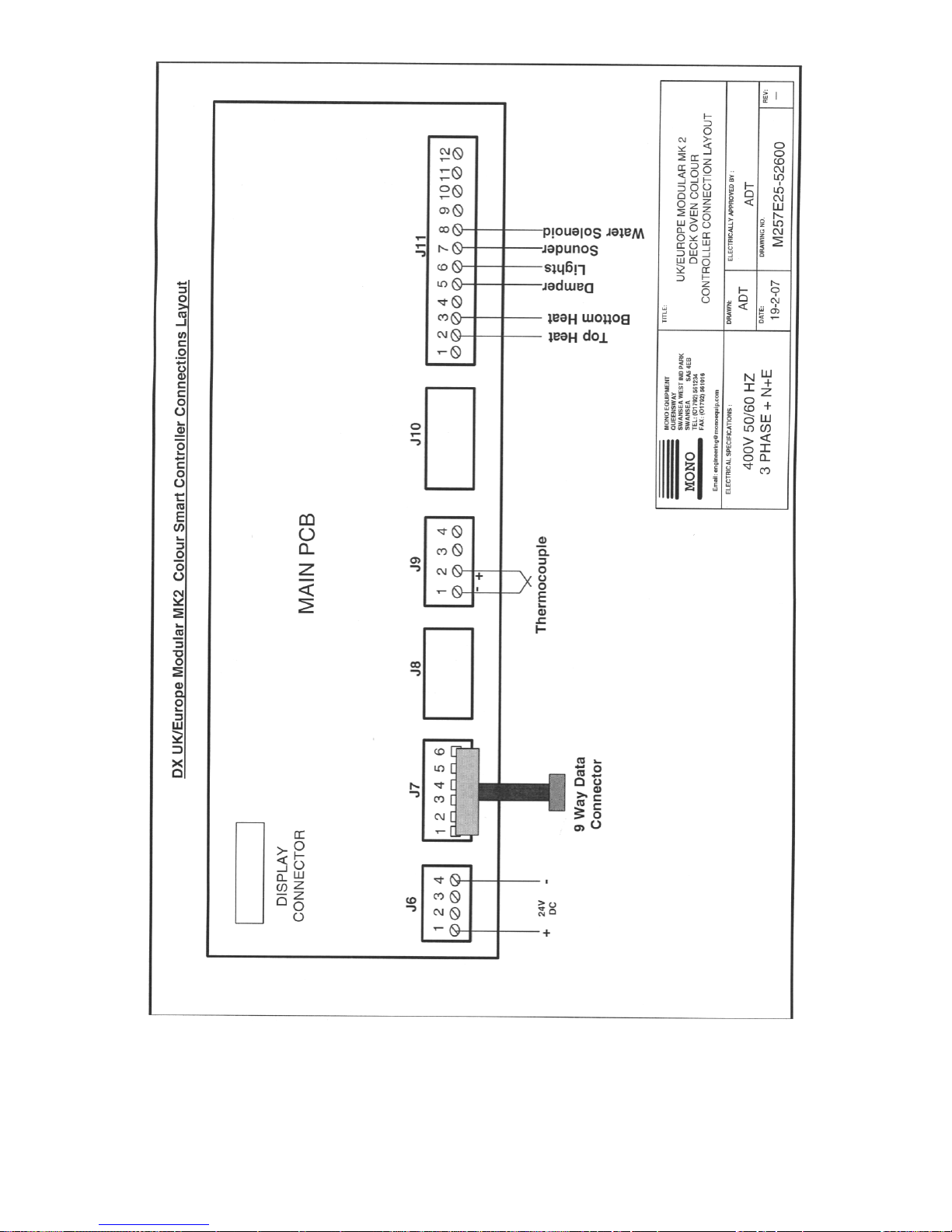
15.0 ELECTRICS
Page 39

FG257 UK colour MODULAR DECK Rev A17 11-04-17
39
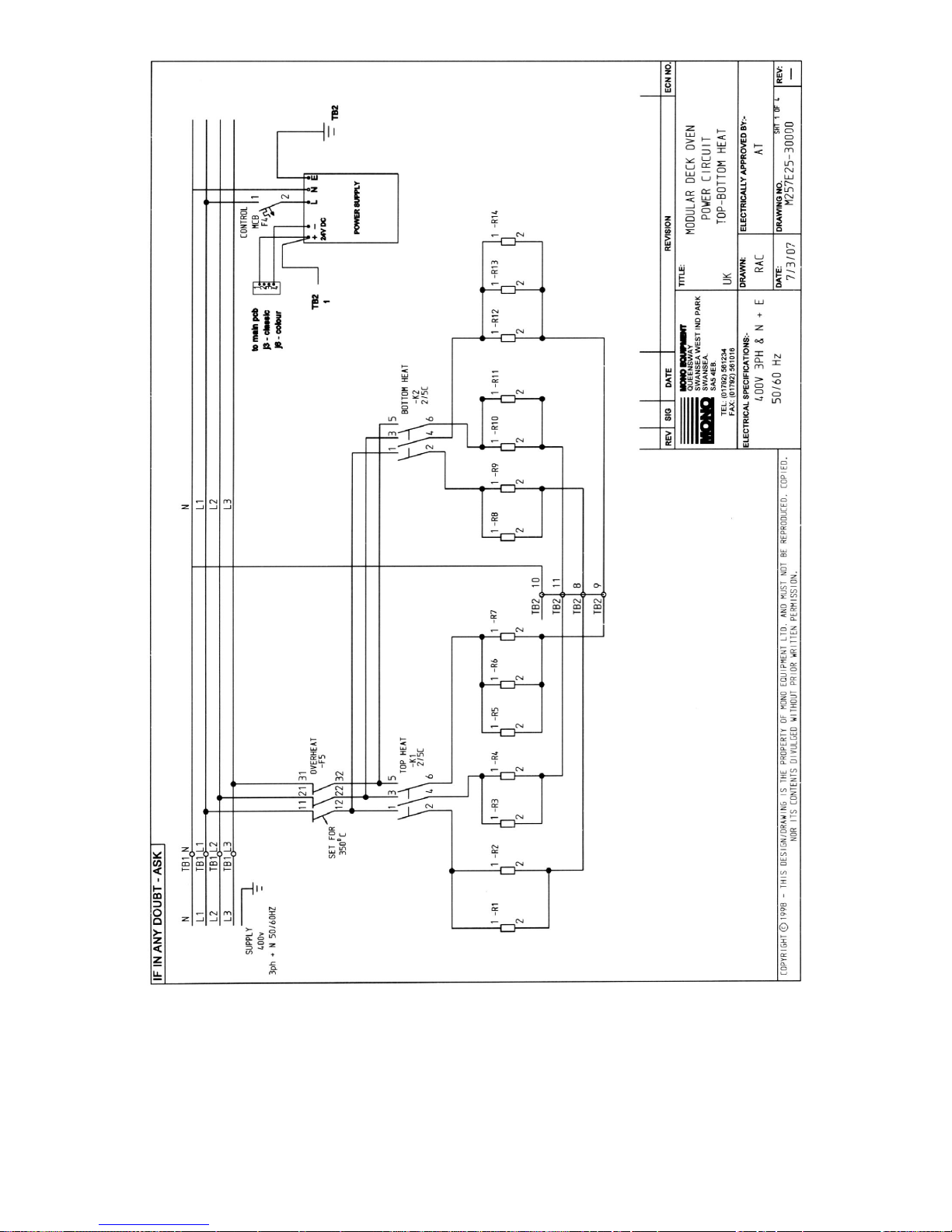
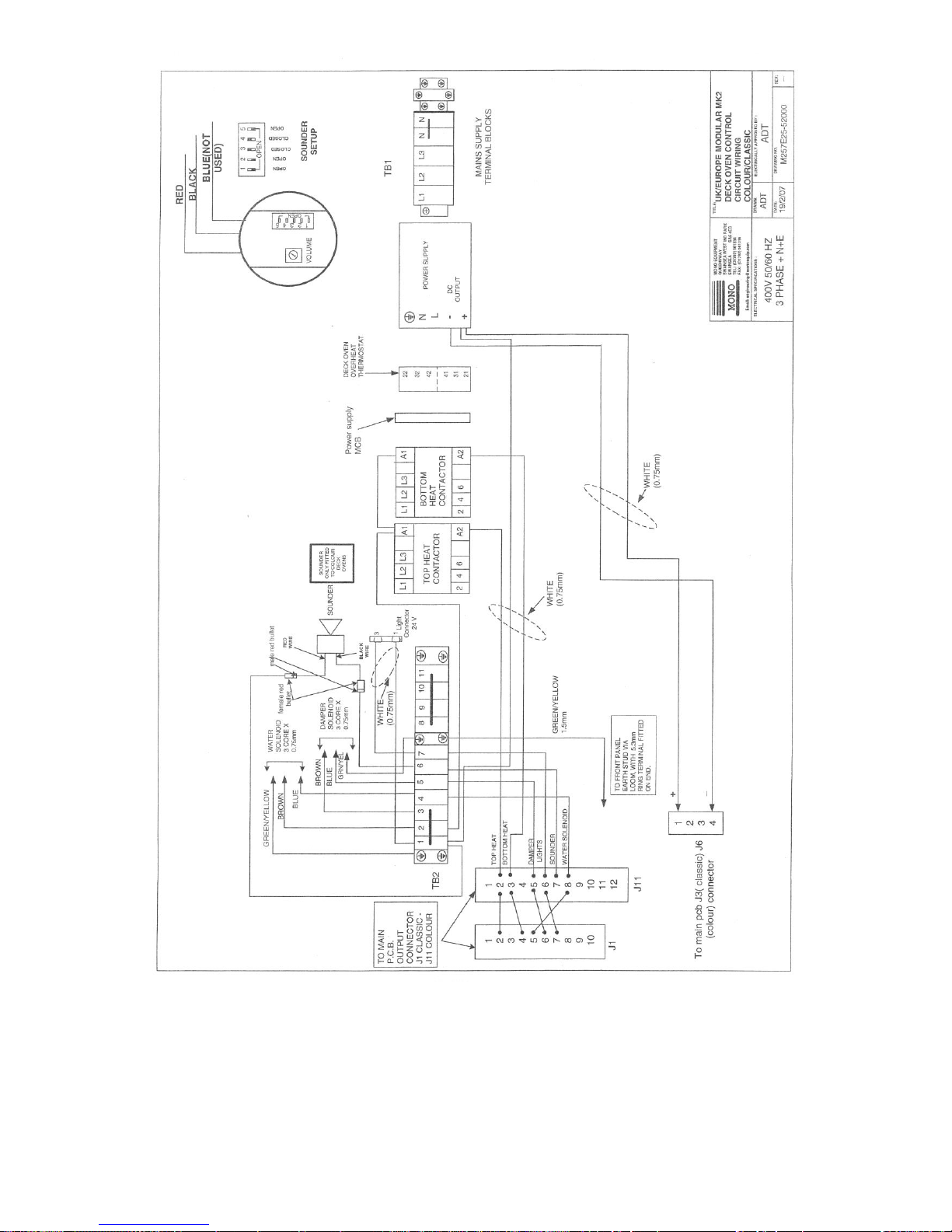
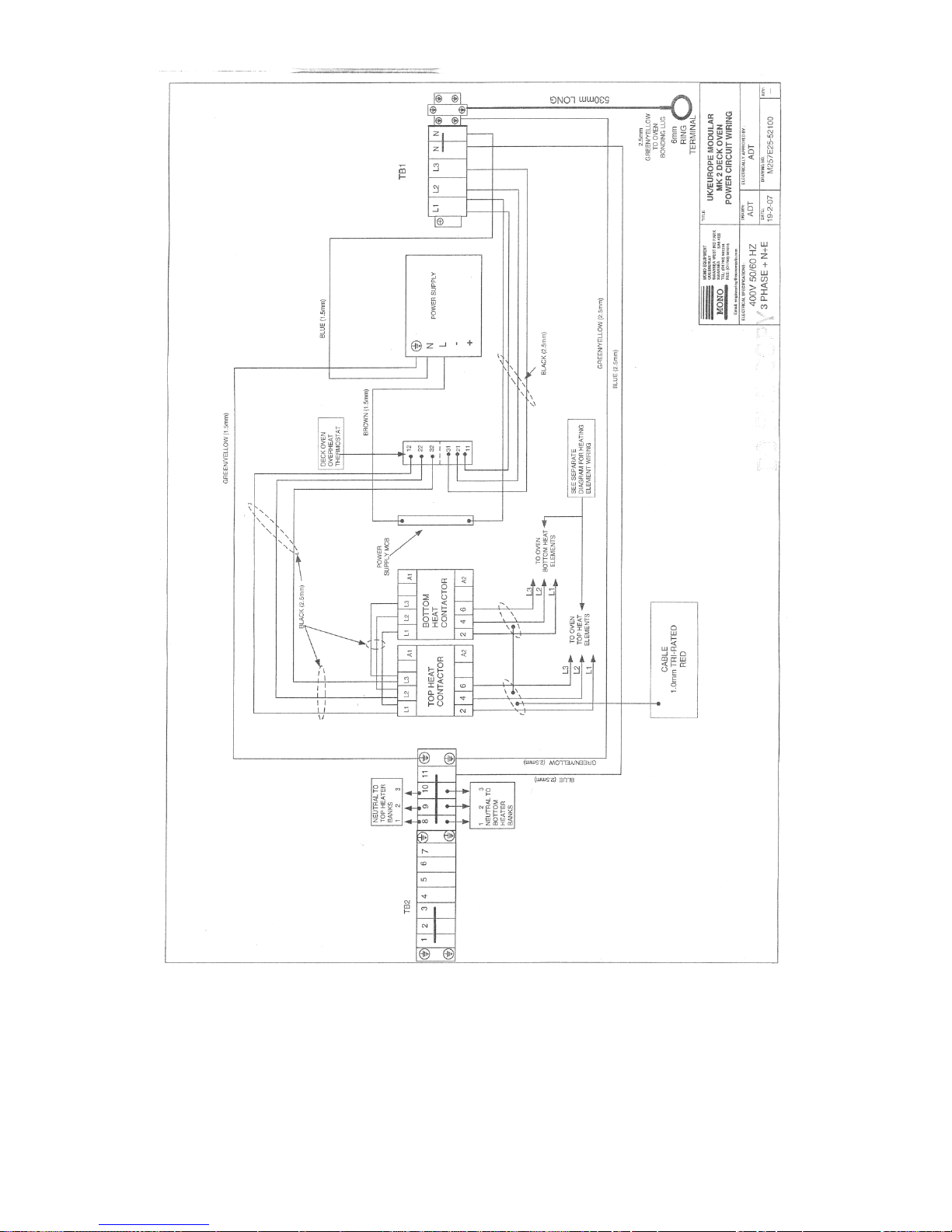
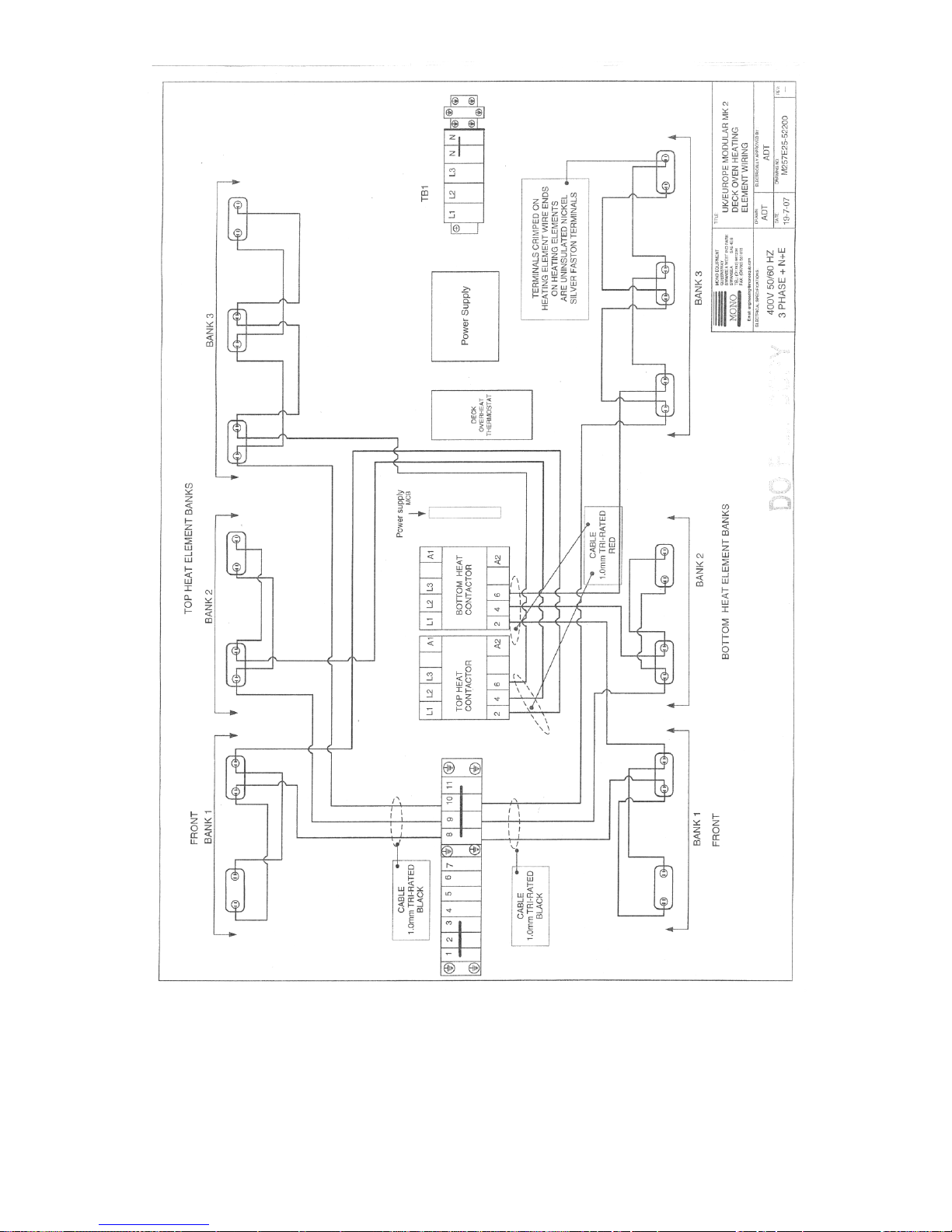
PARTS LIST FOR DRAWINGS FOLLOWING – 2 TRAY WIDE – 220v. (480v IN BRACKETS)
F1 HEATERS MCB B872-22-114 (B872-22-112)
F2 HEATERS MCB B872-22-114 (B872-22-112)
F3 HEATERS MCB B872-22-114 (B872-22-112)
F4 CONTROL TRANSFORMER MCB B872-22-118
F5 OVERHEAT THERMOSTAT B888-30-015
T1 CONTROL CIRCUIT POWER SUPPLY B801-93-005 (B801-93-009)
K1 TOP HEAT CONTACTOR B801-08-021
K2 BOTTOM HEAT CONTACTOR B801-08-021
Y1 WATER SOLENOID A900-34-349
H1 INTERIOR LIGHT B855-94-008
B1 OVEN THERMOCOUPLE B873-95-003
U1 MAIN LED PRINTED CIRCUIT BOARD M257-25-00000
D1 DAMPER SOLENOID B749-83-004
R1 TOP HEAT ELEMENT 0.65kW B854-04-099 (B854-04-105)
R2 TOP HEAT ELEMENT 0.4kW B854-04-097 (B854-04-103)
R3 TOP HEAT ELEMENT 0.4Kw B854-04-097 (B854-04-103)
R4 TOP HEAT ELEMENT 0.4kW B854-04-097 (B854-04-103)
R5 TOP HEAT ELEMENT 0.4kW B854-04-097 (B854-04-103)
R6 TOP HEAT ELEMENT 0.4kW B854-04-097 (B854-04-103)
R7 TOP HEAT ELEMENT 0.4kW B854-04-097 (B854-04-103)
R8 BOTTOM HEAT ELEMENT 0.5kW B854-04-098 (B854-04-104)
R9 BOTTOM HEAT ELEMENT 0.4kW B854-04-097 (B854-04-103)
R10 BOTTOM HEAT ELEMENT 0.4kW B854-04-097 (B854-04-103)
R11 BOTTOM HEAT ELEMENT 0.4kW B854-04-097 (B854-04-103)
R12 BOTTOM HEAT ELEMENT 0.4kW B854-04-097 (B854-04-103)
R13 BOTTOM HEAT ELEMENT 0.4kW B854-04-097 (B854-04-103)
R14 BOTTOM HEAT ELEMENT 0.4kW B854-04-097 (B854-04-103)
CF1 CANOPY FAN RELAY B801-37-001
PARTS LIST FOR DRAWINGS FOLLOWING – 3 TRAY WIDE
F1 HEATERS MCB B872-22-007
F2 HEATERS MCB B872-22-007
F3 HEATERS MCB B872-22-007
F4 CONTROL POWER SUPPLY MCB B872-22-062
F5 OVERHEAT THERMOSTAT B888-30-014
T1 CONTROL CIRCUIT POWER SUPPLY B801-93-005
K1 TOP HEAT CONTACTOR B801-08-021
K2 BOTTOM HEAT CONTACTOR B801-08-021
Y1 WATER SOLENOID (10mm pipe) A900-34-349(up to May 2007)
WATER SOLENOID (8mm pipe) A900-34-365 (after May 2007)
H1 INTERIOR LIGHT B855-94-008
B1 OVEN THERMOCOUPLE B873-95-003
U1 MAIN LED PRINTED CIRCUIT BOARD M257-25-00040
D1 DAMPER SOLENOID B749-83-004
R1 TOP HEAT ELEMENT 1.0kW B854-04-093
R2 TOP HEAT ELEMENT 0.6kW B854-04-091
R3 TOP HEAT ELEMENT 0.6kW B854-04-091
R4 TOP HEAT ELEMENT 0.6kW B854-04-091
R5 TOP HEAT ELEMENT 0.6kW B854-04-091
R6 TOP HEAT ELEMENT 0.6kW B854-04-091
R7 TOP HEAT ELEMENT 0.6kW B854-04-091
R8 BOTTOM HEAT ELEMENT 0.75kW B854-04-092
R9 BOTTOM HEAT ELEMENT 0.6kW B854-04-091
R10 BOTTOM HEAT ELEMENT 0.6kW B854-04-091
R11 BOTTOM HEAT ELEMENT 0.6kW B854-04-091
R12 BOTTOM HEAT ELEMENT 0.6kW B854-04-091
R13 BOTTOM HEAT ELEMENT 0.6kW B854-04-091
R14 BOTTOM HEAT ELEMENT 0.6kW B854-04-091
S1 SOUNDER B723-92-002 (ONLY COLOUR OVENS)
Single phase only
Page 40

FG257 UK colour MODULAR DECK Rev A17 11-04-17
40
PARTS LIST FOR DRAWINGS FOLLOWING – 2 TRAY WIDE
F1 HEATERS MCB B872-22-006
F2 HEATERS MCB B872-22-006
F3 HEATERS MCB B872-22-006
F4 CONTROL POWER SUPPLY MCB B872-22-062
F5 OVERHEAT THERMOSTAT B888-30-014
T1 CONTROL CIRCUIT POWER SUPPLY B801-93-005
K1 TOP HEAT CONTACTOR B801-08-021
K2 BOTTOM HEAT CONTACTOR B801-08-021
Y1 WATER SOLENOID (10mm pipe) A900-34-349(up to May 2007)
WATER SOLENOID (8mm pipe) A900-34-365 (after May 2007)
H1 INTERIOR LIGHT B855-94-008
B1 OVEN THERMOCOUPLE B873-95-003
U1 MAIN LED PRINTED CIRCUIT BOARD M257-25-00040
D1 DAMPER SOLENOID B749-83-004
R1 TOP HEAT ELEMENT 0.65kW B854-04-102
R2 TOP HEAT ELEMENT 0.4kW B854-04-100
R3 TOP HEAT ELEMENT 0.4kW B854-04-100
R4 TOP HEAT ELEMENT 0.4kW B854-04-100
R5 TOP HEAT ELEMENT 0.4kW B854-04-100
R6 TOP HEAT ELEMENT 0.4kW B854-04-100
R7 TOP HEAT ELEMENT 0.4kW B854-04-100
R8 BOTTOM HEAT ELEMENT 0.5kW B854-04-101
R9 BOTTOM HEAT ELEMENT 0.4kW B854-04-100
R10 BOTTOM HEAT ELEMENT 0.4kW B854-04-100
R11 BOTTOM HEAT ELEMENT 0.4kW B854-04-100
R12 BOTTOM HEAT ELEMENT 0.4kW B854-04-100
R13 BOTTOM HEAT ELEMENT 0.4kW B854-04-100
R14 BOTTOM HEAT ELEMENT 0.4kW B854-04-100
S1 SOUNDER B723-92-002 (ONLY COLOUR OVENS)
Single phase only
Page 41

FG257 UK colour MODULAR DECK Rev A17 11-04-17
41
PARTS LIST FOR DRAWINGS FOLLOWING – 1 TRAY WIDE
F1 HEATERS MCB B872-22-005
F2 HEATERS MCB B872-22-005
F3 HEATERS MCB B872-22-005
F4 CONTROL POWER SUPPLY MCB B872-22-062
F5 OVERHEAT THERMOSTAT B888-30-014
T1 CONTROL CIRCUIT POWER SUPPLY B801-93-005
K1 TOP HEAT CONTACTOR B801-08-021
K2 BOTTOM HEAT CONTACTOR B801-08-021
Y1 WATER SOLENOID (10mm pipe) A900-34-349(up to May 2007)
WATER SOLENOID (8mm pipe) A900-34-365 (after May 2007)
H1 INTERIOR LIGHT B855-94-008
B1 OVEN THERMOCOUPLE B873-95-003
U1 MAIN LED PRINTED CIRCUIT BOARD M257-25-00040
D1 DAMPER SOLENOID B749-83-004
R1 TOP HEAT ELEMENT 0.35kW B854-04-111
R2 TOP HEAT ELEMENT 0.2kW B854-04-109
R3 TOP HEAT ELEMENT 0.2kW B854-04-109
R4 TOP HEAT ELEMENT 0.2kW B854-04-109
R5 TOP HEAT ELEMENT 0.2kW B854-04-109
R6 TOP HEAT ELEMENT 0.2kW B854-04-109
R7 TOP HEAT ELEMENT 0.2kW B854-04-109
R8 BOTTOM HEAT ELEMENT 0.25kW B854-04-110
R9 BOTTOM HEAT ELEMENT 0.2kW B854-04-109
R10 BOTTOM HEAT ELEMENT 0.2kW B854-04-109
R11 BOTTOM HEAT ELEMENT 0.2kW B854-04-109
R12 BOTTOM HEAT ELEMENT 0.2kW B854-04-109
R13 BOTTOM HEAT ELEMENT 0.2kW B854-04-109
R14 BOTTOM HEAT ELEMENT 0.2kW B854-04-109
S1 SOUNDER B723-92-002 (ONLY COLOUR OVENS)
Single phase only
Page 42
FG257 UK colour MODULAR DECK Rev A17 11-04-17
42
Page 43
FG257 UK colour MODULAR DECK Rev A17 11-04-17
43
Page 44
FG257 UK colour MODULAR DECK Rev A17 11-04-17
44
Page 45
FG257 UK colour MODULAR DECK Rev A17 11-04-17
45
Page 46
FG257 UK colour MODULAR DECK Rev A17 11-04-17
46
Page 47
FG257 UK colour MODULAR DECK Rev A17 11-04-17
47
Page 48
FG257 UK colour MODULAR DECK Rev A17 11-04-17
48
Page 49
FG257 UK colour MODULAR DECK Rev A17 11-04-17
49
Page 50
FG257 UK colour MODULAR DECK Rev A17 11-04-17
50
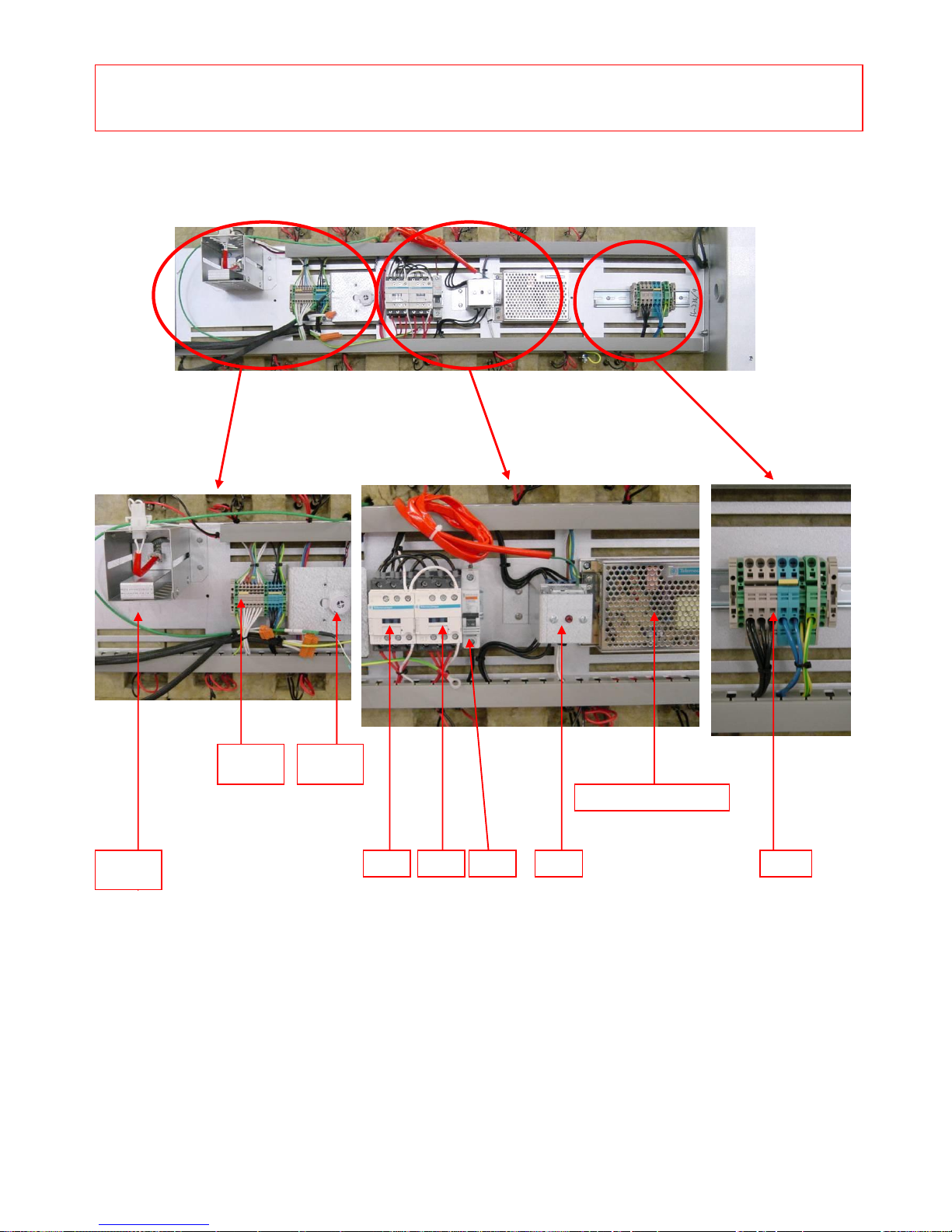
H1
S1
F5
POWER SUPPLY
TB1
TB2
K1
ELECTRICAL PANEL MAIN COMPONENTS
(UK Colour)
F4
K2
Page 51

FG257 UK colour MODULAR DECK Rev A17 11-04-17
51
OVEN CANOPY LAYOUT PARTS LIST
C1 CANOPY FAN CAPACITOR B869-23-005
Q1 CANOPY FAN ON/OFF SWITCH B895-07-005
M1 CANOPY FAN MOTOR B869-75-026
CAPACITOR – 4-6uf – 400VDB – METAL B869-23-005
FAN TYPE R2E225-AG01-21
(230V, 0.88AMP, 200W) B869-75-026
Page 52
FG257 UK colour MODULAR DECK Rev A17 11-04-17
52
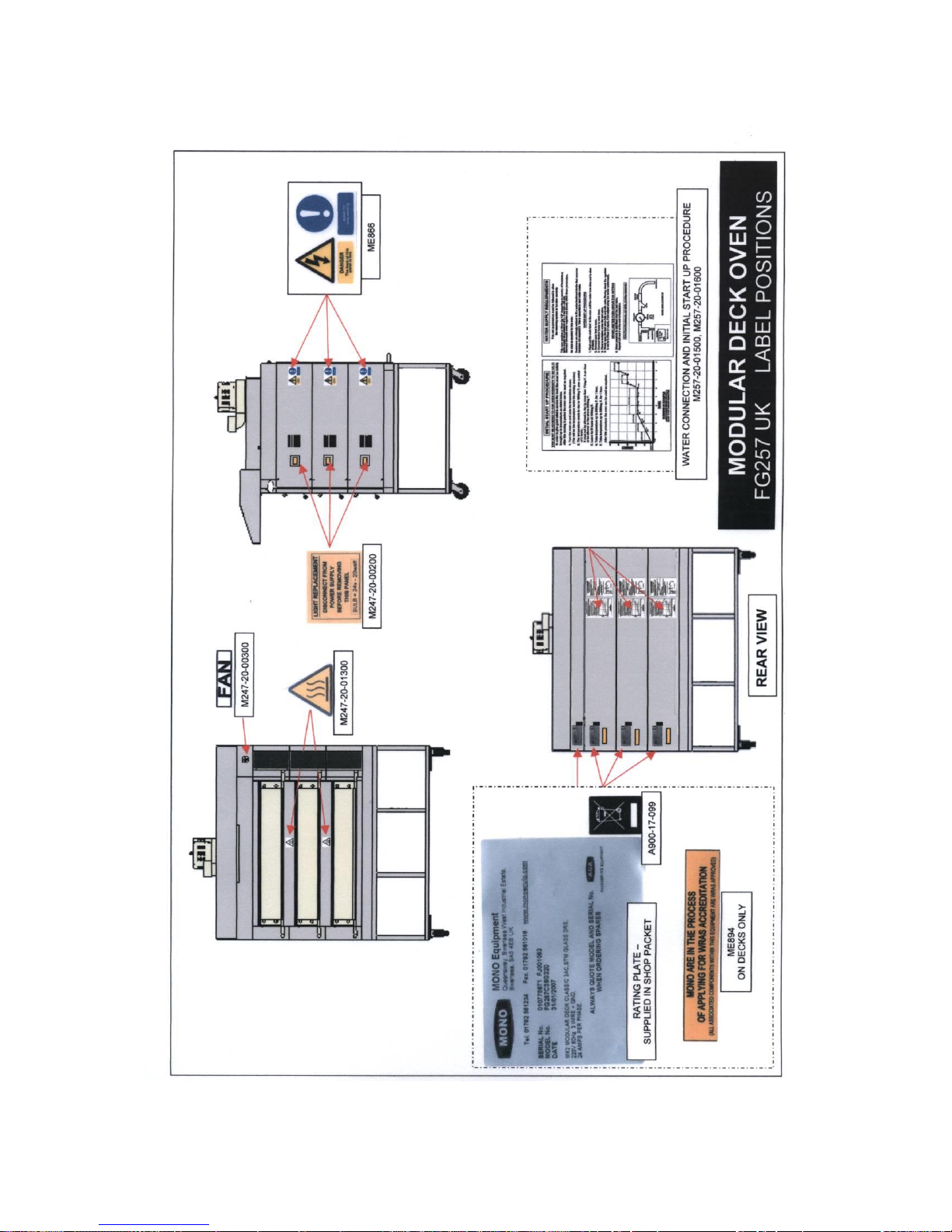
16.0 WARNING AND INFORMATION LABELS
Page 53

FG257 UK colour MODULAR DECK Rev A17 11-04-17
53
MONO Equipment
Queensway, Swansea West Industrial Park, Swansea, SA5 4EB UK
Tel. 01792 561234
Spares +44(0)1792 564039
Fax. 01792 561016
Email: [email protected]
www.monoequip.com
As it is our policy to improve our machines continuously, we reserve the right to
change specifications without prior notice.
DISPOSAL
Care should be taken when the machine comes to the end of its working life. All parts
should be disposed of in the appropriate place, either recycling or other means as the
law permits at the time.
 Loading...