

Page 1
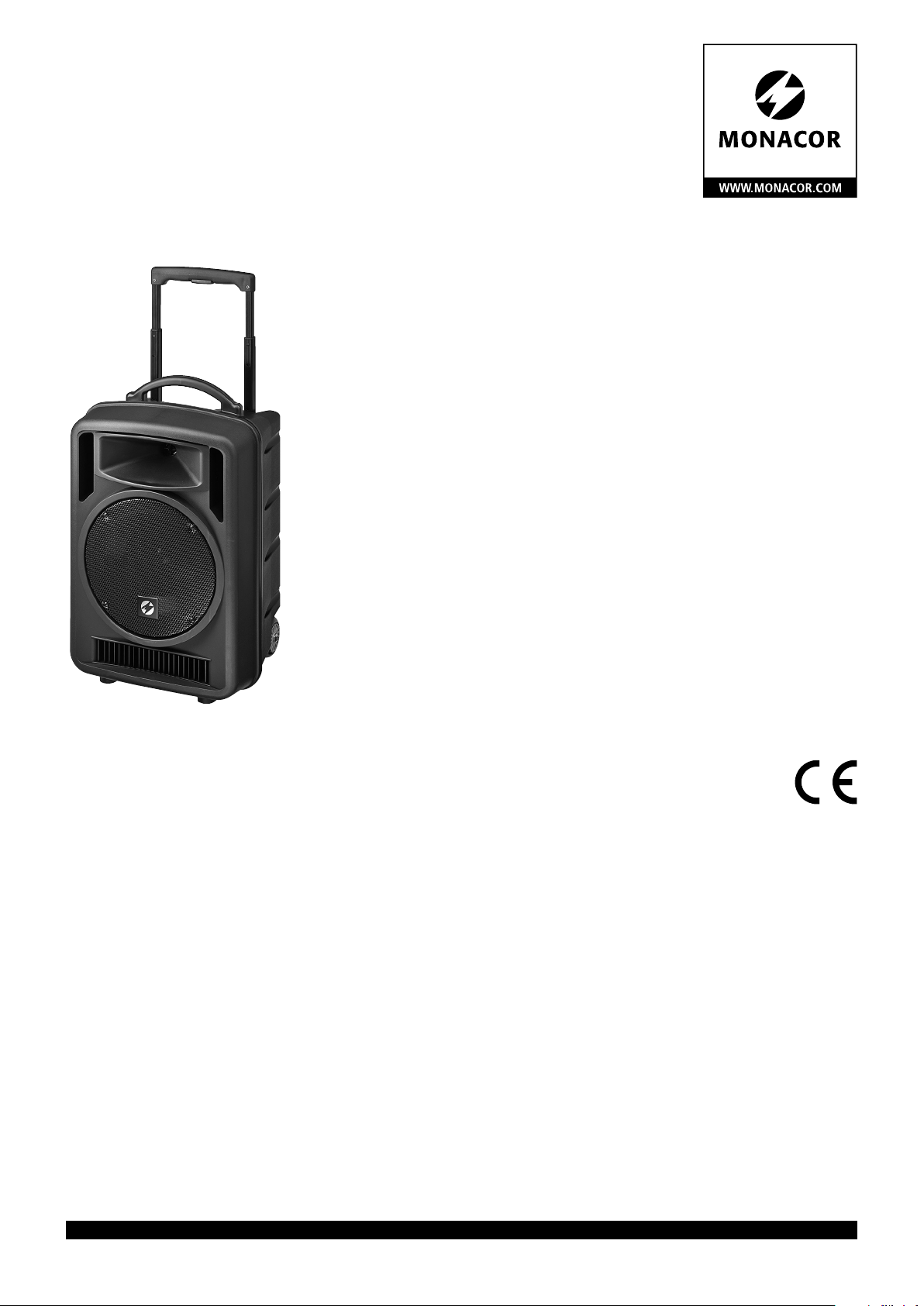
Transportables
High-Power-Verstärkersystem
Portable High-Power Amplifier System
TXA-1022CD
Bestell-Nr. • Order No. 17.4610
BEDIENUNGSANLEITUNG
INSTRUCTION MANUAL
MODE D’EMPLOI
ISTRUZIONI PER L’USO
GEBRUIKSAANWIJZING
MANUAL DE INSTRUCCIONES
INSTRUKCJA OBSŁUGI
SIKKERHEDSOPLYSNINGER
SÄKERHETSFÖRESKRIFTER
TURVALLISUUDESTA
ELECTRONICS FOR SPECIALISTS ELECTRONICS FOR SPECIALISTS ELECTRONICS FOR SPECIALISTS ELECTRONICS FOR SPECIALISTS
Page 2

Deutsch ........Seite 4
English .........Page 9
Français ........Page 14
Italiano.........Pagina 19
Nederlands .....Pagina 24
Español ........Página 29
Polski ..........Strona 34
Dansk ..........Sida 40
Svenska ........Sidan 40
Suomi..........Sivulta 41
ELECTRONICS FOR SPECIALISTS ELECTRONICS FOR SPECIALISTS ELECTRONICS FOR SPECIALISTS ELECTRONICS FOR SPECIALISTS
2
Page 3
1
2 2
POWER
PROGRAM PLAY
PROG
MUTE
6
11 12
MODE
M
3
DIGITAL AUDIO PLAYERVari-Speed
MEMO REP1CDALL RAN PROGF
A→B
M3
RAN/ENT.
SPEED
NOR HI
LOW
7 8 59
13 14
15 14
STOP/EJ——— FOLDER ——
REP/ID3 PREV. —
SKIP —
F.WD
16
17
—
VOL
0
4 5
10
SD
/
SDHC
10
18
20
POWER
B
PROGRAM PLAY
PROG
30
MUTE
MODE
31
19
230 V~ / 50 Hz
SPEED
LOW NOR HIGH
32
1 3
33
4 5 6
7 9
26
FOLDER
2
8
0
F.FF.B
EJECT
PROG
REPEAT
STOP PLAY
REV.
RAN
F.WD
25
30
29
ID3
28
/
I I
2425
2727
ENTER
A B
MODE
A
MEMO REP1
MEMO REP1CDALL RAN PROGF
A
→
A→B
M3
M3
24
CD
M
23
DIGITAL AUDIO PLAYERVari-Speed
ALL RAN PROGF
B
SPEED
NOR HI
LOW
32 29
STOP/EJ——— FOLDER ——
25
REP/ID3 PREV. —
RAN/ENT.
28
26
SKIP —
27
—
F.WD
21
VOL
C
22
0
10
SD
/
SDHC
29 31
3423
35
36
37 38
39
3
Page 4
Transportables
High-Power-Verstärkersystem
Diese Anleitung richtet sich an die Nutzer des
Deutsch
Verstärkersystems (z. B. DJs, Vortragende auf
öffentlichen oder privaten Veranstaltungen etc.).
Zum Verständnis ist kein spezielles Fachwissen
erforderlich. Bitte lesen Sie diese Anleitung vor
dem Betrieb gründlich durch und heben Sie sie
für ein späteres Nachlesen auf.
Auf der ausklappbaren Seite 3 finden Sie alle
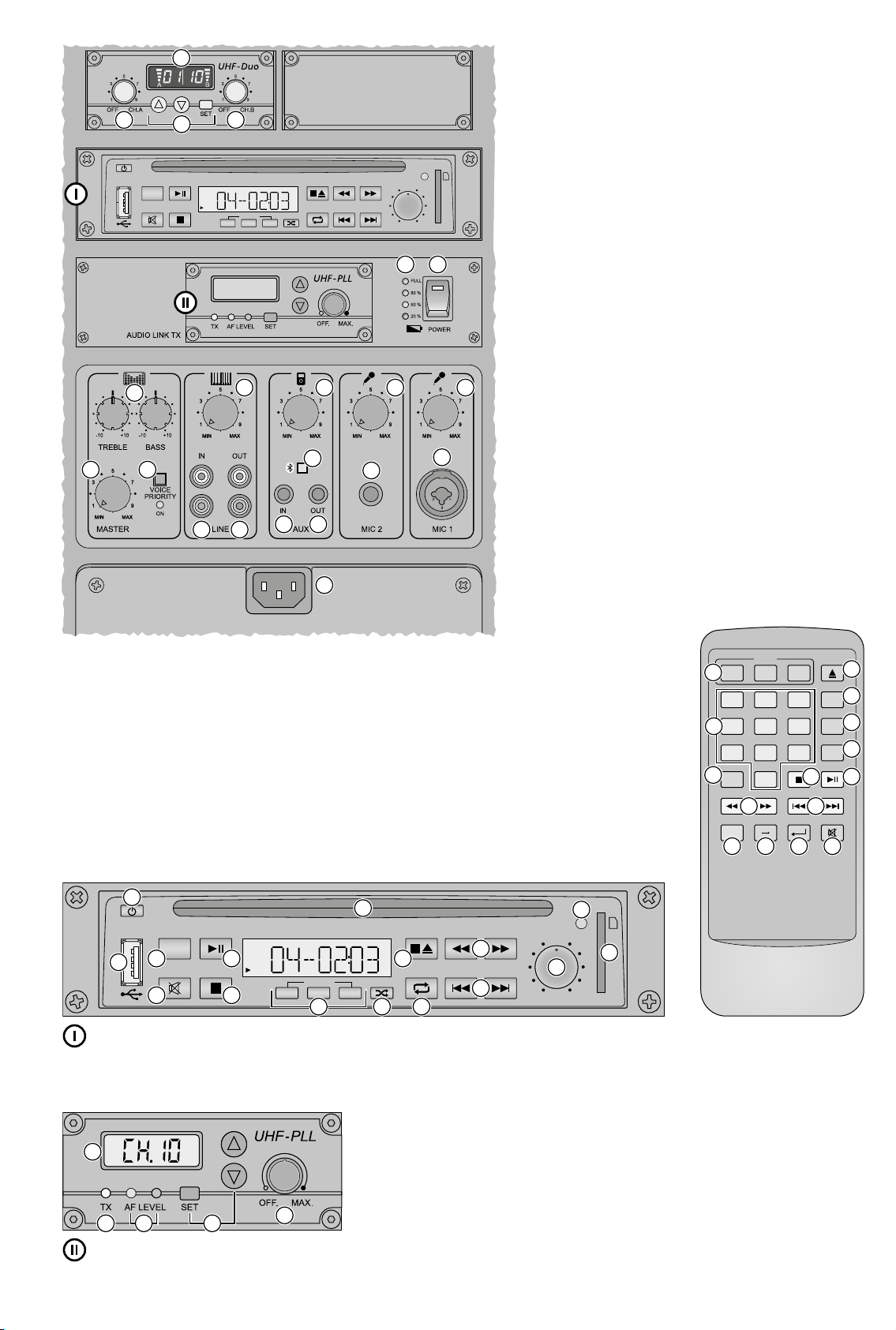
beschriebenen Bedienelemente und Anschlüsse.
1 Einsatzmöglichkeiten
Diese Aktivbox TXA-1022CD ist eine Kombination aus einem 2-Wege-Lautsprechersystem
und einem Klasse-D-Verstärker. Sie ist speziell für
einen netzunabhängigen Betrieb ausgelegt. Zur
Stromversorgung sind Blei-Gel-Akkus eingebaut,
die bei Netzanschluss aufgeladen werden. Das
Gerät eignet sich damit optimal für den mobilen
Einsatz zur Beschallung bei Veranstaltungen,
Vorträgen, etc.
Die Aktivbox verfügt über regelbare Eingänge zum Anschluss von zwei Mikrofonen
und zwei Tonquellen mit Line-Signalpegel
(z. B.CD / MP3-Player) sowie über zwei Ausgänge
(z. B. für den Anschluss einer weiteren Aktivbox).
Über den integrierten Bluetooth-Empfänger ist
es möglich, Audiodaten einer Bluetooth-Tonquelle (z. B. Smartphone) wiederzugeben.
Weitere Ausstattung:
–
2-Kanal-Empfangsmodul (2 × 16 Kanäle im
UHF-Bereich 863,1 – 864,9 MHz) für den Betrieb mit zwei Funksendern;
als passende Funksender eignen sich z. B. die
Sender der TXA-800-Serie
–
Audioplayer zum Abspielen von CDs,
USB-Speichermedien und Speicherkarten
–
Sendemodul (16 Kanäle im UHF-Bereich
863,1 – 864,9 MHz), um das Ausgangs signal
kabellos an weitere Aktivboxen der Serie
TXA-800 / -1020 zu übertragen
1.1 Konformität und Zulassung
Hiermit erklärt MONACOR INTERNATIONAL, dass
das Empfangsmodul und das Sendemodul des
Geräts TXA-1022CD der Richtlinie 2014 / 53 / EU
entsprechen. Die EU-Konformitäts erklärung ist
im Internet verfügbar:
www.monacor.de
Das Empfangsmodul und das Sendemodul sind
für den Betrieb in den EU- und EFTA-Staaten
allgemein zugelassen und anmelde- und ge-
bührenfrei.
2 Hinweise für den sicheren
Gebrauch
Das Gerät entspricht allen relevanten Richt linien
der EU und ist deshalb mit gekennzeichnet.
WARNUNG
Verwenden Sie das Gerät nur im Innenbereich.
•
Schützen Sie es vor Tropf- und Spritzwasser,
hoher Luftfeuchtigkeit und Hitze (zulässiger
Einsatztemperaturbereich 0 – 40 °C).
Stellen Sie keine mit Flüssigkeit gefüllten
•
Gefäße, z. B. Trinkgläser, auf das Gerät.
Nehmen Sie das Gerät nicht in Betrieb und
•
ziehen Sie sofort den Netzstecker aus der
Steckdose, wenn:
1.
sichtbare Schäden am Gerät oder am Netzkabel vorhanden sind,
2. nach einem Sturz oder Ähnlichem der Verdacht auf einen Defekt besteht,
3. Funktionsstörungen auftreten.
Geben Sie das Gerät in jedem Fall zur Reparatur in eine Fachwerkstatt.
Ziehen Sie den Netzstecker nie am Kabel aus
•
der Steckdose, fassen Sie immer am Stecker
an!
Verwenden Sie zum Reinigen nur ein trocke-
•
nes weiches Tuch, niemals Chemikalien oder
Wasser.
Wird das Gerät zweckentfremdet, nicht rich-
•
tig angeschlossen, falsch bedient oder nicht
fachgerecht repariert, kann keine Garantie
für das Gerät und keine Haftung für daraus
resultierende Sach- oder Personenschäden
übernommen werden.
Das Gerät wird mit lebensgefährlicher Netzspannung versorgt. Nehmen Sie deshalb
niemals selbst Eingriffe daran
vor. Durch unsachgemäßes Vorgehen besteht die Gefahr eines
elektrischen Schlages.
Soll das Gerät endgültig aus dem Betrieb genommen werden, übergeben
Sie es zur umweltgerechten Entsorgung einem örtlichen Recyclingbetrieb.
3 Übersicht
1 Display des 2-Kanal-Empfangsmoduls, zeigt
den Übertragungskanal und über eine Segmentanzeige die Empfangsstärke des Funksignals (links: Empfangseinheit A, rechts:
Empfangseinheit B)
2
Ein- /Ausschalter und Lautstärkeregler, jeweils
für die Empfangseinheit A und die Empfangseinheit B des 2-Kanal-Empfangsmoduls
3
Tasten zum Einstellen des 2-Kanal-Empfangsmoduls: ☞ Kapitel 7.1
4 Statusanzeige für die Akkus
Im Akku-Betrieb: Die jeweilige LED zeigt
den Ladezustand der Akkus an. Blinkt die
LED „20 %“ , sollten die Akkus so bald wie
möglich wieder aufgeladen werden.
Bei Netzanschluss: Die LEDs leuchten kontinuierlich nacheinander auf, wenn die Akkus
geladen werden. Sind die Akkus voll geladen, leuchtet die LED „FULL“.
5
Ein- /Ausschalter POWER des Geräts, leuchtet
im Betrieb
6
Klangregler: TREBLE für die Höhen und BASS
für die Bässe
7 Lautstärkeregler für das Eingangssignal der
Buchsen LINE IN (13)
8 Lautstärkeregler für das Eingangssignal der
Buchse AUX IN (15) und den integrierten
Bluetooth-Empfänger
9 Lautstärkeregler für das Eingangssignal der
Buchse MIC 2 (17)
10 Lautstärkeregler für das Eingangssignal der
Buchse MIC 1 (18)
11 Regler MASTER für die Gesamtlautstärke
12 Taste VOICE PRIORITY mit Kontroll-LED für
die Mikrofon-Vorrangfunktion: Ist die Taste
gedrückt (LED leuchtet), wird bei Mikrofondurchsagen die Lautstärke der übrigen Tonquellen stark abgesenkt.
13
Eingang LINE IN (Cinch-Buchsen) zum Anschluss einer Tonquelle mit Line-Signalpegel
wie z. B. CD / MP3-Player
14
Ausgänge LINE OUT (Cinch-Buchsen) und
AUX OUT (3,5-mm-Klinkenbuchse) zum Weiterleiten des Mischsignals der verwendeten
Tonquellen, z. B. an eine weitere Aktivbox
oder ein Aufnahmegerät
Hinweis: Die Klangregler (6) und der MASTER-Regler (11) haben keinen Einfluss auf das
Ausgangssignal an diesen Buchsen.
15
Eingang AUX IN (3,5-mm-Klinkenbuchse)
zum Anschluss einer Tonquelle mit Line-Signalpegel wie z. B. CD / MP3-Player
16 Taste zum Einschalten (länger drücken) und
Ausschalten (kurz drücken) des BluetoothEmpfängers (☞ Kapitel 7.2)
Taste blinkt: keine Verbindung zur BluetoothTonquelle
Taste leuchtet konstant: Verbindung zur
Bluetooth-Tonquelle hergestellt
17 Eingang MIC 2 (6,3-mm-Klinkenbuchse) für
den Anschluss eines Mikrofons
18
Eingang MIC 1 (kombinierte Buchse 6,3-mmKlinke / XLR) für den Anschluss eines Mikrofons
19
Netzbuchse zum Anschluss an eine Steckdose (230 V/ 50 Hz) über das beiliegende
Netzkabel
4
Page 5
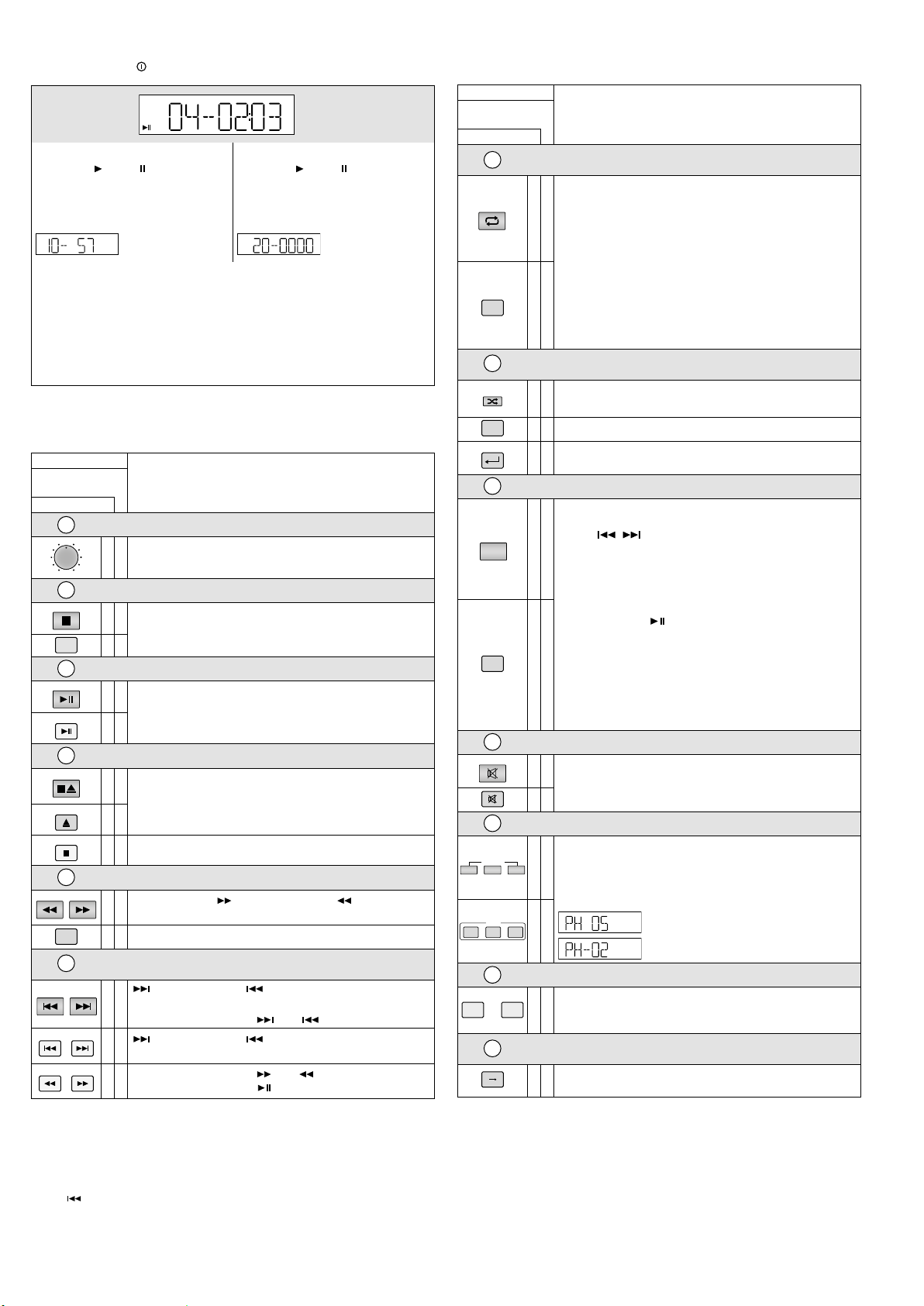
3.1 CD / MP3-Player mit Fernbedienung
MEMO REP1 ALL RAN PROGF
MEMO REP1 ALL RAN PROGF
A
VOL
0
10
MODE
PLAY
PLAY/I I
STOP/EJ
EJECT
STOP
—
—— FOLDER ——
—
FOLDER
PREV. —
SKIP —
F.WD
REV.
F.WD
F.FF.B
REP/ID3
ID3
RAN/ENT.
ENTER
PROGRAM
MUTE
LOW
SPEED
NOR HI
SPEED
siehe Abbildung
→
B
A
M3
CD
MP3-Medien „M3“ Audio-CDs „CD“
Wiedergabe / Pause :
Nummer des Titels im Ordner und gespielte Zeit des Titels (blinkt bei Pause)
Nach dem Schalten auf Stopp: Nach dem Schalten auf Stopp:
Anzahl der Ordner und Titel, z. B.
M3
10 Ordner, 57 Titel
Wiedergabe / Pause :
Nummer des Titels und gespielte Zeit des
Titels (blinkt bei Pause)
Anzahl der Titel, z. B.
→
B
M3
CD
„REP1“ bei Wiederholung des Titels
„REP1 F“ bei Wiederholung des Ordners
„ALL“ bei Wiederholung aller Titel
„RAN“ bei Zufallswiedergabe
„A→B“ blinkt, wenn der Anfang einer Schleife gesetzt wurde und wird beim Abspielen
der Schleife konstant angezeigt
„PROG“ während des Programmierens einer Titelfolge,
„MEMO“ beim Abspielen der Titelfolge
20 Taste POWER zum Ein- und Ausschalten des Players
21 IR-Sensor für die Fernbedienungssignale
Bedienelement
auf der
Fernbedienung
am Player
22
23
M
MODE
24
25
26
27
Hinweise
1.
Ordner- und Titelwahl bei Wiedergabe /Pause:
Den Ordner wählen (kurze Anzeige: Ordnernummer und Zeit 00:00): Die Wiedergabe von Titel 1 im
Ordner startet. Bei Bedarf auf einen anderen Titel springen.
Ordner- und Titelwahl im Stoppmodus:
Den Ordner wählen und innerhalb des Ordners auf den gewünschten Titel springen (Anzeige: Ordnernummer und Nummer des Titels im Ordner). Die Wiedergabe starten.
2.
Taste : Bei CD-Betrieb im Pausenmodus und in einer programmierten Titelfolge springt der Player
beim Drücken der Taste gleich einen Titel zurück.
Lautstärke
✅
Lautstärke einstellen
Abspielmedium auswählen
✅
Umschalten zwischen CD, USB-Speichermedium und Speicherkarte
✅
Wiedergabe / Pause
✅
Wiedergabe starten und
Umschalten zwischen Wiedergabe und Pause
✅
Stopp /CD auswerfen
Wiedergabe stoppen;
✅
im Stoppmodus: CD auswerfen
Nach dem Auswurf kann die im Schlitz steckende CD durch
✅
Drücken der Taste wieder eingezogen werden.
✅
Wiedergabe stoppen
Ordnerwahl
auf den nächsten ( ) oder den vorherigen ( ) Ordner
✅
springen
✅
auf den nächsten Ordner springen
Titel vor- und zurückspringen /
schneller Vor- und Rücklauf
: zum nächsten Titel, : an den Titelanfang, dann mit jedem
weiteren Drücken einen Titel zurück
✅
schneller Vorlauf / Rücklauf: oder gedrückt halten
: zum nächsten Titel, : an den Titelanfang, dann mit jedem
✅
weiteren Drücken einen Titel zurück
schneller Vorlauf / Rücklauf: oder kurz drücken. Ist die
✅
ge wünschte Stelle erreicht, drücken.
Display
20 Titel
Funktion
Bedienelement
auf der
Fernbedienung
am Player
28
endlose Wiederholung /
ID3-Tag-Anzeige
Funktion
Umschalten zwischen:
– Wiederholung des Titels („REP1“)
– Wiederholung des Ordners („REP1 F“)*
✅
– Wiederholung aller Titel („ALL“)
– keine Wiederholung
Zum Einschalten der ID3-Tag-Anzeige* während der Wiedergabe
die Taste für 2Sekunden drücken: Dateiname („FILE“), Titelname
(„TITLE“), Künstler („ARTIST“) und Album („ALBUM“) laufen
durch. Zum Ausschalten die Taste erneut für 2Sekunden drücken.
REPEAT
✅
Die Anzeige schaltet sich auch automatisch beim Erreichen des
nächsten Titels und beim Drücken einer beliebigen Taste aus.
* nur bei MP3-Medien
29
RAN
30
endlose Zufallswiedergabe /
Titelwahl bestätigen
Abspielen aller Titel in zufälliger Reihenfolge („RAN“): Ein /Aus
✅
Titelwahl bestätigen: siehe Position
✅
Abspielen aller Titel in zufälliger Reihenfolge („RAN“): Ein /Aus
✅
Titelwahl bestätigen: siehe Position ㉚ und
㉚
㉝
Programmieren einer Titelfolge
1. PROG drücken („PROG“ wird angezeigt).
2. Den ersten Titel wählen:
– mit / zum Titel springen, ggf. vorher den Ord ner
PROG
✅
wählen
oder
– mit den Zifferntasten die Titelnummer* eingeben
und die Titelwahl mit RAN / ENT. oder ENTER bestätigen.
3. Alle weiteren Titel (max. 10) genauso programmieren.
4. Die Titelfolge mit starten („MEMO“ wird angezeigt).
5. Um in den normalen Abspielmodus zurückzukehren, PROG
drücken: die Titelfolge ist gelöscht.
PROG
✅
Ist keine Wiederholfunktion eingeschaltet (verfügbar sind „REP1“
und „ALL“), schaltet der Player nach dem Abspielen der Titelfolge
auf Stopp, die Titelfolge ist damit gelöscht.
* bei MP3-Medien mit mehreren Ordnern: Nummer des Titels auf
dem Abspiel medium, nicht Nummer im Ordner!
31
Stummschalten
✅
Ton Aus / Ein
✅
32
Abspieltempo (und Tonhöhe) ändern
HI(GH ): Tempo in 10 Schritten erhöhen
LOW: Tempo in 10 Schritten reduzieren
✅
NOR: Rückkehr zum normalen Tempo
HI(GH) oder LOW so oft drücken, bis das gewünschte Tempo
erreicht ist. Das Display zeigt kurz die Einstellung an, z. B.
Normaltempo um 5Schritte erhöht
LOW NOR HIGH
33
1
…
34
A B
A
CD-Einzugsschlitz: die CD so weit einschieben, bis sie automatisch
✅
Titel über die Titelnummer wählen
0
* bei MP3-Medien mit mehreren Ordnern: Nummer des Titels auf
dem Abspiel medium, nicht Nummer im Ordner!
Die Titelnummer* eingeben und mit ENTER bestätigen.
✅
Abschnitt innerhalb eines Titels wiederholen
(Endlosschleife)
Jeweils am Anfang und am Ende des Abschnitts die Taste drücken.
✅
Zum Verlassen der Schleife die Taste erneut drücken.
Normaltempo um 2Schritte reduziert
eingezogen wird
B
USB-Buchse zum Anschluss eines USB- Speichersticks oder einer
USB-Festplatte mit eigener Stromversorgung
C Steckplatz für eine SD- / SDHC-Speicherkarte
Deutsch
5
Page 6
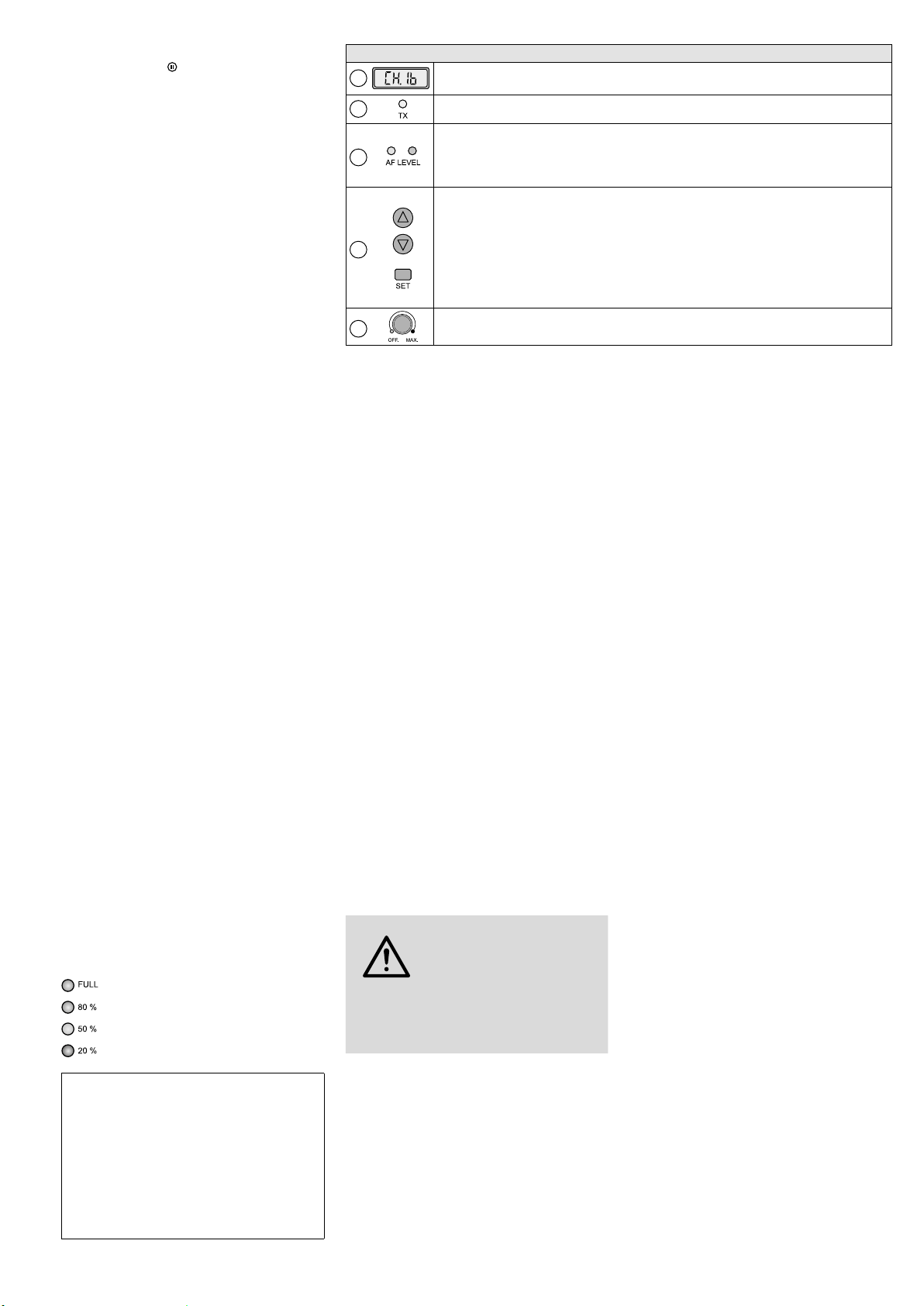
3.2 Sendemodul AUDIO LINK TX
siehe Abbildung
Kabelloser Audio-Link-Betrieb: Das Ausgangssignal einer Aktivbox TXA-1022CD (Hauptgerät)
Deutsch
lässt sich über deren Sendemodul auf die Empfangsmodule anderer Aktivboxen (Nebengeräte)
der Serie TXA-800 / -1020 übertragen. An den
Empfangsmodulen der Nebengeräte den Übertragungskanal einstellen und das Sendemodul
des Hauptgeräts auf den gleichen Kanal einstellen. Bitte beachten: Am Hauptgerät müssen
Empfangs- und Sendemodul auf unterschiedliche Kanäle eingestellt sein, anderenfalls treten
Rückkopplungen auf.
Hinweis: Die Klangregler (6) und der MASTER-Regler
(11) am Hauptgerät haben keinen Einfluss auf das
Ausgangssignal des Sendemoduls.
Bedienelemente und Display
35
36
37
38
39
Display zur Anzeige des Übertragungskanals (CH 1 … CH 16)
Sendeanzeige; leuchtet bei eingeschaltetem Sendemodul
Pegelanzeigen für das Audiosignal am Eingang des Sendemoduls
– gelbe LED: leuchtet ab einem bestimmten Mindestpegel
– rote LED: Übersteuerungsanzeige, sollte höchstens bei Signalspitzen kurz aufleuchten; leuchtet
sie permanent, die Lautstärke der jeweiligen Tonquelle / n reduzieren
Tasten zur Einstellung des Übertragungs kanals:
1. Die Taste SET drücken: Die Kanalanzeige im Display blinkt.
2. Solange die Kanalanzeige blinkt (10 Sek. lang), kann mit den Pfeiltasten der Kanal gewählt
werden.
3. Die Kanalwahl mit der Taste SET bestätigen (anderenfalls schaltet das Sende modul nach 10 Sek.
zurück auf den vorher eingestellten Kanal).
Um sich während des Betriebs kurz die Funkfrequenz anzeigen zu lassen, eine der Pfeiltasten
gedrückt halten: Das Display zeigt solange statt des Kanals die Frequenz an.
Ein- /Ausschalter und Lautstärkeregler des Sendemoduls
4 Aufstellung / Transport
Das Gerät kann frei aufgestellt oder über die
Stativhülse auf der Unterseite auf ein PA-Boxenstativ montiert werden.
Für den Transport besitzt das Gerät einen
ausziehbaren Teleskopgriff. Die Entriegelungstaste an der Griffunterseite herunterdrücken und
den Griff wie gewünscht herausziehen / zusammenschieben.
5 Stromversorgung
5.1 Netzbetrieb /Akkus laden
Soll das Gerät über das Netz betrieben und / oder
sollen die internen Akkus aufgeladen werden,
das beiliegende Netzkabel an die Netzbuchse
(19) anschließen und mit einer Steckdose
(230 V/ 50 Hz) verbinden.
Bei Netzanschluss ist die Ladeautomatik für
die Akkus aktiv: Während des Ladens leuchten die LEDs der Batterieanzeige (4) kontinuierlich nacheinander auf. Das Gerät muss zum
Laden nicht eingeschaltet sein, kann aber auch
während des Ladens betrieben werden. Ist der
Lade vorgang beendet, leuchtet die LED „FULL“
kontinuierlich.
Nach dem Betrieb oder nach dem Aufladen der
Akkus das Gerät von der Netzsteckdose trennen,
damit nicht unnötig Strom verbraucht wird.
5.2 Akku-Betrieb
Im Akku-Betrieb lässt sich über die jeweilige
LED der Batterieanzeige (4) der Ladezustand
der Akkus ablesen:
Ladung 80 – 100 %
Ladung unter 80 %
Ladung unter 50 %
Ladung unter 20 %
Wichtig: Um Beschädigungen der Akkus durch
Tiefentladung zu vermeiden und eine Reduzierung
ihrer Lebensdauer zu verhindern, beachten Sie bitte
folgende Hinweise:
– Vor der ersten Inbetriebnahme und nach längerer
Lagerung die Akkus immer voll aufladen.
– Blinkt die LED „20 %“, sind die Akkus fast entladen
und sollten möglichst bald aufgeladen werden.
– Die Akkus vor jeder längeren Lagerung sowie min-
destens alle zwei Monate während der Lagerzeit
voll aufladen.
6 Audioanschlüsse
Alle Anschlüsse sollten nur bei ausgeschaltetem
Gerät vorgenommen werden.
6.1 Eingänge
Es lassen sich zwei Mikrofone anschließen: über
einen XLR- oder einen 6,3-mm-Klinkenstecker an die Buchse MIC 1 (18) und über einen
6,3-mm-Klinkenstecker an die Buchse MIC2(17).
An die Cinch-Buchsen LINE IN (13) und an
die 3,5-mm-Klinkenbuchse AUX IN (15) können
Audiogeräte mit Line-Signalpegel (z. B. CD / MP3Player, Mischpult, Tapedeck, Tuner) angeschlossen werden. Es lassen sich sowohl Mono- als
auch Stereo-Geräte anschließen, bei einem
Stereo-Eingangssignal werden der linke und
der rechte Kanal zu einem Monosignal addiert.
6.2 Ausgänge
An die Ausgänge LINE OUT und AUX OUT (14)
können weitere Audiogeräte angeschlossen
werden, z. B. ein Aufnahmegerät oder eine
weitere Aktivbox. An beiden Ausgängen steht
das Mischsignal der Tonquellen zur Verfügung,
unbeeinflusst von den Klangreglern (6) und dem
Regler MASTER (11). An jeder Ausgangsbuchse
– den zwei Cinch-Buchsen und der 3,5-mmKlinkenbuchse – liegt ein Mono-Signal an.
7 Bedienung
VORSICHT
Das Ohr gewöhnt sich an hohe Lautstärken
und empfindet sie nach einiger Zeit als nicht
mehr so hoch. Darum erhöhen Sie eine hohe
Lautstärke nach der Gewöhnung nicht weiter.
1) Vor dem Einschalten des Geräts den Regler
MASTER (11) auf „MIN“ drehen.
2)
Zum Ein- und Ausschalten des Geräts den
Schalter POWER (5) verwenden. Bei eingeschaltetem Gerät leuchtet der Schalter. Die
Batterieanzeige (4) gibt den Ladezustand der
Akkus an.
der Akkus durch Tiefentladung zu verhindern,
sorgt ein Entladeschutz für eine rechtzeitige
automatische Abschaltung des Geräts. Auf-
Stellen Sie die Lautstärke nie
sehr hoch ein. Hohe Lautstärken
können auf Dauer das Gehör
schädigen!
Um bei Akku-Betrieb eine Beschädigung
grund der Selbstentladung der Akkus kann
eine Tiefentladung jedoch auch auftreten,
wenn das Gerät länger nicht betrieben wird.
Beachten Sie daher unbedingt den Kasten
„Wichtig“ in Kap. 5.2.
3) Die Tonquellen, die zu hören sein sollen, einschalten und ihre gewünschte Lautstärke mit
den entsprechenden Reglern einstellen (siehe
unten); mit dem Regler MASTER (11) die Gesamtlautstärke für die Aktivbox einstellen.
Lautstärkeeinstellung der Tonquellen:
–
für die zwei Empfangseinheiten des 2-Kanal-Empfangsmoduls den jeweiligen Lautstärkeregler (2), CH.A oder CH.B, verwenden
Bedienung: siehe Kapitel 7.1
–
für den eingebauten Audioplayer den Lautstärke-Regler VOLUME (22) verwenden
Bedienung: siehe Kapitel 7.3 und 3.1
– für ein Gerät am Eingang AUX IN (15) und
den Bluetooth-Empfänger den Lautstärkeregler (8) im Bedienfeld AUX verwenden
Bedienung des Bluetooth-Empfängers:
siehe Kapitel 7.2
Hinweis: Der Regler bestimmt die Lautstärke
des Mischsignals der beiden Quellen, wenn diese
gleichzeitig genutzt werden.
– für ein Gerät am Eingang LINE IN (13) den
Lautstärkeregler (7) im Bedienfeld LINE verwenden
– für ein angeschlossenes Mikrofon den je-
weils darüberliegenden Lautstärkeregler
(10 bzw. 9) verwenden
Die Lautstärke nicht benutzter Quellen immer
auf Minimum einstellen oder die Quellen
ganz ausschalten.
4) Zur Bedienung des Sendemoduls:
siehe Kapitel 3.2.
5) Mit dem Höhenregler TREBLE und dem Tiefenregler BASS (6) den Klang für die Aktivbox
einstellen.
6) Mit der Taste VOICE PRIORITY (12) lässt sich
die Mikrofon-Vorrangfunktion aktivieren. Ist
die Taste gedrückt (LED darunter leuchtet),
wird bei Durchsagen über ein angeschlossenes Mikrofon oder über ein Funkmikrofon
die Lautstärke der laufenden Musik stark abgesenkt. Zum Deaktivieren der Funktion die
Taste wieder ausrasten.
Hinweis: Die Funktion wirkt sich auch auf das
Ausgangssignal der Buchsen LINE OUT und AUX
OUT (14) aus sowie auf das Ausgangssignal des
Sendemoduls.
6
Page 7

7.1 Empfangsmodul bedienen
Mit dem 2-Kanal-Empfangsmodul und zwei
passenden Sendern (z. B. Taschensender TXA800HSE, Funkmikrofon TXA-800HT) lassen sich
zwei Funkstrecken aufbauen.
1)
Die Empfangseinheiten A und B des Moduls haben jeweils einen Regler (2), CH.A
und CH.B, zum Einstellen der Lautstärke
und zum Ein- /Ausschalten. Zum Einschalten
einer Empfangseinheit ihren Regler von der
Position „OFF“ („Aus“) aus aufdrehen. Die
linke Hälfte des Displays (1) gilt für Empfangseinheit A, die rechte für Empfangseinheit B.
Nach dem Einschalten einer Empfangseinheit
zeigt das Display in der jeweiligen Hälfte den
Übertragungskanal an. Durch Drücken einer
Pfeiltaste (△ für Einheit A, ▽ für Einheit B)
lässt sich die Funkfrequenz anzeigen. Nach
2 Sekunden wird zurück auf die vorherige
Anzeige gewechselt.
2) Mit den Tasten (3) des Moduls die Übertra-
gungskanäle einstellen, entweder manuell
oder durch einen automatischen Suchlauf.
Die zugehörigen Sender vorerst noch ausgeschaltet lassen.
Kanalsuchlauf:
Die Tasten △ und ▽ gleichzeitig ca. 1 Sekunde
gedrückt halten, bis das Display anzeigt.
Der Suchlauf startet: Die Empfangseinheiten
werden auf freie Kanäle eingestellt, die sich
gegenseitig nicht stören. Werden keine freien
Kanäle gefunden, werden die eingestellten
beibehalten.
manuelle Kanalwahl:
Wenn beide Empfangseinheiten A und B eingeschaltet sind:
1.
Die Taste SET gedrückt halten, bis im
Display für Empfangseinheit A die Kanalanzeige blinkt.
2. Den Kanal für Empfangseinheit A mit der
Taste △ oder ▽ auswählen und mit der
Taste SET bestätigen.
3.
Im Display blinkt für Empfangseinheit B die
Kanalanzeige. Den Kanal für Empfangseinheit B mit der Taste △ oder ▽ auswählen
und mit der Taste SET bestätigen.
Wenn nur eine Empfangseinheit A oder B eingeschaltet ist: Die Taste SET gedrückt halten,
bis im Display die Kanalanzeige blinkt. Den
Kanal mit der Taste △ oder ▽ auswählen und
mit der Taste SET bestätigen.
Wird ein Kanal nicht innerhalb von 10Sekunden mit der Taste SET bestätigt, wird der
Einstellmodus verlassen und der vorher eingestellte Kanal beibehalten.
Hinweis: Die Empfangseinheiten lassen sich nicht
auf den gleichen Kanal einstellen.
Zeigt im Display die jeweilige Segmentanzeige A oder B bei ausgeschaltetem Sender
Empfang an, werden Störsignale bzw. Signale
anderer Sender empfangen. In diesem Fall
einen anderen Kanal auswählen.
3)
Die Sender einschalten und auf die Kanäle des
Empfangsmoduls einstellen: Einen Sender auf
den Kanal von Empfangseinheit A einstellen
und den zweiten Sender auf den Kanal von
Empfangseinheit B.
Im Display zeigen dann die jeweiligen
Segmentanzeigen die Stärke des Funkempfangs an. Mit den Reglern (2) für jede Empfangseinheit die gewünschte Lautstärke
einstellen.
Wird kein Empfang angezeigt oder ist der
Empfang schlecht, überprüfen ob:
–
die Batterien /Akkus des Senders verbraucht
sind.
–
der Empfang durch Metallgegenstände
oder andere Hochfrequenz-Quellen gestört wird.
–
der Abstand zwischen Sender und Empfangsmodul zu groß ist.
–
der Schwellwert für die Rauschsperre
(Squelch) zu hoch eingestellt ist.
Siehe dazu Kap. 7.1.2.
7.1.1 Gruppeneinstellung ändern
(bei Betrieb mit 2 Empfangsmodulen)
Das Gerät kann um ein weiteres 2-Kanal-Empfangsmodul (als Artikel TXA-1020MR erhältlich)
erweitert werden. Soll zur Einstellung der vier
Übertragungskanäle der Kanalsuchlauf genutzt
werden, bei beiden Empfangsmodulen die Gruppeneinstellung umschalten:
1) Erst beide Empfangseinheiten A und B ausschalten. Dann bei gedrückter Taste SET eine
Empfangseinheit einschalten. Das Display
zeigt die aktuelle Gruppeneinstellung
(die Nummer blinkt).
2) Mit der Taste △ oder ▽ auf umschalten.
3)
Zum Verlassen des Gruppen-Einstellmodus
die Taste SET drücken. Der Squelch-Einstellmodus wird aufgerufen und kann durch Drücken der Taste SET verlassen werden.
Hinweis: Die Einstellmodi werden nach 5 Sekunden
ohne Betätigung einer Taste auch automatisch verlassen. Durchgeführte Einstellungen werden auch in
diesem Fall gespeichert.
Den Kanalsuchlauf für das 1. Empfangsmodul
durchführen, die zwei zugehörigen Sender einschalten und entsprechend einstellen. Die zwei
Sender dann eingeschaltet lassen, damit beim
Kanalsuchlauf für das 2. Empfangsmodul die
schon belegten Kanäle übersprungen werden.
Dann den Kanalsuchlauf für das 2. Empfangsmodul durchführen, die zwei zugehörigen Sender einschalten und entsprechend einstellen.
7.1.2 Squelch einstellen
Die Rauschsperre (Squelch) sorgt für eine
Stummschaltung der jeweiligen Empfangseinheit, wenn der Pegel des Funksignals unter den
eingestellten Schwellwert sinkt. So wird verhindert, dass Störsignale zu einem Aufrauschen
führen, wenn der Sender ausgeschaltet oder
sein Funksignal zu schwach ist: Liegen die Pegel
der Störsignale unter dem Schwellwert, wird die
Empfangseinheit stummgeschaltet.
Ein höherer Schwellwert bietet größere Störsicherheit, reduziert allerdings auch die Übertragungsreichweite. So kann bei gutem Empfang
ein höherer Schwellwert eingestellt werden, bei
größerer Entfernung zwischen Sender und Empfangsmodul dagegen sollte ein niedrigerer Wert
gewählt werden.
1) Erst beide Empfangseinheiten A und B aus-
schalten. Dann bei gedrückter Taste SET eine
Empfangseinheit einschalten. Das Display
zeigt die Gruppeneinstellung ( oder ,
die Nummer blinkt).
2)
Zum Verlassen des Gruppen-Einstellmodus
und Aufrufen des Squelch-Einstellmodus die
Taste SET drücken: Das Display zeigt (für
„Squelch“) und den aktuellen Wert (blinkt).
3) Mit der Taste △ oder ▽ den Wert einstellen
(Stufe 7 = höchster Schwellwert). Zum Ver-
lassen des Squelch-Einstellmodus die Taste
SET drücken.
Hinweis: Die Einstellmodi werden nach 5 Sekunden
ohne Betätigung einer Taste auch automatisch verlassen. Durchgeführte Einstellungen werden auch in
diesem Fall gespeichert.
7.2 Bluetooth-Empfänger bedienen
Über den Bluetooth-Empfänger kann eine Funkverbindung zu einer Bluetooth-Tonquelle (z. B.
Smartphone, Tablet-PC, MP3-Player) hergestellt
werden, um Audiodaten über das Verstärkersystem abzuspielen.
Hinweis: Die Bluetooth-Quelle muss nach dem
A2DP-Protokoll arbeiten (Advanced Audio Distribution Profile). Anderenfalls ist keine Funkverbindung
möglich.
1) Zum Einschalten des Bluetooth-Empfängers
die Taste (16) für ca. 2 Sekunden gedrückt
halten. Die Taste blinkt und signalisiert damit,
dass keine Verbindung zur Bluetooth-Quelle
besteht und der Bluetooth-Empfänger zum
„Pairing“ bereit ist (Koppeln von BluetoothQuelle und Bluetooth-Empfänger).
2)
An der Bluetooth-Quelle die Bluetooth-Funktion einschalten und das „Pairing“ durchführen (siehe ggf. Anleitung der BluetoothQuelle). Der Bluetooth-Empfänger wird auf
dem Display der Bluetooth-Quelle mit „TXA
SERIES“ angezeigt. Nach erfolgter Kopplung
leuchtet die Taste konstant.
3)
Die Audiowiedergabe an der BluetoothQuelle starten. Die Bluetooth-Quelle kann
wie gewünscht bedient werden (Titelwahl,
Einstellen der Lautstärke, Unterbrechen der
Wiedergabe etc.).
4) An der Aktivbox den AUX-Regler (8) zur Einstellung der Lautstärke verwenden.
Hinweis: Der Lautstärkeregler gilt auch für das
Gerät am AUX-Eingang (15); daher diesen Eingang
bei Bluetooth-Betrieb nicht verwenden. Anderenfalls werden beide Tonquellen gleichzeitig wiedergegeben.
5)
Bei Trennung der Bluetooth-Verbindung (z. B.
wenn die Bluetooth-Quelle aus der Reichweite
der Funkverbindung bewegt wird) beginnt die
Taste wieder zu blinken. Das „Pairing“ muss
dann erneut durchgeführt werden.
6) Zum Ausschalten des Bluetooth-Empfängers
die Taste kurz drücken. Die Tastenbeleuchtung erlischt.
7.3 CD / MP3-Player bedienen
Über den Player lassen sich sowohl StandardAudio- CDs als auch CDs, USB-Speichermedien
und SD- / SDHC- Speicherkarten mit MP3-Dateien
abspielen.
Hinweise
1. Bei CD-RWs kann es je nach CD-Typ, verwendetem
CD-Brenner und Brennprogramm beim Abspielen zu
Problemen kommen.
2.
Der Player unterstützt auch die Wiedergabe von
Dateien im WMA-Format.
3. Aufgrund der Vielfalt von Speicher-Herstellern und
Gerätetreibern kann nicht garantiert werden, dass
alle Speichermedien mit diesem Player kompatibel
sind.
4.
Zigarettenrauch und Staub dringen leicht durch alle
Öffnungen des Players und setzen sich auch auf
der Optik des Laser-Abtastsystems ab. Sollte dieser
Belag zu Lesefehlern und Tonaussetzern führen,
muss der Player in einer Fachwerkstatt gereinigt
werden. Diese Reinigung ist kostenpflichtig, auch
während der Garantiezeit!
Deutsch
7
Page 8
5. Der „Anti-Shock“-Speicher des Players kann kurz-
SD / SDHC
zeitige Störungen beim Abtasten einer CD durch
Stöße oder Vibrationen ausgleichen. Er kann jedoch keine anhaltenden, heftigen Erschütterungen
ausgleichen. Das Gerät muss daher bei CD-Betrieb
Deutsch
immer stationär betrieben werden, d. h. auf festem,
unbeweglichem Untergrund stehen.
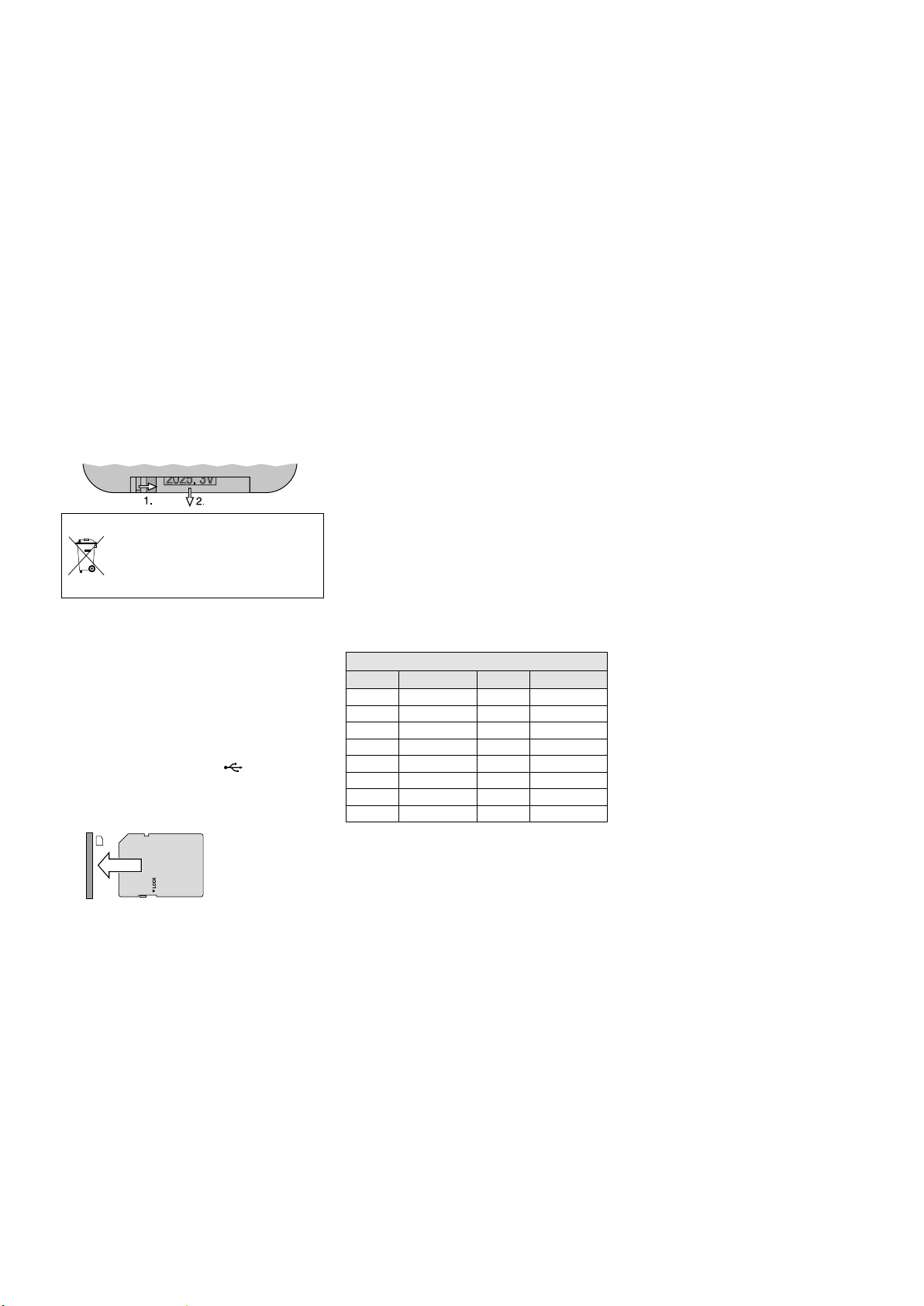
Die IR-Fernbedienung für den Player wird mit
Batterie geliefert. Vor dem ersten Betrieb die
Schutzfolie aus dem Batteriehalter ziehen. Beim
Drücken einer Taste die Fernbedienung immer
auf den IR-Sensor (21) des Players richten. Dabei
muss Sichtverbindung zwischen Sensor und
Fernbedienung bestehen.
Bei längerem Nichtgebrauch die Batterie sicherheitshalber aus der Fernbedienung nehmen,
damit diese bei einem eventuellen Auslaufen der
Batterie nicht beschädigt wird.
Auswechseln der Batterie:
Die Verriegelung des Batteriehalters nach rechts
drücken (1.Pfeil in der Abbildung unten) und
den Halter herausziehen (2.Pfeil). Die alte Batterie entfernen und die neue Batterie (3-V-Knopfzelle vom Typ CR 2025) mit dem Pluspol nach
oben in den Halter legen. Den Halter zurück in
die Fernbedienung schieben.
Batterien dürfen nicht in den Hausmüll
geworfen werden. Geben Sie sie zur
umweltgerechten Entsorgung nur in
den Sondermüll (z. B. Sammelbehälter
im Einzelhandel).
Zum Ein- und Auschalten des Players die
Taste POWER (20) drücken.
Abspielmedium einsetzen:
– Eine CD mit der Beschriftung nach oben so
weit in den CD-Schlitz (A) schieben, bis sie
automatisch eingezogen wird.
– Ein USB-Speichermedium (USB-Speicherstick
oder USB-Festplatte mit eigener Stromversorgung) mit der USB-Buchse (B) verbinden.
– Eine Speicherkarte (abgeschrägte Ecke nach
oben und Kontakte nach rechts) so weit in den
Schlitz SD / SDHC (C) schieben, bis sie einrastet.
Soll die Karte wieder entnommen werden, sie
etwas hinein drücken, so dass sie ausrastet.
Zum Umschalten zwischen den Abspiel-
medien die Taste MODE (23) verwenden. Nach
dem Einlesen eines Me diums startet automatisch
seine Wiedergabe. Ist ein USB-Speichermedium
oder eine Speicherkarte angewählt und wird
entfernt, schaltet der Player auto matisch auf
das CD-Laufwerk um. Ebenso wenn eine neue
CD eingezogen wird.
8 Technische Daten
Verstärkerleistung
Nennleistung: � � � � � � � � � 120 W
Musikleistung: � � � � � � � � 170 W
Lautsprecher: � � � � � � � � � � 25-cm-Tieftöner (10”) und
2,5-cm-Hochtöner (1”)
Frequenzbereich: � � � � � � � � 20 – 20 000 Hz
Eingangsempfindlichkeit: � � 6 mV (MIC 1 / 2),
300 mV (LINE /AUX IN)
Pegel LINE /AUX OUT: � � � � 1 V
Anschlüsse
MIC 1: � � � � � � � � � � � � � � kombinierte Buchse
XLR / 6,3-mm-Klinke, sym�
MIC 2: � � � � � � � � � � � � � � 6,3-mm-Klinkenbuchse,
sym�
LINE IN / OUT: � � � � � � � � � � � Cinchbuchsen
AUX IN / OUT: � � � � � � � � � � � 3,5-mm-Klinkenbuchsen
Klangregelung: � � � � � � � � � ±10 dB / 100 Hz (BASS)
±10 dB / 10 kHz (TREBLE)
Einsatztemperatur: � � � � � � 0 – 40 °C
Stromversorgung
Netzspannung: � � � � � � � � 230 V / 50 Hz
Leistungsaufnahme: � � � 170 VA
Betrieb über Akkus: � � � � eingebaute Blei-Gel-Akkus
(2 × 12 V / 4,5 Ah)
Betriebsdauer: � � � � � � � ca� 4 – 6 Stunden
Abmessungen (B × H × T): 360 × 580 × 320 mm
Gewicht: � � � � � � � � � � � � � � 19,2 kg
8.1 Funkübertragung
Reichweite: � � � � � � � � � � � � ca� 30 m
Sendeleistung des
Sendemoduls: � � � � � � � � � � ≤ 10 mW (EIRP)
Funkfrequenzen
Kanal Frequenz Kanal Frequenz
01 863,1 MHz 09 863,2 MHz
02 864,1 MHz 10 864,2 MHz
03 863,6 MHz 11 863,7 MHz
04 864,6 MHz 12 864,7 MHz
05 863,3 MHz 13 863,4 MHz
06 864,3 MHz 14 864,4 MHz
07 863,8 MHz 15 863,9 MHz
08 864,8 MHz 16 864,9 MHz
Hinweis zum Mehrkanalbetrieb:
Die Anzahl der Kanäle, die sich parallel nutzen lassen,
hängt von den Bedingungen am Einsatzort ab (z. B.
von Störungen durch Sender anderer Funksysteme
oder Hochfrequenz-Quellen wie Leuchtstofflampen).
Unter optimalen Bedingungen lassen sich max. vier
Kanäle gleichzeitig betreiben, ohne sich gegenseitig
zu stören. Zwei Beispiele für eine günstige Kanalwahl
für vier Funkstrecken:
Beispiel 1: Kanal 01 – Kanal 03 – Kanal 06 – Kanal 12
Beispiel 2: Kanal 06 – Kanal 09 – Kanal 15 – Kanal 16
Die Bedienmöglichkeiten und Informationen zu
den Displayanzeigen finden Sie in Kapitel 3.1.
Diese Bedienungsanleitung ist urheberrechtlich für MONACOR ® INTERNATIONAL GmbH & Co. KG geschützt. Eine Reproduktion für eigene kommerzielle Zwecke – auch auszugsweise – ist untersagt.
Änderungen vorbehalten.
8
Page 9
Portable
High-Power Amplifier System
These operating instructions are intended for
users of the amplifier system (e. g. DJs, speakers
at public and private events) and do not require
any specific technical knowledge. Please read
the instructions carefully prior to operation and
keep them for later reference.
All control elements and connections de-
scribed can be found on the fold-out page 3.
1 Applications
This active speaker system TXA-1022CD is a
combination of a two-way speaker system and
a class D amplifier and is especially designed
for mains-independent operation. For power
supply, the unit is equipped with two lead gel
batteries that are charged when the unit is connected to the mains. Thus, the unit is ideally
suited for mobile PA applications, e. g. at events
and lectures.
The active speaker system is equipped with
controllable inputs for the connection of two
microphones and two audio sources with line
signal level (e. g. CD / MP3 player) as well as with
two outputs (e. g. for the connection of another
active speaker system). Audio data of a Bluetooth audio source (e. g. smartphone) can be
reproduced via the integrated Bluetooth receiver.
Further equipment:
–
two-channel receiver module (2 × 16 channels
in the UHF frequency range 863.1 – 864.9 MHz)
for operation with two wireless transmitters;
the transmitters of the series TXA-800, for
example, may be used as wireless transmitters
–
audio player to replay CDs, USB storage media
and memory cards
– transmitter module (16 channels in the UHF
frequency range 863.1 – 864.9 MHz) for wireless transmission of the output signal to additional active speaker systems of the series
TXA-800 / -1020
1.1 Conformity and approval
Herewith, MONACOR INTERNATIONAL declare
that the receiver module and the transmitter
module of the unit TXA-1022CD comply with
the directive 2014 / 53 / EU. The EU declaration of
conformity is available on the Internet:
www.monacor.com
The receiver module and the transmitter mod-
ule are generally approved for operation in EU
and EFTA countries; they are licence-free and
require no registration.
2 Safety Notes
The unit corresponds to all relevant directives of
the EU and is therefore marked with .
WARNING
The unit is suitable for indoor use only. Protect
•
it against dripping water and splash water,
high air humidity and heat (admissible ambient temperature range 0 – 40 °C).
Do not place any vessel filled with liquid on
•
the unit, e. g. a drinking glass.
Do not operate the unit and immediately dis-
•
connect the mains plug from the socket
1.
if the unit or the mains cable is visibly damaged,
2. if a defect might have occurred after the
unit was dropped or suffered a similar accident,
3. if malfunctions occur.
In any case the unit must be repaired by skilled
personnel.
Never pull the mains cable to disconnect the
•
mains plug from the socket, always seize the
plug.
For cleaning only use a dry, soft cloth; never
•
use water or chemicals.
No guarantee claims for the unit and no
•
liability for any resulting personal damage
or material damage will be accepted if the
unit is used for other purposes than originally
intended, if it is not correctly connected or
operated, or if it is not repaired in an expert
way.
The unit uses dangerous mains
voltage. Leave servicing to skilled
personnel. Inexpert handling
may result in electric shock.
If the unit is to be put out of operation
definitively, take it to a local recycling
plant for a disposal which is not harmful to the environment.
3 Overview
1
Display of the 2-channel receiver module,
indicates the transmission channel and, by
means of a segment bar, the strength of the
radio signal received
(left: receiver unit A, right: receiver unit B)
2
Power switch and volume control, for
receiver unit A and receiver unit B of the
2-channel receiver module
3
Buttons to set the 2-channel receiver
module: ☞ chapter 7.1
4
Status indicators for the rechargeable batteries
When operated with rechargeable batteries:
The respective LED indicates the charging
state of the batteries. When the LED “20 %”
starts flashing, recharge the batteries as soon
as possible.
When connected to the mains: The LEDs light
up continuously one after the other while
the batteries are being recharged. When the
batteries have been completely recharged,
the LED “FULL” will light up.
5
POWER switch of the unit, will light up
during operation
6 Tone controls: TREBLE for high frequencies
and BASS for low frequencies
7
Volume control for the input signal of the
jacks LINE IN (13)
8
Volume control for the input signal of the
jack AUX IN (15) and for the integrated
Bluetooth receiver
9 Volume control for the input signal of jack
MIC 2 (17)
10 Volume control for the input signal of jack
MIC 1 (18)
11 Control MASTER for the overall volume
12 Button VOICE PRIORITY with LED indicator
for the microphone priority function: When
the button is pressed (LED illuminated), the
volume of the other audio sources will be
substantially reduced during microphone
announcements.
13
Input LINE IN (RCA jacks) to connect an
audio source with line signal level, e. g. CD /
MP3 player
14
Outputs LINE OUT (RCA jacks) and AUX OUT
(3.5 mm jack) to feed the mixed signal of the
audio sources used to another active speaker
system or to a recorder, for example
Note: The tone controls (6) and the control
MASTER (11) will not have any effect on the output
signals at these jacks.
15
Input AUX IN (3.5 mm jack) to connect an
audio source with line signal level, e. g.
CD / MP3 player
16 Button to switch the Bluetooth receiver on
(keep pressed for a longer period of time) or
off (press briefly) (☞ chapter 7.2)
Button flashes:
no connection to the Bluetooth audio source
Button continuously illuminated:
connection to Bluetooth audio source
established
17
Input MIC 2 (6.3 mm jack) to connect a
microphone
18
Input MIC 1 (combined 6.3 mm jack / XLR jack)
to connect a microphone
19 Mains jack for connection to a mains socket
(230 V/ 50 Hz) via the mains cable provided
English
9
9
Page 10
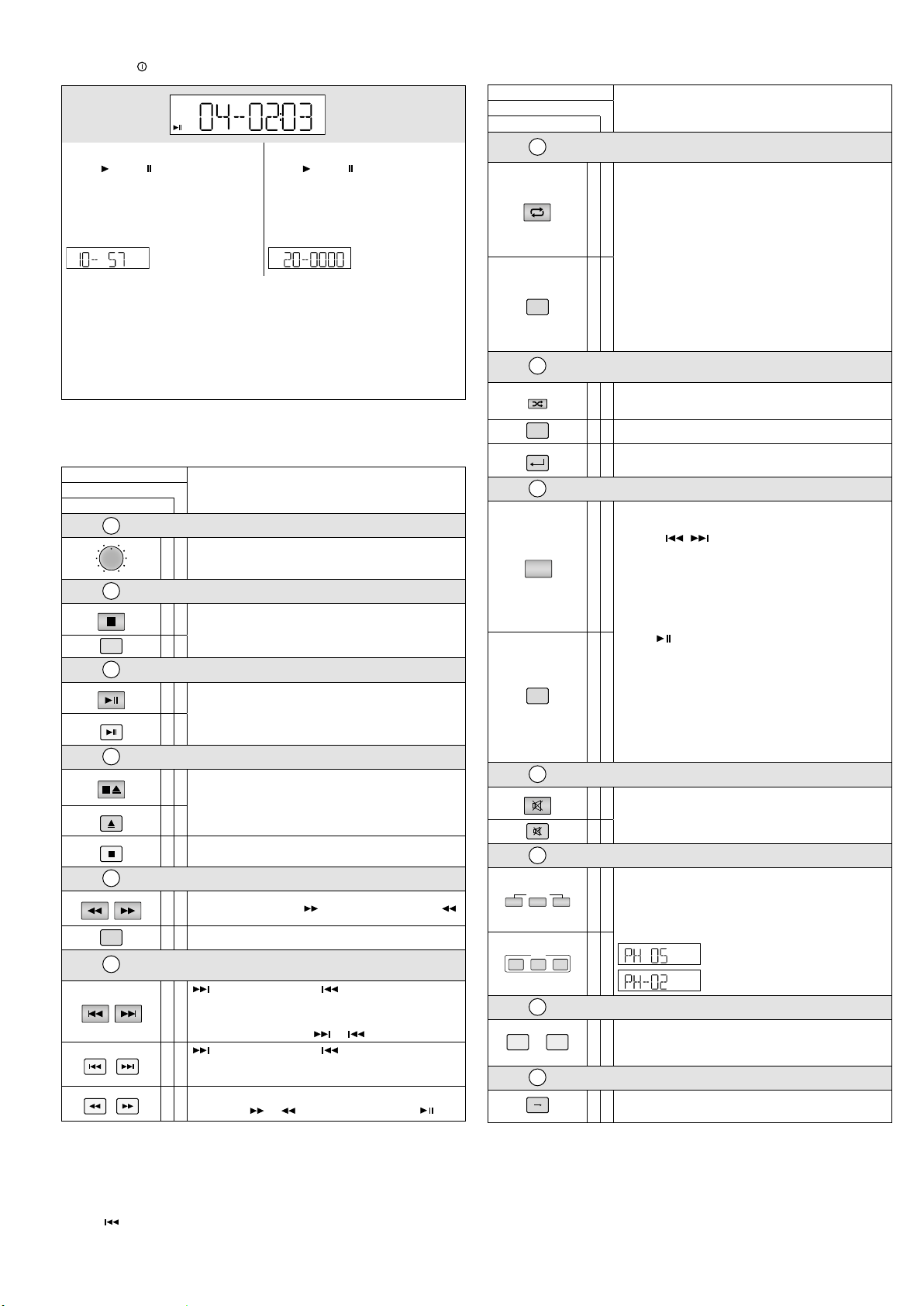
3.1 CD / MP3 player with remote control
MEMO REP1 ALL RAN PROGF
MEMO REP1 ALL RAN PROGF
VOL
0
10
MODE
PLAY
PLAY/I I
STOP/EJ
EJECT
STOP
—
—— FOLDER ——
—
FOLDER
PREV. —
SKIP —
F.WD
REV.
F.WD
F.FF.B
REP/ID3
ID3
RAN/ENT.
ENTER
PROGRAM
MUTE
LOW
SPEED
NOR HI
SPEED
see figure
English
MP3 Media “M3” Audio CDs “CD”
Replay / Pause :
number of the title in the folder and time
played of the title (keeps flashing in the
pause mode)
When the player is stopped: When the player is stopped:
number of folders and titles, e. g.
M3
“REP1” repeat of the title
“REP1 F” repeat of the folder
“ALL” repeat of all titles
“RAN” random replay
“A→B” starts flashing when the start of a loop has been defined and is always indicated while the loop is replayed
“PROG” while a title sequence is programmed,
“MEMO” while the title sequence is replayed
20 POWER button to switch the player on / off
21 IR sensor for the signals of the remote control
Control element
on the player
22
23
M
MODE
24
25
26
27
Notes
1.
Selecting folders and titles during replay / pause:
Select the folder (brief indication of folder number and time 00:00): the replay of title1 in the folder
will start. If required, go to another title.
Selecting folders and titles in the stop mode:
Select the folder and go to the desired title in the folder (indication of folder number and title number
in the folder). Start the replay.
2.
Button : When this button is pressed while the player is in the pause mode (during CD operation)
or within a programmed title sequence, the player will immediately go back one title.
→
B
A
M3
CD
Display
Replay / Pause :
number of the title and time played of the
title (keeps flashing in the pause mode)
number of titles, e. g.
→
B
A
M3
10 folders, 57 titles
CD
20 titles
Functionon the remote control
Volume
✅
to set the volume
Selecting the replay medium
✅
to switch between CD, USB storage medium and
memorycard
✅
Replay / Pause
✅
to start the replay and
to switch between replay and pause
✅
Stop mode / Ejecting the CD
to stop the replay;
✅
in the stop mode: to eject the CD
When the CD has been ejected and has not been removed,
✅
press this button to retract the CD again.
✅
to stop the replay
Selecting folders
✅
to go to the next folder ( ) or to the previous folder ( )
✅
to go to the next folder
Skipping titles /
Fast forward / reverse
: to go to the next title, : to go to the beginning of
the title; each time the button is pressed again, the player
✅
will go back one title at a time
fast forward / reverse: keep or pressed
: to go to the next title, : to go to the beginning of
✅
the title; each time the button is pressed again, the player
will go back one title at a time
fast forward / reverse:
✅
briefly press or . At the desired spot, press .
Control element
Functionon the remote control
on the player
28
Continuous repeat /
ID3 tag feature
to switch between:
– repeat of the title (“REP1”)
– repeat of the folder (“REP1 F”)*
✅
– repeat of all titles (“ALL”)
– no repeat
To activate the ID3 tag feature*, keep the button pressed for
2 seconds during the replay: File name (“FILE”), title name
(“TITLE”), artist (“ARTIST”) and album (“ALBUM”) will scroll
through the display. To deactivate the feature, keep the button pressed again for 2seconds. The feature will automati-
REPEAT
✅
cally be deactivated when the next title is reached or when
a button is pressed.
* for MP3 media only
29
RAN
30
Continuous random replay /
Confirming the title selection
to replay all titles in random order (“RAN”): on /off
✅
to confirm the title selection: see position
✅
to replay all titles in random order (“RAN”): on /off
✅
to confirm the title selection: see positions ㉚ and
Programming a title sequence
㉚
㉝
1. Press PROG (“PROG” will be indicated).
2. Select the first title:
– press / to go to the title; select the folder
before selecting the title, if required
✅
PROG
or
– use the numerical keys to enter the title number*
and press RAN / ENT. or ENTER to confirm the title selection.
3. Proceed in the same way to program all other titles
(10max.).
4. Press to start the title sequence (“MEMO” will be
indicated).
5. Press PROG to return to the normal replay mode: the
title sequence will be deleted.
PROG
✅
If no repeat function has been activated (“REP1” and “ALL”
are available), the player will stop when the title sequence
has been replayed and the title sequence will be deleted.
* for MP3 media with several folders: The number of the title
on the medium, not the number in the folder!
31
Muting the sound
✅
to mute / unmute the sound
✅
32
Changing the speed (and the pitch)
HI(GH ): to increase the speed in 10steps
LOW: to reduce the speed in 10 steps
✅
NOR: to return to normal speed
Press HI(GH) or LOW repeatedly until the desired speed is
reached. The display will briefly indicate the setting, e. g.
normal speed increased by 5 steps
LOW NOR HIGH
33
1
…
34
A B
✅
Selecting a title via the title number
Enter the title number* and press ENTER to confirm.
0
✅
* for MP3 media with several folders: The number of the title
on the medium, not the number in the folder!
Repeating a section within a title (continuous loop)
Press the button at the start and at the end of the section.
✅
To exit the loop, press the button once again.
normal speed reduced by 2 steps
A CD slot: insert the CD until it is retracted automatically
B USB port to connect a USB flash drive or a USB hard disk with separate
power supply
C Slot for an SD / SDHC memory card
10
10
Page 11
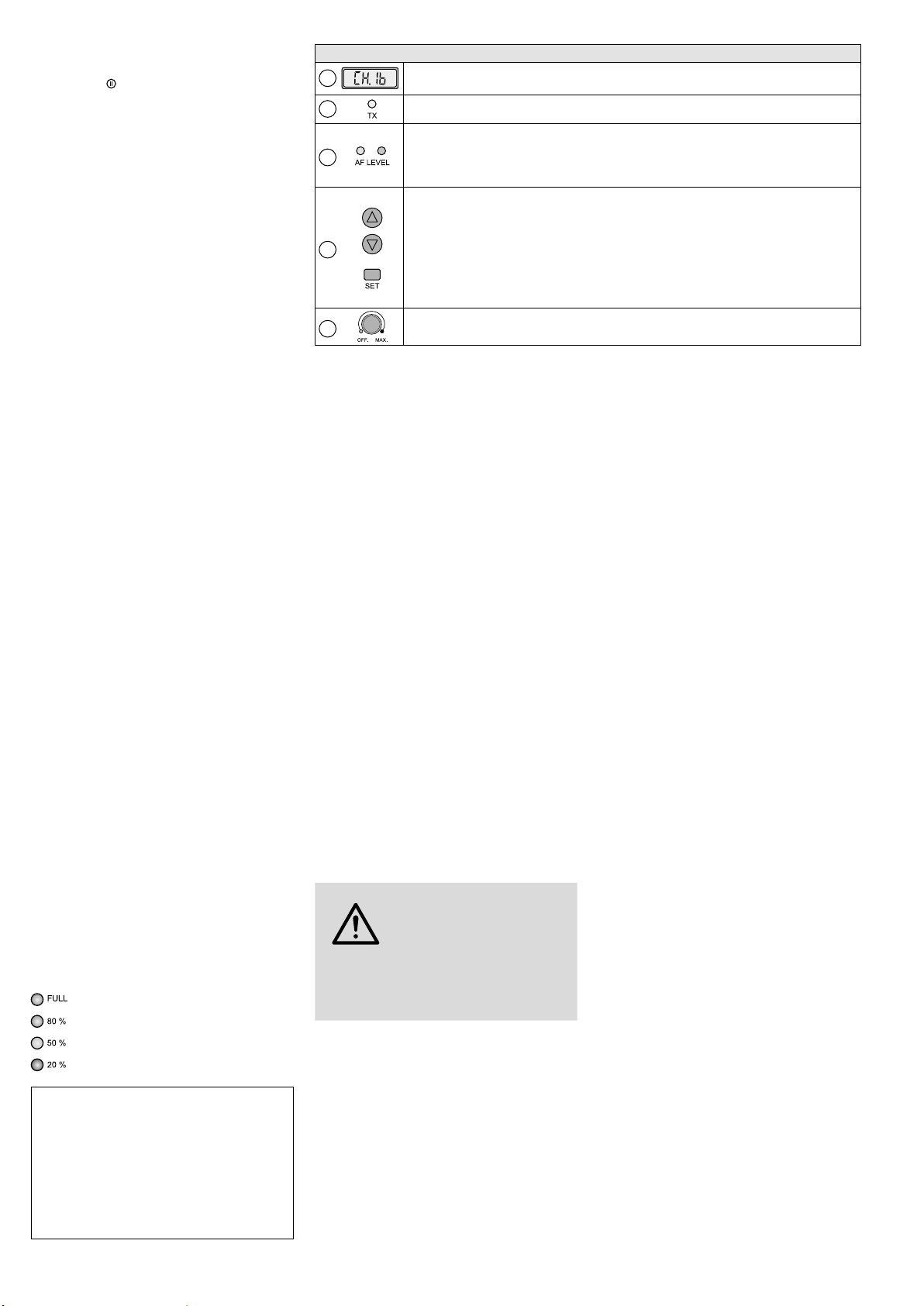
3.2 Transmitter module
AUDIOLINKTX
see figure
Wireless audio link mode: Via the transmitter module of an active speaker system TXA1022CD (master unit), its output signal can be
transferred to the receiver modules of other
active speaker systems (slave units) of the
series TXA-800 / -1020. At the receiver modules
of the slave units, set the transmission channel
and set the transmitter module of the master
unit to the same channel. Please note: At the
master unit, the receiver module and the transmitter module must be set to different channels;
otherwise, there will be feedback.
Note: The tone controls (6) and the control MASTER
(11) at the master unit will not have any effect on the
output signal of the transmitter module.
Control elements and display
35
36
37
38
39
Display to indicate the transmission channel (CH 1 … CH 16)
Transmission indicator; will light up when the transmitter module is switched on
Level indicators for the audio signal at the input of the transmitter module
– yellow LED: will light up when a specific minimum level has been reached
– red LED: overload indicator, should only light up briefly for signal peaks; if it lights up continu-
ously, reduce the volume of the respective audio source(s)
Buttons for setting the transmission channel:
1. Press the button SET: The channel indication on the display will start flashing.
2. As long as the channel indication flashes (10 seconds), the arrow buttons can be used to select
the channel.
3. Confirm the selected channel with the button SET (otherwise, the transmitter module will return
to the previously set channel after 10 seconds).
To briefly indicate the radio frequency during operation, keep one of the arrow buttons pressed: The
display will indicate the frequency instead of the channel while the arrow button is pressed.
Power switch and volume control of the transmitter module
English
4 Setting Up / Transporting
Place the unit as desired or mount it onto a PA
speaker stand via the stand sleeve on its lower
side.
For transporting, the unit is provided with a
telescopic handle. Push down the unlock button at the lower side of the handle and extract /
retract the handle as desired.
5 Power Supply
5.1 Mains operation /
Recharging the batteries
To operate the unit via the mains and /or to recharge the internal batteries, connect the mains
cable provided to the mains jack (19) and to a
mains socket (230 V / 50 Hz).
When the unit is connected to the mains,
the batteries will be automatically recharged:
During the recharge, the LED indicators for the
battery status (4) will light up continuously one
after the other. It is not necessary to switch
on the unit for recharging; however, it can be
operated during the recharging process. Once
the recharging process has been completed, the
LED “FULL” will light up continuously.
After operation or after recharging the batteries, disconnect the unit from the mains to avoid
unnecessary power consumption.
5.2 Battery operation
During battery operation, the respective LED (4)
will indicate the charging state of the rechargeable batteries:
80 – 100 % charged
less than 80 % charged
less than 50 % charged
less than 20 % charged
Important: To prevent damage to the batteries due
to deep discharge and to prevent a reduction of their
lifetime, please observe the following notes:
– Always fully recharge the batteries prior to initial
operation and after longer storage.
– When the LED “20 %” starts flashing, the batteries
are almost discharged and should be recharged as
soon as possible.
– Fully recharge the batteries prior to longer storage
and at least every two months during storage.
6 Audio Connections
Switch off the unit prior to making any con
nection.
6.1 Inputs
Two microphones can be connected: via an XLR
plug or a 6.3 mm plug, to the jack MIC 1 (18)
or, via a 6.3 mm plug, to the jack MIC 2 (17).
Audio units with line signal level (e. g.
CD / MP3 player, mixer, tape deck, tuner) can be
connected to the RCA jacks LINE IN (13) and the
3.5 mm jack AUX IN (15). It is possible to connect
both mono units and stereo units; in case of a
stereo input signal, the left channel and the right
channel are combined to a mono signal.
6.2 Outputs
Additional audio units such as a recorder or another active speaker system can be connected
to the outputs LINE OUT and AUX OUT (14).
At both outputs, the mixed signal of the audio
sources will be available, unaffected by the tone
controls (6) and the control MASTER (11). At
each output jack – the two RCA jacks and the
3.5 mm jack – a mono signal is available.
7 Operation
CAUTION Never adjust the active speaker
system to a very high volume.
Permanent high volumes may
damage your hearing!
Your ear will get accustomed to high volumes
which do not seem to be that high any more
after some time. Therefore, do not further increase a high volume after getting used to it.
1) Prior to switching on the unit, set the control
MASTER (11) to “MIN”.
2)
To switch the unit on and off, use the POWER
switch (5). The switch will be illuminated
when the unit is switched on. The battery
status indicators (4) will indicate the charging
status of the rechargeable batteries.
To prevent damage to the batteries by
deep discharge during battery operation, a
discharge protection will automatically switch
off the unit when required. However, due to
self-discharge of the batteries, a deep discharge may also occur when the unit is not
operated for a longer period of time. Therefore, always observe the box “Important” in
chapter 5.2.
3) Switch on the audio sources that are to be
audible and then adjust their volume with
the corresponding controls (see below); use
the control MASTER (11) to adjust the overall
volume for the active speaker system.
Volume adjustment of the audio sources:
– for the two receiver units of the 2-channel
receiver module, use the corresponding
volume control (2), CH.A or CH.B
operation: see chapter 7.1
–
for the integrated audio player, use the
VOLUME control (22)
operation: see chapters 7.3 and 3.1
– for a unit connected to the input AUX IN
(15) and the Bluetooth receiver, use the volume control (8) of the operating panel AUX
operation of the Bluetooth receiver:
see chapter 7.2
Note: The control will determine the volume of
the mixed signal of both sources when they are
used at the same time.
– for a unit connected to the input LINE IN
(13), use the volume control (7) of the operating panel LINE
– for a microphone connected, use the vol-
ume control (10 or 9) above the corresponding input
Switch unused sources off or set their volume
to minimum.
4) To operate the transmitter module:
see chapter 3.2.
5) Use the high-frequency control TREBLE and
the low-frequency control BASS (6) to adjust
the tone of the active speaker system.
6)
Use the button VOICE PRIORITY (12) to
activate the microphone priority function.
When the button is pressed (LED beneath
the button illuminated), the volume of the
music currently played will be substantially
reduced while announcements via a microphone connected or a wireless microphone
are being made. To deactivate the function,
disengage the button again.
Note: The function will also have an effect on the
output signal of the jacks LINE OUT and AUX OUT
(14) as well as on the output signal of the transmitter module.
11
Page 12

7.1 Operating the receiver module
Using the 2-channel receiver module and two
appropriate transmitters (e. g. pocket transmitter
English
TXA-800HSE, wireless microphone TXA-800HT),
two transmission paths can be established.
1)
The receiver units A and B of the module provide a control (2), CH.A and CH.B respectively,
to adjust the volume and to switch them on
and off. To switch a receiver unit on, advance
the corresponding control from the position
“OFF”. The left half of the display (1) applies
to receiver unit A, the right half applies to
receiver unit B. When a receiver unit has been
switched on, the corresponding half of the
display will indicate the transmission channel. To indicate the radio frequency, press
an arrow button (△ for unit A, ▽ for unit B).
The previous indication will reappear after
2 seconds.
2) Use the buttons (3) of the module to set the
transmission channels, either manually or
by means of an automatic scan. Leave the
corresponding transmitters switched off for
the time being.
Channel scan:
Keep the buttons △ and ▽ simultaneously
pressed for approx. 1 second until
appears on the display. The scan will start:
The receiver units will be set to free channels
without mutual interference. If no free channels are found, the channels set will be kept.
Manual channel selection:
If both receiver units A and B are switched on:
1.
Keep the button SET pressed until the
channel indication for receiver unit A starts
flashing on the display.
2. Select the channel for receiver unit A with
the button △ or ▽ and then confirm with
the button SET.
3. The channel indication for receiver unit B
starts flashing on the display. Select the
channel for receiver unit B with the button △ or ▽ and then confirm with the
button SET.
If only one receiver unit A or B is switched on:
Keep the button SET pressed until the channel
indication starts flashing on the display. Select
the channel with the button △ or ▽ and then
confirm with the button SET.
If a channel is not confirmed within
10seconds with the button SET, the setting
mode will be exited and the channel previously set will be kept.
Note: The receiver units cannot be set to the same
channel.
If, with the transmitter switched off, the respective segment bar A or B on the display
indicates reception, interference signals or
signals from other transmitters are being received. In this case, select a different channel.
3) Switch the transmitters on and set them to
the channels of the receiver module: Set one
transmitter to the channel of receiver unit A
and set the second transmitter to the channel
of receiver unit B.
The respective segment bars on the display will indicate the strength of the radio
signals received. Use the controls (2) to adjust
the desired volume for each receiver unit.
If no reception is indicated or if the reception
is poor, check if:
–
the batteries of the transmitter are discharged.
– the reception is disturbed by metal objects
or other high-frequency sources.
– the distance between the transmitter and
the receiver module is too long.
–
the threshold value for interference suppression (squelch) is too high (see chapter
7.1.2).
7.1.1 Changing the group setting
(for operation with 2 receiver modules)
The unit can be extended by another 2-channel receiver module (available as article TXA1020MR). To set the four transmission channels
via channel scan, change the group setting of
both receiver modules:
1) Switch off the receiver units A and B. Then
keep the button SET pressed while switching
on a receiver unit. The display will indicate the
current group setting (with the number
flashing).
2) Use the button △ or ▽ to switch to .
3)
Press the button SET to exit the group setting
mode. The squelch setting mode will be activated; to exit the mode, press the button SET.
Note: The setting modes will be automatically exited
after 5 seconds if no button is pressed. Any settings
made will be saved.
Perform the channel scan for the first receiver
module, switch on the appropriate two transmitters and set them accordingly. Leave the
two transmitters switched on so that channels
already used will be skipped during the channel
scan for the second receiver module. Then perform the channel scan for the second receiver
module, switch on the two appropriate transmitters and set them accordingly.
7.1.2 Setting the squelch
The squelch function will mute the respective
receiver unit when the level of the radio signal
falls below the threshold value adjusted. Thus,
interference signals will not cause noise when
the transmitter is switched off or when its radio
signal is insufficient: If the levels of the interference signals are below the threshold value, the
receiver unit will be muted.
A high threshold value offers high interference resistance, but it will also reduce the
transmission range. Thus, when the reception is
good, a high threshold value can be used; however, when the transmitter and the receiver are
far apart, a low threshold value is recommended.
1) Switch off the receiver units A and B. Then
keep the button SET pressed while switching
on a receiver unit. The display will indicate the
group setting ( or , with the number
flashing).
2)
Press the button SET to exit the group setting mode and to activate the squelch setting
mode: (for “Squelch”) and the current
value (flashing) will appear on the display.
3)
Use the button △ or ▽ to set the value
(level7 = highest threshold value). Press the
button SET to exit the squelch setting mode.
Note: The setting modes will be automatically
exited after 5 seconds if no button is pressed. Any
settings made will be saved.
7.2 Operating the Bluetooth receiver
The Bluetooth receiver can be used to establish a
wireless connection to a Bluetooth audio source
(e. g. smartphone, tablet PC, MP3 player) which
allows the amplifier system to replay audio data.
Note: The Bluetooth source must be compatible with
the A2DP protocol (Advanced Audio Distribution Profile); otherwise, no wireless connection will be possible.
1)
To switch on the Bluetooth receiver, keep the
button (16) pressed for approx. 2 seconds.
The button will start flashing to indicate that
there is no connection to the Bluetooth source
and that the Bluetooth receiver is ready for
“pairing” (linking the Bluetooth source to the
Bluetooth receiver).
2) At the Bluetooth source, switch on the Bluetooth function and perform the “pairing”
process (see the instructions of the Bluetooth
source, if required). On the display of the
Bluetooth source, the Bluetooth receiver is
indicated as “TXA SERIES”. The button will
be continuously illuminated once the linkage
has been established.
3) At the Bluetooth source, start the replay of
audio data. The Bluetooth source can be
operated as desired (title selection, volume
adjustment, pause, etc.).
4) At the active speaker system, use the control
AUX (8) to adjust the volume.
Note: The volume control will also apply to the unit
that is connected to the AUX input (15); therefore,
do not use this input during Bluetooth operation.
Otherwise, both audio sources will be reproduced
at the same time.
5)
When the Bluetooth connection is disconnected (e. g. when the Bluetooth source is
moved outside of the range of the wireless
connection), the button will restart flashing,
and the “pairing” process must be performed
again.
6)
To switch off the Bluetooth receiver, briefly
press the button . The button will not be
illuminated anymore.
7.3 Operating the CD / MP3 player
The player allows to replay not only standard
audio CDs but also CDs, USB storage media and
SD / SDHC memory cards with MP3 files.
Notes
1. Depending on the CD type, the CD burner and the
burning program used, problems may occur when
CD-RWs are replayed.
2. The player also supports the reproduction of WMA
files.
3. Due to the large number of storage device manu-
facturers and device drivers, it cannot be guaranteed that all storage media are compatible with
this player.
4.
Cigarette smoke and dust will easily penetrate
through all openings of the player and also settle
on the optics of the laser sampling system. If this
deposit causes reading errors and sound interruptions, the player must be cleaned by skilled personnel. Please note that there will be a charge on
cleaning, even during the warranty period!
5. The anti-shock memory of the player will be able
to compensate temporary shocks or vibrations
occurring during CD sampling; however, it will not
be able to compensate continuous, severe vibrations. For CD operation, the unit must therefore
always be used in a stationary way, i. e. it must be
placed on a solid, immobile surface.
12
Page 13
The IR remote control for the player is sup-
SD / SDHC
plied with a battery. Prior to initial operation,
remove the protective film from the battery
holder. When pressing a button, always direct
the remote control to the infrared sensor(21) of
the player. There must be no obstacles between
the sensor and the remote control.
If the remote control is not used for a longer
time, remove the battery as a precaution so that
the remote control will not be damaged in case
the battery should leak.
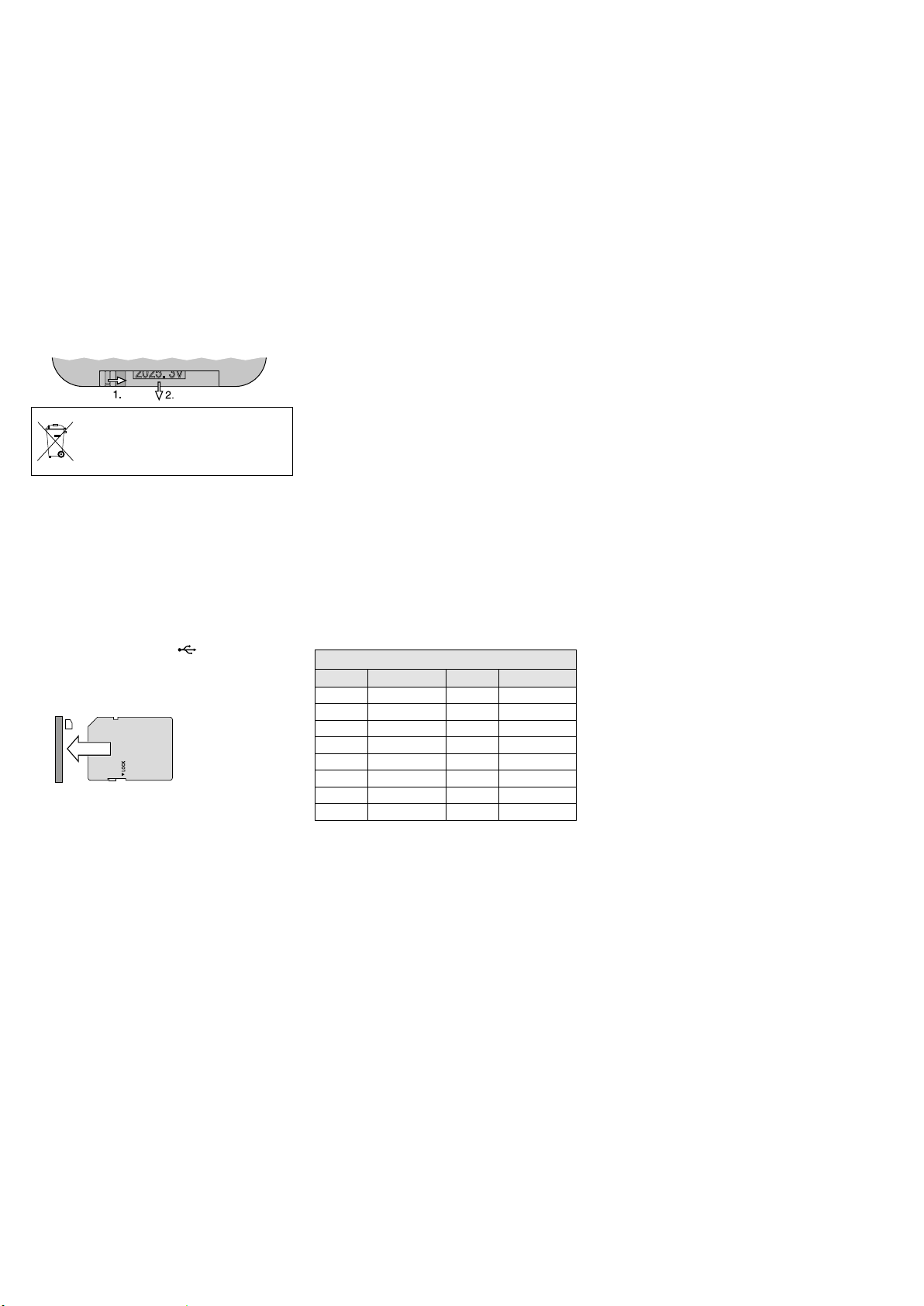
Replacing the battery:
Push the latch of the battery holder to the right
(arrow 1 in the figure below) and remove the
holder (arrow 2). Remove the old battery and
insert the new battery (3 V button cell, type
CR 2025) into the holder with the positive pole
pointing upwards. Push the holder back into the
remote control.
Batteries must not be placed in the
household waste. Always take them
to a special waste disposal (e. g. collection container at your retailer).
To switch the player on /off, use the POWER
button(20).
Inserting a replay medium:
–
Insert a CD with the lettering showing upwards into the CD slot (A) until it is retracted
automatically.
–
Connect a USB storage medium (USB flash
drive or USB hard disk with separate power
supply) to the USB port (B).
–
Insert a memory card (notched corner upward and contacts to the right) into the slot
SD / SDHC (C) until it engages.
To remove the card, slightly push it into the
slot until it disengages.
To switch between the replay media, use
the button MODE (23). When a medium has
been read in, it will be replayed automatically.
If a USB storage medium or a memory card has
been selected and is then removed, the player
automatically switches over to the CD player
mechanism. The same happens when a new
CD is retracted.
Control options and information on the display
indications can be found in chapter3.1.
8 Specifications
Amplifier power
Rated power: � � � � � � � � � 120 W
Music power: � � � � � � � � � 170 W
Speakers: � � � � � � � � � � � � � 25 cm (10”) bass speaker
and 2�5 cm (1”) tweeter
Frequency range: � � � � � � � � 20 – 20 000 Hz
Input sensitivity: � � � � � � � � 6 mV (MIC 1 / 2),
300 mV (LINE /AUX IN)
Level LINE /AUX OUT: � � � � � 1 V
Connections
MIC 1: � � � � � � � � � � � � � � combined
XLRjack / 6�3 mm jack, bal�
MIC 2: � � � � � � � � � � � � � � 6�3 mm jack, bal�
LINE IN / OUT: � � � � � � � � � � RCA jacks
AUX IN / OUT: � � � � � � � � � � � 3�5 mm jacks
Tone control: � � � � � � � � � � ±10 dB / 100 Hz (BASS)
±10 dB /10 kHz (TREBLE)
Ambient temperature: � � � � 0 – 40 °C
Power supply:
Mains voltage: � � � � � � � � 230 V / 50 Hz
Power consumption: � � 170 VA
Battery operation: � � � � � � internal rechargeable
lead gel batteries
(2 × 12 V / 4�5 Ah)
Operating time: � � � � � � 4 – 6 hours approx�
Dimensions (W × H × D): � 360 × 580 × 320 mm
Weight: � � � � � � � � � � � � � � 19�2 kg
8.1 Wireless transmission
Range: � � � � � � � � � � � � � � � approx� 30 m
Transmitting power of
the transmitter module: � � � ≤ 10 mW (EIRP)
Radio frequencies
Channel Frequency Channel Frequency
01 863.1 MHz 09 863.2 MHz
02 864.1 MHz 10 864.2 MHz
03 863.6 MHz 11 863.7 MHz
04 864.6 MHz 12 864.7 MHz
05 863.3 MHz 13 863.4 MHz
06 864.3 MHz 14 864.4 MHz
07 863.8 MHz 15 863.9 MHz
08 864.8 MHz 16 864.9 MHz
Note concerning multichannel operation:
The number of channels to be used in parallel depends on the conditions at the place of application
(e. g. on interference due to other wireless systems
or high-frequency sources such as fluorescent lamps).
In ideal conditions, up to four channels can be operated at the same time without mutual interference.
Two examples of a suitable channel selection for four
wireless transmission paths:
Example 1:
channel 01 – channel 03 – channel 06 – channel 12
Example 2:
channel 06 – channel 09 – channel 15 – channel 16
English
Subject to technical modification.
All rights reserved by MONACOR ® INTERNATIONAL GmbH & Co. KG. No part of this instruction manual
may be reproduced in any form or by any means for any commercial use.
13
Page 14

Système amplifié portable
High Power
Cette notice s’adresse aux utilisateurs du sys-
Français
tème amplifié (par exemple DJs, orateurs lors de
présentations publiques ou privées …). Aucune
connaissance spécifique n’est nécessaire. Veuillez lire la présente notice avec attention avant
le fonctionnement et conservez-la pour pouvoir
vous y reporter ultérieurement.
Vous trouverez sur la page 3, dépliable, les
éléments et branchements décrits.
1 Possibilités d’utilisation
L’enceinte active TXA-1022CD se compose
d’une enceinte 2 voies et d’un amplificateur
classe D. Elle est spécialement conçue pour
un fonctionnement indépendant du secteur.
Pour l’alimentation, des accumulateurs plomb
gel sont intégrés, ils sont chargés lors du branchement secteur. L’appareil est ainsi adapté de
manière optimale pour une utilisation mo bile
pour sonoriser par exemple des manifestations,
présentations …
L’enceinte active dispose d’entrées réglables pour brancher deux microphones et
deux sources audio avec niveau de signal ligne
(par exemple lecteur CD / MP3) et de deux sorties
(par exemple pour brancher une autre enceinte
active). Via le récepteur Bluetooth intégré, il est
possible de lire des données audio d’une source
audio Bluetooth (p. ex. smartphone).
Autres caractéristiques :
–
module de réception 2 canaux (2 × 16 canaux
dans la plage UHF de 863,1 à 864,9 MHz)
pour le fonctionnement avec deux émetteurs
sans fil ;
les émetteurs de la série TXA-800 p. ex. sont
adaptés comme émetteurs sans fil adéquats
– lecteur audio pour lire des CDs, supports de
stockage USB et cartes mémoire
– module d’émission (16 canaux dans la plage
UHF de 863,1 à 864,9 MHz) pour diriger, sans
fil, le signal de sortie vers d’autres enceintes
actives de la série TXA-800 / -1020.
1.1 Conformité et autorisation
Par la présente, MONACOR INTERNATIONAL
déclare que le module de réception et le module d’émission de l’appareil TXA-1022CD
se trouvent en conformité avec la directive
2014 / 53 / UE. La déclaration de conformité UE
est disponible sur Internet :
www.monacor.com
Le module de réception et le module d’émission
sont autorisés pour un fonctionnement dans les
pays de l’Union européenne et de l’A.E.L.E sans
déclaration ni taxe.
2 Conseils de sécurité
etd’utilisation
L’appareil répond à toutes les directives nécessaires de l’Union européenne et porte donc le
symbole .
AVERTISSEMENT
L’appareil n’est conçu que pour une utilisa-
•
tion en intérieur. Protégez-le de tout type de
projections d’eau, des éclaboussures, d’une
humidité de l’air élevée et de la chaleur (plage
de température de fonctionnement autori
sée: 0 – 40 °C).
En aucun cas, vous ne devez poser d’objet
•
contenant du liquide ou un verre sur l’appareil.
Ne faites pas fonctionner l’appareil et débran-
•
chez-le immédiatement du secteur lorsque :
1.
des dommages visibles apparaissent sur
l’appareil ou sur le cordon secteur,
2. après une chute ou un cas similaire, vous
avez un doute sur l’état de l’appareil,
3. des défaillances apparaissent.
Dans tous les cas, les dommages doivent être
réparés par un technicien spécialisé.
Ne débranchez jamais l’appareil en tirant sur le
•
cordon secteur, tenez-le toujours par la fiche.
Pour le nettoyage, utilisez uniquement un
•
chiffon sec et doux, en aucun cas de produits
chimiques ou d’eau.
Nous déclinons toute responsabilité en cas de
•
dommages matériels ou corporels consécutifs
si l’appareil est utilisé dans un but autre que
celui pour lequel il a été conçu, s’il n’est pas
correctement branché ou utilisé ou s’il n’est
pas réparé par une personne habilitée ; en
outre, la garantie deviendrait caduque.
Lorsque l’appareil est définitivement
retiré du service, vous devez le déposer
dans une usine de recyclage adaptée
pour contribuer à son élimination non
polluante.
L’appareil est alimenté par
une tension dangereuse.
Ne touchez pas l’intérieur
de l’appareil car en cas de
mauvaise manipulation, vous
pourriez subir une décharge
électrique.
CARTONS ET EMBALLAGE
PAPIER À TRIER
3 Présentation
1
Affichage du module de réception 2 canaux,
indique le canal de transmission et, via un
bargraphe, la puissance de réception du signal radio (gauche : unité de réception A,
droite : unité de réception B)
2
Interrupteur marche / arrêt et réglage de
volume, respectivement pour l’unité de
réception A et l’unité de réception B du
module de réception 2 canaux
3 Touches pour régler le module de ré ception
2 canaux : ☞ chapitre 7.1
4 LEDs d’état pour les accumulateurs
En mode fonctionnement sur accumulateurs: La LED correspondante indique l’état
de charge des accus. Si la LED «20 %»
clignote, il faut recharger les accus aussi
vite que possible.
En mode fonctionnement sur secteur :
Les LEDs brillent en continu les unes après
les autres lorsque les accus sont chargés.
Lorsqu’ils sont entièrement chargés, la LED
«FULL» brille.
5
Interrupteur marche / arrêt POWER de l’appa
reil, brille pendant le fonctionnement
6 Egaliseurs : TREBLE pour les aigues et BASS
pour les graves
7 Réglage de volume pour le signal d’entrée
des prises LINE IN (13)
8 Réglage de volume pour le signal d’entrée
de la prise AUX IN (15) et du récepteur Bluetooth intégré
9 Réglage de volume pour le signal d’entrée
de la prise MIC 2 (17)
10 Réglage de volume pour le signal d’entrée
de la prise MIC 1 (18)
11 Réglage MASTER pour le volume général
12
Touche VOICE PRIORITY avec LED de témoin
pour la fonction priorité micro : si la touche
est enfoncée (la LED brille), le volume des
autres sources audio est fortement diminué
lors d’annonces micro.
13
Entrée LINE IN (prises RCA) pour brancher
une source audio avec ni veau de signal ligne,
par exemple lecteur CD / MP3
14
Sorties LINE OUT (prises RCA) et AUX
OUT (prise jack 3,5) pour diriger le signal
de mixage des sources audio utilisées par
exemple vers une autre enceinte active ou
un enregistreur
Conseil : les réglages de tonalité (6) et le réglage
MASTER (11) n’ont pas d’influence sur le signal de
sortie à ces prises.
15
Entrée AUX IN (prise jack 3,5) pour brancher
une source audio avec ni veau de signal ligne,
par exemple lecteur CD / MP3
16
Touche pour activer (longue pression) ou
désactiver (brève pression) le récepteur
Bluetooth (☞ chapitre 7.2)
La touche clignote : aucune liaison avec la
source audio Bluetooth
La touche brille en continu : connexion avec
la source audio Bluetooth établie
17
Entrée MIC 2 (prise jack 6,35) pour brancher
un micro
18
Entrée MIC 1 (prise combinée jack 6,35 / XLR)
pour brancher un micro
19
Prise secteur à relier, via le cordon secteur
livré, à une prise secteur 230 V / 50 Hz
-
14
Page 15

3.1 Lecteur CD / MP3 avec télécommande
MEMO REP1 ALL RAN PROGF
MEMO REP1 ALL RAN PROGF
A
VOL
0
10
MODE
PLAY
PLAY/I I
STOP/EJ
EJECT
STOP
—
—— FOLDER ——
—
PREV. —
SKIP —
F.WD
REV.
F.WD
F.FF.B
REP/ID3
ID3
RAN/ENT.
ENTER
PROGRAM
MUTE
LOW
SPEED
NOR HI
SPEED
voir schéma
→
B
A
M3
CD
Supports MP3 «M3» CDs audio «CD»
Lecture / Pause :
Numéro du titre dans le répertoire et
durée lue du titre (clignote en pause)
Après commutation sur Stop : Après commutation sur Stop :
Nombre de répertoires et de titres, p. ex.
M3
10 répertoires, 57 titres
Lecture / Pause :
Numéro du titre et durée lue du titre
(clignote en pause)
Nombre de titres, p. ex.
→
B
M3
CD
«REP1» répétition du titre
«REP1 F» répétition du répertoire
«ALL» répétition de tous les titres
«RAN» lecture aléatoire
«A→B» clignote lorsque le début d’un boucle a été défini ; est affiché en continu
pendant la lecture de la boucle
«PROG» pendant une programmation d’une suite de titres,
«MEMO» pendant la lecture d’une suite de titres
20 Touche POWER pour allumer et éteindre le lecteur
21 Capteur infrarouge pour les signaux de la télécommande
Elément de commande
sur le lecteur
22
23
M
MODE
24
25
26
FOLDER
27
Remarques
1.
Sélection de répertoire et de titre en mode Lecture / Pause :
Sélectionnez le répertoire (affichage bref : numéro du répertoire et durée 00:00) : la lecture du titre1
dans le répertoire démarre. Si besoin, allez à un autre titre.
Sélection de répertoire et de titre en mode Stop :
Sélectionnez le répertoire et, au sein du répertoire, allez au titre voulu (affichage : numéro du répertoire
et numéro du titre dans le répertoire). Démarrez la lecture.
2. Touche : En Pause (dans le mode CD) et dans une suite programmée de titres, le lecteur recule
immédiatement d’un titre lorsqu’on appuie sur la touche.
Volume
✅
Réglage de volume
Sélection du support de lecture
✅
Commutation entre CD, support USB et carte mémoire
✅
Lecture / Pause
✅
Démarrer la lecture et
commuter entre Lecture et Pause
✅
Arrêt / Ejection du CD
Arrêt de la lecture
✅
En mode Stop : éjection du CD
Lorsque le CD a été éjecté mais n’a pas encore été retiré, il
✅
peut être à nouveau inséré en appuyant sur la touche.
✅
Arrêt de la lecture
Sélection de répertoire
✅
Pour aller au répertoire suivant ( ) ou précédent ( )
✅
Pour aller au répertoire suivant
Avance et recul d’un titre /
Avance et retour rapides
: aller au titre suivant, : aller au début du titre,
ensuite, à chaque autre pression, reculer d’un titre
✅
Avance / retour rapides :
maintenez ou enfoncé
: aller au titre suivant, : aller au début du titre,
✅
ensuite, à chaque autre pression, reculer d’un titre
Avance / retour rapides :
✅
appuyez brièvement sur ou . Appuyez sur
lorsque l’emplacement souhaité est atteint.
Affichage
20 titres
Fonctionsur la télécommande
Elément de commande
Fonctionsur la télécommande
sur le lecteur
28
Répétition continue /
Affichage ID3-Tag
Commutation entre :
– répétition du titre («REP1»)
– répétition du répertoire («REP1 F»)*
✅
– répétition de tous les titres («ALL»)
– aucune répétition
Pour activer l’affichage des ID3-Tags*, appuyez pendant
la lecture sur la touche pendant 2 secondes : les nom du
fichier («FILE»), nom du titre («TITLE»), artiste («ARTIST»)
et album («ALBUM») défilent. Pour désactiver, appuyez
à nouveau sur la touche pendant 2 secondes. L’affichage
REPEAT
✅
s’éteint automatiquement lorsque le titre suivant est
atteint et en appuyant sur une touche au choix.
* uniquement pour des supports MP3
29
Lecture aléatoire continue /
Confirmation de la sélection de titre
Lecture de tous les titres en ordre aléatoire («RAN») :
marche /arrêt
✅
RAN
30
Confirmation de la sélection de titre : voir position
Lecture de tous les titres en ordre aléatoire («RAN») :
✅
marche /arrêt
Confirmation de la sélection de titre :
✅
voir positions ㉚ et
㉝
Programmation d’une suite de titres
㉚
1. Appuyez sur PROG («PROG» s’affiche).
2. Sélectionnez le premier titre:
– Avec / , allez au titre ou si besoin, sélection-
nez le répertoire au préalable
ou
PROG
✅
– avec les touches numériques, saisissez le numéro du
titre*
et confirmez la sélection avec RAN / ENT. ou ENTER.
3. Programmez tous les autres titres (10 max.) de la même
manière.
4. Démarrez la suite de titres avec («MEMO» s’affiche).
5. Pour revenir au mode normal de lecture, appuyez sur
PROG : la suite de titres est effacée.
PROG
Si aucune fonction de répétition n’est activée («REP1» et
✅
«ALL» sont disponibles), le lecteur commute sur Stop une
fois la suite de titres lue, la suite de titres est ainsi effacée.
* Pour des supports MP3 avec plusieurs répertoires :
numéro du titre sur le support de lecture, pas le numéro
dans le répertoire !
31
Coupure du son
✅
Coupure du son on / off
✅
32
Modification de la vitesse de lecture
(et de la hauteur tonale)
HI(GH): augmentation de la vitesse en 10 paliers
LOW: diminution de la vitesse en 10paliers
✅
NOR: retour à la vitesse normale
Appuyez sur HI(GH) ou LOW de manière répétée jusqu’à
atteindre la vitesse voulue. L’affichage indique brièvement
le réglage, par exemple
LOW NOR HIGH
33
✅
Sélection de titre via le numéro de titre
vitesse normale augmentée de 5paliers
vitesse normale diminuée de 2paliers
Saisissez le numéro du titre* et confirmez avec ENTER.
* Pour des supports MP3 avec plusieurs répertoires :
1
0
…
34
A B
A
Fente pour CD : poussez le CD jusqu’à ce qu’il entre automatiquement
✅
numéro du titre sur le support de lecture, pas le numéro
dans le répertoire !
Répétition d’un segment au sein d’un titre
(boucle continue)
Appuyez sur la touche au début et à la fin du segment.
✅
Pour quitter la boucle, appuyez à nouveau sur la touche.
B Port USB pour brancher une clé USB ou un disque dur USB avec ali-
mentation propre
C Fente pour une carte mémoire SD / SDHC
Français
15
Page 16

3.2 Module émetteur AUDIO LINK TX
voir schéma
Fonctionnement Audio Link sans fil : le signal
de sortie d’une enceinte active TXA-1022CD
Français
(appareil principal) peut être transmis via son
module émetteur sur les modules de réception
d’autres enceintes actives (appareils auxiliaires)
de la série TXA-800 / -1020. Sur les modules de
réception des appareils auxiliaires, réglez le canal
de transmission et réglez le module émetteur de
l’appareil principal sur le même canal. Veillez
à ce que sur l’appareil principal, les modules
de réception et d’émission soient réglés sur des
canaux différents, sinon des effets de larsen vont
se produire.
Conseil : les réglages de l’égaliseur (6) et le réglage
MASTER (11) sur l’appareil principal n’ont pas d’influence sur le signal de sortie du module d’émission.
Éléments et affichage
35
36
37
38
39
Affichage pour le canal de transmission (CH 1 … CH 16)
Indication d’émission ; brille lorsque le module d’émission est allumé
Indications de niveau pour le signal audio à l’entrée du module d’émission :
– LED jaune : brille à partir d’un niveau minimal donné
– LED rouge : affichage de surcharge : devrait briller brièvement pour des pointes de signal ; si elle
brille en continu, diminuez le volume de la source (des sources) correspondante(s)
Touches pour régler le canal de transmission :
1. Appuyez sur la touche SET : l’indication de canal sur l’affichage clignote.
2. Tant que l’indication de canal clignote (pendant 10 secondes), vous pouvez sélectionner le canal
avec les touches flèches.
3. Confirmez la sélection de canal avec la touche SET (sinon le mo dule d’émission revient sur le
canal précédemment réglé après 10 se condes).
Pour afficher brièvement la fréquence radio pendant le fonctionnement, maintenez une des touches
flèche enfoncée : l’affichage indique la fréquence au lieu du canal.
Interrupteur marche / arrêt et réglage de volume du module émetteur
4 Positionnement et transport
L’appareil peut être posé librement ou placé sur
un pied d’enceinte via l’insert pour pied sur la
face inférieure. Pour le transport, l’enceinte dispose d’une poignée télescopique. Appuyez sur
la touche de déverrouillage sur la face inférieure
de la poignée et selon le cas, tirez ou appuyez
sur la poignée.
5 Alimentation
5.1 Fonctionnement secteur /
Charge des accumulateurs
Si l’appareil doit fonctionner via une prise secteur et / ou si les accumulateurs internes doivent
être chargés, reliez le cordon secteur livré à la
prise (19) et à une prise secteur 230 V/ 50 Hz.
Dans le cas d’un fonctionnement secteur, le
système automatique de charge des accumulateurs est actif, les LEDs du témoin batterie (4)
brillent en continu les unes après les autres. Pour
charger, l’appareil n’a pas besoin d’être allumé, il
peut cependant fonctionner pendant la charge.
Lorsque le processus de charge est terminé, la
LED «FULL» brille en continu.
Après le fonctionnement ou une fois les accumulateurs chargés, débranchez l’appareil du secteur
pour éviter toute consommation inutile.
5.2 Fonctionnement sur
accumulateurs
En fonctionnement sur accumulateurs, on peut
visualiser, l’état de charge des accumulateurs via
la LED correspondante du témoin batterie (4) :
charge 80 – 100 %
charge sous 80 %
charge sous 50 %
charge sous 20 %
Important : Pour éviter tout dommage des accumulateurs à cause d‘une décharge profonde, et une
réduction de la durée de vie des accumulateurs, respectez les points suivants :
– Avant la première mise en service, et après un long
stockage, rechargez complètement les accumulateurs.
– Si la LED «20 %» clignote, les accumulateurs sont
presque déchargés et doivent être rechargés le
plus vite possible.
– Chargez entièrement les accumulateurs avant un
stockage long et tous les 2 mois au moins pendant
le stockage.
6 Branchements audio
Tous les branchements ne doivent être effectués
que lorsque l’appareil est éteint.
6.1 Entrées
On peut brancher deux microphones : via une
fiche XLR ou fiche jack 6,35 à la prise MIC 1 (18)
et via une fiche jack 6,35 à la prise MIC 2 (17).
On peut relier des appareils audio avec niveau de signal ligne (p. ex. lecteur CD / MP3, table
de mixage, tapedeck, tuner) aux prises RCA LINE
IN (13) et à la prise jack 3,5 AUX IN (15). On peut
relier des appareils mono et stéréo ; pour un
signal d’entrée stéréo, le canal gauche et le canal
droit sont combinés pour créer un signal mono.
6.2 Sorties
On peut relier d’autres appareils audio, p. ex. un
enregistreur ou une autre enceinte active, aux
sorties LINE OUT et AUX OUT (14). Le signal de
mixage des sources audio est présent aux deux
sorties, il n’est pas influencé par les égaliseurs
(6) ni le réglage MASTER (11). Un signal mono
est présent à chacune des prises de sortie – les
deux prises RCA et la prise jack 3,5.
7 Utilisation
AVERTISSEMENT
L’oreille s’habitue à des volumes élevés et ne les
perçoit plus comme tels au bout d’un certain
temps. Nous vous conseillons donc de régler
le volume et de ne plus le modifier.
1) Avant d’allumer l’appareil, mettez le réglage
MASTER (11) sur «MIN».
2)
Pour allumer et éteindre l’appareil, utilisez
l’interrupteur POWER (5). Lorsque l’appareil
est allumé, l’interrupteur brille. Le témoin
batterie (4) indique l’état de charge des accumulateurs.
Pour éviter toute décharge profonde qui
pourrait endommager les accumulateurs, en
mode accumulateur, une protection de décharge permet d’éteindre automatiquement
l’appareil. En raison de l’autodécharge des
accumulateurs, une décharge profonde peut
cependant intervenir si l’appareil n’est pas uti-
Ne réglez jamais le volume de
manière très élevée. Un volume trop élevé peut, à long
terme, générer des troubles
de l’audition !
lisé sur une longue période. Prenez en compte
le point «Important» dans le chapitre 5.2.
3)
Allumez les sources audio à écouter et réglez
le volume souhaité avec les réglages correspondants (voir ci-dessous) ; avec le réglage
MASTER (11), réglez le volume général pour
l’enceinte active.
Réglage de volume pour les sources audio :
–
pour les deux unités de réception du
module de réception 2 canaux, utilisez le
ré glage de volume correspondant (2), CH.A
ou CH.B
utilisation : voir chapitre 7.1
– pour le lecteur audio intégré, utilisez le ré-
glage de volume (22)
utilisation : voir chapitres 7.3 et 3.1
– pour un appareil à l’entrée AUX IN (15) et
le récepteur Bluetooth, utilisez le réglage de
volume (8) dans la zone de commande AUX
utilisation du récepteur Bluetooth :
voir chapitre 7.2
Conseil : le réglage définit le volume du signal
de mixage des deux sources si elles sont utilisées
simultanément.
–
pour un appareil à l’entrée LINE IN (13), utilisez le réglage de volume (7) dans la zone
de commande LINE
–
pour un microphone relié, utilisez le réglage
de volume au dessus de l’entrée correspondante (10 ou 9)
Réglez toujours le volume des sources non
utilisées sur le minimum ou éteignez complètement les sources.
4) Pour utiliser le module émetteur :
voir chapitre 3.2.
5)
Avec le réglage des aigus TREBLE et le réglage
de graves BASS (6), réglez la tonalité pour
l’enceinte active.
6)
Avec la touche VOICE PRIORITY (12), vous
pouvez activer la fonction priorité micro. Si
la touche est enfoncée (la LED en-dessous
brille), le volume de la musique diffusée est
fortement diminué lors d’annonces via un
micro relié ou via un micro sans fil. Pour désactiver la fonction, désenclenchez la touche.
Conseil : la fonction agit également sur le signal de
sortie des prises LINE OUT et AUX OUT (14) et sur
le signal de sortie du module émetteur.
16
Page 17

7.1 Utilisation du
modulederéception
Avec le module de réception 2 canaux et deux
émetteurs correspondants (par exemple émetteur de poche TXA-800HSE, micro sans fil TXA800HT), on peut créer deux voies de transmission sans fil.
1)
Les unités de réception A et B du module ont
respectivement un réglage (2), CH.A et CH.B,
pour régler le volume et la marche / arrêt. Pour
allumer une unité de réception, tournez
son réglage de la position «OFF». La partie
gauche de l’affichage (1) est pour l’unité de
réceptionA, la partie droite pour l’unité de
réceptionB. Une fois une unité de réception allumée, l’affichage indique le canal de
transmission dans la partie correspondante.
En appuyant sur une touche flèche (△ pour
unité A, ▽ pour unité B), vous pouvez afficher la fréquence radio. Deux secondes après,
l’affichage revient à l’indication précédente.
2) Avec les touches (3) du module, réglez les
canaux de transmission, soit manuellement, soit via une recherche automatique.
Les émetteurs correspondants doivent rester
éteints.
Recherche de canaux :
Maintenez les touches △ et ▽ enfoncées
simultanément pendant 1 seconde environ
jusqu’à ce que l’affichage in dique . La
recherche démarre : les unités de réception
sont réglées sur les canaux libres, qui ne
créent pas d’interférences entre eux. Si aucun
canal libre n’est trouvé, les canaux réglés sont
conservés.
Sélection manuelle de canaux :
Lorsque les deux unités de réception A et B
sont allumées :
1.
Maintenez la touche SET enfoncée jusqu’à
ce que l’indication du canal pour l’unité de
réception A clignote sur l’affichage.
2.
Sélectionnez le canal pour l’unité de réception A avec la touche △ ou ▽ et confirmez
avec la touche SET.
3.
L’indication du canal pour l’unité de réception B clignote sur l’affichage. Sélectionnez
le canal pour l’unité de réception B avec
la touche △ ou ▽ et confirmez avec la
touche SET.
Si une seule unité de réception A ou B est
allumée : Maintenez la touche SET enfoncée
jusqu’à ce que l’indication de canal clignote
sur l’affichage. Sélectionnez le canal avec la
touche △ ou ▽ et confirmez avec la touche
SET.
Si aucun canal n’est confirmé en l’espace
de 10 secondes avec la touche SET, vous quittez le mode de réglage et le canal préalablement réglé est conservé.
Conseil : on ne peut pas régler les unités de réception sur le même canal.
Si sur l’affichage, le bargraphe A ou B indique
une réception alors que l’émetteur est éteint,
des signaux perturbateurs ou des signaux
d’autres émetteurs sont reçus. Dans ce cas,
sélectionnez un autre canal.
3)
Allumez les émetteurs et réglez-les sur les
canaux du module de réception : réglez un
émetteur sur le canal de l’unité de réceptionA et réglez le second émetteur sur le
canal de l’unité de réception B.
Sur l’affichage, les bargraphes correspondants indiquent la puissance de la réception
radio. Avec les réglages (2), réglez le volume
souhaité pour chaque unité de réception.
Si aucune réception n’est indiquée, ou si la
réception est mauvaise, vérifiez si :
–
les batteries / accus de l’émetteur ne sont
pas morts
–
la réception est perturbée par des objets
métalliques ou des sources hautes fréquences
–
la distance entre l’émetteur et le module
de réception est trop grande
– le seuil squelch est réglé trop haut
(voir chapitre 7.1.2).
7.1.1 Modification du réglage de groupe
(fonctionnement avec deux modules réception)
L’appareil peut être complété par un autre
module de réception 2 canaux (disponible sous
la référence TXA-1020MR). Si vous utilisez la
recherche de canaux pour régler les quatre
canaux de transmission, commutez le réglage
de groupe sur les deux modules de réception :
1)
Tout d’abord, éteignez les deux unités de
réception A et B. Ensuite, avec la touche
SET enfoncée, allumez une unité de réception. L’affichage indique le réglage actuel du
groupe (le numéro clignote).
2) Avec la touche △ ou ▽, commutez sur .
3) Pour quitter le réglage de groupe, appuyez
sur la touche SET. Le mode de réglage
squelch est appelé, vous pouvez le quitter en
appuyant sur la touche SET.
Conseil : les modes de réglages sont automatiquement
quittés si aucune touche n’est activée en l’espace de
5secondes. Les réglages ef fectués sont dans ce cas
aussi mémorisés.
Effectuez la recherche de canaux pour le premier
module de réception, allumez les deux émetteurs correspondants et effectuez les réglages
en conséquence. Laissez ensuite les deux émetteurs allumés pour que, lors de la recherche de
canaux pour le deuxième module, les canaux
déjà configurés soient sautés. Ensuite, effectuez
la recherche pour le deuxième module, allumez
les deux émetteurs correspondants et effectuez
les réglages en conséquence.
7.1.2 Réglage du squelch
Le squelch (seuil de déclenchement) permet
de couper le son de l’unité de réception correspondante lorsque le niveau du signal radio
est sous le seuil réglé. Ainsi, on évite que des
signaux perturbateurs génèrent des bruits
lorsque l’émetteur est éteint ou son signal radio
est trop faible : si les niveaux des interférences
sont sous le seuil, le son de l’unité de réception
est coupée.
Un seuil réglé plus élevé assure une plus
grande sécurité contre les interférences mais
diminue la portée de transmission. Ainsi, pour
une bonne réception, on peut régler un seuil
plus élevé, pour une plus grande distance entre
l’émetteur et le module de réception en revanche, il faudrait sélectionner une valeur plus
faible.
1) Tout d’abord, éteignez les deux unités de ré-
ception A et B. Ensuite, avec la touche SET
enfoncée, allumez une unité de réception.
L’affichage indique le réglage de groupe (
ou , le numéro clignote).
2) Pour quitter le mode de réglage de groupe
et appeler le mode de réglage squelch, appuyez sur la touche SET : l’affichage indique
(pour «Squelch») et la valeur actuelle
(clignote).
3) Avec la touche △ ou ▽, réglez la valeur (niveau 7 = seuil le plus élevé). Pour quitter le
mode de réglage du squelch, appuyez sur la
touche SET.
Conseil : les modes de réglages sont automatiquement
quittés si aucune touche n’est activée en l’espace de
5secondes. Les réglages ef fectués sont dans ce cas
aussi mémorisés.
7.2 Utilisation du récepteur Bluetooth
Via le récepteur Bluetooth, vous pouvez créer
une liaison radio vers une source audio Bluetooth (par exemple smartphone, tablette PC,
lecteur MP3) pour lire des données audio via le
système amplifié.
Conseil : la source Bluetooth doit fonctionner selon le
protocole A2DP (Advanced Audio Distribution Profile).
Sinon, aucune liaison radio n’est possible.
1)
Pour allumer le récepteur Bluetooth, maintenez la touche (16) enfoncée pendant
2secondes environ. La touche clignote et
indique qu’il n’y a pas de liaison vers la source
Bluetooth et que le récepteur Bluetooth est
prêt pour l’appairage (couplage de la source
Bluetooth et du récepteur Bluetooth).
2)
Allumez, sur la source Bluetooth, la fonction Bluetooth et effectuez l’appairage (voir
également notice de la source Bluetooth). Le
récepteur Bluetooth est signalé sur l’affichage
de la source Bluetooth par «TXA SERIES».
Une fois l’appairage effectué, la touche
brille en continue.
3) Démarrez la lecture audio sur la source Bluetooth. La source Bluetooth peut être utilisée
comme vous le souhaitez (sélection de titre,
réglage du volume, interruption de la lecture…).
4) Sur l’enceinte active, utilisez le réglage AUX
(8) pour régler le volume.
Conseil : le réglage de volume vaut également
pour l’appareil à l’entrée AUX (15) ; n’utilisez donc
pas cette entrée pour le fonc tion nement Bluetooth.
Sinon, les deux sources audio sont restituées en
même temps.
5)
Si la liaison Bluetooth est interrompue (par
exemple si la source Bluetooth est hors de
portée de la liaison radio), la touche commence à clignote. Il faut refaire l’appairage.
6)
Pour éteindre le récepteur Bluetooth, appuyez
brièvement sur la touche . L’éclairage de la
touche s’éteint.
7.3 Utilisation du lecteur CD / MP3
Via le lecteur, on peut lire non seulement
des CDs audio standards mais aussi des CDs,
des supports de stockage USB et des cartes
mémoires SD / SDHC avec fichiers MP3.
Conseils
1. Pour des CD-RW réinscriptibles, des problèmes lors
de la lecture peuvent survenir selon le type de CD,
le graveur et le logiciel de gravure utilisés.
2. Le lecteur accepte également de lire des fichiers au
format WMA.
3. En raison de la multitude de fabricants de supports
de mémoire et de drivers de périphériques, il n’est
pas possible de garantir que tous les supports de
mémoire soient compatibles avec ce lecteur.
4.
La fumée de cigarettes et la poussière s’introduisent
facilement dans les ouvertures du lecteur et se déposent également sur l’optique du système de lecture laser. Cela peut générer des erreurs de lecture
et des coupures de son. Dans ce cas, confiez impé-
Français
17
Page 18

rativement le nettoyage du lecteur à un technicien
SD / SDHC
spécialisé. Cette opération est à la charge de l’utilisateur, même lorsque le lecteur est sous garantie !
5. La mémoire anti-chocs du lecteur permet de com-
Français
penser des brefs chocs ou vibrations mais pas des
vibrations continues et importantes. Il faut que
l’appareil soit toujours fixe lors du fonctionnement
CD, c’est-à-dire placé sur un sol solide et immobile.
La télécommande infrarouge du lecteur est
livrée avec sa batterie. Avant la première utilisation, retirez la feuille de protection du support de
batterie. Lorsque vous appuyez sur une touche,
dirigez la télécommande toujours vers le capteur
infrarouge (21) du lecteur. Il ne doit pas y avoir
d’obstacle entre le capteur et la télécommande.
En cas de non utilisation prolongée, retirez
la batterie de la télécommande par mesure de
précaution car elle pourrait couler et endommager la télécommande.
Remplacement de la batterie :
Appuyez le verrouillage du support de batterie
vers la droite (première flèche sur le schéma en
bas) et retirez le support (seconde flèche). Retirez
l’ancienne batterie, insérez la nouvelle batterie
(pile bouton 3 V de type CR 2025) avec pôle plus
vers le haut, dans le support. Replacez le support
dans la télécommande.
Ne jetez pas les batteries usagées
dans la poubelle domestique, déposez-les chez votre détaillant ou dans
un container spécifique.
8 Caractéristiques techniques
Puissance amplificateur
Puissance nominale : � � � 120 W
Puissance musique : � � � � 170 W
Haut-parleurs : � � � � � � � � � grave 25 cm (10”) et
aigu 2,5 cm (1”)
Bande passante : � � � � � � � � 20 – 20 000 Hz
Sensibilité entrée : � � � � � � � 6 mV (MIC 1/ 2),
300 mV (LINE /AUX IN)
Niveau LINE /AUX OUT : � � 1 V
Branchements
MIC 1 : � � � � � � � � � � � � � � prise combinée
XLR / jack 6,35, sym�
MIC 2 : � � � � � � � � � � � � � � jack 6,35, sym�
LINE IN / OUT : � � � � � � � � � � prises RCA
AUX IN / OUT : � � � � � � � � � � prises jack 3,5
Egaliseur : � � � � � � � � � � � � � ±10 dB / 100 Hz (BASS)
±10 dB /10 kHz (TREBLE)
Température fonc� : � � � � � � 0 – 40 °C
Alimentation
Alimentation secteur : � � � 230 V / 50 Hz
Consommation : � � � � � 170 VA
Fonctionnement sur
accumulateurs : � � � � � � � accumulateurs
internes plomb gel
(2 × 12 V / 4,5 Ah)
Durée fonctionnement : 4 – 6 heures env�
Dimensions (l × h × p) : � � 360 × 580 × 320 mm
Poids : � � � � � � � � � � � � � � � � 19,2 kg
Pour allumer et éteindre le lecteur, utilisez la
touche POWER (20).
Insérer un support de lecture :
– Poussez un CD, inscription vers le haut, dans
la fente (A) jusqu’à ce qu’il entre automatiquement.
– Reliez un support USB (clé USB ou disque dur
USB avec alimentation propre) au port USB
(B).
–
Poussez une carte mémoire (coin oblique vers
le haut, contacts vers la droite) dans la fente
SD / SDHC (C), jusqu’à ce qu’elle s’enclenche.
Pour retirer la carte, enfoncez-la légèrement
pour qu’elle se désenclenche.
Pour commuter entre les supports de lec-
ture, utilisez la touche MODE (23). Une fois le
support de lecture reconnu, sa lecture démarre
automatiquement. Si un support USB ou une
carte mémoire est sélectionné et retiré, le lecteur
commute automatiquement sur le lecteur CD.
De même lorsqu’un nouveau CD est inséré.
8.1 Transmission sans fil
Portée : � � � � � � � � � � � � � � � 30 m env�
Puissance d’émission
du module d’émission : � � � ≤ 10 mW (EIRP)
Fréquences radio
Canal Fréquence Canal Fréquence
01 863,1 MHz 09 863,2 MHz
02 864,1 MHz 10 864,2 MHz
03 863,6 MHz 11 863,7 MHz
04 864,6 MHz 12 864,7 MHz
05 863,3 MHz 13 863,4 MHz
06 864,3 MHz 14 864,4 MHz
07 863,8 MHz 15 863,9 MHz
08 864,8 MHz 16 864,9 MHz
Remarque sur le fonctionnement multicanaux :
Le nombre de canaux pouvant être utilisés en parallèle, dépend des conditions sur le lieu d’utilisation
(par exemple, interférences générées par des émetteurs d’autres systèmes sans fil ou sources hautes fréquences, telles que des tubes fluorescents). Dans des
conditions idéales, 4 canaux au plus peuvent fonctionner en même temps sans se gêner mutuellement. Deux
exemples pour une sélection acceptable de canaux
pour quatre voies de transmission sans fil :
Exemple 1 : canal 01 – canal 03 – canal 06 – canal 12
Exemple 2 : canal 06 – canal 09 – canal 15 – canal 16
Vous trouverez les possibilités d’utilisation et
les informations sur les affichages dans le chapitre3.1.
Notice d’utilisation protégée par le copyright de MONACOR ® INTERNATIONAL GmbH & Co. KG. Toute
reproduction même partielle à des fins commerciales est interdite.
Tout droit de modification réservé.
18
Page 19

Sistema d‘amplificazione
high-power trasportabile
Queste istruzioni sono rivolte agli utenti del
sistema d‘amplificazione (p. es. DJ, relatori durante manifestazioni pubbliche o private ecc).
Per comprenderle non è richiesta nessuna
conoscenza tecnica particolare. Vi preghiamo
di leggere attentamente le presenti istruzioni
prima della messa in funzione e di conservarle
per un uso futuro.
A pagina 3, se aperta completamente,
vedrete tutti gli elementi di comando e i collegamenti descritti.
1 Possibilità d’impiego
Questa cassa attiva TXA-1022CD è una combinazione fra un sistema di altoparlanti a 2 vie e
un amplificatore class D. È prevista specialmente
per il funzionamento indipendente dalla rete.
Per l’alimentazione sono integrati delle batterie
ricaricabili al piombo-gel che si ricaricano se la
cassa è collegata con la rete. Perciò, l’apparecchio è indicato in modo ottimale per impieghi
mobili con la sonorizzazione di manifestazioni,
conferenze ecc.
La cassa attiva dispone di ingressi regolabili
per il collegamento di due microfoni e di due
fonti audio con livello Line (p. es. lettori CD / MP3)
nonché di due uscite (p. es. per il collegamento
di un’ulteriore cassa attiva). Tramite il ricevitore
Bluetooth integrato è possibile riprodurre dati
audio di una fonte Bluetooth (p. es. smartphone).
Altre caratteristiche:
–
modulo ricevitore a 2 canali (2 × 16 canali nel
settore UHF 863,1 – 864,9 MHz) per il funzionamento con due radiotrasmettitori;
radiotrasmettitori adatti sono p. es. i trasmettitori della serie TXA-800
–
lettore audio per la riproduzione di CD, mezzi
USB di memoria e schede di memoria
–
modulo trasmettitore (16 canali nel settore
UHF 863,1 – 864,9 MHz) per trasmettere il
segnale d’uscita in modo wireless ad altre
casse attive della serie TXA-800 / -1020
1.1 Conformità e omologazione
La MONACOR INTERNATIONAL dichiara che
il modulo ricevitore e il modulo trasmettitore
dell‘apparecchio TXA-1022CD sono conformi
alla direttiva 2014 / 53 / UE. La dichiarazione di
conformità UE é disponibile in Internet:
www.monacor.com
Il modulo ricevitore e il modulo trasmettitore
sono omologati per l‘impiego negli stati dell‘UE
e dell‘EFTA e non richiedono né registrazione
né pagamento di tasse.
2 Avvertenze per l‘uso sicuro
Questo apparecchio è conforme a tutte le direttive rilevanti dell’UE e pertanto porta la sigla .
AVVERTIMENTO
Usare l’apparecchio solo all’interno di locali.
•
Proteggerlo dall’acqua gocciolante e dagli
spruzzi d’acqua, da alta umidità dell’aria e
dal calore (temperatura d’impiego ammessa
fra 0 e 40 °C).
Non depositare sull’apparecchio dei conteni-
•
tori riempiti di liquidi, p. es. bicchieri.
Non mettere in funzione l’apparecchio e stac-
•
care subito la spina rete se:
1. l’apparecchio o il cavo rete presentano dei
danni visibili;
2. dopo una caduta o dopo eventi simili sussiste il sospetto di un difetto;
3.
l’apparecchio non funziona correttamente.
Per la riparazione rivolgersi sempre ad un’officina competente.
Staccare il cavo rete afferrando la spina, senza
•
tirare il cavo.
Per la pulizia usare solo un panno morbido,
•
asciutto; non impiegare in nessun caso prodotti chimici o acqua.
Nel caso d’uso improprio, di collegamenti
•
sbagliati, d’impiego scorretto o di riparazione
non a regola d’arte dell’apparecchio, non si
assume nessuna responsabilità per eventuali
danni consequenziali a persone o a cose e non
si assume nessuna garanzia per l’apparecchio.
Se si desidera eliminare l’apparecchio
definitivamente, consegnarlo per lo
smaltimento ad un’istituzione locale
per il riciclaggio.
L’apparecchio funziona con
pericolosa tensione di rete.
Non intervenire mai personalmente al suo interno. La
manipolazione scorretta può
provocare una scarica elettrica pericolosa.
3 Panoramica
1
Display del modulo ricevitore a 2 canali,
indica il canale di trasmissione, e tramite
l’indicazione a segmenti visualizza la potenza
del segnale radio (a sinistra: unità ricevitoreA, a destra: unità ricevitore B)
2 Interruttore on / off e regolatore volume per
l’unità ricevitore A e per l’unità ricevitoreB
del modulo ricevitore a 2 ca nali
3
Tasti per impostare il modulo ricevitore a
2canali: ☞ Capitolo 7.1
4 Spie di stato per le batterie ricaricabili
Funzionamento con batterie ricaricabili:
Il relativo LED indica lo stato di carica delle
batterie. Se è lampeggiante il LED “20 %”,
occorre ricaricare le batterie il più presto
possibile.
Funzionamento a rete:
I LED si accendono continuamente uno dopo
l’altro mentre si ricaricane le batterie. Se le
batterie sono cariche completamente, si accende il LED “FULL”.
5
Interruttore on / off POWER dell’apparecchio,
è illuminato durante il funzionamento
6
Regolatori toni: TREBLE per gli alti e BASS
per i bassi
7 Regolatore volume per il segnale d’ingresso
delle prese LINE IN (13)
8 Regolatore volume per il segnale d’ingresso
della presa AUX IN (15) e per il ricevitore
Bluetooth integrato
9 Regolatore volume per il segnale d’ingresso
della presa MIC 2 (17)
10 Regolatore volume per il segnale d’ingresso
della presa MIC 1 (18)
11 Regolatore MASTER per il volume globale
12 Tasto VOICE PRIORITY con LED di controllo
per la funzione prioritaria del microfono: Se il
tasto è premuto (il LED è acceso), durante gli
avvisi con il microfono, il volume delle altre
fonti audio è fortemente abbassato.
13 Ingresso LINE IN (prese RCA) per il collega-
mento di una fonte audio con livello Line,
come p. es. di un lettore CD / MP3
14
Uscite LINE OUT (prese RCA) e AUX OUT
(presa jack 3,5 mm) per inoltrare il segnale
miscelato delle fonti audio utilizzate, p. es. a
un’ulteriore cassa attiva o a un registratore
N. B.: I regolatori toni (6) e il regolatore MASTER
(11) non influenzano il segnale d’uscita di queste
prese.
15 Ingresso AUX IN (presa jack 3,5 mm) per il
collegamento di una fonte audio con livello
Line, come p. es. di un lettore CD / MP3
16
Tasto per attivare (premere più a lungo) e
disattivare (premere brevemente) il ricevitore
Bluetooth (☞ Capitolo 7.2)
Tasto lampeggiante:
nessuna connessione con la fonte Bluetooth
Tasto acceso costantemente:
connessione riuscita con la fonte Bluetooth
17
Ingresso MIC 2 (presa jack 6,3 mm) per il
collegamento di un microfono
18
Ingresso MIC 1 (presa combi jack 6,3 mm / XLR)
per il collegamento di un microfono
19 Presa per il collegamento con una presa di
rete (230 V/ 50 Hz) per mezzo del cavo in
dotazione
Italiano
19
19
Page 20

3.1 Lettore CD / MP3 con telecomando
MEMO REP1 ALL RAN PROGF
MEMO REP1 ALL RAN PROGF
VOL
0
10
MODE
PLAY
PLAY/I I
STOP/EJ
EJECT
STOP
—
—— FOLDER ——
—
PREV. —
SKIP —
F.WD
REV.
F.WD
F.FF.B
REP/ID3
ID3
RAN/ENT.
ENTER
PROGRAM
MUTE
LOW
SPEED
NOR HI
SPEED
vedi figura
Italiano
Mezzi MP3 “M3” CD audio “CD”
Riproduzione / Pausa :
Numero del titolo nella cartella e tempo
trascorso del titolo (lampeggia durante la
pausa)
Dopo il cambio a Stop: Dopo il cambio a Stop:
Numero delle cartelle e dei titoli, p. es.
M3
“REP1” con la ripetizione del titolo
“REP1 F” con la ripetizione della cartella
“ALL” con la ripetizione di tutti i titoli
“RAN” con la riproduzione casuale
“A→B” lampeggia se è stato impostato l’inizio di un loop e rimane acceso durante la
riproduzione del loop
“PROG” durante la programmazione di una sequenza di titoli,
“MEMO” durante la riproduzione di una sequenza di titoli
20 Tasto POWER per accendere e spegnere il lettore
21 Sensore IR per i segnali del telecomando
Elemento di comando
sul lettore
22
23
M
MODE
24
25
26
FOLDER
27
N. B.
1.
Selezione della cartella e del titolo durante la riproduzione / pausa:
Selezionare la cartella (indicazione breve: numero cartella e tempo 00:00): si avvia la riproduzione
del titolo n.1 della cartella. Se necessario, saltare a un altro titolo.
Selezione della cartella e del titolo nella modalità di stop:
Selezionare la cartella e all’interno della cartella saltare al titolo richiesto (indicazione: numero cartella
e numero del titolo nella cartella). Avviare la riproduzione.
2.
Tasto : Con funzionamento CD nella modalità di pausa e con una sequenza programmata di titoli,
il lettore salta subito indietro di un titolo quando si preme il tasto.
→
B
A
M3
CD
Display
Riproduzione / Pausa :
Numero del titolo e tempo trascorso del
titolo (lampeggia durante la pausa)
Numero dei titoli, p. es.
→
B
A
M3
10 cartelle, 57 titoli
CD
20 titoli
Funzionesul telecomando
Volume
✅
Impostare il volume
Selezionare il mezzo di riproduzione
✅
Cambiare fra CD, mezzo di memoria USB e scheda di
memoria
✅
Riproduzione / Pausa
✅
Avviare la riproduzione e
cambio fra riproduzione e pausa
✅
Stop / Espellere il CD
Arrestare la riproduzione
✅
Nella modalità di stop: Espellere il CD
Dopo l’espulsione, il CD rimasto nella fessura può essere nuo-
✅
vamente inserito premendo il tasto.
✅
Arrestare la riproduzione
Selezione della cartella
Saltare alla cartella successiva ( ) o alla cartella prece-
✅
dente ( )
✅
Saltare alla cartella successiva
Saltare avanti e indietro di un titolo /
Avanzamento /ritorno veloce
: al titolo successivo, : all’inizio del titolo, quindi con
ogni ulteriore pressione indietro di un titolo
✅
Avanzamento / ritorno veloce: tener premuto o
: al titolo successivo, : all’inizio del titolo, quindi con
✅
ogni ulteriore pressione indietro di un titolo
Avanzamento / ritorno veloce: premere brevemente o .
✅
Se è stato raggiunto il punto richiesto, pre mere .
Elemento di comando
Funzionesul telecomando
sul lettore
28
Ripetizione senza fine /
indicazione del tag ID3
Cambio fra:
– Ripetizione del titolo (“REP1”)
–
Ripetizione della cartella (“REP1F”)*
✅
– Ripetizione di tutti i titoli (“ALL”)
– nessuna ripetizione
Per visualizzare l’indicazione del tag ID3* durante la riproduzione, premere il tasto per 2 secondi: scorrono nome del
file (“FILE”), nome del titolo (“TITLE”), artista (“ARTIST”) e
albo (“ALBUM”). Per disattivare, premere ancora il tasto per
2 secondi. La visualizzazione si disattiva anche automatica-
REPEAT
✅
mente al raggiungimento del titolo successivo e premendo
un qualsiasi tasto.
* solo con mezzi MP3
29
RAN
30
Riproduzione casuale senza fine /
Confermare la scelta del titolo
Riproduzione di tutti i titoli in ordine casuale (“RAN”): on /off
✅
Conferma della scelta del titolo: vedi posizione
✅
Riproduzione di tutti i titoli in ordine casuale (“RAN”): on /off
✅
Conferma della scelta del titolo: vedi posizione ㉚ e
Programmare una sequenza di titoli
1.
Premere PROG (è visualizzato “PROG”).
㉚
㉝
2. Scegliere il primo titolo:
– con / saltare al titolo, eventualmente scegliere
PROG
✅
prima la cartella
oppure
– con i tasti numerici digitare il numero del titolo*
e confermare la scelta del titolo con RAN / ENT. oppure con
ENTER.
3. Programmare nello stesso modo tutti gli altri titoli
(max.10).
4. Avviare la sequenza con (èvisualizzato “MEMO”).
5. Per ritornare nella modalità normale di riproduzione,
premere PROG: la sequenza è cancellata.
PROG
✅
Se non è attivata nessuna funzione di riproduzione (sono disponibili “REP1” e “ALL”), il lettore, dopo la riproduzione della
sequenza, passa sullo stop e la sequenza è quindi cancellata.
* con mezzi MP3 con più cartelle: numero del titolo sul mezzo
di riproduzione, non numero del titolo nella cartella!
31
Messa in muto
✅
Audio off /on
✅
32
Modificare la velocità di riproduzione
(e l’altezza del suono)
HI(GH ): Aumentare la velocità a 10 passi
LOW: Ridurre la velocità a 10 passi
✅
NOR: Ritorno alla velocità normale
Premere HI(GH) o LOW tante volte finché non è raggiunta la
velocità richiesta. Il display visualizza brevemente l’impostazio ne, p. es.
LOW NOR HIGH
33
1
…
34
A B
✅
Scelta del titolo tramite il numero del titolo
0
* con mezzi MP3 con più cartelle: numero del titolo sul mezzo
di riproduzione, non numero del titolo nella cartella!
Digitare il numero del titolo* e confermare con ENTER.
✅
Ripetere una parte del titolo (loop senza fine)
All’inizio e alla fine del brano premere il tasto.
✅
Per uscire dal loop, premere nuovamente il tasto.
Velocità normale aumentata di 5 passi
Velocità normale ridotta di 2 passi
A Slot per l‘inserimento di un CD: spingere dentro il CD finché non viene
ritirato automaticamente
B Presa USB per il collegamento di una chiavetta USB o di un disco rigido
USB con alimentazione propria
C Slot per una scheda di memoria SD / SDHC
20
20
Page 21

3.2 Modulo trasmettitore
AUDIOLINKTX
vedi figura
Funzionamento wireless audio-link: Tramite il
modulo trasmettitore di una cassa attiva TXA1022CD (apparecchio principale), il suo segnale
d’uscita può essere trasmesso sui moduli ricevitore di altre casse attive (apparecchi secondari)
della seria TXA-800 /-1020. Sui moduli ricevitore
degli apparecchi secondari impostare il canale
di trasmissione e impostare lo stesso canale sul
modulo trasmettitore dell’apparecchio principale. Da notare: Sull’apparecchio principale,
per i moduli ricevitore e trasmettitore devono
essere impostati dei canali differenti, altrimenti
si presenta il fenomeno di feedback.
N. B.: I regolatori toni (6) e il regolatore MASTER (11)
sull’apparecchio principale non influenzano il segnale
d’uscita del modulo trasmettitore.
Elementi di comando e display
35
36
37
38
39
Display per visualizzare il canale di trasmissione (CH 1 … CH 16)
Spia di trasmissione; è accesa con il modulo trasmettitore attivato
Spie di livello per il segnale audio all’ingresso del modulo trasmettitore:
– LED giallo: è acceso a partire da un determinato livello minimo
– LED rosso: spia di sovrapilotaggio, dovrebbe accendersi brevemente al massimo con i picchi del
segnale; se rimane acceso permanentemente oc corre ridurre il volume della relativa fonte audio
Tasti per impostare il canale di trasmissione:
1. Premere il tasto SET: Lampeggia l’indicazione del canale sul display.
2. Mentre l’indicazione del canale sta lampeggiando (per 10 sec.), con i ta sti freccia si può
scegliere il ca nale.
3. Confermare la scelta del canale con il tasto SET (altrimenti, dopo 10 se con di, il modulo trasmettitore ritorna al canale impostato precedentemente).
Per visualizzare brevemente la radiofrequenza durante il funzionamento, tener premuto uno dei
tasti freccia: Il display visualizza intanto la frequenza invece del canale.
Interruttore on / off e regolatore volume del modulo trasmettitore
Italiano
4 Collocamento / Trasporto
La cassa può essere collocata liberamente oppure può essere montata su uno stativo per
casse PA per mezzo della boccola per stativo
posta sul lato inferiore. Per il trasporto, la cassa
possiede una maniglia telescopica allungabile.
Premere sul tasto di sblocco situato sulla parte
inferiore della maniglia e allungare / abbassare la
maniglia secondo desiderio.
5 Alimentazione
5.1 Funzionamento a rete /
Ricaricare le batterie
Se la cassa deve essere alimentata tramite la
rete e / o se le batterie interne devono essere
ricaricate, collegare il cavo rete in dotazione con
l’apposita presa (19) e inserirlo in una presa di
rete (230 V/ 50 Hz).
In caso di collegamento con la rete, la ricarica automatica delle batterie è attiva: Durante
la ricarica, i LED delle spie delle batterie (4) si
accendono continuamente una dopo l’altra.
Per la ricarica, non è necessario che la cassa sia
accesa; tuttavia può essere usata anche durante
la ricarica. Al termine della ricarica, il LED “FULL”
rimane acceso continuamente.
Dopo l’uso o dopo la ricarica delle batterie conviene staccare l’apparecchio dal la rete per non
consumare inutilmente della corrente.
5.2 Funzionamento con batterie
Durante il funzionamento con batterie, il relativo
LED delle spie delle batterie (4) segnala lo stato
di ricarica delle batterie:
carica all’80 – 100 %
carica inferiore 80 %
carica inferiore 50 %
carica inferiore 20 %
Importante: Per escludere danni alle batterie per
via della scarica profonda e per evitare una riduzione
della loro durata, si devono rispettare le seguenti
osservazioni:
– Prima della prima messa in funzione e dopo uno
stoccaggio prolungato, ricaricare le batterie sempre
completamente.
– Se il LED “20 %” lampeggia, significa che le bat-
terie sono quasi completamente scariche e che
dovrebbero essere ricaricate il più presto possibile.
– Ricaricare completamente le batterie prima di ogni
stoccaggio prolungato e per lo meno ogni due mesi
durante lo stoccaggio.
6 Collegamenti audio
Tutti i collegamenti dovrebbero essere eseguiti
solo con l’apparecchio spento.
6.1 Ingressi
Si possono collegare due microfoni: tramite un
connettore XLR oppure un jack 6,3 mm alla presa
MIC 1 (18) e tramite un jack 6,3 mm alla presa
MIC 2 (17).
Alle prese RCA LINE IN (13) e alla presa
jack 3,5 mm AUX IN (15) si possono collegare
apparecchi audio con livello Line (p. es. lettori
CD / MP3, mixer, tapedeck, tuner). Si possono
collegare sia dispositivi mono che dispositivi
stereo; nel caso di segnali d’ingresso stereo, i
segnali del canale sinistro e destro vengono uniti
per formare un segnale mono.
6.2 Uscite
Alle uscite LINE OUT e AUX OUT (14) si possono
collegare ulteriori apparecchi audio, p. es. un
registratore o un’ulteriore cassa attiva. A entrambe le uscite è disponibile il segnale miscelato
delle fonti audio, indipendentemente dai regolatori toni (6) e dal regolatore MASTER (11). A ogni
presa d’uscita – le due prese RCA e la presa jack
3,5 mm – è presente un segnale mono.
7 Funzionamento
ATTENZIONE Mai tenere molto alto il volume.
A lungo andare, il volume eccessivo può procurare danni
all’udito!
L’orecchio si abitua agli alti volumi e dopo un
certo tempo non se ne rende più conto. Perciò
non aumentare il volume successivamente.
1)
Prima di accendere l’apparecchio girare il
regolatore MASTER (11) su “MIN”.
2)
Per accendere e spegnere l’apparecchio usare
l’interruttore POWER (5). Con l’apparecchio
acceso, l’interruttore è illuminato. Le spie per
le batterie (4) indicano lo stato di carica delle
batterie.
Per escludere dei danni alle batterie per
via di una scarica profonda durante il funzionamento con batterie, un circuito di protezione dalla scarica provvede allo spegnimento
tempestivo automatico dell’apparecchio. In
seguito all’autoscarica delle batterie, una
scarica profonda è possibile anche se l’apparecchio non è in uso per parecchio tempo. Da
notare quindi assolutamente il box “Importante” nel cap. 5.2.
3) Accendere le fonti audio da ascoltare e impostare il loro volume con i relativi regolatori
(vedi in basso); con il regolatore MASTER (11)
impostare il volume globale della cassa attiva.
Impostazione del volume delle fonti audio:
– per le due unità ricevitore del modulo rice-
vitore a 2 canali usare il relativo regolatore
(2), CH.A o CH.B
funzionamento: vedi Capitolo 7.1
– per il lettore audio integrato usare il rego-
latore VOLUME (22)
funzionamento: vedi Capitoli 7.3 e 3.1
–
per un apparecchio all’ingresso AUX IN (15)
e per il ricevitore Bluetooth usare il regolatore (8) nel settore di comando AUX
funzionamento del ricevitore Bluetooth:
vedi Capitolo 7.2
N. B.: Il regolatore determina il volume del segnale miscelato delle due fonti se queste sono
usate contemporaneamente.
–
per un apparecchio all’ingresso LINE IN
(13) usare il regolatore (7) nel settore di
comando LINE
– per un microfono collegato usare il regola-
tore sovrastante (risp. 10 e 9)
Portare il volume delle fonti non usate sempre
sul minimo oppure spegnere completamente
le fonti.
4) Per i comandi del modulo trasmettitore: vedi
cap. 3.2.
5) Con i regolatori degli alti TREBLE e dei bassi
BASS (6) impostare i toni per la cassa attiva.
6) Con il tasto VOICE PRIORITY (12) si può attivare la funzione di priorità del microfono.
Se il tasto è premuto (il LED sottostante è
acceso), durante gli avvisi tramite un microfono collegato o tramite un radiomicrofono, il
volume della mu sica attuale viene fortemente
ridotto. Per disattivare la funzione sbloccare
nuovamente il tasto.
N. B.: La funzione ha effetto anche sul segnale d’uscita delle prese LINE OUT e AUX OUT (14) nonché
sul segnale d’uscita del modulo trasmettitore.
21
Page 22

7.1 Funzionamento del
moduloricevitore
Con il modulo ricevitore a 2 canali e con due
Italiano
trasmettitori adatti (p. es. trasmettitore tascabile TXA-800HSE, radiomicrofono TXA-800HT)
si possono creare due sistemi di trasmissione.
1) Le unità ricevitore A e B del modulo hanno
ognuno un regolatore (2), CH.A e CH.B, per
impostare il volume e per l’accensione e lo
spegnimento. Per accendere un’unità ricevitore, spostare il suo regolatore dalla posizione
“OFF” (“spento”). La metà sinistra del display
(1) è per l’unità ricevitore A, quella destra
per l’unità B. Dopo l’accensione di un’unità
ricevitore, il display indica nella relativa metà
il canale di trasmissione. Premendo un tasto
freccia (△ per l’unità A, ▽ per l’unità B), si
può visualizzare la radiofrequenza. Dopo
2se condi si torna indietro all’indicazione
precedente.
2)
Con i tasti (3) del modulo impostare i canali
di trasmissione, o in modo manuale o con
la ricerca automatica. Per il momento lasciare
spenti i relativi trasmettitori.
Ricerca automatica dei canali:
Tener premuti contemporaneamente i tasti△
e ▽ per 1 secondo circa finché il display visualizza . La ricerca automatica inizia:
sulle unità ricevitore s’impostano i canali liberi che non si disturbano a vicenda. Se non
si trovano dei canali liberi, si mantengono
quelli esistenti.
Scelta manuale dei canali:
Se entrambe le unità ricevitore A e B sono
accese:
1.
Tener premuto il tasto SET, finché sul display lampeggia l’indicazione del canale
per l’unità A.
2. Con il tasto △ o ▽, scegliere il canale per
l’unità ricevitore A e confermare con il
tasto SET.
3.
Sul display, per l’unità B è lampeggiante
l’indicazione del canale. Con il tasto △ o
▽, scegliere il canale per l’unità ricevitoreB
e confermare con il tasto SET.
Se è accesa una sola unità ricevitore A o B:
Tener premuto il tasto SET, finché sul display
lampeggia l’indicazione del canale. Con il
tasto △ o ▽, scegliere il canale e confermare
con il tasto SET.
Se un canale non viene confermato con il
tasto SET entro 10 secondi, si esce dal modo
di impostazione e si mantiene il canale impostato precedentemente.
N. B.: Sulle unità ricevitore non può essere impostato un canale identico.
Se sul display la relativa indicazione a segmenti A o B segnala una ricezione mentre il
trasmettitore è spento, significa che si ricevono delle interferenze oppure dei segnali
di altri trasmettitori. In questo caso occorre
scegliere un canale differente.
3)
Accendere i trasmettitori e impostare sugli
stessi i canali del modulo ricevitore: su un
trasmettitore impostare il canale dell’unità
ricevitore A e sul secondo trasmettitore il
canale dell’unita B.
Sul display, le relative indicazioni a
se gmento segnalano la potenza della rice
zione. Con i regolatori (2) impostare per ogni
unità ricevitore il volume desiderato.
Se non viene segnalata nessuna ricezione o se
la ricezione è scarsa, controllare se:
– le batterie (ricaricabili o non) del trasmetti-
tore sono scariche,
–
la ricezione è disturbata da oggetti metallici
o altre fonti di alta frequenza,
– la distanza fra trasmettitore e modulo rice-
vitore è troppo grande,
– il valore limite per la soppressione del ru-
more (squelch) è impostato troppo alto.
Vedi anche cap. 7.1.2.
7.1.1 Modificare l’impostazione di gruppi
(in caso di funzionamento con 2 moduli ricevitore)
L’apparecchio può essere ampliato con un ulteriore modulo ricevitore a 2 canali (disponibile
come articolo TXA-1020MR). Se si deve usare
la ricerca automatica dei canali per impostare i
quattro canali di trasmissione, nei due moduli
ricevitore cambiare l’impostazione di gruppi:
1) Dapprima spegnere entrambe le unità ricevitore A e B. Quindi, con il tasto SET premuto,
accendere un’unità ricevitore. Il display visualizza l’impostazione attuale di gruppi
(il numero lampeggia).
2) Con il tasto △ o ▽ passare a .
3)
Per uscire dal modo d’impostazione di gruppi,
premere il tasto SET. Si apre il modo d’impostazione squelch che si può abbandonare
premendo il tasto SET.
N. B.: Dai modi d’impostazione si esce anche
automaticamente se per 5 secondi non si aziona nessun tasto. Le impostazioni eseguite vengono memorizzate anche in questo caso.
Eseguire la ricerca automatica dei canali per il
primo modulo ricevitore, accendere i suoi due
trasmettitori e effettuare le relative impostazioni. Lasciare accesi i due trasmettitori affinché
durante la ricerca automatica dei canali per il
secondo modulo ricevitore, i canali già occupati vengano saltati. Quindi eseguire la ricerca
automatica dei canali per il secondo modulo
ricevitore, accendere i suoi trasmettitori e effettuare le relative impostazioni.
7.1.2 Impostare la funzione squelch
La soppressione del rumore (squelch) provvede
alla messa in muto della relativa unità ricevitore
se il radiosegnale si ab bassa sotto un valore limite impostato. In questo modo si esclude che
delle interferenze portino a rumori forti se il
trasmettitore è spento o se il suo radiosegnale
è troppo debole: Se i livelli delle interferenze si
trovano sotto il valore limite, l’unità ricevitore
viene messa in muto.
Un valore limite più alto offre una maggiore
sicurezza contro le interferenze, ma nello stesso
tempo riduce la portata. Se la ricezione è buona,
si può impostare un valore limite maggiore, con
distanza maggiore fra trasmettitore e modulo
ricevitore invece è consigliabile un valore minore.
1) Dapprima spegnere entrambe le unità ricevi-
tore A e B. Quindi, con il tasto SET premuto,
accendere un’unità ricevitore. Il display visualizza l’impostazione di gruppi ( o ,
il numero lampeggia).
2)
Per uscire dal modo d’impostazione di gruppi
e per aprire il modo d’impostazione squelch,
-
premere il tasto SET: Il display visualizza
(per “Squelch”) e il valore attuale (lampeggiante).
3)
Con il tasto △ o ▽ impostare il valore (livello7
= valore limite più alto). Per uscire dal modo
d’impostazione squelch, premere il tasto SET.
N. B.: Dai modi d’impostazione si esce anche automaticamente se per 5 secondi non si aziona nessun tasto.
Le impostazioni eseguite vengono memorizzate anche
in questo caso.
7.2 Funzionamento del
ricevitoreBluetooth
Tramite il ricevitore Bluetooth è possibile creare
una connessione wireless con una fonte audio
Bluetooth (p. es. smartphone, tablet-PC, lettore
MP3), per riprodurre dati audio tramite il sistema
d’amplificazione.
N. B.: La fonte Bluetooth deve funzionare secon do il
protocollo A2DP (Advanced Audio Distribution Profile).
Altrimenti, il collegamento wireless non è possibile.
1)
Per accendere il ricevitore Bluetooth, tener
premuto il tasto (16) per 2 se condi circa. Il
tasto lampeggia segnalando che non esiste
nessuna connessione con la fonte Bluetooth
e che il ricevitore Bluetooth è pronto per il
“pairing” (accoppiamento fra fonte Bluetooth e ricevitore Bluetooth).
2)
Sulla fonte Bluetooth attivare la funzione
Bluetooth e eseguire il “pairing“ (vedere
eventualmente le istruzioni della fonte Bluetooth). Il ricevitore Bluetooth è segnalato
sul display della fonte Blue tooth con “TXA
SERIES”. Dopo l’accoppiamento riuscito, il
tasto rimane acceso costantemente.
3)
Avviare la riproduzione audio sulla fonte
Bluetooth. La fonte Bluetooth può essere
comandata secondo piacere (scelta del titolo,
regolazione del volume, interruzione della
riproduzione ecc.).
4) Sulla cassa attiva usare il regolatore AUX (8)
per impostare il volume.
N. B.: Il regolatore volume vale anche per l’apparecchio all’ingresso AUX (15); perciò conviene non
usare questo ingresso durante il funzionamento
Bluetooth. Altrimenti, entrambe le fonti audio
saranno riprodotte contemporaneamente.
5) Se si stacca la connessione Bluetooth (p. es.
se la fonte Bluetooth esce dalla portata della
connessione wireless), il tasto ricomincia
a lampeggiare. Occorre quindi ripetere il
“pairing”.
6) Per spegnere il ricevitore Bluetooth premere
brevemente il tasto . L’illuminazione del
tasto si spegne.
7.3 Funzionamento del
lettoreCD / MP3
Con il lettore è possibile riprodurre CD audio
standard, ma anche CD, memorie USB e schede
di memoria SD / SDHC con file MP3.
N. B.
1. Nel caso di CD-RW, a seconda del tipo di CD, del
masterizzatore CD usato o del programma di masterizzazione ci possono essere dei problemi durante
la riproduzione.
2.
Il lettore accetta anche la riproduzione di file nel
formato WMA.
3.
Dato il grande numero di produttori di memorie
e di driver non si può garantire che tutti i mezzi
di memoria siano compatibili con questo lettore.
4. Il fumo di sigarette e polvere penetrano facilmente
fra tutte le aperture del lettore e si depositano sul
sistema ottico della scansione ai raggi laser. Se ciò
dovesse provocare errori di lettura e buchi nella riproduzione, il lettore deve essere pulito in un labora
-
22
Page 23

torio specializzato. Una tale pulizia è a pagamento,
SD / SDHC
anche durante il periodo di garanzia!
5.
La memoria anti-shock del lettore CD è in grado
di compensare brevi disturbi durante la scansione
del CD in seguito a urti o vibrazioni. Tuttavia non
riesce a compensare delle scosse durature e violenti.
Perciò, con funzionamento CD, l’apparecchio deve
essere usato sempre in modo stazionario, cioè su
una base stabile, immobile.
Il telecomando IR per il lettore viene fornito
con batteria. Prima dell’uso, sfilare la pellicola
protettiva dal portabatteria. Premendo un tasto,
orientare il tele comando sempre sverso il sensore
IR (21) del lettore. Non ci devono essere ostacoli
fra sensore e tele comando.
In caso di mancato uso prolungato, conviene
togliere la batteria dal telecomando per escludere dei danni nel caso che la batteria dovesse
perdere.
Sostituire la batteria:
Spingere a destra il blocco del portabatteria
(1.freccia nell’illustrazione in basso) e sfilare
il portabatteria (2.freccia). Togliere la vecchia
batteria e inserire la nuova batteria (batteria
bottone 3 V del tipo CR 2025) con il polo positivo rivolto in alto. Rimettere il portabatteria
nel telecomando.
Non gettare le batterie nelle immondizie di casa bensì negli appositi contenitori (p. es. presso il vostro rivenditore).
Per accendere e spegnere il lettore, usare il
tasto POWER (20).
Inserire un mezzo di riproduzione:
–
Inserire un CD con la scritta rivolta verso l’alto
nello slot CD (A) finché non viene ritirato automaticamente.
– Collegare una memoria USB (chiavetta USB o
disco rigido USB con alimentazione propria)
con la presa USB (B).
–
Inserire una scheda di memoria (angolo smussato verso l’alto e contatti a destra) nello slot
SD / SDHC (C) fino allo scatto.
Per togliere nuovamente la scheda, spingerla
un po’ indentro per sbloccarla.
Per cambiare fra i mezzi di riproduzione,
usare il tasto MODE (23). Dopo la scansione di
un mezzo s’avvia automaticamente la sua riproduzione. Se è selezionata una memoria USB o
una scheda di memoria e se la stessa viene tolta,
il lettore passa automaticamente al drive CD,
anche se si inserisce un nuovo CD.
8 Dati tecnici
Potenza amplificazione
Potenza nominale � � � � � � 120 W
Potenza musicale: � � � � � � 170 W
Altoparlanti: � � � � � � � � � � � woofer 25 cm (10”) e
tweeter 2,5 cm (1”)
Gamma di frequenze: � � � � 20 – 20 000 Hz
Sensibilità all’ingresso: � � � 6 mV (MIC 1/ 2),
300 mV (LINE /AUX IN)
Livello LINE /AUX OUT: � � � � 1 V
Contatti
MIC 1: � � � � � � � � � � � � � � presa combi
XLR / jack 6,3 mm, bil�
MIC 2: � � � � � � � � � � � � � � presa jack 6,3 mm, bil�
LINE IN / OUT: � � � � � � � � � � � prese RCA
AUX IN / OUT: � � � � � � � � � � � prese jack 3,5 mm
Regolazione toni: � � � � � � � ±10 dB /100 Hz (BASS)
±10 dB /10 kHz (TREBLE)
Temperatura d’esercizio: � � 0 – 40 °C
Alimentazione
Tensione di rete: � � � � � � � 230 V / 50 Hz
Potenza assorbita: � � � � 170 VA
Funzionamento
con batterie: � � � � � � � � � � batterie ricaricabili interne
al piombo-gel
(2 × 12 V / 4,5 Ah)
Durata batterie: � � � � � � ca� 4 – 6 ore
Dimensioni (l × h × p): � � � 360 × 580 × 320 mm
Peso: � � � � � � � � � � � � � � � � � 19,2 kg
8.1 Trasmissione wireless
Portata: � � � � � � � � � � � � � � � ca� 30 m
Potenza di trasmissione
del modulo trasmettitore: � ≤ 10 mW (EIRP)
Radiofrequenze
Canale Frequenza Canale Frequenza
01 863,1 MHz 09 863,2 MHz
02 864,1 MHz 10 864,2 MHz
03 863,6 MHz 11 863,7 MHz
04 864,6 MHz 12 864,7 MHz
05 863,3 MHz 13 863,4 MHz
06 864,3 MHz 14 864,4 MHz
07 863,8 MHz 15 863,9 MHz
08 864,8 MHz 16 864,9 MHz
Nota sul funzionamento multicanale:
Il numero dei canali da usare in parallelo dipende dalle
condizioni nel luogo d’utilizzo (p. es. da interferenze
dovute ai trasmettitori di altri sistemi radio o a fonti di
alta frequenza come lampade fluorescenti). In condizioni ottimali è possibile gestire contemporaneamente
quattro canali al massimo senza che si disturbino a
vicenda. Due esempi per una scelta conveniente di
canali per quattro sistemi di trasmissione
Esempio 1:
canale 01 – canale 03 – canale 06 – canale 12
Esempio 2:
canale 06 – canale 09 – canale 15 – canale 16
Italiano
Le possibilità di comando e le informazioni sulle
indicazioni sul display si trovano nel capitolo 3.1.
La MONACOR ® INTERNATIONAL GmbH & Co. KG si riserva ogni diritto di elaborazione in qualsiasi forma
delle presenti istruzioni per l’uso. La riproduzione – anche parziale – per propri scopi commerciali è vietata.
Con riserva di modifiche tecniche.
23
Page 24

Transporteerbaar
High-Power-versterkersysteem
Deze handleiding is bedoeld voor de gebruikers
van het versterkersysteem (bijv. dj’s, sprekers
op publieke of private evenementen etc.). Om
Nederlands
de handleiding te begrijpen, is geen bijzondere
vakkennis vereist. Lees de handleiding grondig
door, alvorens het apparaat in gebruik te nemen,
en bewaar ze voor latere raadpleging.
Op de uitklapbare pagina 3 vindt u een
overzicht van alle bedieningselementen en de
aansluitingen.
1 Toepassingen
Deze actieve luidspreker TXA-1022CD is een
combinatie van een tweewegluidsprekersysteem en een klasse-D-versterker. Hij is speciaal
ontworpen voor netonafhankelijk gebruik. De
voeding ge beurt door ingebouwde loodgelaccu’s die bij netaansluiting geladen worden. Zo
is het apparaat optimaal geschikt voor mobiel
gebruik zoals het verzorgen van het geluid bij
voorstellingen, voordrachten etc.
De actieve luidspreker beschikt over regelbare ingangen voor aansluiting van twee microfoons en twee geluidsbronnen met lijnsignaalniveau (bijv. cd- / mp3-speler) evenals over twee
uitgangen (bijv. voor de aansluiting van een
bijkomende actieve luidspreker). Via de ingebouwde Bluetooth-ontvanger kunnen audiobestanden van een Bluetooth-geluidsbron (bijv.
smartphone) worden afgespeeld.
Verdere uitrusting:
– 2-kanaals ontvangstmodule (2 × 16 kanalen
in het UHF-bereik 863,1 – 864,9 MHz) voor het
gebruik met twee radiozenders;
geschikte radiozenders zijn bijv. de zenders
uit de TXA-800-serie
–
audiospeler om cd’s, USB-opslagmedia en
geheugenkaarten af te spelen
–
zendmodule (16 kanalen in het UHF-be reik
863,1 – 864,9 MHz), om het uitgangssignaal
draadloos naar andere actieve luidsprekers
van de serie TXA-800 / -1020 over te dragen
1.1 Conformiteit en goedkeuring
Hiermee verklaart MONACOR INTERNATIONAL
dat de ontvangstmodule en de zendmodule van
het apparaat TXA-1022CD in overeenstemming
zijn met de richtlijn 2014 / 53 / EU. De EU-conformiteitsverklaring is beschikbaar op het internet:
www.monacor.com
Het gebruik van de ontvangstmodule en de
zendmodule is algemeen toegelaten in de lidstaten van de EU en de EFTA, en is vrij van
registratie en van taksen.
2 Veiligheidsvoorschriften
Dit apparaat is in overeenstemming met alle
relevante EU-Richtlijnen en is daarom met
gekenmerkt.
WAARSCHUWING
Het apparaat is uitsluitend geschikt voor ge-
•
bruik binnenshuis. Vermijd druip- en spatwater, uitzonderlijk warme plaatsen en plaatsen
met een hoge vochtigheid (toegestaan omgevingstemperatuurbereik: 0 – 40 °C).
Plaats geen bekers met vloeistof zoals drink-
•
glazen etc. op het apparaat.
Schakel het apparaat niet in en trek onmiddel-
•
lijk de stekker uit het stopcontact, wanneer:
1.
het apparaat of het netsnoer zichtbaar
beschadigd is,
2. er een defect zou kunnen optreden nadat
het apparaat bijvoorbeeld gevallen is,
3. het apparaat slecht functioneert.
Het apparaat moet in elk geval worden hersteld door een gekwalificeerd vakman.
Trek de stekker nooit met het snoer uit het
•
stopcontact, maar met de stekker zelf!
Verwijder het stof enkel met een droge doek.
•
Gebruik zeker geen chemicaliën of water.
In geval van ongeoorloofd of verkeerd ge-
•
bruik, verkeerde aansluiting, foutieve bediening of van herstelling door een nietgekwalificeerd persoon vervalt de garantie en de
verantwoordelijkheid voor hieruit resulterende
materiële of lichamelijke schade.
Wanneer het apparaat definitief uit
bedrijf wordt genomen, bezorg het
dan voor milieuvriendelijke verwerking
aan een plaatselijk recyclagebedrijf.
De netspanning van het
apparaat is levensgevaarlijk. Open het apparaat niet,
want door onzorgvuldige
ingrepen loopt u het risico
van elektrische schokken.
3 Overzicht
1 Display van de 2-kanaals ontvangstmodule,
geeft het transmissiekanaal en via een segmentaanduiding de ontvangststerkte van het
radiosignaal weer
(links: ontvanger A, rechts: ontvanger B)
2 POWER-schakelaar en volumerege laar, res-
pectievelijk voor de ontvanger A en de ontvanger B van de 2-kanaals ontvangstmodule
3 Toetsen voor het instellen van de 2-kanaals
ontvangstmodule: ☞ hoofdstuk 7.1
4 Statusleds voor de accu’s
In accubedrijf: de betreffende led geeft de
laadtoestand van de accu’s aan. Als de led
“20 %” knippert, moeten de accu’s zo snel
mogelijk opnieuw worden geladen.
Bij netstroomaansluiting: De leds lichten permanent na elkaar op, als de accu’s worden
geladen. Als de accu’s volledig geladen zijn,
licht de led “FULL” op.
5
POWER-schakelaar van het apparaat, licht
op tijdens het gebruik
6
Equalizer: TREBLE voor de hoge tonen en
BASS voor de lage tonen
7
Volumeregelaar voor het ingangssignaal van
de jacks LINE IN (13)
8
Volumeregelaar voor het ingangssignaal
van de jack AUX IN (15) en de ingebouwde
Bluetooth-ontvanger
9
Volumeregelaar voor het ingangssignaal van
de bus MIC 2 (17)
10
Volumeregelaar voor het ingangssignaal van
de bus MIC 1 (18)
11
Regelaar MASTER voor het totale geluidsvolume
12
Toets VOICE PRIORITY met controle-led voor
de prioriteitsschakeling van de microfoon:
Als de toets ingedrukt (led licht op) is, wordt
het geluidsvolume van de overige geluidsbronnen bij aankondigingen via een microfoon sterk verminderd.
13 Ingang LINE IN (cinchjacks) voor de aanslui-
ting van een geluidsbron met lijnsignaalniveau zoals een cd / mp3-speler
14
Uitgangen LINE OUT (cinchaansluitingen)
en AUX OUT (3,5 mm-stekkerbus) voor het
doorsturen van het mengsignaal van de gebruikte geluidsbronnen, bijv. naar een andere
actieve luidspreker of een opnameapparaat
Opmerking: De klankregelaars (6) en de regelaar MASTER (11) hebben geen in vloed op het
uitgangssignaal van deze jacks.
15
Ingang AUX IN (3,5 mm-stekkerbus) voor de
aansluiting van een geluidsbron met lijnsignaalniveau zoals een cd / mp3-speler
16 Toets voor het inschakelen (langer drukken)
en uitschakelen (kort drukken) van de Bluetooth-ontvanger (☞ hoofdstuk 7.2)
Toets knippert: geen verbinding met de
Bluetooth-geluidsbron
Toets licht continu op: verbinding met de
Bluetooth-geluidsbron tot stand gebracht
17 Ingang MIC 2 (6,3 mm-stekkerbus) voor het
aansluiten van een microfoon
18
Ingang MIC 1 (gecombineerde aansluiting
6,3 mm-jack / XLR) voor de aansluiting van
een microfoon
19 POWER-jack voor aansluiting op een stop-
contact (230 V/ 50 Hz) met behulp van het
bijgeleverde netsnoer
24
Page 25

3.1 Cd- /mp3-speler met afstandsbediening
MEMO REP1 ALL RAN PROGF
MEMO REP1 ALL RAN PROGF
A
VOL
0
10
MODE
PLAY
PLAY/I I
STOP/EJ
EJECT
STOP
—
—— FOLDER ——
—
FOLDER
PREV. —
SKIP —
F.WD
REV.
F.WD
F.FF.B
REP/ID3
ID3
RAN/ENT.
ENTER
PROGRAM
MUTE
LOW
SPEED
NOR HI
SPEED
zie afbeelding
→
B
A
M3
CD
Mp3-media “M3” Audio-cd’s “CD”
Afspelen / pauze :
nummer van de track in de map en
afgespeelde tijd van de track (knippert
Afspelen / pauze :
nummer van de track en afgespeelde tijd
van de track (knippert bij pauze)
bij pauze)
Na het schakelen naar Stop: Na het schakelen naar Stop:
aantal mappen en tracks, bijv.
M3
10 mappen, 57 tracks
aantal tracks, bijv.
→
B
M3
CD
“REP1” bij herhaling van de track
“REP1 F” bij herhaling van de map
“ALL” bij herhaling van alle tracks
“RAN” bij willekeurig afspelen
“A→B” knippert, als het begin van een lus werd ingesteld, en wordt bij het afspelen
van de lus continu weergegeven
“PROG” tijdens het programmeren van een eigen reeks tracks,
“MEMO” bij het afspelen van de reeks tracks
20 Toets POWER voor het in- en uitschakelen van de speler
21 Infraroodsensor voor de afstandsbedieningssignalen
Bedieningselement
op de afstandsbediening
op de speler
22
23
M
MODE
24
25
26
27
Aanwijzingen
1.
Map- en trackselectie bij afspelen / pauze:
De map selecteren (korte weergave: mapnummer en tijd 00:00), het afspelen van track 1 in de map
begint. Zo nodig naar een andere track springen.
Map- en trackselectie in de stopmodus:
De map selecteren en binnen de map naar de gewenste track springen (weergave: mapnummer en
tracknummer in de map). Het afspelen starten.
2. Toets : Bij gebruik van de cd-speler in pauzemodus en bij een geprogrammeerde reeks tracks
springt de speler meteen een track terug, als op u de toets drukt.
Geluidsvolume
✅
Geluidsvolume instellen
Afspeelmedium selecteren
✅
Omschakelen tussen cd, USB-aansluiting en geheugenkaart
✅
Afspelen / pauze
✅
Afspelen starten en
omschakelen tussen afspelen en pauze
✅
Stop / Cd uitwerpen
Afspelen stoppen;
✅
in de stopmodus: cd uitwerpen
Na het uitwerpen kan de cd die nog in de sleuf zit, opnieuw
✅
worden ingetrokken door op de toets te drukken.
✅
Afspelen stoppen
Map selecteren
✅
Naar de volgende ( ) of de vorige ( ) map springen
✅
Naar de volgende map springen
Naar een volgende of vorige track gaan /
versneld vooruit en achteruit zoeken
: naar de volgende track, : aan het begin van de track,
dan bij elke keer drukken keert u een track terug
✅
snel vooruit/achteruit zoeken: of
: naar de volgende track, : aan het begin van de track,
✅
dan bij elke keer drukken keert u een track terug
Snel vooruit/achteruit zoeken: of kort indrukken. Als de
✅
gewenste plaats is bereikt, indrukken.
Display
20 tracks
Functie
ingedrukt houden
Bedieningselement
op de afstandsbediening
op de speler
28
Continu herhaling /
weergave ID3-tag
Functie
Omschakelen tussen:
– herhaling van de track (“REP1”)
– herhaling van de map (“REP1 F”)*
✅
– herhaling van alle tracks (“ALL”)
– geen herhaling
Om de weergave van de ID3-tag* tijdens het afspelen in te schakelen, houdt u de toets 2 seconden lang ingedrukt: bestandsnaam (“FILE”), tracknaam (“TITLE”), uitvoerder (“ARTIST”) en
album (“ALBUM”) lopen door. Om uit te schakelen, houdt u de
toets opnieuw 2seconden lang ingedrukt. De weergave schakelt
REPEAT
✅
ook automatisch uit als de volgende track wordt bereikt of door
op een willekeurige toets te drukken.
* alleen bij mp3-media
29
Continu afspelen willekeurige tracks /
trackselectie bevestigen
Afspelen van alle tracks in willekeurige volgorde (“RAN”):
Aan /U it
✅
RAN
30
Trackselectie bevestigen: zie positie
Afspelen van alle tracks in willekeurige volgorde (“RAN”):
✅
Aan / Uit
✅
Trackselectie bevestigen: zie positie ㉚ en
Een reeks tracks programmeren
㉚
㉝
1. PROG indrukken (“PROG” wordt weergegeven).
2. De eerste track selecteren:
– met / naar de track springen, evt. vooraf de map
PROG
✅
selecteren
of
– met de cijfertoetsen het tracknummer* invoeren
en de trackselectie bevestigen met RAN / ENT. of ENTER.
3. Alle overige tracks (max. 10) net zo programmeren.
4. De trackselectie met starten (“MEMO” wordt weergegeven).
5. Om naar de normale afspeelmodus terug te keren, PROG
indrukken: de reeks tracks wordt gewist.
PROG
Als er geen herhalingsfunctie ingeschakeld is, (beschikbaar zijn
✅
“REP1” en “ALL”), schakelt de speler na het afspelen van de
reeks tracks in de stopstand, de reeks tracks is hiermee gewist.
* bij mp3-media met meerdere mappen: nummer van de track op
het afspeelmedium, niet nummer in de map!
31
Dempen
✅
Geluid aan / uit
✅
32
Afspeeltempo (en toonhoogte) wijzigen
HI(GH): tempo in 10 stappen verhogen
LOW: tempo in 10 stappen verlagen
✅
NOR: terugkeren naar het normale tempo
Druk verschillende keren op HI(GH) of LOW tot het gewenste
tempo bereikt is. Op het display wordt kort de instelling
weergegeven, bijv.
normaal tempo met 5stappen verhoogd
normaal tempo met 2stappen verlaagd
LOW NOR HIGH
33
1
…
34
A B
✅
Track via het tracknummer selecteren
0
* bij mp3-media met meerdere mappen: nummer van de track op
het afspeelmedium, niet nummer in de map!
Het tracknummer* invoeren en met ENTER bevestigen.
✅
Fragment binnen een track herhalen (naadloze loop)
Druk zowel aan het begin als op het einde van het fragment op
✅
de toets. Druk nogmaals op de toets om deze loop te verlaten.
A CD-invoersleuf: schuif de cd in de sleuf tot ze automatisch wordt in-
getrokken
B USB-bus voor ansluiting van een USB-geheugenstick of van een USB-
schijf met autonome voeding
C Slot voor een SD- / SDHC-geheugenkaart
Nederlands
25
Page 26

3.2 Zendmodule AUDIO LINK TX
zie afbeelding
Draadloos audiolinkbedrijf: Het uitgangssignaal
van een actieve luidspreker TXA-1022CD (centraal apparaat) kunt u via de zendmodule ervan
overdragen op de ontvangstmodule van andere
Nederlands
actieve luidsprekers (nevenapparaten) in de serie
TXA-800 / -1020. Stel op de ontvangstmodules
van de nevenapparaten het transmissiekanaal in,
en stel de zendmodule van het centrale apparaat
in op hetzelfde kanaal. Ter informatie: Op het
centrale apparaat moeten ontvangst- en zendmodule op verschillende kanalen zijn ingesteld,
anders worden de signalen teruggekoppeld.
Opmerking: De klankregelaars (6) en de regelaar
MASTER (11) op het hoofdapparaat hebben geen
invloed op het uitgangssignaal van de zendmodule.
4 Opstelling / transport
Het apparaat kan vrij opgesteld of via de statiefaansluiting aan de onderzijde op een PA-luidsprekerstatief gemonteerd worden.
Voor het transport is het apparaat voorzien
van een uittrekbare telescoopgreep. Druk de
ontgrendelingstoets aan de greeponderzijde
naar beneden en schuif de greep naar wens
uit / in elkaar.
5 Voedingsspanning
5.1 Gebruik op netstroom /
accu’sladen
Als u het apparaat op netstroom wilt gebruiken en / of u de interne accu’s wilt opladen, sluit
het bijgeleverde netsnoer dan aan op de jack
POWER (19) en plug de stekker in een stopcontact (230 V/ 50 Hz).
Bij aansluiting op netstroom schakelt het
automatisch laadsysteem voor accu’s in: Tijdens
het laden lichten de leds van de batterij-indicator
(4) permanent achtereenvolgens op. Het apparaat moet niet zijn ingeschakeld om te laden,
maar kan ook tijdens het laden worden ge bruikt.
Als het laden voltooid is, licht de bovenste led
“FULL” permanent op.
Na gebruik of na het laden van de accu’s trekt u
de stekker van het apparaat uit het stopcontact,
zodat er niet onnodig stroom wordt verbruikt.
5.2 Gebruik met accu’s
Tijdens het accubedrijf kunt u via de respectieve
led van de batterij-indicator (4) de laadtoestand
van de accu’s aflezen:
lading 80 – 100 %
lading minder dan 80 %
lading minder dan 50 %
lading minder dan 20 %
Belangrijk: Om beschadiging van de accu‘s door
volledige ontlading te vermijden en een verminderde
levensduur ervan te verhinderen, neemt u de volgende aanwijzingen in acht:
– Voor de eerste ingebruikname en na langere bui-
tenbedrijfstelling moet u de accu‘s steeds volledig
opladen.
– Als de led “20 %” knippert, zijn de accu‘s bijna
ontladen en moeten ze zo snel mogelijk worden
geladen.
– Zorg dat de accu‘s volledig worden geladen, voor-
dat u ze voor lange periode opbergt, en herhaal
dit ten minste om de twee maanden tijdens de
opbergperiode.
Bedieningselementen en display
35
36
37
38
39
Display voor de weergave van het transmissiekanaal (CH 1 … CH 16)
Zenderled; licht op bij ingeschakelde zendmodule
Niveauleds voor het audiosignaal op de ingang van de zendmodule:
– gele led: licht op vanaf een bepaald minimumniveau
– rode led: oversturingsled, mag slechts bij signaalpieken kort oplichten; als ze permanent oplicht,
verminder dan het geluidsvolume van de respectieve geluidsbron(nen)
Toetsen voor het instellen van het transmissiekanaal:
1. Druk op de toets SET: De kanaalaanduiding op het display knippert.
2. Zolang de kanaalaanduiding knippert (10 sec lang) kunt u met de pijltoetsen het kanaal selecteren.
3. Bevestig de kanaalkeuze met toets SET (anders schakelt de zendmodule na 10 sec terug naar het
tevoren ingestelde kanaal).
Om tijdens het bedrijf kort de radiofrequentie te kunnen bekijken, houdt u een van de pijltoetsen
ingedrukt: Gedurende deze tijd verschijnt de frequentie in plaats van het kanaal op het display.
POWER-schakelaar en volumeregelaar van de zendmodule
6 Audio-aansluitingen
Alle aansluitingen mogen alleen bij uitgeschakeld apparaat worden uitgevoerd.
6.1 Ingangen
U kunt twee microfoons aansluiten: de eerste
microfoon via een XLR- of een 6,3 mm-stekker
op de aansluiting MIC 1 (18) en de tweede via
een 6,3 mm-stekker op de jack MIC2(17).
Op de Cinchjacks LINE IN (13) en de 3,5 mmjack AUX IN (15) kunt u audio apparatuur met
lijnsignaalniveau (bijv. cd- / mp3-speler, mengpaneel, cassettedeck, tuner) aansluiten. U kunt
zowel mono- als stereoapparatuur aansluiten, bij
een stereo-ingangssignaal worden het linker en
rechter kanaal tot een monosignaal gemengd.
6.2 Uitgangen
Op de uitgangen LINE OUT en AUX OUT (14)
kunt u andere audioapparatuur aansluiten,
bijv. een opnameapparaat of een bijkomende
actieve luidspreker. Op beide uitgangen is het
mengsignaal van de ge luidsbronnen beschikbaar, ongewijzigd door de klankregelaars (6) en
de regelaar MASTER (11). Op elke uitgangsjack
–de twee cinchjacks en de 3,5 mm-jack – is
een monosignaal beschikbaar.
7 Bediening
OPGELET Stel het volume nooit te hoog in.
Langdurige blootstelling aan hoge
volumes kan het gehoor beschadigen!
Het gehoor raakt aangepast aan hoge volumes
die na een tijdje niet meer zo hoog lijken. Verhoog daarom het volume niet nog meer, nadat
u er gewoon aan bent geraakt.
1)
Stel de regelaar MASTER (11) van het apparaat in op de stand “MIN”, alvorens het
apparaat in te schakelen.
2) Om het apparaat in en uit te schakelen, ge-
bruikt u de schakelaar POWER (5). Bij ingeschakeld apparaat licht de schakelaar op. De
batterij-indicator (4) geeft de laadtoestand
van de accu’s aan.
Om bij accubedrijf een beschadiging van
de accu’s door volledige ontlading te vermijden, zorgt een ontladingsbeveiliging ervoor
dat het apparaat automatisch uitschakelt.
Door de zelfontlading van de accu’s kan een
volledige ontlading echter ook optreden, als
het apparaat niet langer wordt gebruikt. Let
daarbij absoluut op de tekst in het kader “Belangrijk” in hoofdstuk 5.2.
3) Schakel de geluidsbronnen die u wilt horen,
en stel het gewenste geluidsvolume in met
de respectieve regelaars (zie hieronder); met
de regelaar MASTER (11) stelt u het totale
geluidsvolume voor de actieve luidspreker in.
Regeling van het geluidsbronvolume:
– voor de twee ontvangers van het tweeka-
naalse ontvangstmodule gebruikt u de respectieve volumeregelaar (2), CH.A of CH.B.
bediening: zie hoofdstuk 7.1
– voor de ingebouwde audiospeler gebruikt
u de volumeregelaar VOLUME (22)
bediening: zie hoofdstukken 7.3 en 3.1
–
voor een apparaat op de ingang AUX
IN (15) en voor de Bluetooth-ontvanger
gebruikt u de volumeregelaar (8) op het
bedieningspaneel AUX
bediening van de Bluetooth-ontvanger:
zie hoofdstuk 7.2
Opmerking: De regelaar bepaalt het geluidsvolume van het mengsignaal van beide bronnen,
als ze gelijktijdig worden gebruikt.
–
voor een apparaat op de ingang LINE IN
(13) gebruikt u de volumeregelaar (7) op
het bedieningspaneel LINE
– voor een aangesloten microfoon gebruikt
u de respectieve volumerege laar (10 of 9)
erboven
Stel het geluidsvolume van niet-ge bruikte
bronnen steeds in op de minimumstand of
schakel de bronnen volledig uit.
4) Voor de bediening van de zendmodule: zie
hoofdstuk 3.2.
5) Stel met de regelaar van de hoge tonen TREBLE en de regelaar van de lage tonen BASS
(6) de klank in voor de actieve luidspreker.
6) Met de toets VOICE PRIORITY (12) kunt u de
voorrangsschakeling van de microfoon activeren. Als de toets is ingedrukt (led eronder
licht op), wordt bij aankondigingen via een
aangesloten microfoon of via een radiomicrofoon het geluidsvolume van de muziek sterk
gedempt. Om de functie ongedaan te maken,
schakelt u de toets weer uit.
Opmerking: De functie heeft ook invloed op het
uitgangssignaal van de jacks LINE OUT en AUX
OUT (14) en ook op het uitgangssignaal van de
zendmodule.
26
Page 27

7.1 De ontvangstmodule bedienen
Met de 2-kanaals ontvangstmodule en twee geschikte zenders (bijv. zakzender TXA-800HSE,
radiomicrofoon TXA-800HT) kunt u twee
radioverbindingen opzetten.
1) De ontvangers A en B van de module hebben telkens een regelaar (2), CH.A en CH.B
om het geluidsvolume in te stellen en om in
en uit te schakelen. Om een ontvanger in te
schakelen, draait u de betreffende regelaar
van de positie “OFF” (“Uit”) uit. De linker
helft van het display (1) geldt voor ontvanger A, de rechter voor ontvanger B. Na het
inschakelen van een ontvanger verschijnt het
transmissiekanaal op de respectieve helft van
het display. Door op een pijltoets (△ voor
ontvanger A, ▽ voor ontvanger B) te drukken, kunt u de radiofrequentie weergeven.
Na 2 seconden wordt terug naar de vorige
weergave geschakeld.
2)
Stel met de toetsen (3) van de module de
transmissiekanalen in, ofwel handmatig of
door middel van een automatische zoekfunctie. Laat de bijbehorende zenders voorlopig
nog uitgeschakeld.
Kanaalzoekfunctie:
Houd de toetsen △ en ▽ gelijktijdig ca. 1seconde ingedrukt tot op het display verschijnt. De zoekfunctie start: De ontvangers
worden op vrije kanalen ingesteld die elkaar
niet storen. Als er geen vrije kanalen worden
gevonden, worden de ingestelde kanalen behouden.
Handmatige kanaalselectie:
Als beide ontvangers A en B zijn ingeschakeld:
1.
Houd de toets SET ingedrukt tot op het
display voor ontvanger A de kanaalaanduiding knippert.
2.
Selecteer het kanaal voor ontvanger A met
de toets △ of ▽ en bevestig met de toets
SET.
3. Op het display knippert voor ontvanger B
de kanaalaanduiding. Selecteer het kanaal
voor ontvanger B met de toets △ of ▽ en
bevestig met de toets SET.
Als slechts een ontvanger A of B ingeschakeld is: Houd de toets SET ingedrukt tot de
kanaalaanduiding op het display knippert.
Selecteer het kanaal met de toets △ of ▽ en
bevestig met de toets SET.
Als een kanaal niet binnen de 10 seconden met de toets SET wordt bevestigd, wordt
de instelmodus verlaten en het vooraf ingestelde kanaal behouden.
Opmerking: De ontvangers kunnen niet op hetzelfde kanaal worden ingesteld.
Als de respectieve segmentaanduiding A of B
op het display bij uitgeschakelde zender ontvangst aangeeft, dan worden stoorsignalen
of signalen van andere zenders ontvangen.
Selecteer in dit geval een ander kanaal.
3)
Schakel de zenders in en stel ze in op de
kanalen van de ontvangstmodule: Stel een
zender in op het kanaal van ontvanger A en
de tweede zender op het kanaal van ontvanger B.
Op het display geven dan de betreffende
segmentaanduidingen weer hoe sterk de radio-ontvangst is. Stel met de regelaars (2)
voor elke ontvanger het gewenste geluidsvolume in.
Als geen ontvangst wordt weergegeven of
als de ontvangst slecht is, controleer dan of:
–
de batterijen / accu’s van de zender leeg zijn;
–
de ontvangst door metalen voorwerpen
of andere hogefrequentiebronnen wordt
gestoord;
–
de afstand tussen zender en ontvangstmodule te groot is;
– de drempelwaarde voor de ruisonderdruk-
king (squelch) te hoog is ingesteld.
Zie hiervoor hoofdstuk 7.1.2.
7.1.1 De groepsinstelling wijzigen
(bij gebruik met 2 ontvangstmodules)
Het apparaat kan met een extra 2-kanaals ontvangstmodule (als artikel TXA-1020MR verkrijg
baar) worden uitgebreid. Als u voor het instellen
van de vier transmissiekanalen de kanaalzoekfunctie wilt gebruiken, schakel dan bij beide
ontvangstmodules de groepsinstelling om:
1)
Schakel eerst beide ontvangers A en B uit.
Schakel dan bij ingedrukte toets SET een ontvanger in. Op het display verschijnt de huidige
groepsinstelling (het nummer knippert).
2) Schakel met de toets △ of ▽ om naar .
3)
Om de groepeninstelmodus te verlaten, drukt
u op de toets SET. De squelch-instelmodus
wordt opgeroepen en kan door drukken op
de toets SET worden verlaten.
Opmerking: De instelmodi worden na 5 seconden
zonder drukken op een toets ook automatisch verlaten. Doorgevoerde instellingen worden ook in dit
geval opgeslagen.
Voer de kanaalzoekfunctie voor de 1ste ont
vangstmodule door, schakel de twee bijbehorende zenders in en stel ze overeenkomstig in.
Laat de twee zenders dan ingeschakeld, zodat
bij de kanaalzoekfunctie voor de 2de ontvangstmodule de reeds bezette kanalen worden overgeslagen. Voer dan de kanaalzoekfunctie voor
de 2de ontvangstmodule door, schakel de twee
bijbehorende zenders in en stel ze overeenkomstig in.
7.1.2 De squelch instellen
De ruisonderdrukking (squelch) zorgt voor een
demping van de respectieve ontvanger, als het
niveau van het radiosignaal onder de ingestelde
drempelwaarde zakt. Zo voorkomt u dat hoogfrequente stoorsignalen de ruis versterken, als
de zender uitgeschakeld is of het radiosignaal
ervan te zwak is: Als de niveaus van de stoorsignalen onder de drempelwaarde liggen, wordt
de ontvanger volledig gedempt.
Een hogere drempelwaarde biedt grotere
ruisongevoeligheid, maar reduceert ook het
transmissiebereik. Zo kan bij goede ontvangst
een hogere drempelwaarde ingesteld worden,
bij grotere afstand tussen zender en ontvanger
daarentegen moet een lagere waarde geselecteerd worden.
1)
Schakel eerst beide ontvangers A en B uit.
Schakel dan bij ingedrukte toets SET een
ontvanger in. Op het display verschijnt de
huidige groepsinstelling ( of , het nummer knippert).
2)
Om de groepeninstelmodus te verlaten en
de squelch-instelmodus op te roepen, drukt
u op de toets SET: Op het display verschijnt
(voor “Squelch”) en de huidige waarde
(knippert).
3)
Stel met de toets △ of ▽ de waarde in
(niveau7 = hoogste drempelwaarde). Om
de squelch-instelmodus te verlaten, drukt u
op de toets SET.
Opmerking: De instelmodi worden na 5seconden
zonder drukken op een toets ook automatisch verlaten. Doorgevoerde instellingen worden ook in dit
geval opgeslagen.
7.2 De Bluetooth-ontvanger bedienen
Via de Bluetooth-ontvanger kan een radioverbinding met een Bluetooth-geluidsbron
(bijv. smartphone, tablet-pc, mp3-speler) tot
stand worden gebracht, om audiobestanden
via het versterkersysteem af te spelen.
Opmerking: De Bluetooth-bron moet volgens het
A2DP-protocol werken (Advanced Audio Distribution
-
Profile). Anders is er geen radioverbinding mogelijk.
1)
Om de Bluetooth-ontvanger in te schakelen, houdt u de toets (16) ca. 2 seconden lang ingedrukt. De toets knippert en
geeft daarmee aan dat er geen verbinding
met de Bluetooth-bron bestaat, en de Bluetooth-ontvanger gereed is voor “pairing”
(de Bluetooth-bron en Bluetooth-ontvanger
koppelen).
2)
Schakel op de Bluetooth-bron de Bluetooth-functie in en voer de “pairing” door
(zie evt. handleiding van de Bluetooth-bron).
De Bluetooth-ontvanger wordt op het display van de Bluetooth-bron aangegeven met
“TXA SERIES”. Na succesvolle koppeling licht
de toets constant op.
3) Start het afspelen van de audio op de Bluetooth-bron. De Bluetooth-bron kan zoals
-
gewenst worden bediend (trackselectie,
geluidsvolume instellen, afspelen onderbreken etc.).
4)
Gebruik op de actieve luidspreker de AUX-regelaar (8) om het geluidsvolume in te stellen.
Opmerking: De volumeregelaar geldt ook voor het
apparaat op de AUX-ingang (15); gebruik daarom
deze ingang niet bij Bluetooth-gebruik. Anders worden beide geluidsbronnen gelijktijdig weergegeven.
5)
Bij verbreken van de Bluetooth-verbinding
(bijv. als de Bluetooth-bron buiten het bereik
van de radioverbinding wordt geplaatst) begint de toets opnieuw te knipperen. Het “pairen” moet dan opnieuw worden uitgevoerd.
6)
Om de Bluetooth-ontvanger uit te schakelen,
drukt u op de toets . De toetsverlichting
gaat uit.
7.3 De cd- / mp3-speler bedienen
Met de speler kunt u zowel gewone audio-cd’s als
cd’s, USB-opslagmedia en SD- / SDHC-geheugenkaarten met mp3-bestanden afspelen.
Opmerkingen
1.
Bij cd-rw‘s kan het afspelen naargelang van het
cd-type, de gebruikte cd-brander en het brandprogramma problematisch verlopen.
2.
De speler ondersteunt ook het afspelen van bestanden in WMA-formaat.
3.
Door de verscheidenheid aan opslaggeheugenfabrikanten en besturingsprogramma‘s kan niet gegarandeerd worden, dat alle opslagmedia compatibel
zijn met deze speler.
4.
Sigarettenrook en stof dringen makkelijk in alle
openingen van de cd-speler en zetten zich ook
af op de optische onderdelen van het laseraftastsysteem. Mocht deze afzetting tot leesfouten en
klankstoringen leiden, dan moet de cd-speler door
een gekwalificeerd vakman worden gereinigd. De
kosten voor deze reiniging draagt de koper, ook
tijdens de garantietermijn!
Nederlands
27
Page 28

5.
SD / SDHC
Het antischokgeheugen van de speler kan kortstondige storingen – door schokken of trillingen – bij het
scannen van een cd compenseren. Hij kan echter
geen aanhoudende, heftige schokken compenseren. Het apparaat moet daarom bij het afspelen van
een cd steeds stationair worden gebruikt, d. w. z. op
een vaste, onbeweeglijke ondergrond.
Nederlands
De infraroodafstandsbediening voor de
speler wordt inclusief batterij geleverd. Voor de
eerste inbedrijfstelling trekt u de beschermfolie
uit de batterijhouder. Richt de afstandsbediening
steeds naar de infraroodsensor (21) van de speler
als u op een toets drukt. Daarbij moet visueel
contact zijn tussen sensor en afstandsbediening.
Als de afstandsbediening langere tijd niet
wordt gebruikt, neemt u de batterij er voor alle
zekerheid uit; op deze manier raakt ze niet beschadigd bij eventueel uitlopen van de batterij.
De batterij vervangen:
Duw de vergrendeling van de batterijhouder
naar rechts (1ste pijl in de figuur hieronder) en
trek de houder eruit (2de pijl). Verwijder de oude
batterij en plaats de nieuwe batterij (3-V-knoopcel van type CR 2025) met de positieve pool naar
boven in de houder. Schuif de houder terug in
de afstandsbediening.
Batterijen mogen niet via het huisvuil
worden verwijderd. Verwijder ze uitsluitend als KGA (bijv. de inzamelbox
in de detailhandel).
8 Technische gegevens
Versterkervermogen
Nominaal vermogen: � � � 120 W
Muziekvermogen: � � � � � � 170 W
Luidsprekers: � � � � � � � � � � � 25 cm-woofer (10”) en
2,5 cm-tweeter (1”)
Frequentiebereik: � � � � � � � � 20 – 20 000 Hz
Ingangsgevoeligheid: � � � � � 6 mV (MIC 1/ 2),
300 mV (LINE /AUX IN)
Niveau LINE /AUX OUT: � � � 1 V
Aansluitingen
MIC 1: � � � � � � � � � � � � � � gecombineerde aanslui-
ting XLR / 6,3 mm-jack,
gebalanceerd
MIC 2: � � � � � � � � � � � � � � 6,3 mm-jack,
gebalanceerd
LINE IN / OUT: � � � � � � � � � � � cinchjacks
AUX IN / OUT: � � � � � � � � � � � 3,5 mm-stekkerbussen
Klankregeling: � � � � � � � � � � ±10 dB /100 Hz (BASS)
±10 dB /10 kHz (TREBLE)
Omgevingstemperatuurbereik: � � � � � � 0 – 40 °C
Voedingsspanning
Netvoeding: � � � � � � � � � � 230 V / 50 Hz
Vermogensopname: � � � 170 VA
Accubedrijf: � � � � � � � � � � interne loodgelaccu’s
(2 × 12 V / 4,5 Ah)
Bedrijfsduur: � � � � � � � � ca� 4 – 6 uur
Afmetingen (B × H × D): � � 360 × 580 × 320 mm
Gewicht: � � � � � � � � � � � � � � 19,2 kg
Om de speler in en uit te schakelen, gebruikt
u de toets POWER (20).
Afspeelmedium aanbrengen:
– Plaats een cd met het label naar boven in de
cd-sleuf (A) tot ze automatisch ingetrokken
wordt.
–
Verbind een USB-opslagmedium (USB-stick
of USB-schijf met autonome voeding) met de
USB-bus (B).
– Duw een geheugenkaart (afgeschuinde zijde
naar boven en contacten naar rechts) in de
sleuf SD / SDHC (C) tot de kaart vastklikt.
Als u de kaart er weer wilt uitnemen, drukt u
ze iets in, zodat ze ontgrendelt.
Om tussen de afspeelmedia om te schakelen, gebruikt u de toets MODE (23). Na inlezen
van een medium start automatisch het afspelen
ervan. Als er een USB-opslagmedium of geheugenkaart geselecteerd is en wordt verwijderd,
dan schakelt de speler automatisch naar de cddrive. Dit gebeurt ook bij het intrekken van een
nieuwe cd.
8.1 Draadloze transmissie
Reikwijdte: � � � � � � � � � � � � ca� 30 m
Zendvermogen van de
zendmodule: � � � � � � � � � � � ≤ 10 mW (EIRP)
Radiofrequenties
Kanaal Frequentie Kanaal Frequentie
01 863,1 MHz 09 863,2 MHz
02 864,1 MHz 10 864,2 MHz
03 863,6 MHz 11 863,7 MHz
04 864,6 MHz 12 864,7 MHz
05 863,3 MHz 13 863,4 MHz
06 864,3 MHz 14 864,4 MHz
07 863,8 MHz 15 863,9 MHz
08 864,8 MHz 16 864,9 MHz
Opmerking over het meerkanaalbedrijf:
Het aantal kanalen dat parallel kan worden gebruikt,
hangt af van de omstandigheden op de plaats van
gebruik (bijvoorbeeld van storingen door zenders van
andere radiosystemen of hogefrequentiebronnen zoals
fluorescentielampen). In optimale omstandigheden
kunt u maximaal vier kanalen tegelijk zonder onderlinge storingen gebruiken. Twee voorbeelden van een
gunstige kanaalkeuze voor vier radioverbindingen:
Voorbeeld 1:
Kanaal 01 – Kanaal 03 – Kanaal 06 – Kanaal 12
Voorbeeld 2:
Kanaal 06 – Kanaal 09 – Kanaal 15 – Kanaal 16
De bedieningsmogelijkheden en de gegevens
over de displaymeldingen vindt u in hoofdstuk3.1.
Deze gebruiksaanwijzing is door de auteurswet be schermd eigendom van MONACOR ® INTERNATIONAL
GmbH& Co. KG. Een reproductie – ook gedeeltelijk – voor eigen commerciële doeleinden is verboden.
Wijzigingen voorbehouden.
28
Page 29

Sistema Amplificador
de Gran Potencia Portátil
Estas instrucciones de funcionamiento van dirigidas a los usuarios del sistema amplificador
(p. ej. DJs, oradores en eventos públicos o privados) y no se necesita ningún conocimiento
técnico. Lea atentamente estas instrucciones
de funcionamiento antes de utilizar el aparato
y guárdelas para usos posteriores.
Puede encontrar todos los elementos de funcionamiento y las conexiones que se describen
en la página 3 desplegable.
1 Aplicaciones
Este recinto activo TXA-1022CD es una combinación de un recinto de dos vías y un amplificador de la clase D y está diseñado especialmente
para un funcionamiento sin corriente. Para la
alimentación, el aparato está equipado con
baterías de gel que se cargan cuando el aparato
está conectado a la corriente. De este modo, el
aparato está adecuado para aplicaciones móviles, p. ej. en eventos y lecturas.
El recinto activo está equipado con entradas
controlables para la conexión de dos micrófonos
y de dos fuentes de audio con nivel de señal
de línea (p. ej. lector CD / MP3), además de dos
salidas (p. ej. para la conexión de otro recinto
activo). Se pueden reproducir los datos de audio
de una fuente de audio Bluetooth (p. ej. smartphone) mediante el receptor Bluetooth integrado.
Otro equipamiento:
–
Un módulo de recepción de 2 canales (2 ×
16 canales en el rango de frecuencias UHF
863,1 – 864,9 MHz) para el funcionamiento
con dos emisores inalámbricos; los emisores
de la gama TXA-800, por ejemplo, pueden
utilizarse como emisores inalámbricos
– Un lector de audio para reproducir CDs, me-
dios de almacenamiento USB y tarjetas de
memoria
– Un módulo de transmisión (16 canales en el
rango de frecuencias UHF 863,1 – 864,9 MHz)
para la transmisión inalámbrica de la señal de
salida a recintos activos adicionales de la gama
TXA-800 / -1020
1.1 Conformidad y aprobación
Por la presente, MONACOR INTERNATIONAL
declara que el módulo de recepción y el módulo de transmisión del aparato TXA-1022CD
cumplen con la directiva 2014 / 53 / UE. La declaración de conformidad de la UE está disponible
en Internet:
www.monacor.com
El módulo de recepción y el módulo de transmi-
sión están aprobados para el funcionamiento en
la UE y en los países de la AELC; no requieren
ninguna licencia ni registro.
2 Notas de Seguridad
El aparato cumple con todas las directivas relevantes de la UE y por lo tanto está marcado con
el símbolo .
ADVERTENCIA
El aparato está adecuado sólo para utilizarlo
•
en interiores. Protéjalo de goteos y salpicaduras, elevada humedad del aire y calor (temperatura ambiente admisible: 0 – 40 °C).
No coloque ningún recipiente con líquido en-
•
cima del aparato, p. ej. un vaso.
No utilice el aparato y desconecte inmediata-
•
mente el conector de corriente del enchufe si:
1.
El aparato o el cable de corriente están
visiblemente dañados.
2.
El aparato ha sufrido daños después de una
caída o accidente similar.
3. No funciona correctamente.
Sólo el personal cualificado puede reparar el
aparato bajo cualquier circunstancia.
No tire nunca del cable de corriente para
•
desconectarlo del enchufe, tire siempre del
conector.
Utilice sólo un paño suave y seco para la lim-
•
pieza; no utilice nunca ni agua ni productos
químicos.
No podrá reclamarse garantía o responsabi-
•
lidad alguna por cualquier daño personal o
material resultante si se utiliza el aparato para
fines diferentes a los originalmente concebidos, si no se conecta o no se utiliza correctamente, o si no se repara por expertos.
Si va a poner el aparato definitivamente fuera de servicio, llévelo a la
planta de reciclaje más cercana para
que su eliminación no sea perjudicial
para el medioambiente.
El aparato utiliza un voltaje
peligroso. Deje el mantenimiento en manos del personal cualificado. El manejo
inexperto puede provocar
una descarga.
3 Vista General
1
Visualizador del módulo de recepción de
2canales, indica el canal de transmisión y,
mediante una barra de segmentos, la fuerza
de la señal de radio recibida
(izquierda: unidad de recepción A, derecha:
unidad de recepción B)
2
Interruptor de corriente y control de volumen, para la unidad de recepción A y la unidad de recepción B del módulo de recepción
de 2 canales
3
Botones para ajustar el módulo de recepción
de 2 canales: ☞ apartado 7.1
4
Indicadores de estado para las baterías
recargables
Cuando se utiliza con baterías recargables:
El LED respectivo indica el estado de carga de
las baterías. Cuando el LED “20 %” empieza
a parpadear, recargue las baterías en cuando
sea posible.
Cuando está conectado a la corriente:
Los LEDs se iluminan continuamente uno tras
el otro mientras las baterías se están recargando. Cuando las baterías se hayan cargado
completamente, se iluminará el LED “FULL”.
5
Interruptor POWER del aparato, se iluminará
durante el funcionamiento
6 Controles de tono: TREBLE para las frecuen-
cias agudas y BASS para las frecuencias graves
7
Control de volumen para la señal de entrada
de las tomas LINE IN (13)
8
Control de volumen para la señal de entrada
de la toma AUX IN (15) y para el receptor
Bluetooth integrado
9
Control de volumen para la señal de entrada
de la toma MIC 2 (17)
10
Control de volumen para la señal de entrada
de la toma MIC 1 (18)
11 Control MASTER para el volumen general
12
Botón VOICE PRIORITY con indicador LED
para la función de prioridad de micrófono:
Cuando se pulsa el botón (LED iluminado),
el volumen de las otras fuentes de audio se
reduce substancialmente durante los anuncios de micrófono.
13 Entrada LINE IN (tomas RCA) para conectar
una fuente de audio con nivel de señal de
línea, p. ej. lector CD /MP3
14 Salidas LINE OUT (tomas RCA) y AUX OUT
(jack 3,5 mm) para enviar la señal mezclada
de las fuentes de audio utilizadas a otro recinto activo o a un grabador, por ejemplo
Nota: En esas tomas, los controles de tono (6) y
el control MASTER (11) no tendrán ningún efecto
en las señales de salida.
15
Entrada AUX IN (jack 3,5 mm) para conectar
una fuente de audio con nivel de línea, p. ej.
lector CD / MP3
16
Botón para conectar el receptor Bluetooth
(mantener pulsado durante unos instantes)
o para desconectarlo (pulsar brevemente)
(☞ apartado 7.2)
Botón parpadea: No hay conexión con la
fuente de audio Bluetooth
Botón iluminado continuamente: Conexión
establecida con la fuente de audio Bluetooth
17 Entrada MIC 2 (jack 6,3 mm) para conectar
un micrófono
18 Entrada MIC 1 (combinada toma XLR / jack
6,3 mm) para conectar un micrófono
19
Toma de corriente para la conexión a un
enchufe (230 V/ 50 Hz) mediante el cable de
corriente entregado
Español
29
29
Page 30

3.1 Lector CD / MP3 con control remoto
MEMO REP1 ALL RAN PROGF
MEMO REP1 ALL RAN PROGF
VOL
0
10
MODE
PLAY
PLAY/I I
STOP/EJ
EJECT
STOP
—
—— FOLDER ——
—
PREV. —
SKIP —
F.WD
REV.
F.WD
F.FF.B
REP/ID3
ID3
RAN/ENT.
ENTER
PROGRAM
MUTE
LOW
SPEED
NOR HI
SPEED
ver figura
→
B
Español
Medios MP3 “M3” CDs de audio “CD”
Reproducción / Pausa :
Número de la pista en la carpeta y tiempo
transcurrido de la pista (se mantiene
parpadeante en el modo pausa)
Cuando el lector está parado: Cuando el lector está parado:
Número de carpetas y pistas, p. ej.
M3
“REP1” Repetición de la pista
“REP1 F” Repetición de la carpeta
“ALL” Repetición de todas las pistas
“RAN” Reproducción aleatoria
“A→B” empieza a parpadear cuando se define el inicio de un bucle y se indica siempre
mientras se reproduce el bucle
“PROG” mientras se programa una secuencia de pistas
“MEMO” mientras se reproduce la secuencia de pistas
20 Botón POWER para conectar y desconectar el lector
21 Sensor IR para las señales del control remoto
Elemento de control
en el
control remoto
en el lector
22
23
M
MODE
24
25
26
FOLDER
27
Notas
1. Seleccionar carpetas y pistas durante la reproducción /pausa: Seleccione la carpeta (indicación
breve del número de carpeta y punto 00:00): Empezará la reproducción de la pista 1. Si es necesario,
vaya a otra pista.
Seleccionar carpetas y pistas en el modo paro: Seleccione la carpeta y vaya a la pista deseada de
la carpeta (indicación del número de carpeta y número de pista en la carpeta). Inicie la reproducción.
2. Botón : Cuando este botón esté pulsado, mientras el lector esté en el modo pausa (durante el
func. del CD) o en una secuencia de pistas programada, el lector retrocederá inmediatamente una pista.
A
M3
CD
Visualizador
Reproducción / Pausa :
Número de la pista y tiempo transcurrido
de la pista (se mantiene parpadeante en
el modo pausa)
Número de pistas, p. ej.
→
B
A
M3
10 carpetas, 57 pistas
CD
20 pistas
Función
Volumen
✅
Para ajustar el volumen
Selección del medio de reproducción
✅
Para conmutar entre CD, medio de almacenamiento USB y
tarjeta de memoria
✅
Reproducción / Pausa
✅
Para iniciar la reproducción y
para cambiar entre reproducción y pausa
✅
Modo paro / Expulsar el CD
Para parar la reproducción;
✅
en el modo paro: para expulsar el CD
Cuando se haya expulsado el CD pero no se haya extraído,
✅
pulse este botón para introducirlo de nuevo.
✅
Para parar la reproducción
Seleccionar las carpetas
✅
Para ir a la carpeta siguiente ( ) o a la carpeta anterior ( )
✅
Para ir a la carpeta siguiente
Saltar pistas /
Avance / retroceso rápido
: para ir a la pista siguiente, : para ir al inicio de
la pista; cada vez que se pulse el botón de nuevo, el lector
✅
retrocederá una pista
Avance / retroceso rápido: mantenga pulsado o
: para ir a la pista siguiente, : para ir al inicio de
✅
la pista; cada vez que se pulse el botón de nuevo, el lector
retrocederá una pista
Avance / retroceso rápido: pulse brevemente o . Pulse
✅
en el punto deseado.
Elemento de control
en el
control remoto
en el lector
28
Repetición continua /
Función etiqueta ID3
Función
Para cambiar entre:
– repetir la pista (“REP1”)
– repetir la carpeta (“REP1 F”)*
✅
– repetir todas las pistas (“ALL”)
– sin repetición
Para activar la función etiqueta ID3*, mantenga pulsado el botón 2segundos durante la reproducción: Por el visualizador pasará el nombre de archivo (“FILE”), nombre de pista (“TITLE”),
artista (“ARTIST”) y álbum (“ALBUM”). Para desactivar la función, mantenga pulsado nuevamente el botón 2segundos. La
REPEAT
✅
función se desactivará automáticamente cuando pase a la pista
siguiente o cuando se pulse un botón.
* sólo para medios MP3
29
Reproducción aleatoria continua /
Confirmación de la selección de pista
Para reproducir todas las pistas en orden aleatorio (“RAN”):
on / off
✅
RAN
30
Para confirmar la selección de pista: ver posición
Para reproducir todas las pistas en orden aleatorio (“RAN”):
✅
on / off
✅
Para confirmar la selección de pista: ver posiciones ㉚ y
Programar una secuencia de pistas
㉚
㉝
1. Pulse PROG (se indicará “PROG”).
2. Seleccione la primera pista:
– pulse / para ir a la pista; seleccione la carpeta
PROG
✅
antes de seleccionar la pista, si es necesario
o
– utilice los botones numéricos para entrar el número de
pista*
y pulse RAN/ENT. o ENTER para confirmar la selección de
pista.
3. Proceda del mismo modo para programar el resto de pistas
(10 máx.).
4. Pulse para iniciar la secuencia de pistas (se indicará
“MEMO”).
PROG
✅
5. Pulse PROG para volver al modo de reproducción normal:
Seborrará la secuencia de pistas.
Si no se ha activado ninguna función de repetición (“REP1” y
“ALL” están disponibles), el lector parará cuando la secuencia de
pistas se haya reproducido y se borrará la secuencia de pistas.
* para medios MP3 con varias carpetas:
¡El número de la pista en el medio, no el número en la carpeta!
31
Silenciar el sonido
✅
Para silenciar y devolver el sonido
✅
32
Cambiar la velocidad (y el pitch)
HI(GH ): para aumentar la velocidad en 10 niveles
LOW: para reducir la velocidad en 10niveles
✅
NOR: para volver a la velocidad normal
Pulse HI(GH) o LOW repetidamente hasta que se alcance la
velocidad deseada. El visualizador indicará brevemente el
ajuste, p. ej.
LOW NOR HIGH
33
1
…
34
A B
A
Ranura de CD: Inserte un CD hasta que se introduzca automáticamente
✅
Seleccionar una pista mediante el número de pista
0
* para medios MP3 con varias carpetas:
¡El número de la pista en el medio, no el número en la carpeta!
Entre el número de pista* y pulse ENTER para confirmar.
✅
Repetir una sección de una pista (bucle continuo)
Pulse el botón al principio y al final de la sección.
✅
Para salir del bucle, pulse de nuevo el botón.
Velocidad normal au mentada en 5 niveles
Velocidad normal reducida en 2 niveles
B Puerto USB para conectar una unidad flash USB o un disco duro USB
con alimentación separada
C Ranura para una tarjeta de memoria SD / SDHC
30
30
Page 31

3.2 Módulo de transmisión
AUDIOLINK TX
ver figura
Modo Audio Link inalámbrico: Mediante el módulo de transmisión de un recinto activo TXA1022CD (unidad Master), puede transferirse
su señal de salida a los módulos de recepción
de otros recintos activos (unidades Slave) de la
gama TXA-800 /-1020. En los módulos de recepción de los aparatos Slave, ajuste el canal de
transmisión y ajuste el módulo de transmisión
del aparato Master en el mismo canal. Tenga
en cuenta que: En el aparato Master, hay que
ajustar el módulo de recepción y el módulo de
transmisión en canales diferentes; de lo contrario
habrá feedback.
Nota: Los controles de tono (6) y el control MASTER
(11) del aparato Master no tendrán ningún efecto en
la señal de salida del módulo de transmisión.
4 Colocación / Transporte
Coloque el aparato como desee o móntelo en
un pie de altavoz mediante el vaso para pie de
su parte inferior. Para el transporte, el aparato
contiene un asa telescópica. Presione el botón
de desbloqueo de la parte inferior del asa y extraiga / repliegue el asa según convenga.
5 Alimentación
5.1 Funcionamiento por corriente /
recargar las baterías
Para utilizar el aparato mediante la corriente
y /o para recargar las baterías internas, conecte
el cable de corriente entregado a la toma de
corriente (19) y a un enchufe (230 V/ 50 Hz).
Cuando el aparato esté conectado a la corriente, las baterías se recargarán automáticamente: Durante la recarga, los indicadores LED
para el estado de las baterías (4) se iluminarán
continuamente uno tras otro. No es necesario
conectar el aparato para la recarga; sin embargo,
puede funcionar durante el proceso de carga. En
cuanto se complete el proceso de carga, el LED
“FULL” se iluminará continuamente.
Después del funcionamiento o después de recargar las baterías, desconecte el aparato de la
corriente para prevenir un consumo innecesario.
5.2 Funcionamiento por baterías
Durante el funcionamiento por baterías, el LED
correspondiente (4) indicará el estado de carga
de las baterías recargables:
80 – 100 % cargado
Menos del 80 % cargado
Menos de 50 % cargado
Menos de 20 % cargado
Importante: Para prevenir daños en las baterías por
una descarga profunda y para prevenir una reducción
de la vida de las baterías, preste atención a las notas
siguientes:
– Recargue siempre las baterías completamente antes
del funcionamiento inicial y después de un largo
periodo de almacenamiento.
– Si el LED “20 %” empieza a parpadear, significa
que las baterías están casi descargadas y deberían
recargarse lo más pronto posible.
– Recargue completamente las baterías antes de un
largo periodo de almacenamiento y por lo menos
cada 2 meses durante el almacenamiento.
Elementos de control y visualización
35
36
37
38
39
Visualizador para indicar el canal de transmisión (CH 1 … CH 16)
Indicador de transmisión; se iluminará cuando se conecte el módulo de transmisión
Indicadores de nivel de la señal de audio en la entrada del módulo de transmisión:
– LED amarillo: Se iluminará cuando se alcance un nivel mínimo específico
– LED rojo: Indicador de sobrecarga, sólo debería iluminarse brevemente para picos de señal; si se
ilumina continuamente, reduzca el volumen de la(s) fuente(s) de audio correspondiente(s)
Botones para ajustar el canal de transmisión:
1. Pulse el botón SET: La indicación de canal empezará a parpadear en el visualizador.
2. Mientras parpadee la indicación de canal (10 segundos), se podrán utilizar los botones de flecha
para seleccionar el canal.
3. Confirme el canal seleccionado con el botón SET (de lo contrario, el módulo de transmisión
volverá al canal ajustado previamente después de 10 segundos).
Para indicar brevemente la frecuencia de radio durante el funcionamiento, mantenga pulsado uno
de los botones de flecha: El visualizador indicará la frecuencia en lugar del canal mientras el botón
de flecha esté pulsado.
Interruptor Power y control de volumen del módulo de transmisión
6 Conexiones de Audio
Desconecte el aparato antes de realizar cualquier
conexión.
6.1 Entradas
Se pueden conectar dos micrófonos: mediante
un conector XLR o jack 6,3 mm, a la toma MIC1
(18) o, mediante un conector jack 6,3 mm, a la
toma MIC 2 (17).
Los aparatos de audio con nivel de señal de
línea (p. ej. lector CD / MP3, mezclador, pletina,
sintonizador) pueden conectarse a las tomas
RCA LINE IN (13) y a la toma jack 3,5 mm AUX
IN (15). Se pueden conectar aparatos mono
y estéreo; en caso de una señal de entrada
estéreo, el canal izquierdo y el canal derecho se
combinan en una señal mono.
6.2 Salidas
Los aparatos de audio adicionales como un grabador u otro recinto activo se pueden conectar
a las salidas LINE OUT y AUX OUT (14). La señal
mezclada de las fuentes de audio estará disponible en ambas salidas sin que la afecten ni los
controles de tono (6) ni el control MASTER (11).
En cada toma de salida – las dos tomas RCA
y la toma jack 3,5 mm – hay una señal mono
disponible.
7 Funcionamiento
PRECAUCIÓN
Su oído se acostumbrará a los volúmenes altos
que no lo parecen tanto después de un rato.
Por lo tanto, no aumente un volumen alto después de acostumbrarse a él.
1) Antes de conectar el aparato, ponga el con-
trol MASTER (11) en “MIN”.
2)
Para conectar y desconectar el aparato, utilice
el interruptor POWER (5). Se iluminará el interruptor cuando el aparato esté conectado.
Los indicadores del estado de las baterías(4)
indicarán el estado de carga de las baterías
recargables.
Para prevenir daños en las baterías recar-
gables por una descarga profunda durante el
No ajuste nunca un volumen
muy elevado.
¡Los volúmenes
altos permanentes pueden
dañar su oído!
funcionamiento con baterías, la protección
contra descargas desconectará automáticamente el aparato en cuando sea necesario.
De todos modos, debido a la propia descarga
de las baterías, una descarga profunda también puede suceder cuando el aparato no se
utiliza durante un periodo de tiempo largo.
Así pues, preste atención siempre al recuadro
“Importante” del apartado 5.2.
3) Conecte las fuentes de audio que se tienen
que escuchar y luego ajuste su volumen con
los controles correspondientes (ver a continuación); utilice el control MASTER (11) para
ajustar el volumen general del recinto activo.
Ajuste de volumen de las fuentes de audio:
–
Para las dos unidades de recepción del módulo de recepción de 2 canales, utilice el
control de volumen correspondiente (2),
CH.A o CH.B
funcionamiento: ver apartado 7.1
– Para el lector de audio integrado, utilice el
control de volumen VOLUME (22)
funcionamiento: ver apartados 7.3 y 3.1
–
Para un aparato conectado a la entrada
AUX IN (15) y para el receptor Bluetooth,
utilice el control de volumen (8) del panel
de funcionamiento AUX
funcionamiento del receptor Bluetooth:
ver apartado 7.2
Nota: El control determinará el volumen de la
señal mezclada de ambas fuentes cuando se
utilizan al mismo tiempo.
–
Para un aparato conectado a la entrada
LINE IN (13), utilice el control de volumen
(7) del panel de funcionamiento LINE
–
Para un micrófono conectado, utilice el control de volumen (10 ó 9) sobre la entrada
correspondiente
Desconecte las fuentes sin uso o ajuste su
volumen al mínimo.
4) Para utilizar el módulo de transmisión:
ver apartado 3.2.
5) Utilice el control de frecuencias agudas TREBLE y el control de frecuencias graves BASS (6)
para ajustar el tono del recinto activo.
6)
Utilice el botón VOICE PRIORITY (12) para
activar la función de prioridad de micrófono.
Cuando se pulsa el botón (LED bajo el botón
iluminado), el volumen de la música reproducida en ese momento se reducirá substancialmente mientras se realizan anuncios
Español
31
Page 32

a través de un micrófono conectado o de
un micrófono inalámbrico. Para desactivar la
función, libere el botón.
Nota: La función también tendrá un efecto en la
Español
señal de salida de las tomas LINE OUT y AUX OUT
(14) y también en la señal de salida del módulo de
transmisión.
7.1 Funcionamiento del
móduloderecepción
Si utiliza el módulo de recepción de 2 canales
y dos emisores apropiados (p. ej. emisor de petaca TXA-800HSE, micrófono inalámbrico TXA800HT), se pueden crear dos vías de transmisión.
1) Las unidades de recepción A y B del módulo
tienen un control (2), CH.A y CH.B respec
tivamente, para ajustar el volumen y para
conectarlas y desconectarlas. Para conectar
una unidad de recepción, avance el control
correspondiente desde la posición “OFF”
(“Desconectado”). La mitad izquierda del
visualizador (1) es para la unidad de recepción A, la mitad derecha para la unidad de
recepción B. Cuando se haya conectado
una unidad de recepción, la mitad corres
pondiente del visualizador indicará el canal
de transmisión. Para indicar la frecuencia de
radio, pulse un botón de flecha (△ para A,
▽para B). La indicación previa reaparecerá
2segundos después.
2) Utilice los botones (3) del módulo para ajus-
tar los canales de transmisión, ya sea
manualmente o mediante un escaneo automático. Deje los emisores correspondientes
desconectados por el momento.
Escaneo de canal:
Mantenga pulsados simultáneamente los bo
tones △ y ▽ durante 1 segundo aprox. hasta
que aparezca en el visualizador. Empezará el escaneo: Las unidades de recepción se
ajustarán en canales libres sin interferencias
mutuas. Si no se encuentran canales libres, se
mantendrá el ajuste de los canales.
Selección manual de canal:
Si ambas unidades de recepción A y B están
conectadas:
1.
Mantenga pulsado el botón SET hasta
que la indicación de canal de la unidad
de recepción A empiece a parpadear en
el visualizador.
2. Seleccione el canal para la unidad de recepción A con el botón △ o ▽ y luego
confirme con el botón SET.
3. La indicación de canal de la unidad de recepción B empieza a parpadear en el visualizador. Seleccione el canal para la unidad
de recepción B con el botón △ o ▽ y luego
confirme con el botón SET.
Si sólo se ha conectado una unidad de recepción A o B: Mantenga pulsado el botón
SET hasta que la indicación de canal empiece
a parpadear en el visualizador. Seleccione el
canal con el botón △ o ▽ y luego confirme
con el botón SET.
Si un canal no se confirma en 10 segundos con el botón SET, saldrá del modo de
ajuste y se mantendrá el canal previamente
ajustado.
Nota: Las unidades de recepción no se pueden
ajustar en el mismo canal.
Si, con el emisor desconectado, la barra de
segmentos A o B del visualizador indica recepción, significa que hay interferencias o que
se reciben señales de otros emisores. En este
caso, utilice un canal diferente.
3) Conecte los emisores y ajústelos en los canales del módulo de recepción: Ajuste un emisor
en el canal de la unidad de recepción A y
ajuste el segundo emisor en el canal de la
unidad de recepción B.
La barra de segmentos respectiva del visualizador indicará la fuerza de las señales de
radio recibidas. Utilice los controles (2) para
ajustar el volumen deseado para cada unidad
de recepción.
-
Si no se indica ninguna recepción o si la recepción es pobre, compruebe si:
– Las baterías del emisor se han descargado.
–
La recepción está obstaculizada por objetos
de metal u otras fuentes de gran frecuencia.
– La distancia entre el emisor y el módulo de
recepción es demasiado grande.
–
El valor de umbral para la supresión de
-
interferencias (squelch) es muy alto (ver
apartado 7.1.2).
7.1.1 Cambiar el ajuste de grupo
(para funcionar con 2 módulos de recepción)
El aparato se puede ampliar con otro módulo de
recepción de 2 canales (disponible como artículo
TXA-1020MR). Para ajustar los cuatro canales
de transmisión mediante un escaneo de canal,
cambie el ajuste de grupo de ambos módulos
de recepción:
1)
Desconecte las unidades de recepción A
yB. Luego mantenga pulsado el botón SET
mientras conecta una unidad de recepción. El
visualizador indicará el ajuste de grupo actual
(con el número parpadeando).
2) Utilice el botón △ o ▽ para cambiar a .
3)
Pulse el botón SET para salir del modo de
ajuste de grupo. Se activará el modo de ajuste
squelch; para salir del modo, pulse el botón
SET.
Nota: Se sale de los modos de ajuste automáticamente
después de 5 segundos si no se pulsa ningún botón.
Se guardará cualquier ajuste realizado.
Realice el escaneo de canal para el primer
módulo de recepción, active los dos emisores
apropiados y ajústelos según corresponda. Deje
los dos emisores conectados para que se salten
los canales utilizados durante el escaneo del
segundo módulo de recepción. Luego realice el
escaneo de canal para el segundo módulo de
recepción, active los dos emisores apropiados y
ajústelos según corresponda.
7.1.2 Ajuste del squelch
La función squelch silenciará la unidad de recepción correspondiente cuando el nivel de la
señal de radio recibida caiga por debajo del valor
de umbral ajustado. Por lo tanto, las señales
de interferencia no provocarán ruidos cuando
el emisor se desconecte o cuando la señal de
radio sea insuficiente: Si los niveles de las señales
de interferencia están por debajo del valor de
umbral, la unidad de recepción se silenciará.
Un valor de umbral alto ofrecerá una mayor
resistencia a las interferencias pero también
reducirá el rango de transmisión. Por lo tanto,
cuando la recepción es buena, se puede utilizar
un valor de umbral alto; sin embargo, cuando el
emisor y el receptor están muy separados entre
sí, se recomienda un valor de umbral bajo.
1)
Desconecte las unidades de recepción A
yB. Luego mantenga pulsado el botón SET
mientras conecta una unidad de recepción.
El visualizador indicará el ajuste de grupo
o , con el número parpadeando.
2)
Pulse el botón SET para salir del modo de
ajuste de grupo y para activar el modo de
ajuste squelch: (para “Squelch”) y el valor
actual (parpadeando) aparecerán en el visualizador.
3) Utilice el botón △ o ▽ para ajustar el valor
(nivel 7 = valor de umbral más alto). Pulse
el botón SET para salir del modo de ajuste
squelch.
Nota: Se sale de los modos de ajuste automáticamente
después de 5 segundos si no se pulsa ningún botón.
Se guardará cualquier ajuste realizado.
7.2 Funcionamiento del
receptorBluetooth
El receptor Bluetooth se puede utilizar para establecer una conexión inalámbrica con una fuente
de audio Bluetooth (p. ej. smartphone, tableta,
lector MP3) que permite al sistema amplificador
reproducir datos de audio.
Nota: La fuente Bluetooth tiene que ser compatible
con el protocolo A2DP (Advanced Audio Distribution
Profile); de lo contrario no se podrá realizar ninguna
conexión inalámbrica.
1)
Para conectar el receptor Bluetooth, mantenga pulsado el botón (16) durante 2segundos aprox. El botón empezará a parpadear para indicar que no hay conexión con
la fuente Bluetooth y que el receptor Bluetooth está listo para “emparejarse” (enlazar la
fuente Bluetooth con el receptor Bluetooth).
2)
En la fuente Bluetooth, conecte la función
Bluetooth y realice el proceso de “emparejamiento” (ver instrucciones de la fuente
Bluetooth, si es necesario). En el visualizador
de la fuente Bluetooth, el receptor Bluetooth
aparecerá como “TXA SERIES”. El botón se
iluminará continuamente en cuanto se complete el enlace.
3) Inicie la reproducción de datos de audio en
la fuente de señal Bluetooth. La fuente Bluetooth se puede utilizar como desee (selección
de pista, ajuste de volumen, pausa, etc.).
4)
Utilice el control AUX (8) del recinto activo
para ajustar el volumen.
Nota: El control de volumen también se aplicará
al aparato que está conectado a la entrada AUX
(15); por lo tanto, no utilice esta entrada durante el
funcionamiento Bluetooth. De lo contrario, ambas
fuentes se reproducirán al mismo tiempo.
5)
Cuando se desconecte la conexión Bluetooth
(p. ej. cuando la fuente Bluetooth se mueve
fuera del rango de la conexión inalámbrica),
el botón volverá a parpadear y habrá que
realizar de nuevo el proceso de “emparejamiento”.
6)
Para desconectar el receptor Bluetooth, pulse
brevemente el botón . El botón ya no se
iluminará más.
32
Page 33

7.3 Funcionamiento del
SD / SDHC
lectorCD / MP3
El lector permite reproducir no sólo CDs de audio
estándar sino también CDs, medios de almacenamiento USB y tarjetas de memoria SD / SDHC
con archivos MP3.
Notas
1. Dependiendo del tipo de CD, del grabador de CDs
y del programa de grabación utilizado, pueden aparecer problemas al reproducir CD-RWs.
2.
El lector también soporta la reproducción de archivos WMA.
3.
Debido a la gran cantidad de fabricantes de medios
de almacenamiento y de drivers, no podemos garantizar que todos los medios de almacenamiento
sean compatibles con este lector.
4. El humo del tabaco y el polvo pueden penetrar fácilmente a través de todas las aperturas del lector y
depositarse en las ópticas del sistema de muestreo
láser. Estas impurezas pueden provocar errores de
lectura o interrupciones en el sonido. El personal
cualificado deberá limpiar el lector. Tenga en cuenta
que habrá un cargo por la limpieza, ¡incluso durante
el periodo de garantía!
5.
La memoria antichoque del lector podrá compensar
los golpes o las vibraciones temporales que puedan
suceder durante el muestreo del CD; sin embargo,
no podrá compensar golpes severos y vibraciones
continuas. Para el funcionamiento con CD, el aparato debe utilizarse sin moverlo, es decir, colocarlo
en un lugar inmóvil.
El control remoto IR del lector se entrega con
una batería. Antes de iniciar el funcionamiento,
extraiga la lámina del soporte de la batería.
Cuando pulse un botón, dirija siempre el control remoto hacia el sensorIR (21) del lector. No
puede haber obstáculos entre el control remoto
y el sensor.
Si el control remoto no se va a utilizar durante un largo periodo de tiempo, quite la batería como precaución para que el control remoto
no se dañe si se derrama la batería.
Cambiar la batería:
Apriete el cierre del soporte de la batería hacia
la derecha (primera flecha de la figura a continuación) y extraiga el soporte (segunda flecha).
Extraiga la batería antigua y coloque la batería nueva (pila botón de 3 V tipo CR 2025) en
el soporte con el polo positivo mirando hacia
arriba. Coloque el soporte de nuevo en el control remoto.
Las baterías desgastadas no deben
depositarse en el contenedor habitual. Llévelas siempre a un contenedor especializado, p. ej. el contenedor
selectivo de su tienda.
Para conectar y desconectar el lector, utilice
el botón POWER (20).
Insertar un medio de reproducción:
– Inserte un CD con la inscripción hacia arriba
en la ranura de CD (A) hasta que se introduzca
automáticamente.
– Conecte un medio de almacenamiento USB
(unidad flash USB o disco duro USB con alimentación separada) al puerto USB (B).
–
Inserte una tarjeta de memoria (esquina biselada hacia arriba y contactos a la derecha)
en la ranura SD / SDHC (C) hasta que encaje.
Para extraer la tarjeta, presione la tarjeta en
la ranura hasta que se libere.
Para cambiar entre los medios de reproduc-
ción, utilice el botón MODE (23). Después de
leer un medio, se inicia automáticamente su
reproducción. Si se ha seleccionado un medio de
almacenamiento USB o una tarjeta de memoria
y luego se extrae, el lector cambia automáticamente al mecanismo de lectura CD. Sucede lo
mismo cuando se introduce un CD nuevo.
Las opciones de control e información sobre las
indicaciones del visualizador pueden encontrarse
en el apartado 3.1.
8 Especificaciones
Potencia del amplificador
Potencia nominal: � � � � � 120 W
Potencia musical: � � � � � 170 W
Altavoces: � � � � � � � � � � � � 25 cm (10”) altavoz de
bajos y 2,5 cm (1”) tweeter
Rango de frecuencias: � � � 20 – 20 000 Hz
Sensibilidad de entrada: � 6 mV (MIC 1/ 2),
300 mV (LINE /AUX IN)
Nivel LINE /AUX OUT: � � � � 1 V
Conexiones
MIC 1: � � � � � � � � � � � � � Toma combinada
MIC 2: � � � � � � � � � � � � � Jack 6,3 mm, sim�
LINE IN / OUT: � � � � � � � � � Tomas RCA
AUX IN / OUT: � � � � � � � � � � Jacks 3,5 mm
Control de tono: � � � � � � � ±10 dB /100 Hz (BASS)
Temperatura ambiente: � � 0 – 40 °C
Alimentación
Voltaje de corriente: � � � 230 V / 50 Hz
Consumo: � � � � � � � � � 170 VA
Funcionamiento
mediante baterías: � � � � Baterías de plomo gel
Tiempo de funcion�: � � 4 – 6 horas aprox�
Dimensiones (B × H × P): 360 × 580 × 320 mm
Peso: � � � � � � � � � � � � � � � 19,2 kg
8.1 Transmisión inalámbrica
Rango: � � � � � � � � � � � � � � Aprox� 30 m
Potencia de transmisión del
módulo de transmisión: � � ≤ 10 mW (EIRP)
Frecuencias de radio
Canal Frecuencia Canal Frecuencia
01 863,1 MHz 09 863,2 MHz
02 864,1 MHz 10 864,2 MHz
03 863,6 MHz 11 863,7 MHz
04 864,6 MHz 12 864,7 MHz
05 863,3 MHz 13 863,4 MHz
06 864,3 MHz 14 864,4 MHz
07 863,8 MHz 15 863,9 MHz
08 864,8 MHz 16 864,9 MHz
Nota referente al funcionamiento multicanal:
El número de canales que se utilicen en paralelo dependerá de las condiciones del lugar en el que se realice
(p. ej. interferencias de otros sistemas inalámbricos o
fuentes de alta frecuencia como fluorescentes). Encondiciones ideales, se pueden utilizar hasta cuatro canales
al mismo tiempo sin interferencias entre sí. Dos ejemplos de una selección de canales correcta para cuatro
vías de transmisión inalámbrica:
Ejemplo 1: canal 01 – canal 03 – canal 06 – canal 12
Ejemplo 2: canal 06 – canal 09 – canal 15 – canal 16
Sujeto a modificaciones técnicas.
XLR / jack 6,3 mm, sim�
±10 dB /10 kHz (TREBLE)
recargables integradas
(2 × 12 V / 4,5 Ah)
Español
Manual de instrucciones protegido por el copyright de MONACOR ® INTERNATIONAL GmbH & Co. KG.
Toda reproducción mismo parcial para fines comerciales está prohibida.
33
Page 34

Przenośny system
wzmacniający wysokiej mocy
Polski
Niniejsza instrukcja przeznaczona jest dla
użytkowników (DJ, organizatorów wystąpień
publicznych), którzy nie posiadają wiedzy i doświadczenia technicznego. Przed rozpoczęciem
użytkowania proszę zapoznać się z instrukcją, a
następnie zachować ją do wglądu.
Na stronie 3 pokazano elementy sterujące
oraz złącza.
1 Zastosowanie
System wzmacniający TXA-1022CD jest kombinacją 2-drożnego zestawu głośnikowego oraz
wzmacniacza klasy D i przystosowany jest do
pracy w warunkach bez dostępnego zasilania
sieciowego. Urządzenie może być zasilane
z wbudowanych baterii żelowych, które są
ładowane po podłączeniu zasilania sieciowego.
Zapewnia to mobilność urządzenia, dzięki czemu
znajduje ono idealne zastosowanie np. podczas
promocji lub wykładów.
Urządzenie posiada regulowane wejścia
sygnałowe: 2 mikrofonowe oraz 2 liniowe – do
podłączania źródeł sygnału audio z wyjściem
liniowym (np. odtwarzaczy CD / MP3) oraz dwa
wyjścia np. do podłączania kolejnego aktywnego
systemu głośnikowego lub rejestratora audio.
Dodatkowo może współpracować ze źródłami
audio wyposażonymi w interfejs Bluetooth
(np. smartfonami).
Dodatkowe wyposażenie
–
podwójny moduł odbiornika (2 × 16 kanałów
UHF w zakresie 863,1 – 864,9 MHz);
odpowiednie nadajniki dostępne są jako
wyposażenie dodatkowe: seria TXA-800
–
odtwarzacz audio na płyty CD, nośnik USB
oraz karty pamięci
–
moduł nadajnika (16 kanałów UHF w zakresie 863,1 – 864,9 MHz) do bezprzewodowego przesyłania sygnału wyjściowego do
kolejnych systemów wzmacniających serii
TXA-800 / -1020.
1.1 Normy i zezwolenia
Niniejszym firma MONACOR INTERNATIONAL
oświadcza, że odbiornik oraz nadajnik urządzenia TXA-1022CD spełniają wszystkie wymagania
normy 2014 / 53 / UE. Deklaracja zgodności dostępna jest na stronie:
www.monacor.com
Nadajnik / odbiornik nie wymaga zezwolenia
i został dopuszczony do użytkowania w krajach
należących do UE oraz EFTA.
2 Środki bezpieczeństwa
Urządzenie spełnia wszystkie wymagania norm
UE dlatego zostało oznaczone symbolem .
UWAGA
Urządzenie przeznaczone jest wyłącznie do
•
użytku wewnątrz pomieszczeń. Należy chronić je przez wodą, dużą wilgotnością oraz
wysoką temperaturą (dopuszczalny zakres
wynosi 0 – 40 °C).
Na urządzeniu nie należy stawiać żadnych
•
pojemników z cieczą np. szklanek.
Nie wolno używać urządzenia oraz natych-
•
miast odłączyć wtyczkę zasilającą z gniazdka
sieciowego
1.
jeżeli stwierdzono istnienie widocznego
uszkodzenia urządzenia lub kabla zasilającego,
2.
jeżeli uszkodzenie urządzenia mogło nastąpić w wyniku upadku lub innego podobnego zdarzenia,
3. jeżeli urządzenie działa nieprawidłowo.
W każdym przypadku, naprawę należy zlecić
specjaliście.
Nie wolno odłączać urządzenia z gniazdka
•
sieciowego ciągnąc za kabel zasilania, należy
zawsze chwytać za wtyczkę.
Do czyszczenia używać suchej miękkiej ście-
•
reczki; nie używać wody ani środków chemicznych.
Producent ani dostawca nie ponoszą odpo-
•
wiedzialności za wynikłe szkody: uszkodzenie
sprzętu lub obrażenia użytkownika, jeśli urządzenie było używane niezgodnie z ich przeznaczeniem, nieprawidłowo zamontowane,
podłączone lub obsługiwane bądź poddane
nieautoryzowanej naprawie.
Urządzenie pracuje na niebezpiecznym napięciu. Wszelkie
naprawy należy zlecić osobie
przeszkolonej; nieprawidłowa
obsługa może spowodować porażenie prądem elektrycznym.
Po całkowitym zakończeniu eksploatacji, urządzenie należy oddać do
punktu recyklingu, aby nie zaśmiecać
środowiska.
3 Elementy sterujące i złącza
1 Wyświetlacz 2-kanałowego odbiornika: po-
kazuje ustawiony kanał oraz pasek graficzny
sygnalizujący siłę odbieranego sygnału radiowego (lewy: odbiór kanału A, prawy: odbiór
kanału B)
2 Włączniki on / off oraz regulatory głośności,
dla kanału A i B 2-kanałowego odbiornika
3
Przyciski do ustawiania 2-kanałowego odbiornika: ☞ rozdz. 7.1
4
Wskaźnik stanu naładowania baterii akumulatorowych
W przypadku zasilania bateryjnego:
Pokazywany jest stan naładowania baterii.
Jeżeli czerwona dioda “20 %” miga, należy
naładować baterie.
W przypadku zasilania sieciowego:
Kolejne diody zapalają się podczas ładowania
baterii. Po całkowitym naładowaniu zapala
się górna dioda “FULL”.
5
Włącznik POWER; zapala się po włączeniu
urządzenia
6 Regulatory TREBLE (wysokie) oraz BASS (ni-
skie tony) do ustawiania barwy dźwięku
7
Regulator głośności dla sygnału wejściowego
z gniazd LINE IN (13)
8
Regulator głośności dla sygnału wejściowego z gniazda AUX IN (15) oraz odbiornika
Bluetooth
9
Regulator głośności dla sygnału wejściowego
z gniazda MIC 2 (17)
10
Regulator głośności dla sygnału wejściowego
z gniazda MIC 1 (18)
11
Regulator MASTER głośności całkowitej
systemu
12
Przycisk VOICE PRIORITY ze wskaźnikiem
diodowym dla funkcji priorytetu głosowego
dla mikrofonu: Przy wciśniętym przycisku
(dioda świeci), podczas nadawania komunikatów przez nadajnik bezprzewodowy lub
podłączony mikrofon, sygnały z pozostałych
źródeł audio zostają przyciszone.
13 Wejście LINE IN (gniazda RCA) do podłącza-
nia źródła sygnału audio z wyjściem liniowym, np. odtwarzacza CD / MP3
14 Wyjścia LINE OUT (gniazda RCA) oraz AUX
OUT (gniazdo 3,5 mm) do podawania zmiksowanego sygnału np. do rejestratora lub
kolejnego zestawu aktywnego
Uwaga: Sygnał na wyjściu LINE OUT / AUX OUT nie
zależy od ustawień regulatora MASTER (11) oraz
regulatorów barwy (6)
15 Wejście AUX IN (gniazdo 3,5 mm) do pod-
łączania źródła sygnału audio z wyjściem
liniowym, np. odtwarzacza CD / MP3
16
Przycisk do włączania (przytrzymać wciśnięty)
i wyłączania (wcisnąć na krótko) odbiornika
Bluetooth (☞ rozdz. 7.2)
Przycisk miga: brak połączenia ze źródłem
audio Bluetooth
Przycisk świeci ciągle: ustanowione połączenie ze źródłem audio Bluetooth
17 Wejście MIC 2 (gniazdo 6,3 mm) do podłą-
czania mikrofonu
18
Wejście MIC 1 (gniazdo combo 6,3 mm / XLR)
do podłączania mikrofonu
19 Gniazdo zasilania do łączenia z gniazdkiem
sieciowym (230 V/ 50 Hz) za pomocą dołączonego kabla zasilającego
34
Page 35

3.1 Odtwarzacz CD / MP3 z pilotem sterującym
MEMO REP1 ALL RAN PROGF
MEMO REP1 ALL RAN PROGF
VOL
0
10
MODE
PLAY
PLAY/I I
STOP/EJ
EJECT
STOP
—
—— FOLDER ——
—
PREV. —
SKIP —
F.WD
REV.
F.WD
F.FF.B
REP/ID3
ID3
RAN/ENT.
ENTER
PROGRAM
MUTE
LOW
SPEED
NOR HI
SPEED
patrz rysunek
→
B
A
M3
CD
Nośnik z plikami MP3 “M3” Płyta audio CD “CD”
Odtwarzanie / Pauza :
Numer utworu w folderze oraz miniony czas
odtwarzania (miga w trybie pauzy)
Po zatrzymaniu odtwarzacza: Po zatrzymaniu odtwarzacza:
Liczba folderów i utworów, np.
M3
10 folderów, 57 utworów
”REP1” powtarzanie pojedynczego utworu
“REP1 F” powtarzanie folderu
“ALL” powtarzanie wszystkich utworów
“RAN” odtwarzanie losowe
“A→B” zaczyna migać po ustawieniu początku pętli i świeci ciągle podczas odtwarzania pętli
“PROG” podczas programowania sekwencji utworów
“MEMO” podczas odtwarzania sekwencji utworów
20 Przycisk POWER do włączania / wyłączania odtwarzacza
21 Czujnik IR dla sygnału z pilota sterującego
Element sterujący
na odtwarzaczu
22
23
M
MODE
24
25
26
FOLDER
27
Uwagi
1.
Wybór folderu oraz utworu podczas odtwarzania / pauzy:
Wybrać folder (na krótko pojawi się numer folderu oraz czas 00:00): Rozpocznie się odtwarzanie
pierwszego utworu z folderu. Jeżeli trzeba, przejść do innego utworu.
Wybór folderu oraz utworu po zatrzymaniu odtwarzania:
Wybrać folder a następnie żądany utwór z folderu (pojawi się numer folderu i numer utworu w
folderze). Rozpocząć odtwarzanie.
2.
Przycisk : Wciśnięcie przycisku w trybie pauzy (nośnik CD) lub podczas programowania sekwencji
odtwarzania, powoduje natychmiastowe przejście o jeden utwór do tyłu.
Głośność
✅
Regulacja głośności
Wybór nośnika
✅
przełączanie między płytą CD, nośnikiem USB oraz kartą
pamięci
✅
Odtwarzanie / Pauza
✅
start odtwarzania
przełączanie między odtwarzaniem i pauzą
✅
Stop / Wysuwanie płyty CD
Zatrzymanie odtwarzania;
✅
po zatrzymaniu: wysuwanie płyty CD
Jeżeli płyta CD została wysunięta ale nie wyjęta, wcisnąć
✅
przycisk aby ponownie wsunąć płytę.
✅
zatrzymanie odtwarzania
Wybór folderów
✅
przejście do kolejnego ( ) lub poprzedniego folderu ( )
✅
przejście do kolejnego folderu
Przełączanie utworów /
Szybkie przewijanie
: przejście do kolejnego utworu, : powrót do początku
bieżącego utworu; każde kolejne wciśnięcie powoduje przejście
do wcześniejszego utworu
✅
szybkie przewijanie w przód / w tył: przytrzymać wciśnięty
przycisk lub
: przejście do kolejnego utworu, : powrót do początku
✅
bieżącego utworu; każde kolejne wciśnięcie powoduje przejście
do wcześniejszego utworu
szybkie przewijanie w przód / w tył: wcisnąć na krótko przycisk
✅
lub , w żądanym punkcie wcisnąć .
Wyświetlacz
Odtwarzanie / Pauza :
Numer utworu oraz miniony czas odtwarzania (miga w trybie pauzy)
Liczba utworów, np.
→
B
A
M3
CD
20 utworów
Funkcjena pilocie
Element sterujący
Funkcjena pilocie
na odtwarzaczu
28
Ciągłe odtwarzanie /
ID3 tag
przełączanie między:
– powtarzanie pojedynczego utworu (“REP1”)
– powtarzanie folderu (“REP1 F”)*
✅
– powtarzanie wszystkich utworów (“ALL”)
– bez powtarzania
W celu aktywacji odczytu informacji ID3 tag*, podczas odtwarzania przytrzymać wciśnięty przycisk przez 2 sekundy: na wyświetlaczu pokazane zostaną: nazwa pliku (“FILE”), tytuł (“TITLE”),
wykonawca (“ARTIST”) oraz nazwa albumu (“ALBUM”).
Aby wyłączyć funkcję, ponownie wcisnąć przycisk na 2 sekundy.
REPEAT
✅
Wyłączenie funkcji następuje również po przejściu do kolejnego
utworu lub wciśnięciu przycisku.
* tylko dla plików MP3
29
Ciągłe losowe odtwarzanie /
Zatwierdzanie wyboru utworu
odtwarzanie wszystkich utworów w kolejności losowej
(“RAN”): wł. / wył.
✅
RAN
30
zatwierdzanie wyboru utworu: patrz pozycja
odtwarzanie wszystkich utworów w kolejności losowej
✅
(“RAN”): wł. / wył.
✅
zatwierdzanie wyboru utworu: patrz pozycja ㉚ oraz
Programowanie sekwencji utworów
㉚
㉝
1. Wcisnąć przycisk PROG (pojawi się wskazanie “PROG”).
2. Wybrać pierwszy utwór:
– wcisnąć / aby przejść d żądanego utworu; jeżeli
PROG
✅
trzeba wybrać najpierw odpowiedni folder
lub
– wybrać utwór przyciskami numerycznymi*
wcisnąć RAN/ENT. lub ENTER aby zatwierdzić wybór.
3. Analogicznie zaprogramować kolejne utwory (max 10).
4. Wcisnąć aby rozpocząć odtwarzanie sekwencji (pojawi
się wskazanie “MEMO”).
5. Wcisnąć PROG aby powrócić do normalnego odtwarzania:
sekwencja zostanie skasowana.
PROG
✅
Jeżeli nie aktywowano żadnej funkcji powtarzania (“REP1” lub
“ALL”), odtwarzanie zakończy się po odtworzeniu ostatniego
utworu a sekwencja zostanie skasowana.
*
dla plików MP3 w różnych folderach:
Numer utworu na nośniku nie w folderze!
31
Wyciszanie dźwięku
✅
Wł. / wył. wyciszenia dźwięku
✅
32
Zmiana prędkości odtwarzania (oraz pitch)
HI(GH ): zwiększanie w 10 krokach
LOW: zmniejszanie w 10 krokach
✅
NOR: powrót do normalnej prędkości
Wcisnąć kilka razy HI(GH) lub LOW aby uzyskać żądaną pręd-
kość. Bieżące ustawienie pokazywane jest na wyświetlaczu, np.
prędkość zwiększona o 5 kroków
LOW NOR HIGH
33
1
…
34
A B
✅
Wybór numeru utworu
0
*
dla plików MP3 w różnych folderach: Numer utworu na nośniku
nie w folderze!
Wprowadzić numer utworu* i wcisnąć ENTER aby zatwierdzić.
✅
Powtarzanie fragmentu utworu (pętla ciągła)
Wcisnąć przycisk na początku i na końcu żądanego fragmentu.
✅
Aby wyjść z pętli wcisnąć przycisk ponownie.
prędkość zmniejszona o 2 kroki
A Wpust do płyty CD: wsunąć lekko płytę w szczelinę aż zostanie auto-
matycznie wciągnięta
B Port USB do podłączania pamięci przenośnej USB lub twardego dysku
USB z własnym zasilaniem
C Czytnik kart SD / SDHC
Polski
35
Page 36

3.2 Moduł nadajnika AUDIO LINK TX
patrz rysunek
Bezprzewodowe połączenie audio link: poprzez
Polski
nadajnik z aktywnego zestawu głośnikowego
TXA-1022CD (urządzenie nadrzędne) sygnał
wyjściowy można transmitować do odbiorników innego aktywnego zestawu głośnikowego
z serii TXA-800 / -1020 (urządzenia podporządkowane). Ważne: na urządzeniu nadrzędnym,
moduł nadajnika i odbiornika muszą być ustawione na różne kanały, w przeciwnym razie
nastąpi sprzężenie.
Uwaga: Wysyłany sygnał, nie zależy od ustawienia
regulatora MASTER (11) oraz regulatorów barwy (6).
4 Przygotowanie do pracy/
transportowanie
Należy ustawić urządzenie w wybranym miejscu
lub nałożyć je na statyw głośnikowy, wykorzystując gniazdo znajdujące się w dolnej części
zestawu.
W celu ułatwienia transportowania, zestaw
został wyposażony w teleskopową rączkę z blokadą różnych pozycjach. Aby ją odblokować,
należy najpierw wcisnąć górną część rączki, a
następnie ustawić odpowiednią długość poprzez
wysuwanie lub wsuwanie.
5 Zasilanie
5.1 Sieciowe / ładowanie baterii
Aby system pracował na zasilaniu sieciowym, a
także w celu naładowania wewnętrznych akumulatorów żelowych, podłączyć kabel zasilający
do gniazda (19), a następnie do gniazdka sieciowego (230 V/50 Hz).
Po podłączeniu zasilania sieciowego, zawsze włączana jest ładowarka wewnętrznych
akumulatorów. Wskaźniki diodowe (4) zapalają
się kolejno podczas ładowania. W czasie ładowania, nie ma konieczności włączania systemu;
jednakże, urządzenie może normalnie pracować
w trakcie ładowania. Po zakończeniu procesu
ładowania, dioda “FULL” zaczyna świecić ciągłe.
Po zakończeniu pracy lub ładowania, odłączyć
zasilanie sieciowe aby uniknąć niepotrzebnego
poboru prądu.
5.2 Zasilanie z akumulatora
Podczas pracy na zasilaniu z wbudowanego akumulatora, poszczególne diody (4) sygnalizują
stan naładowania:
naładowanie 80 – 100 %
naładowanie poniżej 80 %
naładowanie poniżej 50 %
naładowanie poniżej 20 %
Ważne: Aby zapobiec uszkodzeniu baterii na skutek
głębokiego rozładowania oraz skróceniu ich żywotności, należy przestrzegać następujących zasad:
– Zawsze należy naładować całkowicie baterie przed
pierwszym użyciem oraz po dłuższych przerwach
w użytkowaniu.
– Jeżeli dioda “20 %” miga w czasie pracy na zasi-
laniu akumulatorowym, oznacza to konieczność
szybkiego naładowania baterii.
– Należy ładować baterie co najmniej raz na dwa mie-
siące, nawet w przerwach między użytkowaniem.
Elementy sterujące i wskazania wyświetlacza
35
36
37
38
39
Wskaźnik kanału transmisyjnego (CH 1 … CH 16)
Wskaźnik nadajnika: świeci się przy włączonym nadajniku
Diodowy wskaźnik AF LEVEL poziomu sygnału na wejściu modułu nadajnika:
– gżółta dioda: zapala się po osiągnięciu poziomu minimalnego
– czerwona dioda: zapala się po osiągnięciu poziomu maksymalnego;
powinna zapalać się wyłącznie przy wartościach szczytowych sygnału, jeżeli świeci ciągle należy
zredukować głośność odpowiedniego źródła sygnału
Przycisk SET do ustawiania kanału transmisji:
1. Wcisnąć przycisk SET: Wskazanie kanału na wyświetlaczu zacznie migać.
2. Tak długo jak wskazanie kanału miga (10 sek.), można wybrać kanał, za pomocą przycisków ze
strzałkami.
3. Potwierdzić wybór kanału przyciskiem SET (jeżeli wybór nie zostanie potwierdzony w ciągu
10sekund, urządzenie powróci do poprzedniego ustawienia).
Można na krótko wyświetlić częstotliwość dla wybranego kanału: należy przytrzymać wciśnięty
jeden z przycisków ze strzałką.
Włącznik z regulatorem głośności nadawanego sygnału
6 Złącza audio
Przed przystąpieniem do podłączania lub zmiany
połączeń należy wyłączyć system wzmacniający.
6.1 Wejścia
Możliwe jest podłączenie dwóch mikrofonów:
podłączyć pierwszy mikrofon z wtykiem XLR
lub 6,3 mm do gniazda MIC 1 (18), podłączyć
drugi mikrofon z wtykiem 6,3 mm do gniazda
MIC IN 2 (17).
Źródła audio z wyjściem liniowym (np. odtwarzacz CD / MP3, mikser, magnetofon, tuner)
można podłączać do gniazd RCA LINE IN (13)
oraz 3,5 mm AUX IN (15). Możliwe jest podłączanie zarówno urządzeń mono, jak i stereo. W
przypadku urządzeń stereo, sygnał wejściowy
jest wewnętrznie miksowany do sygnału mono.
6.2 Wyjścia
Wyjścia LINE OUT oraz AUX OUT (14) pozwalają na podłączenie urządzenia rejestrującego
lub kolejnego aktywnego kolejnego zestawu
aktywnego. Na obu wyjściach dostępny jest
zmiksowany sygnał z wejść, z uwzględnieniem
ustawień poszczególnych regulatorów głośności.
Ustawienie regulatorów barwy (6) oraz regulatora głośności MASTER (11) nie ma wpływu na
sygnał na tych wyjściach. Na wyjściach – obu
gniazdach RCA oraz 3,5 mm – dostępny jest
sygnał mono.
7 Obsługa
UWAGA
Ucho ludzkie dostosowuje się do hałasu, który
po pewnym czasie nie wydaje się uciążliwy. Nie
wolno zwiększać głośności po przyzwyczajeniu
się do poprzedniego ustawienia.
1) Przed włączeniem urządzenia, ustawić regu-
lator MASTER (11) na “MIN”.
2)
Włączyć urządzenie przełącznikiem POWER
(5). Włącznik świeci się podczas pracy. Wskaźniki diodowe (4) pokazują stan naładowania
akumulatora.
Nigdy nie ustawiać poziomu głośności dźwięku na bardzo dużą
wartość. Zbyt duże natężenie
dźwięku może uszkodzić słuch!
Aby uniknąć uszkodzenia akumulatora
na skutek głębokiego rozładowania, układ
ochronny wyłączy urządzenie w odpowiednim momencie. Głębokie rozładowanie może
nastąpić także samoczynnie w przypadku długiej przerwy w użytkowaniu. Należy zapoznać
się z uwagami w rozdz. 5.2.
3)
Włączyć wybrane źródła audio następnie
zmiksować ich sygnały przy pomocy odpowiednich regulatorów głośności (patrz poniżej); następnie za pomocą regulatora MASTER
(11) ustawić głośność całkowitą.
Regulacja głośności źródeł audio:
–
dla 2-kanałowego odbiornika, wykorzystać
regulatory (2), CH.A oraz CH.B
obsługa: patrz rozdz. 7.1
–
dla wbudowanego odtwarzacza audio, wykorzystać regulator VOLUME (22)
obsługa: patrz rozdz. 7.3 i 3.1
–
dla urządzeń podłączonych do wejścia AUX
IN (15) oraz połączonych poprzez odbiornik Bluetooth, wykorzystać regulator (8) na
panelu AUX
obsługa odbiornika Bluetooth: patrz rozdz. 7.2
Uwaga: Ustawienie regulatora ma wpływ na
sygnały z obu tych wejść jednocześnie.
–
dla urządzeń podłączonych do wejścia LINE
IN (13), wykorzystać regulator (7) na panelu
LINE
–
dla mikrofonów, wykorzystać regulator (10
lub 9) nad odpowiednim wejściem
Regulatory głośności nieużywanych źródeł
dźwięku zawsze skręcić na minimum.
4)
Obsługę modułu nadajnika, opisano w
rozdz.3.2.
5)
Ustawić barwę dźwięku regulatorami BASS
oraz TREBLE (6).
6)
Priorytet mikrofonu można aktywować za
pomocą przycisku VOICE PRIORITY (12). Jeżeli
przycisk jest wciśnięty (dioda pod przyciskiem
świeci), podczas nadawania komunikatu
głosowego poprzez mikrofon lub mikrofon
bezprzewodowy, odtwarzana muzyka zostanie znacznie wyciszona. Aby wyłączyć funkcję
priorytetu zwolnić przycisk.
Uwaga: Funkcja priorytetu mikrofonów wpływa
również na sygnał podawany na wyjścia LINE OUT
oraz AUX OUT (14), a także na sygnał podawany
do modułu nadajnika.
36
Page 37

7.1 Moduł odbiornika
2-kanałowy odbiornik w połączeniu z dwoma
odpowiednimi nadajnikami (np. kieszonkowymi
TXA-800HSE lub doręcznymi TXA-800HT) pozwala na stworzenie dwóch bezprzewodowych
ścieżek audio.
1) Odbiornik posiada regulatory (2) CH.A oraz
CH.B do ustawiania głośności i wyłączania
kanałów A i B. Aby włączyć żądany kanał
odbiornika, przekręcić odpowiedni regulator z pozycji “OFF”. Lewa część wyświetlacza (1) dotyczy części A odbiornika, prawa
część – części B. Po włączeniu danej części,
na wyświetlaczu pokazany zostaje kanał
transmisji części. Aby sprawdzić częstotliwość ustawionego kanału, wcisnąć przycisk
ze strzałką (△ dla części A, ▽ dla części B).
Powrót do poprzedniego wskazania nastąpi
po 2 sekundach.
2) Za pomocą przycisków (3) na module usta-
wić kanały transmisji, manualnie lub poprzez automatyczne skanowanie. Początkowo nie włączać nadajników.
Automatyczne skanowanie:
Przytrzymać wciśnięte równocześnie przyciski △ oraz ▽ przez około 1 sekundę, aż na
wyświetlaczy pojawi się . Rozpocznie
się skanowanie: ustawione zostaną kanały
wolne od zakłóceń. Jeżeli nie zostaną takowe
znalezione, ustawienie pozostanie bez zmian.
Manualne ustawianie kanału:
Jeżeli obie części A i B są włączone:
1.
Przytrzymać wciśnięty przycisk SET, aż
wskazanie kanału części A zacznie migać.
2. Wybrać kanał transmisji dla części A, przy-
ciskami △ oraz ▽ i zatwierdzić przyciskiem
SET.
3.
Zacznie migać teraz wskazanie kanału części B. Wybrać kanał transmisji dla części B
przyciskami △ oraz ▽ i zatwierdzić przy-
ciskiem SET.
Jeżeli włączona jest tylko jedna część odbiornika A lub B: Przytrzymać wciśnięty przycisk
SET, aż wskazanie kanału zacznie migać.
Wybrać kanał transmisji dla włączonej części,
przyciskami △ oraz ▽ i zatwierdzić przyciskiem SET.
Jeżeli wybór nie zostanie potwierdzony w
ciągu 10 sekund przyciskiem SET, urządzenie
powróci do poprzedniego ustawienia.
Uwaga: Poszczególne części nie mogą zostać ustawione na ten sam kanał.
Jeżeli mimo wyłączonego nadajnika, po wybraniu kanału pasek graficzny A lub B sygnalizuje odbiór sygnału, oznacza to, że w danym
kanale występują zakłócenia lub sygnały z
innych nadajników. Należy wówczas wybrać
inny kanał.
3)
Włączyć nadajniki i ustawić je na analogiczne
kanały transmisji: jeden na kanał z części A
odbiornika, drugi – na kanał z części B.
Paski graficzne sygnalizują siłę odbieranego sygnału radiowego. Za pomocą regulatorów (2) ustawić odpowiednią głośność dla
sygnału z każdej części odbiornika.
Jeżeli odbiór sygnału nie jest sygnalizowany
lub odbiór jest słaby, sprawdzić czy:
– baterie nadajnika nie są wyczerpane.
–
zakłócenia nie są powodowane obecnością metalowych przedmiotów lub źródeł
wysokich częstotliwości.
– odległość między nadajnikiem a odbiorni-
kiem nie jest zbyt duża.
– ustawienie progu działania tłumika zakłó-
ceń (squelch) nie jest zbyt wysokie (patrz
rozdz. 7.1.2).
7.1.1 Zmiana ustawień grupy
(przy obsłudze 2 modułów odbiornika)
Możliwe jest rozszerzenie funkcjonalności urządzenia poprzez zamontowanie kolejnego 2-kanałowego odbiornika (dostępny jako osobny
artykuł TXA-1020MR). W celu automatycznego
wyszukania czterech wolnych kanałów transmisji, należy zmienić ustawienie grupy obu odbiorników:
1)
Wyłączyć obie części A i B. Następnie, trzymając wciśnięty przycisk SET włączyć odbiornik.
Wyświetlacz pokaże bieżące ustawienie grupy
(z migającym numerem).
2)
Za pomocą przycisków △ oraz ▽ zmienić
ustawienie na .
3) Wcisnąć przycisk SET, aby wyjść z trybu ustawiania grupy. Aktywowany zostanie tryb
regulacji progu działania tłumika zakłóceń;
aby wyjść z tego trybu wcisnąć przycisk SET.
Uwaga: Wyjście z trybu ustawiania następuje automatycznie w ciągu 5 sekund po ostatnim wciśnięciu
przycisku. Wszystkie dokonane ustawienia zostają
zapisane.
Przeprowadzić automatyczne skanowanie kanałów dla pierwszego odbiornika, następnie włączyć i ustawić odpowiednio oba dedykowane
nadajniki. Pozostawić je włączone, aby nie zostały ponownie wyszukane podczas skanowania
przez drugi nadajnik. Przeprowadzić automatyczne skanowanie kanałów dla drugiego odbiornika i ustawić dedykowane jemu nadajniki.
7.1.2 Ustawianie progu działania tłumika
zakłóce (squelch)
Tłumik wycisza wszystkie sygnały o poziomie
poniżej ustawionej wartości progowej np. przerwy pomiędzy wypowiedziami lub piosenkami.
Pozwala to na wycięcie zakłóceń i szumów powstających przy wyłączonym nadajniku lub zbyt
słabym poziomie sygnału.
Wysoki próg tłumienia pozwala na uniknięcie zakłóceń, ale zmniejsza dynamikę systemu
mikrofonowego. Ze względu na to, zaleca się
ustawianie wysokiego progu jeżeli odbiór sygnału jest dobry, oraz niskiej wartości jeżeli
odległość między nadajnikiem a odbiornikiem
jest duża.
1)
Wyłączyć obie części A i B. Następnie, trzymając wciśnięty przycisk SET włączyć odbiornik.
Wyświetlacz pokaże bieżące ustawienie grupy
( lub , z migającym numerem).
2) Wcisnąć przycisk SET, aby wyjść z trybu usta-
wiania grupy i aktywować tryb regulacji progu
działania tłumika zakłóceń: na wyświetlaczu
pokazane zostanie (Squelch) oraz migająca wartość.
3)
Za pomocą przycisków △ oraz ▽ ustawić war
tość (poziom 7 = najwyższy próg). Wcisnąć
przycisk SET aby wyjść z trybu ustawiania.
Uwaga: Wyjście z trybu ustawiania następuje automatycznie w ciągu 5 sekund po ostatnim wciśnięciu
przycisku. Wszystkie dokonane ustawienia zostają
zapisane.
7.2 Odbiornik Bluetooth
Odbiornik Bluetooth pozwala na bezprzewodowe połączenie ze źródłem sygnału wyposażonym w nadajnik Bluetooth (np. smartfonem,
tabletem PC, odtwarzaczem MP3) i odtwarzanie
plików audio znajdujących się w ich pamięci.
Uwaga: Nadajnik Bluetooth podłączanego urządzenia
musi być kompatybilny z protokołem A2DP (Advanced
Audio Distribution Profile); w przeciwnym razie połączenie nie będzie możliwe.
1)
Aby włączyć odbiornik Bluetooth, przytrzymać wciśnięty przycisk (16) przez około
2sekundy. Przycisk zacznie migać sygnalizując brak połączenia ze źródłem Bluetooth oraz
gotowość do “parowania” (łączenie źródła
Bluetooth z odbiornikiem).
2)
Na źródle Bluetooth włączyć proces ”parowania” (patrz jego instrukcja obsługi). Na
wyświetlaczu źródła, odbiornik Bluetooth
systemu wzmacniającego oznaczony jest jako
“TXA SERIES”. Przycisk zacznie świecić ciągle oznaczając udane połączenie.
3)
Rozpocząć odtwarzanie utworu ze źródła
Bluetooth. Źródło Bluetooth może być teraz
sterowane z poziomu odbiornika (wybór
utworów, regulacja głośności, pauza, itp.).
4)
Ustawić żądaną głośność sygnału regulatorem AUX (8).
Uwaga: Ustawienie tego regulatora wpływa także
na głośność sygnału z wejścia AUX (15); dlatego
nie zaleca się wykorzystywania tego wejścia wraz
z odbiornikiem Bluetooth.
5)
Po rozłączeniu łączności Bluetooth (np. po
wyłączeniu źródła Bluetooth lub przeniesieniu
poza zasięg działania odbiornika), przycisk
ponownie zacznie migać, i proces ”parowania” należy powtórzyć.
6)
Aby wyłączyć odbiornik Bluetooth, wcisnąć
przycisk na krótko. Zgaśnie podświetlenie
przycisku.
7.3 Odtwarzacz CD / MP3
Odtwarzacz CD pozwala na odtwarzanie standardowych płyt audio CD oraz płyt CD, nośników USB i kart pamięci SD / SDHC z plikami MP3.
Uwagi
1.
Mogą pojawić się problemy z odtwarzaniem niektórych płyt wielokrotnego zapisu (CD-RW), w
zależności od nagrywarki lub użytego programu
nagrywającego.
2.
Odtwarzacz obsługuje także pliki w formacie WMA.
3.
Ze względu na dużą ilość producentów nośników, producent nie gwarantuje kompatybilności
odtwarzacza ze wszystkimi dostępnymi na rynku
nośnikami.
4.
Wpływ dymu papierosowego oraz kurzu może
spowodować błędy przy odczycie płyt CD. Niestety
uniknięcie szkodliwych warunków nie zawsze jest
możliwe (np. w dyskotekach). W takim przypadku
należy zlecić okresowe czyszczenie modułu odtwarzacza przez autoryzowany serwis. Czyszczenie jest
odpłatne, także podczas trwania gwarancji!
5.
Odtwarzacz wyposażony jest w pamięć antywstrzą-
-
sową, zapobiegającą przerwom w odtwarzaniu w
przypadku wystąpienia niewielkich drżeń lub wibracji; należy pamiętać że pamięć ta nie jest efektywna w przypadku ciągłych i dużych wstrząsów.
W przypadku odtwarzania płyt CD, należy zapewnić stabilne ustawienie na solidnej i nieruchomej
podstawie.
Polski
37
Page 38

Pilot zdalnego sterowania dostarczany jest
SD / SDHC
razem z baterią. Przed przystąpieniem do pracy,
należy usunąć folię z komory bateryjnej, znaj-
Polski
dującej się na tylnej stronie pilota. Pilot należy
kierować bezpośrednio w stronę czujnika podczerwieni (21). Podczas pracy, pomiędzy odtwa
rzaczem a pilotem, nie powinny znajdować się
żadne przeszkody.
Jeżeli pilot nie będzie przez dłuższy czas używany, należy wyjąć z niego baterię, aby uniknąć
uszkodzenia na skutek wylania baterii.
Wymiana baterii pilota:
Przesunąć blokadę uchwytu na baterię w prawo
(pierwsza strzałka na rys. poniżej) i wysunąć go
(druga strzałka). Wymienić baterię na nową
(3 V baterię pastylkową typu CR 2025). Dodatni
biegun musi znajdować się na górze. Wsunąć
uchwyt z baterią ponownie do pilota.
Zużyte baterie należy wyrzucać do specjalnie oznaczonych pojemników, nie
do zwykłych koszy na śmieci.
Do włączania i wyłączania odtwarzacza
służy przycisk POWER (20).
Podłączanie nośnika:
–
Wsunąć płytę CD we wpust (A) nadrukiem do
góry, aż zostanie automatycznie wciągnięta.
–
Podłączyć nośnik USB (pamięć przenośną USB
lub twardy dysk USB z własnym zasilaniem)
do portu USB (B).
–
Włożyć kartę pamięci (ściętym rogiem w górę
i stykami w prawo) do czytnika SD / SDHC (C)
aż zaskoczy.
Aby wyjąć kartę, należy najpierw lekko ją
wcisnąć.
Do przełączania pomiędzy nośnikami służy
przycisk MODE (23). Po wczytaniu danych rozpocznie się odtwarzanie. W przypadku odłączenie wybranego nośnika USB lub karty pamięci, odtwarzacz przełączy się automatycznie
na płytęCD. Tak samo stanie się po włożeniu
nowej płytyCD.
Opcje sterowania oraz wskazania wyświetlacza
opisano w rozdz. 3.1
8 Dane techniczne
Moc wzmacniacza
Moc znamionowa: � � � � � 120 W
Moc muzyczna: � � � � � � � � 170 W
Głośniki: � � � � � � � � � � � � � � głośnik niskotonowy
-
Pasmo przenoszenia: � � � � � 20 – 20 000 Hz
Czułość wejść: � � � � � � � � � � 6 mV (MIC 1 / 2),
Poziom LINE /AUX OUT: � � � 1 V
Złącza
MIC 1: � � � � � � � � � � � � � � combo XLR / 6,3 mm, sym�
MIC 2: � � � � � � � � � � � � � � 6,3 mm, sym�
LINE IN / OUT: � � � � � � � � � � RCA
AUX IN / OUT: � � � � � � � � � � � 3,5 mm
Regulatory barwy: � � � � � � ±10 dB /100 Hz (BASS)
Zakres temperatur: � � � � � � 0 – 40 °C
Zasilanie
Sieciowe: � � � � � � � � � � � � 230 V / 50 Hz
Pobór mocy: � � � � � � � � 170 VA
Akumulator: � � � � � � � � � � wbudowane żelowe
Czas pracy: � � � � � � � � � około 4 – 6 godzi
Wymiary (S × W × D): � � � � 360 × 580 × 320 mm
Waga: � � � � � � � � � � � � � � � 19,2 kg
8.1 Transmisja bezprzewodowa
Zasięg: � � � � � � � � � � � � � � � około 30 m
Moc nadajnika: � � � � � � � � � ≤ 10 mW (EIRP)
Częstotliwości radiowe
Kanał Częstotliwość Kanał Częstotliwość
01 863,1 MHz 09 863,2 MHz
02 864,1 MHz 10 864,2 MHz
03 863,6 MHz 11 863,7 MHz
04 864,6 MHz 12 864,7 MHz
05 863,3 MHz 13 863,4 MHz
06 864,3 MHz 14 864,4 MHz
07 863,8 MHz 15 863,9 MHz
08 864,8 MHz 16 864,9 MHz
Uwagi dotyczące pracy na wielu kanałach:
Możliwość równoczesnego wykorzystywania wielu
kanałów zależy warunków lokalnych (np. interferencji
od innych nadajników bezprzewodowych lub lamp
fluorescencyjnych). W idealnych warunkach, możliwa
jest praca na czterech kanałach. Przykładowe ustawienia dla czterech kanałów bezprzewodowych:
Przykład 1: kanał 01 – kanał 03 – kanał 06 – kanał 12
Przykład 2: kanał 06 – kanał 09 – kanał 15 – kanał 16
25 cm (10”) i
głośnik wysokotonowy
2,5 cm (1”)
300 mV (LINE /AUX IN)
±10 dB /10 kHz (TREBLE)
(2 × 12 V / 4,5 Ah)
Z zastrzeżeniem możliwości zmian.
Instrukcje obsługi są chronione prawem copyright for MONACOR ® INTERNATIONAL GmbH & Co. KG.
Przetwarzanie całości lub części instrukcji dla osobistych korzyści finansowych jest zabronione.
38
Page 39

39
Page 40

Læs nedenstående sikkerhedsoplysninger
opmærksomt igennem før ibrugtagning af
enheden. Bortset fra sikkerhedsoplysningerne
DanskSvenska
henvises til den engelske tekst.
Sikkerhedsoplysninger
Denne enhed overholder alle relevante EUdirektiver og er som følge deraf mærket .
ADVARSEL Enheden benytter livsfarlig net-
spænding. For at undgå fare
for elektrisk stød må kabinettet
ikke åbnes. Overlad servicering
til autoriseret personel.
Enheden er kun beregnet til indendørs brug.
•
Be skyt den mod vanddråber og -stænk, høj
luftfugtighed og varme (tilladt omgivelsestemperatur 0 – 40 °C).
Undgå at placere væskefyldte genstande, som
•
f. eks. glas, ovenpå enheden.
Tag ikke enheden i brug og tag straks stikket
•
ud af stikkontakten i følgende tilfælde:
1. hvis der er synlig skade på enheden eller
netkablet,
2. hvis der kan være opstået skade, efter at
enheden er tabt eller lignende,
3. hvis der forekommer fejlfunktion.
Enheden skal altid repareres af autoriseret
personel.
Tag aldrig netstikket ud af stikkontakten ved
•
at trække i kablet, tag fat i selve stikket.
Cigaretrøg og støv kan nemt trænge ind
•
gennem alle åbninger på CD-afspilleren, og
kan sætte sig på laseren. Hvis dette skulle
medfører læse fejl, skal denne renses af en
uddannet reparatør. Rensning af laseren er
ikke omfattet af garantien på CD-afspilleren.
Hvis fjernbetjeningen ikke skal benyttes i læn-
•
gere tid, skal batteriet fjernes. Herved sikrer
man, at fjernbetjeningen ikke beskadiges som
følge af eventuel batteri-lækage.
Brugte batterier må aldrig smides ud
sammen med den øvrige husholdningsaffald. Aflever dem altidi genbrugsstationens battericontainere.
Til rengøring må kun benyttes en tør, blød
•
klud; der må under ingen omstændigheder
benyttes kemikalier eller vand.
Hvis enheden benyttes til andre formål, end
•
den oprindeligt er beregnet til, hvis den ikke
er korrekt tilsluttet, hvis den betjenes forkert,
eller hvis den ikke repareres af autoriseret
personel, omfattes eventuelle skader ikke af
garantien.
ADVARSEL
Det menneskelige øre vænner sig til et højt
lydniveau, og efter nogen tid opfattes dette
lydniveau ikke som højt. Undlad derfor at øge
volumen efter tilvænning.
Der bør aldrig skrues meget højt
op for lydsystemets lydniveau. Et
permanent højt lydniveau kan
skade menneskers hørelse!
Hvis enheden skal tages ud af drift
for bestandigt, skal de afleveres på en
genbrugsstation, for at undgå skader
på miljøet.
Ge akt på säkerhetsinformationen innan enheten tas i bruk. Skulle ytterliggare information
behövas kan den återfinnas i manualen för andra
språk.
Säkerhetsföreskrifter
Denna enhet uppfyller alla relevanta direktiv
inom EU och har därför fått märkning.
VARNING Enheten använder farlig nätspän-
ning. For att undvika en elektrisk
stöt, öppna aldrig chas sit på egen
hand utan överlåt all service till
auktoriserad verkstad.
Enheten är endast avsedd för inomhusbruk.
•
Skydda enheten mot vätskor, hög luftfuktighet och hög värme (tillåten omgivningstemperatur 0 – 40 °C).
Placera inte föremål innehållande vätskor,
•
t. ex. dricksglas, på enheten.
Använd inte enheten och ta omedelbart kon-
•
takten ur eluttaget om något av följande fel
uppstår:
1. Enheten eller elsladden har synliga skador.
2. Enheten är skadad av fall e. d.
3. nheten har andra felfunktioner.
Enheten skall alltid lagas på verkstad av
utbildad personal.
Alle rettigheder til denne brugsvejledning tilhører MONACOR ® INTERNATIONAL GmbH & Co. KG. Ingen
dele af denne vejledning må reproduceres under ingen omstændigheder til kommerciel anvendelse.
Drag aldrig ut kontakten genom att dra i
•
elsladden utan ta tag i kontaktkroppen.
Cigarett rök och damm kommer lätt in genom
•
CD-spelarens intag och kan då givetvis sätta
sig på det optiska läshuvudet. Om detta sker
och förorsakar ljudstörningar och avbrott så
måste enheten rengöras av kvalificerad personal. Var vänlig att notera att detta kommer
att fakturears även om artikeln befinner sig
inom garantiperioden.
Hvis fjernbetjeningen ikke skal benyttes i læn-
•
gere tid, skal batteriet fjernes. Herved sikrer
man, at fjernbetjeningen ikke beskadiges som
følge af eventuel batteri-lækage.
Förbrukade batterier får inte slängas bland hushållssopor. Lämna alltid in dem hos uppsamlingsställen
(som t. ex. batteriholkar eller hos er
återförsäljare).
Rengör endast med en mjuk och torr trasa,
•
använd aldrig kemikalier eller vatten.
Om enheten används för andra ändamål än
•
avsett, om den kopplas in felaktigt, om den
an vänds på fel sätt eller inte repareras av auktoriserad personal upphör alla garantier att
gälla och inget ansvar tas heller för uppkommen skada på person eller materiel.
OBS!
Örat vänjer sig vid höga volymer vilka inte verka
vara högt efter en tid. Öka därför inte en hög
volym ytterligare efter att man vänt sig.
Justera aldrig en mycket hög
volym. Permanent höga volymer
kan skada hörseln!
Om enheten ska tas ur drift slutgiltigt,
ta den till en lokal återvinningsanläggning för en avyttring som inte är skadligt för miljön.
40
Alle rettigheder til denne brugsvejledning tilhører MONACOR ® INTERNATIONAL GmbH & Co. KG. Ingen
dele af denne vejledning må reproduceres under ingen omstændigheder til kommerciel anvendelse.
Page 41

Ole hyvä ja huomioi joka tapauksessa seuraavat turvallisuuteen liittyvät seikat ennen laitteen
käyttöä. Laitteen toiminnasta saa lisätietoa tarvittaessa tämän laitteen muunkielisistä käyttöohjeista.
Turvallisuudesta
Tämä laite täyttää kaikki siihen kohdistuvat EUdirektiivit ja sille on myönnetty hyväksyntä.
VAROITUS Tämä laite toimii hengenvaaral-
lisella jännitteellä. Välttääksesi
sähköiskun, älä avaa laitteen
koteloa. Jätä huoltotoimet valtuutetulle, ammattitaitoiselle
huoltoliikkeelle.
Tämä laite soveltuu vain sisätilakäyttöön. Suo-
•
jele laitetta kosteudelta, vedeltä ja kuumuudelta (sallittu ympäröivä lämpötila 0 – 40 °C).
Älä sijoita laitteen päälle mitään nestettä si-
•
sältävää, kuten vesilasia tms.
Irrota virtajohto pistorasiasta, äläkä käynnistä
•
laitetta jos:
1.
laitteessa tai virtajohdossa on havaittava
vaurio
2. putoaminen tai muu vastaava vahinko on
saattanut aiheuttaa vaurion
3. laitteessa esiintyy toimintahäiriöitä
Kaikissa näissä tapauksissa laite tulee toimittaa valtuutettuun huoltoliikkeeseen.
Älä koskaan irrota virtajohtoa pistorasias ta
•
johdosta vetämällä.
Laitteeseen kertyvä pöly, tupakansavu yms
•
aiheuttaa laitteeseen lukuvirheitä. Laitteen saa
avata ja huoltaa vain av-huoltoliike tai sähköalan ammattilainen. Huomioi että kyseessä
on normaalisti veloitettava huoltotyö myös
takuuaikana.
Jos kauko-ohjainta ei käytetä pidempään ai-
•
kaan, irrota patteri varmuuden vuoksi, jotta
kauko-ohjain ei vaurioituisi mikäli patteri sattuisi vuotamaan.
Käytöstä poistettavat patterit on vietävä niille tarkoitettuihin keräyspisteisiin, eikä niitä saa hävittää muun
sekäjätteen mukana.
Käytä puhdistamiseen pelkästään kuivaa,
•
pehmeää kangasta. Älä käytä kemikaaleja
tai vettä.
Laitteen takuu raukeaa, eikä valmistaja,
•
maahantuoja tai myyjä ota vastuuta mahdollisista välittömistä tai välillisistä vahingoista,
jos laitetta on käytetty muuhun kuin alkuperäiseen käyttötarkoitukseen, laitetta on
taitamattomasti käytetty tai kytketty tai jos
laitetta on huollettu muussa kuin valtuutetussa huollossa.
HUOMIO
Korva tottuu suuriin äänenvoimakkuuksiin. Älä
siis lisää äänenvoimakkuutta totuttuasi siihen.
Älä koskaan säädä laitteiston äänitasoa huippulukemille. Jatkuva
kova äänenvoimakkuus vaurioittaa kuuloasi!
Kun laite poistetaan lopullisesti käytöstä, vie se paikalliseen kierrätyskeskukseen jälkikäsittelyä varten.
Suomi
Kaikki oikeudet pidätetään MONACOR ® INTERNATIONAL GmbH & Co. KG. Mitään tämän käyttöohjeen
osaa ei saa jäljentää miltään osin käytettäväksi mihinkään kaupallisiin tarkoituksiin.
41
Page 42

MONACOR INTERNATIONAL GmbH & Co. KG • Zum Falsch 36 • 28307 Bremen • Germany
Copyright© by MONACOR INTERNATIONAL. All rights reserved.
A-1683.99.04.06.2018
 Loading...