

Page 1
Customer Service
Service client / Kundendienst / Servicio a clientes
/ Assistenza clienti / Apoio ao Cliente
ENGLISH
DETAILED SETUP
1. Before using y our MOGA Hero P ower, fully char ge it
by plugging t he included Mi cro-B cabl e into the Micro -B
charging po rt on your cont roller. While cha rging, the LE D
Charge indi cator next to t he Wake/Bat tery butt on flashes
yellow when t he controller i s off, green w hile in A-mode , and
orange in B- mode. A solid LE D indicates t hat the contro ller
is fully charged.
2. Downloa d and install the M OGA Pivot app u sing the
QR code prov ided or from vi siting MOGA anywhere. com/
Pivotapp o n your device’s we b browser—m ake sure the Pivot
app is set to au tomatically u pdate.
3. Unfold the M OGA Arm. Pla ce your smart phone into the
top of the MOG A Arm, gentl y push the arm op en, and lock
your phone in place.
4. Slide the s witch locate d under the MO GA Arm from Of f
to A.
5. When you sli de the Power swi tch to A, your M OGA is
in Bluetoot h® pairing mod e. The LED Statu s indicator s
flash blue wh ile in pairing mo de. Pairing mod e lasts for 180
seconds be fore the MOG A controller t urns off to sav e power.
6. Launch t he MOGA Pivot a pp. Pivot will ta ke you step-by step throu gh the proces s to ensure that yo ur smartph one’s
Bluetooth s ervice is tu rned on and your s martphon e is paired
with your MO GA Hero Power c ontroller. Foll ow the on-scr een
instructions to start gaming!
USING MOG A BOOST:
To charge your mo bile device wh ile you play, plug th e
included 8 -inch MOGA B oost™ cable into t he charging
port on the b ottom of your M OGA control ler, then into the
Micro-B p ort on your de vice. MOGA Boo st will not func tion if
the MOGA He ro Power contr oller drops be low 25% charge.
The LED Stat us indicator s flash rapidl y when the char ge drops
below 25%.
LED INDICATORS:
The LED Char ge indicator d isplays solid g reen when the
controlle r is powered on in A -mode, soli d orange when
powered on i n B-mode, and t urns off whe n the controll er is
off. While c harging, the L ED Charge indi cator flashe s yellow
when the con troller is off , green while in A -mode, and or ange
in B-mode. T he LED Status i ndicators al l flash in unison w hile
the contro ller is pairing . After pairin g is complete, t he LEDs
display whe ther the contr oller is the fir st, second , third, or
fourth co ntroller pair ed to the mobile d evice. When yo ur
MOGA Hero P ower is paired to y our mobile dev ice, you can
press the Wake /Batter y button, a nd the LED Stat us indicator s
will show bat tery charg e in 25% increment s—one so lid and
one flashin g LED at 25%, two so lid and one flash ing LED
at 50%, thre e solid and one f lashing LED at 75% , and all
four LEDs s olid at 100%. The Wa ke/Batte ry button w ill not
functio n with your cont roller off. In sl eep mode, pre ssing the
Wake/Bat tery butt on will wake up your M OGA Hero Powe r.
A-MODE V S. B-MODE:
A-mode su pports all t he MOGA Enhanc ed games in our
massive libr ary. For games t hat aren’t MOG A
Enhanced, b ut do suppor t HID (Human In terface Dev ice)
drivers , B-mode will al low you to map the ga me’s controls
to your MOGA .
GAMING O N YOUR TABLET:
MOGA supp orts gaming o n any Android 2. 3+ tablet , turning
your tablet into a portable console!
CONNECT ING TO YOUR TV:
You can use MOG A to play mobile gam es on your telev ision.
If your tablet or phone supports MHL out—most newer
models do vi a the charging p ort—and yo ur television
features a n HDMI input, s imply plug an MH L cable into you r
mobile devi ce and your TV f or a large scree n experienc e. Go
to meetmhl.com to see diagrams and how-to-videos to get
the most out o f your device.
FREQUENTLY ASKED QUESTIONS
Q: I am having tr ouble pairing m y MOGA Hero Pow er.
A: First, t ry again. If t he LED Status in dicators st op flashing,
press the Wake /Batter y button. I f your MOGA sti ll won’t pair,
turn the sw itch Off the n back to A. Once y ou see the LED s
flash blue, t ry to pair agai n.
If those opt ions don’t work , you can try t o manually pair
with your MO GA Hero Power. Go t o your Settin gs menu,
select Wireless & Networks>Bluetooth Settings, and, with
Bluetooth o n, scan for dev ices. When MO GA 2 appears ,
select Pai r. Then reopen Pi vot—the MOG A controller s hould
then pair.
Q: I want to pair my M OGA Hero Powe r to another dev ice,
but it keeps re -pairing w ith my original d evice.
A: Launch P ivot and open th e Settings m enu. Select A dd/
Manage Cont rollers— you must alway s unpair your MO GA
Hero Power b efore pairing w ith another d evice. Tap Unsync .
Then, using t he same menu, p air your MOGA H ero Power
with the new m obile device. You ma y also unpair you r MOGA
controlle r in the System Se ttings menu o f your mobile dev ice.
Q: My device is n ot charging wh en connecte d to the MOGA
Boost charging port.
A: Make sure yo u have more than 25% ch arge left in yo ur
MOGA Hero P ower. Also make sure t he MOGA cont roller is
in A or B mode. MO GA BOOST will no t function wh en the
power swit ch is set to Off.
Q: I am tryin g to charge bot h my MOGA Hero Po wer and my
mobile devi ce simultane ously, but my devi ce is not chargin g.
A: You cannot cha rge your mobil e device with M OGA Boost
while your MO GA Hero Power c ontroller is ch arging.
For answers to more frequently asked questions, check out
MOGAanywhere.com/support.
FCC STATEMENT:
Warning: Cha nges or modif ications to th is unit not expr essly
approved b y the party r esponsible fo r compliance co uld void
the user’s authority to operate the equipment.
NOTE: This equipment has been tested and found to comply
with the limi ts for a Class B dig ital device, p ursuant to Par t
15 of the FCC Rules. T hese limits a re designed to p rovide
reasonable protection against harmful interfer ence in a
residential installation. This equipment generates, uses and
can radiate r adio freque ncy energy a nd, if not insta lled and
used in accor dance with th e instructi ons, may cause
harmful interference to radio communications. However,
there is no gua rantee that in terferenc e will not occur in a
particul ar installati on. If this equi pment does ca use harmful
interfe rence to radio or t elevision re ception, whic h can be
determin ed by turning th e equipment of f and on,the use r is
encouraged to try to correct the interference by one or more
of the follow ing measures:
- Reorient or relocate the receiving antenna.
- Increase t he separatio n between th e equipment
and receiver.
- Connect t he equipment in to an outlet on a ci rcuit diffe rent
from that to w hich the recei ver is connec ted.
- Consult the d ealer or an expe rienced rad io/TV te chnician
for help.
IC STATEMENT:
This device complies with Industry Canada licence-exempt
RSS stand ard(s). Operat ion is subjec t to the followin g two
condition s: (1) this device may no t cause inter ference, and
(2) this devi ce must accept an y interfere nce, includin g
interfe rence that may ca use undesire d operation of t he
device.
CARE AND MAINTENANCE
Do not expo se your MOGA He ro Power to ext reme
temperat ures. Your MOGA H ero Power is mean t to be stored
and used in ave rage tempera tures and shou ld never be
exposed t o direct sunli ght or freezin g temperatur es for any
length of time. Normal operating and storage temperature
range is 40 F–110F. Do not expose you r MOGA Hero Po wer to
water or other liquids.
MOGA and th e MOGA logo are t rademark s of Bensussen
Deutsch a nd Associat es, Inc. TM and © B ensussen De utsch
and Assoc iates, Inc. A ndroid is a trad emark of Goog le
Inc. The Blu etooth® word m ark and logos a re registere d
trademar ks owned by Blu etooth SIG, I nc. and any use of su ch
marks by Pow erA is under licen se. All other tr ademarks ar e
propert y of their res pective own ers.
FRENCH
INSTA LLATIO N DÉTAIL LÉE
1. Avant d’utilise r votre MOGA He ro Power, charge z-le
complètem ent en brancha nt le câble micr o-B au port mi cro-B
de chargem ent de votre con trôleur. Penda nt le chargeme nt,
l’indicat eur de charge à DE L situé à côté du bo uton Réveil /
Batteri e clignote en jaun e quand le contr ôleur est arr êté, en
vert en mod e A et en orange en mo de B. Un voyant DEL f ixe
indique que le contrôleur est complètement chargé.
2. Télécharge z et installez l’ap plication MO GA Pivot
en utilisan t le code QR four ni ou en vous renda nt sur
MOGAany where.com /Pivotap p sur le navigateu r de votre
appareil – ve illez à ce que l’appli cation Pivot s oit paramétr ée
pour effectuer des mises à jour automatiques.
3. Dépliez le b ras MOGA Arm . Placez votre sm artphone su r
le dessus du M OGA Arm, ouv rez délicate ment ce dernie r,
mettez votre téléphone en place et bloquez-le.
4. Faites glis ser le bouton d ’alimentation si tué sous le MOG A
Arm de la posi tion Off (arr êt) à la positio n A.
5. Votre MOGA p asse en mode de s ynchronis ation
Bluetooth® lorsque vous faites glisser le bouton
d’alimentat ion sur la positi on A. Les indic ateurs d’état à D EL
clignoten t en bleu pendant l e mode synchr onisation. L e mode
synchron isation dure 180 s econdes, p uis le contrôle ur MOGA
s’éteint pour économiser l’énergie.
6. Lancez l’ap plication MO GA Pivot. Piv ot vous
accompagnera pas-à-pas dans le déroulement du processus
pour assur er que le servi ce Bluetooth d e votre smart phone
est activ é et que votre smar tphone est s ynchronisé a vec
votre cont rôleur MOGA H ero Power. Suivez le s instruct ions à
l’écran et à vous de j ouer !
UTILISATION DU MOGA BOOST:
Pour charge r votre appar eil mobile pend ant que vous joue z,
connect ez le câble de 20 cm M OGA BoostTM a u port situé
au dos de votr e contrôleur M OGA, puis au p ort micro- B de
votre appa reil. MOGA Bo ost ne fonctio nnera pas si la cha rge
du contrôl eur MOGA Hero P ower tombe à moin s de 25 %.
Les indica teurs d’état à DEL c lignotent rap idement lor sque la
charge tom be à moins de 25 %.
INDICATEURS À DEL:
L’indicateur d e charge à DEL s’allum e en vert fixe lo rsque le
contrôleu r est mis en mode A , en orange fi xe lorsqu’il es t en
mode B et s’éteint lorsque le contrôleur est arrêté. Pendant
le chargem ent, l’indic ateur de charg e à DEL clignote en
jaune quand l e contrôleur e st arrêté, en ve rt en mode A et
en orange en m ode B. Les indic ateurs d’état à D EL clignotent
tous à l’unisso n pendant le pro cessus de sy nchronisati on
du contrôleur. Une fois la synchronisation terminée, les
DEL indique nt si le contrôl eur est le premie r, le deuxième,
le troisièm e ou le quatrièm e à être synchr onisé à l’apparei l
mobile.
Lorsque la M OGA Hero Pow er est synchro nisée à votre
appareil mo bile, vous pou vez appuyer sur l e bouton Révei l /
Batteri e, et les indica teurs d’état à DEL i ndiqueront la c harge
de la batte rie par tranch es de 25 % – une DEL fix e et une
clignotan te pour 25 %, deu x fixes et une clig notante pou r
50 %, trois f ixes et une clign otante pour 75 % e t les quatre
fixes pour 10 0 %. Le bouton Ré veil / Batter ie ne fonction ne
pas lorsqu e votre contr ôleur est arrê té. En mode de veil le,
appuyez sur l e bouton Révei l / Batterie po ur réactive r votre
MOGA Hero P ower.
MODE A OU MO DE B?
Le mode A est c ompatible ave c tous les jeux op timisés pour
MOGA de not re vaste collec tion. Pour le s jeux qui ne sont
pas optimis és pour MOGA , mais qui sont co mpatibles av ec
HID (inter face perso nne-machi ne), le mode B vous pe rmet
d’adapter les c ommandes du je u à votre MOGA .
POUR JOU ER SUR VOTRE TABL ETTE:
La MOGA pe rmet de jouer av ec toutes les t ablettes A ndroid
2.3+, transformant ainsi votre tablette en console portable !
CONNEXION À VOTRE TÉLÉVISEUR:
Il est possi ble d’utiliser vo tre MOGA pour j ouer à des jeux
mobiles sur v otre télévis eur. Si votre tabl ette ou votre
téléphon e est compatib le avec MHL – c’est le c as de la
plupart d es modèle réc ents via le por t de chargeme nt – et
que votre tél éviseur est d oté d’un connec teur HDMI, il v ous
suffit d e connecter u n câble MHL à votr e appareil mob ile et à
votre télév iseur pour pro fiter du jeu sur g rand écran. Re ndezvous sur meet mhl.com pour vo ir des schémas e t des vidéos
de démonst ration afin de p ouvoir prof iter au maximum d e
votre appareil.
FOIRE AUX QUESTIONS
Q: J’ai du mal à sync hroniser ma MO GA Hero Power.
R: Commence z par une nouvell e tentative. S i les indicate urs
d’état à DEL cess ent de clignot er, appuyez sur le b outon
Réveil / Batterie.
Si votre MOG A ne se synchro nise toujour s pas, mettez l e
bouton d’alim entation sur O ff, puis de nou veau sur A. Dès
que les DEL se m ettent à clig noter en bleu, e ssayez à nouvea u
de synchroniser.
Si ces option s ne donnent pas d e résultat, v ous pouvez
essayer de s ynchronise r manuellemen t votre MOGA
Hero Power. All ez dans le menu Se ttings (conf iguration),
sélectionnez Wireless & Networks>Bluetooth Settings et,
avec Bluetooth activé, recherchez les appareils. Lorsque
MOGA 2 s’aff iche, sélect ionnez Pair (sy nchroniser ). Rouvrez
ensuite Piv ot – le contrôleu r MOGA devrai t alors se
synchroniser.
Q: Je veux syn chroniser ma M OGA Hero Powe r avec un autre
appareil, m ais elle se resy nchronise ch aque fois avec mo n
ancien appareil.
R: Lancez Pi vot et ouvrez le m enu Settin gs (configura tion).
Sélecti onnez Add / Manag e Controller s (ajouter / gér er des
contrôleu rs) – désynch ronisez toujo urs votre MOG A Hero
Power avant de l e synchronis er avec un autre a ppareil.
Tapotez sur Uns ync (désynch roniser). Dans l e même menu,
synchron isez ensuite vot re MOGA Hero P ower avec le nou vel
appareil mo bile. Vous pouve z également dé synchronis er
votre cont rôleur MOGA da ns le menu Syste m Settings
(paramètres système) de votre appareil mobile.
Q: Mon appar eil ne se charge p as lorsqu’il e st connecté a u
port de cha rgement de la M OGA Boost.
R: Vérifiez q u’il reste plus d e 25 % de charge dans v otre
MOGA Hero P ower. Assurez- vous égaleme nt que le
contrôleu r MOGA est bie n en mode A ou B MOGA B oost ne
fonctionne pas lorsque le bouton d’alimentation est sur Off.
Q: J’essaye de c harger simult anément ma MO GA Hero
Power et mon ap pareil mobil e, mais l’appareil m obile ne se
charge pas.
R: Vous ne pouv ez pas charger vo tre appareil a vec la MOGA
Boost pend ant que le contr ôleur MOGA He ro Power est en
cours de chargement.
Rendez-vous sur MOGAanywhere.com/support pour obtenir
des réponses à d’autres questions fréquemment posées.
ENTRETIEN ET MAINTENANCE
N’exposez p as votre MOGA H ero Power à des te mpérature s
extrême s. Votre MOGA H ero Power doit ê tre entrepo sée
et utilisée à d es températ ures moyenne s et ne doit pas êtr e
exposée à l a lumière direc te du soleil ou à d es températu res
sous zéro pe ndant quelque d urée que ce soi t. Les
températures normales de fonctionnement et d’entreposage
sont compr ises entre 4, 5°C et 43°C. N’ex posez pas vot re
MOGA Hero P ower à de l’eau ou à d’autr es liquides.
MOGA et le lo go MOGA sont de s marques de co mmerce de
Bensusse n Deutsch and A ssociates , Inc. ™ et © Bensu ssen
MOGA HERO
™
POWER
User Manual
BDA Inc.
15525 Woodinvil le-Redmo nd Rd NE
Woodinvill e, WA 98072
1-888- 664-4327
Mon– Fri; 5 AM–5 PM PST
2-Year Limited Warranty: Visit MOGAanywhere.com for details
Garantía lim itada de 2 años . Visita MOGAanywhere.com para obtener detalles
Garantia lim itada de 2 anos: V isita MOGAanywhere.com para o bter detalhe s e registar o te u produto
Beschränkte 2-Jahres-Garantie – Details und Informationen finden Sie unter MOGAanywhere.com
Garantie lim itée de 2 ans – Ren dez-vous sur MOGA anywhere.com pour de plus amples informations
Garantia lim itada de 2 anos: V isita MOGAanywhere.com para obter detalhes
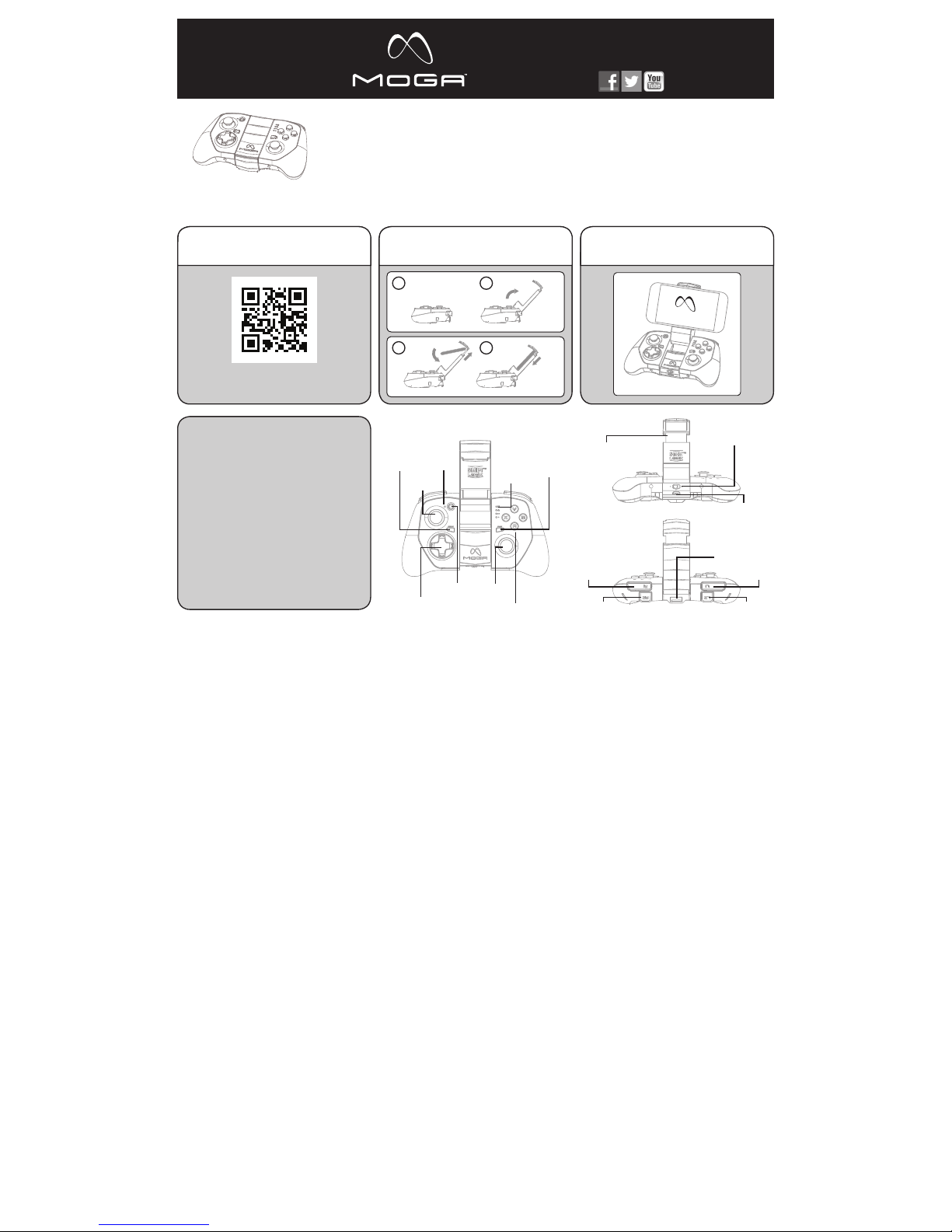
Fig. 1 Front V iew
Action Buttons
R2 L2
Right Analog
Stick/R3
Wake/Battery
Button
START B utton
SELECT Button
LED
Indicators
D-Pad
GETTING STARTED IS AS EASY AS 1, 2, 3!
Fig. 2 Bott om View
Fig. 3 Top View
MOGA Arm w ith
S.M.R.T. Lock Technology
A/Off/B Power Switch
Micro-B
Charging Port
MOGA Boost
Charging Port
R1 L1
Left Analog
Stick/L3
LED Charge
Indicator
QUICK-START INSTRUCTIONS
Make sure you fully charge your MOGA
HERO™ POWER before use.
1. Download, run and install the MOGA
Pivot™ app using the QR code provided or
by visiting MOGAanywhere.com/PivotApp
on your device’s web browser.
2. Insert your smartphone into the MOGA
Arm on the MOGA HERO POWER and
secure it with the S.M.R.T. Lock™.
3. Game On. Anywhere.
/MOGAanywhereMOGAanywhere.com
USER MANUAL
Manuel de l’utilisateur,
Bedienungsanleitung,
Manual de usuario,
Manuale per l’uso,
Manual do usuário
2. Insert your phone into
the MOGA Arm™.
3. Game On. Anywhere.1. Download, run and install
the MOGA Pivot App.
Scan QR Code or go to
MOGAanywhere.com/PivotApp
1 2
3 4
Pivot app
Page 2

carregamento, o LED indicador de carregamento junto do
botão Reac tivação/ Bateria pisc a com a cor amarela q uando
o comando es tá desligado , verde quando e stá no modo A e
cor-de- laranja no modo B . Um LED fixo indi ca que o comando
está totalmente carregado.
2. Transfira e in stale a aplica ção MOGA Pivo t utilizando
o código QR fo rnecido ou vis itando o ende reço
MOGAany where.com /Pivotap p no navegador da w eb do
seu disposi tivo. Certi fique-se d e que a aplicaç ão Pivot está
configurada para se actualizar automaticamente.
3. Abra o MOG A Arm. Coloqu e o smartphon e no topo do
MOGA Arm , empurre suave mente o braço pa ra abri-lo e
bloqueie o te lefone na posi ção.
4. Fça desli zar o interrup tor localiza do abaixo do MO GA Arm
da posição O ff (Desliga do) para A.
5. Quando de slizar o interr uptor de alime ntação para A , o
MOGA fic a em modo de empar elhamento de B luetooth®. Os
LEDs indicadores de estado piscam a azul enquanto estiver
no modo de emparelhamento. O modo de emparelhamento
dura 180 segu ndos antes de o co ntrolador M OGA se desliga r
para economizar energia.
6. Inicie a apl icação MOG A Pivot. O Pivot ir á guiá-lo pass o a
passo pelo p rocesso par a garantir que o se rviço de Blue tooth
do seu smar tphone fiqu e ligado e que seja e mparelhado c om
o seu contro lador MOGA He ro Power. Siga as ins truções no
ecrã para começar a jogar!
UTILIZAÇÃO DO MOGA BOOST:
Para carregar seu dispositivo móvel enquanto joga, ligue o
cabo do MOG A BoostTM de 20 c m na ranhura tras eira do
controlad or MOGA. Em s eguida, ligu e-o a outra ex tremidade
à porta Mic ro-B do disp ositivo. O MOG A Boost não fun ciona
se a carga do co ntrolador M OGA Hero Powe r for inferior a
25%. Os LEDs in dicadores d e estado pisc am rapidamen te
quando a car ga é inferior a 25%.
LEDS INDICADORES:
O LED indica dor de carre gamento apre senta-se d e cor
verde fixo q uando o comand o está ligado no m odo A, corde-laran ja fixo quando e stá ligado no mo do B e desliga- se
quando o comando está desligado. Durante o carregamento,
o LED indica dor de carre gamento pisc a com a cor amarela
quando o comando está desligado, verde quando está no
modo A e cor-d e-laranja no m odo B.
Os LEDs indicadores de estado piscam sincronizadamente
quando o cont rolador est iver a emparelh ar. Depois de o
emparelha mento estar c oncluído, os LE Ds mostram se
o controlad or é o primeiro, s egundo, terc eiro ou quart o
controlad or emparelha do com o disposi tivo móvel.
Quando o teu M OGA Hero Powe r é emparelhad o com o
teu disposi tivo móvel, po des premir o bot ão Reactiva ção/
Bateria e os L EDs indicado res de estad o apresent arão o
carrega mento da bater ia em increment os de 25% - um LED
fixo e outro a p iscar a 25%, dois L EDs fixos e um a pi scar a
50%, três L EDs fixos e um a pi scar a 75% e os quatr o LEDs
fixos a 100% . O botão React ivação/Ba teria não func iona com
o comando desligado. No modo de hibernação, premindo
o botão Reac tivação/ Bateria o teu MO GA Hero Power é
reactivado.
MODO A VS. MO DO B:
O Modo A supor ta todos os j ogos optimiz ados para MOG A
da nossa eno rme bibliote ca. Para jogos q ue não são
optimizad os para MOGA , mas que supor tam contro ladores
de DIH (Disp ositivo de Int erface Huma na), o Modo B permi tirlhe-á mape ar os controlo s do jogo no seu MO GA.
JOGAR NO TA BLET:
O MOGA supo rta jogos em q ualquer tab let Android 2. 3 ou
superior, tr ansformand o o seu tablet nu ma consola por tátil!
LIGAÇÃO À T V:
Pode utiliz ar o MOGA para jo gar jogos de dis positivos mó veis
no seu televi sor. Se o seu table t ou telefone su portar a saí da
MHL, a maior ia dos modelo s mais recente s suporta- a através
da porta d e carregame nto, e o seu televi sor possuir um a
entrada HD MI, basta lig ar um cabo MHL ao d ispositivo m óvel
e à TV para uma e xperiência e m ecrã grande. V isite meetm hl.
com para ver di agramas e víde os instrutiv os sobre o assun to
para aproveitar o dispositivo ao máximo.
PERGUNTAS FREQUENTES
P: Não estou a c onseguir emp arelhar o meu MO GA Hero
Power.
R: Primeir o, tente novame nte. Se os LEDs in dicadores d e
estado pa rarem de pisca r, prima o botão Wake /Batter y
(Activar/Bater ia).
Se seu MOGA a inda assim não em parelhar, mova o
interrup tor de aliment ação para Of f (Desligado) e d epois
para A. Qua ndo os LEDs pis carem a azul, te nte emparelha r
novamente.
Se estas op ções não funci onarem, pod e tentar empar elhar
o seu MOGA He ro Power manualm ente. Vá para o menu
Settings (Configurações), seleccione Wireless & Networks
(Sem fio e red es) >Bluetoot h Settings (C onfiguraçõ es de
Bluetooth) e, com o Bluetooth ligado, procure dispositivos.
Quando o MOG A 2 aparecer, se leccione Pair ( Emparelhar).
Depois, re abra o Pivot - o con trolador MOG A deve então
emparelhar.
P: Quero emp arelhar o meu MO GA Hero Power c om outro
dispositi vo, mas ele conti nua a emparelha r novamente com o
meu dispositivo original.
R: Inicie o Piv ot e abra o menu Set tings (Conf igurações).
Seleccione Add/Manage Controllers (Adicionar/Gerir
Controladores). Deve cancelar sempre o emparelhamento
do seu MOGA H ero Power ante s de emparelha r com outro
dispositi vo. Toque em Unsyn c (Anular sinc ronização). De pois,
utilizand o o mesmo menu, fa ça o emparelha mento do seu
MOGA Hero P ower com o novo dis positivo móvel . Também
pode cance lar o emparelha mento do seu co ntrolador MO GA
no menu System Settings (Configurações de sistema) do seu
dispositivo móvel.
P: O meu dispo sitivo não car rega quando es tá ligado à por ta
de carreg amento MOGA B oost.
R: Certif ique-se de q ue tem mais de 25% de c arga no
seu MOGA He ro Power. Certi fique-se , também, de qu e o
controlad or MOGA est á no modo A ou B. O MOG A BOOST
não funcion a quando o inter ruptor de alim entação est á na
posição Off (Desligado).
P: Estou a ten tar carreg ar tanto o meu MO GA Hero Power
como o meu dispositivo móvel simultaneamente, mas o meu
dispositivo não está a carregar.
R: Não é possí vel carregar o s eu dispositi vo móvel com o
MOGA Boos t enquanto o seu c ontrolador M OGA Hero Powe r
estiver a carregar.
Para encont rar respost as para mais per guntas freq uentes,
visite MOGAanywhere.com/support.
CUIDADO E M ANUTENÇ ÃO
Não exponha o MOGA Hero Power a temperaturas extremas.
O MOGA Hero P ower foi conceb ido para ser ar mazenado e
utilizado a t emperatura s médias e nunca d eve ser expos to à
luz solar dire cta ou a temp eraturas de co ngelamento du rante
qualquer pe ríodo de temp o. O intervalo d e temperatu ras de
funcionam ento e armazena mento normal é d e 4 ºC a 43 ºC.
Não exponh a o MOGA Hero Pow er a água ou outr os líquidos.
MOGA e o logó tipo MOGA são m arcas regis tadas da
Bensusse n Deutsch and A ssociates , Inc.™ e da © Bensusse n
Deutsch and Associates, Inc.
Android é um a marca regist ada da Google I nc.
A marca e os log ótipos Bluet ooth® são marc as comerciais
registadas da Bluetooth SIG Inc. e qualquer utilização dessas
marcas pela PowerA é efectuada sob licença. Todas as outras
marcas registadas pertencem aos respectivos proprietários.
Bringen Sie I hren MOGA He ro Power nicht mit W asser oder
anderen Flüssigkeiten in Kontakt.
MOGA und da s MOGA-Lo go sind Marken von B ensussen
Deutsch a nd Associat es, Inc. TM und © B ensussen De utsch
and Assoc iates, Inc. A ndroid ist ein Wa renzeichen vo n Google
Inc. Die Wortmarke Bluetooth® und die entsprechenden
Logos sind e ingetragen e Marken der Blue tooth SIG Inc . und
werden von PowerA ausschließlich unter Lizenz verwendet.
Alle anderen Marken sind das Eigentum ihrer jeweiligen
Inhaber.
SPANIS H
INSTRUCCIONES DETALLADAS DE INSTALACIÓN
1. Antes de util izar MOGA Her o Power, cárgalo d el todo; para
ello enchuf a el cable Micro -B en el puer to de carga Micr o-B
del mando. Mi entras se car ga, el indicad or LED de carga ,
situado jun to al botón de ac tivación/ batería, par padea en
amarillo si el ma ndo está apa gado, en verde si e stá en el
modo A y en naran ja si está en el mod o B. Cuando el man do
esté total mente cargad o el LED dejará de p arpadear.
2. Descar ga e instala la apli cación MOG A Pivot; para
ello utiliza e l código QR sumin istrado o acce de a
MOGAanywhere.com/Pivotapp desde el navegador web
del disposi tivo. Asegú rate de que la apli cación Pivot e stá
configurada para actualizarse automáticamente.
3. Desplieg a el brazo MOGA . Coloca tu sma rtphone en l a
parte sup erior del brazo , empuja con cuid ado el brazo para
abrirlo y blo quea el teléfo no en su sitio.
4. Cambia el in terruptor si tuado debaj o del brazo MOGA d e
la posición O ff a A.
5. Al hacerlo , el MOGA entra rá en modo de emp arejamiento
de Bluetooth®. En este modo, los indicadores LED de estado
parpadea n en azul. El modo d e emparejamie nto dura 180
segundos ; trascurri do este tiempo , el mando MOGA s e
apaga para ahorrar energía.
6. Abre la ap licación MOG A Pivot. Esta a plicación te g uiará
paso a paso en e l proceso de ac tivación del s ervicio Blu etooth
del smartphone y de emparejamiento del smartphone con
el mando MOG A Hero Power. Sigu e las instrucc iones en
pantalla para empezar a jugar.
CÓMO USAR M OGA BOOST:
Para cargar el dispositivo móvil mientras juegas, inserta el
cable MOG A Boost de 20 cent ímetros en la ra nura situada
en la parte p osterior del m ando MOGA y, a con tinuación,
en el puert o Micro-B de l dispositivo . MOGA Boost de ja de
funcionar s i la carga del man do MOGA Hero P ower descien de
por debajo d el 25 %. Cuando es to ocurre, los i ndicadore s LED
de estado comienzan a parpadear rápidamente.
INDICADORES LED:
El indicado r LED de carga s e queda encend ido en color
verde cuand o el mando está e n modo A y en color na ranja
cuando est á en modo B, y se de sactiva cuan do el mando
está apag ado. Mientras s e carga, el ind icador LED de c arga
parpadea e n amarillo si el man do está apag ado, en verde si
está en el mo do A y en naranja si est á en el modo B.
Todos los indic adores LED d e estado par padean al uníso no
mientras el m ando está emp arejándose. U na vez terminad o
el empareja miento, las luce s LED indican si e l mando
es el primer o, el segundo, e l tercero o el cuar to mando
emparejado con el dispositivo móvil.
Una vez empar ejado el MOGA H ero Power con tu d ispositivo
móvil, pued es ver el estad o de carga de la ba tería pulsan do
el botón de ac tivación/ batería; los i ndicadore s LED de
estado in dican la carga d e batería en incr ementos de 25
%: una LED fija y o tra parpade ante para el 25%, do s fijas y
una parpad eante para el 50 %, tres fijas y u na parpadea nte
para el 75% y las cua tro LED fijas p ara el 100%. El bot ón de
activaci ón/bater ía no funciona co n el mando apaga do. Si
pulsas el bot ón de activac ión/bater ía en el modo en re poso,
el MOGA Her o Power se acti va.
MODO A fre nte a MODO B:
El modo A es com patible con to dos los juegos M OGA
optimizados de nuestra inmensa biblioteca. Para juegos
MOGA no opt imizados per o que admiten co ntroladore s HID
(Disposit ivo de Inter faz Humana), el mo do B permite uti lizar
los contro les de juego en t u MOGA.
CÓMO JUGA R CON TU TABLETA:
MOGA es com patible con cua lquier table ta Android 2. 3+,
convirtiéndola en una consola portátil.
CÓMO CONECTAR MOGA AL TELEVISOR:
Puedes ut ilizar MOGA pa ra disfruta r de juegos de móv iles
en el televis or. Si tu tableta o t eléfono inclu yen un puert o
de salida MH L (la mayoría de lo s modelos más re cientes lo
tienen a trav és del puert o de salida) y tu tel evisor, un puer to
de entrada H DMI, solo tie nes que conec tar un cable M HL
en el disposi tivo móvil y en tu te levisor para d isfrutar de u na
pantalla má s grande. Visit a meetmhl.co m para ver esque mas
y vídeos ex plicativos qu e te ayudarán a sa car el máximo
partido de tu dispositivo.
PREGUNTAS MÁS FRECUENTES
P: Tengo probl emas para empa rejar mi MOGA He ro Power.
R: Antes de n ada, vuelve a int entarlo. Si lo s indicador es LED
de estado d ejan de parpad ear, pulsa el bot ón de activaci ón/
batería.
Si sigues sin po der empareja rlo, apágalo c on el interrup tor en
posición O ff y vuelve a enc enderlo en pos ición A. Cuand o las
LED parpa deen en azul, vu elve a intenta rlo.
Si estas acciones no funcionan, puedes intentar emparejarlo
manualment e con tu MOGA He ro Power. Ve al menú de
configuración, selecciona Conexiones y redes inalámbricas
> Ajustes de Bluetooth y, con el Bluetooth activado, inicia
la búsqued a de dispositiv os. Cuando apa rezca MOGA 2,
seleccion a Emparejar. Seg uidamente vu elve a abrir Pivo t; el
mando MOG A debería empa rejarse.
P: Quiero em parejar mi MOG A Hero Power con o tro
dispositivo, pero sigue emparejándose con el primer
dispositivo.
R: Inicia Pivot y abre el menú de configuración. Selecciona
Agregar/Administrar mandos. Para emparejar tu MOGA Hero
Power con otr o dispositivo d ebes desem parejarlo ant es. Toca
en Interrumpir sincronización. A continuación, utilizando el
mismo menú, e mpareja tu MOG A Hero Power co n el nuevo
dispositivo móvil. También puedes desemparejar tu mando
MOGA con el me nú de configu ración del sist ema de tu
dispositivo móvil.
P: El disposi tivo no se carga c uando lo conec to al puerto d e
carga MOG A Boost.
R: Comprue ba que queda má s del 25 % de carga en e l MOGA
Hero Power. Com prueba tam bién que el mando M OGA está
en modo A o B. Rec uerda que MOG A BOOST no func iona con
el disposit ivo apagado (i nterrupto r en posición Of f).
P: Intento c argar mi MOGA H ero Power y mi disp ositivo móvil
al mismo tiemp o, pero el dispo sitivo no se car ga.
R: No es posib le cargar el dis positivo móvi l con MOGA Boos t
mientras el m ando MOGA Her o Power está ca rgándose.
Para ver más re spuestas a pr eguntas más f recuentes, v isita
MOGAanywhere.com/support.
CUIDADO Y MANTENIMIENTO
No expong as tu MOGA Hero P ower a tempera turas
extrema s. El MOGA Hero P ower está pen sado para
guardars e y utilizarse a t emperatura s medias y no deb ería
exponer se a la luz direc ta del sol ni a temp eraturas muy b ajas
ni siquiera durante un corto espacio de tiempo.
El intervalo de temperatura normal de funcionamiento y
almacenami ento va de los 4 ºC ha sta los 43 ºC . No expongas
tu MOGA Her o Power al agua u ot ros líquidos.
MOGA y el log otipo de MOGA s on marcas come rciales
de Bensuss en Deutsch an d Associate s, Inc. TM y de ©
Bensusse n Deutsch and A ssociates , Inc. Andro id es una
marca come rcial de Google I nc. La marca d enominativa y
los logos de B luetooth® so n marcas regis tradas prop iedad
de Bluetoot h SIG, Inc. y cua lquier uso de di chas marcas po r
PowerA es bajo li cencia. El rest o de marcas son p ropiedad de
sus respectivos propietarios.
ITALI AN
CONFIGURAZIONE DETTAGLIATA
1. Prima di utiliz zare il MOGA H ero Power, caric arlo
completa mente collega ndo il cavo Micr o-B in dotaz ione
alla port a di alimentazi one Micro-B s ul controller. D urante
la carica, l ’indicatore d i carica a LED v icino al pulsan te
Autoaccensione/Batteria lampeggia con luce gialla quando
il controll er è spento, con lu ce verde in moda lità A e con luce
arancione i n modalità B. L a luce fissa del L ED indica che il
controller è completamente carico.
2. Scarica re e installar e l’app MOGA Pivot u tilizzando i l codice
QR in dotazione oppure visitando MOGAanywhere.com/
Pivotapp s ul browser web d el dispositi vo; verificar e che l’app
Pivot sia impostata sull’aggiornamento automatico.
3. Stendere il M OGA Arm. Pos izionare lo smar tphone in cim a
al MOGA Arm , premendo de licatament e il braccio ape rto, e
bloccarlo in posizione.
4. Far scorr ere l’interru ttore sot to il MOGA Arm d alla
posizione O FF ad A.
5. Quando l’i nterrutt ore di alimenta zione è in posizio ne
A, il MOGA è i n modalità di acc oppiamento B luetooth®.
In modalit à di accoppiame nto, gli indica tori di stato a L ED
lampeggiano con luce blu. La modalità di accoppiamento
dura 180 seco ndi prima che il co ntroller MOG A si spenga per
risparmiare energia.
6. Lanciar e l’app MOGA Pivot , che fornirà i struzioni
dettagliate durante la procedura in modo da garantire
che il serv izio Bluetoot h dello smart phone sia atti vato e
lo smartp hone stesso sia a ccoppiato al c ontroller MO GA
Hero Power. Se guire le istru zioni sullo sche rmo per iniziar e
a giocare!
USO DI MOGA B OOST:
Per carica re il dispositi vo mobile duran te il gioco, inse rire
un’estremit à del cavo MOG A BoostTM da 8” nel lo slot sul
retro del co ntroller MOG A e l’altra estre mità nella por ta
Micro-B s ul dispositiv o. MOGA Boost n on funzioner à se la
carica del c ontroller MO GA Hero Power è i nferiore al 25%.
Quando la ca rica è inferio re al 25%, gli indic atori di stato a
LED lampeggiano rapidamente.
INDICATO RI A LED:
L’indicatore d i carica a LED mo stra una luce ve rde fissa
quando il con troller è in mod alità A, una lu ce arancione
fissa quan do è in modalità B e s i spegne quand o il controlle r
è spento. Dur ante la caric a, l’indicato re di carica a LE D
lampeggia c on luce gialla qua ndo il control ler è spento, con
luce verde in m odalità A e con lu ce arancione in m odalità B.
Quando il controller sta eseguendo l’accoppiamento, tutti
gli indicat ori di stato a LE D lampeggian o all’unisono. Una
volta comp letato l’accopp iamento, i LED m ostrano se il
controlle r è il primo, il seco ndo, il terzo o il q uarto accop piato
al dispositivo mobile.
Quando il MO GA Hero Power è ac coppiato al dis positivo
mobile, è possibile premere il pulsante Autoaccensione/
Batteria e g li indicator i di stato a LED mo streranno il li vello
di carica de lla batteria c on increment i del 25%: un LED
fisso e uno la mpeggiante p er il 25%, due LED f issi e uno
lampeggia nte per il 50%, t re LED fissi e un o lampeggian te
per il 75% e tut ti e quattro i LE D fissi per il 100 %. Il pulsante
Autoaccensione/Batteria non funzionerà quando il controller
è spento. In modalità “sospensione” (risparmio energetico),
la pressione del pulsante Autoaccensione/Batteria riattiverà il
MOGA Hero P ower.
MODALITÀ A / MO DALITÀ B:
La modalit à A support a tutti i nost ri numerosi gi ochi MOGA
Enhanced di sponibili. Per g iochi che non so no MOGA
Enhanced ma su pportan o driver HID (D ispositivi a in terfaccia
umana), la moda lità B permet terà di mappa re i comandi di
gioco sul MO GA.
GIOCO SUL TABLET:
MOGA supp orta il gioc o su qualsiasi tab let Android 2. 3 o
successiv o, trasforma ndo il tablet in u na console por tatile!
CONNESSIONE ALLA TV:
È possibile u tilizzare il MO GA per gioca re giochi mobil i alla
TV. Se il table t o il telefono su pporta un’us cita MHL (gra n
parte dei m odelli più nuov i utilizzano all o scopo la por ta di
alimentaz ione) e la TV pre senta un ingre sso HDMI, ba sta
inserire le e stremità di u n cavo MHL nel dis positivo mob ile
e nella TV pe r giocare sul gr ande scherm o. Accedere a
meetmhl.c om per vedere d iagrammi e vide o tutorial in mo do
da ottener e il massimo dal pr oprio dispos itivo.
DOMANDE FREQUENTI
D: Sto avendo pr oblemi con l’acco ppiamento de l MOGA
Hero Power.
R: Per prima co sa, riprova re. Se gli indica tori di stato
a LED smett ono di lampegg iare, premer e il pulsante
Autoaccensione/Batteria.
Se il MOGA no n inizia ancora l’acco ppiamento, s postare
l’interru ttore su OFF, quin di di nuovo su A. Qu ando i
LED lampeggiano con luce blu, provare nuovamente
l’accoppiamento.
Se tali soluz ioni non funzio nano, è possibi le provare ad
accoppiar e manualmente il M OGA Hero Powe r. Accedere al
menu delle im postazioni [S ettings], s elezionare Wi reless &
Networks>Bluetooth Settings e, con il Bluetooth attivato,
eseguire l a ricerca dei di spositivi. Q uando appare M OGA
2, seleziona re Pair. In seguit o, riaprire Piv ot; a quel punto i l
controller MOGA dovrebbe eseguire l’accoppiamento.
D: Voglio acco ppiare il MOGA H ero Power a un alt ro
dispositi vo, ma continua a r ieseguire l’acc oppiamento al m io
dispositivo originale.
R: Lanciar e Pivot e aprire il m enu delle impo stazioni.
Selezionare Add/Manage Controllers; è sempre necessario
annullare l’acc oppiamento a l MOGA Hero Pow er prima di
eseguire l ’accoppiament o a un altro dispo sitivo. Toccare
Unsync. I n seguito, util izzando lo ste sso menu, acc oppiare
il MOGA Her o Power al nuovo dis positivo mob ile. È inoltre
possibile annullare l’accoppiamento del controller MOGA nel
menu delle im postazioni d i sistema del dis positivo mobi le.
D: Il mio dispo sitivo non si car ica quando è col legato alla
porta di al imentazion e MOGA Boost .
R: Verifica re di disporr e di una carica su periore al 25% nel
MOGA Hero P ower. Inoltre, ve rificare ch e il controlle r MOGA
sia in modalit à A o B. MOGA Boos t non funzione rà se
l’interru ttore di alim entazione si tr ova su OFF.
D: Sto tentan do di caricar e contempora neamente il MO GA
Hero Power e il m io dispositiv o mobile, ma il disp ositivo non
si carica.
R: Non è possi bile caricar e il dispositiv o mobile con
MOGA Boos t mentre il cont roller MOGA H ero Power è in
carica. Per risposte ad altre domande frequenti, visitare
MOGAanywhere.com/support.
CURA E MANUTENZIONE
Non esporr e il MOGA Hero P ower a temperat ure estreme .
Il MOGA Her o Power è proget tato per es sere conser vato
e utilizzat o a temperatur e medie e non deve m ai essere
esposto all a luce dirett a del sole o a temp erature trop po
fredde, n eanche per bre vi periodi. Il c ampo di tempe ratura
di funziona mento e conser vazione norm ale è tra i 4,5°C e i
43°C. Non e sporre il MOG A Hero Power all ’acqua o ad altri
liquidi.
MOGA e il log o MOGA sono marc hi commercial i di
Bensusse n Deutsch and A ssociates , Inc. ™ e © Bensus sen
Deutsch a nd Associat es, Inc. And roid è un marchio
commercial e di Google Inc . Il marchio e i logh i Bluetooth®
sono marchi commerciali registrati di proprietà di Bluetooth
SIG, Inc. e ve ngono utiliz zati da PowerA su lic enza. Tutti
gli altri marchi commerciali appartengono ai rispettivi
proprietari.
PORTUGESE
CONFIGURAÇÃO DETALHADA
1. Antes de util izares o teu MOG A Hero Power, car rega-o
totalment e introduzin do o cabo Micro -B incluído n a porta
de carreg amento Micro -B do teu coman do. Durante o
Deutsch and Associates, Inc.
Android es t une marque de c ommerce de Goo gle Inc.
La marque et l es logos Blue tooth® sont de s marques
déposée s de Bluetooth S IG, Inc. et tou te utilisati on de ces
marques par PowerA s’effectue sous licence.
Toutes les aut res marques d e commerce son t la propriété d e
leurs propriétaires respectifs.
Le présent appareil estconforme aux CNR d’Industrie
Canada app licables aux a ppareils rad io exempts de lic ence.
L’exploitatio n est autorisé e aux deux cond itions suivan tes: (1)
L’appareil ne doit p as produire de r ouillage et (2) l’ut ilisateur
de l’appareil doit accepter tout brouillage radioélectrique
subi, meme si le brouillage est susceptible d’en compromettre
le fonctionnement.
GERMAN
DETAILLIERTE EINRICHTUNG
1. Bevor Sie Ihren M OGA Hero Pow er verwende n, müssen
Sie den Contr oller vollstä ndig auflad en. Schließe n Sie dazu
das mitgelieferte Micro-B-Kabel am Micro-B-Ladeanschluss
des Contro llers an. Bei au sgeschalte tem Controll er blinkt die
LED-Ladeanzeige neben der Weck-/Batterie-Taste während
des Ladev organgs gelb . Im A-Modus b linkt die Anzei ge grün
und im B-Mo dus orange. Wen n der Controll er aufgelade n ist,
leuchtet die LED-Anzeige durchgängig.
2. Laden Sie d ie MOGA-Pi vot-App mith ilfe des QR-C odes
herunter, oder indem Sie MOGAanywhere.com/Pivotapp auf
dem Internetbrowser Ihres Geräts aufrufen, und installieren
Sie sie. Achte n Sie darauf, dass d ie Pivot-App s o eingestell t
ist, dass Updates automatisch heruntergeladen werden.
3. Klappen S ie den MOGA- Arm auf. Lege n Sie Ihr
Smartph one in den MOGA -Arm, öff nen Sie den Arm m it
leichtem Druck und lassen Sie Ihr Handy einrasten.
4. Schiebe n Sie den Schalt er unter dem MO GA Arm von
Aus auf A.
5. Wenn Sie den Ha uptschalt er auf A schiebe n, befindet
sich Ihr MOGA im Bluetooth®-Kopplungsmodus. Die LEDStatusleuchten blinken während des Kopplungsvorgangs
blau. Der Kopplungsmodus dauert 180 Sekunden. Danach
schaltet si ch der MOGA Con troller ab, um St rom zu sparen.
6. Starte n Sie die MOGA- Pivot-App. D ie Pivot-App g eleitet
Sie Schritt für Schritt durch die nötigen Einstellungen,
um sicherzustellen, dass die Bluetooth-Funktion Ihres
Smartphones eingeschaltet ist und Ihr Smartphone mit dem
MOGA Hero P ower Controll er gepaart is t. Folgen Sie d en
Bildschirmanweisungen, um loszuspielen!
VERWEN DUNG VON MOGA B OOST:
Um Ihr mobile s Gerät zu laden wä hrend Sie spiel en,
stecken Sie da s 20 cm lange MOG A-Boost™-K abel in den
Steckplat z auf der Rücks eite Ihres MO GA-Cont rollers und
dann in den Mic ro-B-A nschluss an Ihr em Gerät. MOG A
Boost funk tioniert n ur, wenn der Lade zustand des M OGA
Hero Power Co ntrollers b ei wenigstens 2 5 % liegt. Die
LED-Statusleuchten blinken schnell, wenn der Ladezustand
unter 25 % fällt .
LED-ANZEIGEN:
Die LED-Ladeanzeige leuchtet grün, wenn der Controller
im A-Modu s eingeschal tet wird, und or ange, wenn er im
B-Modus eingeschaltet wird. Bei ausgeschaltetem Controller
erlischt di e Anzeige. Währ end des Aufla dens blinkt die
LED-Ladeanzeige bei ausgeschaltetem Controller gelb, bei
aktivier tem A-Mo dus grün und im B- Modus oran ge.
Die LED-St atusleucht en blinken alle im Gl eichtakt, w ährend
der Contro ller gekoppel t wird. Nach der K opplung zeige n die
LEDs an, ob d er Controller d er erste, zw eite, dritt e oder viert e
Controlle r ist, der mit de m mobilen Gerät g ekoppelt wur de.
Nach Herstellung der Verbindung zwischen dem MOGA Hero
Power und Ihrem mobilen Gerät, kann durch Drücken der
Weck-/Batterie-Taste der Ladezustand der Batterie geprüft
werden. Der LED-Balken zeigt in 25%-Inkremente an: eine
leuchtend e und eine blinken de LED = 25 %, zwei l euchtende
und eine blinke nde LED = 50 %, dr ei leuchtend e und eine
blinkende LE D = 75% und vier leuc htende LEDs = 10 0 %. Bei
ausgeschaltetem Controller funktioniert die Weck-/BatterieTaste nicht. Durch Drücken der Weck-/Batterie-Taste im
Ruhemodus w ird Ihr MOGA H ero Power akti viert.
A-MODUS UND B-MODUS:
Der A-Mo dus unterst ützt alle Spie le mit MOGA- Erweiteru ng
in unserer umfangreichen Bibliothek. Spiele, die keine
MOGA-Erweiterung haben, aber HID (Human Interface
Device)-Treiber unterstützen, können Sie mithilfe des
B-Modu s auf Ihrem MOG A spielen.
SPIELEN AUF IHREM TABLET:
Mit MOGA könn en Sie auf jedem A ndroid-2. 3+-Tablet
spielen. MO GA verwand elt Ihr Tablet in ein e tragbare
Spielkonsole!
ANSCHLUSS AN IHREN FERNSEHER:
Mit dem MOG A können Sie mobil e Spiele auch auf I hrem
Fernseher spielen. Wenn Ihr Tablet oder Handy einen MHLAusgang unt erstütz t – bei den meiste n neueren Mod elle über
den Ladea nschluss – und I hr Fernseher e inen HDMI- Eingang
hat, verbi nden Sie Ihr mob iles Gerät und Ih ren Fernseh er
einfach mit ei nem MHL-Kabel , um Ihr Spiel auf d em großen
Bildschir m zu genießen. D iagramme und A nleitungs-V ideos,
wie Sie das Bes te aus Ihrem Ger ät heraushole n, finden Sie
auf meetmhl.com.
HÄUFIG GESTELLTE FRAGEN
F: Ich habe Pr obleme beim Kop peln meines M OGA Hero
Power.
A: Probier en Sie es zunäch st noch einmal. D rücken Sie die
Wecken/Ak ku-Taste, falls die L ED-Status leuchten zu blin ken
aufhören.
Wenn Ihr MOG A immer noch nich t gekoppelt we rden kann,
schalten Si e den Hauptsc halter aus und da nn wieder auf A .
Sobald die L EDs blau blinken , versuchen Si e die Kopplung
noch einmal. Wenn diese Möglichkeiten nicht funktionieren,
können Sie versuchen, die Verbindung zu Ihrem MOGA Hero
Power manuell einzurichten. Öffnen Sie Ihr Einstellungsmenü,
wählen Sie Drahtlos & Netzwerke>Bluetooth-Einstellungen
und, bei eingeschaltetem Bluetooth, Scan nach Geräten.
Drücken Sie au f „Pair“, wenn MOGA 2 er scheint. Öf fnen Sie
dann wiede r die Pivot-Ap p – der MOGA- Controller mü sste
sich nun koppe ln lassen.
F: Ich möcht e meinen MOGA H ero Power mit ein em anderen
Gerät koppe ln, aber er verb indet sich imme r wieder mit
meinem ursprünglich verwendeten Gerät.
A: Starte n Sie die Pivot-A pp und öffne n Sie das
Einstellungsmenü. Wählen Sie Controller hinzufügen/
verwalte n – Sie müssen ste ts die Verbindu ng Ihres MOG A
Pro Power trennen, bevor Sie ihn mit einem anderen Gerät
koppeln. Ti ppen Sie auf „Verbin dung trennen“. Koppe ln Sie
dann im gleich en Menü Ihren M OGA Hero Powe r an das
neue mobile Gerät. Sie können Ihren MOGA-Controller auch
im Systemeinstellungsmenü Ihres mobilen Geräts abkoppeln.
F: Mein Gerät l ädt nicht, wen n es am MOGA Boo stLadeanschluss angeschlossen ist.
A: Vergewis sern Sie sich, d ass der Ladez ustand Ihre s MOGA
Hero[!] Power m ehr als 25 % beträg t. Vergewis sern Sie sich
auch, dass si ch der MOGA- Controlle r im A- oder B-M odus
befinde t. MOGA BOOS T funktioni ert nicht, we nn der
Hauptschalter auf Aus steht.
F: Ich möcht e meinen MOGA H ero Power und mei n mobiles
Gerät gleichzeitig laden, aber mein Gerät wird nicht geladen.
A: Sie können I hr mobiles Gerä t nicht mit MOGA B oost laden,
während Ihr M OGA Hero Powe r Controller g eladen wird.
Antworten auf weitere häufig gestellte Fragen finden Sie auf
MOGAanywhere.com/support.
WARTUNG U ND PFLEGE
Setzen Sie I hren MOGA Her o Power nicht ex tremen
Temperaturen aus. Ihr MOGA Hero Power muss bei normalen
Temperaturen gelagert und benutzt werden und darf nicht
längere Zeit direkter Sonneneinstrahlung oder Temperaturen
unter dem Gefrierpunkt ausgesetzt werden.
Der normale Betriebs- und Lagertemperaturbereich liegt
zwischen 5°C und 43°C.
 Loading...