

Page 1

Start Here
for
Model
EE Installation - 6
Installation - UNIX platforms - 7
Installation - Windows platforms - 10
Sim
EE
Locating Documentation - 21
Tech Support, Updates & Licensing - 25
Online References - 32
Page 2

Model
/VHDL, Model
Sim
/VLOG, Model
Sim
/LNL, and Model
Sim
/PLUS are
Sim
produced by Model Technology Incorporated. Unauthorized copying, duplication, or
other reproduction is prohibited without the written consent of Model Technology.
The information in this manual is subject to change without notice and does not
represent a commitment on the part of Model Technology. The program described in
this manual is fu rnished under a license agreement and may not be used or copied
except in accordance with the terms of the agreement. The online documentation
provided with this product may be printed by the end-user. The number or copies that
may be printed is limited to the number of licenses purchased.
Model
is a trademark of Model Technology Incorporated. PostScript is a registered
Sim
trademark of Adobe Systems Incorporated. UNIX is a registered trademark of AT&T in
the USA and other countries. FLEXlm is a trademark of Globetrotter Software, Inc. IBM,
AT, and PC are registered trademarks, AIX and RISC System/6000 are trademarks of
International Business Machines Corporation. Windows, Microsoft, and MS-DOS are
registered trademarks of Microsoft Corporation. OSF /Motif is a trademark of the Open
Software Foundation, Inc. in the USA and other countries. SPARC is a registered
trademark and SPARCstation is a trademark of SPARC International, Inc. Sun
Microsystems is a registered trademark, and Sun, SunOS and OpenWindows are
trademarks of Sun Microsystems, I nc. All ot her trademarks and registered trademarks
are the properties of their respective holders.
Copyright (c) 1990-1998, Model Technology Incorporated.
All rights reserved. Confidential. Online documentation may be printed by licensed
customers of Model Technology Incorporated for internal business purposes only.
Published: November 1998
EE Start Here - Part # M16500 US$50
Page 3
Thank you
Thank you for purchasing from Mode l Technology’s family of simulation
products! If we can help you with any additiona l product informat ion,
please email our sales department at [email protected]
page at www.model.com
.
, or visit our home
Model
Questions?
This document
Sim
Elite Edition Simulators for UNIX and Windows
•
EE/VHDL
•
EE/VLOG
• EE/LNL
(Language-Neutral Licensing )
•
EE/PLUS
If you have quest ions a bout the product yo u have purc hase d here are a few
sources of information:
• "Locating Documentation" (p21)
• "Tech Support , Updates & Licensing" (p25)
• "Online References" (p32)
In this document you will find information on Model
documentati on for our Elite Edi tion (EE) simulators . You will also find
sections on tech support , licensing, and EDA industr y references. If you are
using this document online (the bes t way to use it), links for
cross-references, email and the web are available - just
click on
the blue text.
- for VHDL simulation only
- for Verilog simulation only
- for
either
- for single-langua ge, or mixed VHDL/Verilog simula tion
VHDL, or Verilog simulation
installation and
Sim
Help preserve the Silicon Forest
Oregon is famous for its forests as well as its
rain and slug chowder. Help us keep our forests
alive and green by using our online docume ntati on.
3
Page 4

Table of Contents
EE Installation - 6
System requirements for ModelSim EE - 6
Installation - UNIX platforms - 7
Installation - Windows platforms - 10
Installing the FLEXid security key - 10
Installation and setup for a PC server - 10
Troubleshootin g PC server setu p - 12
Setup for a UNIX serv er - 12
Windows platform installation details - 12
Licensing - 12
How to find the security key ID - 13
Regenerat ing your design libraries - 13
Installed directories and files - 13
Platform-specific directories - 19
Locating Documentation - 21
Online documentation - 21
Getting the most current PDF manuals - 22
Getting pa per manuals - 22
EE documentation - 22
Using ModelSim’s PDF documentation - 23
Getting the Acrobat Reader - 23
Sear ching PDF files - 23
Requirements for Acrobat Search - 24
Doc files for ModelSim EE - 24
Copy and Past e from PDF files - 24
Tech Support, Updates & Licensing - 25
ModelSim contact matrix - 25
Technical support - by telephone - 25
Mentor Graphics customers In North America - 25
Mentor Graphics customers outside North America - 26
Model Technology customers worldwide - 26
Technical s upport - electronic support services - 26
Ment or G raphics cus to m er s - 26
Model Technology customers - 27
Technical support - other channels - 28
Updates - 28
Mentor customers: getting the latest version via FTP - 28
Model Technology customers: getting the latest version via FTP - 29
4
Page 5

Licenses - ModelSim EE - 29
Wher e to obtain your license - 29
If you have trouble with licensing - 29
All cu stomers: ModelS im EE lice nsing - 29
A
license.dat
All customers: maintenance renewals and EE licenses - 32
All customers: license tra nsfers and server changes - 32
Online References - 32
Book s an d pu bli c at i on s - 32
Partners - 32
Training partners - 32
Resources - 32
Model Tec h nology
License Agreement - 33
Softw a re Lic e ns e A gre ement - 33
Model Technology Software License - 33
Important Notice - 34
Limited Warranty - 34
file example - 29
Table of Contents
5
Page 6

EE Installation
System requirements for Model
Platform Operating system &
interface
SPARCstation SunOS 4.1 &
OpenWindows
Solaris 2.4, 2.5, 2.6 & OSF/
Motif , OpenWindows, or
CDE
IBM RISC/
6000
HP 700 HP-UX 9x through 11. 0 &
X86 network-ready (s ee note)
AIX 4.1, 4.2 & OSF/Motif
HP VUE , OSF/Motif, or
CDE
Windows NT 4.0 or 95/98
Sim
EE
Memory Stora ge
32 Mb
minimum
(memory
need
scales with
size of
circu i t med to
large gate
design
may need
256 Mb)
hard disk
with at
least 35
Mb spare
capacity
Platf o rm- s pe c if ic in s truc tions
Select your platform for installation instr uctions.
• Installation - UNIX platforms (p7)
• Installation - Windows platforms (p10)
Note:
TCP/IP or IPX/SPX. If you are installing on an NT machine, make sure
you are logged in as "administrator" when running th e ins tallation
program.
Start Here for ModelSim EE
6
Any PC client or server must be connected to a network with
Page 7
Installation - UNIX platforms
Before you begin a new Model
make sure you have a Globetro tter licen se data file (
need the file to run Mode l
Sim
EE installat ion on a UNIX machine,
Sim
license. dat
file); you ’ll
. If you don’t have a license file see
"Licenses - ModelSim EE" (p29).
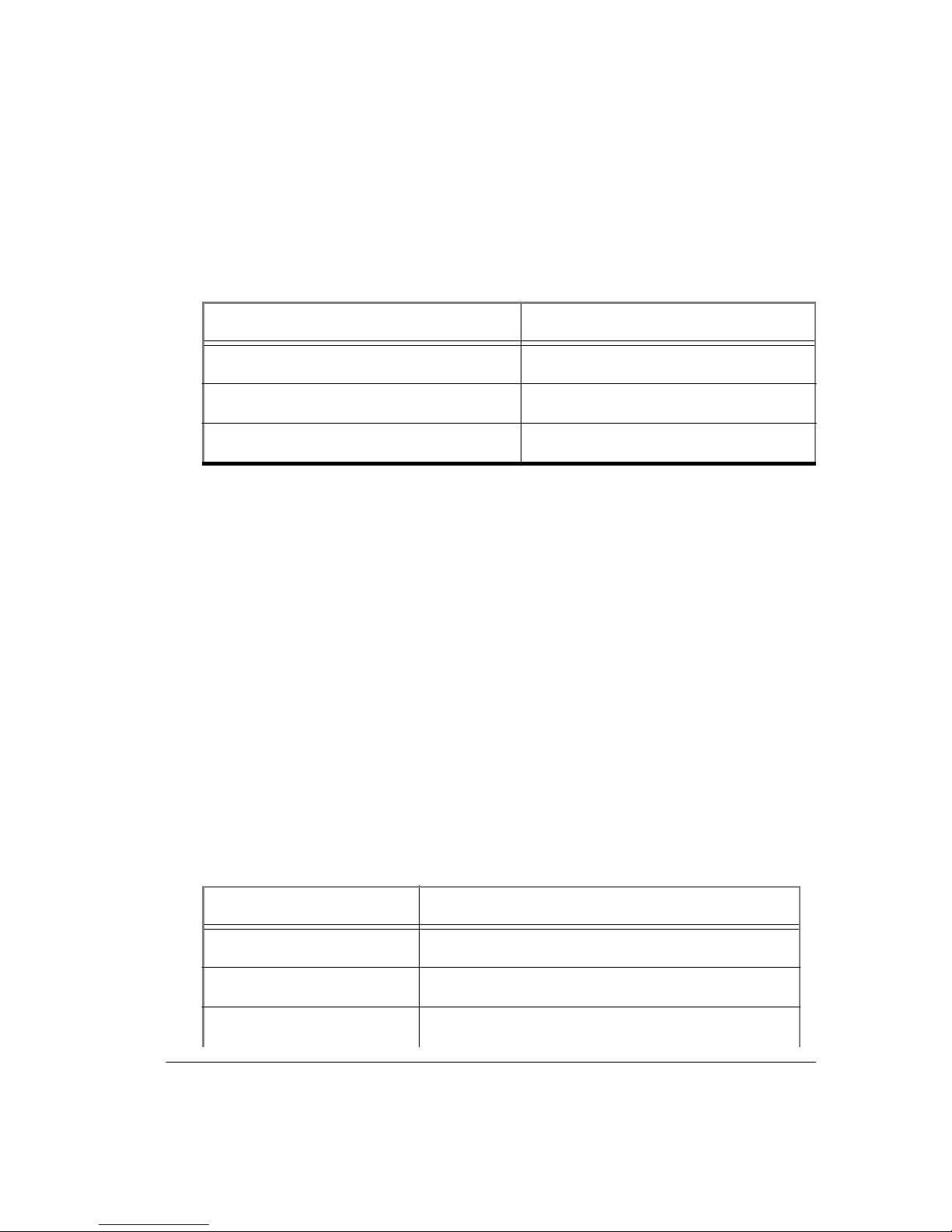
Your workstation’s identificat ion is required for a lice ns e; here are the
commands that r eturn the ID :
Syntax Platform
hostid SPARC
/etc/la nscan HP 700
uname -m RISC/6000
The commands used to i nstall Model
are cas e - sen s i ti v e, so they m u st
Sim
be entered exactly as shown in the following steps. (Note that neither the
prompt nor the <Retu r n> at the end of a line is shown in the exa mpl es .)
Model
1
you are installing it in the
can be installed in any directory. T hes e instructions as s ume that
Sim
directory. You can change to the desired
/usr
installation directory by entering one of the following commands:
cd /usr
or
cd <pathname>
From a mounted Model
2
following syntax (this creates the top-level directory
tar xf /<CD-ROM>/WORKSTATION/install/<filename.tar>
CD, extract the file for your platform with the
Sim
modeltech
where the <filename.tar> is:
Platform <filename.tar>
All platforms base.tar (extract for all platforms)
Sun OS-4/Solaris 1.x sun4.tar
Sun OS-5/Solaris 2.x sunos5.tar
):
EE Installation
7
Page 8

Platform <filename.tar>
HP hp700.tar
IBM rs6000.tar
All platforms docs.tar ( Model
In addition to the platform-specific file you need to extract
(common Model
Add the pathname of the Model
3
files) and
Sim
docs.ta r
Sim
(documentation).
executable directory to you r search
manuals in pdf format)
Sim
base.tar
path (use one of the following):
/usr/modeltech/sun4
/usr/modeltech/sunos5
/usr/modeltech/hp700
/usr/modeltech/rs6000
If are using shell scripts that require platform independenc e, you can use
the
directory to your search path.
command within th e pa th of your s hell s cript to r etu rn the pl atform
vco
returns a path appropriate for the
Vco
hardware from which you ar e invoking the simulator. The shell you are
running determines how you add vco to your path:
• for csh:
set path = ( $path /usr/modeltech/‘/usr/modeltech/vco‘ )
• for sh (Bourne or Korn)
PATH=$PATH:/usr/modeltech/‘/usr/modeltech/vco‘
export PATH
If you are using SunOS 4, and are planning to load shared libraries, you’ll
4
need this path included in the LD_LIBRARY_PATH environment
variable:
/usr/openwin/lib
Enter or edit the
5
license.dat
file in th e
modeltech
directory. Typically the
file looks like this (also see "L ic ense s - Mode lSim EE" (p29)):
SERVER hostname nnnnnnnn 1650
DAEMON modeltech ./modeltech ./options
FEATURE vsim modeltech 1997.090 dd-mmm-yyyy 2 \
6C92577EC335F4C9568D ck=61
FEATURE vcom modeltech 1997.090 dd-mmm-yyyy 2 \
6C92577EC335F4C9568D ck=61
Start Here for ModelSim EE
8
Page 9

Note:
To enable starting the license daemon from any directory,
change the DAEMON line to use the ful l pat h. For example:
DAEMON modeltech /usr/modeltech/hp700/modeltech \
/usr/modeltech/hp700/options
For HP installation using HP-UX version 9.x only: either the device /dev/
6
lan0 must be writable by the userID that starts the server, or the lmgrd
daemon and the lmhos tid utilit y must be made “setuid root”. The
commands to do this are:
chmod a+w /dev/lan0
or
chown root lmgrd lmhostid
chmod u+s lmgrd lmhostid
Start the license manager daemon by entering the following commands:
7
cd /usr/modeltech/<platform>
START_SERVER
where <platform> can be sun4, sunos5, hp700, rs6000.
If your system runs other appl ications that use Globetrotter Software’s
FLEXlm, a complete user’s manual for FLEXlm is availa b le at
Globetrotte r S oftware’s home page:
http://www.globetrotter.com/manual.htm
You may delete the executables you don’t want. Fo r example, if you don’t
8
need Model
cd /usr/modeltech/
rm -rf hp700
for HP machines:
Sim
EE Installation
9
Page 10

Installati on - Windows platforms
Note:
IP or IPX/SPX. If you are installing on an NT machine, make sure you are
logged in as "admi nistrator" when running the inst allation program.
Model
one of the following:
Installing the FLEXid security key
Attach the FLEXid security key (FLEXid is printed on the key) to the
parallel port of the PC server or stand-alone PC (key dri vers are loaded
during installation). If a printe r or other device is using the paral lel port,
install the security key on the port f ir st, then attach that device to the key.
The security key will not interfere with normal device operations.
Any PC client or server must be connected to a network with TCP/
EE requires a server for proper installation. Your server can be
Sim
• A stand-alone PC with a FLEXlm security key attached. (The PC acts
as both server and client.)
• A Windows server (95/98/NT) with a security key attache d. (The client
has no security key.)
• A UNIX server . (The client nor server have a security key; th e server’s
hostID provi des the same locking function as the security key.)
Please remember to protect your security key; Model Technology will
replace a defective key, but not one that is lost or stolen.
Installation and setup for a PC server
Follow this proc ess to set up a floating lice nse server on a PC. If you are
installing Model
floating license. If you are using a UNIX server see: "Set u p for a U NIX
server" (p12).
Run the Model
1
•
Install from the CD -
you can click on the CD icon.
•
Install from an FTP file
below.
The password-protected Model
and documentation file (ee_docs.zip) are available within th e versionnumbered directories at:
ftp.model .com/pub/EE/
Place the unzipped documentation files in the
after Model
Sim
on a stand-alone PC, the license is sti ll a considered
Sim
installation.
Sim
instal l wil l auto- r un when you ins er t the CD, or
- run the installation executa ble as noted
installati o n exe cu table (mti52 e e .ex e)
Sim
modelsim\docs
is installed.
directory
Start Here for ModelSim EE
10
Page 11

During installation you will be asked to choose a Sentinel driver for your
2
specific FLEXid s ecurity key. The number on your FLEX id s ecurity key
(something like 7-xxxxxxxx, or 8-xxxxxxxx) rel ate s to the driver you will
select.
Copy
3
license.dat
purchased Model
specific Mode l
into th e
license.dat
(the license file you received by email when you
) to
Sim
pathname if different. Pasting the text from the email
Sim
C:\modelsim\win32\license.dat
, or to your
file is the safest way to create a valid license file.
See "A lic en se.dat f il e ex ample" (p29) for details on the structur e of a
licen se file.
Verify your hostname (the server’s computer name) via the Windows
4
Control Panel with either FLEXlm > Advance d > Diagnostics, or with
Network > Identific ation.
5
Edit the
license.dat
file and make the f ollowing changes:
• Replac e "hostna me" with t h e server co mputer n ame.
• Change the "1650" port value only if this port is already used. If
uncertain, do not change.
• Change the DAEMON path to corres pond with the full pathname of
the modeltech daemon. For example,
DAEMON modeltech C:\modelsim\win32\modeltech
Set the environment variable for LM_LICENSE_FILE.
6
• For
Win dows NT
go to Control Panel > System > Environment and
add LM_LICENSE_FILE wit h an initial value of 1650@MYPC,
where MYPC is the hostnam e.
• For
Windows 95/98
set LM_LICENSE_FILE=1650@MYPC
edit the
autoexec.bat
and add the following line:
where MYPC is your hostna me.
Note that the c hanges m ade to y our
license.dat
file are reflec ted i n the port #
(1650) and the hostname (MYPC) that you set for LM_LICENSE_FILE.
Note:
If the LM_LICENSE_FILE vari able is al ready defined, you can add
a second value by separating the two values with a semi-colon ( ; ). For
example: LM_LICENS E_FILE=1650@MYPC;c: \renoir\li ce nse.dat
For Windows 95/98, reboot your machine; no reboot is needed for NT.
7
EE Installation
11
Page 12

Go to the FLE Xlm License Ma nager locate d in your Control Panel . Choose
8
the Setup tab and add the pathnames for the lmgrd.exe, license.dat, and
debug.log. Make sure the pathnames and exten sions are correct, then save
the setup. Ty pical entries mi ght look like this:
lmgrd.exe C:\models im\win32\lm grd.exe
License file C:\modelsim\win32\license.dat
Debug log file C: \m odelsim\win32\debug.log
Next choose the FLEXlm Control tab. Press the start button. Wait a
9
moment, then press t he status button. The serve r shoul d be up . If the s erver
does not start, try the following troubleshooting procedures.
Troubleshooting PC server setup
Open a DOS window and go to the appropriate
1
modelsim\win32
directory.
For example, C:\modelsim\ win32. Enter t h e comman d :
lmutil lmdiag
This allows you to veri fy ea ch fe ature independently.
From a DOS window, and the same
2
lmutil lmstat -a
win32
directory, enter the following:
This shows you all licenses that are available.
3
Go to the
debug.l og
inside the
win32
directory. This may pr ovide other
infor mation about the source of the lice n se server problems.
Setup for a UNIX server
Check with your system administra tor for the server’s hostna me and port#,
then follow the installation instructions above (steps 5 through 7) to set the
LM_LICENSE_FILE variabl e for your platform.
Windows platform installation details
Licensing
Model
Globetrott er Software. In a Windows-only en vironment, a FLEXid sec urity
key is installed that identifies the machine as the license server (a standalone PC acts as server
the license server, and requires no security key because FLEXlm uses the
UNIX server’s hostID as the identifier.
licensing is handled by the FLEXlm license manager from
Sim
client). A UNIX machine may also be used as
and
The license file (
license.dat
or host ID), and is obtained from either Model Technology or Mentor
Graph ic s. ( See "Lic ense s - ModelS im EE" (p29) if y ou need a license file.)
Start Here for ModelSim EE
12
) is ba s ed on the s erver identifier ( the FLEXid,
Page 13

If your license server is a UNIX workstation, make sure you are running
lmgrd version 5. 12b. If you have Model
server, you ha ve the current version - earlier l mg r d versions will not work
for Windows machines accessing the server. If you need a new version of
lmgrd, please downl oad it from: http:/ /www.globetr otter.com/lmgrd.htm
If you are a Mentor customer using an MGC license, consult MGC
documentation for setting up your server.
How to find the security key ID
The key ID is on a sti cker a ttac hed to the ke y. If you ca n’t ea sil y access the
key, you can ru n a ut il ity fro m the DOS p rompt tha t reads t he key ID. T ype
lmutil lmhostid -flexid
find
lmutil.exe
Model
Sim
in the
installation.
at the DOS prompt on the Windows server. You’ll
<install_dir>\modelsim\win32
5.2 installed on the UNIX
Sim
directory after
Regenerating your design libraries
.
Depending on your cur rent Model
your design libraries before running a simulation. Chec k the installation
readme file to see if your libraries require an update. You can easily
regenerate yo ur design libra ries wit h
is updated; u se
if you have a library named
design units you would use both of these commands:
vcom -work mylib -refresh
vlog -work mylib -refresh
Note:
VHDL, and
regenerate the std, ieee, vital22b, and verilog li braries.
Important:
varies between Model
libr ary in th e P E
$MODEL_TECH/../std. To prepare a new
it is best t o change the na me of your PE
then use
vmap
-work <library>
mylib
As in the example above, you will need to use
to refresh Verilog design units. Also, you
vlog
The library mapping for the provided Model
PE and Model
Sim
modelsim.ini
to copy a new
says $MODEL_TECH/std, where EE says
modelsim.ini
version, y ou may need t o rege nerate
Sim
-refresh
to update a different li brary. For example,
that contains both VHDL and Verilog
. By defaul t, the
vcom
Sim
EE. For example, the std
Sim
modelsim.ini
modelsim.ini
file.
for Model
to another name , and
work
to refresh
don't
libr ar i es
library
need to
EE
Sim
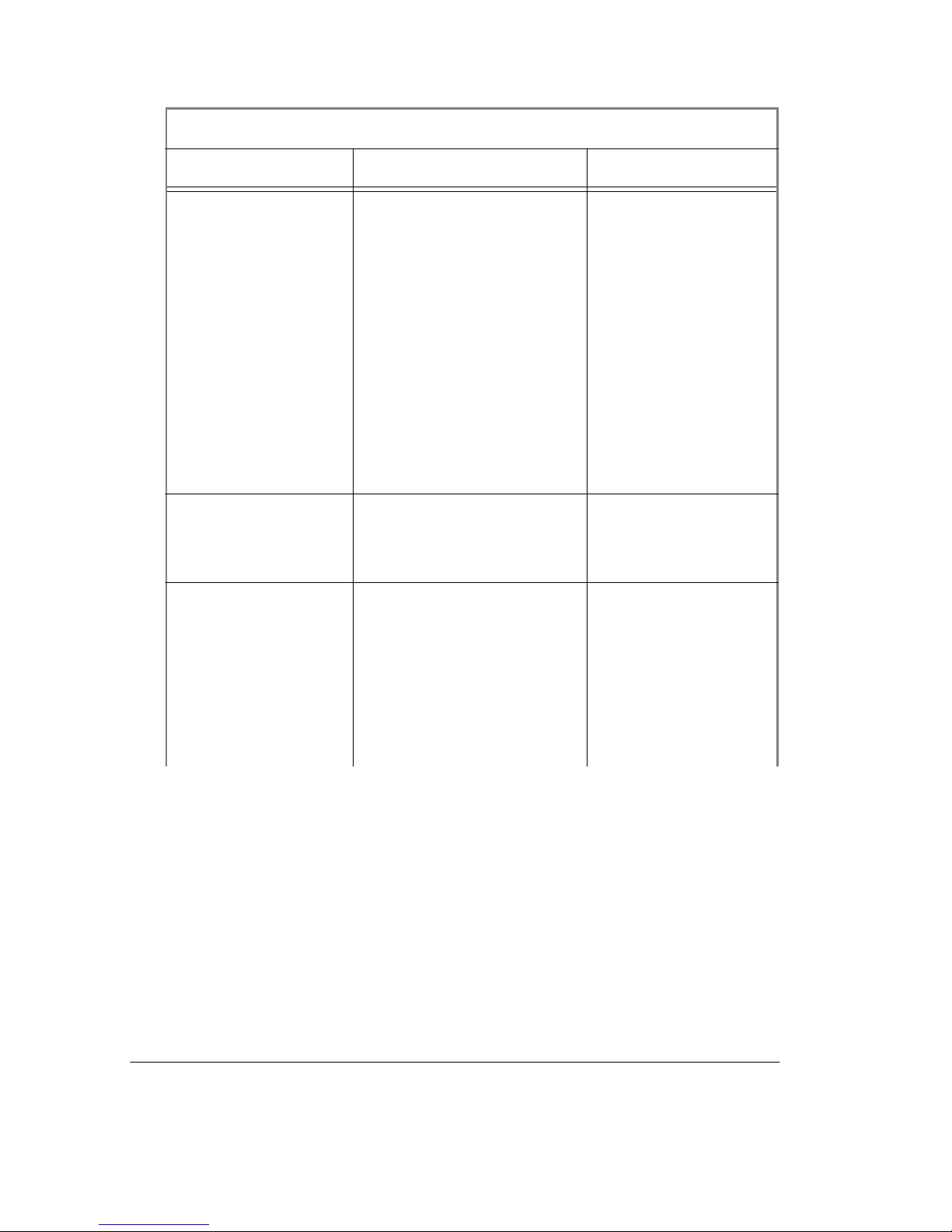
Installed directories and files
A typical installation for any EE platform would include the base file
structure ill ustrated below. For pla tform-specific (hp700, rs6000, sun4,
sunos5, and Win32) directories see "P latform-specific direct or ies" (p19).
EE Installation
13
Page 14
Sim
Installed files - Model
EE
Directory Files & subdirectories Description
<install directory>
/<modelsim_dir>
* NOTE: the default
Model
directory
Sim
is /modeltech for
UNIX, and
/modelsim f or
Windows
convert. tcl, modelsim.ini,
rebuild_libs.csh,
rebuild_libs.s h,
release_notes,
release_notes. h tml,
vsim.ps
translates 4.6 DO
files into 5.1 DO
files, modelsim
initialization file,
recr eates all libr aries
from the sour ce files
(for csh and sh
shells), modelsim
rea dme fil es in text
and HTML formats,
Postscript header
file
./arithmetic std_logic_arith Mentor Graphics
synthesis-specific
arithmetic packages
./bin various UNIX platform-
independ ent
executables and
QuickHDL
mappings to
Model
Sim
executables
Start Here for ModelSim EE
14
Page 15

Installed files - Model
Sim
EE
Directory Files & subdirectories Description
./docs technotes, HTML,
winhelp,
ee_start_here.pdf,
ee_tutorial_<ver>.pdf,
ee_manual_<ver>.pdf,
ee_doc_index.pdf
sdk_um.pdf,
general Model
technot es, HT ML
versions of the Tcl/
Tk man pages,
WinHelp version of
the Tcl man pages,
Start Here document
Sim
in PDF format,
Model
Tuto rial
Sim
in PDF format, EE/
PLUS Reference
Manual in PDF
format, Model
Sim
documentation
index, MGC
standard developer’s
kit manual in P DF
format
./example s various exampl e simulation
models, testbenches,
macros, and utilitie s
./examples/ foreign various example file
directory f or fo reign
interface
./examples/
mixedhdl
various example fil e
directory for mixed
VHDL/Verilog
design
./examples/
tcl_getstart
various example files for
Tcl/Tk tu t ori al
EE Installation
15
Page 16

Installed files - Model
Sim
EE
Directory Files & subdirectories Description
./ieee various library for
accelerated IEEE
and Synopsys
arithmetic packages
./ieeepure various standard VHDL
IEEE library
./include various include files for use
with Verilog PLI,
VHDL foreign
interface, and TCL
./mgc_portable various Mentor Graphics
Quick
Sim
compatible logi c set
./std various VHDL STD library
and package
TEXTIO
./std_developerskit various libraries for MGC
standard developer’s
kit
./synopsys various accelerated
arithmetic packages
(also in ieee)
./tcl bitma p s, tcl8.0, tix4.1,
tk8.0, vsim
libraries for Tcl, Tix,
Tk, and, vsim
./verilog vl_types VHDL package for
mapp ing to V er i log
states
./vhdl_src/
arithmetic
std_arit.vhd
(see note below)
source for Mentor
Graphics synthesis
arithmetic libr aries
Start Here for ModelSim EE
16
Page 17
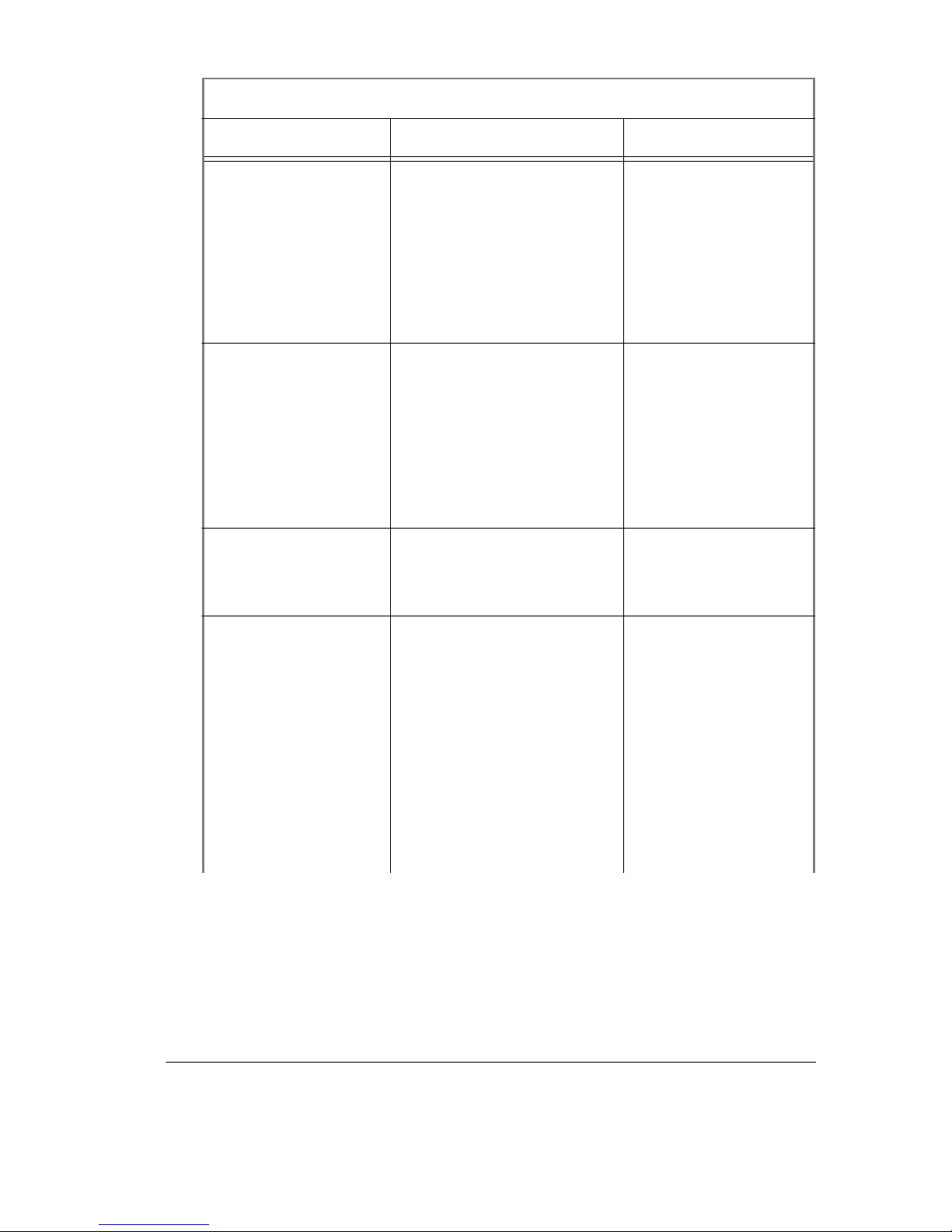
Installed files - Model
Sim
EE
Directory Files & subdirectories Description
./vhdl_src/ieee mti_numeric_bit.vhd,
mti_numeric_std.vhd,
stdlogic.vhd
sources for
rebuilding basic
IEEE
std_logic_1164
library and
accelerated IEEE
arithmetic packages
./vhdl_src/mentor numeric_extra.vhd,
numeric_signed.vhd,
numeric_unsigned.vhd,
source for Mentor
Graphics
QuickHDL add-ons
qsim_logic.vhd,
qsim_relations.vhd,
qsim_tc.vhd,
std_logic_1164_ext.vhd
./vhdl_src/ st d standard. vhd, textio.vh d sources for VHDL
STD library and
package TEXTIO
./vhdl_src/
std_developerskit
examples, iopakb.vhd,
iopakp.vhd,
mempakb.vhd,
mempakp.vhd,
regpakb.vhd,
regpakp.vhd,
simflagb.vhd,
simflagp.vhd,
synthreg.vhd,
timingb .vhd, timingp.vhd
sources and
examples for MGC
standard developer’s
kit
EE Installation
17
Page 18

Installed files - Model
Sim
EE
Directory Files & subdirectories Description
./vhdl_src/synopsys mti_std_logic_ari th.vhd,
mti_std_logic_misc .vhd,
mti_std_logic_signed.vhd
mti_std_logic_uns igned.v
sources for
rebuilding
accelerated
arithmetic packages
hd, std_logic_textio.vhd,
syn_ari.vhd,
syn_attributes.vhd,
syn_type .vhd
./vhdl_src/ verilog v ltypes.vhd source fo r rebuilding
Verilog library
./vhdl_src/vital2. 2b prmtvs_b.vhd,
prmtvs_p.vhd,
timing_b.vhd,
sources for
rebuildi ng VITAL
version 2.2b library
timing_p.vhd
./vhdl_src/vital95 prmtvs_b.vhd,
prmtvs_p.vhd,
timing_b.vhd,
sources for
rebuildi ng VITAL
vers ion 95 libra r y
timing_p.vhd
Note:
NOT the version that is compil ed into the Model
This version is compiled into library
The version of std_logic_arith contained in file
Sim ieee
arithmetic
and is available for
std_arit.vhd
library.
customers who may have previously used Mentor QuickVhdl, and used
the Mentor
arithmetic
package that contai ned std_logic _arith modified
for use with the Mentor synthesis tools.
The source for the ieee-precompiled ver si on is in:
vhdl_src/synopsys/mti_std_logic_arith.vhd
Start Here for ModelSim EE
18
is
Page 19
Platform-specific directories
Platform-specific di rectories within the
rs6000, sun4, sunos5, and win32
Platform-specific directories - UNIX platforms
Files in UNIX platform directory Description
DUMPLOG64 dumps readable content for vsim
START_SERVER license manager script
libhm.sl, libs m.sl, libs wiftpli.sl SmartMode l and ha rdware
lmborrow, lm cksum, lmdiag,
lmdown, lmgrd, lmhostid,
lmremove, lmreread, lmstat,
lmswitchr, lmutil, lmver,
modeltech
) contain files as noted below.
<modelsim_ dir>
.wav file
modeler support libraries
Globetrotter license manager
executables
directory (
hp700
,
options license manager user-specified
options
sm_entity, hm_entity Model
LMG Sm art model s an d hard ware
modeler
tssi2mti Model
files
vcom Model
vdel, vdir, vlib, vmake, vmap Model
tools
vlog Model
vish Tcl/TK u ser in t erfac e
vlm simulation license manager
tools for use with
Sim
tool for use with SEF
Sim
VHDL compiler
Sim
library manageme nt
Sim
Verilog compiler
Sim
EE Installation
19
Page 20
Platform-specific directories - UNIX platforms
Files in UNIX platform directory Description
vgencomp Model
tool for us e with
Sim
Verilog modules in VHDL
vsim Model
wav2log translat es Model
simulator
Sim
log file to
Sim
QuickSim II log file
./rs6000/mt i_exports list of foreign interface routines
exported from mti
./sun4/vsim.swift Model
simulator for use with
Sim
LMG models; only required for
Sun4
Platform-specific directories - Windows platforms
Files in the ../win32 directory Description
dumplog64.exe dumps readable content for vsim
.wav fil e
libsm.dll, libsm.exp, libsm.lib,
SmartMode l support libraries
libswift pli.dll
flexlm.cpl, lmgr325c.dll,
lmgrd.exe, lmutil.exe,
Globetrotter license manager
executables and libraries
modeltech.exe
license. dat licen se manager data file
modelsim.exe invokes Model
modelsim.ini Model
sm_entity.exe Model
project fil e
Sim
tool for use with LMG
Sim
envir o nment
Sim
models
Start Here for ModelSim EE
20
Page 21

Platform-specific directories - Windows platforms
Files in th e ../w in32 direc tor y De s c rip ti on
tcl80.dll, tclpip80.dll,
tix4180.dll, tk80.dll
tssi2mti .exe Model
vcom.exe Model
vdel.exe, vdir.exe, vlib.exe,
vmake.exe, vmap.exe
vlog.exe Model
vish.exe Tcl/TK user interface
vlm.exe simulat ion license manager
vgencomp.exe Model
vsim.exe Model
Tcl, Tix and Tk dyna mic libraries
tool for use with SEF
Sim
files
VHDL compiler
Sim
Model
tools
Verilog modules in VHDL
library manage me nt
Sim
Verilog compiler
Sim
tool for use with
Sim
simulator
Sim
wav2log.exe translat es Model
QuickSim II log file
log file to
Sim
Locating Documentation
Onli ne documentation
Model Technology documentation, including this booklet, is available in
Adobe Acrobat (PDF) format for online viewing.
PDF documentation
You’ll find it easi er to follow cross referenc es (click on blue li nks), and
navigate the doc ument with the outline/bookmark feature of the Acrobat
Reader. Find and Search capabilit ies allow you to lo cate any text string, and
since the table of contents and index entries are also links into the
document, the Acrobat Reader "turns the pages" for you.
is more than elect r onic images of paper manuals.
Locating Documentation
21
Page 22
Our documentation requires Acrobat Reader version 3.01 for viewing (free
from adobe.com
Reader with Search for viewing the files because it facilitates indexed
searching, which is much faster th an si mp le tex t-string searches. See
"Using ModelSim’s PDF documentation" (p25) for more information
about using Search.
, and on the ModelSim CD). We suggest you use the
Getting the most current PDF manuals
Download the current PDF reference manuals from the Model Technology
FTP site: ftp://ftp.model.com/pub
find the documentation files within the version-numbered directories. The
Reference Manual files are password-protected for registered users. The
ModelSim EE Start Here and EE Tutorial are available from
www.model.com
ModelSim software see "Updates" (p30), www.model. com
above.
; no password is required. For the latest version of
. Choose either the EE or PE tree; you’ll
, or the ftp site
Getting paper manuals
If you need a printed copy of the ModelSim Refe rence Manual or the
ModelSim Tutorial, use one of the request cards attached to this booklet.
Registered users may request up to two copies of each book for each license
purchased. You might save the second form to order new books when
versions change. (Additional copies are available at US$50 per book, you
might also consider printing only the sections you need from the PDF file.)
EE documentation
ModelSim EE documentation is included on the ModelSim CD in the
electronic formats shown below.
Model
• PDF format (in print for US$50)
• command and simulation reference for all EE products
• default path: <modelsim_dir>/docs/ee_manual_<version>.pdf
Model
• PDF format (in print for US$50)
• beginning tutorial for all EE products
• default path: <modelsim_dir>/docs/ee_tutorial_<version>.pdf
Std_DevelopersKit User’s Manual
• PDF format
22 Start Here for ModelSim EE
Sim
EE/PLUS Reference Manual
Sim
EE Tutorial
Page 23
• Mentor Graphics VHDL design development kit
• default path: /<modelsim_dir>/docs/sdk_um.pdf
Start Here for Model
• PDF format
• installation and support references
• default path: /<modelsim_dir>/docs/ee_start_here.pdf
Technotes
• text format
• various
• default path: /<modelsim_dir>/docs/technotes/
Tcl man pages
• HTML format, and WinHelp format
• ModelSim menu pick: Help > Tcl Man Pages
Available from our web site:
Model
• PDF format
• quick reference for commands, variables, tools
• from web site: www.model.com/pdf/quic kguide.pdf
Sim
Quick Guide
Sim
(this guide)
Using Model
Sim
’s PDF do cu m entatio n
Getting the Acrobat Reader
ModelSim PDF documentation requires Adobe Acrobat Reader version
3.01 (Reader with Search is recommended). Installation files for the Reader
with Search are in the Acrobat directory on the ModelSim CD, or available
directly from Adobe at: http://www.adobe.com/
Searching PDF files
The Acrobat Reader with Search provides two methods for finding text
within PDF documents: Search (fast, indexed search), and Find (slower text
search). Look for these icons on the A crobat Reader toolbar:
Search icons help you quickly search through an
indexed PDF document. The small binocular icon (the Find icon is larger)
returns a search criteria dialog box. To use Search you must be viewing an
Locating Documentation 23
Page 24
indexed document. See "Requirements for Acrobat Search" (p24) below.
The
Find icon
initiates a simple text search of the PDF file.
Depending on the speed of your machine and the size of the file, Find can
be slow (but effective).
Requirements for Acrobat Search
To use Acrobat Search with Model
file /directory str ucture. If you in stalle d Mo d el
downloaded the documentation se t from our web s ite
(http://www.model.com
) you will likely have this structure. Search is
intended for use with the complete
Search will not work c or r ectly with individ ual files that are not part of the
directory structure below.
Doc files for Model
These Model
Sim
EE
Sim
documentation files must be in the directory shown for
Acrobat Search to work.
This directory:
<intall_dir>/<modelsim_dir>/docs/
mus t in cl u d e th ese files :
ee_manual_<version>.pdf (reference manual)
ee_tutorial_<version>.pdf (Model
ee_start_here.pdf (this document)
ee_doc_index.pdf (links to documentation)
sdk_um.pdf (Mentor Std_developersKit)
ee_index.pdx (PDF index file)
/ee_index (directory and subdirectories for PDF index)
PDF docs you need the following
Sim
from the CD-ROM or
Sim
Manual/Tutorial
Sim
documentation set.
tutorial)
Copy and Paste from PDF files
You can copy text from PDF files and pas te it into Model
transcript.
Select the
abc
select and copy text from the PDF file into Model
helpful if you want to copy and paste examples from the tutorials to the
command line.
Start Here for ModelSim EE
24
’s Main
Sim
button on the Acro bat Reader toolbar. You can then
. This is especially
Sim
Page 25
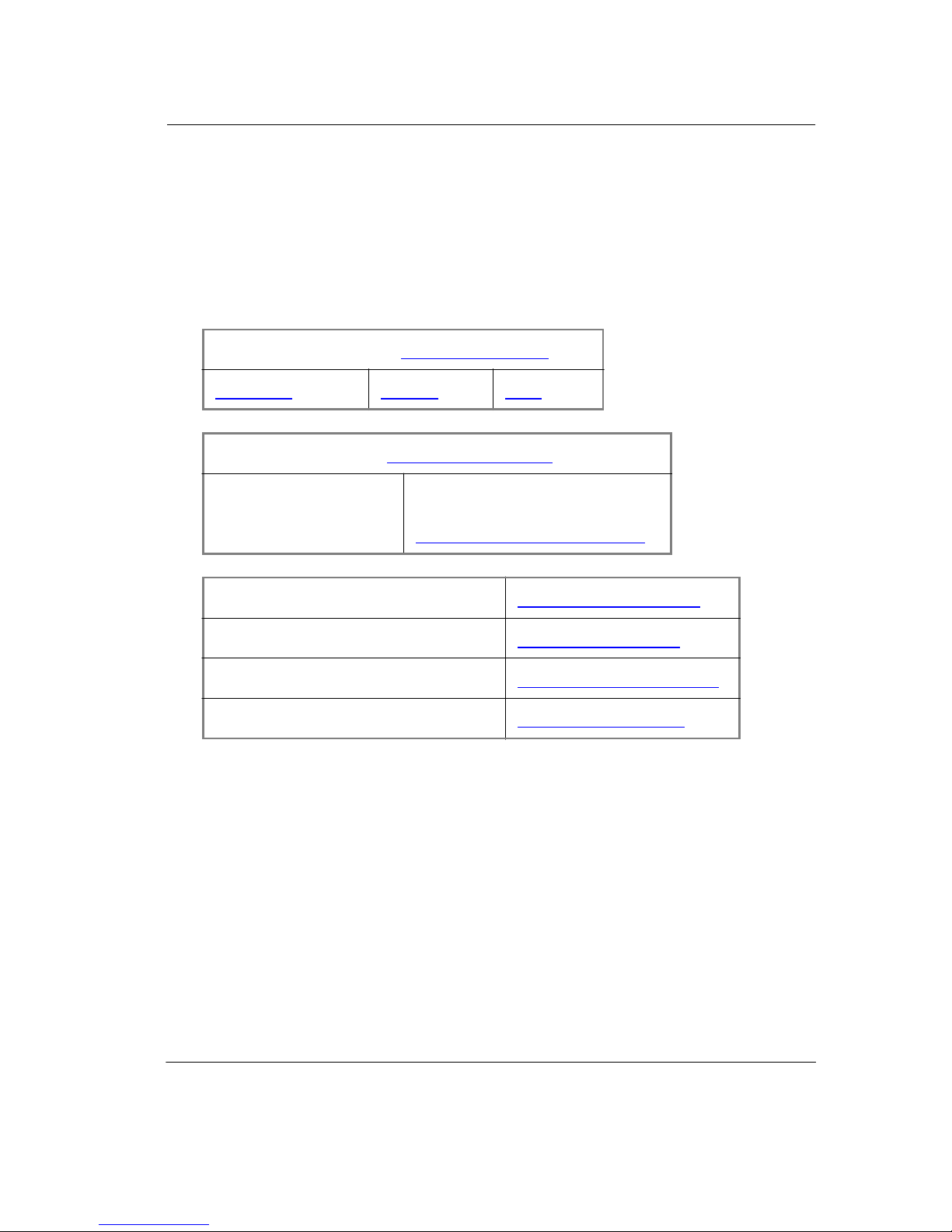
Tech Support, Updates & Licensing
Model
Sim
If you are viewing this document online, select a link for Model
and support from the table below, or see the sections that follow for
additional detail.
Model T echno logy
Americas
Mentor Graphics
North America Outside North America
1-800-547-4303 supportnetweb.mentorg.com
Ann apol is Microsys tems
Exem plar Lo gic
contact matrix
(www.model.com
Europe As ia
(www.mentorg.com
)
)
www.annapmicro. com
www.exemplar.com
Sim
sales
Hewlett Packard EEsof
Synplicity
www.hp.com/go/hpeesof
www.synplicity.com
Technical support - by telephone
Mentor Graphics customers In North America
For customers who purchased products from Mentor Graphics in North
America, and are unde r a current support contra ct, technical tele phone
support is available from the central SupportCe nter by calling toll-free
1-800-547-4303. The coverage window is fr om 6:00am to 5:30pm Pacific
Time, Monday through F r iday, excluding Mentor Graphics holidays.
Tech Support, Updates & Licensi ng
25
Page 26

The more prelim inary information customers can supp ly about a problem
or issue at the begi nning of the reporting proc ess, the sooner the Software
Support Engine er (SSE) can suppl y a sol ution or work arou nd. Inform ation
of most help to the SSE includ es accurate operating s y stem and sof tware
version numbers, the steps leading to the problem or crash, the first few
lines of a tracebac k, and problem sections of the Procedural Interface code.
Mentor Graphics customers outside North America
For customers who purchas ed products from Mentor Graphics outside of
North America, should contact their local support or ganization. A list of
local Mentor Gra phics SupportCente rs outside North Amer ica can be found
at supportn etweb.mentorg. com
Directory".
under "Connections", then "International
Model Technology customers worldwide
For customers who purcha s ed from Model Technology, please contact
Model Technology via the support line at 1-503-641-1340 from 8:00 AM
to 5:00 PM Pacific Time. Be sur e to have your server hostI D or hardwa re
security key a uthorization num ber handy.
Technical support - electronic s upport services
Mentor Graphics customers
Mentor Graphics Customer Support offers a SupportNet-Email server for
North America n and European companies that lets customers find product
information or su bmi t s ervice requests (call logs) to the SupportCent er 24
hours a day, 365 days a year. The ser ver will return a call l og number within
minutes. SSEs follow up on the call logs subm itted through Supp ortNetEmail using the sam e proc es s as if a customer had phoned the
SupportCenter. For more informati on about using the SupportNet-Email
server, send a bla nk e-m ail message to the following address:
support_net@ mentorg.com
Additional ly, cus tomers can open call logs or s earch t he Mentor T echNote
database o f solutions t o try to fi nd the answers to their que stions by logging
onto Mentor Graphics’ Customer Support web home page at
http://supportnetweb.mentorg.com
.
.
Start Here for ModelSim EE
26
Page 27

To establish a SupportNet account for your site (both a site-based
SupportNet-Web account and a user-based SupportNet Email account),
please submit the fol lowing informati on: name, phone number, fax
number, email add r ess, company name, site ID. Within one business day,
you will be provided with the account information for new registrations.
While all customers worldwide are invi ted t o obtain a Support Net-Web si te
login, the SupportNet-Email services are currently limited to customers
who receive suppor t from Mentor support offices in North America or
Europe. If you receive support from Mentor offices outside of North
America or Europe, ple as e contact your local f ield office to obtain
assistance for a technical-support is sue.
Model Technology customers
Support questi ons may be submitted through the Model Techn ology web
site at : www.model.c om
cases to supp [email protected]
this format, in the body of your email message:
. Model Technology customer s may a lso emai l test
; pleas e provide the followin g informati on, in
• Your name:
Company:
Email address (if different from message address) :
Telephone:
FAX (optional):
• Model
• Model
(Use th e Help About dialog box with Wind ows; type
product (EE or PE, and VHDL, VLOG, or PLUS):
Sim
Version:
Sim
vcom
for UNIX
workstation s.)
• Host operating system version:
• PC hardware security key authorization number:
• Host ID of license server for workstati ons :
• Description of the problem (please include the exact wordi ng of any
error messages):
Tech Support, Updates & Licensi ng
27
Page 28

Technical support - other channels
For customers who purchased Model
an OEM, or VAR, support is ava ilable at the following:
•
Annapolis Microsystems
email: [email protected]
telephone: 1-410-841-2514
web site: http://www.annapmicro.com
•
Exemplar Logic
email: [email protected] om
telephone: 1-510-789-3333
web site: http://www.exemplar.com
•
Hewlett Packard EEsof
email: hpees of_s [email protected]
telephone: 1-800-HPEESOF (1-800-473-3763)
web site: http://www.hp.com/go/hpeesof
•
Synplicity
email: [email protected]
telephone: 1-408-617-6000
web site: http://www.synpli city.com
as part of a b undled p roduc t fr om
Sim
Updates
Mentor customers: getting the latest version via FTP
You can ft p the lates t EE or P E version o f the sof tware from the Supp ortNet
site at ft p://supportne t.mentorg.com/pub/mentort ec h/m odeltech/
Instructions are there as well. A valid l icense file from Mentor Graphics is
needed to uncompress the Model
Technology is required to uncompress the Model
Start Here for ModelSim EE
28
if you are a curr ent PE custom er and need a password.
EE files. A password from Model
Sim
PE files. Conta ct
Sim
.
Page 29

Model Technology customers: getting the latest version
via FTP
You can ftp the latest vers ion of the software from the web site at
ftp://ftp.model.com
Model Technology is needed to uncompr es s the Model
password from Model T echnolo gy is neede d to unc ompress the Model
PE files. Contact license@model. com
need a password.
. Inst ructio ns are t here as wel l. A vali d lice nse fi le fr om
EE files. A
Sim
if you are a current PE customer and
Sim
Licenses - Model
Sim
EE
Where to obtain your license
Mentor Graphics cust om ers must contact their Ment or Graphics
salesperson for Model
Model
Techno l o gy at [email protected]
EE licenses from Model Technology. Please contact Model
Sim
EE licensing. All other customers may obtain
Sim
.
If you have trouble with licensing
Contact your normal technical s upport channel:
• Technica l support - by telephon e (p25)
• Technica l support - electr onic support services (p26)
• Technical support - other channels (p28)
All customers: Model
Sim
EE licensing
Model
Globetrotter FLEXlm license files contain lines that can be referred to by
the wor d th at appears first on the line. Each kind o f line has a specific
purpose and there are many more kinds of lines that MTI does not use.
A
license.dat
SERVER hostname 11111111 1650
DAEMON modeltech ./modeltech ./options
FEATURE vcom modeltech 1998.080 31-aug-98 1 \
0C944D8F0C79B02EF5CF ck=117
EE uses Globetro tter’s FLEXlm license mana ger and files.
Sim
file example
Tech Support, Updates & Licensi ng
29
Page 30

FEATURE vsim modeltech 1998.080 31-aug-98 1 \
FCB4FD0F2A635C20E5CF ck=128
FEATURE vlog modeltech 1998.080 31-aug-98 1 \
0C944D9F176CA773E889 ck=10
FEATURE vsim-vlog modeltech 1998.080 31-aug-98 1 \
FCB41D9FC43C87567DBC ck=116
FEATURE hdlcom modeltech 1998.080 31-aug-98 1 \
4C94EDFF6A00858BC8F2 ck=93
FEATURE hdlsim modeltech 1998.080 31-aug-98 1 \
4CF48DDF6A6EA59BCEF2 ck=89
# NOTE: You can edit the hostname on the SERVER line (1st arg),
# the port address on the SERVER line (3rd arg), the paths
# to the daemon and options files on the DAEMON line
# (2nd and 3rd args), or any right-half of a string (b)
# of the form a=b where (a) is all lowercase. (For example,
# xxx in vendor_info="xxx" can be changed).
# Any other changes will invalidate this license.
A Globetrotte r FLEXlm lic en se file co ntains inform ation a bout the licens e
server, the daemon required to authorize the feat ure, and a line for each
product feature you are authoriz ed to e xecute.
The fi rs t li n e is a SERVE R li n e; it spell s ou t w h ich com p ut er on the
network is the license server. The license server is a network resource that
will manage t he feat ures for al l u sers of Mode l
products . T he S ERVER
Sim
line inc ludes the server's h ostname (the server’s ne twork ident ification - for
Windows, check the Network properti es I dentification tab), hostID
(a unique serial number), and a socket number. The hostname and socket
number may be chan ged in a l icense fi le, bu t an y change to the host ID will
invalidate the li cense. If the host is a Windows m achine, the hostID is the
FLEXid security key number, and will take the alpha-numeric form:
7-xxxxxxxx, or 8-xxxxxxxx.
If you need t o find the un ique server ID, use one of th ese UNIX commands:
for Sun,
hostid
; for HP,
/etc/l anscan
; for IBM RISC/6000:
uname -m
. To
determine th e security key ID on a Windows ser ver, from the DOS prompt,
invoke:
lmutil lmho stid -fle xid
(located in the
modelsim\win32
directory).
A DAEMON line specifies the name of the license daemon and the
location s of the daemon an d opti ons fil es it wil l use . This is the full pa th t o
the modeltech daemon. In the example file, the UNIX ". /" means "look in
the current di rector y". This is the dire ctory i n whi ch the se rver was s tarte d.
If the server is to be started from another directory, the full path to the
modeltech
and
options
files would need to be added to this line .
Start Here for ModelSim EE
30
Page 31

For ex ample,
DAEMON modeltech /usr/mti5.2/sunos5/modeltech \
/usr/mti5.2/sunos5/options
A FEATURE line descr ibes how ma ny lice nses ("to ken s") are availabl e; i t
contains the feature name, daemon required, most cu rrent build date
authorized to run, token expiration date, number of tokens for the feature,
license code, and a che cksum. The features are:
vcom
vsim
vlog
vsim-vlog
When a VHDL design is compiled, a
design is compiled, a
simula ted, a
vsim-vlog
language desi gns can work at the same time with one Model
is a VHDL compilatio n f ea ture
is a VHDL simulation feature
is a Verilog compilation feature
is a Verilog simula tion feature
token is us ed. When a Verilog
vcom
token is used. When a VHDL design is
vlog
token is used. When a Verilog design is simulated,
vsim
is used. This is why two people running diff erent single-
PLUS
Sim
product. When a desi gn with both languages is run, one of each token is
checked out.
With Model
EE/LN L,
Sim
FEATU RE lines are added. Wit h LNL
hdl
(language-neutral licensing), either VHDL or Verilog - but not both - can
be used. The hdl FEATURE line s are shown in the example:
hdlcom
hdlsim
is a compilation feature used with either VHDL or Verilog
is a simulation feature used with either language
Notice the FEATURE lines. If a line is too long for the email program, a
backslash ("\") appears at the end of the line. A UNIX system reads that as
"whatever you read on the ne xt l ine be longs o n thi s li ne". So never edit ou t
the "\" when you ar e transcribi ng a license file . Never put anothe r charact er
after it eith e r.
All the import ant l ines end in c hecksums . FLEXlm will let you kno w if you
mistyped something when transc ribing the license files because the
checksu m wil l not ma tch the line's contents. (GLOBEtrot ter has a utility
that will report an y checksum errors in a file. Use thi s command: lmchks um
<license. f il e>) L in es th at st art with "#" are comments.
If you want to learn more about the tools that license Model
license manager appendix in the Model
GLOBEtrotter at http://www.gl obetrotter.c om/home.htm
, read the
Sim
reference manua l, and visit
Sim
.
Tech Support, Updates & Licensi ng
31
Page 32

All customers: maintenance renewals and EE licenses
When main ten ance is r enewed, a n ew lic en se fi le t hat i nco rpora te s the n ew
maintenanc e ex piration date will be automatically sent to you. If
maintenance is not re newed, the c urrent l icen se fi le wil l sti ll pe rmit t he us e
of any version of the softwa re built before the mainte nance expired until the
stop date is reached.
All customers: license transfers and server changes
Model Technology and Mentor Graphics both char ge a fee for server
changes or license transfers. Contact [email protected]
information from Model Technology, or contact your local Mentor
Graphics sales office for Mentor Graphics purchases.
for more
Online References
The Model Technology web site includes links to many E DA information
sources. Check the links below for the most current information.
Books and publications
model.com/support/tnbooksvhd.html
Partners
model.com/partners/index.html
Training partners
model.com/support/training.html
Resources
Useful quick guides and other references.
model.com/resources/index.html
Start Here for ModelSim EE
32
Page 33

Model Technology
License Agreement
Software License Agr eement
Thi s is a lega l agre emen t b etwe en y ou, th e e nd us er, an d Mod el Tech nolo gy In co rpor ated
(MTI). By opening the sealed package, or by signing this form, you are agreeing to be bound
by the terms of this agreement. If you do not agree to the terms of this agreement, promptly
return t he unop en ed pa cka ge a nd al l ac compa nyi ng i tems t o t he p la ce yo u o btai n ed them f or
a full refund.
Model Technology Software License
1. LICENSE. MTI grants to you the
the enclosed software program (the "SOFTWARE") for each license you have purchased.
The SOFTWARE must be used on the computer hardware server equipment that you
ident ified in writing by make , model, and wor kstatio n or host ide ntifi cation numbe r and the
equipment served, in machine-readable form only, as allowed by the authorization code
provided to you by MTI or its agents. All authorized systems must be used within the country
for whi ch the s ystems were sold. Model
within a one-kilometer radius identified in writing to MTI. This restriction does not apply to
single Model
products may be relocated within the coun try for which sold.
PE lice nses lock ed by a ha rdware se curity ke y, and su ch Model
Sim
nontransferable, nonexclusive
EE l icenses must be located at a single site, i.e.
Sim
right t o us e one cop y of
PE
Sim
2. COPYRIGHT. The SOFTWARE is owned by MTI (or its licensors) and is protected by
United States copyright laws and international treaty provisions. Therefore you must treat the
SOFTWARE like any other copyrighted material, except that you may either (a) make one
copy of the SOFTWARE solely for backup or archival purposes, or (b) transfer the
SOFTWARE to a single hard disk provided you keep the original solely for backup or archival
purposes. You may not copy the written materials accompa nying t he SOFTWA RE.
3. USE OF SOFTWARE. The SOFTWA RE is licens ed to yo u for internal use only. You shall
not cond uct be nchmar ks or othe r eval uatio ns of th e SOFTW ARE witho ut th e advanc e writt en
consent of an authorized representative of MTI. You shall not sub-license, assign or
otherwise transfer the license granted or the rights unde r it without the prior written consent
of MTI or its applicable licensor. You shall keep th e SOFTWARE in a restricted and sec ured
area and shall grant access only to authorized persons. You shall not make software
available in any form to any person other than your employees whose job performance
requires access and who are specified in writing to MTI. MTI may enter your business
premises during normal business hours to inspect the SOFTWARE, subject to your normal
security.
4. PERMISS ION TO COPY LICENSED SO FTWARE. You may copy the SO FTWARE only
as reasonably necessary to support an authorized use. Except as permitted by Section 2, you
may not make copies, in whole or in part, of the SOFTWARE or other material provided by
MTI without the prior written consent of MTI. For such permitted copies, you will include all
not ic es an d le ge nds emb ed de d i n t h e SO FTWARE a n d affixed to its me dium and contai ne r
Model Technology L ice nse Agreement
33
Page 34

as received from MTI. All copies of the SOFTWARE, whether provided by MTI or made by
you, shall remain the property of MTI or its licensors.
You will maintain a record of the number and location of all copies of the SOFTWARE made,
including copes that have been merged with other software, and will make those records
available to MTI or its applicable licensor upon request.
5. TRADE SECRET. The source code of the SOFTWARE is trade secret or confidential
information of MTI or its licensors. You shall take appropriate action to protect the
confidentiality of the SOFTWARE and to ensure that any user permitted access to the
SOFTWARE does not provide it to others. You shall take appropriate action to protect the
confidentiality of the source code of the SOFTWARE. You shall not reverse-assemble,
reverse-compile or otherwise reverse-engineer the SOFTWARE in whole or in part. The
provisions of this section shall survive the termination of this Agreement.
6. TITLE. Title t o the SOFTWARE licensed to you or copies thereof are retained by MTI or
third parties from whom MTI has obtained a licensing right.
7. OTHER RESTRICTIONS. You may not rent or lease the SOFTWARE. You shall not
mortgage, pledge or encumber the SOFTWARE in any way. You shall ensure that all support
service is performed by MTI or its designated agents. You shall notify MTI of any loss of the
SOFTWARE.
8. TERMINATION. MTI may terminate this Agreement, or any license granted under it, in the
event of breach or default by you. In the event of such termination, all applicable SOFTWARE
shall be returned to MTI or destroyed.
9. EXPORT. You agree not to allow the MTI SOFTWARE to be sent or used in any other
country except in compliance with this license and applicable U.S. laws and regulations. If
you need advice on export laws and regulations, you should contact the U.S. Department of
Commerce, Export Division, Washington, DC 20230, USA for clarification.
Important Notice
Any provision of Model Technology Incorporated SOFTWARE to the U.S. Government is with
"Restricted Rights" as follows: Use, duplication, or disclosure by the Government is subj ect
to restrictions as set forth in subparagraphs (a) through (d) of the Commercial ComputerRestricted Rights clause at FAR 2.227-19 when applicable, or in subparagraph (c)(1)(ii) of
the Rights in Technical Data and Computer Software clauses in the NASA FAR Supplement.
Any provision of Model Technology document ation to the U.S. Government is wit h Limited
Rights. Contractor/manufacturer is Model Technology Incorporated, 10450 SW Nimbus
Avenue / Building R, Portland, Oregon 97223-4347 USA.
Limited Warranty
LIMITED WARRANTY. MTI warrants that the SOFTWARE will perform substantially in
accordance with the accompanying written materials for a pe riod of 30 days from the date of
receipt. Any implied warranties on the SOFTWARE are limited t o 30 days. Some st ates do
not allow limitations on duration of an implied warranty, so the above limitation may not apply
to you.
Start Here for ModelSim EE
34
Page 35

CUS TO M E R R EM E DI ES. MTI’s enti re liabili ty an d your exc l us iv e r e me dy sh all be, a t MTI’s
option, either (a) return of the price paid or (b) repair or replacement of the SOFTWARE that
does not meet MTI’s Limited Warranty and which is returned to MTI. This Limited Warranty
is void if failure of the SOFTWARE has resulted from accident, abuse or misapplication. Any
replacemen t SOFTWARE will be warranted fo r the remainder of the origina l warr anty period
or 30 days, whichever is longer.
NO OTH ER WARR ANTIES. MTI dis claims all ot her warr anties, ei ther expre ss or impli ed,
including but not limited to implied warranties of merchantability and fitness for a particular
purpose, with respect to the SOFTWARE and the accompanying written materials. This
limited warranty gives you specific legal rights. You may have others, which vary from state
to stat e.
NO LIABILITY FOR CONSEQUE NTIAL DAMAGES. In no event shall MTI o r its suppliers be
liable for any damages whatsoever (including, without limitation, damages for loss of
business profits, business interruption, loss of bus iness information, or other pecuniary loss)
arising out of the use of or inabilit y to use these MTI pr oducts, even if MTI has been advised
of the possibility of such damages. Because some states do not allow the exclusion or
limitation of liability for consequential or incidental damages, the above limitation may not
apply to you.
Model Technology L ice nse Agreement
35
Page 36

Keep these numbers handy for tech support:
UNIX server hostid # :
FLEXid security key # :
Model Technology Incorporated www.model.com
Page 37

Thank you for purchasing ModelSim!
Model Technology
A MENTOR GRAPHICS COMPANY
www.model.com
 Loading...