

Page 1
English 中文 日本語 italiano
langue française lengua española Deutsch
User’s Guide
Stereo Bluetooth
Headphone with NFC
MOCREO HitX
Page 2
-1- -2-
English
Overview
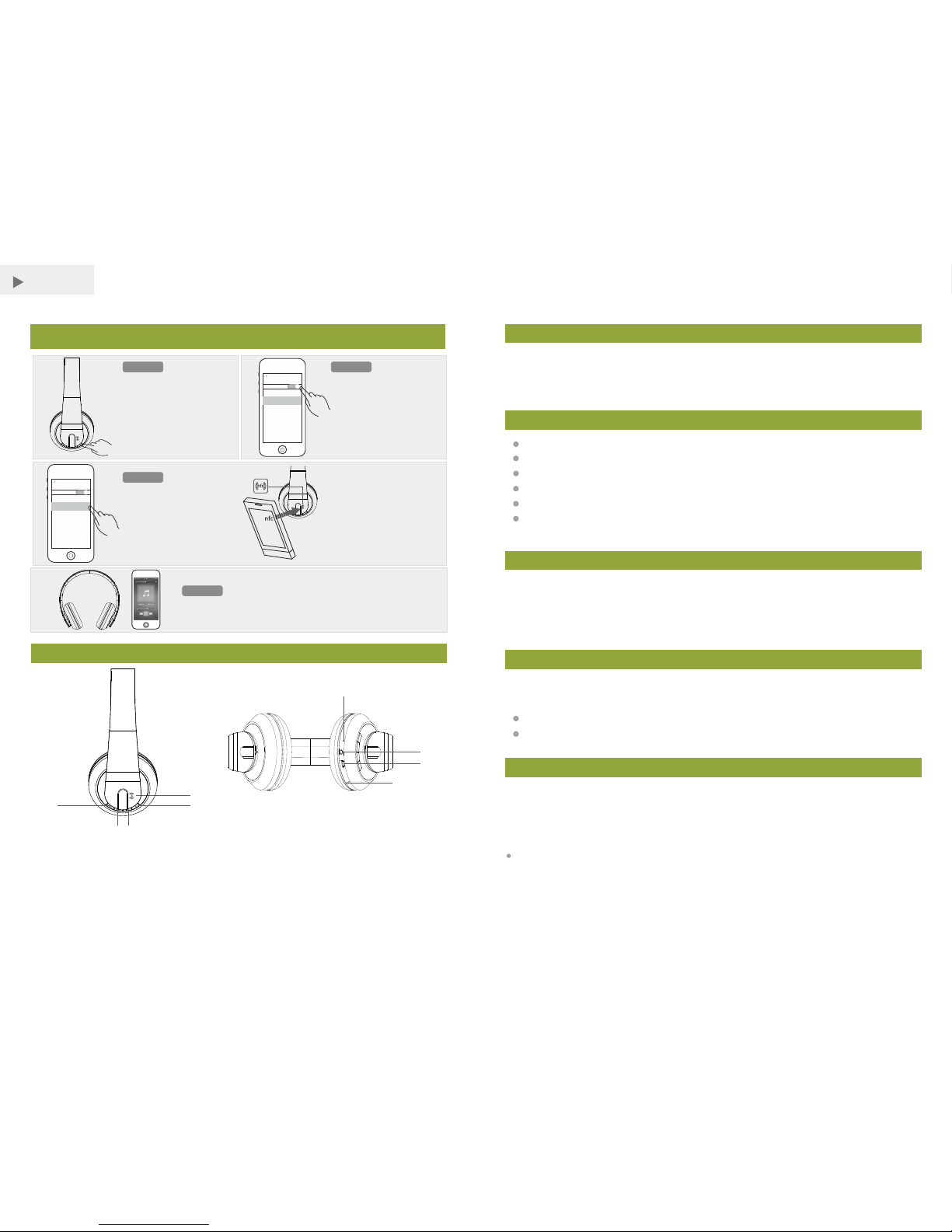
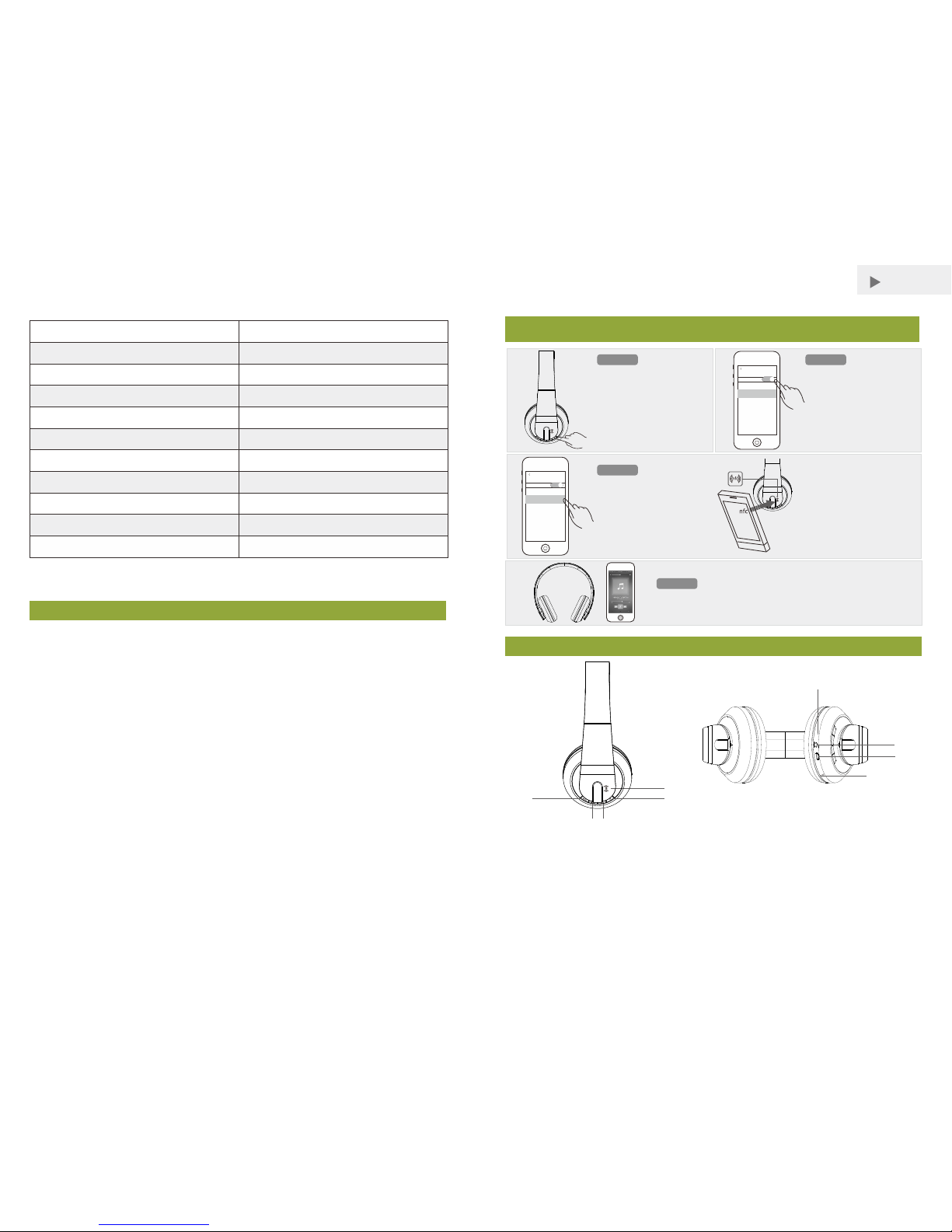
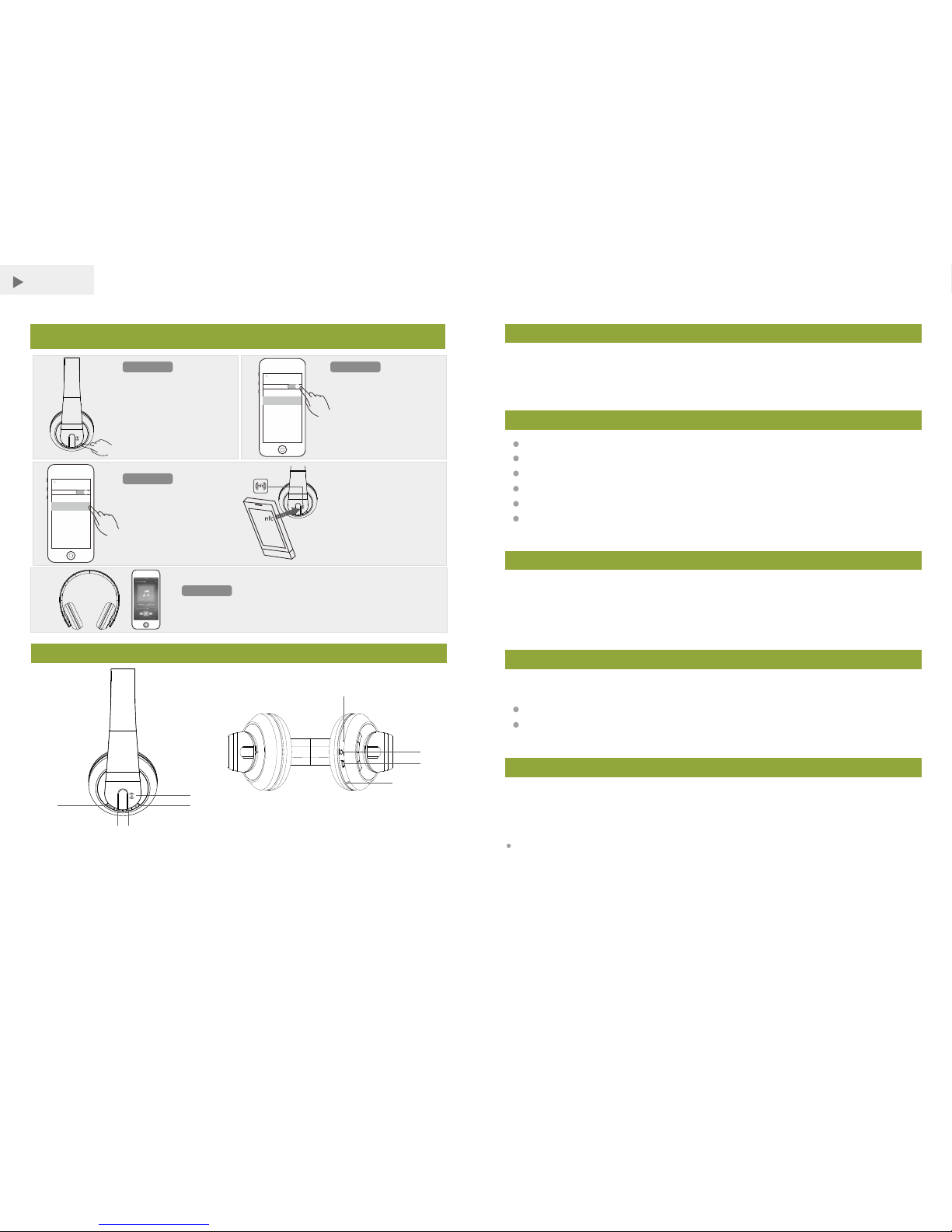
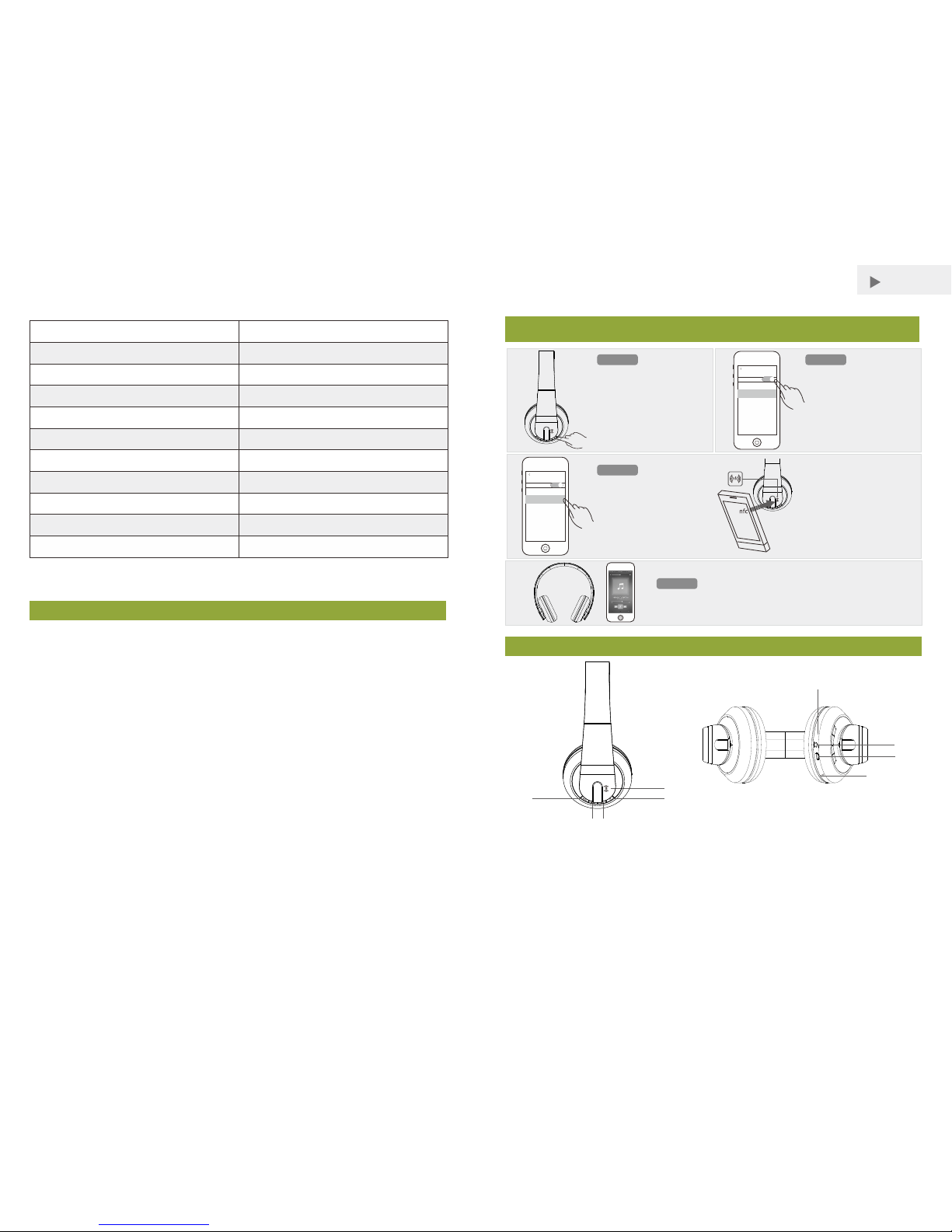
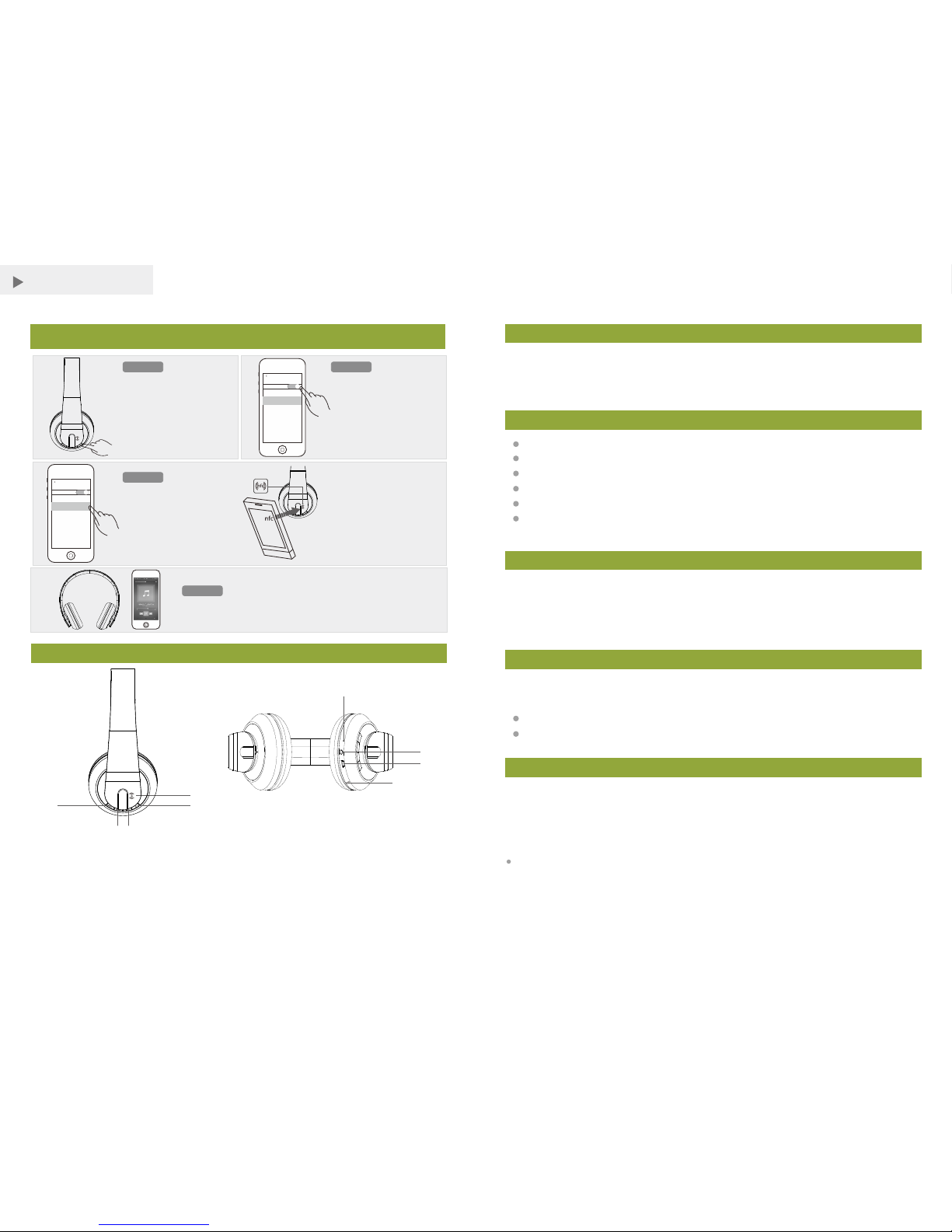
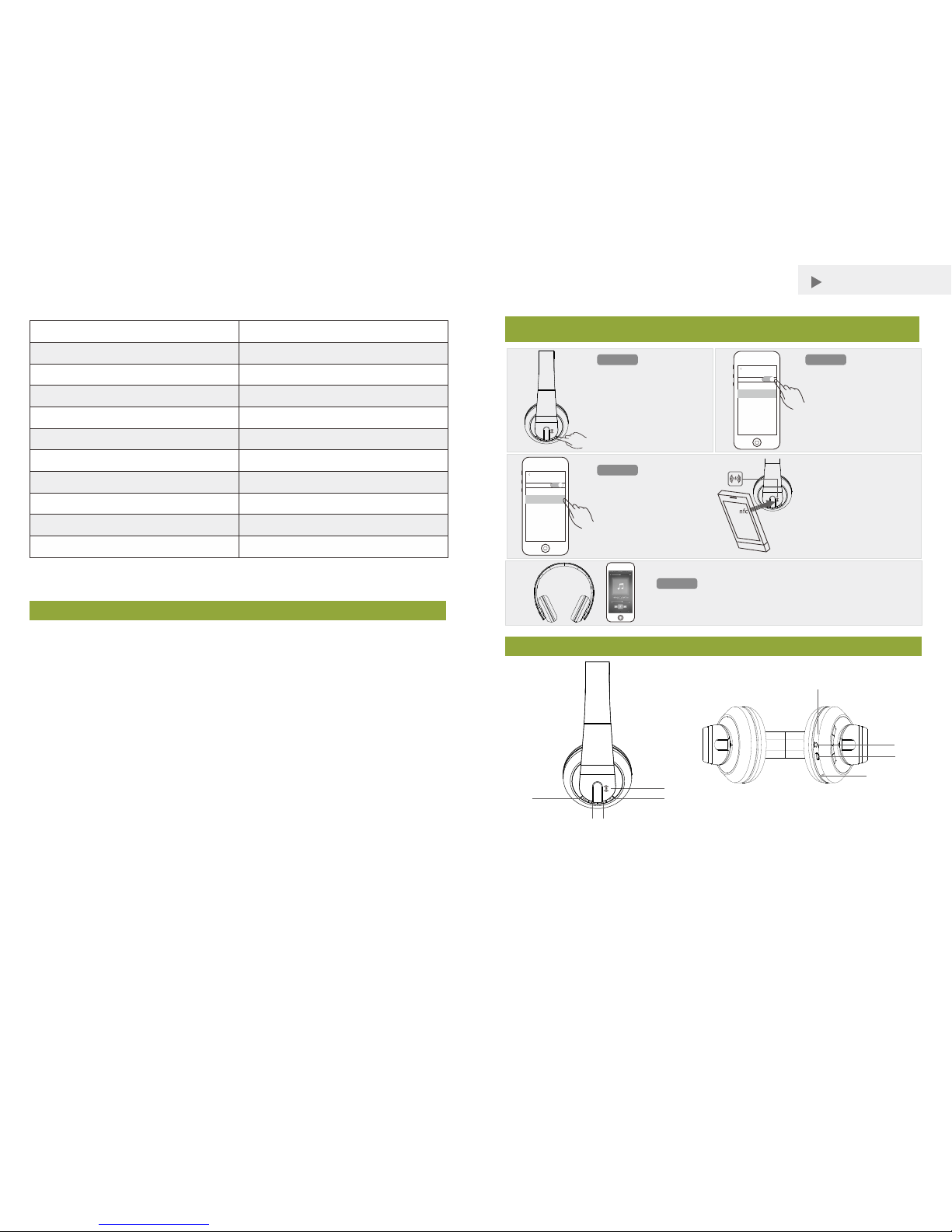
1. NF C Detec tion Area
3. Pl ay / Pause / Receiv e a Call
5. Ne xt / Volum e + by Long P res s
7. US B Charg e Jac k
9. Mi croph one
2. Power B utton
4. Pr eviou s / Volu me – by Lon g Press
6. LE D Indic ator
8. 3. 5mm AUX I n Jac k
Ple ase rea d this us er ’s guide bef ore u sing yo ur new he adpho ne.
MOSOUND QUICK PAIR
ST EP 1
ST EP 3
ST EP 4
ST EP 2
Mus ic cont rol
Whe n MOCRE O HitX
app ears in t he Blue tooth
dev ices li st, pai r it with
you r devic e.
Tou ch t he N FC a rea of
your device against the NFC
lo go o n the h eadph one.
Or pa ir your H itX by NF C
settin gs
Blueto oth
Bluetoot h
DEVICE S
MOCRE O HitX
settin gs
Blueto oth
Bluetoot h
DEVICE S
MOCRE O HitX
Pres s the Power button for
5 sec onds. Wait f or the
ind icato r flash es in blu e
and r ed as the h eadph one
sea rches f or a Blue too thena bled de vice.
Turn on you r devic e’s
Blu etoot h. If it is a n NFCena bled de vice, t urn on
NFC a s well (r efer to your
dev ice’s user’s guide ).
You can con tro l the mus ic play t hroug h your de vice or
wit h the hea dphon e’s but tons.
Turn o n you r headp hone Set up your d evice
Pair you r HitX ma nuall y
①
②
③④
⑤
⑥
⑦
⑧
⑨
Packing List
Features
Before Using
Your headphon e comes with a buil t-in rechargeable bat tery. Pri or to using it fo r the
first ti me , it is re co mmend ed to c omplete ly ch ar ge the battery. Pl ease charge the
headphon e via y our P C or via a micro USB c om pa tible charge r. Please charge it at
least f or 6 hours until the red LED indicator is turned off.
1. MOCR EO HitX Bluetoo th Headphone x 1
2. USB Ch arging Cabl e x 1
3. 3.5m m Audio Cable x 1
4. Quic k Start Guide x 1
Rich, f ull, and dynami c stereo soun d
Recharge ab le batter y for up to 8 hours pla y time
Built- in micropho ne for picking up c alls
USB cha rging port charge s your device s
Suppo rt NFC (Ne ar Field Commun ic ation) tech nology
Compatible with mo st Bluetooth en abled tablets , laptops, MP 3 players, and
smartphones w ith iOS or Android™ platform s
Charging
Using t he USB chargi ng cable, conne ct your headpho ne to a compute r or other USB
charging devices w ith a power USB por t.
The cha rging indic ator light will b e red during ch arging.
Indic ator light will b e off automatically when f ully charge d.
Turning On / Off the Headphone
To turn the HitX on
Press and hold the power button for 5 seconds, the blue LED on the headphone will
quickly flash for three times, release the power button, the headphone is now turned on.
Note:
Blue LE D will flash abou t once every s econd when the he adphone is turn ed on.
The hea dphone is now sea rches and resumes connec ti on with the con ne cted
devic e before.
Page 3

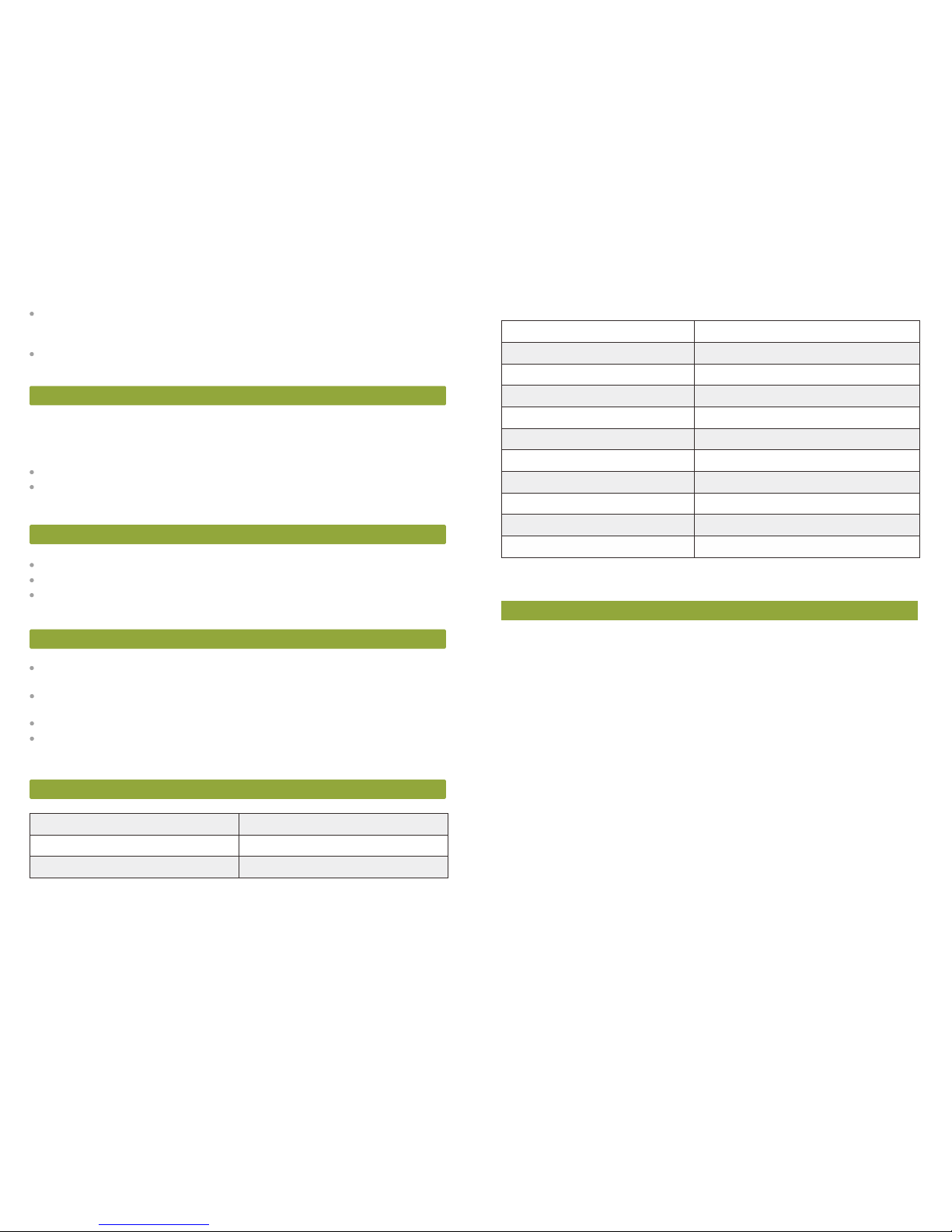
32 ohm
Fre quency Re sponse
Drive r Diameter
40 mm
Imped ance
20Hz- 20kHz
-3- -4-
If there is no connect ed device before, the indica tor then will f lash in blue and red as
the hea dphone searches for a new Blue tooth-enabl ed device.
You must rele ase power button af ter the three quick flashe s. If you kee p pressing
and hol ding power button for anothe r 3 seconds, the he adphone will get in to
PAIRING mode directly.
To turn the HitX off
Pre ss and hold the pow er button for 5 s econds, the red LED on the headp hone will
quickly flash for three times, release the power button, the headphone is now turned off.
Note:
The hea dphone will be tu rned off automatically i f no device conne cted within 30
minut es. If you want t o use the headpho ne, please kind ly restart it.
Pair Your Device Manually by Bluetooth
1. Press the Power button f or 5 seconds. Wait for t he indicator fl ashes in blue and red
as the he adphone searches for a Bluet ooth-enable d device.
2. Turn on your dev ice’s Blueto oth (refer to your device’s use r’s gu ide).
3. When M OCREO HitX appe ar s in the Blueto ot h devices list, pair it with y our device.
4. You can control the music pla y through you r device or with th e headphone’s
butto ns.
Pair Easily by NFC
If your B luetooth de vice supports NFC (Near F ield Communicat ion), you can pair the
headp hone easily.
1. Press the Power button f or 5 seconds. Wait for t he indicator fl ashes in blue and red
as the he adphone searches for a Bluet ooth-enable d device.
2. Turn on your dev ice’s Blueto oth and NFC (re fer to your dev ice’s user’s gui de).
3. Touch the NF C area of y our device agai nst the NFC logo on t he headphone. F ollow
the pairing instru ctions that app ear on your devic e. The headphon e and your device
will pair automa ti cally.
4. You can control the music pla y through you r device or with th e headphone’s
butto ns.
Note:
If a smar tphone is conne cted and you receive a cal l, answer the cal l by pressing .
If your d evice uses Blue tooth 2.0 and b el ow, enter the pa ssword 00 00 for Blueto ot h
conne ction.
If the co nnected devic e moves too far a way from th e headphone, th e he adphone
disco nnects from t he device but resumes connec ti on once the devic e is close.
If you wa nt to connect w ith a new Bluetoo th device, plea se unpair the p revious one s
due to the storage mem or y function.
Use AUX IN
For aud io devices with ou t Bluetooth f unction, use a 3. 5mm audio cable ( included) to
conne ct it to your hea dphone’s AUX I N jack .
Note:
Bluet ooth is autom atically deac tivated w hen AUX IN is con nected.
The hea dphone controls are irresponsive fo r AUX IN conn ec tions. Use the co ntrols
on your d evice to cont rol music pla y
Warnings
Do not op erate the headp hone if it has been d amaged in any way.
Do not pl ace heavy objec ts on top of th e headphone.
To avoid el ectromagn etic interferen ce, do not plac e th e headphone on top of a TV
or othe r electrical ap pliance.
Battery Notes
Recycle ba tteries. Do not d ispose of i n the trash. Do not b urn or bur y batteries . Do
not pun cture or crus h. Do not disasse mble.
Charge batte ries on a firep roof su rfac e away from fla mmable items or l iquids.
Do not ch arge inside a n automobile, e specially whi le driving.
If the el ectrolyte i n the cells gets on y our skin, thoroughly wash wi th soap and
water. If in the ey es, rinse thoroughly with co ol water. Immediate ly seek medical
atten tion.
Specifications
Page 4
Sensi tivity
V3.0
up to 1 0m
Bluet ooth Version
Bluet ooth Prot ocol
Transmissio n Ra nge
Batte ry Capacity
-40dB
EDR, A2 DP, AVRCP, HSP, HFP
300mA h
Input Vo ltage
DC 5V/1 A
Warranty
MOCRE O products are prote cted with a one ( 1) year manufac turer warra nty. Photos
of the product m ay not reflec t the actual cont ent. MOCREO MAK ES NO OTHER
EXPRESS WARR ANTIES.
Charging Time
2~3 hou rs
Music P lay Time
8 Hours
SNR
80dB
Dimen sions
7.87 × 5.1 × 3.5 in (200 × 130 × 89 mm)
Net Weight 0.58 lb ( 264 g)
Specifications are subject to be changed and improved without notice.
-5- -6-
中文
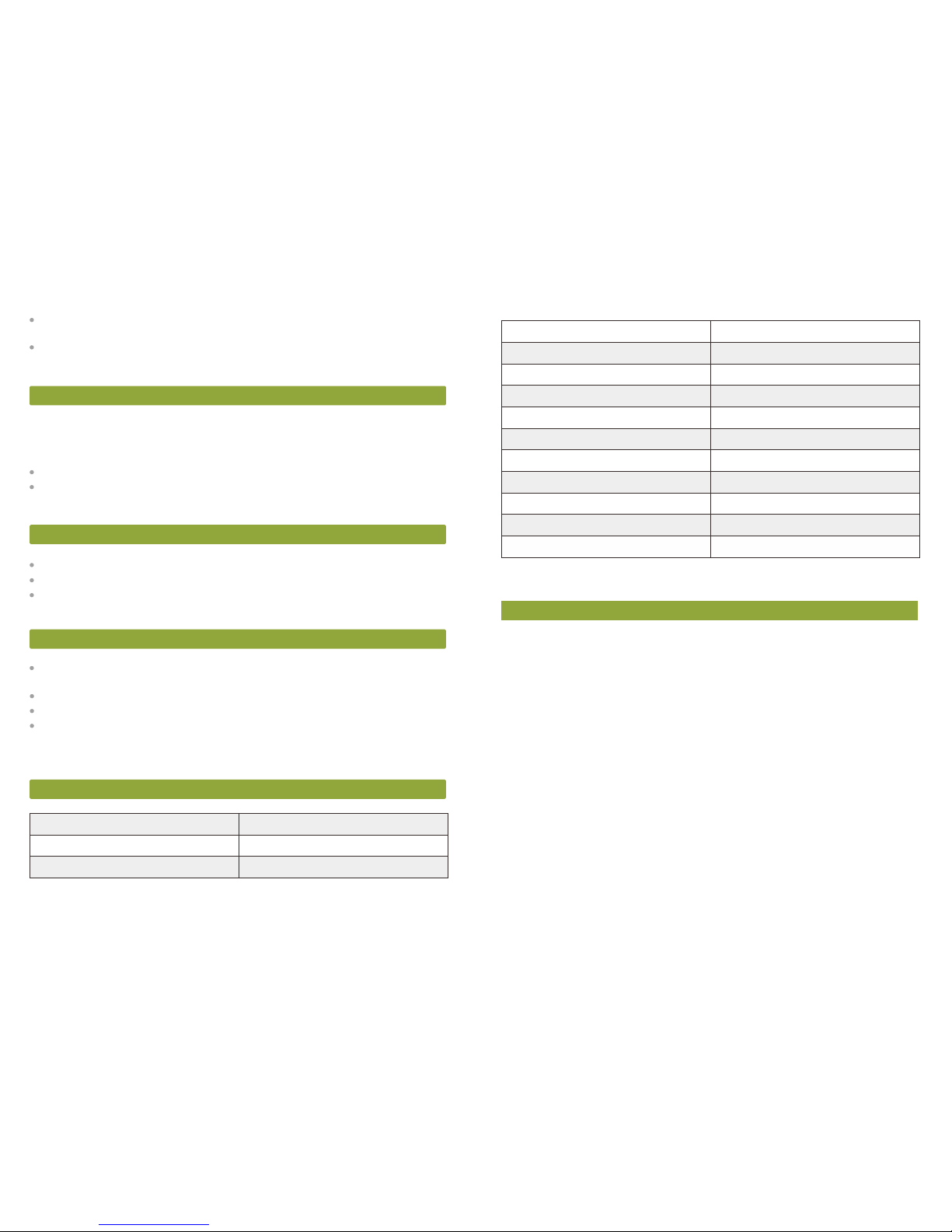
产品概观
1. NF C感应区域
3. 播放 / 暂 停 / 接听电话
5. 下一 首 / 长按音量加
7. Mi cro USB充 电口
9. 麦克 风
2. 电源 开关
4. 上一 首 / 长按音量减
6. LE D指示灯
8. 3. 5mm音频输 入口
请在使 用新耳机之 前,仔细阅 读使用说明 书。
MOSOUND快速连接
步骤一
步骤三
步骤四
步骤二
播放控 制
当搜索 到的蓝牙列 表中出现
“MO CREO Hi tX”,将它 与
您的设 备配对。
将您设 备上的NFC区 域触碰
到蓝牙 耳机的NFC标 识区。
或使用N FC自动配对
settin gs
Blueto oth
Bluetoot h
DEVICE S
MOCRE O HitX
settin gs
Blueto oth
Bluetoot h
DEVICE S
MOCRE O HitX
按住电 源按键大概5秒 ,等到
指示灯红色和蓝 色交替 闪烁,
表明蓝 牙耳机正在 搜索可配
对的蓝 牙设备。
开启您 设备上的蓝 牙功能。
如果您 的设备支持N FC,请
同时开 启NFC功能。 (开启
方法请 查阅您设备 的使用说
明书)
您可以通过 您的设备或 者蓝牙耳机 上面的按键 来控制音乐 的播放。
打开蓝 牙耳机 设置您 的设备
蓝牙手 动配对
①
②
③④
⑤
⑥
⑦
⑧
⑨
Page 5

-7- -8-
包装清单
功能特点
使用之前
您的蓝牙耳 机带 了内 置的可充电电池。在 第一 次使 用之前,我们建 议先 将电 池充满电。请通 过
电脑或者兼容Mic ro USB的充电器为 蓝牙耳 机 充电 。请充 电至少6个小 时直 到红 色的LE D指示
灯灭 。
1. MOCR EO HitX蓝牙耳机x 1
2. USB充电 线x 1
3. 3.5m m音频 线x 1
4. 快速操作 指南x 1
丰富的、完 整的 和动 态的立体声音效
可充电电池 ,可 连续 播放8小时
内置麦克风 ,可 免提 通话
采用USB充电 方式
支持NFC(近 场通 讯)
与大多数蓝 牙设 备兼 容,如:平板电脑、 笔记 本电 脑、MP3播放器、i OS或 安卓 系统的
智能手机等
充电
用USB充电线 将您 的蓝 牙耳机连接上电脑或 者其 他带USB供电口的充电 设备 。
充电时,充 电指 示灯 变红色。
充满时,指 示灯 会自 动灭。
蓝牙耳机的开机/关机
开机
按照电源按 键大 概5秒, 蓝牙耳机上蓝色 的LED指示 灯会快速闪烁三次, 即可 松开 电源按键,此
时蓝牙耳机 已经 开机 。
备注:
开机之后, 蓝色LED指 示灯会大概一秒闪烁 一次 ,此 时处于回连状态 。即 蓝牙 耳机正在搜索
并自动连接 以前 配对 过的设备。
如果搜索不 到以 前配 对过的设备,则指示 灯会 红蓝 交替闪烁,此时 处于 连接 模式,即蓝牙耳 机
正在搜索新 的可 配对 的蓝牙设备。
在蓝色LED灯 快速 闪烁 三次后,您必须松开 电源 按键 。如果您继续按 住按 键长 达3秒左右,则耳
机会直接进 入连 接模 式。
关机
按住电源按 键大 概5秒, 耳机上红色的LE D指示 灯快 速的闪烁三次然后灭 掉, 即可 松开电源按
键,此时耳 机已 经关 机。
备注:
在开机的状 态下 ,如 果30分钟内没有设备来 连接 耳机,则耳机会自动 关机 。如 果您想使用耳
机,请重启 它。
使用蓝牙手动配对
1. 按住电源 按键 大概5秒 ,等到指示灯红 色和 蓝色 交替闪烁时,表明蓝 牙耳 机正在搜索可配对的
蓝牙设备。
2. 开启您设 备上 的蓝 牙功能(开启方法请 查阅 您设备的使用说明书 )。
3. 当搜索到 的蓝 牙列 表中出现“MOCRE O HitX”,将它与您 的设 备配 对。
4. 您可以通 过您 的设 备或者蓝牙耳机上面 的按 键来控制音乐的播放 。
使用NFC自动配对
如果您的设 备支 持NFC(近场通讯), 您可 以简 单的与蓝牙耳机进行 配对 。
1. 按住电源 按键 大概5秒 ,等到指示灯红 色和 蓝色 交替闪烁时,表明蓝 牙耳 机正 在搜索可配对的
蓝牙设备。
2. 开启您设 备上 的蓝 牙和NFC功能(开 启方 法请 查阅您设备的使用说 明书 )。
3. 将您设备 上的NFC区 域触碰到蓝牙耳机的N FC标 识区 。然后遵循您设 备上 出现 的配对指示进
行操作。蓝 牙耳 机与 您的设备将自动完成 配对 。
4. 您可以通 过您 的设 备或者蓝牙耳机上面 的按 键来控制音乐的播放 。
备注:
如果您连接 的设 备是 手机,有电话打进来 的时 候, 请按 来接听。
如果您的设 备是 蓝牙2.0版本及以下,蓝牙 配对 时请输入密码“000 0”。
Page 6
-9- -10 -
32 ohm
频响范围
喇叭直径
40 mm
阻抗
20Hz- 20kHz
如果已连接 的设 备与 蓝牙耳机的距离过远 ,蓝 牙耳 机与此设备的蓝 牙连 接会 断开,但是设备 一
旦靠近蓝牙 耳机 ,会 自动重新连接上。
如果您想用 一个 新的 蓝牙设备与蓝牙耳机 连接 ,请 先将之前的连接 取消 配对 ,因为蓝牙有存 储
记忆功能。
使用AUX音频输入
对于没有蓝 牙功 能的 音频设备,请使用3. 5mm音频线(配件)将设 备连 接到 蓝牙耳机的AUX输
入口。
备注:
当使用AUX音 频输 入连接时,蓝牙 功能 会自 动失效。
AUX音 频输 入播 放时,蓝牙耳机 的按 键会 失效。请使用您的设 备来 控制 音乐的播放。
警告
不论哪种方 式, 如果 蓝牙耳机已经损坏, 请不 要对 蓝牙耳机进行操 作。
请不要在蓝 牙耳 机的 顶部放置重物。
为了避免电 磁干 扰, 请不要将蓝牙耳机放 置在 电视 机或其他电器设 备的 顶部 。
电池说明
可回收利用 的电 池。 请不要丢弃在垃圾筒 。请 不要 烧毁或掩埋电池 。请 不要 刺穿或压碎。请 不
要拆解。
对电池充电 时请 放置 在表面防火的地方, 远离 易燃 物品或液体。
请不要放置 在汽 车内 部充电,特别是汽车 正在 行驶 中。
如果电池里 面的 电解 液弄到皮肤上,请用 肥皂 和清 水彻底的冲洗。 如果 进入 眼睛里,请用冷 水
彻底清洗, 并且 立即 就医。
规格参数
敏感度
V3.0
最大达10米
蓝牙版本
蓝牙协议
传输距离
电池容量
-40dB
EDR, A2 DP, AVRCP, HSP, HFP
300mA h
输入电压
DC 5V/1 A
保质期
MOCRE O产品 享有 一年制造商保质期。 产品 的图 片可能不能完全 反映 真实 内容。MOCRE O不
做任何其他 担保 声明 。
充电时间
2~3小时
播放时间
8小时
信噪比
80dB
尺寸
7.87 × 5.1 × 3.5 in (200 × 130 × 89 mm)
净重 0.58 lb ( 264 g)
规格如有更 改和 改进 ,恕不另行通知 。
Page 7
日本語
-11- -12 -
概要
1. NF C 検出エリア
3. 再生/一 時停止/通話を 受信
5. 早送 り/ボリューム+同 時に長押し
7. US B充電ジャッ ク
9. マイ ク
2. 電源 スイッチ
4. 巻戻 し/ボリューム-同 時に長押し
6. LE Dインジケー ター
8. 3. 5mm AUX I nジャッ ク
MOSOUNDクイックペア
ステッ プ 1
音楽コ ントロール
MOC REO Hit X は、
Blu etoot hデバ イスリ スト に
表示さ れたら、お 使いのデバ
イスと ペアリング します。
デバイ スのNFCエリ アが
ヘッド フォンの上 にNFCの
ロゴと タッチしま す。
または 、NFCによるH itXを
ペアリ ング
settin gs
Blueto oth
Bluetoot h
DEVICE S
MOCRE O HitX
settin gs
Blueto oth
Bluetoot h
DEVICE S
MOCRE O HitX
5秒間電 源ボタンを 押して。
そして 、LEDインジ ケーター
は赤、 青に点滅し て、
Blu etoot h対応 のデバ イス を
検索す る。
お使い のデバイス の
Blu etoot hをオ ンにし ます
(お使 いのデバイ スのユー
ザーガ イドを参照 してくだ
さい) 。
お使い のデバイス で、または ヘッドフォ ンのボタン でヘッド
フォン をコントロ ールします 。
ヘッド フォンをオ ンにする デバイ スを設定
Hit Xを手動でペ アリング
①
②
③④
⑤
⑥
⑦
⑧
⑨
パッキングリスト
特徴
使用する前に
このヘッド フォ ンは 充電式バッテリーが 付属 して います。初めて ご使 用す る前に、フル充 電
することを お勧 めし ます。マイクロUSBポ ート 付けのチャージに接 続し 充電 が可能です。
ACアダ プタ で充 電も可能です。 赤いLEDイ ンジケーターがオフ にな るま で6時間以上充電し て
ください。
豊かな、完 璧な 、そ してダイナミックな ステ レオ サウンド
充電式バッ テリ ーは 最大8時間の再生時間
マイク内蔵 、すぐ電話に答える
USB充電ポ ートを充電
NFC(近距 離無線通信)技術をサポート
ほとんどのB luetooth対応のiO SやAndroid™プラ ットフォームのタブレッ ト、ノ
ートパソコ ン、MP3プレーヤー、スマート フォンとの互換性が優れ る
充電
USBチャー ジケーブルはヘッドフォンと パソコンなどのUSBチャー ジデバイスを接続します 。
充電中イン ジケーターが赤になります。
フル充電の 時、インジケーターが自動的 にoff になります 。
HitXをオ ンに する
5秒間電源ボ タン を押 し、ブルーLEDは三回 点滅し、ヘッドフォンは オンになります。
ノート:
ブルーLEDが 約1秒に点滅するとヘッドフォン をオンにします。ヘッド フォンは今、デバ
イスを接続 するために検索します。
ヘッド フォンを使 用する前に 、このユー ザーズガイ ドをお読み ください。
1. MOCR EO HitX Bluetoo thヘッドフォン x 1
2. USB充電 ケー ブルx 1
3. 3.5m mオーディオケーブルx 1
4. クイック スタートガイドx 1
ヘッドフォンオン/オフにする
ステッ プ 2
ステッ プ 3
ステッ プ 4
Page 8

-13 - -14 -
32 ohm
周波数範囲
ドライバー 直径
40 mm
インピーダ ンス
20Hz- 20kHz
デバイスに 接続 され るまで、インジケー ター は赤 、青に点滅しま す。
3回点滅す ると 、電 源ボタンを放す必要 があ りま す。押したまま 3秒 間を 過ごすと、ヘッ ド
フォンがペ アリ ング モードになります。
HitXをオ フに する
電源ボタン を5秒間 押し て、赤インジケータ ーは3回 点滅すると、電源ボ タン を放 します。ヘ
ッドフォン は現 在、 オフになります。
ノート:
デバイスは3 0分以 内に 接続されていない場 合は 、ヘッドフォンが自 動的 にオ フになります。
ヘッドフォ ンを 使用 したい場合は、再起 動し てく ださい。
1. 5秒間電源 ボタ ンを 押します。そし て、L EDインジケーターは赤、 青に点滅して、
Bluet ooth対応のデバイスを 検索します。
2. デバイス のBluetoothをオン にします(お使いのデバ イスのユーザーガイドを 参照 してく
ださい)。
3. MOCR EO HitXは、Blueto othデバイスリストに表 示されたら、お使いのデ バイスとペア
リングしま す。
4. お使いの デバイスでまたはヘッドフォ ンのボタンでヘッドフォ ンをコントロールします 。
NFCによる 簡単ペア
Bluet oothデバイスがNFC(近 距離無線通信)をサポー トしている場合は、簡単に
ヘッドフォ ンをペアにすることができま す。
1. 5秒間電源 ボタ ンを 押します。そし て、L EDインジケーターは赤、 青に点滅して、
Bluet ooth対応のデバイスを 検索します。
2. デバイス のBluetoothとNFCを オンにします(お使いの デバイスのユーザーガイ ドを 参照
してくださ い)。
3. デバイス のNFCエリアがヘッドフォンの 上にNFCのロゴとタッチし ます。
ヘッドフォ ンとデバイスは自動的にペア リングします。
4. お使いの デバイスでまたはヘッドフォ ンのボタンでヘッドフォ ンをコントロールします 。
ノート:
スマートフ ォン が接 続され、電話を受け され る時 は を押して。
お使いのデ バイ スは 、Bluetoo th2.0以下のバージョ ンを 使用 している場合は 、パ スワ ードが
0000を入 力。
デバイスと ヘッ ドフ ォンが離れすぎてBl uetooth接続が 切断 され るが、近くになった ら、 自
動的に接続 する 。
新しいBlu etoothデバイスと接 続する場合は、ストレー ジ·メモリ機能による、 以前 のペアリ
ングを解除 してください。
AUX Inを利用
Bluet ooth機能ないオーディ オデ バイ スでは、3.5m mオー ディ オケーブル(含 まれ た) を使
用し、AUX INを接 続します。
ご注意:
AUXを 使用 すると、Blue toothが自動的に スト ップします 。
AUX I nを接 続すると、ヘッ ドフ ォンのコン トロ ールは使用 でき ません。デバイ スで音楽再
生をコント ロールしてくだ さい 。
警告
ヘッドフォ ンが 損傷 した場合は操作しな いで くだ さい。
ヘッドフォ ンの 上に 重いものを置かない でく ださ い。
電磁干渉を避けるために、テレビや他の電気器具の上にヘッドフォンを置かないでください。
電池使用注意事項
仕様
デバイスを手動でペアリング
デバイスを手動でペアリング
リサイクル バッ テリ ー。ゴミ箱の中に捨 てな いで ください。加熱 や電 池を 埋めないでくだ さ
い。パンク させ たり 、ぶつけたりしない よう にし てください。分 解し ない でください。
引火しやす い物 や液 体を離れて、安全の 場所 にバ ッテリーを充電 して くだ さい。
自動車の中 に、 特に 運転中は充電しない でく ださ い。
電解液がお 肌に 付着 した場合はソープと 水で 洗浄 。眼に入った場 合、 お冷 水で充分に洗っ
て、すぐに 病院 で診 察を受けてください 。
Page 9
italiano
-15 - -16 -
感度
V3.0
最大 約10m
Bluet oothバージョン
Bluet oothプロトコル
通信距離
バッテリー 容量
-40dB
EDR, A2 DP, AVRCP, HSP, HFP
300mA h
入力
DC 5V/1 A
保証書
本製品の保 証期 間は 、ご購入日から1年 です 。製品の写真は 、実 際の 内容とは異なる 場合 があ
ります。そ の他 一切 の保証は行 わず 、又 は責任を負 いま せん。
充電時間
2~3 時間
再生時間
8 時間
SNR
80dB
サイズ
200 × 130 × 8 9 mm
ネット重量 264 g
仕様および 外観 は、 性能改良のため予告 なく 変更 することがあり ます 。
Panoramica
1. Ar ea di Ril eva mento N FC
3. Pl ay / Pausa / Ric evere Chia mata
5. Su ccess ivo / Volu me + Tenend o Pre muto
7. Porta Mic ro US B
9. Mi crofono
2. Pu lsant e Accen sione
4. Pr ecede nte / Vo lume – Tene ndo Pre muto
6. In dicat ore L ED
8. Ja ck 3.5m m AUX I n
Si pr ega di le ggere ques ta guid a utent e prima d i utili zzare il vos tro n uovo cu ffie.
ACCOPPIAMENTO RAPIDO MOSOUND
FASE 1
FASE 3
FASE 4
FASE 2
Con troll i music ali
Qua ndo app are MOCREO
HitX nella lista di disposi tivi
Blu etoot h, acco ppiatelo c on
il vo stro dispo sitiv o.
Tocca te l’are a NFC del
vos tro dispos itivo c on il
log o NFC pre sente sull e
cuf fie.
O acc oppia te il vos tro
Hit X trami te NFC
settin gs
Blueto oth
Bluetoot h
DEVICE S
MOCRE O HitX
settin gs
Blueto oth
Bluetoot h
DEVICE S
MOCRE O HitX
Tenete p remuto i l pu lsan te
di Accension e per 5 secondi.
Att end ete c he l'i ndic ato re
lam pegg i in bl u e rosso
men tre le cu ffie ce rcano un
dispositivo abilitato Bluetooth.
Acc endet e il Blue tooth d el
vostro dispositivo. Se si tratta
di un d ispos itivo a bilit ato
NFC, accen dete anche l’NFC
(fa te rife rimen to al man ual e
utente del vostro dispositivo).
Pote te cont rolla re la riproduzi one mus icale a ttrav ers o il
vos tro dispos itivo o ppure con i pu lsant i delle c uffie .
Accendete le vostre cuffie Imp ostat e il vost ro
dis posit ivo
Acc oppia te manu almen te
il vo stro Hi tX
①
②
③④
⑤
⑥
⑦
⑧
⑨
Page 10

-17 - -18 -
Packing List
Features
Prima dell’Uso
Caricamento
Utili zzando un cavo di r icarica USB, co llegate il vo stro cuffie a d un computer o a
un'altro dispositivo USB di carica d otato di porta USB.
L'ind icatore di ca rica luminoso s arà rosso dur ante la caric a.
L'ind icatore di ca rica luminoso s i spegnerà automaticamen te a carica compl eta.
Accendere/Spegnere le CUFFIE
Per accendere Hi tX
Pre mere e tene re premut o il pulsante d i accensione pe r 5 secondi, il LED b lu sulle
cuffi e lampeggerà ra pi damente per t re volte, r ilasciare p ulsante di ac censione, e
adess o le cuffie sono ac ce se.
Nota:
Il LED bl u lampeggerà ci rca una volta a l secondo quand o le cuffie sono ac cese. Le
cuffi e adesso ricercano e riprist in ano la connessi one con il dispos itivo conness o
in precedenza.
Se non è st ato connesso al cun dispositi vo in prece denza, l'indica tore lamp eggerà in
blu e rosso mentre l e cuffie cerc ano un nuovo disp ositivo abi litato Bluetooth
Dovete rilas ci are pulsa nte di acce ns ione dopo i tre fl ash rap id i. Se conn uate
a pre me re e te ne re prem uto il puls an te di acc en si one per altri 3 s econdi, le
cuffie an dranno di ream en te in mod al ità ACC OPPI AM ENT O.
Per spegnere H it X
Pre mere e tene re premut o il pulsante d i accensione pe r 5 secondi, il LED rosso sulle
cuffi e lampeggerà ra pi damente per t re volte, r ilasciare p ulsante di ac censione, e
adess o le cuffie sono sp en te.
Nota:
Le cuff ie si spegneranno a utomatica mente se non vien e connessa con un d ispositivo
entro 30 minuti. Se vo lete utiliz zare le cuffi e, vi preghia mo gentilmente di riavviarle .
Accoppiare Il Vostro Dispositivo Manualmente
Tramite Bluetooth
1. Tenete p remuto il p ul sante di Acce nsione per 5 seco ndi. Atte ndete che l'ind icatore
lampe ggi in blu e ross o mentre le cuf fie cercano u n dispositivo a bilitato Bl ue tooth.
2. Acce ndete il Bluetooth del vostro disposi ti vo (fate ri ferimento al ma nuale utente
del vos tro disposi tivo).
3. Quan do appare M OCREO HitX nell a lista di dispos itivi Bluetoo th, accoppiatelo
con il vo stro dispos itivo.
4. Potete controlla re la ripro duzione music ale attraverso il vostro dis positivo oppu re
con i pul santi delle cuffi e.
Accoppiare Facilmente tramite NFC
Se il vos tro disposi tivo Blueto oth supporta l’NFC (N ea r Field Communi cation),
potete facilmente accoppiare le cuffie.
1. Tenete p remuto il p ul sante di Acce nsione per 5 seco ndi. Atte ndete che l'ind icatore
lampe ggi in blu e ross o mentre le cuf fie cercano u n dispositivo a bilitato Bl uetooth.
2. Acce ndete Bluetooth e NFC del vost ro dispos it ivo (fate r iferimento al m anuale
ute nte del vostro dispositi vo).
3. Toccate l’area NFC del v ostro dispo sitivo con il l ogo NFC prese nte sulle cuffi e.
Segui te le istruzion i di accoppiame nto che appaiono sul vostro dispositi vo. Le cuffie
e il vost ro disposit ivo si accopp ieranno autom aticamente.
4. Potete controlla re la ripro duzione music ale attraverso il vostro dis positivo oppu re
con i pul santi delle cuf fi e.
Note:
Se coll egate uno smartphon e e ri cevete una ch iamata, potete rispond ere alla
chiam ata premend o .
Se il vos tro disposi tivo utiliz za Bluetooth 2. 0 e precedent i, inserita la password 0000
per la co nnessione Bluetooth.
1. Cuff ie Bluetooth MO CREO HitX x 1
2. Cavo d i Carica USB x 1
3. Cavo A udio 3.5mm x 1
4. Guid a Avvio Rap ido x 1
Suono s tereo ricco , pieno e dinamic o
Batte ria ricaricab ile con durata fi no a 8 ore
Microfono in co rporato per r icevere l e chiamate
La porta USB rica rica i vostri d ispositivi
Suppo rta la tecnologia NFC ( Ne ar Field Commun ication)
Compatibile con la m aggior parte di tab let, laptop , le ttori MP3 e sma rtphon e con
piatt aforme iOS o Android™ compatibili con il Bl uetooth
La tua cu ffie Bluetoot h è dotata di una batteria inc orporata rica ricabile. Pri ma di
utili zzarla per la pri ma volta, si cons iglia di carica re completa mente la ba tteria. Per
favore carica la cuf fie Bluetoo th usando il tuo PC o t ramite un car ic atore Mic ro USB
compatibile. Per favo re caricala p er almeno 6 ore o f inchè a quando il L ED rosso
indic atore è spe nto.
Page 11
-19 - -20 -
32 ohm
Fre quenza di Rispo sta
Diame tro del Drive r
40 mm
Imped enza
20Hz- 20kHz
Se il dis positivo conn esso si sposta troppo dall'c uffie, l'cuff ie si disconnette dal
dispo sitivo ma rista bilisce la conn essione una vol ta che il disposi tivo torna ad e ssere
vicin o.
Se vole te collegar vi con un nuovo dis po sitivo Blue tooth, per fa vore disacc oppiate
quell o precedent e per motivi di fun zionalità di me moria.
Utilizzo di AUX IN
Per i disposit ivi audio con fun zione Bluetoo th, utilizzate un cavo auto da 3,5 mm
(incl uso) da collega re al Jack AUX IN del vost ro cuffie.
Nota:
Il Blue tooth si disatt iva automaticamente quando viene co llegato l’AUX IN.
I controlli dell’cuffie no n rispondono co n le connession i AUX IN. Usate i controll i
del vos tro disposi tivo per cont rollare l a riproduzi one musicale.
Attenzione
Non ope rate l'cuffie s e ha subito qua lsiasi tipo di da nn o.
Non pos izionate ogge tti pesanti in ci ma all'cuffie .
Per evitare interferenz e elettroma gnetiche, non p osizionate l' cuffie in cima ad u na
TV o ad altri ele ttrodomes tici.
Note sulle Batterie
Ricic late le bat terie. Non butt atele nella spazzatura . Non bruciate e no n seppellite
le ba tterie. Non rompetele e no n bucatele. N on smontate le batterie.
Caric ate le batt erie su una super fici e ignifuga lont ano da oggetti o li quidi
infia mmabili.
Non car icate all'interno di un'automobile, spec ialmente dura nte la guida.
Se gli el ettroliti d elle celle finisc ono sulla vos tr a pelle, lavate accura tamente con
acqua e s apone. Se finis co no negli occhi, r isciacquate accuratame nte con acqua
fre dda. Rivolgetevi immedia tamente al medi co.
Specifiche
Sensi bilità
V3.0
fino a 10 M
Versio ne Bluetooth
Pro tocollo Blu etooth
Raggi o Transm ission
Capacità della Bat teria
-40dB
EDR, A2 DP, AVRCP, HSP, HFP
300mA h
Volt ag gio Input
DC 5V/1 A
Garanzia
I pro dotti MOCRO s ono prote tti con una garan zi a produtt ore di un (1) ann o. Le foto
del prodotto pot rebbero n on riflettere il contenu to attuale. M OCREO NON
FORNI SCE ALTRE GARANZ IE E SPLICITE.
Tempo di Rica rica
2~3 Ore
Music a Temp o di Gioco
8 Ore
SNR
80dB
Dimen sioni
7.87 × 5.1 × 3.5 in (200 × 130 × 89 mm)
Peso Netto 0.58 li bbre (264 g)
Le spec ifiche sono sog ge tte a modific a e miglioramen ti senza prea vviso.
Page 12
langue française
-21 - -22 -
Présentation
1. NF C Zone de D étect ion
3. Pl ay / Pause / Rece voir un a ppel
5. Su ivant / Volum e + par appui lo ng sur la t ouc hé
7. Port mi cro-U SB
9. Mi croph one
2. Bo uton d' alime ntati on
4. Pr écéde nt / Volume - de av ec un app ui prolong é
6. In dicat eur LED
8. Pr ise AUX I N 3,5 mm
JUMELAGE RAPIDE MOSOUND
ÉTAPE 1
ÉTAPE 3
ÉTAPE 4
ÉTAPE 2
Con trôle d e la musi que
Lor sque MO CREO Hi tX
app araît d ans la li ste d es
app are ils Blu etoot h,
jum elez- le avec v otre
app are il.
Pre ssez la z one NFC d e
vot re apparei l contre le
log o NFC sur l e casqu e.
Ou ju melez v otre Hi tX
ave c le NFC
settin gs
Blueto oth
Bluetoot h
DEVICE S
MOCRE O HitX
settin gs
Blueto oth
Bluetoot h
DEVICE S
MOCRE O HitX
Mai ntene z le bout on
d’ali men tatio n enfon cé
pen dant 5 se conde s.
Attend ez que l’indic ateur
cli gnote e n bleu et roug e,
sign e que le casq ue recherche
un appa reil Bluetoot h.
Acti vez le Bluet ooth de votre
appareil. Si c’est un appareil
dis posan t du NFC, a ctive z le
NFC a ussi (r éférez-v ous a u
man uel d’u tilis ation d e
vot re appareil).
Vous p ouvez c ontrô ler la mu sique à l ’aide de v otre
app are il ou ave c les bou tons du c asque .
All umez le c asque Configu rez votre appare il
Jum elez vo tre Hit X
man uelle ment
①
②
③④
⑤
⑥
⑦
⑧
⑨
Liste de contenu de l'emballage
Caractéristiques
Avant utilisation
Votre casque Blue tooth dispose d ’une batter ie intégrée rechargeable. Avant de
l’utili ser pour la pre mière fois, i l est recomma ndé de complète ment rech arger la
bat terie. Veuil lez recharger la casque Bl uetooth à l’aide de vo tre PC ou d’un
chargeur compa tible micro U SB. Veuillez l a recharg er pendant au moi ns 6 heures
jusqu ’à ce que l’indicateur DEL rouge s ’éteigne.
Chargement
Avec le câble de cha rge USB, conn ectez votre casque à un ordinateur ou a utre
périp hériques USB av ec un port d 'alimentati on USB de charg e.
Les tém oin de charge e st rouge pe nd ant la charge.
Voya nt s seront au tomatiqueme nt éteints lors que complètem ent chargée .
Allumer / Éteindre le casque
Pour allumer le Hi tX
Maint enez enfoncé le b outon d’alimen tation pendan t 5 secondes, la DE L bleue sur
le casque clignotera alors rapidement 3 fois. Relâchez ensuite le bouton d’alimentation,
le casq ue est allumé.
Note:
La DEL bl eue s’allumera env iron une fois par seconde lo rs que le casque est
allum é. Le casque cherche alors et re prend la conn exion avec des ap parei ls
conne ctés au pré al able.
Mer ci de lire le gu ide de l' utili sateu r ava nt d'ut ilise r votre nouveau cas que.
1. MOCR EO HitX: Casque B lu etooth x 1
2. Câbl e de rechargement USB x 1
3. Câbl e audio 3,5 mm x 1
4. Guid e Rapide De Démar ra ge x 1
Un son st éréo rich e, complet, et dyna mique
Batte rie recha rgeable pou r ju squ'à 8 h eures d'autonomie
Microphone intég ré pour prendre des ap pels
port de charg ement USB pour ch arger vos d ispositifs
Soute nir NFC (Near Fie ld Communicat ion)
Compatible avec la p lupart des tablet tes compa ti bles Blueto oth, les ordi nateurs
portables, les lecteurs MP3 et les smartphones sous plates-formes iOS ou Android ™
Page 13

-23 - -24 -
32 ohm
Réponse en fréquence
Diamè tre du Driver
40 mm
Impéd ance
20Hz- 20kHz
Si aucun appareil n’a été connecté auparavant, l’indicateur clignotera alors en bleu
et en rouge signe que le c asque reche rche un appareil don le Bl uetooth est a ctivé.
Vous d evez relâch er le bouton d’ali me ntation après les troi s clignotemen ts rapides.
Si vous c ontinuez de mai ntenir le bouton d’a limentation e ncore 3 secon des, le
casqu e entrera directement en m ode JUMELAGE.
Pour éteindr e le HitX
Maint enez le bouto n d’a limentation e nfoncé pendan t 5 secondes. La DE L rouge du
casqu e clignotera ra pidement trois fois. Relâchez alo rs l e bouton d’alime ntation, le
casqu e est désormais é teint.
Note:
Le casq ue s’é teindra automatiquemen t si aucun appa reil ne lui est c onnecté
penda nt 30 minutes. Si vous voulez ut iliser le casqu e, veuillez alo rs l e redémarrer.
Jumelez manuellement votre appareil via le Bluetooth
1. Main tenez enfoncé l e bouton d’alime ntation penda nt 5 secondes. Attendez qu e
l’indic ateur clign ote en bleu et ro uge, signe que le c asque reche rche un appareil
Bluet ooth.
2. Acti vez le Blueto oth de votre apparei l (référe z-vous au manue l d’utilisati on de
votre appareil).
3. Lorsqu e MOCREO HitX apparait dans la l iste des appareils Blu etooth, jumel ez-le
avec votre appareil.
4. Vou s pouvez contrô ler votre m us ique à l’aide de vot re appa reil ou des bou tons
sur le ca sque.
Jumeler facilement avec le NFC
Si votre appareil Bluetoo th est compat ible avec le NF C (Near Field Commu nication),
vous po urrez facil ement jumeler l e casque.
1. Main tenez enfoncé l e bouton d’alime ntation penda nt 5 secondes. Attendez qu e
l’ind icateur clign ote en bleu et rouge, signe qu e le c asque rec he rche un appareil
Bluet ooth.
2. Acti vez le Blueto oth et le NFC de votre appareil (réfé rez-vous au m anuel
d’uti lisation de vot re appareil).
3. Pressez la zone NFC d e votre appareil con tre le logo NFC d u casque. Suive z les
instr uctions de jumela ge qui appa ra itront al or s sur votre a ppareil . Le casque et votre
appareil se jume lleront automatiquemen t.
4. Vou s pouvez contrô ler la musique à l’a id e de votre ap pareil ou a vec les bouto ns
du casq ue.
Remarque:
Si un sma rtphon e est connecté et q ue vous rec evez un appel, vous pouvez répondre
à l'app el en appuyant su r.
Si votre appareil utilise l a technologie B luetooth 2. 0 et au-dessous, en trez le mot de
pas se 0000 pour la con nexion Blueto oth.
Si le pér iphérique conne cté s'éloig ne trop du casq ue, le casque se dé connecte de
l'appareil, ma is repren d la connexion un e fois que le dispo sitif se rapproche.
Si vous voulez vous co nnecter ave c un nouveau pé ri phérique Blue tooth, merci de
décou pler les préc édents en raison de l a fonction de la mé moire de stockage.
Utilisez AUX IN
Pour les appareils audi o sans fonction B luetooth, u tilisez un câbl e au dio de 3,5 mm
(incl us) pour le connecter à l'entrée AUX de vot re casque IN.
Remarque:
Bluet ooth est auto matiquement d ésactivé lors qu e AUX IN est co nn ecté.
Les con trôles des casq ue n e marchen t pas via conne ction AUX IN .U tilisez les
comma ndes de votre a ppare il pour contrôl er l a lecture d e mu sique.
Avertissements
Ne pa s utiliser le cas que s'il a été endo mmagé de quelqu e façon que ce soit .
Ne pa s placer d'obje ts lourds sur l e dessus de l'encei nte.
Pour évite r les interfére nc es électrom agnétiques, n e pas placer le c asque au-dess us
d'un té léviseur ou de tout autre ap pareil él ectrique.
Remarques sur la batterie
Recyclez les batteries. N e jetez pas à l a poubelle. Ne pas brûler ou enterrer les
bat teries. Ne pas percer ou é craser. Ne pas démonter.
Recharge z le s batteri es sur une surface inco mbustible, lo in de produit s
infla mmables ou des liqu ides.
Ne pa s charger à l'i ntérieur d' un e automobil e, en particulier pen dant la conduite.
Si l'él ec trolyte d ans les cellule s rentre en c ontact avec la pe au, lavez abo ndamment
avec de l 'eau et du savo n.Si cela attei nt dans les yeux, r incer abondam ment avec de
l'eau f roide.Con sultez immédi atement un méde cin .
Caractéristiques
Page 14
lengua española
-25 - -26 -
Sensi bilité
V3.0
jusqu'à 10m
Versio n Bluetooth
Pro tocole Blue tooth
Plage d e transmission
Capacité de la Bat terie
-40dB
EDR, A2 DP, AVRCP, HSP, HFP
300mA h
Tension d'e ntrée
DC 5V/1 A
Garantie
Les produits MOCRE O sont protégés par la gar antie du fabric an t de un (1) an. Les
photos du produi t peuvent ne pa s refléte r le contenu ré el. MOCREO NE DON NE
AUC UNE AUTRE GAR ANTIE EXPRESS E.
Temps de Charge
2~3 heu res
Temps de Lect ure
8 heures
SNR
80dB
Dimen sions
7,87 × 5,1 × 3,5 po (200 × 130 × 89 mm)
Poids net £ 0,58 (2 64 g)
Les spé cifications s on t sujettes à êt re changées e t améliorée s sans préavi s.
Descripción
1. NF C Área de D etecc ión
3. Re pro duc ir / Pausa r / Recib ir un a Llama da
5. Si guien te / Volum en + co n una Pul sación La rga
7. Pu erto U SB Mi cro
9. Mi crófono
2. Bo ton de En cendi do
4. An terio r / Vol umen - co n un Puls ación Lar ga
6. In dicad or LED
8. Co necto r AUX IN 3, 5mm
MOSOUND SINCRONIZACIÓN RÁPIDA
PASO 1
PASO 3
PASO 4
PASO 2
Con trol de l a músic a
Cuando MOCREO HitX aparezca
en la lis ta d e di spo sit ivos
Blu etoot h, sinc ronícelo c on
su di sposi tivo.
Toque l a zona NF C del
dis posit ivo con tra el
log otipo d el NFC en e l
aur icula r.
O enl ace su Hi tX
med iante N FC
settin gs
Blueto oth
Bluetoot h
DEVICE S
MOCRE O HitX
settin gs
Blueto oth
Bluetoot h
DEVICE S
MOCRE O HitX
Pulse el botón de encendido
dur ante 5 se gundo s. Espe re
a que e l indic ador pa rpa dea
en az ul y ro jo m ien tras el
auricular busca un dispositivo
hab ilita do para B lue tooth .
Enc ienda e l Bluet ooth de l
dis posit ivo. Si s e trata d e un
dis posit ivo com patible co n
NFC, encienda el NFC también
(co nsult e la guía d el usua rio
del d ispos itivo ).
Pue de cont rolar l a rep roduc ción de l a músic a a través de
su di sposi tivo o co n los bot ones de l auric ular.
Enc ienda e l auric ular Con figur ación d e su
dis posit ivo
Con ecta su H itX
man ualme nte
①
②
③④
⑤
⑥
⑦
⑧
⑨
Por favo r, lea e sta guía de l usuar io ante s de ut iliza r su nuev o auric ulare s.
Page 15

-27 - -28 -
Contenido
Características
Antes de Utilizar
Su auriculares Bluetooth viene con una batería integrada recargable. Antes de utilizar
la auri culares Blu etooth por prim era vez, se recomienda cargar la batería
compl etamente. Por favo r, cargu e la auriculares Bluetoo th vía su PC o vía cual quier
cargador micro USB compatible. Por favor, cargue la auriculares Bluetooth por al menos 6
horas h asta que el indic ador LED se apa gue.
Carga
Con el ca ble de carga US B, conecte el aur iculares a un o rdenador u ot ro dispos itivo
USB con u n puer to de alimentac ió n USB.
Se ence nderá el indicado r de carga de c ol or rojo dur ante la carga .
Las luc es indicadora s se a pagarán a utomáticame nte cuando es té cargad o
compl etamente.
Encendiendo / Apagando los Auriculares
Para encender el H it X
Mante nga pulsado el bo tón de encend ido durante 5 seg undos, el LED azu l de los
auric ulares pa rpadeará rá pidamente t res veces, su elte el botón d e encendido, el
auric ular ya se encuentr a encendido.
Notas :
El LED az ul parpad eará una vez po r se gundo cuando el a uricular esté encendido.
El auricular está buscando y reanudando la conexión con el dispositivo conectado
anter iormente.
Si no hay n ingún dispositi vo conectad o anteriorm en te, el indica dor parpa deará en
azul y rojo mientras e l auricular bus ca u n nuevo dispo sitivo compatible con
Bluet ooth.
Deber á liberar el botó n de encendido de spués de los tres parpad eos rápidos. Si
sigue m anteniendo pu lsado el botó n de encendido dura nte 3 segundo s, el auricular
se pond rá en modo de SINCR ONIZACIÓN d irectam en te.
Para apagar el H it X
Mante nga pulsado el bo tón de encend ido durante 5 seg undos, el LED rojo de los
auric ulares pa rpadeará rá pidamente t res veces, su elte el botón d e encendido, el
auric ular ya se encuentr a apagado .
Note:
El auri cular se apag ará automátic amente si no ha y ningún dispos itivo conecta do
duran te 30 minutos . Si desea utiliz ar el auricular, por favor, reinici e el dispositiv o.
Sincronizar el dispositivo de forma manual
mediante Bluetooth
Sincronización fácil por NFC
1. Auri cu la res MOC REO HitX con Blue to oth x 1
2. Cabl e Ca rgador US B x 1
3. Cabl e de A ud io 3,5mm x 1
4. Guía par a In icio Rápido x 1
Sonid o estéreo vivo, completo y dinámico
Bater ía recargable de hasta 8 h oras de reproducción
Micrófono inco rporado par a atender lla madas
Puerto de carga USB para s us dispositiv os
Apoyo a l a tecnologí a NFC (Near Field Com munication)
Compatible con la ma yoría de las tabl etas con Bluetooth, orde nadores por tátiles,
rep roducto res de MP3 y te lé fonos intel igentes con p la taformas iO S o An droid™
1. Puls e el botón de encen dido durante 5 segundos. Esp ere a que el indi ca dor
par padee en azul y rojo mientra s el auricular bu sca un disposit ivo habilitad o para
Bluet ooth.
2. Encienda el Bluetooth del dispositivo (consulte la guía del usuario del dispositivo).
3. Cuan do MOCREO HitX aparezca en l a lista de dispos itivos Bluetooth, sincronícelo
con su di spositivo.
4. Pued e controlar l a reprodu cción de música a t ravés de su dispo sitivo o con lo s
boton es del auricula r.
Si su dis positivo Blue tooth es compatible con la t ecnología NFC ( Near Field
Commu nication), pu ed e sincroniz ar el auricular f ácilmente .
1. Puls e el botón de encen dido durante 5 segundos. Esp ere a que el indi ca dor
par padee en azul y rojo mientra s el auricular bu sca un disposit ivo habilitad o para
Bluet ooth.
2. Enci enda el Bluetoo th del disposit ivo y el NFC (consu lte la guía del u suario del
dispo sitivo).
3. Toque la zon a NFC del disposi tivo contra el lo gotipo de NFC del a uricular. Siga las
instr ucciones de sincronizaci ón q ue aparecen en su dispos it ivo. Los auri culares y el
dispo sitivo se sincronizarán au tomáticam ente.
4. Pued e controlar l a reprodu cción de la músic a a través de su disp ositivo o con l os
boton es del auricula r.
Si un tel éfono intel igente se encue ntra conectad o y recibe una ll amada, uste d
puede c ontestar la lla mada presio nando .
Si utiliza Bluetooth 2.0 o anterior, introduzca la clave 0000 para conectar el Bluetooth.
Nota:
Page 16
-29 - -30 -
32 ohm
Fre cuencia de Respuesta
Diáme tro del Altav oz
40mm
Imped ancia
20Hz- 20kHz
Si el dis positivo cone ctado se encuen tra lejos del aur ic ulares, e l mi smo se
desco nectará del dis positivo, pero reanuda rá la conexión un a vez que el dispos itivo
se encu entre cerca.
Si uste d desea conecta r el auriculares con un dispos itivo Bluetooth nuevo, por f avor,
desenlace el dispositivo anterior, debido a la función de la memoria de almacenamiento.
Uso del AUX IN
Para disposi tivos de audio si n la función de Blu etooth, utili ce el cable de audi o de
3,5mm ( incluido) para conectarl o al AUX IN de su aur iculares.
Nota:
El Blue tooth será desc onectado automáticamen te cuando el AU X IN sea conectad o.
Los con troles del au riculares n o responden a c onexiones de AUX IN. Utilice l os
controles de su disp ositivo par a control ar la música.
Advertencias
No util ice el auriculares si ha sido da ña do de cualquier m anera.
No colo que objetos pes ados sobre el a uriculare s.
Para evitar in terf erencia ele ctromag né tica, no coloqu e el auriculares encima del
tel ev isor u otro a rtef ac to eléctric o.
Notas de la Batería
Recicle las ba terías. No la s bote en la pa pelera. No quem e o en tierre las baterías. N o
las per fora o aplaste. No las desar me.
Cargue las baterías sobre u na superficie res istente al fu ego, y lejos de líq uidos y
objet os volátile s.
No cargue la batería dentro d el vehículo, es pecialmente s i está conducie ndo.
Si los el ectrolito s de las celdas tocan su piel, lav e bien con jabón y ag ua. Si toca sus
ojos, e njuague con agu a fr ía. Busque ayud a médica inmedi atamente.
Especificaciones
Sensi bilidad
V3.0
hasta 1 0M
Versio n del Bluetooth
Pro tocolo Blue tooth
Rango d e Transm is ión
Capacidad de la Bacteria
-40dB
EDR, A2 DP, AVRCP, HSP, HFP
300mA h
Volt aj e de Entrada
DC 5V/1 A
Garantía
Tiemp o de Carga
2~3 hor as
Músic a Tiempo de Reproducci ón
8 horas
SNR
80dB
Dimen siones
7,87 × 5,1 × 3,5 pulgadas (200 × 130 × 89 mm)
Peso Neto 0,58 li bras (264 g)
Las esp ecificacion es e stán sujetas a ca mbios o mejoras s in previo avi so.
Los pro du ctos MO CR EO c uentan con un a ga rantía de un (1) añ o. Las fotogr afía s de l
pro du cto no re fl ej an el conte ni do actual del m is mo . MOCREO NO E XP RE SA OT RO
TIPO DE G AR AN TIA.
Page 17
Deutsch
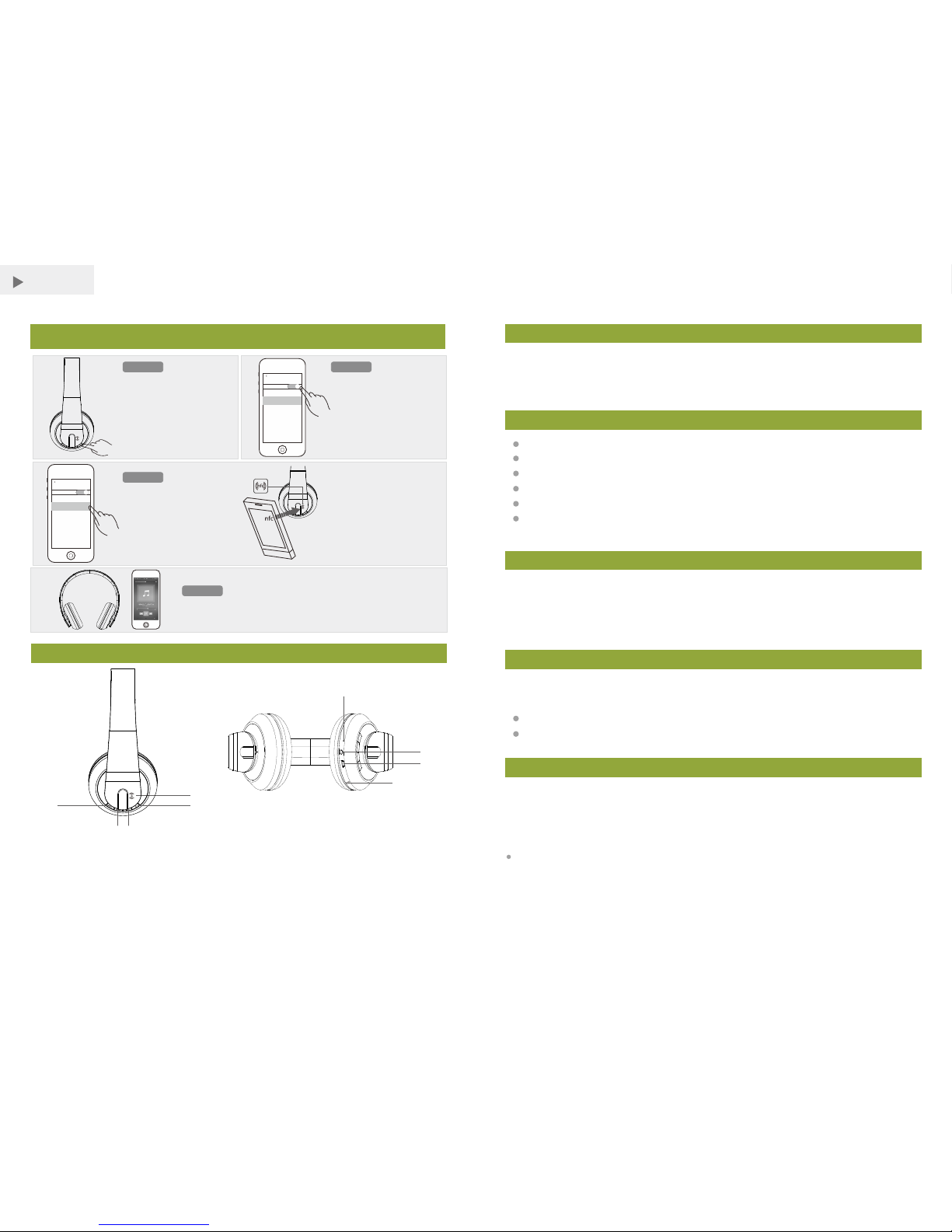
Überblick
1. NF C Erkennun gsber eich
3. Pl ay / Pause / Empfan gen ein es Anru fs
5. Nä chste / Vo lume + von Lon g Press
7. Mi cro USB -Ansc hluss
9. Mi krofon
2. Ne tzsch alter
4. Pr eviou s / Volu me - von Lo ng Pres s
6. LE D-Anz eige
8. 3, 5-mm- AUX-I n-Buc hse
MOSOUND SCHNELL PAAR
Sch ritt 1
Sch ritt 3
Sch ritt 4
Sch ritt 2
Mus ikste uerun g
Wenn MOC REO Hit X
erschein t in der Li ste
Bluetooth-Geräte verbinden
Sie e s mit Ihr em Gerä t.
Ber ühren S ie den NF CBer eich Ih res G eräte s
geg en die NF C-Log o auf
dem K opf hörer.
Ode r koppe ln Sie Hi tX
von N FC
settin gs
Blueto oth
Bluetoot h
DEVICE S
MOCRE O HitX
settin gs
Blueto oth
Bluetoot h
DEVICE S
MOCRE O HitX
Drü cken Sie die Tas te für 5
Sek unden . Warte n Sie , bis
die A nzeig e blink t in Blau
und Rot wi e die Kopf hörer
suc ht nach e inem
Blu etoot h-fäh igen Ge rät.
Sch alten S ie Blue tooth I hre s
Ger äts. Wenn es e in NFCfäh iges Ge rät, sc halte n Sie
NFC a ls auch ( siehe
Ben utzer handb uch des
Ger äts).
Sie k önnen d ie Musi kwied ergab e über da s Gerät o der mit
den Tas ten des K opf hörer s steue rn.
Schalten Sie den Kopfhörer Ric hten Si e Ihr Ger ät
Koppeln Sie Ihr HitX manuell
①
②
③④
⑤
⑥
⑦
⑧
⑨
Packliste
Eigenschaften
Vor der Verwendung
Ihre Bluetooth -Kopfhö rer kom mt m it einem eingebauten Akk u. Vor der Verwendung
es zum er sten Mal, ist es em pfehlensw er t, d en Akku vollstä ndig aufzulad en. Bitte
laden S ie die Bluetoot h-Kopfh örer über den P C oder über einem M icro-USBLadeg erät kompatibel. Bit te laden Sie es min destens 6 Stunden, bis d ie rote LED Anzei ge ist ausgesch al tet.
Reicher, voller und dyna mi scher Stereo-S ound
Akku fü r bis zu 8 St unden Spielzeit
Integ rier tes Mikrofon zur Aufna hme Anrufen
USB-L adeanschlus s lä dt Ihre Vorr ichtungen
Unter stützt NFC (Nea r Fi eld Communica tion)-Technolog ie
Kom patibel mit d en meisten Bl ue tooth-fäh igen Tablets, Laptops, MP3-Pla yer und
Smartphones m it iOSoder Android ™-Platt formen
Laden
Mit dem U SB-Ladekabe l, s chließen Sie Ih re Lautsprecher an einen C omputer ode r
andere USB-Gerät e mit einer Ladel eistung USB-Port.
Die Lad eanzeige leuchtet währen d des Ladevorgangs rot w erden.
Anzei ge leuchtet automatisch ab , wenn voll auf geladen ist.
Den Kopfhörer Einschalten / Ausschalten.
Um die Hi tX e inzuschalte n
Drücken und halten Sie die Power-Taste für 5 Sekunden, b li nkt dreim al die blaue LED
auf dem Kopfhörer, lassen Sie die Power-Taste, so wird der Kopfhörer jetzt eingeschaltet.
Hinwe is:
Blaue L ED blinkt etwa ei nmal pro Seku nde, wenn der Kopfhörer eingeschaltet ist.
Der Kopfhöre r sucht nun und nim mt Verbindung mi t dem bevor ang es chlossenen
Gerät .
Bit te lese n Sie die ses Ben utzer handb uch vor d er Inbe trieb nahme I hre r Kopfhöre r.
1. MOCR EO HitX Bluetoo th-Kopf hörer x 1
2. USB- Ladekabel x 1
3. 3,5 mm A udio-Kabel x 1
4. Benu tzerhandbuc h x 1
-31 - -32 -
Page 18

32 ohm
Fre quenzgang
Treiber Durchmesser
40 mm
Imped anz
20Hz- 20kHz
Wenn es kein e be vor angesch lossene Gerät g ibt, die Anzeige da nn blinkt in Bl au und
Rot wie die Ko pfhörer s ucht nach einem neu en Bluetoot h-fähigen Ger ät .
Sie müssen Power-Taste nach den drei schnellen Blitzen lösen. Wenn Sie halten Drücken
und Hal ten-Taste für w eitere 3 Se kunden wird d er Kopf hö rer in den Pairing-M odus
direkt zu erhalt en.
Um die Hi tX a uszuschalte n
Drücken und halten Sie die Power-Taste für 5 Sekunden, d ie rote LED auf d em
Kopfhörer bl inkt schnel l dreimal, lass en Sie die Power-Taste, wird der Kopfhöre r nun
ausge schaltet.
Hinwe is:
Der Kopfhöre r wird auto matisch ausge schaltet, wenn kein Gerä t innerhalb von 30
Minut en verbunde n wird. Wenn Sie die Kopfhörer ve rwende n möchten, bi tte star ten
Sie es ne u.
Koppeln Sie Ihr Gerät manuell über Bluetooth.
1. Drüc ken Sie die Power-Taste für 5 Sekund en. War ten Sie, bi s di e Anzeige blinkt in
Blau un d Rot wie die Kopfhörer sucht nach ei nem Bluetoo th-fähigen Ge rät.
2. Scha lten Sie Bluetooth Ihres G eräts (siehe Be nutzerhandb uc h des Geräts).
3. Wenn MOCREO Hit X er scheint in der Li ste Bluetoo th-Geräte v erbinden Sie es m it
Ihrem Gerät.
4. Sie kö nnen die Musikwie dergabe übe r das Gerät oder mi t den Tasten des
Kopfhörers steuern.
Koppeln Sie einfach über NFC
Wenn Ihr Bluetoo th-Gerät unterstützt NFC (Ne ar Field Commun ication), kön nen Sie
die Kopfhöre r einfach koppeln.
1. Drüc ken Sie die Power-Taste für 5 Sekund en. War ten Sie, bi s di e Anzeige blinkt in
Blau un d Rot wie die Kopfhörer sucht nach ei nem Bluetoo th-fähigen Ge rät.
2. Scha lten Sie Bluetooth und NFC Ihres Geräts (si ehe Benutzerhan dbuch des
Gerät s).
3. Tipp en Sie auf den NFC-Be reich Ihres Gerätes ge gen die NFC-Log o auf dem
Kopfhörer. Befolge n Si e die Paa rung-Anwe is ungen, die auf de m Gerät angezei gt. Die
Kopfhörer un d das Gerät wird automatis ch koppel n.
4. Sie kö nnen die Musikwie dergabe übe r das Gerät oder mi t den Tasten des
Kopfhörers steuern.
Hinwe is:
Wenn ein Smartphone ang eschlossen is t und Sie einen Anr uf erhalten, dr ücken Sie
den Anr uf entgegenne hmen.
Wenn Ihr Gerät Blu etooth 2.0 un d da runter benu tzt, geben Sie da s Passw or t 0000 f ür
die Blu etooth-Ver bindung.
Wenn das angesch lossene Gerät b ewegt sich zu wei t weg vom Lauts precher, trennt
der Sprecher aus dem G erät aber wiede r Zu sammenhang, s obald das Ger ät ist in der
Nähe.
Wenn Sie mit einem n eu en Bluetoot h-Gerät ansch ließen möchte n, bitte entpaaren
die vor herigen aufgr und der Speiche r-Funktion .
Verwenden AUX IN
Für Aud io-Geräte ohn e Bluetooth -Funktion, mi t einem 3,5-mm- Audiokabel (i m
Liefe rumfang enthalten), um sie zu Ih rem Kopfhörer AU X-IN-Buchse . Die Bluetoo th /
AUX I N-Anzeige leu chtetblau ang ezeigt.
Hinwe is:
Bluet ooth wird a utomatisch de aktiviert, wenn AUX IN angesch lo ssen ist.
Die Kopfhöre r-Kontrollen sind unv erantwortlich für AUX IN-Verbin dungen.
Verwenden Sie di e Ste ue relemente auf dem Gerät, u m Musik zu spiele n.
Warnungen
Sie nicht die Lautsprecher funktionieren, wenn es in irgendeiner Weise beschädigt wurde.
Stellen Sie keine schwe ren Gegenst ände auf den Laut sprecher.
Um elek tromagn et ische Störungen zu vermeiden, ste llen Sie den Laut sprecher ni cht
auf ein em Fernseher od er a ndere Elektrogerät .
Batterie Hinweis
Recycle AKKU . Werfen Sie das ni cht in den Papierkor b. Nicht verb rennen oder
vergraben Batterien. Nicht du rchstoß en oder zu vernic hten. Nicht a useinander
nehme n.
Laden S ie die Batterie n auf eine feuerfeste Unterlage fe rn von bren nbaren
Gegen ständen oder Flüs sigkeiten.
Sie inn er halb eines Automobils nich t aufladen, vor a llem währen d der Fah rt.
Wenn der Elekt rolyt in den Zell en auf die Haut gel angt, gründli ch mit Wa sser und
Seife w aschen. Wenn in den Augen, grü ndlich mit kaltem Wa sser abspülen . Sofort
Arzt aufsuc hen.
Technische Daten
-33 - -34 -
Page 19

Empfindlichkeit
V3.0
bis zu 10 m
Bluet ooth Version
Bluet ooth-Protokoll
Reichweite
Akku- Kapazität
-40dB
EDR, A2 DP, AVRCP, HSP, HFP
300mA h
Einga ngsspannu ng
DC 5V/1 A
Garantie
MOCRE O Produkt e sind mit einem ei nem (1) Jahr He rs teller-Gar antie geschüt zt.
Fotos von dem Prod ukt müssen ni cht dem tatsäch li chen Inhalt übe reinstimm en.
MOCRE O NIMMT KEINE WEI TE REN GARANTIE.
Ladez eit
2~3 Stunden
Musik wiedergab ezeit
8 Stunden
SNR
80dB
Abmes sungen
7,87 × 5, 1 × 3,5 in (200 × 130 × 89 mm )
Netto -Gewicht 0,58 £ (2 64 g)
Technisch e Daten könne n verändert und verbe sser t we rden mit Ankü ndigung.
-35 -
 Loading...