

Page 1
Instruction Manual
Automatic Wrist Blood Pressure Monitor
Medical grade
technology
meets elegant,
compact design.
Page 2

Page 3

Table of Contents
Medical Disclaimer
Intended Use
About Blood Pressure
Measurement Method
Accuracy
Precautions
Device Overview
Symbol Denitions
Features
Installing Batteries
02
02
03
06
07
08
12
14
16
23
Applying the Cu
Positioning Guide
Measurement Procedure
Memory Function
Bluetooth Transmission
Storage and Maintenance
Troubleshooting
Warranty & Recalibration
Specications
Note
Appendix
25
26
27
31
33
35
37
39
40
42
46
Page 4

Medical Disclaimer
This manual and product are not meant as a substitute for advice
provided by your doctor.
You are not to use the information contained herein, or this product
for diagnosing or treating a health problem or prescribing any
medication. If you have or suspect that you have a medical problem,
promptly consult your healthcare provider.
Intended Use
MOCACuff automatically measures human’s Systolic, Diastolic blood
pressure and heart rate by using the oscillometric method during deation.
All values can be read out in one LCD panel. Measurement position is at
human being’s wrist. The intended use of this over-the-counter device is
for adults aged 18 years and older with wrist circumference ranging from
5.3 inches to 7.7 inches (approx. 135 mm to 195 mm) and for home use.
MOCACuff detects the appearance of irregular heartbeats during
measurement; an indicated symbol will appear with measuring reading.
And the Risk Category Indicator will show the information with the
readings on the screen for the user tracking their blood pressure level.
2
Page 5

About Blood Pressure
What is blood pressure?
Blood pressure is the measurement of the force of blood pushing against
the walls of the arteries. Arterial blood pressure is constantly uctuating
during the course of the cardiac cycle. The highest pressure in the cycle
is called the systolic blood pressure, and represents the pressure in the
artery when the heart is beating. The lowest pressure is the diastolic
blood pressure, and represents the pressure in the artery when the heart
is at rest. Both the systolic and the diastolic pressure are necessary for a
physician to evaluate the status of a patient's blood pressure.
Many factors such as physical activity, anxiety or the time of day, can
influence your blood pressure. Blood pressure is typically low in the
mornings and increases from the afternoon to the evening. It is on
average lower in the summer and higher in the winter.
Why is it useful to measure blood pressure at home?
Having one's blood pressure measured by a doctor in a hospital or
a clinic, is often associated with a phenomenon called "White Coat
Hypertension" where the patient becomes nervous or anxious, thus
raising his blood pressure. There are also numerous other factors that
might cause your blood pressure to be raised at a specic time of day.
3
Page 6
This is why medical practitioners recommend home monitoring as it
is important to get readings of blood pressure during different times
of the day to really get an idea of your real blood pressure. Medical
practitioners generally recommend the "Rule of 3", where you are
encouraged to take your blood pressure three times in a row (at 3 ~ 5
minute interval), three times a day for three days. After three days you
can average all the results and this will give you an accurate idea of
what your blood pressure really is.
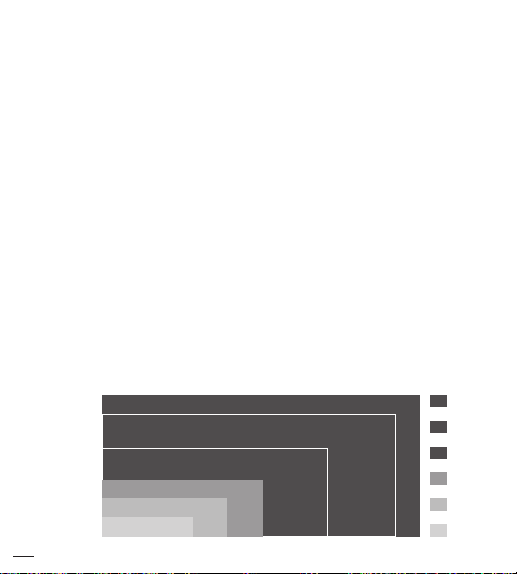
WHO blood pressure classications
Standards for assessment of high or low blood pressure without
regard to age, have been established by the World Health Organization
(WHO), as shown in the chart. However this chart is not exact for
classication of blood pressure and it's intended to be used as a guide
in understanding non-invasive blood pressure measurements. Please
consult with your physician for proper diagnosis.
Systolic
(mmHg)
n
Diastolic
(mmHg)
Severe Hypertension
110
105
Moderate Hypertension
100
Mild Hypertension
95
90
High-Normal
85
Normal
80
Optimal
4
130 140 160 180150 170120
Red
Red
Red
Orange
Yellow
Green
Page 7
Variations in blood pressure
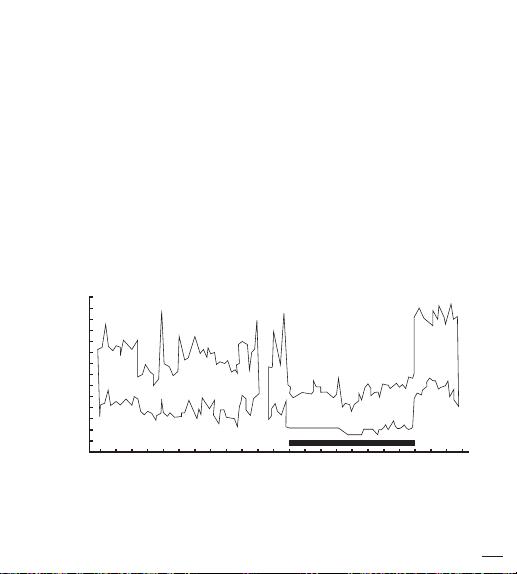
Individual blood pressures vary greatly both on a daily and a seasonal
basis. These variations are even more pronounced in hyper tense
patients. Normally the blood pressure rises while at work and is at
its lowest during sleeping period. (hyper tense: means a person who
has high blood pressure symptom.) The graph below illustrated the
variations in blood pressure over a whole day with measurement taken
every five minutes. The thick line represents sleep. The rise in blood
pressure at 4 PM (A in the graph) and 12 PM (B in the graph) correspond
to an attack of pain.
160
140
120
100
80
60
40
20
blood pressure (mmHg)
A B
(Direct arterial pressure recording in unrestricted man.
23222120 11101918171615141312
24 8765432
1 9
Time
Beven, Honour & Stott: Clin. Sci. 36:329. 1969)
5
Page 8

Measurement Method
MOCACuff Automatic Wrist Blood Pressure Monitor measures
blood pressure and heart rate by oscillometric method, meaning
the fluctuations in pressure are measured. Once the cuff is
wrapped around your wrist, just turn on the monitor and inflation
automatically starts. The ination of the cu creates pressure around
the arteries inside the wrist.
Within the cu is a gauge which senses the uctuations (oscillations)
in pressure. The fluctuation measured represents the degree of
intensity that your arteries contracting with each heart beat, and
also a result of the pressure that the cu has placed on the wrist. The
monitor measures these contractions and converts the information to
a digital value. This is the result displayed on the monitor screen.
Once the measurement is complete, the cu will automatically deate.
NOTE
• The patient is an intended operator.
• The applied part is the cu.
6
Page 9

Accuracy
MOCACuff Automatic Wrist Blood Pressure Monitor has been
clinically tested against a scientific device called a mercury
sphygmomanometer, considered the gold standard in blood pressure
measurement.
All MOCACuff Automatic Wrist Blood Pressure Monitors have
performed equivalent to measurements taken with this scientific
device and are within the accuracy limits prescribed by the American
National Standard for Electronic or Automated Sphygmomanometers.
The SPHYGMOMANOMETER was clinically investigated according
to the requirements of ISO 81060-2:2013.
• We suggest our users have their blood pressure monitor checked every
2 years. This operation should only be performed by Manufacturer or
by authorized representatives.
7
Page 10

Precautions
• Do not use this manual and product as a substitute
for advice, diagnosing or treating a health problem or
prescribing any medication by your doctor. If you
have a medical problem, promptly consult your
healthcare provider.
• Read the Instruction Manual thoroughly before
measuring and keep it at hand for your reference at
any time.
• This device uses the oscillometric method to measure
systolic and diastolic blood pressure as well as your
heart rate. It’s recommended for use by people over
the age of 18 and not to be used on infant or children.
• The device is designed for home use and not suitable for
clinical use.
• This monitor is not intended for use in the MR environment.
• Do not take a measurement in a low (less than 41 °F/5 °C) and
high (more than 104 °F/40 °C) temperature, nor in a place outside
humidity ranges (15% ~ 93% R.H.), and atmospheric pressure
ranges (700 ~ 1060 hPa), or you may get inaccurate readings.
• Wait 30 ~ 45 minutes before measurement if you’ve just consumed
caffeinated beverages or smoked cigarettes.
• Rest at least 5 ~ 10 minutes before taking a measurement.
8
Page 11

• To allow your blood vessels to return to the condition prior to
taking the measurement, please wait at least 3 ~ 5 minutes in
between measurements. You may need to adjust the wait time
according to your personal physiological situation.
• We recommend you using the same wrist (preferably the left
wrist) and measuring around the same time each day.
• Sit down comfortably and place your elbow on the table with
your feet at on the oor. Please do not cross your legs during
measurements.
• Keep the device at heart level. Relax your hand with the palm facing up.
• Perform measurements in a quiet and relaxed environment at
room temperature.
• Do not move or shake the device during a measurement. Please
keep quiet and do not talk during measurements.
• This product is not suitable for:
with arrhythmias
4.
Currently in a dialysis treatment
• For those who have had mastectomy surgery (especially whose’
lymph nodes removed), it’s recommend take a measurement on
the unaffected side.
• When used among medical electronic equipments on the same
limb, pressurization of the cuff may cause temporarily malfunction
to other devices.
3.
Undergoing intravenous injection on any limb
1.
Pregnant women 2. People
5.
In pre-eclampsia condition.
9
Page 12

• Keep in mind that blood pressure naturally varies from time to
time through out the day and is aected by lots of dierent
factors such as stress, eating, smoking, alcohol consumption,
medication, and physical activity, etc.
• Normally the blood pressure rises while at work and is at
its lowest during sleeping period.
• Blood pressure measurements should be interpreted by a
physician or a trained health professional who is familiar with
your medical history. Using the unit and recording the results
regularly for your physician to interpret, you will keep your
physician informed of the continuing changes in your blood
pressure.
• If you have one of the circulatory problems as arteriosclerosis,
diabetes, liver disease, kidney disease, severe hypertension,
peripheral circulation….., please consult your healthcare
professional before using the device.
• Blood pressure measurements taken with this device are
equivalent to those obtained by a trained observer using the cuff/
stethoscope auscultation method and are within the accuracy
limits prescribed by the American National Standard for Manual,
electronic, or Automated Sphygmomanometers.
• Results are not intended for direct diagnosis. Please consult with a
physician if you have any questions or concerns about your results.
10
Page 13

ATTENTION
1. Do not use the device on infants, children, or those who cannot
express their own intention.
2. The device is equipped with sensitive electronic components.
While measuring, avoid strong electrical or electromagnetic
elds, e.g. mobile phones, microwave ovens, etc; or it may lead
to temporary reading error or inaccuracy.
3. Consider the electromagnetic compatibility of the device (ex.
power disturbance, radio frequency interference etc.) Please use
it indoor only.
4. Over high frequency measurements may result in blood ow
interference, which is likely to cause uncomfortable sensations,
such as partial subcutaneous hemorrhage, or temporary
numbness to your wrist. In general, these symptoms should not
last long. However, if you do not recover in time, please seek
your medical practitioners for help.
11
Page 14
Device Overview
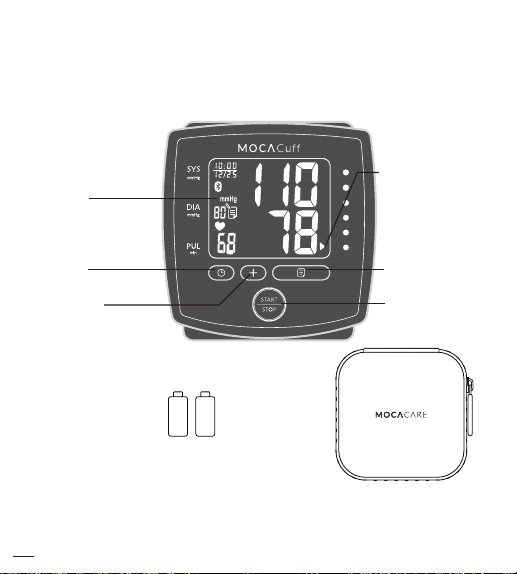
Product components
LCD
Display
Risk
Category
Indicator
Mode
Button
Set
Button
(AAA "LR03"(1.5V)
Alkaline Battery x 2 )
Storage Case
Memory
Button
Start/Stop
Button
CAUTION
Substitution of a component dierent from that supplied might result in
measurement error.
12
Page 15
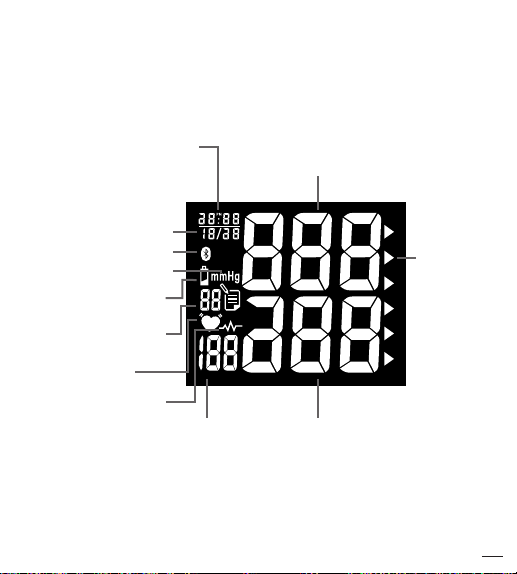
Device Overview
Unit display
Hour : Minute
(Also represents YEAR
in Setting Mode)
Month / Date
Bluetooth Symbol
Blood Pressure Unit
Low Battery Symbol
Memory Record
Number
Pulse Symbol
Irregular Heartbeat
Detector
Systolic Rate
Risk
Category
Indicator
Heart Rate Diastolic Rate
13
Page 16
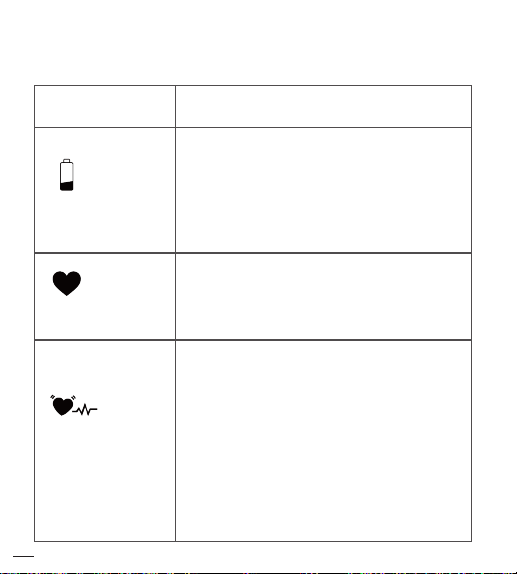
Symbol Definitions
SYMBOLS
LOW BATTERY
SYMBOL
PULSE SYMBOL
IRREGULAR
HEARTBEAT
DETECTOR
14
DEFINITIONS
This symbol appears when the
battery power is excessively low or
the polarity reverses.
We suggest you replace all batteries
with new ones, and make sure the +/polarities are properly positioned.
Once pulse is detected, the symbol
ashes with each pulse beat.
Our suggestion: Please do not talk or
move during measurements.
This symbol appears for 1 minute when
the user was talking, moving, shaking,
or an irregular heart beat was detected
during measurements.
Our suggestion: Please do not talk or
move during measurements. Repeat the
measurement after resting for at least 5
minutes, and restart your measurement
while sitting down comfortably and quietly.
Page 17
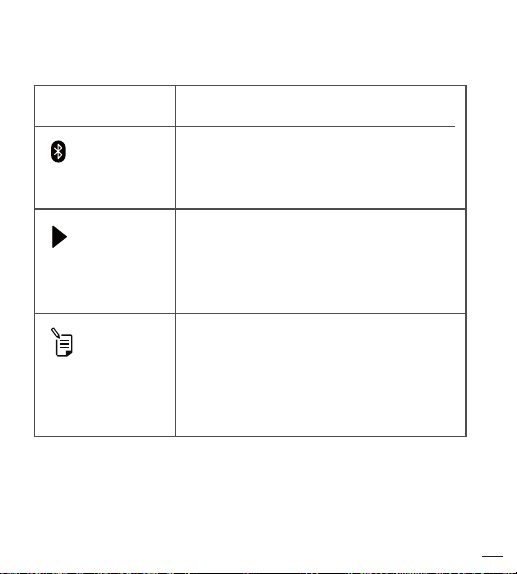
SYMBOLS DEFINITIONS
BLUETOOTH
SYMBOL
RISK
CATEGORY
INDICATOR BAR
MEMORY
RECORD
SYMBOL
LCD displays this symbol when
Bluetooth Function turns ON.
The arrowhead points out the specic
Risk Category that your measurement
reading ts in.
This symbol goes along with gures
according to the order of reading
stored in the memory.
15
Page 18

Features
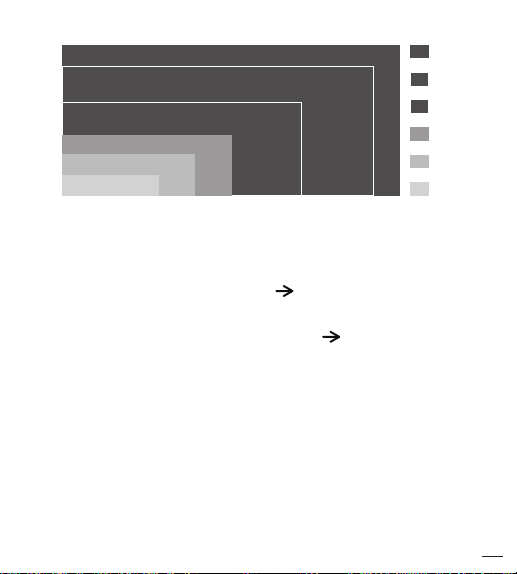
Risk Category Indicator
This device is equipped with Risk Category Indicator which classies
your blood pressure measurements into six stages (Optimal to Severe
hypertension) as shown in below chart:
Stages of Blood
Pressure Levels
Grade 3
Severe Hypertension
Grade
Moderate Hypertension
Grade 1
Mild Hypertension
High-Normal
Normal
Optimal
Sytolic
Diastolic
(mmHg)
(mmHg)
≥180
≥110
2
160~179
100~109
140~159
90~99
130~139
85~89
120~129
80~84
<80
<120
After each measurement is completed, LCD display will show your
position automatically on the six segments of the bar indicator which
corresponds to Risk Category Indicator.
16
Recommendations by SIGN49:
Color
Hypertension in older people
Confirm immediately and repeat BP in one day and
Red
again within one week depending on clinical situation.
Red
Serial blood pressures repeated within one month.
Provide advice about lifestyle modification and confirm
Red
within two months.
Provide advice about lifestyle modification and
Orange
recheck in one year.
w
Yello
Recheck in 2-5 years. (patients aged > 75
years offered annual health check)
Green
*Source: WHO,2003
Page 19
Diastolic
(mmHg)
Severe Hypertension
110
105
Moderate Hypertension
100
Mild Hypertension
95
90
High-Normal
85
Normal
80
Optimal
NOTE
130 140 160 180150 170120
Systolic
(mmHg)
Red
Red
Red
Orange
Yellow
Green
When a person’s systolic and diastolic pressures fall into dierent
categories, the higher category should apply.
e.g. systolic rate 181 & diastolic rate 99 Red category (Severe
Hypertension)
e.g. systolic rate 110 & diastolic rate 95 Red category (Mild
Hypertension)
The above table is not exact for classication of blood pressure and it's
intended to be used as a guide in understanding non-invasive blood
pressure measurements.
Usually this is not a cause for concern; however we recommend you
consult with your physician for proper diagnosis or seek medical advice
according to our recommendation mentioned above. Please note that the
device does not appropriate to diagnose hypertension, and it is only for
user reference on blood pressure monitoring.
17
Page 20

Features
Irregular Heartbeat Detector
The symbol will appear on screen indicating a certain heartbeat
irregularity was detected during measurement.
The heartbeat rhythm that is more than or less than 25% from the
average rhythm is usually dened as an irregular heartbeat rhythm.
Talking, moving, shaking or an irregular pulse during the measurement
can result in the appearance of this symbol. Usually this is not a cause
for concern, however if the symbol appears often, we recommend you
seek medical advice. And please note that the device does not replace a
cardiac examination, but serves to detect pulse irregularities at an
early stage.
NOTE
• The pulse display is not suitable for checking the frequency of
heart pacemakers. If a certain pulse irregularity is detected
during measurement often, we recommend you seek medical advice.
18
Page 21

• As a safeguard, we recommend that if you have arrhythmias
such as atrial or ventricular premature beats and atrial
brillation or any other special conditions you should check
with your physician before using your device.
• The IHB function is not designed for use by people with
arrhythmias nor for diagnosing or treating an arrhythmic
problem. In order to lter the unstable status of user and
avoid aecting the detection of heart rate from any movement,
shaking or talking in the beginning of measurement, the
method of averaging heart beat intervals of subject device is
calculated with the three proper heart beat pulses detected in
the beginning of measurement and that is dierent from a
strict mathematical averaging of all recorded intervals.
• At least 3 beats with at least 25 % dierence from the average
heart beat interval will generate the IHB icon on the screen.
19
Page 22

Features
Bluetooth Data Transmission
MOCACu features a built-in "Bluetooth Data Transmission" function,
which enables the device automatically transmit measuring results to
paired Bluetooth-enabled device after measurement. When connection
established, BPM would transmit memory data such as Measure Date,
Systolic, Diastolic and Pulse to the Bluetooth enabled device.
If paired Bluetooth-enabled device is not working or is not within RF
range of this device, the measuring results will be stored in the blood
pressure monitor's memory. Besides, user can press " " button for one
time to open the Bluetooth function.
Bluetooth compatibility
Bluetooth-enabled device is:
• Bluetooth 4.0 for Android 4.3 or above,
• Bluetooth 4.0 for iOS 7.0 or above
20
with blood pressure monitor for
Page 23

Features
NOTE
• MOCACu is subject to and complies with electromagnetic
compatibility (EMC) standard of IEC 60601-1-2, EN 301 489-1,
EN 301 489-17, EN 300 328 and U.S. federal guidelines, Part 15
of the FCC (Federal Communications Commission) rules for
devices with RF capability. These guidelines help ensure that
your device will not aect the operation of other nearby devices.
Additionally, other devices should not aect the use of your device.
• Other wireless devices that are in use nearby, such as a cell
or mobile phone, or a wireless network, may prevent or delay
the transmission of data from your device to paired Bluetooth enabled device. Moving away from the source of the interference
or turning o these devices to resolve the problem.
• Make sure MOCACu and paired Bluetooth-enabled device are
within acceptable distance (no more than 10 meters) with each
other. If not, put them closer.
• Be sure to select the correct User on the monitor before your
blood pressure measurement begins.
• Bluetooth date transmission is not available under measurement.
21
Page 24
Features
Application Software for Bluetooth
To fully utilize this feature, users need to ensure Bluetooth support
of Wireless (usually under settings menu) on their Android or iOS
device for contactless data exchange. Then, download and install
MOCACARE
"
Bluetooth-enabled device which is compatible with Android 4.3 or iOS
7.0 or above. Please follow the following steps for installing:
1. To install
store, and search for
2. Click the INSTALL button. Once installed, click on MOCACARE
app APP icon.
3. Now you can start using your Android version or iOS version
MOCACARE
of
log, track and trend your test results from your
Bluetooth-enabled Device.
NOTE
MOCACARE
and instructions of how to activate them.
22
app" application software from Google Play on the
MOCACARE
app Software Manual contains explanations of functions
FREE APP, go to the Google Play APP
MOCACARE
app with Bluetooth feature, it’s a simple tool to
app.
Page 25
Installing Batteries
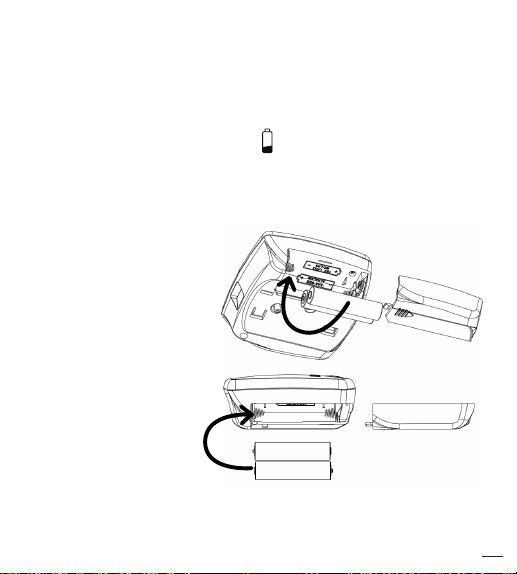
When LOW BATTERY SYMBOL appears on the display, or no
reaction toward operation, please change batteries. Replace all worn-out
batteries with new ones and do not mix new and used batteries. Do not
mix alkaline, standard (carbon-zinc) or rechargeable cadmium batteries
either. Such action may
shorten the battery life
or cause the device to
malfunction.
Slide the battery cover
and insert 2 AAA (LR03)
alkaline batteries into
the battery compartment
as shown on the figure
below. Make sure the
polarities "+" and "–"
ends are coinciding
with similar markings
engraved on the
battery housing.
23
Page 26

Attention
• Batteries are hazardous waste. Do not dispose of them together
with the household garbage. Please discard worn-out batteries
to the recycling site according to local regulations.
• Keep the battery away from children in case they choke on it.
• To prolong the battery life and prevent damage caused by
leakage, remove the batteries from the device if the device is not
to be used for a long period.
• The device will keep the last measuring results after changing
batteries, please reset date and time.
• Please replace all worn-out batteries with new ones when you
are operating the Bluetooth transmission function, and the LOW
BATTERY SYMBOL appears on the display.
• All batteries used must be the same type. Do not mix alkaline,
standard (carbon-zinc) or rechargeable (cadmium) batteries. Do
not mix old and new batteries.
24
Page 27
Applying the Cuff
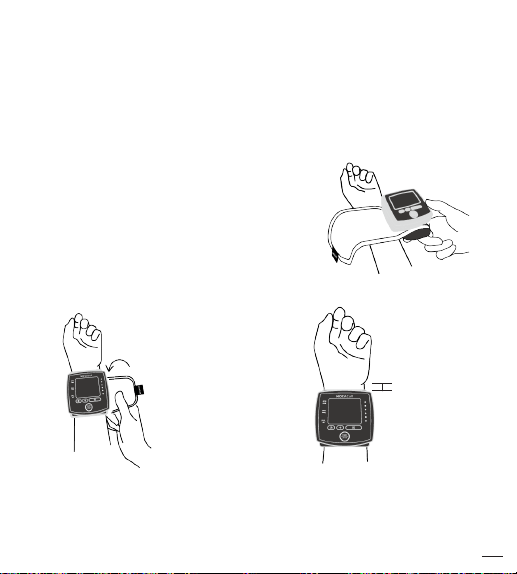
1. Do not place the pressure cu over a jacket or sweater sleeve. Wrap
the pressure cu around the bare wrist with the monitor facing you.
2. Wrap the cu snugly. Do not make
it too tight.
3. Fold the remaining part of the cu
back out of the way.
4. Leave approximately 0.4 inch
(10 mm) between the cu and the
bottom of your hand palm.
3. 4.
2.
0.4inch(10mm)
NOTE
• Do not use this device if your wrist has any wound or injury.
• Do not wrap the cu around any body part other than your wrist.
5.3 ~ 7.7 inch (135 ~ 195 mm)
25
Page 28
Positioning Guide
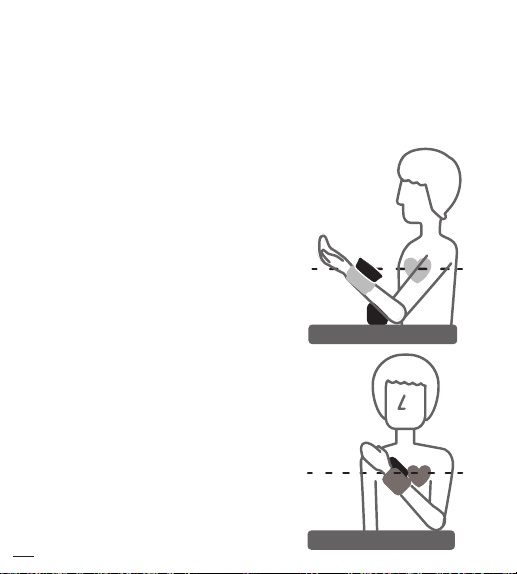
It is extremely important that the cu be at the same height as the heart.
Having the cu higher or lower may cause inaccurate results.
1. Sit down comfortably with
your feet at on the oor and
back supported.
2. Position the blood pressure
monitor on your wrist.
3. Place your elbow on the table
and rest the back of your hand
on the device storage case or
other object.
4. Rest your wrist on the armrest
until it’s at the same height as
your heart. (Position 1)
5. Relax your hand and turn
your palm upwards.
6. For more accurate measurements
, hold your arm across your chest
at heart level. (Position 2)
26
Position 1
Position 2
Page 29
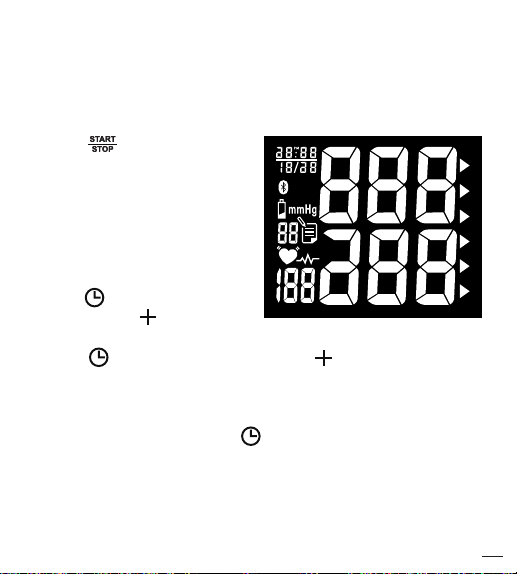
Measurement Procedure
Switch on the Monitor
A.
Press button to switch
on the monitor.
B.
All segments appear on the
screen.
Setting Year, Date and Time
A.
Press button ("YEAR"
ashes). Press button to
adjust YEAR value.
B.
Press button ("MONTH" ashes). Use button to adjust
MONTH (1, 2, 3,……, 12).
C.
Adjust DATE (1, 2, 3,…, 31), HOUR (1, 2, 3,……..12PM,1 PM,…,
12) and MINUTE (00,01,02,03,.....59) as described in Step A above.
D.
When settings are done, press button to conrm the above
settings. The device is ready to measure.
27
Page 30
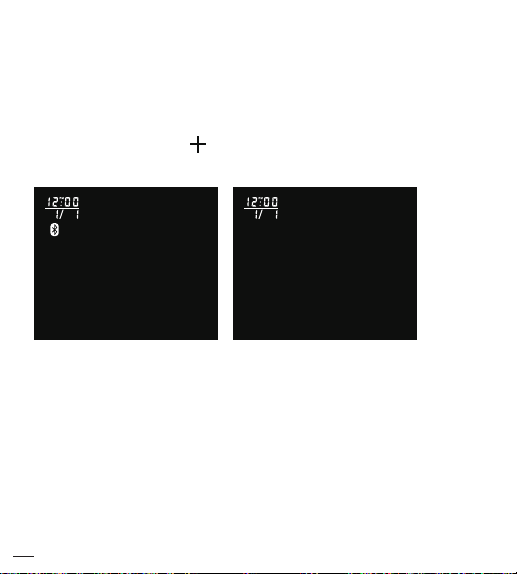
Measurement Procedure
Turning Bluetooth Feature ON/OFF
User can press and hold button 3 seconds to turn the Bluetooth
feature ON/OFF in Standby Mode.
Bluetooth feature ON
Bluetooth feature OFF
NOTE
• The Bluetooth Feature Switch default setting is ON
• Once Bluetooth Feature turns ON, the LCD appears Bluetooth
symbol in any mode.
28
Page 31
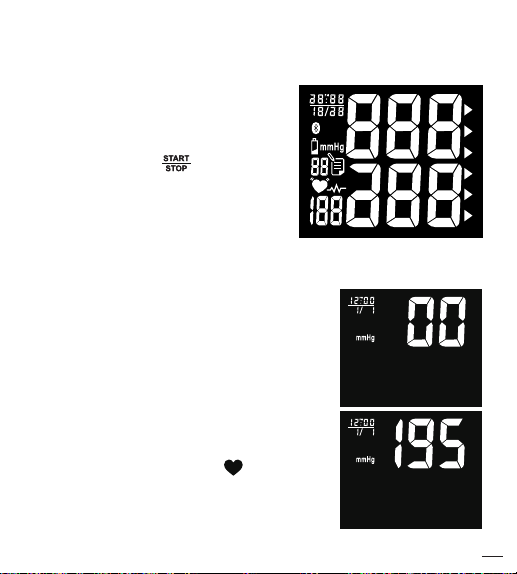
Get Started
A.
With the cu wrapped around
your wrist, press button to
start measurement. All display
units appear on the screen.
NOTE
Do not inate the cu until it is wrapped around your wrist.
B.
After all symbols disappear, the display
will show "00". The monitor is "Ready to
Measure" and will automatically inate
to the level that is right for you.
C.
After ination of the cu, the pressure
will slowly decrease. When pulse is
detected, PULSE SYMBOL ashes.
29
Page 32
Measurement Procedure
NOTE
• If the cu does not stop inating, remove the cu at once.
• To stop measurement, press button. The cu will deate
immediately after the button is pressed.
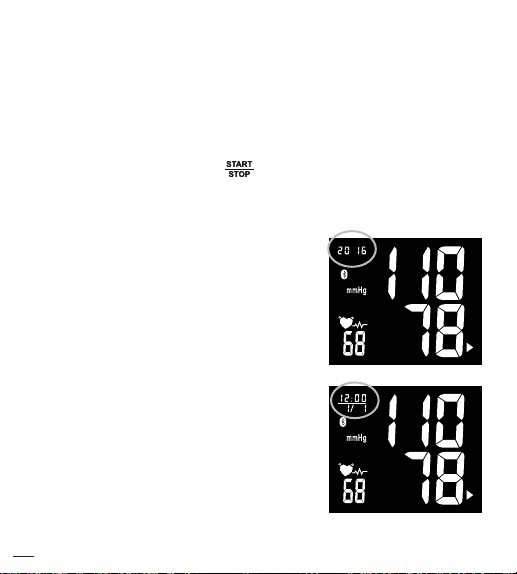
D.
LCD screen displays your systolic
rate, diastolic rate, pulse, Risk
Category Indicator Bar, and
Irregular Heartbeat Detector symbol
(if any) with date and time for 1
minute.(Year and Date / Time
display alternate automatically)
E.
Without any operation for 1 minute,
device automatically shuts o.
30
Page 33
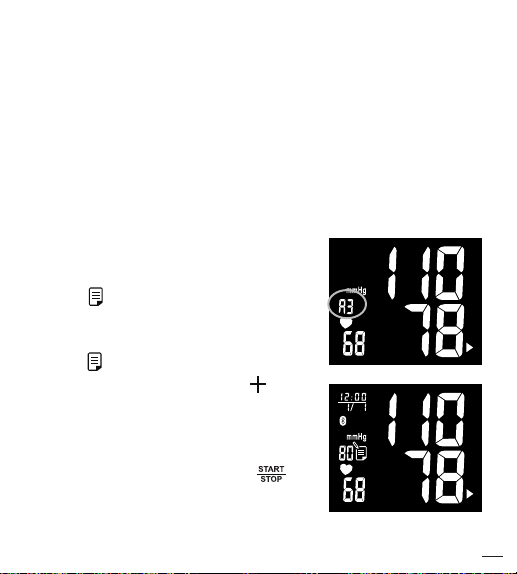
Memory Function
Storing data
After each measurement, the systolic and diastolic pressure, heart
rate with date and time will be automatically stored. The monitor can
store up to 99 memory sets for one user, and automatically replace the
oldest data with new one.
Recalling data
A.
Press button to enter Memory
Mode. LCD displays average of last
3 measuring results rst.
B.
Press button again, LCD displays
the latest measuring result. Use
button to scroll through all stored
measuring results. (Year and Date /
Time display alternate automatically)
C.
To stop reading memories, press
button, and switch to Standby Mode.
31
Page 34
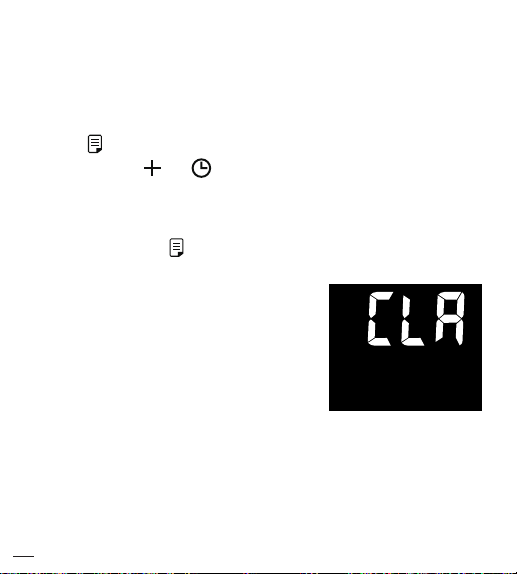
Erasing data
Erasing data
A.
Press button to enter Memory Mode.
B.
Press and hold and buttons at the
same time, the data will be erased automatically.
C.
To conrm the data in the selected user has
been erased, press button and no data should appear.
NOTE
ONCE DELETED, YOUR DATA
CAN NOT BE RESTORED.
32
Page 35
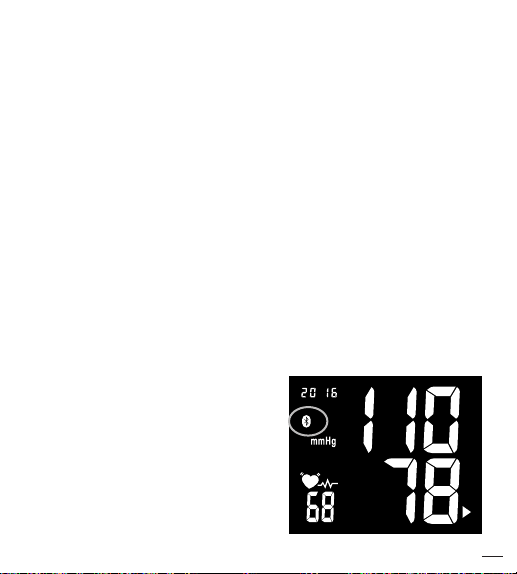
Bluetooth Transmission
To activate Bluetooth function, please make sure your
Bluetooth-enabled device have downloaded APP, and
follow pairing instruction.
There are 2 ways to process Bluetooth Transmission if Bluetooth
function is ON:
Measurement Completed
1. After measurement completed, the device activates
Bluetooth function automatically, and the Bluetooth Symbol
will begin ashing on the screen.
2. While transmitting the reading to your Bluetooth-enabled
Device, MOCACu Bluetooth Symbol will remain steady
on the screen.
3. MOCACu can only pair up with
one Bluetooth-enabled device at a
time. To transmit measuring results
to other Bluetooth-enabled device,
please retry Steps 1 ~ 2.
Bluetooth Symbol lit constantly
under transmission
33
Page 36

Press button for one time:
Under Standby Mode,
1. Press button for one time to wake up the device
and starting Bluetoothfunction (Bluetooth Symbol
ashing).
2. While transmitting the reading to your Bluetooth enabled Device, MOCACuff Bluetooth Symbol will
remain steady on the screen.
3. MOCACuff can only pair up with one Bluetooth-enabled device at
a time. To transmit measuring results to other Bluetooth-enabled
device, please retry as mention above.
Date/Time Synchronization
1. The BPM’s Date/Time Setting can be synchronized by
Bluetooth-enabled device (e.g. smart phone) which has
downloaded and installed MOCACARE application software.
2. When Bluetooth connection is established, the Bluetooth enabled device can send commend with the date/time
information to BPM and the BPM’s date/time will be updated.
NOTE
• Without any operation in 1 minute, the device shuts o automatically
and Bluetooth Transmission OFF.
• Standby Mode: Segments appeared but not under BPM measuring or
data transmitting.
• Sleeping Mode: Clear all LCD segments.
34
Page 37

Maintenance and Storage
General Use
• Do not in any way twist the cu.
• Do not press button if the cu is not wrapped around the wrist.
• Do not drop the product and avoid any strong impacts.
Maintenance
• Use a piece of cloth with water or mild cleansing agent to wipe
the device and dry it immediately with a dry cloth.
• Do not use detergent or any strong chemicals to clean the device.
• Disinfection - Use a piece of cloth with a dilution of neutral
detergent or soapsuds to wipe the surface of the cu for 10 seconds.
• Make sure the cu is completely dry before using.
• Do not attempt to disassemble or change any parts of the
monitor, including wrist cu, due to substitution of a component
dierent from that supplied might result in measurement error.
• If any suggestion or service is requested, please consult your
service station.
35
Page 38

• Do not implement the maintenance procedures for equipment
during measurement.
• Only trained technicians are allowed to repair and dissemble the
device, including software upgrades, patches and maintenance.
NOTE
Water quality required for cleaning and disinfection: Tap water.
Storage
• If the device is not to be used for a long time, please remove the
batteries from the device (leaking of battery acid can cause the
device to malfunction).
• Always store the unit in the storage case after use. It is intended
to be transported or stored in a carrying case between uses.
• Do not place the device directly under sunlight, in high
temperature, or in humid or dusty places.
• Do not store the device in extremely low (less than –13 °F/–25
°C) and high (more than 158 °F/70 °C) temperature, nor in a
place its humidity exceeds 93% R.H.
36
Page 39
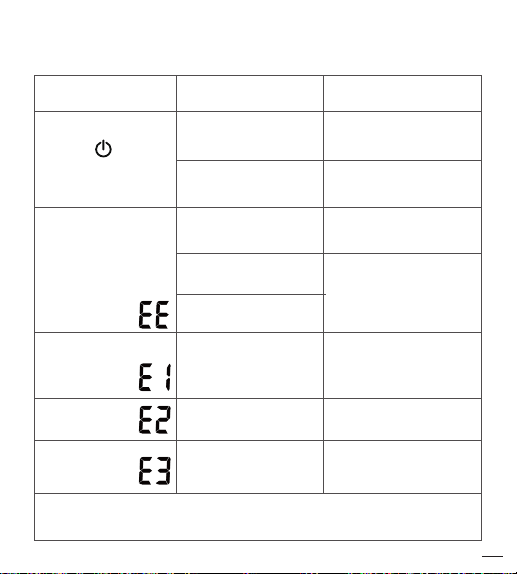
Troubleshooting
SYMBOLS /
SYMPTOMS
Unit does not turn
on when button
is pushed.
Measuring
Error Symbol appears
when blood pressure
value displayed is
excessively low
or high.
Measuring Error
Symbol
Measuring Error
Symbol
Measuring Error
Symbol
Note: If "EP" appears on the display, just return the device to your local
distributor or importer.
CONDITIONS /
CAUSES
Worn-out batteries.
Battery polarities
have been positioned
incorrectly.
Cu has been placed
incorrectly.
Did you talk or move
during measurement?
Shaking of the wrist
with the cu on.
Air circuit abnormality.
Cu tube may not be
plugged into monitor
correctly.
Ination pressure
exceeding 300 mmHg.
Can’t determine blood
pressure measurement
data.
INDICATION/
CORRECTION
Replace them with
2 new AAA (LR03)
alkaline batteries.
Re-insert the batteries in
the correct positions.
Wrap the cu
properly so that it is
positioned correctly.
Measure again. Keep
wrist steady during
measurement.
Check cu connection.
Measure again.
Switch the unit o,
then measure again.
Wrap the cu properly
and keep steady.
Measure again.
37
Page 40

Troubleshooting
SYMBOLS /
SYMPTOMS
BPM cannot
communicate
with Bluetooth
device
Note: If "EP" appears on the display, just return the device to your local
distributor or importer.
38
CONDITIONS /
CAUSES
Paring has not been
completed.
Bluetooth function
is not turn on.
The distance between
BPM and Bluetooth
device is out of
transmitting range.
Use an incompatible
Bluetooth device.
Use non- Bluetooth
device.
Unexpected loss of
electrical/mechanical
integrity.
INDICATION/
CORRECTION
Please re-pairing the BPM and
Bluetooth device with
each other.
Please refer to Page 27
"Measurement Procedure"
and Page 33 "Bluetooth
Transmission" to turn on the
Bluetooth function.
Please make sure the
acceptable distance (≤10
meters) with each other.
Please refer to
Page 20 "Bluetooth
compatibility" & Page 41 "RF
Specication".
Re-insert the batteries and
try again.
Return the device to your local
distributor or importer.
Page 41

Warranty & Recalibration
Warranty For One Year from the manufacturing date
Please note that this warranty does not cover damage caused by misuse
or abuse; accident; the attachment of any unauthorized accessory;
alteration to the product; improper installation; unauthorized repairs or
modifications; improper use of electrical/power supply; loss of power;
dropped product; malfunction or damage of an operating part from failure
to provide manufacturer’s recommended maintenance; transportation
damage; theft; neglect; vandalism; or environmental conditions; loss of use
during the period the product is at a repair facility or otherwise awaiting
parts or repair; or any other conditions whatsoever that are beyond the
control of importers or distributors.
Recalibration Notice
To ensure continued measurement precision, all digital blood pressure
monitors require recalibration regularly.
After 2 years from the manufacturing date, we recommend you have your
monitor recalibrate at the local distributor or importer. The recalibration
service plus the charge of shipping and handling fee shall be charged
accordingly.
39
Page 42
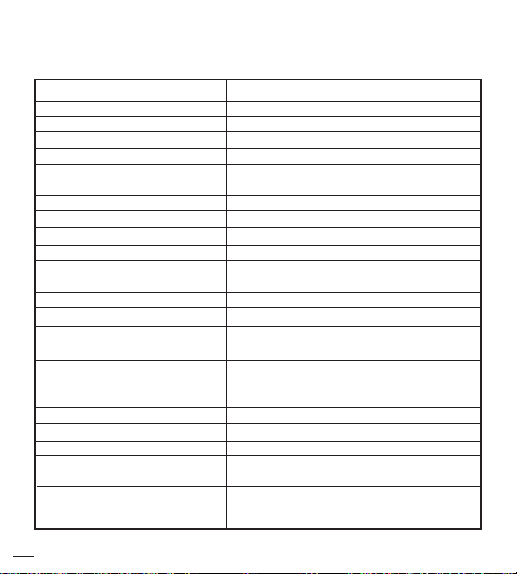
Specifications
Model Number
Measurement Method
Rated Range of Cu Pressure
Rated Range of Determination
Measurement Range of Heart Rate
Unit Dimensions
Unit Weight(Cu & Batteries Excluded)
Transportation Environment
Operation Environment
Power Supply
Sleeping Mode
40
Accuracy
Ination
Deation
Display
Memory
Cu Size
Storage/
Battery Life
Product Life
Accessories
MOCACu
Oscillometric
0~300mmHg
40 ~ 280 mmHg
40 ~ 199 beats/minute
Pressure: ±3 mmHg
Pulse: ±5 % Max.
Automatic Ination (Air Pump)
Automatic Air Release Control Valve.
Liquid Crystal Display
99 Memory Total for one user.
74 X 74.5 X 30.5 mm (L X W X H)
2.91 X 2.93 X 1.20 inch (L X W X H)
97.5g±10g (3.44oz±0.35oz)
135 ~ 195 mm (approx. 5.3 ~ 7.7 inch)
Temperature: -25 °C ~ 70 °C (-13 °F ~ 158 °F)
Humidity: ≤ 93 % R.H.
Temperature: 5 °C ~ 40 °C (41 °F ~ 104 °F)
Humidity: 15 % ~ 93 % R.H.
Atmospheric pressure: 700 hPa ~ 1060 hPa
DC 3 V, AAA “LR03” (1.5 V) Alkaline Battery x 2
Approx. 200 Measurements
5 Years (4 times per day)
Without any operation for 1 minute, device
automatically shuts o.
Instruction Manual, 2 AAA (LR03) Alkaline
Batteries, Storage Case
Page 43
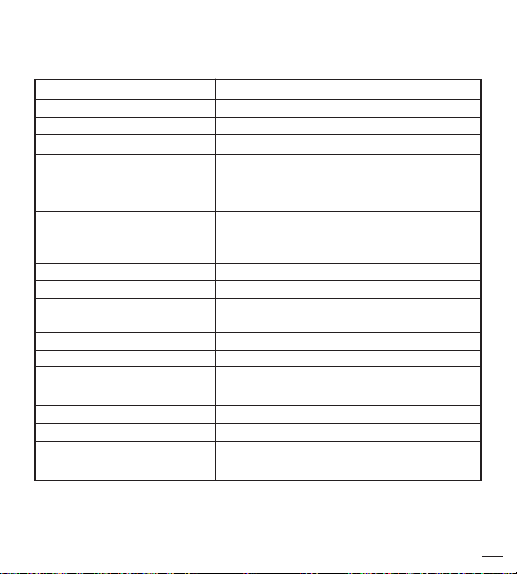
Specifications
Bluetooth 4.0 BLE
RF Type
RF Modulation
Eective Radiated Power
Data Throughput
Expected Delay (Latency Range)
in Wireless (RF) Communication
Wireless Operation Distance
Need for Spectrum Management
Maximum Permitted Power
Proximity of Other In-band
Transmitters Used in Vicinity
Wireless Communication Prole
*The contents of this manual and the specications of the device covered by this
manual are subject to change for improvement without notice.
RF Frequency /
Maximum Limitation
Wireless Coexistence
System requirement of the
Bluetooth device
GFSK
0 dBm
0.2 Mbps
The latency time is less than 0.3 ms second
from sender to receiver.
Channel Quality-Driven Data Rate (CQDDR)
Integrity
technology increases the eective data rate and
integrity in noisy environments.
AES-128 and application layer user dened
Security
Class 2 (Maximum: 10 meter)
2402 - 2480 MHz (allowing for guard bands)
Unlimited
5 mW
Up to 40 bands (2 MHz spacing; centered
from 2402 to 2480 MHz)
GATT – Client and Server
Support for 802.11 Coexistence
Bluetooth 4.0 for Android 4.3 or above
Bluetooth 4.0 for iOS 7.0 or above
41
Page 44
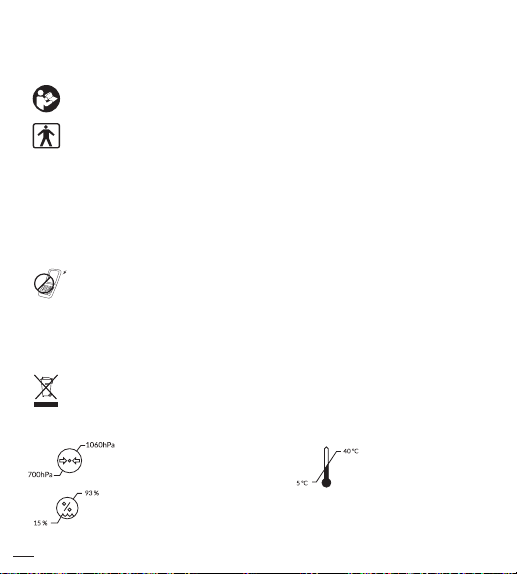
Note
Follow instructions for use.
BF Classication:
- Internally powered equipment
- BF type applied part
- IP22-Degrees of protection provided by enclosures
- Not suitable for use in presence of ammable anesthetic
mixture with air or with Oxygen or nitrous oxide
- Continuous operation with short-time loading
To avoid inaccurate results caused by electromagnetic interference
between electrical and electronic equipments, do not use the
device near a microwave oven. At least keep a maximum
output power of 2 W yields and a distance 3.3m away from this
equipment.
Discard the used product to the recycling collection point
according to local regulations.
Humidity limitation
42
Manufacturer:
HEALTH & LIFE CO., LTD.
9F, No. 186, Jian Yi Road,
Zhonghe District, New
Taipei City, Taiwan.
www.healthandlife.com.tw
Temperature limitAtmospheric pressure limitation
Page 45

Note
NOTE
This equipment has been tested and found to comply with the
limits for a Class B digital device, pursuant to Part 15 of the FCC
Rules. These limits are designed to provide reasonable protection
against harmful interference in a residential installation.
This equipment generates uses and can radiate radio frequency
energy and, if not installed and used in accordance with
the instructions, may cause harmful interference to radio
communications. However, there is no guarantee that interference
will not occur in a particular installation. If this equipment does
cause harmful interference to radio or television reception, which
can be determined by turning the equipment o and on, the user is
encouraged to try to correct the interference by one or more of the
following measures:
The user is encouraged to try to correct the interference by one or
more of the following measures:
• Reorient or relocate the receiving antenna.
• Increase the separation between the equipment and the receiver.
• Connect the equipment into an outlet on a circuit
dierent from that to which the receiver is connected.
• Consult the dealer or an experienced radio/TV
technician for help.
43
Page 46

CAUTION:
To assure continued FCC compliance:
1. Any changes or modications not expressly approved by
the grantee of this device could void the user's
authority to operate the equipment.
2. This equipment complies with FCC radiation exposure
limits set forth for an uncontrolled environment. This
equipment should be installed and operated with
minimum distance 20cm between the radiator & your body.
FCC Label Compliance Statement:
This device complies with Part 15 of the FCC Rules. Operation is
subject to the following two conditions:
(1)
this device may not cause harmful interference, and
(2)
this device must accept any interference received, including
interference that may cause undesired operation.
NOTE
"Changes or modifications not expressly approved by the
manufacturer could void the user’s authority to operate the
equipment".
44
Page 47

MOCACuff essential performance per IEC 80601-2-30 additional
essential performance requirements:
• 201.12.1.102 Limits of the error of the manometer from
environmental conditions
Over the temperature range of 5 °C to 40 °C (41 °F ~ 104
°F) and the relative humidity range of 15 % to 93 %
(non-condensing), the maximum error for the
measurement of the CUFF pressure at any point of the
NOMINAL measurement range shall be less than or
equal to ± 3 mmHg (± 0.4 kPa) or 2 % of the reading,
whichever is greater.
• 201.12.1.107 Limits of the change in error of the blood
pressure determination
The laboratory limits of the change in error of the
BLOOD PRESSURE DETERMINATION of the
AUTOMATED SPHYGMOMANOMETER shall be less
than 3 mmHg (0.4 kPa).
45
Page 48

Appendix
Guidance and manufacturer’s declaration – electromagnetic emissions
The device is intended for use in the electromagnetic environments listed
below, and should only be used in such environments:
Emissions test Compliance
RF emissions
CISPR 11
RF emissions
CISPR 11
Harmonic
emissions
IEC 61000-3-2
Voltage
uctuations/
icker emissions
IEC 61000-3-3
46
Group 1
Class B
Not
Applicable
Not
Applicable
Electromagnetic environment – guidance
RF energy is used only to maintain
device’s operation. Therefore, its
RF emissions are so low that it’s
not likely to cause any interference
in nearby electronic equipment.
The device is suitable for use
in all establishments, including
domestic establishments, and
those directly connected to the
public low-voltage power supply
network that supplies buildings
used for domestic purposes.
Page 49

Appendix
Guidance and manufacturer’s declaration – electromagnetic immunity
The device is intended for use in the electromagnetic environments listed
below, and should only be used in such environments:
Immunity test
IEC 60601 test
level
Compliance
level
Electromagnetic
environment – guidance
Electrostatic
discharge (ESD)
IEC 61000-4-2
Power
frequency
(50/60 Hz)
magnetic eld
IEC 61000-4-8
±6 kV
contact
±8 kV air
3 A/m
±8 kV
contact
±15 kV air
3 0A/m
The relative humidity
should be at least 5%.
Power frequency magnetic
elds should be at levels
characteristic of a typical
location in a typical
commercial or hospital
environment. Recommended
separation distance
where I is the current in
amperes in a power bus or
an appliance wire and r is
the recommended separation
distance between your device
and the power bus or
appliance wire, in meters (m).
I
188
(m)
r =
47
Page 50
Appendix
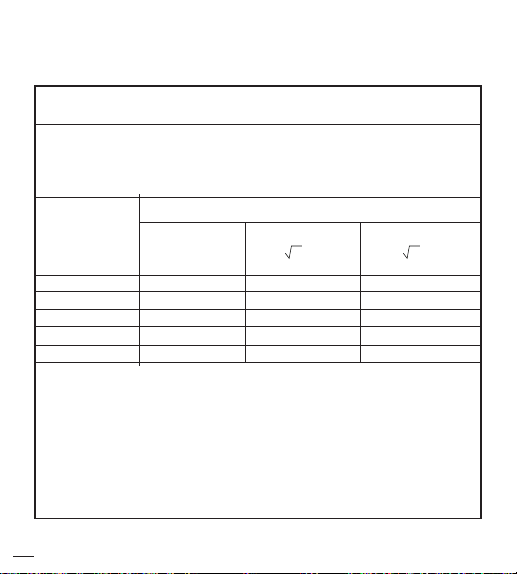
Recommended separation distances between portable and mobile RF
communication equipment and the device.
The device is intended for use in an electromagnetic environment where
radiated RF disturbances are under control. User can help prevent
electromagnetic interference by keeping the device at a minimum distance
from portable and mobile RF communications equipment (transmitters). Below
table details the maximum output power of transmitter:
Rated
maximum
output power
of transmitter
W
0.01
0.1
1
10
100
For transmitters rated at a maximum output power not listed above, the
recommended separation distance d in metres (m) can be estimated using
the equation applicable to the frequency of the transmitter, where P is the
maximum output power rating of the transmitter in watts (W) according to
the transmitter manufacturer.
NOTE 1 At 80 MHz and 800 MHz, the separation distance for the higher
frequency range applies.
NOTE 2 These guidelines may not apply in all situations. Electromag netic
propagation is aected by absorption and reection from structures, objects
and people.
48
Separation distance according to frequency of transmitter(m)
150 kHz to 80
MHz
Not applicable
NA
NA
NA
NA
NA
80 MHz to 800 MHz
d = 1.2 p
0.12
0.38
1.2
3.8
12
800 MHz to 2.5 GHz
d = 2.3 p
0.23
0.73
2.3
7.3
23
Page 51
Appendix
Guidance and manufacturer’s declaration – electromagnetic immunity
The device is intended for use in the electromagnetic environments
listed below, and should only be used in such environments:
Immunity
test
Conducted
RF
IEC 61000-4-6
Radiated RF
IEC 61000-4-3
IEC 60601
test level
3 Vrms 150
kHz to 80
MHz
3 V/m
80 MHz to
2.5 GHz
Compliance
level
Not
Applicable
10 V/m
80 MHz to
2.7 GHz
Electromagnetic environment – guidance
Portable and mobile RF
communications equipment should
be used no closer to any part of the
device, including cables, than the
recommended separation distance
calculated from the equation applicable
to the frequency of the transmitter.
Recommended separation distance
d = 1.2 √p 80 MHz to 800 MHz
d = 2.3 √p 800 MHz to 2.5 GHz
where P is the maximum output
power rating of the transmitter in
watts (W) according to the transmitter
manufacturer and d is the recommended
separation distance in metres (m).
Field strengths from xed RF
transmitters, as determined by an
electromagnetic site survey,
less than the compliance level in each
frequency rangeb .
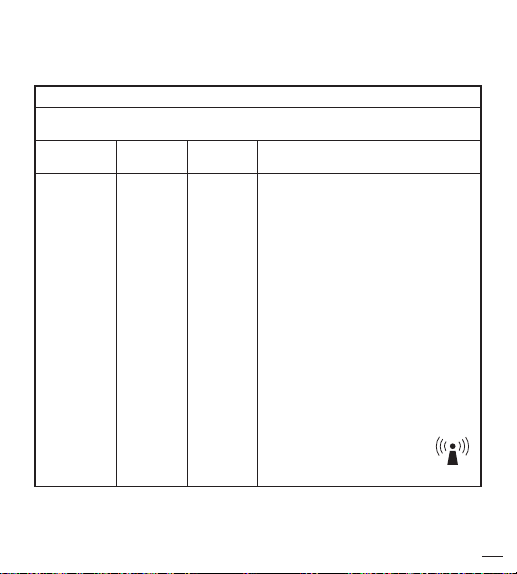
Interference may occur in the
vicinity of equipment marked
with the following symbol:
should be
a
49
Page 52

Appendix
NOTE 1 At 80 MHz and 800 MHz, the higher frequency range
applies.
NOTE 2 These guidelines may not apply in all situations.
Electromagnetic propagation is aected by absorption and reection
from structures, objects and people.
a. Field strengths from xed transmitters, such as base
stations for radio (cellular/cordless) telephones and land
mobile radios, amateur radio, AM and FM radio broadcast
and TV broadcast cannot be predicted theoretically with
accuracy. To assess the electromagnetic environment due
to xed RF transmitters, an electromagnetic site survey
should be considered. If the measured eld strength in the
location in which the device is used exceeds the applicable
RF compliance level above, the device should be observed
to verify normal operation. If abnormal performance is
observed, additional measures may be necessary, such as
reorienting or relocating the device.
b. Over the frequency range 150 kHz to 80 MHz, eld
strengths should be less than 10 V/m.
50
Page 53

Page 54

Page 55

Page 56

P/N: 323102949 VER: 001
 Loading...