

Page 1
EN
NPA-PoE Set: Quick Install
The Multifunctional, Ultra-Compact
PoE Injector From MOBOTIX
The HiRes Video Company
• Direct PC connection without a switch thanks to the crossover function!
• Suitable for use with power sources from 12V to 42V!
• Connects to electrical power using a power supply unit!
• Suitable for all PoE-supplied (MOBOTIX) network cameras and Mx2wire!
• Suitable for all standard PoE devices conforming to IEEE 802.3af (e.g., VoiP phone, netbooks,
routers etc.)!
• Suitable for international use thanks to interchangeable power supply adapters!
• Can be connected to the end device using an Ethernet cable up to 100m in length!
11/2009
HiRes Video Innovations
The German company MOBOTIX AG is known as the leading pioneer in network camera technology and its decentralized
concept has made high-resolution video systems cost ecient.
MOBOTIX AG • 67722 Langmeil, Germany • Phone: +49-6302-9816-103 • Fax: +49-6302-9816-190 • [email protected]
www.mobotix.com
www.mobotix.com > Support > Manuals
Latest PDF file:
Page 2
NPA-PoE Set
A Quality MOBOTIX Product Made In Germany
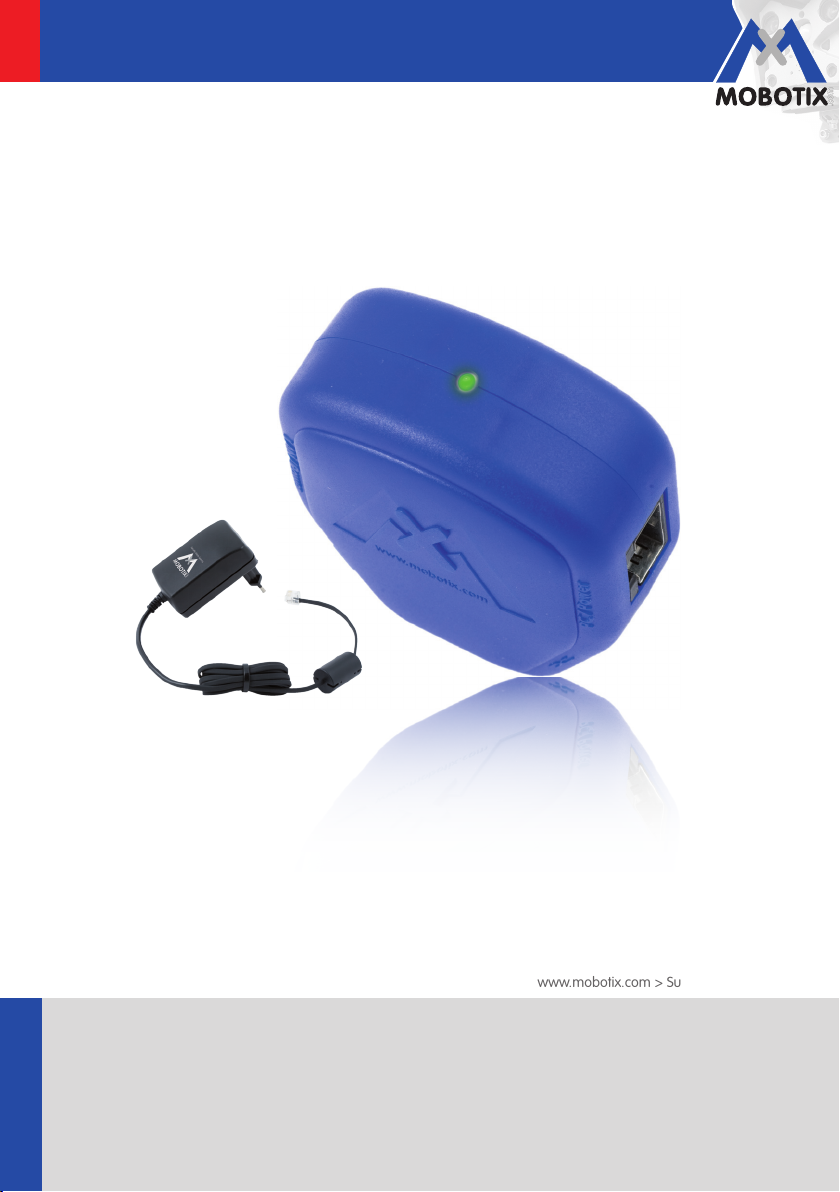
The MOBOTIX Network Power Adapter Set (NPA-PoE set) is a high-quality, robust, ultra-compact and multifunctional
PoE injector with three connectors (network, camera/PoE device, PC) and a universal power supply unit with
interchangeable adapter plugs.
The Network Power Adapter Set remotely supplies all PoE devices with power in accordance with the IEEE
802.3af standard. This makes it possible to use the network cable to both connect the camera and remotely
supply power (up to 100m). As a result, a network camera can be supplied with PoE power via the adapter
and connected directly to your PC (integrated crossover function).
A further advantage of this product is its versatility. The blue adapter can be connected to dierent electrical power
supply networks around the world (90 V to 230V) using the power supply unit. The device can also be directly
connected to network-independent power sources between 12 V and 42V. This is ideal for battery-operated,
standalone operation of a network camera. This device is especially practical because the included power
supply unit can be used around the world by changing the adapter plugs as required with a few simple steps.
If you have any technical questions, please email us directly at [email protected].
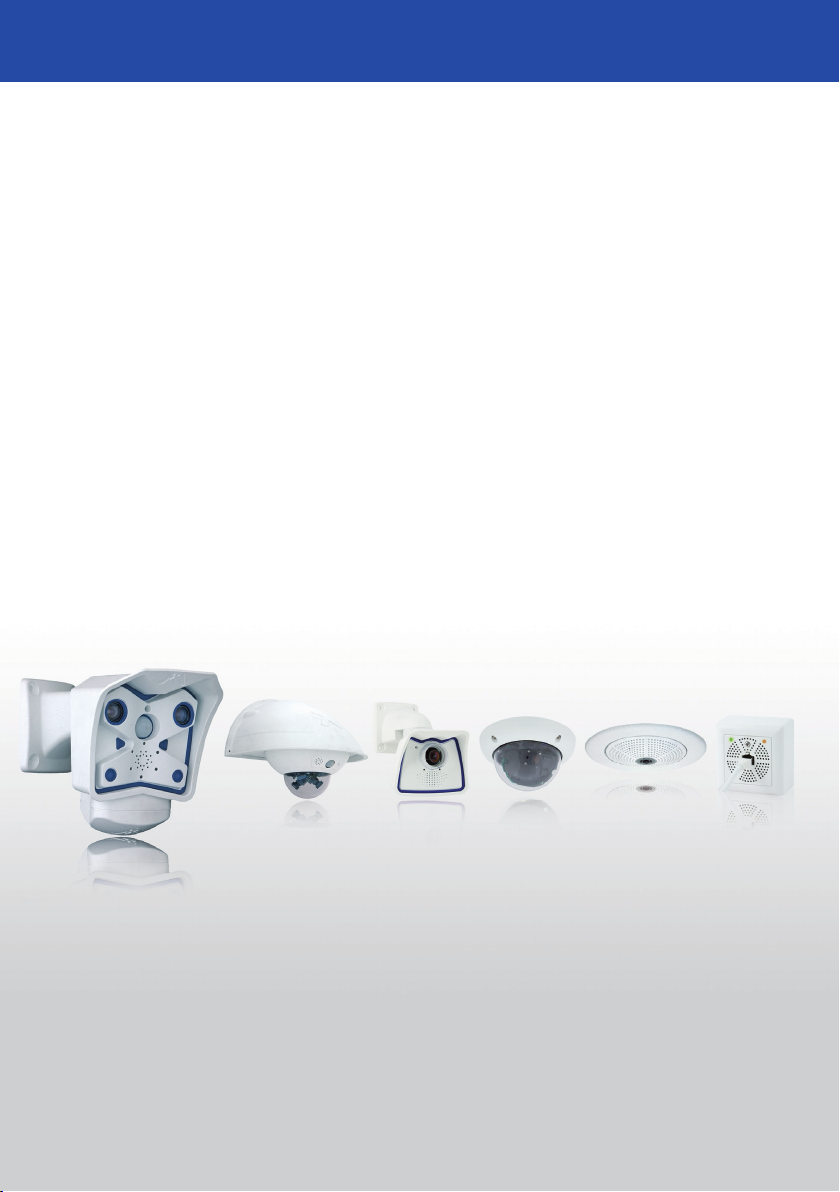
You can use the NPA-PoE Set to safely and reliably supply power to all of your MOBOTIX cameras (except for
M1/M10) and to the Mx2wire media converter.
The German company MOBOTIX AG is known as the leading pioneer in network camera technology, and
its decentralized concept has made high-resolution video systems cost-ecient. Whether in embassies,
airports, railway stations, ports, gas stations, hotels or on highways - over one hundred thousand MOBOTIX
video systems have been in operation on every continent for years. For more information on current MOBOTIX
products, visit www.mobotix.com.
MOBOTIX AG • 67722 Langmeil, Germany • Tel.: +49-6302-9816-103 • Fax: +49-6302-9816-190 • [email protected]
Page 3
Connection Option 1
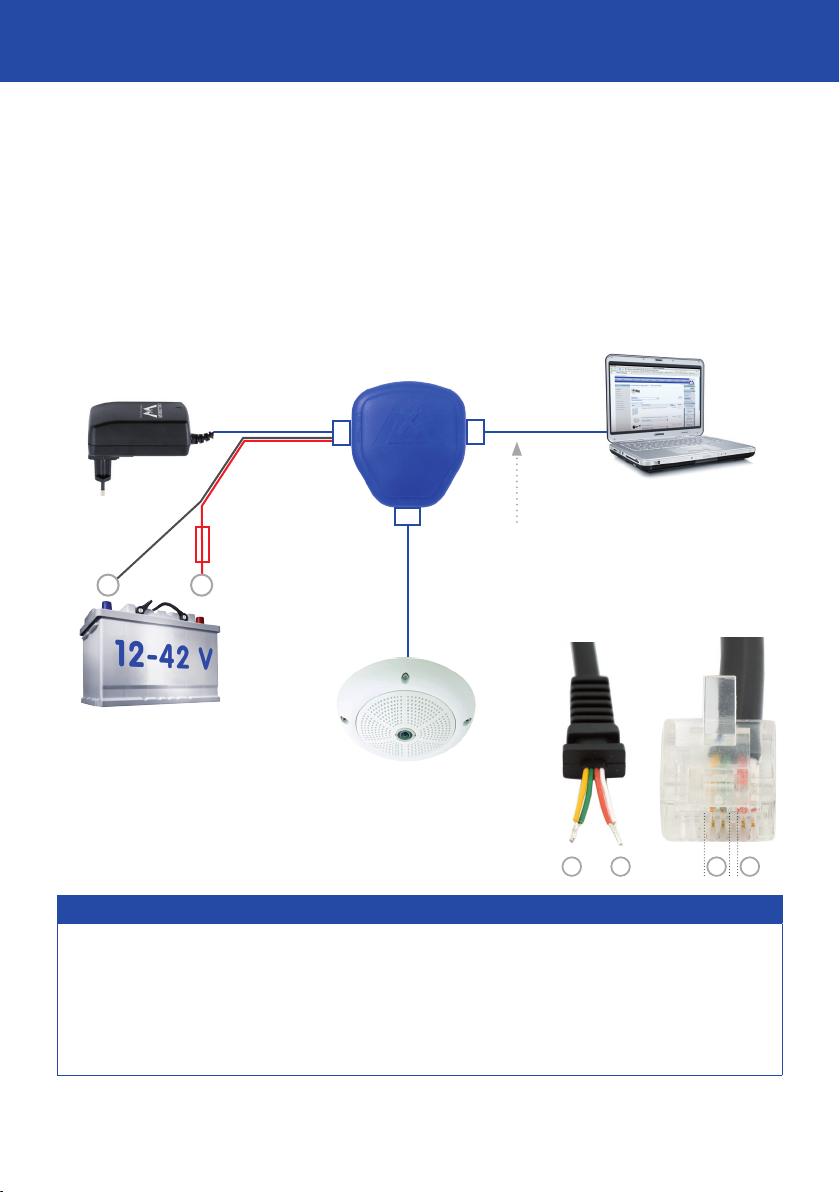
Power Supply When Connected Directly To A PC (Integrated And Patented Crossover Function)
1. Connect the camera's Ethernet patch cable, or that of the PoE device that is to be supplied, to the "Camera"
connector of the blue adapter.
2. Connect the "PC/Power" connector of the adapter directly to the Ethernet port of the computer. The adapter
eliminates the need for the crossover cable thanks to the integrated crossover function.
3. Plug the RJ45 connector of the power supply unit/battery into the "LAN/Power" connector of the adapter.
Adapter
LAN/Power
RJ45
RJ45
PC/Power
Power supply
-
Fuse 2.5A slow
for example, via in-line fuse switch
+
Camera
RJ45
Crossover function
All that is required to connect to the
computer is a standard Ethernet
cable with RJ45 connectors since the
adapter already has an integrated
crossover function (replaces special
crossover cable).
PC
Using battery or power supply
Battery (alternatively)
Camera/PoE device
Connection cable to the battery
Make sure that cable only comes into contact
with pins 4/5 and 7/8 of an RJ45 connector.
1 2 3 44 55 6 77 88
++ --
Connection Cable To The Battery (Order Number: MX-CBL-NPA-BAT-2)
The blue adapter works reliably in an input voltage range of 12–42volts. When connecting the adaptor to a
mobile power source (for example, a car battery), the power supply unit is not used. Instead, you will need
a correctly prepared connection cable that is, if possible, equipped with a fuse protection concept suitable
for your application.
The connection cable must have a "+/-" connection to the battery on one side and, on the
other side, an RJ45 connector to connect to the adapter. Pins 4 and 5 on the RJ45 connector must display a "+",
pins 7 and 8 a "-." Caution: Do not use a patch cable as pins 1, 2, 3 and 6 may not come into contact with the
RJ45 connector due to safety reasons. The connection cable (2m) to the battery can be ordered from MOBOTIX.
MOBOTIX AG • 67722 Langmeil, Germany • Tel.: +49-6302-9816-103 • Fax: +49-6302-9816-190 • [email protected]
Page 4
Connection Option 2
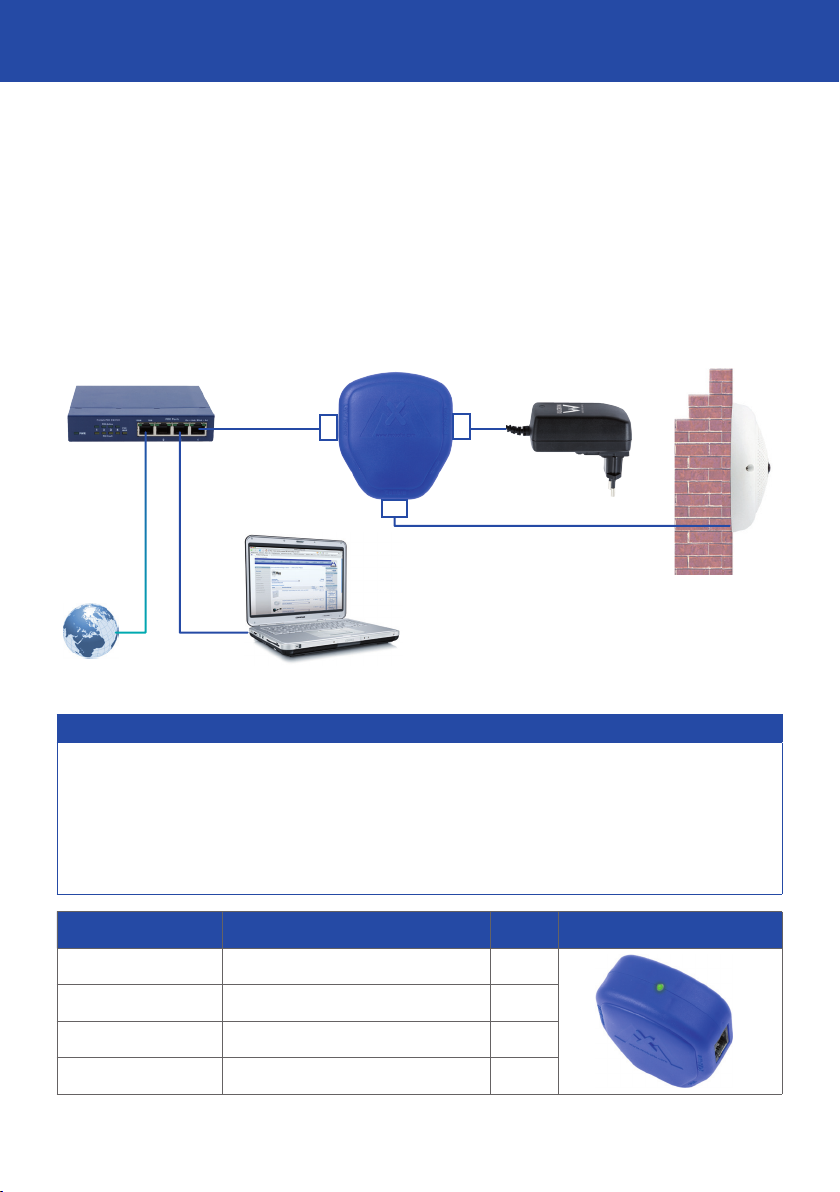
Power Supply With Integration Of A Switch/Router
1. Connect the camera's Ethernet patch cable, or that of the PoE device that is to be supplied, to the "Camera"
connector of the blue adapter.
2. Connect the "LAN/Power" connector of the adapter to the Ethernet connector of the switch/router or the
Ethernet socket.
3. Plug the RJ45 connector of the power supply unit/battery into the "PC/Power" connector of the adapter.
Please see the note "Connection Cable To The Battery."
Switch/router
LAN/Power
RJ45
Adapter
Camera
RJ45
Power supply (or battery)
RJ45
PC/Power
LAN/WWW
PC Camera/PoE device
Status LED On The Adapter (Primarily For Battery Operation)
An LED light, which indicates the status of the adapter's power supply based on their color, is located on
the upper side of the blue adapter. This is especially important during battery operation. The LED is green
when the input voltage is 16volts or higher. This indicates a maximum PoE output rating of 12.95watts (all
PoE classes and devices). If the LED is orange, only class 1 and 2 PoE devices can be supplied (a max. of
6.49watts; for example, a MOBOTIX camera with and without USB devices). A red status LED indicates low
voltage, for example, the battery is almost empty. The device is permanently disabled for total discharge
protection of the battery at less than 10volts.
Voltage (Input) PoE Output LED
> 16V Classes 1 to 3 (up to 12.95W) Green
12V–16V Classes 1 and 2 (up to 6.49W) Orange
10V–12V Lower than class 1 (< 3.84W) Red
< 10V No power supply O
MOBOTIX AG • 67722 Langmeil, Germany • Tel.: +49-6302-9816-103 • Fax: +49-6302-9816-190 • [email protected]
Page 5
Electrical Power And Battery
The HiRes Video Company
Electrical Power: Installing The Power Supply
The power supply of the MX-NPA-PoE Set operates at an input voltage of 100V to 240V. The "INT" set includes
four interchangeable power supply adapter plugs so that the device can be operated in the dierent power
outlet systems around the world. The individual power supply adapter plugs are packaged in dierently colored
foil bags designed to protect them from dirt and moisture (suitable for storage between -40°C and +70°C,
-40°F and 158°F).
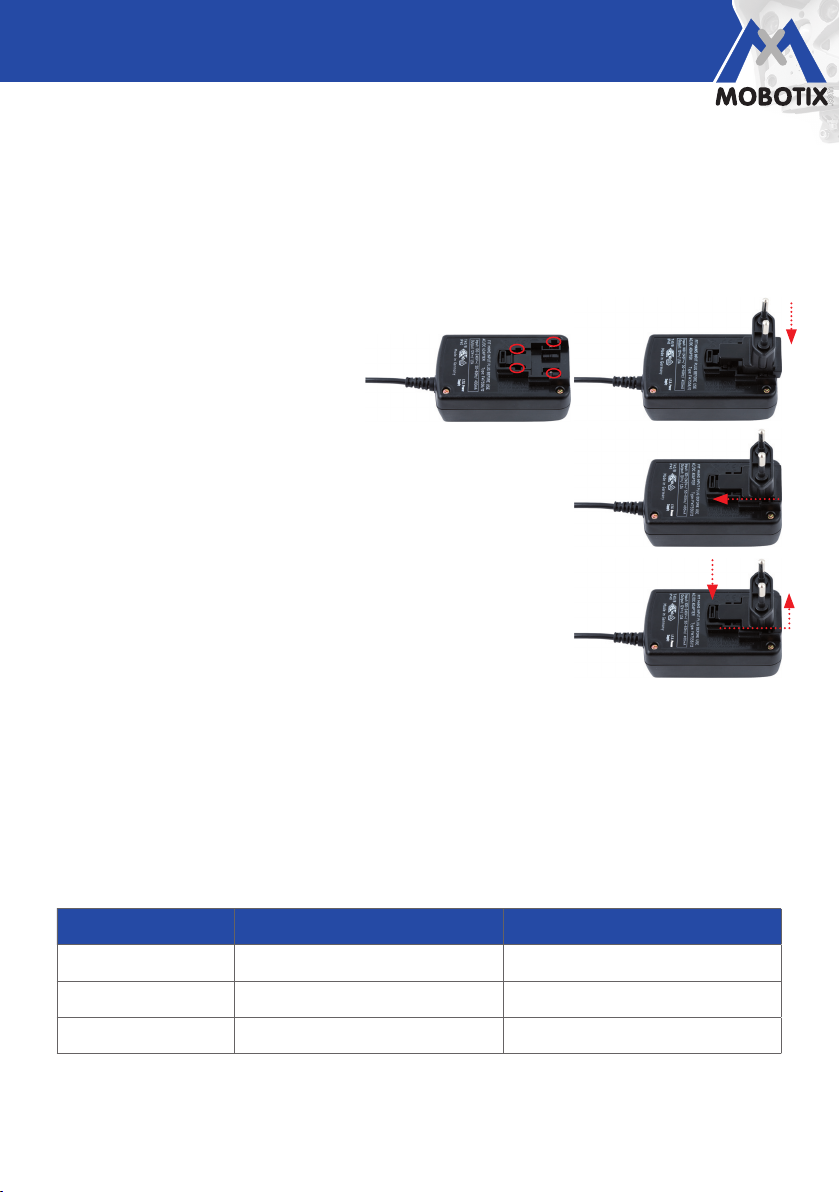
1. Remove the desired adapter from the packaging (see Delivered Parts).
2. Push down the adapter plug part on the
power supply unit so that the four guides
of the adapter fit securely into the guides
on the bottom of the power supply unit.
3. Push the adapter in the direction indicated by the arrows until it audibly
clicks into place. You can now use the power supply unit.
4. To exchange the adapter, use your finger to press down the button on
the power supply unit. At the same time, use your other hand to pull the
adapter up and away from the power supply unit.
Battery Operation Of A MOBOTIX Camera: Operating Time
A modern MOBOTIX network camera (e.g., D24/Q24) has a power consumption of only 3watts during active
operation. Therefore, cameras can be supplied with power using battery sources of 12V and higher. The
operating time is dependent upon the voltage (V) and the ampere hour value (Ah) of the battery. For example,
a car battery with 70Ah can supply a device that requires 70A for an hour under ideal conditions (e.g., ambient
temperature) before it is empty. The lower the power consumption of the supplied device and the higher the
capacity of the battery, the longer the operating time.
The following values apply to a MOBOTIX D24/Q24 camera. Note that in practice, these values may change
as a result of dierent environmental conditions:
Battery Voltage/Ah Avg. Power Consumption Q24/D24 Avg. Operating Time (100% Charge)
12V/70Ah 0.25A 280h (> 11 days)
24V/70Ah 0.12A 583h (> 24 days)
42V/70Ah 0.07A 1,000h (> 41 days)
Hint: For a new battery with 70Ah, the voltage value corresponds to the operating time measured in days. In
practice, you should expect half the operating time indicated here.
MOBOTIX AG • 67722 Langmeil, Germany • Tel.: +49-6302-9816-103 • Fax: +49-6302-9816-190 • [email protected]
Page 6

Additional Notes
Power over Ethernet (PoE Conforming To IEEE 802.3af)
Power over Ethernet (PoE) is a technology for supplying network-enabled devices with power via an 8-wire
Ethernet cable. The main advantage of Power over Ethernet is that no additional power cable is required, making
Ethernet devices easy to install in hard-to-reach places or in places that are not equipped to handle numerous
cables. This can significantly reduce installation costs, while also increasing the reliability of the connected
devices by providing a central uninterruptible power supply (UPS).
Caution
The maximum length of the Ethernet cable for supplying power is 100 m.
Care And Maintenance
Clean the NPA-PoE Set using a slightly moistened soft cloth, making sure that no liquid is allowed to enter. Never
use aggressive cleaning agents or cleaning agents with abrasive particles (scouring agent). Make sure you
instruct cleaning personnel on how to clean the set. As the set does not have any mechanical moving parts,
regular servicing and maintenance is not required. MOBOTIX recommends, however, that you occasionally
check that the device is functioning both reliably and properly.
Electromagnetic Compatibility (EMC)
Electromagnetic compatibility encompasses all unintentional or intentional malfunctions of electrical or electronic
equipment generated by electrical, magnetic or electromagnetic fields and processes, for example. This includes
interference from currents and voltages. The proof and verification of immunity to interference and a suciently
low level of electromagnetic interference are regulated by EMC directives and EMC standards.
The European EMC Directive defines electromagnetic compatibility as "the ability of a device, equipment or a
system to function satisfactorily in its electromagnetic environment without introducing intolerable electromagnetic
disturbances to anything in that environment."
The MOBOTIX MX-NPA-PoE Set complies with all relevant EMC and safety regulations (see Declaration of
Conformity).
Adapter
LAN/Power
LAN or POWER PC or POWER
MOBOTIX AG • 67722 Langmeil, Germany • Tel.: +49-6302-9816-103 • Fax: +49-6302-9816-190 • [email protected]
RJ45
Camera
RJ45
Camera/PoE device
RJ45
PC/Power
Integrated and patented
crossover function
Page 7

Declaration Of Conformity
Konformitätserklärung
Declaration of Conformity
Déclaration de conformité
Hersteller:
Manufacturer:
Fabricant :
Produkt:
Product:
Produit :
Typ:
Type:
Type :
Bei bestimmungsgemäßer Verwendung erfüllt das bezeichnete Produkt die Bestimmungen der im
Folgenden aufgeführten Richtlinien:
The product identified above complies with the essential requirements of the relevant standard, when used for its
intended purpose:
Le produit désigné ci-dessus est conforme aux exigences fondamentales des normes s'y rapportant :
Niederspannungsrichtlinie
Low-voltage directive
Directive basse-tension
Angewendete harmonisierte Normen:
Harmonised standards applied:
Normes harmonisées :
EMV-Richtlinie
EMC directive
Directive CEM
Angewendete harmonisierte Normen:
Harmonised standards applied:
Normes harmonisées :
MOBOTIX AG
PoE-Injektor
PoE injector
Injecteur PoE
NPA-PoE
2006/95/EG
EN 60950:2005
2004/108/EG
EN 55022:2006
EN 55024:1998+A1:2001+A2:2003
EN 61000-6-1:2007
EN 61000-4-2
EN 61000-4-3
EN 61000-4-4
EN 61000-4-6
Weitere angewendete Normen:
Other harmonised standards applied:
Autres normes harmonisées :
Anschrift:
Address:
Addresse :
MOBOTIX AG
Kaiserstrasse
67722 Langmeil
Germany
CFR 47, FCC Part 15B
C-Tick AS/NZS 3548 CISPR 22:2005 (mod.)
+ TK-Nr. / Phone number / N° de communication :
Fon:
Fax:
E-Mail:
Langmeil, 04.09.2009
Ort, Datum
Place & date of issue
Lieu et date
+49 6302 9816-0
+49 6302 9816-190
[email protected]
Dr. Ralf Hinkel
Vorstand/CEO, MOBOTIX AG
Name und Unterschrift
Name and signature
Nom et signature
MOBOTIX AG • 67722 Langmeil, Germany • Tel.: (+49-6302) 9816-0 • Fax: (+49-6302) 9816-190 • [email protected]
Page 8
EN
Delivered Parts/Tech. Specications
The HiRes Video Company
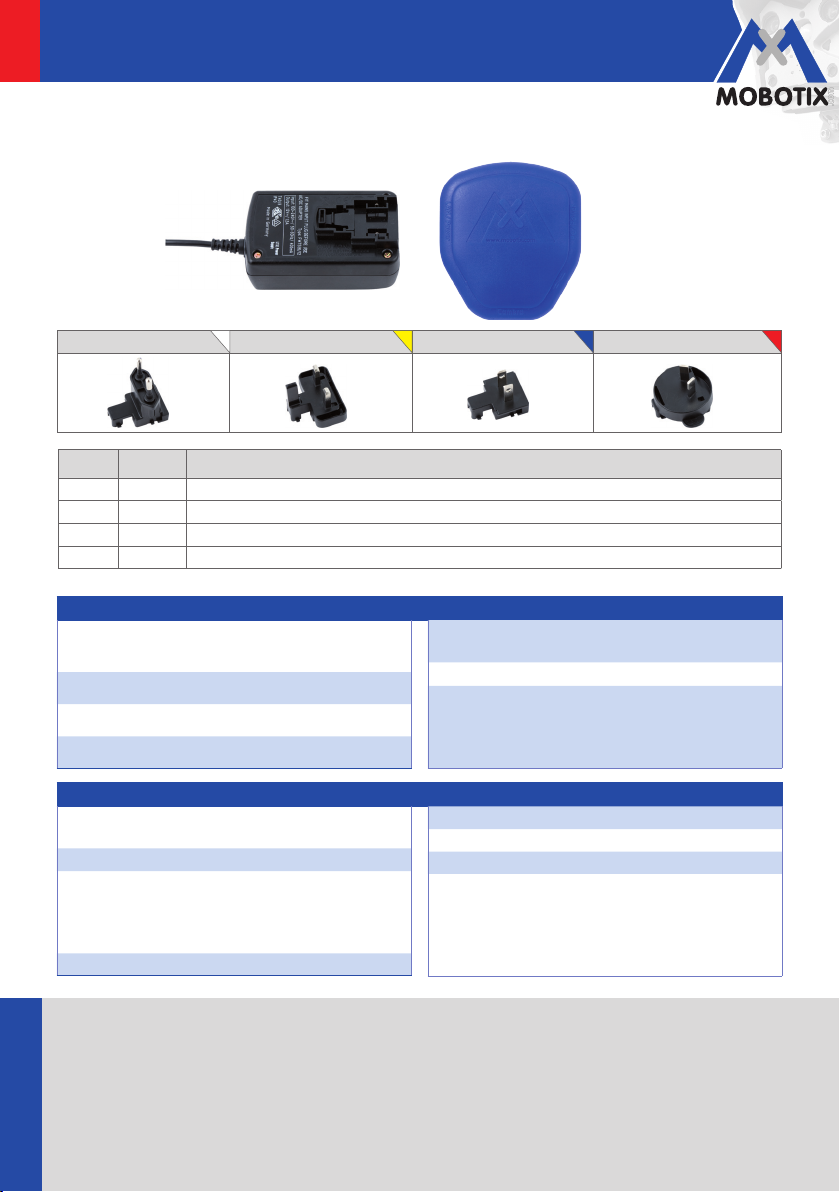
Delivered Parts And Components
LAN/Power
Item 1 Item 3
PC/Power
Camera
EU adapter plug (item 2) UK adapter plug (item 2) US adapter plug (item 2) AUS adapter plug (item 2)
Item
Quantity
1 1 Power supply unit with RJ45 connection cable
2-EU 1 European adapter plug for power supply unit
2-INT 4 Interchangeable adapter plugs for power supply unit (EU, UK, US, AUS)
3 1 Adapter with 3x RJ45 connectors, status LED and integrated crossover function
Part Name
Technical Specications: Power Supply Unit
Connections
Nominal data input
Nominal data output DC24V/750mA
Ambient temp. 0 to +40°C
1x RJ45 (for adapter), 1x network (up
to 4x interchangeable adapter)
100V to 240V, 50 to 60Hz/400mA
Dimensions
Weight approx. 165g (incl. 1 adapter plug)
Special features Suitable for international use thanks
LxWxH: 8.5 x 5.2 x3.9 cm (without
adapter plug)
to broad input voltage range and
interchangeable power supply
adapter plugs (no tools required)
Technical Specications: Adapters
Connections
Nominal data input 12V to 42V
Nominal data output
Disabling Less than 10V input voltage
12/2009
HiRes Video Innovations
The German company MOBOTIX AG is known as the leading pioneer in network camera technology and its decentralized
concept has made high-resolution video systems cost ecient.
MOBOTIX AG • 67722 Langmeil, Germany • Phone: +49-6302-9816-103 • Fax: +49-6302-9816-190 • [email protected]
www.mobotix.com
3x RJ45 (LAN/Power, PC/Power,
camera)
DC48V; PoE acc. to IEEE 802.3af: PoE
classes 1 to 3 (max. 12.95W) min. 16V
input voltage, PoE class 1 and 2 (max.
6.49W) 12V to 16V input voltage
Ambient temp. -30 to +60°C, -22 to + 140°F
Dimensions LxWxH: 6 x 5.5 x 2.7cm
Weight Approx. 40g
Special features Integrated crossover function for
direct connection to PC; connection
to power supply or battery 12V
or higher; status LED with 4 states
(green/orange/red/o)
Technical information subject to change without notice.
 Loading...