

Page 1

MobileView 9000 Series Exterior
Analog/IP Camera Quick Guide
1072869 A September 2014
© 2014 United Technologies Corporation, Inc. MobileView is
part of UTC Building & Industrial Systems, a unit of United
Technologies Corporation. All rights reserved.
Content
Introduction 1
Product overview 1
Installation Environment 1
Package Contents 1
Cable Requirements 1
Camera Description 2
Setting up the Camera 2
Mounting the Camera 2
FCC Complicance 4
Contact information 4
Introduction
Product overview
This is the Quick Guide for MobileView camera models:
MVC-9000-28-WI (Exterior camera, 2.8mm)
MVC-9000-40-WI (Exterior camera, 4.0mm)
Installation Environment
When installing your product, consider these factors:
• Electrical: Install electrical wiring carefully. It should
be done by qualified service personnel. Always use
a proper PoE switch or a 12 VDC power supply to
power the camera. Do not overload the power cord
or adapter. PoE and 12VDC power sources should
NOT both be used together; choose only one.
• Ventilation: Ensure that the location planned for the
installation of the camera is well ventilated.
• Temperature: Do not operate the camera beyond
the specified temperature, humidity or power source
ratings. The operating temperature of the camera is
between -30 to +65°C.
• Servicing: Do not attempt to repair this camera
yourself. Any attempt to dismantle this product,
except as required for normal installation, will
invalidate the warranty and may also result in injury.
Refer all servicing to qualified service personnel.
• Cleaning: Do not touch the lens with fingers. If
cleaning is necessary, use a clean cloth with some
ethanol and wipe the camera gently.
Package Contents
Check the package and contents for visible damage. If
any components are damaged or missing, do not
attempt to use the unit; contact the supplier immediately.
If the unit is returned, it must be shipped back in its
original packaging.
Package contents:
Camera
Y Splitter cable (optionally used if 12VDC power is
supplied via Cat5)
Hex wrench
Quick Operation Guide
Drill Template
Molex connector/pins
Guard
Cable Requirements
For proper operation, adhere to the following cable and
power requirements for the cameras. All network cabling
must be installed according to applicable codes and
regulations.
1 MobileView 9000 Series Exterior Analog/IP Camera Quick Guide
Page 2
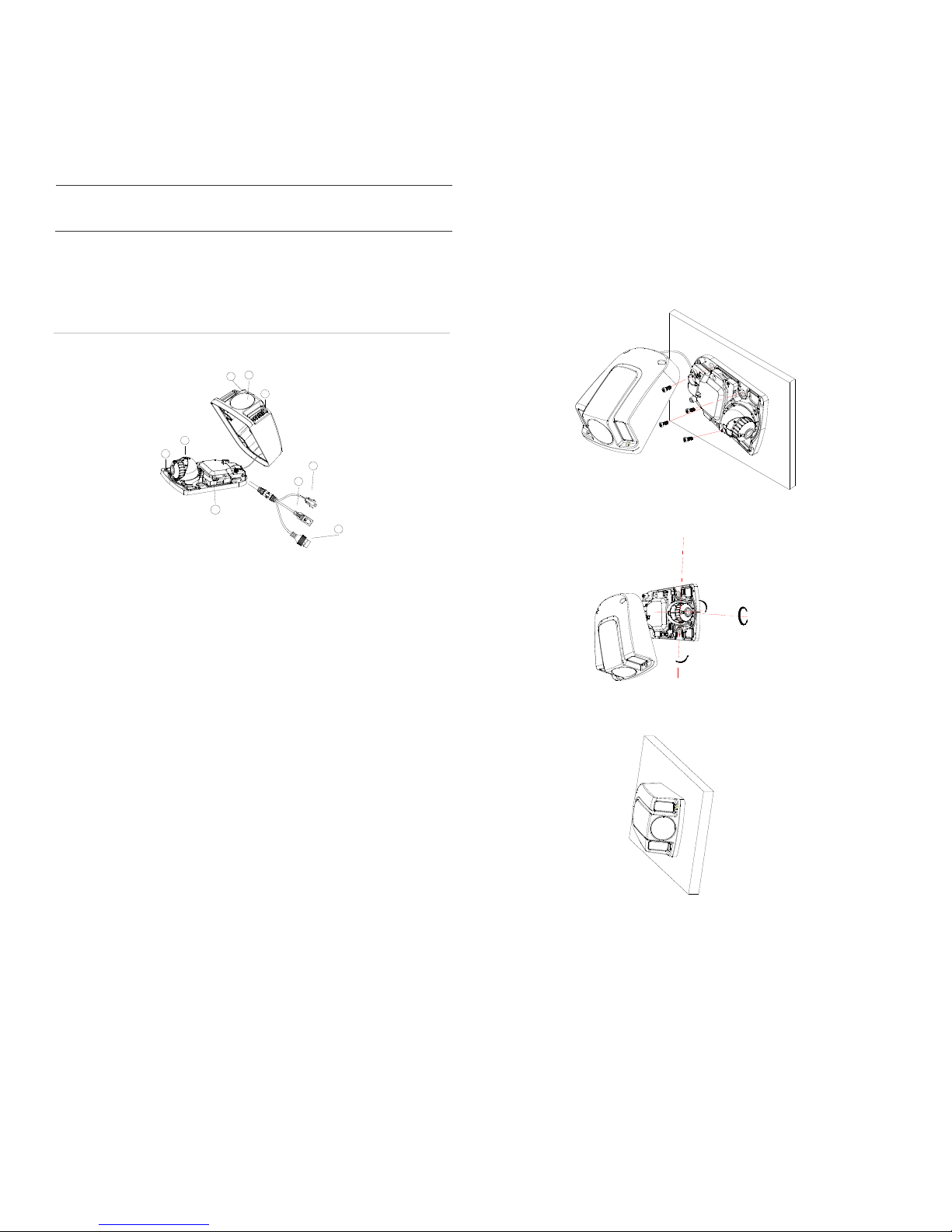
Figure 1 lists the requirements for the cables that
connect to the camera. Note that the camera has two
options to receive power; only one should be used at a
time.
Table 1: Recommended power cable requirements
PoE(802.3af):
12VDC:
Cat5, or better
18 AWG, or larger
Camera Description
Figure 1: MVC-9000 Exterior Camera
2
1
3
5
4
9
1. Cover
2. Bubble
3. IR
4. Base
5. Lens
6. BNC Cable
7. 12VDC Molex connector
8. Ethernet RJ45 cable
9. Reset Button
7
6
8
Mounting the Camera
To Mount the Exterior Camera:
1. Use the supplied template to mark out the mounting
area. Drill the screw holes on the surface. Rivnuts
with #8-32 machine screws (or larger) are
recommended.
2. Loosen the cover screws, so cover can be removed.
Secure the mounting base to the surface with
appropriate screws.
3. Loosen the adjusting screw to adjust the pan, tilt and
rotation angle, then re-tighten the adjusting screw
4. Reinstall the cover screws.
.
Setting up the Camera
To quickly put the camera into operation:
1. Prepare the mounting surface.
2 Mount the camera using the appropriate fasteners.
See the following “Mounting the Camera” section.
3. Set up the camera’s network and streaming
parameters so that the camera can be controlled
over the network. See section “Accessing the
Camera over the Internet.” For further information,
please refer to the “MobileView 9000 & 9100 Series
Analog/IP Camera User Manual”.
4. Program the camera to suit its location. For further
information, please refer to the “MobileView 9000 &
9100 Series Analog/IP Camera User Manual”.
2 MobileView 9000 Series Exterior Analog/IP Camera Quick Guide
Accessing the Camera over
the Internet
Use the camera web browser to access and configure
the camera over the internet (Microsoft Internet
Explorer). Only one camera is accessible from a single
web browser window.
Page 3
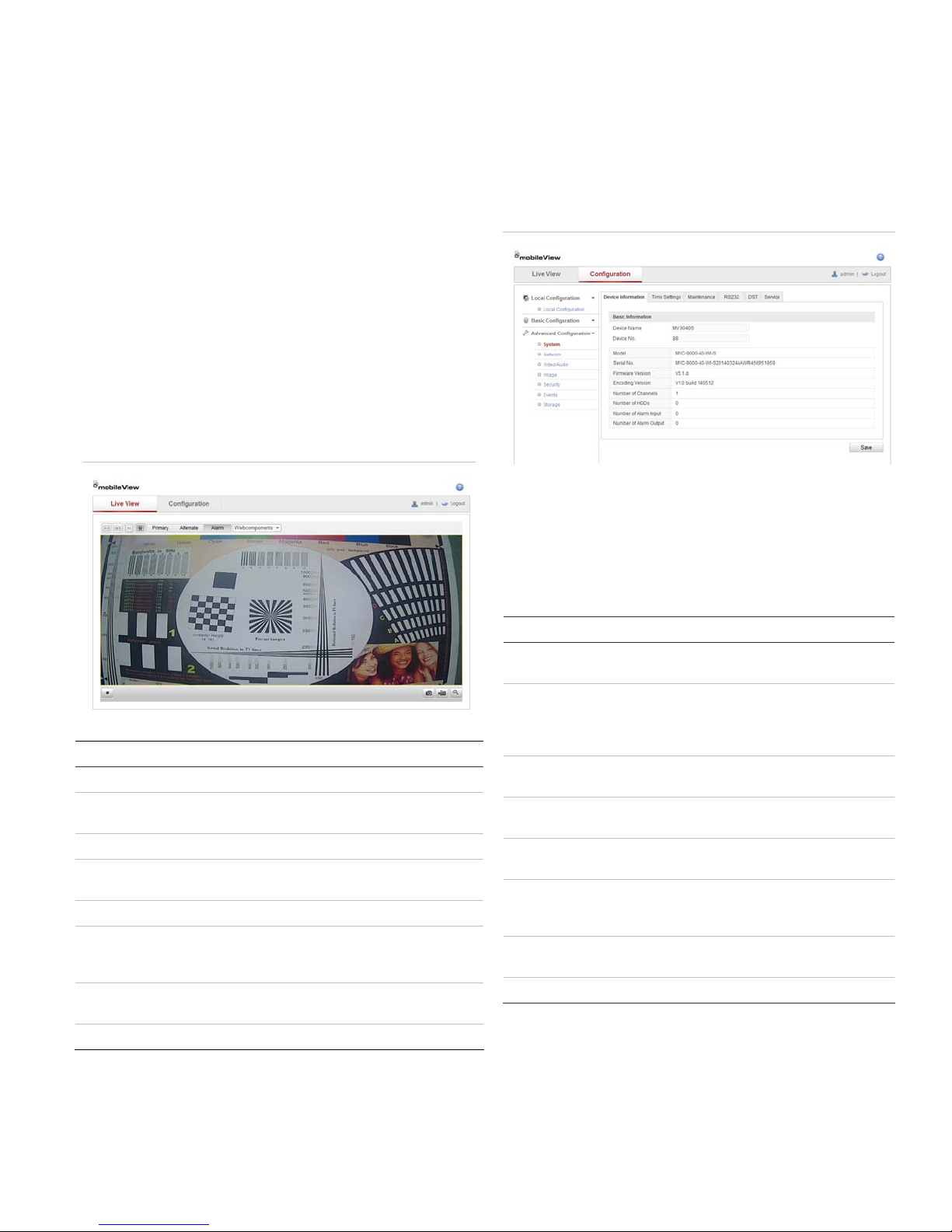
To access the camera online:
1. In the Web browser, enter the camera’s IP address
(default is 192.168.1.70). The Login dialog box
appears.
Note: Ensure that the Active X controls are enabled.
2. Enter your user name and password.
User name: admin
Password: 1234
3. Click Login. The web browser window appears in
live view mode. See Figure 2.
Overview of the Camera Web
Browser
Figure 2: Camera Web browser interface
Network and Streaming
Configuration
In the camera Web browser screen click the
Configuration button on the toolbar to display the
configuration screen. See Figure 3.
Figure 3: Configuration screen
Refer to the MobileView 9000 & 9100 Series Analog/IP
Camera User Manual for detailed information on
configuring the cameras. See Table 2 for an overview of
the configuration parameters.
Item Name Description
1. Live view Click to view live video.
2. Configuration Click to display the configuration
screen for setting up the camera.
3. Current user Displays current user logged on.
4. Logout Click to log out from the system. This
can be done at any time.
5. Start/stop live view Click to start/stop live view.
6. Capture Click to take a snapshot of the video.
7. Start/stop
recording
8. Digital Zoom Click to enable digital zoom.
The snapshot will be saved to the
default folder in JPEG or BMP format.
Click to record live video.
Table 2: Overview of the configuration parameters
Configuration folders Description
Local configuration Defines the protocol type, live view
performance and local storage paths.
System Displays device information including serial
number and firmware version. Defines time
settings, maintenance and RS232
parameters.
Network Defines the network parameters required to
access the camera over the internet.
Video/Audio Defines recording parameters for each of
the three streams.
Image Defines the image parameters, OSD
settings, overlay text and privacy mask.
Security Defines who can use the camera, their
passwords and access privileges, and RTSP
authentication.
Events Defines motion detection, tamper-detection,
and exceptions.
Storage Defines snapshot configurations.
MobileView 9000 Series Exterior Analog/IP Camera Quick Guide 3
Page 4

FCC Complicance
Complies with FCC Part 15; Class A.
Contact information
North America:
855-MOBVIEW (662-8439)
www.interlogix.com/mobileview/
4 MobileView 9000 Series Exterior Analog/IP Camera Quick Guide
 Loading...