

Page 1
Bluetooth Handsfree Kit
For Bluetooth Mobile Phones
Kit mains libres Bluetooth
Pour téléphones mobiles Bluetooth
Bluetooth Freihand-Kit
Für Bluetooth Mobiltelefone
Bluetooth Handsfree Set
Voor Mobiele Bluetooth telefoons
Kit manos libres Bluetooth
Para teléfonos móviles Bluetooth
Kit viva voce Bluetooth
Per telefoni cellulari Bluetooth
Page 2

Page 3
3
A. Product Description
SUPERTOOTH VOICE is a Bluetooth handsfree kit
that supports headset or handsfree prole phones. Its
special features include Full DSP Noise Cancellation/
Echo Cancellation. Thus, it provides an advanced audio
quality. It is designed for easy handsfree operation and
superior performance.
This kit includes Text-To-Speech system. The voice
announces instructions for the users in 6 different
languages. It indicates the status of the Bluetooth
device and it announces the name (or phone number if
contact not loaded to kit) of the incoming caller!
Don’t forget: Drive safely and within the law.
Check if the national or local legislation into force in your
country does limit the use of mobile phones while driving.
It is up to the user of this product to respect the said
legislation in the area where he lives.
B. Product Overview
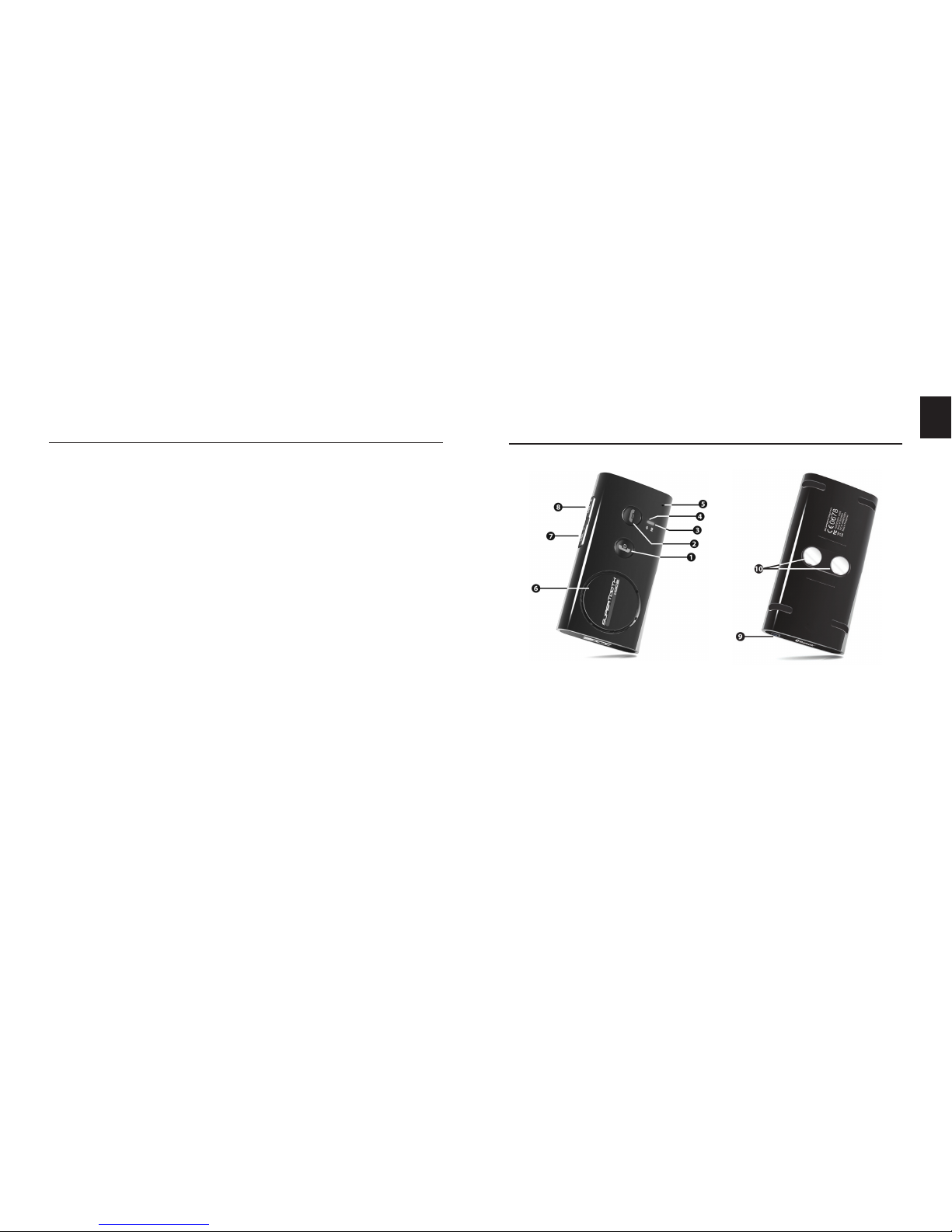
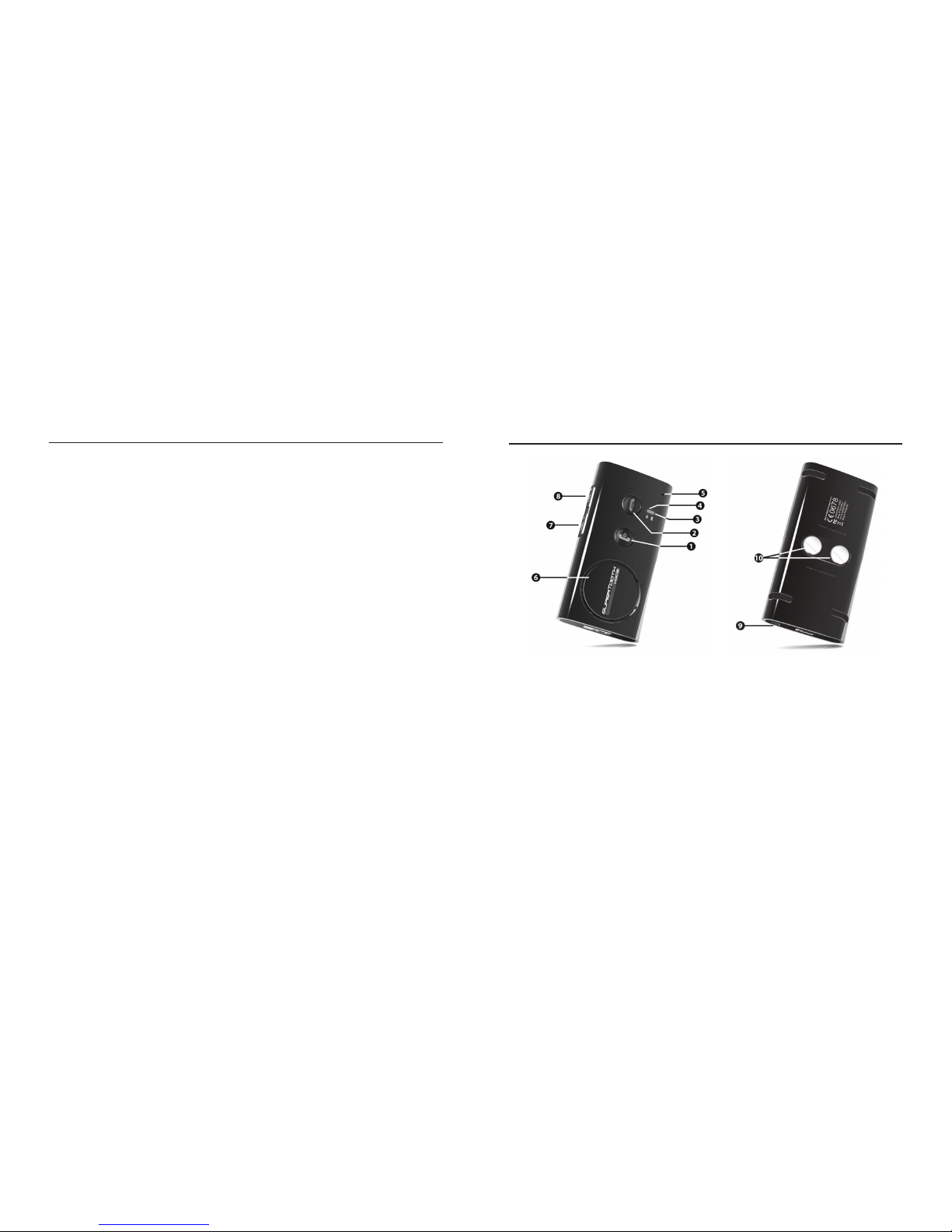
1 MFB or Multi-function Button
(power on & off / pairing / answer /
voice dial / redial / audio transfer)
2 End/Reject Button
(end & reject call / reload phonebook)
3 Bluetooth Indicator
4 Charge Indicator
EN
5 Microphone
6 Speaker
7 Volume Down
8 Volume Up
9 Charger Port
10 Magnets
Page 4
4
C. Charging
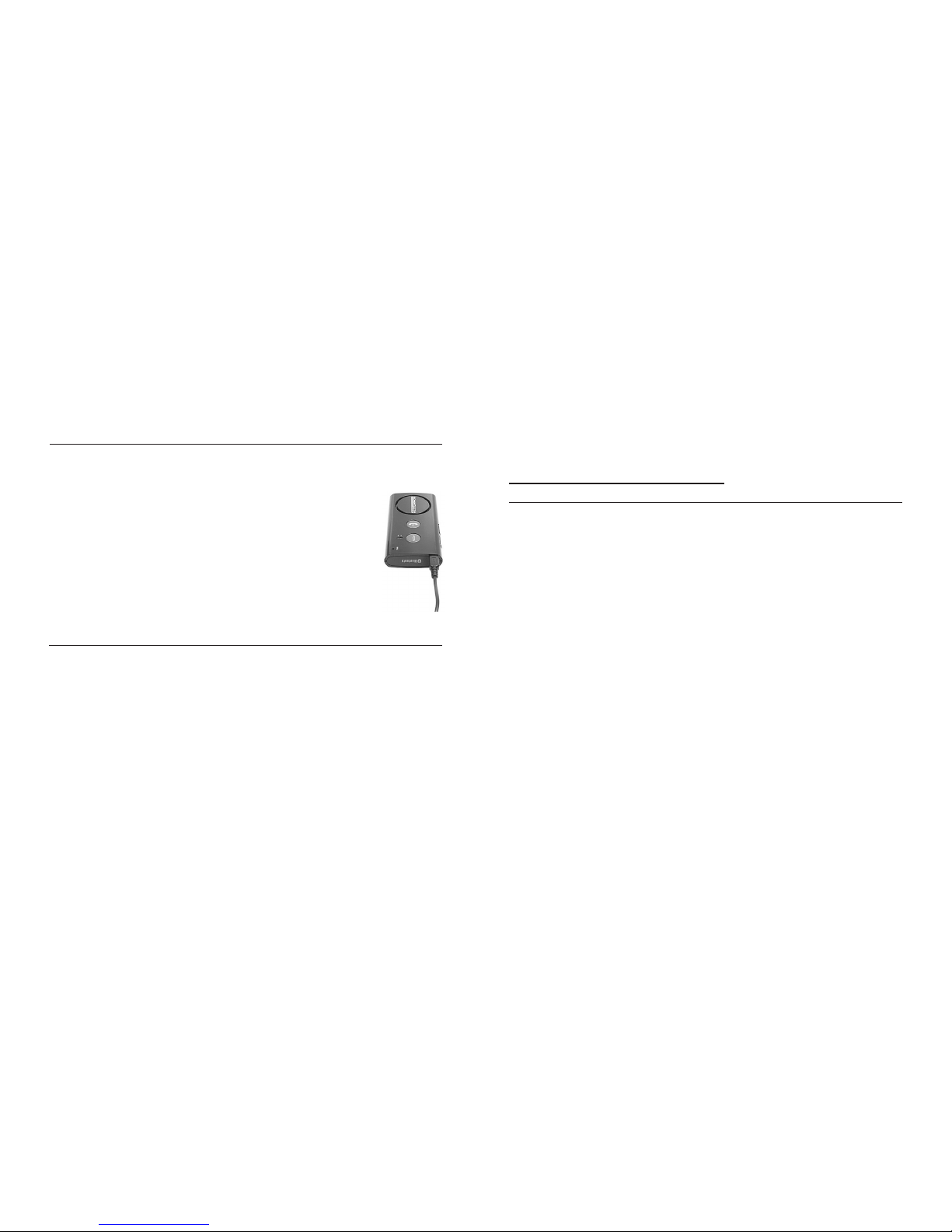
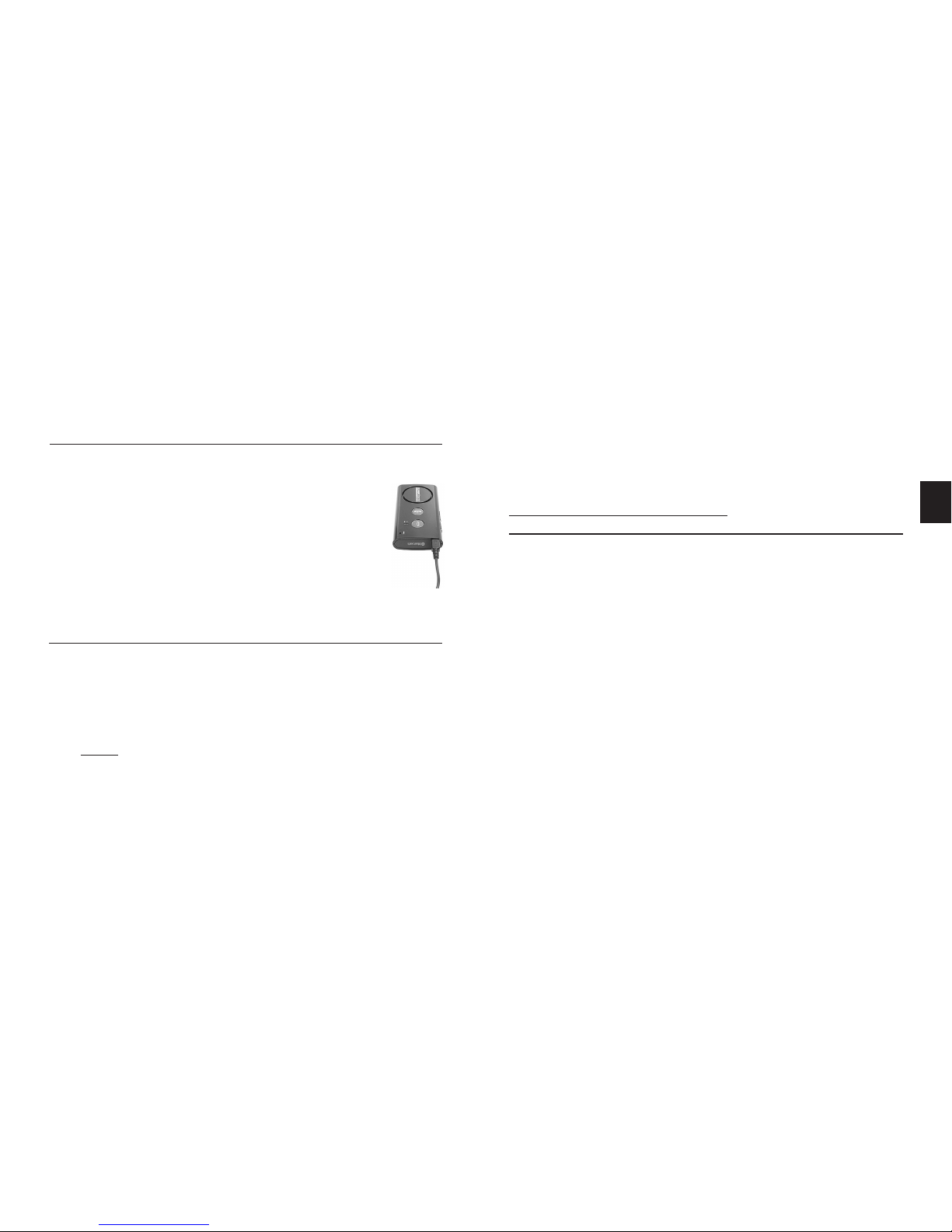
1. Connect the charger’s plug into the Charger Port (9)
of the SUPERTOOTH VOICE. Connect the charger
to an external power source.
Charge Indicator (4) Status:
Steady red: Low Batt Speech: Low battery
Steady orange: Charging Speech: Charging
Steady green: Full Charge Speech: Fully Charged
2. When fully charged, disconnect
the charger.
D. Power On/Off
Power On: Press MFB (1) for 1 second. The Bluetooth
Indicator (3) will turn blinking blue and a voice will say,
“SUPERTOOTH VOICE ready. Connected to phone
(or if phone not available: No phone detected).”
Note: The rst time the SUPERTOOTH VOICE is
switched on, the language selection is automatically activated. In this case, proceed to Section E (Procedure 2).
Power Off: Press and hold MFB (1) for 5 seconds until
a voice announces, “SUPERTOOTH VOICE powering
down.” The Bluetooth Indicator (3) will turn steady
red for 4 seconds and then turns off.
E. Selecting Language and
Pairing to your Bluetooth mobile Phone
There are 6 languages featured in this kit. They are British
English, American English, French, Italian, Spanish and
German.
After selecting your language, pair the SUPERTOOTH
VOICE to your Bluetooth mobile phone to create the link
or audio connection between the two. Pairing should be
done only at the rst connection to a phone.
Procedure:
1. From OFF, press and hold MFB (1) for 6 seconds until
the Bluetooth Indicator (3) turns blinking red/blue.
A voice will then announce, “Press green button
to select British English.” Instructions for other
languages will be announced succeedingly.
2. As soon as the preferred language is spoken, press
the green button or MFB (1) to enable it. If British
English is chosen, a voice will announce “British
English selected. From phone’s Bluetooth menu,
Page 5

5
search for devices then select ST VOICE and enter
pincode 0000.” This means the kit is now ready to pair.
Note: If you selected the wrong language, just turn off the
SUPERTOOTH VOICE and bring it back to pairing mode to
be able to select one more time from the available languages.
3. While the kit is in pairing mode, access the Bluetooth
menu of your phone. Turn on the Bluetooth function
then execute a Bluetooth search. (See your phone’s
manual.)
4. When the phone displays the list of Bluetooth devices,
select ST VOICE.
5. Enter password/pin code 0000 and press OK.
“Pairing
successful to phone. Loading phonebook. Please
wait.” will be announced on the kit.
6. The contacts in your phone will be downloaded to the
kit. The Bluetooth Indicator (3) turns violet for 1-2
seconds.
Note: Some phones will display a question or request
on the phone screen before it allows the kit to download
the phonebook. Just accept any request (e.g.
Connection...?, Allow Internet access…?, DUN…?).
7. The number of contacts will be announced while the
download is ongoing.
8. When download is complete,
“SUPERTOOTH VOICE
ready. Connected to phone” will be announced.
Accept connection request from the phone if a prompt
is displayed.
Important Note:
Most phones automatically connect to the kit after pairing.
With some phones you need to connect manually after
pairing. Go back to Bluetooth > Paired devices > highlight
ST VOICE > press Options > then press Connect.
The kit is now ready to use. When a call is received on
IMPORTANT NOTICE: Some Symbian phones do not
support automatic Phonebook downloading. In this
case, “Automatic transfer not supported by phone.
Please refer to manual or press red button to cancel
phonebook transfer.” will be announced then proceed
to Section F to transfer the phonebook manually from
the phone menu to the kit or press red button or End/
Reject Button (2) of SUPERTOOTH VOICE to connect
the kit to the phone without phonebook transfer.
Page 6

6
your mobile phone, the name of the incoming caller will
be announced on the kit.
F. Automatic Transfer Not Supported By Phone
If automatic transfer of phonebook failed, you can send
or transfer the contacts to the SUPERTOOTH VOICE by
sending them via Bluetooth.
IMPORTANT:
This procedure will only work right after pairing or
right after phonebook update (see Sections E and G
respectively).
Procedure:
1. There are two ways to proceed with the procedure
depending on your phone model.
The common way is:
a. Go to the Phonebook of your phone.
b. Choose a contact or contacts you want to send to
the kit.
Note: Choose “Mark all” (if this option is available in your
phone) to be able to send all contacts at one time.
However, there are phones that do not support
sending all contacts at one time. Then, you
need to send them one by one.
c. Choose to send the contacts via Bluetooth > select
ST VOICE
Note: On some phones, SIM contacts transfer is
impossible.
Or,
The other way is:
a. Go to
Options icon in your phone.
b. Choose
Bluetooth > Highlight ST VOICE > press
Key > Choose Transfer Address Book.
c. Choose to transfer via Bluetooth > select
ST VOICE.
2. “Loading phonebook. Please wait.” will then be
announced on the kit.
3. The number of contacts will be announced as
download is ongoing.
4. After a few seconds, the phone will display
“Data
sent” or the kit will announce “SUPERTOOTH VOICE
ready. Connected to phone.” For some phones,
you may need to accept any connection prompt on
the phone before reconnection takes place.
Page 7
7
The kit is now ready to use. When a call is received on
the user’s mobile phone, the name of the incoming caller
G. Phonebook Update
If you renamed or added a contact in your phone, you can
refresh the phonebook of the SUPERTOOTH VOICE in
order for the kit to recognize the change.
Procedure:
1. Ensure that the phone is connected to the kit. In
standby mode, long press the End/Reject Button (2)
for 10 seconds.
2. “Loading phonebook. Please wait.” will be
announced. At the same time, the phone will
disconnect.
Note: Some phones display a question or request
on the phone screen before it allows the kit to
download the phonebook. Just accept any request
(Connection...?, allow Internet access…?, DUN…?).
3. The number of contacts will be announced while the
download is ongoing.
IMPORTANT NOTICE: Some Symbian phones do
not support automatic Phonebook downloading. In
this case, “Automatic transfer not supported by
phone. Please refer to manual or press red button
to cancel phonebook transfer.” will be announced
then proceed to Section F to transfer the phonebook
manually from the phone menu to the kit or press red
button or End/Reject Button (2) of SUPERTOOTH
VOICE to connect the kit to the phone without
phonebook transfer.
4. When the download is complete, “SUPERTOOTH
VOICE ready. Connected to phone.” will be
announced. Accept connection request from the phone
if a prompt is displayed.
H. Installation
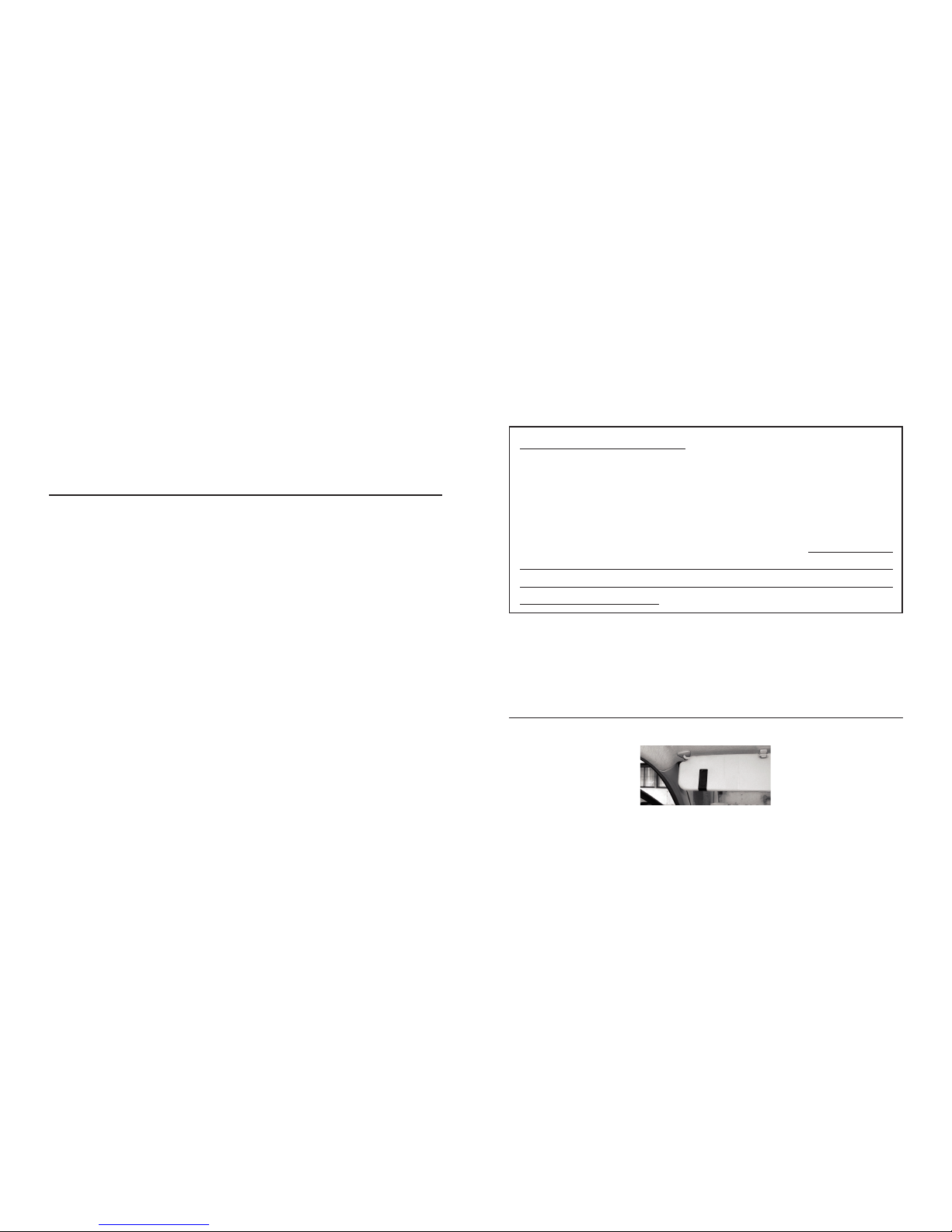
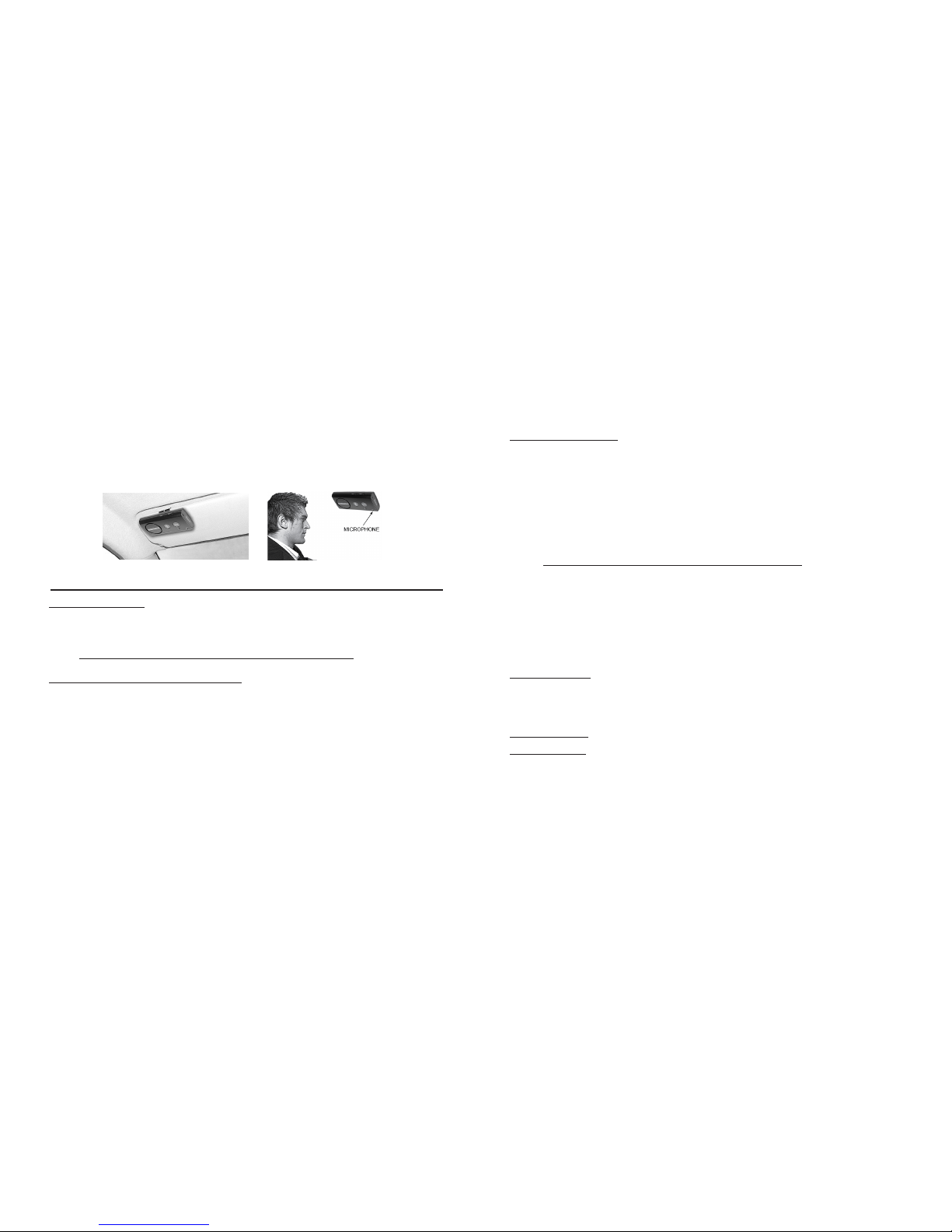
Fix the metal clip of SUPERTOOTH VOICE on the sun
visor.
Page 8
8
Attach the magnetic back of SUPERTOOTH VOICE to
the xed metal clip. The SUPERTOOTH VOICE must be
placed in such way that its microphone is directed to the
mouth of the user.
Answer a Call:
When a call is received, the name or phone number
of the incoming caller will be announced on the kit.
During the ring tone, press MFB (1) for 1 second to
answer the call and when call is answered, the Bluetooth
Indicator (3) will turn steady blue.
Or, assuming that Voice Answer is activated.
(see Voice Answer Activation/Deactivation on Section K):
After a beep is heard on the kit, accept a call by loudly and
clearly saying “ACCEPT CALL”, “ACCEPT”, “ANSWER”
or “OK”; say it only once and within 3 seconds emphasizing
each syllables. When a call is answered, the Bluetooth
Indicator (3) will turn steady blue.
End a Call:
Press End/Reject Button (2) for 1 second to end the call.
“End of call” will be announced.
Voice Dial:
Important: Before using this feature, make sure that the
voice dialing function of your phone is activated and at
least one voice tag is recorded on your phone. (Kindly refer
to the procedure in your phone’s manual.)
I. Basic Operations
IMPORTANT:
The kit needs to be ‘paired’ to your Bluetooth mobile
phone rst, before you can use the following functions.
See Pairing to your Bluetooth Mobile Phone in Section E.
Make a Call (Normal Dial):
Dial the number on your phone. Audio will automatically
be on the kit. During an ongoing call, the Bluetooth
Indicator (3) will turn steady blue.
Note: With some phones like Siemens S55 and Panasonic
X70, audio is always on the phone during an outgoing
call. You will need to press the MFB (1) for 1 second to
transfer the audio to your kit.
Page 9

9
Note: Voice dialing entries must be stored in the phone’s
memory, not on the SIM card!
1. Press the
MFB (1) for 1 second.
2. A voice dial beep will be heard on the kit to prompt the
user to say the voice tag of the contact to call and the
Bluetooth Indicator (3) will turn steady blue.
3. Say the voice tag exactly as how you recorded it.
4. The voice tag will be played back to you and then the
phone will dial the number automatically.
Redial (For Handsfree Prole Phones only):
Press MFB (1) for 3 seconds. The last dialed number will
be redialed and “Redialing” will be announced on the kit.
Reject a Call (For Handsfree Prole Phones only):
During the ring tone, press End/Reject Button (2) for
1 second. The incoming call will be rejected and “Call
rejected” will be announced on the kit.
Volume Setting:
Increase or decrease the volume by pressing the Volume
Up (8) or Volume Down (7) button. Press repeatedly until
desired level is reached. The Bluetooth Indicator (3)
will turn violet as lowest and highest levels are reached.
When maximum volume is reached, “Maximum Volume”
will be announced on the kit.
Audio Transfer (For Handsfree Prole Phones only):
During an ongoing call, you can transfer the audio.
Kit to Phone: Press and hold MFB (1) for 3 seconds
and the audio will be transferred to the phone.
Phone to Kit: Press MFB (1) for 1 second and the
audio will be transferred to the kit.
Note: For some phones, you may need to accept any
connection prompt on the phone before automatic
transfer takes place.
J. Advance Functions
Multi-Pairing / Switching Connections between Phones
The SUPERTOOTH VOICE can be paired up to 8
Bluetooth phones. An additional pairing will automatically
delete the phone that has not been used for the longest
time. Thus, the SUPERTOOTH VOICE always maintains
8 phones in its memory.
You can easily switch to any of the paired phones by:
1. Disconnecting the currently used phone using the
Page 10

10
“Active devices” in the Bluetooth menu of that phone.
2. Connecting to the wanted phone by using the “Paired
devices” in the Bluetooth menu of that wanted phone.
Note: Reconnection to a paired phone can also be done
by pressing the MFB (1). However, the SUPERTOOTH
VOICE will attempt to connect to the last used phone
only. Therefore, it is recommended to connect to another
paired phone using the phone menu.
Erasing all Paired Devices and Phonebook:
1. From OFF, press and hold the Volume Up (8) Button.
2. While holding the Volume Up (8) Button, press MFB
(1) for 1 second until a distinctive melody is heard on
the kit, and the version is announced. Then switch off
for 10 seconds.
All the paired devices and phonebook are now erased.
• When activated, the user can accept a call by loudly
and clearly saying “ACCEPT CALL”, “ACCEPT”,
“ANSWER” or “OK”; say it only once and within 3
seconds emphasizing each syllables.
• When deactivated, apply normal answer of call.
Activation: Press and hold Volume Up (8) Button for
5 seconds until a voice announces, “Voice answer
enabled.” At this point, when a call is received, a
beep will be heard after the name or phone number of
the caller is announced.
Deactivation: Press and hold Volume Down (7) Button
for 5 seconds until a voice announces, “Voice answer
disabled.” When a call is received, only the name or
phone number of the caller will be heard on the kit.
Automatic Reconnection:
Automatic reconnection occurs when the user (without
turning OFF the kit) goes out of Bluetooth range for
more than 20 seconds and then goes back in range.
In this case, a new reconnection system is able to
reconnect the kit to the phone anytime the user goes
back in range.
K. Special Feature
Voice Answer Mode:
Important Notice: This feature may not perform well
inside a car with high background noise.
Page 11

11
Note: This automatic reconnection could take up to
10 seconds after user goes back in range.
In case of intentional disconnection (using the phone
menu), this system is not activated.
(British English, American
English, French, Italian, Spanish
and German)
*Full Duplex
*Full DSP Noise Cancellation /
Echo Cancellation
*Digital Volume Control
*Voice Recognition Dialing
(If phone supports)
*Last Call Redial
*Reject Incoming Call
*Can also be charged directly from a
PC via USB Cable (not included)
*Compact Size
*Answer incoming calls by
voice control
*Full automatic reconnection
Installation: Quick xation on sun visor via
magnetic clip
Dimensions (mm): 18.2 x 60.2 x 122
Weight: 115 g
SUPERTOOTH VOICE Specications
Bluetooth Compliance: Bluetooth version 2.0 specications
Supported Bluetooth
Proles: Supports headset and handsfree
proles with automatic detection
Operating Range: Up to 10 meters
Frequency: 2.4 GHz
Talk Time: Up to 15 hours
Stand-by time: Up to 800 hours
Charging Time: 3 hours
Battery Type: Rechargeable Lithium Ion
Special Features *Voice to announce CallerID,
Bluetooth device status and
instruction guides in 6 languages
Page 12
12
A. Description
Le SUPERTOOTH VOICE est un kit mains libres Bluetooth
sans l qui s’utilise avec les téléphones supportant les
prols casque ou mains libres. Son DSP élimine les
phénomènes d’écho et de bruit de fond, permettant de
téléphoner librement avec une qualité audio optimale.
Ce kit utilise le système Text-To-Speech. Les instructions
sont annoncées vocalement par le kit dans 6 langues
différentes. Le kit indique la conguration Bluetooth par
rapport au GSM et annonce le nom (ou le numéro de
téléphone si le contact n’a pas été téléchargé vers le kit)
de l’appelant lors d’un appel entrant !
N’oubliez pas que votre sécurité prime sur les appels.
Respectez la législation en vigueur !!!
Vériez si la législation nationale ou locale applicable
dans votre région limite
l’utilisation des téléphones mobiles pendant la conduite.
Il incombe à l’utilisateur de ce produit de respecter la
législation du lieu où il habite.
B. Illustration
1 BMF ou Bouton Multi-Fonctions
(Allumer-éteindre / pairer / répondre
/ Activation de la reconnaissance
vocale / rappel du dernier numéro
composé / transfert du son)
2 Bouton Fin d’appel/Refus d’appel
(Fin et refus d’appel /
rafraichissement du répertoire)
3 Voyant Bluetooth
4 Voyant de charge
5 Microphone
6 Haut-parleur
7 Diminution du volume
8 Augmentation du volume
9 Prise chargeur
10 Aimants
Page 13
13
C. Charger le SUPERTOOTH VOICE
1. Lorsque le voyant de charge (4) devient rouge, la
batterie est déchargée. Vous devez alors recharger
le SUPERTOOTH VOICE.
Connectez le chargeur dans la prise de
charge (9) prévue à cet effet
Etat du voyant de charge (4):
Rouge : Low Batt Indication vocale : batterie faible
Orange : Charging Indication vocale : en charge
Vert : Full Charge Indication vocale : batterie chargée
2. Lorsque la charge est complète, débranchez le chargeur.
D. Allumer/Eteindre
Allumer: Appuyez sur le BMF(1) pendant une seconde.
Le voyant Bluetooth(3) doit clignoter bleu et le kit
annonce: « votre SUPERTOOTH VOICE est prêt
à être utilisé. Votre téléphone est connecté »
, ou
si le téléphone n’est pas disponible ou non pairé:
« votre téléphone n’est pas détecté »
.
Note : si c’est la première fois que le SUPERTOOTH
VOICE est allumé, la sélection du langage est auto-
matiquement activée. Dans ce cas, référez-vous à
la Section E (procédure 2).
Eteindre: Maintenez appuyé le BMF(1) pendant 5
secondes jusqu’à ce que le kit annonce «SUPERTOOTH
VOICE éteint ». Le voyant Bluetooth(3) reste allumé
rouge pendant 4 secondes et le kit s’éteint.
E. Sélection de la langue et
pairage avec votre téléphone Bluetooth
Les 6 langues suivantes sont disponibles sur ce kit : Anglais,
Américain, Français, Italien, Espagnol et Allemand.
Après avoir sélectionné votre langue, vous devez pairer
le SUPERTOOTH VOICE à votre téléphone mobile
Bluetooth. Pairer consiste à créer un lien ou une connexion
audio entre le kit et le téléphone. Cette opération n’est
à effectuer que lors de la première utilisation avec un
nouveau téléphone.
Procédure:
1. Le SUPERTOOTH VOICE étant éteint, maintenez
appuyé le BMF(1) pendant 6 secondes jusqu’à ce
que le voyant Bluetooth(3) clignote rouge/bleu. Le
kit annonce: “Press green button to select British
English”. Les instructions pour les autres langues
disponibles seront annoncées successivement à la
n de cette phrase initiale.
2 Pendant que la langue voulue est entendue, pressez
FR
Page 14

14
IMPORTANT: Certains téléphones Symbian ne supportent
pas le transfert automatique du répertoire. Dans ce
cas, le kit annonce : « Téléphone non compatible
avec le transfert automatique, veuillez consulter
votre mode d’emploi sinon appuyez sur la touche
rouge pour annuler le transfert ».
Référez-vous à la
section F pour transférer manuellement le répertoire
du téléphone vers le kit ou appuyez sur le bouton rouge
ou Bouton Fin/refus d’appel(2) pour connecter le kit
sans avoir transféré le répertoire.
le bouton vert ou BMF(1) pour la valider. Si
Français est sélectionné, le kit annonce « Français
sélectionné. Depuis le menu Bluetooth de votre
téléphone, recherchez les accessoires Bluetooth
puis sélectionnez ST VOICE et rentrez le code
0000 ».
Votre kit est maintenant prêt à être pairé.
Note : si vous avez sélectionné une autre langue que
celle désirée, éteignez votre SUPERTOOTH VOICE et
revenez en mode pairage pour avoir à nouveau le choix
de votre langue parmi les 6 disponibles.
3 Le
SUPERTOOTH VOICE étant en mode pairage,
activez la fonction Bluetooth de votre téléphone
mobile. Recherchez les équipements Bluetooth
environnants (voir mode d’emploi du téléphone).
4 Parmi les équipements Bluetooth trouvés, sélectionnez
le ST VOICE.
5 Dès que le téléphone mobile vous demande le mot
de passe ou le code, tapez 0000 puis OK. Le kit
annonce : « Le pairage avec votre téléphone est
réussi, chargement de votre répertoire en cours,
veuillez patienter, veuillez accepter toute demande
connexion sur votre téléphone»
.
6 Les contacts sont téléchargés vers le kit.
Le voyant
Bluetooth(3)
devient violet pendant 1 à 2 secondes.
Note : sur certains téléphones, une demande ou une
question peut apparaître sur l’écran du téléphone, cette
demande autorise le téléchargement du répertoire vers
le kit. Veuillez donc accepter toute demande de la part
de votre téléphone comme par exemple: Connexion ?,
Autoriser connexion internet…, DUN.. ? etc ).
7 Le nombre de contacts transférés est annoncé par le
kit pendant le téléchargement.
8 Quand le transfert est terminé, le kit annonce : « Votre
SUPERTOOTH VOICE est prêt à être utilisé, votre
téléphone est connecté »
. Veuillez accepter toute
demande de connexion qui pourrait apparaître sur
Page 15

15
l’écran de votre téléphone.
Note importante : La plupart des téléphones se connecte
automatiquement au kit après le pairage Certains
téléphones nécessitent une connexion manuelle après
le pairage. Procédez ainsi: Dans le menu du téléphone,
sélectionnez la rubrique Bluetooth > équipements liés
> Sélectionnez le ST VOICE > Appuyez sur Options >
Puis appuyez sur Connecter.
Le kit est maintenant prêt à être utilisé. Lors d’un appel
entrant, le nom de l’appelant sera prononcé par le kit.
F. Transfert automatique non supporté par le téléphone
Si le transfert automatique du répertoire échoue, vous
pouvez envoyer ou transférer les contacts de votre
téléphone vers le SUPERTOOTH VOICE par Bluetooth.
IMPORTANT :
Cette procédure ne fonctionne qu’après le pairage ou
après avoir rafraîchi votre répertoire. (Voir Section E et
G respectivement).
Procédure
Il y a 2 façons de procéder suivant le modèle de votre
téléphone. La procédure la plus courante :
a : Allez dans le menu Répertoire de votre téléphone.
b : Choisissez un ou plusieurs contacts que vous
voulez envoyer vers le kit.
Note : Sélectionnez « marquer, tout marquer », de façon à
pouvoir envoyer tous les contacts sélectionnés en une
seule fois (cette option n’est pas disponible sur tous
les téléphones). Certains téléphones ne supportent
pas d’envoyer tous les contacts en une fois .Vous
devrez dans ce cas les envoyer un par un.
c : Choisissez d’envoyer les contacts par Bluetooth,
sélectionnez ST VOICE.
Note
: Avec certains téléphones, le transfert des contacts
SIM est impossible. Dans ce cas vous devez les copier
sur la memoire du téléphone.
Ou,
L’autre procédure est :
a : Allez sur l’icône
Options de votre téléphone.
b : Choisissez Bluetooth, mettez en surligné ST VOICE,
pressez la touche , choisissez transférer le
carnet d’adresse.
c : Choisissez de transférer par Bluetooth, sélectionnez
ST VOICE.
2 : Le kit annonce : « Chargement de votre répertoire
en cours, veuillez patienter ».
3 : Le nombre de contacts transférés est annoncé par le
Page 16

16
G. Rafraîchissement du répertoire
Si vous renommez ou ajoutez un contact dans le répertoire
de votre téléphone, vous pouvez rafraichir le répertoire de
votre SUPERTOOTH VOICE an que les modications
soient prises en compte.
Procédure:
1 Assurez-vous que le téléphone est connecté au kit.
Hors communication, maintenez appuyé le Bouton
Fin/refus d’appel(2) pendant 10 secondes.
2 Le kit annonce : « Chargement de votre répertoire
en cours, veuillez patienter ». Au même moment, le
IMPORTANT: Certains téléphones Symbian ne
supportent pas le transfert automatique du répertoire.
Dans ce cas, le kit annonce : « Téléphone non
compatible avec le transfert automatique, veuillez
consulter votre mode d’emploi sinon appuyez sur
la touche rouge pour annuler le transfert ».
Référezvous à la section F pour transférer manuellement le
répertoire du téléphone vers le kit ou appuyez sur le
bouton rouge ou Bouton Fin/refus d’appel(2) pour
connecter le kit sans avoir transféré le répertoire.
4. Quand le transfert est terminé, le kit annonce : « Votre
SUPERTOOTH VOICE est prêt à être utilisé, votre
kit pendant le téléchargement.
4 : Après quelques secondes, l’écran du téléphone
indique : « données envoyées » et le kit annonce :
« Votre SUPERTOOTH VOICE est prêt à être
utilisé, votre téléphone est connecté ».
Sur
certains téléphones, il est nécessaire d’accepter
toute demande de connexion présente sur l’écran
du mobile an que la connexion Bluetooth soit bien
établie. Sinon donner un clic sur le BMF(1) pour que
la connexion soit bien établie.
Le kit est maintenant prêt à être utilisé. Lors d’un appel
entrant, le nom de l’appelant sera prononcé par le kit.
téléphone se déconnecte.
Note
: sur certains téléphones, une demande ou une
question peut apparaître sur l’écran du téléphone, cette
demande autorise le téléchargement du répertoire vers
le kit. Veuillez donc accepter toute demande de la part
de votre téléphone comme par exemple : Connexion ?,
Autoriser connexion internet, DUN.. ? etc. )
3 Le nombre de contacts transférés sera annoncé par le
kit pendant le téléchargement.
Page 17
17
H. Installation
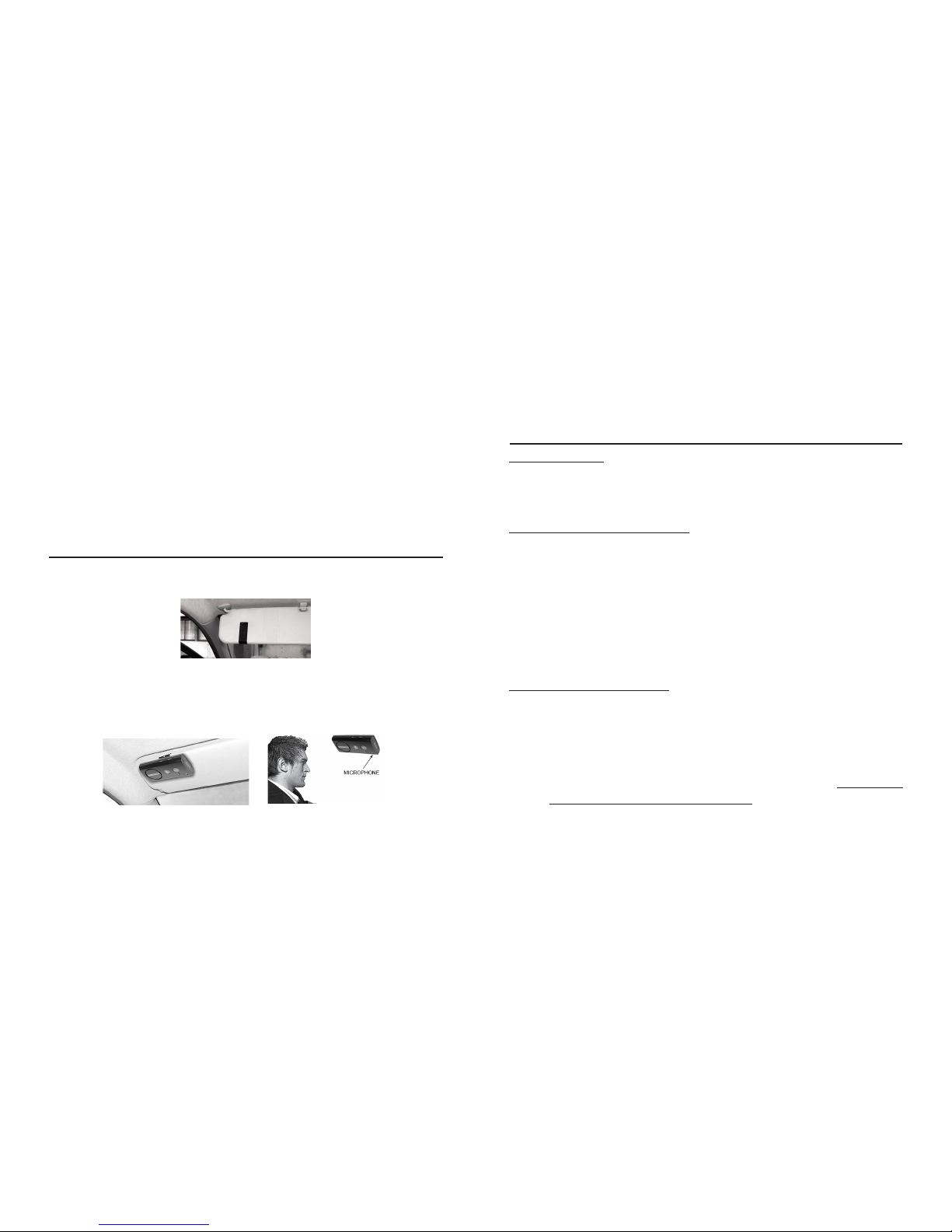
Fixez le clip du SUPERTOOTH VOICE sur le pare-soleil
comme indiqué ci-dessous.
Positionnez la partie aimantée (10) de votre SUPERTOOTH
VOICE sur le clip métallique. Le SUPERTOOTH VOICE
doit être placé face à vous sur le pare-soleil de telle sorte
que le microphone soit dirigé vers vous.
I. Fonctions de base
IMPORTANT:
Avant d’utiliser le SUPERTOOTH VOICE, il doit être pairé
au téléphone. (Voir Pairer votre téléphone mobile
Bluetooth à la section E).
Appeler (appel normal) :
Composez le numéro sur votre téléphone. L’audio sera
automatiquement transféré sur le SUPERTOOTH VOICE.
Durant l’appel, le voyant Bluetooth(3) sera allumé bleu xe.
Remarque: Avec certains téléphones tels que le Siemens
S55 et le Panasonic X70, l’audio est toujours sur le hautparleur du téléphone lors des appels sortants. Il vous faut
presser le bouton BMF (1) pendant une seconde pour
transférer l’audio sur votre kit mains libres.
Répondre à un appel:
Lors d’un appel entrant, le kit annonce le nom ou
le numéro de téléphone de l’appelant. Pendant la
sonnerie, appuyez sur le bouton BMF(1) pendant 1
seconde pour répondre à l’appel. Durant l’appel,
le voyant Bluetooth(3) sera allumé bleu xe.
Ou, si la Réponse Vocale est activée (voir Réponse
Vocale Activée/Désactivée à la section K) :
téléphone est connecté ». Sur certains téléphones, il
est nécessaire d’accepter toute demande de connexion
présente sur l’écran du mobile an que la connexion
Bluetooth soit bien établie. Sinon donner un clic sur
le BMF(1) pour que la connexion soit bien établie.
Page 18

18
Apres qu’un bip ait été entendu dans le kit, acceptez l’appel
en prononçant de manière claire : « ACCEPTER »,
« REPONDRE » ou « OK ». Ne dites un de ces mots clés
qu’une seule fois après le bip en prononçant bien chaque
syllabe. Le temps imparti pour prononcer le mot clé est de
3 secondes à partir de la n du bip. Durant l’appel, le
voyant Bluetooth(3) est allumé bleu xe.
Terminer un appel :
Lorsqu’une conversation est terminée, appuyez sur
le bouton n d’appel (2) pendant une seconde pour
terminer l’appel.
Numérotation vocale :
Important : la fonction numérotation vocale doit être
activée dans votre téléphone, et au moins une étiquette
vocale doit avoir été enregistrée dans la mémoire de
votre téléphone.
1 Appuyez sur le bouton de prise de ligne (1) pendant
une seconde.
2 Apres le bip entendu dans le kit, prononcez le nom (ou
étiquette vocale) de la personne à appeler.
3 Prononcez le nom (ou étiquette vocale) de la même
façon que lors de l’enregistrement.
4 La voix sera répétée dans le kit, puis le téléphone
composera le numéro automatiquement.
Rappeler (seulement pour les téléphones en prol mains libres):
Appuyez sur le bouton de prise de ligne (1) pendant 3
secondes, le dernier numéro composé est rappelé et le
kit annonce : « Rappel du dernier numéro en cours ».
Refuser un appel (seulement pour les téléphones en prol
mains libres) :
Durant la sonnerie appuyez sur le bouton n d’appel
(2) pendant une seconde pour refuser un appel. Le kit
annonce : « Appel refusé ».
Régler le volume :
Augmentez ou diminuez le volume en appuyant sur
les boutons volume (7 ou 8). Le voyant Bluetooth(3)
s’éclaire en violet lorsque les seuils minimum ou maximum
sont atteints. Quand le niveau maximum de volume est
atteint, le kit annonce : « Volume maximum ».
Transférer l’audio (seulement pour les téléphones en
prol mains libres) :
Pendant un appel, vous pouvez transférer le son :
Du kit vers le téléphone: maintenez appuyé le BMF(1)
Page 19

19
pendant 3 secondes et l’audio est transféré vers
le téléphone.
Du téléphone vers le kit: maintenez appuyé le
BMF(1) pendant 1 seconde et l’audio est transféré
vers le kit.
Remarque: Avec certains téléphones, il est nécessaire
d’accepter toute demande de connexion sur le téléphone
avant le transfert.
J. Fonctions avancées
Pairage multiple / passer d’un téléphone à un autre:
Le SUPERTOOTH VOICE peut être pairé à 8 téléphones.
Tout pairage supplémentaire effacera automatiquement le
téléphone qui a été utilisé le moins récemment. Le dernier
téléphone pairé est automatiquement actif.
Vous pouvez passer d’un téléphone à un autre déjà pairé
comme suit:
1. Déconnectez le SUPERTOOTH VOICE du téléphone
en utilisant le menu Bluetooth (appareils actifs) du
téléphone.
2. Connectez le SUPERTOOTH VOICE à l’autre téléphone
en utilisant le menu Bluetooth (appareils liés) du
téléphone.
Note: Le SUPERTOOTH VOICE se connectera toujours
au dernier téléphone utilisé lors de l’allumage ou d’un
appui sur le bouton de prise de ligne (1). Il est donc
conseillé d’utiliser le menu du téléphone pour connecter
un autre téléphone déjà pairé.
Remise à zero : effacement du répertoire et des
téléphones pairés :
1. Le kit étant arrêté, maintenez appuyé le bouton
Augmentation du volume(8).
2. Tout en maintenant enfoncé le bouton Augmentation
du volume(8), appuyez sur le BMF(1) pendant une
seconde. Une mélodie distinctive est entendue via le
kit. Le kit annonce la version. Le voyant Bluetooth(3)
clignote en bleu. Ensuite eteignez le kit pendant au
moins 10 secondes.
Tous les pairages ainsi que le répertoire du SUPERTOOTH
VOICE sont maintenant effacés.
K. Caractéristiques spéciales
Mode Réponse Vocale:
Important: Ce mode ne fonctionne correctement que s’il
est utilisé dans une voiture où les bruits ambiants sont
faibles.
Page 20

20
• Lorsque ce mode est activé, après qu’un bip ait été
entendu dans le kit, vous pouvez accepter l’appel
en prononçant de manière claire : « ACCEPTER »,
« REPONDRE » ou « OK ». Ne dites
un de ces mots
clés qu’une seule fois après le bip en prononçant bien
chaque syllabe. Le temps imparti pour prononcer le
mot clé est de 3 secondes à partir de la n du bip.
• Lorsque ce mode est désactivé, vous pouvez répondre
simplement en donnant un clic sur le BMF(1).
Activation:
Le téléphone étant pairé au kit, hors communication,
maintenez appuyé le bouton Augmentation du
volume(8) pendant 5 secondes jusqu’à ce que le
kit annonce : « Réponse vocale activée ».
Dans
cette conguration, lors d’un appel entrant, un bip est
entendu après que le nom ou le numéro de l’appelant
ait été prononcé.
Désactivation:
Le téléphone étant pairé au kit, hors communication,
maintenez appuyé le bouton Diminution du volume(7)
pendant 5 secondes jusqu’à ce que le kit annonce :
« Réponse vocale désactivée ».
Dans cette conguration, lors d’un appel entrant, seul le
nom ou le numéro de l’appelant sera prononcé via le kit.
Reconnexion automatique:
La reconnexion automatique intervient lorsque le
téléphone pairé sur le SUPERTOOTH VOICE est
éloigné du kit (hors zone de couverture Bluetooth,
environ 10 mètres) pendant plus de 20 secondes
(sans que le kit ait été arrêté) et que le téléphone
revient dans la zone de couverture Bluetooth. Dans ce
cas, ce nouveau système de reconnexion est capable
de reconnecter automatiquement le kit au téléphone
chaque fois que celui-ci revient dans la zone de
couverture Bluetooth. Il est bien sûr nécessaire
que le téléphone ait été pairé initialement au kit.
Note: La reconnexion automatique intervient au bout
de 10 secondes après que l’utilisateur soit revenu
dans la zone de couverture Bluetooth.
Dans le cas d’une déconnexion volontaire (en utilisant
le menu du téléphone), ce système de reconnexion
automatique n’est pas activé.
Page 21

21
Spécications
Protocole: Bluetooth version 2.0
Prols supportés: Mains libres et casque,
détection automatique
Portée: Jusqu’à 10 mètres
Fréquence: 2,4 GHz
Autonomie en
communication: Jusqu’à 15 heures
Autonomie en veille: Jusqu’à 800 heures
Temps de charge: 3 heures
Type de batterie: Lithium ion rechargeable
Fonctions: *Annonce vocale de
l’identication de l’appelant
de la conguration Bluetooth
du kit et des instructions dans
6 langues (Anglais, Américain,
Français, Italien, Espagnol et
Allemand)
*Full Duplex
*Système DSP (Digital Signal
Processor) permettant la suppression
de l’écho et des bruits ambiants
*Contrôle de volume numérique
*Numérotation vocale (si supportée
par le téléphone)
*Rappel du dernier numéro composé
(uniquement en prol mains libres)
*Possibilité de rejeter un appel
*Peut être chargé à partir d’une
prise USB (cordon non fourni)
*Compact
*Réponse d’un appel entrant en
prononçant un mot clé
*Reconnexion automatique
Installation: Installation rapide par clip et
xation aimantée
Dimensions (mm): 121 x 61 x 20
Poids: 115 grammes
Page 22
22
A. Produkt Beschreibung
SUPERTOOTH VOICE ist ein Bluetooth Freisprechanlage
für HandsFree-Prol (HFP) und Headset-Prol Telefone.
Seine besonderen Eigenschaften sind unter anderem
Full DSP Geräusch-Unterdrückung und Echo-Unterdrückung
Somit hat es eine verbesserte Audio-Qualität. Es ist
ausgearbeitet für einfachen Freihand-Gebrauch und
beste Leistung.
Dieses HF-Kit enthält das Text-To-Speech System
Die Stimme gibt den Benutzern Anweisungen in 6
verschiedenen Sprachen. Sie zeigt den Status der
Bluetooth- Vorrichtung an und sie sagt die Nahmen an
von einkommenden Anrufern (oder die Telefonnummern,
wenn der Kontakt nicht eingespeichert wurde)!
Vergessen Sie nicht:
Fahren Sie sicher und mit dem Gesetz.
Vergewissern Sie sich, ob nationale oder örtliche Gesetzgebung den Gebrauch von Mobiltelefonen während
des Fahrens verbietet. Jeder muss sich an die örtlichen
Gesetze halten.
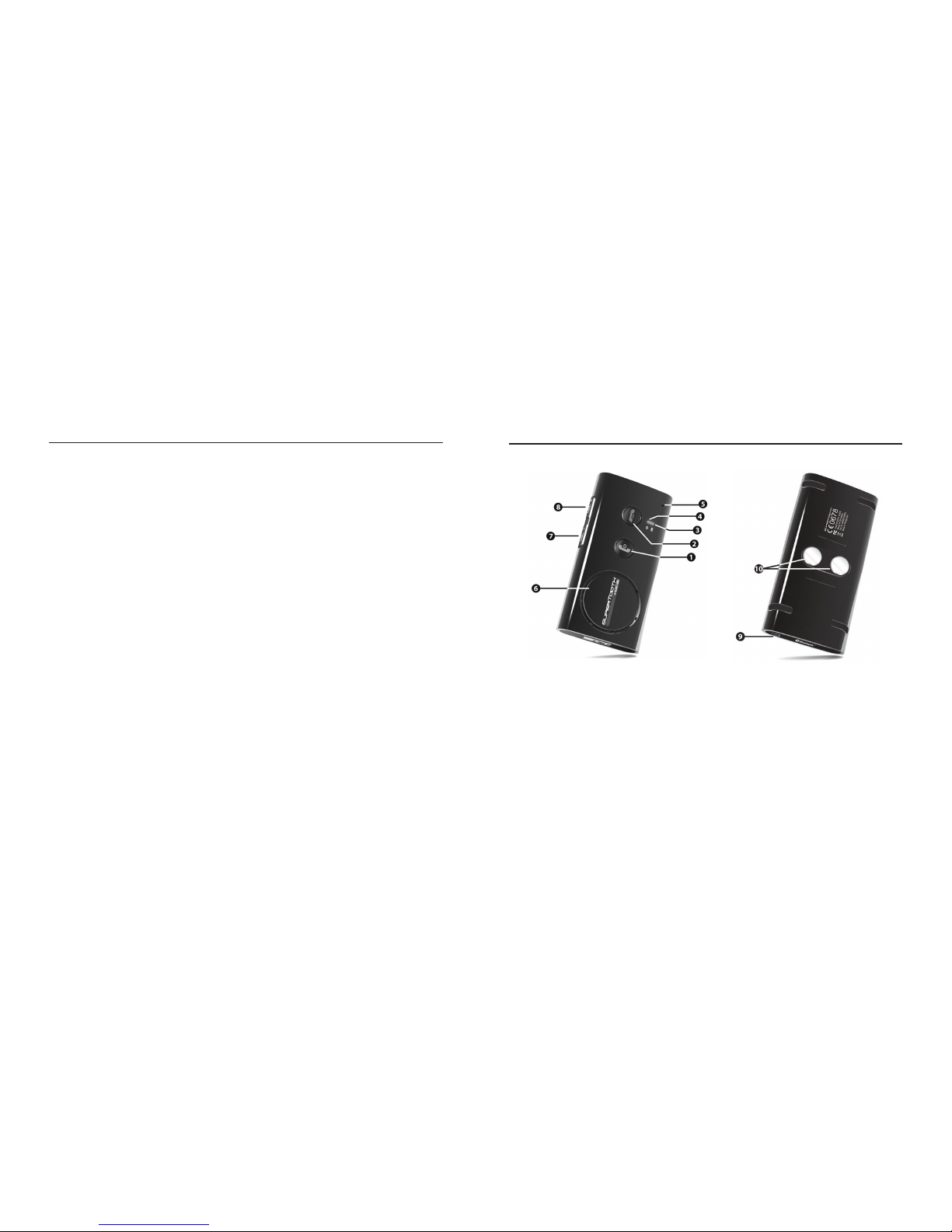
B. Produkt Ansicht
1 MFB or oder Multifunktionsbutton
( EIN- und AUS-Schalten / Verbinden /
Antworten / Voice dial / Wiederwahl /
Audio-Übertragung)
2 End/Reject Button
(Beenden und Abweisen eines
Gesprächs / Einspeichern Adressbuch)
3 Bluetooth Anzeige
4 Ladezustand-Anzeige
5 Mikrofon
6 Lautsprecher
7 Volume Down
8 Volume Up
9 Auade-Port
10 Magnete
Page 23
23
C. Auaden
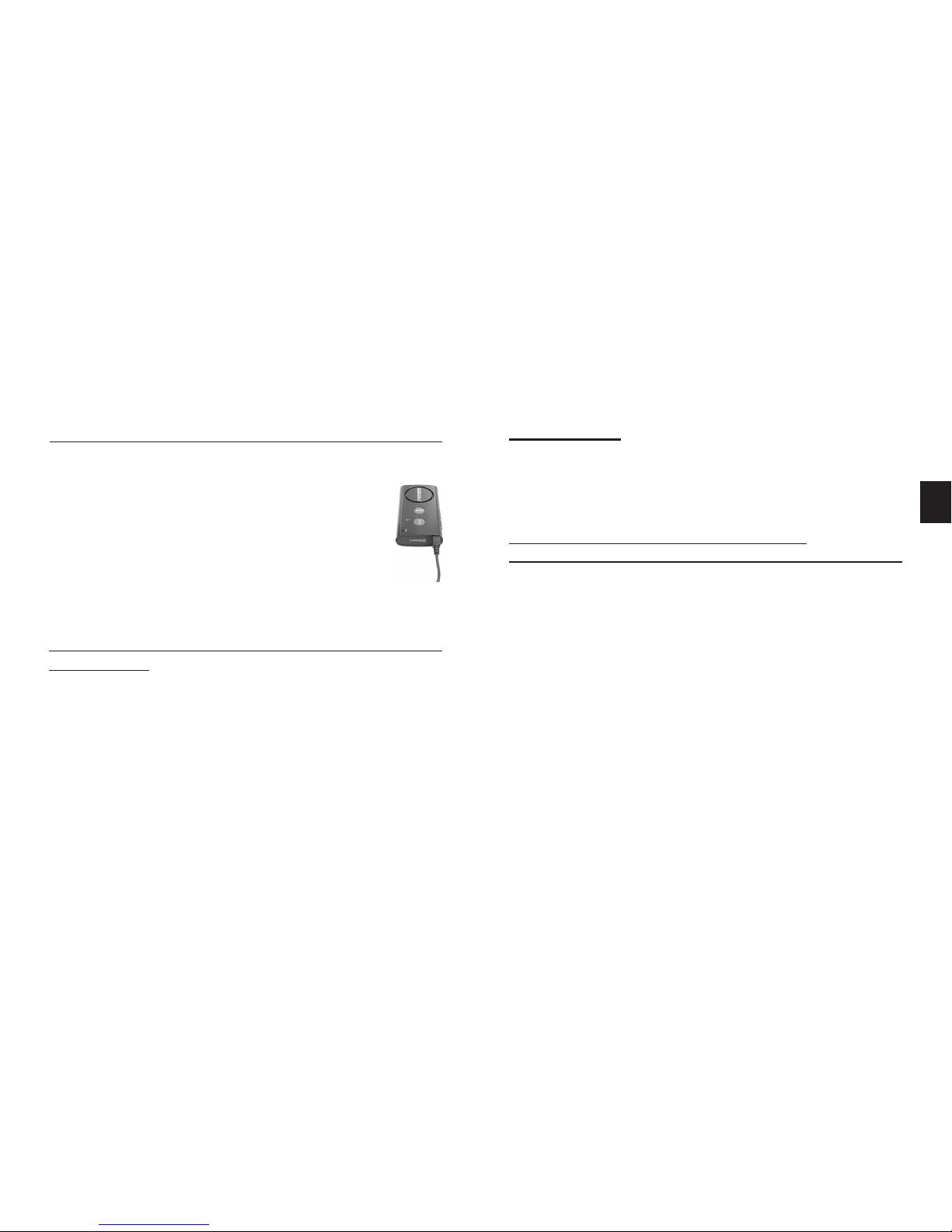
1. Ladekabel in den SUPERTOOTH VOICE Auade-
Port (9) stecken. Stecker an ein externes Stromnetz
anschließen
Ladeanzeiger (4) Status:
2. Nach dem vollständigen Auaden,
Stecker herausziehen.
D. EIN-und AUS-Schalten
Ein-Schalten: Die Taste MFB (1) eine Sekunde lang
eindrücken. Bluetooth-Anzeige (3) blinkt blau und
eine Stimme sagt an: Batterie ist schwach. Ihr
Mobiltelefon ist verbunden. (Oder wenn das Telefon
nicht erreichbar ist: Kein Telefon gefunden. Notieren
Sie, dass wenn Sie das erste Mal SUPERTOOTH
VOICE anschalten, die Sprachwahl automatisch
aktiv wird .In diesem Fall lesen Sie weiter unter
Kapitel E (Prozedur 2)
AUS-Schalten: Die Taste MFB (1) während 5 Sekunden
eingedrückt halten bis eine Stimme ansagt,
Supertooth Voice wird ausgeschaltet. Die BLUETOOTH
-ANZEIGE (3) stellt sich auf „andauernd rot“ während
4 Sekunden und schaltet sich dann aus.
E. Sprachwahl und Pairing mit ihrem
Bluetooth Mobiltelefon
Sie haben 6 Sprachen zur Wahl in diesem HF-Kit:
Britisch-Englisch, Amerikanisch-Englisch, Französisch,
Italienisch, Spanisch und Deutsch.
Nach der Sprachwahl, verbinden Sie das SUPERTOOTH
VOICE mit Ihrem Bluetooth-Mobiltelefon um eine
Verbindung oder einen Audio-Anschluss herzustellen.
Dieses Pairing ist nur einmal durchzuführen, bei der
ersten Verbindung zu ihrem Mobiltelefon.
Prozedur:
1. Von Position AUS, halten Sie die Taste MFB (1) während
6 Sekunden eingedrückt, bis die Bluetooth-Anzeige rot/
blau blinkt. Eine Stimme sagt dann an: z.B. „Drücken
Sie die grüne Taste um Deutsch auszuwählen“ Angaben
für andere Sprachen werden nacheinander angesagt.
DE
Andauernd rot: Batterie lehr Sprich: Batterie ist schwach
Andauernd orange: Gerät wird aufgeladen Sprich: Das Gerät wird geladen
Abdauernd grün: Batterie geladen Sprich: Ladung beendet, Gerät
ist vollständig aufgeladen
Page 24

24
2. Sobald Sie die gewünschte Sprache hören, drücken
Sie die grüne Taste oder MFB (1) um diese Sprache
einzustellen. Wenn Deutsch ausgesucht wurde sagt
die Stimme an: Deutsch Ausgewählt. Im Bluetooth Telefon-Menü, wählen Sie unter den Einstellungsmög-
lichkeiten, ST VOICE und dann tippen Sie den PIN-
Code 0000 ein. Jetzt kann das Pairing durchgeführt
werden kann.
Notieren Sie, dass Sie bei falscher Sprachwahl nur das
SUPERTOOTH VOICE ausschalten müssen und das Pairing
nach einer erneuten Sprachwahl durchführen können.
3. Während sich das HF-Kit im Pairing-Modus bendet,
schalten Sie das Bluetooth-Menü von Ihrem Mobiltelefon
an. Aktivieren Sie die Bluetooth-Funktion und führen
Sie eine Bluetooth-Suche aus. (Schauen Sie in Ihrer
Mobiltelefon-Gebrauchsanleitung nach.)
4. Wenn das Telefon die Liste der Bluetooth-Funktionen
anzeigt, wählen Sie ST VOICE aus.
5. Tippen Sie den PIN-Code 0000 ein und danach OK.
Mobiltelefon ist erfolgreich gepaart. Bitte warten Sie.
wird auf dem HF-Kit angesagt.
6. Die Kontakte aus ihrem Telefon werden in das HF-Kit
geladen. Die Bluetooth-Anzeige (3) leuchtet violett 1-2
Sekunden lang.
Notieren Sie, dass einige Telefone eine Frage oder
Anleitung auf ihrem Display anzeigen bevor sie
das Downloaden vom Telefonbuch auf das HF-Kit
erlauben. Sie brauchen es nur zu akzeptieren. (z.B.
connection…?, Internet access…?, DUN…?)
7. Die Anzahl der Kontakte wird angesagt während des
Downloadens.
Wichtiger Hinweis: Manche Symbian Telefone erlauben
kein automatisches Adressbuch-Downloaden. In diesem
Fall wird angesagt: „Automatischer Transfer wird
von diesem Telefon nicht Unterstüzt. Bitte lesen Sie
in der Gebrauchsanweisung nach, oder drücken die
rote Taste, um den telefonbuchtransfer abzubrechen”.
Lesen Sie weiter Kapitel F um das Adressbuch manuell
vom Telefon-Menü auf das HF-Kit zu übertragen. Oder
drücken Sie die rote Taste oder End/Reject Button (2)
von Ihrem SUPERTOOTH VOICE um das HF-Kit ohne
Adressbuch-Transfer an ihr Telefon anzuschließen.
Page 25

25
8. Wenn das Speichern des Adressbuches beendet ist
wird angesagt: Supertooth Voice bereit Ihr Mobiltelefon
ist verbunden. Akzeptieren Sie die Verbindungsanfrage
Ihres Telefons wenn eine Aufforderung dazu angezeigt
wird.
Wichtige Notiz:
Die meisten Telefone schließen sich automatisch an dem
HF-Kit an, nach dem Pairing. Mit einigen Telefonen müssen
Sie sich manuell anschließen nach dem Pairing. Gehen
Sie zurück zu den Bluetooth > Paired devices > wählen
Sie ST VOICE >drücken Sie auf Options> dann Drücken
Sie Connect.
Das HF-Kit ist jetzt zum Gebrauch bereit. Wenn der
Gebraucher einen Anruf auf seinem Mobiltelefon erhält,
wird der Name des einkommenden Anrufers vom HF-Kit
angesagt.
F. Automatischer Transfer Vom
Telefon Nicht Unterstüzt
Wenn der automatische Transfer des Adressbuches nicht
gelungen ist, können Sie Ihre Kontakte auch mit BluetoothFunktechnik zu ihrem SUPERTOOTH VOICE senden.
Wichtig:
Dieser Vorgang gelingt nur direkt nach dem Pairing oder
direkt nach dem Updaten des Adressbuches. (Lesen sie
jeweils Kapitel E und G).
Prozedur:
1. Es gibt zwei Möglichkeiten vorzugehen, dies hängt
von Ihrem Telefon-Model ab.
Der normale Vorgang ist:
a. Gehen Sie zum
Adressbuch Ihres Telefons.
b. Wählen Sie einen oder mehrere Kontakte aus,
die Sie in Ihr HF-Kit speichern möchten.
Notieren Sie: Sie können auch „Mark all“ d.h. alle
markieren (wenn es diese Einstellung in Ihrem Telefon
gibt) und alle Kontakte auf einmal schicken. Doch gibt
es Telefone, die dies nicht können und so müssen Sie
jeden Kontakt einzeln senden.
c. Wählen Sie die Kontakte via Bluetooth zu
senden> Selektieren Sie ST VOICE
Notieren Sie: Bei manchen Telefonen ist Transfer von
SIM Kontakten nicht möglich.
Page 26

26
Oder
Der andere Vorgang ist:
a. Gehen Sie zu der Option Ikone Ihres Telefons.
b. Wählen Sie
Bluetooth> markieren Sie ST
VOICE> drücken Sie die
Taste>
wählen Sie Adressbuch transferieren.
c. Wählen Sie den Transfer via Bluetooth>
selektieren Sie ST VOICE.
2. „Telefonbuch wird synchronisiert. Bitte warten
Sie“ erscheint auf dem HF-Kit.
3. Die Anzahl der Kontakte wird auch angesagt während
des Downloadens.
4. Nach einigen Sekunden, wird auf dem Display des
Telefons „Datei versendet“ erscheinen oder das HF-Kit
wird ansagen Supertooth Voice bereit. Ihr
Mobiltelefon ist verbunden. Bei manchen Telefonen
müssen Sie einen Verbindungs- Aufforderung
auf dem Display akzeptieren bevor die Wiederver-
bindung stattndet.
Das HF-Kit ist nun zum Gebrauch bereit. Wenn
einAnruf eingeht wird der Name des einkommenden
Kontaktes vom HF-Kit angesagt.
Das HF-Kit ist nun zum Gebrauch bereit. Wenn
ein Anruf eingeht wird der Name des einkommenden
Kontaktes vom HF-Kit angesagt.
G. Adressbuch Updaten
Wenn Sie Kontakte zufügen oder ändern in Ihrem Telefon,
können Sie das Adressbuch des SUPERTOOTH VOICE
auffrischen, damit das HF-Kit die Neueingaben erkennt.
Prozedur:
1. Vergewissern Sie sich, dass das Telefon an das HF-Kit
angeschlossen ist. Im Standby-Modus, halten Sie den
End/Rejekt Button (2) 10 Sekunden lang eingedrückt.
2. „Telefonbuch wird synchronisiert. Bitte warten
Sie“ wird angesagt. Zur gleichen Zeit wird sich das
Telefon abschalten.
Bitte notieren Sie: Bei einigen Telefonen wird eine
Frage oder Anzeige auf dem Telefon Display
erscheinen, bevor es dem HF-Kit erlaubt, das
Adressbuch zu downloaden. Akzeptieren Sie
jedeAnfrage (z.B.Connection…?, allow Internet
access…?, DUN…?)
3. Die Anzahl der Kontakte wird angesagt während des
Downloadens.
Page 27
27
4. Wenn das Downloaden beendet ist, wird angesagt:
„Supertooth Voice bereit Ihr. Mobiltelefon ist
verbunden “. Akzeptieren Sie die Verbindungs-
Anzeigen Ihres Telefons wenn diese auf dem Display
erscheinen.
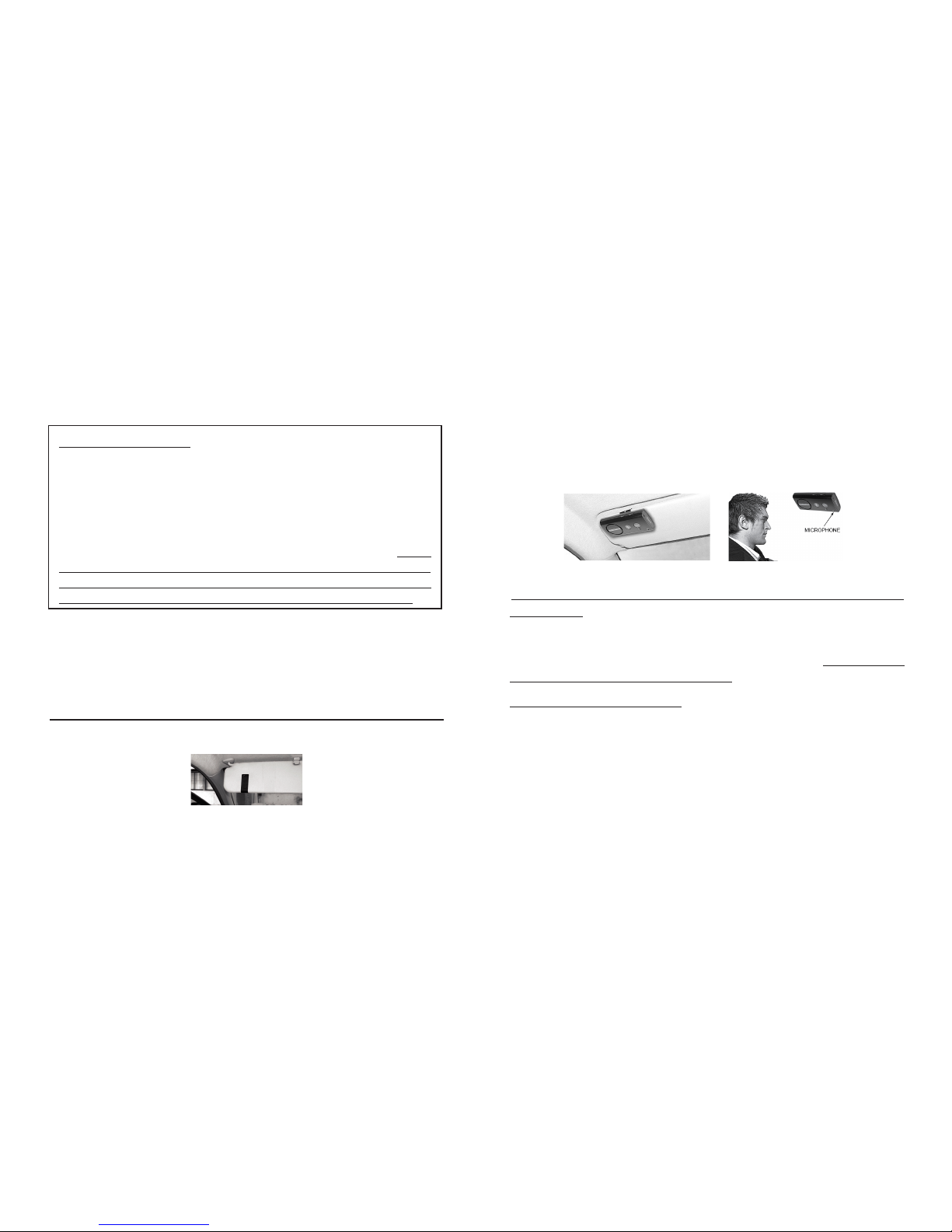
H. Klemm-Montage
Klemmen Sie den Metall-Clip vom SUPERTOOTH VOICE
an Ihre Sonnenblende im Kfz.
I. Basis Funktionen
WICHTIG:
Das HF-Kit muss erst mit Ihrem Bluetooth-Mobiltelefon
„gepaired“ werden, bevor sie die folgenden Funktionen
benutzen können. Lesen Sie dazu Kapitel E Pairing mit
Ihrem Bluetooth-Mobiltelefon.
Anrufen(Normal-Wahl):
Nummer in ihr Telefon eingeben. Ton kommt automatisch
aus Ihrem HF-Kit. Während eines ausgehenden Anrufes
leuchtet die Bluetooth-Anzeige (3) durchgehend blau.
Notieren Sie: Mit einigen Telefonen, wie Siemens S55
und Panasonic X70, kommt der Ton immer aus dem
Telefon während des ausgehenden Anrufes. Sie müssen
Befestigen Sie die magnetisierte Rückwand des
SUPERTOOTH VOICE am Metall-Clip. Das SUPERTOOTH
VOICE muss so xiert werden, dass das Mikrofon in
Richtung des Mundes des Bebrauchers gerichtet ist.
Wichtiger Hinweis: Manche Symbian Telefone erlauben
kein automatisches Adressbuch-Downloaden. In diesem
Fall wird angesagt: „Automatischer Transfer wird
von diesem Telefon nicht Unterstüzt. Bitte lesen Sie
in der Gebrauchsanweisung nach, oder drücken die
rote Taste, um den telefonbuchtransfer abzubrechen”.
Lesen Sie weiter Kapitel F um das Adressbuch manuell
vom Telefon-Menü auf das HF-Kit zu übertragen. Oder
drücken Sie die rote Taste oder End/Reject Button (2)
von Ihrem SUPERTOOTH VOICE um das HF-Kit ohne
Adressbuch-Transfer an ihr Telefon anzuschließen.
Page 28

28
in diesem Fall den MFB (1) Sekunde lang eindrücken um
den Ton auf ihr HF-Kit zu transferieren.
Beantworten eines Anrufes:
Wenn ein Anruf einkommt, wird der Name des
Kontaktes oder die Telefonnummer des Anrufers
vom HF-Kit angesagt. Während des Läutens
drücken Sie die Taste MFB (1) eine Sekunde lang
um den Anruf anzunehmen. Ist dies erfolgt und Sie
antworten dem Anrufer wird die Bluetooth-Anzeige
(3) andauernd blau leuchten.
Oder, angenommen, dass der VOICE ANTWORTER
aktiviert ist: (lesen Sie dazu Kapitel K VOICE
ANTWORTER Aktivieren/Deaktivieren.):
Nach dem Beep-Ton des HF-Kits, akzeptieren Sie einen
Anruf indem Sie laut und deutlich sagen „AKZEPTIEREN“, „ANTWORTEN“ oder „OK“; sagen Sie dies nur
einmal innerhalb 3 Sekunden indem sie laut und deutlich
jede Silbe betonen. Wenn der Anruf beantwortet wird,
leuchtet die Bluetooth-Anzeige (3) durchgehend blau.
Anruf beenden:
Drücken Sie den End/Rejekt Button (2) eine Sekunde
lang, um den Anruf zu beenden. “Anruf beendet“ wird
angesagt.
Voice Dial:
Wichtig: Bevor diese Funktion benutzt werden kann,
müssen Sie sicher sein, dass die Voice Dial Funktion
Ihres Telefons aktiviert worden ist, und dass mindestens
ein voice tag in Ihrem Telefon aufgenommen wurde.
(Bitte lesen Sie dazu die jeweilige Prozedur in Ihrer
Telefon-Gebrauchsanleitung.)
Notieren Sie: Voice Dialing Angaben müssen in Ihrem
Telefon aufgenommen worden sein und nicht auf Ihrer
SIM Karte!)
1. Drücken Sie die Taste MFB (1) eine Sekunde lang.
2. Eine Beep-Ton werden den Gebraucher auffordern, den
„voice-tag“ des anzurufenden Kontaktes auszusprechen
und die Bluetooth- Anzeige (3) wird durchgehend
blau leuchten.
3. Sprechen Sie den „voice-tag“ genauso aus, wie Sie
ihn aufgenommen haben.
4. Der „voice-tag“ wird Ihnen wiederholt und dann wird
das Telefon die Nummer automatisch wählen.
Page 29

29
Wahlwiederholung (Nur für Handfrei Prol Telefone)
Drücken Sie den MFB (1) 3 Sekunden lang. Die zuletzt
gewählte Telefonnummer wird wiedergewählt, und
“Wahlwiederholung“ wird vom HF-Kit angesagt.
Anruf abweisen (Nur für Handfrei Prol Telefone)
Während des Läutens drücken Sie die Taste End/Reject
Button (2) eine Sekunde lang und es wird vom HF-Kit
angesagt:“Anruf abgelehnt“.
Lautstärke einstellen:
Höherstellen oder Leiserstellen des Volumens geschieht
durch Eindrücken der Taste Volume Up (8) oder Volume
down (7). Drücken Sie wiederholt, bis die gewünschte
Lautstärke erreicht ist. Wenn die maximale Lautstärke
erreicht ist, wird das HF-Kit ansagen: „Maximale
Lautstärke“.
Audio Transfer( Nur für Handfrei Prol Telefone)
Während eines Gespräches, können Sie dieses ableiten:
Auf ihr Mobiltelefon: drücken Sie die Taste MFB (1)
eine Sekunde lang und die Wiedergabe wird auf Ihr
Telefon transferiert.
Auf ihr HF-Kit: drücken Sie die Taste MFB (1) eine
Sekunde lang und die Wiedergabe wird auf das HF-Kit
transferiert.
Bitte notieren Sie: Bei einigen Modellen, müssen Sie eine
Verbindungs- Aufforderung des Telefons akzeptieren
bevor der automatische Transfer stattnden kann.
J. Weitere Funktionen
Multi-Pairing/ Verbindungswechsel zwischen
mehreren Telefonen
SUPERTOOTH VOICE kann für bis zu 8 Bluetooth-Telefone
„gepaart“ werden. Ein zusätzliches Pairing wird ein länger
nicht gebrauchtes Telefon automatisch löschen. Also,
kann Ihr SUPERTOOTH VOICE immer 8 Telefone in
seinem Speicher behalten.
Sie können ganz leicht zu jedem der „gepaarten“
Telefone überwechseln:
1. Unterbrechen Sie die Verbindung zum üblich
gebrauchten Telefon indem Sie im Bluetooth-Telefon Menü die „Aktiven Funktionen“ benutzen.
2. Verbinden Sie sich an das gewünschte Telefon indem
Sie die „Pairings Funktionen“ im Bluetooth-Menü des
gewünschten Telefons benutzen.
Page 30

30
Bitte notieren Sie: Wiederverbindung eines „gepaarten“
Telefons kann ebenso durch Gebrauch des MFB (1)
erfolgen. Jedoch wird Ihr BLUETOOTH VOICE
versuchen sich nur an das zuletzt gebrauchte Telefon
anzuschließen. Deshalbwird empfohlen, sich an ein
anderes „gepaartes“ Telefon mit dem Telefon-Menü
anzuschließen.
Erlöschen aller Pairings-Mittel und des Adressbuches:
1. Von AUS, halten Sie die Volume Up (8) Taste
eingedrückt.
2. Gleichzeitig drücken Sie die MFB (1) Taste bis Sie eine
gewisse Melodie auf dem HF-Kit hören, dann wird die
Version auf dem HF-Kit angesagt. Schalten Sie die
Anlage für 10 Sekunden aus. Alle Pairings-Mittel und
auch das Adressbuch sind nun gelöscht.
K. Spezial-Funktionen:
Voice-Antwort-Modus:
Wichtige Notiz: Diese Funktionen kann bei lautem
Hintergrundsgeräusch nicht gut funktionieren.
• Wenn aktiviert, kann der Gebraucher ein Gespräch
annehmen indem er laut und deutlich sagt
„AKZEPTIEREN“, „ANTWORTEN“ oder „OK“; sagen
Sie es nur einmal innerhalb 3 Sekunden und indem
Sie jede Silbe betonen.
• Wenn nicht aktiviert, antworten Sie wie gewöhnlich.
Aktivieren: Halten Sie die Taste Volume Up (8)
5 Sekunden lang eingedrückt Bis eine Stimme sagt
„Sprachantwort aktiviert“ Wenn ein Anruf einkommt,
wird ein Beep-Ton zu hören sein, nach der Ansage des
Namens oder der Telefonnummer des Anrufers.
Deaktivieren: Halten Sie die Taste Volume Down
(7) 5 Sekunden lang eingedrückt, bis eine Stimme
sagt „Sprachantwort deaktiviert“. Wenn ein Anruf
einkommt, werden nur der Name oder die Telefonnummer
des Anrufers angesagt.
Automatisches Wiederverbinden:
Automatisches Wiederverbinden erfolgt, wenn der
Gebraucher ( ohne das HF-Kit abzustellen ) die
Bluetooth Reichweite für mehr als 20 Sekunden
verlässt und dann in Reichweite zurückkommt. In
Page 31

31
diesem Fall, kann das Neu-Verbindungs-System Ihr
HF-Kit mit dem Telefon wieder verbinden sobald der
Gebraucher wieder in Reichweite ist.
Bitte notieren Sie: Diese Automatische Wiederverbindung
kann bis zu 10 Sekunden benötigen nachdem der
Gebraucher wieder in Reichweite ist.
Im Falle einer gewollten Unterbrechung (Benutzen
des Menüs), wird das System nicht wieder verbunden.
(Britisches Englisch, Amerikanisches
Englisch, Französisch
, Italienisch,
Spanisch und Deutsch)
*Full Duplex
*Full DSP Geräuschunterdrückung
und Echounterdrückung
*Digitale Volumen Kontrolle
*Wählen durch Stimm-Erkennung
(wenn das Telefon diese Funktion hat)
*Wiederwahl der letzten
Telefonnummer
*Einkommendes Gespräch
abweisen
*Kann auch direkt via eines
PCs oder via USB-Kabel
(nicht
mitgeliefert)
aufgeladen werden
*Kompakte Maße
*Beantworten einkommender
Gespräche mit dem „voice control“
*Vollautomatisches Wiederverbinden
Installation: Schnelle Montage an der
Sonnenblende durch Magnet-Clips
Maße: 18.2 x 60.2 x 122
Gewicht: 115
Supertooth Voice Leistungsmerkmale
Bluetooth Konformität: Bluetooth-Version 2.0
Spezizierungen
Bluetooth-Prol Beistand: Headsets und handfrei Prole
mit Automatischer Erkennung
Funktionsreichweite: Bis zu 10 Meter
Frequenz: 2.4 GHz
Gesprächs-Zeit: Bis zu 15 Stunden
Standby-Zeit: Bis zu 800 Stunden
Ladezeit: 3 Stunden
Akku-Typ: Li-Ion-Akku
Spezial Eigenschaften: Stimme für Ansagen der Anrufer,
Identitäten, Bluetooth-Status und
Angaben, begleitet Sie in 6 Sprachen
Page 32
32
A. Productbeschrijving
SUPERTOOTH VOICE is een hands free kit voor Bluetooth
die hoofdtelefoon of hands free telefoons ondersteunt.
Zijn speciale kenmerken omvatten een Volledige DSP
Ruis-onderdrukking / Echo-onderdrukking. Zo zorgt het
voor een geavanceerde geluidskwaliteit. Zijn ontwerp laat
een gemakkelijke hands free bediening en uitstekende
prestaties toe.
Deze kit bevat een Tekst-naar-Spraak (Text-to-Speech)
systeem. De stem kondigt de gebruiksinstructies in 6
talen aan. Het geeft de status van het Bluetooth-toestel
en het vermeldt de naam (of het telefoonnummer indien
de contactpersoon niet in de kit werd opgeladen) van de
beller!
Niet vergeten: Rij veilig en respecteer de wet.
Ga na of de nationale of de lokale wetgeving die van kracht
is in uw land het gebruik van mobiele telefoons tijdens het
rijden niet verbiedt. Het is de verantwoordelijkheid van de
gebruiker van dit product om de vermelde wetgeving van
zijn woonplaats na te leven.
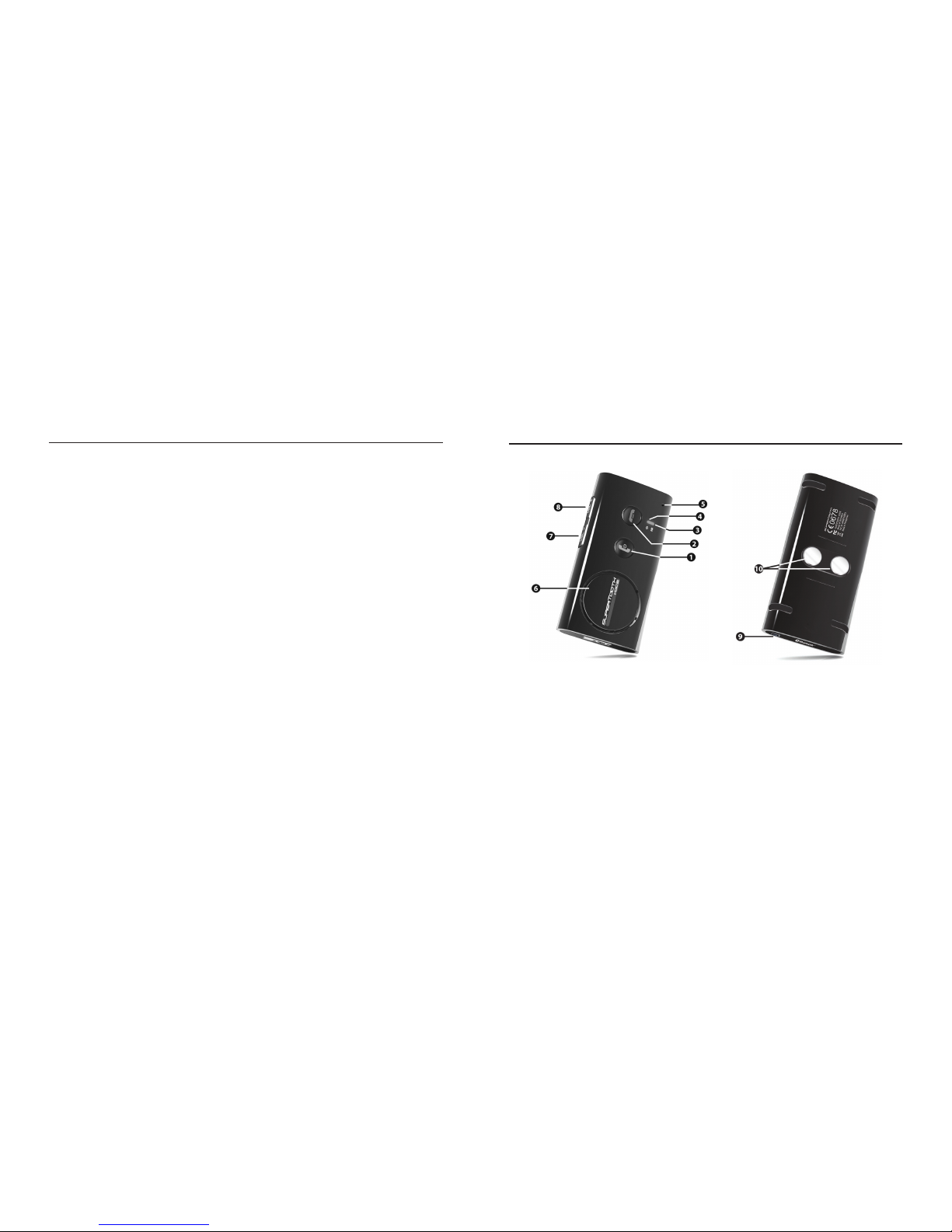
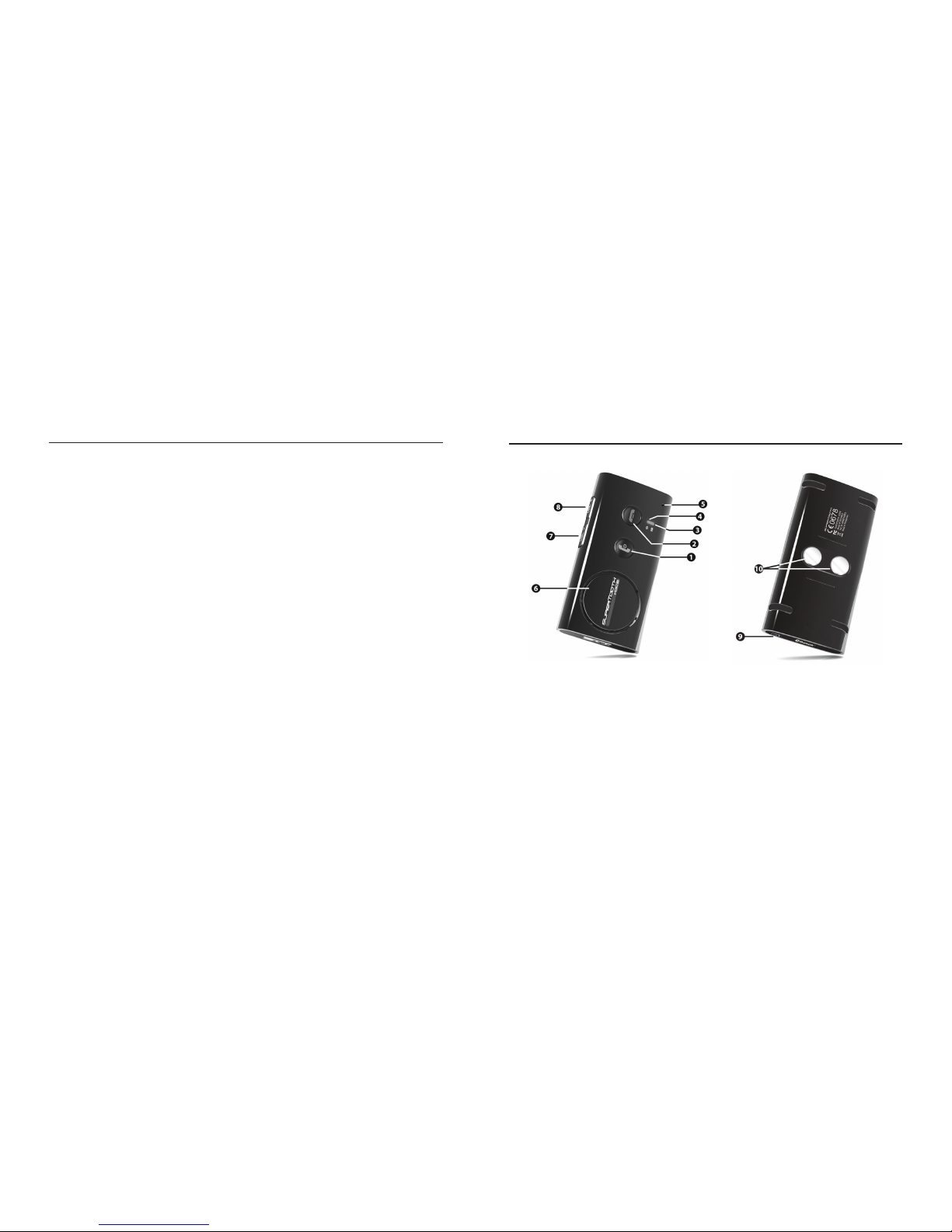
B. Productoverzicht
1 MFB of Multi-functionele knop
(ingeschakeld/uitgeschakeld / pairing
/ antwoord / Stemgestuurd kiezen /
herkiezen / geluidstransfer)
2 End/Reject Button Einde Verwerpknop
(end & reject call / reload phonebook /
einde en weigeren oproep / herladen
Telefoonboek)
3 Bluetooth Indicator
(Bluetooth indicatorlichtje)
4 Charge Indicator
(lader indicatorlichtje)
5 Microphone (microfoon)
6 Luidspreker
7 Volume Down (volume lager)
8 Volume Up (volume hoger)
9 Charger Port (laderport)
10 Magnets (magneten)
Page 33
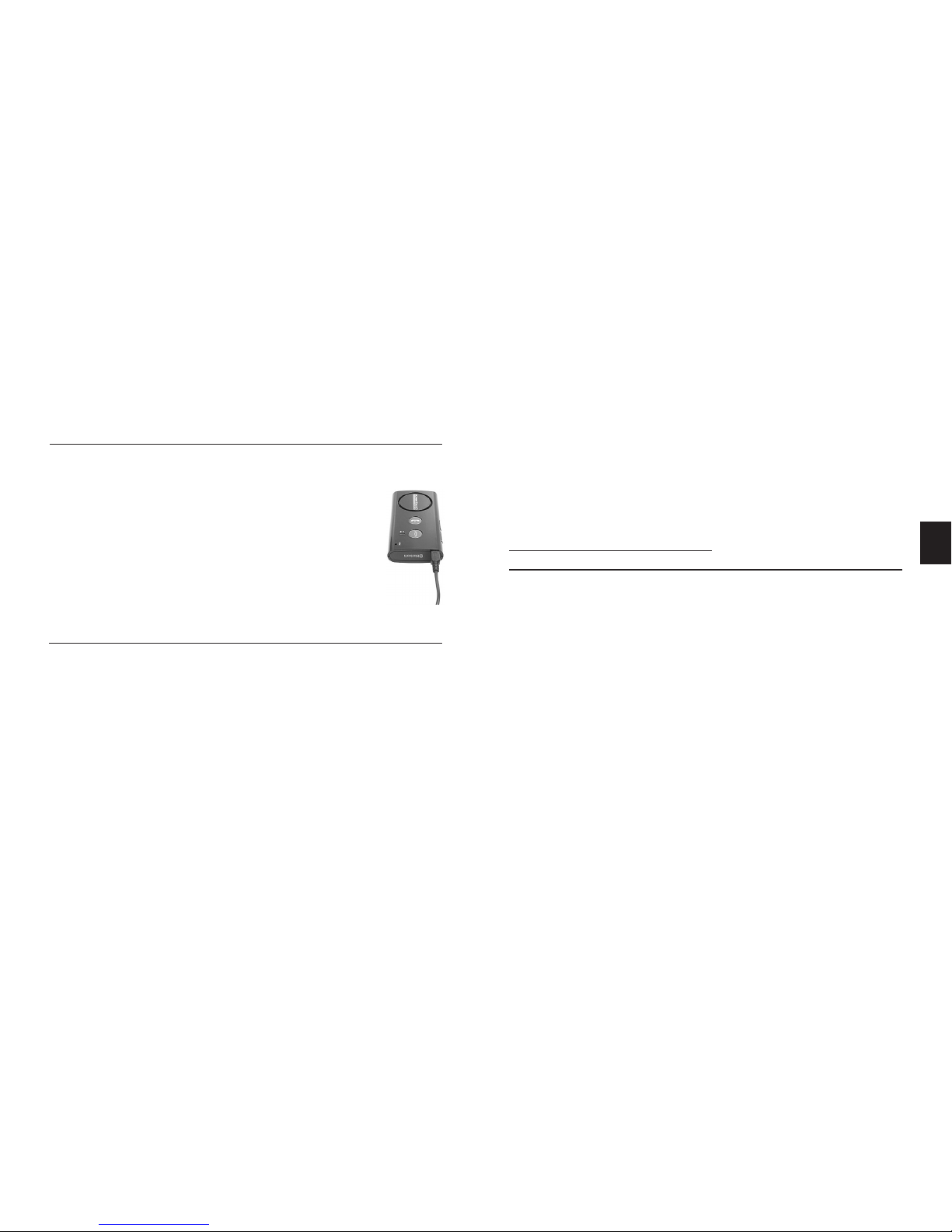
33
C. Laden
1. Sluit de laderplug aan op de Laderport (9) van de
SUPERTOOTH VOICE. Sluit de lader aan op een
externe energiebron.
indicatorlichtje lader (4) Status:
Constant rood: Batterij Laag Spraak : Low battery
Constant oranje : Aan het laden Spraak : Charging
Constant groen: Batterij vol Spraak : Fully Charged
2. Na het volledig opladen koppelt
u de lader af.
D. Ingeschakeld/Uitgeschakeld
Ingeschakeld: Druk op MFB (1) gedurende 1 seconde. Het
Bluetooth indicatorlichtje (3) zal blauw beginnen
te knipperen en een stem zegt “SUPERTOOTH
VOICE ready. Connected to phone (“SUPERTOOTH
VOICE klaar. Aangesloten op telefoon”) (of indien de
telefoon niet beschikbaar is:
No phone detected
(Geen telefoon vastgesteld) Opmerking: Wanneer de
SUPERTOOTH VOICE voor de eerste maal wordt
ingeschakeld, wordt de taalselectie automatisch
geactiveerd. Ga naar Hoofdstuk E (Procedure 2).
Uitgeschakeld: Druk op MFB (1) gedurende 5 seconden
tot een stem aankondigt “SUPERTOOTH VOICE
powering down.” (“SUPERTOOTH VOICE van
energie voorzien”) Het Bluetooth indicatorlichtje
(3) zal gedurende 4 seconden constant rood
branden en daarna worden uitgeschakeld.
E. Selectie van de taal en
pairing met uw Bluetooth Mobiele Telefoon
Deze kit stelt 6 talen voor. Dit zijn Brits Engels, Amerikaans
Engels, Frans, Italiaans, Spaans en Duits.
Nadat u uw taal geselecteerd heeft, pairt u de SUPERTOOTH
VOICE met uw Bluetooth mobiele telefoon om de
verbinding of u maakt een geluidsverbinding tussen de
twee te maken. U hoeft alleen bij de eerste aansluiting
met een telefoon te pairen.
Procedure:
1. In de stand OFF (Uit), drukt u op MFB (1) gedurende 6
seconden tot het Bluetooth indicatorlichtje (3) rood/
blauw gaat knipperen. Een stem kondigt aan “Press
green button to select British English.” (“Druk
op de groene knop om Brits Engels te selecteren”)
Daarna volgen de instructies voor de andere talen.
NL
Page 34

34
2. Zodra de gewenste taal wordt gesproken, drukt u op de
groene knop of MFB (1) om die te kiezen.
Wanneer Brits Engels werd gekozen, zal een stem
aankondigen “British English selected. From
phone’s Bluetooth menu, search for devices
then select ST VOICE and enter pincode 0000.”
(“Brits Engels geselecteerd. In het Bluetooth
telefoonmenu, zoekt u de toestellen, dan selecteert
u ST VOICE en voert u de pincode 0000 in”) Nu is
de kit klaar om te pairen.
Opmerking: Wanneer u de verkeerde taal geselecteerd
hebt, schakelt u de SUPERTOOTH VOICE uit en zet u
hem opnieuw in de pairingmodus om nogmaals uit de
beschikbare talen te kiezen.
3. Terwijl de kit in de pairingmodus staat, gaat u naar
het Bluetooth-menu van uw telefoon. Schakel de
Bluetooth-functie in en voer een Bluetooth-opzoeking
uit (zie handleiding van uw telefoon).
4. Wanneer de telefoon de lijst van Bluetooth-toestellen
weergeeft, selecteert u ST VOICE.
5. Voer het paswoord/pincode 0000 in en druk op OK.
“Pairing successful to phone. Loading phonebook.
Please wait.” (“Pairing met telefoon geslaagd.
Telefoonboek wordt geladen. Eventjes geduld”). zal op
de kit worden aangekondigd.
6. De contactpersonen van uw telefoon worden in de
kit gedownload. Het Bluetooth indicatorlichtje
(3) wordt gedurende 1-2 seconden purper.
Opmerking: Bij sommige telefoons komt een vraag of
verzoek op het scherm voordat het telefoonboek op
de kit wordt gedownload. Aanvaard elk verzoek (bijv.
Aansluiting...? Internettoegang toegelaten ...?).
7. Het aantal contactpersonen zal worden aangekondigd
terwijl het downloaden bezig is.
BELANGRIJKE OPMERKING: Sommige Symbiantelefoons ondersteunen het automatisch downloaden
van het telefoonboek niet. In dit geval zal “Automatic
transfer not supported by phone. Please refer to
manual or press red button to cancel phonebook
transfer.” worden aangekondigd, ga naar Hoofdstuk
F om het telefoonboek handmatig van het telefoonmenu naar de kit over te maken of druk op de rode
knop of End/Reject knop (2) van SUPERTOOTH
VOICE om de kit op de telefoon aan te sluiten zonder
transfer van het telefoonboek.
Page 35

35
F. Automatische Transfer die niet
wordt ondersteund door de telefoon
Wanneer de automatische transfer van het telefoonboek
mislukte, kunt u de contactpersonen naar de SUPERTOOTH
VOICE zenden of overmaken door ze via Bluetooth te sturen.
BELANGRIJK:
Deze procedure zal alleen direct na het pairen of direct na
8. Wanner het downloaden beëindigd is, wordt
“SUPERTOOTH VOICE ready. Connected to phone”
(“SUPERTOOTH VOICE klaar. Aangesloten
op telefoon”) aangekondigd. Aanvaard de
aansluitingsaanvraag van de telefoon wanneer een
prompt op het scherm verschijnt.
Belangrijke opmerking: De meeste telefoons worden
automatisch met de kit verbonden na het pairen. Bij
sommige telefoons moet u de verbinding handmatig
maken na het pairen. Ga terug naar Bluetooth
>Gepairde toestellen > kies ST VOICE > druk op
Opties >druk daarna op Verbinding.
De kit is nu gebruiksklaar. Wanneer de gebruiker een
oproep krijgt op zijn mobiele telefoon, zal de naam van de
beller op de kit worden aangekondigd.
een update van het telefoonboek werken (zie respectievelijk
Hoofdstukken E en G).
Procedure:
1. Er zijn twee manieren om de procedure uit te voeren ,
afhankelijk van het model van uw telefoon.
De gebruikelijke manier is:
a. Ga naar het Telefoonboek van uw telefoon.
b. Kies een contactpersoon of –personen die u naar
de kit wenst te zenden.
Opmerking: Kies “Alles markeren” (wanneer
deze optie in uw telefoon beschikbaar is) om
alle contactpersonen ineens door te sturen. Er
zijn echter telefoons die het doorsturen van alle
contactpersonen ineens niet ondersteunen. Dan
dient u ze één voor één te versturen.
c. Kies om de contactpersonen via Bluetooth te
versturen > selecteer ST VOICE
Opmerking: Op bepaalde telefoons is de transfer
van SIM-contactpersonen onmogelijk.
Of,
De andere manier is:
a. Ga naar de
Opties- icoon in uw telefoon.
Page 36
36
b. Kies Bluetooth > kies ST VOICE > druk op de
-toets > Kies Transfer Adresboek.
c. Kies de transfer via Bluetooth > selecteer ST VOICE.
2. “Loading phonebook. Please wait.” (“Telefoonboek aan
het laden. Even geduld”) wordt aangekondigd op de kit.
3. Het aantal contactpersonen wordt aangekondigd
naarmate het downloaden vordert.
4. Na een paar seconden verschijnt op de telefoon
“Gegevens
verstuurd” of de kit zal aankondigen “SUPERTOOTH
VOICE ready. Connected to phone.” (“SUPERTOOTH
VOICE klaar. Aangesloten op detelefoon”). Bij
sommige telefoons moet u een aansluitingsprompt
op de telefoon aanvaarden voor de omschakeling
plaatsvindt.
De kit is nu gebruiksklaar. Wanneer de gebruiker een
oproep op zijn mobiele telefoon krijgt, zal de naam van de
beller op de kit worden aangekondigd.
G. Update van het telefoonboek
Wanneer u een contactpersoon in uw telefoon herbenoemd
of toegevoegd hebt, kunt u uw telefoonboek van de
SUPERTOOTH VOICE opfrissen zodat de kit de
verandering kan herkennen.
Procedure:
1. Zorg ervoor dat de telefoon is aangesloten aan de kit.
In de standby-modus drukt u gedurende 10 seconden
op de End/Reject Button (Eind/Verwerpingknop) (2) .
2. “Loading phonebook. Please wait.” (“telefoonboek
wordt opgeladen. Even geduld”) wordt aangekondigd.
Tegelijkertijd zal de telefoon worden uitgeschakeld.
Opmerking: Bij sommige telefoons komt een vraag of
verzoek op het scherm voordat het telefoonboek op
de kit wordt gedownload. Aanvaard elk verzoek (bijv.
Aansluiting...? Internettoegang toegelaten ...?
3. Het aantal contactpersonen zal worden aangekondigd
terwijl het downloaden bezig is.
BELANGRIJKE OPMERKING: Sommige Symbiantelefoons ondersteunen het automatisch downloaden
van het telefoonboek niet. In dit geval zal “Automatic
transfer not supported by phone. Please refer to
manual or press red button to cancel phonebook
transfer.” worden aangekondigd, ga naar Hoofdstuk
F om het telefoonboek handmatig van het telefoonmenu naar de kit over te maken of druk op de rode
knop of End/Reject knop (2) van SUPERTOOTH
VOICE om de kit op de telefoon aan te sluiten zonder
transfer van het telefoonboek.
Page 37
37
4. Wanneer het downloaden beëindigd is, wordt
“SUPERTOOTH VOICE ready. Connected to phone”
(“SUPERTOOTH VOICE klaar. Aangesloten op telefoon”)
aangekondigd. Aanvaard de aansluitingsaanvraag van
de telefoon wanneer een prompt op het scherm komt.
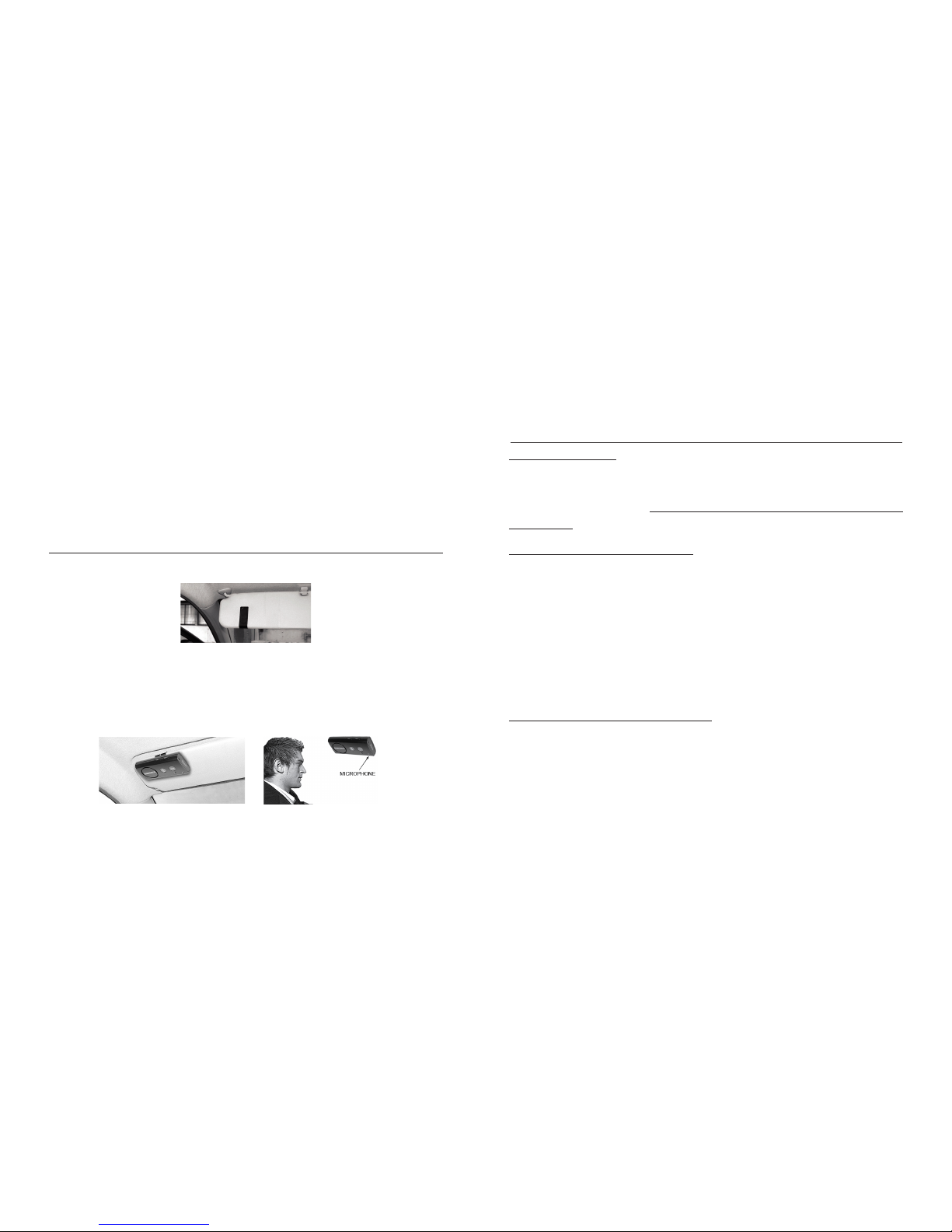
H. Installatie
Bevestig de metalen clip van SUPERTOOTH VOICE op
de zonneklep.
Bevestig de magnetische achterkant van SUPERTOOTH
VOICE aan deze metalen clip. De SUPERTOOTH VOICE
moet zodanig worden geplaatst dat de microfoon naar de
mond van de gebruiker gericht is.
I. Basisfuncties
BELANGRIJK:
De kit moet eerst aan uw Bluetooth mobiele telefoon
worden “gepaird” voordat volgende functies kunnen
worden gebruikt. Zie Pairing van uw Bluetooth Mobiele
Telefoon in Hoofdstuk E.
Bellen (normaal kiezen) :
Voer het nummer in op uw telefoon. Het geluid komt
automatisch op de kit. Tijdens de oproep zal het
Bluetooth Indicatorlichtje (3) constant blauw worden.
Opmerking: Bij sommige telefoontoestellen, zoals de
Siemens S55 en de Panasonic X70, is het geluid steeds
op de telefoon aanwezig tijdens een uitgaande oproep. U
moet gedurende 1 seconde op MFB (1) drukken om het
geluid naar uw kit over te maken.
Een oproep beantwoorden:
Wanneer u een oproep ontvangt, zal de naam
of het telefoonnummer van de beller op de kit
worden aangekondigd. Tijdens de beltoon drukt
u gedurende 1 seconde op MFB (1) om de
oproep te beantwoorden. Wanneer de oproep is
Page 38

38
beantwoord, wordt de Bluetooth Verklikkerlamp
(3) constant blauw.
Of, in de veronderstelling dat Voice Answer
(Stemrespons) werd geactiveerd (zie Voice
Answer Activation/Deactivation (Stemrespons
Activering/Deactivering) in Hoofdstuk K):
Nadat u een biep op de kit gehoord hebt, aanvaardt
u een oproep door luid en duidelijk te zeggen
“ACCEPT”, “AANVAARD”, “ANTWOORD” of “OK”;
zeg het slechts eenmaal en binnen de 3 seconden
en leg de nadruk op elke lettergreep. Wanneer een
oproep wordt beantwoord, wordt het Bluetooth
indicatorlichtje (3) constant blauw.
Een oproep beëindigen:
Druk gedurende 1 seconde op de End/Reject-knop (2) om
de oproep te beëindigen. “End of call” (“Einde gesprek”)
zal worden aangekondigd.
Stemkiezen:
Belangrijk: vooraleer u deze eigenschap gebruikt,
moet u nagaan of de stemkiesfunctie van uw telefoon
is geactiveerd en er minstens één voice tag op uw
telefoon werd opgenomen (Raadpleeg de procedure
in de handleiding van uw telefoon) Opmerking: De
stemkiesinvoer moeten worden opgeslagen in het
telefoongeheugen, niet op de sim-kaart!
1. Druk gedurende 1 seconde op MFB (1) .
2. U hoort een stemkiesbiep op de kit om de gebruiker
aan te zetten de voice tag van de op te roepen
contactpersoon te zeggen en het Bluetooth
Indicatorlichtje (3) wordt constant blauw.
3. Zeg de voice tag exact zoals u ze hebt opgeslagen.
4. U krijgt de voice tag te horen en dan zal de telefoon
automatisch het nummer kiezen.
Herkiezen (Alleen voor handenvrije telefoons):
Druk gedurende 3 seconden op MFB (1). Het laatst
gekozen nummer wordt opnieuw gekozen en “Redialing”
(“Herkiezen”) wordt op de kit aangekondigd.
Reject a Call (Een oproep weigeren)
(Alleen voor handenvrije telefoons):
Wanneer u de beltoon hoort, drukt u gedurende 1
seconde op de End/Reject (Einde/Weigeren)-knop (2).
De binnenkomende oproep wordt geweired en “Call
Page 39

39
rejected” (“Oproep geweigerd”) zal door de kit worden
aangekondigd.
Volume-instelling:
Verhoog of verlaag het volume door de Volume Up (hoger)
(8) of Volume Down (lager) (7)-knop in te drukken. Druk
meermaals tot het gewenste niveau bereikt word. Het
Bluetooth indicatorlichtje (3) wordt paars wanneer de
laagste en hoogste niveaus worden bereikt. Wanneer
het maximumvolume werd bereikt, wordt “Maximum
Volume” aangekondigd op de kit.
Geluidstransfer (alleen voor handenvrije telefoons):
Tijdens een oproep kunt u het geluid overschakelen.
Kit naar Telefoon: Druk gedurende 3 seconden
op MFB (1) om het geluid via de telefoon te horen.
Telefoon naar Kit: Druk gedurende 1 seconde op
MFB (1) om het geluid via de kit te horen.
Opmerking: Voor sommige telefoontoestellen moet u de
aansluitingsprompt op de telefoon aanvaarden voordat
de automatische overschakeling plaatsvindt.
J. Gevorderde Functies
Multi-Pairing / Schakelverbindingen tussen telefoons
De SUPERTOOTH VOICE kan worden gepaird met
8 Bluetooth telefoons. Een bijkomende pairing zal
automatisch de telefoon die het langst niet werd gebruikt
wissen. Zo houdt de SUPERTOOTH VOICE steeds 8
telefoons in zijn geheugen.
U kunt gemakkelijk naar één van de gepairde telefoons
overschakelen door:
1. de huidige gebruikte telefoon af te koppelen door
gebruik te maken van “Active devices (Actieve
toestellen)” in het Bluetooth-menu van deze telefoon.
2. aan te sluiten op de gewenste telefoon door gebruik
te maken van “Paired devices (gepairde toestellen)”
in het Bluetooth-menu van de gewenste telefoon.
Opmerking: De heraansluiting aan een gepairde telefoon
kan eveneens gebeuren door op MFB (1) te drukken.
De SUPERTOOTH VOICE probeert alleen aan te sluiten
op de laatst gebruikte telefoon. Daarom is het aan te
raden op een andere gepairde telefoon aan te sluiten via
het telefoonmenu.
Page 40

40
Alle gepairde toestellen en het telefoonboek wissen:
1. In OFF drukt u op de Volume Up (8) –knop en houdt
u hem ingedrukt.
2. Terwijl u de Volume Up (8)-knop ingedrukt houdt,
drukt u gedurende 1 seconde op MFB (1) tot u een
kenmerkende melodie op de kit hoort, en de versie
worden op de kit aangekondigd. Schakel nu de kit
gedurende 10s uit.
Alle gepairde toestellen en het telefoonboek zijn nu
gewist.
• Wanneer gedeactiveerd, beantwoord de oproep zoals
normaal.
Activering: Druk gedurende 5 seconden op de Volume
Up (8) –knop tot een stem aankondigt “Voice answer
enabled” (“Stemrespons geactiveerd”). Wanneer u
nu een oproep ontvangt, zal u een biep horen nadat
de naam of het telefoonnummer van de beller werd
aangekondigd.
Deactivering: Druk gedurende 5 seconden op de
Volume Down (7) –knop tot een stem aankondigt,
“Voice answer disabled” (“Stemrespons
gedeactiveerd”). Wanneer u een oproep krijgt, zal
enkel de naam of het telefoonnummer van de beller
worden gehoord op de kit.
Automatische Heraansluiting:
Automatische heraansluiting doet zich voor wanneer de
gebruiker (zonder de kit UIT te schakelen) gedurende
meer dan 20 seconden buiten het Bluetoothbereik gaat en dan naar het bereik terugkeert. In
dit geval is een nieuw heraansluitingssysteem in
staat de kit aan de telefoon aan te sluiten zodra de
gebruiker terug bereik heeft. Opmerking: Het kan t
K. Speciale Funkties
Stemresponsmodus:
Belangrijke mededeling: Het kan zijn dat deze Funktie
niet goed werkt in een auto met veel achtergrondlawaai.
• Na de activering kan de gebruiker een oproep
aanvaarden door luid en duidelijk “ACCEPT”,
“AANVAARD”, “ANTWOORD” of “OK” te zeggen;
zeg het slechts eenmaal en binnen de 3 seconden en
benadruk elke lettergreep.
Page 41

41
tot 10 seconden duren voordat de gebruiker opnieuw
bereik heeft met de automatische heraansluiting.
In geval van vrijwillige afsluiting (door gebruik te
maken van het telefoonmenu) is dit systeem niet
geactiveerd.
Specicaties SUPERTOOTH VOICE
Frans, Italiaans, Spaans en Duits).
*Full Duplex
*Volledige DSP
Ruis-onderdrukking
*Digitale Volumecontrole
*Kiezen met stemherkenning
(indien de telefoon dit ondersteunt)
*Herkiezen laatste oproep
*Weigeren van
binnenkomende oproep
*Kan eveneens rechtstreeks
worden opgeladen meteen
PC via USB-kabel
(niet meegeleverd)
*Compacte afmetingen
*Beantwoorden van
binnenkomende oproepen
door stemcontrole
*Volledige automatische
herkenning
Installatie: Snelle bevestiging op
zonneklep via magnetische clip
Afmetingen (mm): 18.2 x 60.2 x 122
Gewicht :
115 g
Bluetooth compatibiliteit: Bluetooth versie 2.0
specicaties
Ondersteunde
Bluetooth-proelen: ondersteunt hoofdtelefoon
en hands free proelen met
automatische detectie.
Werkbereik: tot 10 meter
Frequentie: 2,4 GHz
Spreekduur: tot 15 uur
Stand-by-tijd: tot 800 uur
Laadtijd : 3 uur
Batterijtype : Oplaadbare Lithium Ion
Speciale kenmerken: *Stem om de belleridentiteit
aante kondigen, net als de
toestelstatus van Bluetooth en
de instructie handleiding in 6
talen (Brits Engels, Amerikaans Engels,
Page 42
42
A. Descripción del producto
SUPERTOOTH VOICE es un kit manos libres Bluetooth
que soporta teléfonos con perl Bluetooth auricular o
manos libres. Sus características especiales incluyen
Supresión de Ruido y de Eco gracias al DSP Total. Por lo
tanto, suministra una calidad de sonido avanzada. Está
diseñado para una utilización manos libres fácil y un
rendimiento superior.
Este kit incluye un sistema de “Texto a voz”. La voz
anuncia instrucciones para los usuarios en 6 idiomas
distintos. Indica el estado del dispositivo Bluetooth y
anuncia el nombre (o el número de teléfono si el contacto
no está almacenado en el kit) del llamador entrante.
No se olvide: conduzca de manera segura y
respetando la ley.
Verique si la legislación nacional o local vigente en
su país efectivamente limita la utilización de teléfonos
móviles mientras se conduce. Depende del usuario de
este producto respetar dicha legislación en la zona donde
vive.
B. Presentación del producto
1 Botón BMF o multifunciones
(encendido y apagamiento/acoplamiento
/contestar/ marcación vocal/
remarcación/transferencia de audio)
2 Botón Terminar/Rechazar
(terminar y rechazar llamada/recargar
agenda telefónica)
3 Indicador Bluetooth
4 Indicador de carga
5 Micrófono
6 Altavoz
7 Bajar volumen
8 Subir volumen
9 Puerto del cargador
10 Imanes para soporte
Page 43
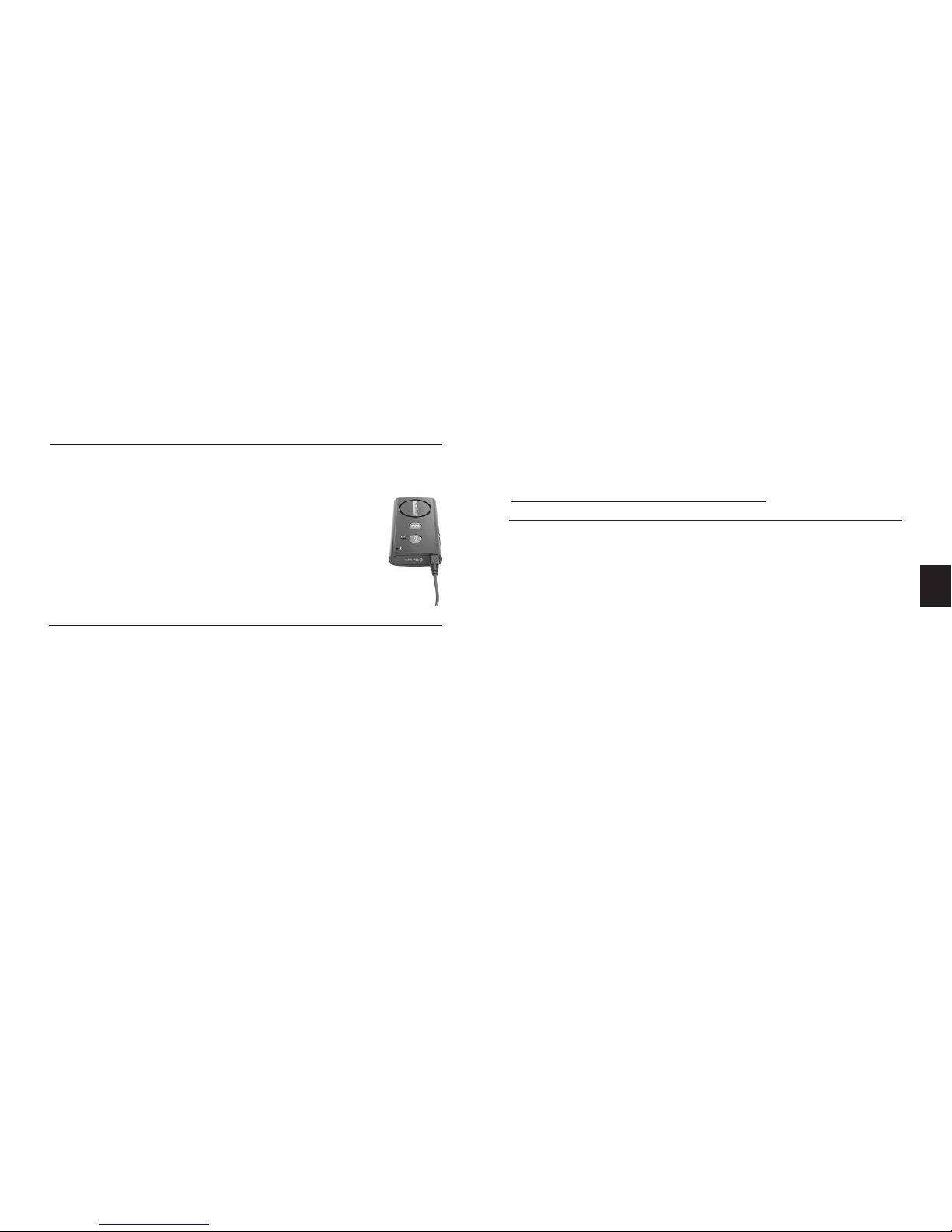
43
C. Carga
1. Conecte la clavija del cargador en el puerto del
Cargador (9) del SUPERTOOTH VOICE. Conecte
el cargador a una fuente de alimentación externa.
Estado del indicador de carga (4):
Rojo jo: Batería baja Voz: Batería baja
Naranja jo: Cargando Voz: Cargando
Verde jo: Batería llena Voz: Totalmente cargado
2. Cuando esté totalmente cargado,
desconecte el cargador.
D. Encendido/Apagado
Encendido: pulse el BMF (1) durante 1 segundo. El
indicador Bluetooth (3) se pondrá a parpadear en
azul y el kit pronunciará: “Supertooth Voice preparado. Teléfono conectado (o si el teléfono no
está disponible: Ningún móvil detectado)”. Nota:
la primera vez que encienda el SUPERTOOTH
VOICE es encendido, la selección de idioma se
activa automáticamente. En este caso, vaya a la
Sección E (Procedimiento 2).
Apagado: pulse y mantenga pulsado el BMF (1) du-
rante 5 segundos hasta que el kit una voz anuncie:
“SUPERTOOTH VOICE apagado”. El indicador
Bluetooth (3) se encenderá en color de rojo jo
durante 4 segundos y luego se apagará.
E. Selección de idioma y enlace
con su teléfono móvil Bluetooth
Este kit posee 6 idiomas. Estos son Inglés británico,
Inglés americano, Francés, Italiano, Español y Alemán.
Después de seleccionar su idioma, enlace el SUPERTOOTH
VOICE con su teléfono móvil Bluetooth para crear la
conexión de audio entre ambos. El enlace solo debe
ser realizado en la primera conexión a un teléfono.
Procedimiento:
1. A partir de OFF (APAGADO), pulse y mantenga
pulsado el BMF (1) durante 6 segundos hasta que
el indicador Bluetooth (3) se ponga a parpadear
en rojo/azul. Entonces el kit anunciará: “Pulse
la tekla verde para selectionar Espanol”. Las
instrucciones para otros idiomas serán anunciadas
seguidamente.
2. En cuanto el idioma deseado sea mencionado, pulse
el botón verde o BMF (1) para activarlo. Si se escoge
ES
Page 44

44
Español , el kit anunciará: “Español Seleccionado
Active la búsqueda de dispositivos bluetooth en su
móvil Seleccione ST VOICE y entre el pin 0000”. Esto
signica que el kit está ahora listo para enlazarse.
Nota: si usted seleccionó el idioma equivocado,
simplemente apague el SUPERTOOTH VOICE y
vuelva a ponerlo en el modo de acoplamiento para
poder seleccionar una vez más entre los idiomas
disponibles.
3. Mientras el kit está en el modo de enlace, entre en
el menú Bluetooth de su teléfono. Active la función
Bluetooth y luego ejecute una búsqueda de
dispositivos. (Consulte el manual de su teléfono).
4. Cuando el teléfono muestre la lista de los dispositivos
Bluetooth, seleccione ST VOICE.
5. Introduzca la contraseña/código pin 0000 y pulse
OK. “Supertooth Voice enlazado con el teléfono.
Actualizando los contactos. Por favor espere.” será
anunciado en el kit.
6. Los contactos en su teléfono serán descargados
en el kit. El indicador Bluetooth (3) se ilumina en
color pone violeta durante 1-2 segundos.
Nota: algunos teléfonos mostrarán una pregunta
o solicitud en la pantalla del teléfono antes de
permitir que el kit descargue la agenda telefónica.
Simplemente acepte cualquier solicitud (p. ej:
¿Conexión…?, ¿Permitir acceso a Internet…?,
¿DUN…?).
7. El número de contactos será anunciado mientras
que la descarga está en curso.
8. Cuando la descarga haya terminado, se anunciará:
“Supertooth Voice preparado. Teléfono conectado.”
AVISO IMPORTANTE: algunos teléfonos Symbian
no soportan la descarga automática de la agenda
telefónica. En este caso, “El telephono no supporta
la transferencia automática. Por favor, consulte
el manual, o pulse la tekla rojo para cancelar
transferencia.” será anunciado, y luego debe ir a
la Sección F para transferir la agenda telefónica
manualmente desde el menú del teléfono al kit o
pulsar el botón rojo o el botón Terminar/Rechazar
(2) del SUPERTOOTH VOICE para conectar el kit con
el teléfono sin transferencia de la agenda telefónica.
Page 45

45
Acepte la solicitud de conexión del teléfono si aparece
un indicador.
Nota importante: la mayoría de los teléfonos se conecta
automáticamente con el kit después del enlace.
Con algunos teléfonos usted tiene que conectar
manualmente después del enlace. Regrese a Bluetooth
> Dispositivos acoplados > resalte ST VOICE > pulse
Opciones > luego pulse Conectar.
El kit está ahora listo para ser utilizado. Cuando una
llamada es recibida en el teléfono móvil del usuario, el
nombre del llamador entrante será anunciado en el kit.
F. Transferencia automática
no soportada por el teléfono
Si la transferencia automática de la agenda telefónica no
se completó, usted puede enviar o transferir los contactos
al SUPERTOOTH VOICE enviándolos a través de Bluetooth.
IMPORTANTE:
Este procedimiento solo funcionará justo después de
enlazar o justo después de la actualización de la agenda
telefónica (ver Secciones E y G respectivamente).
Procedimientos:
1. Existen dos modos de realizar el procedimiento según
el modelo de su teléfono.
El procedimiento más usual es:
a. Vaya a
Agenda telefónica de su teléfono.
b. Escoja un contacto o contactos que quiera enviar al kit.
Nota: escoja “Marcar todos” (si esta opción está
disponible en su teléfono) para poder enviar todos
los contactos de una sola vez. Sin embargo, hay
teléfonos que no soportan el envío de contactos
de una sola vez. Por lo tanto, usted debe enviarlos
uno por uno.
c. Escoja enviar los contactos a través de Bluetooth
> seleccione ST VOICE.
Nota: en algunos teléfonos, la transferencia de
contactos SIM es imposible.
O,
El otro procedimiento es:
a. Vaya al icono Opciones en su teléfono.
b. Escoja
Bluetooth > Resalte ST VOICE > Pulse la
tecla > Escoja Transferir agenda.
c. Escoja transferir a través de Bluetooth >
seleccione ST VOICE.
Page 46

46
2. “Actualizando los contactos. Por favor espere.”
será entonces anunciado en el kit.
3. El número de contactos será anunciado mientras que
la descarga está en curso.
4. Después de algunos segundos, el teléfono mostrará
“Datos enviados” o el kit anunciará “Supertooth Voice
preparado. Teléfono conectado”. Para algunos
teléfonos, pueda ser que usted tenga que aceptar
cualquier indicador de conexión en el teléfono antes
de que ocurra la reconexión.
El kit está ahora listo para ser utilizado. Cuando una
llamada es recibida en el teléfono móvil del usuario, el
nombre del llamador entrante será anunciado en el kit.
2.
“Actualizando los contactos. Por favor espere.”
será anunciado. Al mismo tiempo, el teléfono se
desconectará.
Nota: algunos teléfonos mostrarán una pregunta o
solicitud en la pantalla del teléfono antes de permitir
que el kit descargue la agenda telefónica. Simplemente
acepte cualquier solicitud (¿ Conexión…?,¿ Permitir
acceso a Internet…?, ¿DUN…?).
3. El número de contactos será anunciado mientras que
la descarga está en curso.
AVISO IMPORTANTE: algunos teléfonos Symbian
no soportan la descarga automática de la agenda
telefónica. En este caso, “El telephono no supporta
la transferencia automática. Por favor, consulte
el manual, o pulse la tekla rojo para cancelar
transferencia.” será anunciado, y luego debe ir a
la Sección F para transferir la agenda telefónica
manualmente desde el menú del teléfono al kit o
pulsar el botón rojo o el botón Terminar/Rechazar
(2) del SUPERTOOTH VOICE para conectar el kit con
el teléfono sin transferencia de la agenda telefónica.
G. Actualización de la agenda telefónica
Si usted modica o añade un contacto en su
teléfono, puede actualizar la agenda telefónica del
SUPERTOOTH VOICE a n de que el kit reconozca el
cambio.
Procedimiento:
1. Cerciórese de que el teléfono esté conectado con el
kit. En el modo de espera, pulse el botón Terminar/
Rechazar (2) durante 10 segundos.
Page 47
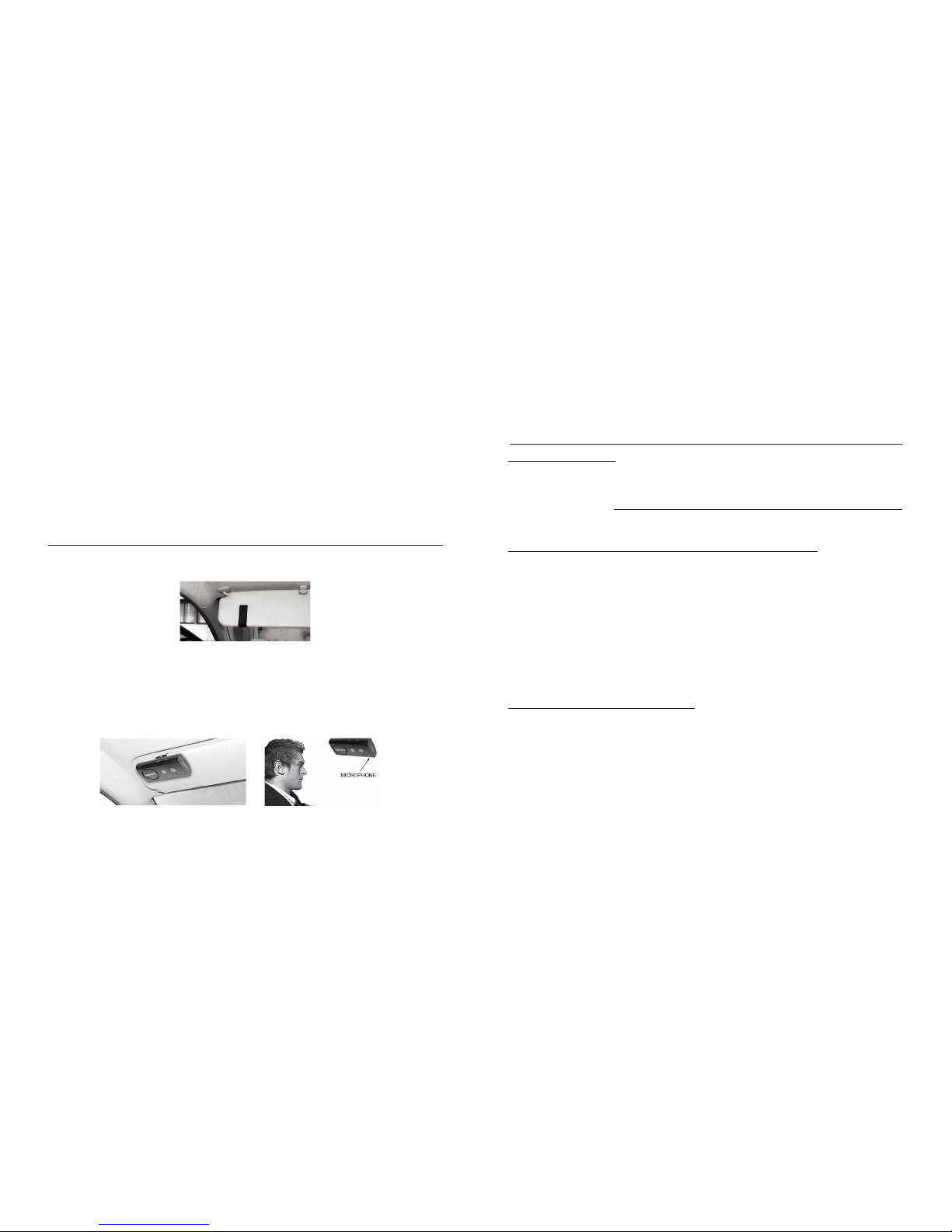
47
4. Cuando la descarga haya terminado, se anunciará:
“Supertooth Voice preparado. Teléfono conectado.”
Acepte la solicitud de conexión del teléfono si aparece
un indicador.
H. Instalación
Fije el clip de metal del SUPERTOOTH VOICE en el
parasol.
Sujete la parte trasera magnética del SUPERTOOTH
VOICE en el clip gancho de metal jo. El SUPERTOOTH
VOICE debe ser colocado de tal manera que el micrófono
esté dirigido hacia la boca del usuario.
I. Operaciones básicas
IMPORTANTE:
Debe enlazar el kit con su teléfono móvil Bluetooth en
primer lugar antes de que pueda usar las siguientes
funciones. Vea Enlace con su teléfono móvil Bluetooth
en la Sección E.
Realizar una llamada (Marcación normal):
Marque el número en su teléfono. El audio se transferirá
estará automáticamente al kit. Durante una llamada en
curso, el indicador Bluetooth (3) se iluminará en color
azul jo.
Nota: con algunos teléfonos como el Siemens S55 y
el Panasonic X70, el audio siempre está en el teléfono
durante una llamada saliente. Usted deberá pulsar el BMF
(1) durante 1 segundo para transferir el audio a su kit.
Contestar a una llamada:
Cuando reciba una llamada es recibida, el nombre
o el número de teléfono del llamador entrante será
anunciado en el kit. Durante el tono del timbre,
pulse el BMF (1) para contestar a la llamada y,
cuando la llamada sea contestada, el indicador
Bluetooth se iluminará en color azul jo.
Page 48

48
O, en el caso que la Respuesta vocal está
activada (vea Activación/Desactivación de la
Respuesta vocal en la Sección K):
Después de oír un bip en el kit, acepte una llamada pronunciando en voz alta y clara “ACEPTO”, “CONTESTO”
u “OK”; pronúncielo solo una vez y en un lapso de 3 segundos acentuando cada una de las sílabas. Cuando una
llamada es contestada, el indicador Bluetooth (3) se ilu-
minará en color azul jo.
Terminar una llamada:
Pulse el botón Terminar/Rechazar (2) durante 1 segundo
para terminar la llamada. “Fin de la llamada” será
anunciado.
Marcación vocal:
Importante: antes de usar esta característica, cerciórese
de que la función de marcación vocal de su teléfono está
activada y de que por lo menos una etiqueta vocal está
grabada en su teléfono. (Sírvase referirse al procedimiento en el manual de su teléfono).
Nota: ¡las entradas de marcación vocal deben ser almacenadas en la memoria de su teléfono, no en la tarjeta SIM!
1. Pulse el BMF (1) durante 1 segundo.
2. Se oirá un bip de marcación vocal en el kit para indicar
al usuario que pronuncie la etiqueta vocal del contacto
a por llamar y el indicador Bluetooth (3) se iluminará
en color azul jo.
3. Pronuncie la etiqueta vocal exactamente como usted la
grabó.
4. La etiqueta vocal será reproducida para usted y luego
el teléfono marcará el número automáticamente.
Rellamada (Para teléfonos con perl manos libres únicamente):
Pulse BMF (1) durante 3 segundos. El kit volverá a marcar
el último número marcado y anunciará “Rellamada”.
Rechazar una llamada
(Para teléfonos con perl manos libres únicamente):
Durante el tono de timbre, pulse el botón Terminar/
Rechazar (2) durante 1 segundo. La llamada entrante
será rechazada y “Llamada rechazada” será anunciado
en el kit.
Ajuste del volumen:
Aumente o disminuya el volumen pulsando el botón Subir
volumen (8) o Bajar volumen (7). Púlselo repetidamente
hasta alcanzar el nivel deseado. El indicador Bluetooth
(3) se iluminará en color violeta a medida que se alcanzan
Page 49

49
los niveles más bajo y más alto. Cuando se alcanza el
volumen máximo, “Volumen máximo” será anunciado
en el kit.
Transferencia de audio
(Para teléfonos con perl manos libres únicamente):
Durante una llamada en curso, usted puede transferir el
audio.
Kit a teléfono: pulse y mantenga pulsado el BMF
(1) durante 3 segundos y el audio será transferido al
teléfono.
Teléfono a Kit: pulse el BMF (1) durante 1 segundo y
el audio será transferido al kit.
Nota: para algunos teléfonos, pueda ser que usted tenga
que aceptar cualquier indicador de conexión en el teléfono
antes de que se realice la transferencia automática.
J. Funciones avanzadas
Enlace múltiple/Conmutación de conexiones entre
teléfonos
El SUPERTOOTH VOICE puede enlazarse con hasta 8
teléfonos Bluetooth. Si desea enlazar un teléfono adicional
(cuando ya hay 8 teléfonos enlazados), se suprimirá
automáticamente el teléfono que no ha sido usado por
el mayor tiempo. Por lo tanto, el SUPERTOOTH VOICE
siempre mantiene 8 teléfonos en su memoria.
Usted puede fácilmente cambiar a cualquiera de los
teléfonos enlazados:
1. Desconectando el teléfono conectado actualmente
usando los “Dispositivos activos” en el menú Bluetooth
de dicho teléfono.
2. Conectándose con el teléfono deseado utilizando los
“Dispositivos enlazados” en el menú Bluetooth de
dicho teléfono deseado.
Nota: la reconexión con un teléfono enlazado también
se puede realizar pulsando el BMF (1). Sin embargo, el
SUPERTOOTH VOICE tratará de conectarse con el
último teléfono usado únicamente. Por lo tanto, se
recomienda conectarse con otro teléfono enlazado
usando el menú del teléfono.
Supresión de todos los dispositivos enlazados y de
la agenda telefónica:
1. Desde OFF, pulse y mantenga pulsado el botón
Subir
volumen (8).
2. Mientras mantiene pulsado el botón Subir volumen
(8), pulse el BMF (1) durante 1 segundo hasta oír
Page 50

50
una melodía característica en el kit, la versión es
anunciadas en el kit. Apague el kit durante al menos
10 segundos
Todos los dispositivos enlazados y la agenda telefónica
han sido suprimidos.
voz anuncie “Respuesta vocal activada”. En este
momento, cuando se reciba una llamada, se oirá un
bip después de anunciar que el nombre o el número
de teléfono del llamador es anunciado.
Desactivación: pulse y mantenga pulsado el botón
Bajar volumen (7) durante 5 segundos hasta que el
kit una voz anuncie “Respuesta vocal desactivada”.
Cuando se recibe una llamada, el kit solo pronunciará
el nombre o el número de teléfono del llamador.
Reconexión automática:
La reconexión automática ocurre cuando el usuario
(sin apagar el kit) sale del alcance Bluetooth durante
más de 20 segundos y luego regresa dentro del
rango de
alcance. En este caso, un nuevo sistema de
reconexión es capaz de reconectar el kit con el teléfono
en cualquier momento en que el usuario regresa dentro
del alcance.
Nota: esta reconexión automática podría tardar
hasta 10 segundos después de que el usuario regrese
dentro del alcance.
En caso de desconexión intencional (utilizando el
menú del teléfono), este sistema no se activada.
K. Característica especial
Modo de respuesta vocal:
Aviso importante: esta característica podría no funcionar
bien dentro de un automóvil con elevado ruido de fondo.
• Cuando pronunciando en voz alta está activado, el
usuario puede aceptar una llamada pronunciando
en voz alta y claramente “ACEPTO”, “CONTESTO”
u “OK”; pronúncielo
solo una vez y en un lapso de 3 segundos acentuando
cada una de las sílabas.
• Cuando está desactivado, aplique la contestación
normal a una llamada.
Activación: pulse y mantenga pulsado el botón Subir
volumen (8) durante 5 segundos hasta que el kit una
Page 51

51
Especicaciones del SUPERTOOTH VOICE
*Supresión del ruido y del
Supresión de Eco-DSP total
*Control digital de volumen
*Marcación por
reconocimiento vocal
(si el teléfono lo soporta)
*Rellamada
*Rechazo de llamada entrante
*También permite la carga
directamente desde un PC
mediante un cable USB
(no incluido)
*Tamaño compacto
*Respuesta a llamadas
entrantes por control vocal
*Reconexión automática total
Instalación: Fijación rápida en el parasol
mediante clip magnético
Dimensiones (mm): 18.2 x 60.2 x 122
Peso: 115 g
Conformidad del Bluetooth: Especicaciones del
Bluetooth versión 2.0
Perles Bluetooth
soportados: Soporta perles auricular y
manos libres con detección
automática
Alcance de funcionamiento: Hasta 10 metros
Frecuencia: 2.4 GHz
Tiempo de conversación: Hasta 15 horas
Tiempo de espera: Hasta 800 horas
Tiempo de carga: 3 horas
Tipo de batería: Ion de litio recargable
Características especiales: *Voz para anunciar la
identicación del llamante,
estado del dispositivo
Bluetooth y guías de
instrucciones en 6 idiomas
(Inglés británico, Inglés
americano, Francés,
Italiano, Español y Alemán)
*Dúplex completo
Page 52
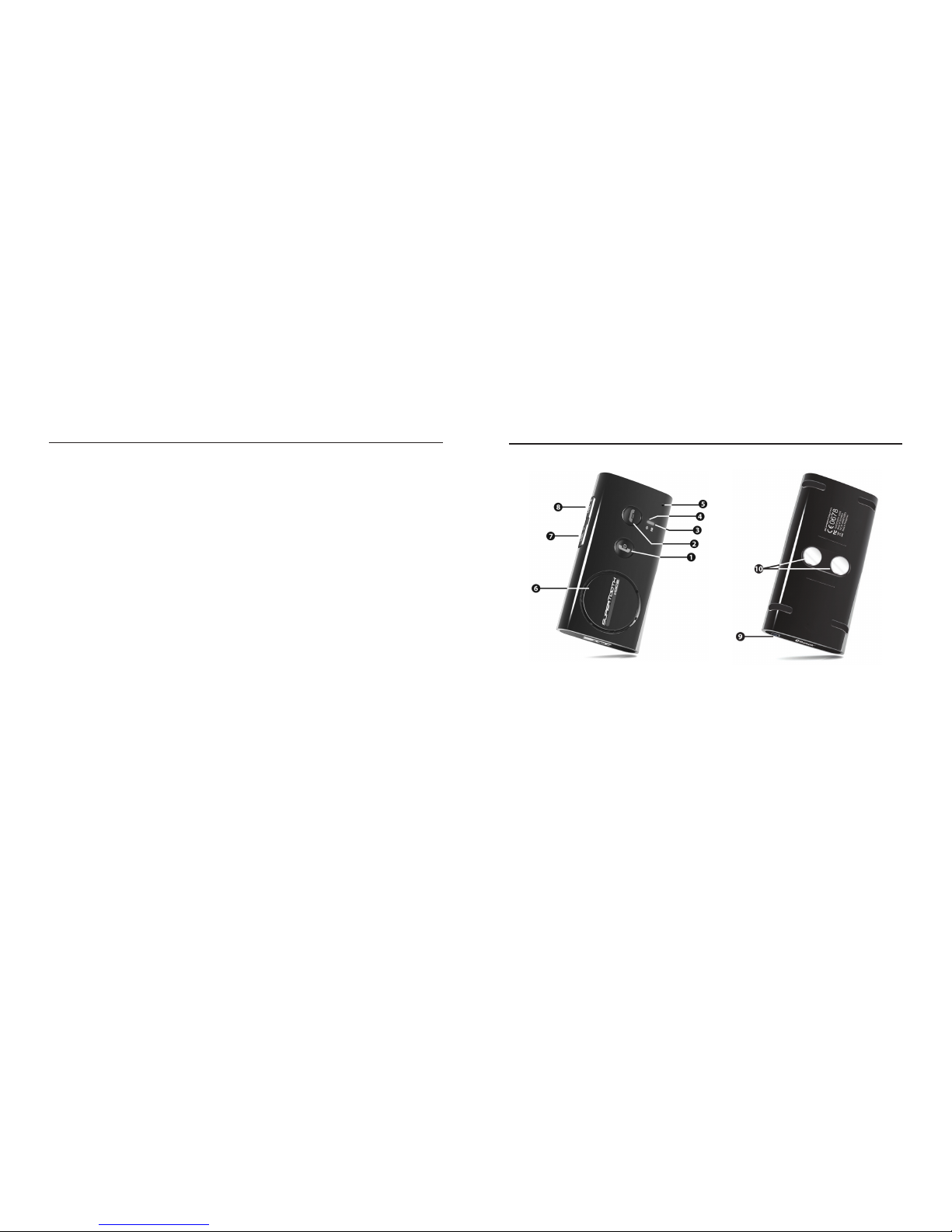
52
A. Descrizione del prodotto
SUPERTOOTH VOICE è un kit vivavoce Bluetooth che
supporta telefoni con prolo headset o handsfree. Tra le
caratteristiche gurano la soppressione dell’effetto eco e
la cancellazione dei rumori di fondo DSP. Il prodotto offre
quindi un qualità audio molto elevata, un funzionamento
vivavoce semplice e prestazioni superiori.
Il kit è dotato di un sistema Text-To-Speech (dal testo
al parlato). La voce annuncia le istruzioni all’utente in 6
lingue diverse, indica lo stato del dispositivo Bluetooth e
annuncia il nome (o il numero di telefono se il contatto
non è stato caricato nel kit) del chiamante in arrivo!
Attenzione: guidare sempre con prudenza e nel
rispetto della legge.
Vericare quali sono i limiti imposti dalla legislazione
nazionale o locale in vigore nel proprio paese sull’utilizzo
dei telefoni cellulari mentre si sta guidando. L’utente di
questo prodotto è tenuto a rispettare la legislazione
vigente nel luogo in cui vive.
B. Presentazione del prodotto
1 MFB (pulsante Multi-funzione)
(accensione e spegnimento /
abbinamento / risposta / composizione
vocale / ricomposizione /
trasferimento audio)
2 Pulsante Termina / Riuta
(termina e riuta una chiamata /
ricarica la rubrica)
3 Indicatore Bluetooth
4 Indicatore di carica
5 Microfono
6 Speaker
7 Volume Giù
8 Volume Su
9 Porta del Caricatore
10 Magneti
Page 53
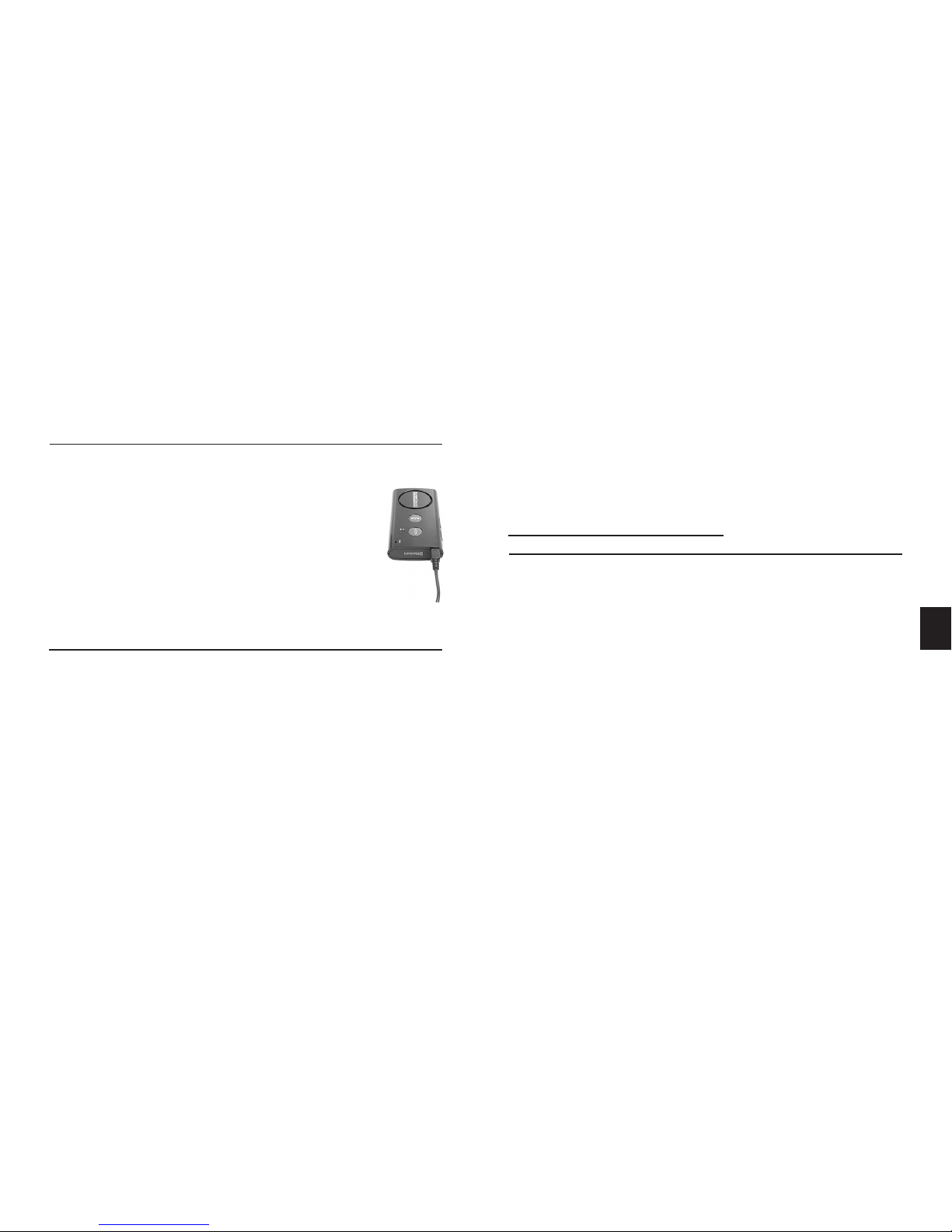
53
C. Caricamento
1. Inserire la spina del caricatore nella Porta del Cari-
catore (9) del SUPERTOOTH VOICE. Collegare il
caricatore ad un’alimentazione esterna.
Stato dell’Indicatore di Carica (4):
Rosso sso: Batteria scarica Voce: Batteria scarica
Arancione sso: In carica Voce: In carica
Verde sso: Batteria carica Voce: Carica completata
2. Una volta completata la carica, scollegare
il caricatore.
D. Accensione / Spegnimento
Accensione: Premere il pulsante MFB (1) per 1 secondo.
L’Indicatore Bluetooth (3) inizia a lampeggiare
di colore blu e una voce dice: “Supertooth Voice
pronto per l’utilizzo. Telefono connesso.” (o, se il
telefono non è disponibile: “Collegamente telefono
assente”). Nota: la selezione della lingua viene
attivata automaticamente la prima volta che viene
acceso il SUPERTOOTH VOICE. In questo caso,
passare al Paragrafo E (Procedura 2).
Spegnimento: Premere e tenere premuto MFB (1) per
5 secondi sino a quando una voce non annuncia:
“SUPERTOOTH VOICE in spegnimento”.
L’Indicatore Bluetooth (3) diventa rosso sso per 4
secondi, dopo di che si spegne.
E. Selezione della lingua e
Appaiamento al cellulare Bluetooth
E’ possibile scegliere fra 6 lingue diverse: inglese britannico,
inglese americano, francese, italiano, spagnolo e tedesco.
Dopo aver selezionato la propria lingua, abbinare il
SUPERTOOTH VOICE al proprio cellulare Bluetooth per
creare il collegamento o la connessione audio tra i due
apparecchi. L’abbinamento deve essere fatto solo alla
prima connessione ad un telefono.
Procedura:
1. In posizione OFF, premere e tenere premuto MFB (1)
per 6 secondi no a quando l’Indicatore Bluetooth (3)
non inizia a lampeggiare rosso/blu. Una voce annuncerà
quindi: “Premi il tasto verde per selezionare
l’italiano.” Le istruzioni per le altre lingue vengono
annunciate di seguito.
IT
Page 54

54
2. Non appena si sente pronunciare la lingua prescelta,
premere il pulsante verde o MFB (1) per abilitarla. Se
si sceglie “Italiano”, una voce annuncerà: “Italiano
selezionato. Ricerca de dispositivi dal menu di
bluetooth del telefono selezionare ST VOICE
ed inserire sul telefono il codice 0000.” Questo
signica che il kit è pronto per essere abbinato.
Nota: se si è selezionata la lingua sbagliata, spegnere
il SUPERTOOTH VOICE e riportare l’apparecchio in
modalità abbinamento per poter effettuare nuovamente la selezione tra le lingue disponibili.
3. Quando il kit è in modalità abbinamento, accedere
al menu Bluetooth del proprio telefono. Attivare la
funzione Bluetooth, quindi effettuare una ricerca
Bluetooth (fare riferimento al manuale del proprio
telefono).
4. Quando il telefono visualizza l’elenco dei dispositivi
Bluetooth, selezionare ST VOICE.
5. Inserire la password / codice PIN 0000 e premere OK.
Il messaggio
“Accoppiamento telefono completato.
Trasferimento rubrica dal telefono. Attendere
prego” sarà annunciato sul kit.
6. I contatti nel vostro telefono saranno scaricati nel kit.
L’Indicatore Bluetooth (3) diventa di colore viola per
1 – 2 secondi.
Nota: alcuni telefoni visualizzano una domanda o una
richiesta sullo schermo del telefono prima di permettere
al kit di scaricare la rubrica. Accettare qualsiasi richiesta
(ad es.: Connessione…?, Consentire l’accesso a
Internet…?, DUN…?).
7. Il numero di contatti viene annunciato mentre lo
scaricamento è in corso.
NOTA IMPORTANTE: alcuni telefoni Symbian
non supportano lo scaricamento automatico della
rubrica. In questo caso, il messaggio “Telefono non
compatibile con el trasferimento automatico.
Consulti prego il manuale o premi il tasto rosso
per annullare il trasferimento” sarà annunciato.
Passare quindi al Paragrafo F per trasferire la rubrica
manualmente dal menu del telefono al kit oppure
premere il pulsante rosso o il pulsante Termina/
Riuta (2) del SUPERTOOTH VOICE per collegare
il kit al telefono senza trasferimento della rubrica.
Page 55

55
8. Una volta completato lo scaricamento, il messaggio
“Supertooth Voice pronto per l’utilizzo. Telefono
connesso.” sarà annunciato. Accettare la richiesta di
connessione dal telefono laddove venga visualizzata.
Nota importante: La maggior parte dei telefoni si collega
automaticamente al kit dopo l’abbinamento. Con alcuni
telefoni è necessario collegarsi manualmente dopo
l’abbinamento. Tornare su Bluetooth > Dispositivi
appaiati > evidenziare ST VOICE > premere Opzioni >
quindi premere Connetti.
Il kit è ora pronto per essere utilizzato. Quando viene
ricevuta una telefonata sul cellulare dell’utente, il nome
del chiamante in arrivo viene annunciato sul kit.
F. Trasferimento automatico
non supportato dal telefono
Se il trasferimento automatico della rubrica non è avvenuto,
è possibile inviare o trasferire i contatti al SUPERTOOTH
VOICE inviandoli tramite Bluetooth.
IMPORTANTE:
Questa procedura funziona correttamente solo dopo
l’abbinamento o dopo l’aggiornamento della rubrica
(vedere rispettivamente i Paragra E e G).
Procedura:
1. Vi sono due modi per effettuare la procedura in
funzione del modello di telefono.
Il modo comune è:
a. Andare alla
Rubrica del proprio telefono.
b. Selezionare uno o più contatti che si desidera
inviare al kit.
Nota: Selezionare “Segna tutti” (se quest’opzione
è presente nel proprio telefono) per inviare tutti i
contatti in una volta. Alcuni telefoni non supportano
l’invio contemporaneo di tutti i contatti in un’unica
volta: occorrerà in tal caso inviarli uno per uno).
Page 56

56
c. Scegliere di inviare i contatti tramite Bluetooth >
selezionare ST VOICE.
Nota: in alcuni telefoni, il trasferimento dei contatti
SIM è impossibile.
In alternativa,
L’altro modo è:
a. Andare sull’icona
Opzioni del proprio telefono.
b. Selezionare
Bluetooth > Evidenziare ST VOICE
> premere tasto > Selezionare Trasferimento
Rubrica.
c. Scegliere di trasferire tramite Bluetooth >
selezionare ST VOICE.
2.
“Trasferimento rubrica dal telefono. Attendere
prego” sarà annunciato sul kit.
3. Il numero di contatti sarà annunciato in corso di
scaricamento.
4. Dopo alcuni secondi, il telefono visualizza “
Dati
inviati” oppure il kit annuncerà “SUPERTOOTH
VOICE pronto. Collegato al telefono”. In alcuni
telefoni, occorre accettare la richiesta di connessione
visualizzata prima che la riconnessione si verichi.
Il kit è ora pronto per essere utilizzato. Quando viene
ricevuta una chiamata sul cellulare dell’utente, il nome del
chiamante in arrivo viene annunciato sul kit.
G. Aggiornamento rubrica
Se un contatto è stato rinominato o aggiunto nel telefono,
è possibile aggiornare la rubrica del SUPERTOOTH
VOICE afnché il kit possa riconoscere la modica.
Procedura:
1. Accertarsi che il telefono sia collegato al kit. In
modalità stand-by, premere a lungo il pulsante
Termina/Riuta (2) per 10 secondi.
2. Il messaggio
“Trasferimento rubrica dal telefono.
Attendere prego” sarà annunciato. Il telefono
contemporaneamente si scollegherà.
Nota: Alcuni telefoni visualizzano una domanda o
una richiesta sullo schermo prima di permettere
al kit di scaricare la rubrica. Accettare la richiesta
(Connessione…?, Consentire l’accesso a Internet…?
DUN…?).
3. Il numero di contatti sarà annunciato durante lo
scaricamento.
Page 57
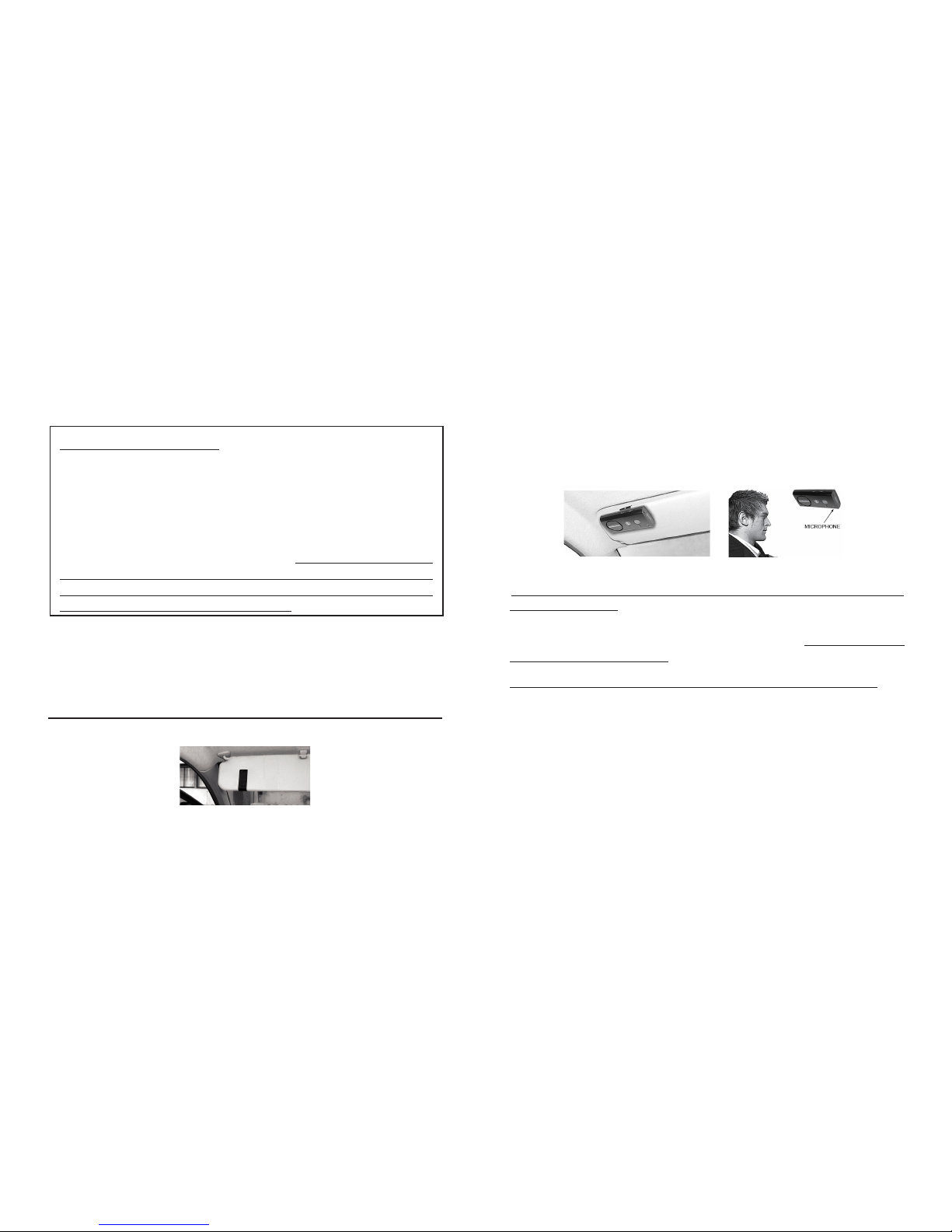
57
NOTA IMPORTANTE: alcuni telefoni Symbian non
supportano lo scaricamento automatico della rubrica.
In questo caso, il messaggio “Telefono non compatibile
con el trasferimento automatico. Consulti prego
il manuale o premi il tasto rosso per annullare il
trasferimento” sarà annunciato. Passare quindi al
Paragrafo F per trasferire la rubrica manualmente
dal menu del telefono al kit oppure premere il
pulsante rosso o il pulsante Termina/Riuta (2) del
SUPERTOOTH VOICE per collegare il kit al telefono
senza trasferimento della rubrica.
4. Una volta completato lo scaricamento, il messaggio
“Supertooth Voice pronto per l’utilizzo. Telefono
connesso” sarà annunciato. Accettare l’eventuale
richiesta di connessione dal telefono.
H. Installazione
Fissare la clip di metallo del SUPERTOOTH VOICE alla
visiera.
Attaccare il dorso magnetico del SUPERTOOTH VOICE
alla clip di metallo ssata. Il SUPERTOOTH VOICE deve
essere posizionato in modo tale che il microfono sia
diretto verso la bocca dell’utente.
I. Operazioni di base
IMPORTANTE:
Il kit deve essere “abbinato” al cellulare Bluetooth prima di
poter utilizzare le seguenti funzioni. Vedere Abbinamento
al cellulare Bluetooth al Paragrafo E.
Effettuare una chiamata (composizione normale):
Comporre il numero sul telefono. L’audio sarà
automaticamente sul kit. Durante una chiamata in uscita,
l’Indicatore Bluetooth (3) diventa blu sso.
Nota: Con alcuni telefoni, come il Siemens S55 e il
Panasonic X70, l’audio è sempre sul telefono durante
una chiamata in uscita. Occorrerà premere il pulsante
MFB (1) per 1 secondo per trasferire l’audio al proprio kit.
Page 58

58
Rispondere ad una chiamata:
Quando viene ricevuta una chiamata, il nome o
il numero di telefono del chiamante in arrivo sarà
annunciato sul kit. Durante la suoneria, premere
il pulsante MFB (1) per 1 secondo per rispondere
alla chiamata. Mentre si risponde, l’Indicatore
Bluetooth (3) diventerà blu sso.
Ora, presupponendo che Risposta Vocale sia
attivato (vedere Attivazione/Disattivazione
Risposta Vocale al Paragrafo K):
Dopo aver sentito un bip sul kit, accettare la chiamata
dicendo in maniera chiara e ad alta voce “ACCETTO”,
“RISPOSTA” o “OK” (dirlo una sola volta e entro 3
secondi, enfatizzando ciascuna sillaba). Quando si
risponde ad una chiamata, l’Indicatore Bluetooth (3)
diventa blu sso.
Terminare una chiamata:
Premere il pulsante Termina/Riuta (2) per 1 secondo
per terminare la chiamata. Il messaggio “Fine della
chiamata” sarà annunciato.
Composizione vocale:
Importante: Prima di usare questa opzione, accertarsi che
la funzione di composizione vocale sul proprio telefono
sia attivata e che almeno un campione vocale sia registra-
to sul telefono (fare riferimento al manuale del telefono).
Nota: le voci della composizione vocale devono essere archiviate nella memoria del telefono, non sulla SIM!
1. Premere il pulsante
MFB (1) per 1 secondo.
2. Sul kit si udirà un bip di composizione vocale che
richiede all’utente di dire il campione vocale del
contatto da chiamare. L’Indicatore Bluetooth (3)
diventa blu sso.
3. Dire il campione vocale esattamente come lo si è
registrato.
4. Il campione vocale sarà ripetuto, dopo di che il telefono
comporrà automaticamente il numero.
Ricomposizione
(solo per telefoni con prolo handsfree):
Premere il pulsante MFB (1) per 3 secondi. L’ultimo
numero composto sarà ricomposto e il messaggio
“Ricomposizione” sarà annunciato sul kit.
Riutare una chiamata
(solo per telefoni con prolo handsfree):
Page 59

59
Durante la suoneria, premere il pulsante Termina/Riuta
(2) per 1 secondo. La chiamata in arrivo sarà riutata e il
messaggio “Chiamata riutata” sarà annunciato sul kit.
Impostazione del volume:
Aumentare o diminuire il volume premendo il pulsante
Volume Su (8) o Volume Giù (7). Premere ripetutamente
sino ad ottenere il livello desiderato. L’Indicatore
Bluetooth (3) diventa viola quando vengono raggiunti
i livelli più bassi e quelli più alti. Una volta raggiunto il
volume massimo, il messaggio Volume massimo sarà
annunciato sul kit.
Trasferimento dell’audio
(solo per telefoni con prolo handsfree):
Durante una chiamata in uscita, è possibile trasferire l’audio.
Dal kit al telefono: Premere e tenere premuto il
pulsante MFB (1) per 3 secondi e l’audio sarà trasferito
al telefono.
Dal telefono al kit: Premere il pulsante MFB (1) per 1
secondo e l’audio sarà trasferito al kit.
Nota: In alcuni telefoni, potrebbe essere necessario
accettare la richiesta di connessione visualizzata prima
che il trasferimento automatico possa avvenire.
J. Funzioni avanzate
Multi-abbinamento / Commutazione della
connessione tra telefoni
Il SUPERTOOTH VOICE può essere appaiato no a 8
telefoni Bluetooth. Un ulteriore abbinamento eliminerà
automaticamente il telefono che non è stato utilizzato per
più tempo. Il SUPERTOOTH VOICE archivia sempre 8
telefoni nella sua memoria.
E’ possibile commutare la connessione su uno qualsiasi
dei telefoni abbinati:
1. Scollegando il telefono al momento utilizzato utilizzando
“Dispositivi attivi” nel menu Bluetooth di quel telefono.
2. Collegandosi al telefono desiderato utilizzando “Dispositivi
abbinati” nel menu Bluetooth del telefono desiderato.
Nota: la riconnessione ad un telefono abbinato può
essere fatta anche premendo il pulsante MFB (1). Il
SUPERTOOTH VOICE cercherà comunque di connettersi
solo all’ultimo telefono utilizzato. Si consiglia quindi di
connettersi ad un altro telefono abbinato utilizzando il
menu telefono.
Cancellare tutti i dispositivi abbinati e la rubrica:
1. In posizione OFF, premere e tenere premuto il pulsante
Page 60

60
Volume Su (8).
2. Mentre si tiene premuto il pulsante
Volume Su (8),
premere il pulsante MFB (1) per 1 secondo no a
quando non si sente una melodia caratteristica sul kit e
la versione non è annunciata sul kit. Allora spengnere
il kit per 10 secondi
Tutti i dispositivi abbinati e la rubrica sono ora cancellati.
Attivazione: Premere e tenere premuto il pulsante
Volume Su (8) per 5 secondi nché una voce
annuncia “Risposta vocale attivata”. A questo
punto, alla ricezione di una chiamata, si sentirà un bip
dopo l’annuncio del nome o del numero di telefono
del chiamante.
Disattivazione: Premere e tenere premuto il pulsante
Volume Giù (7) per 5 secondi nché una voce
annuncia “Risposta vocale disattivata”. Alla
ricezione di una chiamata, solo il nome o il numero di
telefono del chiamante saranno uditi sul kit.
Riconnessione automatica:
La riconnessione automatica si verica quando
l’utente (senza spegnere il kit) esce dal campo
Bluetooth per più di 20 secondi per poi tornare
nel campo. In questo caso, un nuovo sistema di
riconnessione è in grado di riconnettere il kit al
telefono ogni volta che l’utente esce dal campo.
Nota: la riconnessione automatica potrebbe impiegare
sino a 10 secondi dopo che l’utente è tornato in campo.
In caso di disconnessione intenzionale (utilizzando
il menu del telefono), questo sistema non è attivo.
K. Funzione speciale
Modalità Risposta Vocale:
Nota importante: questa funzione potrebbe non funzionare
bene all’interno di una macchina con rumore di fondo
elevato.
• Una volta attivata, l’utente può accettare una chiamata
dicendo in maniera chiara e ad alta voce “ACCETTO”,
“RISPOSTA” o “OK” (dirlo una sola volta e entro 3
secondi, enfatizzando ciascuna sillaba).
• Una volta disattivata, applicare la risposta normale
della chiamata.
Page 61

61
Speciche SUPERTOOTH VOICE
vocale (se supportato dal telefono)
*Ricomposizione ultima chiamata
*Riuto chiamata in arrivo
*Caricabile direttamente anche
dal PC con cavo USB
(non in dotazione)
*Compatto
*Risposta chiamate in arrivo
tramite controllo vocale
*Riconnessione automatica
completa
Installazione: Fissaggio rapido sulla visiera
con clip magnetica
Dimensioni (mm): 18.2 x 60.2 x 122
Peso: 115 g
Conformità Bluetooth: Speciche Bluetooth versione 2.0
Proli Bluetooth
supportati: Proli headset e handsfree
con rilevazione automatica
Range operativo: Fino a 10 metri
Frequenza: 2.4 GHz
Ore di conversazione: Fino a 15 ore
Stand-by: Fino a 800 ore
Tempo di carica: 3 ore
Tipo batteria: Ricaricabile al litio-ione
Caratteristiche speciali: *Voce che annuncia l’identità del
chiamante, lo stato del dispositivo
Bluetooth e guide istruzioni in 6
lingue (inglese britannico,
inglese americano, francese,
italiano, spagnolo e tedesco)
*Full Duplex
*Soppressione eco / cancellazione
rumori di fondo DSP
*Controllo volume digitale
*Composizione riconoscimento
Page 62

Disclaimer
Greatest care has been taken to provide accurate and complete information in
this manual. The manufacturer is not liable for errors and missing information.
The manufacturer reserves the right to change and improve functions and
specications of the product without notice. Duplication, transmission of part or all
of this manual without consent of the manufacturer is prohibited. All rights reserved.
Bluetooth is a trademark owned by Bluetooth SIG, Inc., U.S.A. and licensed to
EuroCB. Other trademarks and trade names belong of their respective owners.
Déclinaison de responsabilités
Bien que tous les efforts aient été déployés pour faire en sorte que le contenu
de ce manuel soit aussi able et complet que possible, nous déclinons toute
responsabilité en cas d’erreur et / ou d’omission. Le fabricant se réserve le droit
de changer et d’améliorer les fonctionnalités et caractéristiques du produit
sans avertissement préalable. La reproduction, le transfert, la distribution ou le
stockage de tout ou partie du contenu de ce manuel sans permission préalable
du fabricant sont strictement interdits. Marque déposée.
Bluetooth est une marque déposée de Bluetooth SIG, Inc., U.S.A. et mise àla
disposition d’EuroCB sous licence. Les autres noms de produits et de sociétés
mentionnés sont des marques déposées ou des noms commerciaux appartenant
à leurs propriétaires respectifs.
Haftungsausschluß
Dieses Handbuch wurde mit größter Sorgfalt verfasst um möglichst genau und
umfangreich alle Informationen zur Verfügung zu stellen. Für fehlende oder
fehlerhafte Informationen ist der Hersteller nicht verantwortlich. Der Hersteller
behält sich das Recht vor, Eigenschaften und Funktionen des Produktes ohne
gesonderte Mitteilungen zu ändern oder zu verbessern. Ohne ausdrückliche
Genehmigung des Herstellers ist es untersagt dieses Handbuch in Auszügen oder
komplett zu kopieren oder anderweitig zu vervielfältigen. Alle Rechte vorbehalten.
Bluetooth ist ein eingetragenes Warenzeichen der Bluetooth SIG, Inc., U.S.A.
EuroCB ist lizenzierter Hersteller. Andere eingetragene Warenzeichen und
Handelsnamen gehören ihren jeweiligen Inhabern.
Disclaimer
De grootste zorg is besteedt aan het brengen van accurate en complete informatie in
deze handleiding. De producent is niet aansprakelijk voor fouten of ontbrekende
informatie. De producent houdt zich het recht voor om functies en specicaties
van dit product te veranderen en verbeteren zonder mededeling. Duplicatie, of
overdracht van de hele of delen van de handleiding zonder toestemming van de
producent is verboden. Alle rechten voorbehouden.
Bluetooth is een handelsmerk in eigendom van Bluetooth SIG, Inc, U.S.A. en
licentie van EuroCB. Andere handelsmerken en handelsnamen zijn eigendom
van de respectievelijke eigenaren.
Responsabilidades
Se han realizado todos los esfuerzos necesarios para asegurar que el contenido
de este manual sea lo más completo y able posible. Sin embargo, el fabricante
no se responsabiliza de cualquier error u omisión. El fabricante se reserva
el derecho de cambiar o mejorar las funcionalidades o características del
producto sin previo aviso. La reproducción, copia o distribución de parte o la
totalidad del contenido de este manual quedan estrictamente prohibidas sin el
consentimiento del fabricante.
Bluetooth es una marca registrada de Bluetooth SIG, INC., U.S.A. y puesta a
disposición de EuroCB bajo licencia. El resto de marcas o nombres comerciales
mencionados en este manual son marcas registradas con sus pertinentes
proprietarios.
Declinazione di responsabilità
Nonostante tutti gli sforzi siano stati impiegati afnché il contenuto di questo catalogo
sia il più possibile afdabile e completo, decliniamo qualsiasi responsabilità in caso
d’errore e/o omissione. Il costruttore si riserva il diritto di modicare e migliorare le
funzioni e le caratteristiche del prodotto senza nessun preavviso. La riproduzione, il
trasferimento, la vendita di parte o di tutto il contenuto del presente manuale senza
previa autorizzazione del costruttore è severamente vietata. Marchio registrato.
Bluetooth è un marchio registrato di Bluetooth SIG, Inc., U.S.A. e messo a
disposizione di EuroCB sotto licenza. Gli altri nomi di prodotti e Società riportate
sono marchi registrati o nomi commerciali appartenenti ai loro rispettivi proprietari.
Page 63
63
(Applicable in the European Union and other European countries with
separate collection systems) This marking shown on the product or its
literature, indicates that it should not be disposed with other household
wastes at the end of its working life. To prevent possible harm to the
environment or human health from uncontrolled waste disposal,
please separate this from other types of wastes and recycle it
responsibly to promote the sustainable reuse of material resources.
Household users should contact either the retailer where they purchased this product, or their local government ofce, for details of where and how they can take this
item for environmentally safe recycling.
Business users should contact their supplier and check the terms and conditions of the purchase contract. This product should not be mixed with other
commercial wastes for disposal.
English
Correct Disposal of This Product
(Waste Electrical & Electronic Equipment)
(Applicable dans les pays de l’Union Européenne et dans les autres pays
européens disposant de systèmes de collecte sélective) Ce symbole sur
le produit ou sa documentation indique qu’il ne doit pas être éliminé en n
de vie avec les autres déchets ménagers. L’élimination incontrôlée des
déchets pouvant porter préjudice l’environnement ou à la santé humaine,
veuillez le séparer des autres types de déchets et le recycler de façon
responsable. Vous favoriserez ainsi la réutilisation durable des ressources matérielles.
Les particuliers sont invités à contacter le distributeur leur ayant vendu le produit
ou à se renseigner auprès de leur mairie pour savoir où et comment ils peuvent se
débarrasser de ce produit an qu’il soit recyclé en respectant l’environnement.
Les entreprises sont invitées à contacter leurs fournisseurs et à consulter les conditions de leur contrat de vente. Ce produit ne doit pas être éliminé avec les autres
déchets commerciaux.
Français
Comment éliminer ce produit
(Equipement électrique et électronique usagé)
Deutsch
Korrekte Entsorgung dieses Produkts
(Elektromüll)
(Anzuwenden in den Ländern der Europäischen Union und anderen
europäischen Ländern mit einem separaten Sammelsystem) Die Kennzeichnung auf dem Produkt bzw. auf der dazugehörigen Literatur gibt an,
dass es nach seiner Lebensdauer nicht zusammen mit dem normalen
Haushaltsmüll entsorgt werden dart. Entsorgen Sie dieses Gerät bitte
getrennt von anderen Abfällen, um der Umwelt bzw. dermenschlichen
Gesundheit nicht durch unkontrollierte Müllbeseitigung zu schaden. Recyceln Sie das
Gerät, um die nachhaltige Wiederverwertung von stofichen Ressourcen zu fördern.
Private Nutzer sollten den Händler, bei dem das Produkt gekauft wurde, oder die
zuständigen Behörden kontaktieren, um in Erfahrung zu bringen, wie sie das Gerät
auf umweltfreundliche Weise recyceln können.
Gewerbliche Nutzer sollten sich an lhren Lieferanten wenden und die Bedingungen
des Verkaufsvertrags konsultieren. Dieses Produkt darf nicht zusammen mit anderem
Gewerbemüll entsorgt werden.
Nederlands
Correcte verwijdering van dit product
(elektrische & elektronische afvalapparatuur)
Dit merkteken op het product of het bijbehorende informatiemateriaal duidt
erop dat het niet met ander huishoudelijk afval verwijderd moet worden
aan het einde van zijn gebruiksduur. Om mogelijke schade aan het milieu
of de menseljke gezondheid door ongecontroleerde afvalverwijdering te
voorkomen, moet u dit product van andere soorten afval scheiden en op
een verantwoorde manier recyclen, zodat het duurzame hergebruik van
materiaalbronnen wordt bevorderd.
Huishoudelijke gebruikers moeten contact opnemen met de winkel waar ze dit
product hebben gekocht of met de gemeente waar ze wonen om te vernemen
waar en hoe ze dit product milieuvriendelijk kunnen laten recyclen.
Zakelijke gebruikers moeten contact opnemen met hun leverancier en de
algemene voorwaarden van de koopovereenkomsten nalezen. Dit product moet
niet worden gemengd met ander bedrijfsafval voor verwijdering.
Page 64
64
(Aplicable en la Unión Europea y en países europeos con sistemas de
recogida selectiva de los residuos). La presencia de este logotipo en el
producto o en el material informativo que lo acompaña, indica que al
nalizar su vida útil no deberá eliminarse junto con otros residuos domésticos. Para evitar los posibles daños al medio ambiente o a la salud
humana que representa la eliminación incontrolada de residuos, separe
este producto de otros tipos de residuos y recíclelo correctamente para
promover la reutilización sostenible de los recursos materiales.
Los usuarios particulares pueden contactar con el establecimiento donde adquirieron
el producto, o con las autoridades locales pertinentes, para informarse sobre cómo
y dónde pueden llevarlo para que sea sometido a un reciclaje ecológico y seguro.
Los usuarios comerciales pueden contactar con su proveedor y consultar las condiciones del contrato de compra. Este producto no debe eliminarse junto a otros residuos
comerciales.
(Applicabile in i paesi dell’Unione Europea e in quelli con sistema di
raccolta differenziata). Il marchio riportato sul prodotto o sulla sua
documentazione indica che il prodotto non deve essere smaltito con altri
riuti domestici al termine del ciclo di vita. Per evitare eventuali danni
all’ambiente o alla salute causati dall’inopportuno smaltimento dei riuti,
si invita l’utente a separare questo prodotto da altri tipi di riuti e di reciclarlo in maniera responsabile per favorire il riutilizzo sostenibile delle risorse materiali.
Gli utenti domestici sono invitati a contattare il rivenditore presso il quale è stato
acquistato il prodotto o l’ufcio locale preposto per tutte le informazioni relative alla
raccolta differenziata e al riciclaggio per questo tipo di prodotto.
Gli utenti aziendali sono invitati a contattare il proprio fornitore e vericare i termini
e le condizioni del contratto di acquisto. Questo prodotto non deve essere smaltito
unitamente ad altri riuti commerciali.
Español
Eliminación correcta de este producto
(material eléctrico y electrónico usado)
Italiano
Corretto smaltimento del prodotto
(riuti elettrici ed elettronici)
English
This equipment is in compliance with the essential requirements and other relevant
provisions of directive
1999/5/EC
Français
Cet appareil est conforme aux exigences essentielles et aux autres dispositions
pertinentes de la directive
1999/5/CE.
Deutsch
Dieses Gerät erfüllt die Anforderungen und gesetzlichen Vorschriften nach Richtlinie
1999/5/EG.
Nederlands
Dit toestel is in overeenstemming met de essentiële eisenen de andere relevante
bepalingen van richtlijn
1999/5/EG
Español
Este equipo cumple con los requisitos esenciales y otras disposiciones aplicables
o exigibles de la directiva
1999/5/CE
Italiano
Questo apparecchio è conforme ai requisiti essenziali ed alle disposizioni pertinenti
stabilite dalla direttiva
1999/5/CE
CE info : http://www.supertooth.fr/download
Euro Communication Equipements sas
D117 Route de Foix
F 11500 NEBIAS
Page 65

65
Federal Communications Commission (FCC) Statement
15.21
You are cautioned that changes or modications not expressly approved by the
part responsible for compliance could void the user’s authority to operate the
equipment.
15.105(b)
This equipment has been tested and found to comply with the limits for a
Class B digital device, pursuant to part 15 of the FCC rules. These limits
are designed to provide reasonable protection against harmful interference
in a residential installation. This equipment generates, uses and can radiate
radio frequency energy and, if not installed and used in accordance with the
instructions, may cause harmful interference to radio communications.
However, there is no guarantee that interference will not occur in a particular
installation. If this equipment does cause harmful interference to radio or
television reception, which can be determined by turning the equipment off
and on, the user is encouraged to try to correct the interference by one or
more of the following measures:
-Reorient or relocate the receiving antenna.
-Increase the separation between the equipment and receiver.
-Connect the equipment into an outlet on a circuit different from that to
which the receiver is connected.
-Consult the dealer or an experienced radio/TV technician for help.
Operation is subject to the following two conditions:
1) this device may not cause interference and
2) this device must accept any interference, including interference that may
cause undesired operation of the device.
FCC RF Radiation Exposure Statement:
This equipment complies with FCC radiation exposure limits set forth for an
uncontrolled environment. End users must follow the specic operating
instructions for satisfying RF exposure compliance. This transmitter must not
be co-located or operating in conjunction with any other antenna or transmitter.
 Loading...