

Page 1

©Mobicom Corp. 2005 www.mobicomcorp.com
Mobicom 2188
© Mobicom Corp. 2005 www.mobicomcorp.com
Content
For Your Safety
Safety Tips
Network Service
Usage Warnings
Get Started
Insert the SIM card
Charge the Battery
Effi ciently use the Battery
Phone Elements
Keypad Illustration
Basic Operations
Message
Phonebook
3
3
6
7
9
10
12
13
14
16
17
18
23
01
Page 2
©Mobicom Corp. 2005 www.mobicomcorp.com
Mobicom 2188
© Mobicom Corp. 2005 www.mobicomcorp.com
©Mobicom Corp. 2005 www.mobicomcorp.com
Mobicom 2188
© Mobicom Corp. 2005 www.mobicomcorp.com
For your safety
03
1. Safety Tips
2. Network Service
3. Usage Warnings
For Your safety
Content
02
Call History
Network Service
Phone Settings
Organizer
Extra Features
25
27
31
36
38
Page 3
©Mobicom Corp. 2005 www.mobicomcorp.com
Mobicom 2188
© Mobicom Corp. 2005 www.mobicomcorp.com
©Mobicom Corp. 2005 www.mobicomcorp.com
Mobicom 2188
© Mobicom Corp. 2005 www.mobicomcorp.com
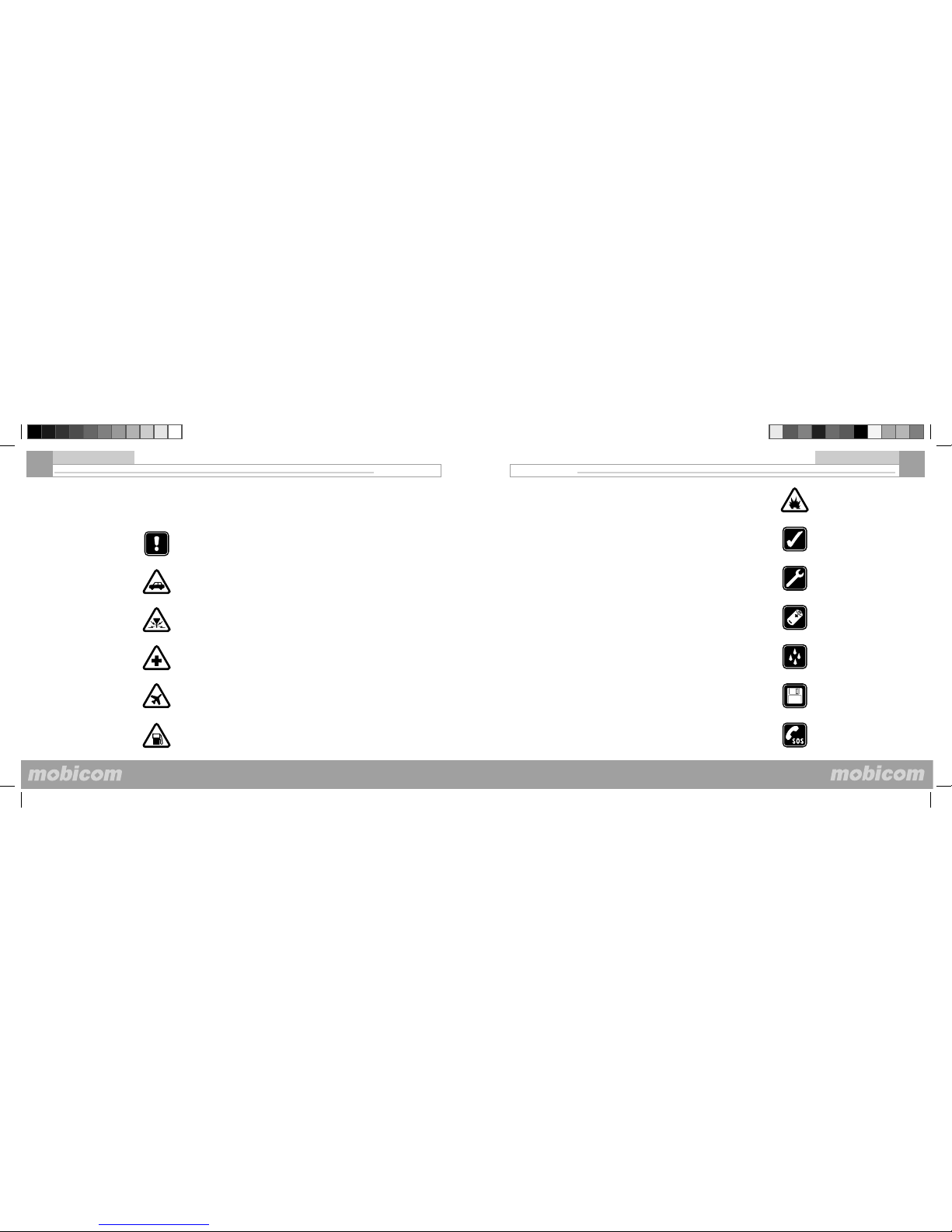
SWITCH OFF NEAR BLASTING
Follow any restrictions. Don’t use the phone where blasting is in progress.
USE SENSIBLY
Use only in the normal position as explained in the product documentation. Don’t touch the
antenna unnecessarily.
QUALIFIED SERVICE
Only qualifi ed personnel may install or repair this product.
ENHANCEMENTS AND BATTERIES
Use only approved enhancements and batteries. Do not connect incompatible products.
WATER-RESISTANCE
Your phone is not water-resistant. Keep it dry.
BACK-UP COPIES
Remember to make back-up copies or keep a written record of all important information stored in
your phone.
EMERGENCY CALLS
Ensure the phone is switched on and in service. Press the End key as many times as needed to
clear the display and return to the main screen. Enter the emergency number, then press the Talk
key. Give your location. Do not end the call until given permission to do so.
05
For your safety
For your safety
04
SWITCH ON SAFELY
Do not switch the phone on when wireless phone use is prohibited or when it may cause interference or danger.
ROAD SAFETY COMES FIRST
Obey all local laws. Always keep your hands free to operate the vehicle while driving. Your fi rst
consideration while driving should be road safety.
INTERFERENCE
Obey all local laws. Always keep your hands free to operate All wireless phones may be susceptible to interference, which could affect performance.
SWITCH OFF IN HOSPITALS
Follow any restrictions. Switch the phone off near medical equipment.
SWITCH OFF IN AIRCRAFT
Follow any restrictions. Wireless devices can cause interference in aircraft.
Read these simple guidelines. Not following them may be dangerous or
illegal. Read the complete user guide for further information.
SWITCH OFF WHEN REFUELING
Don’t use the phone at a refueling point. Don’t use near fuel or chemicals.
1. Safety Tips
Page 4
©Mobicom Corp. 2005 www.mobicomcorp.com
Mobicom 2188
© Mobicom Corp. 2005 www.mobicomcorp.com
©Mobicom Corp. 2005 www.mobicomcorp.com
Mobicom 2188
© Mobicom Corp. 2005 www.mobicomcorp.com
• Keep the phone and all its parts and accessories out of the reach of
small children.
• Keep the phone clean. Do not use or store the phone in dusty, dirty
areas, as its moving parts may be damaged.
• Keep the phone dry. Precipitation, moisture and liquids contain minerals that will corrode electronic circuits.
• Do not store the phone in hot areas. High temperature can shorten the
life of electronic devices, damage batteries, warp or melt certain plastic
parts.
• Do not store the phone in cold areas. When the phone warms up to its
normal operating temperature, humidity can form inside the phone, which
may damage electronic circuit boards.
• Phone should only be disassembled by an authorized service center.
Inauthorized disassembly may void the warrenty.
• Do not drop, knock or shake the phone. Rough handling can break
internal electronic boards.
• Do not use harsh chemicals, cleaning solvents or strong detergents
to clean the phone. Wipe it with a soft cloth slightly dampened in a mild
soap-and-water solution.
07
3. Usage Warnings
For your safety
To use the phone you must have service from a wireless network operator. Many of the features in this device depend on features in the wireless
network to function. These Network Services may not be available on
all networks or you may have to make specifi c arrangements with your
network operators before you can utilize Network Services.
Your service provider may need to give you additional instructions for
their use and explain what charges will apply. Some networks may have
limitations that effect how you can use Network Services. For instance,
some networks may not support all language-dependent characters and
services.
Your network operators may have requested that certain features be
disabled or not activated in your device. If so, they will not appear on your
device menu. Contact your network operators for more information.
06
2. Network Sevice
For your safety
Page 5
©Mobicom Corp. 2005 www.mobicomcorp.com
Mobicom 2188
© Mobicom Corp. 2005 www.mobicomcorp.com
©Mobicom Corp. 2005 www.mobicomcorp.com
Mobicom 2188
© Mobicom Corp. 2005 www.mobicomcorp.com
Get started
1. Insert the SIM card
2. Charge the Battery
3. Effi ciently use the Battery
4. Phone Elements
5. Keypad Illustration
Get started
09
• Do not paint the phone. Paint can clog the device’s moving parts and
prevent proper operation.
• If the phone, battery, charger or any other accessory is not working
properly, take it to your nearest qualifi ed service facility.
08
For your safety
Page 6
©Mobicom Corp. 2005 www.mobicomcorp.com
Mobicom 2188
© Mobicom Corp. 2005 www.mobicomcorp.com
©Mobicom Corp. 2005 www.mobicomcorp.com
Mobicom 2188
© Mobicom Corp. 2005 www.mobicomcorp.com
11
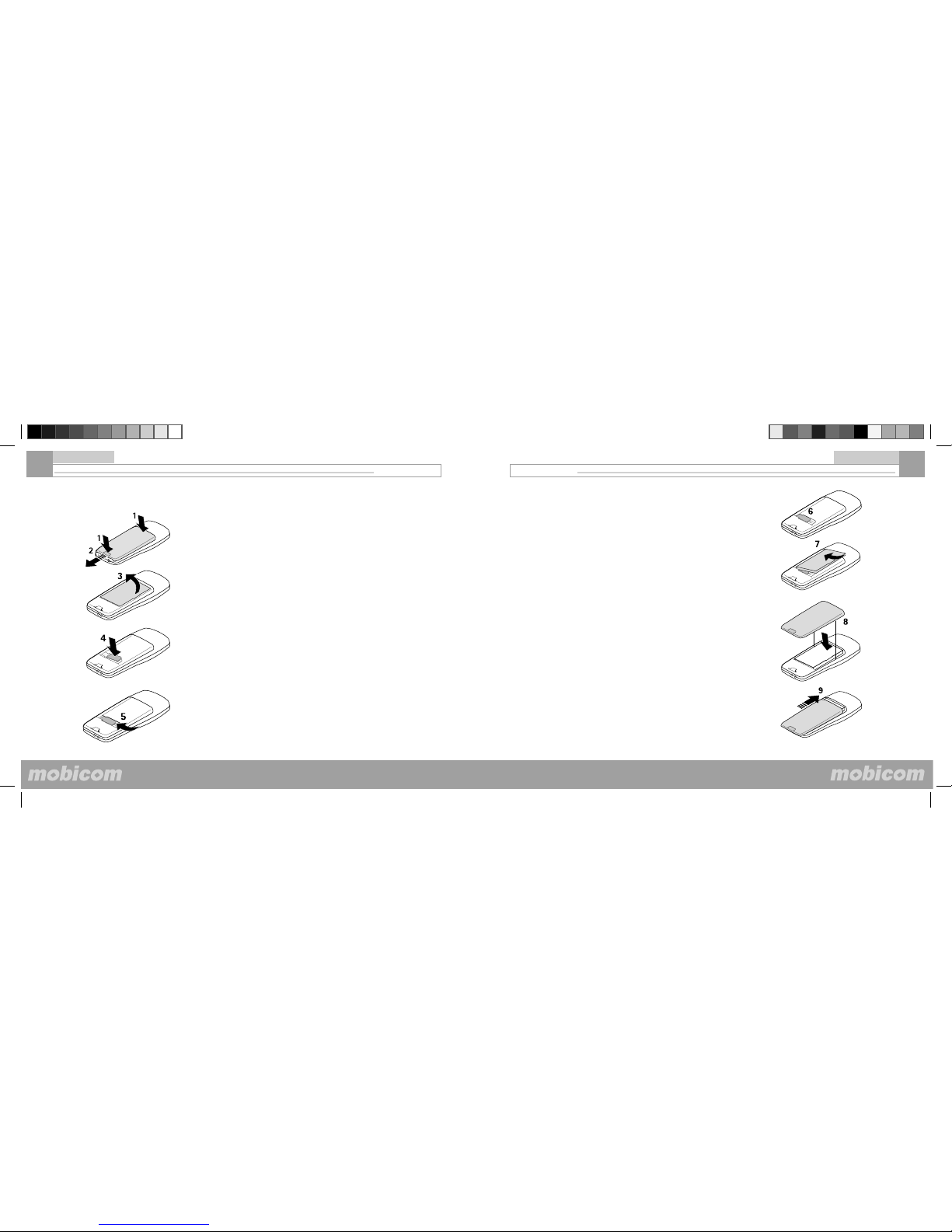
(6) the SIM card stops at the left end of the slot
Replace battery
(7) put the battery back in, left side fi rst, to make sure it goes into the right spot.
Replace the back cover
(8) align the two side clip on the cover with the housing
(9) slide the cover up to position it
Get started
10
1. Insert the SIM card Note: Before installing the SIM card, make sure that the phone is
switched off, and disconnected from the charger or any other device.
Remove the back cover:
(1) press the top and the bottom of the battery cover;
(2) slide to open
Remove the battery.
(3) pull up the right side of the battery to take it out
Insert the SIM card
(4) place the SIM card into the slot, with the gold side down and the beveled edge to the right.
(5) push the SIM card to the left
Get started
Page 7

©Mobicom Corp. 2005 www.mobicomcorp.com
Mobicom 2188
© Mobicom Corp. 2005 www.mobicomcorp.com
©Mobicom Corp. 2005 www.mobicomcorp.com
Mobicom 2188
© Mobicom Corp. 2005 www.mobicomcorp.com
• Do not charge the battery at improper temperatures because it can affect the battery capability.
• Do not charge the battery in sunny or damp environment.
• Keep the battery away from open fl ames. It is prohibited to disassemble
the battery or put it together with explosive substances.
• Please do not knock the battery with a sharp object or place it under
weight, otherwise the electronic circuits and internal parts and components can be damaged, shortening the lifetime of battery.
• The battery is designed to be charged and discharged many times, but
will eventually wear out. You should replace the battery when talk time
and standby time is noticeably shorter than normal.
• Please use the supplied accessories, in order to avoid damaging the
phone and battery.
• Please keep the battery pins and metal parts clean.. Charging may not
be performed if the battery is too dirty.
• Please place the battery in dry and cool environment. Extreme high
or low temperature may damage the battery capability and reduce the
lifetime of battery.
3. Effi ciently use the battery
13
Get started
2. Charge the Battery
12
(1). Charging the battery with the travel charger
• Plug the travel charger into the bottom outlet.
• The indication bar of battery scrolls when battery charging is in process;
In this process the mobile phone can be used but this will increase the
charging time.
• When the indication bar of battery stops scrolling, it means charging is
complete; Please switch off the power before disconnecting the charger.
The charging time may vary with the residual battery level.
(2). Low Battery Indicator
• When the battery is weak and only a few minutes of talk time remain,
you will hear a warning tone and a message of low battery will be repeated at regular intervals on the display;
• When the battery is too weak for the phone to operate, it switches off
automatically.
(3). Battery Usage
• The battery will consume more power when the phone is in talk mode.
Therefore, the longer the talk time, the shorter the standby time;
• The lifetime of battery may vary with the external environment (i.e.,
number of charging cycles, ambient temperature, method of usage, signal
strength and duration of keypad lighting).
Note: Use only the supplied charger because other chargers may damage the phone.
Note:
The Charger Connector is the left
one of the two connectors on the
bottom of the phone.Please fi nd
a small charger icon next to the
charger connector to avoid plugging
the charger into the audio connector
by mistake.
Get started
Page 8
©Mobicom Corp. 2005 www.mobicomcorp.com
Mobicom 2188
© Mobicom Corp. 2005 www.mobicomcorp.com
©Mobicom Corp. 2005 www.mobicomcorp.com
Mobicom 2188
© Mobicom Corp. 2005 www.mobicomcorp.com
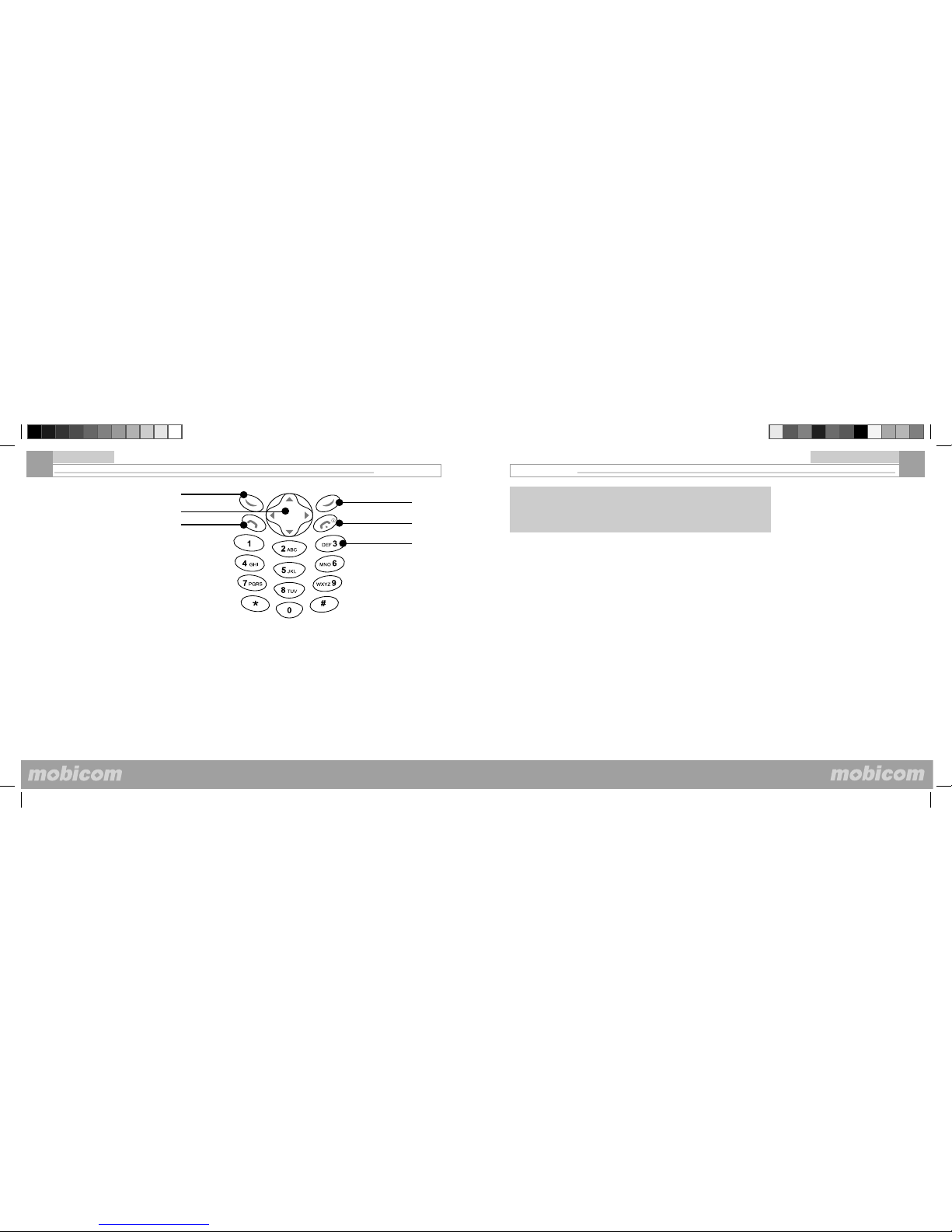
See Illustration on the left:
• Lanyard Holes (on the top of the back houseing)
Allows the lanyard to go through to carry the phone.
• Earpiece
Allows sound to be heard through the phone.
• LCD (Liquid Crystal Display)
Mono 96x64, displays the information and icons.
• Soft Keys
Perform the displayed functions.
• Navigation Keys
Help scrolling up and down Menu.
Shortcuts to Call History, Keypad and Ring Tone Setting, Messages, and Phone Book.
• Numeric Keys
Enter numbers, letters and characters. Quickly scroll through the menu options.
• Charging Connecter
Charge the phone by plugging the charger in the connecter.
• Headset Connecter
Allows the headset to be connected to the phone.
15
Get started
4. Phone Elements
Mono Display 96x64
Lanyard (back)
Soft Key Soft Key
Navigation Key
Earpiece
Numeric Keys
Headset Connecter
Charging Connecter
14
Get started
Page 9
©Mobicom Corp. 2005 www.mobicomcorp.com
Mobicom 2188
© Mobicom Corp. 2005 www.mobicomcorp.com
©Mobicom Corp. 2005 www.mobicomcorp.com
Mobicom 2188
© Mobicom Corp. 2005 www.mobicomcorp.com
Basic Operations
17
Basic oPERATIONS
1. Messages
2. Phonebook
3. Call History
4. Network Service
5. Phone Settings
6. Organizer
7. Extra Features
5. Keypad Illustration
Get started
16
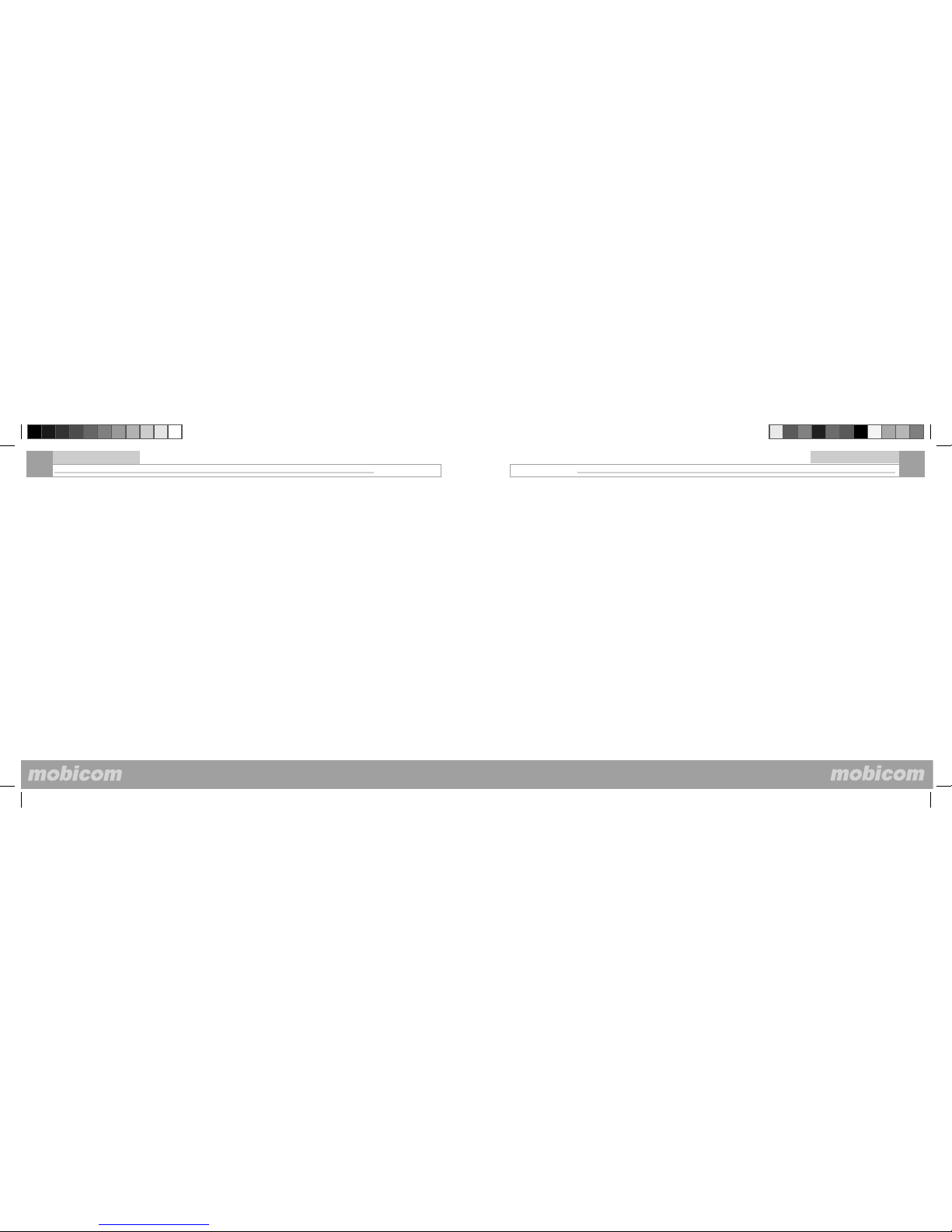
• Send Key: Makes or answers a call.
• End Key: Stops prompt, ends a call or exits from the current menu.
Used to switch phone on/off when pressing and holding down for longer.
• Left Soft Key: Performs the functions shown in the left bottom area of
display. Scroll through menu options in idle mode.
• Right Soft Key: Performs the functions shown in the right bottom area
of display.
• Navigation Keys: Scroll through the menu; shortcuts:
Up Arrow Key: Keypad Tone setting and Ring tone setting.
Down Arrow Key: Phone Book
Left Arrow Key: Messages
Right Arrow Key: Call History
Left Soft Key
Send Key
Right Soft Key
Navigation Key
End Key
Numeric Keys
Page 10
©Mobicom Corp. 2005 www.mobicomcorp.com
Mobicom 2188
© Mobicom Corp. 2005 www.mobicomcorp.com
©Mobicom Corp. 2005 www.mobicomcorp.com
Mobicom 2188
© Mobicom Corp. 2005 www.mobicomcorp.com
19
Basic Operations
i. Save the number
ii. Call the number
iii. Send a message to the number.
You can also press the Send key directly to call this number.
• Call Number-- Call the number that sent you this message.
(2). Write (Write and send a message)
I. From Menu, select Messages > Write
II. Compose a message using the keypad.
Entering text
Press # to switch modes: Abc - fi rst letter is capitalized
ABC - upper case
abc - lower case
123 - numeric entry
Press * to select punction marks.
Press 1 to enter a space (except in numeric entry mode).
III. For other options while composing the message, select Options and
one of the following:
• Send — Send the message to more than one recipient.
• Save — Select Save to save the message in the Draft.
• Discard — Erase the text clipboard.
IV. To send the message, select Send, enter the recipient’s phone number or select Names to retrieve a number from contacts, and select Send
18
Basic Operations
1. Messages
(1), Read
(2). Write
(3). Delete All
(4). Settings
(5). Broadcast
(6). Voice Mail
The shortcut to Messages is the Left arrow key in idle mode.
(1). Read (read a message)
When a message is received, new messages will be displayed on the
screen, and your phone will sound a tone in accordance with the settings
you choose. Press read to quickly view the message contents.
I. To view the message immediately, select read
II. To view a saved message, From Menu, select messages >Read>
Inbox or Draft
III. While viewing the message, select Options and one of the following:
• Delete — Delete the message you are viewing.
• Reply — While viewing a message, select Options > Reply. Compose
your reply and send the message as described in “Write and send a
message”.
• Edit — Edit the message.
• Forward — Forward the message to another recipient.
i. While viewing a message, select Options > Forward
ii. Edit the message if desired, and select Send.
iii. Enter the recipient’s phone number or retrieve it from contacts,
and select Send.
• Extr. Number --Automatically captures the numbers within the mes-
sage. You can press Next to cycle through them and press Options to
Page 11
©Mobicom Corp. 2005 www.mobicomcorp.com
Mobicom 2188
© Mobicom Corp. 2005 www.mobicomcorp.com
©Mobicom Corp. 2005 www.mobicomcorp.com
Mobicom 2188
© Mobicom Corp. 2005 www.mobicomcorp.com
21
Basic Operations
network operator. To save the number manually, do the following:
I. From Menu, select Messages > Settings > Service center
II. If the box in the display is empty or contains an incorrect number, enter
the number given by your network operator, and select OK.
OR
If the box in the display contains the correct number, select OK. A message appears in the display confi rming your number is saved.
(5). Broadcast
Broadcast messages are public messages delivered to all the end users,
if the service is available from your network operator. The messages are
categorized by different topics, such as weather forecast, bonus stock,
fl ight lines and so on. Please contact with your network operator for the
category details.
From Menu, select messages>Broadcast
The function options include the following:
I. Activate—Activate the message station: to receive messages. Shut
down the message station: stop to receive the messages.
II. Read—Read the messages send by the station.
III. New Broadcast—check the programs categories, and add or delete
programs in your cell phone. Please inquiry the network operator for the
corresponding codes of programs.
IV. List
20
Note: When sending messages, your device may display the line
Sending Message.This is not an indication that the message has been
received at the intended destination. For more details about messaging
services, check with your network operators.
(3). Delete All
I. From Menu, select Messages > Delete All
II. Select OK to delete all or Back to exit.
(4). Settings
I. From Menu, select Messages > Settings
II. If more than one message profi le set is supported by your SIM card,
select the set desired to change; then select one of the following:
• Service center—Save the phone number of the message center which
is necessary for sending text messages; obtain this number from your
network operators.
• Message validity—Defi ne how long the network attempts to send your
messages before it gives up.
• Status reports—Request the network to send delivery reports on your
messages.
• Storage—Screen will display total space and free space.
• Save your message center number
Messages sent by your phone are routed through your network operator
message center. Normally, this number is saved to your phone by your
Basic Operations
Page 12
©Mobicom Corp. 2005 www.mobicomcorp.com
Mobicom 2188
© Mobicom Corp. 2005 www.mobicomcorp.com
©Mobicom Corp. 2005 www.mobicomcorp.com
Mobicom 2188
© Mobicom Corp. 2005 www.mobicomcorp.com
23
You can save the phone numbers and corresponding names into the
phone memory or SIM Card of your phone. Your phone memory allows
you to store 100 names and phone numbers in total. The length and
quantity of names and phone numbers to be stored into the SIM Card
depends on the type of SIM Card provided.
The shortcuts to Phone Book are:
1. Press the Down arrow key at the idle screen
2. Select Names at the idle screen
(1). List -Find a name or select from a list.
From Menu, select PhoneBook > list
Press Up/Down keys to scroll through the list of names. Press Send key
to call the name or select Options by pressing the soft key to edit, as one
of the following options:
• Send Message — Send a message to the number (See “Write and
send a message”)
• Change — Edit the original information
• Details — From Menu, select Phonebook > List, and then check the
details of the name you selected.
• Call Number — From Menu, select Phonebook > List, choose the
desired number and select Call Number
• Copy — Copy entries from phone memory to SIM and vice versa.
• Move — Move entries from phone memory to SIM and vice versa with-
out keeping them in the original locations.
• Delete — Delete a name and its associated numbers.
2. Phone Book
(1). List
(2). Add new entry
(3). My number
(4). Memory Stat.
(5). Select Book
(6). One Touch Dial
Basic Operations
22
(6). Voice Mail
This option enables you to answer the voice mail. You should apply for
this service from your network operator fi rst, then you can use this function.
From Menu, select Messages> Voice Mail
There are two sub options of this option:
I. Voice Mail: When this option is selected, your phone will directly access to the set Voice Mail Box, then you can listen to the voice messages. If the Voice Mailbox is not yet set, a prompt will appear on the screen,
requesting you to enter the Voice Mailbox Number fi rst.
Note: You can quickly access your voice mail by pressing and holding
down the “ 1 ” key.
II. Set voice mail box: Input the voice mail number provided by your network operators and press OK. This number will be saved.
Basic Operations
Page 13
©Mobicom Corp. 2005 www.mobicomcorp.com
Mobicom 2188
© Mobicom Corp. 2005 www.mobicomcorp.com
©Mobicom Corp. 2005 www.mobicomcorp.com
Mobicom 2188
© Mobicom Corp. 2005 www.mobicomcorp.com
25
Basic Operations
3. Call History
(1). Missed calls
(2). Answered calls
(3). Outgoing Calls
(4). View calls options
(5). Call timer
Call History stores information about the last 10 missed, 10 received,
and 10 dialed calls. It also adds the total duration of all calls. When the
number of calls exceeds the maximum, the most recent call replaces the
oldest. For Call History to work properly:
• Your network operators must support caller ID, and it must be enabled.
• Your calls cannot be blocked.
• Your phone must be on and within the service area.
The shortcut to Call History is the Right arrow key in idle mode.
(1). Missed Calls
From Menu, select Call History > Missed Calls
Missed Calls- Shows the phone numbers of unanswered calls.
(2). Answered Calls -Answered calls are calls that have been answered.
I. From Menu, select Call History > Answered calls.
II. Scroll to a name or number, and select Options and the desired option
from the list.
(3). Outgoing Calls
You can view dialed numbers in one of two ways:
I. At the start screen, press the Talk key.
OR
From Menu, select Call History > Outgoing Calls.
II. Scroll to a name or number, and select Options and the desired option
from the list.
24
Basic Operations
(2). Add New Entry
From Menu, select PhoneBook > Add New Entry.
or, you can also enter new numbers at idle screen and then press Save
to add it to Phone Book.
(3). My Number
From Menu, select PhoneBook > My Number
Screen will suggest Edit or Back. Select Edit to edit the number.
(4). Memory Stat.
From Menu, select PhoneBook > Memory Stat.
The screen displays the content and available spaces of SIM card and
the phone.
(5). Select Book
From Menu, select PhoneBook > Select Book
Use Up/Down arrow keys to select SIM card or cell phone. Phone book
entries are stored in the selected phone book (SIM or phone’s memory)
(6). One Touch Dial
Form Menu, select PB > 1 Touch Dial. Pick one from number keys 2
through 9, and then enter a phone number and press OK. To One Touch
Dial a number in locations 2 through 9, press and hold down the appropriate number key.
Page 14
©Mobicom Corp. 2005 www.mobicomcorp.com
Mobicom 2188
© Mobicom Corp. 2005 www.mobicomcorp.com
©Mobicom Corp. 2005 www.mobicomcorp.com
Mobicom 2188
© Mobicom Corp. 2005 www.mobicomcorp.com
27
Basic Operations
4. Network Service
(1). Divert
(2). Network Sel.
(3). Call barring
(4). Call waiting
(5). Hide ID
(1). Divert
I. Not Reachable
This allows you to forward incoming calls when your phone is power off or
in an area where the network is unreachable.
• From Menu, select Network service > Divert
• Scroll to operate these options: Status, Set, Cancel
II. If busy
Forward all calls when you are on a call.
This allows you to forward the incoming calls when your phone is busy.
When this function is activated, Your phone will forward the incoming call
even when you refuse to answer it.
• From Menu, select Network service > Divert > If Busy
• Scroll to operate these options: Status, Set, Cancel
III. If No Answer
Forward all calls to another number if you do not answer. You can also
set a delay before forwarding takes place.
• From Menu, select Network Service > Divert > If No Answer
• Scroll to operate these options: Status, Set, Cancel
IV. All Calls
This network service allows you to forward the incoming call to another
phone number, enabling you to correctly handle the incoming call when
you are unable to answer. When this function is activated, an icon will be
displayed when the phone is in idle mode.
26
Basic Operations
(4). View calls options
Whether you are viewing missed, answered, or outgoing calls, the menu
options are as the following:
Store Number — Enter a name for the number and save it to contacts.
Send message — Send a message to the number.
Details — Display the date\ number and time of the call.
Delete — Clear the number from memory.
To clear any missed, outgoing, or answer calls from phone memory, select Call History > missed\outgoing or Answer > Delete
Delete All- To clear any missed, outgoing, or answer calls from phone
memory, select Call History > Missed / Outgoing or Answer > Delete
all
(5). Call Timers
Call timers—View the duration of recent calls and clear the call timers.
From Menu, select Call History > Call timers
Page 15
©Mobicom Corp. 2005 www.mobicomcorp.com
Mobicom 2188
© Mobicom Corp. 2005 www.mobicomcorp.com
©Mobicom Corp. 2005 www.mobicomcorp.com
Mobicom 2188
© Mobicom Corp. 2005 www.mobicomcorp.com
29
II. Intern. Calls — When this option is activated, you are unable to dial
any international number.
III. Intern. But Home — It allows you to make a call only to your country
and dial the domestic numbers when you are roaming.
IV. Incoming Call — When this option is activated, you are unable to
answer any incoming call.
V. When Roaming — When this option is activated, and you are abroad,
you are unable to answer any call except it comes domestically.
VI. Cancel All — When this option is activated, all the calling restrictions
set before will be canceled. You need network password for this function.
VII. Change Password — enter original Phone Lock code, after it’s
confi rmed correct, enter new code for twice.
Except Cancel All, other options include the same following items: Sta-
tus ,Set ,Cancel. When the functions are activated, you need to enter
network password.
Basic Operations
28
Basic Operations
This function allows forwarding all the incoming calls in any instance.
• From Menu, select Network service > Divert > All Calls
• Scroll to operate these options: Status, Set, Cancel
V. Cancel All
Cancel any call forwarding options you may have set.
From Menu, select Network service > Divert > Cancel All to cancel all
settings.
(2). Network Sel.
This option enables you to select or search your service network.
• From Menu, select Network service > Network Sel > Automatic or
Manual
You can choose Manual Net Sel or Auto Net Sel to search network
(3). Call Barring
This service allows you to restrict your phone to make or answer any
or some calls. You need to enter the network password if you want to
use this function. You need to apply for the password from your network
operator.
From Menu, select Network service > Call Barring, the menu options
are as the following:
I. Outgoing — When this option is activated, you are unable to dial any
number
Page 16
©Mobicom Corp. 2005 www.mobicomcorp.com
Mobicom 2188
© Mobicom Corp. 2005 www.mobicomcorp.com
©Mobicom Corp. 2005 www.mobicomcorp.com
Mobicom 2188
© Mobicom Corp. 2005 www.mobicomcorp.com
31
5. Phone Settings
(1). Languages
(2). Tones
(3). Clock
(4). Security
(5). Auto Redial
(6). Any-key Answer
(7). Screen Saver
(8). Factory reset
(1). Languages
From Menu, select Phone Settings>Languages and one of the following:
• English
• Spanish
(2). Tones
I. Ringer
From Menu, select Phone Settings>Ton es>Ringer, and one of the fol-
lowing:
• Melody — Enables you to set how the phone informs you of an incom-
ing call.
• Volume — Enables you to set tone volume level of incoming call
II. SMS tone
From Menu, select Phone Settings > Ton es > SMS tone
• Melody — Enables you to set different SMS tones.
• Volume — Enables you to set tone volume level of SMS tone
III. Alarm
From Menu, select Phone Settings > Ton es > Alarm
• Melody—Select an alarm tone from list.
• Volume— Enables you to set tone volume level.
Basic Operations
30
Basic Operations
(4). Call Waiting
If supported by your network operators, call waiting notifi es you of an incoming call even while you are in a call. You can accept, reject, or ignore
the incoming call.
I. Check Status
You can see whether call waiting is active, and for which type of calls.
From Menu, select Network service > Call Waiting>Check Status
II. Activate or Deactivate
From Menu, select Network service > Call Waiting > Activate or Deac-
tivate.
(5). Hide ID
From Menu, select Network service > Hide ID, and one of the following:
I. Check Status
II. Activate
III. Deactivate
This function can control whether receiver is able to see your number or
not, please consult your network operator for this service.
Page 17
©Mobicom Corp. 2005 www.mobicomcorp.com
Mobicom 2188
© Mobicom Corp. 2005 www.mobicomcorp.com
©Mobicom Corp. 2005 www.mobicomcorp.com
Mobicom 2188
© Mobicom Corp. 2005 www.mobicomcorp.com
(I). Yes—Activate fi xed dialing.
(II). No—Deactivate fi xed dialing.
(III). FDN Number
You can select On or Off. You need to enter PIN2 code in order to select
On. When this function is activated, you can save, revise or delete numbers in Fixed Dialing list.
II. PIN
From Menu, select Phone Settings > Security > PIN, The menu options are as follows:
Status, Activate, Deactivate, Change- You will need to input your PIN
code before you can perform any of PIN options. When this function
is activated, you need to input your PIN code every time the phone is
switch on.
PIN change(I). At the prompt, enter the original PIN code, and select OK.
(II). At the prompt, enter the new PIN code, and select OK.
(III). At the prompt, enter the new PIN code again, and select OK.
III. PIN2
The PIN2 code is required for features such as fi xed dialing. If you enter
an incorrect PIN2 code three times in succession, the PIN2 code is
blocked and you will have to enter the PUK2 code.
The original PIN2 code must be obtained from your network operators.
Use this procedure to change your PIN2 code:
33
Basic Operations
IV. Keypad Tone
From Menu, select Phone Settings>Ton es>Keypad Tone
There are 2 choices:
• Tones--you can select Silent, Click, or DTMF
• Volume--you can adjust the volume by pressing up and down arrow
keys on the navigation key.
The shortcut of the Keypad Tone control is the Up arrow key in idle mode.
(3). Clock
From Menu, select Phone Settings>Clock. This menu enables you to
set date and time.
Enter Date: Enter the date, and select OK.
Enter Time: Enter the time in hh:mm format, and select OK.
(4). Security
I. Fixed Names
Once you set up and activate a fi xed dialing list, your phone can make
calls only to those numbers that you have defi ned in the fi xed dialing list.
Fixed dialing is a network feature and must be supported by your network
operators.
This option allows you to restrict your outgoing calls to a limited set of
phone numbers, if supported by your SIM Card. You need to enter your
PIN2 before enabling or disenabling it.
• From Menu, Phone Settings > Security > Fixed Names
After a brief pause, the following options appear in the display.
32
Basic Operations
Page 18
©Mobicom Corp. 2005 www.mobicomcorp.com
Mobicom 2188
© Mobicom Corp. 2005 www.mobicomcorp.com
©Mobicom Corp. 2005 www.mobicomcorp.com
Mobicom 2188
© Mobicom Corp. 2005 www.mobicomcorp.com
35
Basic Operations
II. press OK to enter. Press again to reset some functions to factory set-
tings.
Note: The stored phonebook information and messages will not be affected by
restoring the factory settings.
34
Basic Operations
From Menu, select Phone Settings> Security >PIN2
Change PIN2
• At the prompt, enter the original PIN2 code, and select OK.
• At the prompt, enter the new PIN2 code, and select OK.
• At the prompt, enter the new PIN2 code again, and select OK.
(5). Auto Redial
From Menu, select Phone Settings> Security > Auto Redial
You can select On or Off. When this function is activated, your phone will
automatically redial the number up to 10 times after 10 attempts the function will be terminated. (This function must be supported by your network
operator). Press (END) key to stop auto redial.
(6). Any-key Answer
Any-key answer allows you to answer an incoming call by briefl y pressing
any key except the End key.
From Menu, select Phone settings > Any-key answer > On or Off.
(7). Screen Saver
From Menu, select Phone settings>Screen Saver
Select On to activate or Off to deactivate.
(8). Factory Reset
You can reset some of Menu settings to their original values. However,
data that you have entered or downloaded are not affected. For example,
names and numbers in contacts are not affected.
I. From Menu, select Phone settings > Restore factory
Page 19
©Mobicom Corp. 2005 www.mobicomcorp.com
Mobicom 2188
© Mobicom Corp. 2005 www.mobicomcorp.com
©Mobicom Corp. 2005 www.mobicomcorp.com
Mobicom 2188
© Mobicom Corp. 2005 www.mobicomcorp.com
Note: This calculator has limited accuracy and is designed for simple calculations.
I. From Menu, select Organizer > Calculator
II. In the calculator screen, enter the fi rst number in the calculation.
Press the # key for a decimal point if necessary.
III. To perform an arithmetic calculation, select Options to cycle through
Equals, Plus, Minus, Divide By, Multiple By.
IV. For an arithmetic calculation, enter the second number in your
calculation and select Equals.The completed calculation appears in the
display.
(5). Calendar
The Calendar function allows the user to view a calendar through December 20049 From Menu, select Organizer > Calendar
Current date, week, and month date are displayed
Note: Date checking ranges from 31st. Jan. 1900 to 31st. Dec. 2049
(6). Global Time
This function provides you conveniences to consult the local time of
main big cities in the world, in order to better control the time during your
business trip, travel and business negotiation.
From Menu, select Organizer >Global Time
you can select the city you want to view.
(7). Games
Two games, Four In A Row and Tetris, are available in this model.
From Menu, select Organizer >Games>Four In A Row or Tetris.
37
Basic Operations
(1). Alarm
I. Alarm
From Menu, select Organizer > Alarm > Alarm
Enter alarm time and choose frequency, Once, or Daily.
II.Tones
From Menu, select Organizer > Alarm > tones and one of the following:
• Melody— Enables you to set how the phone informs you of an alarm.
• Volume— Enables you to set tone volume level of alarm.
III. Clear Alarm
From Menu, select Organizer > Alarm > Clear Alarm
(2). Power On
I. From Menu, select Organizer > Power On
Choose ON and set put ON time , and press OK key .
II. From Menu, select Organizer > Power on > Ton es and one of the
following:
• Melody— Enables you to set how the phone informs you of ON music.
• Volume— Enables you to set tone volume level of ON music.
(3). Power Off
I. From Menu, select Organizer > Power Off
Choose Power Off and set off time , and press OK key .
II. From Menu, select Organizer > Power Off > Clr Pwr off to clear
power off setting
(4). Calculator
The calculator adds, subtracts, multiplies, divides digits.
6. Organizer
(1). Alarm
(2). Power On
(3). Power Off
(4). Caculator
(5). Calendar
(6). Global Time
(7). Game
36
Basic Operations
Page 20
©Mobicom Corp. 2005 www.mobicomcorp.com
Mobicom 2188
© Mobicom Corp. 2005 www.mobicomcorp.com
©Mobicom Corp. 2005 www.mobicomcorp.com
Mobicom 2188
© Mobicom Corp. 2005 www.mobicomcorp.com
7. Extra Features (1). Shortcuts
In idle Mode:
Up Arrow Key: Keypad Tone setting and Ring Tone setting. You can set
them Normal or Slient.
Down Arrow Key: Phone Book menu
Left Arrow Key: Messages menu
Right Arrow Key: Call History menu
(2). Key Lock and Unlock
To lock the keypad: Select Menu and then press key
To unlock the keypad: Select Unlock and then press key.
*
*
38
Basic Operations
FCC notice and SAR sTATEMENT
This device complies with part 15 of the FCC Rules. Operation is subject
to the following two conditions: (1) This device may not cause harmful
interference, and (2) this device must accept any interference received,
including interference that may cause undesired operation.
Any changes or modifi cations not expressly approved by Mobicom Corporation will void the user’s authority to operate the equipment. Use only
Mobicom approved chargers.
Note: This equipment has been tested and found to comply with the limits
for a Class B digital device, pursuant to part 15 of the FCC Rules. These
limits are designed to provide reasonable protection against harmful
interference in a residential installation. This equipment generates, uses,
and can radiate radio frequency energy and if not installed and used in
accordance with the instructions, may cause harmful interference to radio
communications. However, there is no guarantee that interference will
not occur in a particular installation. If this equipment does cause harmful
interference to radio or television reception, which can be determined by
turning the equipment off and on, the user is encouraged to try to correct
the interference by one or more of the following measures:
• Reorient or relocate the receiving antenna.
• Increase the separation between the equipment and receiver.
• Connect the equipment into an outlet on a circuit different from that to
which the receiver is connected.
• Consult the dealer or an experienced radio/TV technician for help.
39
Page 21
©Mobicom Corp. 2005 www.mobicomcorp.com
Mobicom 2188
© Mobicom Corp. 2005 www.mobicomcorp.com
FCC Notice and SAR sTATEMENT
40
THIS PHONE MODEL HAS BEEN CERTIFIED TO BE IN COMPLIANCE
WITH THE GOVERNMENT’S REQUIREMENTS FOR EXPOSURE TO
RADIO WAVES.
Before a phone model is available to sale to the public, it must be tested
and certifi ed that it does not exceed government limits for exposure to radio frequency (RF) energy. Specifi c Absorption Rate (SAR) is a value that
corresponds to the relative amount of RF energy absorbed by the user
of a wireless phone. The Federal Communications Commission of the
United States government and Health Canada set SAR limits. The limits
include a safety margin designed to assure the safety of all persons,
regardless of age and health. The maximum allowed SAR value set by
the FCC is 1.6 W/kg. Tests for SAR values are conducted using FCC approved operating positions at the highest possible power levels. Although
the SAR is determined at the highest certifi ed power level, the actual SAR
level of the phone while operating is likely well below the maximum value.
The highest SAR values as reported to the FCC for this model phone are
in full compliance with FCC limits.
For more information about RF exposure, visit the FCC website at www.
fcc.gov. Additional information on Specifi c Absorption Rates (SAR) can be
found on the Cellular Telecommunications & Internet Association (CTIA)
website:
http://www.ctia.org/wireless_consumers/health_and_safety/index.cfm
or the Canadian Wireless Telecommunications Association (CWTA) website: http://www.cwta.ca
 Loading...