

Page 1
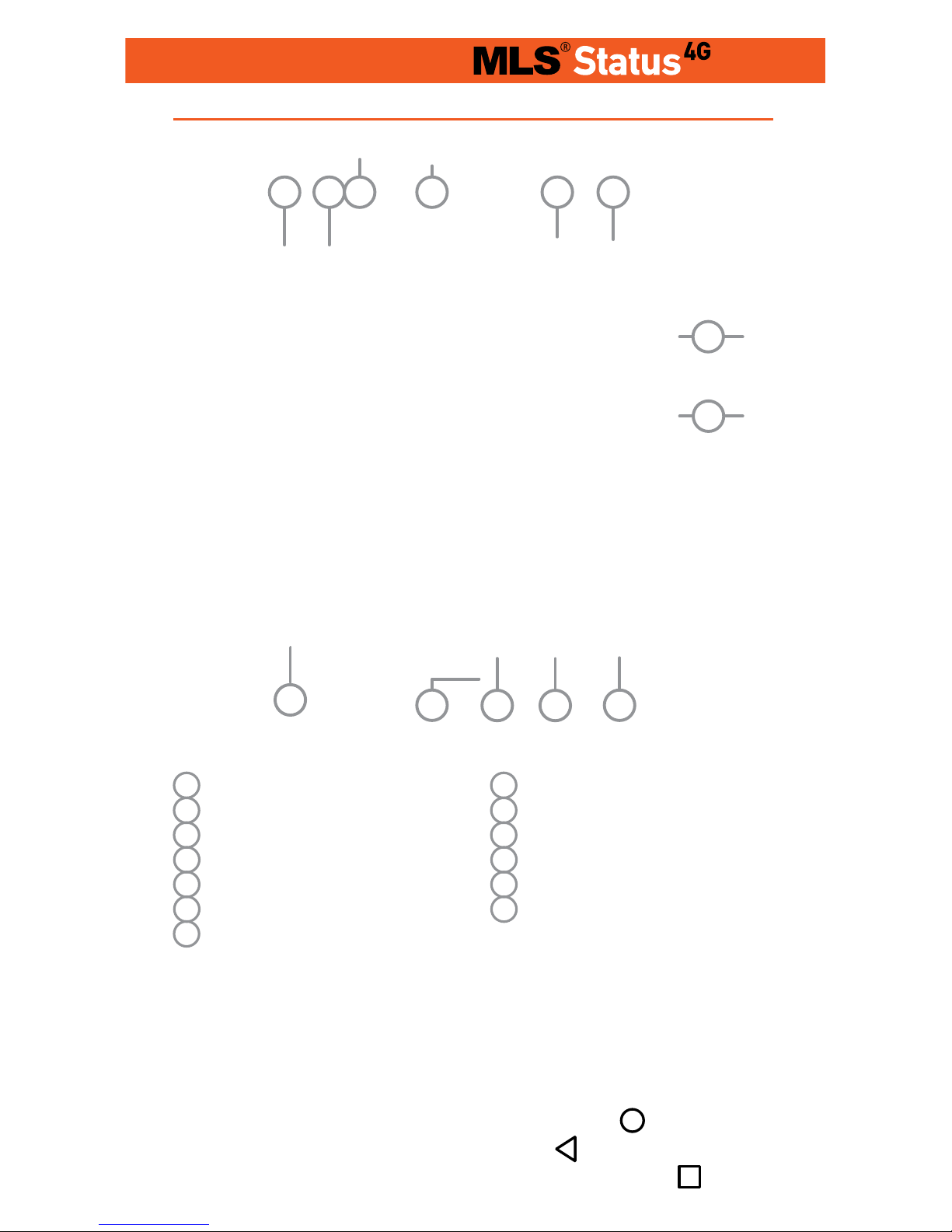
When you switch on your phone for the first time, press the side
key (8) and hold to activate.
At the initial screen, touch any icon to access the relative application.
To move back to the home screen, touch the
home screen
key. To move back , tap on the back icon
. ΓTo open the active
application management screen, touch the menu tab
.
8 Activation key / Lock
9 Speaker
10 Microphone
11 Back to previous screen
12 Home screen key
13 Active applications man-
agement key
1 Rear camera
2 Rear flash
3 Micro USB slot
4 3.5mm earphone socket
5 Receiver
6 Front camera
7 Increase/ Decrease
volume key
4
1
9
8
10
7
5
2
3
6
1
2
11
13
Quick Guide
Structure
Page 2

In order to take out
the back cover of
your phone, pull the
cap upwards from
its niche, as shown
in the picture.
In order to remove the battery
from the device, pull it up by
placing your finger in the appropriate niche, as shown in the
picture to the left.
In order to insert the SIM and
SD cards in the device, remove the battery, unlock the
corresponding cover, pull it
upwards and then place the
cards in their slots, as shown
in the picture on the right.
In order to remove the SIM
and SD cards, follow the same
steps in reverse.
In order to take out
the back cover of
your phone, pull the
cap upwards from
its niche, as shown
in the picture
In order to remove the battery
from the device, pull it up by
placing your finger in the appropriate niche, as shown in the
picture to the left.
In order to insert the SIM
and SD cards in the device,
remove the battery and then
place the cards in their slots,
as shown in the picture on the
right. In order to remove the
SIM and SD cards, follow the
same steps in reverse.
Insert & Remove battery
Insert & Remove SIM and SD cards
Phone opening
Insert & Remove battery
Insert & Remove SIM and SD cards
For Dual SIM Users
Phone opening
For Single SIM Users
Page 3
Lock & Unlock
In order to lock your device, tap the activation key. In order to
unlock your device, tap the activation key. When the lock icon
appears on the screen, drag upwards.
Main menu
Settings
To access all settings options, touch the top of the touch screen
and drag downwards twice. By tapping on the following key
you can access the general settings. On the “Settings” screen,
you can personalize your device to suit your needs, by setting
its functions accordingly. Networks, WiFi, Bluetooth settings,
sounds, appearance, applications, all at the tips of your fingers.
Navigate on the main menu by dragging the screen left and right
to switch pages on the main menu. Tap and hold on any icon you
want, in order to drag it to the main screen, as a shortcut. To go
back to the main screen press the corresponding key.
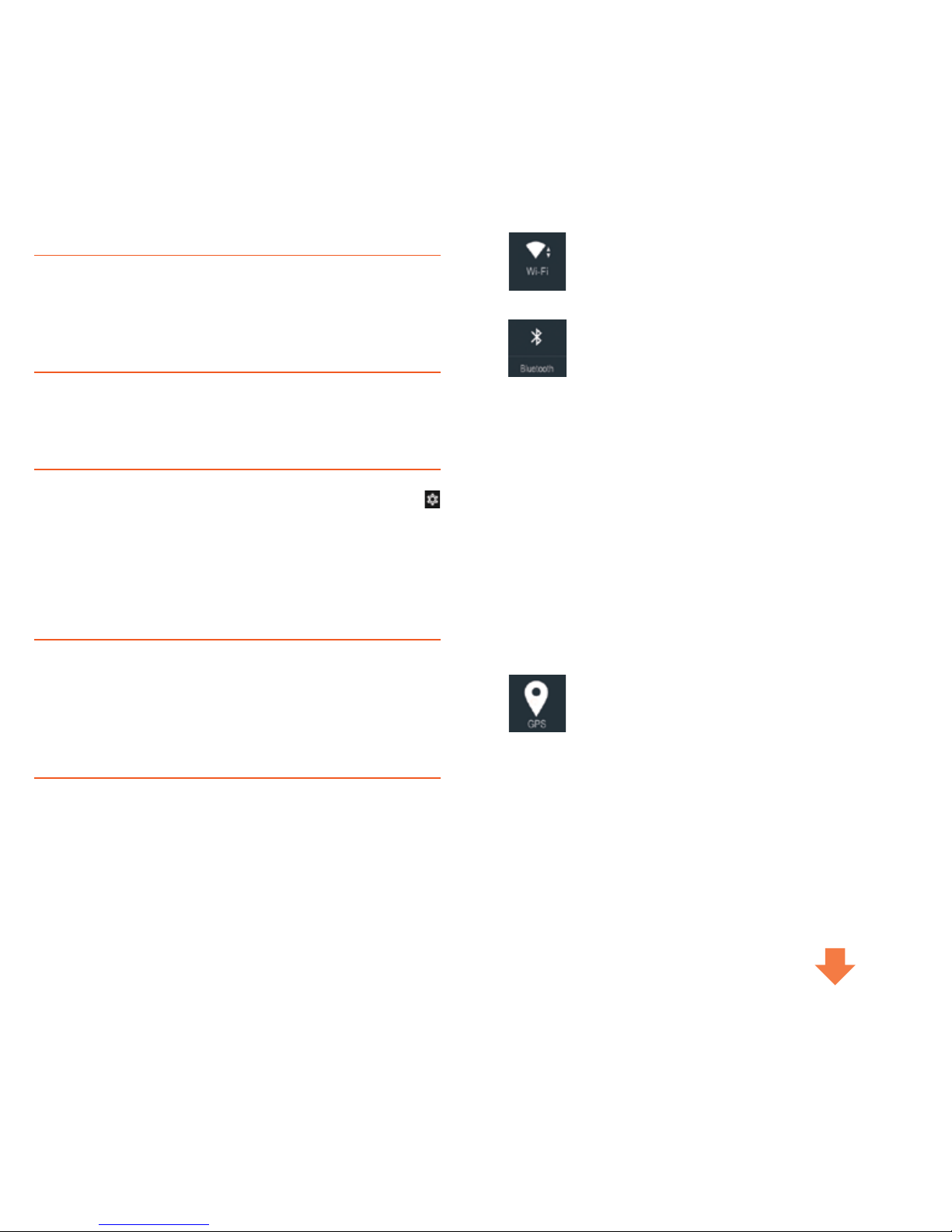
Quick Settings
By dragging once the upper end of the screen downwards, the
settings options will appear. If you drag it once more, quick settings will appear, as shown below.
MAIC (Settings)
You can set the basic functions of your device through MAIC.
Specifically, you can activate/ deactivate the Bluetooth, wifi, data
use, gps and silent mode by using voice command.
Alternatively, you can just say “Settings” and then chose from
the settings options.
Brightness Sets the brightness of the screen.
Drag the notification options once
and you can see all your notifications, i.e. Messages, missed calls,
e-mails, application updates.
Wireless networks-Activate the wifi when you’re
inside the range of a known wireless network and
deactivate it when you’re moving away and you want
to save battery power.
Bluetooth - Allow your device to connect with other
devices and Bluetooth accessories to transfer contacts, photos and files or to just use your wireless
earphones.
Automatic Rotation - It allows the automatic rotation of the screen.
Screen Transfer - Transfer the subject screened on
your device to another screen.
Flight Mode - When you activate Flight Mode, all
wireless connectivity options will be deactivated.
You can reactivate the Wifi and Bluetooth options
through Settings or the quick settings menu.
Data Connection - Activate and Deactivate mobile
data.
GPS - Activate your GPS and your MLS device will
give you information regarding your geographical location in any application necessar y, such as
Talk&Drive.
Page 4
Li-ion type battery To reach its maximum potential, the battery should first complete 2-3 charging cycles. After those
cycles, you can charge it as often as necessar y. After the first
cycles, Li-ion batteries do not need to be fully discharged bwfore you charge them again.
WARNING: Do not charge your device while it is covered or
exposed to the sun, especially if the ambient temperatures
are high. Always use the original charger and the cable.
Music and Videos
Transfer the music you like to your device, download music
from the internet and enjoy the high quality sound from your
device’s speaker or your earphones. A world full of music
at the tips of your fingers. A world you can create and enjoy,
exactly as you prefer. Watching videos you like is a piece of
cake with your MLS device. Furthermore, it offers you video
descriptions and information with pictures and playlist texts.
Your favorite movies, series or YouTube videos can keep you
high quality company, wherever you are.
Photos and Camera
Touch, tap or pinch on the screen of your device to zoom in or
zoom out on a picture. Furthermore, there’s automatic rotation
between horizontal and vertical function for picture screening.
Your favorite moments are always with you, in the way you want
to remember them.
By using zoom or flash, you can take your favorite pictures or
videos. Save photos and videos from parties, concerts, vacation
or any other images you like
in your device’s memory and your own, share them with friends
through e-mail and MMS.
Home screen
Radio
Plug in your earphones and listen to the radio station of your
choice, save your favorite stations for easy access every time
you use the application. With just one click, your favorite radio
station is there to keep you company and bring music to your
moments.
Internet
By choosing the internet browser application on the lower
right side of the home screen and by inputing the website you
would like to visit, you c an easily surf the web and immediately navigate on any web page you like. Furthermore, you
can touch the screen to zoom in/ zoom out and you can chose
through the “Menu” to open more windows for simultaneous
navigation in different internet web pages. Discover the easiest and fastest Internet trip ever. στο πιο εύκολο και γρήγορο
ταξίδι που έγινε ποτέ.
Arrange your folders, your applications and widgets by tapping
and holding your finger on any icon and drag it where you wish.
Through this process, the home screen of your device will be
arranged in a way that best serves your needs.
Page 5
MLS AFTER SALES SUPPORT SERVICE
You bought an MLS device? You don’t know how it works?
You don’t know how to update the MLS Talk& Drive Maps?
What’s MAIC ? How do I use Talk&Call? ML S is there for you
to solve all your possible problems! Customer Service is here
to help you and answer any questions you might have. For issues such as:
Your device won’t turn on?
Won’t charge?
How do I update it?
MAIC doesn’t understand me. I lost all my contacts.
MAIC, MLS Talk&Call and MLS Talk&Drive do not work &
How do I export my contac ts to my SD card?
The storage space of my device is limited. My device has
a low response rate.
GOS doesn’t work.
The flash or the vibrating function do not work.
My device won’t connect to my computer or is not recognized
by mycomputer
The SD card is not recognized
Before you talk to one of our resellers, you can contact us with
the following ways:
Customer Service Call Center
Τηλ.2310 989838
Fax.2310 989808
Email: [email protected]
Monday to Friday 9:30am-8:30pm
Saturday10:30am-3.30pm
Στα MLS Stores
MLS Store Mall
35, Andrea Papandreou str., 15125 Marousi (inside The
Mall Athens)
Τel. 210 6104859
Fax 210 6107683
Email: [email protected]
Monday to Friday 10:00am - 9:00pm
Saturday10:00am - 8.00pm
MLS Store Piraeus
120, Grigoriou Lampraki str.,18532, Piraeus
Tel. 210 4111160
Fax: 210 4111161
Email: [email protected]
Monday/Wednesday/Saturday 9:00am-3:00pm
Tuesday/Thursday/Friday 9:00am-9:00pm
MLS Store Cosmos
11Th km National Road of Thessaloniki/ Nea Moudania, 570
01, Thessaloniki (inside Mediterranean Cosmos)
Τet. 2310 475263
Fax: 2310 475264
Email: [email protected]
Monday to Friday 10:00am - 9:00pm
Saturday10:00am - 8.00pm
MLS Store Tsimiski
119, Tsimiski str., 54621, Thessaloniki
Τel. 2310 220538
Fax 2310 220548
Email: [email protected]
Monday/Wednesday 9:00am-5:00pm
Tuesday/Thursday/Friday: 9:00am - 9:00pm
Saturday 9:00am - 9:00pm
Page 6

MLS Offices
Customer Service Department of Attica
40, Digeni Akrita str. & Argyroupoleos, Τ.Κ. 16451, Argyroupoli
Monday to Friday 9:00am-5:00pm
Customer Service Department of Thessaloniki
VΕPΕ TECHNOPOLIS, 555 35, Pylaia, Thessaloniki
Monday to Friday 9:00am-5:00pm
For your accommodation, ML S has created the MLS Updater.
MLS Updater is a tool that allows you to do the following to
your Android device:
Update the latest MLS Services versions.
Update your maps
Update your ROM software by fixing possible problems.
Keep yourself updated on important subjects regarding
MLS produc ts and ser vices
MLS Updater is pre-installed in your device. For better support, MLS suggests that you regularly update it to its latest
version through Google Play Store. In that way, you’ll be continuously updated and receive support for technical issues.
Note: MLS Updater is exclusively addressed to MLS smartphone and tablet users.
MLS Destinator users can update their maps to their latest
version via our websitewww.mls.gr. Register on our members tab and downlοad the new maps for free via The process
is simple and does not require advanced computer knowl-
edge.
MLS Updater
To ensure the optimum function of your device, we recommend that you reboot it at regular intervals.
Keep a backup of your personal data (contacts, photos,
music etc.) In that way, you’ll make sure that your personal
data will be safe in case of loss or malfunction of your device.
In case you address the MLS Technical Department, please
make sure that you have kept a backup of your data, because
we might have to, for example, switch your device’s motherboard during the repair, meaning that all your data will be lost.
It is recommended that you do not use accessories manu-
fac tured by third parties (chargers, wires, batteries), because they might lead to malfunc tions or even damages to
your device.
In case your device won’t charge, make sure that you’re us-
ing the original charger of the product and that the cable has
been properly plugged in. Connect your device to the USB port
of your computer and see if it works.
In case your Android device freezes, take out the battery,
press the reset button or keep the on/off button pressed
continuously for 30-40 secs.
If you happen to notice that your device keeps malfunction-
ing af ter a ROM update, we recommend you to try resetting
your device.
In order for you to discover and use the 100% of the capa-
bilities of an Android device, you’ll need to add a Google account.
In case you have any questions, call 2310 989838 and visit
our website www.mls.gr. There, you’ll find all our manuals
and the characteristics of MLS devices, as well as all the frequently asked questions.
The information included in the manual that you’re holding are
indicative. Real time functions vary, depending on the operating system edition of the device.
Useful Tips
Page 7

Telephone Assistance
© 2003-2018 MLS.
All rights reserved.
The business names and logos MLS, MAIC and Status 4G
are trademarks owned by MLS Innnovation, registered in
Greece and in other countries.
Android is trademark owned by Google Inc.
With the present, the manufacturer MLS Informatics declares that the device is in compliance with all essential demand and other relative clauses of the directive 1999/5/EC.
A copy of the Compliance Declaration can be found at the MLS website: http://
www.mlsshop.gr/content/diloseis-symmorfosis
0700
 Loading...