

Page 1
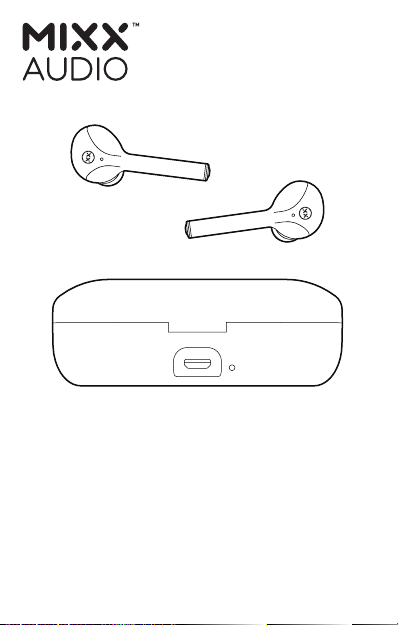
STREAMBUDS™ DX
TRUE WIRELESS
EARBUDS
QUICK START GUIDE
Page 2
LET’S CHECK
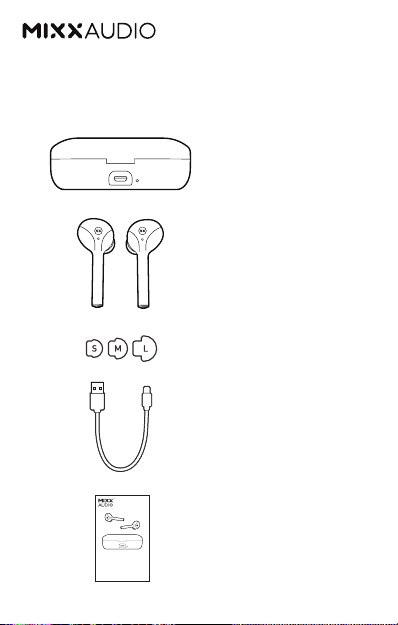
What’s in the box?
Charging Case
StreamBud DX
Earbuds
3 pairs of ear
cushions, small,
medium and large.
Micro USB
Charging Cable
STREAMBUDS™ DX
TRUE WIRELESS
EARBUDS
QUICK START GUIDE
Quick Start Guide
Page 3
LET’S START
1
L R
5
1
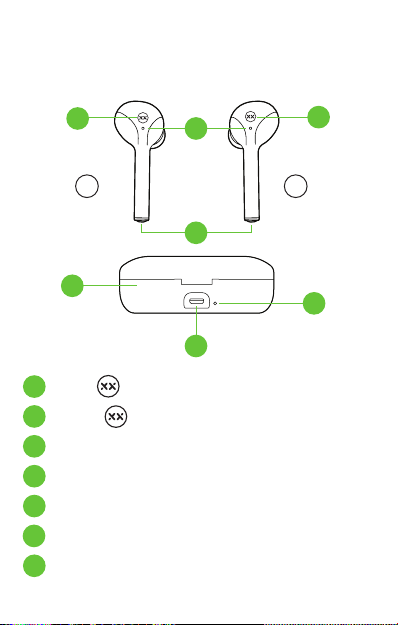
Left Touch Sensor
2
Right Touch Sensor
3
Earbud LED Light
4
Microphone
5
Portable Charging Case
6
Micro USB Charging Port
7
Charge Case LED Light
3
4
6
2
7
Page 4

LET’S CONNECT
First time pairing
Remove both of the MIXX StreamBuds DX Earbuds
from the Portable Charging Case . They will
automatically pair to each other and will confirm
with ‘Connected, pairing’.
Go to the Bluetooth settings on your audio device
and select ‘MIXX StreamBuds DX’ from the list.
Once paired successfully you will hear ‘Connected’
and the LED Light will flash BLUE.
Placing both earbuds back in the Portable
Charging Case will power them off.
After this initial pairing, these earbuds will
seamlessly reconnect to the last Bluetooth audio
device it was paired with.
3
5
5
LET’S USE VOICE ASSISTANT
Pair your Bluetooth device with your earbuds.
Press and hold either Touch Sensors for 2
seconds. Your Voice Assist familiar ‘beep’ will
Page 5

sound to confirm connection with Siri
or Google Assistant.
You can now ask Siri or Google Assistant a
question or state a command.
LET’S CHARGE
Earbuds:
The StreamBuds DX Earbuds are charged using
the Portable Charging Case .
While in the charging case each earbud LED
3
Light will be RED and once fully charged the
earbud LED Lights will turn BLUE.
Secure the earbuds by closing the lid.
Portable Charging Case:
When the Charge Case LED Light flashes
BLUE it is time to recharge the case battery.
Always charge the Portable Charging Case
using the micro USB cable supplied and a
suitable USB wall charger or a power bank.
The Charging Case LED Light will flash RED
while the case is charging and will then remain
a solid RED once fully charged.
3
5
7
5
7
Page 6

CONTROL FUNCTIONS
Streambuds DX
First time
pairing
Power ON
Power OFF
Play / Pause
Music
Answer /
End Call
Voice
Assistant*
* Voice Assist APPs must be installed on your phone to activate.
Remove both earbuds from the
Portable Charging Case and they
will automatically pair with each
other. Go to the Bluetooth settings
on your audio device to select
‘MIXX StreamBuds DX’ from the list.
Once paired successfully you will
hear ‘Connected’
Remove both earbuds from the
charging case
Place both earbuds in the
charging case
Short press either
Touch Sensors
Short press either
Touch Sensors
Press and hold either
Touch Sensors for 2 seconds to
activate Google Assistant or Siri
Page 7

LET’S BE SAFE
It’s important that you read this section
completely, especially the ‘Warning, Caution
and Safe Usage’ instructions.
For your protection:
Ensure the product is correctly connected using
the manufacturer’s original accessories included
with the product.
Please keep the product out of reach from
children and animals.
Do not listen to loud music for a long duration
of time. Adjust the volume to a comfortable level
before listening.
Do not use these earbuds while operating
machinery, including cars.
Do not use in areas where the use of hearing
is required for safety.
Do not drop, short circuit, disassemble or
continue to use this product if damaged.
Page 8

We recommend
To refer all servicing to qualified persons.
Servicing may be required when the product
has been damaged in any way, does not operate
normally or has been dropped.
The operating temperature range for this product
is 5°- 40° Celsius.
WARNING:
The Portable Charging Case , the earbuds and
the micro USB charging cable connector are not
water resistant and should not be exposed to rain,
moisture, any splashing or liquid spills. This may
cause excessive heat and may lead to fire damage
or personal injury.
CAUTION: This product contains a lithium battery.
Incorrect disposal may result in an explosion.
5
Page 9

LET’S RECYCLE
We recommend
This product can be recycled. Products bearing
this symbol must NOT be thrown away with
normal household waste.
Take the product to a designated collection point
for recycling of electronic devices.
Find out more about return and collection points
through your local authority.
Page 10
SAFE USAGE INFORMATION
Do not crush, puncture or incinerate
the charging case or the earbuds. Only
use certified or device manufacturer’s
charging cable.
For support or more information visit
mixxaudio.com
MIXX Audio™ is a registered trademark of MIXX Ltd.
Registration number 016983141
MSDPQSG03
 Loading...