

Page 1
QUICK START GUIDE
OX2
WIRELESS
HEADPHONES
Page 2
CHECK
QUICK START GUIDE
OX2
WIRELESS
HEADPHONES
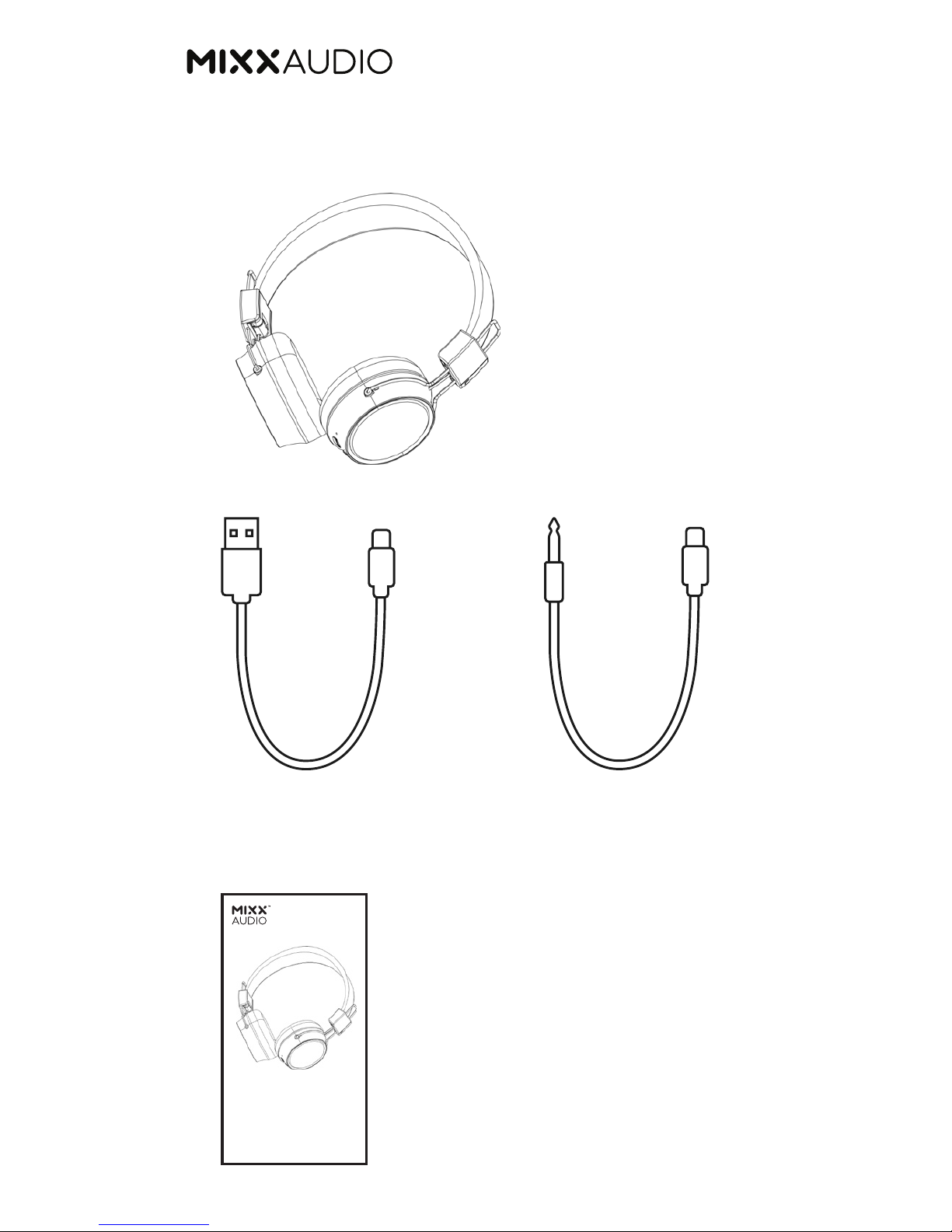
OX2 wireless stereo
headphones
3.5mm AUX Audio CableMicro USB
Charging Cable
OX2 Quick Start Guide
Page 3
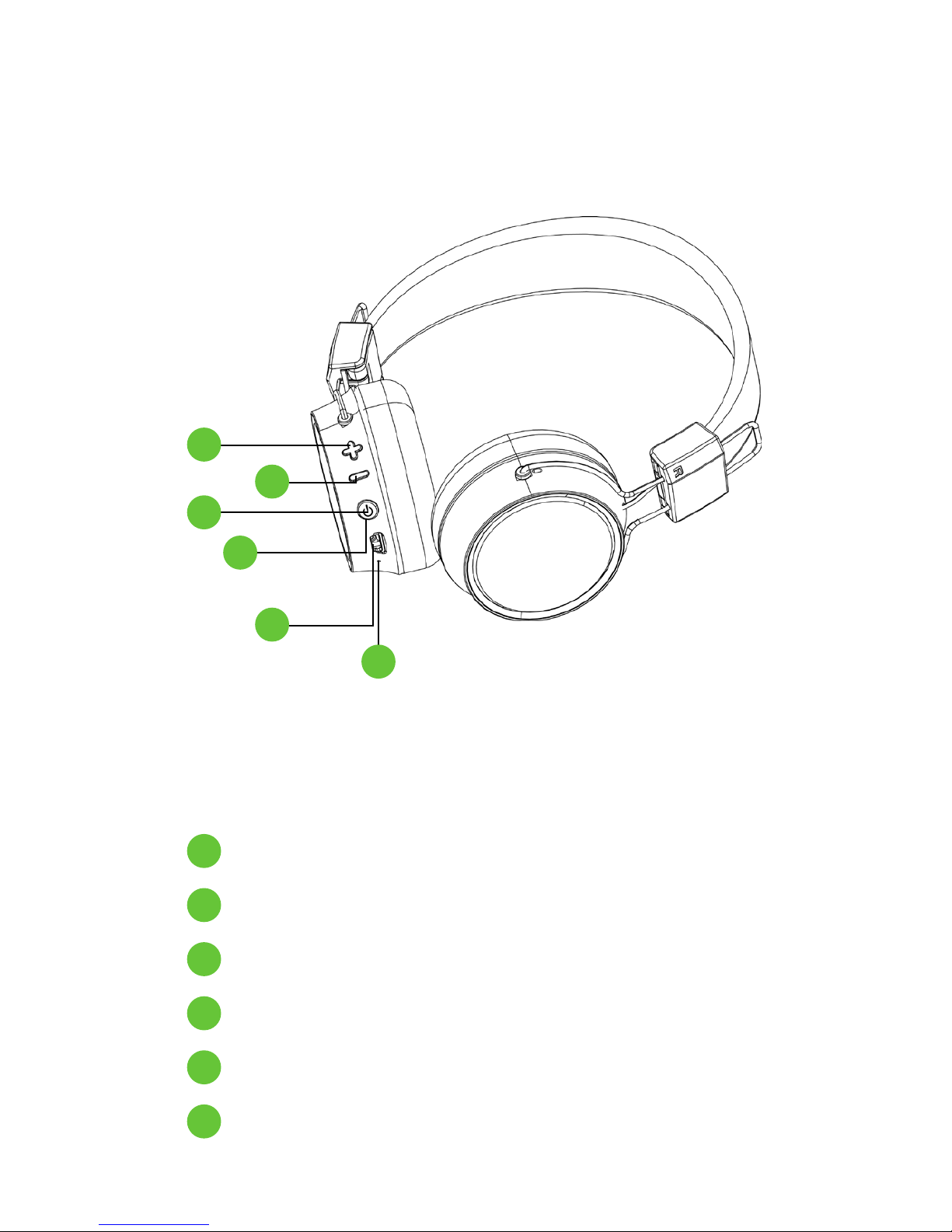
Volume Up/Skip Forwards
Volume Down/Previous Button
Multi-Function Button
LED Indicator Light
Micro USB Socket
Microphone
LET’S START
1
2
3
4
5
6
1
2
3
4
5
6
Page 4

Connect the OX2 to any USB mains charger,
computer or power bank using the micro USB
charging cable included.
The OX2 will begin to charge automatically and the
LED Indicator Light will light up RED.
Once the OX2 is fully charged, the LED Indicator
Light will stay on BLUE.
It should take up to 2 hours to fully charge
these headphones.
ON - Press and hold the Multi-Function Button
until you hear ‘Power On’.
Your OX2 automatically starts searching for a
Bluetooth audio device to pair with.
The LED Indicator Light will flash BLUE and RED.
OFF - Press and hold the Multi-Function Button
until your OX2 says ‘Power Off’ and the LED Indicator
Light will switch off.
LET’S POWER
4
4
4
4
3
3
LET’S CHARGE
Page 5

You can pair your OX2 with a Bluetooth enabled
audio device such as a phone, tablet, computer
or laptop.
Your OX2 headphones must be within 1m of your
Bluetooth device. Ensure that your phone is not paired
with any other Bluetooth device. With the headphones
switched OFF, press and hold the Multi-Function
button until you hear ‘Power On’ and two ‘BEEPS’
to indicate the headphones are in pairing mode. The
LED Indicator light will flash BLUE and RED.
Go to the Bluetooth settings on your device and select
‘Mixx OX2’ from the list.
Once successfully paired, you will hear ‘Bluetooth
Connected’ and the LED Indicator Light will begin
to flash BLUE confirming it is paired with your device.
You can now enjoy your music.
Once pairing is complete, your headphones will now
automatically pair to your device when turned on.
LET’S PAIR USING BLUETOOTH
4
4
3
Page 6

These headphones include a 3.5mm AUX Audio
Cable giving you the flexibility to convert these
wireless headphones for wired use, convenient
when watching movies on a plane or there is no
Bluetooth connection.
Simply plug the micro USB end of your 3.5mm AUX
Audio Cable into the Micro USB Socket of your
OX2 headphones and the other end into your audio
devices 3.5mm AUX socket to start listening to your
music or movie.
LET’S LISTEN USING 3.5MM AUX
AUDIO CABLE
5
Page 7

Power ON/OFF
Play/Pause
Volume Up/Down
Next/Previous
Answer/End
Phone Call
Pairing Mode
Press and hold Multi-
Function Button until you
hear ‘Power On / Off’
Short press MultiFunction Button
Press and hold + or – Button
Short press + or – Button
Short press Multi-
Function Button
Press and hold MultiFunction button until you
hear ‘Power On’ and 2
‘BEEPS’
Select ‘MIXX OX2’ in your
Bluetooth phone setting.
Once paired successfully
you will hear ‘Bluetooth
Connected’
CONTROL FUNCTIONS
Page 8

For your protection:
Ensure the product are correctly connected using
the manufacturers original accessories included
with the product.
Please keep the product out of reach of children
and animals.
Do not:
• Listen to loud music for long periods of time. Adjust
the volume to a comfortable level before listening.
Use headhones while operating machinery,
including cars.
Use in areas where the use of hearing is required
for safety.
Drop, short circuit or disassemble this product.
• Continue to use product if damaged.
We recommend:
• To refer all servicing to qualified persons. Servicing
may be required when the product has been
damaged in any way, does not operate normally or
has been dropped.
• The operating temperature range for this product is
5°- 40° Celsius.
LET’S BE SAFE
Page 9

This product can be recycled.
Products bearing this symbol must NOT be thrown
away with normal household waste.
Take the product to a collection point designated for
recycling of electronic devices.
Find out more about return and collection points
through your local authority.
LET’S RECYCLE
WARNING:
This product is not water resistant and should not
be exposed to rain, moisture, any splashing or liquid
spills. This may lead to fire damage or personal injury.
CAUTION: This product contains a lithium battery.
Incorrect disposal may result in explosion.
Page 10
For technical support or to download the user guide
visit www.mixxaudio.com
Mixx Audio™ is a registered trademark of Bayan Audio
Ltd – Registration number 016983141
MHO2-QSG01
 Loading...