

Page 1
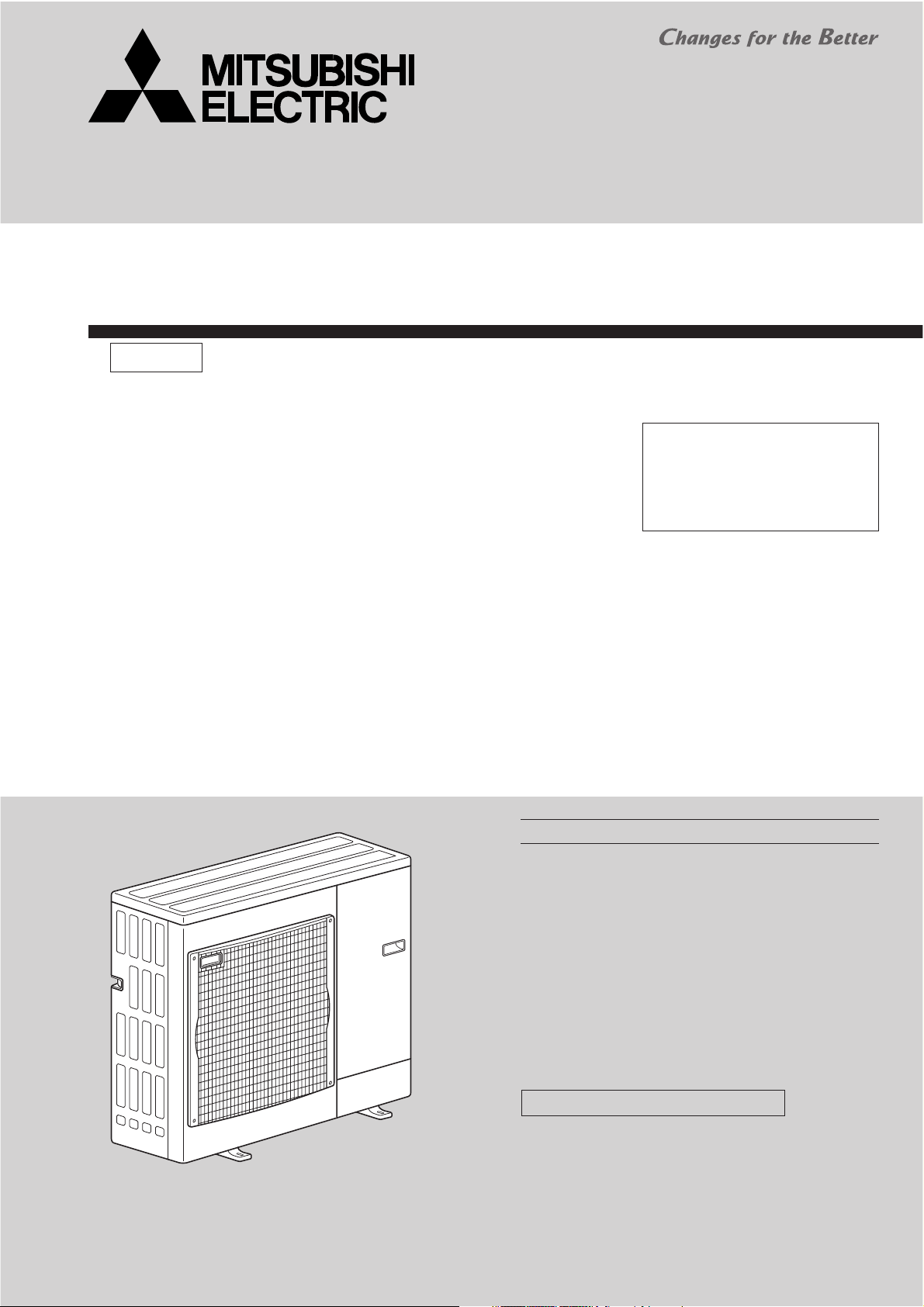
AIR TO WATER HEAT PUMP
SERVICE MANUAL
R410A
August 2007
No. OCH419
[model name]
PUHZ-W90VHA
[Service Ref.]
PUHZ-W90VHA
CONTENTS
Note:
• This manual describes only
service data of PUHZ-W90VHA.
• RoHS compliant products have
<G> mark on the spec name plate.
PUHZ-W90VHA
1. SAFETY PRECAUTION
2. SPECIFICATIONS
3. DATA
4. OUTLINES AND DIMENSIONS
5. WIRING DIAGRAM
6. WIRING SPECIFICATIONS
7. REFRIGERANT SYSTEM DIAGRAM
8. TROUBLESHOOTING
9. DISASSEMBLY PROCEDURE
.............................................................................
..........................................
.....................................................
............................
...................................................
....................................
...........................................
...........................
PARTS CATALOG (OCB419)
...................
2
4
5
7
8
9
10
11
38
Page 2
1
SAFETY PRECAUTION
1-1. ALWAYS OBSERVE FOR SAFETY
Before obtaining access to terminal, all supply ciucuits must be disconnected.
1-2. CAUTIONS RELATED TO NEW REFRIGERANT
Cautions for units utilizing refrigerant R410A
Do not use refrigerant other than R410A.
If other refrigerant (R22 etc.) is used, chlorine in refrigerant can cause deterioration of refrigerant oil etc.
Use a vacuum pump with a reverse flow check valve.
Vacuum pump oil may flow back into refrigerant cycle and that can cause deterioration of refrigerant oil etc.
Use the following tools specifically designed for use with R410A refrigerant.
The following tools are necessary to use R410A refrigerant.
Tools for R410A
Gauge manifold
Charge hose
Gas leak detector
Torque wrench
Vacuum pump adaptor
Electronic refrigerant
charging scale
Keep tools with care.
If dirt, dust or moisture enters into refrigerant cycle, that can cause deterioration of refrigerant oil or malfunction
of compressor.
Do not use a charging cylinder.
If a charging cylinder is used, the composition of refrigerant will change and the efficiency will be lowered.
Ventilate the room if refrigerant leaks during operation. If refrigerant comes into contact with
a flame, poisonous gases will be released.
Charge refrigerant from liquid phase of gas cylinder.
If the refrigerant is charged from gas phase, composition change may occur in refrigerant and the efficiency
will be lowered.
[1] Cautions for service
(1) Perform service after recovering the refrigerant left in unit completely.
(2) Do not release refrigerant in the air.
(3) After completing service, charge the cycle with specified amount of refrigerant.
[2] Additional refrigerant charge
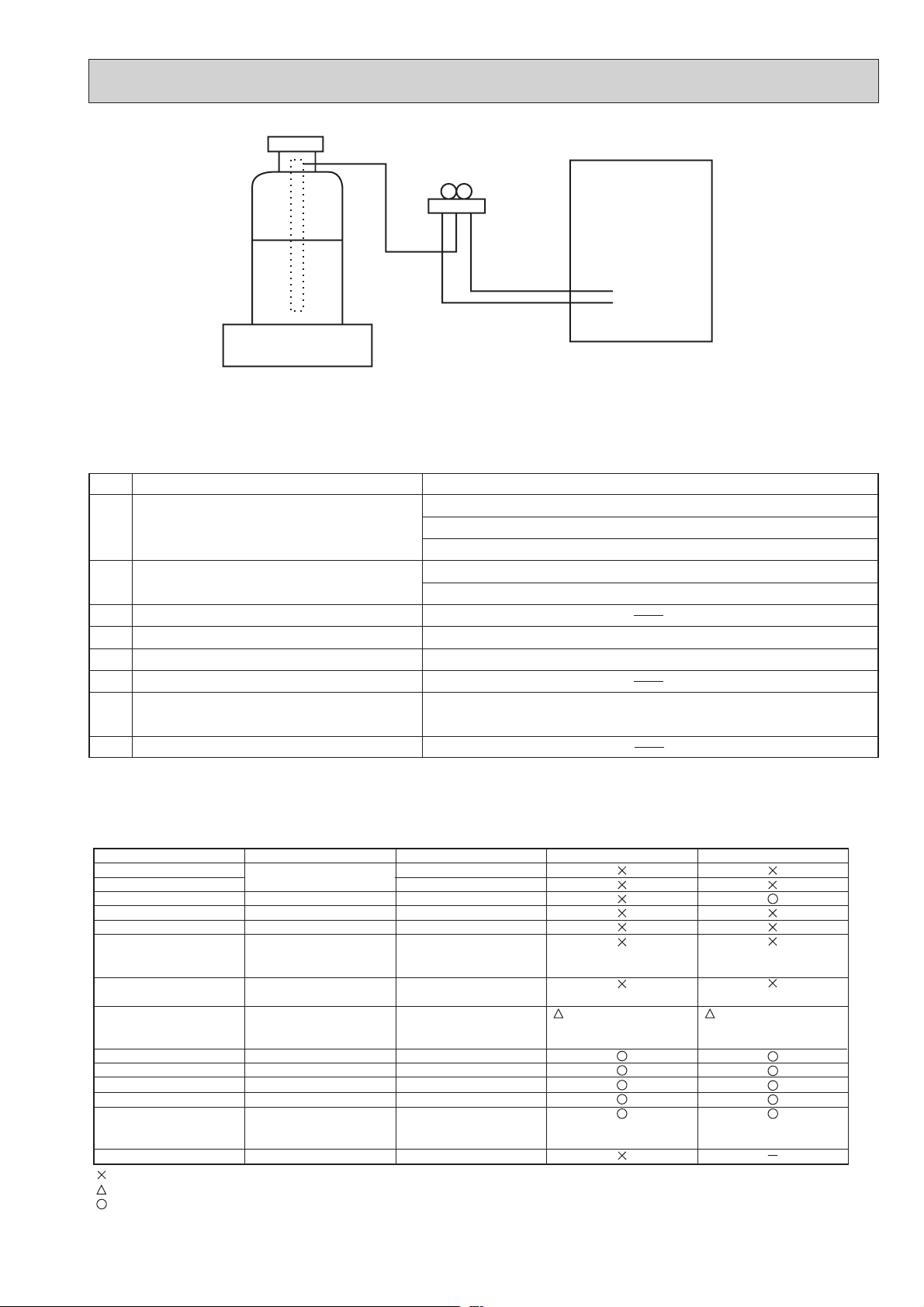
When charging directly from cylinder
· Check that cylinder for R410A on the market is syphon type.
· Charging should be performed with the cylinder of syphon stood vertically. (Refrigerant is charged from liquid phase.)
2
Page 3
Unit
Gravimeter
[3] Service tools
Use the below service tools as exclusive tools for R410A refrigerant.
No. Specifications
Gauge manifold ·Only for R410A
·Use the existing fitting
·Use high-tension side pressure of 5.3MPa·G or over.
Charge hose ·Only for R410A
·Use pressure performance of 5.09MPa·G or over.
Electronic scale
Gas leak detector ·Use the detector for R134a, R407C or R410A.
Adaptor for reverse flow check ·Attach on vacuum pump.
Refrigerant charge base
Refrigerant cylinder ·Only for R410A Top of cylinder (Pink)
Cylinder with syphon
Refrigerant recovery equipment
specifications
. (UNF1/2)
1-3. CAUTIONS FOR REFRIGERANT PIPING WORK
Tools for R410A (The following table shows whether conventional tools can be used or not.)
Tools and materials Use R410A tools Can R22 tools be used?
Gauge manifold
Charge hose
Gas leak detector
Refrigerant recovery equipment
Refrigerant cylinder
Safety charger
Charge valve
Vacuum pump
Bender
Pipe cutter
Welder and nitrogen gas cylinder
Refrigerant charging scale
Vacuum gauge or thermistor vacuum gauge and
vacuum valve
Charging cylinder
: Prepare a new tool. (Use the new tool as the tool exclusive for R410A.)
: Tools for other refrigerants can be used under certain conditions.
: Tools for other refrigerants can be used.
Air purge, refrigerant charge
and operation check
Gas leak check
Refrigerant recovery
Refrigerant charge
Prevent compressor malfunction
when charging refrigerant by
spraying liquid refrigerant
Prevent gas from blowing out
when detaching charge hose
Vacuum drying and air
purge
Bend the pipes
Cut the pipes
Weld the pipes
Charge refrigerant
Check the degree of vacuum. (Vacuum
valve prevents back flow of oil and refrigerant to thermistor vacuum gauge)
Refrigerant charge
Tool exclusive for R410A
Tool exclusive for R410A
Tool for HFC refrigerant
Tool exclusive for R410A
Tool exclusive for R410A
Tool exclusive for R410A
Tool exclusive for R410A
Tools for other refrigerants can
be used if equipped with adopter for reverse flow check
Tools for other refrigerants can be used
Tools for other refrigerants can be used
Tools for other refrigerants can be used
Tools for other refrigerants can be used
Tools for other refrigerants
can be used
Tool exclusive for R410A
(Usable if equipped
with adopter for rever se flow)
Can R407C tools be used?
(Usable if equipped
with adopter for rever se flow)
33
Page 4
2
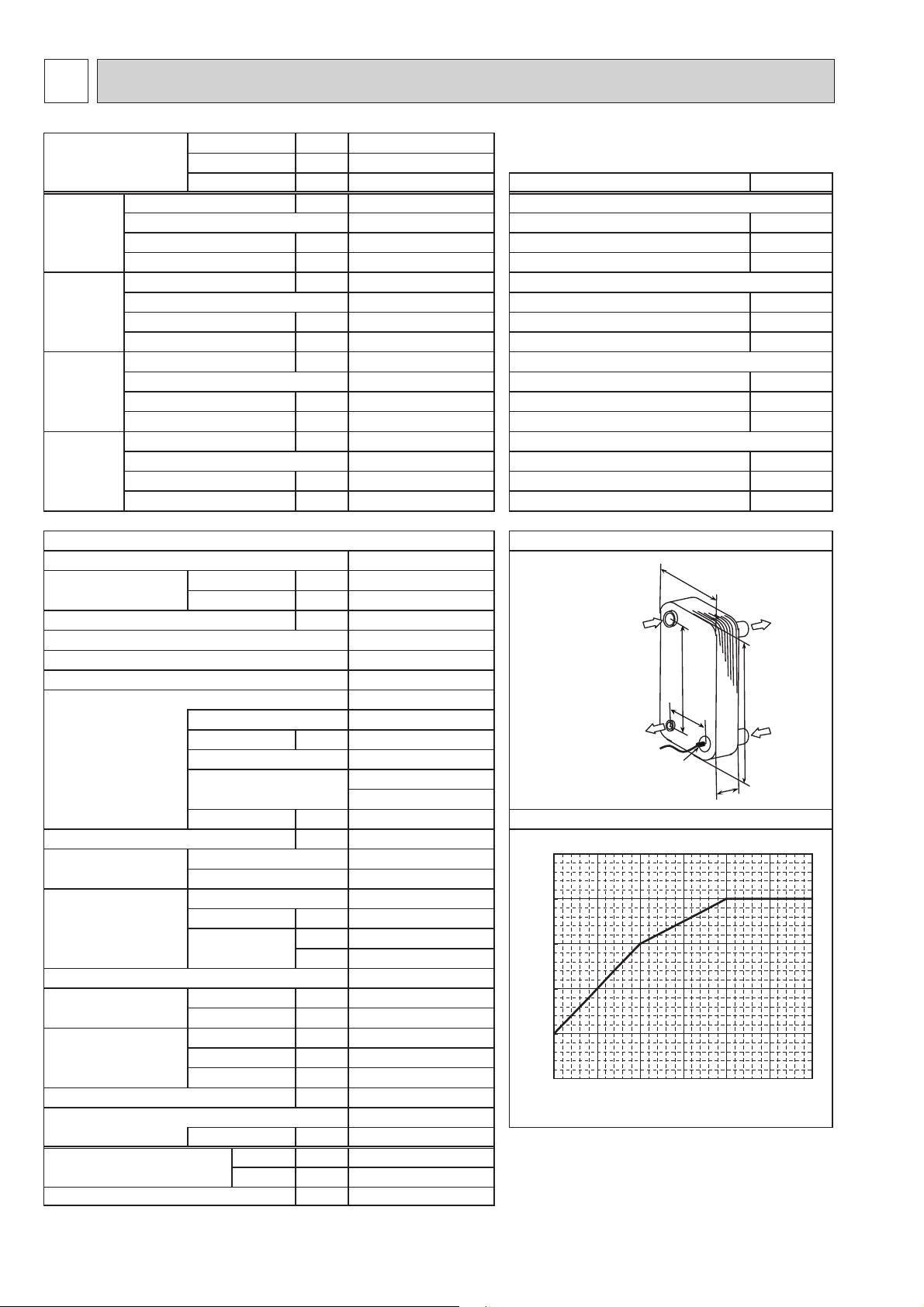
SPECIFICATIONS
Power supply Phase
㱢
Voltage V
Heating Capacity kW Heating(A2/W35)
(A2/W35) 2+)blub-yrD(erutarepmetriaedistuOPOC 㷄
1
230
50
7.0
3.40
2.06
noitidnocgnitarepolanimoNzHycneuqerF
etriaedistuOWktupnirewoP 㷄
1+)blub-teW(erutarepm
25.8
Heating Capacity kW Heating(A7/W35)
(A7/W35) 7+)blub-yrD(e
Cooling Capacity kW Cooling(A35/W7)
(A35/W7) EER
(COP) Outside air temperature (Dry-bulb) +35㷄
nimoN 㷄
Cooling Capacity kW Cooling(A35/W18)
(A35/W18) EER
(COP) Outside air temperature (Dry-bulb) +35㷄
animoN 㷄
9.0
3.90
2.31
25.8
7.1
2.00
3.55
20.4
7.1
3.70
1.92
20.4
rutarepmetriaedistuOPOC 㷄
6+)blub-teW(erutarepmetriaedistuOWktupnirewoP 㷄
tretaWnim/LwolfretawlanimoN 㷄
42+)blub-teW(erutarepmetriaedistuOWktupnirewoP 㷄
42+)blub-teW(erutarepmetriaedistuOWktupnirewoP 㷄
regnahcxetaehetalPtinuroodtuO
Model name ALFA LAVAL
Running current Heating
Cooling
(A7/W35) 04-03HCAA
(A35/W7) A
External finish
Start type
Protection devices
PUHZ-W90VHA
10.3
15.7
23.0
Galvanized plate
Munsell 3Y 7.8/1.1
Linear expansion valve
Hermetic twin rotary
TNB220FLHM1
1.3
Line start
HP switch
w
mm4.04:AAtnerruc.xaM
Ref.IN
(Heating)
mm2.862:BgnisacretuO
mm39:WlortnoctnaregirfeR
mm523:HrosserpmoC
mm96:DledoM
Ref.OUT
(Heating)
4WktuptuorotoM
setalp0
B
Thermistor
(TH32)
A
D
Water OUT
H
Water IN
Discharge thermo
WretaehesacknarC
Heat exchanger (Air)
(Water)
Fan Fan(drive)×No.
Fan motor output
Air flow
kW
3
m
/min
(CFM)
Defrost method
Noise level Heating dB
Cooling dB
Dimensions Width mm(in.)
Depth mm(in.)
Height mm(in.)
Refrigerant
Quantity kg(lbs)
Guaranteed operating Heating
range (Outdoor) Cooling
㷄
㷄
nim/LwolfretaW
0.67 (FV50S)
䊷
Plate fin coil
Plate heat exchanger
Propeller fan × 1
0.060
55
(1,940)
Reverse cycle
*2
49
*2
49
950 (37-3/8)
*1
330 +30
(13+1-3/16)
943 (37-1/8)
)sbl(gkthgieW
79 (174)
R410A
2.4 (5.3)
-20 䌾 +35
*4
-5
䌾 +46
10.0 䌾 25.8
65
]
60
55
*3
50
45
Maximum outlet water temptemperature [
40
-20 -15
*1 grill
*2 at distance of 1m from outdoor unit
*3 Hot gas with four-way valve
*4 With the optional air outlet guide, the operation at
-15㷄㩷outdoor temperature is possible.
-10 -5 0 5 10
Ambient t emperature []
erutarepmetretawteltuomumixaML)ledoM(liO
53+/03+)teltuo/telni(erutarepmetretaWnim/LwolfretawlanimoN 㷄
53+/03+)teltuo/telni(erutarepme
7+/21+)teltuo/telni(erutarepmetretaWnim/Lwolfretawla
81+/32+)teltuo/telni(erutarepmetretaWnim/Lwolfretawl
4
Page 5
5
3
DATA
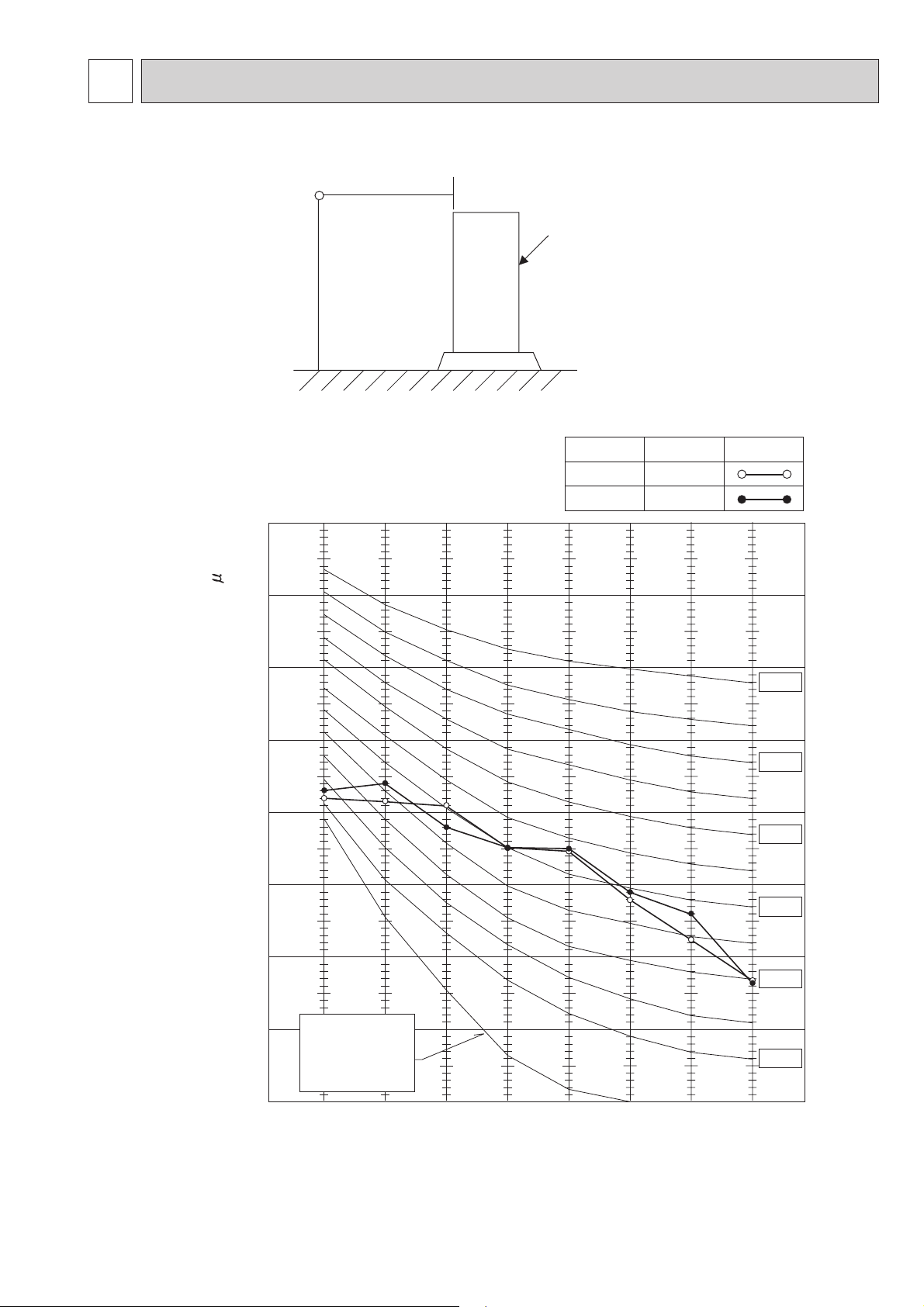
3-1. NOISE CRITERION CURVES
MICROPHONE
1.5m
1m
UNIT
GROUND
PUHZ-W90VHA
90
80
70
60
50
40
MODE
COOLING
HEATING
SPL(dB)
49
49
LINE
NC-70
NC-60
NC-50
NC-40
30
20
OCTAVE BAND SOUND PRESSURE LEVEL, dB (0 dB = 0.0002 bar)
10
APPROXIMATE
THRESHOLD OF
HEARING FOR
CONTINUOUS
NOISE
63 125 250 500 1000 2000 4000 8000
BAND CENTER FREQUENCIES, Hz
NC-30
NC-20
Page 6
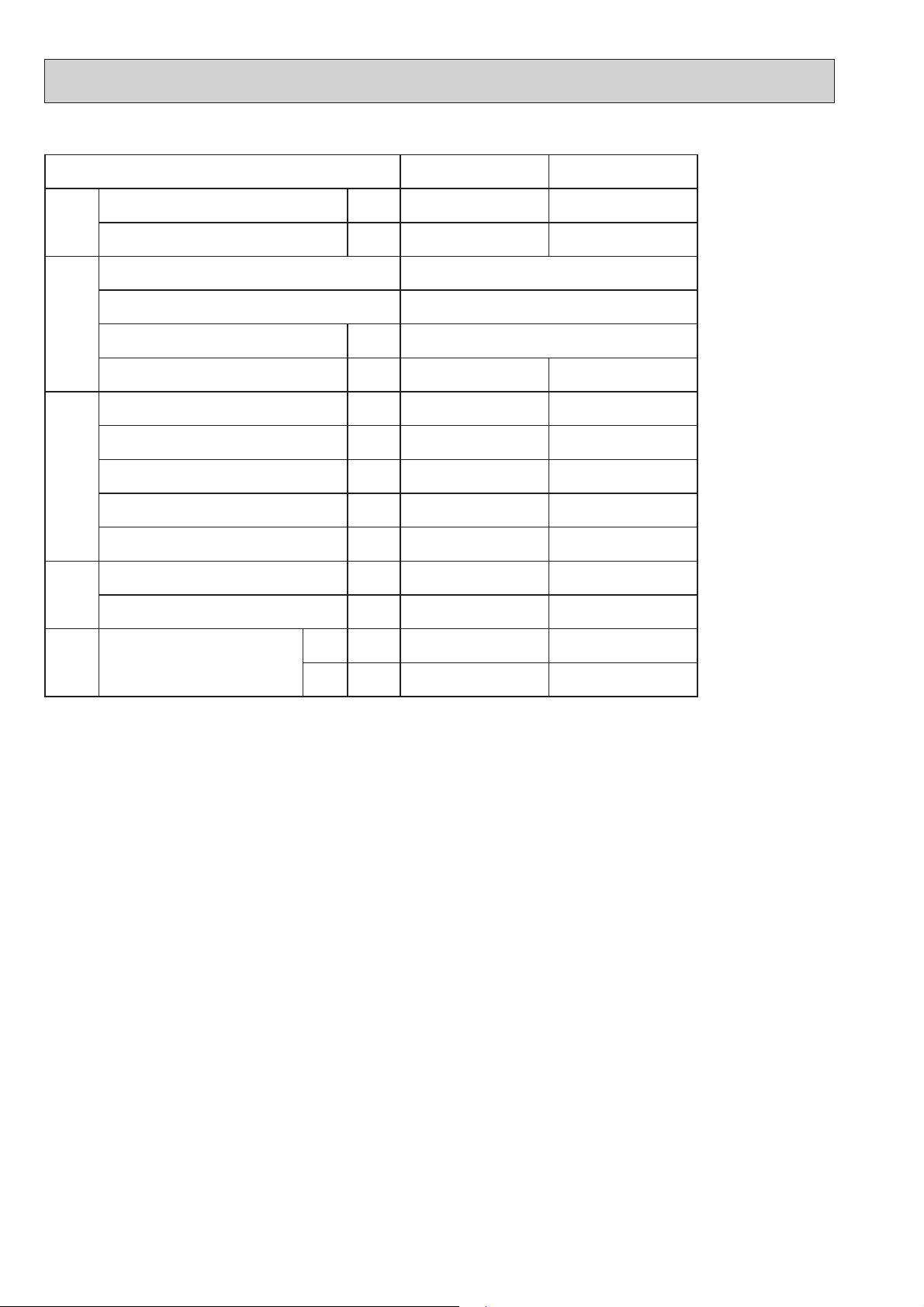
3-2. STANDARD OPERATION DATA
Mode Cooling (A35/W7) Heating (A7/W35)
Capacity W 7,100 9,000
Total
Input kW 3.55 2.31
Outdoor unit PUHZ-W90VHA
Phase, Hz 1, 50
Voltage V 230
Electrical circuit
Current A 15.7 10.3
Discharge pressure MPa 2.74 2.21
Suction pressure MPa 0.73 0.64
Discharge temperature
Condensing temperature
Refrigerant circuit
Suction temperature
Flow volume L/min 20.4 25.8
Water
Outlet water temperature
conditions
D.B.
Intake air temperature
Outdoor
conditions
The unit of pressure has been changed to MPa based on international SI system.
The conversion factor is : 1(MPa)=10.2(kgf/cm
W.B.
74 65
47
2
)
3-1
735
35 7
24 6
38
6
Page 7
4
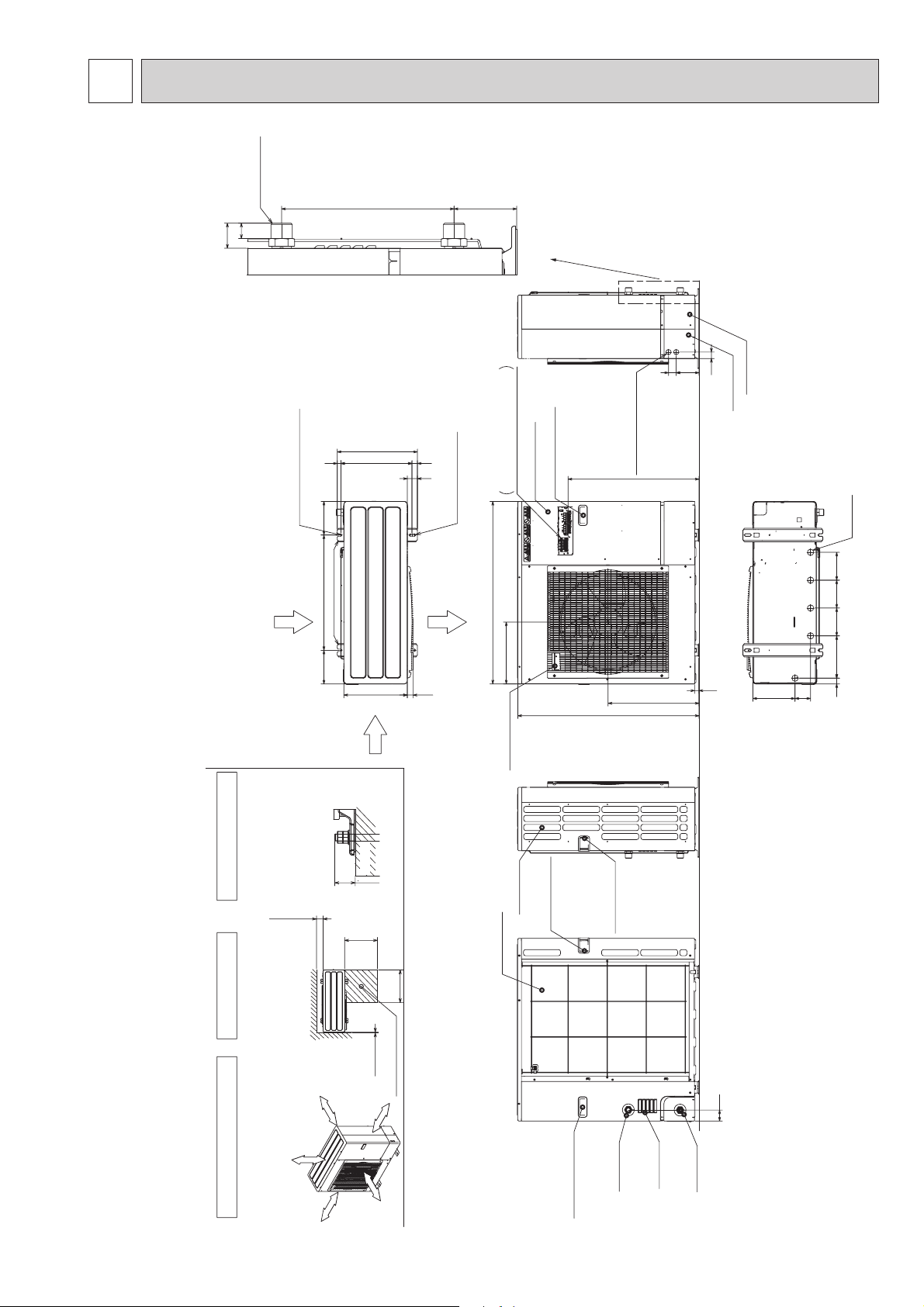
OUTLINES AND DIMENSIONS
PUHZ-W90VHA
24
39
ISO 228/1-G1 B
2-U Shaped notched holes
(Foundfation Bolt M10)
26998
417
370 19
28
53
2-12×36 oval holes
(Foundation Bolt M10)
Detail
Scale 1:3
Service panel
Left······Power supply wiring
Terminal Connections
Handle for moving
Right······Controller wiring
see Detail
119
34
40
Power supply wiring hole
(2-:27Knock Out)
682
Rear cover
Front cover
Unit : mm
Drain hole
(5-:33)
Rear Air Intake
Installation Feet
175 600 175
Side Air Intake
FOUNDATION
Please secure the unit firmly
with 4 foundation (M10) bolts.
(Bolts and washers must be
2 SERVICE SPACE 3 FOUNDATION BOLTS
Dimensions of space needed
for service access are
shown in the below diagram.
<Foundation bolt height>
purchased locally.)
Over300
500
330
30
Less than
Over
Over
500
Air Discharge
30
950
322
Handle for moving
Side Air Intake
Handle for moving
Rear Air Intake
473
943
Handle for moving
23
30 220 145 145 145
81 219
Over10
Service space
Over 10mm
Over 300mm
(4''
1 FREE SPACE (Around the unit)
The diagram below shows a
basic example.
Explantion of particular details are
given in the installation manuals etc.
Over 10mm
Over 00mm
57
Air Intake
Water OUT
Water IN
Handle for moving
77
Page 8
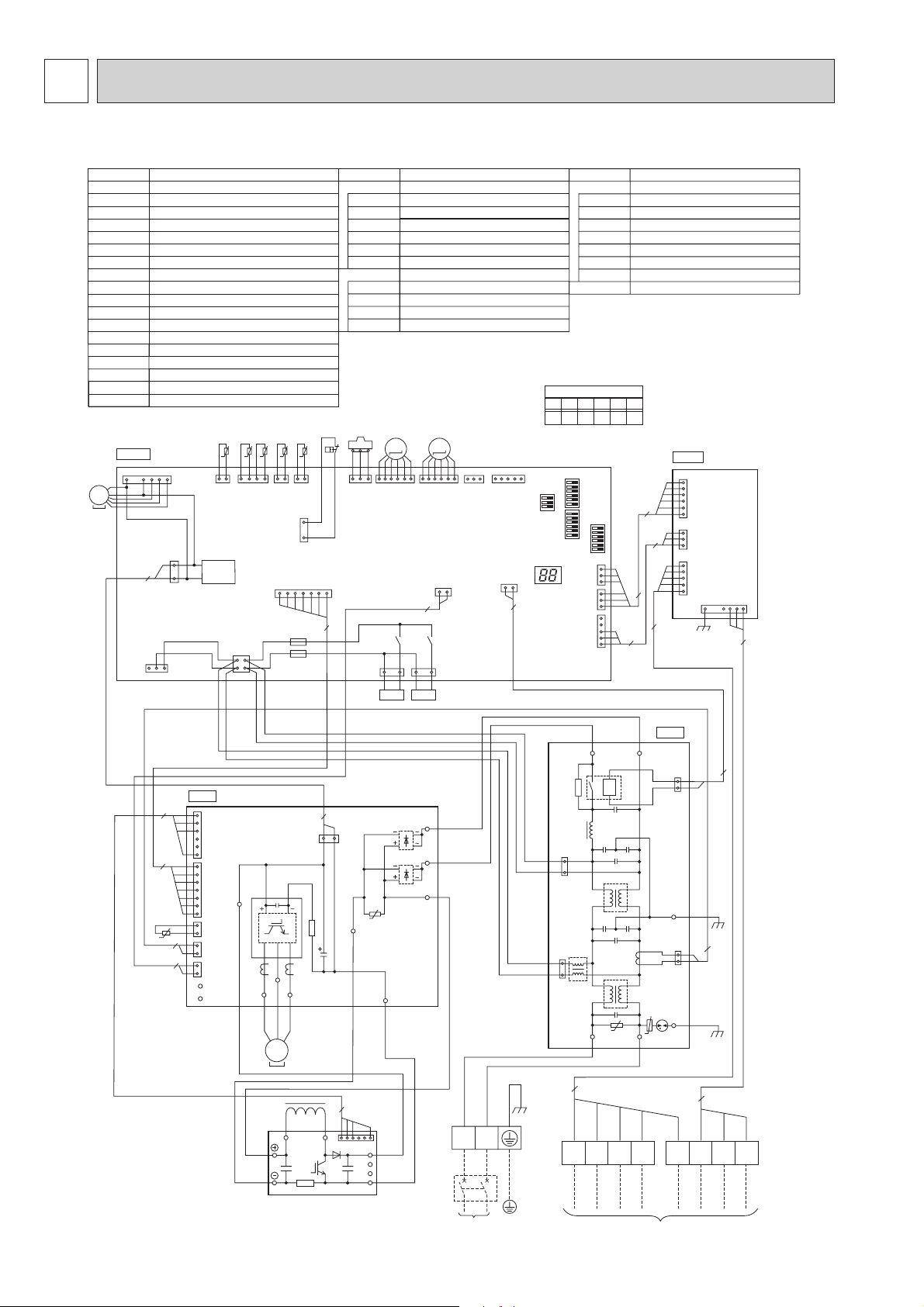
WIRING DIAGRAM5
PUHZ-W90VHA
SYMBOL NAME SYMBOL NAME
TB1
TB2 Terminal Block<Controller>
TB3 Terminal Block<Controller>
MC
MF1
21S4
SV Solenoid Valve<Bypass Valve
63H
63HS
TH3
TH4
TH6
TH7
TH8
Terminal Block<Power Supply>
Motor for Compressor
Fan Motor
Solenoid Valve<Four-Way Valve
High Pressure Switch
High Pressure Sensor
Thermistor<Liquid>
Thermistor<Discharge>
Thermistor<Plate HEX Iiquid>
Thermistor<Ambient>
Thermistor<Heatsink>
>
>
P.B.
TABU/V/W
TABS/T
TABP1/P2
TABN1/N2
N.F.
LI,LO
NI,NO
EI,E2
52C
Power Circuit Board
Connection Terminal<U/V/W-Phase>
Connection Terminal<L/N-Phase>
Connection Terminal<DC Voltage>
Connection Terminal<DC Voltage>
Diode bridgeDS2, DS3
Power ModuleIPM
Noise Filter Circuit Board
Connection Terminal<L-Phase>
Connection Terminal<N-Phase>
Connection Terminal<Ground>
52C Relay
TH32 Thermistor<Inlet water>
LEV-A, LEV-B
DCL
Electronic Expansion Valve
Reactor
ACTM Active Filter Module
63HS
MF1
MS
3~
C. B.
1
CNS
(WHT)
TH7
TH6 TH3 TH4
TH32
t° t° t° t°
7
CNF1
(WHT)
3
2
1
CNDC
(PNK)
3
1
12
TH32
(BLK)
TRANS
t°
CNAC
(WHT)
1
3
TH7/6
(RED)
2
4
TH3
(WHT)
63H
2
TH4
(WHT)
1
3
63H
(YLW)
CN2
(WHT)
17
7
F3
F4
11121
63HS
(WHT)
21S4
(GRN)
LEV-A
34
21S4 SV
M
LEV-A
(WHT)
X52
LEV-B
M
1613
61
LEV-B
CNVMNT
(RED)
(WHT)
CN4
(WHT)
12
2
X55
SV2
1313
(BLU)
1
CNMNT
(WHT)
CN52C
(RED)
12
*1 MODEL SELECT
1=ON, 0=OFF
5
SW8
LED3
2
SYMBOL NAME
C.B.
SW1
SW2
SW6
SW8
LED3
F3, F4
X52, X55
I.F.
SW6
12345 6
Controller Circuit Board
Switch<Function Switch>
Switch<Function Switch>
Switch<Model Select>
Switch<Function Switch>
LED<Operation/Inspection Indicators>
Fuse<T6.3AL250V>
Relay
Interface Circuit Board
00101 0
*1
SW6
SW1
CNDM
CN3S
(RED)
(WHT)
CN51
(WHT)
SW2
1
3
1
3
1
5
6
3
6
5
3
I. F.
1
CNIF1
(RED)
6
1
CNIF2
(WHT)
3
1
CNIF3
(WHT)
5
1
CNIF4
(WHT)
7
3
4
7
TH8
t°
N. F.
BLU
WHT
52C
U
RED
A3 A4
NO
NI
U
BLK
BLU
CONTROLLER
BLU
TB2
1
2
E2
1
2
CN5
EI
PNK
A5
(BLK)
CN52C
(RED)
B1
3
YLW
2
2
ORN
B2 B3
BRN
TB3
LO
P. B.
TABV
WHT
V
MS
3~
BLK
CNDC
BLK
W
MC
L1
(PNK)
TABW
2
1
L2
ACTM
3
4
WHT
16
TABN1
N1
N2
BLK
P
Io
TABT
TABS
TABP1
BLU
WHT
RED
BLU
RED
N
L
POWER SUPPLY
~/N 230V 50Hz
YLW/GRN
TB1
3
1
(RED)
CNAC2
3
1
(WHT)
CNAC1
5
RED
A1
LI
WHT
A2
DS3
DS2
U
TABN2
WHT
RED
WHT
1
CNAF
(WHT)
6
1
CN2
IPM
(WHT)
7
TABP2
RED
1
CN3
(WHT)
2
2
1
CN5
(RED)
2
2
1
CN4
(WHT)
2
TABN
TABP
TABU
RED
U
DCL
RED
BLK
8
Page 9
9
WIRING SPECIFICATIONS6
FIELD ELECTRICAL WIRING (power wiring specifications)
Outdoor unit power supply ~/N (single), 50Hz, 230 V
Outdoor unit Circuit Breaker capacity *1 25 A
)
2
Outdoor unit power supply, earth 3 × Min.4
Wiring
Controller-Outdoor unit *2 8 × Min.0.5 (polar)
size (mm
Wire No. ×
Outdoor unit L-N (single) AC 230 V
rating
Circuit
Controller-Outdoor unit DC 12 V
*1. A breaker with at least 3.0 mm contact separation in each pole shall be provided. Use non-fuse breaker (NF) or earth leak-
age breaker (NV).
*2. Max. 20 m
Notes: 1. Wiring size must comply with the applicable local and national codes.
2.
Power supply cables and the cables between Controller and Outdoor unit shall not be lighter than polychloro-
SUHQHVKHDWKHGÀH[LEOHFDEOHV
(Design 60245 IEC 57
3. Be sure to connect the cables between Controller and Outdoor unit directly to the units (no intermediate
connections are allowed).
Intermediate connections may result in communication errors. If water enters at the intermediate connection
SRLQWLWPD\FDXVHLQVXI¿FLHQW
insulation to ground or a poor electrical contact .
(If an intermediate connection is necessary, be sure to take measures to prevent water from entering the
cables.)
4. Install an earth longer than other cables.
)
Page 10
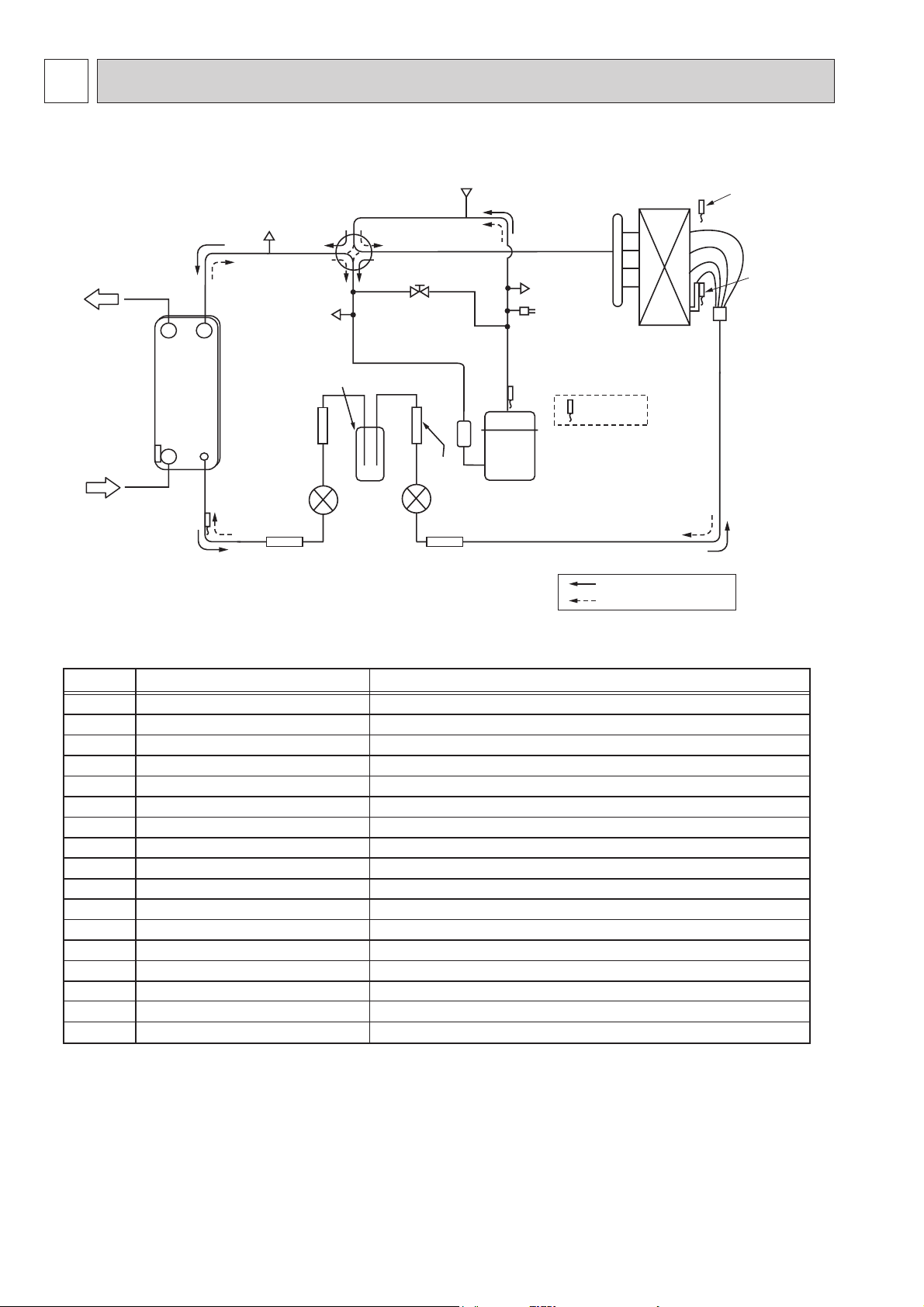
REFRIGERANT SYSTEM DIAGRAM7
PUHZ-W90VHA
Water OUT
Plate HEX
Water IN
TH32
TH6
CHECK/V
CHECK/V
Receiver
Strainer
(#100)
LEV-B
Strainer(#100) Strainer(#100)
REV/V
S/V
Strainer
(#100)
LEV-A
P-Sensor
COMP
CHECK/V
H/P SW
TH4
TH7
TH3
Distributor
TH8 P/B
Refrigerant flow in heating
Refrigerant flow in cooling
Symbol
COMP
H/P SW
Plate HEX
REV/V
S/V
CHECK/V
P-Sensor
P/B
LEV-A
LEV-B
TH32
TH3
TH4
TH6
TH7
TH8
Receiver
Part name
Compressor
High pressure switch (63H)
Plate Heat Exchanger
Reversing (4-way) valve (21S4)
Solenoid valve
Check valve
Pressure sensor (63HS)
Power board
Linear expansion valve -A
Linear expansion valve -B
Inlet water temperature thermistor
Liquid temperature thermistor
Discharge temperature thermistor
Plate HEX liquid temperature thermistor
Ambient temperature thermistor
Heatsink temperature thermistor
Receiver
Detail
DC inverter twin rotary compressor (Mitsubishi Electric Corporation)
For protection (OFF:4.15MPa)
ACH30 - 40 Plates (Alfa Laval)
Change the refrigerant circuit (Heating / Cooling) and for Defrosting
For production test use
High pressure / Low pressure / For production test use
For calculation of the condensing temperature from high pressure
Inverter power board
Heating:Secondary LEV Cooling:Primary LEV
Heating:Primary LEV Cooling:Secondary LEV
For freeze protection and for compressor frequency control
Heating:Evaporating temperature Cooling:Sub cool liquid temperature
For LEV control and for compressor protection
Heating:Sub cool liquid temperature Cooling:Evaporating temperature
For fan control and for compressor frequency control
For power board protection
For accumulation of refrigerant
10
Page 11
11
TROUBLESHOOTING8
8-1. TROUBLESHOOTING
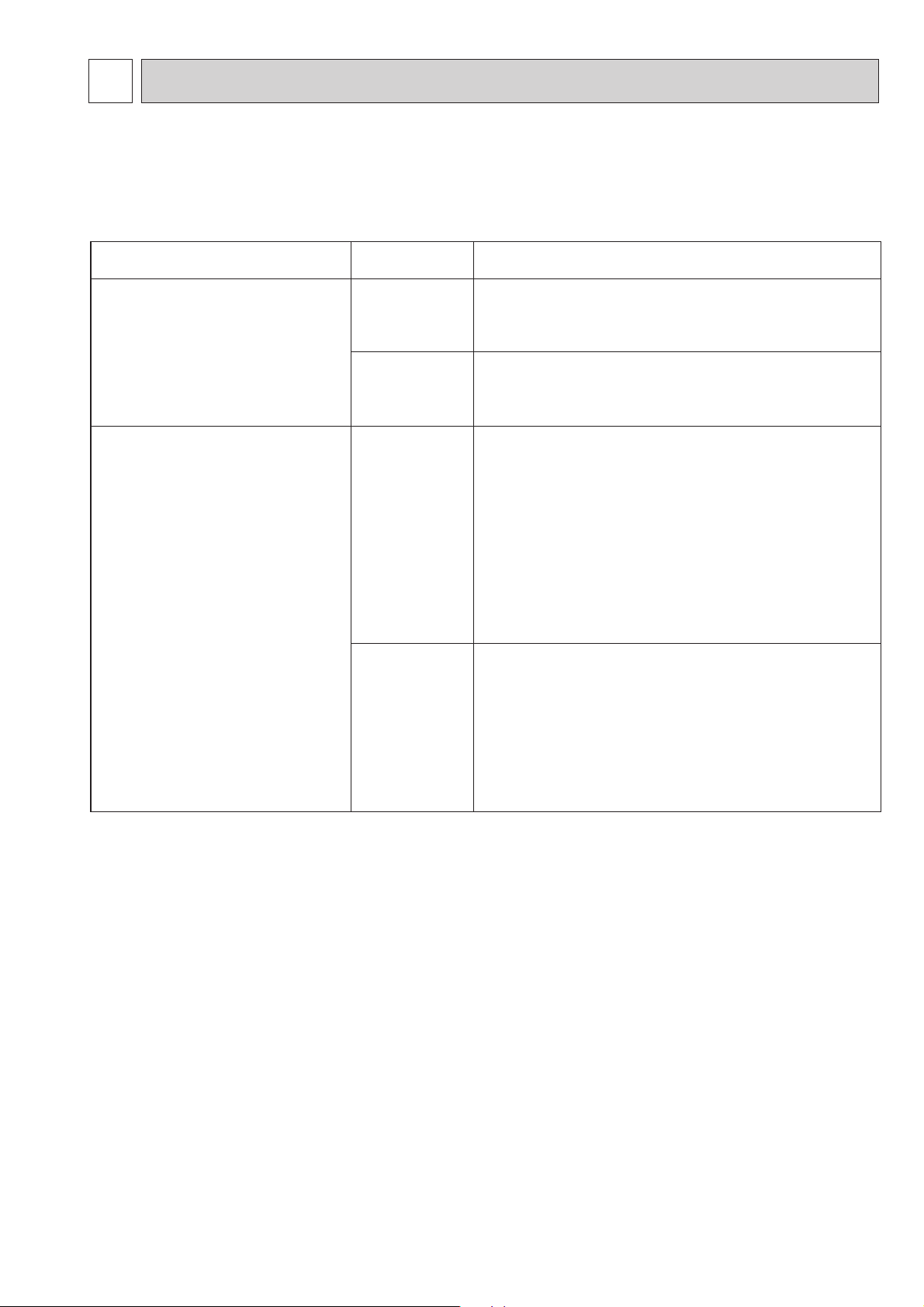
<Error code display by self-diagnosis and actions to be taken for service (summary)>
Present and past error codes are logged and displayed on the control board of outdoor unit. Actions to be taken for service,
which depends on whether or not the trouble is reoccurring at service, are summarized in the table below. Check the contents
below before investigating details.
Unit conditions at service
The trouble is reoccurring.
The trouble is not reoccurring.
Error code
Displayed
Not displayed
Logged
Not logged
Actions to be taken for service (summary)
Judge what is wrong and take a corrective action according
to “8-3. Self-diagnosis action table”.
Conduct troubleshooting and ascertain the cause of the
trouble.
Consider the temporary defects such as the work of
protection devices in the refrigerant circuit including
compressor, poor connection of wiring, noise and etc.
Re-check the symptom, and check the installation
environment, refrigerant amount, weather when the
trouble occurred, matters related to wiring
and etc.
Reset error code logs and restart the unit after finishing
service.
There is no abnormality in electrical component,
controller board, and etc.
Re-check the abnormal symptom.
Conduct troubleshooting and ascertain the cause of the
trouble
Continue to operate unit for the time being if the cause
is not ascertained.
There is no abnormality concerning of parts such as
electrical component, controller board, and etc.
.
8-2. CHECK POINT UNDER TEST RUN
Before test run
• After installation of outdoor units, piping work and electric wiring work, re-check that there is no water leakage, loosened con-
nections and incorrect polarity.
• Measure impedance between the ground and the power supply terminal block(L, N) on the outdoor unit by 500V Megger and
check that it is 1.0M or over.
+Don’t use 500V Megger to connecting wire terminal block(A1~A5, B1~B3) . This may cause malfunction.
• Turn on power supply 12 hours before test run in order to protect compressor.
• Make sure to read operation manual before test run. (Especially items to secure safety.)
Page 12
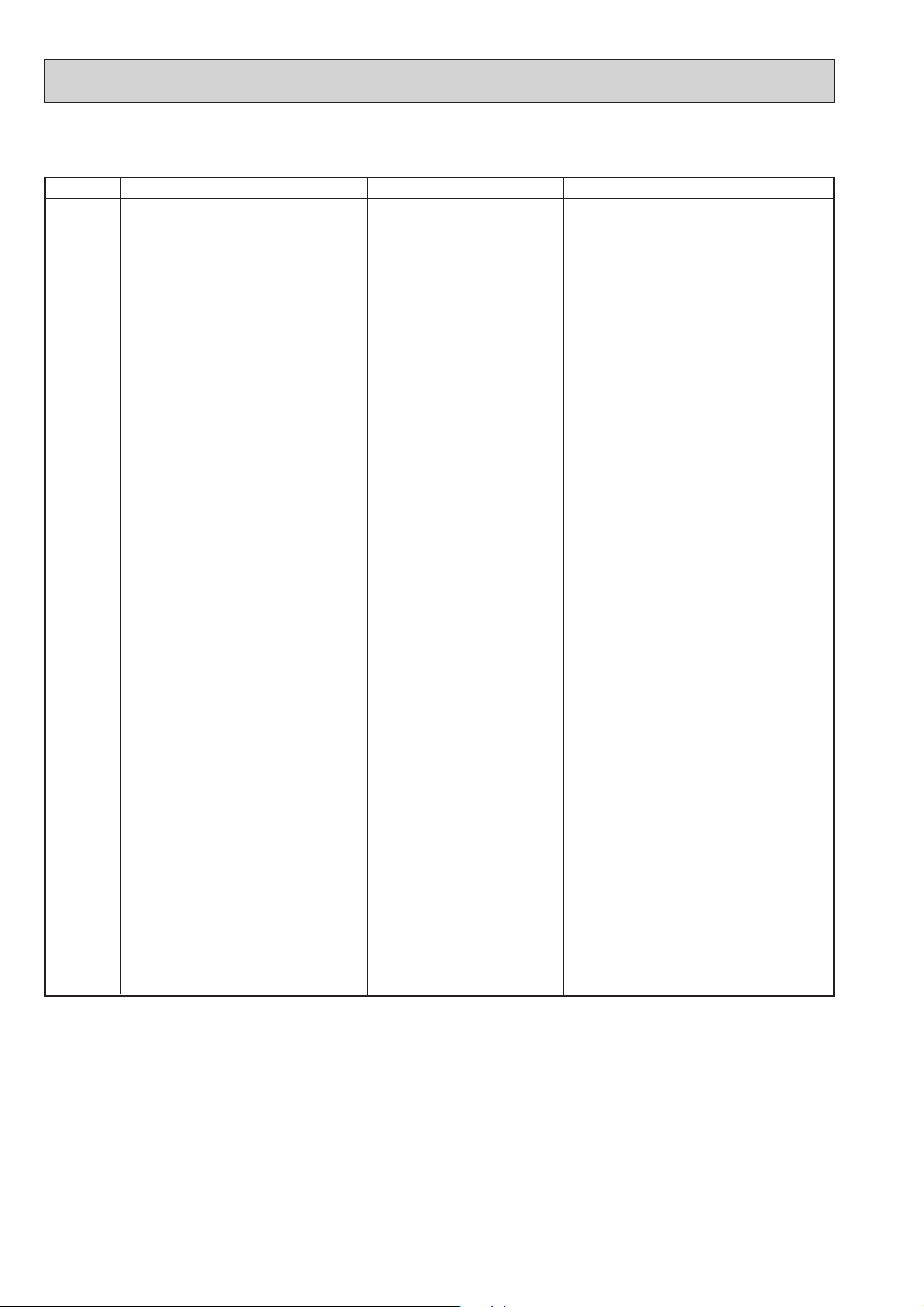
8-3. SELF-DIAGNOSIS ACTION TABLE
<Abnormalities detected when the power is turned on>
Error Code
None
Abnormal point and detection method
—
No voltage is supplied to terminal
block(TB1) of outdoor unit.
a) Power supply breaker is
b) Contact failure or disconnec-
c) Open phase (L or N phase)
Electric power is not supplied
to power supply terminal of
noise filter circuit board / outdoor power circuit board.
a) Contact failure of power
b) Open phase on the noise
Electric power is not supplied to
outdoor controller circuit board.
a) Connector disconnected
Case
turned off.
tion of power supply
terminal
supply terminal
filter circuit board / outdoor
power circuit board
: Disconnection of terminal
LI, NI, LO, NO
: Disconnection of terminal
TABT or TABS
(CNDC)
Judgment and action
Check following items.
a) Power supply breaker
b) Connection of power supply terminal block.
(TB1)
c) Connection of power supply terminal block.
(TB1)
Check following items.
a) Connection of power supply terminal block.
(TB1)
Connection of terminal (LI, NI, LO, NO) on
the noise filter circuit board
b) Connection of terminal (TABT or TABS) on
outdoor power circuit board.
Refer to 8-6.
Check connection of the CNDC connector,
on the outdoor power circuit board.
Refer to 8-6.
F5
63H connector open
Abnormal if 63H connector circuit is open
for 3 minutes continuously from being
switched on.
63H: High-pressure switch
Disconnection of reactor (DCL)
Disconnection of outdoor noise
filter circuit board or parts failure in outdoor noise filter circuit
board
Defective outdoor power circuit
board
Defective outdoor controller
circuit board
Disconnection or contact failure
of 63H connector on outdoor
controller circuit board
Disconnection or contact failure
of 63H
63H is working due to defective
parts.
Defective outdoor controller
circuit board
Check connection of reactor. (DCL)
Check connection of “L1” and “L2” on the
active filter module.(ACTM) Refer to 8-6.
Replace outdoor noise filter circuit board.
Refer to 8-6.
Replace outdoor power circuit board.
Replace outdoor controller circuit board (When
items above are checked but the units cannot
be repaired.)
Check connection of 63H connector on
outdoor controller circuit board.
Refer to 8-6.
Check the 63H side of connecting wire.
Check for continuity of 63H.
Replace high pressure swich if it is defective.
Replace outdoor controller circuit board.
12
Page 13
13
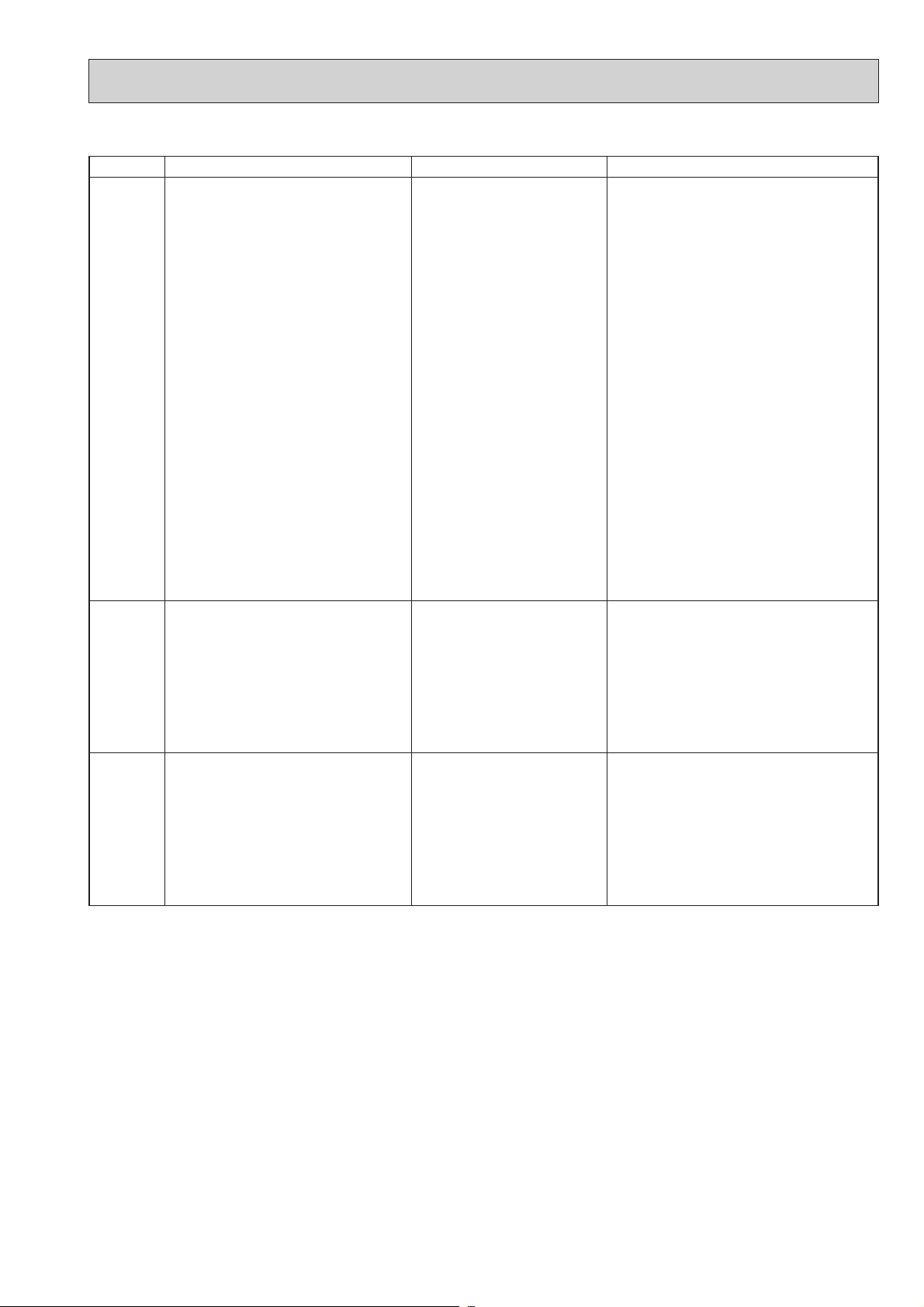
<Abnormalities detected while unit is operating>
Error Code
U1
Abnormal point and detection method
High pressure (High-pressure switch
63H activated)
Abnormal if high-pressure switch 63H is
activated ( + ) during compressor operation.
+ 4.15 MPa
63H: High-pressure switch
Case
Decreased water flow
Clogged filter of water pipe
Dirt of plate heat exchanger
Locked water pump
Malfunction of water pump
Clogged or broken pipe
Locked outdoor fan motor
Malfunction of outdoor fan
motor
Short cycle of outdoor unit
Dirt of outdoor heat exchanger
Decreased airflow caused by
defective inspection of outside
temperature thermistor
(It detects lower temperature
than actual temperature.)
Disconnection or contact failure
of connector (63H) on outdoor
controller board
Disconnection or contact failure
of 63H connection
Defective outdoor controller
board
Defective operation of linear
expansion valve
Malfunction of fan driving
circuit
Judgment and action
~Check water circuit and repair the defect.
Check piping and repair the defect.
~ Check outdoor unit and repair the defect.
Check the detected temperature of outside
temperature thermistor on LED display.
(SW2: Refer to 8-7.)
~Turn the power off and check F5 is
displayed when the power is turned on again
When F5 is displayed, refer to “Judgment
and action” for F5.
Check linear expansion valve.
Refer to 8-5.
Replace outdoor controller board.
.
U2
U3
High discharging temperature
(1) Abnormal if discharge temperature
thermistor (TH4) detects 125 or
110 continuously for 5 minutes.
Abnormal if during defrosting and dis charge temperature thermistor (TH4)
detects 110 continuously for 30
minutes.
Open/short circuit of discharge
temperature thermistor (TH4)
Abnormal if open (3 or less) or short
(217 or more) is detected during
compressor operation.
(Detection is inoperative for 10 seconds to
10 minutes of compressor starting process
and for 10 minutes after or during defrosting.)
Overheated compressor
operation caused by insufficient
refrigerant
Defective thermistor
Defective outdoor controller
board
Defective operation of linear
expansion valve
Disconnection or contact
failure of connector (TH4) on
the outdoor controller circuit
board.
Defective thermistor
Defective outdoor controller
circuit board
Check intake super heat.
Check leakage of refrigerant.
Charge additional refrigerant.
Turn the power off and check if U3 is dis-
played when the power is turned ON again.
When U3 is displayed, refer to “Judgement
and action” for U3.
Check linear expansion valve.
Refer to 8-5.
Check connection of connector (TH4) on the
outdoor controller circuit board.
Check the lead wire for thermistor (TH4).
Refer to 8-6.
Check resistance value of thermistor (TH4) or
temperature on LED display.
(Thermistor/TH4: Refer to 8-5.)
(SW2 : Refer to 8-7.)
Replace outdoor controller board.
Page 14
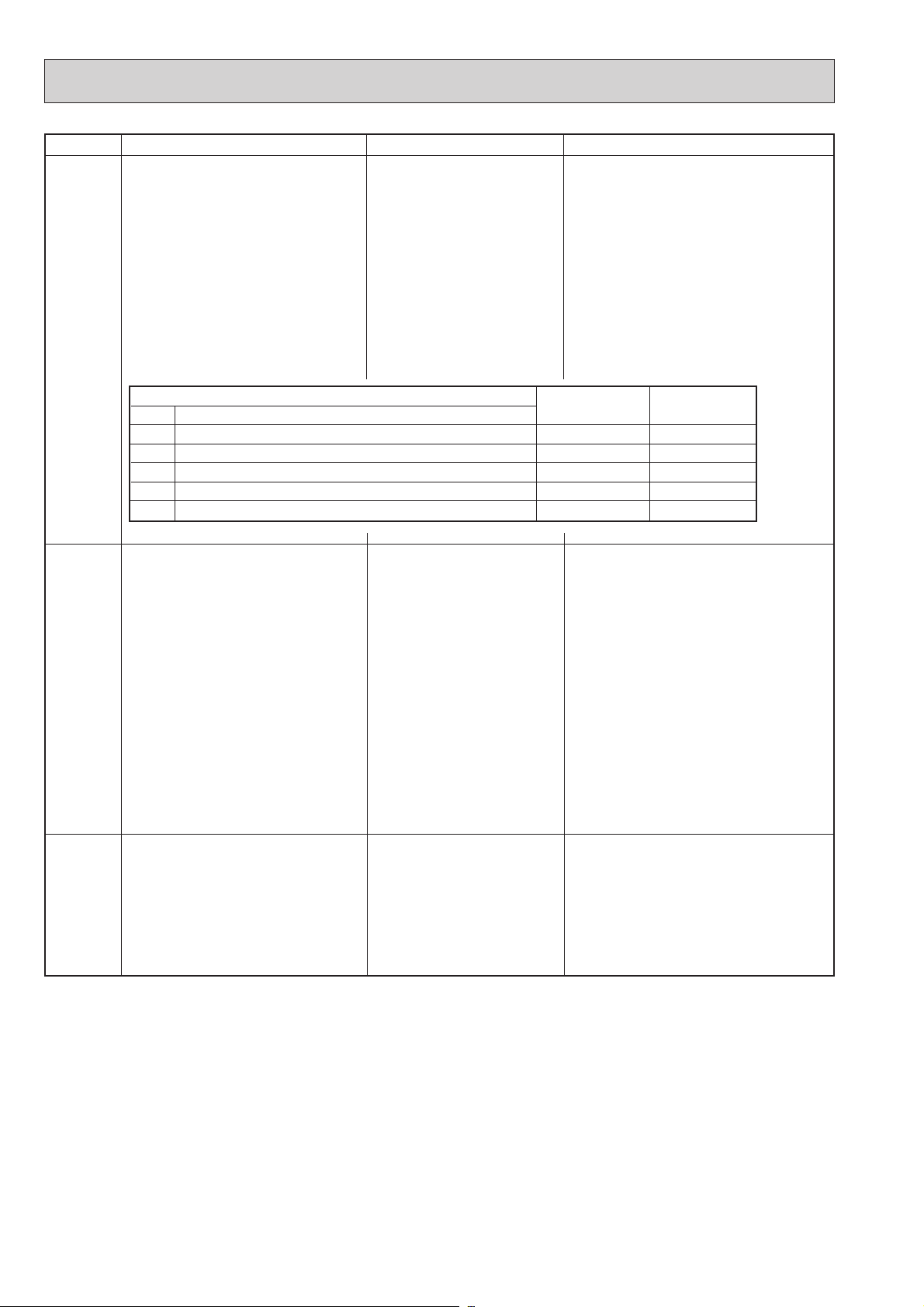
Error Code
U4
Abnormal point and detection method
Open/short of outdoor unit thermistors
(TH3, TH32, TH6, TH7, and TH8)
Abnormal if open or short is detected
during compressor operation.
Open detection of thermistors TH3, TH32
and TH6 is not detected for 10 seconds to
10 minutes after compressor starting and
10 minutes after and during defrosting.
+Check which unit has abnormality in its
thermistor by switching the mode of
SW2.
(Refer to 8-7.)
Case
Disconnection or contact failure
of connectors
Outdoor controller circuit
board: TH3,TH32,TH6/TH7
Outdoor power circuit board:
(
CN3
Defective thermistor
Defective outdoor controller
circuit board
)
Judgment and action
Check connection of connector (TH3,TH32,
TH6/TH7) on the outdoor controller circuit board.
Check connection of connector (CN3) on the
outdoor power circuit board.
Check the lead wire for thermistor
(TH3,TH32,TH6,TH7,TH8). Refer to 8-6.
Check resistance value of thermistor
(TH3,TH32,TH6,TH7,TH8) or check temperature on LED display.
(Thermistor/TH3,TH32,TH6,TH7,TH8: Refer
to 8-5.)
(SW2 : Refer to 8-7)
Replace outdoor controller circuit board.
U5
Thermistors
Symbol
Thermistor <Liquid temperature>
TH3
Thermistor <Inlet water temperature>
TH32
Thermistor <Plate HEX liquid temperature>
TH6
Thermistor <Ambient temperature>
TH7
Thermistor <Heatsink temperature>
TH8
Temperature of heatsink
Abnormal if heatsink thermistor(TH8)
detects temperature indicated 77.
Name
The outdoor fan motor is
locked.
Failure of outdoor fan motor
Air flow path is clogged.
Ambient temperature is high.
Defective thermistor
Defective input circuit of
outdoor power circuit board
Failure of outdoor fan drive
circuit
Open detection Short detection
– 40 or below
– 40 or below
– 40 or below
– 40 or below
– 35 or below
Check outdoor fan.
Check air flow path for cooling.
Check if there is something which causes
temperature rise around outdoor unit.
(Upper limit of ambient temperature is 46.)
Turn off power, and on again to check if U5
is displayed within 30 minutes.
If U4 is displayed instead of U5, refer to
error code U4.
Check resistance value of thermistor (TH8)
or temperature by microcomputer.
(Thermistor/TH8: Refer to 8-5.)
(SW2 : Refer to 8-6)
Replace outdoor power circuit board.
Replace outdoor controller circuit board.
90 or above
102 or above
90 or above
90 or above
102 or above
U6
Power module
Check abnormality by driving power module
in case overcurrent is detected.
(UF or UP error condition)
Defective outdoor power circuit
board
Decrease of power supply voltage
Loosen, disconnected or
reverse of compressor wiring
connection
Defective compressor
14
Replace outdoor power circuit board.
Check facility of power supply.
Correct the wiring (U
compressor. Refer to 8-6 (Outdoor power
circuit board).
Check compressor referring to 8-4.
•V•
W phase) to
Page 15

15
Error Code
U7
Abnormal point and detection method
Too low superheat due to low discharge
temperature
Abnormal if discharge superheat is
continuously detected -15 or less for
3 minutes even though linear expansion
valve has minimum open pulse after compressor starts operating for 10 minutes.
Case
Disconnection or loose
connection of discharge
temperature thermistor (TH4)
Defective holder of discharge
temperature thermistor
Disconnection or loose connection
of linear expansion valve’s coil
Disconnection or loose
connection of linear expansion
valve’s connector
Defective linear expansion valve
Judgment and action
Check the installation conditions of
discharge temperature thermistor (TH4).
Check the coil of linear expansion valve.
Refer to 8-5.
Check the connection or contact of LEV-A and
LEV-B on outdoor controller circuit board.
Check linear expansion valve.
Refer to 8-4.
U8
U9
Outdoor fan motor
The outdoor fan motor is considered to be
abnormal if the rotational frequency of fan
motor is abnormal when detected during
operation.
Fan motor rotational frequency is abnor mal if;
• 100 rpm or below detected continuously
for 15 seconds at 20 or more outside
air temperature
• 50 rpm or below or 1500 rpm or more
detected continuously for 1 minute.
Overvoltage or voltage shortage
Synchronous signal to main circuit
Abnormal if any of followings are detected
during compressor operation;
• Decrease of DC bus voltage to 310V
• Instantaneous decrease of DC bus voltage
to 200V
• Increase of DC bus voltage to 400V
• Decrease of input current of outdoor unit
to 0.1A only if operation frequency is more
than or equal to 40Hz or compressor
current is more than or equal to 6A.
+ Check U9 error detail (SW2 all ON)
Refer to 8-7.
Failure in the operation of
the DC fan motor
Failure in the outdoor circuit
controller board
Decrease of power supply voltage
Disconnection of compressor
wiring
Disconnection or loose connec-
tion of CN52C
Defective ACT module
Defective ACT module drive
circuit of outdoor power circuit
board
Disconnection or loose connec-
tion of CNAF
Defective 52C drive circuit of
outdoor controller circuit board
Disconnection or loose
connection of CN5 on the
outdoor power circuit board
Defective input current circuit
of outdoor power circuit board/
noise filter circuit board
Check or replace the DC fan motor.
Check the voltage of the outdoor circuit
controller board during operation.
Replace the outdoor circuit controller
board. (when the failure is still indicated
even after performing the remedy
above.)
Check the facility of power supply.
Correct the wiring (U
•V•
W phase) to compressor.
Refer to 8-6 (Outdoor power circuit board).
Check CN52C wiring.
Replace ACT module.
Replace outdoor power circuit board.
Check CNAF wiring.
Replace outdoor controller circuit board.
Check CN5 wiring on the outdoor power
circuit board.
Refer to 8-6.
Replace outdoor power circuit board/ noise
filter circuit board.
Ud
UF
Overheat protection
Abnormal if outdoor pipe thermistor (TH3)
detects 70or more or condensing
temperature of pressure sensor (63HS)
detects 70 or more during compressor
operation.
Compressor overcurrent interruption
(When compressor locked)
Abnormal if overcurrent of DC bus or
compressor is detected within 30 seconds
after compressor starts operating.
Defective outdoor fan (fan
motor) or short cycle of outdoor unit during cooling operation
Defective outdoor pipe
thermistor (TH3)
Defective outdoor controller
board
Defective pressure sensor
Decrease of power supply voltage
Looseness, disconnection or
converse of compressor wiring
connection
Defective compressor
Defective outdoor power board
Decreased water flow
Clogged filter of water pipe
Clogged plate heat exchanger
Locked water pump
Malfunction of water pump
Check outdoor unit air passage.
Turn the power off and on again to check
the error code. If U4 is displayed, follow the
U4 processing direction.
Check pressure by microcomputer.
(Pressure sensor/ 63HS)
(SW2: Refer to 8-7.)
Check facility of power supply.
Correct the wiring (U
compressor.
•V•
W phase) to
Refer to 8-6 (Outdoor power circuit board).
Check compressor. Refer to 8-4.
Replace outdoor power circuit board.
~
Check water circuit and repair the defect.
Page 16

Error Code
UH
Abnormal point and detection method
Current sensor error or input current error
·Abnormal if current sensor detects –1.0A
to 1.0A during compressor operation.
(This error is ignored during test run.)
·Abnormal if input current is detected 32A
or input current is detected 28A or more
for 10 seconds continuously.
Case
Disconnection of compresso
wiring
Defective circuit of current
sensor on outdoor power
circuit board
Decrease of power supply volt-
age
Judgment and action
Correct the wiring (U
pressor. Refer to 8-6 (Outdoor power circuit
board).
Replace outdoor power circuit board.
Check the facility of power supply.
•V•
W phase) to com-
UP
Ed
Compressor overcurrent interruption
Abnormal if overcurrent DC bus or compressor is detected after compressor starts
operating for 30 seconds.
Serial communication error
Abnormal if serial communication
between outdoor controller circuit
board and outdoor power circuit board
is defective.
Decrease of power supply voltage
Looseness, disconnection or
converse of compressor wiring
connection
Defective fan of outdoor units
Short cycle of indoor/outdoor
units
Defective input circuit of out-
door controller board
Defective compressor
Decreased water flow
Clogged filter of water pipe
Clogged plate heat exchanger
Locked water pump
Malfunction of water pump
Wire disconnection or contact
failure of connector CN2
between the outdoor controller
circuit board and the outdoor
power circuit board
Wire disconnection or contact
failure of connector CN4
between the outdoor controller
circuit board and the outdoor
power circuit board
Defective communication circuit
of outdoor power circuit board
Defective communication circuit
of outdoor controller circuit board
for outdoor power circuit board
Check facility of power supply.
Correct the wiring (U
pressor. Refer to 8-6 (Outdoor power circuit
board).
Check outdoor fan.
Solve short cycle.
Replace outdoor controller circuit board.
Check compressor.
Refer to 8-4.
+ Before the replacement of the outdoor
controller circuit board, disconnect the wiring
to compressor from the outdoor power circuit
board and check the output voltage among
phases, U, V, W, during test run. No defect
on board if voltage among phases (U-V, V-W
and W-U) is same. Make sure to perform the
voltage check with same performing frequency.
~ Check water circuit and repair the defect.
Check connection of each connector CN2
and CN4 between the outdoor controller
circuit board and the outdoor power circuit
board.
Replace outdoor power circuit board.
Replace outdoor controller circuit board.
•V•
W phase) to com-
16
Page 17

17
Error Code
P6
Abnormal point and detection method
Freezing/overheating protection is working
(1)Freezing protection <Cooling mode>
Abnormal if plate heat exchanger pipe
temperature(TH6) stays at -5
or lower
for 10 seconds or abnormal if plate heat
exchanger pipe thermistor (TH6) stays at
or lower and compressor operation
-2
frequency is minimum for 5 minutes
after compressor starts operating for 6
minutes.
(2)Overheating protection <Heating mode>
Abnormal if condensing temperature of
pressure sensor(63HS) detects
Tcond. or more and compressor operation frequency is less than or equal to
30 Hz. Detection is inoperative during
defrosting.
Case
<Cooling mode>
Reduced water flow
· Clogged filter
· Leakage of water
Low temperature
· Low-load
· Inlet water is too cold.
Defective water pump
Defective outdoor fan control
Overcharge of refrigerant
Defective refrigerant circuit
(clogs)
Malfunction of linear expansion
valve
<Heating mode>
Reduced water flow
· Clogged filter
· Leakage of water
High temperature
· Over-load
· Inlet water is too warm.
Defective water pump
Judgment and action
<Cooling mode>
Check water piping.
Check water pump.
Check outdoor fan motor.
~ Check operating condition of refrigerant
circuit.
Check linear expansion valve.
<Heating mode>
Check water piping.
Check water pump.
P8
UE
Overcharge of refrigerant
Defective refrigerant circuit
Malfunction of linear expansion
Tcond
stage-e
stage-a stage-b stage-c stage-d stage-e stage-f stage-g
Tcond 63 61 59 57 54 51 48
Leakage or shortage of
stage-g
Pipe temperature
stage-f
-19
-18 -16 -15 -13 -12 -11 -10 -8 -7 -3 -2
Abnormal if the following conditions are
detected for continuously 3 minutes after
compressor starts operating for 10 minutes.
Malfunction of linear
1.Cooling mode
63HS-TH72 and
T
TH3-TH74 or T
63HS-TH3< 0and
Refrigerant circuit is clogged
TH32-TH60 and
Compressor operation frequency is 61Hz or more.
+Clogging occurs in the parts
2.Heating mode
63HS-TH322and
T
TH6-TH321and
TH7-TH31 and
Compressor operation frequency is 61Hz or more.
Disconnection holder of
T63HS:Condensing temperature of pressure
sensor(63HS)
Thermistor
TH3:Liquid temperature
TH32:Inlet water temperature
TH6:Plate HEX Liquid temperature
TH7:Ambient temperature
Abnormal pressure of pressure sensor
Disconnection or contact
(63HS)
Abnormal if pressure sensor(63HS) detects
0.1MPa or less.
Detection is inoperative for 3 minutes after
compressor starting and 3minutes after
Defective pressure sensor
Defective outdoor controller
and during defrosting.
(clogs)
valve
stage-c
stage-d
Ambient temperat ure (TH7)
refrigerant
expansion valve
with foreign objects.
which become below freezing
point when water enters in
refrigerant circuit.
thermistor
failure of connector (63HS)
on the outdoor controller
circuit board
circuit board
Check operating condition of refrigerant
circuit.
Check linear expansion valve.
stage-a
stage-b
[ ]
Check intake superheat.
Check leakage of refrigerant.
Check linear expansion valve.
After recovering refrigerant, remove water
from entire refrigerant circuit under vacuum
more than 1 hour.
Check temperature display on outdoor
controller circuit board.
Temperature display is indicated by setting
SW2 of outdoor controller circuit board.
Check the holder of thermistor.
Check connection of connector (63HS) on
the outdoor controller circuit board.
Check breaking of the lead wire for thermistor
(63HS).
Check pressure by microcomputer.
(Pressure sensor/ 63HS)
(SW2: Refer to 8-7.)
Replace outdoor controller board.
Page 18

Error Code
PE
Abnormal point and detection method
Inlet water temperature
Abnormal if the following conditions are
detected for continuously 10 seconds.
1.Cooling mode
During compressor operation
TH32 < 3
2.Heating mode (exclude defrosting)
During compressor operation
TH32 < -10
3.Defrosting mode
During compressor operation
TH32 < 0
Thermistor
TH32 : Inlet water temperature
Case
Reduced water flow
· Clogged filter
· Leak of water
Low temperature
· Low-load
· Low temperature inlet water
Defective water pump
Leakage or shortage of
refrigerant
Judgment and action
Check water piping.
Check water pump.
Check intake superheat.
Check leakage of refrigerant.
18
Page 19

19
8-4. HOW TO CHECK THE PARTS
1
2
3
4
5
6
M
Parts name
Check points
Disconnect the connector then measure the resistance using a tester.
(At the ambient temperature of 10~30)
Disconnect the connector then measure the resistance using a tester.
(Winding temperature 20)
TH3:Liquid pipe
temperature
TH4:Discharge
temperature
TH6:Plate Hex liquid
pipe temperature
TH7:Ambient
temperature
TH8:Heatsink
temperature
TH32:Inlet water
temperature
Normal
160k~410k
4.3k~9.6k
4.4k~9.8k
39k~105k
TH4
TH3
TH6
TH7
TH32
TH8
Abnormal
Open or short
Normal
Red - White Red - Orange
Brown - Yellow
Brown - Blue
Abnormal
46±4
Measure the resistance between the terminals using a tester.
(At the ambient temperature of 20
)
Solenoid valve coil
<Four-way valve>
(21S4)
Compressor
(MC)
Linear expansion valve
(LEV-A/ LEV-B)
Normal
Abnormal
Open or short
Open or short
Measure the resistance between the terminals using a tester.
(At the ambient temperature of 20)
Normal
1450±150
Abnormal
Open or short
Solenoid valve coil
<Bypass valve>
(SV)
Refer to the next page.Fan motor(MF1)
2350±170
0.865~0.895
Measure the resistance between the terminals using a tester.
(Winding temperature 20
)
Normal Abnormal
Open or short
W
V
U
Red
Brown
Blue
Orange
Yellow
White
PUHZ-W90VHA
Page 20

Check method of DC fan motor (fan motor / outdoor controller circuit board)
Notes
· High voltage is applied to the connector (CNF1) for the fan motor. Give attention to the service.
· Do not pull out the connector (CNF1) of the motor with the power supply on.
(It may damage of the outdoor controller circuit
Self check
Symptom : The outdoor fan does not run.
Check fuse (F5) on outdoor control
circuit board.
board and fan motor.)
Is the fuse normal?
Yes
Wiring contact check
Contact of fan motor connector (CNF1)
Is there no contact failure?
Yes
Power supply check
Measure the voltage on the outdoor controller circuit. (The connector CNF1 is removed.)
No
No
Replace fan motor.
Replace
outdoor controller circuit board.
Wiring recovery
TEST POINT VDC DC280-330V (between 1 (+) and 4 (-) of CNF1)
Is the voltage normal?
VDC DC15V (between 5 (+) and 4 (-) of CNF1)
Yes
Replace fan motor.
No
Replace outdoor control circuit board.
Check fan motor rotation.
NG
OK
Replace fan motor.
END
Check fan motor rotation.
NG
OK
Replace outdoor control circuit board.
20
END
Page 21

21
8-5. HOW TO CHECK THE COMPONENTS
500
400
300
200
100
0
25
50 75 100 120
Temperature ()
Resistance (k)
<Thermistor feature chart>
Low temperature thermistors
• Thermistor <Liquid pipe> (TH3)
• Thermistor <Plate Hex liquid pipe> (TH6)
• Thermistor <Ambient> (TH7)
50
40
Thermistor R0 = 15k ± 3%
B constant = 3480 ± 2%
1
t =15exp{3480(
R
0 15k
10 9.6k
1
273+t–273
30
4.3k
40 3.0k
)}
20 6.3k
25 5.2k
Medium temperature thermistor
• Thermistor <Heatsink> (TH8)
Thermistor R50 = 17k ± 2%
B constant = 4150 ± 3%
1
R
t =17exp{4150(
273+t–323
1
)}
0 180k
25 50k
50 17k
70 8k
90 4k
Resistance (k)
30
20
Resistance (k)
10
0
-20 -10 0 10 20 30 40 50
Temperature ()
200
150
100
50
0
25 50 75 100 125
Temperature ()
High temperature thermistor
• Thermistor <Discharge pipe> (TH4)
Thermistor R120 = 7.465k ± 2%
B constant = 4057 ± 2%
1
R
t =7.465exp{4057(
20 250k
30 160k
40 104k
50 70k
60 48k
1
273+t–393
)}
70 34k
80 24k
90 17.5k
100 13.0k
110 9.8k
Page 22

Low temperature thermistor
0
10
20
30
40
50
-20 -10 0 10 20 30 40 50
Temperature()
Resistance (k)
• Thermistor <Inlet water> (TH32)
Thermistor R0 = 15k ± 2.5%
B constant = 3450 ± 2%
1
R
t =15exp{3450(
0 15k
10 9.6k
1
273+t–273
30 4.2k
40 2.9k
)}
20 6.3k
25 5.1k
22
Page 23

23
Linear expansion valve
(1) Operation summary of the linear expansion valve
• Linear expansion valve open/close through stepping motor after receiving the pulse signal from the outdoor controller board.
• Valve position can be changed in proportion to the number of pulse signal.
<Connection between the indoor controller board and the linear expansion valve>
Outdoor controller board
DC12V
1
:4
:3
:2
:1
Red
Brown
Blue
Orange
Yellow
White
2
3
4
5
6
Drive circuit
:4
:3
:2
:1
LEV
3
2
M
5
1
6
4
<Output pulse signal and the valve operation>
OFF
ON
OFF
OFF
Output
5678
OFF
OFF
ON
OFF
OFF
OFF
ON
ON
OFF
ON
ON
OFF
OFF
OFF
OFF
ON
ON
OFF
OFF
ON
Output
(Phase)
:1
:2
:3
:4
234
1
ON
ON
OFF
ON
OFF
OFF
OFF
OFF
(2) Linear expansion valve operation
Connector LEV-A
LEV-B
2SHQLQJDYDOYHĺĺĺĺĺĺĺĺ
&ORVLQJDYDOYHĺĺĺĺĺĺĺĺ
The output pulse shifts in above order.
•When linear expansion valve operation stops, all output phase
become OFF.
•When the switch is turned on, 700 pulse closing valve signal will
be sent till it goes to point in order to define the valve position.
(The pulse signal is being sent for about 20 seconds.)
When the valve moves smoothly, there is no sound or vibration
occurring from the linear expansion valve.
When the pulse number moves from to or when the valve is
locked, sound can be heard.
No sound is heard when the pulse number moves from to in
case coil is burnt out or motor is locked by open-phase.
Valve position (capacity)
Close
Extra tightning (about 32 pulse)
Open
Pulse number
•Noise can be detected by placing the ear against the screw driver
handle while putting the screw driver to the linear expansion valve.
500 pulse
Opening a valve
all the way
Page 24

y
(3) How to attach and detach the coil of linear expansion valve
A
Be sure to attach the
stopper to pipe B.
B
A
<Composition>
Linear expansion valve is separable into the main body and the coil as shown in the diagram below.
Coil
Lead wire
<How to detach the coil>
Hold the lower part of the main body (shown as A) firmly so that
the main body does not move and detach the coil by pulling it
upward.
Be sure to detach the coil holding main body firmly. Otherwise,
pipes can bend due to pressure.
Stopper
Main bod
<How to attach the coil>
Hold the lower part of the main body (shown as A) firmly so that
the main body does not move and attach the coil by inserting it
downward into the main body. Then securely attach the coil stopper to pipe B. (At this time, be careful that stress is not added
to lead wire and main body is not wounded by lead wire.) If the
stopper is not firmly attached to pipe B, coil may be detached
from the main body and that can cause defective operation of linear expansion valve.
To prevent piping stress, be sure to attach the coil holding the
main body of linear expansion valve firmly. Otherwise pipe may
break.
24
Page 25

25
8-6. TEST POINT DIAGRAM
Outdoor controller circuit board
&$87,21!7(6732,17LVKLJKYROWDJH
CNAC
to : Power supply
for outdoor controller
circuit board
(220V-240V AC)
to : Not used
CN2
Connect to the outdoor power circuit
board (CN2).
-:
Power circuit board
ĺ7UDQVPLWWLQJVLJQDO
to the controller circuit
board
(0-5V DC)
=HURFURVVVLJQDO
-:
(0-5V DC)
-: 18V DC
-: 16V DC
-: 16V DC
–
[
:
,,,: +
]
21S4
Four-way
valve
CNS
Not used
VCC 7(6732,17)
YROWDJHEHWZHHQSLQVRI&%'&9
63H
+LJKSUHVVXUHVZLWFK
VDC 7(6732,17)
YROWDJHEHWZHHQSLQVRI&(
: DC280V-380V
CNDC
+
DC280V-380V
&RQQHFWIURP
}
–
outdoor power
circuit board.
VSP(
7(6732,17
YROWDJHEHWZHHQSLQV
of C5B): DC 0V (when
stopped), DC 1– 6.5V
(when operated)
VFG(
7(6732,17
YROWDJHEHWZHHQULJKW
pins of PC5D, pin 3
and pin 4)
7+
7KHUPLVWRU
,QOHWZDWHUWHPSHUDWXUH!
7+
7KHUPLVWRU
<Plate Hex liquid
WHPSHUDWXUH!
7+
$PELHQWWHPSHUDWXUH!
7+
7KHUPLVWRU
/LTXLGWHPSHUDWXUH!
7+
7KHUPLVWRU
'LVFKDUJH!
)
)
SV2
Bypass valve
CN4
7UDQVPLVVLRQ
to outdoor
power circuit
board (CN4)
CN52C
Connect to the outdoor noise
filter circuit board. (CN52C)
CN51
Connect to interface
circuit board.(CN2F2)
CNDM / CN3S
Connect to interface
circuit board.(CNIF1)
/(9$%
Linear expansion valve
SW8
Function switch
SW6
Model select
SW1
Forced defrost,
detect history
record reset
SW2
2SHUDWLRQPRQLWRUIXQFWLRQ
Page 26

Outdoor noise filter circuit board
LO, NO
Voltage of 220-240V AC is output.
Connect to the outdoor power
circuit board (TABS, TABT).
CNAC1, CNAC2
220-240V AC
Connect to the outdoor controller circuit board (CNAC).
EI
Connect to
the earth.
E2
Connect to the
earth.
CN5
Input current
Connect to the
outdoor power
circuit board
(CN5).
LI, NI
Voltage of 220-240V AC is input.
Connect to the terminal block(TB1).
26
Page 27

27
Outdoor power circuit board
Brief Check of POWER MODULE
+ Usually, they are in a state of being short-circuited if they are broken.
Measure the resistance in the following points (connectors, etc.).
If they are short-circuited, it means that they are broken.
1. Check of diode bridge
TABP1-TABS, TABN1-TABS, TABP1-TABT,TABN1-TABT
2. Check of DIP-IPM
P-U, P-V, P-W, N-U, N-V, N-W
CN2
Connect to the outdoor controller circuit board
(CN2)
1-5:Transmitting signal to the outdoor
controller circuit board (0~5V DC)
2-5:Zero cross signal (0~5V DC)
3,4:18V DC
6-5:16V DC
7-5:16V DC
CN3
Thermistor (TH8)
<Heatsink>
CN5
Detection of input
current
Connect to the
outdoor noise filter
circuit board (CN5)
CN4
Connect to the
outdoor controller
circuit board (CN4)
CNAF
Connect to ACTM
DIP-IPM
CNDC
280-380V DC (+, –)
Connect to the outdoor
controller circuit board
TABS/TABT
Connect to the
outdoor noise
filter circuit
board
Voltage among
phases:220240V AC
TABP1
Connect to
ACTM
+
TABN1
Connect to
—
ACTM
TABP2
Connect to the
ACTM
TABU/V/W
Connect to the compressor (MC)
Voltage among phases:10V~180V AC
TABN2
Connect to ACTM
Page 28

Interface circuit board
CNIF1
Connect to the outdoor
controller circuit board
CNIF2
Connect to the outdoor
controller circuit board
CNIF3
Input signal
Connect to the
terminal block
(TB2, TB3)
CNIF4
Output signal
Connect to the terminal block
(TB3)
28
Page 29

29
Active filter module(ACTM)
L1, L2
Connect to the
DCL (Reactor)
P
Connect to the
outdoor power
circuit board
(TABP2)
N1
Non-connect
+
Connect to the outdoor
power circuit board
(TABP1)
—
Connect to the
outdoor power
circuit board
(TABN1)
N2
Non-connect
I0
Connect to the
outdoor power
circuit board
(TABN2)
Page 30

8-7. OUTDOOR UNIT OPERATION MONITOR FUNCTION
1ON23456
1 second
interval
Display
Contents to be inspected (During operation)
U1
U2
U3
U4
U5
U6
U7
U8
U9
Ud
UF
UH
UP
P6
P8
UE
PE
Ed
Abnormal high pressure (63H worked)
Abnormal high discharging temperature, shortage of refrigerant
Open/short circuit of discharging thermistor(TH4)
Open/short of outdoor unit thermistors(TH3, TH32, TH6, TH7 and TH8)
Abnormal temperature of heatsink
Abnormality of power module
Abnormality of superheat due to low discharge temperature
Abnormality in outdoor fan motor
Voltage fault, Input current sensor error
Overheat protection
Compressor overcurrent interruption (When Comp. locked)
Current sensor error, Input overcurrent interruption
Compressor overcurrent interruption
Freezing/overheating protection is working.
Abnormality of pipe temperature
Abnormal pressure of pressure sensor
Abnormality of entering water temperature
Serial communication error
Operation indicator SW2 : Indicator change of self diagnosis
SW2 setting
1ON23456
Display detail
<Digital indicator LED3 working details>
(Be sure that the 1 to 6 in the SW2 are set to OFF.)
(1) Display when the power supply is ON.
When the power supply is ON, blinking displays by turns.
Wait for 10 seconds at the longest.
(2) When the display lights (Normal operation)
Operation mode display
Explanation for display Unit
(Lighting)
SW2
LED3
The tens digit : Operation mode
Display Operation Model
O
C
H
d
OFF
COOLING
HEATING
DEFROSTING
Display during error postponement
Postponement code is displayed when
compressor stops due to the work of
protection device.
Postponement code is displayed while
error is being postponed.
(3) When the display blinks
Inspection code is displayed when compressor stops due to the work of protection devices.
The ones digit : Relay output
Display
0
1
2
3
4
5
6
7
8
A
Warming-up
Compressor
—
—
—
—
—
—
—
—
ON
ON
Compressor
—
—
—
—
ON
ON
ON
ON
—
—
4-way valve
ON
ON
ON
ON
ON
(Initial setting)
—
—
—
—
—
Solenoid valve
—
ON
—
ON
—
ON
—
ON
—
—
Display
Inspection unit
0 Outdoor unit
Display
Contents to be inspected (When power is turned on)
63H connector(yellow) is open.
F5
30
Page 31

31
SW2 setting
1ON23456
1ON23456
10
1
05
1
05
1ON23456
Display detail
Pipe temperature / Liquid(TH3)
– 40~90
Explanation for display Unit
– 40~90
(When the coil thermistor detects 0 or below, “–”
and temperature are displayed by turns.)
(Example) When -10;
0.5 secs. 0.5secs. 2 secs.
1ON23456
1ON23456
1ON23456
1ON23456
Discharge temperature (TH4)
3~217
Fan steps
0~10
Compressor ON/OFF
0~9999
Compressor accumulated operation
hours
0~9999
3~217
(When the discharge thermistor detects 100 or
more, hundreds digit, tens digit and ones digit are
displayed by turns.)
(Example) When 105;
0.5 secs. 0.5secs. 2 secs.
0~10
0~9999
(When the number of times is 100 or more,
hundreds digit, tens digit and ones digit are
displayed by turns.)
(Example) When 42500 times (425 100 times);
0.5 secs. 0.5secs. 2 secs.
4
25
0~9999
(When it is 100 hours or more, hundreds digit, tens
digit and ones digit are displayed by turns.)
(Example) When 2450 hours (245 10 hours);
0.5 secs. 0.5secs. 2 secs.
2
45
Step
100 times
10 hours
1ON23456
1ON23456
1ON23456
1ON23456
Compressor running current
0~50
Compressor running frequency
0~225
0~50
+to round off at decimal point
0~255
(When it is 100Hz or more, hundreds digit, tens
digit and ones digit are displayed by turns.
(Example) When 105Hz;
0.5 secs. 0.5secs. 2 secs.
LEV-A opening pulse
0~500
0~500
(When it is 100 pulse or more, hundreds digit, tens
digit and ones digit are displayed by turns.
(Example) When 150 pulse;
0.5 secs. 0.5secs. 2 secs.
1
50
Deferred error history (1)
Deferred error
Blinking: being deferred
Lighting: deferment cancelled
“00” is displayed in case of no deferment
Operation mode when the error occured. Operation mode when the unit is stopped due to
error. The code when the SW2 is set like below.
(SW2)
A
Hz
Pulse
Code
display
Code
display
Page 32

SW2 setting
Model
PUHZ-W90VHA
Code
14
1ON23456
Display detail
Pipe temperature / Liquid(TH3) when
error occured.
– 40~90
Explanation for display Unit
– 40~90
(When the coil thermistor detects 0 or below, “–”
and temperature are displayed by turns.)
(Example) When –15;
0.5 secs. 0.5secs. 2 secs.
15
1ON23456
1ON23456
1ON23456
1ON23456
Discharge temperature (TH4) when
error occured.
3~217
Compressor current when error occred.
0~50
Error code history (1) (latest)
Alternate display of faulty unit
number and error code
Error code history (2)
Alternate display of faulty unit
number and error code
3~217
(When the temperature is 100 or more, the
hundreds digit, tens digit and ones digit are
displayed by turns.)
(Example) When 130;
0.5 secs. 0.5secs. 2 secs.
1
30
0~50
When no error history,
“ 0 ” and “– –” are displayed by turns.
When no error history,
“ 0 ” and “– –” are displayed by turns.
A
Code
display
Code
display
1ON23456
1ON23456
1ON23456
Compressor operation duration
0~999
LEV-B opening when error occured.
Capacity settings
0~999
(When it is 100 minutes or more, the hundreds digit,
tens digit and ones digit are displayed by turns.)
(Example) When 245 minutes;
0.5 secs. 0.5secs. 2 secs.
2
45
0~500
(When it is 100 pulse or more, hundreds digit, tens
digit and ones digit are displayed by turns.
(Example) When 150 pulse;
0.5 secs. 0.5secs. 2 secs.
1
50
Shown as the outdoor capacity code.
Minute
Pulse
Code
display
32
Page 33

33
SW2 setting
1ON23456
1
05
1ON23456
1ON23456
Display detail
Plate HEX liquid pipe temperature(TH6)
– 39~88
Explanation for display
– 39~88
(When the temperature is 0 or less, “–” and
temperature are displayed by turns.)
Unit
1ON23456
1ON23456
Condensing temperature(T
63HS
)
– 39~88
Caliculated maximum frequency
0~150
Water inlet temperature (TH32)
0~100
Requested capacity step(QSTEP)
0~7
– 39~88
(When the temperature is 0 or less, “–” and
temperature are displayed by turns.)
0~150
(When it is 100Hz or more, hundreds digit, tens
digit and ones digit are displayed by turns.
(Example) When 105Hz;
0.5 secs. 0.5secs. 2 secs.
0~100
0~7
Hz
Step
1ON23456
1ON23456
1ON23456
1ON23456
Ambient temperature (TH7)
-39~88
Outdoor heatsink temperature (TH8)
-40~200
Discharge superheat (SHd)
0~255
Cooling and Heating:SHd=TH4-T
Sub cool (SC)
0~130
Cooling:SC = T
Heating:SC = T
63HS-TH3
63HS-TH6
-39~88
(When the temperature is 0 or less, “–” and
temperature are displayed by turns.)
-40~200
(When the temperature is 0 or less, “–” and
temperature are displayed by turns.)
(When the thermistor detects 100 or more,
hundreds digit, tens digit and ones digit are
displayed by turns.)
0~255
(When the SHd is 100°C or more, hundreds
digit, tens digit and ones digit are displayed by
turns.)
63HS
0~130
(When the SC is 100°C or more, hundreds digit, tens
digit and ones digit are displayed by turns.)
°C
°C
Page 34

SW2 setting
1ON23456
Display detail
Input current of outdoor unit
0~500
Explanation for display Unit
0~500
(When it is 100 or more, hundreds digit, tens digit
and ones digit are displayed by turns.)
0.1 A
1ON23456
1ON23456
1ON23456
LEV-B opening pulse
0~500
U9 error detail history(latest)
Direct current bus line voltage
150~400
0~500
(When it is 100 pulse or more, hundreds digit, tens
digit and ones digit are displayed by turns.)
Error details
(No error)
Over voltage
Insufficient
voltage
Input current
sensor error
ACTM error
150~400
(When it is 100V or more, hundreds digit, tens
digit and ones digit are displayed by turns.)
Cause
㧙
Power PCB
Power PCB
Control PCB
Control PCB
Code
00
01
02
04
20
Pulse
Code
display
V
1ON23456
1ON23456
1ON23456
1ON23456
Deferred error history (2)
of outdoor unit
Deferred error history (3)
of outdoor unit
Error code history (3) (Oldest)
Faulty unit number and error code are
displayed alternately.
Error thermistor display
When there is no error thermistor,
“–“ is displayed.
Deferred error code display
Blinking: being deferred
Lighting: deferment cancelled
“00” is displayed in case of no deferment.
Deferred error code display
Blinking: being deferred
Lighting: deferment cancelled
“00” is displayed in case of no deferment.
When no error history, “0” and “– –“ are displayed by
turns.
3: Liquid pipe thermistor (TH3)
3: Water inlet temp. thermistor (TH32)
6: Plate HEX liquid pipe thermistor (TH6)
7: Ambient temp.thermistor (TH7)
8: Heatsink thermistor (TH8)
Code
display
Code
display
Code
display
Code
display
34
Page 35

35
SW2 setting
15
1ON23456
30
1
1ON23456
15
15
50
1
1ON23456
Display detail
Operation frequency when error occured.
0~225
Explanation for display Unit
0~225
(When it is 100Hz or more, hundreds digit, tens digit
and ones digit are displayed by turns.)
(Example) When 105Hz;
0.5 secs. 0.5secs. 2 secs.
1
05
Hz
1ON23456
1ON23456
1ON23456
Fan step when error occured.
0~10
LEV-A opening pulse when error
occured.
0~500
Water inlet temperature (TH32) when
error occured.
0~100
Plate HEX liquid pipe temperature(TH6)
when error occured.
-39~88
Condensing temperature when error
occured.
-39~88
0~10
0~500
(When it is 100 pulse or more, hundreds digit, tens
digit and ones digit are displayed by turns.)
(Example) When 130 pulse;
0.5 secs. 0.5secs. 2 secs.
0~100
-39~88
(When the temperature is 0°C or less, “–” and
temperature are displayed by turns.)
(Example) When –15°C;
0.5 secs. 0.5secs. 2 secs.
-39~88
(When the temperature is 0°C or less, “–” and
temperature are displayed by turns.)
(Example) When –15°C;
0.5 secs. 0.5secs. 2 secs.
Step
Pulse
1ON23456
1ON23456
1ON23456
Ambient temperature (TH7) when error
occured.
-39~88
Outdoor heatsink temperature (TH8)
when error occured.
-40~200
Discharge superheat (SHd) when error
occured.
0~255
Cooling and Heating :SHd=TH4-T
63HS
-39~88
(When the temperature is 0°C or less, “–” and
temperature are displayed by turns.)
(Example) When –15°C;
0.5 secs. 0.5secs. 2 secs.
-40~200
(When the temperature is 0°C or less, “–” and
temperature are displayed by turns.)
(When the temperature is 100°C or more, hundreds
digit, tens digit and ones digit are displayed by
turns.)
0~255
(When the temperature is 100°C or more, hundreds
digit, tens digit and ones digit are displayed by
turns.)
(Example) When 150°C;
0.5 secs. 0.5secs. 2 secs.
Page 36

SW2 setting
15
1
1
05
Error details
(No error)
Over voltage
Insufficient
voltage
Input current
sensor error
ACTM error
Cause
㧙
Power PCB
Power PCB
Control PCB
Control PCB
Code
00
01
02
04
20
Display
Compressor frequency control
Input current restriction control
Compressor current restriction control
1
2
LED
1ON23456
Display detail
Sub cool (SC) when error occured.
0~130
Cooling:SC = T
Heating:SC = T
63HS-TH3
63HS-TH6
Explanation for display Unit
0~130
(When the temperature is 100°C or more, hundreds
digit, tens digit and ones digit are displayed by
turns.)
(Example) When 115°C;
0.5 secs. 0.5secs. 2 secs.
1ON23456
1ON23456
1ON23456
Compressor operation duration before
the unit stops with error.
0~999
Maximum frequency when
error occured.
0~150
Requested capacity step when error
occured.
0~7
Compressor frequency control status
0~999
(When it is 100 minutes or more, hundreds digit, tens
digit and ones digit are displayed by turns.)
(Example) When 415 minutes;
0.5 secs. 0.5secs. 2 secs.
4
0~150
(When it is 100Hz or more, hundreds digit, tens
digit and ones digit are displayed by turns.
(Example) When 105Hz;
0.5 secs. 0.5secs. 2 secs.
0~7
The following code will be a help to know the operating status of unit.
•Ten place(left side):
15
Minute
Hz
Step
1ON23456
1ON23456
U9 Error details (To be shown while
error call is deferred.)
•First digit(Total figure of the corresponding relays are
displayed.)
Display
When the following 3 points are under control;
(1) Input current restriction control.
(2) Condensing temp.control(not to over rise).
(3) Heatsink temp.control(not to over rise).
Compressor frequency control
Discharge temp.control(not to over rise).
1
Condensing temp.control(not to over rise).
2
Freezing protection control
4
Heatsink temp.control(not to over rise).
8
36
Code
display
Code
display
Page 37

37
8-8. FUNCTION OF SWITCHES
Switch
mark No. ON (with) OFF (without)
SW1
SW6
3~6 Model Setting 2
SW8
Function
1
2
3 No function
4 No function
5 No function
6 No function
1 Model Setting 1
2
1 Mode selection
2
3
Forced
defrosting
To clear error
history
Defrost control
selection
Cooling only,
Heating only or
Reversible
To fix operation
mode
ON to start Usual setting OFF
ON to clear Usual setting OFF
Do NOT use PUHZ-W90VHA
Do NOT use PUHZ-W90VHA
Do NOT use PUHZ-W90VHA
Do NOT use PUHZ-W90VHA
Do NOT use PUHZ-W90VHA
Energy saving
Cooling only or
Heating only
Cooling only Heating only OFF To fix as Cooling Only or Heating Only Always
<Important Note>
All these dip switches on PUHZ-W90VHA are set as shown above.
Spare PCBs, however, will be supplied without any settings, which means that all dip switches are switched OFF.
When servicing, please make sure to set all switches correctly, referring to the previous PCB which is removed from the unit.
For high
humidity
1=ON, 0=OFF
mode
Selection
Standard OFF
SW6
3456
1010
Powerful mode OFF – Always
Reversible OFF
Initial setting* Function details
Switch ON to forced defrosting When compressor
Switch ON to clear (erase) the followings:
(1)Error codes and Suspension flags in RAM
(2)Error codes and Suspension flags in
EEPROM
OFF
OFF
OFF
OFF
OFF
As shown in
the left table
PCB may be damaged, if switched ON.
Switch ON to change conditions (standard /
high himidity) to start defrosting
To select Cooling only, Heating only or
Reversible Always
––
–
Effective timing
(SW1, 8) /
Note (SW6)
is working in heating
mode.*1
off or operating
ON for other models
–
Make sure to set
SW6-3 to 6 correctly
*1. Forced defrosting should be done as follows.
Change the DIP SW1-1 on the outdoor controller board from OFF to ON.
Forced defrosting will start by the above operation if these conditions written below are satisfied.
• Heat mode setting
• 10 minutes have passed since compressor started operating or previous forced defrosting finished.
• Pipe temperature is less than or equal to 8
.
• Forced defrosting will finish if certain conditions are satisfied.
Forced defrosting can be done if above conditions are satisfied when DIP SW1-1 is changed from OFF to ON.
After DIP SW1-1 is changed from OFF to ON, there is no problem if DIP SW1-1 is left ON or changed to OFF again. This
depends on the service conditions.
Page 38

9
DISASSEMBLY PROCEDURE
PUHZ-W90VHA
OPERATING PROCEDURE
1. Removing the service panel and top panel
(1) Remove 3 screws (5x10) and slide the hook on the right
downward to remove the service panel.
(2) Remove screws (3 for front, 3 for rear/5x10) of the top
panel and remove it.
2. Removing the fan motor (MF1)
(1) Remove the service panel. (See figure 1.)
(2) Remove the top panel. (See figure 1.)
(3) Remove 5 screws (5x10) to detach the fan grille.
(See figure 1.)
(4) Remove a nut (for right handed screw of M6) to detach the
propeller. (See photo 1.)
(5) Disconnect the connector CNF1 on controller circuit board
in electrical parts box.
(6) Remove 4 screws (5x25) to detach the fan motor.
(See photo 2.)
Figure 1
Fan grille
Photo 1
Nut
PHOTOS&ILLUSTRATION
Top panel fixing screws
Slide
Grille fixing screws
Front panel
Propeller
Photo 2
Fan motor fixing screws
Top panel
Service panel
Service panel
fixing screws
Fan
motor
(MF1)
3. Removing the electrical box
(1) Remove the service panel. (See figure 1.)
(2) Remove the top panel. (See figure 1.)
(3) Disconnect the connecting wires from terminal block.
Remove all the following connectors from controller circuit board;
(4)
fan motor, linear expansion valve(x2), thermistor<Liquid pipe>,
thermistor<Discharge>, thermistor<Plate HEX Liquid>,
thermistor<Outdoor ambient>, high pressure sensor,
high pressure switch, four-way valve and bypass valve.
Then remove a screw (4x8) from the valve bed to remove
the lead wire.
Pull out the disconnected wire from the electrical parts box.
<Diagram symbol in the connector housing>
• Fan motor (CNF1)
• Linear expansion valve (LEV-A and LEV-B)
• Thermistor <Liquid pipe> (TH3)
• Thermistor <Discharge> (TH4)
• Thermistor <Plate HEX Liquid, Outdoor Ambient> (TH6/7)
• High pressure sensor (63HS)
• High pressure switch (63H)
• Solenoid valve coil <Four-way valve> (21S4)
• Solenoid valve coil <Bypass valve> (SV2)
(5) Remove the terminal cover and disconnect the compressor
lead wires.
(6) Remove a screw (4x10) and detach the electrical parts
box by pulling it upward. The electrical parts box is fixed
with 2 hooks on the left and 1 hook on the right.
Front panel fixing screws
Photo 3
Controller circuit board(C.B.)
Fan motor
fixing screws
Electrical parts box
Electrical parts box
fixing screw(4x10)
38
Page 39

OPERATING PROCEDURE
PHOTOS&ILLUSTRATION
4. Removing the thermistor <Plate HEX Liquid> (TH6)
(1) Remove the service panel. (See figure 1.)
(2) Remove the top panel. (See figure 1.)
(3) Disconnect the connectors, TH6 and TH7 (red), on the
controller circuit board.
(4) Loosen the clamps for the lead wire.
(5) Pull out the thermistor <Plate HEX Liquid> (TH6) from
the sensor holder.
Note: In case of replacing thermistor <Plate HEX Liquid>
(TH6), replace it together with thermistor<Outdoor
ambient> (TH7), since they are combined together.
Refer to No.5 below to remove thermistor <Outdoor
ambient>.
5. Removing the thermistor <Outdoor ambient> (TH7)
(1) Remove the service panel. (See figure 1.)
(2) Remove the top panel. (See figure 1.)
(3) Disconnect the connector TH6 and TH7(red) on the
controller circuit board.
(4) Loosen the clamps for the lead wire.
(5) Pull out the thermistor <Outdoor ambient> (TH7) from
the sensor holder.
Note: In case of replacing thermistor <Outdoor ambient>
(TH7), replace it together with thermistor <Plate HEX
Liquid> (TH6), since they are combined together.
Refer to No.4 above to remove thermistor <Plate HEX
Liquid>.
Photo 4
Plate HEX liquid
thermistor(TH6)
Receiver
Photo 5
Sensor holder for outdoor ambient thermistor(TH7)
Outdoor liquid
thermistor(TH3)
Plate heat
exchanger
Plate heat exchanger
fixing screw
6. Removing the thermistor <Liquid pipe> (TH3) and
thermistor <Discharge> (TH4)
(1) Remove the service panel. (See figure 1.)
(2) Disconnect the connectors, TH3 (white) and TH4 (white),
on the controller circuit board.
(3) Loosen the clamps for the lead wire.
(4) Pull out the thermistor <Liquid pipe> (TH3) (See photo 4)
and thermistor <Discharge> (TH4) from the sensor holder.
7. Removing the thermistor <Inlet Water> (TH32)
(1) Remove the service panel. (See figure 1.)
(2) Remove 2 screws (5x10) and remove the front cover panel.
Remove 2 screws (5x10) and remove the back cover panel
(3)
(4) Disconnect the connectors, TH32 (black) on the controller
circuit board.
(5) Loosen the clamp for the lead wire.
(6) Remove the thermistor <Inlet water> (TH32) from the plate
heat exchanger.
Photo 6
Discharge
thermistor(TH4)
Photo 7
.
Note: Before removing the thermistor<Inlet water>(TH32),
recover water in the plate heat exchanger.
3939
Plate heat
exchanger
Inlet water
thermistor(TH32)
Page 40

OPERATING PROCEDURE
PHOTOS&ILLUSTRATION
8. Removing the solenoid valve coil <Four-way valve> (21S4)
linear expansion valve coil (LEV (A), LEV (B)) and solenoid
valve coil <Bypass valve> (SV)
(1) Remove the service panel. (See figure 1.)
(2) Remove the top panel. (See figure 1.)
(3) Remove the electrical parts box. (See photo 3.)
[Removing the solenoid valve coil <Four-way valve> ]
(4) Remove solenoid valve coil <Four-way valve> fixing
screw(M4x6).
(5) Remove the solenoid valve coil <Four-way valve>.
(6) Disconnect the connector 21S4 (green) on the controller
circuit board.
[Removing the linear expansion valve coil]
(4) Remove the linear expansion valve coil by sliding the coil
upward.
(5) Disconnect the connectors, LEV A (white) and LEV B (red),
on the controller circuit board.
[Removing the solenoid valve coil <Bypass valve>]
(4) Remove the solenoid valve coil <Bypass valve> fixing
screw(M4x6).
(5) Remove the solenoid valve coil <Bypass valve> by sliding
the coil upward.
(6) Disconnect the connector SV2 (blue) on the controller cir-
cuit board.
9. Removing the four-way valve
(1) Remove the service panel. (See figure 1.)
(2) Remove the top panel. (See figure 1.)
(3) Remove the electrical parts box. (See photo 3.)
(4) Remove 3 stay fixing screws (4x10) and remove the stay.
(5) Remove 3 right side panel fixing screw (5x10) in the rear
of the unit and remove the right side panel.
(6) Remove the solenoid valve coil <Four-way valve>.
(See photo 8.)
(7) Recover refrigerant.
(8) Remove the welded part of four-way valve.
Photo 8
Solenoid
valve coil(21S4)
High pressure
switch
Photo 9
Solenoid
valve coil(21S4)
Four-way valve
Solenoid
valve coil(SV)
LEV-A
LEV-B
Bypass valve
Note 1: Recover refrigerant without letting it out in the air.
Note 2: The welded part can be removed easily by
removing the right side panel.
Note 3: When installing the four-way valve, make sure to
cover it with a wet cloth to prevent it from heating
(120°C or more), then braze the pipes so that the
inside of pipes are not oxidized.
10
. Removing linear expansion valve
(1) Remove the service panel. (See figure 1.)
(2) Remove the top panel. (See figure 1.)
(3) Remove the electrical parts box. (See photo 3.)
(4) Remove 3 stay fixing screws (4x10) and remove the stay.
(5) Remove 3 right side panel fixing screw (5x10) in the rear
of the unit and then remove the right side panel.
(6) Remove the linear expansion valve.
(7) Recover refrigerant.
(8) Remove the welded part of linear expansion valve.
Note 1: Collect refrigerant without spreading it in the air.
Note 2: The welded part can be removed easily by
removing the back panel.
Note 3: When installing the linear expansion valve, cover
it with a wet cloth to prevent it from heating
(120°C or more), then braze the pipes so that the
inside of pipes are not oxidized.
Stay fixing screw
Stay fixing
screw
Stay fixing
screw
Four-way valve
40
Page 41

41
OPERATING PROCEDURE
PHOTOS&ILLUSTRATION
11. Removing the bypass valve
(1) Remove the service panel. (See figure 1.)
(2) Remove the top panel. (See figure 1.)
(3) Remove the electrical parts box. (See photo 3.)
(4) Remove 3 right side panel fixing screws (5x10) in the rear
of the unit and remove the right side panel.
(5) Remove the bypass valve solenoid coil.
(6) Recover refrigerant.
(7) Remove the welded part of bypass valve.
Note 1: Recover refrigerant without letting it out in the air.
Note 2: The welded part can be removed easily by
removing the right side panel.
12
. Removing the high pressure switch (63H)
(1) Remove the service panel. (See figure 1.)
(2) Remove the top panel. (See figure 1.)
(3) Remove the electrical parts box. (See photo 3.)
(4) Remove 3 right side panel fixing screws (5x10) in the rear
of the unit and remove the right side panel.
(5) Pull out the lead wire of high pressure switch.
(6) Recover refrigerant.
(7) Remove the welded part of high pressure switch.
Note 1: Recover refrigerant without letting it out in the air.
Note 2: The welded part can be removed easily by
removing the right side panel.
Note 3: When installing the high pressure switch, make
sure to cover it with a wet cloth to prevent it from
heating (120°C or more), then braze the pipes so
that the inside of pipes are not oxidized.
Photo 10
Solenoid
valve coil(21S4)
High pressure
switch
Four-way valve
Solenoid
valve coil(SV2)
LEV-A LEV-B
Bypass valve
13
. Removing the high pressure sensor (63HS)
(1) Remove the service panel. (See figure 1.)
(2) Remove the top panel. (See figure 1.)
(3) Remove the electrical parts box. (See photo 3.)
(4) Remove 3 right side panel fixing screws (5x10) in the rear
of the unit and remove the right side panel.
(5) Pull out the lead wire of high pressure sensor.
(6) Recover refrigerant.
(7) Remove the welded part of high pressure sensor.
Note 1: Recover refrigerant without letting it out in the air.
Note 2: The welded part can be removed easily by
removing the right side panel.
Note 3: When installing the high pressure switch, make
sure to cover it with a wet cloth to prevent it from
heating (120°C or more), then braze the pipes so
that the inside of pipes are not oxidized.
Page 42

OPERATING PROCEDURE
PHOTOS&ILLUSTRATION
14. Removing the compressor (MC)
(1) Remove the service panel. (See figure 1.)
(2) Remove the top panel. (See figure 1.)
Remove 2 screws (5x10) and remove the front cover panel.
(3)
(4)
Remove 2 screws (5x10) and remove the back cover panel.
(5) Remove the electrical parts box. (See photo 3.)
Remove 3 screws (4x10) and remove the stay. (See photo 9.)
(6)
(7) Remove 3 screws (5x10) in the rear of the unit and remove
the right side panel.
(8) Remove 5 screws (1:4x10 4:5x10) and remove the front
panel.
(9) Remove 3 screws (4x10) and remove the separator.
(
10
) Remove the terminal cover and remove the lead wire for
compressor.
11
) Remove the soundproof cover for compressor.
(
12
) Recover refrigerant.
(
13
) Remove the 3 points of the compressor fixing nut using a
(
spanner or a adjustable wrench.
14
) Remove the welded pipe of the compressor, then remove
(
the compressor.
Note 1: Recover refrigerant without letting it out in the air.
15
. Removing the receiver
(1) Remove the service panel. (See figure 1.)
(2) Remove the top panel. (See figure 1.)
Remove 2 screws (5x10) and remove the front cover panel.
(3)
(4)
Remove 2 screws (5x10) and remove the back cover panel.
(5) Remove the electrical parts box. (See photo 3.)
Remove 3 screws (4x10) and remove the stay. (See photo 9.)
(6)
(7) Remove 3 screw (5x10) in the rear of the unit and remove
the right side panel.
(8) Recover the refrigerant.
(9) Remove 2 welded pipes of receiver.
(
10
) Remove 2 receiver leg fixing screws (4x10), then remove
the receiver.
Photo 11
Compressor
(MC)
Photo 12
Terminal cover
Receiver
Sound proof
cover for
compressor
Lead wire for compressor
Note 1: Recover refrigerant without letting it out in the air.
16. Removing the plate heat exchanger
(1) Remove the service panel. (See figure 1.)
(2) Remove the top panel. (See figure 1.)
Remove 2 screws (5x10) and remove the front cover panel.
(3)
(4)
Remove 2 screws (5x10) and remove the back cover panel.
(5) Remove the electrical parts box. (See photo 3.)
Remove 3 screws (4x10) and remove the stay. (See photo 9.)
(6)
(7) Remove 3 screw (5x10) in the rear of the unit and remove
the right side panel.
(8) Recover the refrigerant
(9) Remove 2 welded pipes of plate heat exchanger inlet and
outlet.
(
10
) Remove 2 plate heat exchanger fixing screws (4x10),
then remove the plate heat exchanger.
Note 1: Recover refrigerant without letting it out in the air.
Note 2:Before removing the thermistor <Inlet water>(TH32),
recover water in the plate heat exchanger.
Compressor
fixing nut
Photo 13
Plate HEX liquid
thermistor(TH6)
Receiver
Receiver
leg fixing
screw
Outdoor liquid
thermistor(TH3)
Plate heat
exchanger
Plate heat exchanger
fixing screw
42
Page 43

43
OPERATING PROCEDURE
17. Removing the interface circuit board (I.F.) : Figure 2
(1) Remove 2 Interface board cover fixing screws (4x10).
(2) Remove all lead wire connectors (CNIF1, CNIF2, CNIF3,
CNIF4) on interface circuit board (I.F.).
(3)
Remove interface circuit board from the C.B. base.(5 supports)
18. Removing the controller circuit board (C.B.) : Figure 2
(1)
Remove all lead wire connectors on controller circuit board (C.B.).
CNF1,CNDC,CNAC,CN2,CN4,CN52C,CN3S,CNDM,CN51
21S4,SV2,63H,63HS,LEV-A,LEV-B,
TH32,TH7/6,TH3,TH4
(2)
Remove controller circuit board from the C.B. base.(5 supports)
19.
Removing the noise filter circuit board (N.F.) : Figure 2, Photo 14
(1) Remove E2,CN5,LO,NO lead wire connectors from noise
filter circuit board (N.F.).
(2) Remove E1 lead wire connector from electrical parts box.
(3)
Remove L, N lead wire connectors from terminal block (TB1).
(4) Remove 4 screws (4x10) for fixing the C.B. base and
detach the C.B. base from the electrical parts box.
(5) Remove CNAC1, CNAC2, E1, LI, NI lead wire connectors
from noise filter circuit board (N.F.).
(6) Remove noise filter circuit board from the C.B. base.
(11 supports)
20.
Removing the power circuit board (P.B.) : Figure 2, Photo 15
(1) Remove CN2, CN4, CNDC lead wire connectors from con
troller circuit board (C.B.).
(2) Remove LO, NO, CN5 lead wire connectors from noise
filter circuit board (N.F.).
(3)
Remove 4 screws(4x10) for fixing the C.B. base and detach
the C.B. base from the electrical parts box.
(4)
Remove all lead wire connectors on power circuit board (P.B.).
CNAF, CN2, CN3, CN5, CN4, CNDC
TABU, TABV ,TAVW, TABT, TABS, TABP1, TABN1, TABN2
(5)
Remove power circuit board from the electrical parts box.
(3 supports and 4 screws ( 2 screws (3x12) + 2screws
(4x18))
21.
Removing the active filter module (ACTM) : Figure 2, Photo15
(1) Remove CN2, CN4, CNDC lead wire connectors from con
troller circuit board (C.B.).
(2) Remove LO, NO, CN5 lead wire connectors from noise
filter circuit board (N.F.).
(3)
Remove 4 screws (4x10) for fixing the C.B. base and detach
the C.B. base from the electrical parts box.
(4)
Remove all lead wires on active filter module (ACTM).
L1, L2, P, Io, +, -, CNAF (4 wires)
(5)
Remove the active filter module (ACTM) from the electrical
parts box.(2 screws (4x14))
22. Removing the reactor (DCL) : Figure 2, Photo16
(1) Remove 4 reactor fixing screws (4x16) to detach the reac
tor (DCL).
(2) Disconnect L1,L2 lead wire from active filter module
(ACTM).Remove reactor wire from wire supoort.
23. Removing the thermistor <HEATSINK> (TH8) : Photo 15
(1) Remove CN2, CN4, CNDC lead wire connectors from con
troller circuit board (C.B.).
(2) Remove LO, NO, CN5 lead wire connectors from noise
filter circuit board (N.F.).
(3)
Remove 4 screws(4x10) for fixing the C.B. base and detach
the C.B. base from the electrical parts box.
(4)
Remove all lead wire connectors on power circuit board (P.B.).
CNAF,CN2,CN3,CN5,CN4,CNDC
TABU,TABV,TAVW,TABT,TABS,TABP1,TABN1,TABN2
Remove power circuit board from the electrical parts box.
(5)
(3 supports and 4 screws( 2 screws(3x12) + 2screws(4x18))
(6) Remove the thermistor<HEATSINK> from the electrical
parts box. (1 screw(3x12)
Figure 2
Electrical
parts box
Controller
circuit board
(C.B.)
Photo 14
-
Photo 15
-
Lead wire
for heatsink
thermistor
-
Photo 16
-
PHOTOS&ILLUSTRATION
Active filter module (ACTM)
Power curcuit board (P.B.)
Noise filter circuit
board (N.F.)
Noise filter circuit board (N.F.)
Active filter module(ACTM)
(TB1)
Reactor(DCL)
Power circuit board
(P.B)
Wire supportTerminal block
Reactor (DCL)
C.B. base
Interface circuit
board (I.F.)
Page 44

HEAD OFFICE : TOKYO BLDG., 2-7-3, MARUNOUCHI, CHIYODA-KU, TOKYO 100-8310, JAPAN
©Copyright 2007 MITSUBISHI ELECTRIC ENGINEERING CO., LTD.
Distributed in Aug. 2007 No. OCH419 PDF 8
Made in Japan
New publication, effective Aug. 2007
Specifications subject to change without notice.
 Loading...