

Page 1
Mitsubishi Drives: Step-by-Step
PHX6 - Facilities
PU
EXT
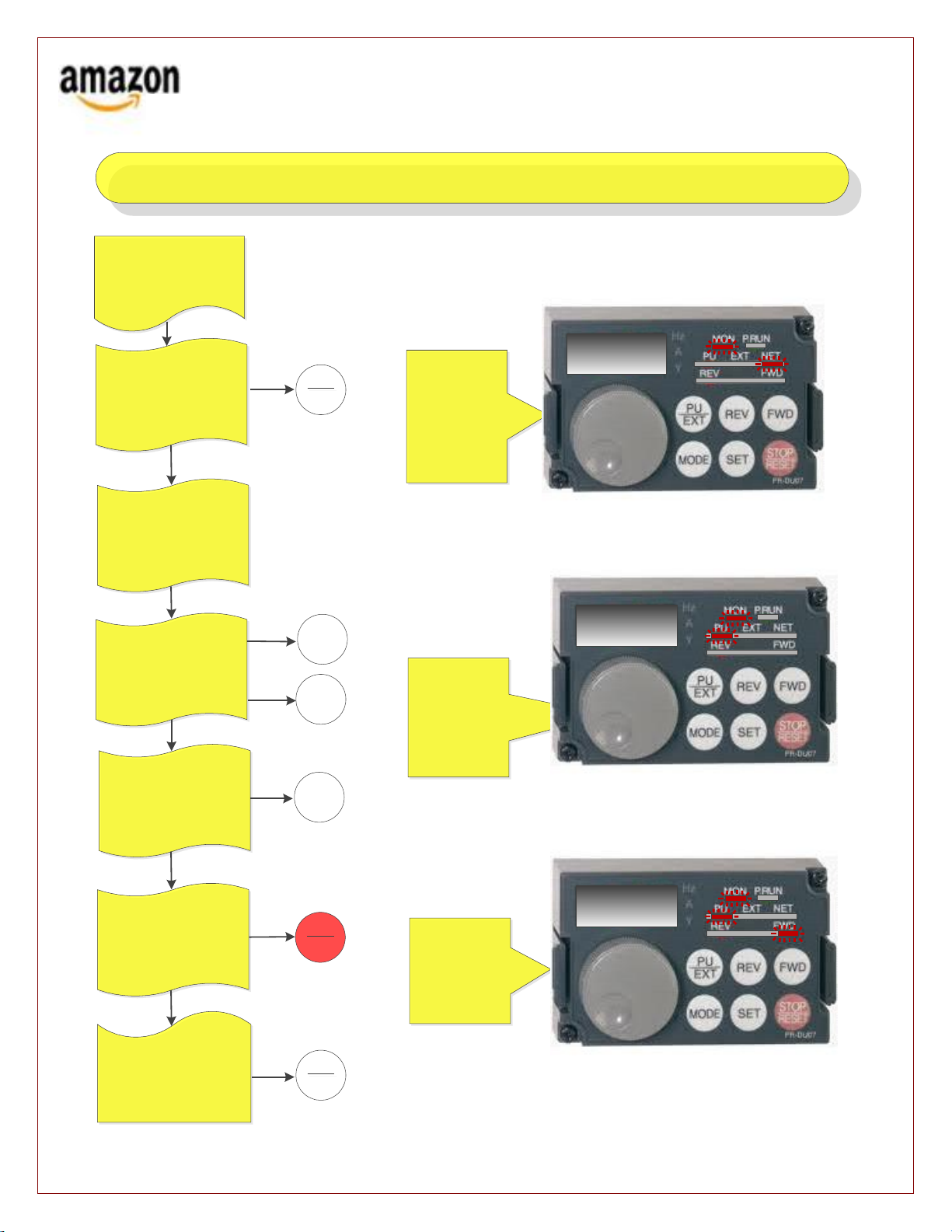
Mitsubishi Drives: How to manually run a Gapper Conveyor Section
Normal View
Unit Stopped
Power Still On
FWD
SET
STOP
RESET
Running View
Speed Set
Turn Dial Until The
Speed Frequency
You Desire Shows
In the Readout
SET
PU
EXT
Push the PU/EXT button
changing the unit from “NET”
to “PU”
Turn the dial, bring up a speed
frequency that you want to run
at.
You should not need to exceed
35.
You now see the LED’s
flashing… you have a limited
amount of time to push the
“SET” button and then the
“FWD” button. The unit will
then start.
To change the speed… turn the
dial to the desired frequency,
push “SET”.
To stop push the red
STOP/RESET button
Start with the unit being
stopped but with the power
remaining on
To place back in operational
mode… push the PU/EXT button
until “NET” is illuminated again
00.0
30.0
30.0
This step-by-step procedure makes the assumption that the personnel involved are already familiar with the operation of the Sorters as well as all Amazon
Safety protocols regarding servicing of equipment.
 Loading...