

Page 1
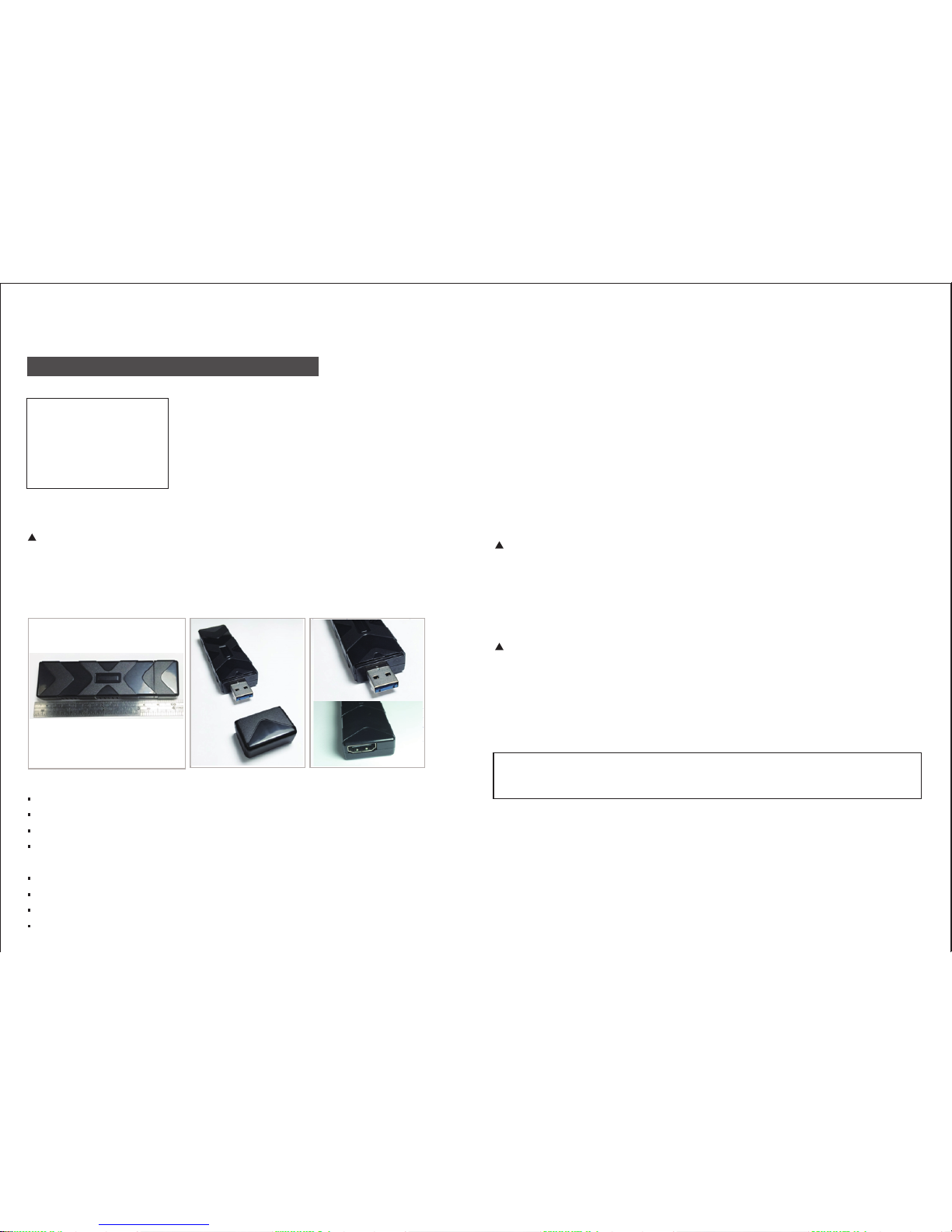
USB 3.0
MISUMI UHD-260 HDMI USB3.0 UVC
Grabber Card User Manual
Smallest in the world!! PCBA size 25mm x 80mm
Support OS:
Window 8.1
Linux Ubuntu 15.x
Mac OSX
Driver free for MAC and Windows
(Must read condions below before purchase!!)
Features:
HDCP OFF
Directly connects to SONY PS 3
UVC driver is standard. Even for one sample
Follow standard UVC (USB VIDEO CLASS). USB webcam
Almost NO latency (less than 50m sec.)
NO compression
NO video distoron from scale IC
1920 x 1080p YUV422 60fps output
Remember:
You can use MAC wirecast to control UVC output resolution and frame rate.
Condion 1: HDMI Input Resoluon
HDMI input:
(auto detect HDMI output format)
1920 x 1090p 60/50/30/24 fps
1366 x 760 60/30fps
1280 x 720 60/50fps
MISUMI UHD-260 HDMI USB 3.0 UVC Grabber card does not work for HDMI 1920 x 1080i
UVC output:
1920 x 1090p 60/50/30/24 fps
1366 x 760 60/30fps
1280 x 720 60/50fps
HDMI input resoluon & frame rate must = UVC output resoluon & frame rate.
Example 1:
When HDMI input is 1920 x 1080p 60fps, UVC output must be 1920 x 1080p 60fps
If you choose UVC output as 1920 x 1080p 24 fps, it will not work.
Example 2:
HDMI input 1920 x 1080p 60fps works on Windows Vmix;
therefore, you must choose UVC output as 1920 x 1080p 60fps too.
Example 3:
If hdmi input is 1920x1080p 60fps,
we can use MAC wirecast to force Google hangouts to get 1920x1080p 60fps.
At first, you will see the HDMI input resoluon & frame rate is not equal to UVC output
resoluon & frame rate. But you sll can choose the UVC output to match HDMI input
resoluon & frame rate.
Video viewer soware:
VLC - (video and audio together, heavy latency)
GTK UVC - (video only, almost no latency)
Page 2
Windows 8.1
MAC OSX
Condion 3: Embedded USB3.0 Host requirement
USB3.0 host: It's beer to use intel eXensible Host Controller (Intel XHCI)
If your USB3.0 is not like the one below:
MiSUMi UHD-260 grabber will only show as 640 x 480 60fps
It means your PC is USB2.0 or USB3.0, which is not intel XHCI chip set.
Applicaon note for MAC OSX
STEP1: OPEN quickme
ASMedia USB 3.0 eXtensible Host Controller - 0096 (Microso)
Generic USB Hub
Intel(R) 7 Series/C216 Chipset Family USB Enhanced Host Controller - 1E2D
Intel(R) 7 Series/C216 Chipset Family USB Enhanced Host Controller - 1E26
Intel(R) USB 3.0 eXtensible Host Controller - 0100 (Microsoft)
Renesas Electromics USB 3.0 Host Controller
Renesas Electromics USB 3.0 Root Hub
USB Composite Device
USB Mass Storage Device
USB Root Hub
USB2.0 HOST
Controller
Windows
XP
Windows
7
Windows
8
Windows
8.1
MAC OSX
10.8
MAC OSX
10.9.4
No No No No
No
No
Works
Works
Works
Works
note: (bootcamp)
Mac air 2013 is Ivy bridge
Works
note: (bootcamp)
Mac air 2014 is Haswell
Works
Works
Works
Works
No
No No
No
No
No No
No
No
USB3.0 to PCle (Gen.2)
thunderbolt to USB3.0
Embedded USB3.0
intel XHCI Haswell ULT
Embedded USB3.0
intel XHCI Ivy bridge
Conditon 2: Hardware / OS Requirement
UHD-260 Grabber works on:
Windows 8.1: Vmix, Wirecast, OBS
MAC OSX: Wirecast, Sportscode
Linux Ubuntu 15.x
USB3.0 only can work on XHCI, not eHCI.
.tupni IMDH tuptuo CVU BSU tceted del erawdraH
(all of progressive)
1920x1080p 60fps 1920x1080p 60fps
1920x1080p 50fps 1920x1080p 50fp
1920x1080p 30fps 1920x1080p 30fps
1920x1080p 24fps
USBHDMI
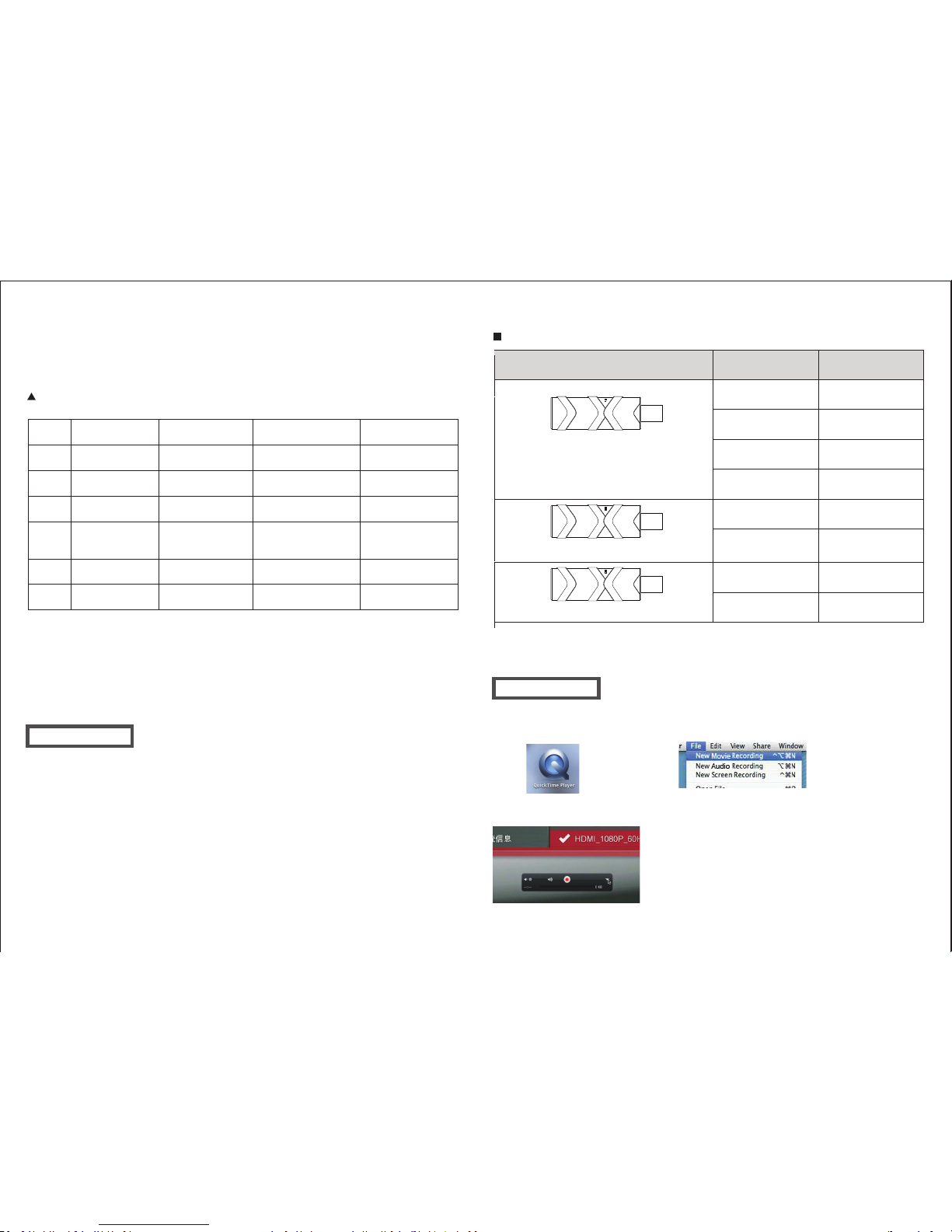
The green light turn on (no Blinking):
H.DMI input is 1920x1080P
The green LED and red LED turn on together
(no Blinking): H.DMI input is 1366x768p
The red light turn on (no Blinking): H.DMI input
is 1280x720P
HDMI
USB
HDMI
USB
1920x1080p 24fps
1366x768p 60fps 1366x768p 60fps
1366x768p 50fps 1366x768p 50fps
1280x 720p 60fps 1280x720p 60fps
1280x720p 50fps 1280x720p 50fps
Note : 1. If uvc output is 1920x1080p 60fps, HDMI source must be 1920x1080p 60fps
2. If uvc output is 1920x1080p 60fps, HDMI source must be 1920x1080p 30fps
to preview on amcap player .
TWO LED light hint
Flash (Blinking) of two light : HDMI input error
STEP2: New Movie Recording
STEP4:
Camera: HD TV CAM, Microphone: HD TV CAM
(If your HDMI source do not have audio,
do not choice.HD TV CAM
on microphone of quicme)
STEP3:Choice the uvc video source
 Loading...