

Page 1

AP61 Hardware Installation Guide
Overview
The Mist AP61 is an IP67 rated outdoor access point which delivers 4x4
MIMO with four spatial streams when operating in multi-user (MU) or singleuser (SU) mode that supports the IEEE 802.11ac Wave 2 specification.
AP61 Hardware Installation Guide
Mist Systems (C) Copyright 2017. All Rights Reserved
1
Page 2
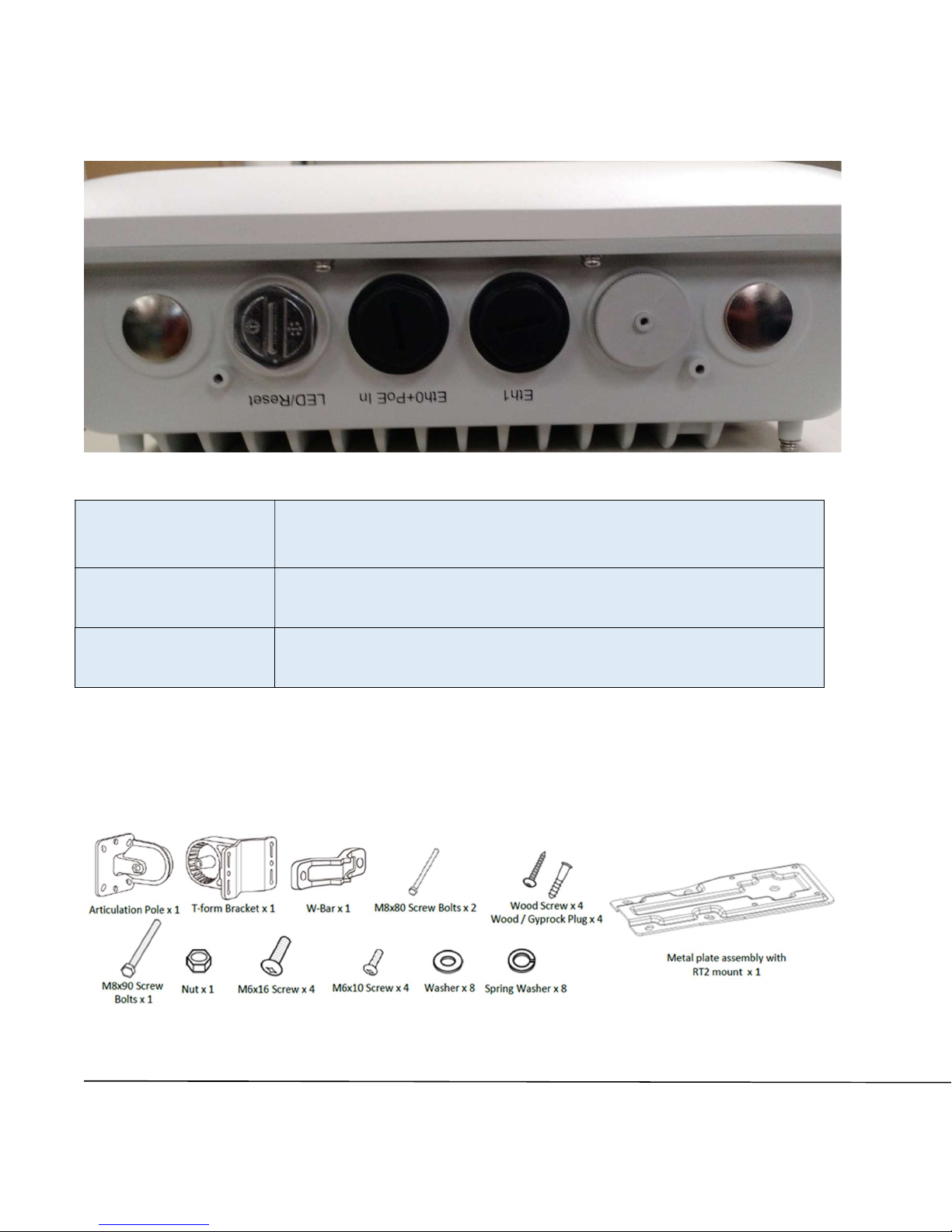
I/O ports and Kensington lock
LED/Reset Reset to the factory default settings
Eth0+PoE
Eth1 10/100/1000 BaseT RJ45 interface
10/100/1000 BaseT RJ45 interface that supports 802.3at
PoE PD
On the AP61E, there are 4 N-type antenna connectors (Ant1-Ant4)
Mounting kit installation
Mounting kit contents:
AP61 Hardware Installation Guide
Mist Systems (C) Copyright 2017. All Rights Reserved
2
Page 3
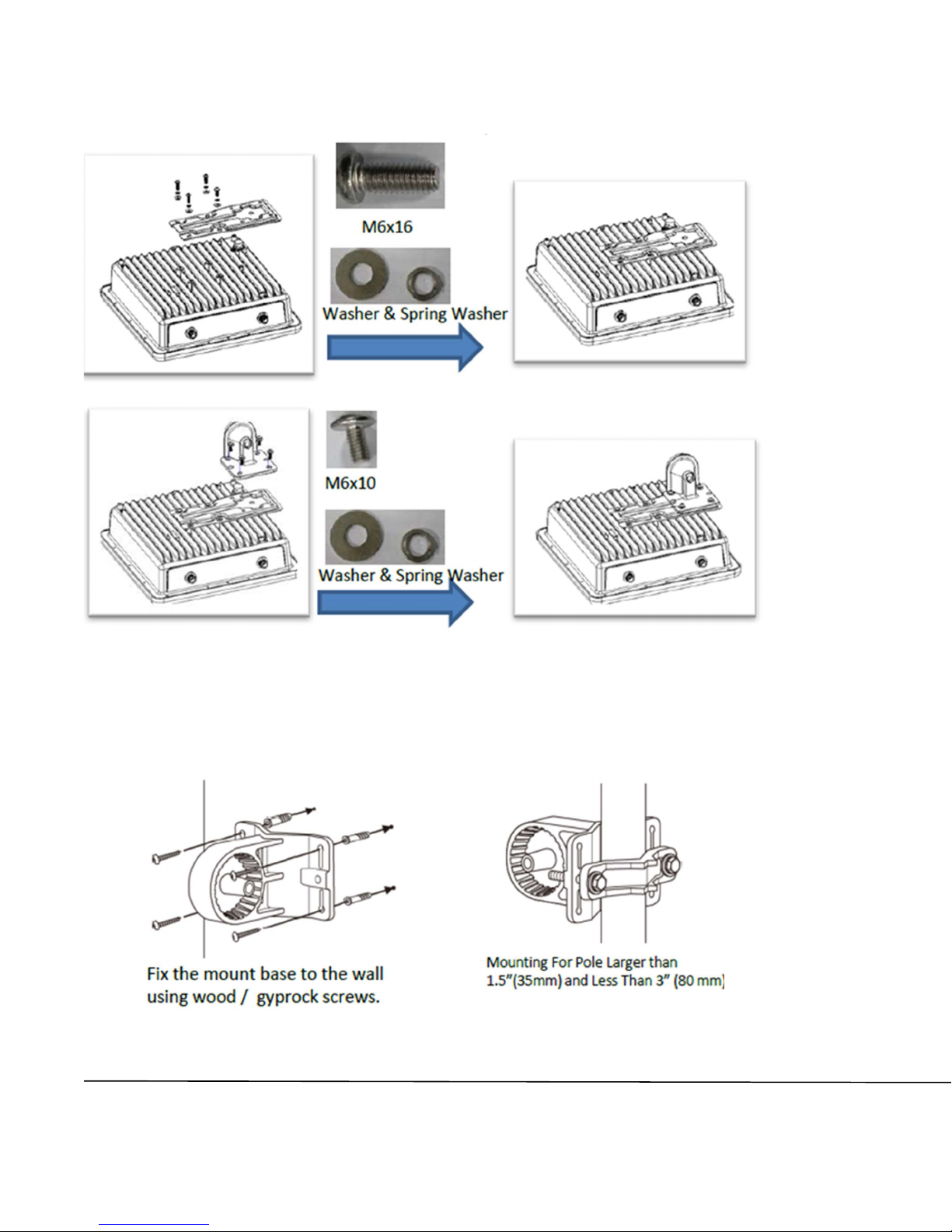
How to install the AP61 to the articulation pole:
How to install the AP61 to a wall or pole:
Install T-form bracket to a wall Install T-form bracket to a pole
AP61 Hardware Installation Guide
Mist Systems (C) Copyright 2017. All Rights Reserved
3
Page 4
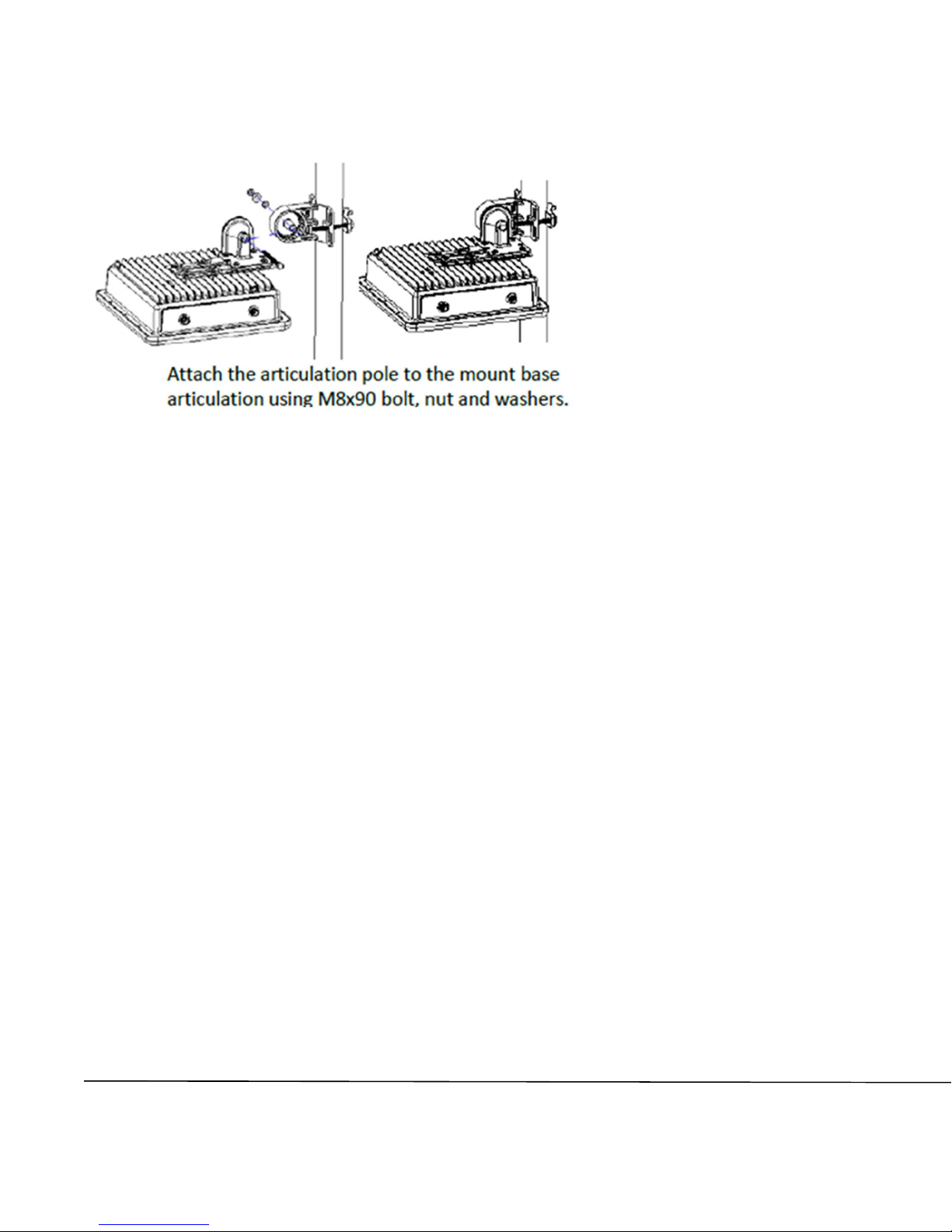
Install the AP61 to the T-form bracket on the wall or pole
In a wall mount installation, please use screws that have a 1/4in. (6.3mm)
diameter head with a length at least 2 in. (50.8mm).
In a pole mount installation, please use the M8x80 screws to attach to the pole
mount kit.
AP61 Hardware Installation Guide
Mist Systems (C) Copyright 2017. All Rights Reserved
4
Page 5

Technical Specifications:
Feature Description
Power options 802.3at PoE
Dimensions
Weight
Operating
temperature
Operating humidity 10% to 90% maximum relative humidity, non-condensing
Operating altitude 3,048m (10,000 ft)
Electromagnetic
emissions
I/O
RF
Maximum PHY rate
AP61 – 12.2in x 12.2in x 4.2in (310mm x 310mm x 107mm)
AP61E – 12.2in x 13.5in x 4.2in (310mm x 343mm x 107mm)
AP61 – 9.85 lbs (4.47 kg)
AP61E – 10.1 lbs (4.59 kg)
Internal antenna -20° to 65° C
External antenna -20° to 65° C
FCC Part 15 Class B
1 - 10/100/1000BASE-T auto-sensing RJ-45 with PoE
1 – 10/100/1000BASE-T auto-sensing RJ-45
2.4GHz - 4x4:4 spatial streams 802.11ac MU-MIMO & SU-MIMO
5GHz - 4x4:4 spatial streams 802.11ac MU-MIMO & SU-MIMO
2.4GHz / 5GHz scanning radio
2.4GHz BLE with Dynamic Antenna Array
Total maximum PHY rate – 2533Mbps
5GHz – 1733 Mbps
2.4GHz – 800Mbps
Indicators Multi-color status LED
UL 60950-1
Compliance standards
FCC Part 15.247, 15.407, 15.107, and 15.109
AP61 Hardware Installation Guide
Mist Systems (C) Copyright 2017. All Rights Reserved
5
Page 6

Warranty Information
The AP61 family of Access Points comes with a limited lifetime warranty.
Ordering Information:
Access Points
AP61-US Premium Outdoor Wi-Fi & BLE Array AP - Internal Antenna
for the US Regulatory domain
AP61E-US Premium Outdoor Wi-Fi & BLE Array AP - External
Antenna for the US Regulatory domain
AP61-WW Premium Outdoor Wi-Fi & BLE Array AP - Internal Antenna
for the WW Regulatory domain
AP61E-WW Premium Outdoor Wi-Fi & BLE Array AP - External
Antenna for the WW Regulatory domain
Accessories and spare parts
SP-01 Ethernet Surge Protector
APOUT-BR1 AP outdoor mounting bracket spare
The AP61 product includes an outdoor mounting bracket kit. If you would like a second mounting
bracket kit, you can optionally order the spare part.
Regulatory Compliance Information:
If you need further assistance with purchasing the power source, please contact
Mist Systems, Inc.
AP61 Hardware Installation Guide
Mist Systems (C) Copyright 2017. All Rights Reserved
6
Page 7

FCC Requirement for Operation in the United States of
America:
FCC Guideline for Human Exposure
This equipment complies with FCC radiation exposure limits set forth for an
uncontrolled environment. This equipment should be installed and operated with
minimum distance 32cm between the radiator & your body.
This device complies with Part 15 of the FCC Rules. Operation is subject to the
following two conditions: (1) This device may not cause harmful interference, and
(2) this device must accept any interference received, including interference that
may cause undesired operation.
This equipment has been tested and found to comply with the limits for a Class B
digital device, pursuant to Part 15 of the FCC Rules. These limits are designed to
provide reasonable protection against harmful interference in a residential
installation. This equipment generates, uses and can radiate radio frequency
energy and, if not installed and used in accordance with the instructions, may
cause harmful interference to radio communications. However, there is no
guarantee that interference will not occur in a particular installation. If this
equipment does cause harmful interference to radio or television reception, which
can be determined by turning the equipment off and on, the user is encouraged to
try to correct the interference by one of the following measures:
● Reorient or relocate the receiving antenna.
● Increase the separation between the equipment and receiver.
● Connect the equipment into an outlet on a circuit different from that to
which the receiver is connected.
● Consult the dealer or an experienced radio/TV technician for help.
FCC Caution
● Any changes or modifications not expressly approved by the party
responsible for compliance could void the user's authority to operate this
equipment.
● This transmitter must not be co-located or operating in conjunction with any
other antenna or transmitter.
● For operation within 5.15 ~ 5.25GHz / 5.47 ~5.725GHz frequency range, it
is restricted to indoor environment.
7
AP61 Hardware Installation Guide
Mist Systems (C) Copyright 2017. All Rights Reserved
 Loading...