

Page 1

User Guide
ACT-80HC
DIGITAL TRANSMITTER
All rights reserved.
Do not copy or forward without prior approvals MIPRO.
Specifications and design subject to change without notice.
MN 015/01
2 CE 5 0 9 A
Page 2
Rechargeable Wideband Digital Handheld Transmitter Rechargeable Wideband Digital Handheld Transmitter
Contents
1 Controls and Indicators
Handheld
3 Operating Instructions for Insertion &
Removing Battery
5 Patented Protection Cover
7 LCD
8
Display Screen
How to Setup Transmitter Parameters
19 Battery Status
22
23
Setting MUTE
General Tips for Improving System
Performance
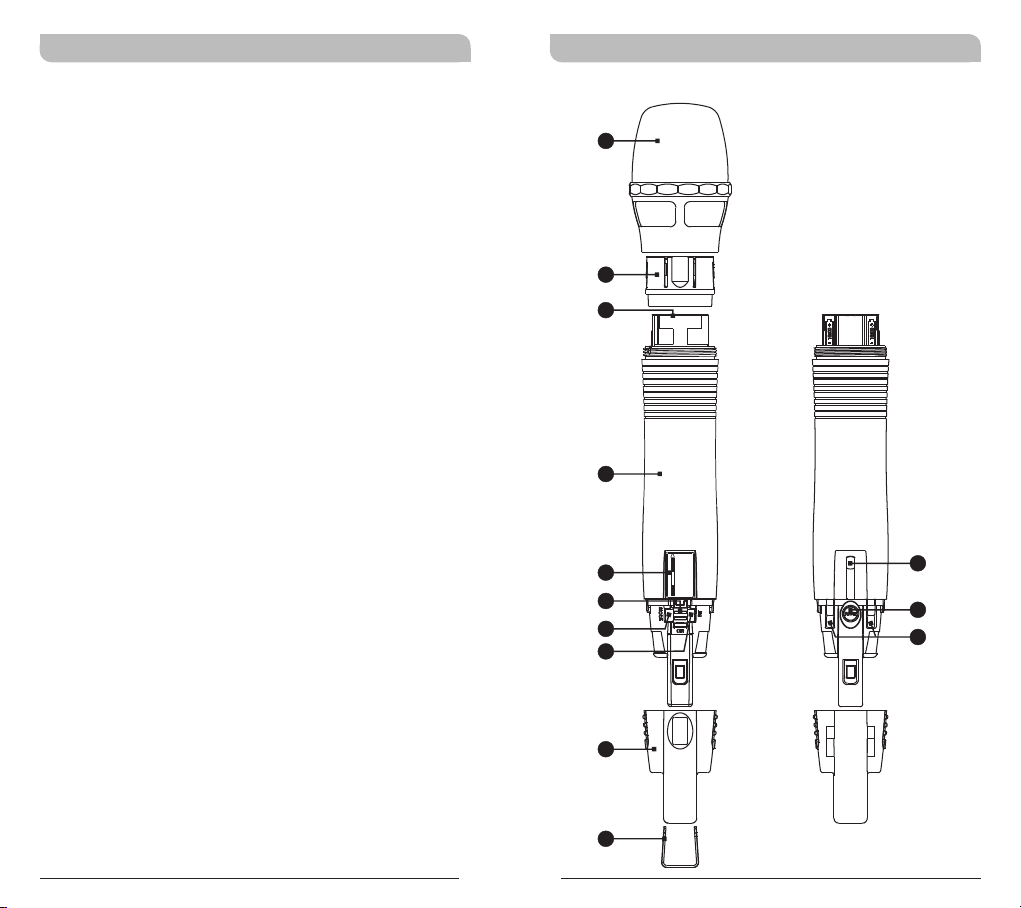
Handheld Controls and Indicators
1
2
3
4
486.500MHz
5
6
7
8
FREQU ENCY
9
10
11
0 1
12
13
Page 3
Rechargeable Wideband Digital Handheld Transmitter Rechargeable Wideband Digital Handheld Transmitter
1
Capsule Module: Protects detachable
microphone capsule module and internal foam
Operating Instructions for Insertion &
Removing Battery
prevents breathing, wind and POP noises.
2
Fixed Ring
3
Battery Compartment: Accommodates one
18500 rechargeable battery.
4
Housing: Protects transmitter PCB, battery
compartment and batteries.
5
LCD Panel: Displays transmitter parameters.
6
Power On/Off Switch: Slides the power switch
to the “ON” position for use or to the “OFF”
position when not in use.
7
MODE Button: Allows access to available
functions displaying in LCD panel.
8
SET Button: Changes parameters.
9
ACT Infrared (IR) Port: Receives signals from
receiver to synchronize frequencies.
10
MUTE Button: To mute and un-mute the audio
signal temporary.
11
Battery Charging Contact: Align contacts
during charging.
12
Protection Cover: Protects power switch and
prevents user has direct access to power switch.
13
Channel ID Clip: For channel identification
(Optional)
18500
rechargeable
lithium
battery
2 3
Page 4

Rechargeable Wideband Digital Handheld Transmitter Rechargeable Wideband Digital Handheld Transmitter
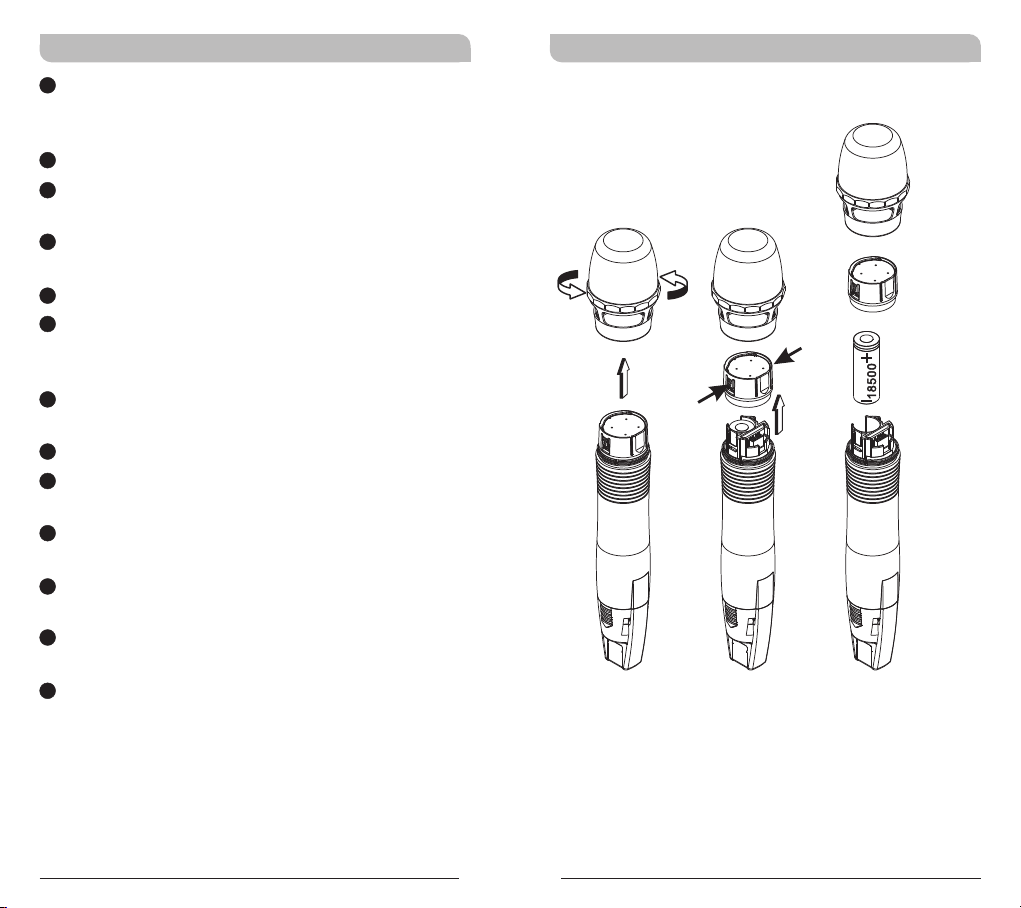
! Rotate and remove microphone grill counter
clock direction.
! Press both sides of Fixed Ring to pull out Fixed
Ring.
! Insert or remove battery accordingly. Insert
battery according to its correct polarity for a
proper fit. Wrong polarity will not fit properly.
! Power on the transmitter to check if battery is
fresh and inserted correctly. LCD lit denotes
battery inserted correctly.
Note: Transmitter cannot be powered on with
charged battery.
a. Ensure battery is inserted correctly with +
top side.
b. If battery is inserted correctly it could be
due to self battery protection mechanism.
Insert the transmitter into the charger to
re-charge for 10-20 seconds to wake-up
the battery. It should work.
c. If charger cannot be used, reverse the
battery insertion for 10-20 seconds, wake
up the battery with correct polarity. It
should work.
d. Always power off after each use. Remove
the internal battery if it will not be used
for an extended period of time.
Patented Protection Cover
Protection cover's patented design protects
accidental access to power switch and its rugged
material and snug fit offer protection to both power
switch and PCB during accidental drop.
Steps
! Remove protection cover.
! Reverse protection cover.
! Install protection cover to protect accidental
power on/off.
! Mute function is open for easy acsess.
4 5
Page 5
Rechargeable Wideband Digital Handheld Transmitter Rechargeable Wideband Digital Handheld Transmitter
! When power is off, reverse-installation of
protection cover will turn on the switch
automatically. To turn off the system, remove
the cover to turn off.
Protection cover must be attached during
!
operation for full protection.
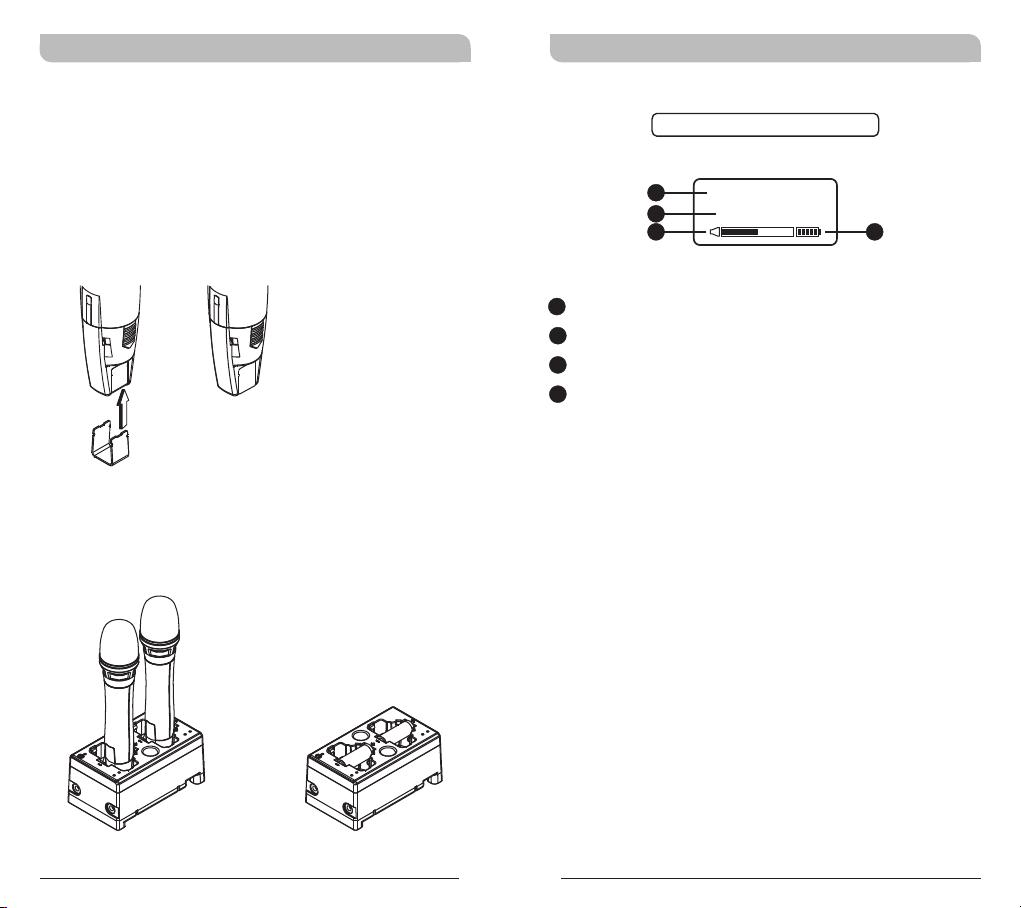
! Color-coded channel identification clip can be
attached to the bottom of protection cover.
MP-80 Battery Charger (Optional)
MP-80 Charger charges both transmitters and
18500 rechargeable batteries.
LCD Display Screen
Fully Lit LCD Display
A1
A2
A3
A1
LCD Screen
15
A2
Parameters Screen
16
A3
AF (audio) MUTE
A4
Transmitter Battery Meter
GRP CH
0 1 0 2
A4
Transmitters Charging
18500 Charging
6 7
Page 6
Rechargeable Wideband Digital Handheld Transmitter Rechargeable Wideband Digital Handheld Transmitter
How to Setup Transmitter Parameters
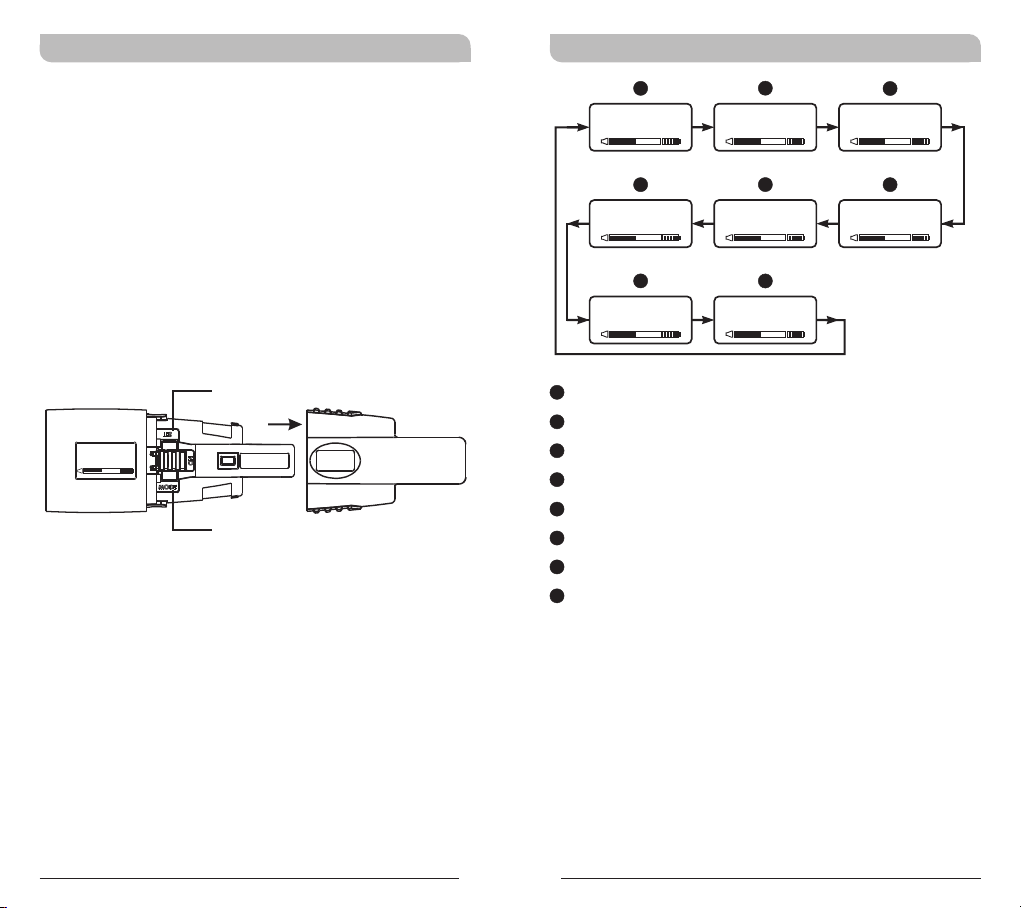
! Remove protection cover to expose MODE
button and SET button.
! MODE Button:
Press “MODE” button to access one of the six
functions below.
! SET Button:
Press “SET” button and LCD wills start flashing.
During flashing, press SET button to change
parameters.
SET
FREQ UENCY
486.500MHz
MODE
A
GRP CH
0 1 0 2
F
ENC RYPTIO N
N O
G
RF P OWER
RF-L O W
A
Group and Channel
B
Frequency
C
Sensitivity Level
D
AF Low Cut
E
AF Limit
F
Encryption
G
RF Output Power
H
MUTE Mode
B
FRE QUENC Y
486.500MHz
E
AF L IMIT
Y E S
H
MUT E MODE
MANU A L
C
AF G AIN
0 dB
D
AF L OW-CU T
LOW CUT
8 9
Page 7
Rechargeable Wideband Digital Handheld Transmitter Rechargeable Wideband Digital Handheld Transmitter
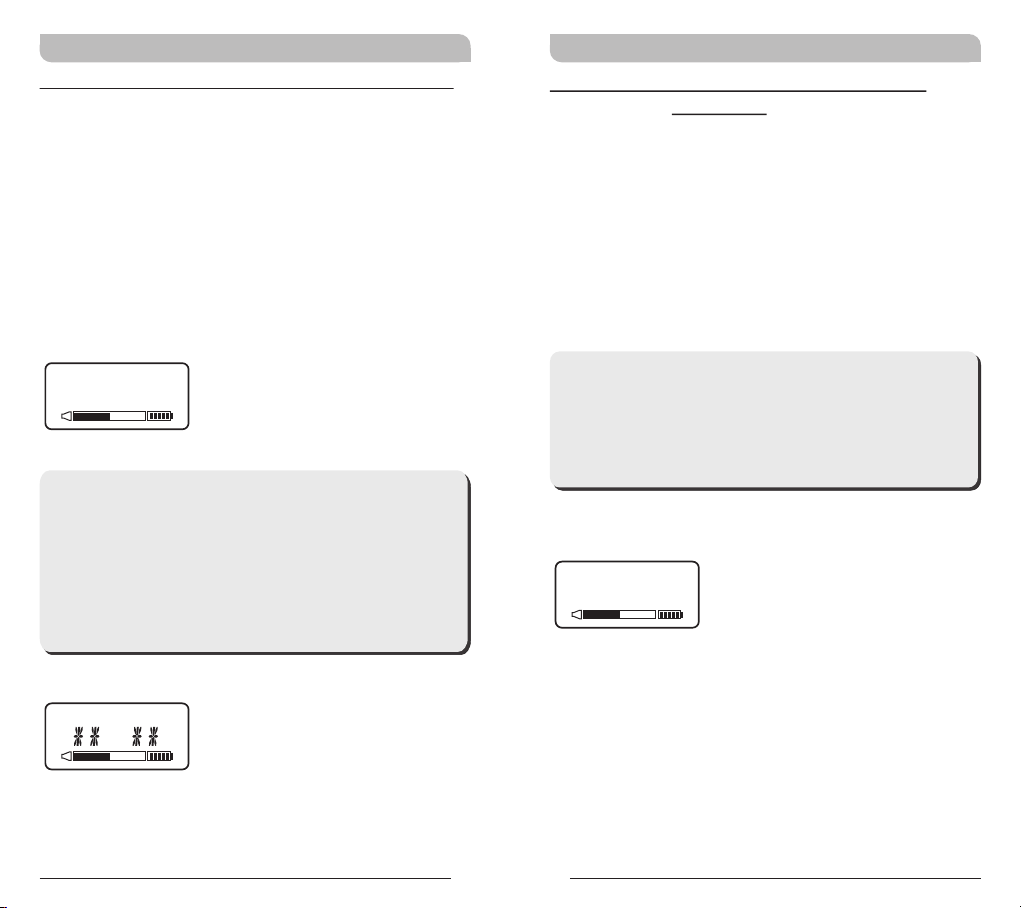
GRP CH: Displays Group and Channel Information
a. Press MODE and stop on the GRP CH function;
the display showing the current group and
channel will be flashing. After 5 seconds, the
display will stop flashing and the current group
and channel selection will be set.
b. The group and channel information is now
shown on the display. Changing the current
group and channel must be done on the
receiver.
GRP CH
0 1 0 2
**NOTE:
When programming a special frequency via
monitoring software, the LCD screen cannot
display the number. This is because this special
channel is not in the preset group and channel.
RF, the LCD panel will look like the illustration
below.
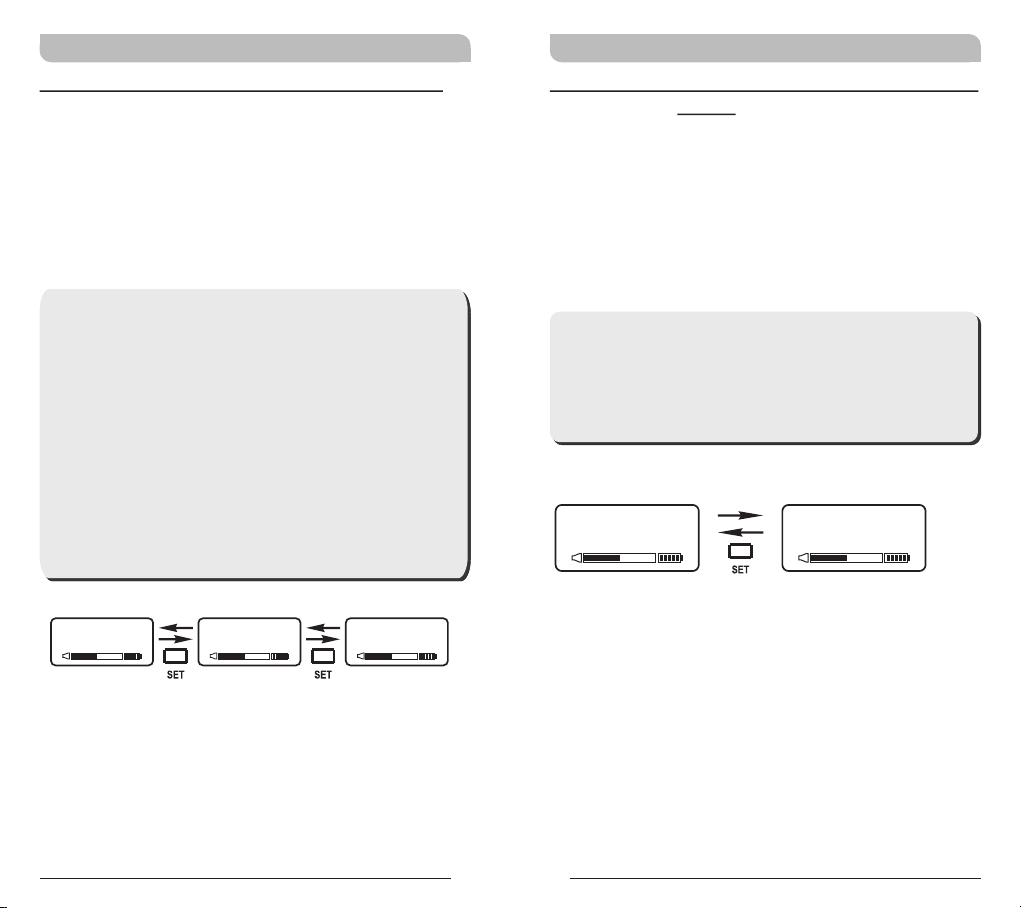
FREQUENCY: Displays Transmitter Frequency
Information
a. Press MODE and stop on the FREQUENCY
function; the display showing the current
frequency will be flashing. After 5 seconds, the
display will stop flashing.
b. The frequency information is now shown on the
display. Changing the current frequency must be
done on the receiver.
**NOTE:
To modify the transmitter's group, channel and
frequency, all three must be set at the receiver
and the new setting transmitted to the
transmitter via the ACT function.
FR EQ UE NCY
485.000MHz
GRP CH
10 11
Page 8
Rechargeable Wideband Digital Handheld Transmitter Rechargeable Wideband Digital Handheld Transmitter
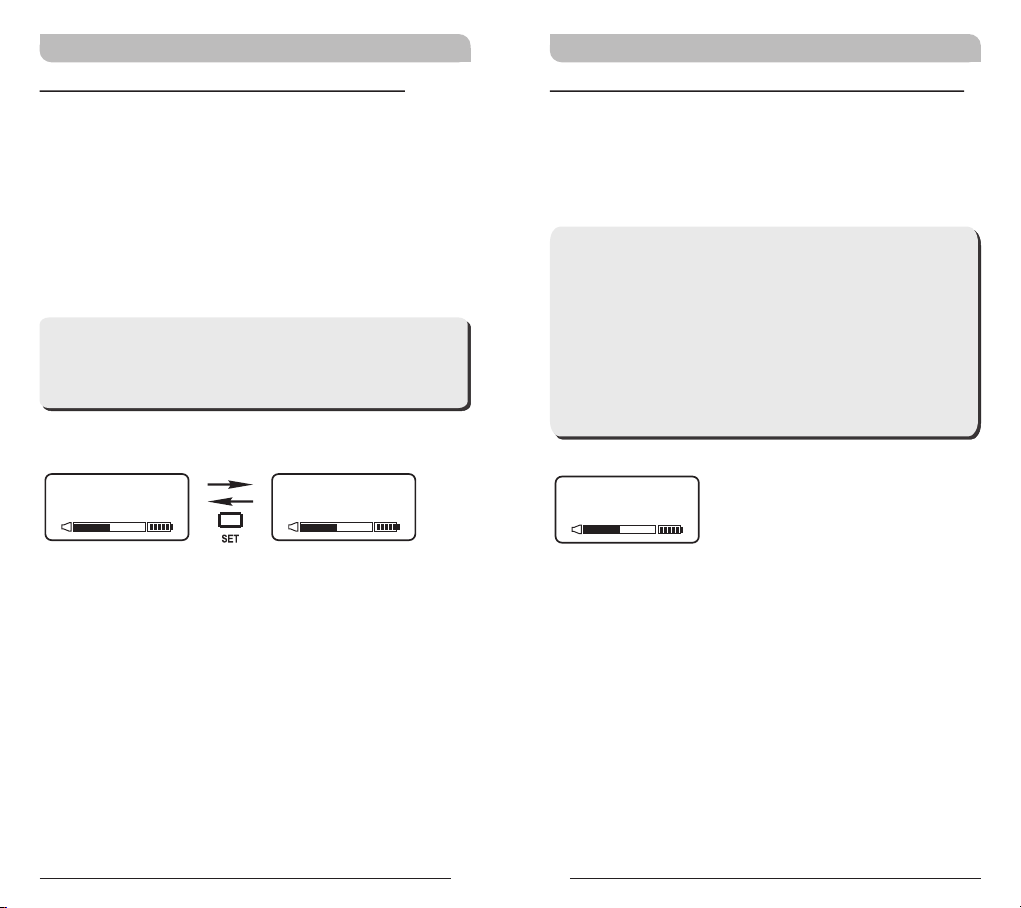
AF GAIN: Setup and Change of Input Sensitivity
a. Press MODE and stop on the AF GAIN function;
the display showing the current status will be
flashing and is ready to be modified.
b. Every push of the SET button increases the dB
value by 3dB to a maximum of 6dB.
**NOTE:
1. The higher the gains are set, the lower the
dynamic range for signal input and the
greater the danger of unwanted noises and
feedback getting into the system.
2. When using electronic guitar, gain should set
at 0dB.
3. Please make sure input signal strength does
not exceed 2 Vrms (gain=6dB) as it is the
maximum input strength allowed for
transmitter without causing distortion.
AF G AIN
0 dB
AF G AIN
3 dB
AF G AIN
6 dB
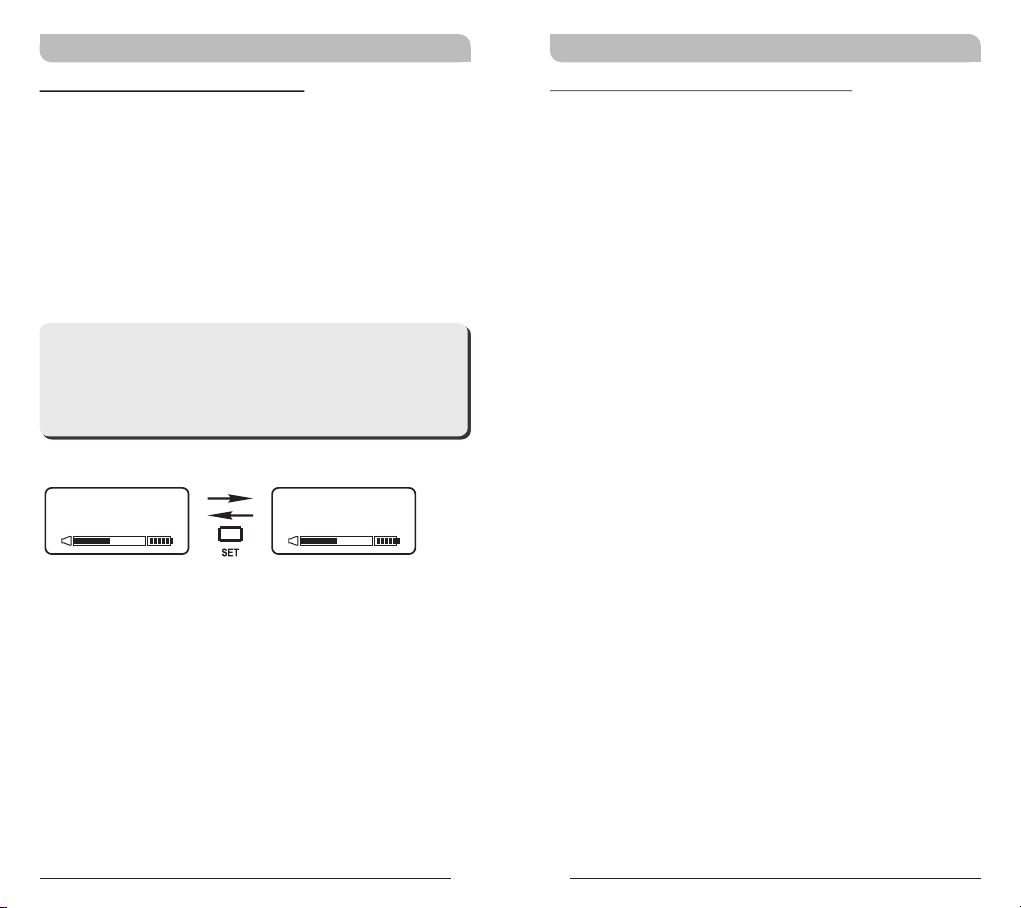
AF LOW-CUT: Setup and Change of Low Frequency
Cut Off
a. Press MODE and stop on the AF LOW-CUT
function; the display showing the current status
will be flashing and is ready to be modified.
b. Press the SET button while the display is
flashing to change to LOW CUT or FLAT as
desired.
**NOTE:
When the AF LOW-CUT function is LOW CUT,
the frequency response below 100Hz will
decrease about 3dB with a slope of
-6dB/Octave.
AF LO W-C UT
LOW CUT
AF LO W-C UT
FLAT
12 13
Page 9
Rechargeable Wideband Digital Handheld Transmitter Rechargeable Wideband Digital Handheld Transmitter
AF LIMIT: Setup and Change of Input Limit
a. Press MODE and stop on the AF LIMIT
function; the display showing the current status
will be flashing and is ready to be modified.
b. Press SET while the display is flashing to change
the setting to ON or OFF.
**NOTE:
When the LIMIT is ON, the maximum output of
the receiver is limited to 1V.
AF LI MIT AF LI MIT
Y E S N O
ENCRYPTION: Displays Information of Encryption
a. Press MODE and stop on the ENCRYPTION
function; the display showing the current status
will be flashing.
**NOTE:
1. The ENCRYPTION function displays status
information only. Changing of the current
status must be done from the receiver via
the ACT function.
2. The ENCRYPTION function must be set at
receiver first then using ACT to program the
transmitter.
EN CRY PT IO N
N O
14 15
Page 10
Rechargeable Wideband Digital Handheld Transmitter Rechargeable Wideband Digital Handheld Transmitter
RF POWER: RF Power Selection
a. Press MODE button for selection of RF POWER.
Selection of RF-HI or RF-LOW can be selected
once the RF POWER LCD starts blinking.
b. Press SET button to select and set RF-HI or
RF-LOW.
**NOTE:
RF-HI has 50mW transmitting power. RF-LOW
has 10mW transmitting power. Set appropriate
power to meet region/country regulations.
RF PO WE R
RF - HI
RF PO WE R
RF - LO W
MUTE MODE: Mute model selection
a. Press MODE button for selection of MUTE
MODE. Selection of MANUAL or AUTO or
DISABLE can be selected once the MUTE
MODE LCD starts blinking.
b. Press SET button to select and set MANUAL or
AUTO or DISABLE.
c. LCD will stop blinking and change will not be
saved if setting is not done within 5 seconds.
d. MANUAL: Mute function is controlled by the
Mute button at “MANUAL” mode.
! Press Mute button to enter mute status. At
mute status, AF indicators will become “AF
MUTE” and blink continuously. Press Mute
button again to release mute status.
! AF MUTE status will be released automatically
when turning off.
e. AUTO: Mute button can not be activated at
the AUTO mode. Mute function will be activated
by the microphone itself automatically.
! Microphone will enter mute status when
positioning the capsule downward and the
mute status will be released automatically
when positioning the capsule upward.
! Idle the microphone for 4 seconds to enter
mute status automatically. Touch or use the
microphone again to release the mute status.
f. DISABLE: MUTE button is not operable.
16 17
Page 11
Rechargeable Wideband Digital Handheld Transmitter Rechargeable Wideband Digital Handheld Transmitter
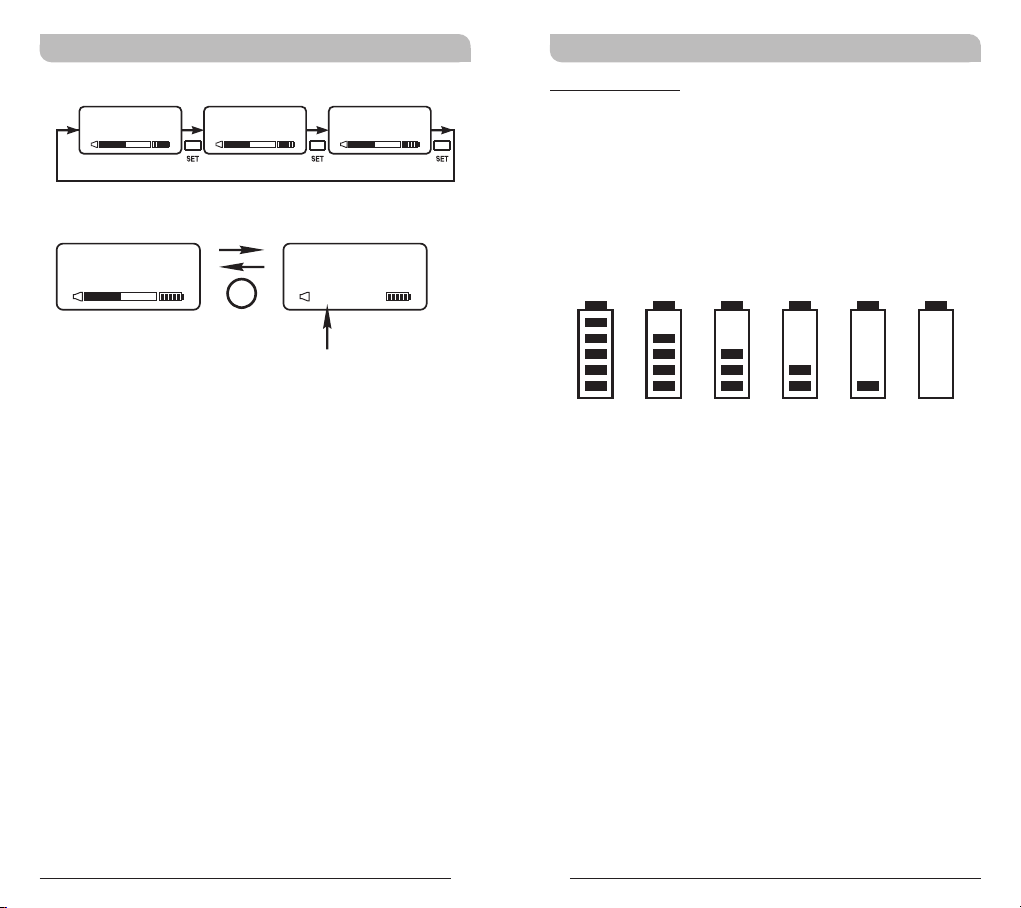
Battery Status
MUT E MODEMUT E MODEMUT E MODE
DISABLEAUTOMANUAL
Indicates the power remaining in the transmitter
battery. When the battery has less than 10% power
remaining it must be replaced. If an under voltage
condition continues, the LCD will show “OFF...” and
the system will shut down to prevent being overly
discharged.
MU TE MO DE
MA N UA L
MUTE
MU TE MOD E
MU T E
AF MUT E
AF MUTE
blinks continuously
10 0% 80 % 60 % 40 % 20 % 10 %
18 19
Page 12
Rechargeable Wideband Digital Handheld Transmitter Rechargeable Wideband Digital Handheld Transmitter
Power Button
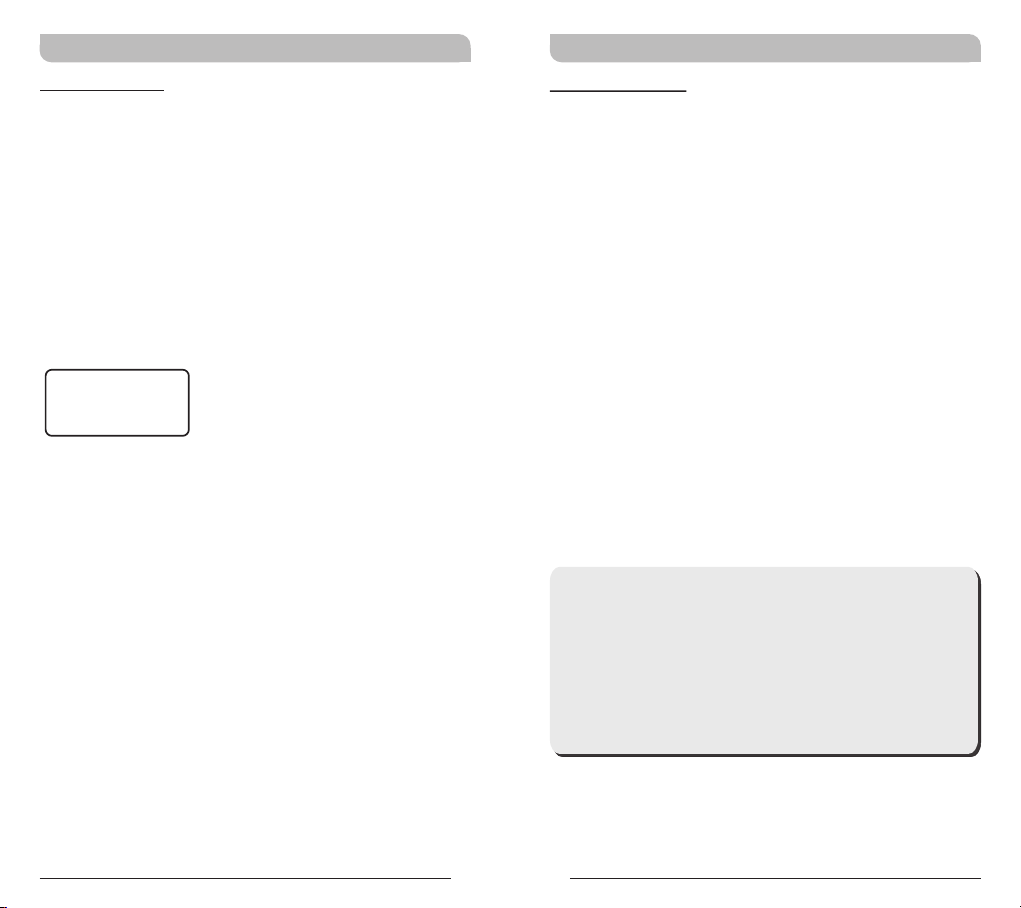
! Turn the power switch to ON position where
transmitter will be activated and LCD will lit up.
! Turn the power switch to OFF position to shut
down the transmitter.
! When the power switch is turned off, the LCD
will show “OFF...” (for Power Off) first and then
the system will shut down and no further
messages will be displayed.
OF F. . .
ERR: Error Code
If the LCD displays “ERR” after turning on the
power, it indicates the operation is not correct. The
error codes are as follows:
ROM-ER →Transmitter does not have the initial
data so the microphone is completely
dead and cannot be programmed.
ERROR1 →Failure on RF circuitry, frequency
cannot be programmed.
NO----OR3 →Frequency to be programmed into the
transmitter exceeds the highest
frequency of the designated
frequency band of the transmitter.
NO----OR4 →Frequency to be programmed into the
transmitter exceeds the lowest
frequency of the designated
frequency band of the transmitter.
**NOTE:
NO----OR3 and NO----OR4 will not change the
transmitter's original frequency and the
transmitter will still operate normally with the
error message on display. To remove the error
message from the display panel, please switch
off the transmitter and switch it on again.
20 21
Page 13
Rechargeable Wideband Digital Handheld Transmitter Rechargeable Wideband Digital Handheld Transmitter
Setting MUTE
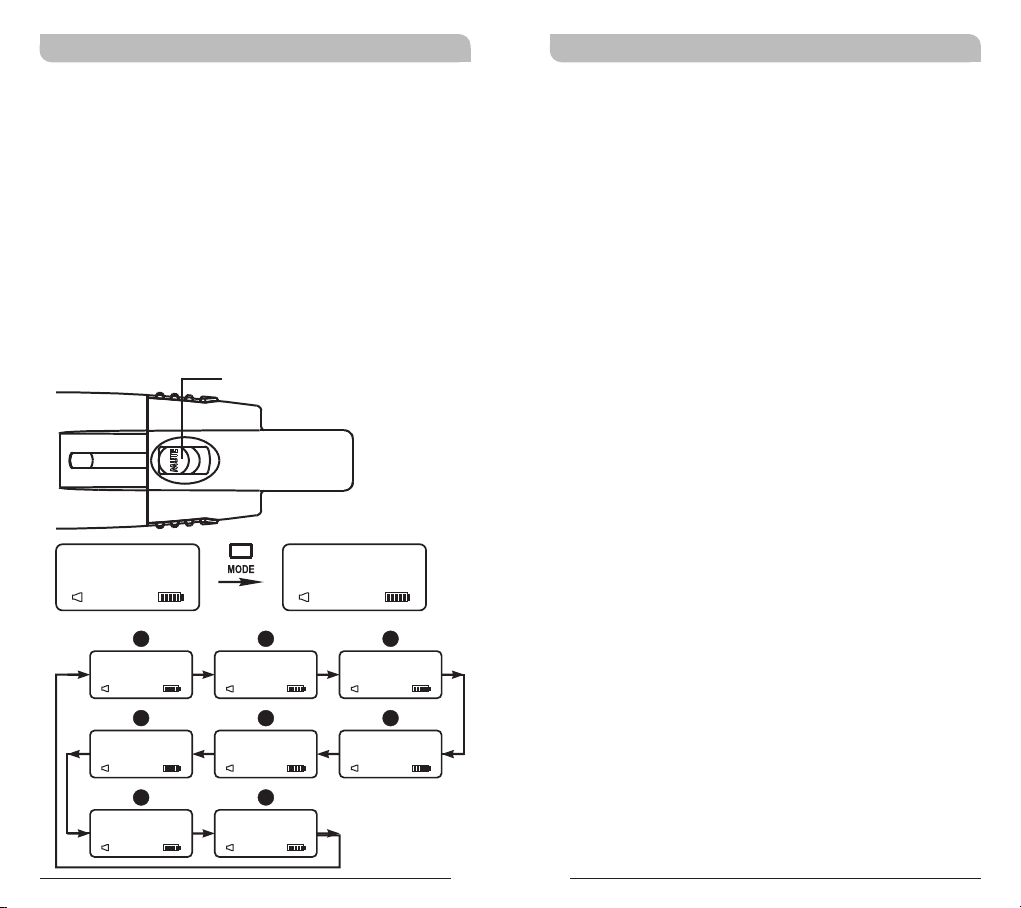
! Press MUTE button to enter mute status. At
mute status, AF indicators will become “AF
MUTE” and blink continuously. All the functions
can be operated and ACT can be activated at
the mute status. All the operations of functions
are the same with the ones at regular status.
! Press MUTE button again to release mute status
; AF MUTE status will be released automatically
when turning off.
! MUTE button can be activated at “MANUAL”
mode.
MUTE button
GRP CH
M U T E
AF MUT E
GRP CH
0 1 0 2
AF M UTE
F
ENC RYPTIO N
N O
AF M UTE
G
RF P OWER
RF-L O W
AF M UTE
FRE QUENC Y
486.500MHz
AF M UTE
AF L IMIT
Y E S
AF M UTE
MUT E MODE
MANU A L
AF M UTE
FR EQ UE NCY
486.500MHz
AF MUT E
BA
E
H
C
AF G AIN
0 dB
AF M UTE
D
AF L OW-CU T
LOW CUT
AF M UTE
22 23
General Tips for Improving System
Performance
1. Performer should avoid holding the microphone over
or near the antenna section as this will deteriorate
transmission efficiency. Severe deterioration if
performer directly covers up the antenna section with
both hands.
2. Many performers tend to hold the microphone by the
top grille. Unfortunately, this position seriously
degrades both the sound quality and directionality of
a microphone. Even the most expensive microphones
will have its original sound quality compromised by
this method. Grabbing a microphone by the grille will
isolate the capsule's acoustic resonance circuit and or
change the capsule resonator's frequency. This
results in an inferior performance in both frequency
response and the separation of directionality. In
addition, a palm's sound-focusing effect will tend to
strengthen resonances in certain frequencies and can
cause unwanted echo.
3. A proper technique is required for using directional
microphones because the distance between the
microphone and your mouth has a significant impact
on sensitivity and performance. There is an inverse
relationship between microphone sensitivity and the
distance from the mouth to the microphone.
Consequently, performers with a ''weaker'' sound
level cannot expect to hold the microphone too far
away from their mouth and compensate by turning
up the amplifier volume to increase the sound level
as this can easily cause echo or feedback. In
contrast, performers with a ''louder'' sound level
should not hold the microphone too close as this can
easily result in distortion by causing the amplifier
system to be overloaded.
Page 14
Rechargeable Wideband Digital Handheld Transmitter Rechargeable Wideband Digital Handheld Transmitter
4. Furthermore, a large-diaphragm directional
microphone has a very distinct proximity effect.
When the microphone is close to the mouth, the
bass response is strengthened as the distance gets
closer. Therefore, if a performer's sound is
insufficient in bass, they can hold the microphone
closer and use the proximity effect to help
compensate for the lower bass level. Conversely, if a
performer's voice is too heavy in the bass register,
increasing the distance between the microphone and
their mouth will decrease the proximity effect and
reduce the bass response, thus making their voice
become clearer and brighter.
5. It is recommended to keep the grille and sponge
windscreen clean to avoid any substance blocking the
proximity effect of the microphone.
Notes
1. Refer to actual product in the event of product
description discrepancy.
2. Frequency range and maximum deviation comply
with the regulations of different countries.
FCC
THIS DEVICE COMPLIES WITH PART 74 OF THE FCC
RULES.
OPERATION IS SUBJECT TO THE FOLLOWING TWO
CONDITIONS:
(1) This device may not cause interference.
(2) This device must accept any interference, including
interference that may cause undesired operation of the
device.
This equipment complies with FCC RF radiation exposure
limits set forth for an uncontrolled environment.
IC
This device complies with Industry Canada RSS-210
ISSUE 8 standards. Operation is subject to the following
two conditions:
(1) this device may not cause interference, and
(2) this device must accept any interference, including
interference that may cause undesired operation of the
device.
Le présent appareil est conforme aux CNR d'Industrie
Canada applicables aux appareils radio exempts de licence.
L'exploitation est autorisée aux deux conditions suivantes:
(1) l'appareil ne doit pas produire de brouillage, et
(2) l'utilisateur de l'appareil doit accepter tout brouillage
radioélectrique subi, même si le brouillage est susceptible
d'en compromettre le fonctionnement.
24 25
Page 15
Rechargeable Wideband Digital Handheld Transmitter Rechargeable Wideband Digital Handheld Transmitter
WARNING
1. FOR OUTDOOR USE:
To reduce the risk of fire or electric shock, do not
expose this apparatus to rain or moisture.
2. UNDER WET LOCATION:
Apparatus should not be exposed to dripping or
splashing and no objects filled with liquids, such as
vases should be placed on the apparatus.
3. SERVICE INSTRUCTIONS:
CAUTION - These servicing instructions are for use by
qualified service personnel only. To reduce the risk of
electric shock, do not perform any servicing other than
that contained in the operating instructions unless you
are qualified to do so.
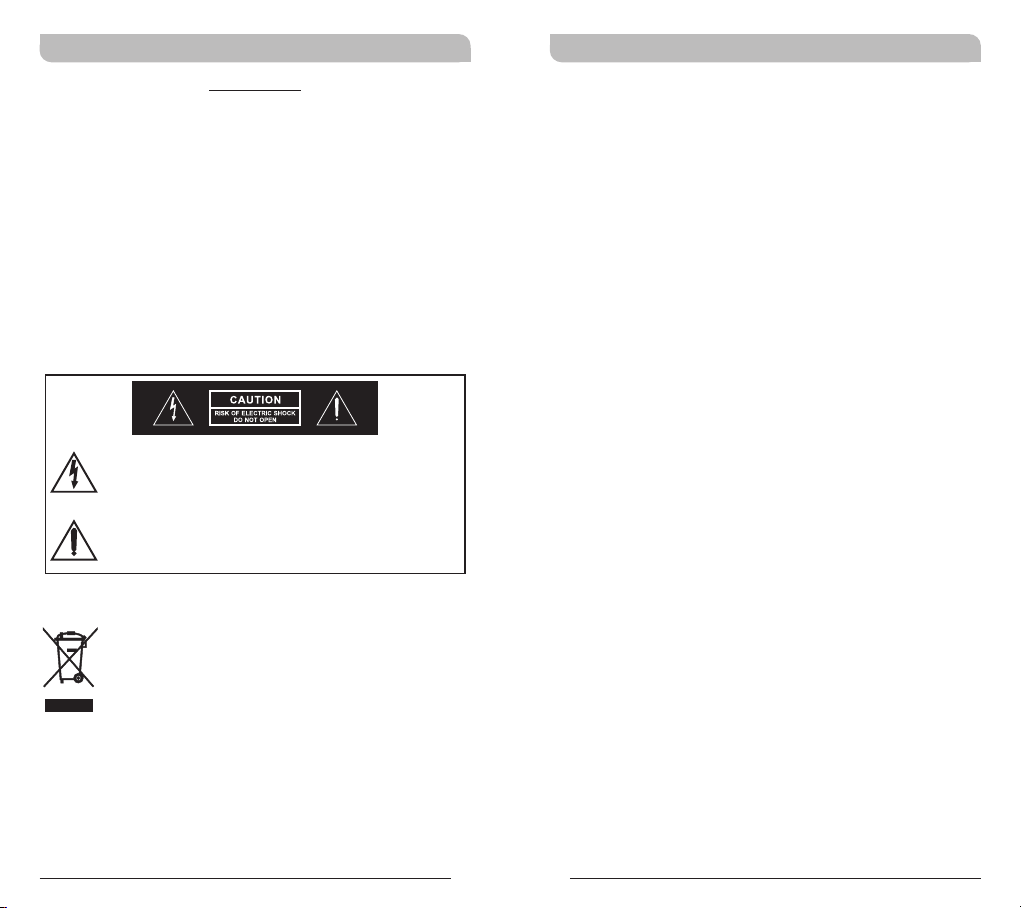
This symbol indicates that dangerous voltage
constituting a risk of electric shock is present
within this unit.
This symbol indicates that there are important
operating and maintenance instructions in the
literature accompanying this unit.
Disposal
2005 -08-1 3
Dispose of any unusable devices or batteries
responsibly and in accordance with any
applicable regulations.
Disposing of used batteries with domestic waste
is to be avoided!
Batteries / NiCad cells often contain heavy
metals such as cadmium(Cd), mercury(Hg) and
lead(Pb) that makes them unsuitable for
disposal with domestic waste. You may return
spent batteries/accumulators free of charge to
recycling centres or anywhere else batteries/
accumulators are sold.
By doing so, you contribute to the conservation
of our environment!
26 27
 Loading...