

Page 1
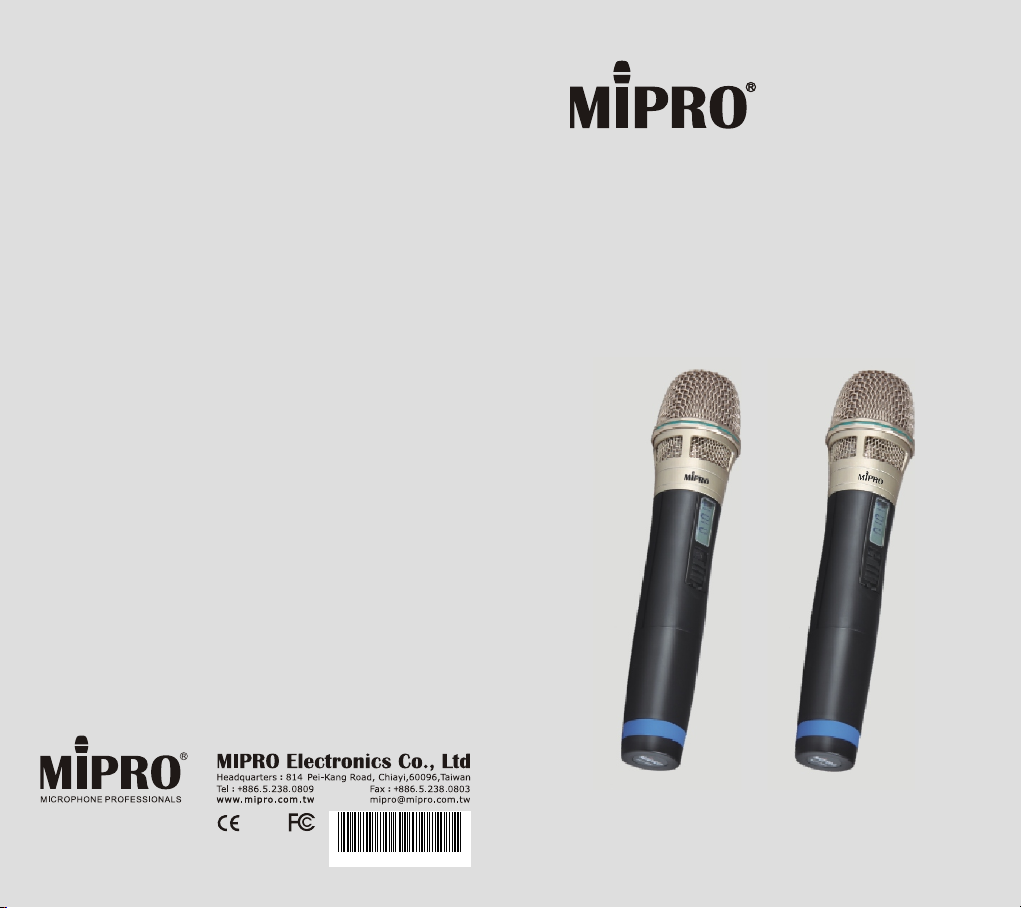
Handheld Transmitter Microphone
2 CE4 0 1 F
User Guide
All rights reserved. Do not copy or forward without prior approvals MIPRO.
Specifications and design subject to change without notice. MN 013/11
ACT-31H
ACT-32H
ACT-30Hr
ACT-32HR
Page 2

Handheld Transmitter Handheld Transmitter
Contents
1 Key Features
3 Handheld Controls and Indicators
perating Instructions for Insertion &
5 O
Removing Battery
6 Operating Instructions
7 LCD Screen
8 Battery Status
9 General Tips for Improving System
Performance
Key Features
! Extremely rugged, ergonomically designed
housing.
! The unique flat top multi-layered steel grille
protects the capsule against impact, rolling, pop
noise and ensures sound clarity.
! The unique flat top multi-layered steel grille for
condenser capsules and round top for dynamic
capsules protect the capsule against impact,
rolling and pop noise. The upper grille is able to
be detached easily for cleaning and hygiene
practices.
! Premium true condenser microphone capsule
provides high fidelity, wide frequency response,
high dynamic range, rapid transient response,
clarity and accurate sound reproduction.
! Proprietary lockable silent on/off switch to avoid
accidental power-off during performance.
! Impact-resistant battery compartment holds 2
AA batteries.
! Interchangeable colored rings for microphone
channel identification on stage.
! LCD displays group, channel, battery level &
error message codes.
! Low spurious PLL-synthesized technology
enhances frequency stability and reliability.
Patented “Built-in” antenna design.
! World's first ACT™ function provides precise and
rapid frequency sync to the transmitters.
0 1
Page 3
Handheld Transmitter Handheld Transmitter
Key Features
! Industry's only digital master control can be
adjusted manually or wireless via new ACT-30Hr
/ACT-32HR handheld transmitter microphone.
(for MA-505, MA-708 & MA-808 portables)
2 3
Handheld Controls and Indicators
ACT-30H/ACT-32H
BAT
GROUP
CHANNEL
ERR
5
4
6
6
7 8
7
7 8
7
1
2
10
ACT-30Hr/ACT-32HR
BAT
GROUP
CHANNEL
ERR
5
4
1
1
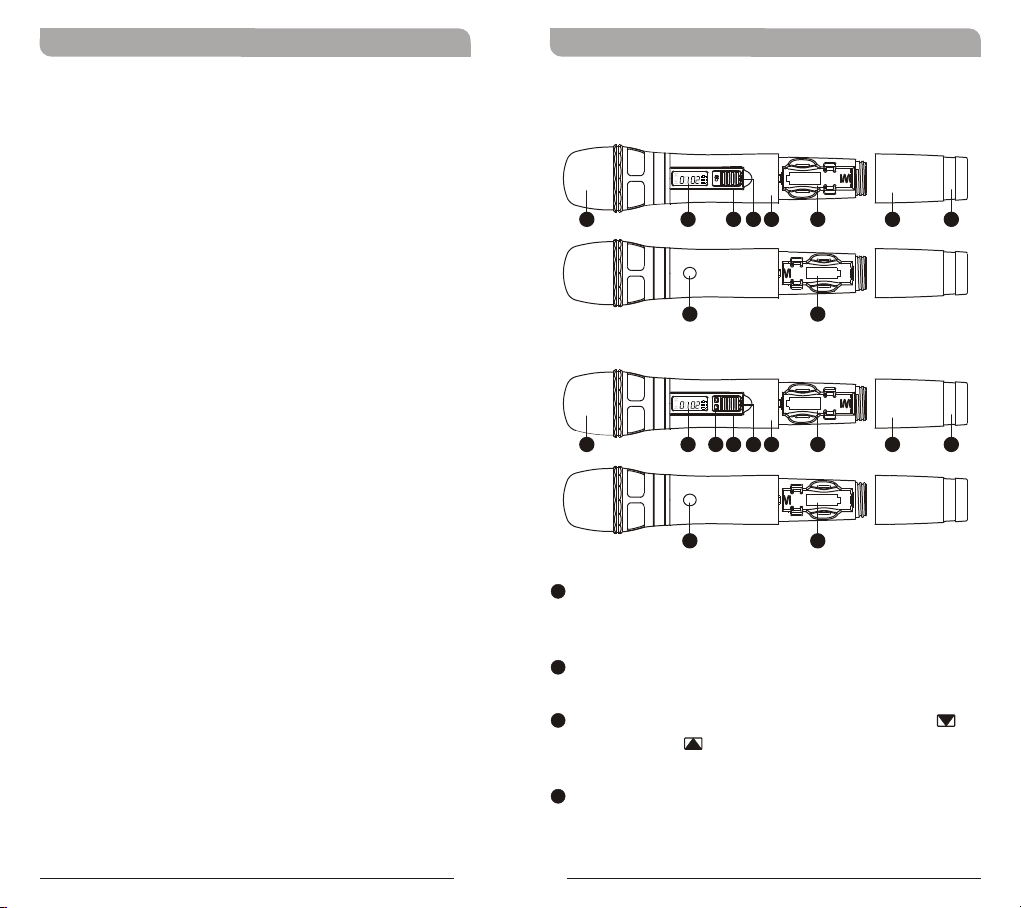
Top Grille: Protects detachable microphone
3
2
10
capsule module and internal foam prevents
breathing, wind and POP noises.
2
LCD Screen: Displays group, channel, battery
status and error codes.
3
Remote Volume Control Buttons: Press to
decrease or to increase volume loudness
wirelessly.
4
Power On/Off Switch: Slide the power switch
to the “ON” position for use or to the “OFF”
position when not in use.
9
9
Page 4
Handheld Transmitter Handheld Transmitter
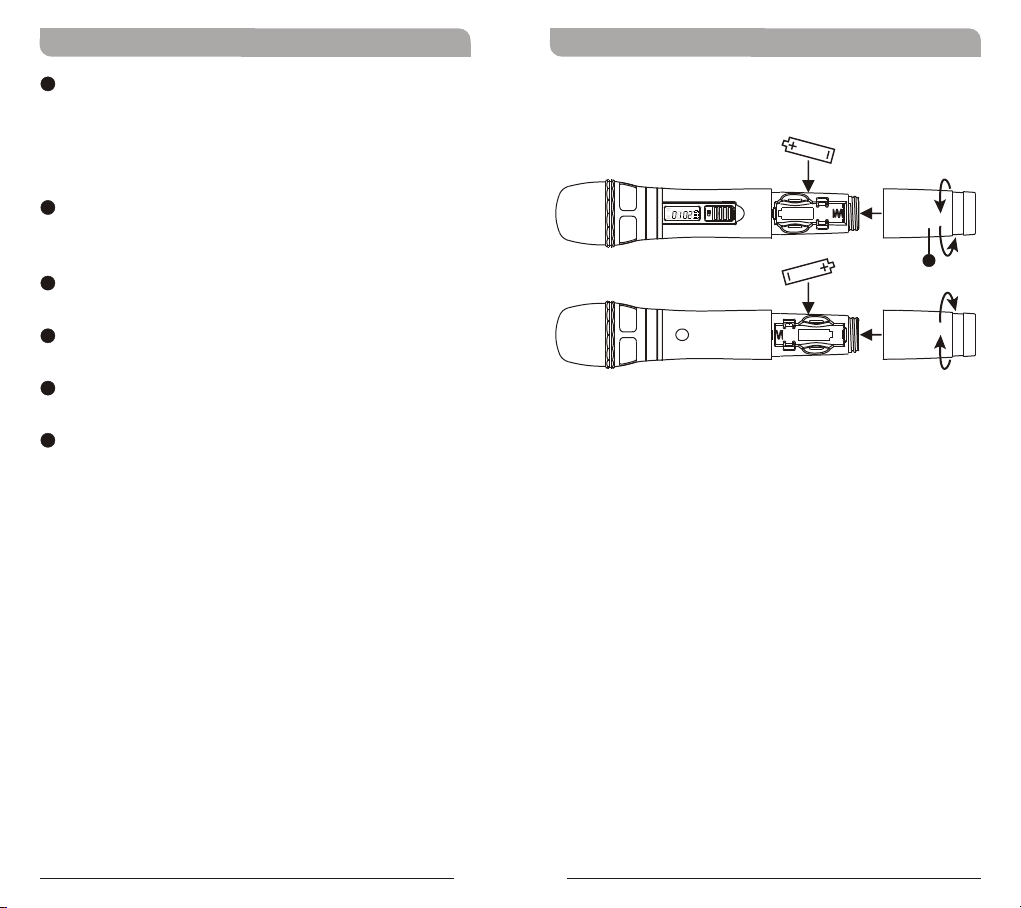
5
Lockable On/Off Switch: Slide the switch to
the “ON” position after power-on to avoid
accidental power off during performance. Slide
the switch to “OFF” position before power-off
and conserve battery power.
6
Housing: Upper portion connects to the
microphone capsule module. Internally it holds
the transmitter PCB and battery compartment.
7
Battery Compartment: Accommodates 2 AA
alkaline.
8
Battery Compartment Cover: Protects
battery compartment and holds batteries.
9
Color-Coded Ring: Available in different colors
for channel differentiation.
10
ACT Infrared (IR) Port: Receives signals from
receiver to synchronize frequencies.
Operating Instructions for Insertion &
Removing Battery
BAT
GROUP
CHANNEL
ERR
8
1. Gently twist the microphone housing in a
counter-clockwise direction
2. Remove the old batteries from the battery
compartment, if any are installed.
3. Insert two new AA alkaline batteries in the
battery compartment with correct polarity
orientation.
4 5
Page 5
Handheld Transmitter Handheld Transmitter
Operating Instructions
1. LCD screen on the transmitter and the RF
level/indicator shown on the receiver will be lit
when the microphone is turned-on, denoting
normal status. A blank LCD screen maybe due
to an incorrect battery polarity orientation.
2. The audio level or indicator show on the receiver
will be lit when there is audio line or
microphone input from the transmitter.
Caution
Remove the batteries if unused for a long period of
time to prevent battery leakage, corrosion and
causes damage to electronics.
LCD Screen
GR OUP
CH ANN EL
ER R
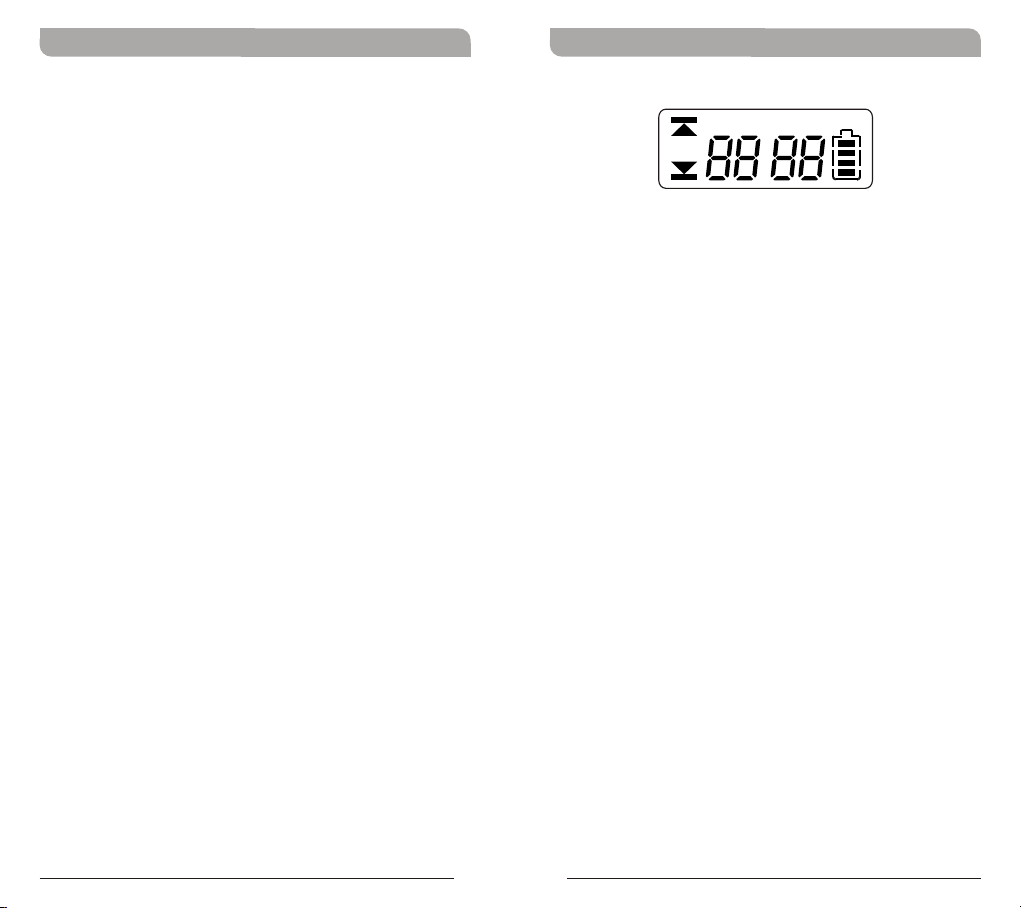
! ERR Message: When “ERR” appears in the
display it indicates that an operational error has
occurred. Please refer to the following codes to
diagnose which error you are experiencing.
ERR no01 EEPROM is not being programmed or
ERR no02 For testing only.
ERR no03 The frequency you want to program is
ERR no04 The frequency you want to program is
internal data error.
above the switching bandwidth of the
transmitter. Use a receiver with an
appropriate frequency group. (At this time
the microphone is still operating and the
frequency remains unchanged. To clear
the displayed "ERR" message, switch the
handheld transmitter off and on again.)
below the switching bandwidth of the
transmitter. Use a receiver with an
appropriate frequency group. (At this time
the microphone is still operating and the
frequency remains unchanged. To clear
the displayed “ERR” message, switch the
handheld transmitter off and on again.)
BAT
6 7
! “Group” & “Channel” : When both the group
and channel numbers are displayed, it means
that you are using the pre-programmed
frequency of the receiver.
! “Channel” Only : If “Channel” only is
displayed, it means that you are using a
frequency which is not pre-programmed.
Page 6
Handheld Transmitter Handheld Transmitter
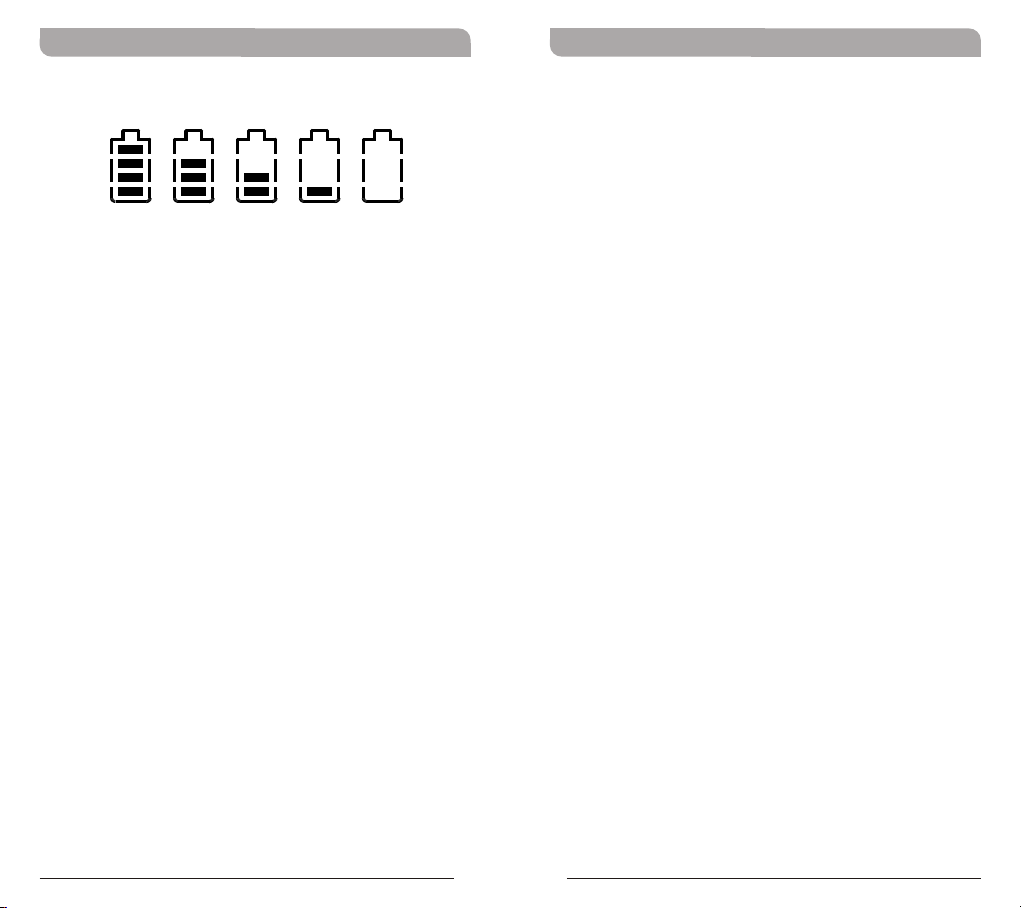
Battery Status
10 0% 80 % 40 % 10 % 0%
Indicates the power remaining in the transmitter
battery. When the battery has less than 10% power
remaining it must be replaced or recharged. If an
under voltage condition continues, the LCD will show
“Poff” and the system will shut down to prevent
being overly discharged.
“Poff” - Power Off :
When the power switch is turned off, the LCD will
show “Poff” (for Power Off) first and then the
system will shut down and no further messages will
be displayed.
General Tips for Improving System
Performance
1. Performer should avoid holding the microphone over or
near the antenna section as this will deteriorate
transmission efficiency. Severe deterioration if
performer directly covers up the antenna section with
both hands.
2. Many performers tend to hold the microphone by the
top grille. Unfortunately, this position seriously
degrades both the sound quality and directionality of a
microphone. Even the most expensive microphones will
have its original sound quality compromised by this
method. Grabbing a microphone by the grille will
isolate the capsule's acoustic resonance circuit and or
change the capsule resonator's frequency. This results
in an inferior performance in both frequency response
and the separation of directionality. In addition, a
palm's sound-focusing effect will tend to strengthen
resonances in certain frequencies and can cause
unwanted echo.
3. A proper technique is required for using directional
microphones because the distance between the
microphone and your mouth has a significant impact on
sensitivity and performance. There is an inverse
relationship between microphone sensitivity and the
distance from the mouth to the microphone.
Consequently, performers with a ''weaker'' sound level
cannot expect to hold the microphone too far away
from their mouth and compensate by turning up the
amplifier volume to increase the sound level as this can
easily cause echo or feedback. In contrast, performers
with a ''louder'' sound level should not hold the
microphone too close as this can easily result in
distortion by causing the amplifier system to be
overloaded.
8 9
Page 7

Handheld Transmitter Handheld Transmitter
& IC - ID
FCC
This device complies with Part 15 of the FCC Rules.
Operation is subject to the following two conditions:
(1) This device may not cause harmful interference,
and (2) This device must accept any interference
received, including interference that may cause
undesired operation.
Disposal
2005 -08- 132005 -08- 13
Dispose of any unusable devices or
batteries responsibly and in accordance
with any applicable regulations.
Disposing of used batteries with domestic
waste is to be avoided!
Batteries / NiCad cells often contain
heavy metals such as cadmium(Cd),
mercury(Hg) and lead(Pb) that makes
them unsuitable for disposal with
domestic waste. You may return spent
batteries/ accumulators free of charge to
recycling centres or anywhere else
batteries/accumulators are sold.
By doing so, you contribute to the
conservation of our environment!
FCC Caution: To assure continued compliance, any
changes or modifications not expressly approved by
the party responsible for compliance could void the
user's authority to operate this equipment.
(Example - use only shielded interface cables when
connecting to computer or peripheral devices).
IC
This device complies with Industry Canada’s RSSs.
Operation is subject to the following two conditions:
(1) This device may not cause interference; and
(2) This device must accept any interference,
including interference that may cause undesired
operation of the device.
Le présent appareil est conforme aux CNR
d’Industrie Canada applicables aux appareils radio.
L’exploitation est autorisée aux deux conditions
suivantes :
(1) l’appareil ne doit pas produire de brouillage;
(2) l’utilisateur de l’appareil doit accepter tout
brouillage radioélectrique subi, même si le
brouillage est susceptible d’en compromettre le
fonctionnement.
10 11
 Loading...