

Page 1

ElectronicsCo.,Ltd.
Headoffice:814,Pei-KangRoad,Chiayi,600,Taiwan.
Taipeioffice:5,Lane118,Sung-tehRoad,110,Taipei,Taiwan.
Web-http://www.mipro.com.tw
E-mail:[email protected]
ACT-707HMWirelessMicrophone
ACT-707HMWirelessMicrophone
InstructionManual
019
7
2CE141
Page 2
WirelessMicrophone WirelessMicrophone
Finelycraftedandergonomically
designedACT-707HMadaptsmagnesiumalloy
housing,LCDpanel,andhigh-efficient
transmittingcircuitdesignwithlowspurious
showcasesMIPRO'sprofessionalstyle.
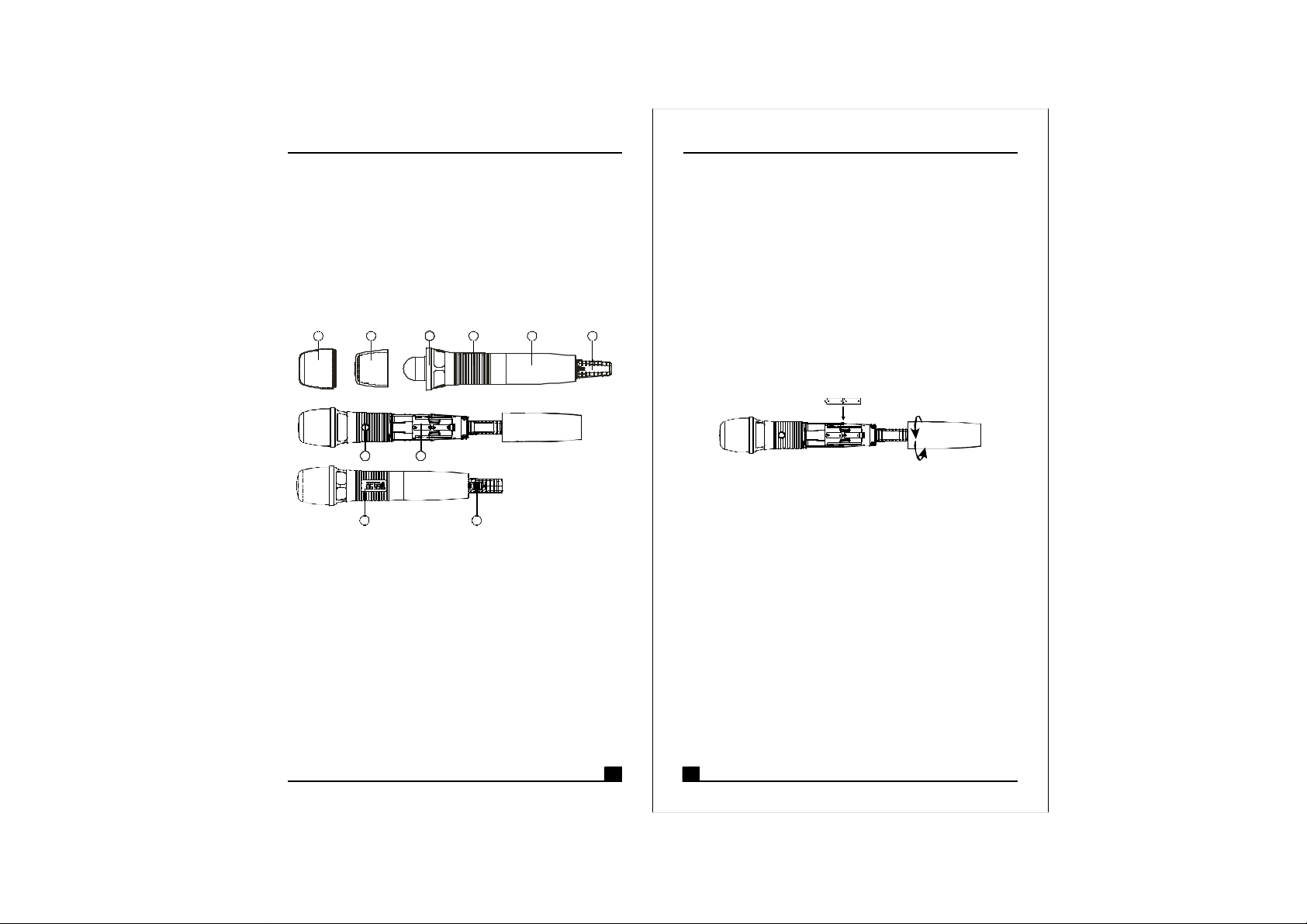
1.PARTSNAMEANDFUNCTIONS
1
1.TopGrilleDesignedtoprotectmicrophonecapsule.
2.InternalFoamScreenofUpperGrille:Itisinclosed
insidetheprotectivepouchofmicrophonesfor
advancingtoeliminate"pop"noiseinspecial
occasion.
3.InternalFoamScreenofLowerGrilleAndCapsule
Module:Internalfoamscreenoflowergrilleis
designedtoprotectcapsulemodulewhichtransfer
voiceintoaudiofrequency.
4.UpperHousing:Designedtoconnecttogrille,
capsulemoduleandaccommodateemissionPCB
andbatterycompartment
5.LowerHousing:Designedtoprotectbattery
compartmentandbatteries.
2 3
7
9
﹕
4 6
8
10
5
(Fig.1)
1 2
6.ColorRearHousingProtectingOn-offswitch
﹕
structureandpreventingusersfreefromswitching
poweroffaccidentally.
7.ACTSignalReceptor:ReceivingACTsignaland
adjustingfrequencyautomatically.
8.BatteryCompartment:Designedtoaccommodate
two1.5V(AA)batteries.
9.LCDPanel:Displaygroupchannelerrorcodeand
、、
batterymeterstatus.
10.PowerSwitch:Slidingtheswitchforpower"ON"or
"OFF".
2.BATTERYINSTALLATIONS
(Fig.2)
1.Unscrewhousing(5)incounter-clockwisedirection.
2.Inserttwo1.5V(AA)batteriescorrectlyintothebattery
compartment(8)withthepositivepole(+)pointsatthe
microphonecapsule.Then,screwthehousing(5)back
tomicrophoneasshowninfig.2.
PS:Whenthemicrophoneisnotinuse:
Makesurethepowerofthemicrophoneisoff.Ifthe
microphonewillnotbeusedforsometime,please
removethebatteriesfromthebatterycompartmentto
avoidbatteryleakageandresultindamagedbattery
springsandcircuit.Ifarechargeablebatterywas
used,takeitoutandrechargeit.
Page 3
WirelessMicrophone WirelessMicrophone
FURNISHEDACCESSORIES:
①×
AATYPEBATTERY2
②×
CARRYINGSTORAGEBAG1
③
INTERNALFOAMSCREENOFUPPERGRILLEX1
④×
INSTRUCTIONMANUAL1
SPECIFICATION:
ITEM
ACTFunction
RFOutputPower
OscillationMode
SpuriousEmissions
MaximumInputLevel
MicrophoneCapsule
Battery
Weights(g)
Dimensions(m/m)
SPECIFICATIONS
Yes
10mW(oraccordingtoregulations)
PLLSynthesizer
<-60dBc
148dBSPL
Condenser
AATYPE2
×
280gs
50265
φ
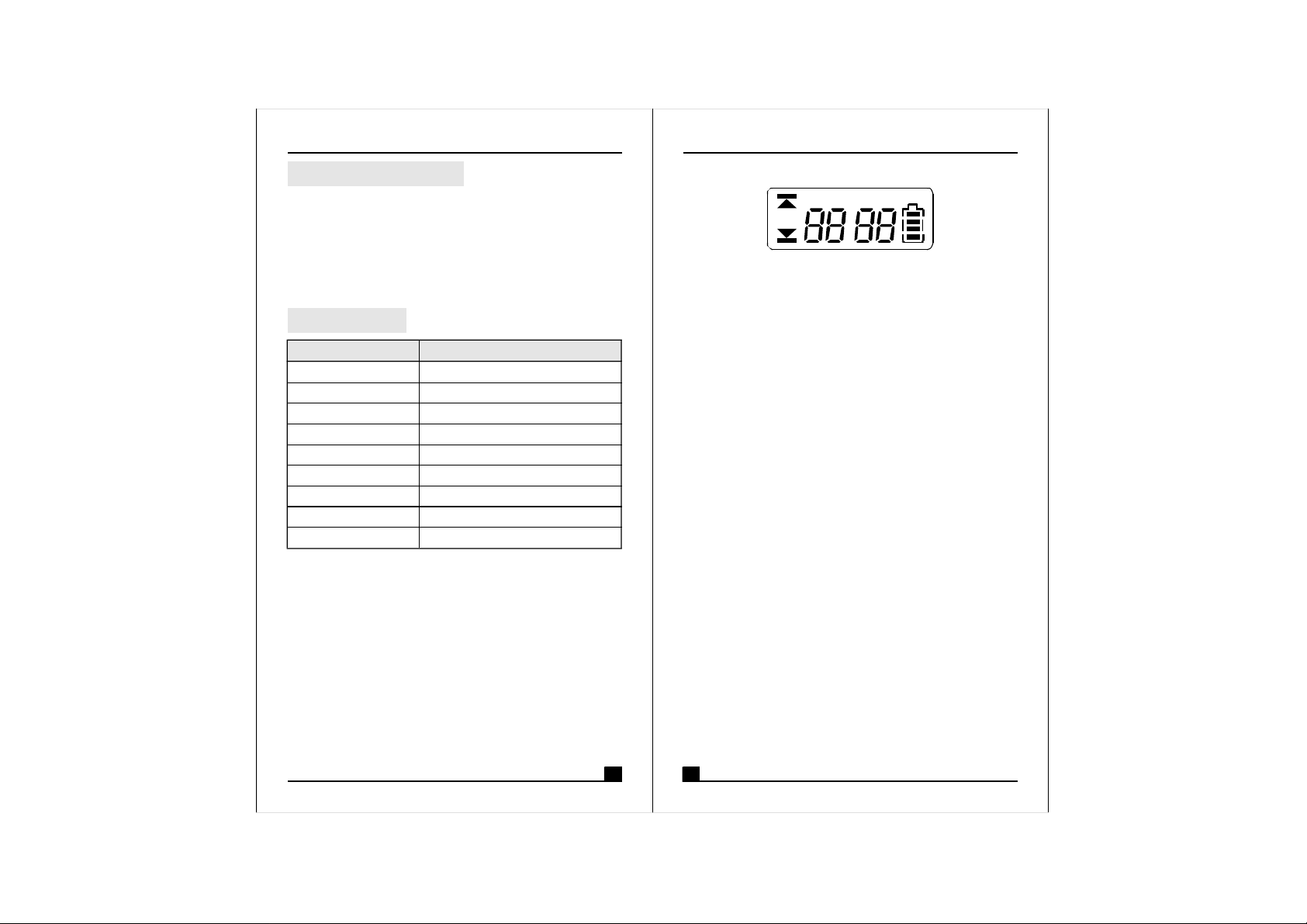
3.FUNCTIONSOFLCDDISPLAY
GROUP
CHANNEL
ERR
1.ERRMessage:When"ERR"appears,itmeans
"OperationError".Pleaserefertothefollowingcodes
todiagnosewhicherroryouareexperiencing.
ERRno01EEPROMisnotbeingprogrammedor
→
internaldataerror.
ERRno02Fortestingonly.→
ERRno03Thefrequencyyouareabouttoprograminto
→
thesystemexceedsmicrophone'supperlimit.
(Atthistime,microphoneisstilloperatable
andthefrequencyremainsunchanged.To
clearthe"ERR"messageinLCDdisplay,
simplyturnoffthepowerandswitchbackon.)
ERRno04Thefrequencyyouareabouttoprograminto
→
thesystemisbelowmicrophone'sfrequency
lowerlimit.(Atthistime,microphoneisstill
operatableandthefrequencyremains
unchanged.Toclearthe"ERR"messagein
LCDdisplay,simplyturnoffthepowerand
switchbackon.)
2."Group"&"Channel":Whenbothitemsareshown,
theyindicatethattheuseriscurrentlyusingthepreprogrammedfrequencyinthereceiver.
3."Channel"Only:If"Channel"istheonlyitemshownin
thedisplay,itindicatestheuserisusingthe
personalizedfrequency.(Suchfrequencycanonlybe
programmedviaMIPRO'sACTSoftwareandavailable
onACT-707MConly.)
BAT
3 4
Page 4
WirelessMicrophone WirelessMicrophone
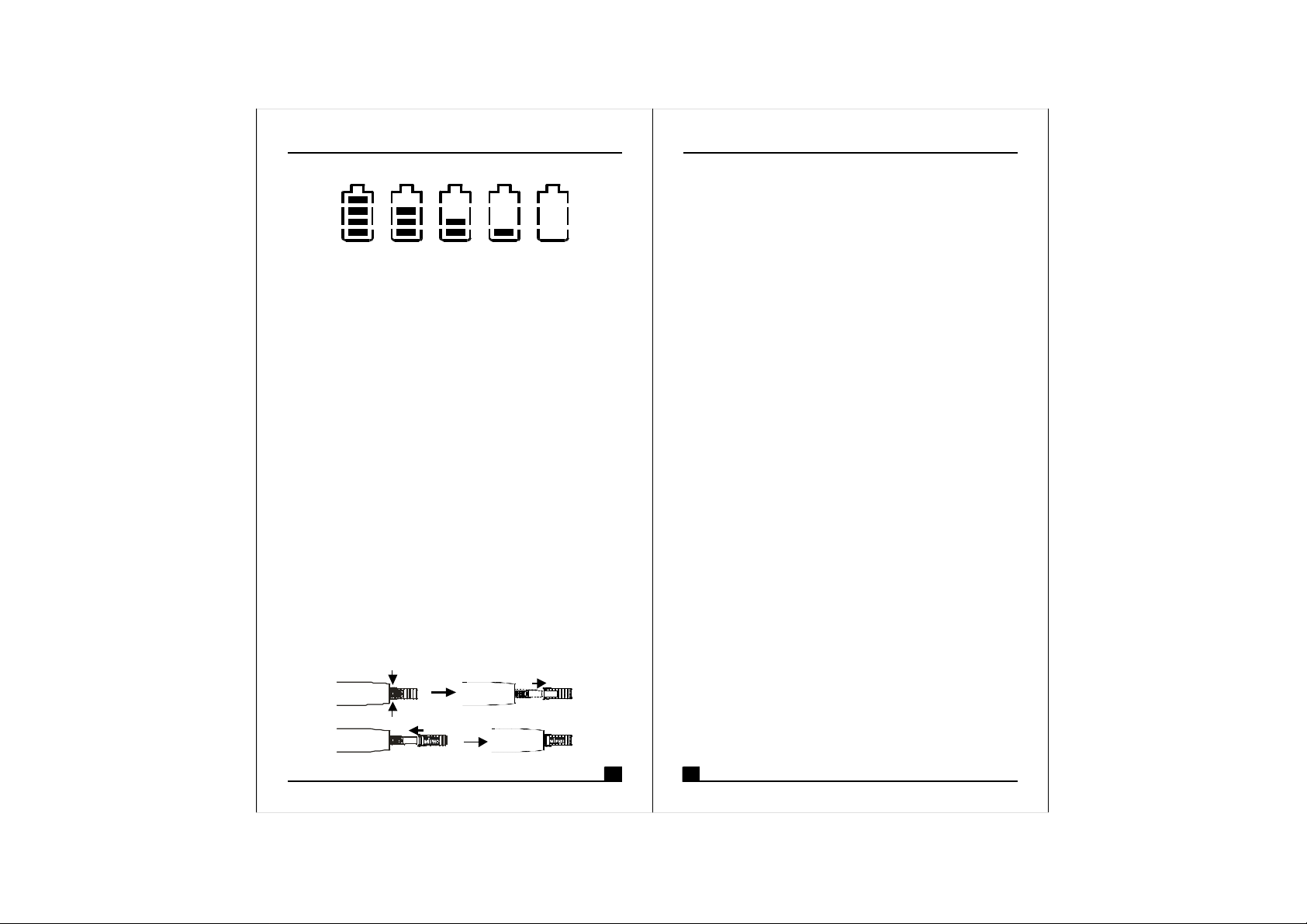
4.BatteryStatus:
100% 80% 40% 10% 0%
BatteryStatus:Whenthebatteryhaslessthan10%
powerremaining,batteriesmustbereplaced.If
undervoltagecontinues,LCDwillshow"PoFF"andshut
downthesystemtoavoidbatterybeingover-discharged.
5.SwitchOff:
Whenswitchthepowerknobto"Off"position,LCD
willshow"PoFF"first.Then,thesystemiscompletely
shutdownandnofurthermessagewillbedisplayed.
4.USAGEOFCOLORREARCAP:
1.Whentheopeningofcolorrearcapisputonthesame
positionaspowerswitch,theswitchcanbefreelyslid.
2.Toavoidusersaccidentallyslidethepowerswitchin
livestagesorsound-controlledsessions,removecolor
rearcapbypressingbothsidesofthecapandturnthe
openingofthecap180degreestocoverthepower
switchasshowninfigurebelowsothepowerswitch
can'tbefreelyslid.
3.Incaseofmulti-microphoneoperation,additionalcaps
canbepurchasedfromyourlocaldealerforbetter
channeldifferentiation.
Notice:
Thechangesormodificationsnotexpresslyapproved
bythepartyresponsibleforcompliancecouldvoidthe
user'sauthoritytooperatetheequipment.
IMPORTANTNOTE:
TocomplywiththeFCCRFexposurecompliance
requirements,nochangetotheantennaorthedeviceis
permitted.Anychangetotheantennaorthedevicecould
resultinthedeviceexceedingtheRFexposure
requirementsandvoiduser'sauthoritytooperatethe
device.
5 6
 Loading...