

Page 1
2 CE 5 1 3 A
User Guide
ACT-70TC Rechargeable
Wideband Bodypack Transmitter
All rights reserved.
Do not copy or forward without prior approvals MIPRO.
Specifications and design subject to change without notice.
MN 014/05
Page 2
WARNING
1. FOR OUTDOOR USE:
To reduce the risk of fire or electric shock, do not
expose this apparatus to rain or moisture.
2. UNDER WET LOCATION:
Apparatus should not be exposed to dripping or
splashing and no objects filled with liquids, such as
vases should be placed on the apparatus.
3. SERVICE INSTRUCTIONS:
CAUTION - These servicing instructions are for use by
qualified service personnel only. To reduce the risk of
electric shock, do not perform any servicing other than
that contained in the operating instructions unless you
are qualified to do so.
This symbol indicates that dangerous voltage
constituting a risk of electric shock is present
within this unit.
This symbol indicates that there are important
operating and maintenance instructions in the
literature accompanying this unit.
Disposal
2005 -08- 13
Dispose of any unusable devices or batteries
responsibly and in accordance with any
applicable regulations.
Disposing of used batteries with domestic waste
is to be avoided!
Batteries / NiCad cells often contain heavy
metals such as cadmium(Cd), mercury(Hg) and
lead(Pb) that makes them unsuitable for
disposal with domestic waste. You may return
spent batteries/ accumulators free of charge to
recycling centres or anywhere else
batteries/accumulators are sold.
By doing so, you contribute to the conservation
of our environment!
FCC
THIS DEVICE COMPLIES WITH PART 74 OF THE FCC
RULES.
OPERATION IS SUBJECT TO THE FOLLOWING TWO
CONDITIONS:
(1) This device may not cause interference.
(2) This device must accept any interference, including
interference that may cause undesired operation of the
device.
This equipment complies with FCC RF radiation exposure
limits set forth for an uncontrolled environment.
IC
This device complies with Industry Canada RSS-123
ISSUE 2 standards. Operation is subject to the following
two conditions:
(1) this device may not cause interference, and
(2) this device must accept any interference, including
interference that may cause undesired operation of the
device.
Le présent appareil est conforme aux CNR d'Industrie
Canada applicables aux appareils radio exempts de licence.
L'exploitation est autorisée aux deux conditions suivantes:
(1) l'appareil ne doit pas produire de brouillage, et
(2) l'utilisateur de l'appareil doit accepter tout brouillage
radioélectrique subi, même si le brouillage est susceptible
d'en compromettre le fonctionnement.
Page 3
Rechargeable Wideband Bodypack Transmitter Rechargeable Wideband Bodypack Transmitter
Contents
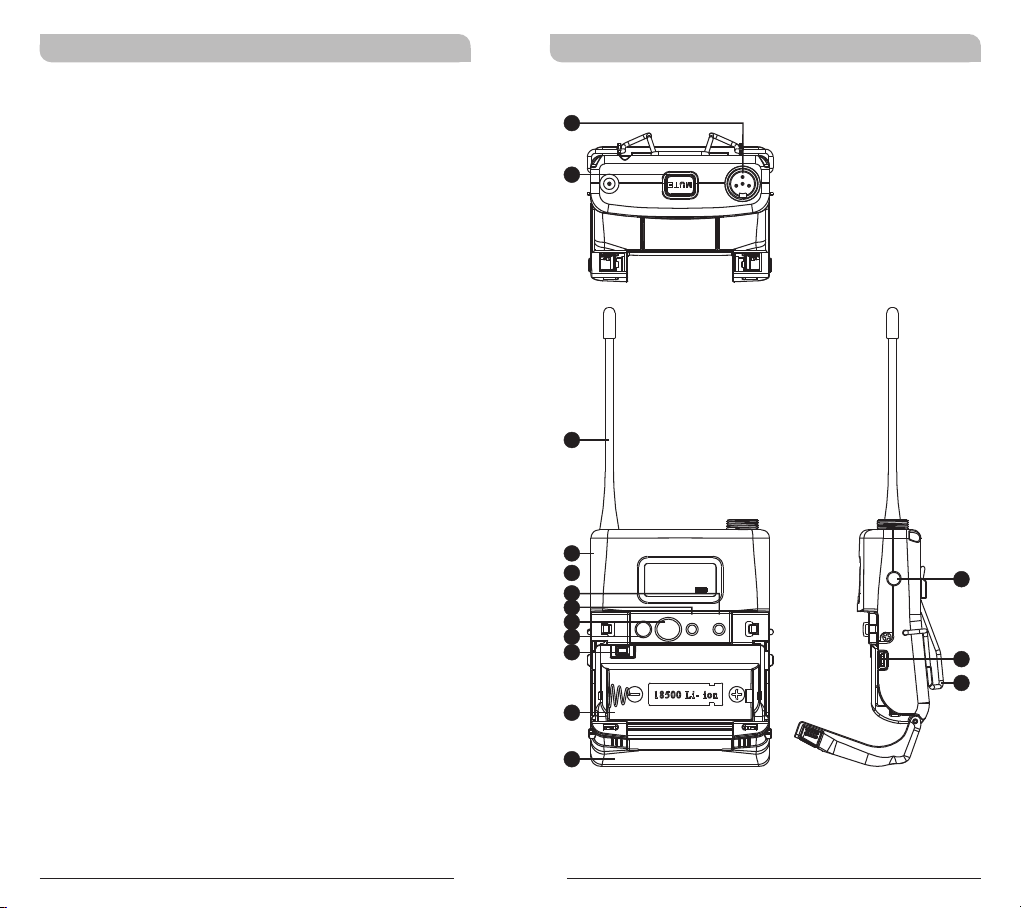
1 Bodypack Controls and Indicators
4 O
5 LCD
6 T
perating Instructions
Display Screen
ransmitter Parameters
12 Battery Status
14 Setting MUTE
16 AF
17 B
Input Connections
attery Removal and Installation
Bodypack Controls and Indicators
1
2
3
4
5
6
7
8
9
10
11
FREQ UENCY
718.275MHz
ON MODE
SET
13
14
15
12
0
1
Page 4
Rechargeable Wideband Bodypack Transmitter Rechargeable Wideband Bodypack Transmitter
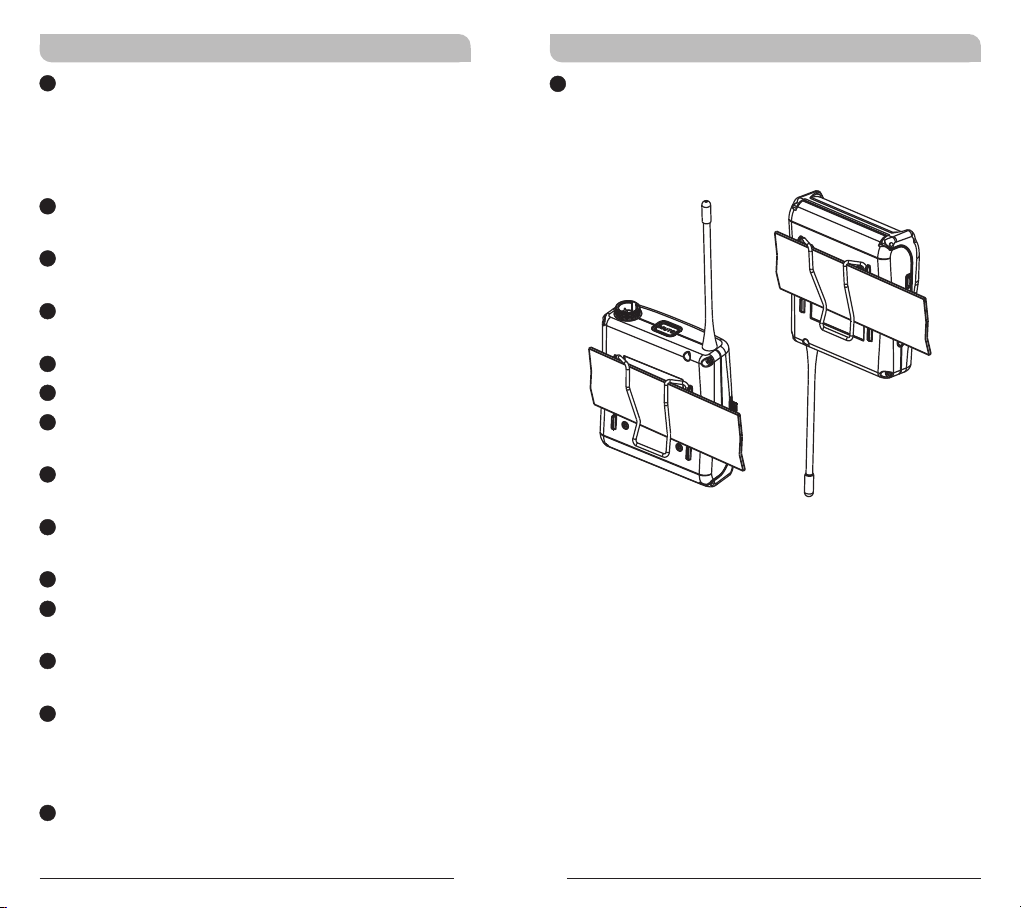
1
Audio Input Connector: TA4F mini 4-pin
connector accepts any MIPRO lavalier,
instrument and headset microphones and
cables. (See 5 ways of connection on AF Input
Connections)
2
MUTE Button: To mute and un-mute the audio
signal temporary.
3
Antenna: Flexible 1/ 4 wave transmitting
antenna.
4
Transmitter Housing: Holds PCB board and
wires.
5
LCD Panel: Display transmitter parameters.
6
SET Button: Parameter selection button.
7
MODE Button: Allows access to available
functions displaying in LCD panel.
8
ACT IR Port: Align and syncs the transmitter
and receiver frequency automatically.
9
Power Button: Press and hold 2 seconds to
power ON or OFF.
10
Battery Circuitry Protection Reset Button
11
Battery Compartment: Accommodates one
18500 rechargeable battery.
12
Battery Cover: Hinged cover opens to provide
access to one 18500 rechargeable battery.
13
External Mute Connector: When an external
mute switch cable, MJ-70 (optional) is connected
, user can manually mute and un-mute the
audio temporary.
14
Battery Charging Contact: Align contacts
during charging.
15
Belt Clip: Detachable and reversible design
allows the transmitter to be worn on a belt,
waistband, or guitar strap ( .Figure 1)
(Positive Wear)
(Opposite Wear)
(Figure 1)
2
3
Page 5
Rechargeable Wideband Bodypack Transmitter Rechargeable Wideband Bodypack Transmitter
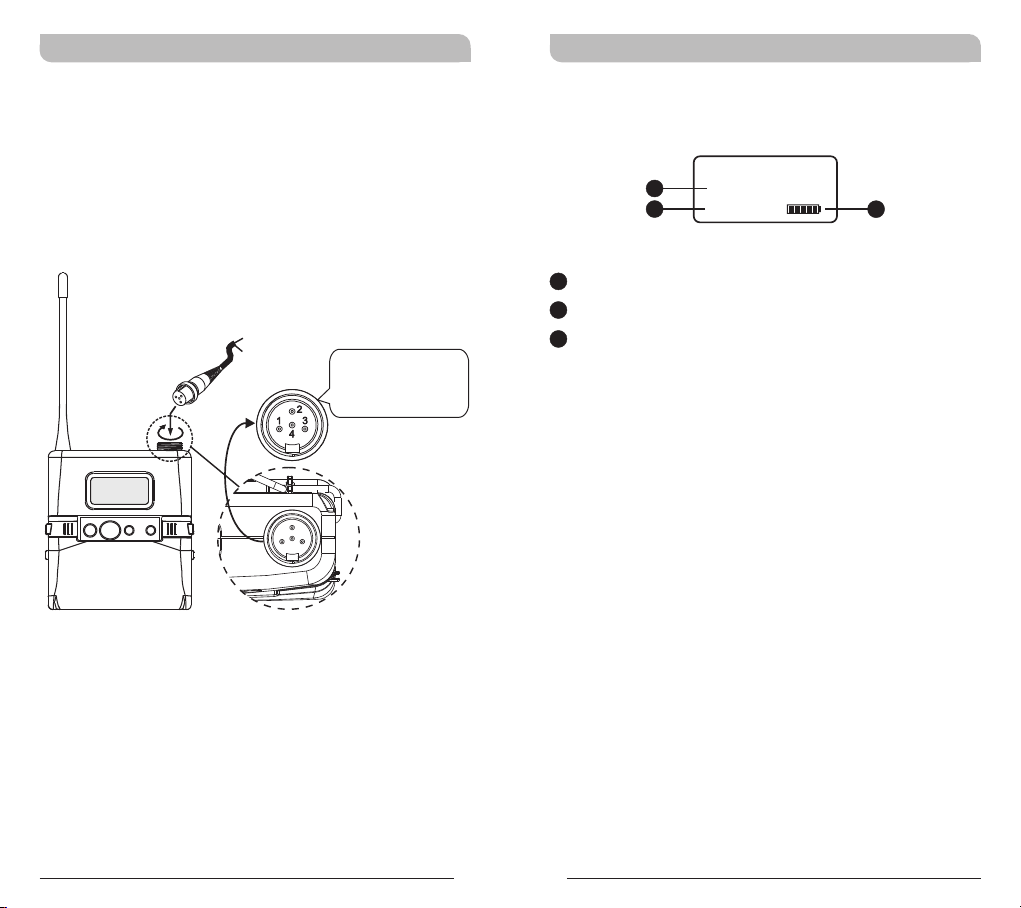
Operating Instructions
!!Insert the lavalier, headset microphone or
instrument cable into the audio input connector
before power ON the transmitter.
Tighten the connector screw clockwise direction
as shown in (Figure 2) for a secured fit.
Capsule Connector
Headset
ON MODE
Lavalier
SET
The ridge on the
connector must align and
match the indentation on
the socket when inserting
for a proper fit.
(Figure 2)
LCD Display Screen
A1
A2
A1
LCD Screen
A2
AF (audio) MUTE
A3
Transmitter Battery Meter
FREQUENCY
775.275MHz
AF MUTE
A3
4
5
Page 6
Rechargeable Wideband Bodypack Transmitter Rechargeable Wideband Bodypack Transmitter
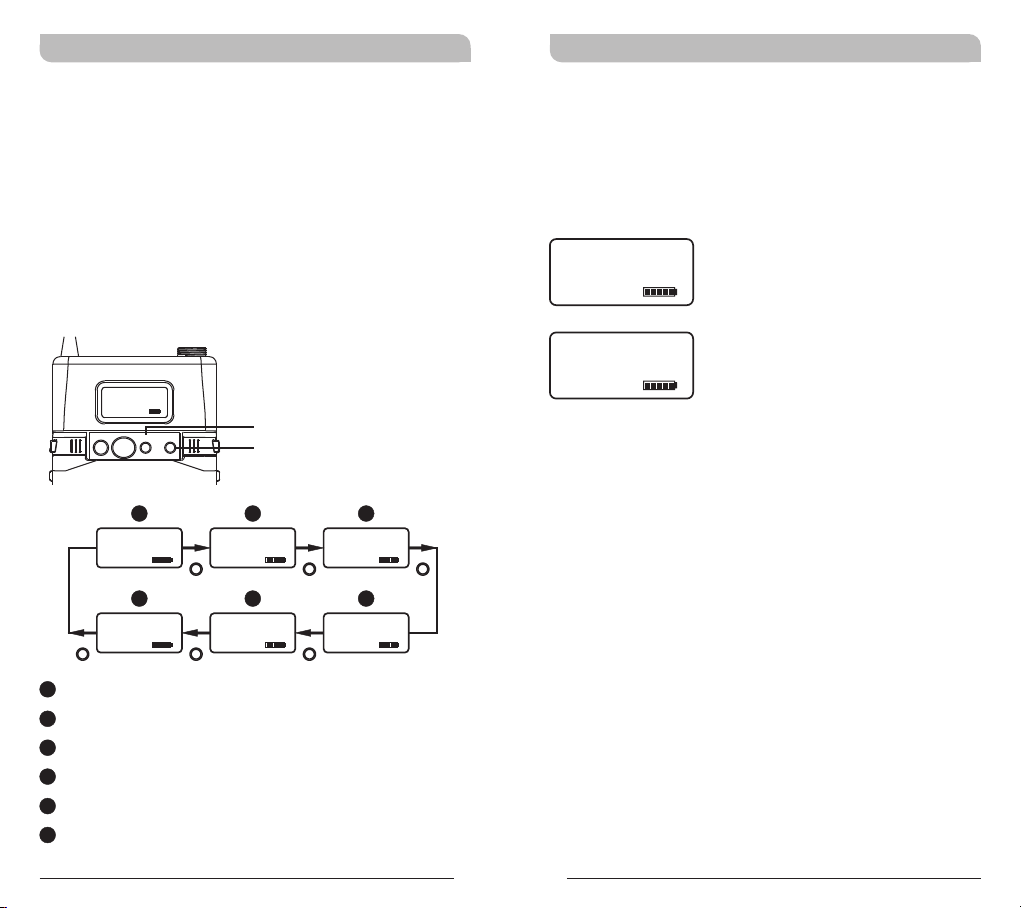
Transmitter Parameters
MODE button
!
Press “MODE” button to access one of the
functions below.
SET button
!
Press “SET” button then the changeable
functions will twinkle. Change to the desired
parameters during the above twinkle by pressing
“SET” button.
FREQU ENCY
718.275MHz
ON MODE
AF MUTE
UNLOCK
AF MUTE AF MUTE
SET
A B
GRP CH
01 01
F
SET LOCK
MODE
SET
FREQUENCY
775.275MHz
AF MUTE AF MUTE
E
MUTE MODE
MANUAL
AF GAIN
0 dB
MODE MODEMODE
RF POWER
RF-LOW
MODEMODE MODE
AF MUTE
C
D
! Group & Channel and Frequency are factory pre-
set, thus, its parameter values are displayed
after it is ACT synced. Values cannot be
changed.
GRP CH
01 01
FREQUENCY
775.275MHz
( )Group and Channel
( )Frequency
A
Group and Channel
B
Frequency
C
Sensitivity Level
D
RF Output Power
E
MUTE Mode
F
Parameters Lock & Unlock Status
6
7
Page 7
Rechargeable Wideband Bodypack Transmitter Rechargeable Wideband Bodypack Transmitter
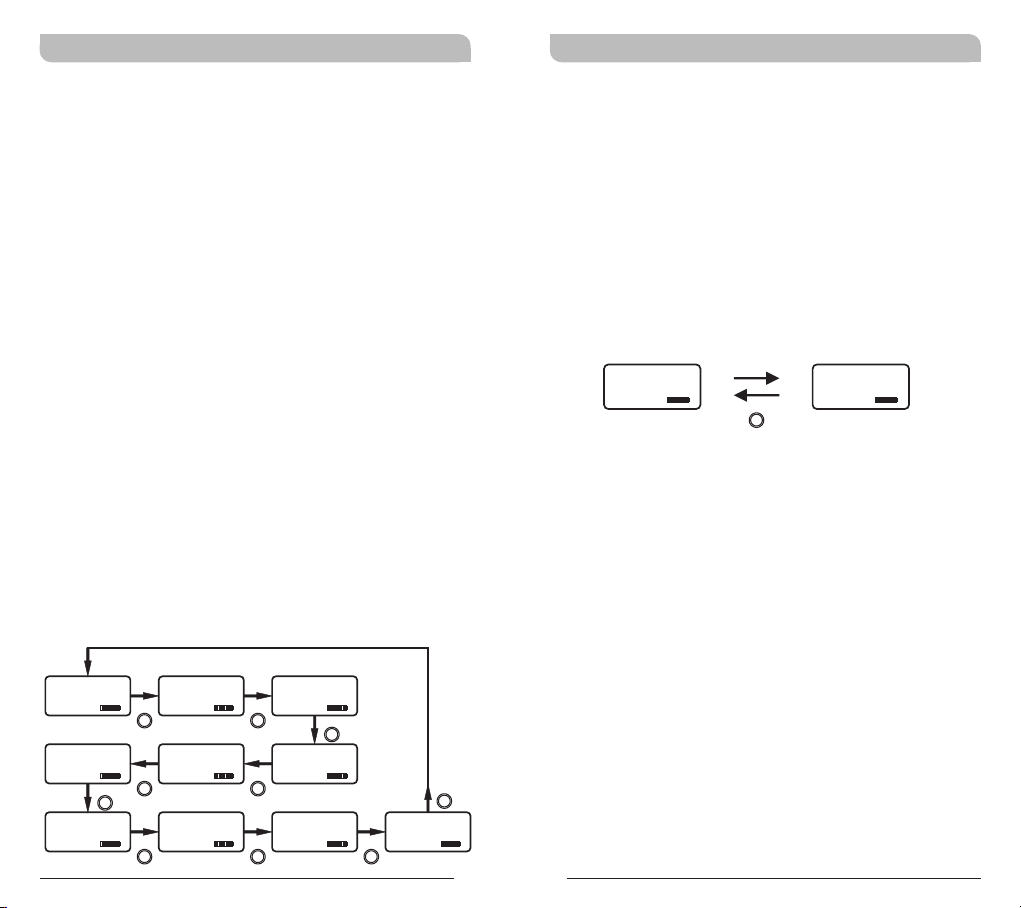
Setting Input Gain Level
! Selectable between 12dB to -18dB
with 6dB parameter up or down selection.
! Press MODE button until mode
appears.
! Press SET button once to activate function.
! Press SET button to select the desired
sensitivity level.
! Press MODE button to confirm and save the
change.
! The higher the sensitivity level, the lower the
dynamic range of input signals. Meanwhile noise
will increase, and the feedback problem will be
getting more serious.
NOTE:
! The audio gain level is factory preset at 0dB
level.
! Guitar setting is recommended at -12dB
level.
AF GAIN
AF GAIN
Setting RF Output Power
! 2 RF Output Power Levels: RF-LOW and RF-HI.
! Press MODE button until RF POWER mode
appears.
! Press SET button once to activate function.
! Press SET button to select the desired RF output
power.
! Press MODE button to confirm and save the
change.
RF POWER
RF-LOW
SET
RF POWER
RF-HI
AF GAIN
0 dB
AF GAIN
-12 dB
SET
SET
SET
SET
AF GAIN
6 dB
AF GAIN AF GAIN
0 dB -6 dB
AF GAIN
-18 dB
SET
SET
SET
AF GAIN
12 dB
SET
AF GAIN
6 dB
AF GAIN
-12 dB
SET
SET
AF GAIN
-6 dB
8
9
Page 8
Rechargeable Wideband Bodypack Transmitter Rechargeable Wideband Bodypack Transmitter
MUTE MODE
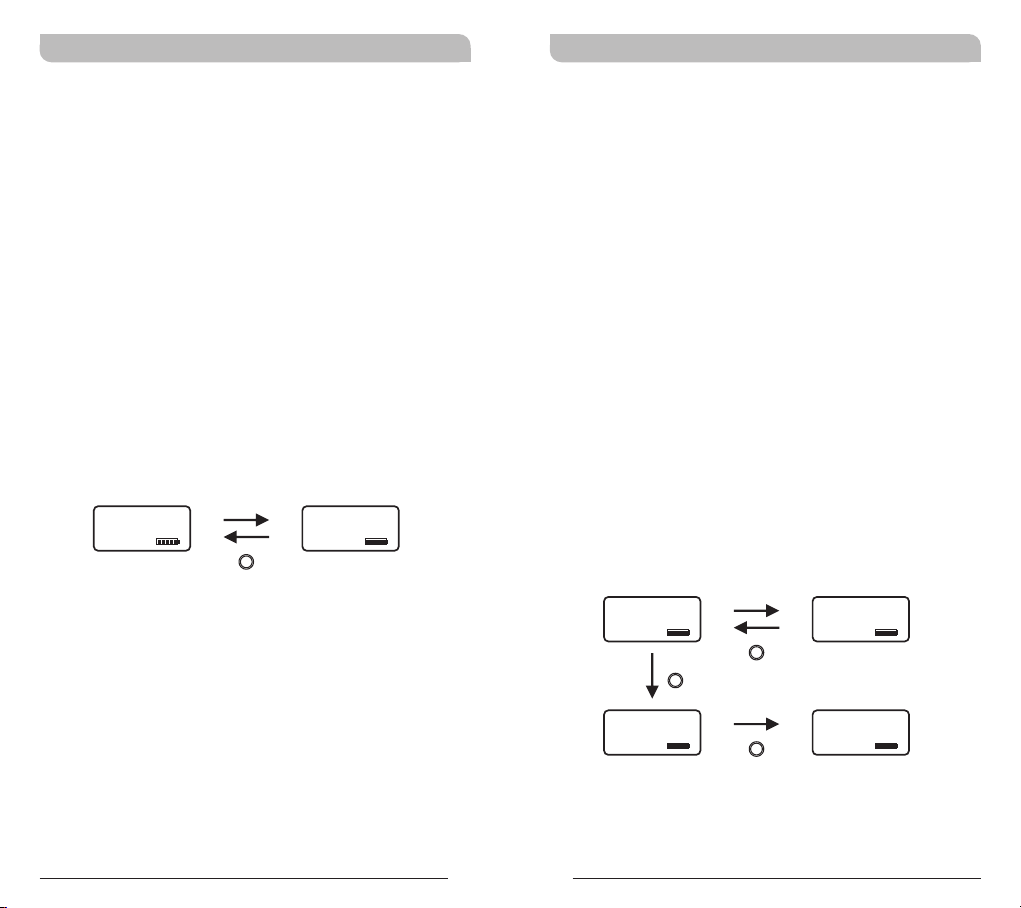
! MUTE MODE: Select from MANUAL and
DISABLE.
! Press MODE button until MUTE MODE appears.
Press SET button once, the LCD screen starts
flashing to denote it is ready to accept mode
changes. Press SET button to change between
MANUAL and DISABLE in cycle. Press MODE
button to confirm and save the change, or LCD
will stop flashing after 5 seconds and parameter
will be saved.
! MUTE button is operable when MUTE MODE is
set in MANUAL mode.
! MUTE button is not operable when MUTE
MODE is set in DISABLE mode.
MUTE MODE
MANUAL
SET
MUTE MODE
DISABLE
Setting LOCK
! Setting LOCK can be switched to LOCK or
UNLOCK mode.
! Press MODE button until SET LOCK mode
appears.
! Press SET button to select the desired
parameter.
! Press MODE button to confirm and save the
change.
! Press SET button twice to remove the LOCK
function.
! The LOCK function will be removed automatically
when losing power.
! Mute function can still work properly when
LOCK.
NOTE: Once locked, all 6 parameter values
cannot be changed.
SET LOCK
LOCK
SET
MODE
SET LOCK
UNLOCK
10
11
RF POWER
RF-HI
RF POWER
SET
LOCKED
Page 9
Rechargeable Wideband Bodypack Transmitter Rechargeable Wideband Bodypack Transmitter
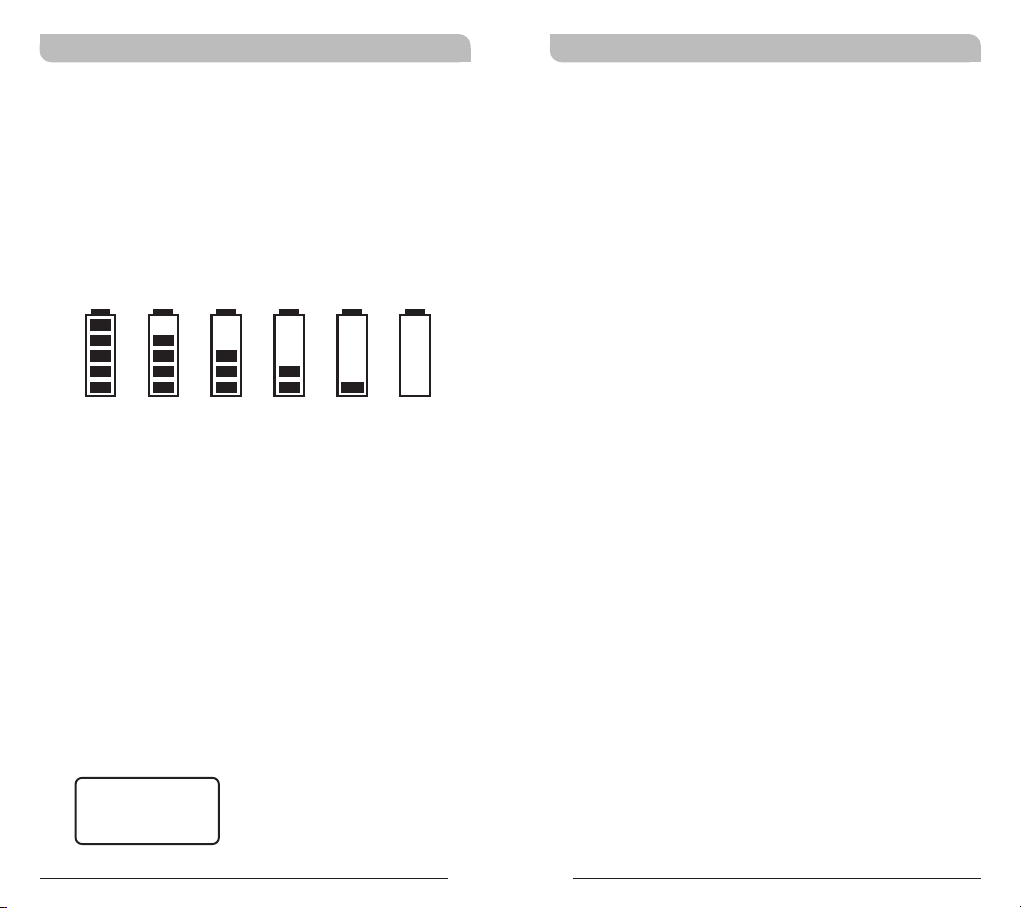
Battery Status
! Indicates the power remaining in the transmitter
battery. When the battery has less than 10%
power remaining it must be replaced or
recharged. If an under voltage condition
continues, the LCD will show “OFF...” and the
system will shut down to prevent being overly
discharged.
10 0% 80 % 60 % 40 % 20 % 10 %
Power Button
! Press and hold for 2 seconds to power on & off.
“OFF...” - Power Off
! When the power switch is turned off, the LCD
will show “OFF...” (for Power Off) first and then
the system will shut down and no further
messages will be displayed.
ERR Message
! When “ERR” appears in the display it indicates
that an operational error has occurred. Please
refer to the following codes to diagnose which
error you are experiencing.
ERR no01 EEPROM is not being programmed or
internal data error.
ERR no02 For testing only.
ERR no03 The frequency you want to program is
above the switching bandwidth of the
transmitter. Use a receiver with an
appropriate frequency group. (At this time
the microphone is still operating and the
frequency remains unchanged. To clear the
displayed "ERR" message, switch the
handheld transmitter off and on again.)
ERR no04 The frequency you want to program is
below the switching bandwidth of the
transmitter. Use a receiver with an
appropriate frequency group. (At this time
the microphone is still operating and the
frequency remains unchanged. To clear the
displayed “ERR” message, switch the
handheld transmitter off and on again.)
! “Group” & “Channel” : When both the group
and channel numbers are displayed, it means
that you are using the pre-programmed
frequency of the receiver.
OFF...
12
! “Channel” Only : If “Channel” only is
displayed, it means that you are using a
frequency which is not pre-programmed.
13
Page 10
Rechargeable Wideband Bodypack Transmitter Rechargeable Wideband Bodypack Transmitter
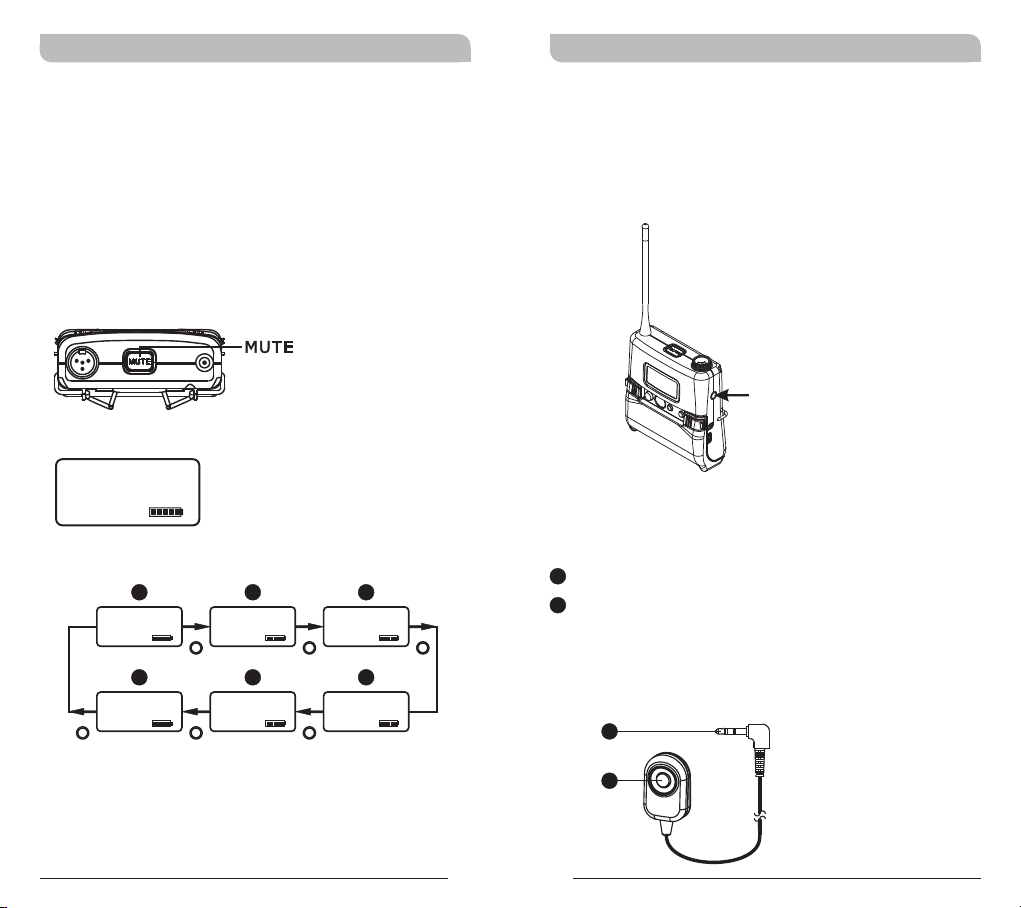
Setting MUTE
! Press MUTE button to enter MUTE mode.
! Under MUTE mode, press MUTE button to exit
MUTE mode.
! MUTE button is operable when SET LOCK mode
is LOCK.
! MUTE button is operable when MUTE MODE is
set in MANUAL mode.
AF INPUT
MUTE
AF MUTE
A B
GRP CH
01 01
AF MUTE
F
SET LOCK
UNLOCK
AF MUTE AF MUTE
FREQUENCY
775.275MHz
AF MUTE AF MUTE
MUTE MODE
MANUAL
MODE MODEMODE
E
MODEMODE MODE
C
AF GAIN
0 dB
D
RF POWER
RF-LOW
AF MUTE
External Mute Connector
! External mute connector is a 3.5mm jack. When
an external mute switch cable, MJ-70 (optional)
is connected, user can manually mute and unmute the audio temporary.
External mute connector
MJ-70 External Mute Switch (optional)
B1
3.5mm jack.
B2
External mute switch on/off button.
NOTE: Plug in the device before power on the
bodypack transmitter.
B1
14
B2
15
Page 11
Rechargeable Wideband Bodypack Transmitter Rechargeable Wideband Bodypack Transmitter
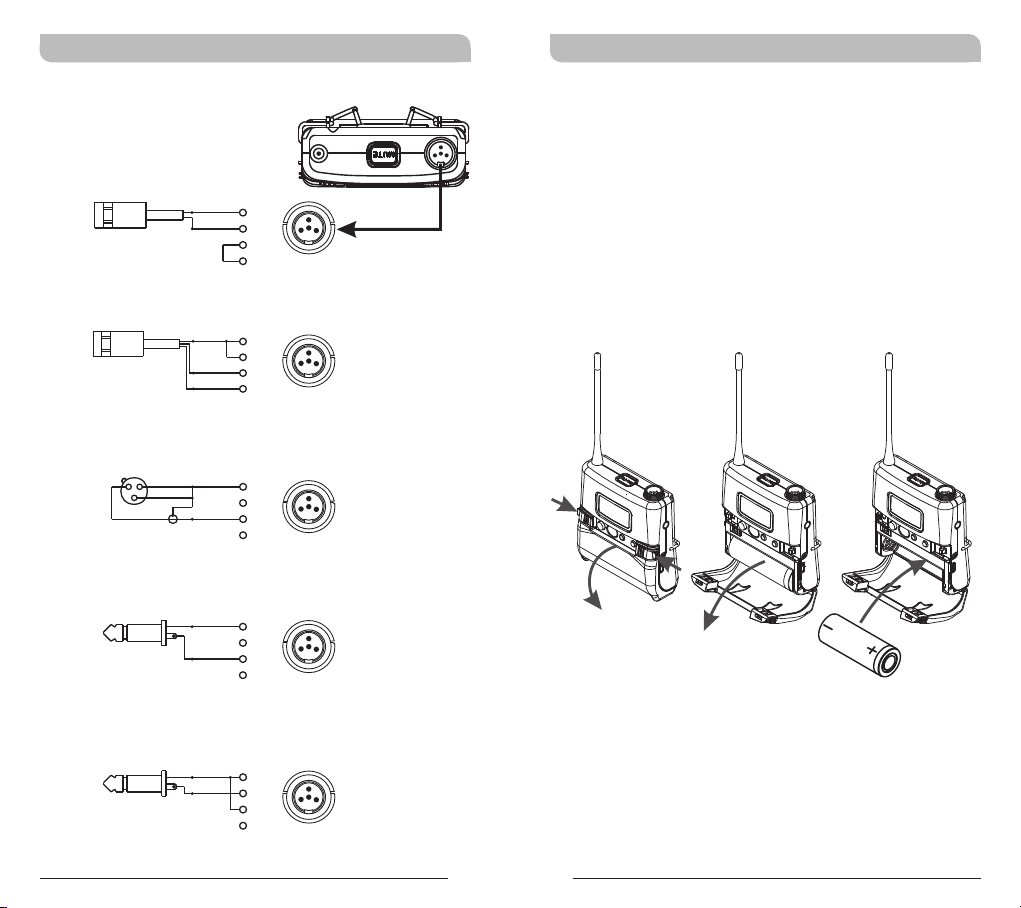
AF Input Connections
(1) 2-Wire Electret condenser
microphone Capsule
PIN
SHIELD
1
AUDIO
2
3
4
(2) 3-Wire Electret condenser microphone Capsule
PIN
SHIELD
1
2
AUDIO
3
BIAS
4
(3) Dynamic Microphone
2
1
3
SHIELD
AUDIO
PIN
1
2
3
4
(4) Electric Guitar
PIN
SHIELD
1
2
AUDIO
3
4
2
3
1
4
2
3
1
4
2
3
1
4
2
3
1
4
Battery Removal and Installation
! Pushing down both snap locks on the sides to
open battery compartment cover. Take out the
two batteries. (Figure 3)
! Insert one charged 18500 rechargeable battery
into the battery compartment according to the
correct polarity (- and +) as shown in (Figure 4)
. Then close the battery compartment cover
tightly.
(Figure 4)(Figure 3)
(5) Line-in (Impedance 8KΩ ATT. 10dB)
PIN
SHIELD
AUDIO
1
2
3
4
2
3
1
4
16
Caution
Remove the batteries if unused for a long period of
time to prevent battery leakage, corrosion and
causes possible damage to electronics.
17
Page 12
Rechargeable Wideband Bodypack Transmitter Rechargeable Wideband Bodypack Transmitter
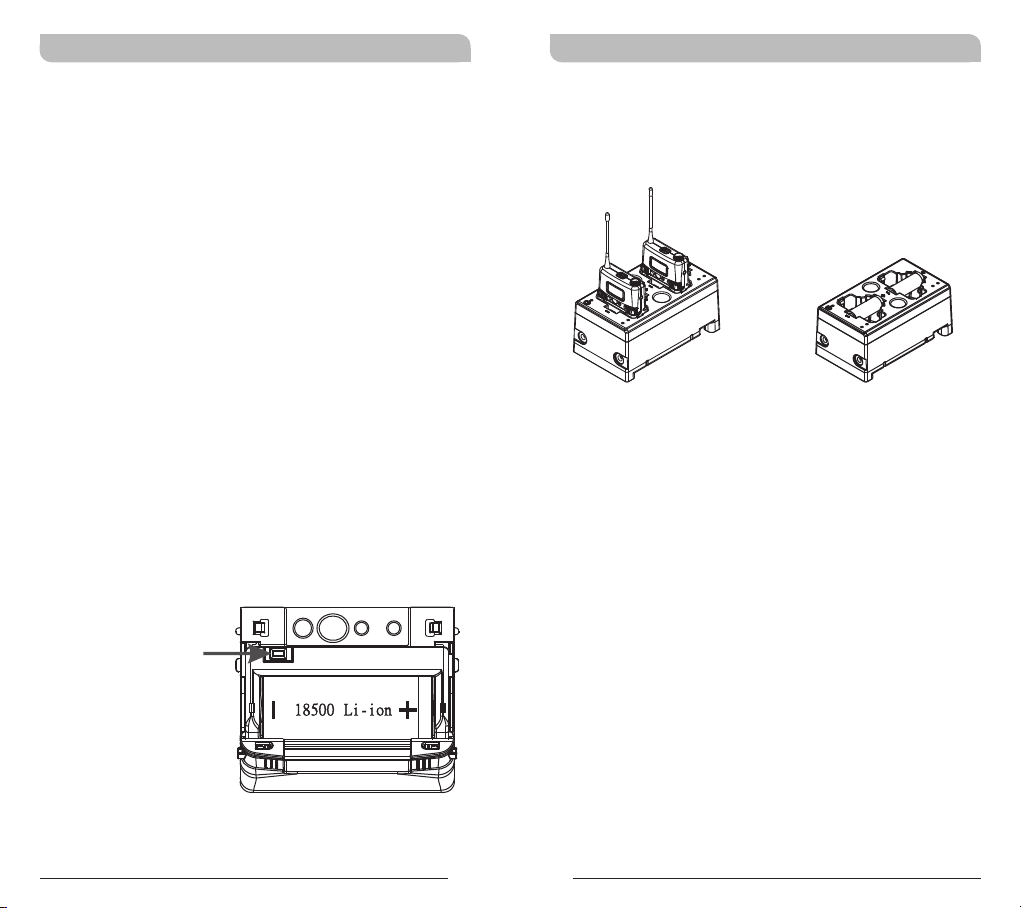
Caution
Note: Transmitter cannot be powered on with
charged battery.
Method 1:
a. Ensure battery is inserted correctly with + top
side.
b. If battery is inserted correctly it could be due
to self battery protection mechanism. Insert the
transmitter into the charger to re-charge for
10-20 seconds to wake-up the battery. It
should work.
c. If charger cannot be used, reverse the battery
insertion for 10-20 seconds, wake up the
battery with correct polarity. It should work.
Method 2:
a. Power off the transmitter before open the
hinged cover. Press battery protection circuitry
reset button once to wake-up battery. Power on
the transmitter.
MP-80 Battery Charger (Optional)
MP-80 Charger charges both transmitters and
18500 rechargeable batteries.
Transmitters Charging
18500 Charging
Battery Protection
Circuitry Reset Button
ON MODE
SET
18
19
Page 13

Rechargeable Wideband Bodypack Transmitter Rechargeable Wideband Bodypack Transmitter
Notes
1. Refer to actual product in the event of product
description discrepancy.
2. Frequency range and maximum deviation comply
with the regulations of different countries.
20
21
 Loading...