

Page 1
FCC Statement
Changes or modifications not expressly approved by the party responsible for compliance could void the user's
authority to operate the equipment.
This equipment has been tested and found to comply with the limits for a Class B digital device, pursuant to
Part 15 of the FCC Rules. These limits are designed to provide reasonable protection against harmful
interference in a residential installation. This equipment generates uses and can radiate radio frequency energy
and, if not installed and used in accordance with the instructions, may cause harmful interference to radio
communications. However, there is no guarantee that interference will not occur in a particular installation. If
this equipment does cause harmful interference to radio or television reception, which can be determined by
turning the equipment off and on, the user is encouraged to try to correct the interference by one or more of the
following measures:
-- Reorient or relocate the receiving antenna.
-- Increase the separation between the equipment and receiver.
-- Connect the equipment into an outlet on a circuit different from that to which the receiver is connected.
-- Consult the dealer or an experienced radio/TV technician for help
This device complies with part 15 of the FCC rules. Operation is subject to the following two conditions (1)this
device may not cause harmful interference, and (2) this device must accept any interference received, including
interference that may cause undesired operation.
www.minuswire.com
Support contact:
E-mail: [email protected]
MANUFACTURER
Dongguan Kantsang Electroacoustic Technology Co., Ltd.
Address: No.8, Lu Yi Yi Road, Tangxia, Dongguan, China
FCC ID: PAZMW-1100PROX
MADE IN CHINA
FCC ID: PAZMW-1100PROX-R
MW-1100ProX
MODEL: MW-1100ProX
ACTIVE NOISECANCELLING TRUE
WIRELESS STEREO EARBUDS
User Guide
Page 2
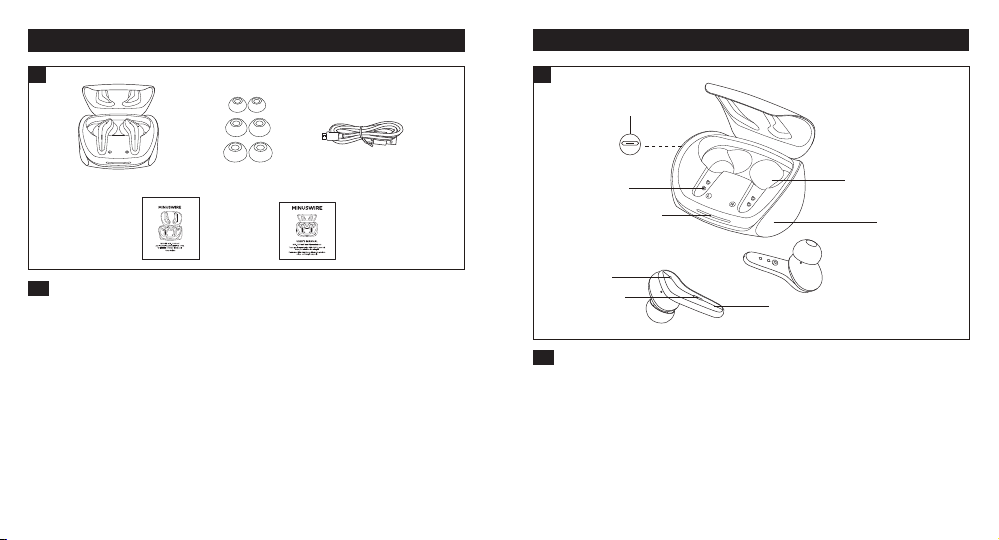
PACKAGE CONTENTS (Fig. 1)
1
① ②
PRODUCT DIAGRAM (Fig. 2)
③
2
②
④ ⑤
EN
Active Noise-Cancelling True Wireless Stereo Earbuds (MW-1100ProX)
①
6 x Ear Tips (two are equipped on the earbuds)
②
1 x USB Charging Cable
③
1 x User Manual
④
1 x Quick Start Guide
⑤
①
⑧
⑥
EN
Product Diagram
Charging Contacts
①
USB-C Charging Port
②
Charging Slot
③
Charging Indicators
④
③
④
⑦
⑤
Touch Sensor area
⑤
LED Indicator
⑥
Charging Case
⑦
Microphone
⑧
Page 3
EN
IMPORTANT SAFETY INSTRUCTIONS
Please read the instructions thoroughly before using this product and retain it
for future reference.
Hearing Safety
• Do not wear earbuds with high volume for a long time to avoid damaging
your hearing.
• Set the earbuds to low volume before you put them on, then increase the
volume gradually as per your preference.
• Do not set volume too high to stay aware of your surroundings.
• Please refer to local laws and regulations if you want to answer phone calls
via this device during driving.
• For your safety, avoid distraction from music or phone calls when you are
driving or doing other activities with potential dangers.
Warning: Please set the volume to proper level to avoid hearing damages.
Caution
• Do not expose this product to high temperatures.
• Do not immerse the earbuds into water or expose them to humidity for a
long time.
• Do not clean the product with detergent containing alcohol, ammonia,
benzene or abrasives.
• Avoid dropping.
• Place the earbuds back into the charging case when not in use and keep it
away from children and pets to avoid choking hazard.
• Unauthorized disassembly of any parts of this product is forbidden, which
01 02
may cause fire hazard, warranty voidance, and/or property loss.
• Close attention is needed when using near children.
• Keep the charging case away from water, rain or any other liquid.
• Don’t use the product in thunderstorm to avoid malfunction or electric shock.
• Always ask a professional technician or authorized personnel for repair.
This product contains lithium battery. Never expose it to excessive heat
such as direct sunlight or fire to avoid explosion.
HOW TO WEAR
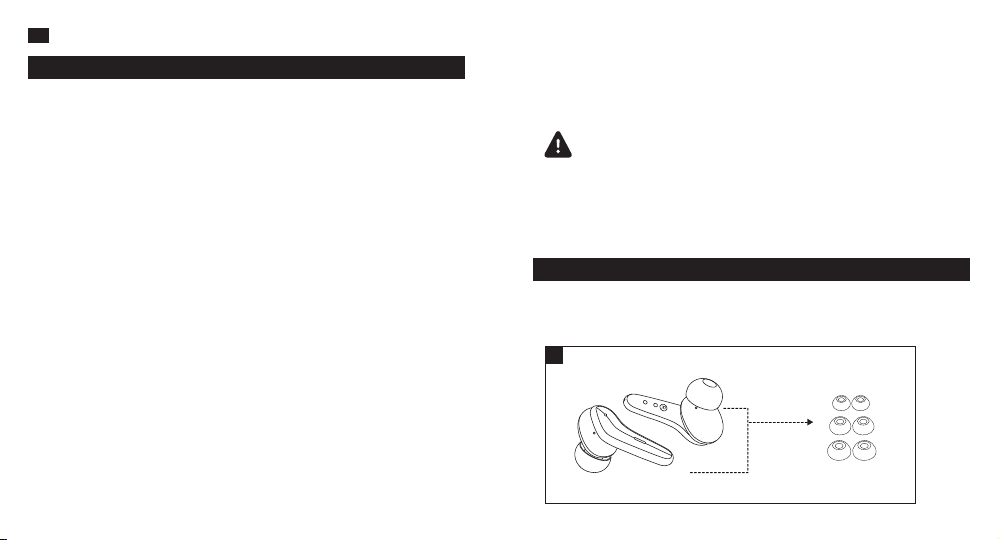
Choose the Right Tips (Fig. 3)
Ear tips with different sizes are included in the package, try all sizes and
choose the ones fitting you best.
3
Page 4
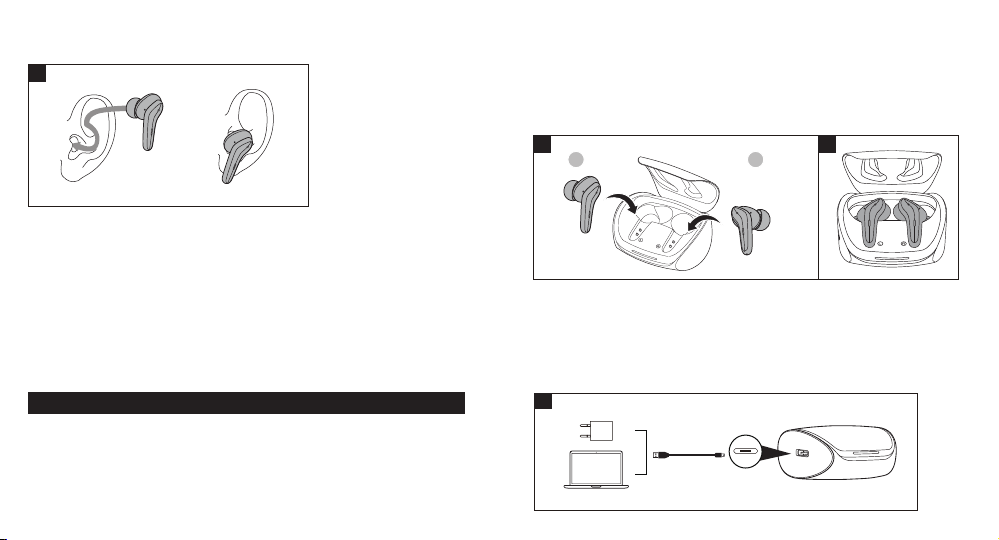
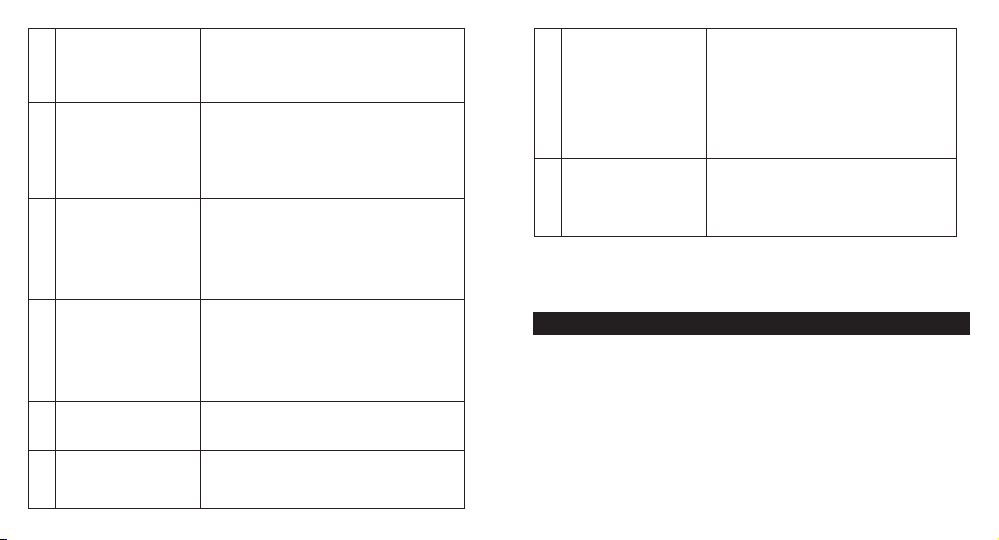
Wear the Earbuds (Fig. 4)
Please wear the earbuds as shown below.
4
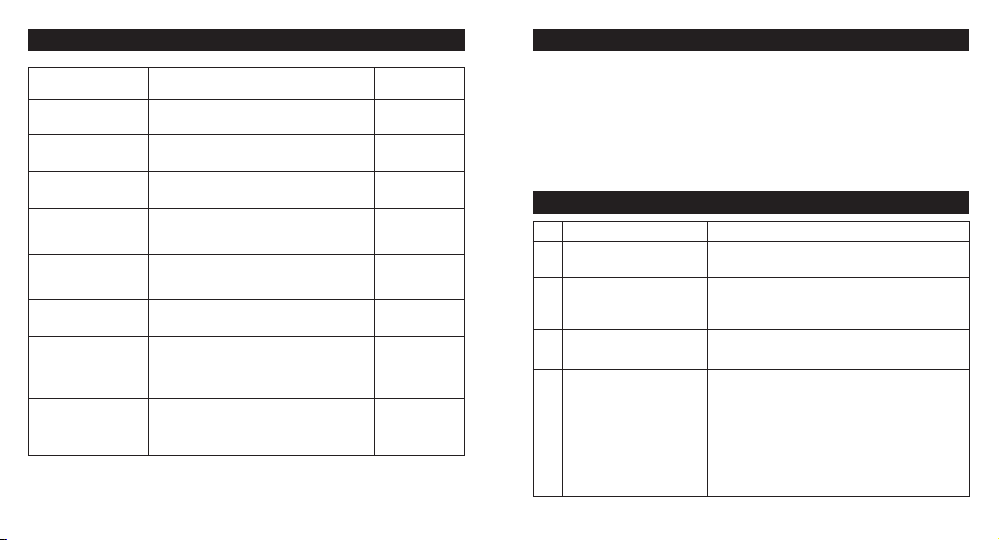
① ②
Pictures only for reference.
Note:
• Please fully charge the earbuds when using them for the first time.
• When battery is low, a “Battery Low Please Recharge” voice prompt will be
heard (if you are wearing the earbuds). Please charge it in time or the earbuds
will turn off automatically around 10 minutes later.
• Charge the earbuds at least once every 3 months when not using for a long time.
5 6
L R
Bluetooth Caution
• When the device is connected wirelessly to another device, place the two
devices close to each other to achieve their normal functionalities and avoid
possible signal interference.
• When using a wireless connection, make sure there are no obstacles
between the two devices. Obstacles including walls and fences may shorten
the effective range.
Charging the Charging Case (Fig. 7)
1. Connect the charging port with any USB charging adapter or active
computer USB port (Fig. 7).
2. The four step charging bar will light up progressively.
Note: Unplug the charging cable (timely) when fully charged.
USING YOUR EARBUDS
7
Charging
Charging the Earbuds (Fig. 5) (Fig. 6)
1. Put the earbuds into the charging case as per the L (left) and R (right) marks
(Fig. 5).
2. Cover the lid and charging will start automatically (Fig. 6).
03 04
Page 5
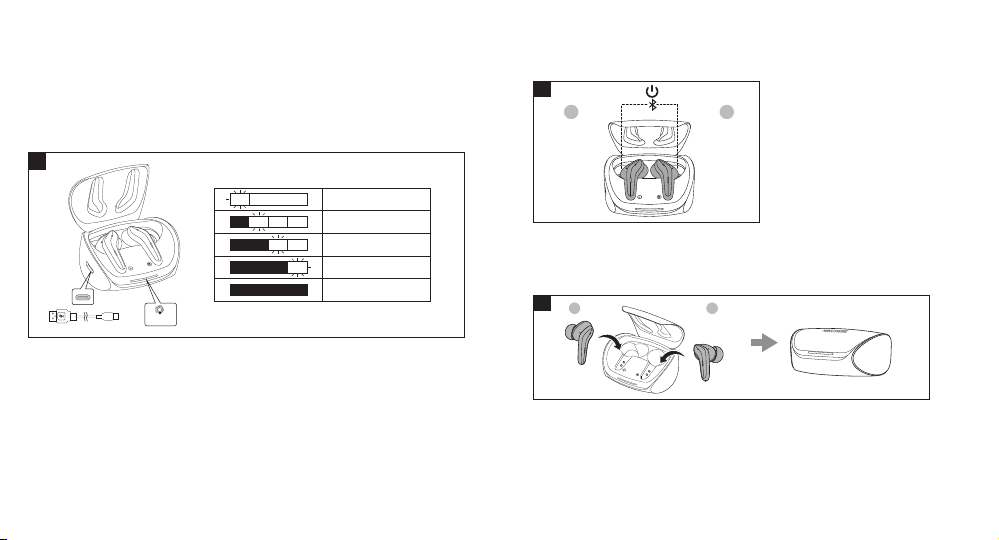
Charging (Fig. 8)
Charging the earphones
Earphone light on during charging
100% Full charged, earphone lights go out
Charging the charging box
8
Power On (Fig. 9)
Uncover the lid, the earbuds will power on automatically. The LED indicators
on both earbuds will light up red and then blue.
9
L R
<25%
25%-50%
50%-75%
75%-100%
100%
Twinkle
05 06
Power Off (Fig. 10)
Put the earbuds into the charging case and cover the lid. The earbuds will
turn off automatically.
10
L R
• You can use one earbud or both earbuds as per your preference. Please
refer to the corresponding pairing instructions.
• Before pairing, please turn off other Bluetooth devices and place the
device to be connected close to the earbuds.
• When the earbuds are disconnected from your device for more than 5 minutes,
they will turn off automatically.
Page 6
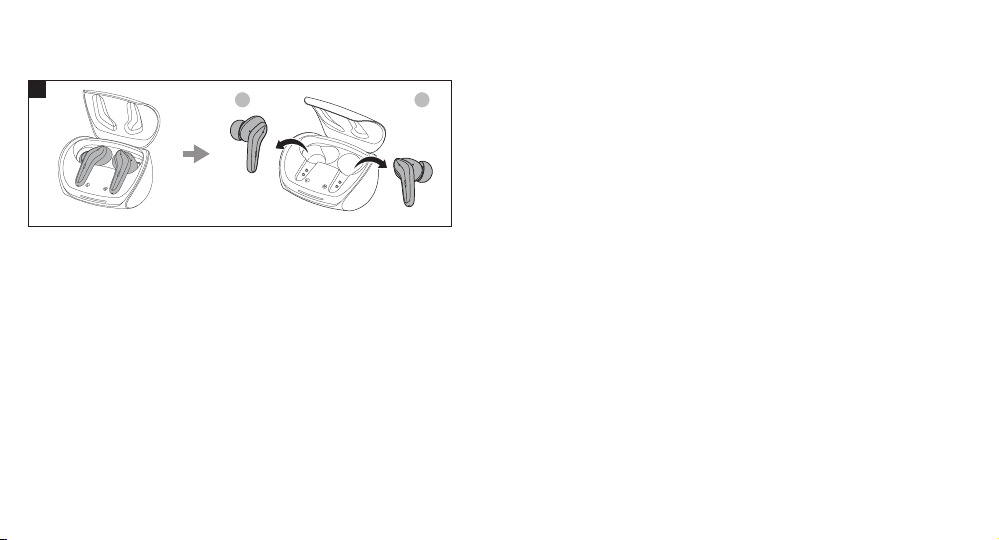
Pairing (Fig. 11)
If keep the lid open but there is no Bluetooth connection is made for 5 minutes.
The earbuds will turn off automatically.
11
Couple Earbuds Mode
1. Uncover the lid and the earbuds will turn on automatically. They will connect
with each other. Once connected, The LED indicator on Right earbud will flash
blue and red alternatively. The LED indicator on Left earbud will flash blue
intermittently indicating the earbuds are in pairing mode now.
2. Turn on the Bluetooth function on your device and search for nearby devices.
Find “MW-1100ProX” in the searching results, tap on the name to connect.
3. Once connected, the LED indicators on both earbuds be turned blue
intermittently.
4. Take out both earbuds from the charging case. The LED indicators on both
earbuds be turned off.
07 08
L R
Note:
• If the earbuds failed to pair with each other, please disconnect the Bluetooth
connection with your device, put them back into the charging case, close the lid
then open it and take out the earbuds to pair again.
• It is not recommended to wear the two earbuds on different people. If needed,
please keep the 2 earbuds within 3 meters / 9.8 feet in couple earbuds mode.
Single Earbud Mode
1. Repeat the steps correspond to Couple Earbuds Mode. Take out one earbud
from the charging case, and make sure the other one is placed in the charging
case.
Note:
If you want to change to couple mode, simply take out the other earbud from the
charging case, they will pair with each other automatically.
If you want to swap to another earbud, simply take out the other earbud from the
charging case and put the earbud just being used back to charging case.
Note:
If you want to pair the earbuds with another device when you have already paired
them with a device, deactivate the Bluetooth function on the paired device or
clear “MW-1100ProX” from its Bluetooth list.
Page 7
Function
Answer Phone Call
Hang up Phone Call
Reject Incoming Call
Previous Track (Not
available when use in
single earbud mode)
Next Track (Not
available when use in
single earbud mode)
Play / Pause
ANC mode / Ambient
mode (Not available
when use in single
earbud mode)
Activate Siri / Google
Assistant
OPERATION AND FUNCTIONS
Operation
Press the touch sensor area on either of the
earbuds 1 times
Press the touch sensor area on either of the
earbuds 2 times
Long press the touch sensor area on either
of the earbuds for 2 seconds
Press the touch sensor area on the left
earbud 2 times
Press the touch sensor area on the right
earbud 2 times
Press the touch sensor area on either of the
earbuds once
Long Press the touch senor area for 2
seconds, (left / right earphone) to toggle
between ANC on, Ambient Sound, and
ANC off
When the earbuds are paired with your
device successfully, press 3 times the touch
sensor area (left / right earphone)
Voice Prompt
from earbuds
none
none
Call Rejected
none
none
none
ANC ON >
Ambient
Sound > ANC Off
none
1. Clean the earbuds and the charging case on a regular basis.
2. Use dry and soft cotton cloth to wipe the unit.
Note: Do not insert anything into the product.
3. Keep away from sharp objects to avoid scratches.
4. Put the unit in a dry and shady place if it is to be idle for a long time.
5. Do not clean the product with detergent or chemicals.
No. Problem Solution
1
2
3
4
CLEANING AND MAINTENANCE
TROUBLESHOOTING
Failed to turn on the
earbuds
Failed to charge the
earbuds
Can’t charge the
charging case
Can’t find
“MW-1100ProX”
in the Bluetooth device
list
Earbuds low battery, please charge them
• Place the earbuds into the charging
case properly
• Make sure the charging case is charged fully
Make sure the charging cable is intact
and plugged in properly
The earbuds reconnected with previously
paired device automatically:
• Deactivate the Bluetooth function of
previously paired device or clear
“MW-1100ProX”
from its Bluetooth device list, and then
search again
09 10
Page 8
5
Failed to pair the
earbuds with your
device
6
No sound in one of the
earbuds in couple
earbuds mode
7
Poor sound quality
• Turn on the device and activate its
Bluetooth function before pairing
• Bring the earbuds into pairing mode as
instructed in the “Pairing” section
Place both earbuds back to the charging
case then take them out, they will pair
with each other automatically. If pairing
failed, restore them back to the factory
settings as instructed in the “Clear Pairing
List” section
• Wear the earbuds properly and keep
them close to each other
• Place the connected device close to the
earbuds or remove the obstacles
between them
• Clear the debris on the earbuds
Noise-Cancelling
11
doesn’t work
12
Touch sensor area of the
earbuds is unresponsive
• Make sure use in couple earbud mode.
• Wear the earbuds properly and keep
them close to each other
• Place the connected device close to
the earbuds or remove the obstacles
between them
Clear the debris on the earbuds
Place the two earbuds into the charging
case and cover the lid, disconnect the
Bluetooth connection. Uncover the lid to
turn on the earbuds and pair again
• The effective distance may shorten with
8
Unstable connection
Can’t hear the other
9
party during a phone call
The other party can’t
10
hear your voice during a
phone call
11 12
obstacles in the way
• Turn off other Bluetooth devices to
decrease the interference
Set the volume to higher level
Free the built-in microphone of any covers
If any problems occur, please contact the Minuswire Customer Care Centre
in your country via the contact information listed in this User Guide.
WARRANTY AND SERVICE
 Loading...