

Page 1
FrameMaker Ver.5.5E(PC) Di250 GENERAL, MECHANICAL/ELECTRICAL
99.01.14
Di250
GENERAL
Page 2

FrameMaker Ver.5.5E(PC) Di250 GENERAL, MECHANICAL/ELECTRICAL
99.01.14
CONTENTS
1. SAFETY INFORMATION .................................................................................G-1
2. SPECIFICATIONS ...........................................................................................G-8
3. PRECAUTIONS FOR INSTALLATION ........... .................................................G-10
4. PRECAUTIONS FOR USE ..............................................................................G-11
5. HANDLING OF THE CONSUMABLES ....................................... ............... .....G-12
6. OTHER PRECAUTIONS .................................................................................G-12
7. SYSTEM OPTIONS .........................................................................................G-13
i
Page 3
FrameMaker Ver.5.5E(PC) Di250 GENERAL, MECHANICAL/ELECTRICAL
99.01.14
1170SBG0100A
1 SAFETY INFORMATION
Laser Safety
This is a digital machine which prints by means of a laser. There is no possibility of danger
from the laser, provided the machine is operated according to the instructions in this
manual.
Since radiation emitted by the laser is completely confined within protective housing, the
laser beam cannot escape from the machine during any phase of user operation.
This machine is certified as a Class 1 product. This means the machine does not produce
hazardous laser radiation.
CAUTION: The use of controls, adjustments or performance of procedures
other than those specified in this manual may result in hazardous radiation
exposure. Because of this, Minolta strongly recommends that you operate
your copy machine onl y as described in this documentation.
Internal Laser Radiation
Maximum Average Radiation Power: 36.7µW at laser aperture of the print head unit
Wavelength: 770-810nm
This product employs a Class
The Laser Diode and Scanning Polygon Mirror are incorporated in the print head unit.
The print head unit is NOT A FIELD SERVICE ITEM.
Therefore, the print head unit should not be opened under any circumstances.
III
b Laser Diode that emits an invisible laser beam.
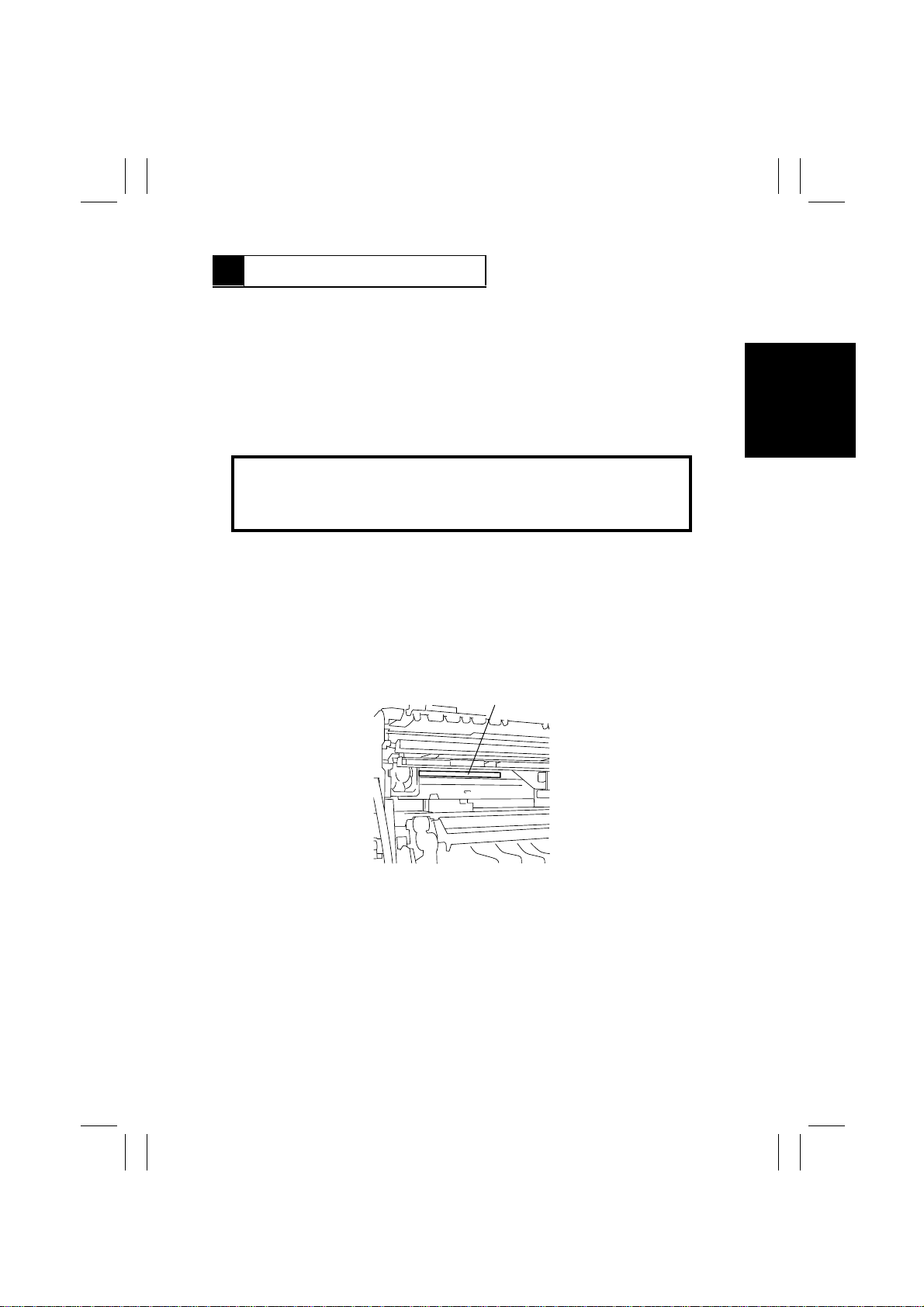
Laser Aperture of the Print Head Unit
1166O263AA
This figure shows the view inside the Right Side Door with the
Imaging Unit removed.
For United States
CDRH regulation
This copier is certified as a Class 1 Laser product under the Radiation Performance
Standard according to the Food, Drug and Cosmetic Act of 1990. Compliance is mandatory
for Laser products marketed in the United States and is reported to the Center for Devices
and Radiological Health (CDRH) of the U.S. Food and Drug Administration of the U.S.
Department of Health and Human Services (DHHS). This means that the device does not
produce hazardous laser radiation.
G-1
Page 4

FrameMaker Ver.5.5E(PC) Di250 GENERAL, MECHANICAL/ELECTRICAL
99.01.14
The label shown on page G-3 indicates compliance with the CDRH regulations and must
be attached to laser products marketed in the United States.
CAUTION:
specified in this manual may result in hazardous radiation exposure.
This is a semiconductor laser. The maximum power of the laser diode is 5mW and the
wavelength is 770-810nm.
For Europe
CAUTION:
specified in this manual may result in hazardous radiation exposure.
This is a semiconductor laser. The maximum power of the laser diode is 5mW and the
wavelength is 770-810nm.
For Denmark
ADVARSEL
Usynlig laserstråling ved åbning, når sikkerhedsafbrydere er ude af funktion.
Undgå udsættelse for stråling.
Klasse 1 laser produkt der opfylder IEC60825 sikkerheds kravene.
For Finland
LUOKAN 1 LASERLAITE
VAROITUS
Laitteen käyttäminen muulla kuin tässä käyttöohjeessa mainitulla tav alla saattaa alt istaa
käyttäjän turvallisuusluokan 1 ylittävälle näkymättömälle lasersäteilylle.
Use of controls, adjustments or performance of procedures other than those
Use of controls, adjustments or performance of procedures other than those
VARO
Avattaessa ja suojalukitus ohitettaessa olet alttiina näkymättomälle lasersäteilylle. Älä
katso säteeseen.
For Sweden
KLASS 1 LASER APPARAT
VARNING
Om apparaten används på annat sätt än i denna bruksanvisning specificerats, kan
användaren utsättas för osynlig laserstrålning, som överskrider gränsen för laserklass 1.
VARNING
Osynlig laserstråining när denna del är öppnad och spärren är urkopplad. Betrakta ej
stråien.
G-2
Page 5
FrameMaker Ver.5.5E(PC) Di250 GENERAL, MECHANICAL/ELECTRICAL
CLASS 1 LASER PRODUCT
LASER KLASSE
1 PRODUKT
MINOLTA CO., LTD
2, Higashiakatsuchi, Yawata-cho, Toyokawa-shi
Aichi-ken 442-8585, Japan
MANUFACTURED:
THIS PRODUCT COMPLIES WITH 21 CFR
CHAPTER I, SUBCHAPTER J.
0946-7101-14
99.01.14
For Norway
ADVERSEL
Dersom apparatet brukes på annen måte enn spesifisert i denne bruksanvisning, kan
brukeren utsettes för unsynlig laserstrålning, som overskrider grensen for laser klass 1.
Dette en halveder laser. Maksimal effekt till laserdiode er 5mW og bφlgelengde er 770810nm.
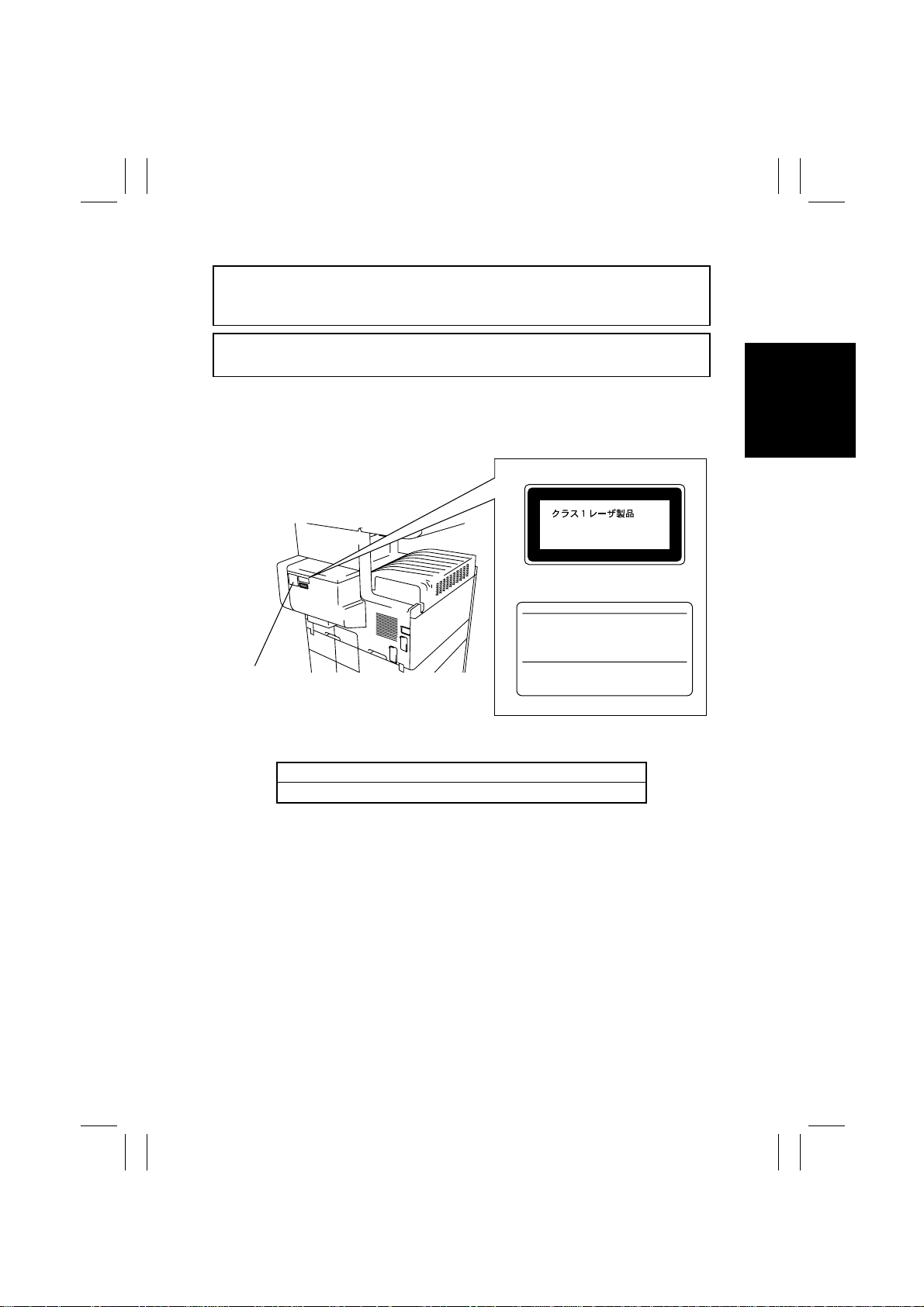
Laser Safety Label
A laser safety label is attached to the outside of the copy machine as shown below.
Laser safety label
For Europe
For United States
Manufacturer’s
Name Plate
1166O261DA
The Manufacturer’s Name Plate is affixed at the position illustrated above.
Please write down the Model Name and Serial No. of your copier here.
Model:
Serial No.:
G-3
1166O248AA
Page 6
FrameMaker Ver.5.5E(PC) Di250 GENERAL, MECHANICAL/ELECTRICAL
99.01.14
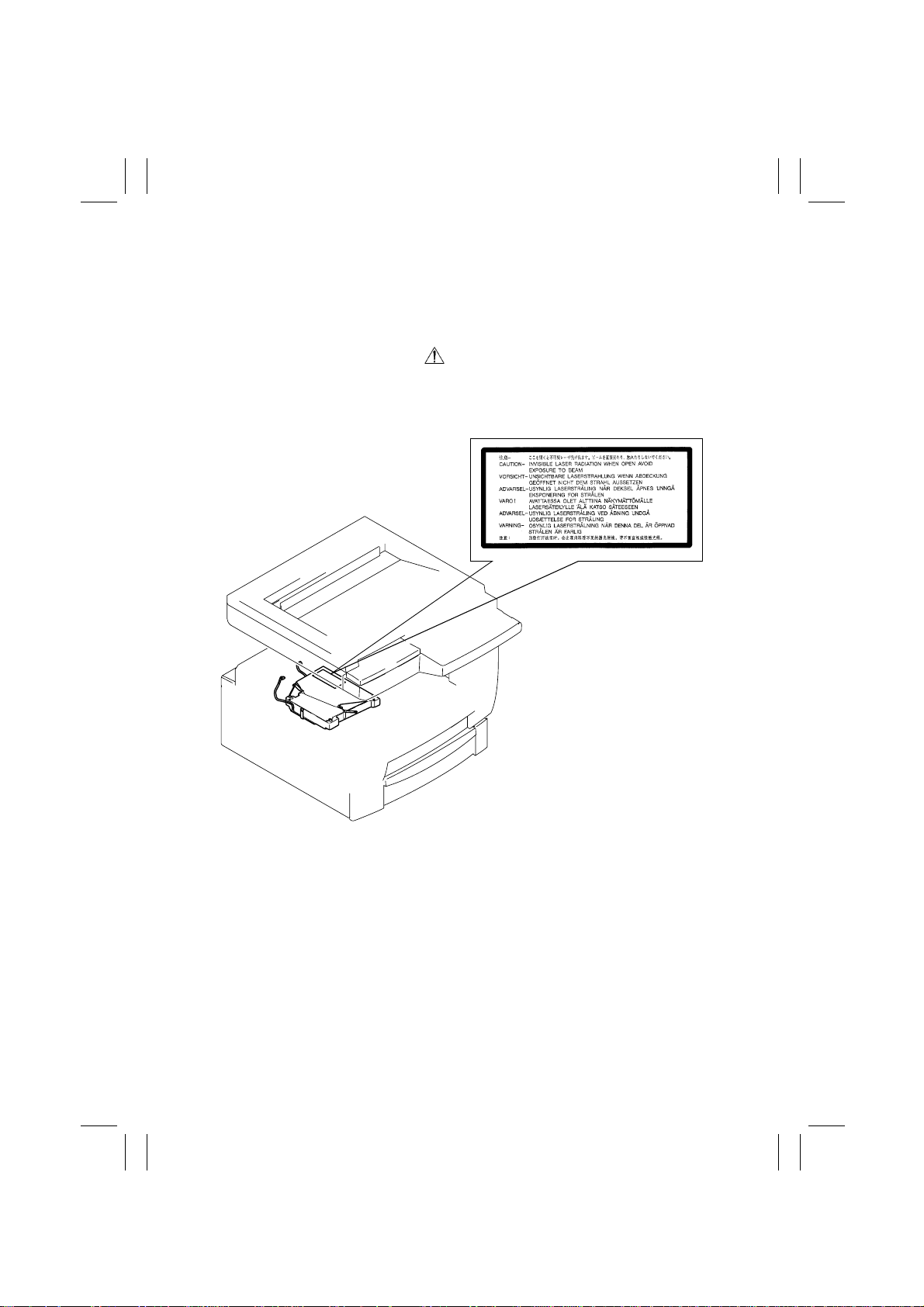
Label inside copy machine
The following laser safety label will be attached inside the copy machine as shown below.
Please read the following for your own protection.
Caution
Opening the cover indicated by the Caution label may e xpose you to harmful laser radiation
which could cause damage or loss of eyesight. Do not open the cover when the power is
on.
1166O234AA
G-4
Page 7

FrameMaker Ver.5.5E(PC) Di250 GENERAL, MECHANICAL/ELECTRICAL
99.01.14
ALL Areas
Germany only
Denmark only
Norway only
Danger of explosion if battery is incorrectly replaced.
CAUTION
Replace only with the same or equivalent type
recommended by the manufacturer.
Dispose of used batteries according
to the manufacturer’s instructions.
VORSICHT!
Explosinsgefahr bei unsachgemäßen austausch der
batterie. Ersatz nur durch denselben oder einen vom hersteller
empfohlenen ähnlichen typ. Entsorgung gebrauchter batterien
nach angaben des herstellers.
ADVARSEL!
Lithiumbatteri - Eksplosionsfare ved fejlagtig håndtering
Udskiftning må kun ske med batteri
af samme fabrikat og type.
Levér det brugte batteri tilbage til leverandøren.
ADVARSEL
Eksplosjonsfare ved feilaktig skif te av batteri.
Benytt samme batteritype eller en tilsvarende
type anbefalt av apparatfabrikanten.
Brukte batterier kasseres i henhold til fabrikantens
instruksjoner.
Sweden only
Finland only
Explosionsfara vid felaktigt batteriby te.
VARNING
Använd samma batterityp eller en ekvivalent
typ som rekommenderas av apparattillverkaren.
Kassera använt batteri enligt fabrikantens
instruktion.
VAROlTUS
Paristo voi räjähtää, los se on virheellisesti asennettu.
Vaihda paristo ainoastaan laitevalmistajan suosittelemaan
tyyppiin. Hävitä Käytetty paristo valmistajan ohjeiden
mukaisesti.
G-5
Page 8

FrameMaker Ver.5.5E(PC) Di250 GENERAL, MECHANICAL/ELECTRICAL
99.01.14
ALL Areas
“Replace only with the same or equivalent type recommended by the manufacturer.
Dispose of used IC Package according to the manufacturer’s instructions.”
Germany only
⇒
”Austausch nur durch denselben oder einen vom Hersteller empfohlenen,
gleichwertigen typ. Entsorgung gebrauchter Batterien nach Angaben des Herstellers.
CAUTION
VORSICHT!
G-6
Page 9

FrameMaker Ver.5.5E(PC) Di250 GENERAL, MECHANICAL/ELECTRICAL
99.01.14
Service Precautions
(1) Precautions
Refer to DISASSEMBLY/CLEANING for the Disassembly procedure.
1. When unplugging connectors on the P.W.B.s themselves, always make sure the power
is OFF first. Be sure to unplug the copier before disassembling and cleaning.
2. Always unplug connectors by holding the connector housing. Pulling on the wires can
lead to problems with poor contact.
3. It is recommended that a body ground not be used when carrying out any troubleshooting procedure. Be sure to ground DC lines to a ground test point on the P.W.B.
(2) At Replacement/Adjustment/Cleaning
1. Be sure to handle the Fusing Unit carefully. It remains hot a while after the copier is
turned off.
2. Do not disassemble the Imaging Cartridge or Print Head Unit.
3. Do not expose the PC Drum of the Imaging Cartridge to direct sunlight or to room lighting for more than 5 minutes.
4. Turn off the power bef ore removing the Print Head Unit to protect the e y es from possib le
exposure to the laser beam.
5. Use only a Fuse of the indicated rating.
(3) During Operation
1. Keep your hands, clothing, etc. well away from operating or rotating parts.
2. Never touch the terminals of electrical parts or high voltage parts.
3. This copier uses an invisible laser beam. To pre vent a laser beam leak, the copier performs a trial run to make sure the covers are in position.
Handling the P.W.B.
Observe the following precautions when handling a P.W.B. with ICs.
(1) During Transportation/Storage
1. During transport and storage, P.W.B.s should be kept in conductive bags or on mats
and not taken out unless absolutely necessary.
2. P.W.B.s should be stored in a place where direct sunlight does not strike them.
3. Do not touch IC terminals with your hands.
(2) At Replacement
1. Before removing connectors from a P.W .B., make sure the copier has been unplugged.
2. When P.W .B .s are taken out of their conductiv e bags or off their mats , hold them by their
edges to avoid touching the terminals or the patterned surfaces.
3. Before installing connectors on a P.W.B., make sure the copier has been unplugged.
G-7
Page 10
FrameMaker Ver.5.5E(PC) Di250 GENERAL, MECHANICAL/ELECTRICAL
99.01.14
1170SBG0200A
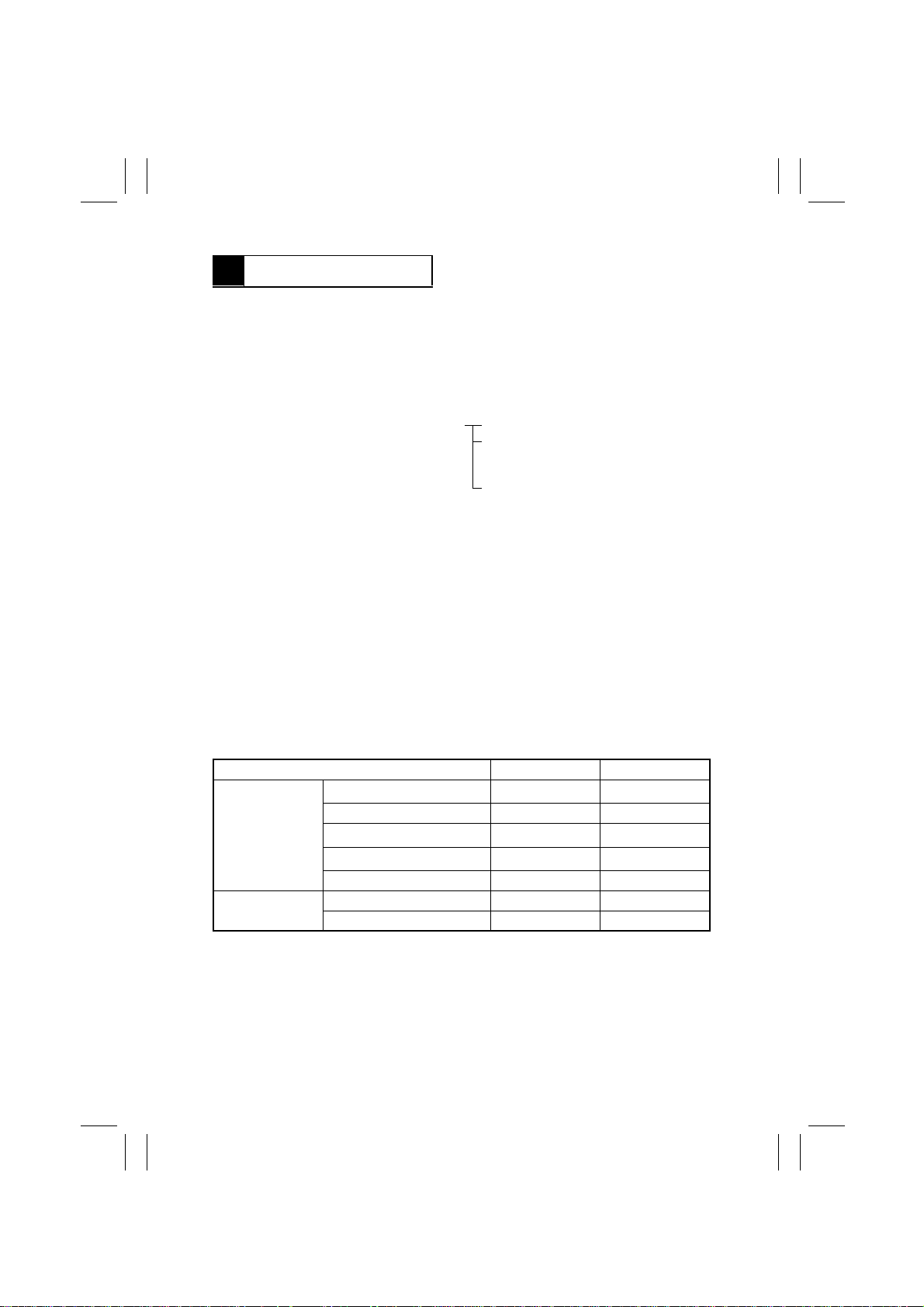
2 SPECIFICATIONS
TYPE : Console/Desktop Type
PHOT OCONDUCTOR : Organic Photoconductor
COPYING SYSTEM : Electrostatic Dry Powdered Image Transfer to Plain Paper
ORIGINAL SCANNING
RESOLUTION
PAPER FEEDING
SYSTEM
EXPOSURE SYSTEM : Mirror Scanning, Slit Exposure
DEVELOPING SYSTEM : MT-HG System
CHARGING SYSTEM : Comb Electrode (1) DC Negative Corona with Scorotron
IMAGE TRANSFER : Roller Image Transfer
PAPER SEPARATING
SYSTEM
FUSING SYSTEM : Heat Roller
PAPER DISCHARGING
SYSTEM
MAXIMUM ORIGINAL
SIZE
with a Laser
: 600 dpi
: 3-way system Manual Feed Tray: Single sheet feeding
Multi-Purpose (MP) Cassette:
Plain paper: Approx. 250 sheets
Special paper: Approx. 20 sheets
500-Sheet Cassette: Approx. 500 sheets
System
: Paper Separator Fingers and Charge Neutralizing Plate
: Charge Neutralizing Brush
: A3L, 11” × 17”L
COPY MEDIUM
Paper Source MP Cassette Manual Feed Tray
2
Plain paper (60 to 90 g/m
Transparencies
Medium
Dimensions
❍
: Permissible−: Not permissible
MULTIPLE COPIES : 1 to 99
WARMING-UP TIME : 60 sec. or less with room temperature of 23°C and rated
FIRST COPY TIME : 5.8 sec. (A4C, MP Cassette, full size mode)
Thick paper (91 to 157 g/m
Postcards (190 g/m
Recycled paper
Maximum (Width × Length) 297 × 432 mm 297 × 432 mm
Minimum (Width × Length) 90 × 140 mm 90 × 140 mm
power voltage
5.9 sec. (8-1/2” × 11”C, MP Cassette, full size mode)
)
2
)
2
)
❍❍
❍❍
❍❍
❍❍
❍❍
G-8
Page 11
FrameMaker Ver.5.5E(PC) Di250 GENERAL, MECHANICAL/ELECTRICAL
99.01.14
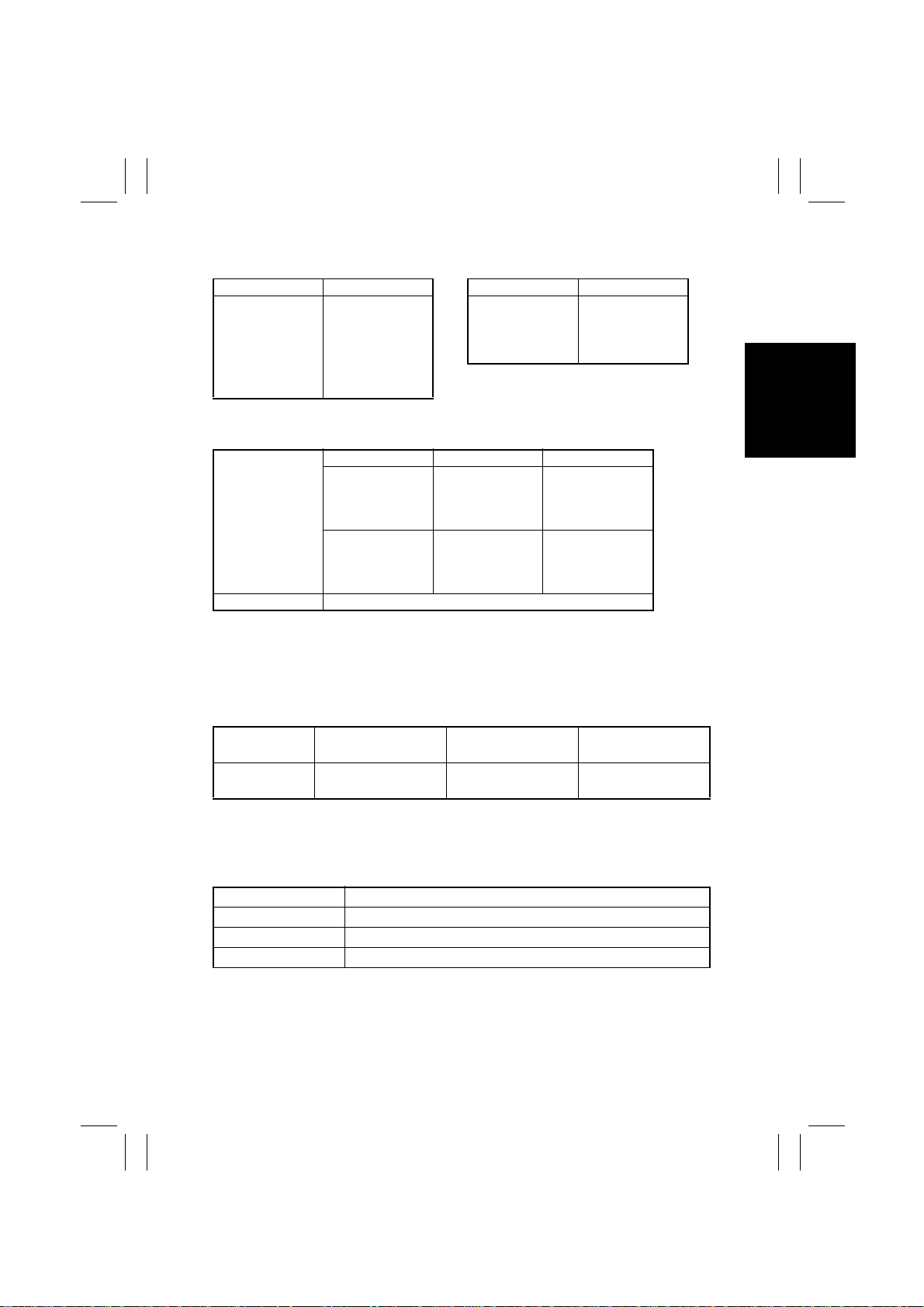
CONTINUOUS COPY SPEED (copies/min.)
- Metric - - Inch Size Speed Size Speed
A3L 14 11” × 17”L 14
B4L 16 8-1/2” × 14”L 17
A4L 19 8-1/2” × 11”L 20
A4C 25 8-1/2” × 11”C 25
B5L 22
B5C 29
ZOOM RATIOS
- Metric - - Inch -
Full Size
Enlargement
Fixed
Reduction
Variable 25% to 400% (in 0.1% increments)
×
1.000
×
2.000
×
1.414
×
1.224
×
1.154
×
0.866
×
0.816
×
0.707
×
0.500
×
1.000
×
2.000
×
1.545
×
1.294
×
1.214
×
0.785
×
0.733
×
0.647
×
0.500
LENS : Through Lens (F = 4.0, f = 62 mm)
EXPOSURE LAMP : Fluorescent Lamp
FUSING TEMPERATURE : 190°C
POWER/CURRENT CONSUMPTION (Copier Only)
Exposure Lamp
(Rating)
24V
20W
POWER
REQUIREMENTS
ENVIRONMENTAL CONDITIONS
Temperature 10 to 32°C with a fluctuation of 10°C or less per hour
Humidity 15 to 85% RH with a fluctuation of 10% RH or less per hour
Ambient Illumination 3,000 lux or less
Levelness 1° (1.75 mm/100 mm)
DIMENSIONS : Width ... 566 mm, 22-1/4”
WEIGHT : 53.5 kg, 118 lbs.
Fusing Roller Heater
Lamp (Rating)
660W 850W
: 120V, 230V, 50/60Hz
Depth ... 707 mm, 27-3/4”
Height ... 635 mm, 25”
Max. Power Consump-
tion (full system)
Max. Current Con-
sumption (full system)
120V, 8A
230V, 4A
G-9
Page 12

FrameMaker Ver.5.5E(PC) Di250 GENERAL, MECHANICAL/ELECTRICAL
99.01.14
1170SBG0300A
3 PRECAUTIONS FOR INSTALLATION
Installation Site
To ensure safety and utmost performance of the copier, the copier should NOT be used in a
place:
•
Where it will be subjected to extremely high or low temperature or humidity.
•
Which is exposed to direct sunlight.
•
Which is in the direct air stream of an air conditioner, heater or ventilator.
•
Which puts the operator in the direct stream of exhaust from the copier.
•
Which has poor ventilation.
•
Where ammonia gas might be generated.
•
Which does not have a stable, level floor.
•
Where it will be subjected to sudden fluctuations in either temperature or humidity. If a
cold room is quickly heated, condensation forms inside the copier, resulting in blank
spots in the copy.
•
Which is near any kind of heating device.
•
Where it may be splashed with water.
•
Which is dirty or where it will receive undue vibration.
•
Which is near volatile flammables or curtains.
Power Source
Use an outlet with a capacity of 120V/8A, or 220V to 240V/4A or more.
•
If any other electrical equipment is sourced from the same power outlet, make sure that
the capacity of the outlet is not exceeded.
•
Use a power source with little voltage fluctuation.
•
Never connect by means of a multiple socket any other appliances or machines to the
outlet being used for the copier.
•
Make the following checks at frequent intervals:
✽
Is the power plug abnormally hot?
✽
Are there any cracks or scrapes in the cord?
✽
Has the power plug been inserted fully into the outlet?
✽
Does something, including the copier itself, ride on the power cord?
•
Ensure that the copier does not ride on the power cord or communications cable of other
electrical equipment, and that it does not become wedged int o or underneath the mechanism.
Grounding
To prevent receiving electrical shocks in the case of electrical leakage, always ground the
copier.
•
Connect the ground wire to:
✽
The ground terminal of the outlet.
✽
A grounding contact which complies with the local electrical standards.
•
Never connect the ground wire to a gas pipe, the ground wire for a telephone, or a water
pipe.
G-10
Page 13

FrameMaker Ver.5.5E(PC) Di250 GENERAL, MECHANICAL/ELECTRICAL
99.01.14
1170SBG0400A
4 PRECAUTIONS FOR USE
To ensure that the copier is used in an optimum condition, observe the following precautions.
•
Never place a heavy object on the copier or subject the copier to shocks.
•
Insert the power plug all the way into the outlet.
•
Do not attempt to remove any panel or cover which is secured while the copier is making
copies.
•
Do not turn OFF the Power Switch while the copier is making copies.
•
Provide good ventilation when making a large number of copies continuously.
•
Never use flammable sprays near the copier.
•
If the copier becomes inordinately hot or produces abnormal noise, turn it OFF and
unplug it.
•
Do not turn ON the Power Switch at the same time when you plug the pow er cord into the
outlet.
•
When unplugging the power cord, do not pull on the cord; hold the plug and pull it out.
•
Do not bring any magnetized object near the copier.
•
Do not place a vase or vessel containing water on the copier.
•
Be sure to turn OFF the Power Switch at the end of the workday or upon power failure.
•
Use care not to drop paper clips, staples, or other small pieces of metal into the copier.
Operating Environment
The operating environmental requirements of the copier are as follows:
•
Temperature: 10°C to 32°C with a fluctuation of 10°C per hour
•
Humidity: 15% to 85% RH with a fluctuation of 10% RH per hour
Power Requirements
The power source voltage requirements are as follows:
•
Voltage Fluctuation: AC120/230V
±10% (Copying performance assured)
+10%
(Paper feeding performance assured)
-15%
•
Frequency Fluctuation: 50/60 Hz ±0.3%
G-11
Page 14

FrameMaker Ver.5.5E(PC) Di250 GENERAL, MECHANICAL/ELECTRICAL
99.01.14
1170SBG0500A
5 HANDLING OF THE CONSUMABLES
Before using any consumable, always read the label on the container carefully.
•
Use the right toner. The applicable copier model name is indicated on the toner bottle.
•
Paper is easily damaged by dampness. To prevent absorption of moisture, store paper,
which has been removed from its wrapper but not loaded into the drawer, in a sealed
plastic bag in a cool, dark place.
•
Keep consumables out of the reach of children.
•
Do not touch the PC Drum with bare hands.
•
Store the paper, toner, and other consumables in a place free from direct sunlight and
away from any heating apparatus.
•
The same sized paper is of two kinds, short grain and long grain. Short grain paper
should only be fed through the copier crosswise, long grain paper should only be fed
lengthwise.
•
If your hands become soiled with toner, wash them with soap and water immediately.
•
Do not throw away any used consumables (PC Drum, starter, toner, etc.). They are to be
collected.
NOTE
Do not burn, bury in the ground, or throw into the water any consumables (PC Drum,
starter, toner, etc.).
1170SBG0600A
6 OTHE R PRECAUTIONS
The Print Head Unit of this copier uses a laser diode that emits a laser beam. Use the following precautions when performing service jobs at the users’ premises.
•
When a service job needs to be performed in the laser beam path, such as when working
around the Print Head Unit and PC Drum, be sure first to turn the copier OFF.
•
If the job requires that the power cord be left plugged in, observe the following precautions
1. Take off your watch, ring, and any other reflective object and wear laser protective goggles.
2. At the job site, select a place that is as far as possible away from the users and that is
enclosed by walls.
3. Do not bring a highly reflective tool into the laser beam path during the service job.
G-12
Page 15
FrameMaker Ver.5.5E(PC) Di250 GENERAL, MECHANICAL/ELECTRICAL
99.01.14
1170SBG0700A
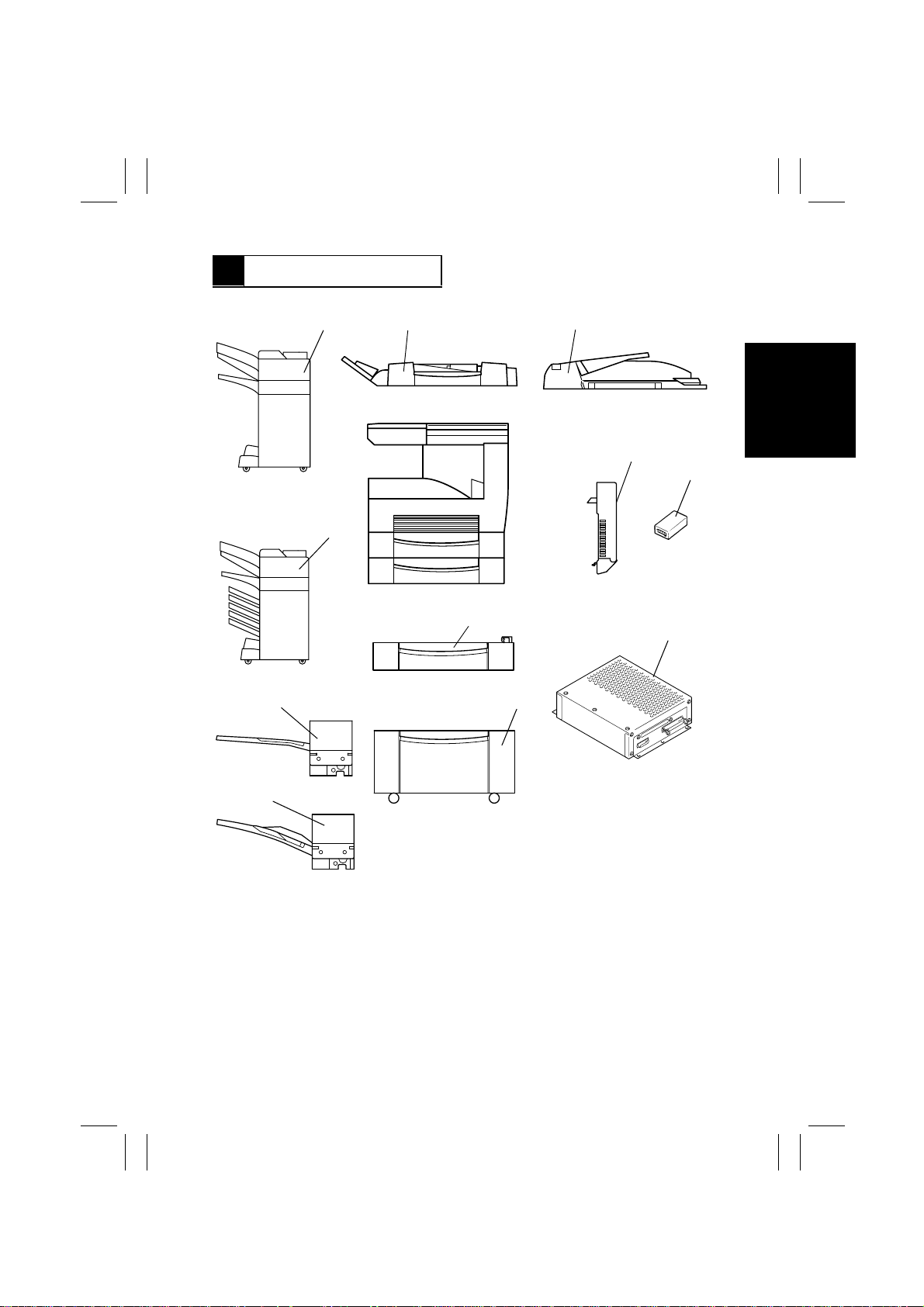
7 SYSTEM OPTIONS
1166O120AA
1166O121AA
10
9
12
11
1166O012AA
1
1166O014AA
2
1166O008AA
5
3
1145M035AA
1171G001AA
1166O015AA
7,8
4
1166O009AA
6
4608D018AA
1166O010AB
1166O011AA
1. Duplexing Document Feeder (AFR-14)
2. Automatic Document Feeder (AF-6)
3. Plug-In Counter
4. Printer Controller (Pi3500)
5. Duplex Unit (AD-10)
6. Large Capacity Cabinet (PF-106)
7. Paper Feed Unit (PF-108)
8. Paper Feed Unit (PF-110)
9. Shift Tray (OT-100)
10. Job Tray (JS-200)
11. Mailbin Finisher (FN-500)
12. Finisher (FN-100)
G-13
 Loading...