

Page 1

R100安装及取下
4
( 取下时按照上述步骤倒序进行 )
使用场景
3
本产品可固定在自行车上使用,以生成、显示及存储GPS定位信息,并且可
以按照使用者需求,拍摄存储录像或照片。使用者可将这些数据通过USB或
WiFi传输给其他数码设备。
5
App下载
产品清单
产品介绍
1
2
R100骑行相机*1、专用底座*1、Micro USB数据线*1、R100使用说明书*1。
1
2
3
4
5
6
7
+++
①【WiFi指示灯】 ⑤【电源/WiFi 】
长按 —— 开关机
短按 —— 开关WiFi
(WiFi用于设置设备和传输数据)
[WiFi名称: camile_xxxxxxxxx
密码12345678 ]
③【电量指示灯】
常亮 —— 电量充足
闪烁 —— 电量低于20%或正在充电
④【显示区域】
显示 —— 速度、时间、里程、
电量(开机时)、来电提醒(显示CALL)、
骑行计划提醒(半程提醒,完成提醒)
②【工作指示灯】
常亮 —— 录像
闪烁 —— 连拍
⑥【Micro USB】
⑦【开启录像、连拍/显示切换】
长按 —— 开启录像、连拍(必须
在App中切换)
短按 —— 切换显示
(USB用于设备充电和传输数据)
*蓝牙连接*
① 扫描二维码或在iOS、Android商店中下载App,并打开手机蓝牙。
② 进入App后搜索,配对成功即可进行设备参数设置及来电提醒。
扫描以下二维码获取App:
Page 2
① 请勿将产品扔进火中或靠近高温物体;
② 请使用符合安全规定的充电器进行充电;
③ 请勿将产品泡在水中;
④ 请勿用锐物触碰产品屏幕,以免造成划伤;
⑤ 请勿自行拆卸产品;
⑥ 充电时在27度以下使用,电池供电时在38度以下使用。
6
注意事项
使用说明书
R100
浙江省杭州市西湖区三墩镇金蓬街368号同硕科技园
Tel: 400-960-3766
E-mail: [email protected]
杭州米为科技有限公司
Page 3
*Bluetooth Connection*
① Download the App by scanning the QR Code, or find in the Android or iOS App
Store, then switch on your device bluetooth.
② After opening the App, go to Device > Bluetooth, and search for Camile and
connect to the device. In ‘Device’you can change Camile settings.
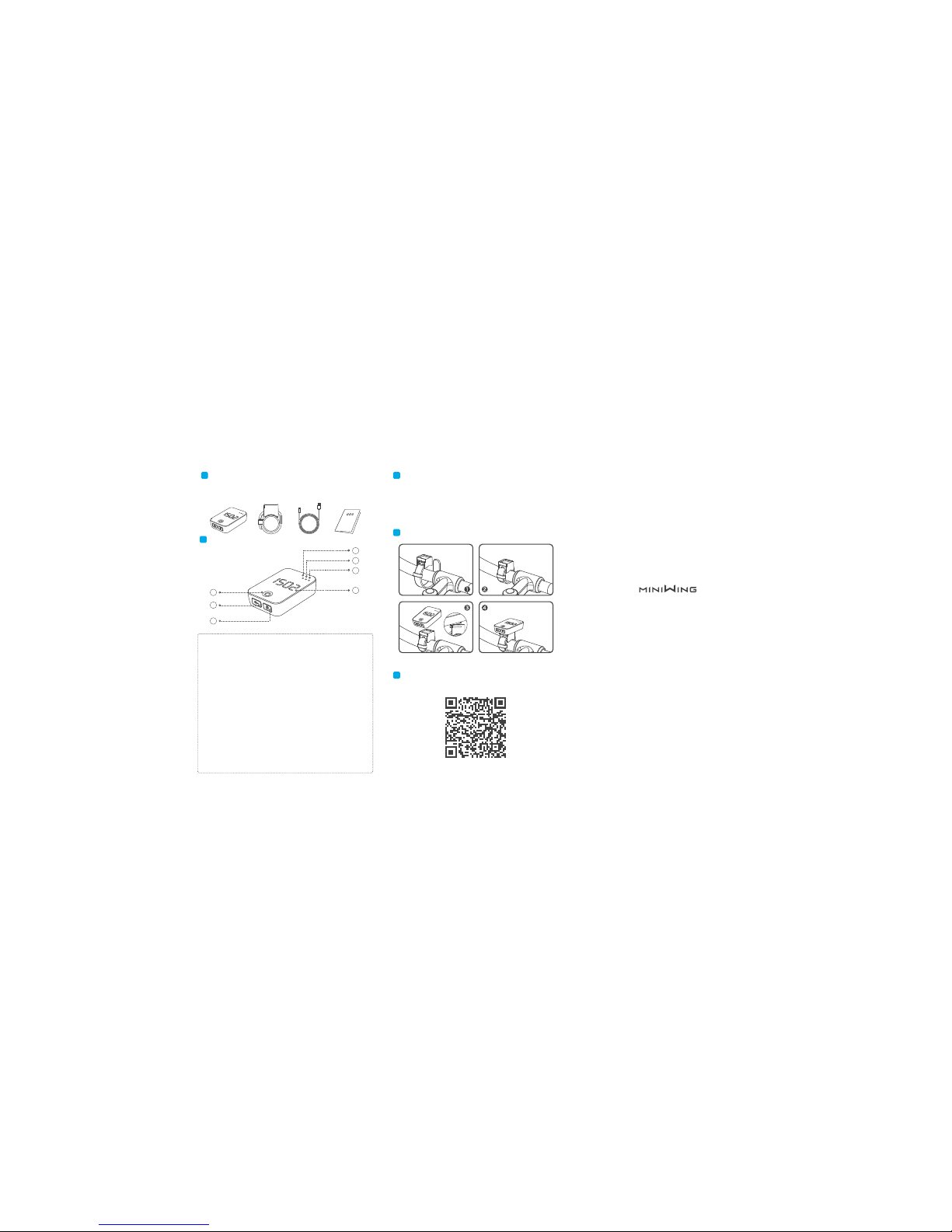
Package Contents
1
Product Guide
2
Camile R100 Cycling Camera x1、Camile Mount x1、Micro USB
Cable x1、Camile R100 Quick-Start Guide x1.
1
2
3
4
5
6
7
+++
①【WiFi Indicator】 ⑤【Power/WiFi Button】
Long Press - Power On/Off
Single Press - WiFi On/Off
(WiFi Set up and Data Transmission)
(WiFi Username: camile_xxxxxxxxx
Password: 12345678)
③【Power Indicator】
Constant Light - More than 20% power
Flashing Light - Less than 20% power / charging
④【Display】
Displays Speed / Time / Mileage
Battery Percentage on Power Up
Call Alerts
Cycling Plan Alerts (Halfway and Goal
Reached Alerts)
②【REC / Photo Indicator】
Constant Light - Video
Flashing Light - Continuous Shooting
⑥【Micro USB Port】
Long Press - Starting Video or
Continuous Shooting(Video or Continuous
Must to be Set Up in App)
Single Press - Display Toggle
USB Charging and Data Transmission
No.368 Jinpeng Street, SandunTown, Hangzhou, China.
Tel: 400-960-3766
E-mail: [email protected]
www.miniwing.com
Hangzhou Miniwing Technology Co.,Ltd
Mounting Instructions
4
Product Use:
3
Scan the QR Code to download.
5
Download Camile App
This product is able to be fixed on to a bike using a mount, and
collect GPS data in accordance with the users needs, as well as
shoot movies or capture photos. The user can then transfer this
data to another device using USB or WiFi.
⑦【Starting Video or Continuous
Shooting / Display Toggle】
Page 4
FCC Radiation Exposure Statement:
To comply with FCC RF exposure compliance requirements, the
antennas used for this transmitter must be installed to provide a
separation distance of at least 20 cm from all persons and must not
be co-located or operating in conjunction with any other antenna or
transmitter.
Due to the used enclosure material, the product shall only be
connected to a USB Interface of version 2.0 or higher. The connection
to so called power USB is prohibited.
The suitable temperature for the equipment is 0~38℃.It is
recommended to charge the equipment in an environment with a
temperature that ranges from 0℃~27℃.
CAUTION RISK OF EXPLOSION IF BATTERY IS REPLACED BY AN
INCORRECT TYPE. DISPOSE OF USED BATTERIES ACCORDING TO
THE INSTRUCTIONS.
EU Regulatory Conformance:
Hereby, Hangzhou Miniwing Technology Co.,Ltd, declares that this
device is in compliance with the essential requirements and other
relevant provisions of Directive 1999/5/EC.
Notice: Observe the national local regulations in the location where the
device is to be used. This device may be restricted for use in some or
all member states of the European Union (EU).
Quick-Start Guide
R100
① Do not expose to fire or high heat.
② Do not allow contact with water.
③ Do not place with sharp objects to avoid screen scratches.
④ Do not disassemble.
⑤ Use the charger according to public safety regulations.
⑥ The suitable temperature for the equipment is 0~38℃.
It is recommended to charge the equipment in an environment
with a temperature that ranges from 0℃~27℃.
6
Warning:
FCC Statements:
This device complies with part 15 of the FCC rules. Operation is subject
to the following two conditions: (1) this device may not cause harmful
interference, and (2) this device must accept any interference received,
including interference that may cause undesired operation.
CAUTION: Any changes or modifications not expressly approved by the
grantee of this device could void the user’s authority to operate the
equipment.
NOTE: This equipment has been tested and found to comply with the
limits for a Class B digital device, pursuant to part 15 of the FCC Rules.
These limits are designed to provide reasonable protection against
harmful interference in a residential installation. This equipment
generates uses and can radiate radio frequency energy and, if not
installed and used in accordance with the instructions, may cause
harmful interference to radio communications. However, there is no
guarantee that interference will not occur in a particular installation. If
this equipment does cause harmful interference to radio or television
reception, which can be determined by turning the equipment off and
on, the user is encouraged to try to correct the interference by one or
more of the following measures:
‐ Reorient or relocate the receiving antenna.
‐ Increase the separation between the equipment and receiver.
‐ Connect the equipment into an outlet on a circuit different from that
to which thereceiver is connected.
‐ Consult the dealer or an experienced radio/TV technician for help.
 Loading...