

Page 1
International HQ
Jerusalem, Israel
Tel: + 972 2 535 9666
[email protected]
North American HQ
Linden, New Jersey
Tel: + 1 908 4862100
[email protected]
European HQ
Zurich, Switzerland
Tel: + 41 1 455 6220
[email protected]
Italy
Rome
Tel: + 39 06 8209 7902
[email protected]
www.minicom.com Customer support - [email protected]
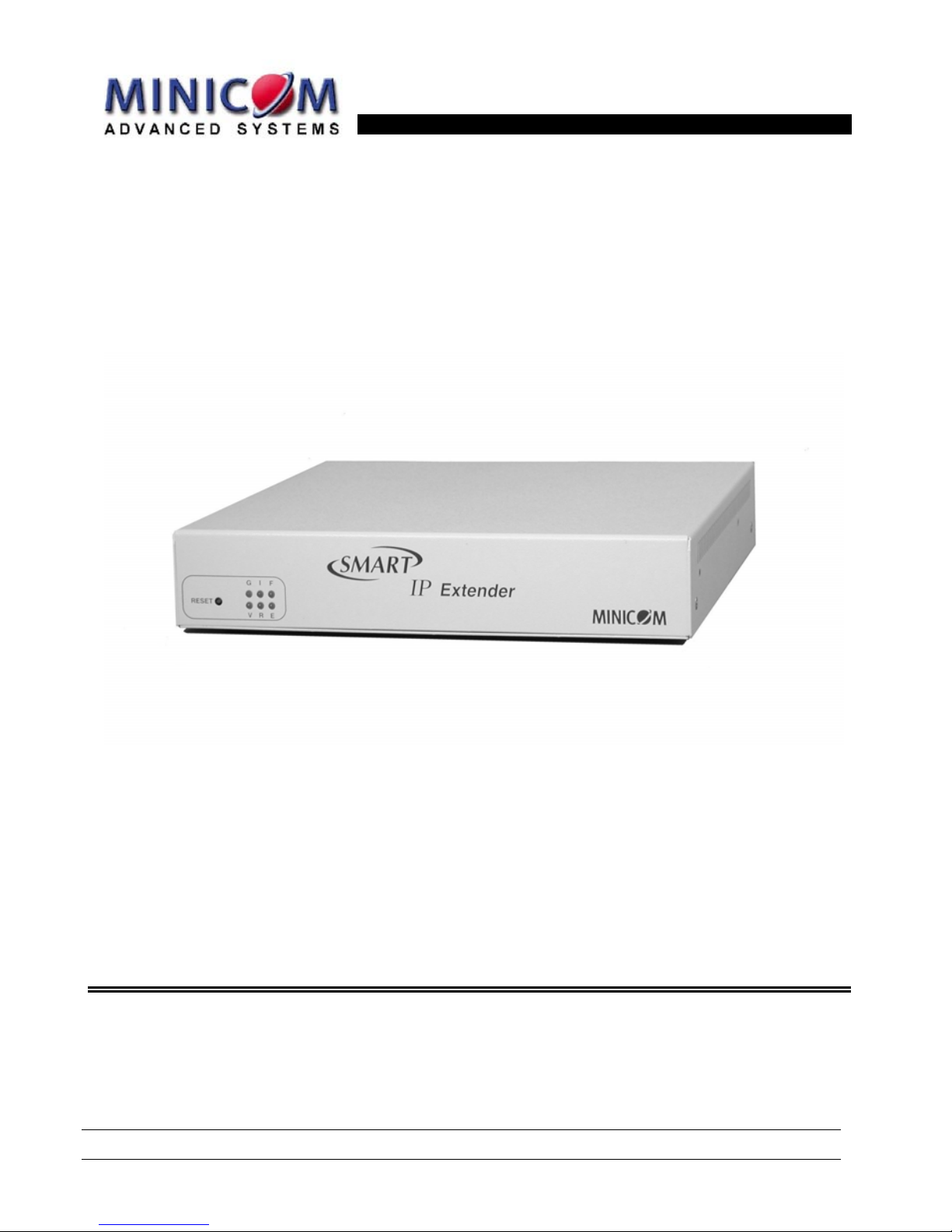
Smart IP Extender
User Guide
5UM20104 V2.1 9/03
Page 2

SMART IP EXTENDER
Table of Contents
1. Welcome....................................................................................................................... 4
2. Introduction .................................................................................................................5
3. Features of IP Extender ..............................................................................................6
4. Remote power management.......................................................................................6
5. System components ................................................................................................... 7
6. The IP Extender cables ...............................................................................................8
7. IP Extender front panel ...............................................................................................8
8. The IP Extender rear panel ports ............................................................................... 9
9. Pre-installation instructions ..................................................................................... 10
10. Connecting the IP Extender to the host computer/KVM switch ............................ 10
11. Connecting the Power management options..........................................................11
12. Connecting the IPMI option......................................................................................11
13. Connecting the Internal Reset/Power Option .........................................................12
14. Connecting the External Reset/Power Option ........................................................ 13
15. Connecting to Ethernet............................................................................................. 13
16. 10 Mbps Connection .................................................................................................13
17. 100 Mbps Connection ...............................................................................................13
18. Connecting to ISDN...................................................................................................13
19. Switching on .............................................................................................................. 14
20. Configuring the system ............................................................................................ 14
21. Configuration via DHCP server ................................................................................ 14
22. Configuration via local console ............................................................................... 15
23. Mouse, Keyboard and Video configuration............................................................. 16
24. IP Extender Video Modes.......................................................................................... 17
25. Operating the IP Extender system ...........................................................................17
26. Logging in.................................................................................................................. 18
27. Timeout ......................................................................................................................19
28. The Work area............................................................................................................19
29. Remote Console ........................................................................................................19
30. Keyboard layout ........................................................................................................ 20
31. The Control buttons /toolbar icons..........................................................................21
32. The Chat window.......................................................................................................22
33. The Video settings..................................................................................................... 23
34. Video Settings access............................................................................................... 24
35. Mouse synchronization............................................................................................. 24
36. Mouse synchronization limitations.......................................................................... 24
37. Single mouse mode................................................................................................... 25
38. Remote Console Settings ......................................................................................... 25
39. Telnet Console...........................................................................................................27
1
Page 3

USER GUIDE
40. Status via IPMI ...........................................................................................................27
41. Event Log via IPMI..................................................................................................... 27
42. Power Control............................................................................................................28
43. Keyboard & Mouse Settings..................................................................................... 30
44. KVM Settings ............................................................................................................. 31
45. KVM Port Settings .....................................................................................................32
46. Video Settings ...........................................................................................................33
47. Enable local video port .............................................................................................34
48. Noise filter.................................................................................................................. 34
49. Video quality/speed................................................................................................... 34
50. Custom Video Modes................................................................................................34
51. User/Group Management.......................................................................................... 35
52. Existing user..............................................................................................................36
53. New user name ..........................................................................................................36
54. Full user name ...........................................................................................................36
55. Password / Confirm password .................................................................................36
56. Email address /Mobile number.................................................................................36
57. Group membership/Member of/Not Member of ......................................................36
58. Existing groups ......................................................................................................... 36
59. New group name ....................................................................................................... 37
60. Create User button ....................................................................................................37
61. Delete User button .................................................................................................... 37
62. Modify User button....................................................................................................37
63. Copy User ..................................................................................................................37
64. Group Management...................................................................................................37
65. Create group button..................................................................................................38
66. Delete Group button..................................................................................................38
67. Modify Group ............................................................................................................. 38
68. Copy Group................................................................................................................38
69. User/Group Permissions .......................................................................................... 38
70. Network Settings .......................................................................................................40
71. Dynamic DNS............................................................................................................. 42
72. ISDN Settings.............................................................................................................44
73. Modem Settings.........................................................................................................46
74. Serial Port Settings ................................................................................................... 46
75. Security Settings ....................................................................................................... 50
76. SNMP Settings...........................................................................................................54
77. The IP Extender SNMP MIB ......................................................................................56
78. IPMI Settings..............................................................................................................56
79. LDAP Settings ...........................................................................................................57
80. Maintenance...............................................................................................................58
81. Updating firmware.....................................................................................................58
2
Page 4

SMART IP EXTENDER
82. Data file for support ..................................................................................................59
83. Include/modify custom HTML code .........................................................................59
84. Access via Telnet ......................................................................................................60
85. Telnet server commands .......................................................................................... 60
Frequently Asked Questions ................................................................................. 61
Glossary of terms ................................................................................................... 62
Appendix A: IP Extender Video modes ................................................................ 63
Appendix B: Key codes.......................................................................................... 64
Appendix C: Pin assignments ............................................................................... 66
Appendix D: Technical specifications .................................................................. 68
3
Page 5

USER GUIDE
1. Welcome
The Smart IP Extender system is produced by Minicom Advanced Systems Limited.
Technical precautions
This equipment generates radio frequency energy and if not installed in accordance
with the manufacturer’s instructions, may cause radio frequency interference.
This equipment complies with Part 15, Subpart J of the FCC rules for a Class A
computing device. This equipment also complies with the Class A limits for radio
noise emission from digital apparatus set out in the Radio Interference Regulation of
the Canadian Department of Communications. These above rules are designed to
provide reasonable protection against such interference when operating the
equipment in a commercial environment. If operation of this equipment in a
residential area causes radio frequency interference, the user, and not Minicom
Advanced Systems Limited, will be responsible.
Changes or modifications made to this equipment not expressly approved by
Minicom Advanced Systems Limited could void the user’s authority to operate the
equipment.
Minicom Advanced Systems Limited assumes no responsibility for any errors that
appear in this document. Information in this document is subject to change without
notice.
No part of this document may be reproduced or transmitted in any form or by any
means, electronic or mechanical, for any purpose, without the express written
permission of Minicom Advanced Systems Limited.
© 2003 Minicom Advanced Systems Limited. All rights reserved.
Trademarks
PS/2 is a registered trademark of International Business Machines Corporation. All
other trademarks and registered trademarks are the property of their respective
owners.
4
Page 6
SMART IP EXTENDER
2. Introduction
The Smart IP Extender (IP Extender) from Minicom Advanced Systems redirects
local keyboard, mouse and video data to a remote computer. All data is transmitted
via IP.
IP Extender features, remote KVM access and control via a LAN, Internet, or ISDN
connection. IP Extender provides a non-intrusive solution for remote access and
control. Remote access and control software runs on the IP Extender embedded
processors only and not on the servers, so there is no interference with server
operation or impact on network performance.
The IP Extender can also be used in a multi administrator and multi server
environment. Combining one or several IP Extenders with a KVM switched matrix
allows access to multiple remote servers over via single remote console. The IP
Extender combines digital remote KVM access via IP networks with a
comprehensive and integrated system management.
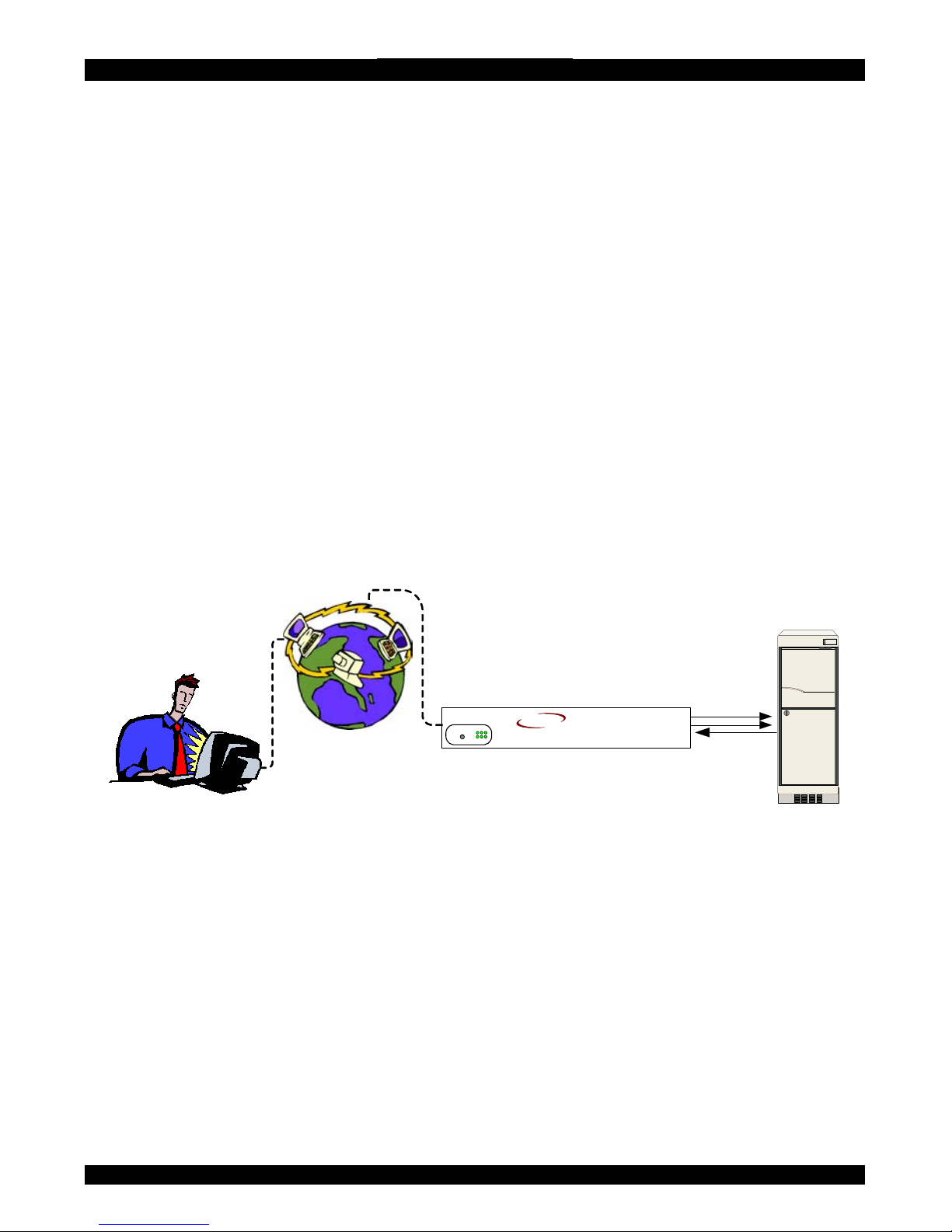
Figure 1 illustrates the connections of IP Extender to its host, to peripheral devices,
to the power source and to the local area network.
KVM signals
Server
IP Network
Administrator
Smart IP
MINICOM
I
ER
V
FG
RESET
IP Extender
SMART
Figure 1 IP Extender usage scenario
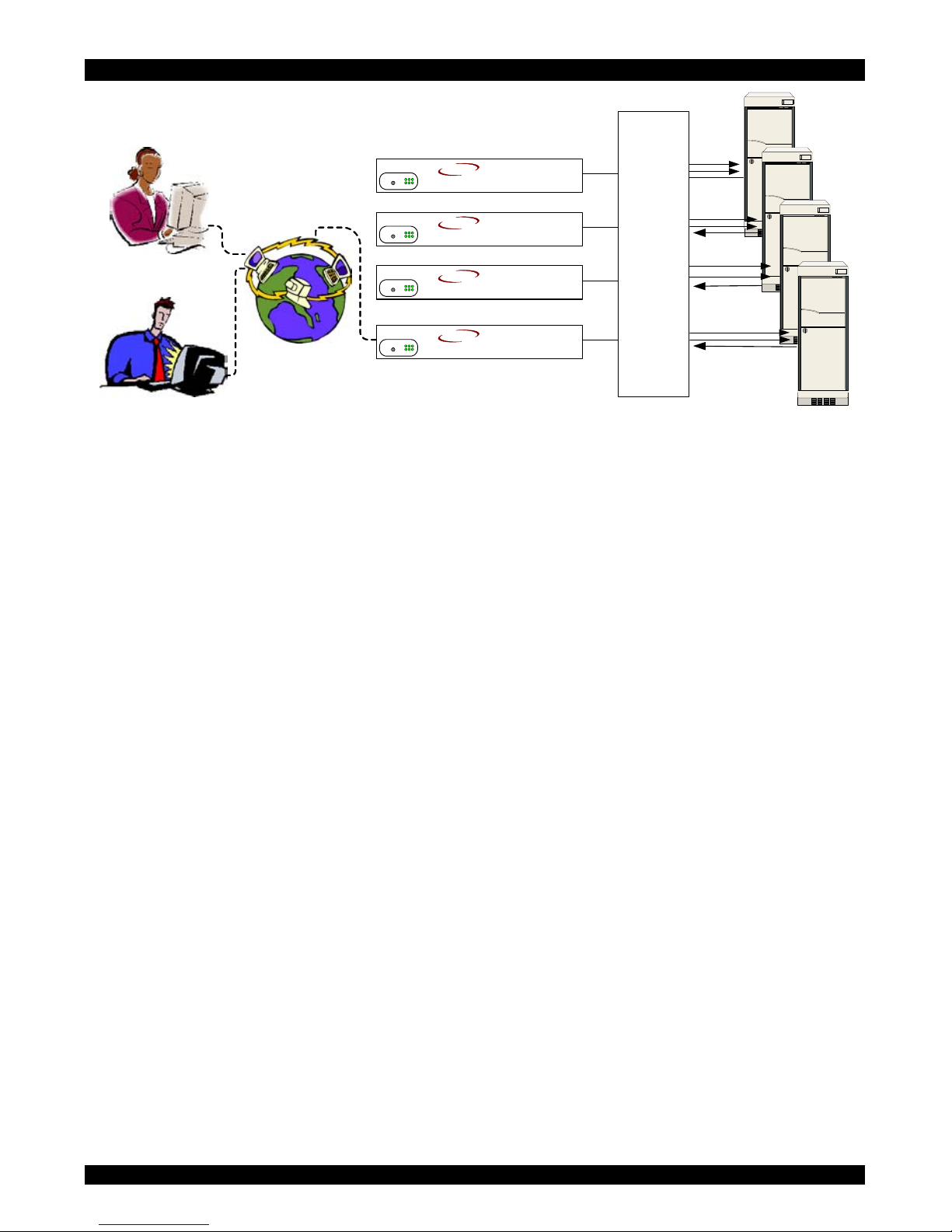
IP Extender is multi user capable, i.e. up to 64 concurrent users may use IP Extender
to administrate a remote site. Figure 2 illustrates a configuration with concurrent
users on a number of servers connected by a KVM switching matrix using one or
more IP Extenders. Using more than one IP Extender in a configuration prevents
blocking administrators who use the switching matrix.
5
Page 7
USER GUIDE
IP Network
Smart IPs
Administrators
KVM
Matrix
switch
MINICOM
I
ER
V
FG
RESET
IP Extender
SMART
MINICOM
I
ER
V
FG
RESET
IP Extender
SMART
MINICOM
I
ER
V
FG
RESET
IP Extender
SMART
MINICOM
I
ER
V
FG
RESET
IP Extender
SMART
Figure 2 Multiple users/servers
3.
4.
Features of IP Extender
• KVM (keyboard, video, mouse) access over IP, ISDN or analogous
telephone line.
• Automatically senses video resolution for best possible screen capture
• High-performance mouse tracking and synchronization
• Connect a user console for direct access to KVM switch
• Local Mouse suppression (only when using SUN's Java Virtual Machine)
IP Extender supports PS/2 type keyboards and mice and HD 15 video output. See
the pin assignments in Appendix C.
IP Extender automatically detects the current video mode of the console, however
manual tuning is recommended to get the best video quality. IP Extender will accept
video streams up to 110 MHz dot clock. This results in a screen resolution of
1280x1024 dots with a refresh rate of 75Hz.
Remote power management
There are three remote power management options:
• Internal reset/power
• External scalable power switch box
• IPMI Version 1.5
The management system to use depends on the remote server interface.
6
Page 8

SMART IP EXTENDER
Internal Reset/Power Option - This option applies to remote systems where no
IPMI Version 1.5 is available. The optional bracket is mounted in a free PCI/AGP
slot. Main board pins for reset and power on/off have to be connected to the bracket.
With this option it is possible to perform a remote reset, power cycle, and power
on/off.
External Power Switch Option - When there is neither a IPMI V1.5 option
available or the ability to place a bracket in the remote system, an external power
switch box can switch the power on and off.
IPMI Version 1.5 - defines a serial connection to access certain system parameters
and perform system actions like powering down or a hard reset. Modern server
systems, supporting the IPMI V1.5 specification, provide a mode where the
externally available COM2 serial connection can be configured as a system
management port (sometimes called an emergency management port). IP Extender
may use this port in order to enable remote system management operations.
5. System components
• 1 IP Extender Extender box
• Cables (illustrated below)
• Power cord
• Marketing & Documentation CD
• Optional IPMI Option. This is a serial cable for connecting the IP Extender
and an IPMI V1.5 compliant serial management port on the remote system.
• Optional Internal Reset/Power Option. The internal reset/power option (see
Figure 2.2) consists of a PC bracket with a Sub-D 9 jack on the outside and
4x2 pin connector in the inner side. The Sub-D 9 jack is connected to the IP
Extender Serial Port 2. The internal 4x2 pin connector allows to connect the
reset and power on/off switching signals of the main board to IP Extender.
7
Page 9
USER GUIDE
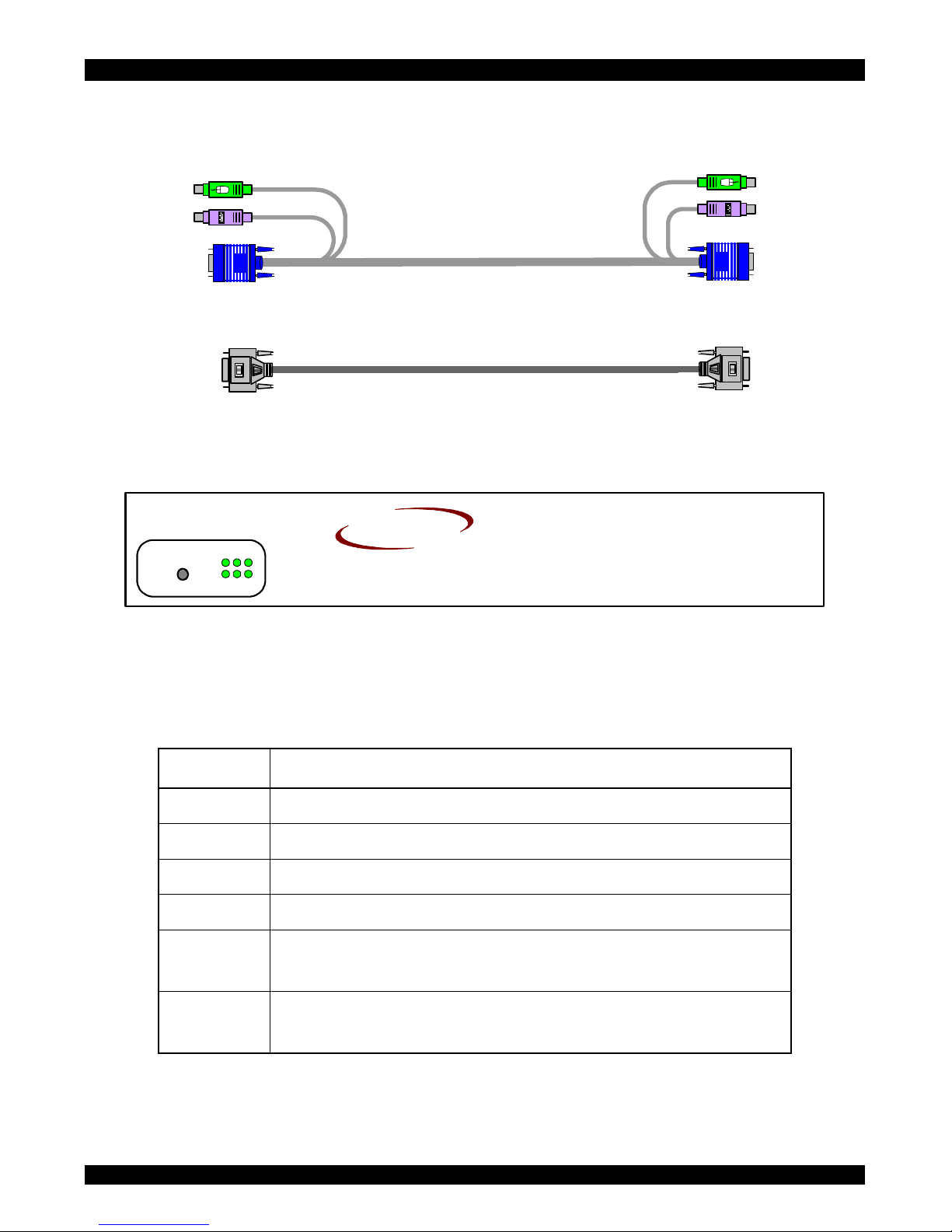
6. The IP Extender cables
The IP Extender package contains the following cables.
3 in 1 CPU cable
Null Modem cable
7. IP Extender front panel
Figure 3 illustrates the IP Extender front panel.
MINICOM
GI
ER
V
F
RESET
IP Extender
SMART
Figure 3 Front panel
The Reset button resets the IP Extender.
The table below explains the functions of the front panel LEDs.
LED Function
V Video signals indicator
R IP Extender system is running
E Ethernet connection in 100 Mbit mode
F Ethernet connection in full-duplex mode
I ISDN subsystem is available and active (EMEA
version only)
G Remote user is logged on and the video engine is
outputting data
8
Page 10
SMART IP EXTENDER
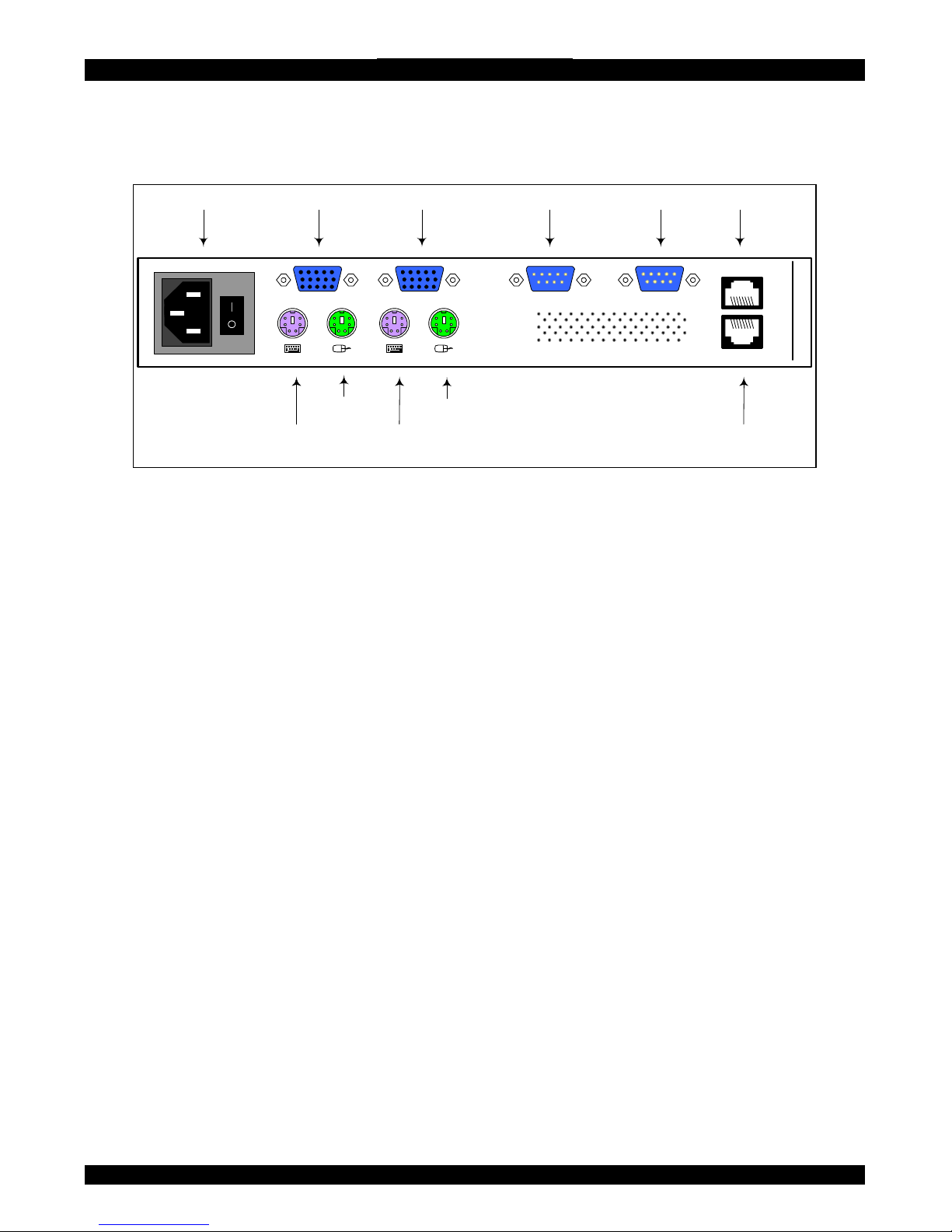
8. The IP Extender rear panel ports
The figure below illustrates the ports on the IP Extender.
POWER
85-265VAC 50/60 Hz
USER COMPUTER / SWITCH
ETHERNET
ISDN
www.min icom.com
Video InPower connector
Mouse
In port
Keyboard
Out
Mouse
Out
Keyboard
In port
Serial 1
SERIAL 1 SERIAL 2
Video Out Serial 2 ISDN
Ethernet
Figure 4 IP Extender ports
You can work locally on the host system by connecting a KVM console to IP
Extender rear panel.
Serial 1 port
Serial 1 port is used as follows:
• IPMI Version 1.5 connection to the remote system using the IPMI Option
cable
• Serial output for modem dial in connection
• Serial pass-through via Telnet
• Initial configuration
Serial 2 port
The Serial 2 port supports the internal and external power options
ISDN
Connects the IP Extender to a EURO ISDN network
Ethernet
Connects the IP Extender to an Ethernet network.
9
Page 11
USER GUIDE
9.
10.
Pre-installation instructions
Place cables away from fluorescent lights, air conditioners and other machines that
are likely to generate electrical noise.
Switch off the computer and disconnect the keyboard monitor and mouse.
Connecting the IP Extender to the host computer/KVM
switch
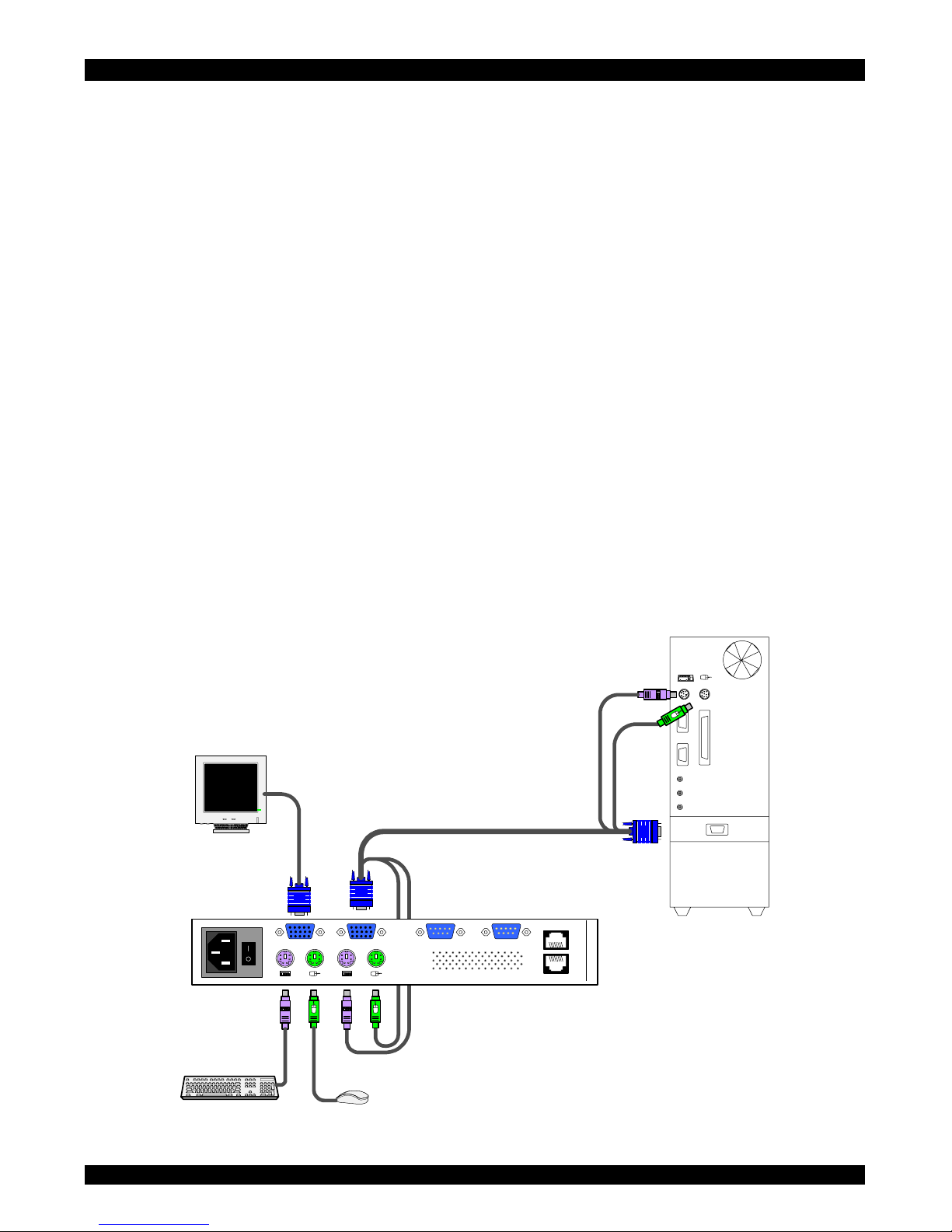
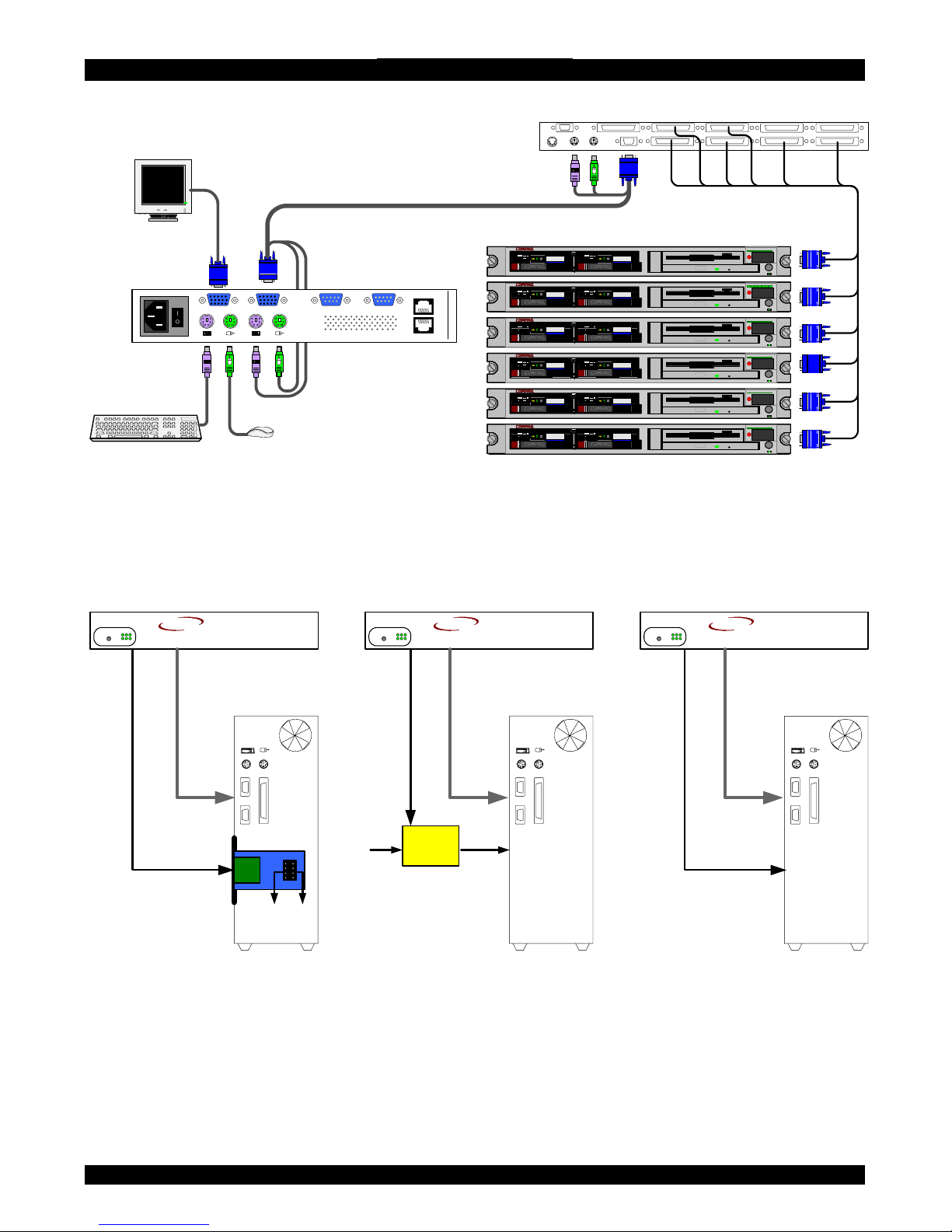
Connect the host computer / KVM switch to the IP Extender as follows:
1. Connect the connectors of one end of the 3 in 1 CPU cable to the
Computer/Switch KVM ports of the IP Extender.
2. Connect the connectors of other end of the 3 in 1 CPU cable to the KVM ports of
the host computer / KVM switch.
3. Connect the power cord and Ethernet and/or modem, ISDN connection.
4. You can connect a local KVM console to the IP Extender and work on the host
computer. Figure 5 and Figure 6 illustrate the connections to a computer and
KVM switch respectively.
POWER
85-265VAC50/60 Hz
USER COMPUTER / SWITCH
ETHERNET
ISDN
www.min icom.com
SERIAL1 SERIAL2
SD
P110
Smart IP Extender
3in1CPUcable
Computer
Figure 5 IP Extender connections to a computer
10
Page 12
SMART IP EXTENDER
POWER
85-265VAC 50/60 Hz
USER COMPUTER / SWITCH
ETHERNET
ISDN
www.minicom.com
SERIAL1 SERIAL2
SD
P110
Smart IP Extender
3in1CPUcable
Computer rack
COMPUTER1 COMPUTER2
COMPUTER6COMPUTER5STATION2
SCREENPS/2MOU SEKB
POWER
SERIAL MOUSE
COMPUTER3 COMPUTER4
COMPUTER8COMPUTER7
ProLiant DL360
9.1 - GB
10k
ULTRA2 SC SI
9.1 - GB
10k
ULTRA2 SCSI
ProLiant DL360
9.1 - GB
10k
ULTRA2 SC SI
9.1 - GB
10k
ULTRA2 SCSI
ProLiant DL360
9.1 - GB
10k
ULTRA2 SC SI
9.1 - GB
10k
ULTRA2 SCSI
ProLiant DL360
9.1 - GB
10k
ULTRA2 SC SI
9.1 - GB
10k
ULTRA2 SCSI
ProLiant DL360
9.1 - GB
10k
ULTRA2 SC SI
9.1 - GB
10k
ULTRA2 SCSI
ProLiant DL360
9.1 - GB
10k
ULTRA2 SC SI
9.1 - GB
10k
ULTRA2 SCSI
KVM switch
Figure 6 IP Extender connections to a KVM switch
11. Connecting the Power management options
Figure 7 gives an overview of the three Power management options.
Reset/Power bracke t
IPMI KVM
Connects to Reset and
Power On /Off pins on
Mainboard or Internal
Adapter kit
Server
ServerServer
KVM KVMIPMI
External power
Switch box
IPMI
IPMI version
1.5 interface
MINICOM
GI
ERV
F
RESET
IP Extender
SMART
MINICOM
GI
ERV
F
RESET
IP Extender
SMART
MINICOM
GI
ERV
F
RESET
IP Extender
SMART
Figure 7 Power management options
12. Connecting the IPMI option
IPMI Version 1.5 defines a serial connection to access certain system parameters
and to perform actions like switching off the system or performing a hard reset.
Connect a Serial cable to a Serial port on the host computer and the Serial 1 or 2 port
on the IP Extender.
11
Page 13
USER GUIDE
For further information about IMPI 1.5, see
i/tools.htm
http://developer.intel.com/design/servers/ipm
To use the IPMI over a serial interface enable it in the host computer. This is done
using BIOS settings or special utilities provided by the server manufacturer. Refer to
the server manufacturer's manual site.
Note! IPMI V1.5 is only supported by server systems manufactured in 2002
onwards.
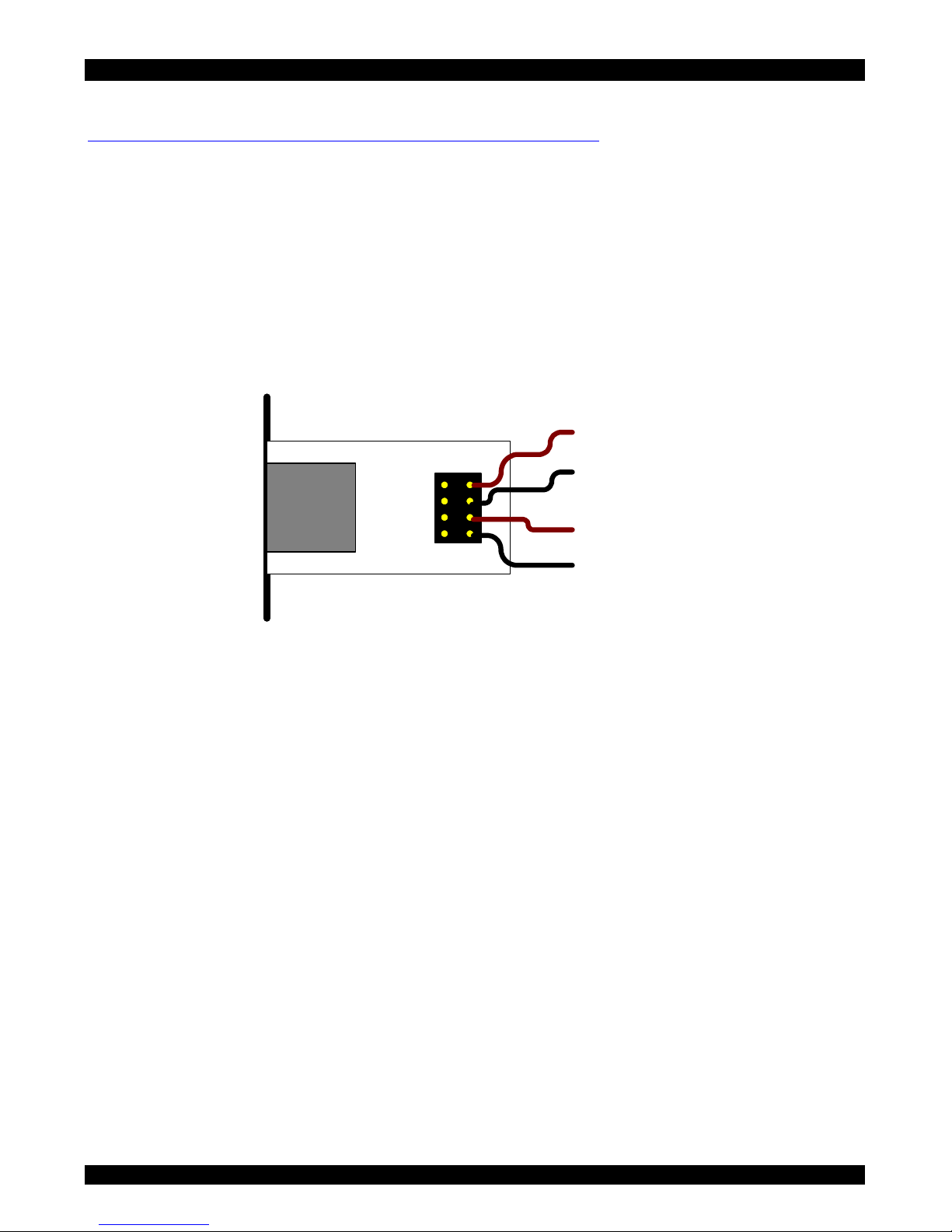
13. Connecting the Internal Reset/Power Option
Figure 8 shows the top view of the reset/power bracket.
To Reset pin
on Mainboard
To front panel
Reset switch
To Power On pin
on Mainboard
To front panel
Power switch
Figure 8 Reset/power bracket
Additional cables are required to enable the remote reset and power functions.
To install the bracket:
1. Mount the bracket in a free slot of the controlled system.
2. Find and disconnect the cable connecting the front panel reset button to the main
board.
3. Connect the cable to the pin connector on the bracket as shown in Figure 8.
4. Take the red/black reset cable and connect one end to the Motherboards reset
jumper connector and the other end to the bracket connector see Figure 8.
5. Find and disconnect the cable connecting the front panel power button and the
Motherboard.
6. Connect it to the pin connector on the bracket. See Figure 8.
7. Take the red/black power cable and connect one end to the Motherboard 's power
jumper connector and the other end to the bracket connector, see Figure 8.
12
Page 14

SMART IP EXTENDER
8. Connect the bracket to the IP Extender Serial port 2 using the supplied SUB-D 9
to SUB-D 9 connector.
14.
15.
16.
17.
Connecting the External Reset/Power Option
Refer to the of the External Power Switch Option guide to connect this to one of the
serial ports. To date supported options are:
• Avocent—SPC 1 800/1600
• Sentry In-Line Power Module
Connecting to Ethernet
The Ethernet connector on the IP Extender can be used either for a 100 Mbps
100BASE-TX connection or for a 10 Mbps 10BASE-T connection. The adapter
adjusts to the appropriate operation mode automatically.
10 Mbps Connection
For 10BASE-T Ethernet networks, the Fast Ethernet adapter uses Category 3, 4, or 5
UTP/FTP cable. To establish a 10 Mbps connection, the cable must be connected to
a 10BASE-T hub. Ensure the cable is wired appropriately for a standard 10BASE-T
adapter. Align the RJ-45 plug with the notch on the adapter's connector and insert it
into the adapter's connector.
100 Mbps Connection
For 100BASE-TX Fast Ethernet networks, the IP Extender supports Category 5 UTP
cabling. To establish a 100 Mbps connection, the cable must be connected to a
100BASE-TX hub.
1. Make sure that the cable is wired appropriately for a standard 100BASE-TX
adapter.
2. Align the RJ-45 plug with the notch on the adapter's connector and insert it into
the adapter's connector.
Note! The UTP/FTP wire pairs and configuration for 100BASE-TX cable are
identical to those for 10BASE-T cable when used with Category 5 UTP/FTP cable.
18. Connecting to ISDN
Connect the IP Extender to an ISDN network, using a standard ISDN cable.
13
Page 15

USER GUIDE
19.
20.
21.
Switching on
After connecting IP Extender to the computer, switch on IP Extender first and then
the computer.
Configuring the system
The IP Extender's communication interfaces are based on TCP/IP, and it comes
configured with the values listed below.
• DHCP - active
• IP address - 192.168.0.220
• Net mask - 255.255.255.0
• Default Gateway - None
If the above values are unsuitable, change the IP configuration. This can be done in a
number of ways:
Configuration via DHCP server
By default, IP Extender will try to contact a DHCP server in the subnet to which it is
physically connected. If a DHCP server is found it may provide a valid IP address,
gateway address and net mask. Before connecting the IP Extender to your local
subnet complete the corresponding configuration of your DHCP server.
We recommended configuring a fixed IP assignment to the MAC address of IP
Extender. You can find the MAC address on the outside of the shipping box and also
labeled on IP Extender's underside. If the DHCP connection fails on boot up, IP
Extender will boot with the last known IP configuration. So for the initial use this
would be the preconfigured IP address as set out above.
14
Page 16
SMART IP EXTENDER
22. Configuration via local console
There are two ways of doing this:
(A) Connect the NULL modem cable to the computer and to IP Extender’s
Serial 1 port. Use any Terminal software to connect to IP Extender. The
screen shots below use Windows Hyperterminal.
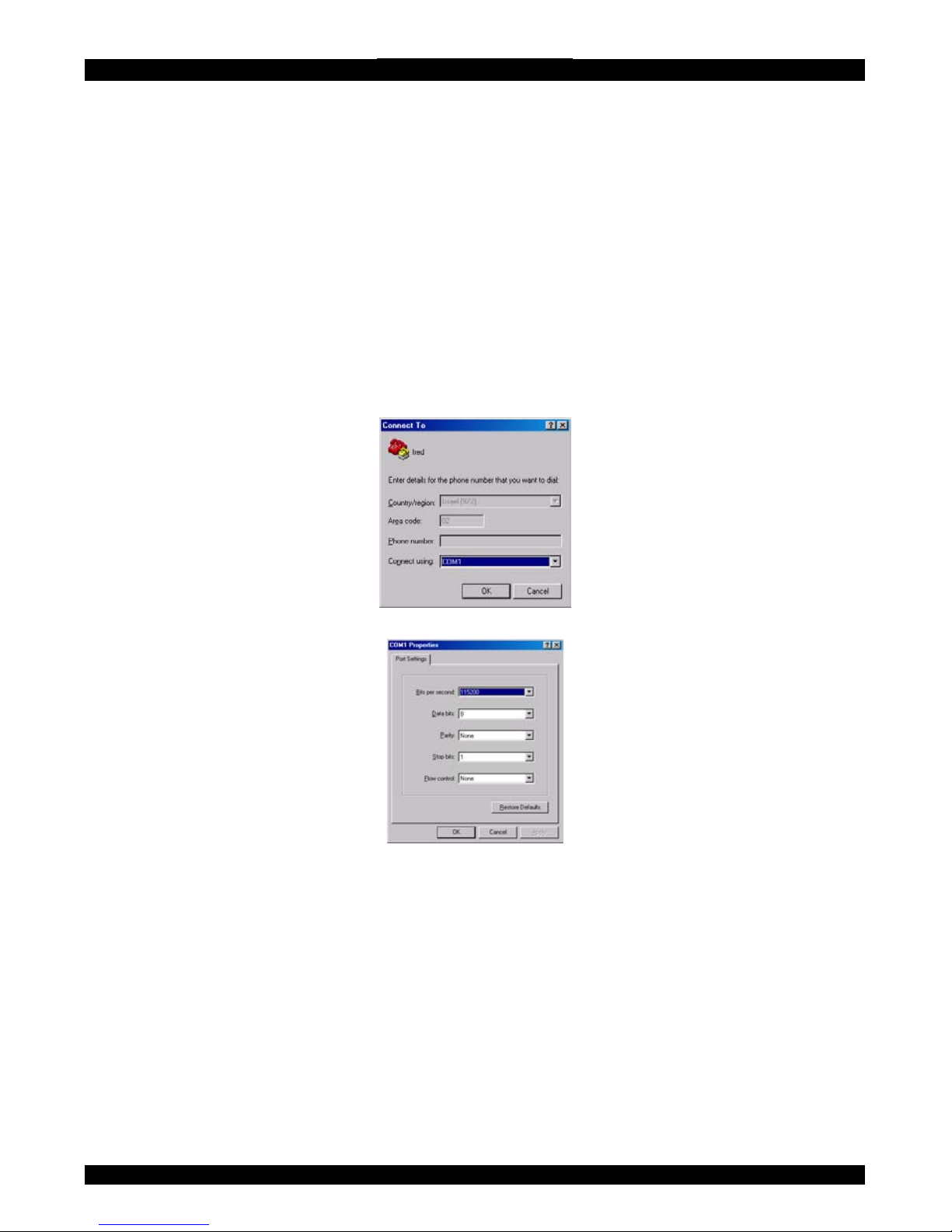
1. Choose Start/Programs/Accessories/Communications/Hyperterminal.
2. When prompted enter a name and click OK. The Connect To box appears.
See Figure 9.
3. Fill in the connection details. Select COM 1 in the Connect using box and
click OK. The COM 1 properties box appears. See Figure 10.
Figure 9 Connect To box
Figure 10 COM 1 Properties box
4. Set the port settings to the following values:
• Bits/second - 115200
• Data bits - 8
• Parity - None
• Stop bits - 1
• Flow Control - None
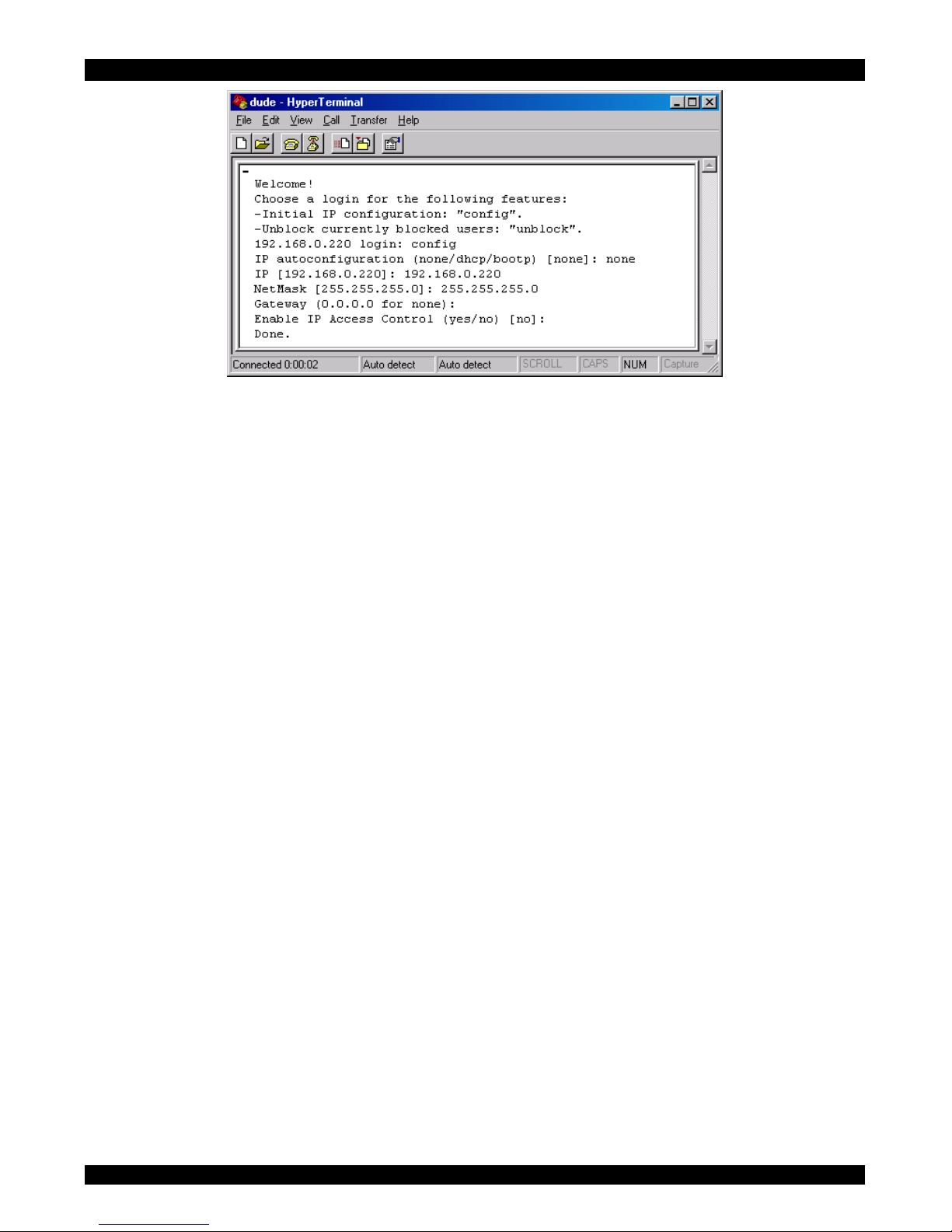
5. Click OK. The Hyperterminal appears. See Figure 11.
15
Page 17
USER GUIDE
Figure 11 The Hyperterminal
6. Press Enter. Some device information and a prompt appear.
7. Type config and press Enter. Configuration questions appear. DHCP must be
disabled. You can change the IP address, net mask and default gateway. Pressing
Enter without entering values keeps the default values. To contact IP Extender
from outside the LAN configure a gateway. To remove an already configured
gateway, type 0.0.0.0.
The last question – enable IP access control – concerns switching IP packet
filtering on or off. This can re-enable access to IP Extender after an incorrect IP
access configuration has been activated. Page 52 has more information on IP
access control.
8. Confirm the settings, IP Extender resets the configuration.
(B) Use a crossover Ethernet cable to connect the IP Extender to the computer back-
to-back.
Set the IP address of the computer to 192.168.0.1 and type 192.168.0.220 into the
Address box of the web interface to carry out the IP configuration.
23. Mouse, Keyboard and Video configuration
The correct operation of the client mouse depends on the following two settings.
IP Extender mouse setting
To make the remote keyboard and mouse work properly the IP Extender settings for
the host's mouse and keyboard types must be correct. Check the settings in the IP
Extender front-end. See page 28.
16
Page 18

SMART IP EXTENDER
Host system mouse settings
The host operating system has various settings for the mouse driver. IP Extender
works with accelerated mice and is able to synchronize the host with the client
mouse pointer. This is further discussed on page 24.
The following may prevent proper mouse synchronization.
Special vendor-specific Mouse drivers disrupt the synchronization process. Ensure
these are not on the host system
Windows XP has a setting ' enhanced pointer precision’. Deactivate it.
Check the correct setting by moving the mouse of your administration system to the
upper left corner of the Remote Console and moving it there slightly forth and back.
This will force mouse synchronization in that corner of the screen. Once that is done
you may observe the behavior of your client mouse in accordance to the host one. If
both mice desynchronize quickly one of the above may be the reason.
24.
25.
IP Extender Video Modes
IP Extender recognizes a limited number of common video modes. When running
X-Window on the host system, don't use any custom modelines with special video
modes. If you do, IP Extender may not be able to detect these. Use any standard
VESA video mode. Refer to Appendix A on page 63 for a list of all known modes.
You can adjust up to 4 Custom Video Modes if your video mode differs from the
standard VESA video mode.
Set the Custom Video Modes in the Video settings section.
Operating the IP Extender system
Operate the IP Extender system through one of the following interfaces:
1. HTTP/HTTPS - Any standard Web browser. Depending on the Web browser, you
can access the IP Extender card using the unsecured HTTP protocol or, in case the
browser supports it, the encrypted HTTPS protocol. We recommend using HTTPS
when possible.
2. SNMP (Simple Network Management Protocol) - Any standard SNMP client can
use this protocol.
3. Telnet - Use a standard Telnet client to access an arbitrary device connected to
one of the IP Extender's serial ports via a terminal mode.
All the above interfaces are accessed using the TCP/IP protocol. They can thus be
used via the built-in Ethernet adapter, modem or ISDN.
17
Page 19
USER GUIDE
This chapter deals with the HTTP interface. The other two interfaces are explained
on pages 44 and 60.
The Web browser must come with a Java Runtime Environment version 1.1 or
higher. Without Java support, you can still maintain the remote host system using
the administration forms displayed by the browser.
We recommend the following browsers for an unsecured connection:
• Microsoft Internet Explorer version 5.0 or higher with Windows 98, ME,
2000 and XP
• Netscape Navigator 7.0 or Mozilla 1.0 with Windows 98, ME, 2000, and
XP, Linux and other UNIX like operating systems
To access the remote host system using a securely encrypted connection you need a
browser that supports the HTTPS protocol. Strong security is only assured by using
key length of 128 Bit. We recommend the following browsers.
• Microsoft Internet Explorer version 5.5 or higher with Windows 98, ME,
2000 and XP
• Netscape Navigator 7.0 or Mozilla 1.0 with Windows 98, ME, 2000, and
XP, Linux and other UNIX like operating systems
26. Logging in
Type the configured IP address into the Web browser. Either http://192.168.0.220
for an unsecured connection. Or https://192.168.0.220 for a secured connection. The
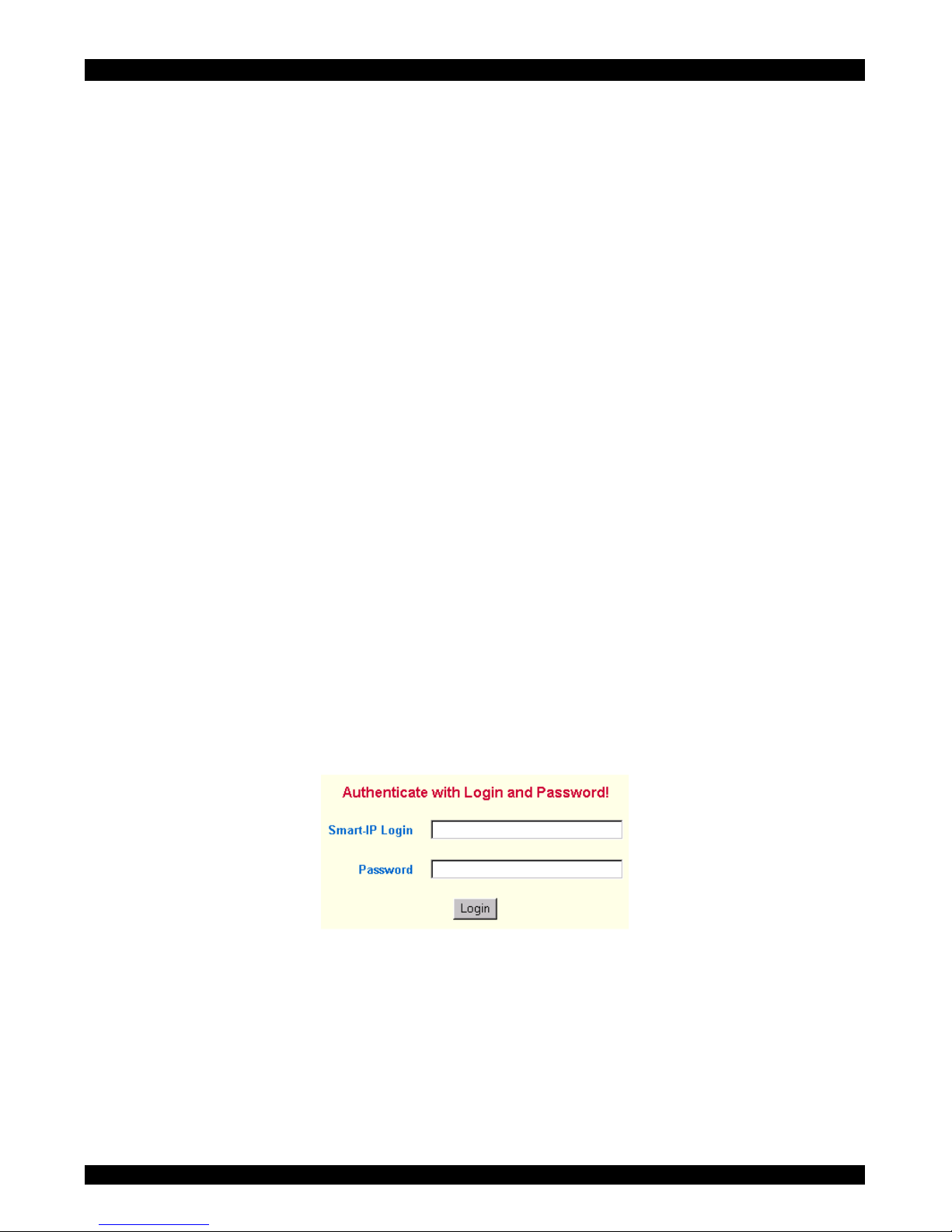
Login screen appears. See Figure 12
Figure 12 The Login screen
Initially there is only one user configured who has unrestricted access to all IP
Extender features. Type the default Login name ‘super’ and Password ‘smart’ and
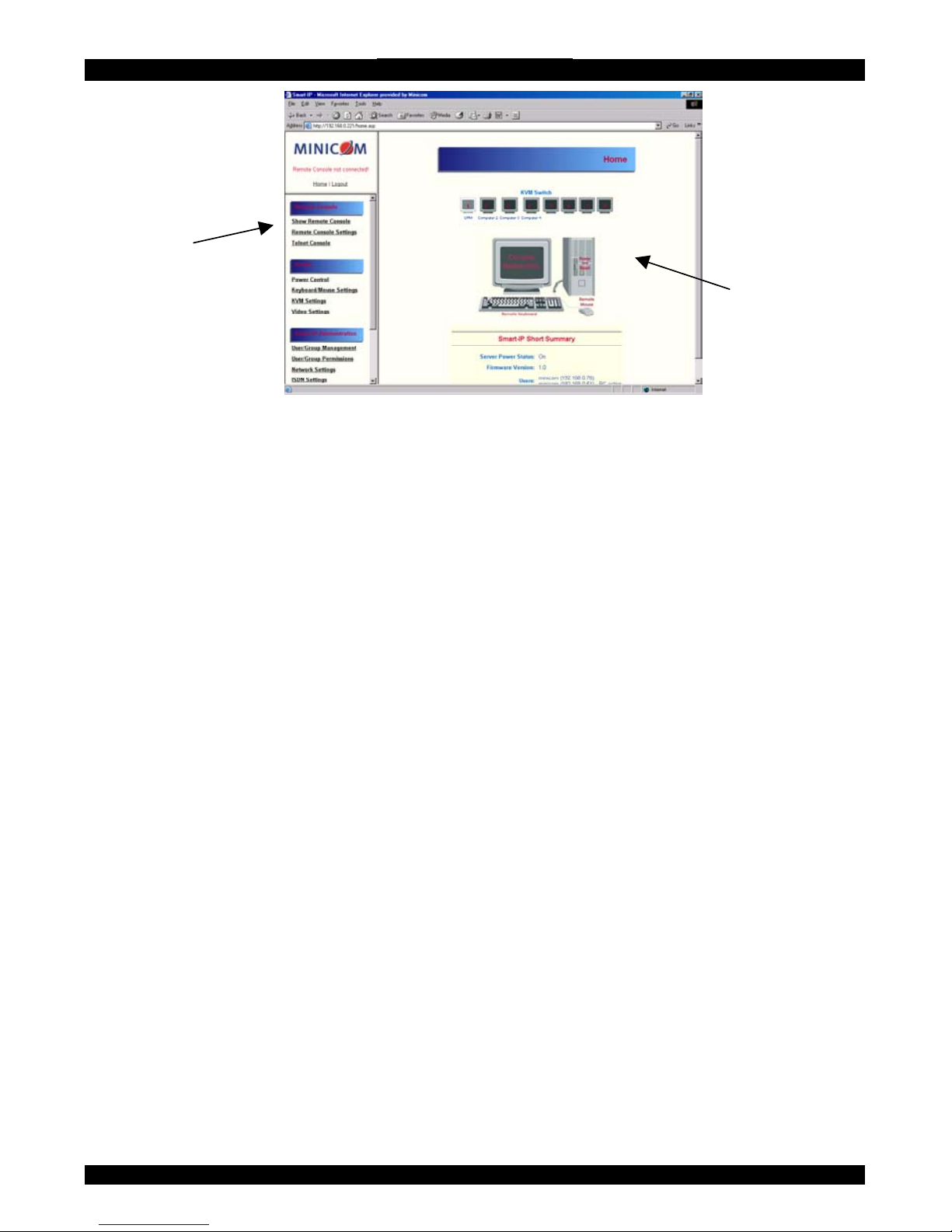
click Login. The IP Extender Home page appears. See Figure 13.
18
Page 20
SMART IP EXTENDER
Menu
Work area
Figure 13 The IP Extender Home page
27.
28.
Timeout
After half an hour of non-activity the system automatically logs out. Clicking
anywhere on the screen will lead back to the Login screen.
The Work area
The Work area has a short summary about your IP Extender.
• Server Power Status - On or Off
• Firmware Version - installed on your IP Extender
• Device management – self managed or connected to a management device
• Users - all currently logged in users and IP addresses. (Note: when
connected through a proxy server the IP address will be that of the proxy
server).
RC – Remote Control open. Exclusive – Exclusive mode. Idle – time since
29.
last activity.
Remote Console
From the menu click Show Remote Console. The remote console appears. See
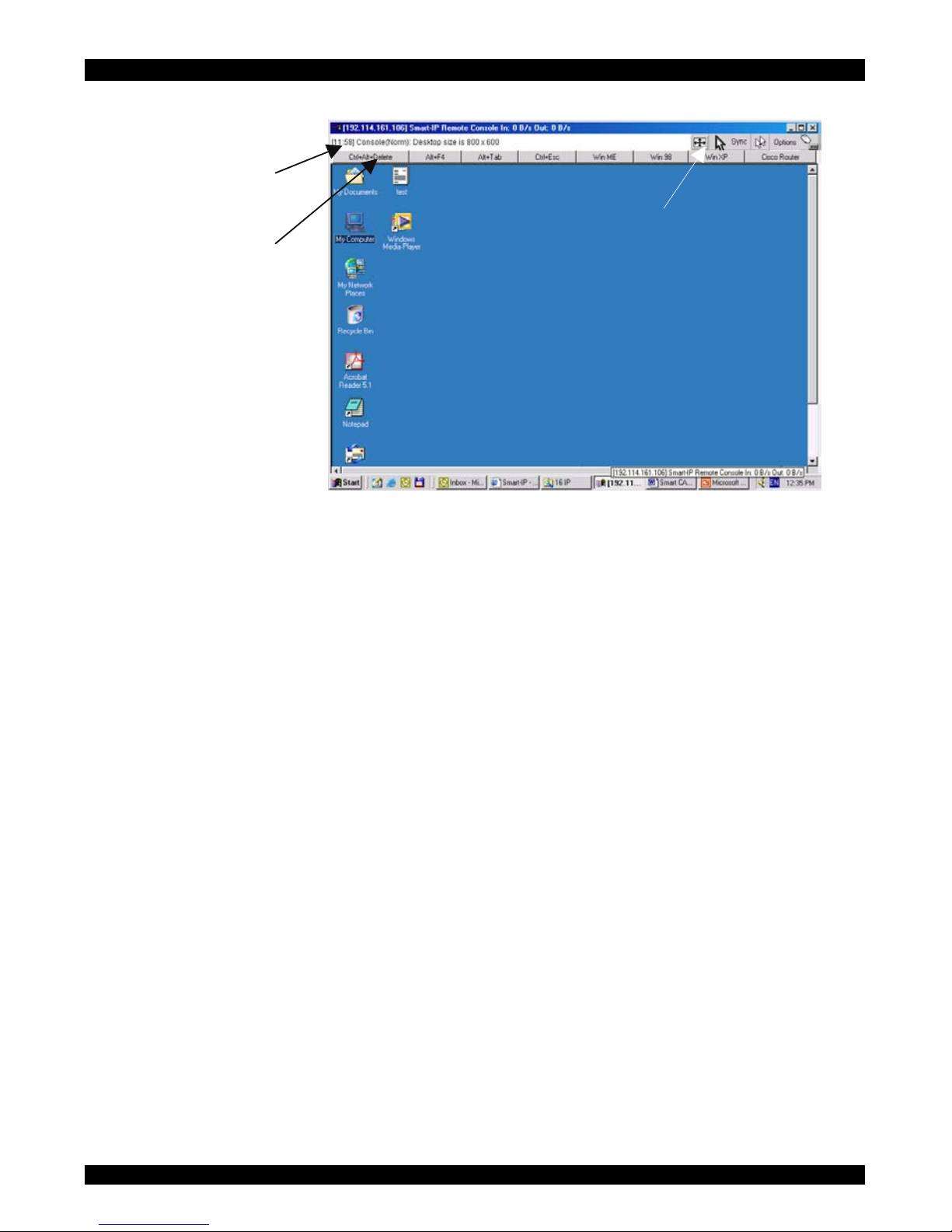
Figure 14.
19
Page 21
USER GUIDE
Information bar
Control buttons
Computer buttons
Figure 14 The remote console
You can work on it with the keyboard and mouse. The delay with keyboard and
mouse reactions - if any - depends on the line connection bandwidth.
30. Keyboard layout
Your host keyboard changes its layout to match the remote host system. So for
example if the host system uses a US English keyboard layout, special keys on a
German keyboard won't work but will function as US English keys.
To solve this problem, adjust the remote system keyboard to the same mapping as
your host one. Alternatively, use the Soft-Keyboard that is part of the Remote
Console applet.
The Remote Console window is a Java Applet that tries to establish its own TCP
connection to IP Extender. The protocol that is run over this connection is not HTTP
or HTTPS but a protocol called RFB (Remote Frame Buffer Protocol). Currently
RFB tries to establish a connection to port number 443. Your local network
environment must allow this connection to be made, i.e. your firewall and, in case
you have a private internal network, your NAT (Network Address Translation)
settings must be configured accordingly.
20
Page 22
SMART IP EXTENDER
In case IP Extender is connected to your local network environment and your
connection to the Internet is available using a proxy server only without NAT being
configured, the Remote Console is very unlikely to be able to establish the according
connection. This is because today's Web proxies are not capable of relaying the RFB
protocol. In case of problems, please consult your network administrator in order to
provide an appropriate network environment.
The Remote Console window shows the remote screen at its optimal size. However,
you can always resize the Remote Console window in your host window system.
Hint: The Remote Console window on your local window system is just one
window among others. To make the keyboard and mouse work, your Remote
Console window must have the local input focus.
31. The Control buttons /toolbar icons
The control buttons/toolbar icons have the following functions:
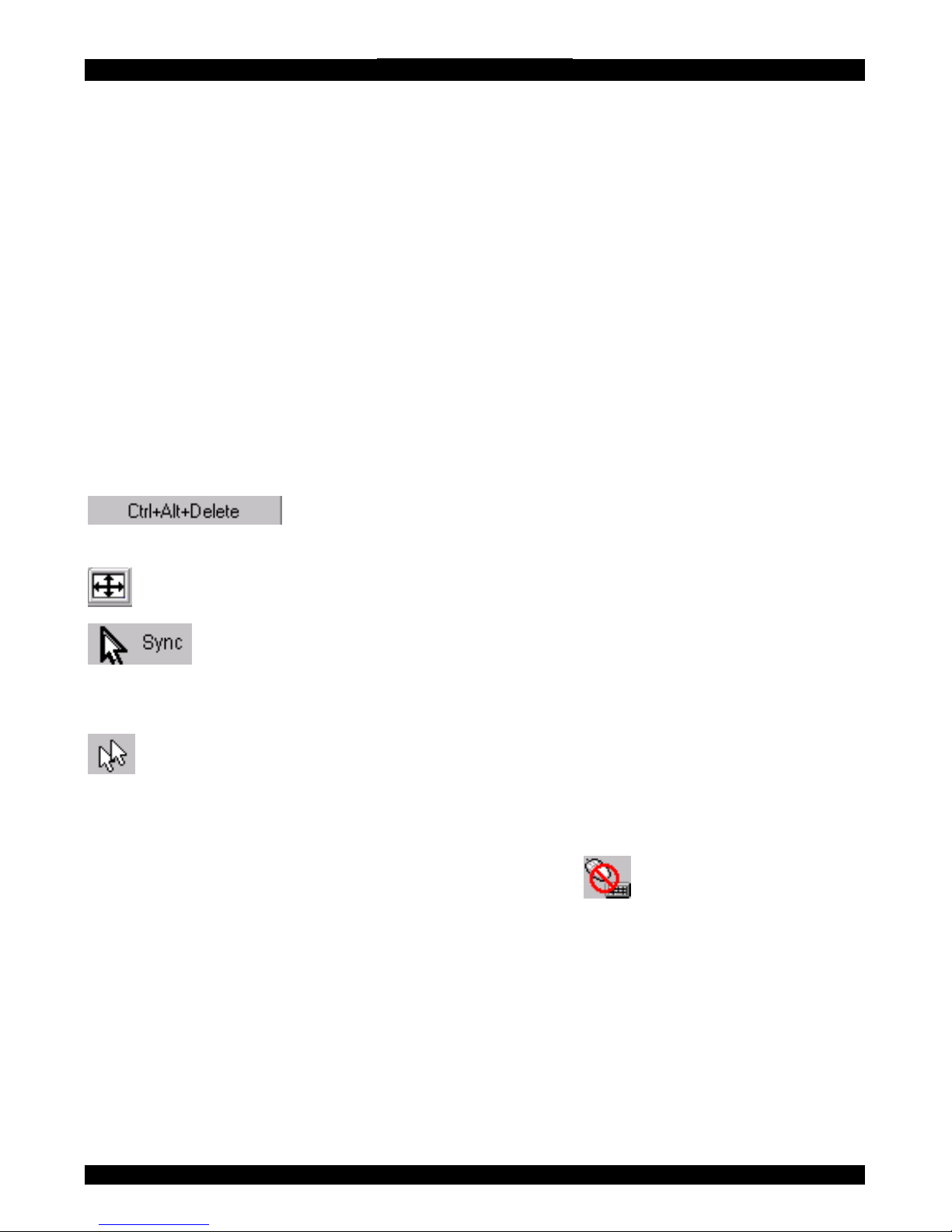
- Sends the `Control Alt Delete' key combination to the remote
system.
Auto adjust - Adjusts the screen to the best visual quality
Sync mouse - Synchronizes the host and remote mice. Necessary when
using accelerated mouse settings on the host system. There is generally no need to
change mouse settings on the host.
- Discussed on page 25.
Click the Options button to get the following options:
Monitor Only - When turned on, the Remote Console does not accept keyboard /
mouse input. The top right hand icon appears like this
.
Exclusive access - If a user has the appropriate permission, he can force the Remote
Consoles of all other users to close. No one can open the Remote Console until this
user disables the Exclusive access or logs off.
Scaling - Scale down the Remote Console. Not all display details will be preserved.
Readability Filter - Turn the filter on in scaling mode to preserve most of the
screen details. Only available with a Java Virtual Machine version number of 1.3 or
higher
21
Page 23

USER GUIDE
Mouse handling - The submenu for mouse handling offers two options for
synchronizing the host and the client mouse pointer - explained on page 24. The
option for 'Fast Sync' shows the hotkey if you defined one using the Remote
Console Settings.
Local cursor - Choose a cursor shape for the host mouse. The number of available
shapes depends on the Java Virtual Machine, only version 1.2 or higher offers the
full list.
Chat Window - Opens the Chat windo
32.
w
Video Settings – To adjust the video settings.
Refresh video - Refreshes the video
Soft Keyboard - Opens the soft-keyboard menu:
• Click Show. The soft-keyboard appears.
• Click Layout. Choose layout
• Click Mapping. Choose the desired language and country
Local Keyboard - Used to change the language mapping of your browser machine
running the Remote Console Applet. Normally the Applet determines the correct
value automatically. However, depending on your particular JVM and your browser
machine settings this is not always possible. A typical example is a German
localized system that uses a US-English keyboard mapping. In this case you have to
change the Local Keyboard setting manually to the right language
Information bar - Shows the console and connection state and remote screen size.
The value in round brackets describes the connection to the remote system: Norm
stands for a standard connection without encryption; SSL stands for a secured
connection. Double click the bar to see a history of all the status information.
The Chat window
Use the Chat window to chat with others logged into the system. Figure 15
illustrates the Chat window.
Figure 15 Chat window
22
Page 24
SMART IP EXTENDER
All messages are broadcast to ALL connected users. There is no option to direct a
message to a particular user only. There is no message history, so messages can only
be received after opening the Remote Console.
33. The Video settings
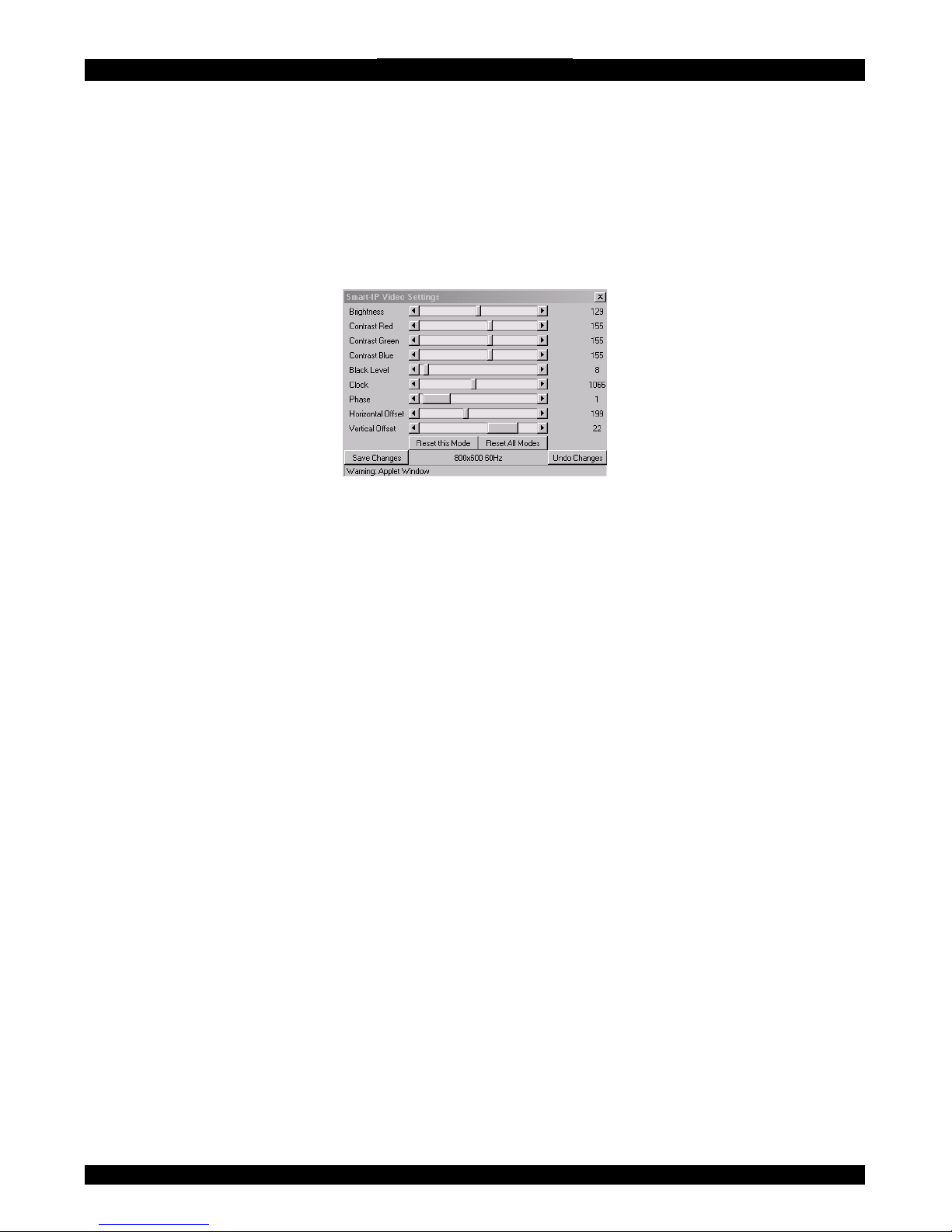
From the Options menu choose Video Settings. The Video Settings box appears. See
Figure 16.
Figure 16 The Video settings
The parameters have the following functions:
Brightness - Brightness control.
Contrast Red/Green/Blue- RGB contrast control.
Black level - Sets the intensity of the color black.
Clock - Sets the horizontal frequency for a video line, this depends on the video
mode. Different video cards may require different values. The default settings and
auto adjustment procedure should be adequate for all common configurations. If not
change this setting together with the sampling phase.
Phase - Sets the phase for video sampling.
Horizontal Offset - Moves the picture in a horizontal direction.
Vertical Offset - Moves the picture in a vertical direction.
Brightness, Black level and contrast affect all modes and KVM ports globally; the
other settings are changed specifically for each mode on each KVM port.
23
Page 25

USER GUIDE
- Resets mode to factory defaults.
- Resets all modes to factory defaults.
- Saves changes.
- Undoes changes that have not yet been saved.
34.
35.
Video Settings access
In the User/Group Permissions section on page 38, it explains how to set access
levels for all parameters including Video Settings access. A Remote Console user
can always change Brightness, Contrast, Black level and picture positions, whatever
his Video Settings access rights. A user who has permission to change the Video
Settings can also change the Clock and Phase parameters and use the reset buttons.
Mouse synchronization
There are two ways to synchronize the host and remote mice:
(a) Choose Options / Mouse Handling / Fast Sync. This corrects a temporary, but
fixed skew.
(b) Intelligent Sync If the fast sync doesn't work or the mouse settings have been
changed on the host system use the Intelligent Sync option.
To do so:
1. Ensure the picture is correctly adjusted, Click Auto Adjust or manually correct
the picture using the Video Settings.
2. Choose Options / Mouse Handling / Intelligent Sync.
Pressing the
button usually leads to a fast sync, except when the KVM
port or the video mode recently changed.
36. Mouse synchronization limitations
Synchronization may not work properly in the following cases:
1. For the intelligent sync to work, the picture MUST be correctly adjusted. Use the
auto adjustment function or the manual correction in the Video Settings panel to
adjust the picture. The video must also be of sufficiently good quality.
2. Special vendor-specific Mouse drivers disrupt the synchronization process.
Ensure these are not on the host system
3. Windows XP has a setting 'enhanced pointer precision'. Deactivate it.
24
Page 26
SMART IP EXTENDER
4. Active Desktop. Disable it. Or do not use a plain background, use a wallpaper.
37. Single mouse mode
The information above applies to the Double Mouse Mode, where remote and
host mouse pointers are visible and need to be synchronized. There is also the
Single Mouse mode. In this mode only the client mouse pointer is visible.
Single Mouse mode needs a Sun Java Virtual Machine 1.3 or later.
Select the mode in the Remote console - see Figure 14.
From the Options menu choose Mouse Handling/Mouse Mode/ Single Mouse
Mode. Or press
from the Control Buttons toolbar. The client mouse
pointer can be controlled directly.
To leave this mode, you must define a m
38.
ouse hotkey in the Remote Console
Settings Panel – see section 38 below. Press this key to free the captured host
mouse pointer.
Remote Console Settings
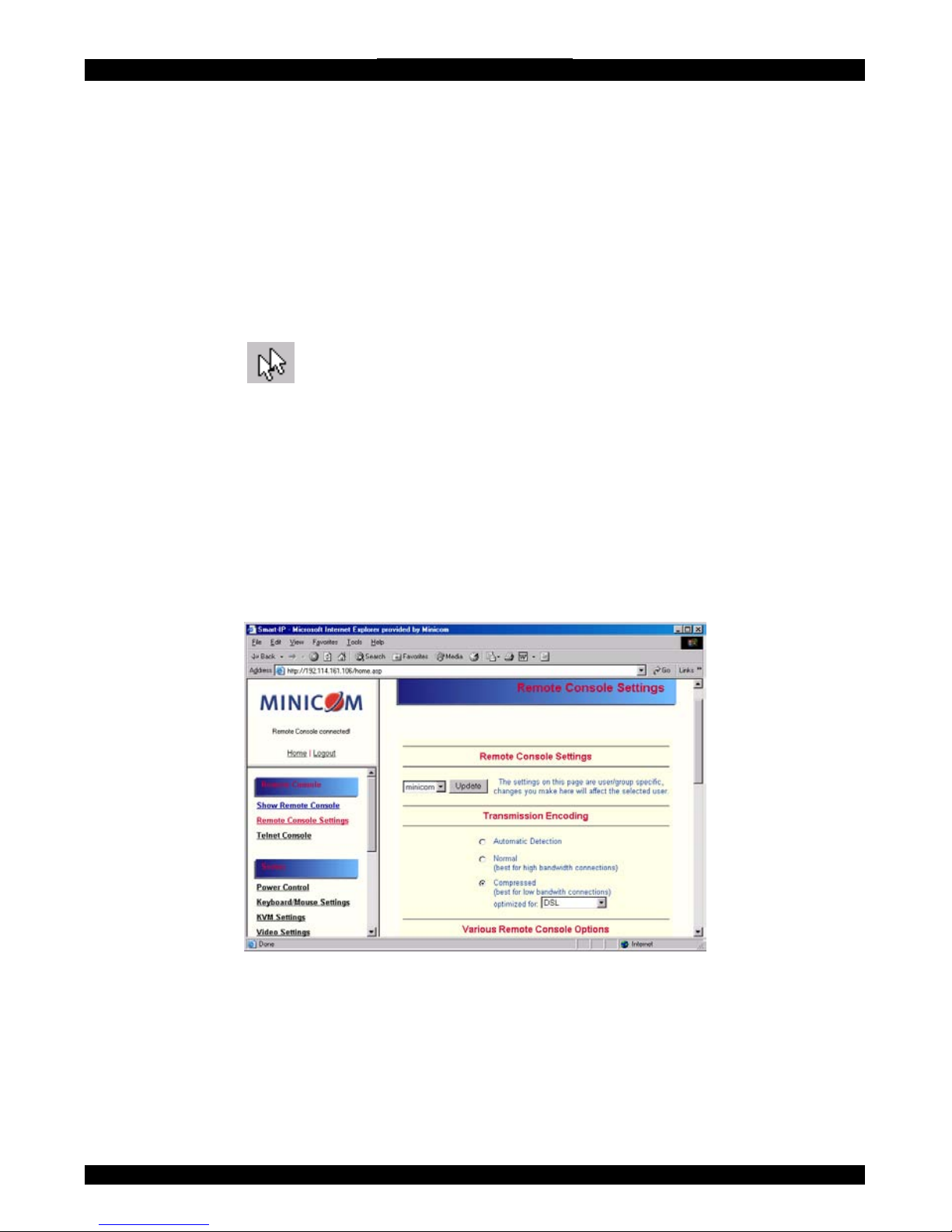
From the IP Extender Menu click Remote Console Settings. The Remote Console
Settings window appears. See Figure 17.
Figure 17 The Remote Console Settings
The settings and their functions are now described. All settings are user specific.
Choose a user from the Drop-down menu.
Transmission Encoding - Optimizes the speed of the remote screen depending on
the number of parallel users and the bandwidth of the connection line.
25
Page 27

USER GUIDE
Automatic Detection - The encoding and the compression level is determined
automatically from the available bandwidth and the current content of the video
image.
Normal - Best suited for many parallel users in a LAN environment.
Compressed - For low bandwidth connections - Modem or ISDN. 1 is the lowest
and 9 the highest compression rate. The IP Extender takes time to compress the data.
This option shouldn't be used when many users want access simultaneously
Various Remote Console Options
Start in Monitor Mode - Check this option to open the Remote Console window in
read only mode.
Exclusive Access- Enables the Exclusive Access mode at Remote Console startup.
This forces the Remote Consoles of all other users to close. No one can open the
Remote Console until this user disables the Exclusive Access or logs off.
Remote Console Type
Default Java-VM – Uses your Browser’s default Java Virtual Machine. This may
be the Microsoft JVM for the Internet Explorer or the Sun JVM if it is configured
this way. Use of the Sun JVM may also be forced (see below).
Sun Microsystems Java Browser Plugin - Uses Sun Microsystems Java Browser
Plugin - Sets the administration system’s Web browser to use the JVM (Java Virtual
Machine) of Sun Microsystems. The JVM is used to run the code for the Remote
Console window, which is actually a Java Applet. If the Java plug-in is not installed
on your system, it will be downloaded and installed automatically. The download is
about 11 Mbytes. The JVM provides a stable and identical Java Virtual Machine
across different platforms. The Remote Console software is optimized for this JVM
version and offers wider range of functionality when run in SUN's JVM.
Tip! The software is on the Marketing & Documentation CD. So, if you have a slow
Internet connection, pre-install the JVM on your administration machine.
ActiveX control - Use an ActiveX control instead of a Java applet - This is the
ActiveX-Control of the KVM Vision Viewer - an application available separately.
You must install the viewer on your local system. See the Viewer Guide for further
information. This option only works with Microsoft Internet Explorer on Win32
Systems.
Mouse hotkey - Used for fast mouse synchronization in Double Mouse mode and to
free the grabbed mouse when in single mouse mode.
26
Page 28

SMART IP EXTENDER
Remote Console Button Keys - Button Keys simulate keystrokes on the remote
system that cannot be generated locally. For example `Control + Alt + Delete' on
Windows and DOS or `Control + Backspace' on Linux.
Define a new Button Key as follows:
Type the required keys e.g. Ctrl+Alt+Delete. The + sign means that the keys are
pressed together. The – sign means the keys are pressed sequentially.
The * sign inserts a pause with a definable duration. See page 32.
To require a confirmation request before keystrokes are sent, write confirm at the
start. E.g. confirm Ctrl+Alt+Delete.
For a list of key codes and aliases IP Extender recognizes, refer to Appendix B on
page 16.
Press Apply for the changes to take effect.
39.
40.
41.
Telnet Console
The Telnet Console offers a Java applet for the Telnet protocol to open a connection
to IP Extender. Its main use is the pass through option for the Serial port 1 see page
47. The Telnet access has to be enabled in the security settings as well, see page 52.
It is also possible to connect with a standard Telnet client.
For details regarding the Telnet interface please refer to page 60.
Status via IPMI
The Status via IPMI function shows the current values and the min/max-thresholds
of all fans, temperatures and voltages existing in the host system. Change the
thresholds by editing the values and pressing Apply.
The first time you call this page, it can take up to two minutes until the sensor data
appears.
Note: If IPMI is disabled, Status via IPMI and System Log via IPMI are not
available (the menu options are not visible).
Event Log via IPMI
The Event Log via IPMI accesses the SEL (System Event Log) repository and reads
every entry sequentially. The first time you use this function after starting Smart 16
IP the complete repository has to be read, what may take 1 or 2 minutes.
After reading all entries, Smart 16 IP displays them with their time, sensor and
description in accordance with the filter settings. You have the choice between
27
Page 29
USER GUIDE
several pre-settings (i.e. last day, last week) or an exact declaration of the start and
the end date.
Once you change the filter settings, click `Update' to update the shown entries. If the
Get sensor names box is checked, all sensor IDs are shown with their respective
names.
The time shown in the log entries is the SEL time, meaning it is independent of the
system time. The SEL time is shown at the top of the log table. Click Clear Event
Log to delete all entries in the SEL repository.
42. Power Control
The appearance of the power control window depends on the power control option
connected to IP Extender and on the currently activated setting (discussed on page
48). There are three options available: Power control disabled. Internal power.
External power.
Internal power
Once connected enable the internal power option using the serial settings on page
44.
The Power Control panel enables access to the most important external buttons of
your host system. These buttons are the reset and the ATX power button.
The power button represents the ATX power button on your host system. It is used
to switch the power supply on and off. The ATX power button has 2 operation
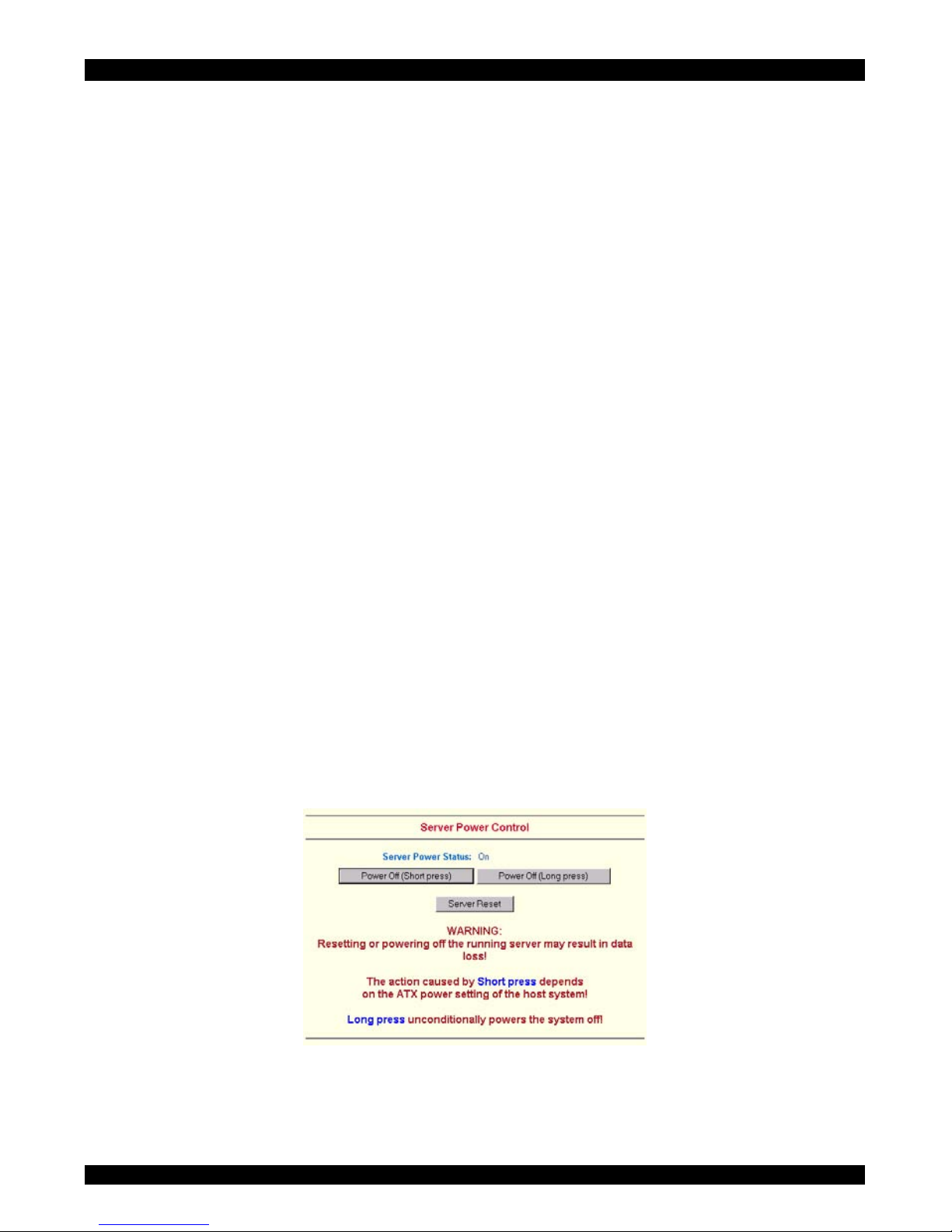
modes: a short press, and a press of about 4 seconds. As shown in Figure 18 these
two modes are supported separately. The 2 operation modes are explained in the
next section.
Figure 18 Internal Power Control
Note: The prerequisite for the remote power/reset button to work is a correct
installation of IP Extender.
28
Page 30
SMART IP EXTENDER
External power
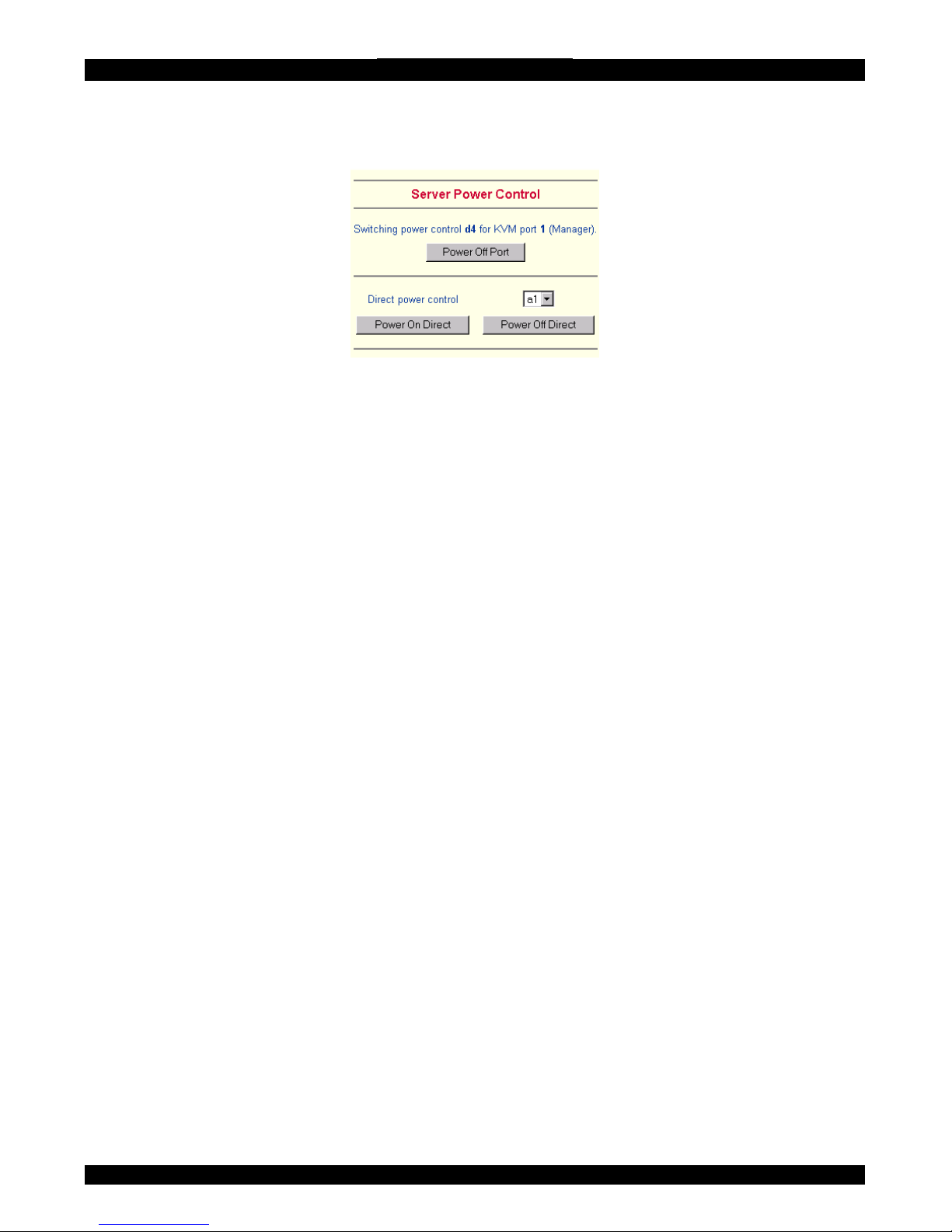
If the external power option is enabled it will look like Figure 19.
Figure 19 External power control
The upper half is used to switch the power for the KVM port currently active. Use
the KVM settings – see page 31 - to assign a port of the external power control to a
KVM port. If no assignment exists, the option is disabled.
The lower half offers controls for switching each port of the external power control
directly. Select the appropriate port and decide whether to power it off or on.
The Remote reset and power button effects are as follows:
Reset - This is similar to pressing the reset button directly on the remote system.
Pressing the reset button will result in a cold start of the system. This might damage
open files and the file system itself.
Power (short press) - A short press on the ATX button is normally caught by the
running operating system that tries to initiate a controlled shut down. Do this to
switch off the system. If this does not work try the long press button.
After pressing, the power state displayed in the administration panel won't
immediately reflect the requested change. A controlled shut down of the system may
take some minutes. Observe the action caused by your button press using the
Remote Console window or by reloading the Server Power Control panel.
Power (long press) - This will unconditionally power off the system. Even if you
have submitted a short press before, this will shut down the power supply of the host
system. The effect of the long button press can be immediately observed on the
panel that is loaded into the browser because of the button press. The power state
will be off.
If IPMI is enabled, the power control functions are performed over IPMI requests.
This may take a few seconds.
If IPMI is disabled, the power control functions are performed through the internal
or external power control options.
29
Page 31
USER GUIDE
43. Keyboard & Mouse Settings
IP Extender supports different keyboard and mouse types.
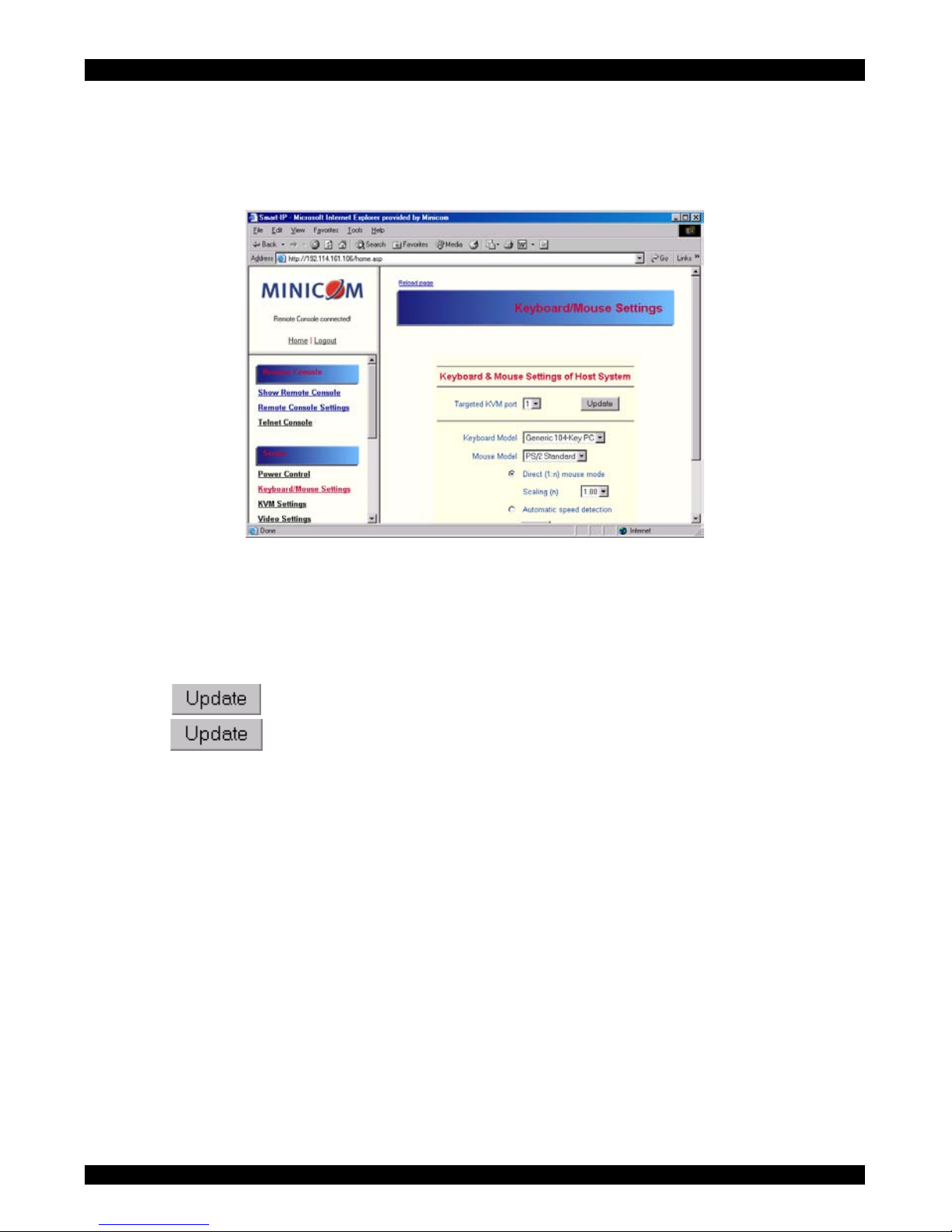
Click Keyboard & Mouse Settings. The settings appear as in Figure 20.
Figure 20 Keyboard & Mouse Settings
The elements of the Keyboard & Mouse Settings are explained below.
Targeted KVM port
1. Choose the port to which a KVM switch is connected.
2. Press
to display the current values for the selected KVM port. Without
pressing
alterations will NOT be made to the chosen port.
Keyboard Model - Choose the keyboard model
Mouse Model - Choose the mouse model
Direct (1:n) mouse mode
Use a direct translation of mouse movements between the host and the remote
pointer. Fix a scale, which determines the amount the client mouse pointer moves
when the host mouse pointer moves by one pixel. This only works when Mouse
Acceleration on the local computer is disabled.
30
Page 32
SMART IP EXTENDER
Automatic speed detection
When Mouse Acceleration on the local computer is enabled, check Automatic speed
detection. We highly recommend disabling the Mouse Acceleration.
G&D Equalizer – G&D Equalizer – This supports to the mouse synchronization
for Guntermann & Drunck KVM switches. These switches perform an internal
rescaling of the mouse movements, which cause the existing algorithm to break if IP
Extender is connected behind such a switch. This option detects the rescaling and
compensates for it, so that the mouse synchronization works. Choose auto or a
number from the drop down menu.
- Click to apply changes
- If the keyboard or mouse seems to react irrationally click to reset the
keyboard and mouse emulation. It is like disconnecting and reconnecting the
keyboard and mouse connectors.
44. KVM Settings
Adjust the settings for the KVM switches connecting the IP Extender to the host
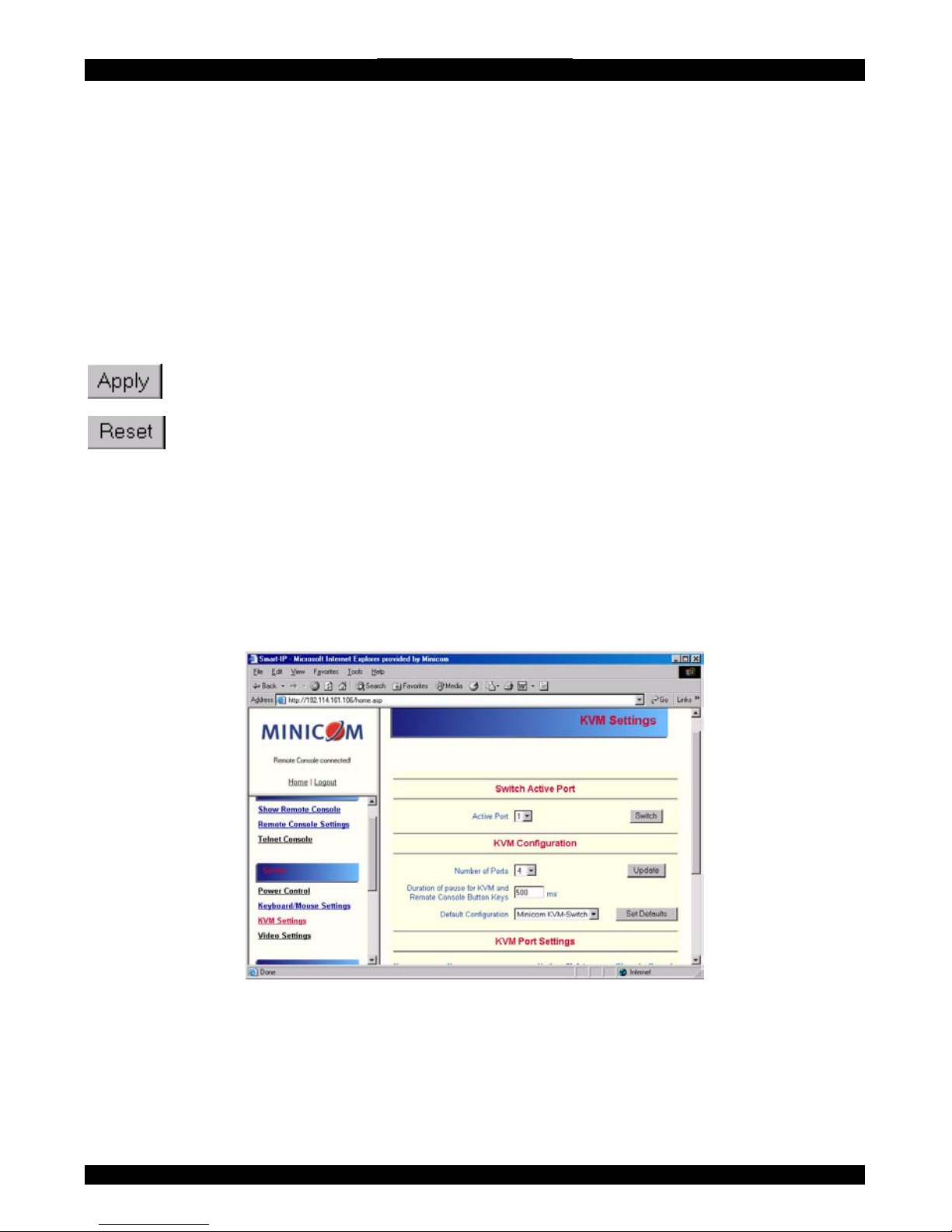
computers. From the IP Extender menu choose KVM Settings. The IP Extender
KVM settings appear. See Figure 21.
Figure 21 KVM Settings
The elements of the KVM Settings are explained below.
31
Page 33
USER GUIDE
Active Port
To switch to a computer:
1. Choose a number in the Active port Drop-down list.
2. Press
. The computer screen appears in the Remote Console.
Number of Ports
To set the number of ports the KVM uses:
1. Choose a number in the Number of Ports Drop-down list.
2. Press
. The number of rows chosen appears in the KVM Port Settings
list. See Figure 22.
Duration of Pause
Define the pause time for KVM and Remote Console Button Keys in milli-seconds ,
represented by the * symbol in all hotkeys and button keys.
Default configuration
This is explained in the section below.
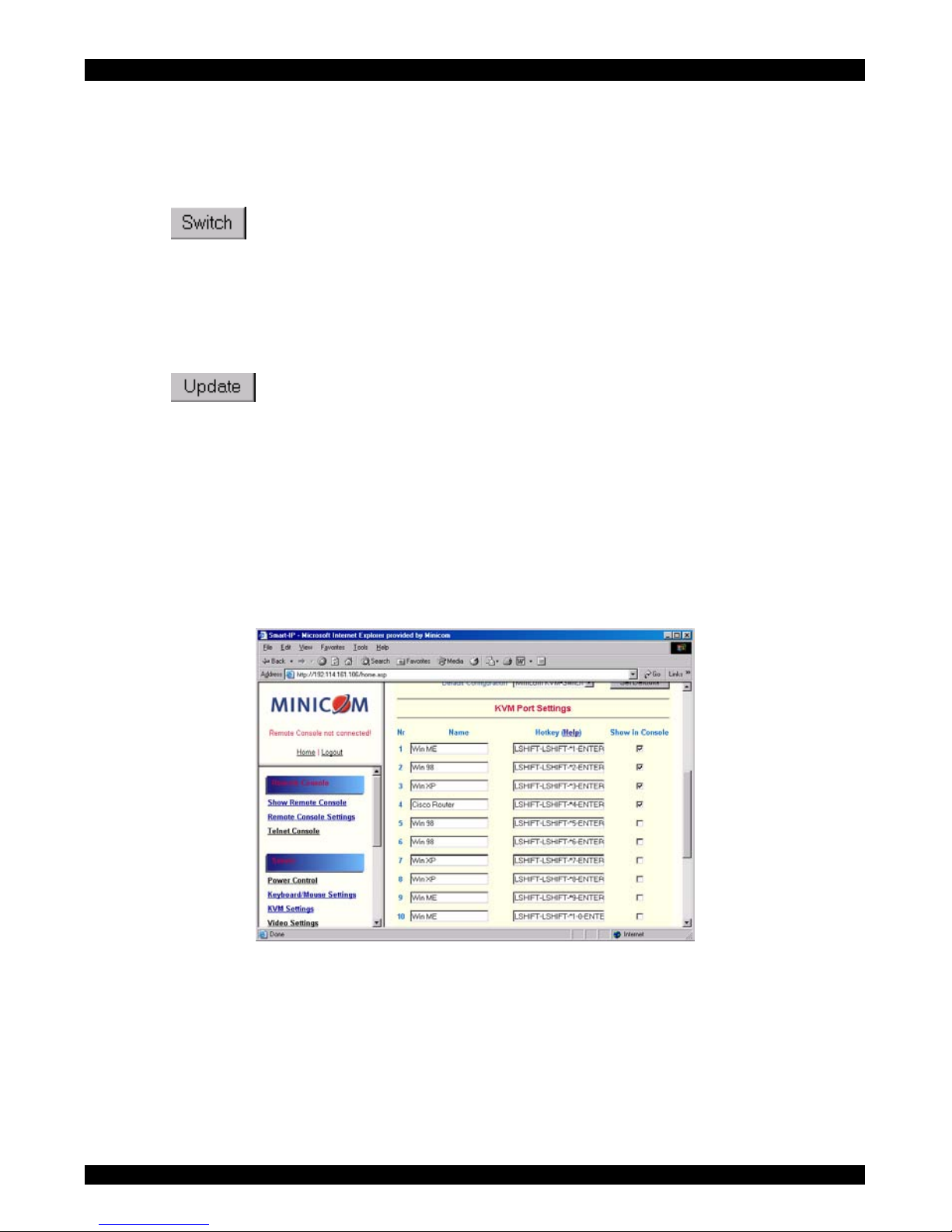
Figure 22 KVM Port Settings
45. KVM Port Settings
1. Assign names for each port.
2. Define hotkeys to switch to each port.
Choose either Minicom default hotkeys by selecting Minicom KVM-Switch in the
Default configuration box, and then click the Set Defaults button.
32
Page 34
SMART IP EXTENDER
Or choose your own hotkeys. The syntax to define a new hotkey is as follows:
<keycode> [ + | - | * ] <keycode>.
For example LShift-LShift-*1-Enter. A + sign means that the keys are pressed
together. The – sign means the keys are pressed sequentially. Lshift means the left
Shift key.
The * sign inserts a pause with a definable duration. Add more than one pause if
necessary. See Appendix B on page 16 for a list of key codes.
3. Press Apply at the bottom of the page. The settings are saved.
IP Extender uses separate mouse synchronization settings - see page 24 - and videosettings - see page 23 - for each port.
Note:
It is still possible to apply KVM key combinations through the Remote Console for
switching the KVM port. However, video and mouse synchronization settings will
be shared among the ports and may be unintentionally changed for one of those
ports.
If an external power option is enabled it is possible to assign a port of this control
for power switching to each KVM port, see page 28.
Show in console – check this option to have a button appear on the top of the
Remote console. Click the button to switch to that computer.
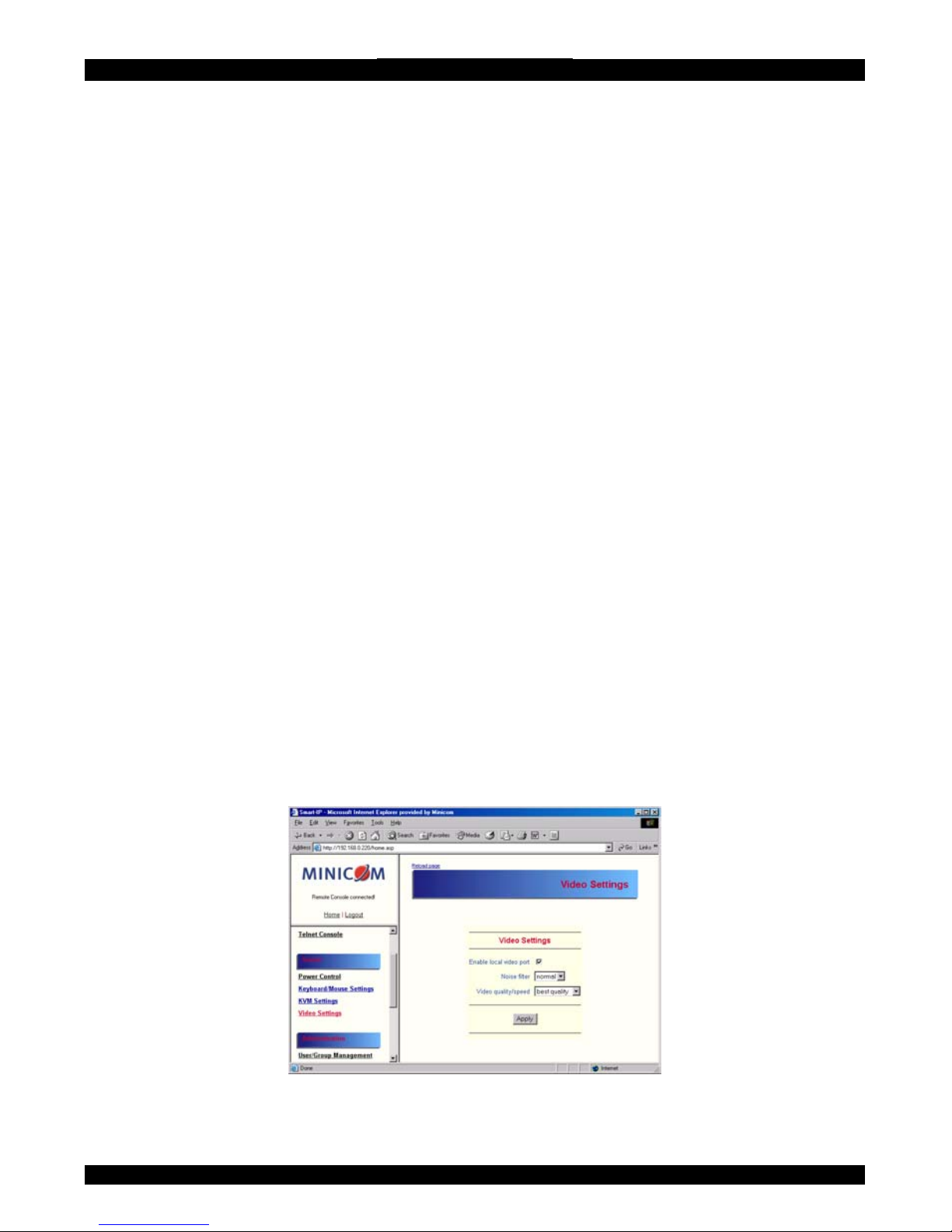
46. Video Settings
From the IP Extender Menu choose Video Settings. The Video settings appear. See
Figure 23
Figure 23 Video Settings
33
Page 35

USER GUIDE
47.
48.
49.
50.
Enable local video port
This option decides if the video output on the front panel of IP Extender is active
and passing through the incoming signal from the host system.
Noise filter
Define how IP Extender reacts to small changes in the video input signal. A large
tolerance needs less network traffic and leads to a faster video display, but small
changes in some display regions may not be recognized immediately. A small
tolerance displays all changes instantly but may lead to a constant amount of
network traffic even if display content is not really changing (depending on the
quality of the video input signal). The default setting should be suitable for most
situations.
Video quality/speed
Choose the Video quality/speed, the faster the speed the lower the video quality.
Custom Video Modes
Add video modes to IP Extender, which are not recognized using the factory
settings, when for example using special modelines in an X-Window configuration
on the host or with uncommon hosts or operating systems.
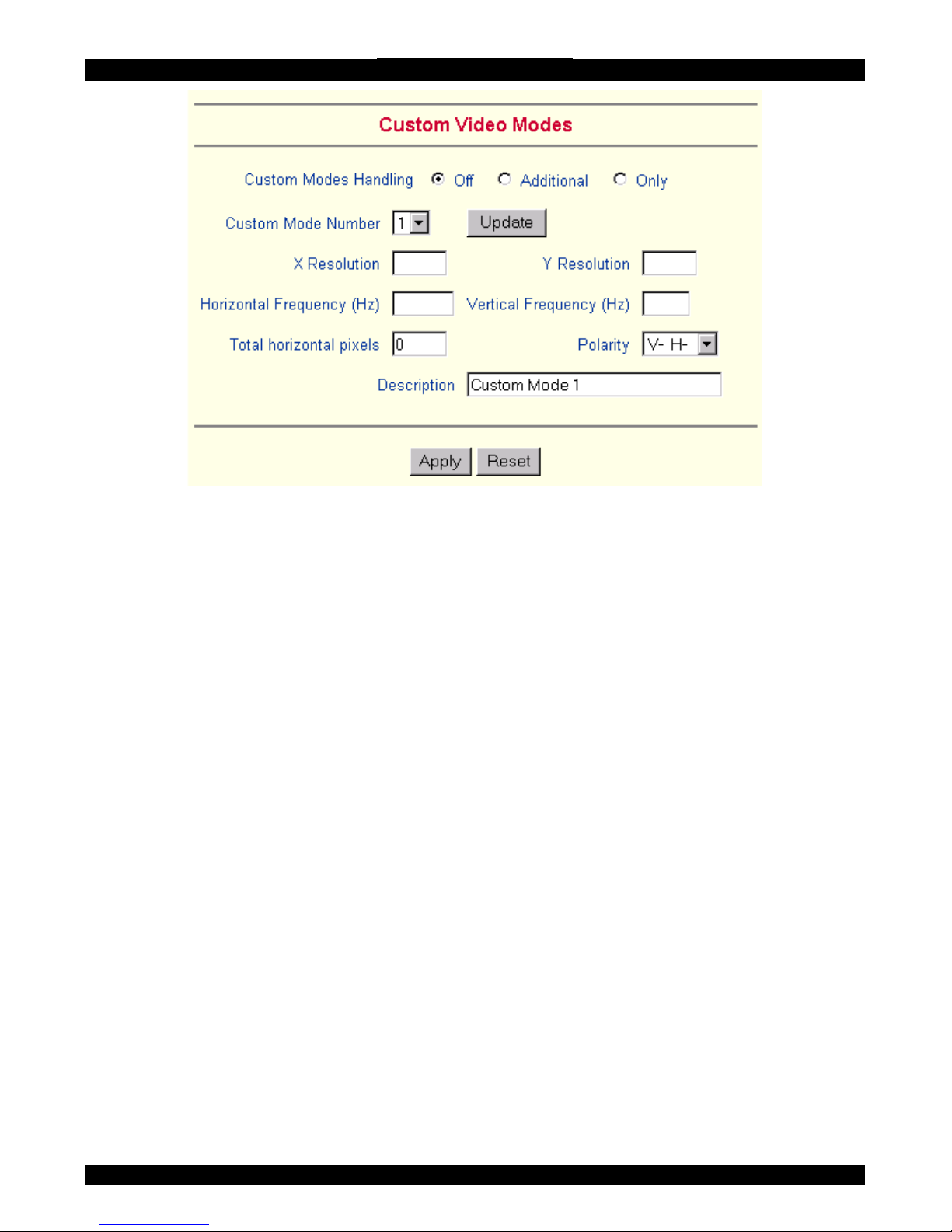
Click Add Custom Video Modes. The Custom Video Modes window appears, see
Figure 24.
Note! This option may affect the correct video transmission and is for advanced
users only.
The maximum number of custom video resolutions is 4.
34
Page 36
SMART IP EXTENDER
Figure 24 Custom Video Modes window
Custom Modes Handling – switch custom modes off, or use in addition to the
standard video resolutions, or use exclusively - Only. With Only you can force a
special video mode for IP Extender.
To change the parameters for a mode, choose the number and press Update.
X Resolution - Visible num
51.
ber of horizontal pixels.
Y Resolution - Visible number of vertical pixels.
Horizontal Frequency (Hz) - Horizontal (line) frequency.
Vertical Frequency (Hz) - The vertical (refresh) frequency.
Total horizontal pixels - The total amount of pixels per line, including non-visible
and blank areas.
Polarity - The polarity (positive/negative) of the synchronization signals. V means
vertical, H means horizontal.
Description Give the mode a name. The name appears in the Remote Console when
the custom mode is activated.
User/Group Management
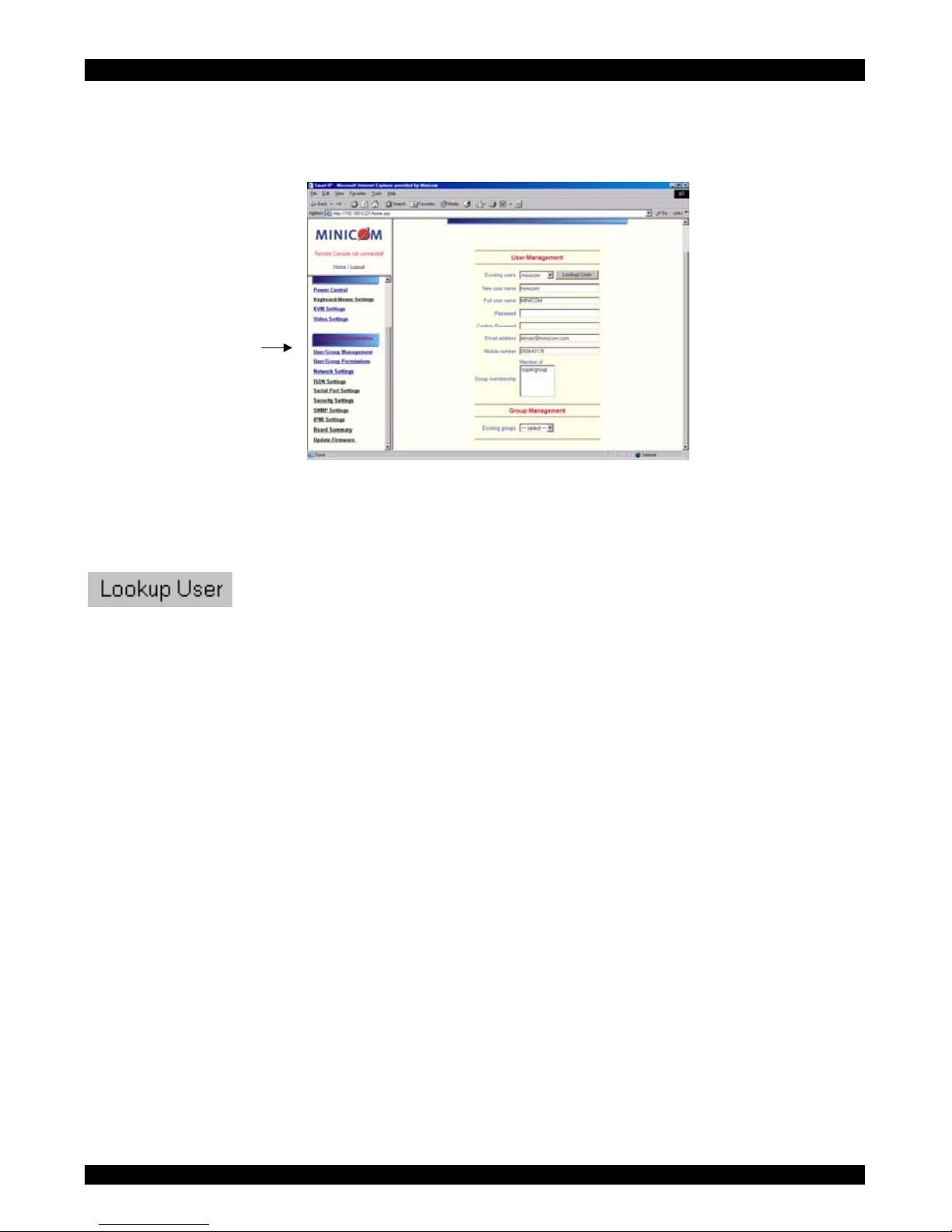
From the IP Extender Menu choose User/Group Management. The User/Group
Management settings appear. See Figure 25. The user and group management of IP
Extender is based on configurable users and groups. Each user or group can have
different access capabilities.
35
Page 37
USER GUIDE
The IP Extender is factory set with a supervisor user called `super' with the
password ‘smart’. Change the super user password immediately after accessing the
IP Extender.
Figure 25 The User/Group Management settings
52. Existing user
Select an existing user for modification or deletion. Once selected, click
to see the user information.
53.
54.
55.
56.
57.
58.
New user name
Enter a login name for a new user here. Ensure that it is not the same as a current
user or group.
Full user name
Write the full name of the new user.
Password / Confirm password
The password must be at least four characters. Confirm password.
Email address /Mobile number
These are optional.
Group membership/Member of/Not Member of
Each user can be a member of one or more groups and inherit the rights of that
group. Use the arrows to add or remove a user from a group.
Existing groups
Select an existing group for copying, modification or deletion.
36
Page 38

SMART IP EXTENDER
59.
60.
61.
62.
63.
64.
New group name
To create a new group, enter a new group name.
Create User button
Once the required fields are filled in, click the Create User button to create a new
user.
Delete User button
To delete a user:
1. Select a user in the Existing users Drop-down list.
2. Click the Lookup button. The complete user information appears.
3. Click the Delete User button.
Note: The factory set supervisor user `super' cannot be deleted, but it can be
renamed.
Modify User button
To modify a user:
1. Select a user in the Existing users Drop-down list.
2. Click the lookup button to get all the user's information.
3. All fields can be modified as required. The old password is not displayed, but can
be modified.
4. Click the Modify User button.
Copy User
To copy an existing user’s properties to a new user:
1. Select a user in the Existing user Drop-down list.
2. Enter a new user name in the New user name box.
3. Click the Copy User button. All properties of the selected user will be copied to
the new one, except user specific permissions.
Group Management
The following headings appear under Group Management.
37
Page 39

USER GUIDE
65.
66.
67.
68.
69.
Create group button
To create a group:
1. Type a name into the New group name box
2. Click the Create group button.
Delete Group button
To delete a group:
1. Select a group in the Existing groups Drop-down list.
2. Click the Delete group button.
Modify Group
To modify an existing group select the group in the Existing group control. The
group's name field can be modified. Finally click the Modify group button.
Copy Group
To create a group with the properties of an existing group:
1. Select a group in the Existing group Drop-down list.
2. Type a name into the New group name box.
3. Click the Copy Group button.
User/Group Permissions
From the IP Extender Menu choose User/Group Permissions. The User/Group
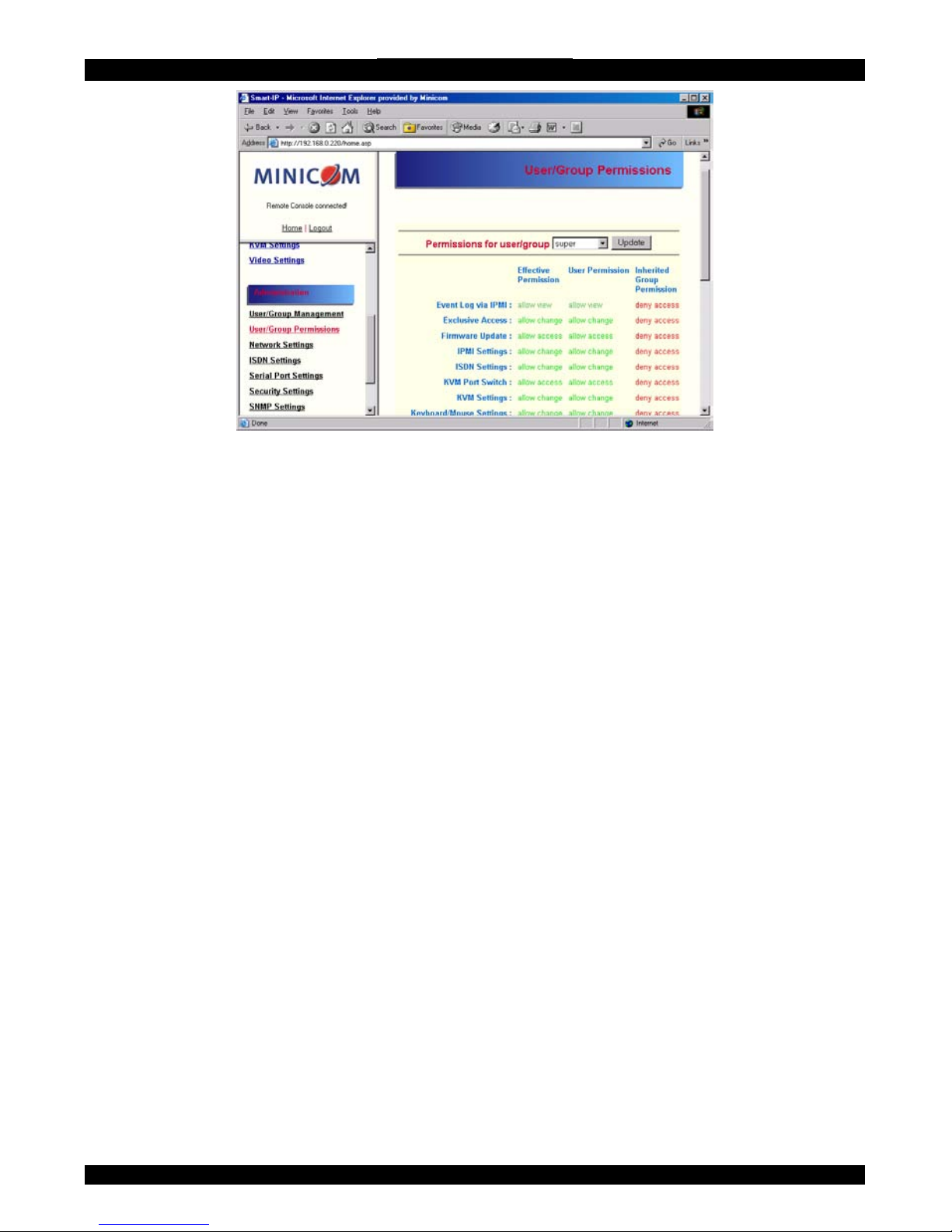
Permissions settings appear. See Figure 26.
38
Page 40
SMART IP EXTENDER
Figure 26 User/Group Permissions
Each user or group has a set of access rights to the IP Extender functions. The user
'super' always has unalterable full access rights. A newly created user has the access
rights of all groups he belongs to.
You can change the access rights in the User/Group Permissions panel. The panel
shows the changes to the access rights inherited by the user's ancestors only. This
means an empty user permission list has exactly the same access rights as the groups
he belongs to.
When one user creates a new user, he can alter his access rights. A user can change
another user or group's access rights if he stands higher in hierarchy. The 'super' user
stands at the top of the hierarchy, and can change everybody's access rights.
A user can never give more access rights than he himself has but he can always
reduce the access rights.
To change access rights:
1. From the Drop down list select a user/group. The selection list shows only users
and groups, which you have the right to change.
2. Click the Update button. The access rights of the user appear. The meaning of the
Permissions is as follows:
Viewing a field. allow view means you can view it. deny access means you cannot
view it.
Changing a field setting. Allow change means you can change it. (This doesn’t give
an automatic right to view the value, the allow view value must also be set). Deny
change means you cannot change it.
39
Page 41
USER GUIDE
Using a function. allow access means you can use it. deny access means you cannot
use it.
Group setting – Use the access rights inherited from the group(s), the user belongs
to.
3. Select the desired permission.
4. To add the right, click Add.
To remove the right, check the Delete Entry box.
5. Click Apply.
70. Network Settings
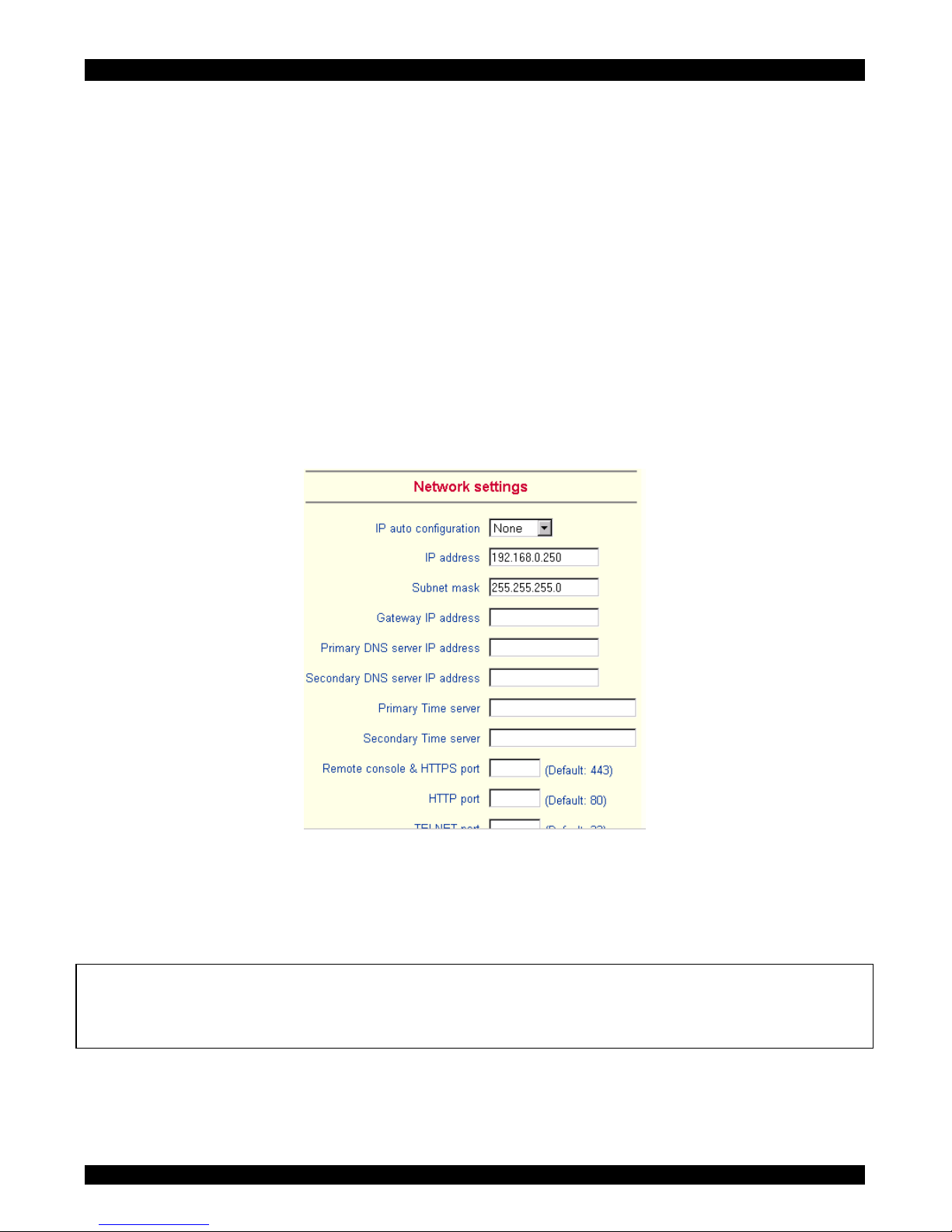
From the IP Extender Menu choose Network Settings. The Network Settings appear.
See Figure 27.
Figure 27 The Network Settings
In the Network Settings panel you can change the network parameters.
The initial IP configuration is usually done directly at the host system. However you
can also connect to the IP Extender using its pre-configured IP settings.
Warning! Changing the network settings of IP Extender may result in losing the
connection. If you remotely change the settings ensure that all values will give you
access to the IP Extender.
40
Page 42

SMART IP EXTENDER
IP auto configuration
Choose between the 3 options.
None – no IP auto configuration. In this case type a static IP address in the
appropriate settings below.
DHCP - When selected, IP Extender will contact a DHCP (Dynamic Host
Configuration Protocol) server in the local sub-net to obtain a valid IP address,
gateway address and net mask. Before you connect IP Extender to your local subnet, complete the corresponding configuration of your DHCP server.
BOOTP - When selected, IP Extender will contact a BOOTP (Bootstrap Protocol)
server in the local sub-net to obtain a valid IP address, gateway address and net
mask.
IP address
Static IP address in the usual dot notation.
Subnet mask
The net mask of the local network.
Gateway IP address
In case the IP Extender should be accessible from networks other than the local one,
this IP address must be set to the local network router's IP address.
Primary DNS Server IP address
IP address of the primary Domain Name Server. This may be left empty, however IP
Extender won't be able to perform name resolution.
Secondary DNS Server IP address
This address will be used in case the Primary DNS Server can't be contacted.
Primary Time Server
IP address of the primary NTP (Network Time Protocol) compliant timeserver. IP
Extender will synchronize its own absolute time with the timeserver's one. This is
important for writing log entries and for the Dynamic DNS Service.
Secondary Time Server
This address will be used in case the Primary Time Server can't be contacted.
41
Page 43
USER GUIDE
Remote Console & HTTPS port
Port number at which IP Extender's Remote Console server and HTTPS server are
listening. If empty the default value is used.
HTTP port
Port number at which IP Extender's HTTP server is listening. If empty the default
value is used.
Telnet port
Port number at which IP Extender's Telnet server is listening. If empty the default
value is used.
Bandwidth limitation
The maximum network traffic generated through the IP Extender Ethernet device.
Disable Setup Protocol
Exclude the IP Extender from the setup protocol.
71. Dynamic DNS
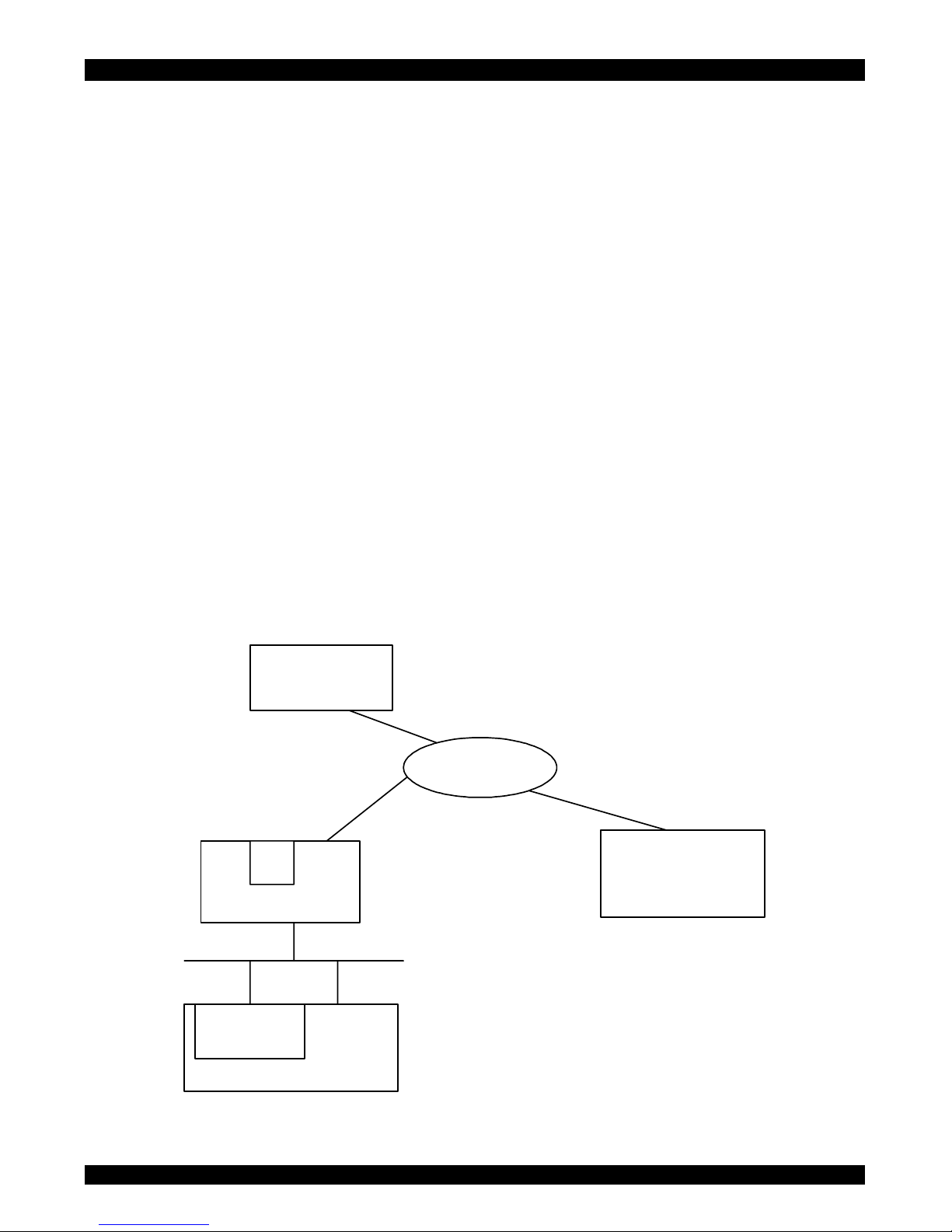
Minicom provides a Dynamic DNS service. See Figure 28.
IP
Extender
Internet
Dynamic DNS server
www.dyndns.minicom.com
Administrator PC
DSL
Dynamic IP
NAT
DSL router
LAN
Server
Figure 28 Dynamic DNS scenario
42
Page 44
SMART IP EXTENDER
IP Extender is reachable via the IP address of the DSL router, which is dynamically
assigned by the provider. Since the administrator doesn't know the IP address
assigned by the provider, IP Extender connects to a special dynamic DNS server in
regular intervals and registers its IP address there. The administrator can contact this
server as well and pick up the same IP address belonging to his card.
The administrator has to register a IP Extender that is supposed to take part in the
service with the Dynamic DNS Server. He will get an approved nickname and
password in return to the registration process. This account information is needed in
order to determine the IP address of the registered IP Extender.
To enable the Dynamic DNS:
1. Ensure the IP Extender LAN interface is properly configured.
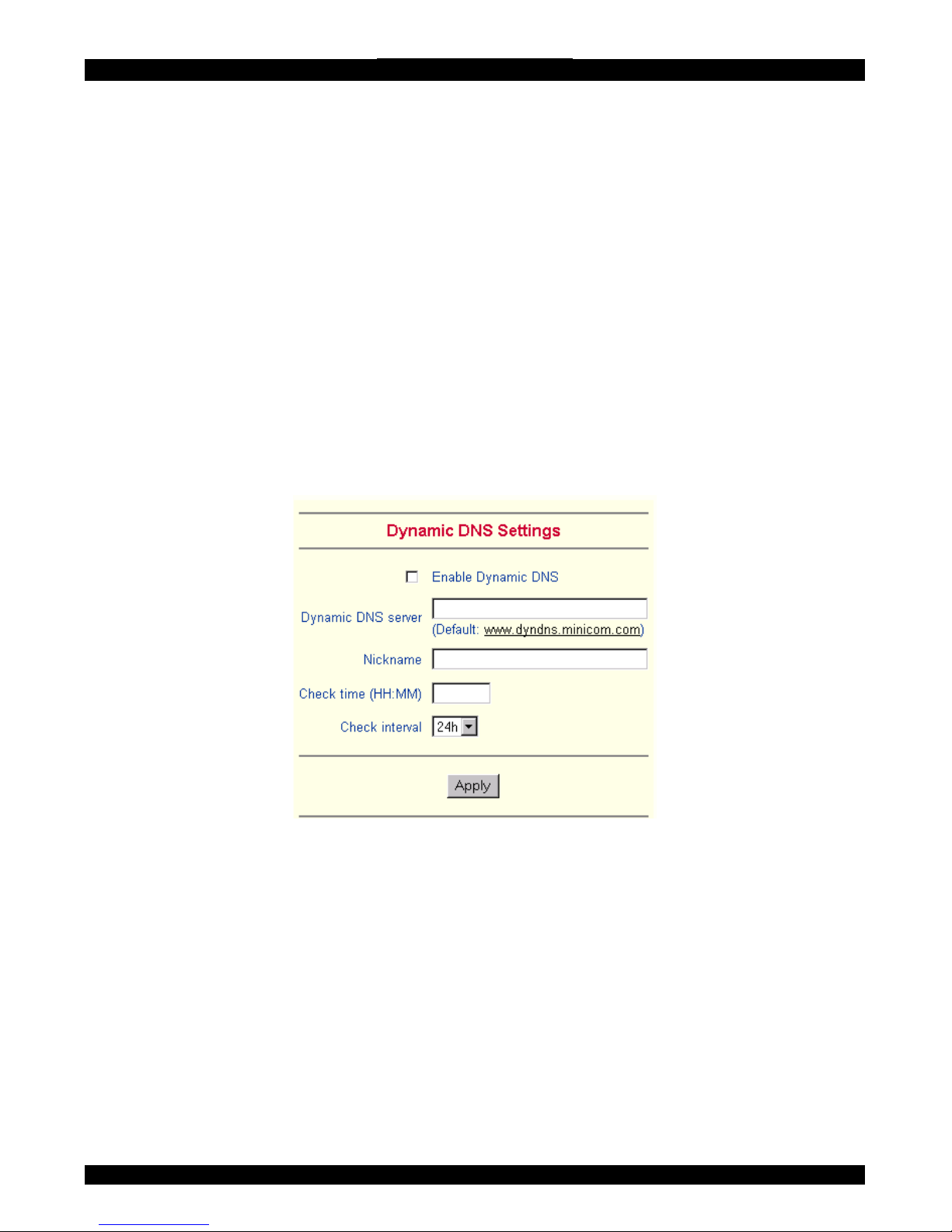
2. From the IP Extender menu choose Network Settings / Dynamic DNS. The
Dynamic DNS Settings appear. See Figure 29.
Figure 29 Dynamic DNS Settings
3. Check the Enable Dynamic DNS box.
4. Change the settings as desired.
Dynamic DNS server - Enter the server name where IP Extender registers itself in
regular intervals. If left blank the default will be used.
Nickname - The nickname registered during manual registration with the Dynamic
DNS Server. Spaces are not allowed in the Nickname.
Check time - IP Extender card registers itself in the Dynamic DNS server at this
time.
43
Page 45
USER GUIDE
Check interval - Interval for reporting again to the Dynamic DNS server by IP
Extender.
IP Extender has its own independent real time clock. Ensure the time setting is
correct by configuring a timeserver see page 32.
IP Extender registers itself to the Dynamic DNS server slightly different from the
time configured. To reduce load peaks on the server we add a random time (0-10
min) to the absolute time value.
72. ISDN Settings
IP Extender offers remote access using an ISDN connection (only for EMEA
versions of IP Extender).
Connecting to IP Extender using an ISDN line builds a dedicated point to point
connection from your console computer to IP Extender.
IP Extender also acts as an Internet Service Provider (ISP) to which you can dial in.
The Point-to-Point Protocol (PPP) establishes the connection. Configure your
console computer accordingly.
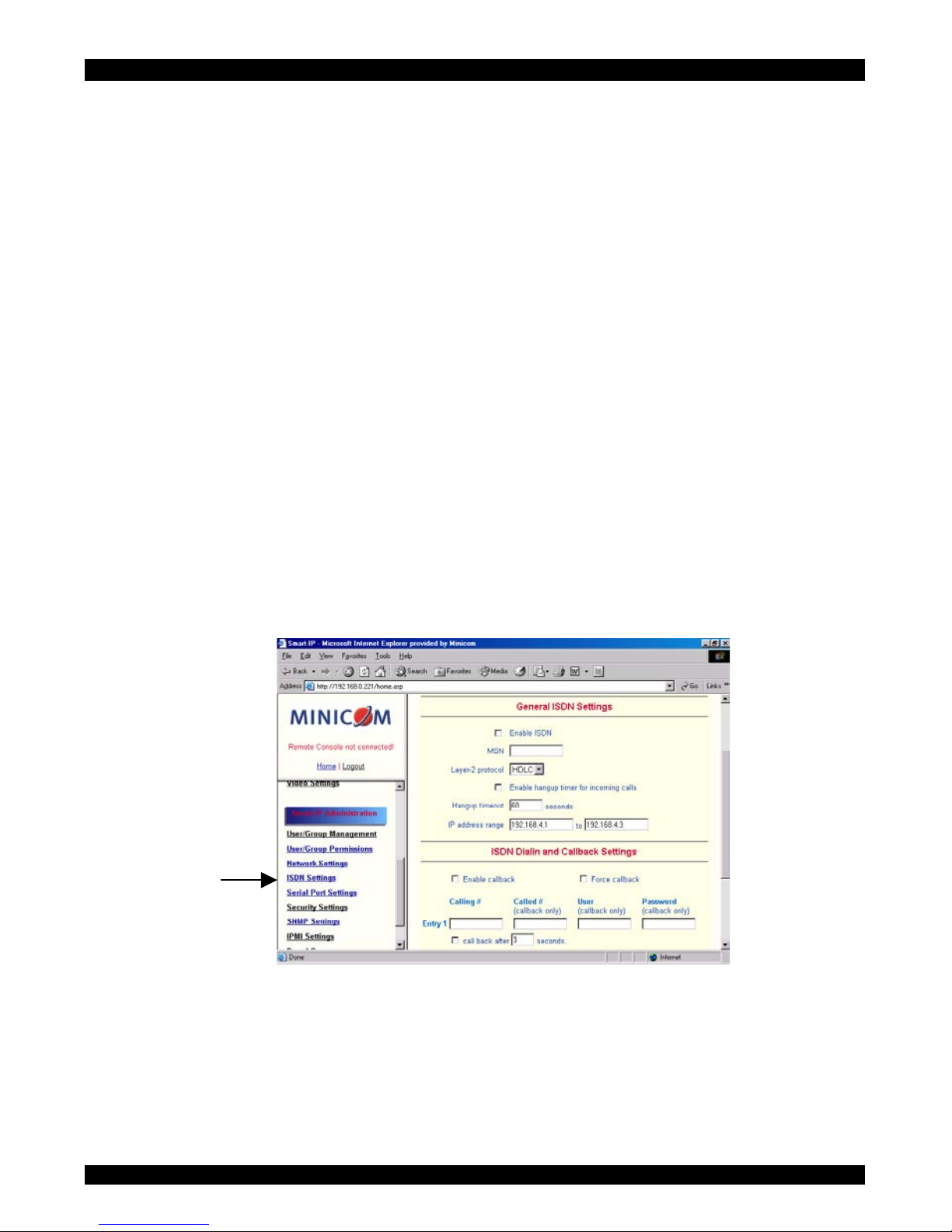
From the IP Extender Menu choose ISDN Settings. The ISDN Settings appear. See
Figure 30.
Figure 30 ISDN Settings
Enable ISDN – Check to enable ISDN.
MSN - Multiple Subscriber Number assigned to IP Extender.
44
Page 46

SMART IP EXTENDER
Layer-2 protocol - responsible for the error-free movement of data between
network nodes. Choose between the High-level Data Link Control (HDLC) and
X.75. You can leave this option untouched in case you use a standard network
connection as built in Windows or Linux.
Enable hang-up timer for incoming calls - Check to hang up an incoming
connection.
Hang-up timeout - For outgoing connections only where IP Extender is configured
for callback. When the Enable hang-up timer for incoming calls is checked, the
time out also applies to incoming calls.
IP address range - Addresses to be assigned to IP Extender and the console
computer while establishing an ISDN connection. The first address is used for IP
Extender itself. The range must have at least 3 addresses.
Enable channel bundling – Enables channel bundling.
ISDN last incoming call status – displays the status of the last incoming call.
Enable callback – Check to enable IP Extender to either call back a number that is
trying to connect or to call a different number. Both these numbers must be inputted
as explained below.
Force callback – Can only connect via inputted callback numbers. The Enable
callback box must also be checked.
Calling # - Type the phone number that can call into IP Extender. If no number is
inputted them ANY number can dial in.
Called # - Type the phone number which will be called when callback is enabled.
this could be the same as the Calling # or a different one.
User / Password - The user name and password.
Call back after [x] seconds – Check the box to make it an active callback entry.
You can also type in a time delay.
- click to add more entries.
ISDN configuration - some examples
Non-callback dial in for everyone. Uncheck the Enable callback and Force callback
boxes.
Non-callback dial in for selected people. Check Enable callback. Uncheck Force
callback. Type the Calling # for the selected people. Uncheck the call back after box.
45
Page 47

USER GUIDE
Callback connections only. Check Enable callback. Uncheck Force callback. Make
an entry for every allowed client and check the call back after box.
73.
74.
Modem Settings
IP Extender has the option of remote access using a telephone line. Connect the
modem to IP Extender’s serial interface. Using a telephone line means building up a
dedicated point to point connection from your console computer to the IP Extender.
The IP Extender acts as an Internet Service Provider (ISP) to which you can dial in.
The connection is established using the Point-to-Point Protocol (PPP).
Before connecting to IP Extender, configure your console computer accordingly. For
instance on Windows based operating systems you can configure a dial-up network
connection, which defaults to the right settings like PPP. The modem settings are
part of serial settings panel (see the section above).
Enable modem on RS 232
Enable or disable the modem on the serial interface adapter of IP Extender. When
enabled, IP Extender tries to initialize the modem using an initial string of AT
commands and waits for incoming connections.
Serial line speed
The speed IP Extender communicates with the modem. Most modems today support
the default value of 115200 bps. Try lowering the speed of old modem if you are
having problems.
Modem Init String
The initialization string used by IP Extender to initialize the modem. The default
value works with all modern standard modems directly connected to a telephone
line. If you have a special modem or the modem is connected to a local telephone
switch that requires a special dial sequence to establish a connection to the public
telephone network, you can change this setting by giving a new string. Refer to the
modem’s manual about the AT command syntax.
Serial Port Settings
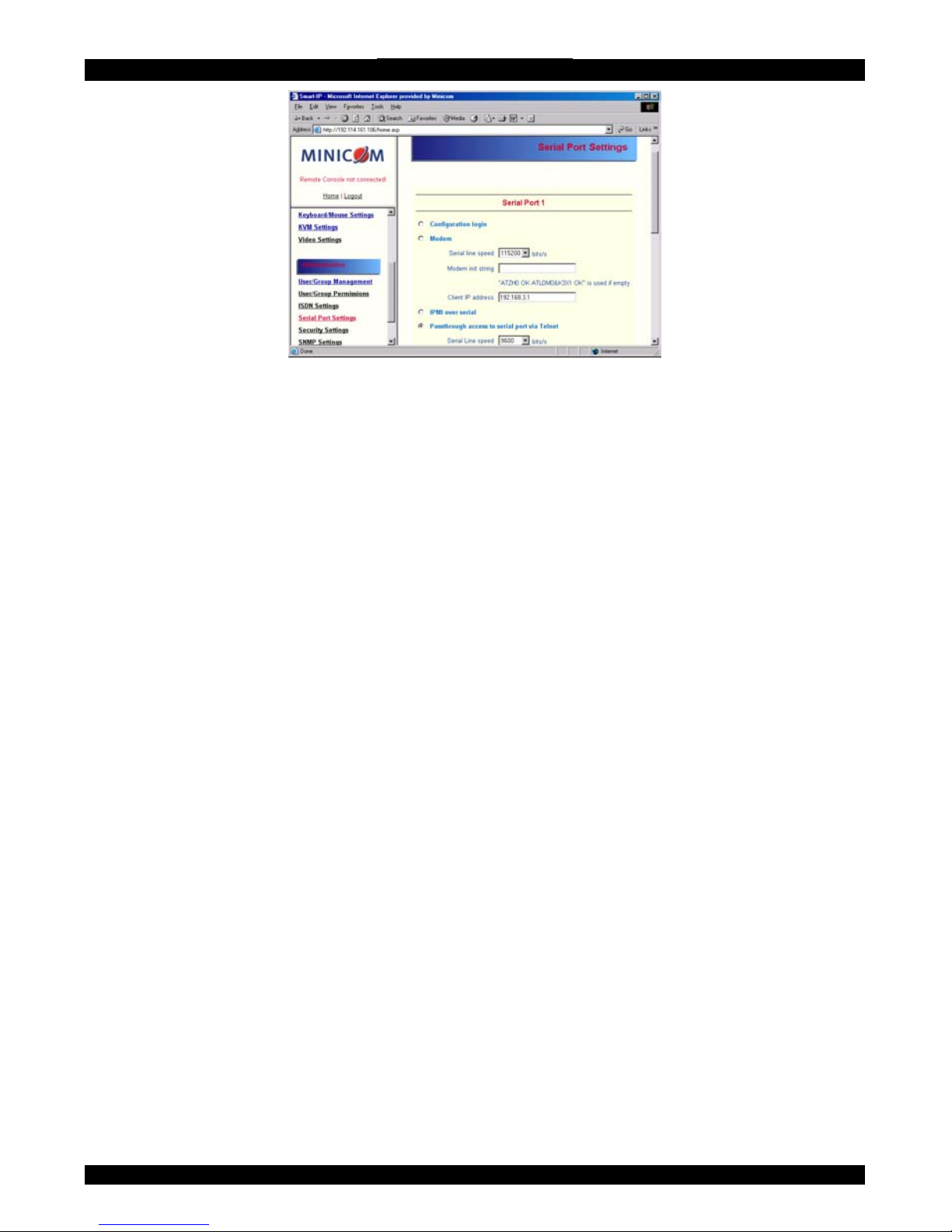
From the IP Extender Menu choose Serial Port Settings. The Serial Port Settings
appear. See Figure 31.
46
Page 48
SMART IP EXTENDER
Figure 31 Serial Port Settings
In the IP Extender Serial Settings specify the devices connected to the two Serial
ports.
Serial Port 1
The port options are listed below
Configuration login –If this option is checked you can only use the port for the
initial configuration and no other function.
Modem - Connect a modem to Serial 1 port. See section
73 below
Serial line speed - Most modems today will support the default value of 115200
bps. For older modems lower the speed.
Modem Init String - Initialization string. The default value works with all modern
standard modems connected to a telephone line. For special modems or if connected
to a local telephone switch that requires a special dial sequence to connect to the
public telephone network, change this setting by giving a new string. See the
modem's manual about the AT command syntax.
Modem Server IP address – This address is used only when connecting to IP
Extender via a modem. When you dial into the IP Extender the client computer will
receive a Client IP address from the IP Extender. Open the Web browser and type
modem server IP address to login to the IP Extender.
The Client IP (see paragraph below) must be in the same class C subnet as the server
IP. This subnet should not conflict with the Ethernet subnet on the client side and
with the Ethernet subnet on IP Extender Network side.
Modem Client IP address - This address is assigned to your console computer
during the PPP handshake. Since it is a point-to-point IP connection virtually every
IP address is possible but ensure, it is not interfering with the IP settings of IP
Extender and your console computer. The default value will work in most cases.
47
Page 49
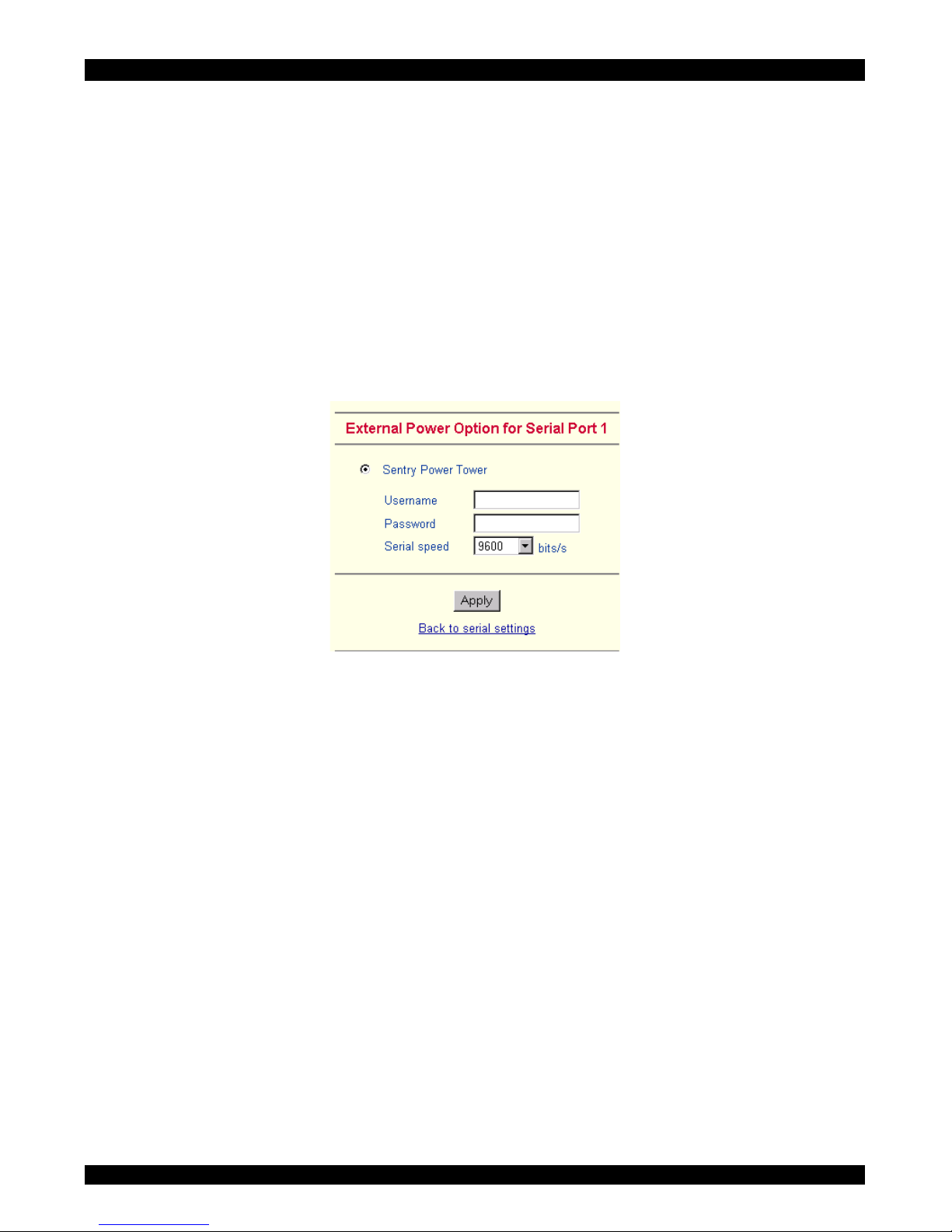
USER GUIDE
IPMI over Serial - Check to use this serial port for IPMI 1.5 over serial. See page
56 for more information.
Passthrough… - Connect an arbitrary device to the serial port and access it
(assuming it provides terminal support) via telnet. Select the appropriate options for
the serial port and use the Telnet Console (see page 50) or a standard telnet client to
connect to IP Extender. For more information, see page 60.
External Power Option – When the External Power Option is the Sentry Power
Tower connected to Serial port 1, configure it by clicking change external power
switch option. The External Power Option for Serial port 1 window appears.
Fill in the Username and password as defined by the Sentry Power Tower.
Figure 32 External Power Option for Serial port 1 window
Serial Port 2
This port provides the power control options, see page 28. Choose a suitable setting
and fill in additional required options. IP Extender supports the following:
Internal Power Option - This option gives access to the ATX power and reset
functions of a single connected system. You can change the duration of each button
press. To do so, click Change button press durations. The box below appears. Adjust
the time as desired.
48
Page 50
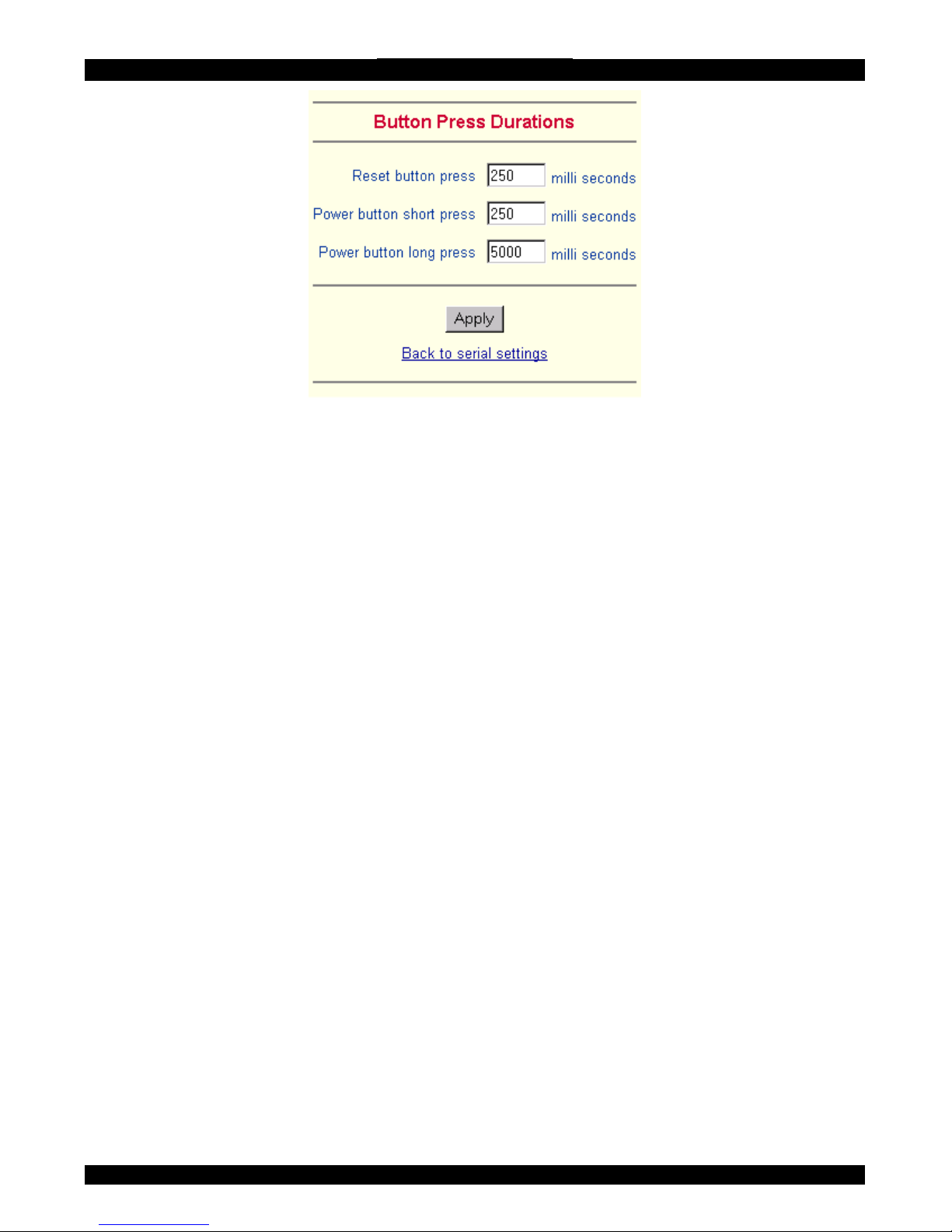
SMART IP EXTENDER
Figure 33 Button Press Durations box
External Power Option
To configure the External Power Option connected to Serial port 2, click change
external power switch option.
SPC 800/1600 - Using the Avocent
TM
SPC, switch power for more than one system
connected to IP Extender through a KVM switch. To use this device enter a
username and password, which exist on the SPC and have the privileges to switch
power for each port.
Intelligent Power Module - External module option to switch power of a single
system by putting it in the power supply line of the controlled system.
ePowerSwitch 4 port- Using this switch, switch power for more than one system
connected to IP Extender through a KVM switch.
ePowerSwitch-Slave – This switch is cascadable to up to 4 power sockets with 8
ports. IP Extender must be connected to the first socket of the cascade via a serial
connection.
Spectrum Control Inc. - Smart Start Jr. – Check the box if this option is connected.
49
Page 51
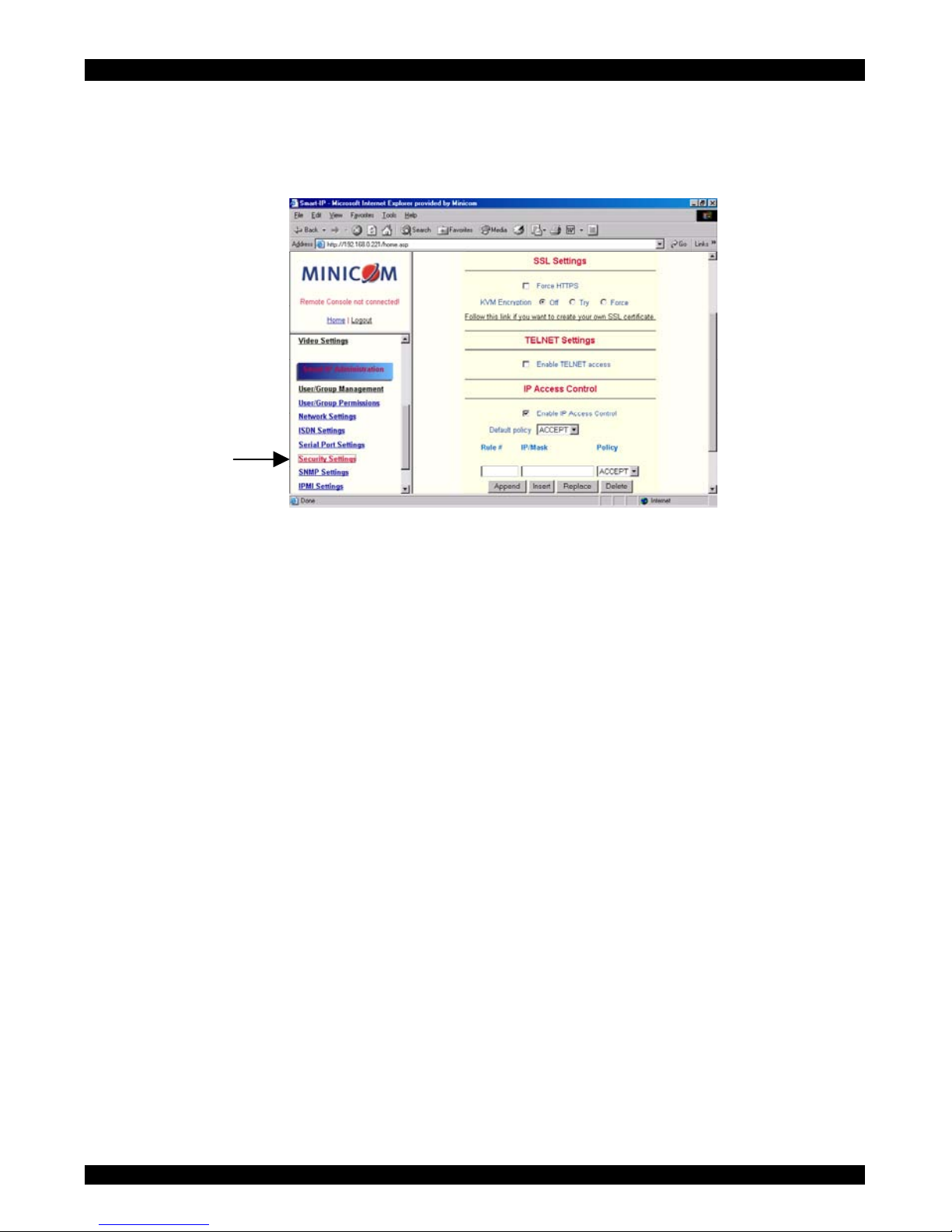
USER GUIDE
75. Security Settings
From the IP Extender Menu choose Security Settings. The Security Settings appears.
See Figure 34.
Figure 34 Security Settings
SSL settings
Force HTTPS - Access the Web front-end only using an HTTPS connection. IP
Extender won't listen on the HTTP port for incoming connections.
Disable SSLv2 ciphers – disables SSLv2 ciphers. Only version 3 or higher is
enabled.
KVM encryption - Controls the encrypting of the RFB protocol, used by the
Remote Console to transmit the screen data to the administrator machine and
keyboard and mouse data back to the host.
Off - No encrypting used.
Try - Tries to make an encrypted connection. If unsuccessful, an unencrypted
connection is used.
Force - Tries to make an encrypted connection.
SSL Certificate Management
IP Extender uses the SSL (Secure Socket Layer) protocol for any encrypted network
traffic between itself and a connected client. When connecting, IP Extender reveals
its identity to a client using a cryptographic certificate. This is the same for all IP
Extenders and won't match the network configurations applied to the card by its
user. The certificate's underlying secret key is also used for securing the SSL
handshake. Hence, this is a security risk (but better than no encryption at all).
50
Page 52
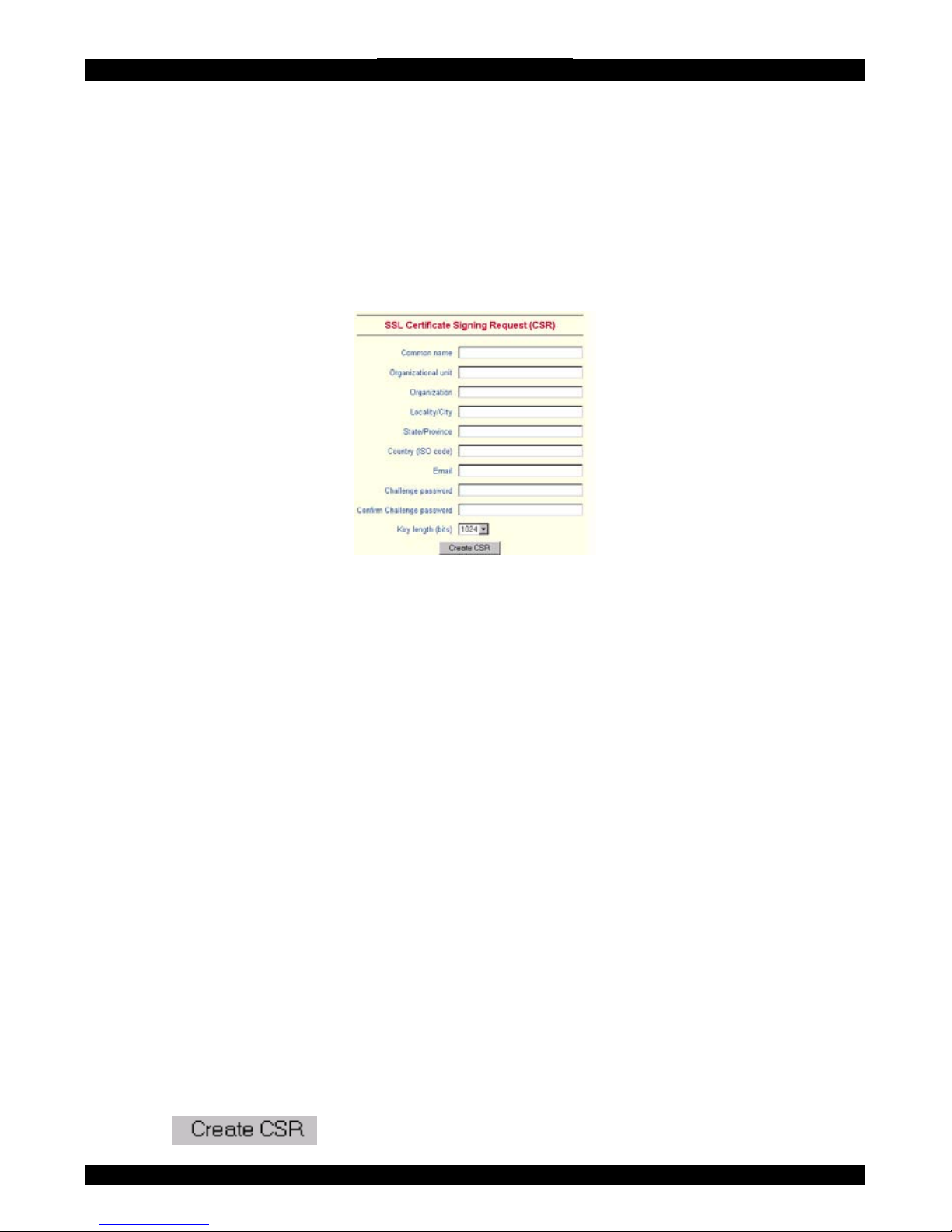
SMART IP EXTENDER
You can generate and install a new certificate unique to a particular card. IP
Extender can generate a new cryptographic key and the associated Certificate
Signing Request that needs to be certified by a certification authority (CA). A CA
verifies you are who you claim to be and signs and issues a SSL certificate to you.
To create and install a IP Extender SSL certificate:
1. From the Security Settings page choose Create your own SSL certificate. The
window appears as in Figure 35.
Figure 35 CSR
2. Fill in the fields:
Common name - Network name of IP Extender once installed in the user's network.
It is identical to the name that is used to access the card with a Web browser. In case
the name given here and the actual network name differ, the browser will pop up a
security warning when the card is accessed over HTTPS.
Organizational unit - Specifies which department within an organization IP
Extender belongs.
Organization/Locality/City/State/Province - Organization to which IP Extender
belongs + location.
Country - Use the 2 letter ISO code, e.g. DE for Germany.
Challenge Password/Confirm- Some certification authorities require a challenge
password to authorize later changes on the certificate. The minimum is 4 characters.
Email - Of a security contact person that is responsible for IP Extender.
Key length - Length of the generated key in bits. 1024 Bits are supposed be
sufficient for most cases. Larger keys may result in slower response time during the
connection.
3. Click
.
51
Page 53

USER GUIDE
4. Press Download CSR to download the CSR to your administration machine.
5. Send the CSR to a CA for certification. They will send a new certificate
6. Press Upload to upload the certificate to IP Extender. The certificate uploads.
Important! If you destroy the CSR on IP Extender there is no way to get it back! If
you deleted it, repeat the above steps.
Telnet Settings
Enable Telnet access - Access over Telnet client. For better security disable Telnet
access.
IP Access Control
This is used to limit access to a specific number of clients only. These clients are
identified by their IP addresses.
The IP access control settings apply to the LAN interface only!
Enable IP Access Control - Enables access control based on IP source addresses.
Default policy - Controls arriving IP packets that don't match any of the configured
rules. They can be accepted or dropped.
ATTENTION: If you set this to DROP and you have no ACCEPT rules configured,
access to the Web front-end over LAN is disabled! To enable access, change the
security settings via modem or ISDN dial in or by temporarily disabling IP access
control with the initial configuration procedure (see page 14).
Rule # - Type the rule number for which the following commands will apply. This is
ignored, when adding a new rule.
IP/Mask - Specifies the IP address or IP address range for which the rule applies.
Numbers attached to an IP address with a `/' is the number of valid bits that are used
for the given IP address. Examples:
192.168.0.22 or 192.168.0.22/32 matches the IP Address 192.168.0.22
192.168.0.0/24 matches all IP packets with source addresses from 192.168.0.0 to
192.168.0.255
0.0.0.0/0 matches any IP packet
Policy - Determines what to do with matching packets. They are accepted or
dropped.
52
Page 54

SMART IP EXTENDER
NOTE: The order of the rules is important. The rules are checked in ascending order
until a rule matches. Rules below the matching one are ignored. The default policy
applies if no match has been found.
Append a rule - Enter the IP/Mask and set the policy. Then press .
Insert a rule - Enter the rule number, IP/Mask and set the policy. Then press
.
Replace a rule - Enter the rule number, IP/Mask and set the policy. Then press
.
Delete a rule - Enter the rule number and press
.
Anti Brute Force Settings
Anti Brute Force Settings lets you block access to a specific user, for a fixed amount
of time if a predefined number of unsuccessful login attempts by this user occurred.
Max. number of failed logins – insert a maximum number or leave it blank.
Block time - Block time in minutes - insert a number or leave it blank.
53
Page 55

USER GUIDE
76. SNMP Settings
The following information is available via SNMP:
• Serial number
• Firmware version
• MAC address / IP address / Netmask / Gateway of LAN interface
• Configured users
• Currently active users with login time (login time is only valid if time is
synchronized on IP Extender)
• Server's power state
• The following actions can be initiated via SNMP:
• Reset server
• Power on/off server
• Reset IP Extender
The following events are reported by IP Extender via SNMP:
• Login trial at IP Extender failed
• Login trial at IP Extender succeeded
• Denying access to a particular action.
• Server was reset.
• Server was powered on/off
From the IP Extender Menu choose SNMP settings. The SNMP Settings appear. See
Figure 36.
54
Page 56
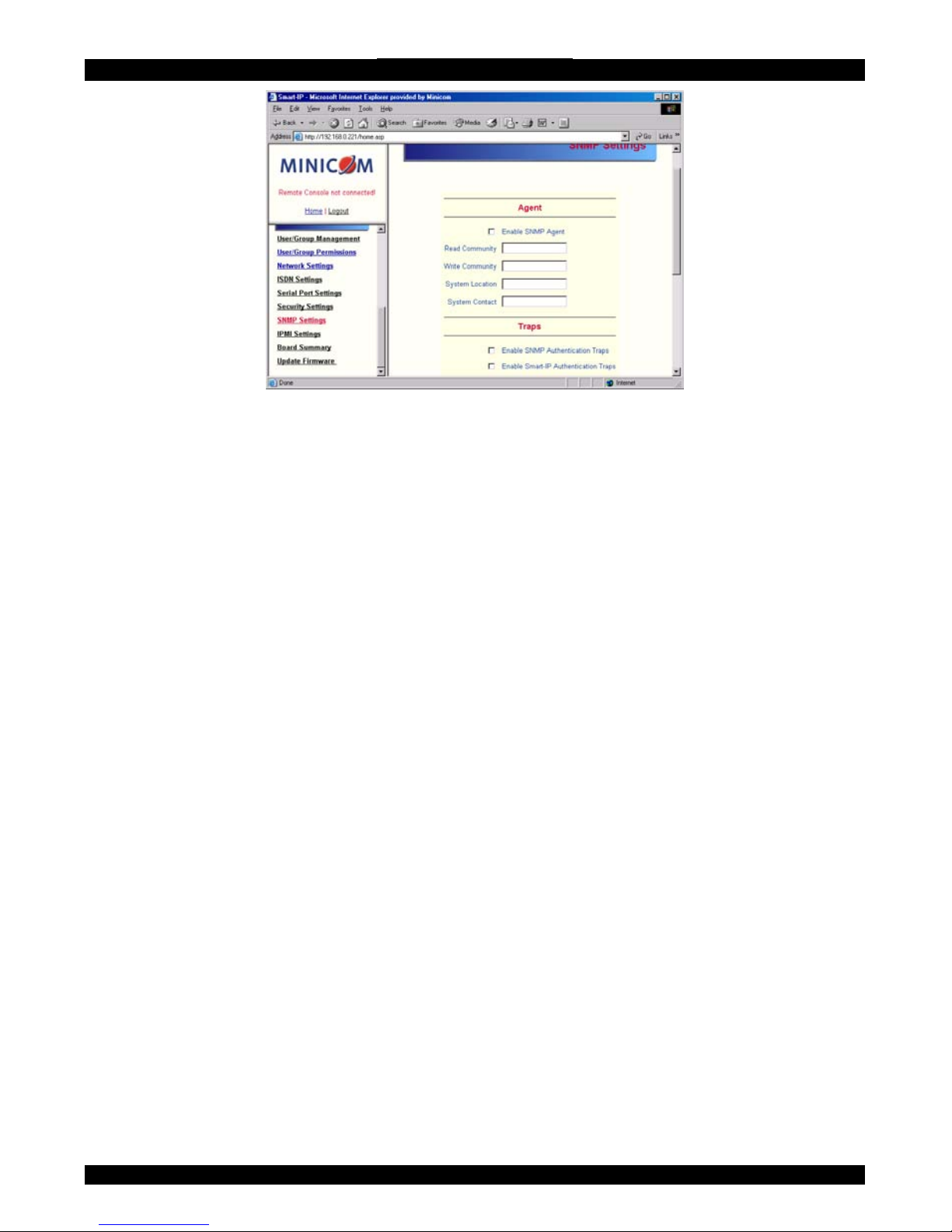
SMART IP EXTENDER
Figure 36 SNMP settings
You can change the following parameters:
Enable SNMP Agent - When checked, IP Extender will answer to SNMP requests.
If a community is blank, you cannot perform the request. E.g. if you want to disable
the possibility to reset IP Extender via SNMP, don't set a write community.
Read Community - This is the SNMP community, which allows you to retrieve
information via SNMP.
Write Community - This community allows you to set options and reset IP
Extender or the host via SNMP.
System Location - Type a description of the physical location of the host. This will
be used in reply to the SNMP request "sysLocation.0".
System Contact - Type a contact person for the host. This will be used in reply to
the SNMP request "sysContact.0".
Enable SNMP Authentication Traps -When checked, an SNMP trap will be sent
in case somebody has tried to access IP Extender via SNMP using a wrong SNMP
community.
Enable IP Extender Authentication Traps - When checked, an SNMP trap will be
sent if somebody tries to login via the Web front-end. Both successful and failed
logins trials will be indicated. Furthermore, there will be notification about other
security violations like trying to perform an action via Web front-end for which a
user has no permission.
Enable Host Traps -When checked, IP Extender will send SNMP traps whenever
the host is reset, powered down or powered up.
55
Page 57
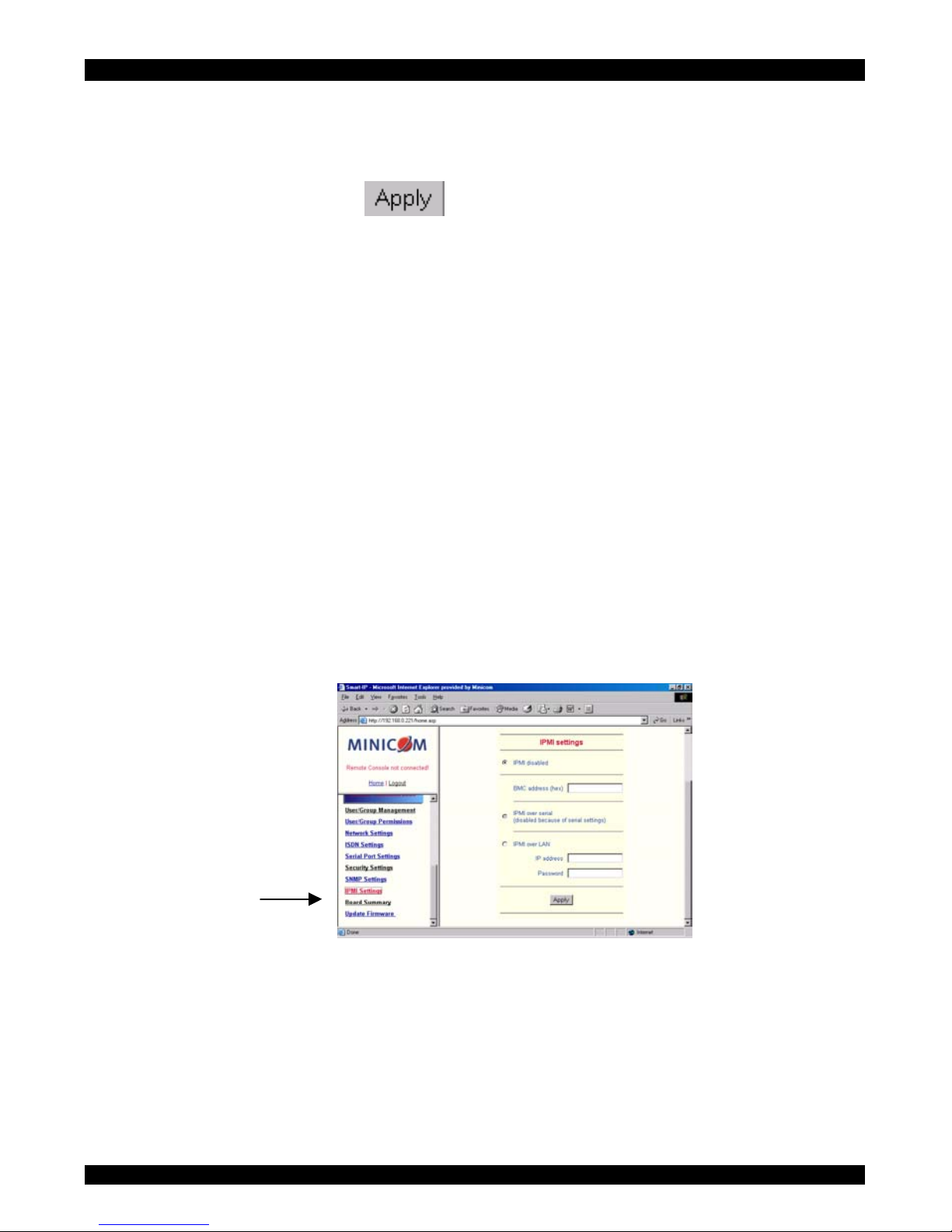
USER GUIDE
Trap destinations Enter IP addresses, to which the traps will be sent. For every IP
address, set an according community so that your management client can identify
the SNMP traps.
After making the entries click
.
77.
78.
The IP Extender SNMP MIB
Click the link to access the IP Extender SNMP MIB file. With it, an SNMP client
can communicate with IP Extender.
IPMI Settings
The IP Extender IPMI (Intelligent Platform Management Interface) is an additional
way to power on or off the system or to perform a hard reset. You can also show an
event log of the host system and the status of some system sensors (i.e. temperature).
If your host system supports IPMI, you can access it in one of the following ways:
• IPMI over Serial
• IPMI over LAN
Both require IPMI V1.5.
From the IP Extender Menu choose IPMI Settings. The IPMI Settings appears. See
Figure 37.
Figure 37 IPMI Settings
IPMI disabled - Disables IPMI. Status via IPMI and Event Log via IPMI are not
available and the power on/off and reset functions won't use IPMI.
BMC address - Hexadecimal Baseboard Management Controller address. Needed
for all types of communication to the IPMI-interface. Usually you can find this
address in the BIOS of the host system. The default and common value is 20.
56
Page 58
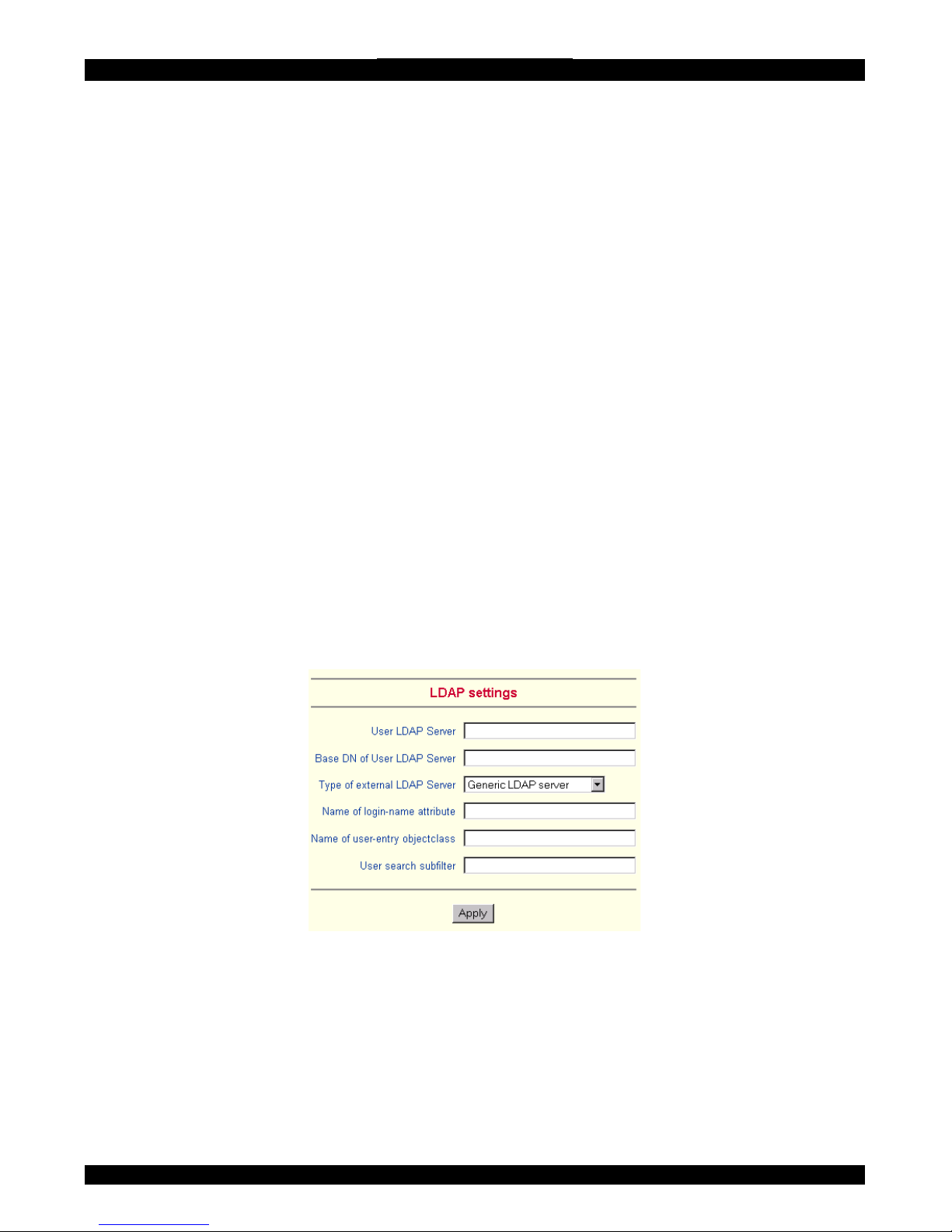
SMART IP EXTENDER
IPMI over Serial - If your host system supports IPMI V1.5 and has an Intel EMP
(Emergency Management Port, usually COM2) connector, you can connect IPMI
through serial port 1 on IP Extender. Please note:
• Set the EMP port to Always enable and switch off the Restricted Mode.
• The BMC should accept a null username and a non-null password account
as login.
• Passwords are 4 -16 characters long.
• Use a null modem cable for connection
IPMI over LAN - You can connect the IPMI over a LAN connection. You need a
host system with IPMI V1.5 and a network adapter with a sideband connection to
the BMC (mostly on board). In the IPMI Settings, enter the IP-address of this host
system and the correct password for the LAN connection.
You can also access other IPMI systems when you enter their IP address.
79. LDAP Settings
You can keep authentication information in a central LDAP directory.
From the IP Extender Menu choose LDAP Settings. The LDAP Settings appears.
See Figure 38.
Figure 38 LDAP Settings
User LDAP Server - Enter the name or IP address of the LDAP server containing
all the user entries. If you use a name, configure a DNS server in the network
settings.
Base DN of User LDAP Server - Specify the distinguished name (DN) where the
directory tree starts in the user LDAP server.
57
Page 59
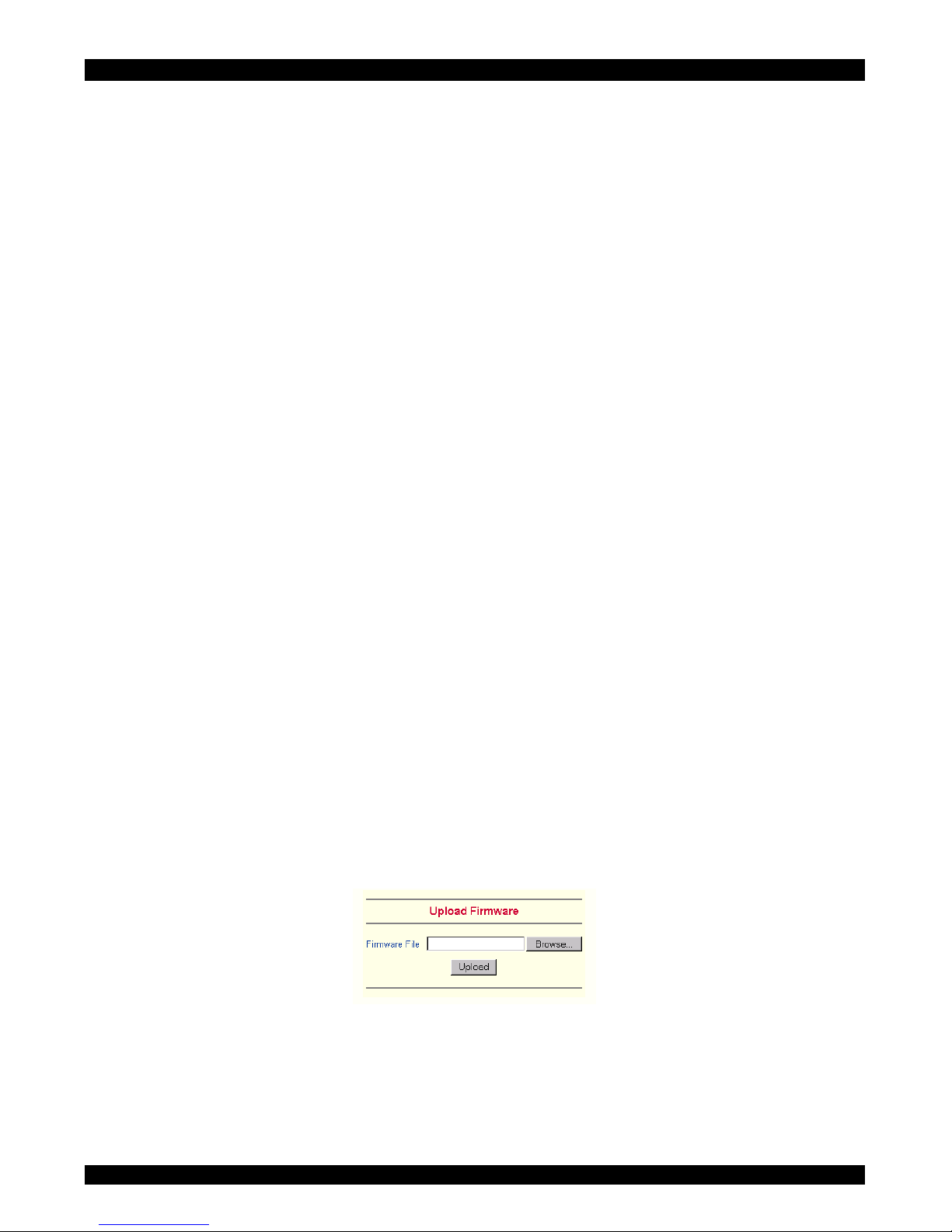
USER GUIDE
Type of external LDAP Server - Set the type of the external LDAP server. This is
necessary since some server types require special handling. Also the default values
for the LDAP schema are set appropriately. Choose between Generic LDAP Server,
Novell Directory Service and Microsoft Active Directory. If you don’t have Novell
Directory Service or Microsoft Active Directory then choose Generic LDAP Server
and edit the LDAP schema used (see below).
Name of login-name attribute - Name of the attribute containing the unique login
name of a user. To use the default leave this field empty. The default depends on the
selected LDAP server type.
Name of user-entry object class - The object class that identifies a user in the
LDAP directory. To use the default leave this field empty. The default depends on
the selected LDAP server type.
User search subfilter - Refine the search for users that should be known to the IP
Extender.
80.
81.
Maintenance
From the IP Extender Menu choose Maintenance. The IP Extender Maintenance
window appears.
Board Summary - This contains information about the IP Extender and its current
firmware.
Updating firmware
You can receive firmware updates by email or download them from the Minicom
Web site. Save the firmware file on the client computer.
To update the firmware:
1. Scroll down the Maintenance window. Under Maintenance features click Update
Firmware. The Update Firmware window appears. See Figure 39.
Figure 39 Update Firmware window
2. Ensure that the host computer is connected to IP Link and switched on during the
firmware update.
3. Locate and upload the firmware file from your client system. In case of any
errors the upload will be aborted.
58
Page 60

SMART IP EXTENDER
After a smooth upload the Update Firmware panel appears showing the current
firmware version number and the uploaded firmware version number.
4. Press the Update button. The firmware updates. Warning! This process is
irreversible; ensure the IP Extender's power supply won't be interrupted during
the update process, as this may cause damage.
5. When prompted reset IP Extender manually by pressing the
button. When pressed all connections to the administration or Remote console
close. 30 seconds later, IP Extender runs with the new firmware. You must login
again.
Attention: Only experienced staff members or administrators should perform a
firmware update.
82.
83.
Data file for support
Click the link to access the IP Extender data file. The file contains support
information, which will help us to troubleshoot your problem.
Include/modify custom HTML code
You can modify the HTML code of the Home page to include customized graphics
and text. You can’t save graphics on the IP Extender therefore the graphics should
be accessible on the Network. Define Primary and secondary DNS in the Network
settings if needed.
59
Page 61

USER GUIDE
84.
85.
Access via Telnet
Connect via a standard Telnet client using IP Extender’s Telnet server. Use it for
passthrough access to a device connected to serial port 1. Connect any serial device,
which offers terminal access via its serial port and access it using the Telnet
interface. Set the serial settings - see page 44 - according to the requirements of the
device.
Connect to IP Extender in the usual way required by the Telnet client, e.g. in a
UNIX shell: telnet 192.168.0.220 – (The IP address has been replaced by the
one that is actually assigned to IP Extender).
Type a username and password when prompted. These are identical to those of the
Web interface. The user management of the Telnet interface is controlled just like
the Web interface.
Once logged in, the command line appears to type management commands.
The interface supports both the command line and terminal modes. The command
line mode is used to control or display some parameters. In terminal mode the
passthrough access to serial port 1 is activated (if the serial settings were made
accordingly). All inputs are redirected to the device on serial port 1 and the answers
appear on the Telnet interface.
Telnet server commands
Click help to list the following commands:
cls - Clears screen
quit - Logs out current user and disconnects from the client.
version - Shows all available version numbers
terminal - Starts the terminal passthrough mode for serial port 1. The key sequence
`<esc> exit' switches back to command modus.
60
Page 62

SMART IP EXTENDER
Frequently Asked Questions
Q 1: The client mouse doesn't work or is not synchronized.
A: Ensure the IP Extender mouse settings match the mouse model. Also see page 24
Q 2: Bad video quality or grainy picture
A: Use the brightness and contrast settings - see page 23. Use the auto adjustment
feature to correct a flickering video.
Q 3: Login fails.
A: Was the correct user and password given? On delivery, the user "super" has the
password "smart". Configure your browser to accept cookies.
Q 4: I use the Mozilla Browser 0.9.x., Netscape 6.x and https (secure http). When I
try to open the Remote Console applet loading fails with Bad Magic Number
Exception.
A: This is a bug in some older versions of Mozilla. Don't use https, or upgrade your
Browser.
Q 5: The Remote Console window can't connect to IP Extender.
A: Maybe a firewall prevents access to the Remote Console. Ensure the TCP port
numbers 443 or 80 are open for incoming TCP connections.
Q 6: Cannot connect to IP Extender.
A: Check if the network connection is working (ping the IP address of IP Extender).
If not, check network hardware. Is IP Extender powered on? Check if the IP address
of IP Extender and all other IP related settings are correct. Also verify that all the IP
infrastructure of your LAN, like routers are correctly configured. Without a ping
functioning, IP Extender can't work.
Q 7: Special key combinations, e.g. ALT+F2, ALT+F3 are intercepted by the
console system and not transmitted to the host.
A: Define a so-called 'Button Key'. This can be done in the Remote Console
settings.
Q 8: In the browser the IP Extender pages are inconsistent or chaotic.
A: Ensure your browser cache settings are feasible, and are not set to something like
"never check for newer pages". Otherwise IP Extender pages may be loaded from
your browser cache and not from the card.
Q 9: Windows XP doesn't awake from standby mode
A: This is possibly a Windows XP problem. Try not to move the mouse while XP
goes into standby mode.
61
Page 63

USER GUIDE
Glossary of terms
ACPI - A specification that enables the operating system to implement power
management and system configuration.
ATX - Advanced Technology Extended: A particular specification of a motherboard
introduced by Intel in 1995.
BMC - Board Management Controller: implements the IPMI based main board
management functions.
DHCP - Dynamic Host Configuration Protocol: protocol for dynamically assigning
IP configurations in local networks.
DNS - Domain Name System: protocol used to locate computers on the Internet by
their name.
EMP - Emergency Management Port: provides remote emergency access and
control of server resources. EMP offers operating system independent, fundamental
remote management access regardless of the server's current state or network
availability.
HTTP - Hypertext Transfer Protocol: the protocol used between web browsers and
servers.
HTTPS - Hyper Text Transfer Protocol Secure: secure version of HTTP.
IPMI - Intelligent Platform Management Interface
MIB - Management Information Base: describes the structure of the management
information that can be accessed via SNMP.
SNMP - Simple Network Management Protocol: a widely used network monitoring
and control protocol.
SSL - Secure Socket Layer: encryption technology for the Internet used to provide
secured data transmissions.
SVGA - Super VGA: A refinement of Video Graphics Array (VGA) that provides
increased pitch and resolution performance.
62
Page 64

SMART IP EXTENDER
Appendix A: IP Extender Video modes
The IP Extender supports the following video modes. Do not use other custom video
settings.
Resolution Refresh rates (Hz)
640x350 70, 85
640x400 56, 70, 85
640x480 60, 67, 72, 75, 85, 90, 100, 120
720x400 70, 85
800x600 56, 60, 70, 72, 75, 85, 90, 100
832x624 75
1024x768 60, 70, 72, 75, 85, 90, 100
1152x864 75
1152x870 75
1152x900 66, 76
1280x960 60
1280x1024 60
1280x1024 75
63
Page 65
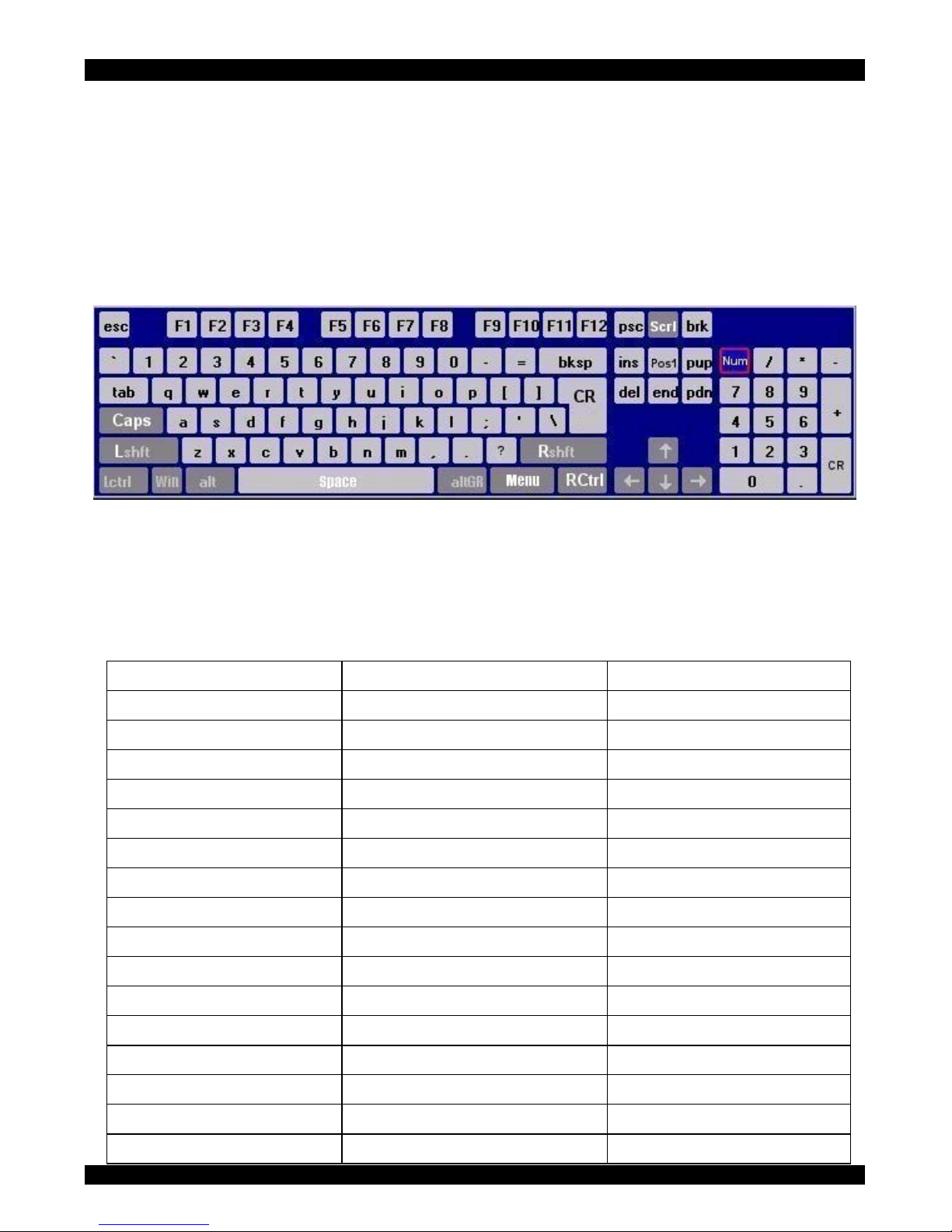
USER GUIDE
Appendix B: Key codes
Figure 40 illustrates the keys on a standard 104 key PC keyboard with a US English
language mapping. These keys are used to define keystrokes or hotkeys for several
IP Extender functions. The keys may not represent keys used on international
keyboards. Most modifier keys and other alphanumeric keys are in identical
positions, whichever language mapping you are using.
Figure 40 US English keyboard layout
The table below lists keys that that have 2 ways of being written (Alternative) and
also keys that are written in a different way to that which appears on the actual
keyboard key (Key code).
64
Key Key code Alternative
~ ~ TILDE
- - MINUS
= = EQUALS
< < LESS
/ / SLASH
Bksp BACK_SPACE
Tab TAB
CR ENTER
Caps CAPS_LOCK
\ \ BACK_SLASH
Lshft LSHIFT SHIFT
Lctrl LCTRL CTRL
Win WINDOWS
Alt LALT ALT
AltGR ATGR
Esc ESCAPE ESC
Page 66
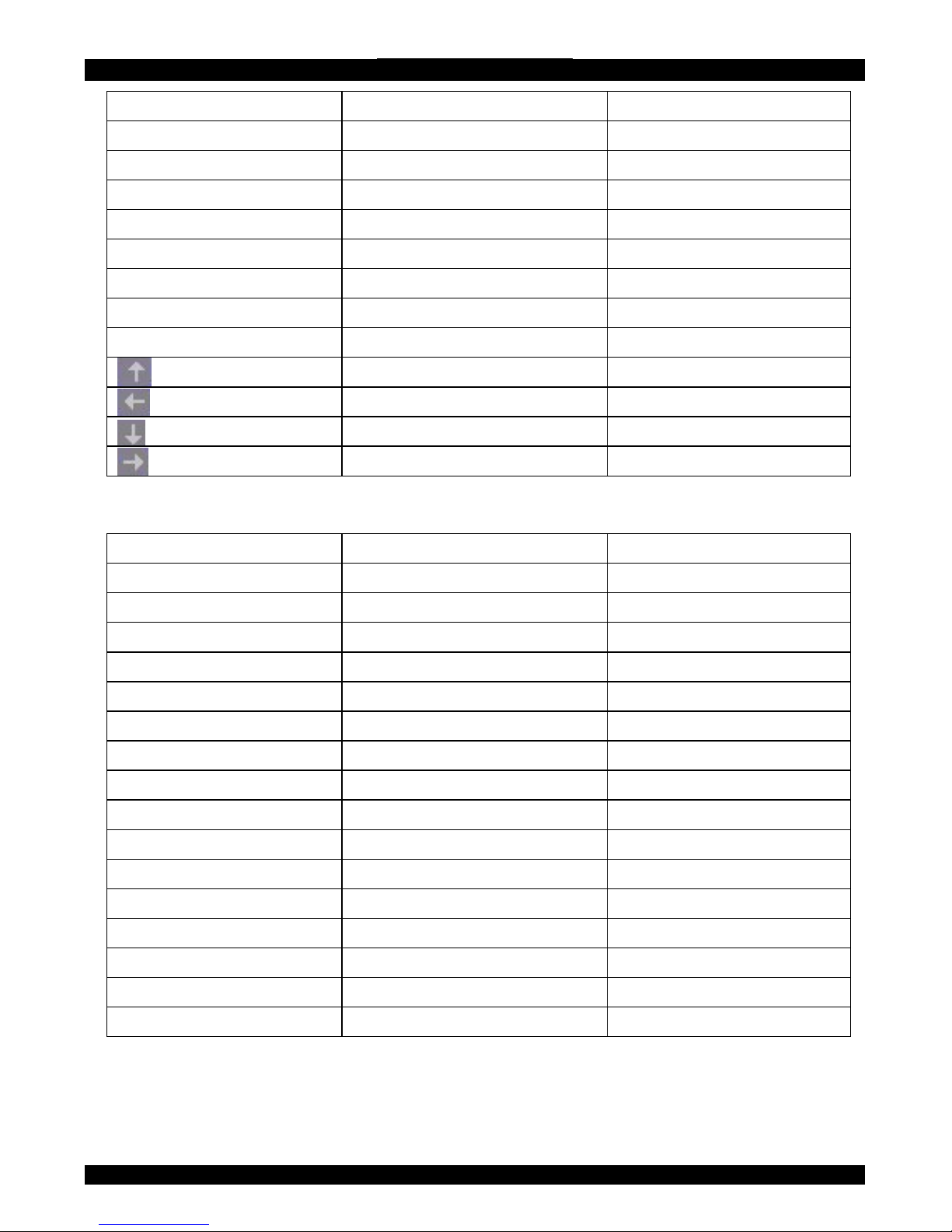
SMART IP EXTENDER
Key Key code Alternative
Psc PRINTSCREEN
Scrl SCROLL_LOCK
Brk BREAK
Ins INSERT
Pos1 HOME
Pup PAGE_UP
Del DELETE
Pdn PAGE_DOWN
UP
LEFT
DOWN
RIGHT
The numerical keypad codes
Key Key code Alternative
num NUM_LOCK
0 NUMPAD0
1 NUMPAD1
2 NUMPAD2
3 NUMPAD3
4 NUMPAD4
5 NUMPAD5
6 NUMPAD6
7 NUMPAD7
8 NUMPAD8
9 NUMPAD9
+ NUMPADPLUS NUMPAD_PLUS
/ NUMPAD/
* NUMPADMUL NUMPAD_MUL
- NUMPADMINUS NUMPAD_MINUS
CR NUMPADENTER
65
Page 67
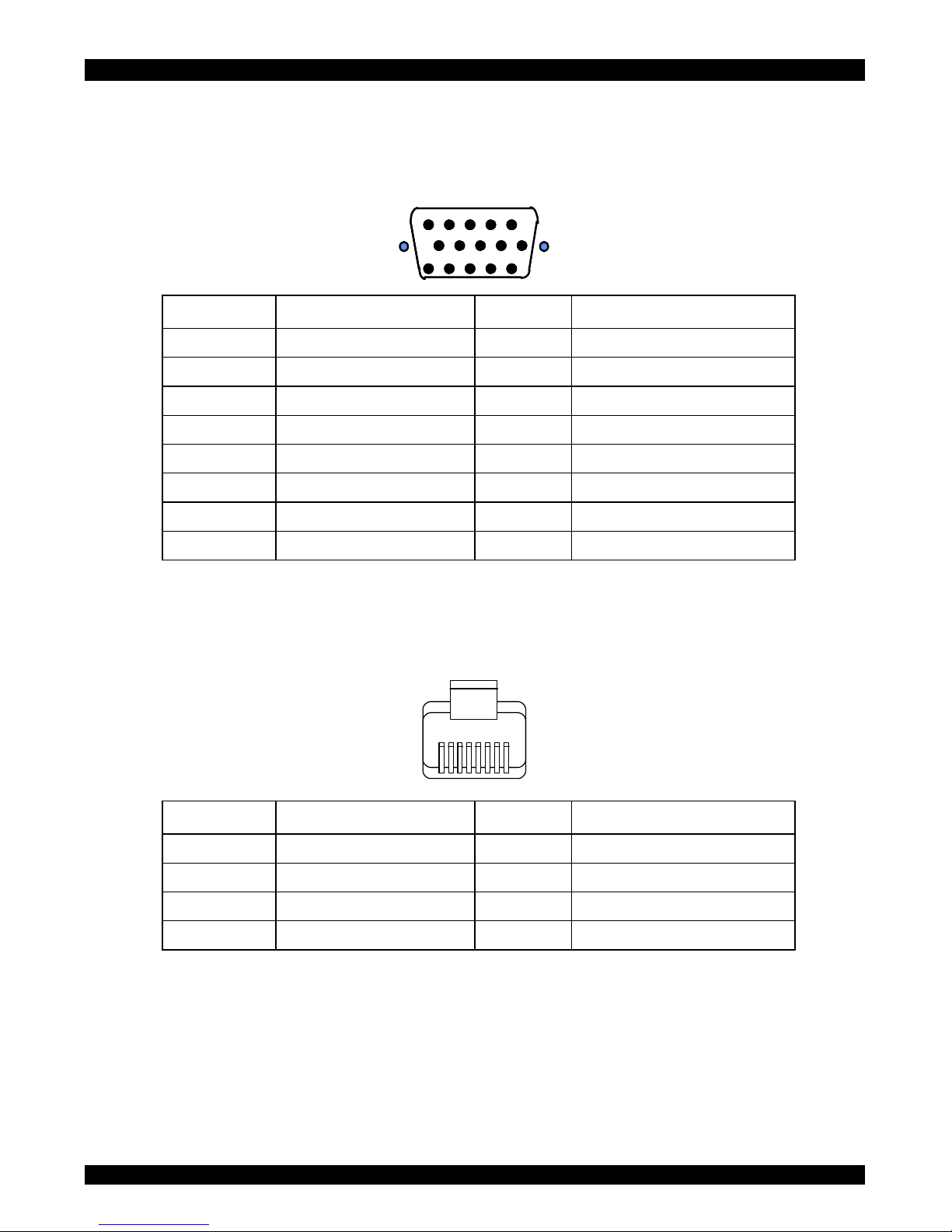
USER GUIDE
Appendix C: Pin assignments
VGA HD-15
54321
109876
1112131415
5432154321
109876109876
1112131415 1112131415
Pin Assignment Pin Assignment
1 Red 9 5 V
2 Green 10 GND sync
3 Blue 11 Not connected
4 Not connected 12 SDA, DCC, ...
5 GND 13 HSYNC
6 GND red 14 VSYNC
7 GND green 15 DATA CLOCK
8 GND blue
RJ 45 Connector Ethernet
1
8
Pin Assignment Pin Assignment
1 TX + 5 Not connected
2 TX - 6 RX -
3 RX + 7 Not connected
4 Not connected 8 Not connected
66
Page 68
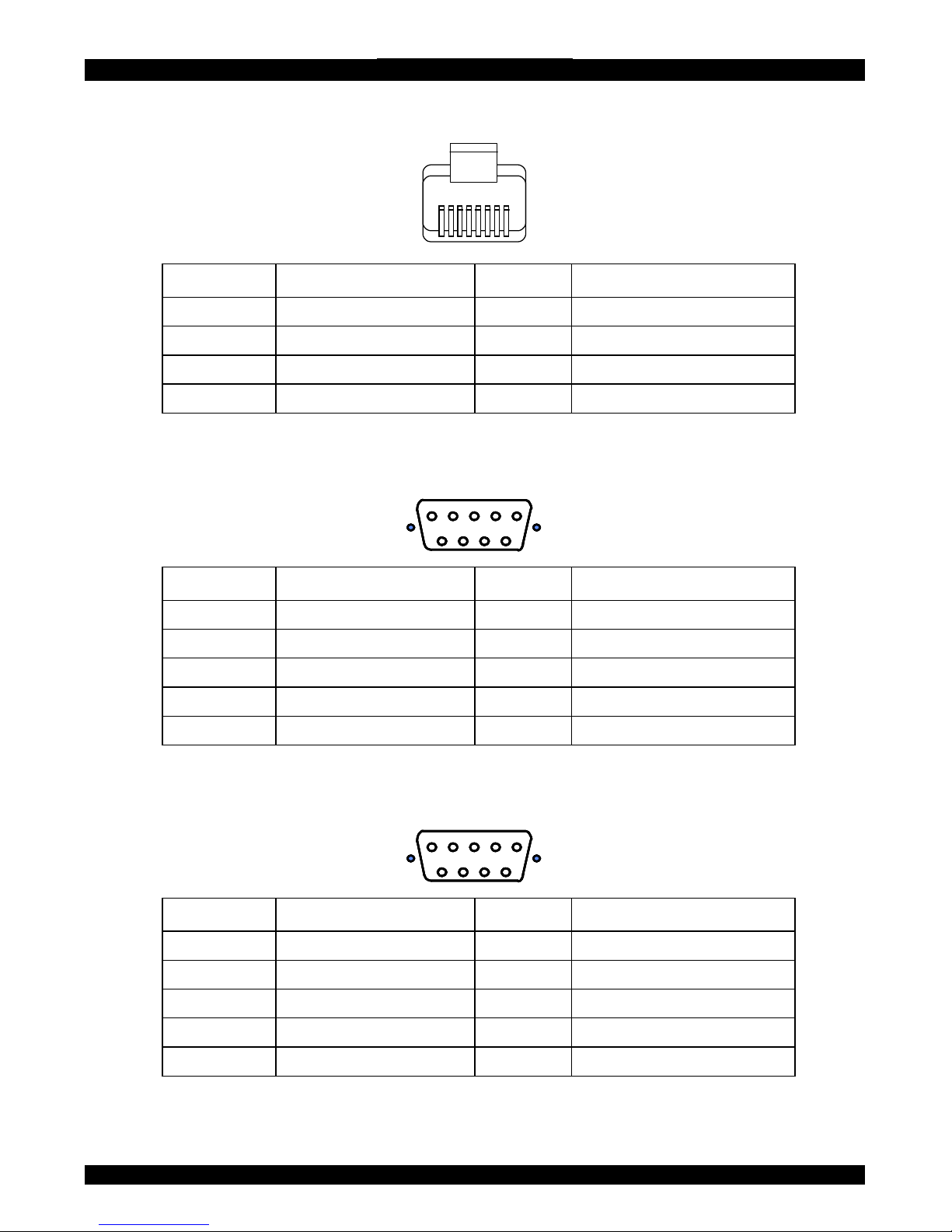
SMART IP EXTENDER
RJ 45 Connector ISDN
1
8
Pin Assignment Pin Assignment
1 Not connected 5 RX -
2 Not connected 6 TX -
3 TX + 7 Not connected
4 RX + 8 Not connected
Serial SUB-D 9 Connector 1
12345
6789
12345
6789
1234512345
67896789
Pin Assignment Pin Assignment
1 DCD 6 DSR
2 RX 7 RTS
3 TX 8 CTS
4 DTR 9 RI
5 GND
Serial SUB-D 9 Connector 2
12345
6789
12345
6789
1234512345
67896789
Pin Assignment Pin Assignment
1 DCD 6 DSR, Reset2
2 RX 7 RTS, Power1
3 TX 8 DTS, Power2
4 DTR, Reset1 9 Not connected
5 GND
Pins 1 and 6 are bridged
67
Page 69

USER GUIDE
Appendix D: Technical specifications
Host computer Operating systems
Novel, Linux, Windows 98, ME, 2000, XP and later
Client computer Operating systems
Windows 98, ME, 2000, XP and later, Linux.
Internet browser with full Java support
Host computer resolution
Up to 1280x1024 @75Hz
Client computer resolution
Recommended resolution should be higher than
host computer resolution
Host mouse driver Microsoft Driver or Operating System default
mouse driver.
IP Extender to local
Screen – HDD15; Keyboard/Mouse – MiniDIN6
IP Extender to
h
connection
3 in 1 CPU cable 1.8m:
HD15-MiniDIN6-MiniDIN6 (Supplied with system)
Line connection
RJ45 – LAN, Autosensing 10/100 Mbit/s
RJ45 – Euro ISDN (EMEA Version only) 2x64
kbit/s
Serial connection
2 x DB9:
COM1 for initial configuration and external modem,
COM2 for power management only
Product weight
1.48 Kg / 3.26 lb
Shipping weight
2Kg / 4.41lb
Dimensions
224 x 221 x 42 mm / 8.82 x 8.70 x 0.17 inches
Power supply
85 – 265 VAC
50 / 60 Hz
Operating temperature
0°C to 40°C / 32° to 104°F
Storage temperature
-40°C to 70°C / -40° to 158°F
Operating humidity
10% to 90% (non-condensing)
Storage humidity
5% to 95% (non-condensing)
Warranty:
3 years
KVM connection
computer /switc
68
Page 70

SMART IP EXTENDER
69
SMART IP EXTENDER
69
Page 71

USER GUIDE
70
 Loading...