

Page 1
www.minicom.com
International HQ
Jerusalem, Israel
Tel: + 972 2 535 9666
America
Linden, NJ, USA
Tel: + 1 908 486 2100
Technical support - [email protected]
5UM20184 V1.1 9/09
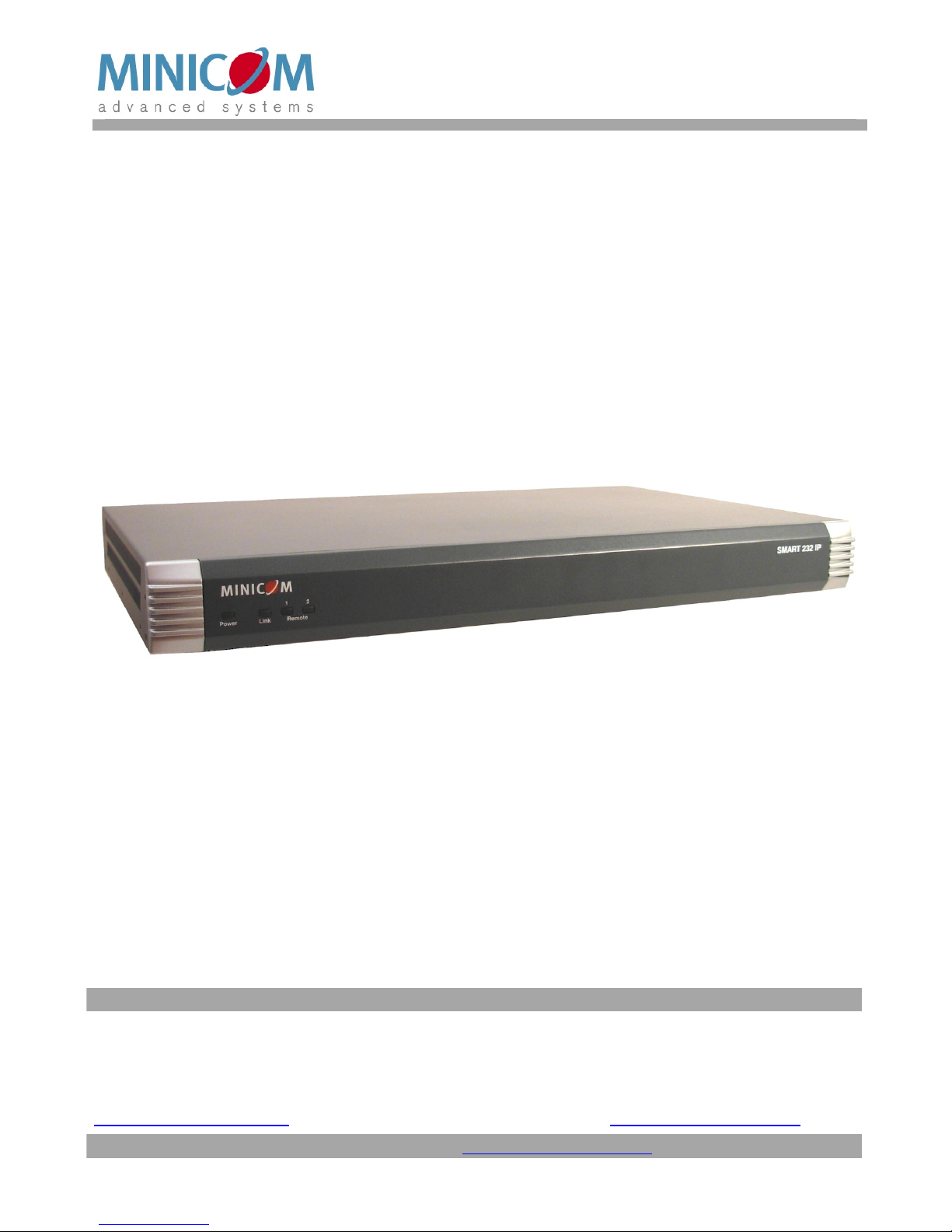
Smart 216 / 232 IP
User Guide
Page 2

SMART 216 / 232 IP
1
Table of Contents
1. Welcome............................................................................................................................3
Section I............................................................................................4
2. Introduction.......................................................................................................................4
3. Key features......................................................................................................................4
4. System components........................................................................................................5
5. Compatibility.....................................................................................................................5
6. Terminology......................................................................................................................5
7. The Smart 216 / 232 IP unit..............................................................................................5
7.1 LED and button table....................................................................................................................6
7.2 Connector table............................................................................................................................6
8. Pre-installation guidelines...............................................................................................7
8.1 Avoiding general rack mounting problems....................................................................................7
8.2 Rack mounting the Smart 216 / 232 IP.........................................................................................8
9. Connecting the system....................................................................................................9
9.1 The ROCs....................................................................................................................................9
9.1.1 Connecting a ROC PS/2.....................................................................................................10
9.1.2 Connecting a ROC USB.....................................................................................................10
9.2 Connecting to the network..........................................................................................................11
9.3 Connecting the CAT5 cables......................................................................................................11
9.4 Connecting a KVM console........................................................................................................11
9.5 Connecting the power supply.....................................................................................................11
10. Setting the IP address..................................................................................................12
11. Logging into the web interface....................................................................................13
11.1 SSL Certificate notes................................................................................................................13
11.2 Logging in.................................................................................................................................13
11.3 Connecting to a Target server..................................................................................................14
12. Configuring the system................................................................................................15
12.1 Network > Configuration...........................................................................................................15
12.1.1 LAN..................................................................................................................................15
12.1.2 KVM.net...........................................................................................................................16
13. Administration > User Settings...................................................................................17
13.1 Adding a user...........................................................................................................................18
13.2 Deleting a user.........................................................................................................................18
13.3 Blocking a user.........................................................................................................................18
14. Administration > Switch Configuration......................................................................19
15. Administration > Power Management.........................................................................20
16. Administration > Serial Settings.................................................................................21
17. Administration > User Targets....................................................................................22
18. Security > Settings.......................................................................................................23
19. Security > SSL Certificate............................................................................................24
20. Maintenance > Switch Upgrade...................................................................................25
21. Maintenance > RICCs/RoCs Upgrade.........................................................................26
Page 3

USER GUIDE
2
22. Restore Factory Settings.............................................................................................27
23. Set Time & Date............................................................................................................27
24. Backup & Restore.........................................................................................................28
25. Saving changes and logging out................................................................................28
26. Accessing a Target server...........................................................................................28
26.1 Displaying the Toolbar..............................................................................................................29
26.2 Session profile..........................................................................................................................29
26.3 Full screen mode......................................................................................................................30
26.4 Changing the performance settings..........................................................................................31
26.5 Adjusting the Video settings.....................................................................................................32
26.5.1 Refresh.............................................................................................................................32
26.5.2 Video Adjust.....................................................................................................................32
26.5.3 Advanced.........................................................................................................................32
26.6 Power cycle..............................................................................................................................33
26.7 Keyboard key sequences.........................................................................................................34
26.8 Synchronizing mouse pointers..................................................................................................35
26.8.1 Aligning the mice pointers.................................................................................................36
26.8.2 Calibrating mice pointers..................................................................................................36
26.8.3 Manual mouse synchronization.........................................................................................36
26.9 Switching to a different server/device.......................................................................................38
26.10 Disconnecting the remote session..........................................................................................38
27. The Targets page menu...............................................................................................38
27.1 Changing the password............................................................................................................38
27.2 Event log..................................................................................................................................39
27.2.1 Downloading the log.........................................................................................................39
27.2.2 Clearing the log................................................................................................................40
28. Troubleshooting - Restoring to the factory settings.................................................40
Section II.........................................................................................41
29. The OSD........................................................................................................................41
29.1 Navigating the OSD Main window.............................................................................................41
29.2 Selecting a computer................................................................................................................41
29.3 Power management hotkey – left Shift, F12.............................................................................42
29.4 Moving the Confirmation label – F1..........................................................................................42
29.5 Tuning – F5..............................................................................................................................43
29.6 The Settings window - F2.........................................................................................................43
29.7 DDC – F10...............................................................................................................................44
29.8 Saving changes to the settings.................................................................................................45
30. Remote session video resolution and refresh rates.................................................46
31. Technical specifications..............................................................................................47
32. Safety.............................................................................................................................48
33. User guide feedback....................................................................................................48
34. WEEE compliance........................................................................................................48
© 2009 Copyright Minicom Advanced Systems. All rights reserved.
Page 4

SMART 216 / 232 IP
3
1. Welcome
Thank you for buying the Smart 216 / 232 IP system. This system is produced by
Minicom Advanced Systems Limited.
This document provides installation and operation instructions for Minicom’s
Smart 216 / 232 IP. It is intended for system administrators and network managers,
and assumes that readers have a general understanding of networks, hardware and
software.
Technical precautions
This equipment generates radio frequency energy and if not installed in accordance
with the manufacturer’s instructions, may cause radio frequency interference.
This equipment complies with Part 15, Subpart J of the FCC rules for a Class A
computing device. This equipment also complies with the Class A limits for radio
noise emission from digital apparatus set out in the Radio Interference Regulation
of the Canadian Department of Communications. These above rules are designed to
provide reasonable protection against such interference when operating the
equipment in a commercial environment. If operation of this equipment in a
residential area causes radio frequency interference, the user, and not Minicom
Advanced Systems Limited, will be responsible.
Changes or modifications made to this equipment not expressly approved by
Minicom Advanced Systems Limited could void the user’s authority to operate the
equipment.
Minicom Advanced Systems Limited assumes no responsibility for any errors that
appear in this document. Information in this document is subject to change without
notice.
No part of this document may be reproduced or transmitted in any form or by any
means, electronic or mechanical, for any purpose, without the express written
permission of Minicom Advanced Systems Limited.
Trademarks
All trademarks and registered trademarks are the property of their respective
owners.
Page 5

USER GUIDE
4
Section I
This section explains how to configure and operate the Smart 216 / 232 IP system
remotely over IP.
Section II on page 41, explains how to operate the Smart 216 / 232 IP switching
system locally through the On Screen Display (OSD).
2. Introduction
The Smart 216 IP and the Smart 232 IP two units are functionally the same. The
Smart 216 IP has 16 Server ports and the Smart 232 IP has 32 Server ports.
The Smart 216 / 232 IP extends your KVM (keyboard, video, and mouse) from any
computer or server over TCP/IP via LAN, WAN or Internet connection. Now 2
remote users can control, monitor and manage up to 16 remote (PS/2, USB) servers
simultaneously from wherever they are, inside or outside the organization.
Simultaneously 1 local user can also access the servers. Simultaneously 2 more
remote users can operate serial devices such as routers or managed network
switches. Alternatively, 1 more user can use a PDU.
The Smart 216 / 232 IP is a cost-effective hardware solution, for secure remote
KVM access & control of 16 (32 for the Smart 232 IP) computers/servers from the
BIOS level - independent of the OS.
The Smart 216 / 232 IP is based on Minicom’s innovative ROC technology in
which each computer/server is directly connected to the switch via ROC dongles
using only standard CAT5 cable at a distance of up to 30m/100ft in a star
configuration. No external power is needed at the remote ROC.
3. Key features
BIOS level control to any server’s brand and model, regardless of the server
condition and network connectivity, covering the entire spectrum of crash
scenarios.
Compatible with all major operating systems. Supports many hardware and
software configurations for the remote client and the Target server computers, as
well as the KVM switch in use
Web-based control - Browser Control to a Target server, from any location via
secured standard IP connection.
Security - Supports the highest security standards for encryption (256 bit SSL and
HTTPS) and authentication for remote user and advanced OSD management with
multi-layer security for local user.
Page 6
SMART 216 / 232 IP
5
Centralized Management - Can be controlled by the Minicom’s Centralized
Management systems – AccessIT and KVM.net II.
Seamless power control – with Minicom’s Serial Remote Power Switch.
4. System components
The system consists of:
· 1 Smart 216 / 232 IP (p/n 1SU70036) or 1 Smart 232 IP (p/n 1SU70037)
· Rack mounting set (p/n 5AC20247)
· ROCS - PS/2, USB
5. Compatibility
The Smart 216 / 232 IP is compatible with:
· PS/2 and USB computers/servers
· VGA, SVGA, or XGA monitors
· Windows, Linux, UNIX and other major operating systems
6. Terminology
Below are some terms and their meanings used in this guide.
Term Meaning
Target server
The computers/servers that are accessed remotely via the
Smart 216 / 232 IP.
Client computer
The PC running a remote Smart 216 / 232 IP session
Remote session
The process of remotely accessing and controlling Target
servers connected to Smart 216 / 232 IP from a user
workstation
7. The Smart 216 / 232 IP unit
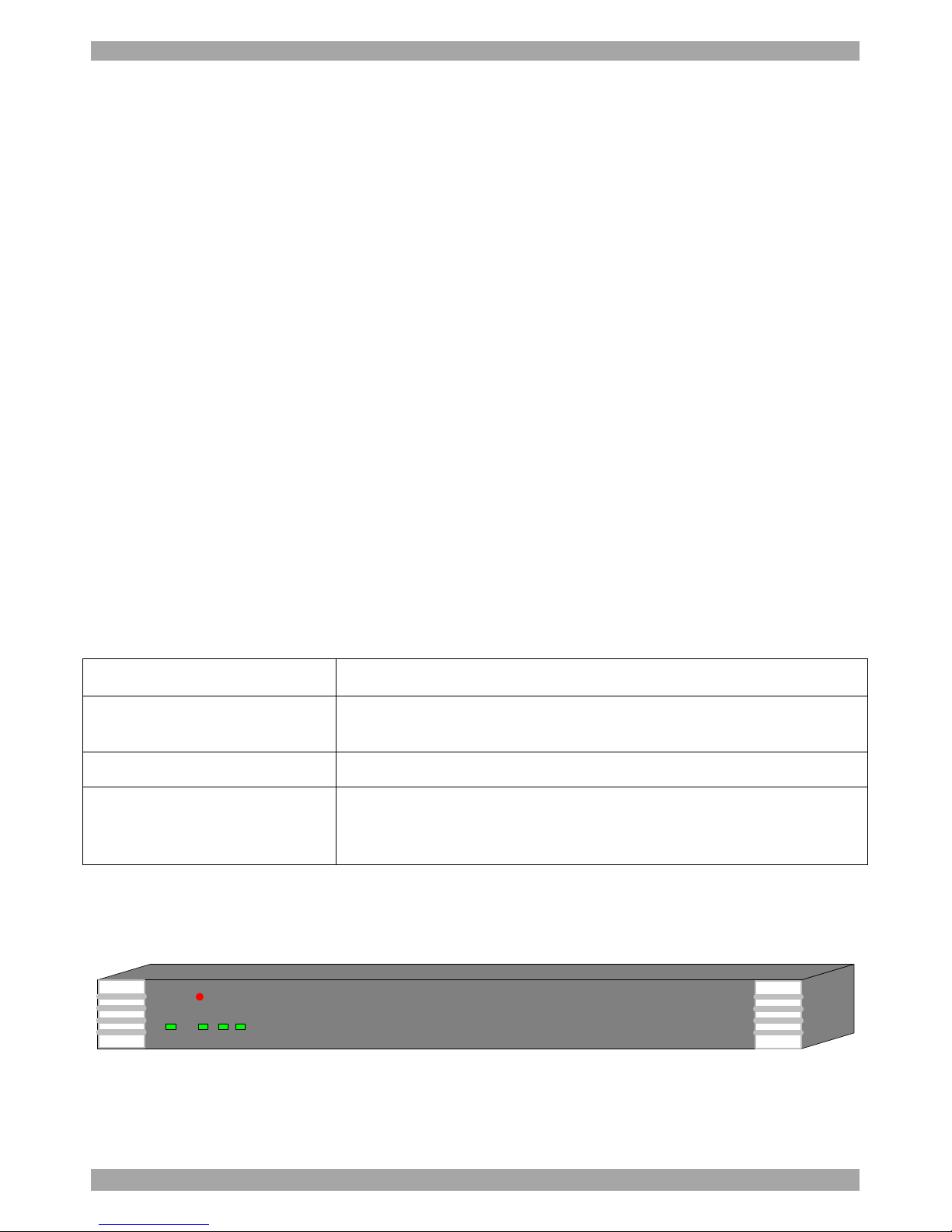
Figure 1 illustrates the front panel of the Smart 216 / 232 IP.
MINICOM
Power RemoteLink
SMART 216 IP
21
Figure 1 Smart 216 IP front panel
Page 7
USER GUIDE
6
7.1 LED and button table
LED Function
Power
Power Indicator
Link
Unit is connected to the network
Remote 1 & 2
Illuminates when a remote session is active
Power
POWER
100-240 VAC 50/60 Hz
Server ports
I
0
1 2 3 4 5 6 7 8
Keyboard
Mouse
Monitor
LOCAL USER
LAN (Ethernet)
port
LAN
SERIAL 1
Serial 1 port
10 11 12 13 14 15 169
SERIAL 2
SERVER
Serial 2 port
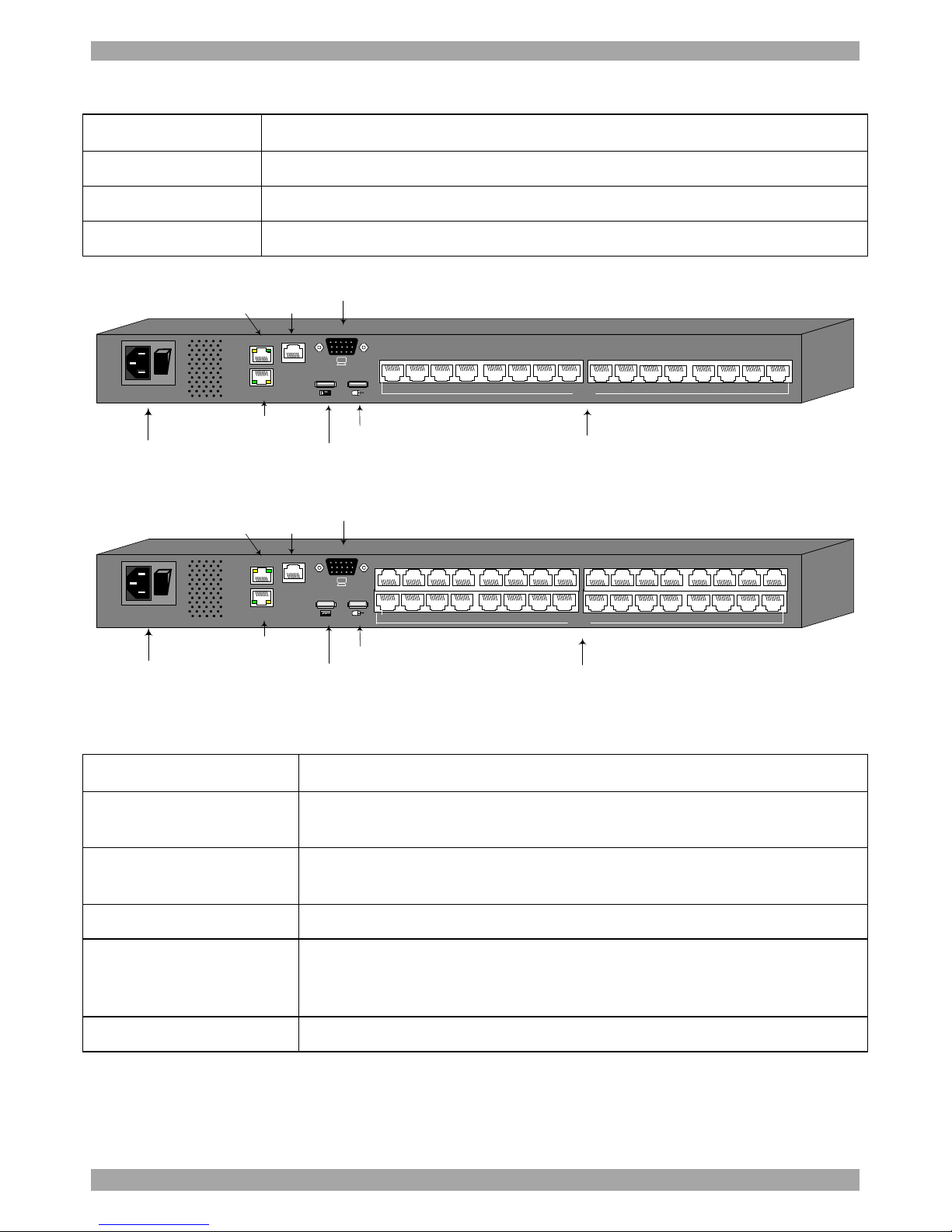
Figure 2 Smart 216 IP ports
Power
POWER
100-240 VAC 50/60 Hz
Server ports
I
0
1 2 3 4 5 6 7 8
Keyboard
Mouse
Monitor
LOCAL USER
LAN (Ethernet)
port
LAN
SERIAL 1
Serial 1 port
10 11 12 13 14 15 169
SERIAL 2
SERVER
Serial 2 port
3231302928
27
262518 19 20 21 22 23 2417
Figure 3 Smart 232 IP ports
7.2 Connector table
Connector Function
Console KVM
Connect a keyboard, video and mouse to operate the Smart 216 /
232 IP locally
Serial 1
Connect any Serial device. Note! Minicom’s Serial Remote Power
Switch must be connected to Serial 1
Serial 2
Connect any Serial device.
LAN
Connect to 10/100 Mbit Ethernet. Yellow Led illuminates when
connected to LAN. Green LED illuminates when a remote session
is in progress
Server ports
Connect to servers via ROCs
Page 8

SMART 216 / 232 IP
7
8. Pre-installation guidelines
· Place cables away from fluorescent lights, air conditioners, and machines that
are likely to generate electrical noise
· Place the Smart 216 / 232 IP on a flat, clean and dry surface
· The Smart 216 / 232 IP is not intended for connection to exposed outdoor lines
· Ensure that the maximum distance between each computer and the Smart 216 /
232 IP, does not exceed 30m/100ft for ROCs.
8.1 Avoiding general rack mounting problems
Elevated operating ambient temperature
The operating ambient temperature of the rack environment may be greater than
the room ambient when installing into a closed or multi-unit rack assembly. So
install the equipment in an environment compatible with the maximum rated
ambient temperature.
Reduced airflow
Install the equipment in a rack in such a way that the amount of airflow required
for safe operation is not compromised. Leave a gap of at least 5cm/2” each side of
the Smart 216 / 232 IP.
Mechanical loading
Mount the equipment in the rack in such a way that a hazardous condition is not
achieved due to uneven mechanical loading.
Circuit overloading
When connecting the equipment to the supply circuit, consider the effect that
overloading of circuits might have on over-current protection and supply wiring.
Reliable earthing of rack-mounted equipment should be maintained. Give attention
to supply connections other than direct connections to the branch circuit (e.g. use of
power strips).
Page 9
USER GUIDE
8
8.2 Rack mounting the Smart 216 / 232 IP
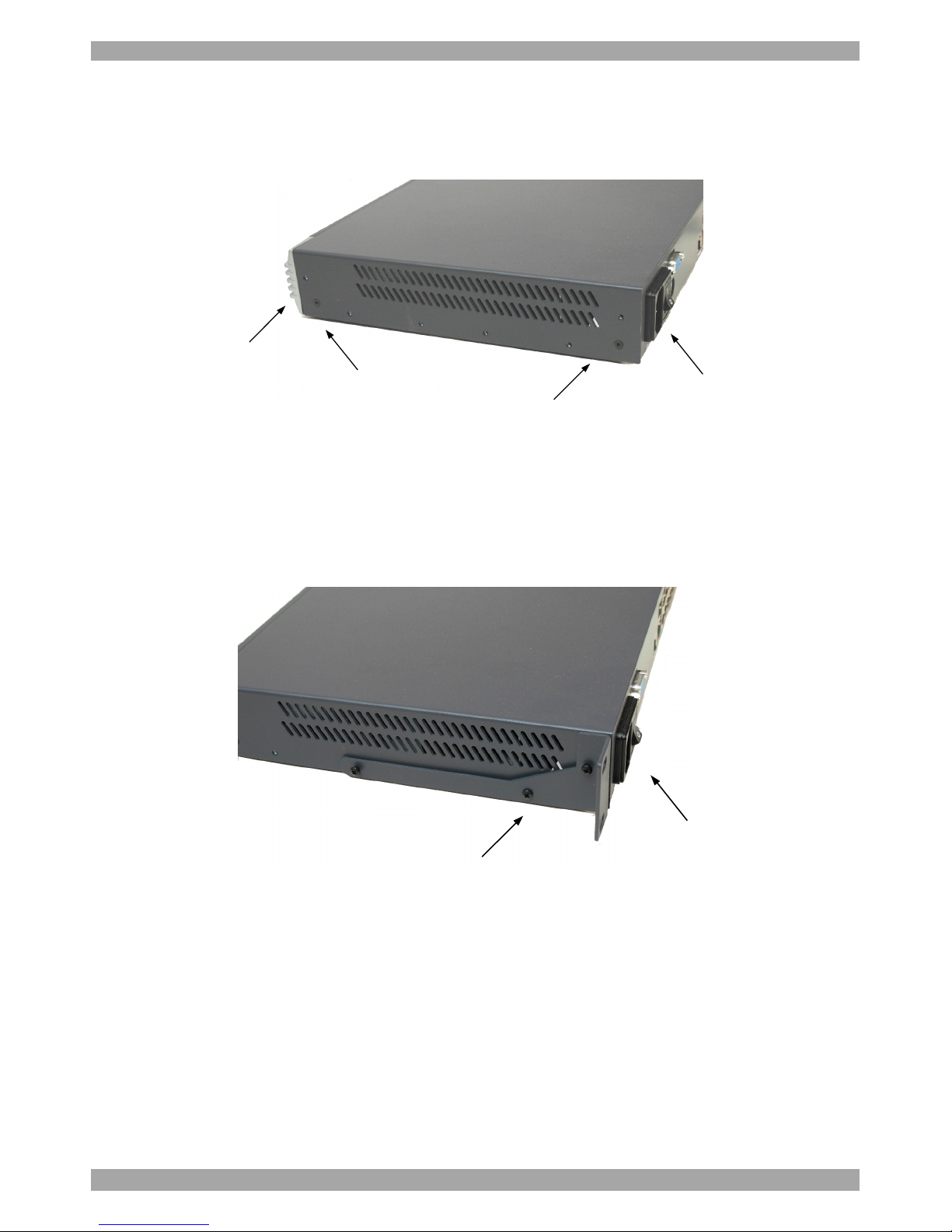
Rack mount the Smart 216 / 232 IP using the supplied Rack-mount kit. The
brackets can be placed in 2 possible positions, see Figure 4.
Position here for
front facing
Position here
for rear facing
Rear of unit
Front of unit
Figure 4 Bracket positions
Place the brackets towards the front of the unit so that the unit can be mounted
front facing, or place the brackets towards the rear of the unit so that the unit can be
mounted rear facing. Figure 5 illustrates the bracket connected for rear facing.
Screw the bracket to the Smart 216 / 232 IP using the screws provided.
Bracket connected for rear
facing rack mounting
Rear of unit
Figure 5 Bracket connected
Page 10
SMART 216 / 232 IP
9
9. Connecting the system
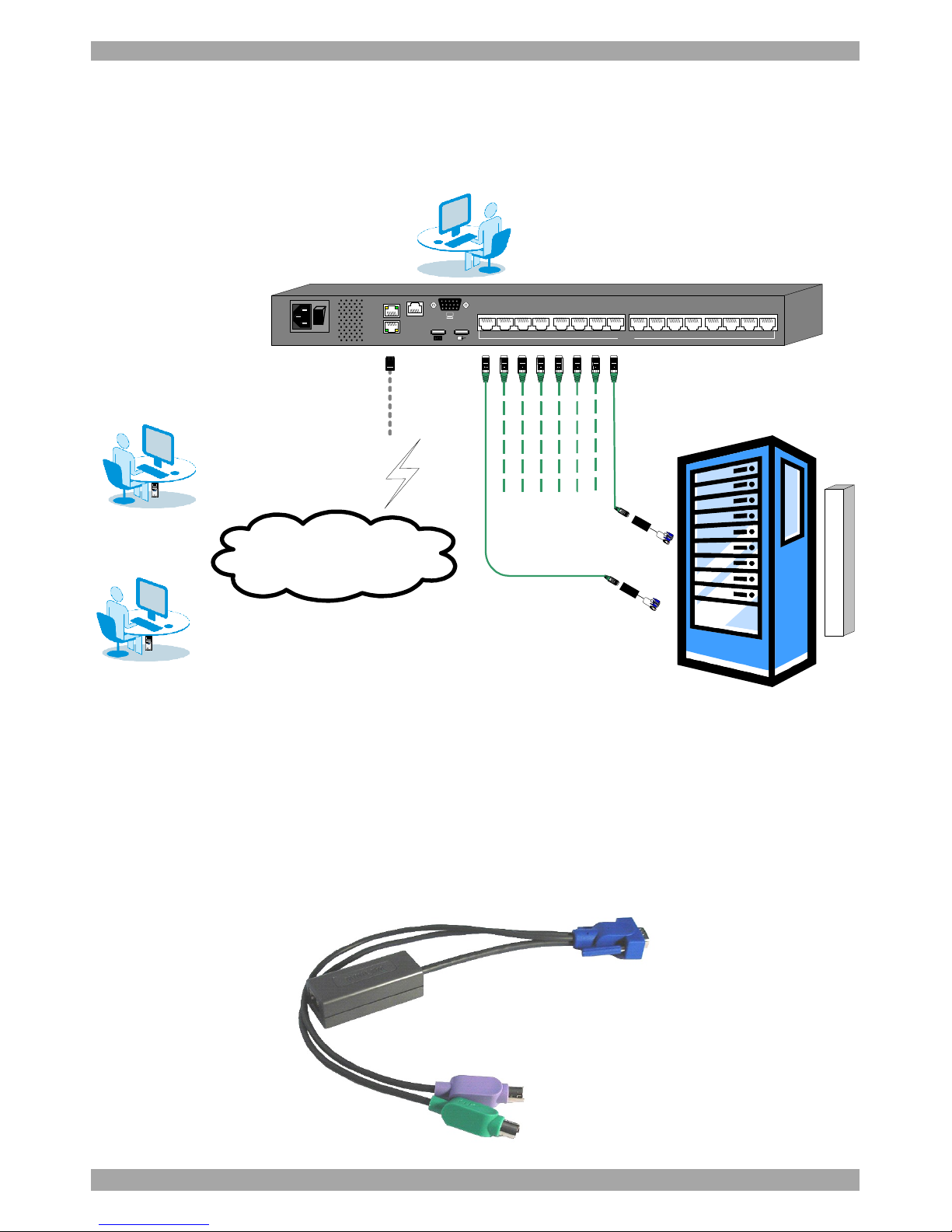
Figure 6 illustrates the Smart 216 / 232 IP system overview.
User 2 over IP
Internet / VPN / LAN
To servers
To LAN port
ROCs
POWER
100-240 VAC 50/60 Hz
I
0
1 2 3 4 5 6 7 8
LOCAL USER
LAN
SERIAL 1
10 11 12 13 14 15 169
SERIAL 2
SERVER
User 1 over IP
Local User
PDU
Figure 6 Smart 216 / 232 IP system overview
9.1 The ROCs
Each computer/ server is directly connected to the Smart 216 / 232 IP via the
appropriate RoC using CAT5 cable in a star configuration. No external power is
needed at the remote ROCs. The ROCs draw their power from the computer’s
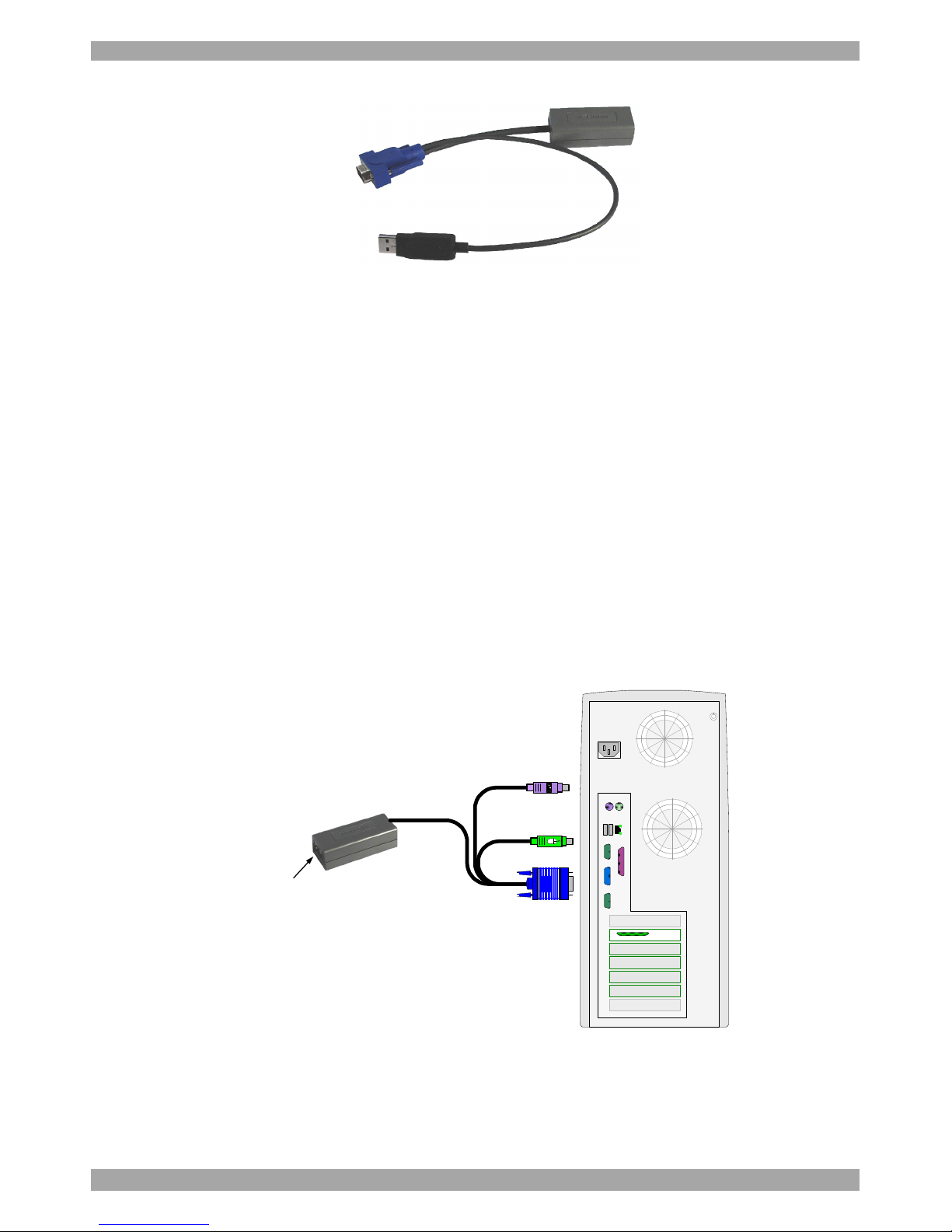
keyboard port (ROC PS/2) or from the USB port (ROC USB). The figures below
illustrate the ROC PS/2 and ROC USB.
To computer’s
keyboard port
To computer’s
mouse port
To computer’s
Video card
Figure 7 ROC PS/2
Page 11
USER GUIDE
10
To computer’s
USB Port
To computer’s
Video Card
Figure 8 ROC USB
9.1.1 Connecting a ROC PS/2
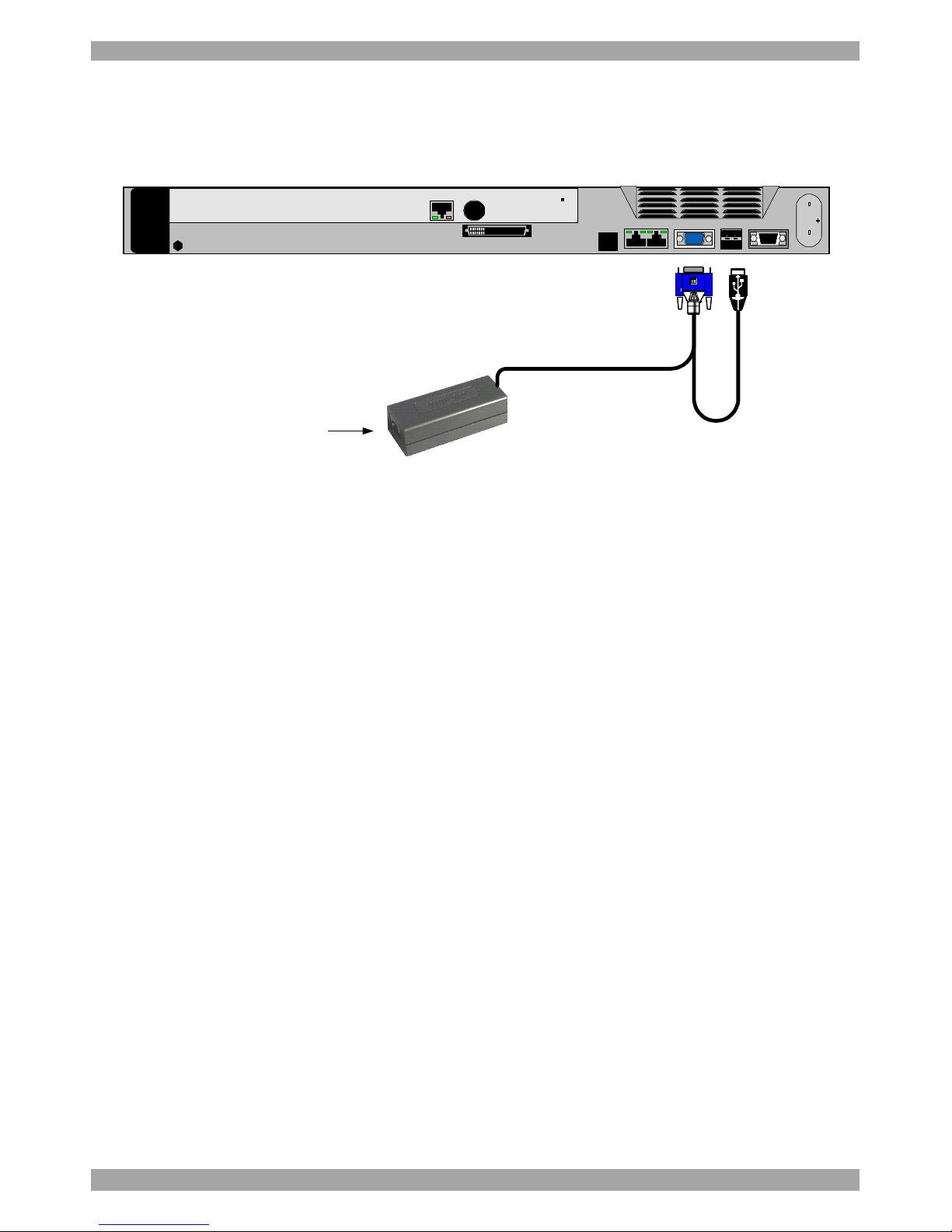
Figure 9 illustrates the ROC PS/2 connections.
You can connect the ROC PS/2 to a powered on computer, but it must be in the
following order:
1. Connect the Mouse connector to the computer’s Mouse port.
2. Connect the Keyboard connector to the computer’s Keyboard port.
3. Connect the Screen connector to the computer’s Video port.
Failure to connect in the above order while the server is running, may lead to the
mouse malfunctioning until the server is rebooted.
To Keyboard port
CAT5 cable to switch
Server port
To Mouse port
To Video port
ROC PS/2
Keybd
Mouse
100T
VideoSerial A
Parallel
PCI 33Mx32b
PCI 33Mx32b
PCI 33Mx32b
PCI 33Mx32b
Serial B
SCSI
Figure 9 ROC PS/2 connections
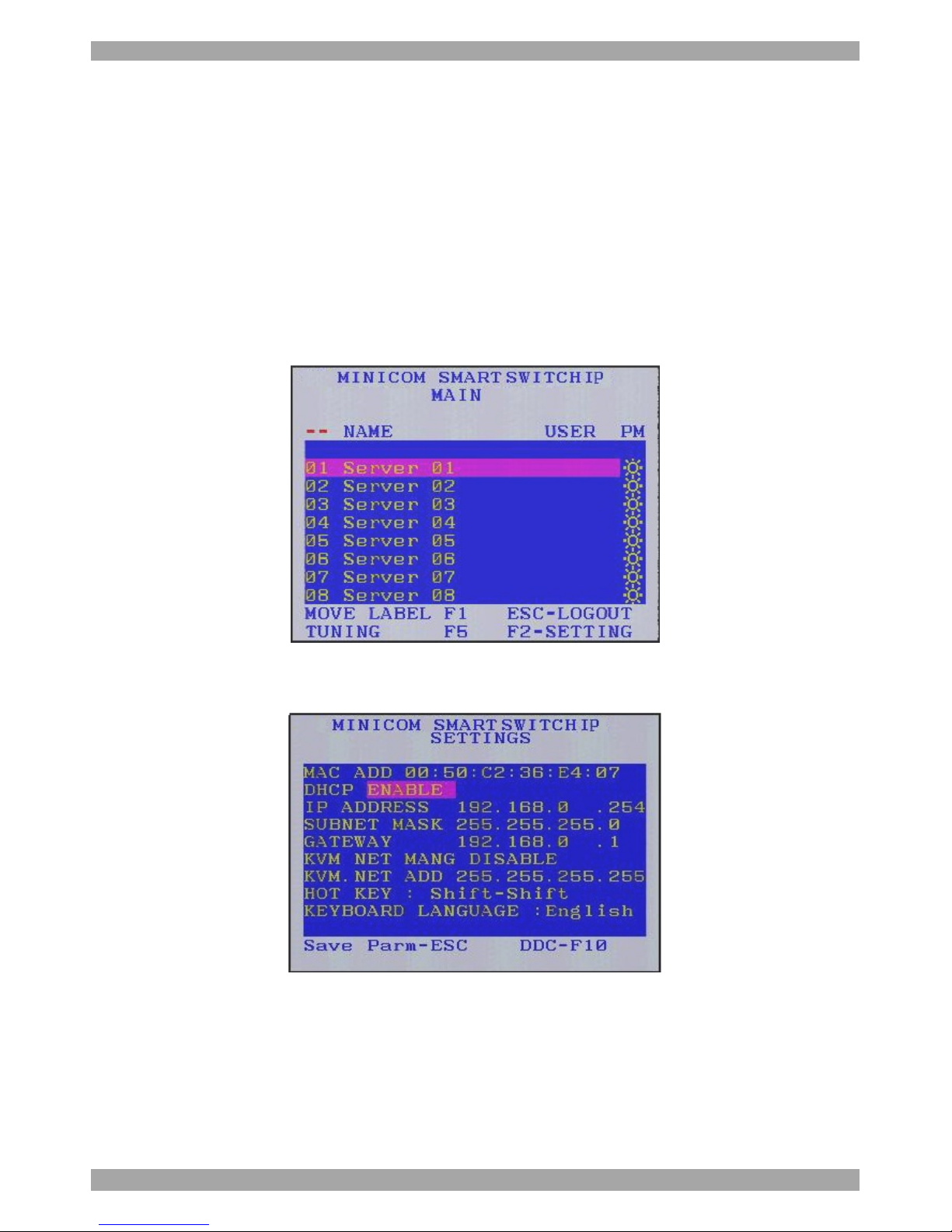
9.1.2 Connecting a ROC USB
The ROC USB supports Windows 98 SE and later, MAC, SUN and SGI, and all
modern Linux distributions. Figure 10 illustrates the ROC USB and its connections.
Page 12
SMART 216 / 232 IP
11
To connect the ROC USB:
1. Connect the Screen connector to the computer’s Video port.
2. Connect the USB connector to the computer’s USB port.
To USB port
To Video port
ROC USB
CAT5 cable to switch
Server port
Figure 10 ROC USB
9.2 Connecting to the network
Connect the network cable to the LAN port of the Smart 216 / 232 IP. This must be
done before powering on the Smart 216 / 232 IP.
9.3 Connecting the CAT5 cables
1. Connect one connector to the ROCs RJ45 port.
2. Connect the other connector to one of the Smart 216 / 232 IP’s Computer ports.
3. Follow the above 2 steps for each computer.
9.4 Connecting a KVM console
To operate the system locally, connect a KVM console to the Smart 216 / 232 IP:
1. Connect the monitor’s connector to the Smart 216 / 232 IP’s Monitor port.
2. Connect the keyboard’s USB connector to the Smart 216 / 232 IP’s USB
Keyboard port.
3. Connect the mouse’s USB connector to the Smart 216 / 232 IP’s USB Mouse
port.
9.5 Connecting the power supply
1. Using the Power cord provided, connect the Smart 216 / 232 IP to a socket
outlet with grounding connection. Only use the power cord supplied with the
unit.
Page 13
USER GUIDE
12
2. Switch on the Smart 216 / 232 IP.
10. Setting the IP address
By default, Smart 216 / 232 IP boots with an automatically assigned IP address
from a DHCP (Dynamic Host Configuration Protocol) server on the network. The
DHCP server provides a valid IP address, gateway address and subnet mask.
You can identify the IP address from the OSD at the local position. Also where
there is no DHCP server, set the IP address locally via the OSD as follows:
1. From the local keyboard, press Shift twice. The OSD Main window appears.
See Figure 11.
Figure 11 OSD Main window
2. Press F2. The Settings window appears see Figure 12.
Figure 12 Settings window
In the Settings window navigate downwards using the Tab key. At the bottom of
the window, press tab to go to the top of the window. Change settings by typing in
the selected area or by pressing the spacebar – whichever is relevant.
Page 14
SMART 216 / 232 IP
13
Changing the Network parameters
Enable DHCP – When a DHCP server is active on the same network to which
Smart 216 / 232 IP is connected, DHCP provides automatic IP assignment.
When DHCP is disabled – (Recommended) – You can assign a fixed IP address to
the Smart 216 / 232 IP.
Consult your Network Administrator regarding the use of the DHCP.
When DHCP is disabled, enter the IP Address, Subnet Mask, and Gateway as
given by your Network Administrator.
Once the IP address is satisfactory login to the web interface to complete the
configuration, as explained in section 11 below.
(Network parameters can also be changed from the remote GUI as explained on
page 15).
11. Logging into the web interface
Client computer operating system. Windows 2000 or higher, with Firefox 3 or
Internet Explorer 6.0 or later version. Linux with Firefox 3.
11.1 SSL Certificate notes
When first connecting, 2 browser security warnings appear. Click Yes to proceed.
The first warning disappears upon first Smart 216 / 232 IP client installation, when
Minicom’s root certificate is installed.
11.2 Logging in
To complete the initial setup via the web configuration interface:
1. Open your web browser (Internet Explorer version 6.0 or higher).
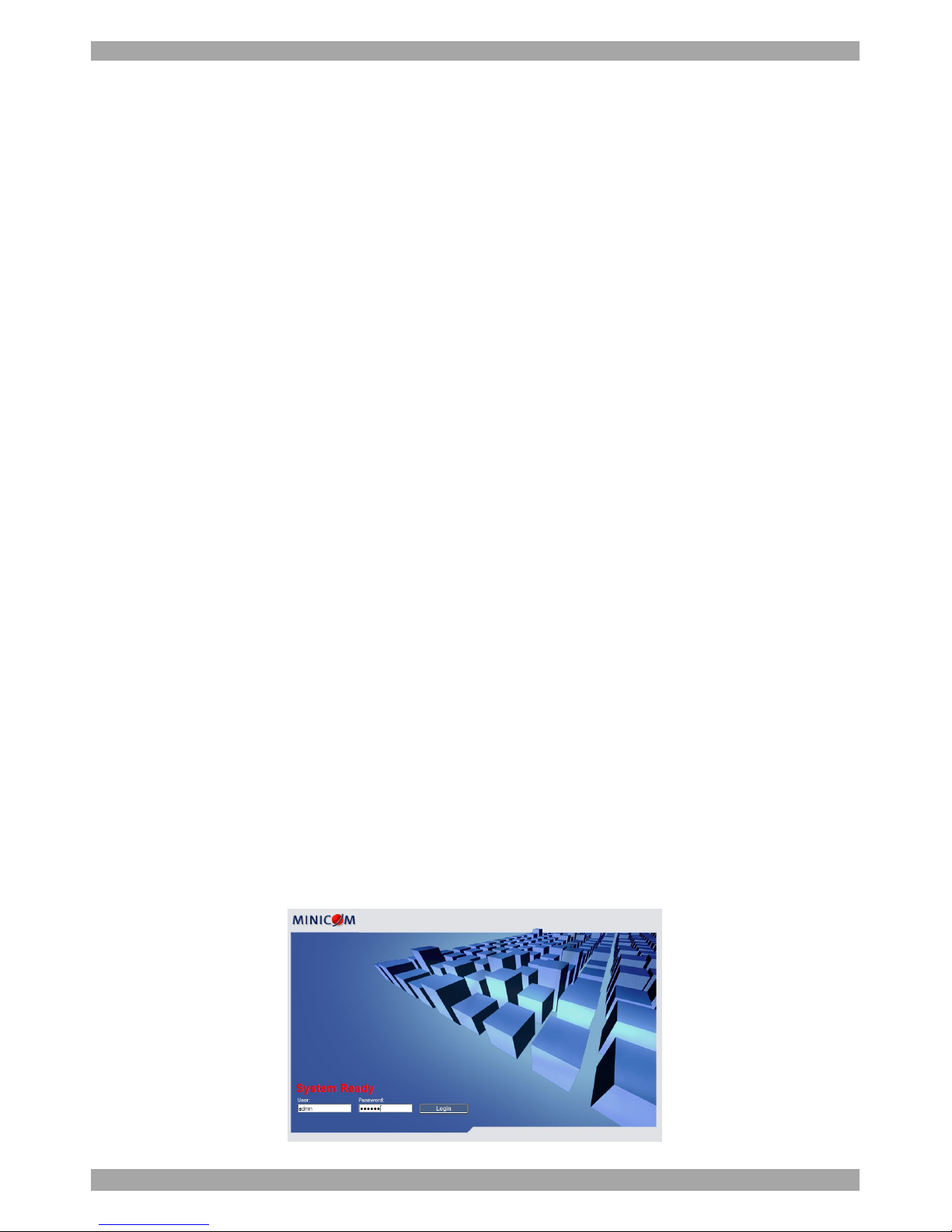
2. Type the Smart 216 / 232 IP system IP address – http or https://IP address/ and press Enter. The login page appears, see Figure 13.
Figure 13 Login page
Page 15
USER GUIDE
14
3. Type the default Administrator user name - admin - and password - access -
(both lower case).
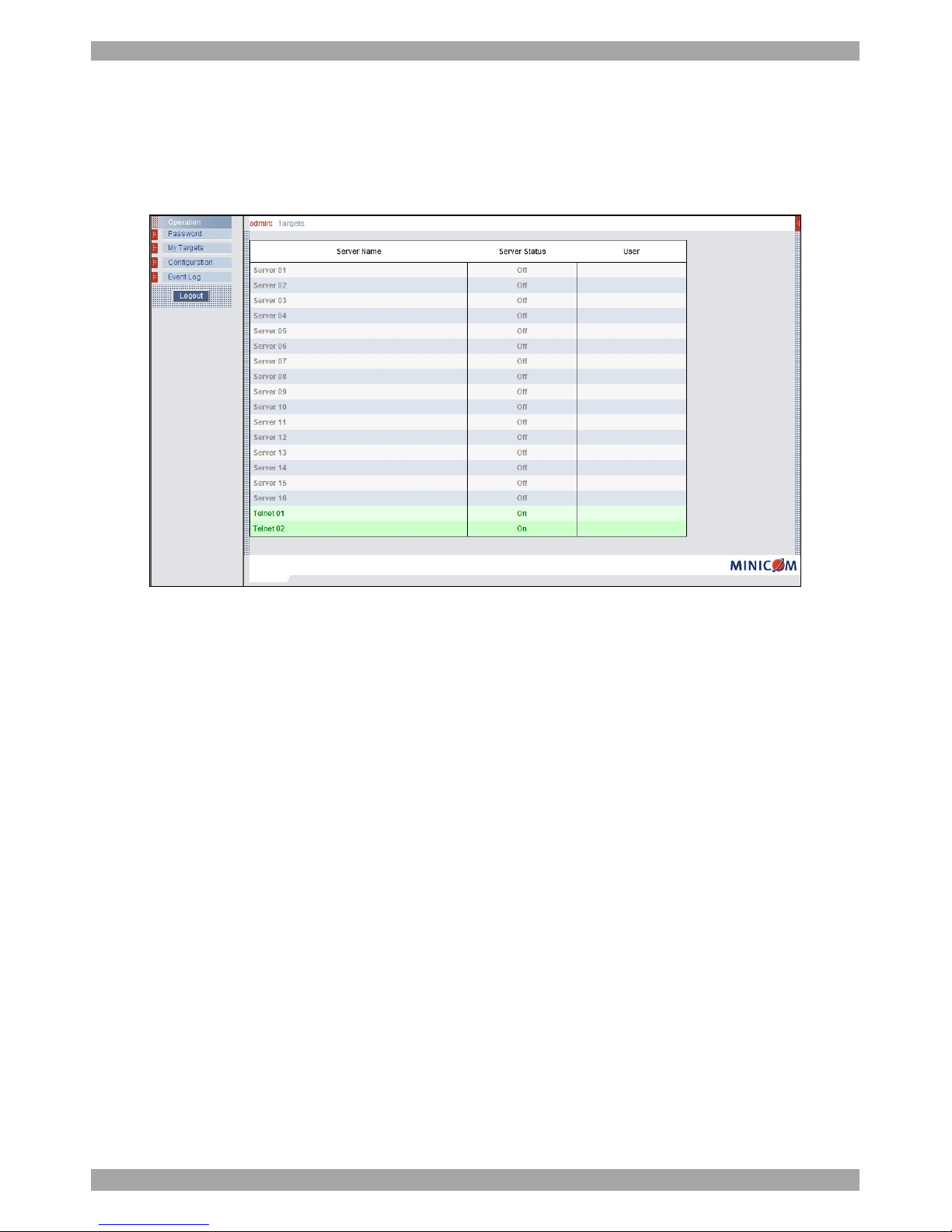
4. Press Enter. The web interface opens at the Targets page. See Figure 14.
5. Bookmark the page for easy reference.
Figure 14 Targets page
By default an Administrator can access all connected Targets, so they all appear on
the Targets page.
Columns:
Server name - The server name can be changed in the configuration settings to
give the server an identifiable name.
Server Status - Server Status can be on, off or busy (i.e. another user is accessing
the server).
User – The current user (if any) accessing the Target.
11.3 Connecting to a Target server
To connect to a Target you click the desired Target in the Server Name
Column. The screen of the Target appears side the remote console. Section
26 on page 28 explains how to conduct a remote session. The sections below
first explain how to configure the system.
Page 16
SMART 216 / 232 IP
15
12. Configuring the system
Configure the system includes setting network parameters, user and security
settings and maintenance.
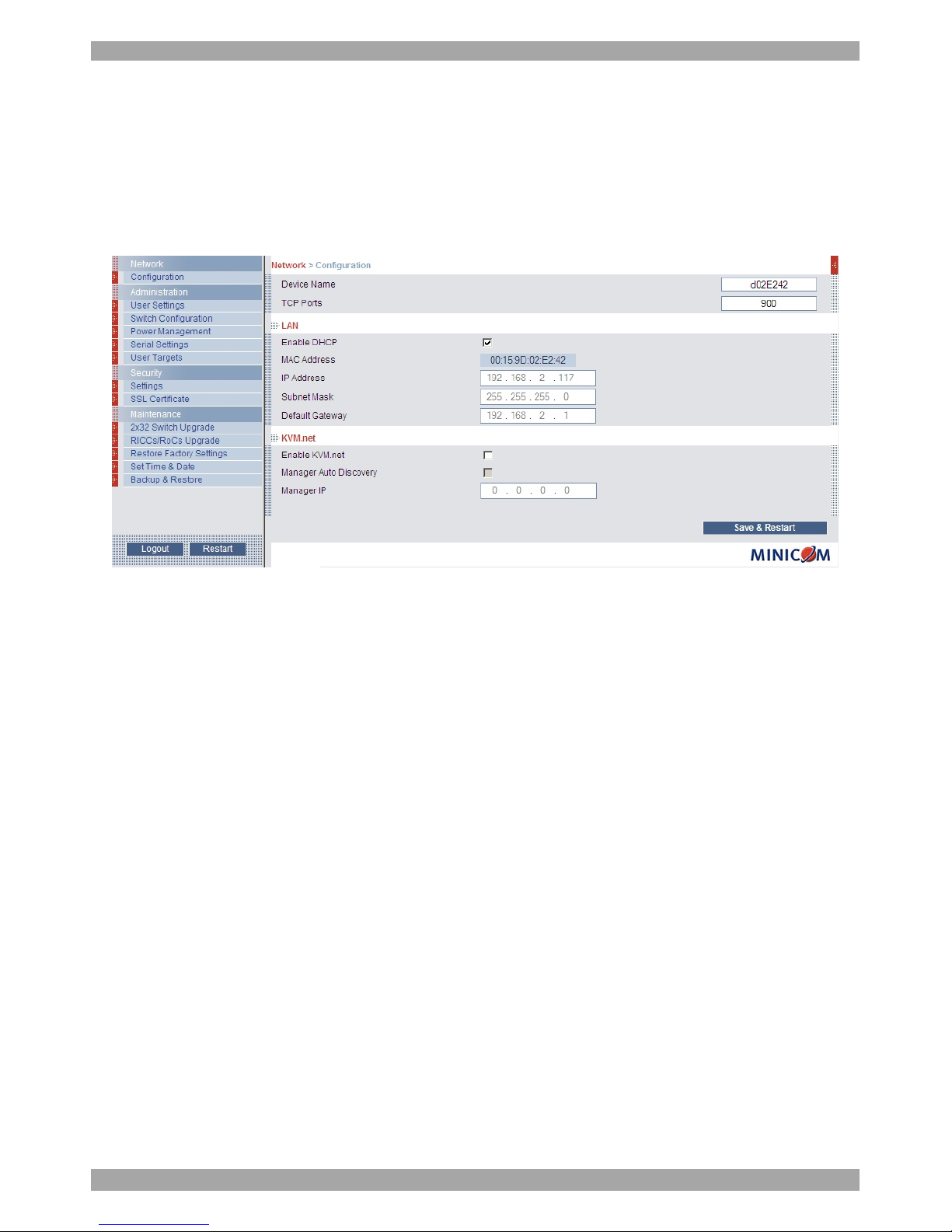
From the menu, click Configuration. The Network >Configuration page appears,
see Figure 15.
Figure 15 Network >Configuration page
12.1 Network > Configuration
Consult your Network Administrator for the network settings.
Device name - Type a name for the Smart 216 / 232 IP.
TCP Port - Choose any TCP port from port #800 to 65535. (When managed by
KVM.net® II or AccessIT, the port number can be changed from the management
interface if needed).
Notes
Firewall or router security access list must enable inbound communication through
the selected TCP port for the Smart 216 / 232 IP’s IP address.
For Client computer access from a secured LAN, the selected port should be open
for outbound communication.
12.1.1 LAN
In the LAN section – see Figure 15 – is the following:
Enable DHCP – When a DHCP server is active on the same network to which
Smart 216 / 232 IP is connected, DHCP provides automatic IP assignment.
Page 17

USER GUIDE
16
When DHCP is disabled – (Recommended) – You can assign a fixed IP address to
the Smart 216 / 232 IP.
Consult your Network Administrator regarding the use of the DHCP.
When DHCP is disabled, enter the IP Address, Subnet Mask, and Default
Gateway for LAN, as given by your Network Administrator.
These parameters can be configured locally from the OSD as explained on page 12.
12.1.2 KVM.net
Note! Any reference to KVM.net equally refers to AccessIT.
KVM.net is a centralized IP based system for secure control of servers and network
devices, power and user administration in the data center environment. KVM.net
combines Out-Of-Band, KVM via IP access with modern IT standards and
requirements. It is the most comprehensive remote server maintenance solution
available in the market today. The system also work with AccessIT
Enable KVM.net - Check this option to allow Smart 216 / 232 IP unit to be
remotely managed by Minicom’s KVM.net system.
Manager Auto Discovery – when checked, KVM.net automatically detects the
Smart 216 / 232 IP, if it resides on the same network segment.
Manager IP – If Smart 216 / 232 IP resides on a different segment, type the static
IP address of the KVM.net Manager. (We advise typing the static IP address of the
KVM.net Manager even if the Smart 216 / 232 IP resides on the same network
segment as the KVM.net Manager).
Page 18
SMART 216 / 232 IP
17
13. Administration > User Settings
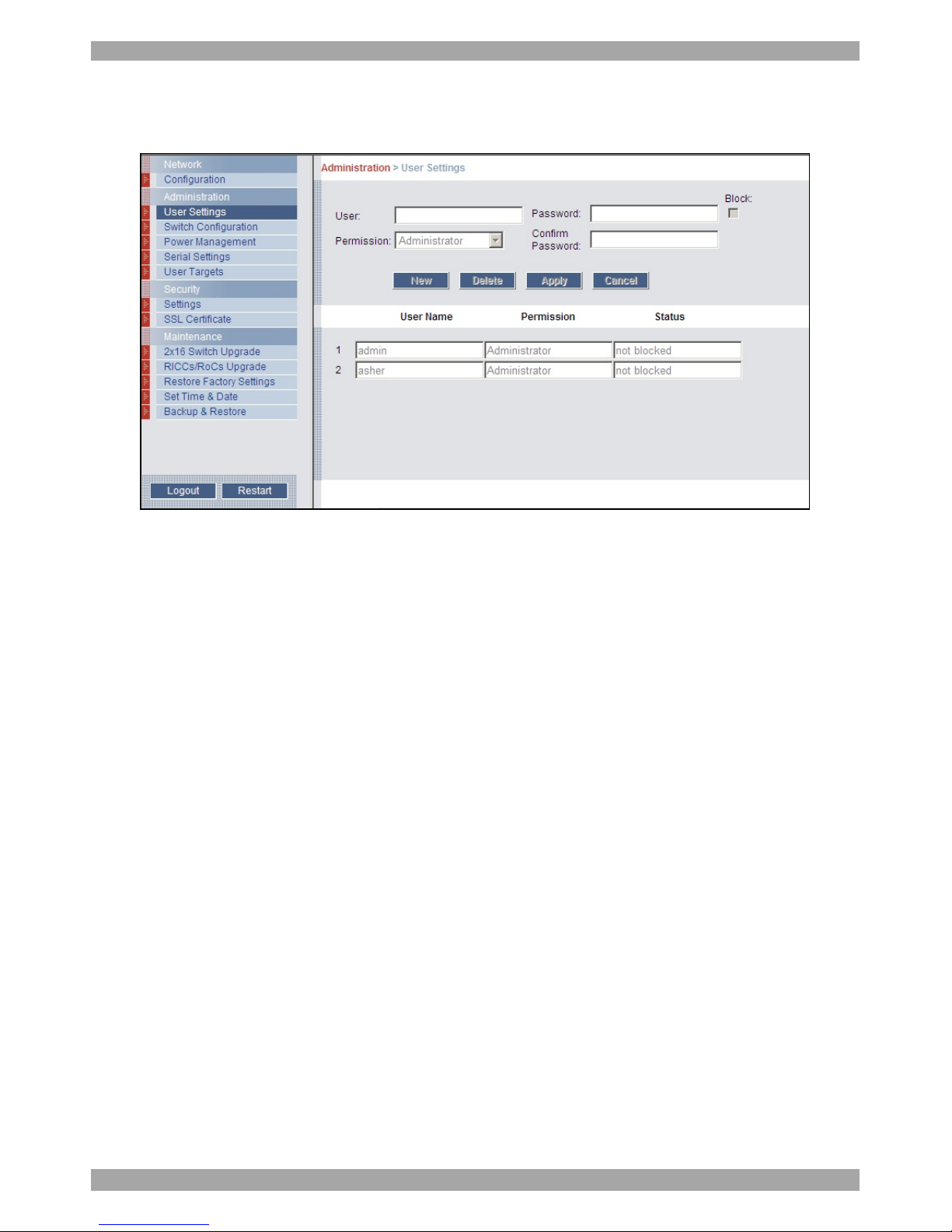
From the menu click User Settings, Figure 16 appears.
Figure 16 User Settings
On this page an Administrator creates or deletes users.
There are 2 levels of user access:
· Administrator
· User
Administrator
An Administrator has unrestricted access to all windows and settings. An
Administrator can change the name and password and Target server permissions of
all users.
User
A User can access/control permitted Target servers, but cannot use the advanced
mouse settings.
A User has no access to the web configuration interface.
Page 19
USER GUIDE
18
13.1 Adding a user
To add a user:
1. Click and type a name and a password. The password must be at
least 6 characters – letters or numbers, and must not include the user name, even
if other characters are added.
Note! The following “special” characters: &, <, >, ” cannot be used for either
the user name or password.
Depending on the security level chosen the user name and password parameters
are different. See section 18 on page 23.
2. Select the permission type from the Permission box.
3. Click , the user appears in the list of users. The Permission column
shows the user level (Administrator, User, View Only). The Status column shows
whether the user is blocked or unblocked, explained in section 13.3 below.
13.2 Deleting a user
To delete a user:
1. Select the user from the list.
2. Click .
3. Click , the changes are saved.
13.3 Blocking a user
An alternative to deleting a user is blocking a user. This means that the user’s name
and password is stored, but the user is unable to access the system. Check Block to
block a user. Uncheck Block to allow the user access.
Page 20
SMART 216 / 232 IP
19
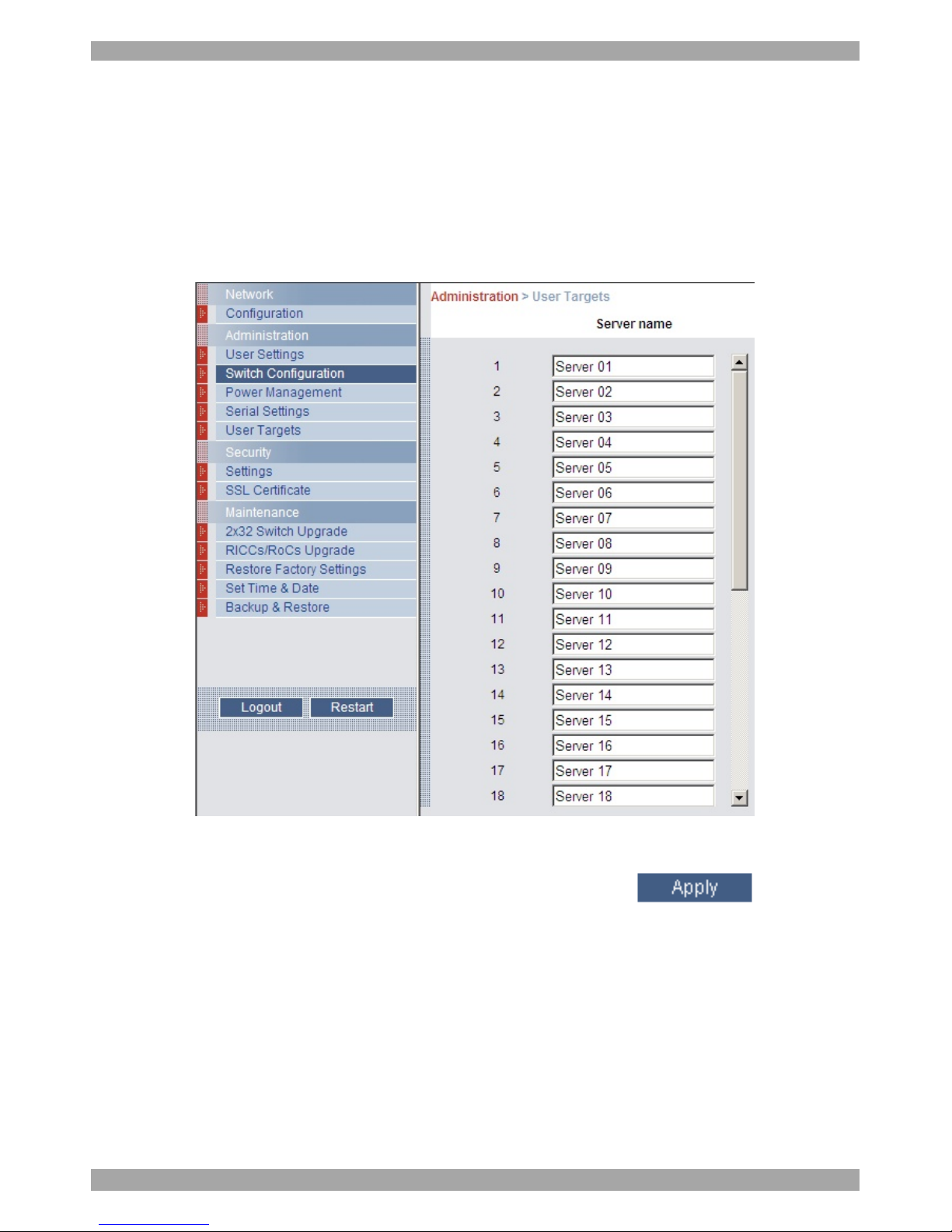
14. Administration > Switch Configuration
Give the servers connected to the Smart 216 / 232 IP unique names, so that users
accessing the system can identify the servers easily.
To do so:
1. From the menu click Switch Configuration. The Switch Configuration window
appears, see Figure 17.
Figure 17 Switch Configuration
2. In the Server Name section change the name of the connected servers by
selecting the server name and typing a new name. Click to save
changes.
Page 21
USER GUIDE
20
15. Administration > Power Management
Where you have a Minicom Serial Remote Power Switch (SRPS), connect it to the
Serial 1 port of the Smart 216 / 232 IP.
Configure the Power Management switch as follows:
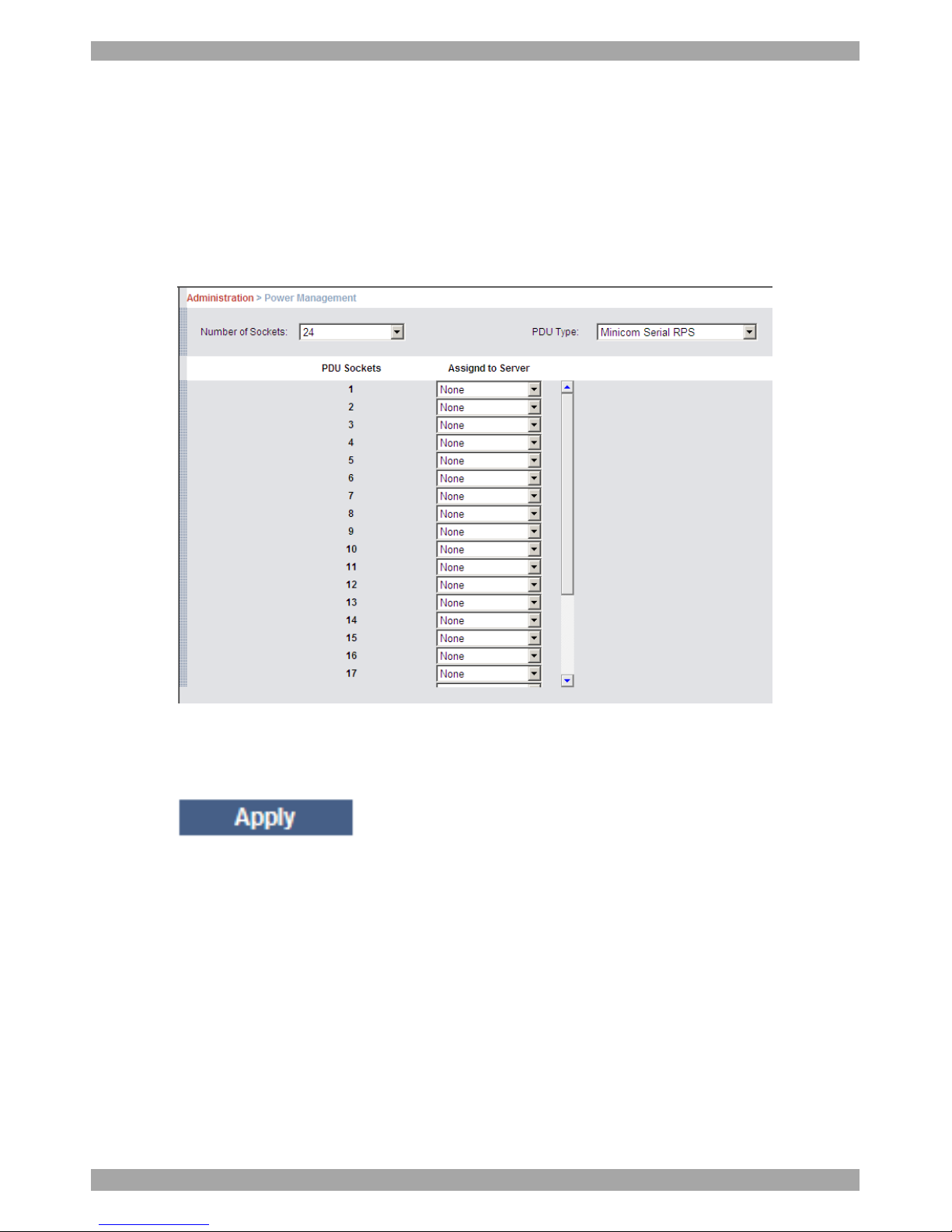
1. From the menu, click Power Management. The Power Management window
appears, see Figure 17.
Figure 18 Power Management
2. Select the number of sockets on the power management switch in the Number
of Sockets drop-down menu.
3. Click . The appropriate number of Managed by Sockets and
Server name drop-down menus appear.
4. Select the PDU type (currently only Minicom SRPS is supported).
5. Match the sockets to the servers. For each socket select the server name
connected to it from the drop-down menu.
When you want to power manage the servers with double or more power supplies,
you need to assign multiple sockets to the same KVM port.
Page 22
SMART 216 / 232 IP
21
16. Administration > Serial Settings
Where you have a Serial device connected to the system you must configure the
RS232 settings.
To do so:
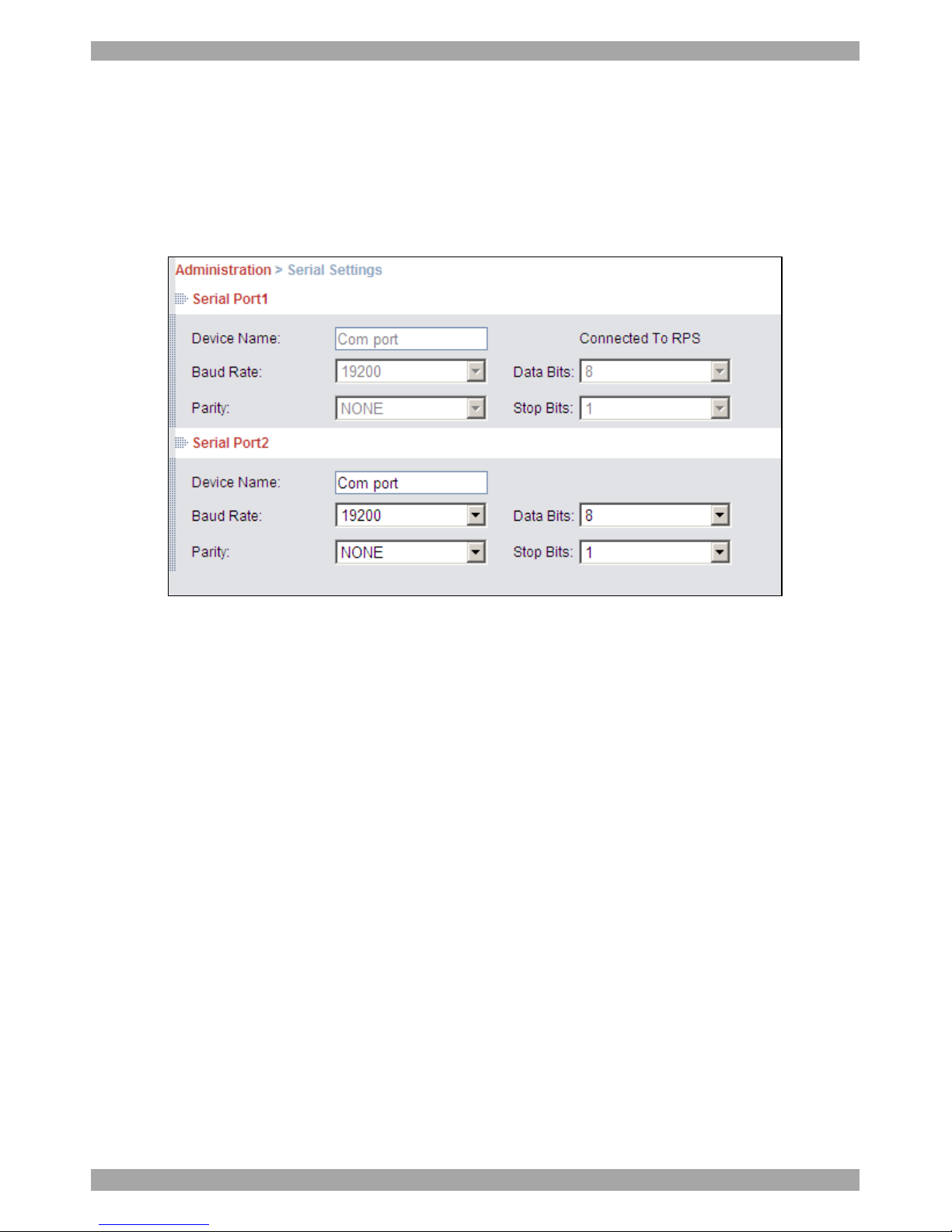
From the menu click Serial Settings, the Serial Settings appear, see Figure 19.
Figure 19 Serial Settings
Where you have a Minicom Serial Remote Power Switch, it must be connected to
Serial port 1.
For each Serial device connected, type a device name and choose the correct device
parameters.
Page 23
USER GUIDE
22
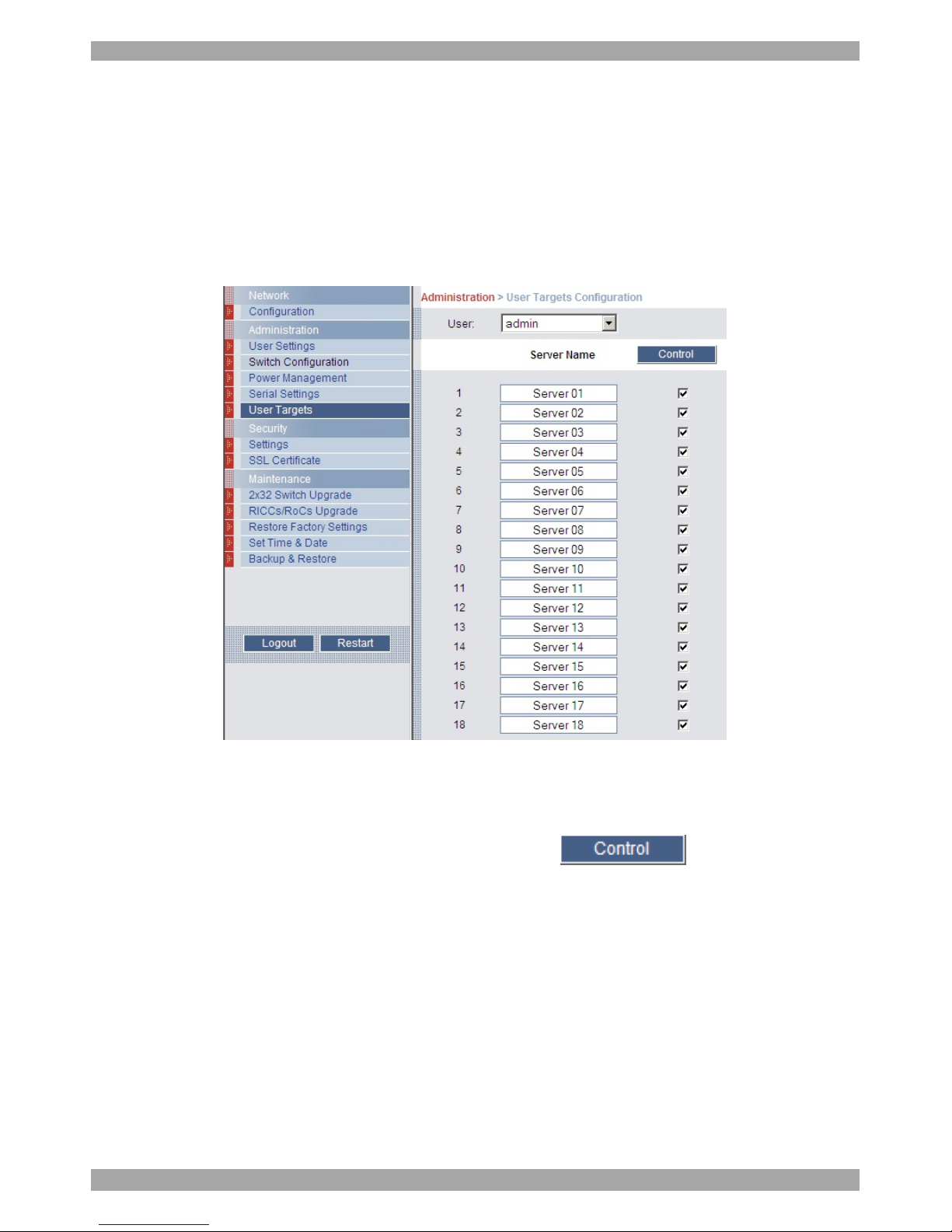
17. Administration > User Targets
By default access is allowed to all servers for administrators. For other users,
define the access rights of each user separately.
To do so:
1. From the menu click User Targets. The User Targets Configuration window
appears, see Figure 20.
Figure 20 User Targets Configuration
2. Select a user from the User drop-down menu.
3. Check the Target servers the user can access (according to his access
permissions). To select all Target servers, press .
4. Click Apply, the selection is saved.
5. Repeat the above steps for other users.
Page 24
SMART 216 / 232 IP
23
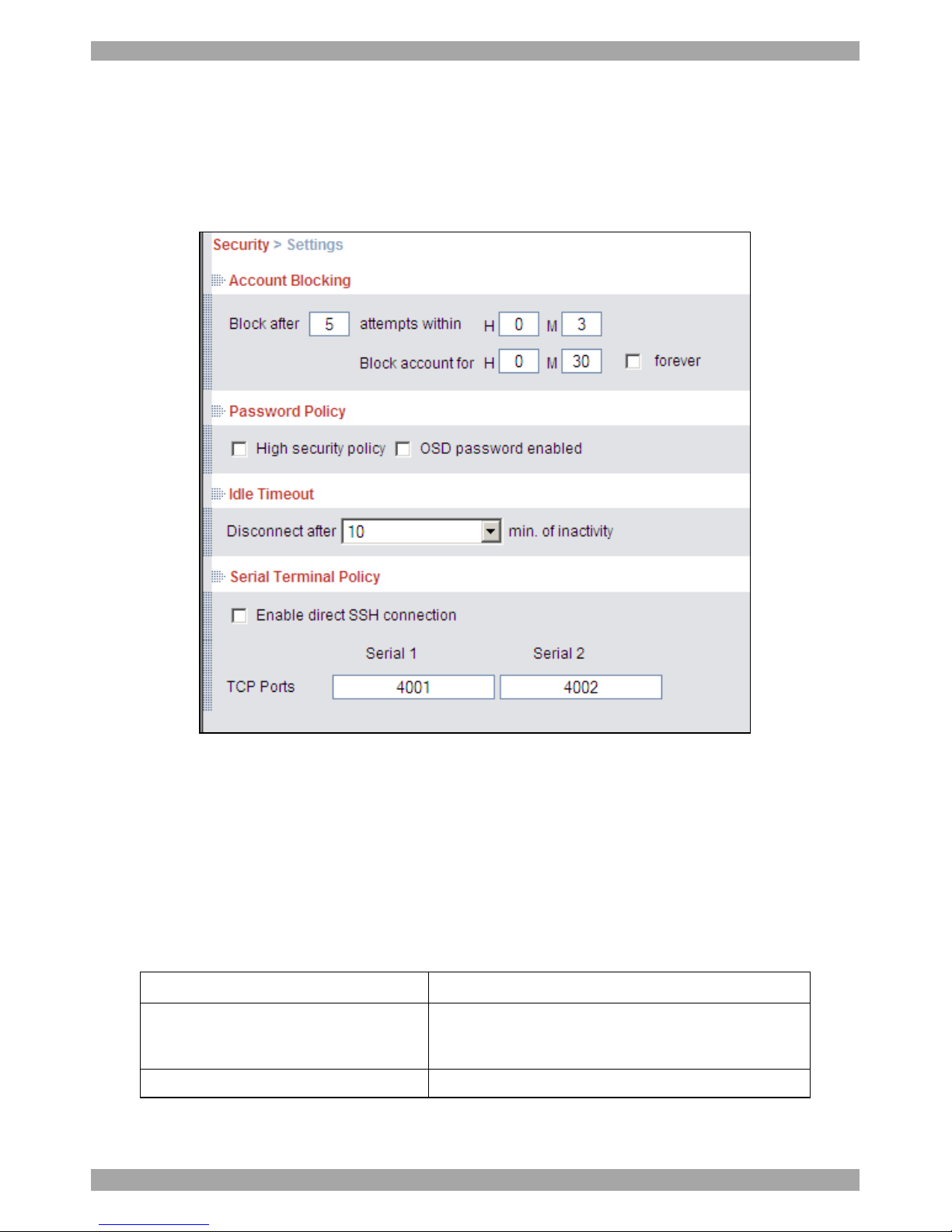
18. Security > Settings
Configure the security features, such as Account Blocking, Password Policy, Idle
Timeout and Serial Terminal Policy, as explained below.
From the Security section click Settings, the Security Settings appear, see Figure
21.
Figure 21 Security Settings
The Security Settings fields:
Account Blocking – decide on the number of attempts to login with a wrong
username or password after which there is a time lock or a total block.
Password Policy
For local and remote users you have the option of a standard or high security level
of password. The table below shows the parameters of the 2 options.
Standard security policy High security policy
6 characters or more
8 characters or more must include at least 1 digit
and 1 upper case letter and 1 “special” character
as follows !@#$%^*()_-+=[]’:;?/{}
Must not include the user name Must not include the user name
Check the box to enable the high security password policy. Unchecked, the
standard security policy applies.
Page 25

USER GUIDE
24
OSD password enabled - For the local user access to the OSD can be password
enabled or disabled (default), with the option of a standard or high security level of
password as explained above. Select the checkbox to enable password.
Note! The user access permissions are the same whether access in done locally or
remotely.
Idle Timeout – Select the Timeout inactivity period after which the user is
disconnected from the system. Choose No Timeout to disable Timeout.
Serial Terminal Policy
The Smart 216 / 232 IP device enables you to control serial devices by connecting
to them via the devices’ web interface, as follows:
Log in to the Smart 216 / 232 IP web interface, click on a serial port, and then
connect. This way, the Smart 216 / 232 IP internal SSH client is opened and used
for the session.
Alternatively you can bypass the web interface and connect directly to the serial
device itself.
To do this, the Smart 216 / 232 IP device should be configured to “Enable direct
SSH connection” which will redirect all serial communication messages to / from
the connected device via a dedicated TCP port.
This will enable you to use your preferred SSH client that will communicate
directly to the serial device via the specified TCP port, opening and closing
sessions autonomously without the need for a web interface.
The default TCP ports used to operate Serial connections 1 and 2 are TCP ports
4001 and 4002 respectively.
Hence – when “Enable direct SSH connection” is selected, you type the IP Address
of the Smart 216 / 232 IP, followed by the TCP port number in your SSH client to
connect to the Serial device.
Login to the Smart 216 / 232 IP SSH shell with the user name and password
configured in the Smart 216 / 232 IP.
Note! Restart the Smart 216 / 232 IP device after adding Telnet permissions to the
users in order to enable login over SSH connection.
These settings are customizable enabling you to choose the TCP port used for that
purpose, if that port is already taken by another service on your network.
You can operate the serial connection by using any SSH client – PuTTy
SecureCRT and others.
Page 26
SMART 216 / 232 IP
25
19. Security > SSL Certificate
You can install an SSL certificate.
To do so:
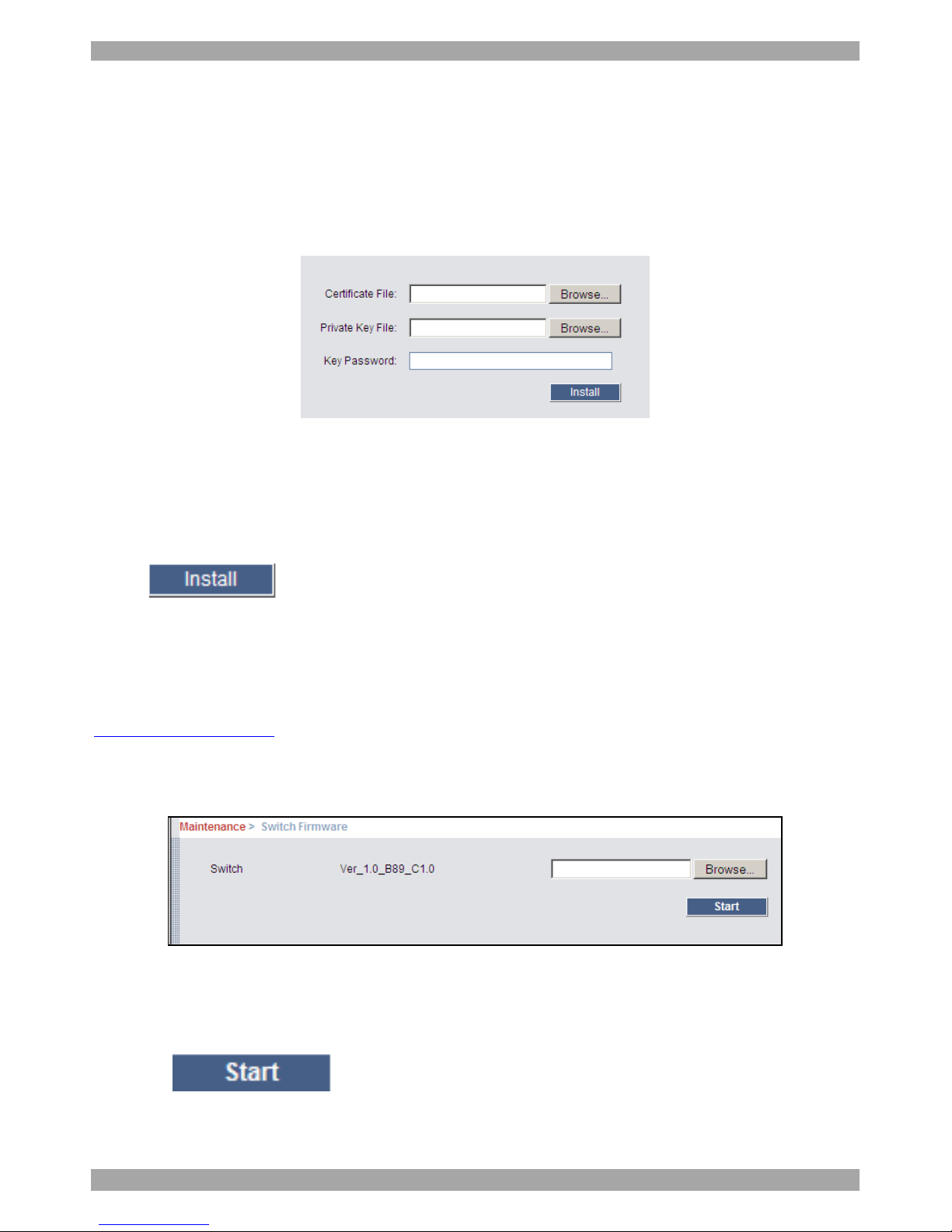
From the menu, select SSL Certificate, the install SSL Certificate page appears,
see Figure 22.
Figure 22 Install SSL Certificate page
Certificate File - Browse to locate the cer file (.ssl format).
Private Key File - Browse to locate the private key file (.pem format).
Key Password – Type the Key password.
Click . The certificate installs. The device restarts automatically.
20. Maintenance > Switch Upgrade
Upgrade the Smart 216 / 232 IP firmware to take advantage of new features.
Download the firmware from the Support section of Minicom’s website –
www.minicom.com. Save the firmware file on the Client computer.
From the menu select Switch Upgrade. The Upgrade window appears showing the
current firmware version see Figure 23.
Figure 23 Firmware Upgrade
1. Locate and upload the firmware file.
2. Verify the current and uploaded version of the firmware.
3. Click . The upgrade starts. The unit reboots automatically.
After about 2 minutes the Login page appears.
Page 27
USER GUIDE
26
Note!
Depending on the type of firmware upgrade, the following settings may be erased:
User settings, server names, mouse and video adjustments. For more information
refer to the firmware release notes.
The network settings remain intact.
21. Maintenance > RICCs/RoCs Upgrade
Upgrade the RICC/RoC firmware to take advantage of new features. Download the
firmware from the Support section of Minicom’s website –www.minicom.com.
Save the firmware file on the Client computer.
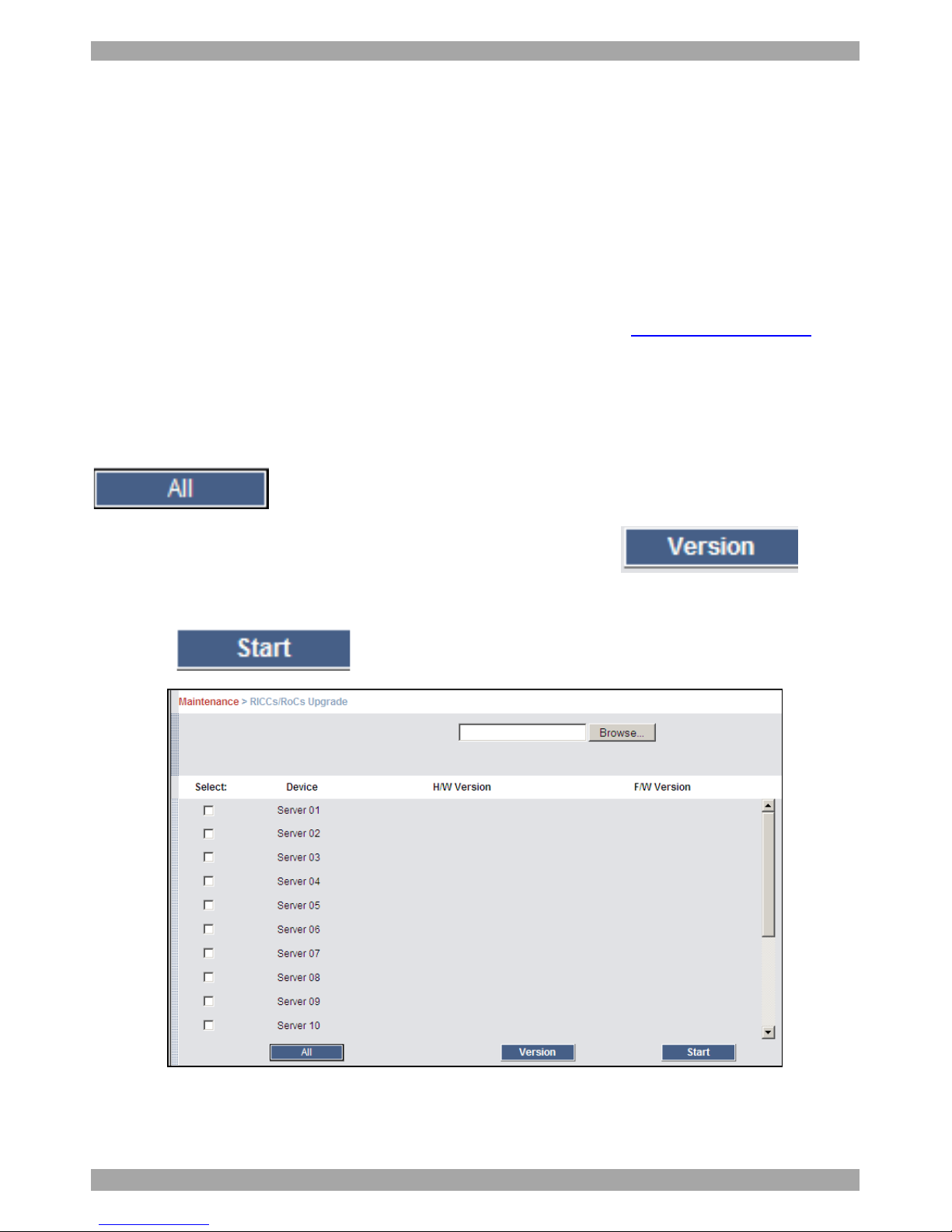
1. From the menu select RICCs/RoCs Upgrade. The Upgrade window appears see
Figure 24.
2. Select the servers connected to the RICCs/RoCs you wish to upgrade. Click
to select all.
3. Verify the current version of the firmware by pressing .
4. Locate and upload the firmware file.
5. Press , the firmware upgrades.
Figure 24 RICCs/RoCs Upgrade
Page 28
SMART 216 / 232 IP
27
22. Restore Factory Settings
You can restore the Smart 216 / 232 IP unit to the factory settings. This restores the
original Smart 216 / 232 IP parameters, resetting all the information added by the
administrators, including: Network settings*, servers, users, and passwords etc.
* You have the option to preserve network settings – explained below.
Warning! Once reset the data cannot be retrieved.
To restore factory settings:
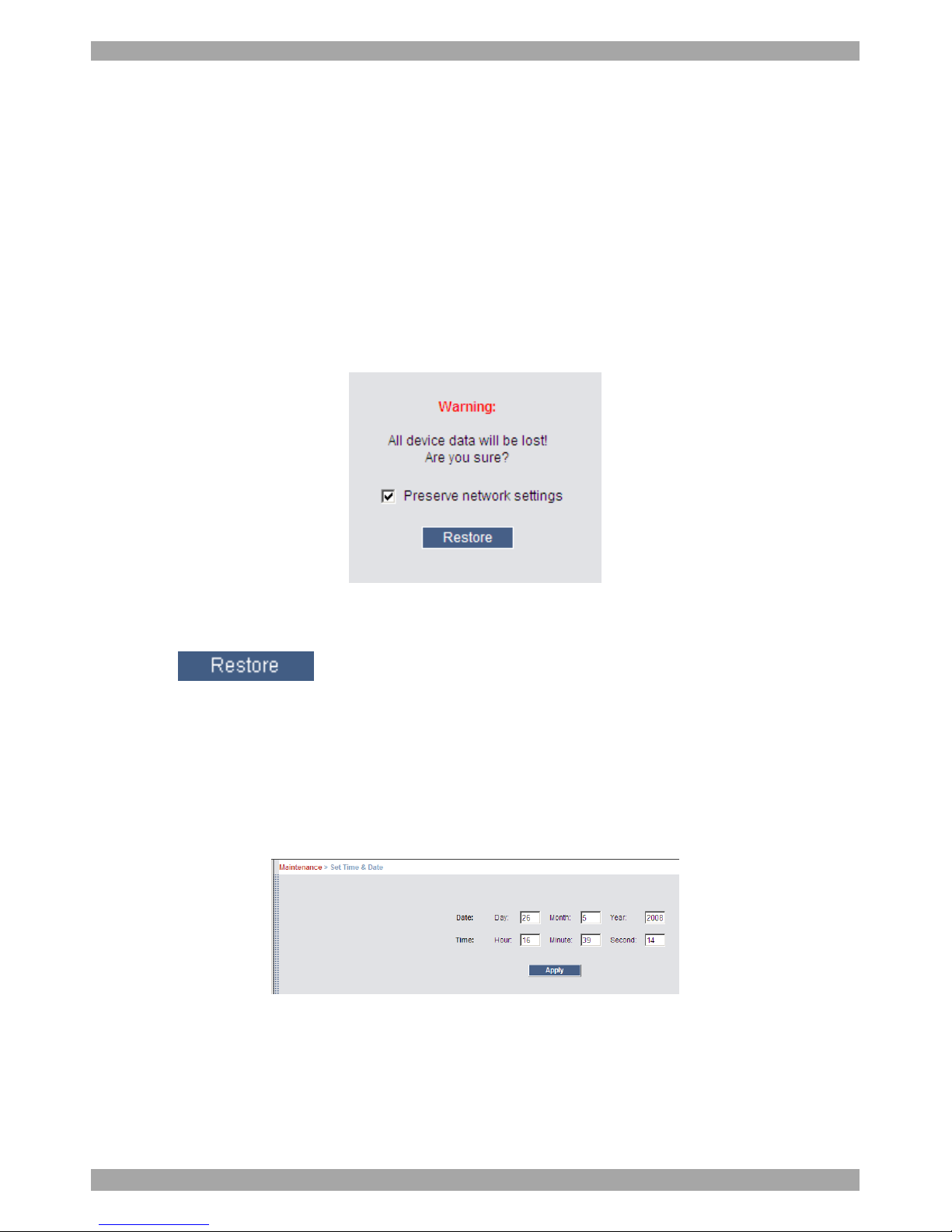
1. From the menu select Restore Factory Settings. Restore Factory Settings
appears see Figure 25.
Figure 25 Restore factory settings
2. Check the box if you want to preserve Network settings.
3. Click .
23. Set Time & Date
The time and date set is used when recording log events (see page 39).
To set the time and date:
From the menu, select Time & Date, Figure 26 appears.
Figure 26 Set Time & Date
Type the appropriate parameters.
Page 29
USER GUIDE
28
24. Backup & Restore
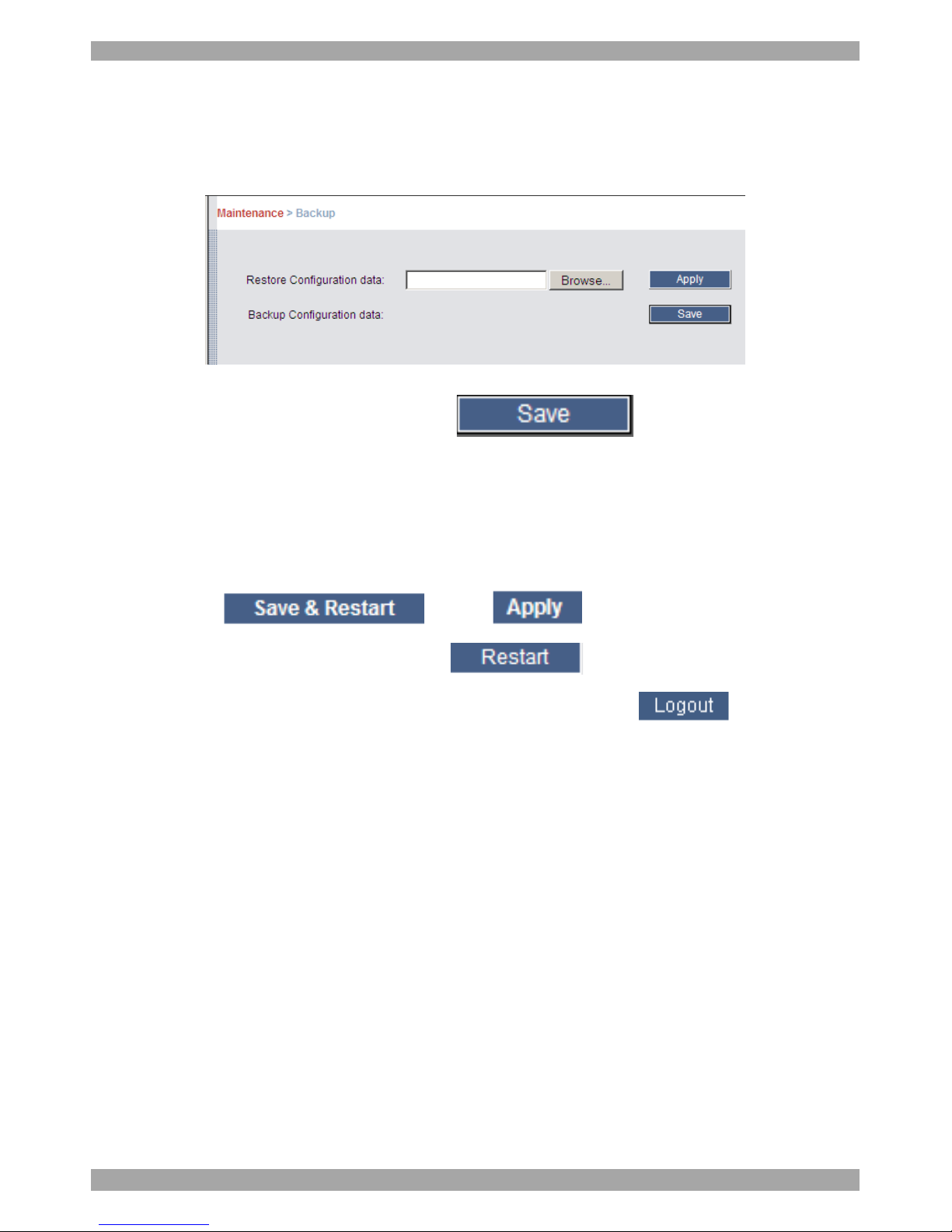
You can backup all configuration data and restore it at a later date. To do so:
From the menu select Backup & Restore, Figure 27 appears.
Figure 27 Backup & Restore
To backup the configuration data, click . And save the file.
To restore the configuration data, browse to locate the file and press Apply, the
device restarts.
25. Saving changes and logging out
To save any configuration changes click the relevant button on the current page.
This could be or just .
To restart the Smart 216 / 232 IP press .
To exit the Configuration menu and close the session, click .
Only one Administrator can log into the Configuration area at a time. After the idle
Timeout – see section 18 page 23 – the session terminates.
26. Accessing a Target server
Log in to the web interface as explained on page 13. The web interface opens at the
Targets page, see Figure 14 on page 14. To connect to a Target or serial device,
click the desired Target/device in the Server Name Column. (A server being used
by another user cannot be accessed). The screen of the Target/device appears inside
a remote console window. Note! For a User, only permitted Targets appear on the
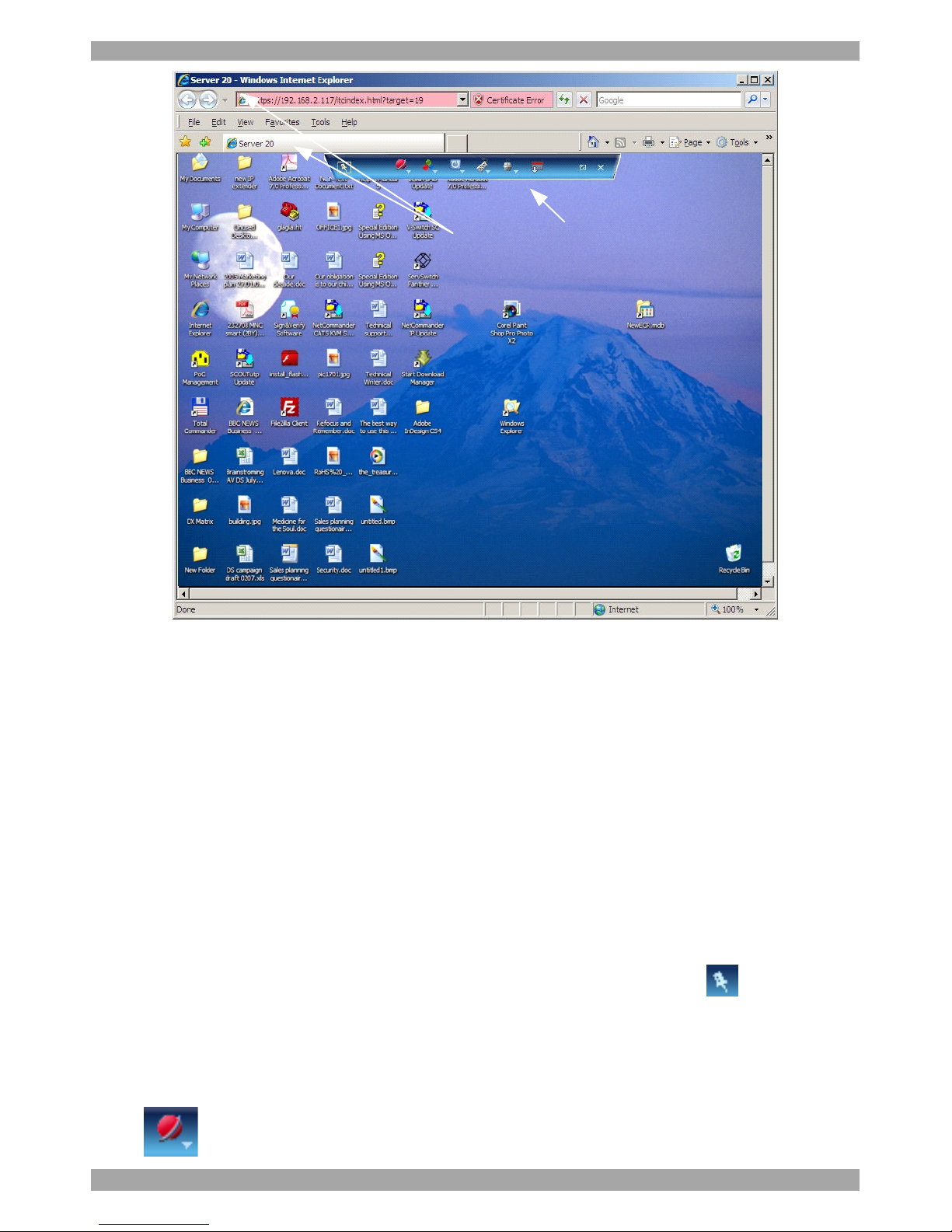
Targets page. Figure 28 illustrates the remote console window.
Page 30
SMART 216 / 232 IP
29
Toolbar
Server name
Figure 28 Remote console window
When using Microsoft Internet Explorer, on first connection install the Minicom
certificate and ActiveX control. You must login as an Administrator to your
computer to install the ActiveX control. Once the ActiveX control is installed, all
types of users can login.
When using a Firefox browser, install the Minicom Firefox add-on.
The currently accessed server identity can be checked any time by looking at the
Server name on the Internet Browser title bar or tab, see Figure 28.
26.1 Displaying the Toolbar
The Toolbar appears briefly at the top of the screen, see Figure 28. It disappears
when the mouse is not over it. To make it reappear, glide the mouse over the top of
the screen. To display the Toolbar permanantly, click the tack icon on the
Toolbar.
26.2 Session profile
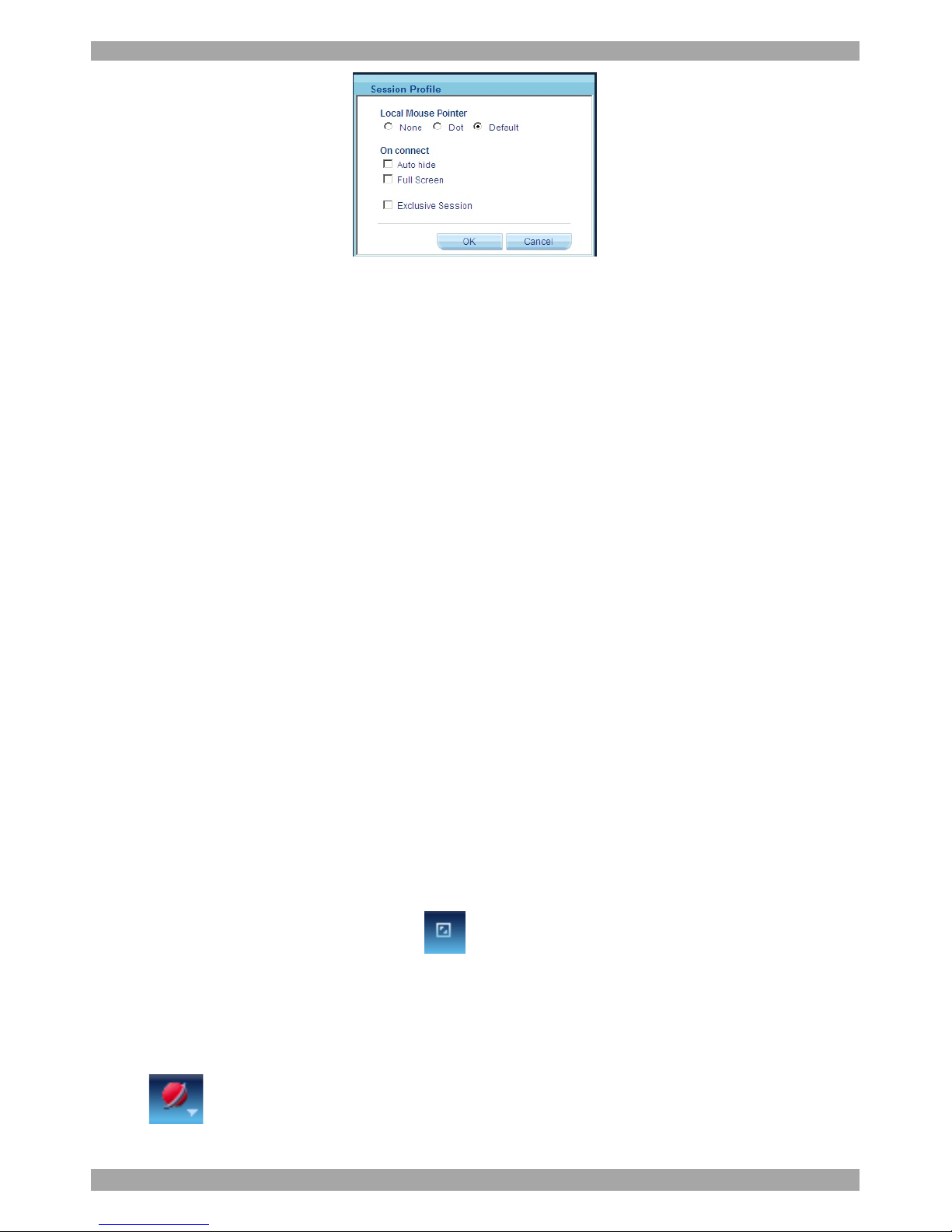
You have several remote session display options to choose from. From the Toolbar
click / Session Profile. The Session Profile box appears, see Figure 29.
Page 31
USER GUIDE
30
Figure 29 Session Profile box
You have the following options:
Local Mouse Pointer – You can change the Client computer mouse pointer to
appear as a dot or to not appear at all. Default is a regular shaped mouse cursor.
On connect
Auto Hide – Check this option to hide the Toolbar from the next connection
onwards.
Full Screen - Check this option to make the remote session screen appear in full
screen mode from the next connection onwards. To toggle the full screen mode on
and off, press F11. (See section 26.3 below).
26.3 Full screen mode
Work on the Target Server as if you are working on a local computer, with full
screen mode.
To work in full screen mode:
1. Ensure that the Client computer has the same screen resolution as the Target
Server.
2. Press F11. The browser window disappears.
To exit full screen mode:
Press F11. Or place the mouse at the top of the window to display the browser
toolbar and click the Restore button .
Note! Full screen mode can also be activated from the Session Profile box, see
above.
About
Click /About to verify the Client, Firmware, KME (Keyboard/Mouse
Emulation firmware) and Switch file versions installed on your Smart 216 / 232 IP.
Page 32
SMART 216 / 232 IP
31
26.4 Changing the performance settings
You can alter the performance settings from the Toolbar.
To alter the settings:
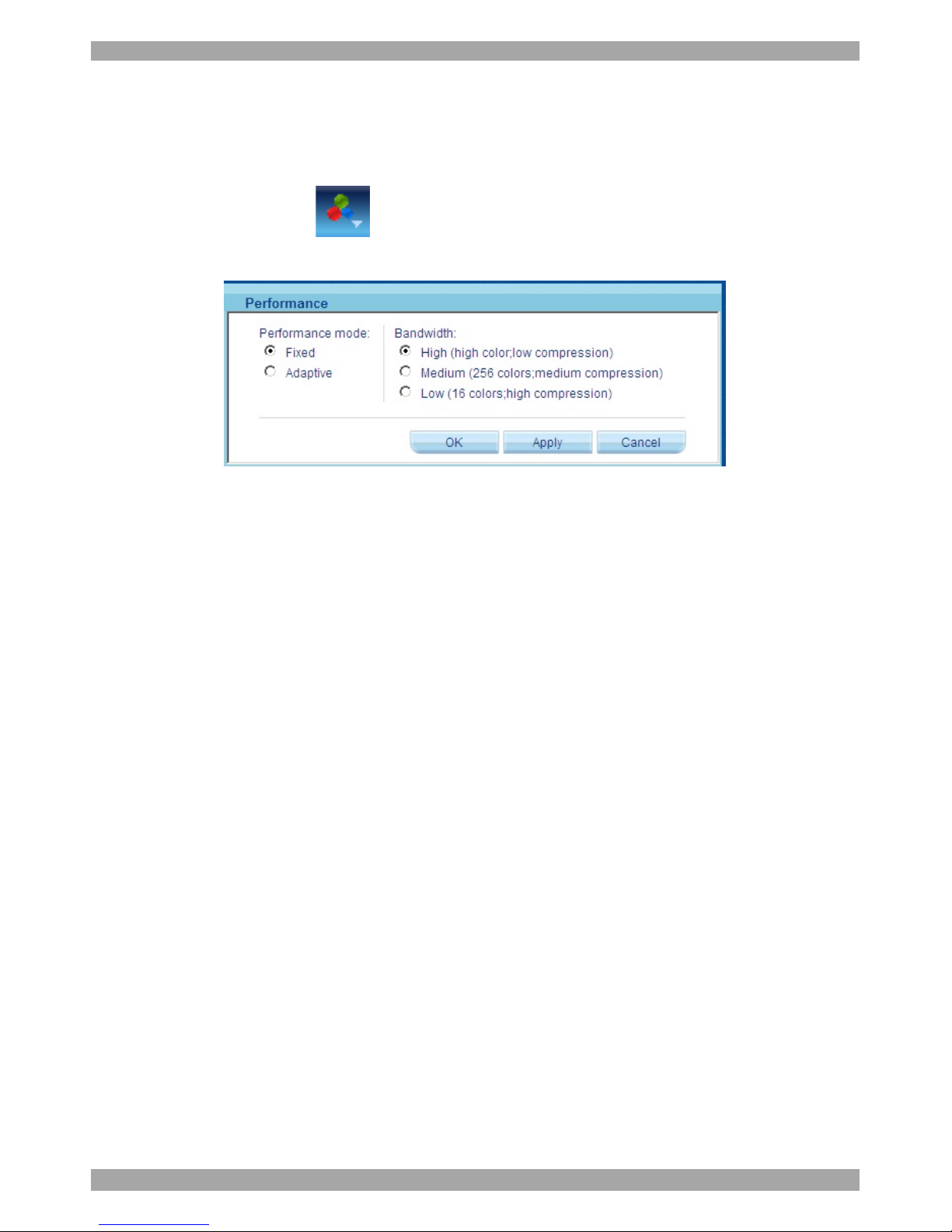
From the Toolbar, click /Performance. The Performance dialog box appears,
see Figure 30.
Figure 30 Performance box
Performance mode
You can choose fixed or adaptive – these are explained below.
Fixed mode
Fixed mode allows you to select the high, medium or low bandwidth option. For
example, in a LAN environment, it is best to set the bandwidth setting on High. For
VPN and internet environments you may want to alter the settings to increase
responsiveness.
Bandwidth - Choose from the following options
High - For optimal performance when working on a LAN, select High. This gives
a low compression and high colors (16bit).
Medium - Select medium for medium compression and 256 colors. Medium is
recommended when using a standard internet connection.
Low - Select Low for high compression and 16 colors.
Adaptive mode
Adaptive mode automatically adapts to the best compression and colors according
to the network conditions.
Click OK. The chosen setting take effect and the screen of the last accessed Target
Server appears.
Page 33

USER GUIDE
32
26.5 Adjusting the Video settings
To change the video settings:
From the Toolbar, click . You have the following options:
· Refresh
· Video Adjust
· Advanced
Each option is explained below.
26.5.1 Refresh
Select Refresh to refresh the Video image. Refresh may be needed when changing
the display attributes of a Target Server.
26.5.2 Video Adjust
To adjust the video automatically:
Click Video Adjust. The process takes a few seconds. If the process runs for more
than 3 times, there is an abnormal noise level. Check the video cable and verify that
no dynamic video application is running on the Target Server’s desktop.
Perform the procedure where necessary for each Target Server or new screen
resolution.
26.5.3 Advanced
Use the Advanced video adjustment options for fine-tuning the Target Server video
settings after auto adjustment or for adapting to a noisy environment or a nonstandard VGA signal or when in full-screen DOS/CLI mode.
To adjust the video:
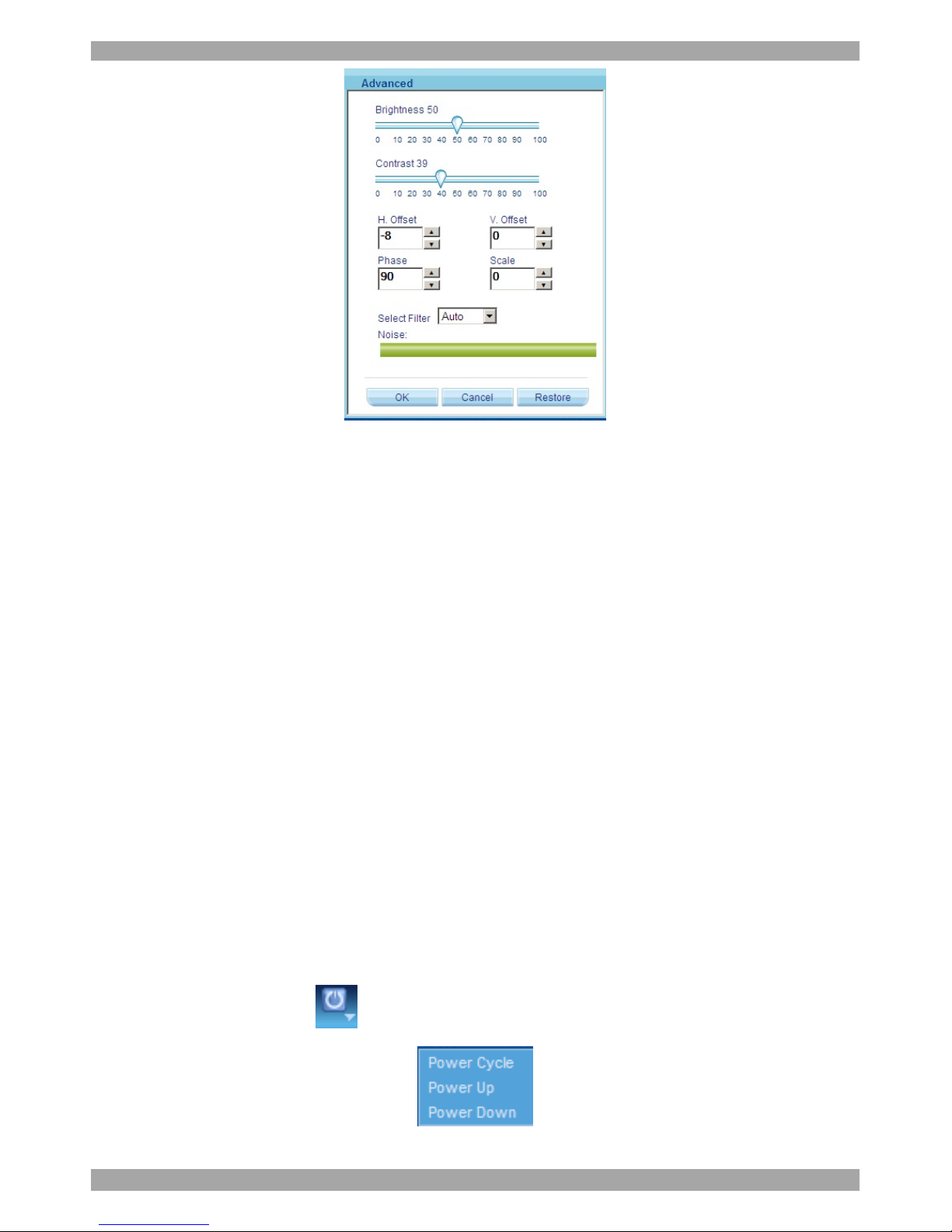
Click Advanced. The manual controls appear, see Figure 31.
After adjusting the video manually, you can always revert to Auto settings by
clicking Auto Video Adjust – explained in section 26.5.2 below.
Page 34
SMART 216 / 232 IP
33
Figure 31 Manual Video Adjustments controls
Brightness / Contrast - use the scales to adjust the brightness and contrast of the
displayed image. Move the sliders to change the displayed image. Click in the area
of the sliders for fine-tuning.
For the following controls choose the appropriate measurement.
H. Offset - defines the starting position of each line on the displayed image.
V. Offset - defines the vertical starting position of the displayed image.
Phase - defines the point at which each pixel is sampled.
Scale – defines the scale resolution of the session image.
Adjust Phase and Scale to reduce noise level to a minimum.
Select Filter - defines the filter of the input video from the server. A higher filter
reduces the noise level but makes the image heavier.
Noise - represents the Video "noise" when a static screen is displayed.
26.6 Power cycle
Where a Serial Remote Power Switch is connected to the Serial port of the
Smart 216 / 232 IP, you can power manage the Target servers as follows:
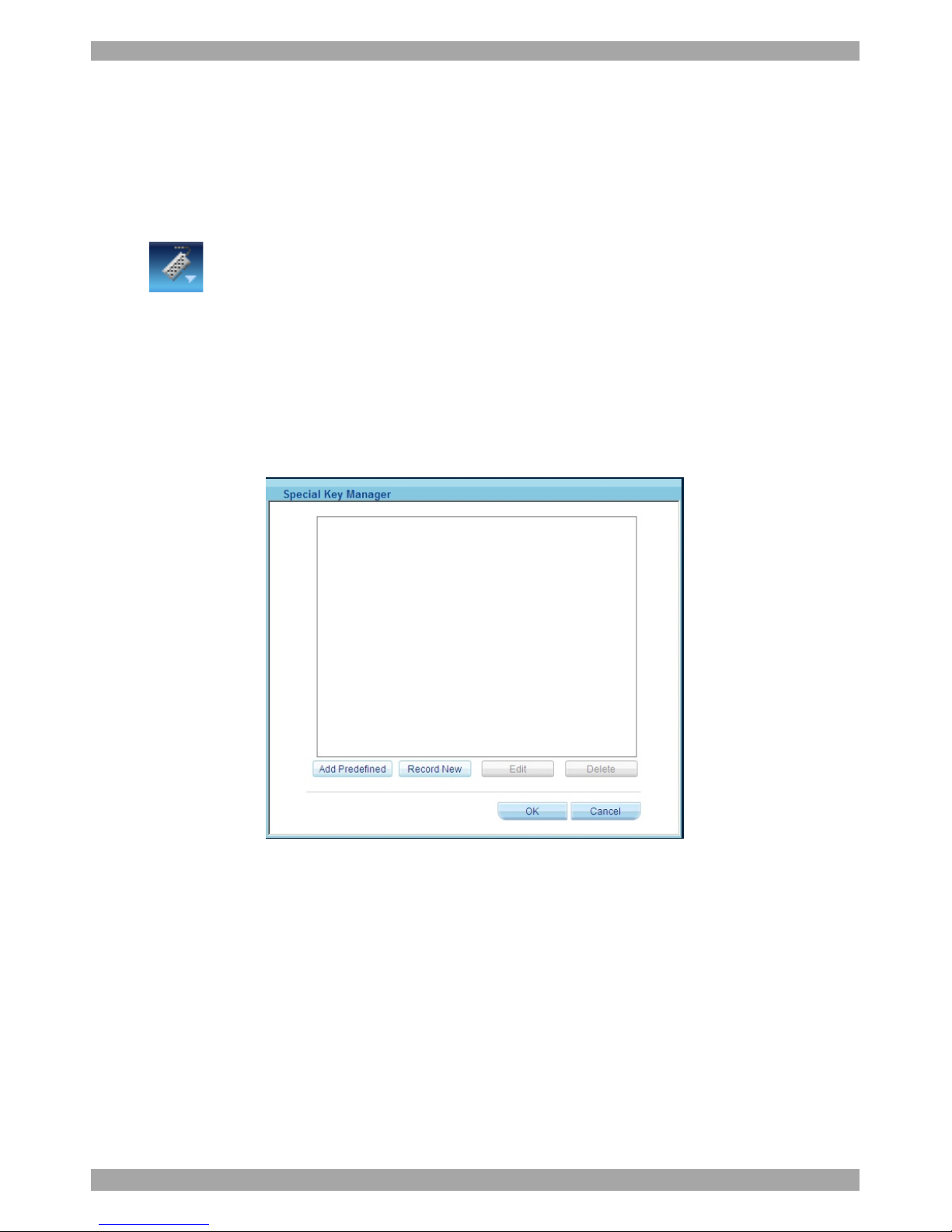
From the Toolbar, click . The Power menu appears, see below.
Figure 32 Power menu
Page 35
USER GUIDE
34
To send a power cycle command or to power down or up the currently accessed
Target server, select the appropriate option.
Note! Only the currently accessed Target server is affected, so to power manage
other Target servers you must access each one individually.
26.7 Keyboard key sequences
Click . A list of defined keyboard sequences appears. When clicked, these
transmit directly to the Target Server, and will not affect the Client computer.
For example, select Ctrl-Alt-Del to send this three key sequence to the Target
Server to initiate its Shutdown/Login process.
To add a keyboard sequence:
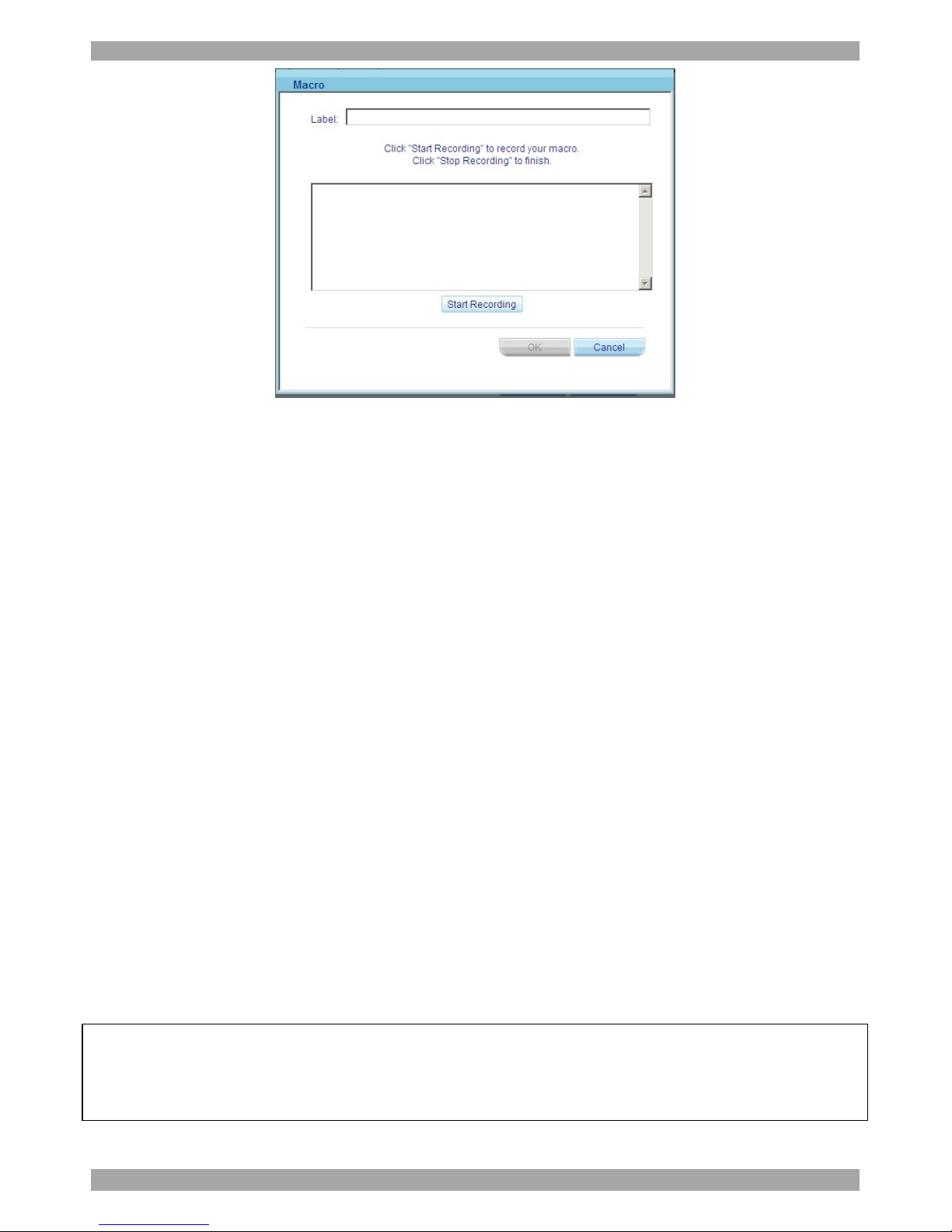
Click Add/Remove. The Special Key Manager box appears see Figure 33.
Figure 33 Special Key Manager box
To add a predefined sequence:
1. Click Add Predefined. A list of sequences appears.
2. Select the desired sequence and click OK. The sequence appears in the Special
Key Manager box.
3. Click OK. The sequence appears in the Keyboard Key sequence list.
To record a key sequence:
1. From the Special Key Manager box press Record New. The Macro box appears
see Figure 34.
Page 36
SMART 216 / 232 IP
35
Figure 34 Macro box
2. Give the key sequence a name in the Label field.
3. Click Start Recording.
4. Press the desired keys. The keys appear in the area provided.
5. Click Stop Recording.
6. Click OK.
To edit a key sequence:
1. From the Special Key Manager box select the desired key.
2. Click Edit.
3. Click Start Recording
4. Press the desired keys. The keys appear in the area provided.
5. Click Stop Recording.
6. Click OK.
26.8 Synchronizing mouse pointers
When working at the Client computer, two mouse pointers appear: The Client
computer’s is on top of the Target Server’s. The mouse pointers should be
synchronized. The following explains what to do if they are not synchronized.
Warning
Before synchronizing mouse pointers adjust the video of the Target Server,
(explained above) otherwise mouse synchronization may not work..
Page 37
USER GUIDE
36
26.8.1 Aligning the mice pointers
When accessing the Target Server, the mice may appear at a distance to each other.
To align the mouse pointers:
From the Toolbar click / Align (or press Ctrl+M). The mice align.
26.8.2 Calibrating mice pointers
A Target Server may have a different mouse pointer speed to the Client computer.
Calibrating automatically discovers the mouse speed of the Target Server and
aligns the two pointers.
To perform the calibration when the Target Server Operating system is, Windows
NT4, 2000 or 98:
From the Toolbar click / Calibrate. The KVMIP card saves the calibration so
you need to calibrate the mouse twice per Target Server.
If the Video Noise Level is above zero, calibration may not work. Go to Video
Adjustment and try to eliminate the noise by pressing Auto video adjust and/or
adjusting the bars in Manual video adjust, then perform the mouse calibration.
Note! If the mouse settings on the Target Server were ever changed, you must
synchronize mouse pointers manually, as explained below.
26.8.3 Manual mouse synchronization
If the mouse settings on the Target Server were ever changed, or when the
Operating system on the Target Server is, Windows XP / 2003 Server / Vista /2008
Server, Linux, Novell, SCO UNIX or SUN Solaris you must synchronize the
mouse pointers manually.
To manually synchronize mouse pointers:
1. From the Toolbar click / Mouse Settings. The Mouse Settings box
appears see Figure 35.
Page 38
SMART 216 / 232 IP
37
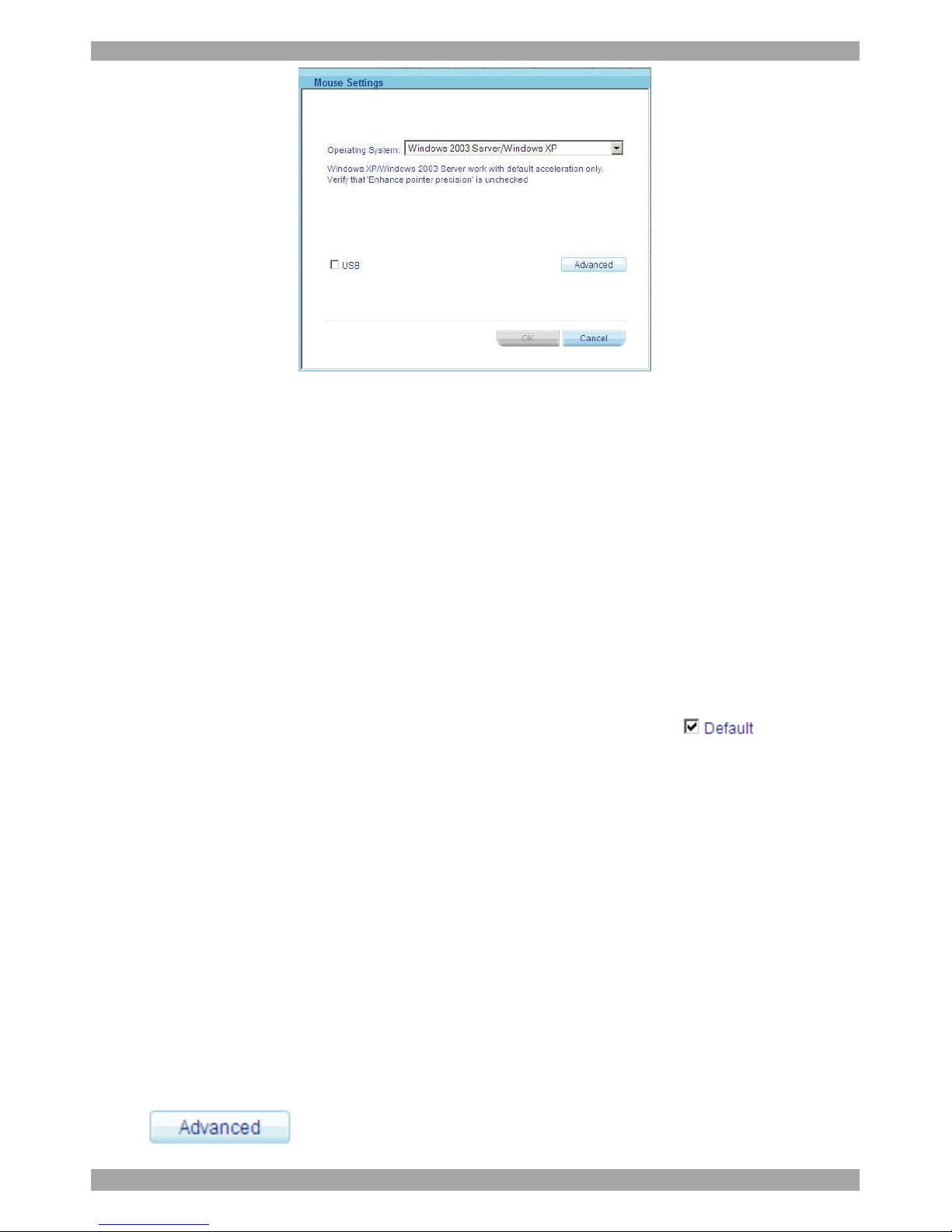
Figure 35 Relative Mouse Settings
1. From the drop down menu, select the Target’s Operating system. Instructions
and sliders appear.
2. Follow the instructions and set any relevant sliders to the same values as set in
the Target’s Mouse Properties window.
3. Click OK to save the settings
2 examples!
For Windows XP. Go to the Mouse settings on the Target and uncheck Enhance
pointer precision.
For Windows 2000. If Mouse Properties were ever changed for the Target – even if
they have been returned to their original state - uncheck default .
Click OK. The mouse pointers should be synchronized.
26.8.3.1 USB
The USB option in the Mouse Settings box is available for RICC/ROC USB and
for unsupported operating systems and SUN Solaris. Use this option if you are sure
of the custom acceleration algorithm you are using, or have been informed so by
customer support.
26.8.3.2 Advanced – Mouse Emulation
In the Advanced Mouse settings, you can set the type of mouse that you would like
Smart 216 / 232 IP to emulate. We recommend not changing the advanced settings
unless there is erratic mouse behavior (the mouse is making random clicks and
jumping arbitrarily around the screen).
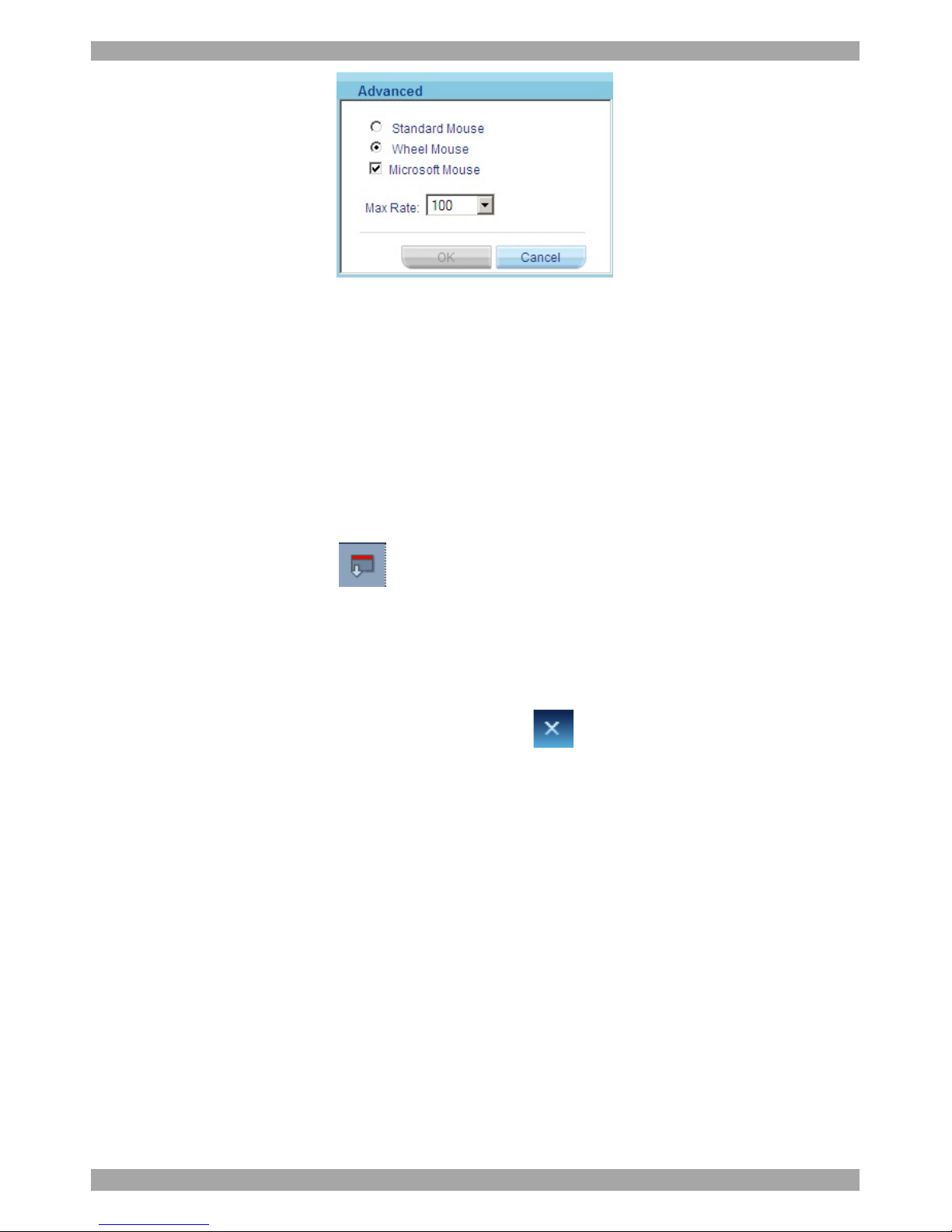
Click the Mouse Emulation box appears see Figure 36.
Page 39
USER GUIDE
38
Figure 36 Mouse Emulation box
Select the mouse connected to the Local Console port on the Smart 216 / 232 IP,
e.g. if the local mouse is a non-Microsoft 2 button mouse, select Standard Mouse
and uncheck Microsoft Mouse.
Max Rate - this defines the maximum mouse report rate. For Sun Solaris the
default value is 20 in order to support older Sun versions.
26.9 Switching to a different server/device
To connect to a different server/device:
1. From the Toolbar, click . A list of connected servers/devices appears.
2. Click the desired server or Serial device. The screen of the server or the Serial
device terminal emulation window appears.
26.10 Disconnecting the remote session
To disconnect the session, on the Toolbar, click . The Login page appears. You
can re-login or close the browser window.
27. The Targets page menu
When logging into the system as an Administrator or a User, you reach the Targets
page, see Figure 14 page 14. From the menu you can:
· Change the password
· See an event log
Note! Only an Administrator has the configuration option in the menu.
27.1 Changing the password
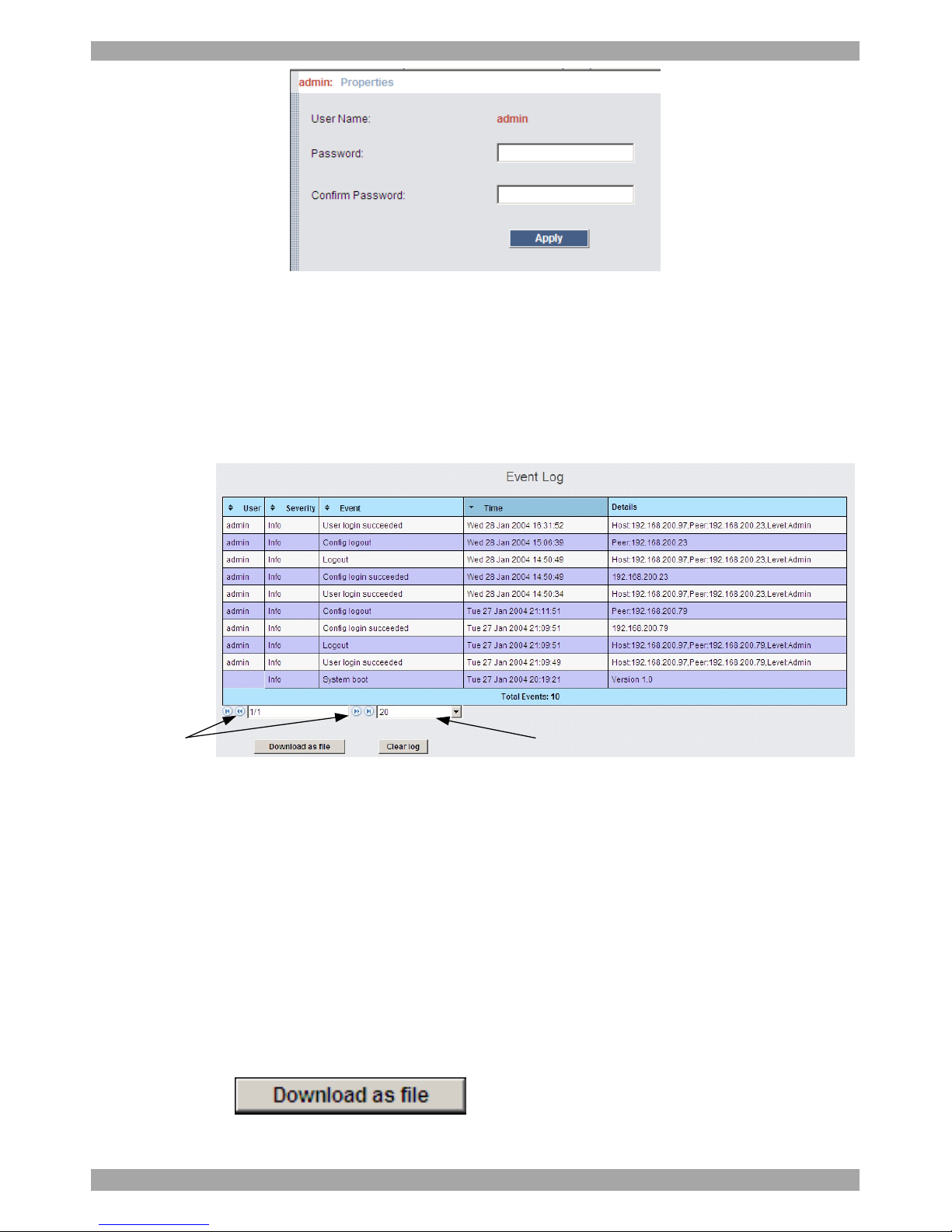
To change the password, from the menu click Password, the following appears.
Page 40
SMART 216 / 232 IP
39
Figure 37 My Properties
Type a new password according to the password policy set - see page 23.
27.2 Event log
To see a log of all system events:
From the menu select Event Log, the following appears.
(A)
Where there
are a number
of pages, click
forward or
backwards
here to
navigate to the
desired page
(B)
Select here the
number of
events that
should appear
on each page
Figure 38 Events log
Navigate through the events pages using the forward or backward arrows, marked
as (A) in Figure 38,
From the drop down menu, marked as (B) in Figure 38, choose the number of
events that will appear on each page - between 10 – 40.
27.2.1 Downloading the log
You can download and save the log.
To do so, click and save as a .csv file. The file can be
viewed using Microsoft Excel or compatible software.
Page 41
USER GUIDE
40
27.2.2 Clearing the log
To clear the log, click . A prompt appears asking if you first want to
save the log.
28. Troubleshooting - Restore factory settings
Section 22 on page 27 explained how to restore factory settings from the
configuartion GUI. You can also restore the factory settings if for example the user
name and password are forgotten and you cannot access the GUI.
To restore the device to the factory settings:
1. You need a USB drive. In the root of the USB drive create an empty file with
name “default”.
2. Put the USB drive into one of the USB ports of the Smart 216/232 IP and restart
it by power cycling it. The Smart 216/232 IP will reboot and recognize the
presence of the default file, and will restore the unit to the factory settings, erase
this file and reboot. After rebooting the unit reverts back to the factory settings.
Page 42
SMART 216 / 232 IP
41
Section II
Section II explains how to operate the Smart 216 / 232 IP system locally via the
OSD.
29. The OSD
To display the OSD:
1. From the local keyboard, press the left Shift key twice. The OSD Main window
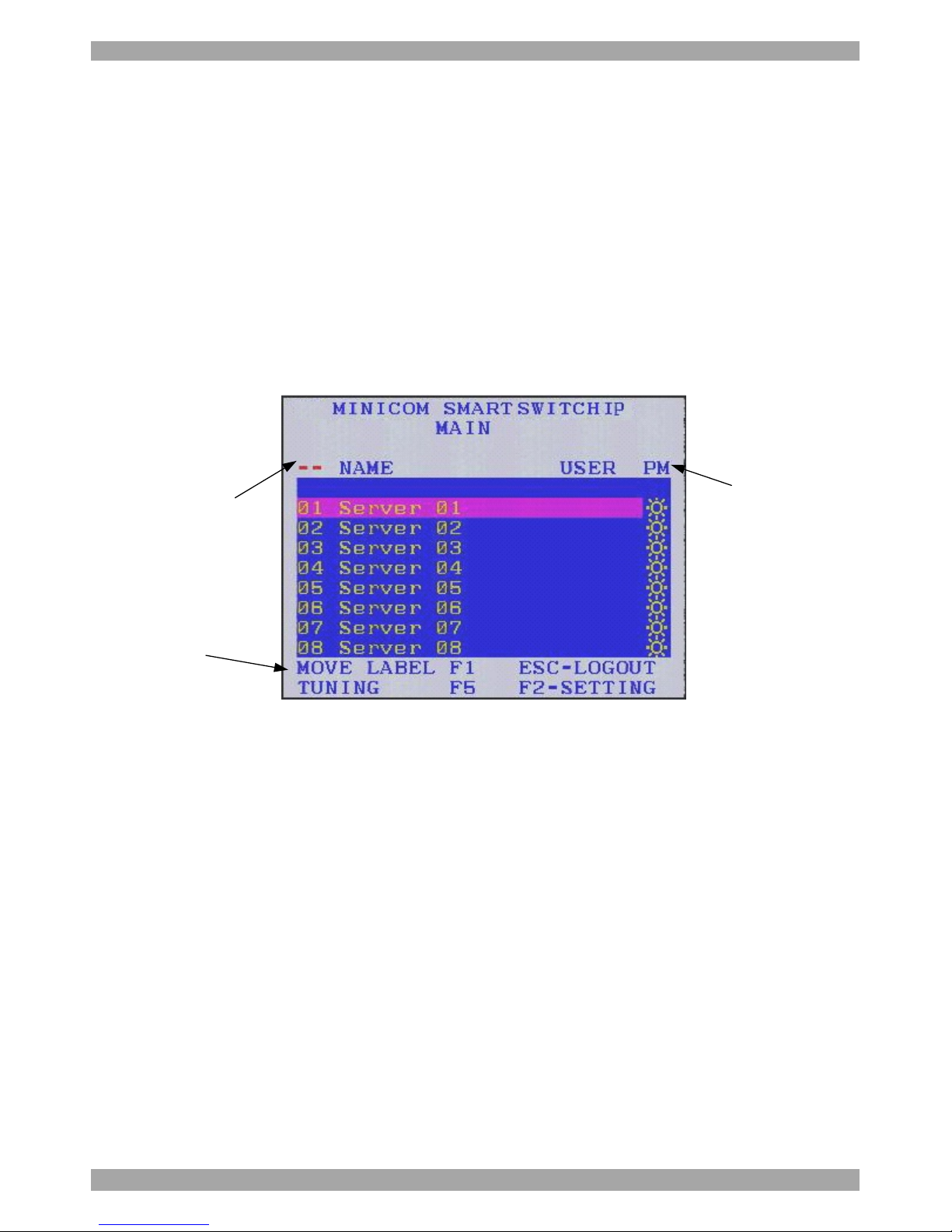
appears. See Figure 39. Lines with the sun icons in the PM column show
switched on active computers/servers. A switched off computer has no sun icon.
When a server is busy the entire line appears in red characters.
Port number
appears here
Instruction
keys
PM=Power
management
Figure 39 OSD Main window
29.1 Navigating the OSD Main window
To navigate up and down use the Up and Down arrow keys.
To exit the OSD press Esc.
29.2 Selecting a computer
To select a computer:
1. Navigate to the desired computer line.
Or, type the two-digit port number of the desired computer.
2. Press Enter. The selected computer is accessed. A Confirmation label appears
showing which computer is accessed.
Page 43
USER GUIDE
42
29.3 Power management hotkey – left Shift, F12
To power manage a server connected to a power management switch:
1. Navigate to the computer line you desire to power manage.
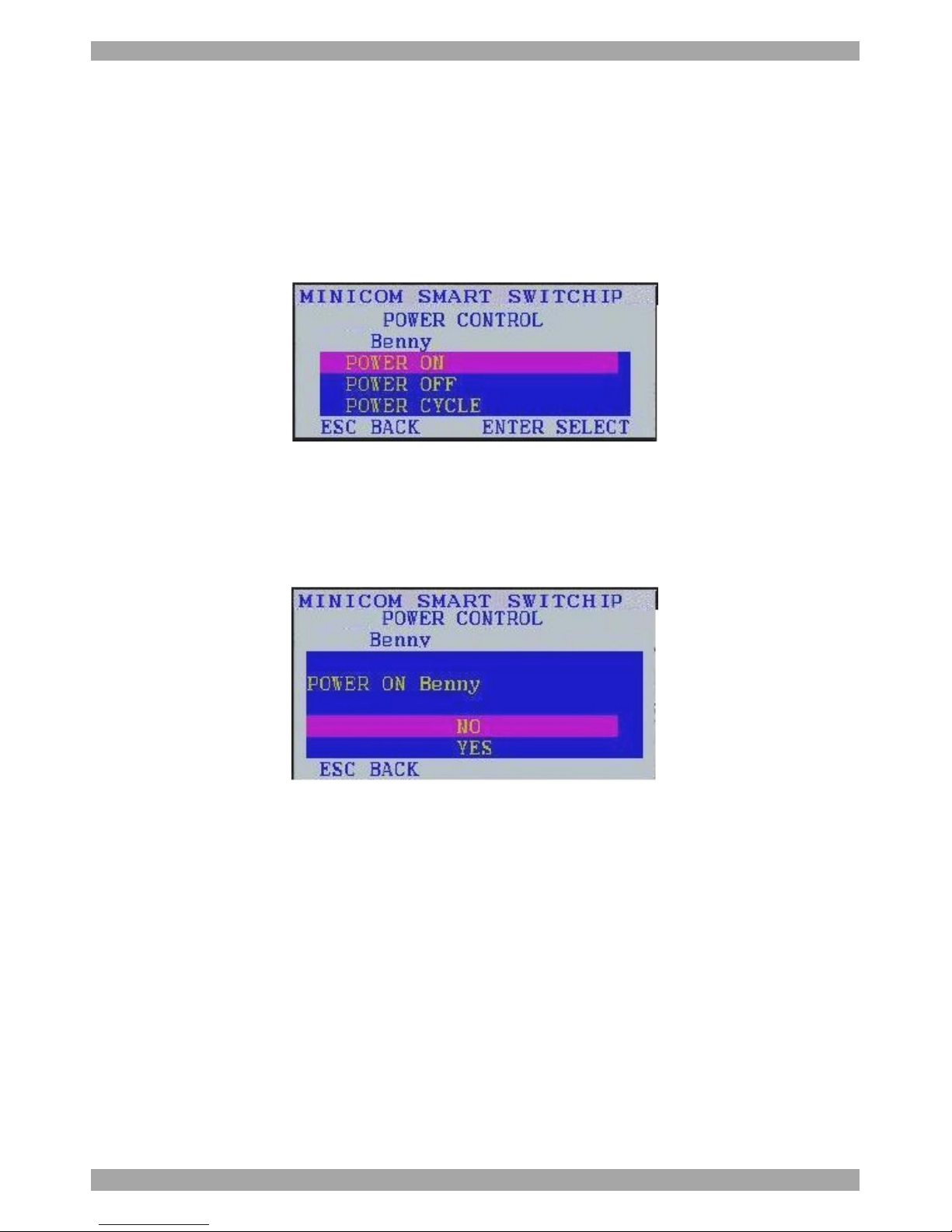
2. Press Left Shift, F12. The Power Control dialog box appears, see Figure 40.
Note! If you change the OSD hotkey from Shift, Shift to Ctrl, Ctrl, then the
power management hotkey becomes left Ctrl, F12.
Figure 40 Power Control dialog box
3. Use the arrow keys to navigate up and down and press Enter to select
the power option.
4. A prompt appear, see Figure 41. Select the desired option and press
Enter. The power command is sent.
Figure 41 Power prompt
29.4 Moving the Confirmation label – F1
The Confirmation label appearing briefly showing which computer is currently
accessed can be positioned anywhere on the screen.
To position the label from the Main window:
1. Navigate to a computer line using the Up and Down arrow keys.
2. Press F1. The selected screen image and Confirmation label appear.
3. Use the arrow keys to move the label to the desired position.
4. Press Esc to save and exit.
Page 44
SMART 216 / 232 IP
43
29.5 Tuning – F5
You can tune the image of any computer screen from the Main window.
To adjust the screen image:
1. Navigate to the computer line you wish to adjust.
2. Press F5. The screen image of the selected computer appears, together with the
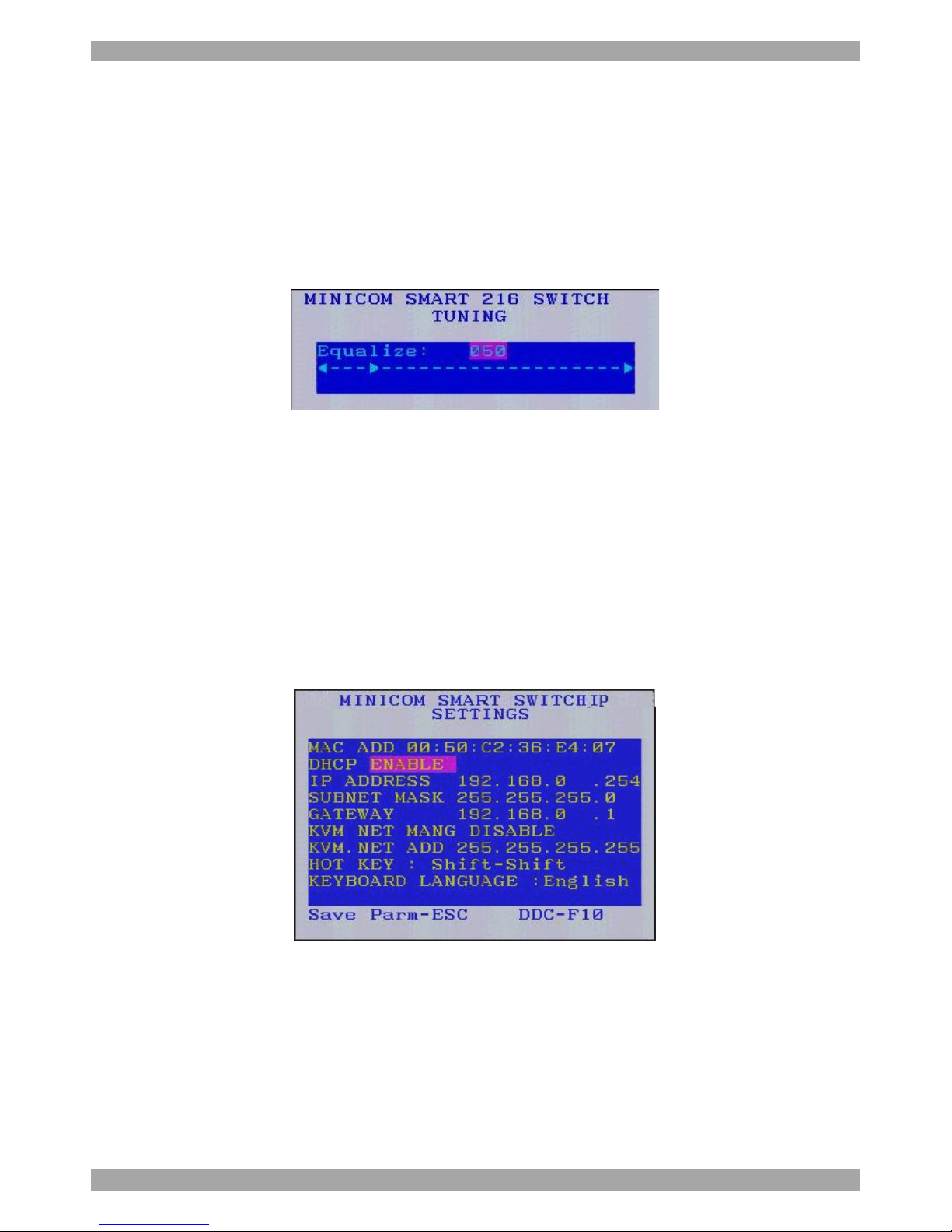
Image Tuning label, see Figure 42.
Figure 42 Image Tuning label
3. Adjust the image by using the Right and Left Arrow keys.
4. When the image is satisfactory, press Esc.
Note! Picture quality is relative to distance. The further away a remote computer is
from the Smart 216 / 232 IP, the lower the image quality, and the more tuning
needed. So place the higher resolution computers closer to the Switch.
29.6 The Settings window - F2
Press F2. The Settings window appears see Figure 43.
Figure 43 Settings window
In the Settings window navigate downwards using the Tab key. At the bottom of
the window, press tab to go to the top of the window. Change settings by typing in
the selected area or by pressing the spacebar – whichever is relevant.
Page 45

USER GUIDE
44
In the Settings window you can do the following:
Changing the Network parameters
DHCP Enable – When a DHCP server is active on the same network to which
Smart 216 / 232 IP is connected, DHCP provides automatic IP assignment.
When DHCP is disabled – (Recommended) – You can assign a fixed IP address to
the Smart 216 / 232 IP.
Consult your Network Administrator regarding the use of the DHCP.
When DHCP is disabled, enter the IP Address, Subnet Mask, and Gateway as
given by your Network Administrator.
(Network parameters can also be changed from the remote GUI as explained on
page 15).
KVM.NET MNG – Press the spacebar to toggle between enabling and disabling
KVM.net/AccessIT management. When enabled the Smart 216 / 232 IP unit is
remotely managed by Minicom’s KVM.net/AccessIT system.
KVM.NET ADD – Here you can change the static IP address of the
KVM.net/AccessIT Manager.
HOT KEY – By pressing Shift, Shift the OSD appears. You can replace Shift,
Shift with any of the following:
· Ctrl, Ctrl
· Ctrl, F11
· Print Screen
Press the Spacebar to toggle between options. To display the OSD in future press
the new hotkey.
KEYBOARD LANGUAGE – This refers to the OSD keyboard language and not
the computer keyboard language. Press the Spacebar to toggle between the
language options. It can be changed to French or German.
29.7 DDC – F10
Display Data Channel (DDC) is a VESA standard for communication between a
monitor and a video adapter.
The ROC emulates the DDC information to the connected computer.
To emulate the DDC information of the monitor connected to the Smart 216 / 232
IP switch into the memories of all connected ROCs when first installing system.
Page 46

SMART 216 / 232 IP
45
Press F10. “Please wait” flashes a few times and disappears. The monitor’s DDC
information is sent to all ROCs.
29.7.1.1 Updating the DDC information
Update the DDC information in any of the following circumstances:
· When replacing the monitor connected to Smart 216 / 232 IP Switch
· When adding a new ROC to the system
· When reconnecting an existing ROC that was temporarily used in a
different system
To update the DDC information, repeat the steps as set out above.
29.8 Saving changes to the settings
To save changes to the settings and return to the Main window, press Esc.
Page 47

USER GUIDE
46
30. Remote session video resolution and refresh rates
Hz →
56 60 65 66 70 72 73 75 76 85 86
640x480
x x x x x x
720x400
x x
800x600
x x x x x x
1024x768
x x x x x x x
1152x864
x
1152x900
x x
1280x720
x
1280x768
x x
1280x960
x x
1280x1024
x x x x x
1600x1200
x x x x x
Page 48

SMART 216 / 232 IP
47
31. Technical specifications
Operating systems
Target server
Windows, Novell, Linux, SUN Solaris
Client Computer
Windows 2000 or higher with Internet Explorer 6.0 /
Firefox 3.0 and later
Linux x86 with Firefox 3.0 and later
Resolution
Target server
Up to 1600 x 1200 @ 85Hz
Client Computer
Recommended - resolution should be higher than on
Target server
Distance from Switch to ROCs
Up to 30m/99ft.
Video and mouse synchronization
Both auto and manual modes
Security
256-bit SSL encryption in Firefox
Connections
Ethernet – RJ45 – 10/100 Mbit/sec autosensing
Serial – RJ45 x 2
Local KVM connection – Screen HDD15,
Keyboard./Mouse – 2 USB
Servers – RJ45
Weight
2.343Kg / 5.165lbs
Dimensions (H x D x W)
44 x 270 x 431 mm / 1.7 x 10.6 x 17"
Power input
100 – 240 VAC, 0.8 A, 50 / 60 Hz.
Operating temperature
0°C to 40°C / 32°F to 104°F
Storage temperature
-40°C to 70°C / -40°F to 158°F
Humidity
80% non condensing relative humidity
ROC PS/2 ROC USB
Connections
VGA - HDD15
KM - MiniDin6
System - RJ45
VGA - HDD15
KM - USB
System - RJ45
Power
From Keyboard port From USB port
Product weight
100g / 0.20lb
Shipping weight
172g / 0.38lb
Dimensions
65 x 25 x 25mm / 0.21 x 0.08 x 0.08”
Page 49

USER GUIDE
48
32. Safety
This device contains no serviceable parts. Any servicing of the device must be
performed by an authorized Minicom Technician in a Minicom authorized Service
Center.
33. User guide feedback
Your feedback is very important to help us improve our documentation. Please
email any comments to: [email protected]
Please include the following information: Guide name, part number and version
number (as appears on the front cover).
34. WEEE compliance
WEEE Information for Minicom Customers and Recyclers
Under the Waste Electrical and Electronic Equipment (WEEE) Directive and
implementing regulations, when customers buy new electrical and electronic
equipment from Minicom they are entitled to:
· Send old equipment for recycling on a one-for-one, like-for-like basis (this
varies depending on the country)
· Send the new equipment back for recycling when this ultimately becomes
waste
Instructions to both customers and recyclers/treatment facilities wishing to obtain
disassembly information are provided in our website www.minicom.com.
Page 50

SMART 216 / 232 IP
49
 Loading...