

Page 1

Your new life withYour new life with
Booklet_MULTILINGUE-avril2011.indd 1 4/04/11 14:51:57
Page 2

WARNING!
Use Karotz in an environment where the temperature is between 0°C (32°F) and +40°C (+104°F).
Caution, risk of explosion if battery is replaced by an incorrect type. Dispose of used batteries
according to the instructions.
Changes or Modifications not expressly approved by the party responsible could void the user’s
authority to operate this device.
NOTE: This equipment has been tested and found to comply with the limits for a Class B digital
device, pursuant to Part 15 of the FCC Rules. These limits are designed to provide reasonable
protection against harmful interference in a residential installation. This equipment generates,
uses and can radiate radio frequency energy and, if not installed and used in accordance with
the instructions, may cause harmful interference to radio communications. However, there is no
guarantee that interference will not occur in a particular installation.
If this equipment does cause harmful interference to radio or television reception, which can be
determined by turning the equipment o and on, the user is encouraged to try to correct the
interference by one or more of the following measures:
- Reorient or relocate the receiving antenna.
- Increase the separation between the equipment and receiver.
- Connect the equipment into an outlet on a circuit dierent from that to which the receiver
is connected.
- Consult the dealer or an experienced radio/TV technician for help.
AVERTISSEMENT
Utilisez Karotz dans un endroit où la température est comprise entre 0°C et +40°C.
Attention : Risque d’explosion si la batterie est remplacée par une batterie d’un autre type.
Jetez la batterie usagée conformément aux instructions.
Les changements ou modifications qui n’ont pas été expressément approuvés par la partie
responsable peuvent annuler le droit de l’utilisateur de faire fonctionner cet appareil.
REMARQUE : cet équipement a été testé et respecte les limitations des appareils numériques
de Classe B, conformément à l’alinéa 15 de la Réglementation de la FCC. Ces limitations
sont conçues pour fournir une protection adéquate contre les interférences nuisibles dans
une installation résidentielle. Cet équipement produit, utilise et peut émettre de l’énergie
radiofréquence. S’il n’est pas installé et utilisé conformément aux instructions, il risque de
provoquer des interférences nuisibles aux communications radio. Il n’existe cependant pas de
garantie qu’aucune interférence ne viendra perturber une installation particulière.
Si cet équipement provoque des interférences nuisibles à la réception radio ou télévisuelle, ce qui
peut être déterminé en l’éteignant puis en le rallumant, l’utilisateur doit essayer de corriger les
interférences en appliquant une ou plusieurs des mesures suivantes :
- réorientez ou déplacez l’antenne de réception ;
- augmentez la distance entre l’équipement et le récepteur ;
- branchez l’équipement sur une prise diérente de celle du récepteur, sur des circuits
diérents ;
- consultez le vendeur ou un technicien expert radio/TV pour obtenir de l’aide.
WARNHLNWELS
Nutzen Sie den Karotz in einer Umgebung mit Temperaturen zwischen 0°C und +40°C.
Warnhinweis: Es besteht Explosionsgefahr, wenn die Batterie durch einen anderen Batterietyp
ersetzt wird. Batterie gemäß Anweisung entsorgen.
Änderungen, die nicht ausdrücklich von der verantwortlichen Partei genehmigt wurden, können
die Autorisierung des Nutzers zum Betrieb dieses Gerätes außer Kraft setzen.
HINWEIS: Dieses Gerät wurde getestet und entspricht den Grenzwerten digitaler Geräte
der Klasse B (siehe Abschnitt 15 der FCC-Bestimmungen). Diese Grenzwerte bieten einen
ausreichenden Schutz gegen Interferenzen bei häuslichen Installationen. Das Gerät erzeugt und
verwendet hochfrequente Schwingungen und kann sie ausstrahlen. Wenn es nicht nach den
Anweisungen des Herstellers aufgestellt und betrieben wird, können Störungen im Radio- und
Fernsehempfang auftreten. In Ausnahmefällen können bestimmte Installationen aber dennoch
Störungen verursachen.
Sollte das Gerät zu einer Beeinträchtigung des Radio- und Fernsehempfangs führen, was durch
Ein- und Ausschalten des Gerätes festgestellt werden kann, empfiehlt sich die Behebung der
Störung durch eine oder mehrere der folgenden Maßnahmen:
- Richten Sie die Empfangsantenne neu aus.
- Vergrößern Sie den Abstand zwischen Gerät und Empfänger.
- Stecken Sie den Netzstecker des Geräts in eine andere Steckdose, sodass das Gerät und
der Empfänger an verschiedene Stromkreise angeschlossen sind.
- Bitten Sie Ihren Händler oder einen erfahrenen Radio- bzw. Fernsehtechniker um Hilfe.
Booklet_MULTILINGUE-avril2011.indd 2-3 4/04/11 14:51:57
Page 3

ATENCIÓN
Use el Karotz en un ambiente en el que la temperatura esté entre 0°C y +40°C.
Atención: peligro de explosión si se reemplaza la batería por otro tipo de batería. Deshágase
de la batería según las instrucciones.
Los cambios o modificaciones que no se hayan aprobado de forma expresa por la parte responsable podrían invalidar la autoridad del usuario para utilizar este dispositivo.
NOTA: este equipo se ha probado y cumple con los límites adjudicados a un dispositivo digital
de Categoría B, de acuerdo con el Artículo 15 de la normativa de la Comisión Federal de
Comunicaciones. Estos límites se designan para que exista cierta protección contra cualquier
interferencia dañina que pudiera haber en una instalación casera. Este equipo genera, usa e
irradia energía de frecuencias de radio y, si no se instala o se usa siguiendo las instrucciones,
podría causar interferencias dañinas en las comunicaciones de radio. Sin embargo, no hay
garantía alguna de que dicha interferencia pudiera ocurrir durante una instalación en concreto.
Si este equipo causase alguna interferencia dañina en la recepción de radio o televisión, lo cual
puede comprobarse apagando y volviendo a encender el equipo, el usuario podrá intentar corregir
la interferencia siguiendo uno o más de los siguientes pasos:
- Volver a orientar o reubicar la antena receptora.
- Aumentar la separación entre el equipo y el receptor.
- Conectar el equipo a una salida de un circuito diferente a aquella en la que el receptor está
conectado.
- Consultar con el distribuidor o pedir ayuda a un técnico experto en televisión o radio.
WAARSCHUWING
Gebruik Karotz in een omgeving waar de temperatuur tussen de 0°C en 40°C ligt.
Let op: er bestaat explosiegevaar wanneer de batterij wordt vervangen door een verkeerde
batterij. Gooi gebruikte batterijen volgens de voorschriften weg.
Wijzigingen of veranderingen die niet uitdrukkelijk zijn goedgekeurd door de verantwoordelijke
partij kunnen de machtiging van de gebruiker om dit apparaat te gebruiken ongeldig maken.
OPMERKING: Dit apparaat is getest en voldoet aan de voorschriften voor een digitaal apparaat
van klasse B conform deel 15 van de FCC-regelgeving. Deze voorschriften zijn ontworpen om
een redelijke bescherming te bieden tegen schadelijke interferentie in een huisinstallatie. Dit
apparaat produceert en gebruikt radiofrequentie-energie en straalt deze mogelijk uit. Als de
apparatuur niet wordt geïnstalleerd en gebruikt in overeenstemming met de instructies, kan dat
leiden tot schadelijke interferentie met radiocommunicatie. Er is echter geen garantie dat er in
een bepaalde installatie geen interferentie zal optreden.
Mocht dit apparaat schadelijke interferentie in radio- of tv-ontvangst veroorzaken, wat
kan worden vastgesteld door het apparaat uit en weer in te schakelen, wordt de gebruiker
aangeraden de interferentie te verhelpen door een of meer van de volgende maatregelen te
nemen:
- Verander de ontvangstantenne van richting of van plaats
- Vergroot de afstand tussen het apparaat en de ontvanger
- Sluit het apparaat aan op een stopcontact in een andere groep dan die waarop de
ontvanger is aangesloten
- Vraag de leverancier of een ervaren radio-/tv-technicus om hulp.
Booklet_MULTILINGUE-avril2011.indd 4-5 4/04/11 14:51:57
Page 4

TABLE OF CONTENTS
Box contents ....................................................................................................... p. 8
Introducing your Karotz ....................................................................................p. 10
To install your Karotz ........................................................................................ p. 12
The applications .................................................................................................p. 14
Karotz sp eaks to you - Summa ry of the light indicators ...............................p. 16
Flatnanoz and other accessories ......................................................................p. 18
More information on www.karotz.com ............................................................p. 18
Commercial warranty ........................................................................................p . 19
SOMMAIRE
Contenu de la boîte ...........................................................................................p. 22
Présentation de votre Karot z ..........................................................................p. 23
Installer votre Karotz .......................................................................................p. 25
Les applications ................................................................................................p. 28
Karotz vo us parle : petit réc apitulatif du fonctionnement lu mineux .......... p. 30
Les Flatnanoz et autres accessoires ................................................................p. 32
Plus d’infos sur le site www.karotz.com ..........................................................p. 32
Garantie commerciale .......................................................................................p. 33
INHALT
Verpackungsinhalt ........................................................................................... p. 36
Das ist Ihr Ka rotz ............................................................................................. p. 38
Karotz in stallieren ...........................................................................................p. 40
Die Anwend ungen .............................................................................................p. 42
Karotz sp richt zu Ihnen - Zusa mmenfassung der Lichtindikatoren ............p. 44
Flatnanoz un d weiteres Zubehör .................................................................... p. 46
Weitere Informationen auf www.karotz.com .................................................. p. 46
Garantie .............................................................................................................p. 47
ÍNDICE
Contenido de la caja ......................................................................................... p. 50
Le presenta mos a su Karotz ............................................................................p. 52
Cómo instalar el Karotz ................................................................................... p. 54
Las aplicaciones ............................................................................................... p. 56
Karotz se comunica con usted: esquema de los indicadores luminosos ..... p. 58
Flatnanoz y otr os accesorios .......................................................................... p. 60
Más información en www.karotz.com ............................................................. p. 60
Garantía comercial ............................................................................................p. 61
INHOUDSOPGAVE
Inhoud va n de doos .......................................................................................... p. 64
Kennismaki ng met je Karotz ........................................................................... p. 66
Installatie v an je Karotz .................................................................................. p. 68
De toepassin gen ............................................................................................... p. 70
Karotz p raat met je – overzicht van de lampjes .............................................p. 72
Flatnanoz en a ndere accessoires .................................................................... p. 74
Meer informatie op www.karotz.com .............................................................. p. 74
Garantie .............................................................................................................p. 75
6
7
Booklet_MULTILINGUE-avril2011.indd 6-7 4/04/11 14:51:57
Page 5

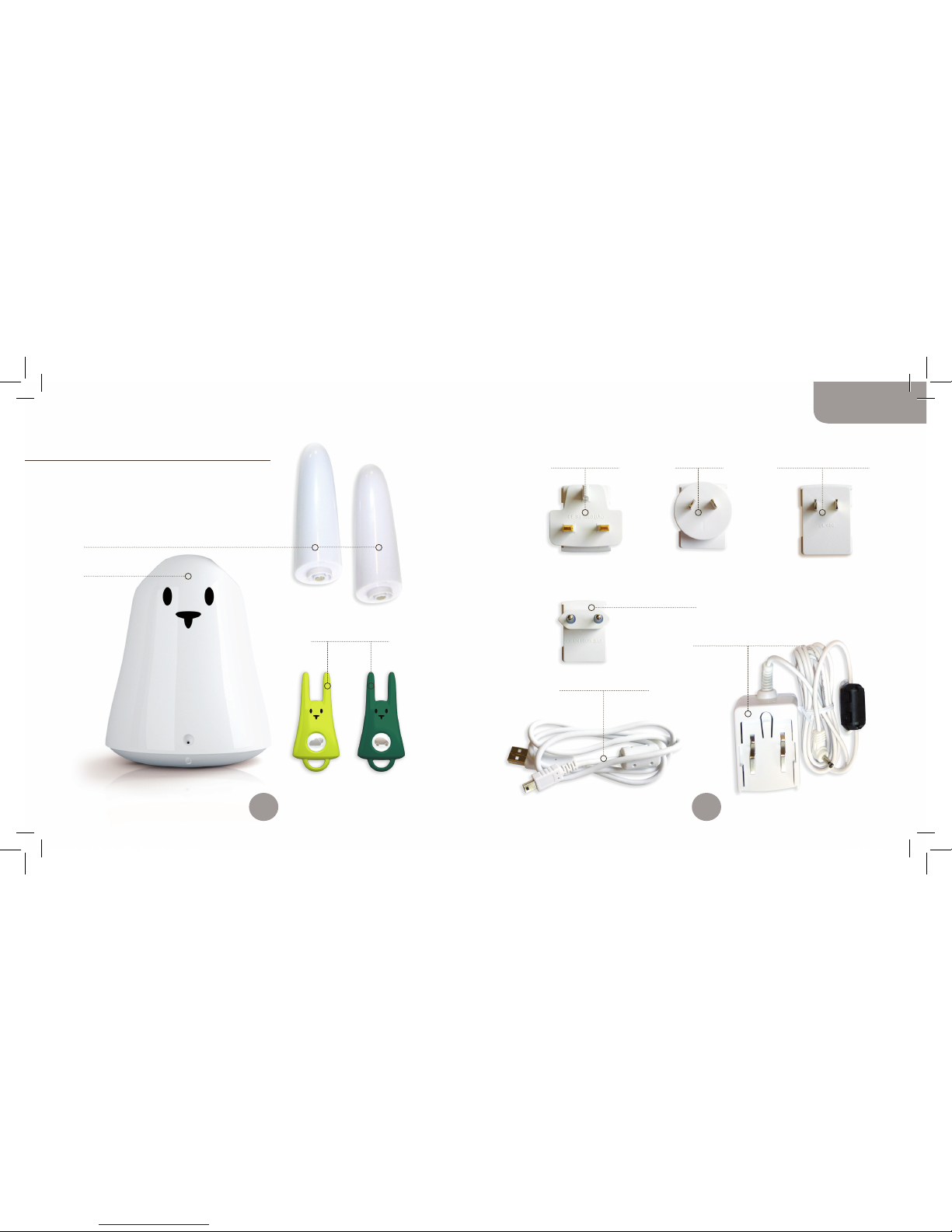
2 Ears
1 Karotz
1 Adapter plug
for Europe
1 mini USB / USB cable
1 power supply
1 Adapter plug
for United Kingdom
2 Flatnanoz
1 Adapter plug
for North America
1 Adapter plug
for Asia
Box contents
You have just bought a Karotz,
and it’s going to change your life!
The box contains:
8
9
English
Booklet_MULTILINGUE-avril2011.indd 8-9 4/04/11 14:51:58
Page 6
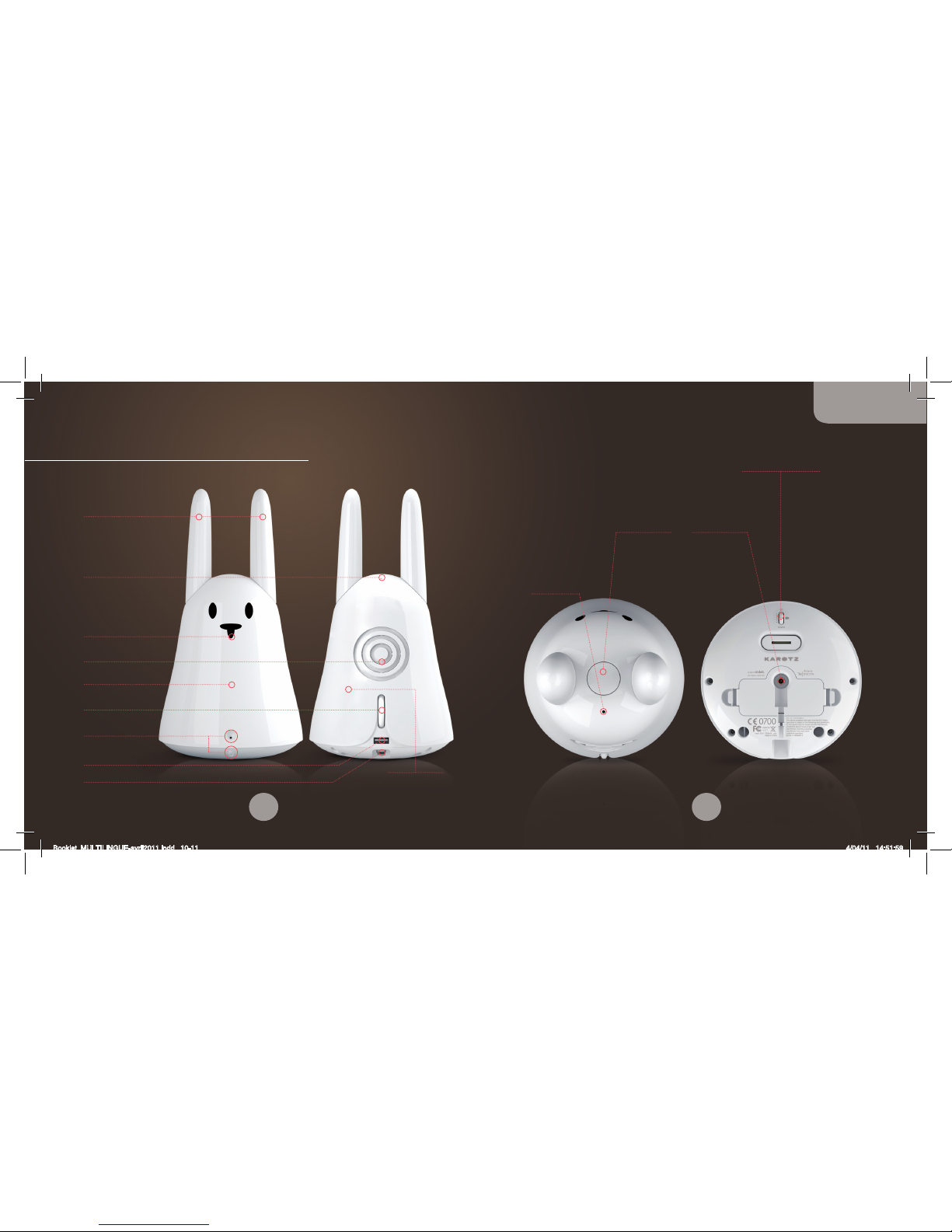
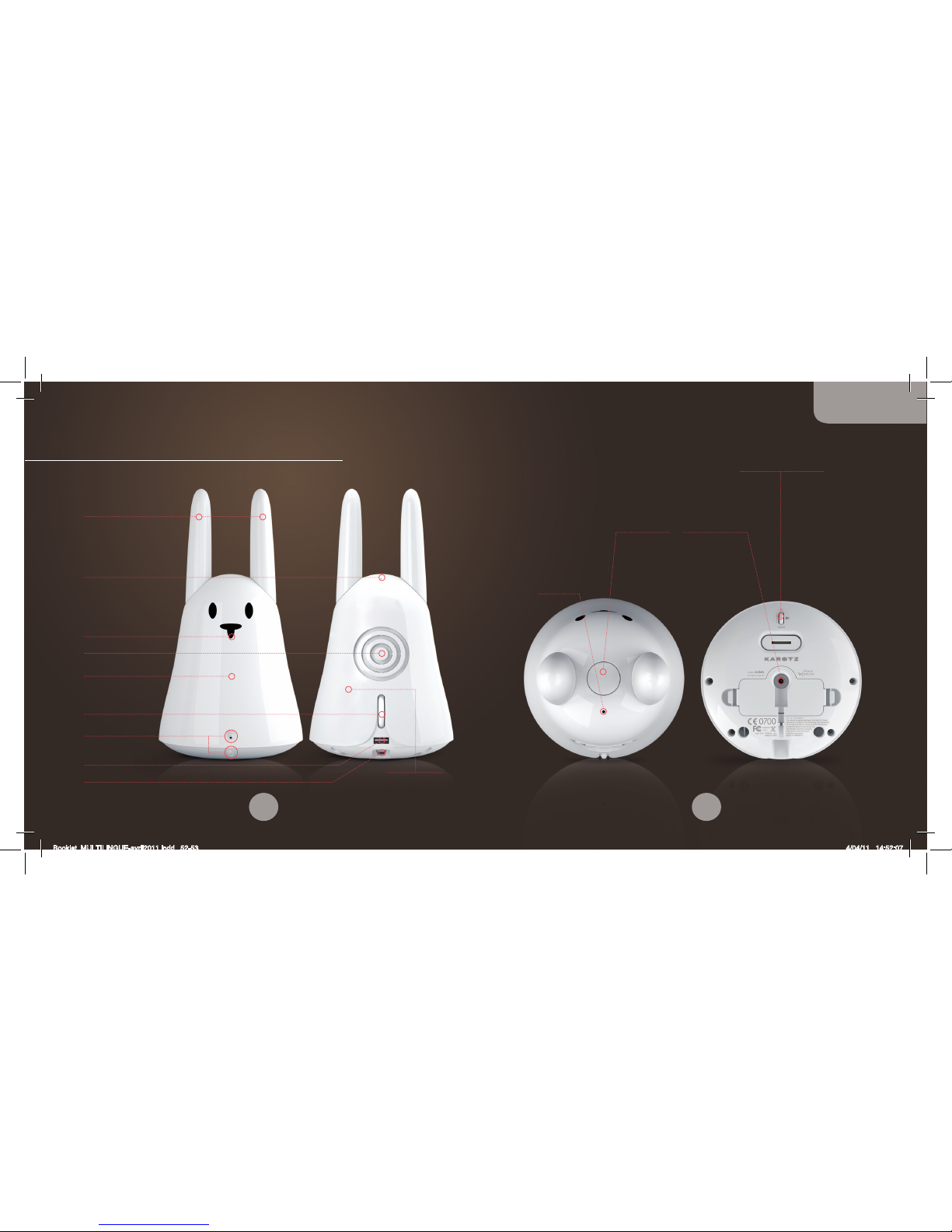
Nose
RFID reader
LED
Volume control
Switch on/o Karotz
Microphone
Speaker
Ears
1 USB 1.1 port
1 mini USB port
Adjustable
Webcam
Karotz button
Power source
Microphone
Adjustable Webcam
Introducing your Karotz
Wi-Fi antenna
10
11
English
Booklet_MULTILINGUE-avril2011.indd 10-11 4/04/11 14:51:59
Page 7

• Usually, the set-up program launches automatically. If not, you
can launch it by double-clicking on the Karotz Configuration icon
on your desktop, or from Programs/Karotz/Karotz Configuration
Setup.
• Follow the instructions step by step. IMPORTANT: when you are
asked to connect your Karotz to your computer, turn it on and
wait for the LED to change from solid red, before connecting it
with the mini USB/USB cable.
• When the set-up process for your Karotz is nished,
the updates may be activated. This may take several minutes
(depending on the speed of your Internet connection) and
the Karotz LED will show dierent colors: orange, purple,
blue, red. ATTENTION: do not disconnect or unplug your Karotz
during this operation.
• When its LED is slowly blinking green, Karotz is ready.
Note: to connect your Karotz to your computer, plug the mini USB
connector into the mini USB slot on your Karotz and the USB
connector into the USB slot on your computer.
In case of any problems during the installation or set-up process,
you can find more information on http://support.karotz.com.
To install your Karotz
ATTENTION!
Do not plug your Karotz to the mains or connect it to your
computer until you are asked to.
Start by accessing the following URL from your computer:
http://plug.karotz.com.
Then follow the instructions that appear on your computer. You will
be guided step by step through the installation and setup process
for your Karotz. Carefully follow the instructions for each stage.
INSTALLATION:
• You must rst sign up by creating your Karotz account.
• You will then receive an e-mail with a link for downloading
the installation program.
• Click on this link to launch the download.
• Once the download is complete, activate it by double-clicking.
• Follow the instructions.
SETUP:
Now you are ready to configure your Karotz.
Make sure you have the code to your Wi-Fi network (WEP, WPA,
WPA2…) if you decide to connect Karotz to your Wi-Fi network.
You may also connect it to your network via the Ethernet,
but you must have an USB/Ethernet adapter and an Ethernet
cable (not included in the box, but available from the store:
http://store.karotz.com).
12
13
English
Booklet_MULTILINGUE-avril2011.indd 12-13 4/04/11 14:52:00
Page 8

THE VOICE COMMAND
If you want Karotz to do something, you only have to say the word.
To activate this, keep the button on its head pushed down and when
the LED turns a solid orange tell it what you want it to do, then
release the button.
Please note that any command you give your Karotz is linked to an
application available on www.karotz.com under the “Appz” heading.
For example, to launch the demo (linked to the demo application),
keep the button pressed down until the LED turns solid orange, say
the word ‘demo’ clearly, then release the button.
Note: get close to the microphone to give your Karotz a command,
otherwise it might not understand it.
The applications
Karotz is so much more than a cute little rabbit; it is also
a smarty-pants! It is Karotz’s mission to help you in your daily life.
THE APPLICATIONS STORE: APPZ
Visit the “Appz” section on http://www.karotz.com where you’ll find
a whole host of applications to enhance Karotz’s capacities.
For example, ‘At Home’ to receive an e-mail when a person indicates
you he/she enters your home. Or the ‘Music Player’ application
for listening to your favorite music from a USB ash drive. Or the
‘Karotz Controller’ application for controlling your Karotz from a
smartphone or tablet.
How applications work is explained in detail on their configuration
interface during installation. If you wish to reconfigure an
application after installing it, go to “My account/My Objects”.
There are three ways to configure an application launch:
• On demand: Use a keyword (that will be given to you during
application installation), or an RFID chip
• At a predened moment: Pre-program the time, like an alarm
clock
• Permanent availability: Depending on your settings, Karotz will
tell you what you want to know, as frequently as you want, when
there is news to be had
Note: In most cases, quickly press the Karotz’s button twice if you
wish to quit an application. Otherwise, consult the instructions for
each application.
14
15
English
Booklet_MULTILINGUE-avril2011.indd 14-15 4/04/11 14:52:00
Page 9
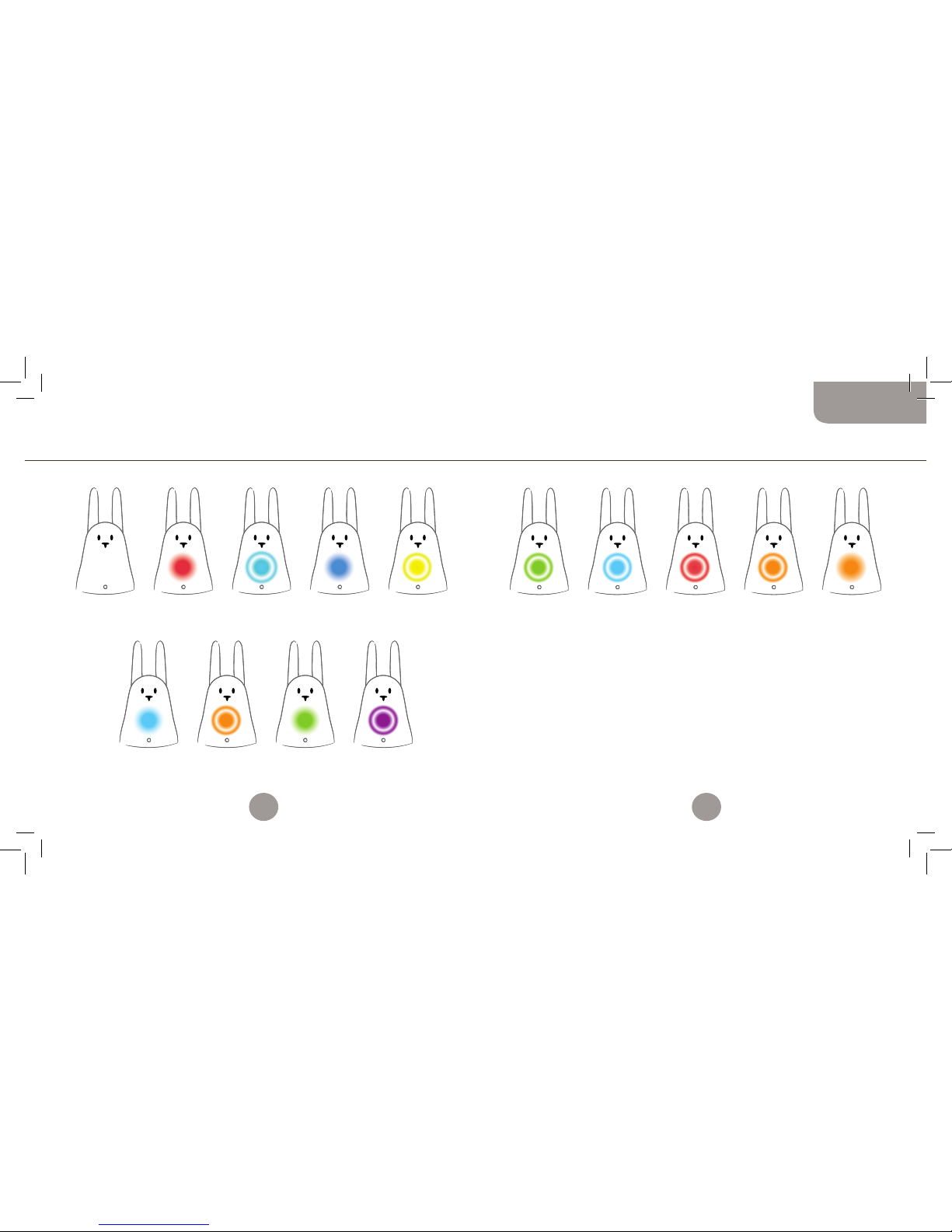
OFF:
Karotz on standby
or unplugged.
SOLID CYAN:
Karotz not configured.
Use software on
http://plug.karotz.com
to configure Karotz.
SOLID RED:
Karotz starting up.
Do not unplug.
FLASHING ORANGE:
Update in progress.
Do not unplug. Do
not disconnect from
the internet.
FLASHING CYAN:
Karotz attempting
internet
connection.
SOLID GREEN:
Karotz reboot
imminent.
SOLID BLUE:
Factory settings
are being restored.
Do not unplug.
FLASHING PURPLE:
Launching the system.
FLASHING GREEN:
Karotz is ready.
FLASHING CYAN:
Message waiting.
FLASHING RED:
Technical problem.
FLASHING ORANGE:
RFID chip recognized.
FLASHING YELLOW:
Operating system error
detected. Restoration in
progress. Do not unplug.
SOLID ORANGE:
Voice-recognition
activated.
Karotz speaks to you Summary of the light indicators
DURING THE START UP AFTER START UP
If your Karotz no longer responds, quickly press down 3 times on its
head to make it reboot. Its LED will then flash green.
To switch o your Karotz, turn the volume control knob until you
hear a ‘click’.
16
17
English
Booklet_MULTILINGUE-avril2011.indd 16-17 4/04/11 14:52:00
Page 10

Flatnanoz and other accessories
A Flatnanoz is a mini-Karotz with a RFID chip reader for a Karotz key
ring. It launches your application when you swipe it in front of your
Karotz’s nose.
You have 2 Flatnanoz, a yellow one and a green one.
Swipe a Flatnanoz in front of your Karotz’s nose, and Karotz will tell
you it does not recognize it. You can then go to www.karotz.com,
in My Account\My Objects section, to choose which application to
associate to this Flatnanoz.
You can change the programmed application on a Flatnanoz
as often as you like. Go to the My Account\My Objects section
on www.karotz.com.
While you are there, you can also visit the store to see all the
available accessories for your Karotz: http://store.karotz.com.
Flatnanoz, Nanoztag, Mirror, Musical Dock, key rings, Ears,
RFIDress, battery, USB Tail…
More information on www.karotz.com
This is only a glimpse of what Karotz can do for you.
There are many more surprises to come!
See you soon on www.karotz.com.
To find help, and the complete guide to everything you can do with
your Karotz, go to http://support.karotz.com.
Commercial warranty
The object of the present contract is a commercial warranty subscription under the following conditions,
henceforth referred to as “The Warranty”.
The present Warranty is conferred by the company Mindscape, a limited company with a supervisory board
with a capital of 2,525,840.50 euros; headquarters: 73-77, rue de Sèvres 92514 Boulogne-Billancourt, France;
registered under the number B 408 530 137 RCS NANTERRE, henceforth referred to as the “Seller”.
Karotz (referenced Karotz v1), henceforth referred to as the «Product».
1. EXTENT OF THE WARRANTY
The Warranty requires that the Seller guarantees the Product against manufacturing defects, under normal
conditions of use, during a one (1) year period from the date of purchase by the retail Buyer. This period is
henceforth referred to as the “Warranty period”. These conditions are valid worldwide.
This warranty only covers manufacturing and component defects.
If the Product has a material defect, and a claim is received during the period of the warranty, it is at the
Seller’s exclusive discretion to (i) repair the Product for free using new or remanufactured replacement
components, (ii) exchange the Product for a new Product or a Product manufactured from new or
remanufactured components whose operation is equivalent to that of the original Product, or (iii) reimburse the
purchase price of the product.
The Seller reserves the right to ask the Buyer to replace the faulty components with new or remanufactured
components that are furnished by the Seller in accordance with the Warranty, and that the Buyer can install.
During the contractual period of the Warranty agreed at the time of product purchase, if the Buyer requests a
recondition covered by the Warranty, and the Product is out of service during a period of at least seven days,
there will be an extension to the remaining period of the Warranty counted from the date that the Buyer has
requested the intervention, or from the date that the Buyer dropped o the Product for repair, if this date is
subsequent to the intervention request.
When a Product or a component is exchanged, all replacement components become your property, and the
exchanged component will become the property of the Seller. The components furnished by the Seller in
accordance with the warranty must be used for the products for which the Warranty service is requested. When
there is a reimbursement, the Product for which the reimbursement is given must be returned to the Seller and
becomes the property of the Seller.
2. WARRANTY LIMITATIONS AND EXCLUSIONS
2.1 - THE WARRANTY DOES NOT APPLY TO:
(a) Damage caused by accident, abuse, improper use, flood, fire, earthquake, or external causes due to
force majeure;
(b) Damage caused by a use of the product that is not prescribed or indicated by the Seller, or that is not
described in the Documentation relating to the use of the Product;
(c) Damage caused at the time that the product was opened;
(d) Damage caused by the intervention of a person that is not a Seller representative;
(e) A Product or component that has been modified such that its functioning or capacities have been
significantly altered, without the Seller’s written authorization;
(f) Product maintenance that is not in accordance with the Seller’s instructions, or negligence in the
maintenance of the Product;
(g) Improper handling or treatment of the Product (mishandling, fall, shock, etc) or an inappropriate
environment (poor ventilation, vibration, exposure to humidity or to excessive heat, contact with sand
18
19
English
Booklet_MULTILINGUE-avril2011.indd 18-19 4/04/11 14:52:00
Page 11

or any other substance, improper power supply, etc);
(h) Consumable components such as batteries, unless the damage is due to manufacturing or material
defect;
(i) Situations where a serial number of the Product has been removed or rendered illegible;
(j) Services and message sending;
(k) Component repair and replacement due to normal wear and tear;
(l) Any adaptation of the product that would be necessary to make the product compliant with the
technical and safety norms in a country besides the country for which the product was originally
designed and manufactured;
(m) A change made to or a repair made on the Product that was not performed by a service provider
authorised by the Seller.
(n) Compliance defects resulting from the non respect of the assembly and product use instructions;
(o) In the event where the Buyer has failed to follow the usage instructions or has refused the Product
usage advice.
2.2. FURTHERMORE, THE BUYER AGREES THAT IN ORDER TO USE THE PRODUCT, HE OR SHE MUST BE EQUIPPED WITH A
COMPUTER AND A HIGH-SPEED INTERNET CONNECTION.
The Seller does not guarantee that the operation of the Product will be uninterrupted or without error, and
declines responsibility if the Buyer’s computer operation system is inadequate for the Product.
The Seller is not responsible for providing internet access and in particular for any interruption in access. The
Seller thus declines all responsibility:
• for any interruption related to access to the website dedicated to the use of the Product, hereafter
referred to as the “Website”, for bugs, or for any event that renders the Website unfit for use,
• and more generally, for any direct or indirect damage, whatever its nature and cause, resulting from the
consultation and use of the Website,
• in the event of a breach to system security.
The Seller is not responsible for Product dysfunction if the Buyer uses other products, material, or software
that are ultimately inadequate and/or incompatible with the Product, or whose use is not in conformity with the
normal use of the Product and/or the instructions provided by the Documentation.
The Seller declines all responsibility in the event that the Buyer’s expected objectives are not met, notably
regarding technical dysfunction, a breach of the security indications provided by the Buyer in view of the
information provided to the Buyer regarding the use of the Product.
2.3. WITHIN THE LIMITS AUTHORIZED BY APPLICABLE LEGISLATION, THE WARRANTY AND THE AFOREMENTIONED
RECOURSE ARE EXCLUSIVE OF ANY OTHER CONTRACTUAL WARRANTY, RECOURSE OR CONDITIONS, WRITTEN OR VERBAL,
LEGAL, EXPRESS OR TACIT.
To the extent authorized by applicable law, the Seller expressly excludes tacit guarantees, notably including
guarantees concerning commercialization, appropriateness for a specific use, and guarantees against hidden
or latent defects. If the Seller is not legally authorized to overrule legal or tacit guarantees, to the extent
authorized by law, the said guarantees will be limited to the duration of the Warranty and the provision of repair
or replacement service as determined by the sole discretion of the Seller.
No reseller, agent or employee is authorized to modify, extend, or supplement the Warranty.
Except for the provisions of the present warranty, and to the extent authorized by law, the Seller is not
responsible for damage that is direct or indirect, special, incidental, or a result of a violation of any guarantee
or condition of the terms or of any other legal concept including but not limited to any loss of use, revenue,
real or foreseeable loss of profits, including any loss of profit related to insurance reports, any reduced financial
availability, any expected loss in savings, any loss of business, any loss of opportunities, any loss of clients, any
loss in reputation, any damage, any loss, or any data damage that may be indirect or consecutive. The present
limitation is not applicable to claims in case of death or injury.
The Seller does not issue any statement pertaining to his or her capacity to repair a product at the
conclusion of the present Warranty, nor to exchange a product without any risk.
3. CONSUMER PROTECTION
However, the terms described above in the Warranty will not conflict with the required provisions of the
applicable legislation in the countries where the Product is purchased or in the country of residence of the
Buyer, notably regarding the required provisions governing consumer protection.
4. NON-CONFORMITY AND LATENT DEFECTS.
The following clauses apply within the limits authorized by applicable legislation.
The Buyer is given a warranty for non-conformity of the purchased product and any latent defects under the
following conditions:
It is hereby guaranteed that the product conforms to the contract and that non-conformity shall not occur at
the time of purchase of the aforementioned product.
The Seller shall not be held liable for non-conformity of the product resulting from packaging, assembling
instructions or installation.
The Seller guarantees that the product covered by this contract is fit for normal use and corresponds to the
description and qualities mentioned in the present contract.
Any action resulting from non-conformity of the product shall be initiated within two years from the time of
purchase of the product.
Warranty is hereby oered for hidden defects of the purchased product, which render it unfit for its
intended use, or that hinder such use to such extent that the buyer would not have purchased the product, or
would have paid a lower price for it, had the buyer been aware of the defects.
Any action resulting from latent defects shall be initiated by the buyer within two years from the time the
defect is discovered.
5. ACCESS TO WARRANTY SERVICE
It is the obligation of the Buyer to access the online help services in accordance with the documentation
accompanying the Product, and to examine this before requesting warranty activation.
In the event that the Product doesn’t function properly after calling upon these resources, the Buyer is
requested to contact the Seller whose contact information is provided in this documentation, hereafter referred
to as the “Warranty service”.
A Seller’s representative will assist the Buyer in determining if his or her Product requires warranty activation,
and, if deemed necessary, will inform the latter on the activation procedure.
The Seller will provide the Buyer with the Warranty that will be given or presented during the Warranty Period,
to the extent allowed by law.
Under this warranty activation, the availability of components and the handling time varies from country to
country. The Buyer is responsible for the shipping and transportation costs for the Product if the Product cannot
benefit from a Warranty Service in the country of residence.
In accordance with applicable law, the Seller can request the Buyer to provide proof of purchase and the Product
reference, as well as to comply with certain registration formalities before appealing to the Warranty Service.
20
21
English
Booklet_MULTILINGUE-avril2011.indd 20-21 4/04/11 14:52:00
Page 12
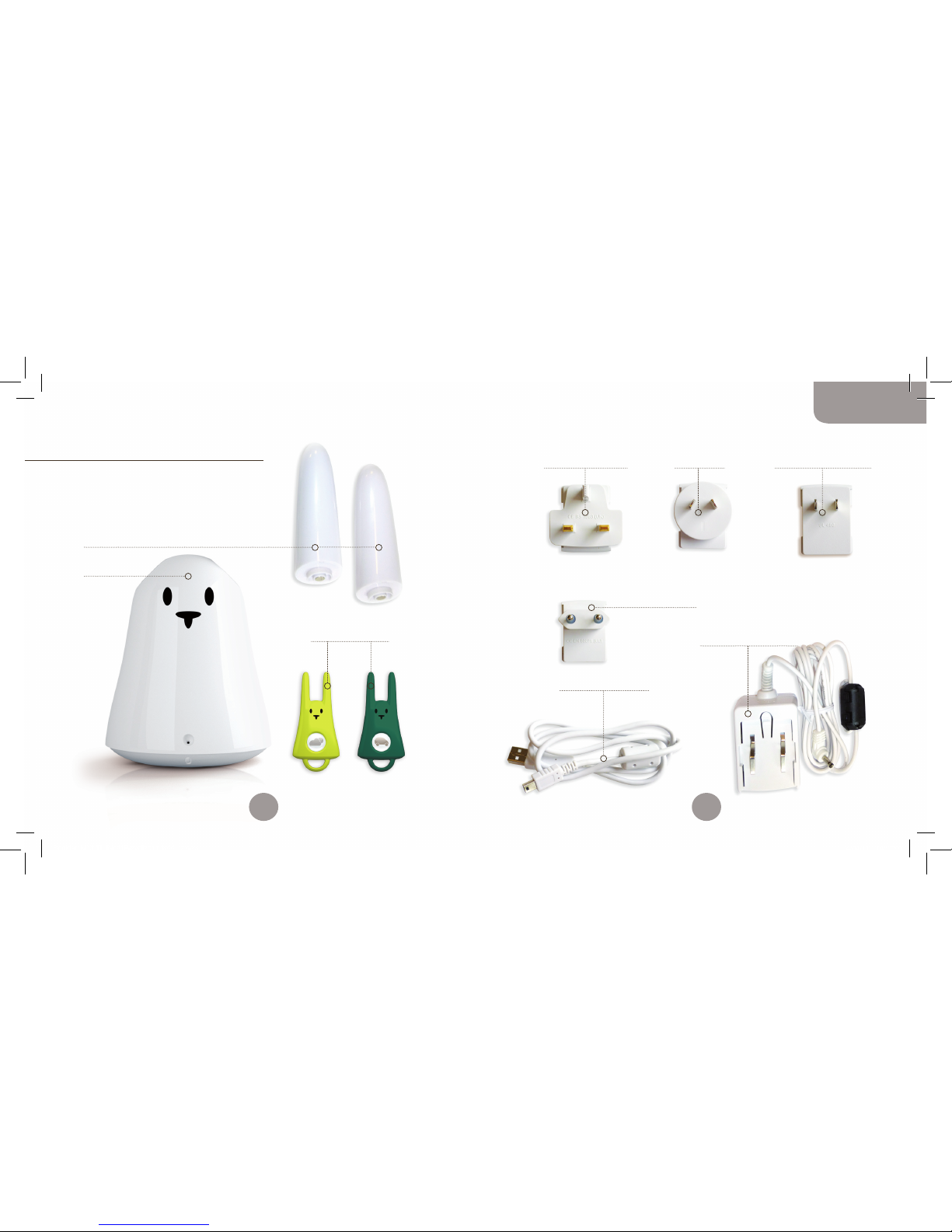
2 oreilles (Earz)
1 Karotz
1 Adaptateur
pour l’Europe
1 câble mini-USB / USB
1 alimentation électrique
1 Adaptateur
pour le Royaume-Uni
2 Flatnanoz
1 Adaptateur
pour l’Amérique du nord
1 Adaptateur
pour l’Asie
Contenu de la boîte
Vous venez d’acquérir un Karotz,
et il va changer votre vie !
Voici les éléments fournis dans la boîte :
22
23
Français
Booklet_MULTILINGUE-avril2011.indd 22-23 4/04/11 14:52:01
Page 13
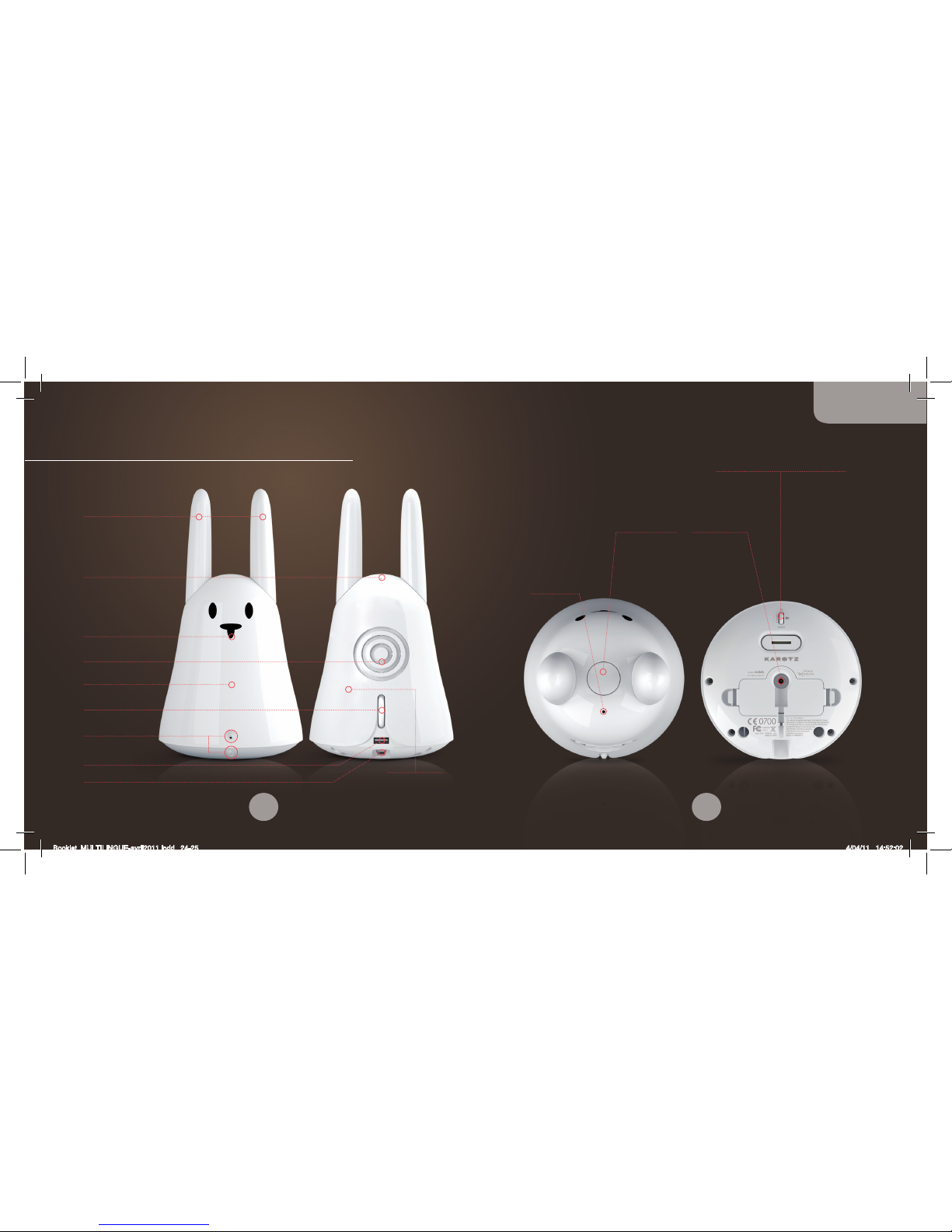
Nez
Lecteur RFID
LED
Contrôle du volume Allumer/Éteindre
Microphone
Enceinte
Oreilles
Port USB 1.1
Port mini-USB
Webcam
réglable
Bouton Karotz
Alimentation
Microphone
Réglage de l’angle de la Webcam
Présentation de votre Karotz
Antenne Wi-Fi
24
25
Français
Booklet_MULTILINGUE-avril2011.indd 24-25 4/04/11 14:52:02
Page 14

Ethernet (non fourni dans la boîte, mais disponible sur la boutique :
http://store.karotz.com).
• Normalement, le programme de conguration se lance
automatiquement. Sinon, vous pouvez le lancer en double-cliquant
sur l’icône Karotz Configuration sur votre bureau, ou à partir
de Programmes/Karotz/Karotz Configuration.
• Suivez les instructions pas à pas. IMPORTANT : quand on vous
demande de connecter votre Karotz à votre ordinateur, allumez-le,
et attendez que sa LED ne soit plus de couleur rouge fixe avant de
le connecter par le câble mini-USB / USB.
• Quand la conguration de votre Karotz est terminée, il est possible
que des mises à jour soient eectuées. Cela peut prendre plusieurs
minutes (en fonction de votre connexion Internet), et la LED de
Karotz passera alors par diérentes couleurs : orange, violet, bleu,
rouge. ATTENTION : ne déconnectez pas et ne débranchez pas votre
Karotz pendant cette opération.
• Karotz sera prêt quand sa LED clignotera lentement en vert.
Remarque : pour connecter votre Karotz à votre ordinateur, branchez
le connecteur mini-USB sur la prise mini-USB de votre Karotz, et le
connecteur USB sur une prise USB de votre ordinateur.
En cas de problème au cours de l’installation ou de la configuration,
vous trouverez plus d’informations sur http://support.karotz.com.
Installer votre Karotz
ATTENTION !
Ne branchez pas votre Karotz au secteur et ne le connectez
pas à votre ordinateur tant que ça ne vous a pas été indiqué.
Commencez par vous rendre à l’URL suivante à partir de votre
ordinateur : http://plug.karotz.com.
Suivez ensuite les instructions qui apparaissent sur l’écran de
votre ordinateur. Vous allez être guidé pas à pas dans le processus
d’installation et de configuration de votre Karotz. Il est important
de suivre scrupuleusement chaque étape.
INSTALLATION :
• Vous devez d’abord vous inscrire en créant votre compte Karotz.
• Vous allez alors recevoir par email un lien pour télécharger
le programme d’installation.
• Cliquez sur ce lien pour lancer le téléchargement.
• Une fois le programme d’installation téléchargé, exécutez-le
en double-cliquant dessus.
• Suivez les instructions.
CONFIGURATION :
Ensuite, vous passez à la phase de configuration de votre Karotz.
Pensez à vous munir de la clé de votre réseau Wi-Fi (WEP, WPA, WPA2…)
si vous décidez de connecter Karotz à votre réseau en Wi-Fi.
Vous pouvez aussi le connecter à votre réseau par Ethernet, mais vous
devrez alors disposer d’un adaptateur USB/Ethernet et d’un câble
26
27
Français
Booklet_MULTILINGUE-avril2011.indd 26-27 4/04/11 14:52:02
Page 15

Remarque : Dans la plupart des cas, pour quitter une application,
appuyez deux fois rapidement sur le bouton du Karotz. Sinon,
référez-vous à la documentation de chaque application.
LA COMMANDE VOCALE
Pour demander quelque chose à Karotz, utilisez la parole.
Pour ce faire, maintenez appuyé le bouton au-dessus de sa tête
et quand la LED est de couleur orange fixe, dites-lui ce que vous
souhaitez qu’il fasse, puis relâchez le bouton.
À noter que tout ordre que vous donnez à votre Karotz est associé
à une application disponible sur www.karotz.com, dans la rubrique
« Appz ».
Par exemple, pour lancer la démo (associée à l’application « Demo »),
appuyez sur le bouton et gardez-le enfoncé, et quand la LED est
orange fixe, prononcez distinctement le mot « Démo », puis relâchez
le bouton.
Remarque : approchez-vous bien du microphone pour donner
un ordre à votre Karotz, sinon, il se peut qu’il ne comprenne pas
votre demande.
Les applications
Karotz n’est pas uniquement un charmant petit lapin, c’est aussi
un animal très intelligent. Son but est de vous assister dans votre
vie de tous les jours.
LA BOUTIQUE DES APPLICATIONS : APPZ
Vous trouverez sur le site Internet www.karotz.com, dans
la rubrique « Appz », de nombreuses applications qui viendront
enrichir ses capacités. Comme par exemple l’application « Maison »
pour recevoir un email lorsqu’une personne vous indique qu’elle est
rentrée dans votre domicile. Mais aussi l’application « Music Player »
pour écouter vos musiques préférées au format mp3 à partir d’une
clé USB. Ou encore l’application « Karotz Controller » pour piloter
votre Karotz de votre smartphone ou tablette.
Le fonctionnement des applications est expliqué en détail sur
l’interface de paramétrage lors de l’installation d’une application.
Si vous souhaitez redéfinir le paramétrage d’une application suite
à son installation, rendez-vous dans la rubrique « Mon compte /
Mes objets ».
Le déclenchement des applications peut être paramétré de 3 façons :
• à la demande : Vous utilisez un mot clé (qui vous est donné
lors de l’installation de l’application) ou une puce RFID (un
Flatnanoz, un Nanoztag…)
• à un instant précis que vous déterminez (à la façon d’un réveil)
• en permanence : Suivant votre réglage, Karotz vous lira plus ou
moins souvent les informations qui vous intéressent, dès qu’il y
a du nouveau.
28
29
Français
Booklet_MULTILINGUE-avril2011.indd 28-29 4/04/11 14:52:02
Page 16
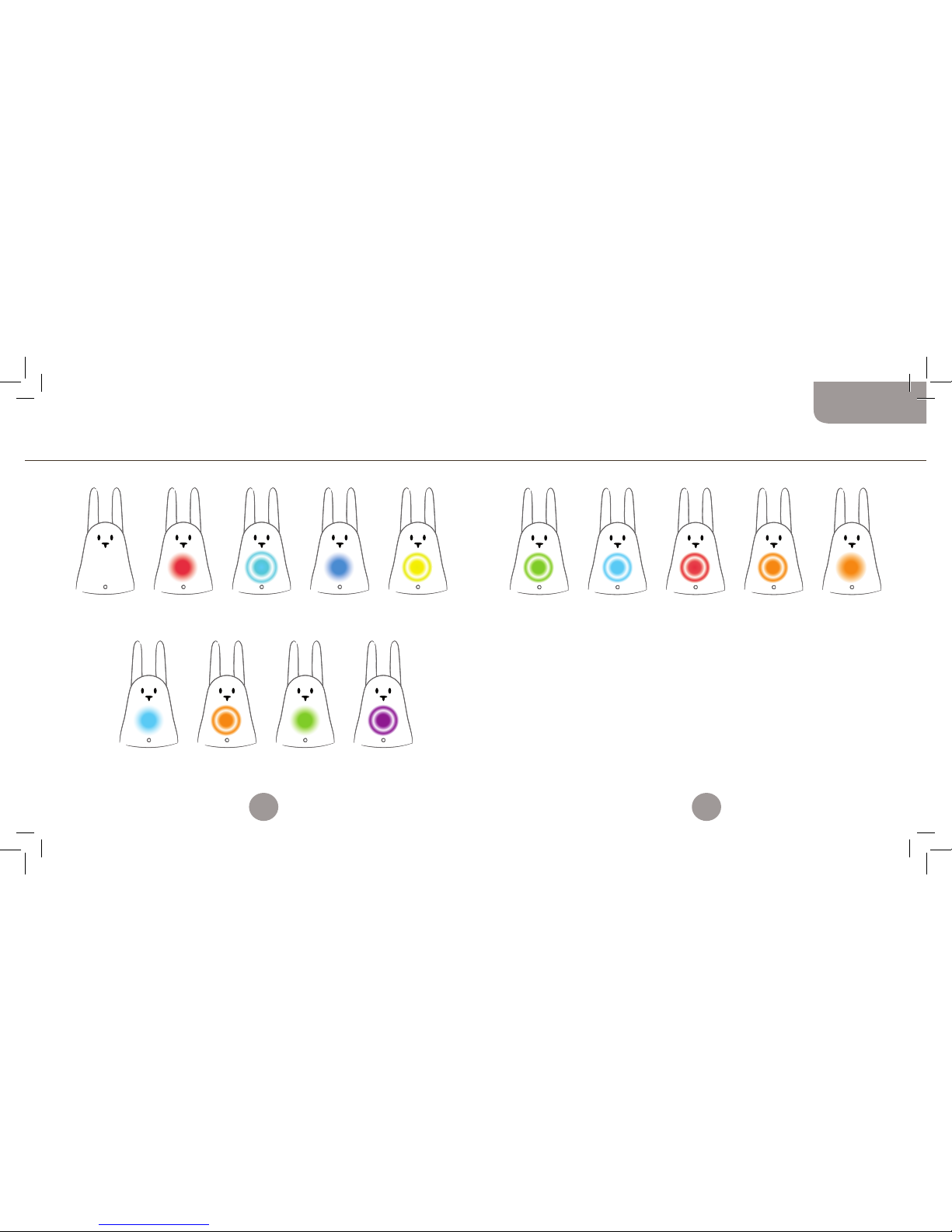
ÉTEINT :
En veille
ou débranché.
CYAN FIXE :
Karotz non configuré.
Utiliser le logiciel
disponible à l’adresse :
http://plug.karotz.com
pour le configurer.
ROUGE FIXE :
En cours de lancement.
Ne pas le débrancher.
ORANGE CLIGNOTANT :
Mise à jour en cours.
Ne pas débrancher,
ne pas couper l’accès
à Internet.
CYAN CLIGNOTANT :
Karotz tente
de se connecter
à Internet.
VERT FIXE :
Karotz va redémarrer.
BLEU FIXE :
Restauration du système
en configuration usine.
Ne pas le débrancher.
VIOLET CLIGNOTANT :
Lancement
du système.
VERT CLIGNOTANT :
Karotz est prêt.
CYAN CLIGNOTANT :
Message en attente.
ROUGE CLIGNOTANT :
Erreur technique.
ORANGE CLIGNOTANT :
Puce RFID détectée.
JAUNE CLIGNOTANT :
Problème dans
le système opérationnel
= restauration.
Ne pas débrancher.
ORANGE FIXE :
Reconnaissance vocale
activée.
Karotz vous parle petit récapitulatif du fonctionnement lumineux
PENDANT LE DÉMARRAGE APRÈS LE DÉMARRAGE
Si votre Karotz ne répond plus, appuyez 3 fois rapidement sur sa tête
pour le débloquer. Sa LED clignotera alors en vert.
Pour éteindre votre Karotz, faites tourner la molette de contrôle du
volume au minimum, jusqu’à entendre un «clic».
30
31
Français
Booklet_MULTILINGUE-avril2011.indd 30-31 4/04/11 14:52:02
Page 17

Les Flatnanoz et autres accessoires
Un Flatnanoz est un mini-Karotz intégrant une puce RFID pour
porte-clés Karotz. Il déclenche votre application lorsque vous
le passez devant le nez de votre Karotz.
Vous disposez de 2 Flatnanoz : un jaune et un vert.
Passez votre Flatnanoz devant le nez de votre Karotz ; Karotz vous
dit alors « je ne connais pas cet objet ». Puis, rendez-vous sur
www.karotz.com dans la rubrique Mon compte / Objets pour associer
l’application que vous souhaitez à ce Flatnanoz.
Vous avez la possibilité de changer l’application enregistrée
sur un Flatnanoz aussi souvent que vous le souhaitez.
Rendez-vous sur www.karotz.com, dans la rubrique Mon Compte.
Allez aussi visiter la boutique pour voir tous les accessoires
disponibles pour votre Karotz : http://store.karotz.com.
Flatnanoz, Nanoztag, Mirror, Musical Dock, porte-clés, Oreilles,
RFIDress, batterie, Queue USB…
Plus d’infos sur www.karotz.com
Mais tout ceci n’est qu’un rapide résumé de ce que Karotz peut
faire pour vous et vous proposer. Attendez-vous à de nombreuses
surprises ! Rendez-vous sur www.karotz.com.
Et pour trouver de l’aide, et le manuel complet de tout
ce que vous pouvez faire avec votre Karotz, rendez-vous
sur http://support.karotz.com.
Garantie contractuelle
Le présent contrat a pour objet la souscription d’une garantie contractuelle suivant les modalités ci-après définies,
ci-après « la Garantie ». La présente Garantie est conférée par la Société Mindscape, société anonyme à conseil
de surveillance au capital de 2 525 840,50 euros, dont le siège social est 73-77, rue de Sèvres 92514 BoulogneBillancourt, immatriculée sous le numéro B 408 530 137 RCS NANTERRE, ci-après « le Vendeur ».
Karotz (référence Karotz v1), ci-après « le Produit ».
1. ÉTENDUE DE LA GARANTIE
Au titre de la Garantie, le Vendeur garantit le Produit contre les vices de fabrication dans des conditions normales
d’utilisation pour une période de un (1) an à compter de la date d’achat au détail par l’Acheteur, ci-après « la
période de Garantie » et pour le monde entier.
Cette garantie ne couvre que les défauts de pièces et de fabrication du produit.
Si un vice du Produit matériel apparait et qu’une réclamation valable est reçue au cours de la période
de garantie, le Vendeur, à son choix exclusivement, (i) réparera le Produit gratuitement en utilisant des pièces
de rechange neuves ou remanufacturées, (ii) échangera le Produit contre un Produit neuf ou fabriqué à partir de
pièces neuves ou remanufacturées dont le fonctionnement sera équivalent à celui du Produit d’origine ou enfin (iii)
remboursera le prix d’achat du produit.
Le Vendeur pourra demander à l’Acheteur de remplacer les pièces défectueuses par des pièces neuves ou
remanufacturées pouvant être installées par l’Acheteur, que le Vendeur fournira conformément à son obligation
de Garantie. Lorsque l’Acheteur sollicitera durant la période de Garantie, contractuelle qui lui a été consentie lors
de l’acquisition du Produit, une remise en état couverte par la Garantie, toute période d’immobilisation du Produit
d’au moins sept jours viendra s’ajouter à la durée de la garantie qui restait à courir à la date de la demande
d’intervention de l’Acheteur ou de la mise à disposition pour réparation du Produit, si cette mise à disposition est
postérieure à la demande d’intervention.
Lorsqu’un Produit ou une pièce sont échangés, toute pièce de rechange devient votre propriété et la pièce
échangée devient la propriété du Vendeur. Les pièces fournies par le Vendeur conformément à son obligation
de garantie doivent être utilisées pour les produits pour lesquels le service de Garantie est réclamé. Lorsqu’un
remboursement est eectué, le Produit pour lequel le remboursement est fourni doit être retourné au Vendeur et
devient la propriété du Vendeur.
2. EXCLUSIONS ET LIMITATIONS DE GARANTIE
2.1. LA GARANTIE NE S’APPLIQUE PAS :
(a) à tout dommage causé par accident, abus, mauvaise utilisation, inondation, incendie, tremblement de
terre ou causes extérieures constitutives d’un cas de force majeure ;
(b) à tout dommage causé par le fonctionnement du produit hors des utilisations permises ou décrites par le
Vendeur et décrites dans la Documentation aérente à l’utilisation du Produit;
(c) à tout dommage causé au moment de l’ouverture du produit ;
(d) à tout dommage causé par l’intervention d’une personne qui n’est pas un représentant du Vendeur ;
(e) à un Produit ou une pièce qui a été modifiée de telle manière à en altérer significativement
la fonctionnalité ou les capacités sans l’autorisation écrite du Vendeur ;
(f) un entretien du Produit non conforme aux instructions du Vendeur ou une négligence dans
l’entretien du Produit ;
(g) à une mauvaise manipulation ou un mauvais traitement du Produit (fausse manœuvre, chute, chocs,
etc…) ou un environnement inapproprié (mauvaise aération, vibrations, exposition à l’humidité, à
une chaleur excessive, contacts avec le sable ou avec toute autre substance, alimentation électrique
inadéquate, etc…) ;
32
33
Français
Booklet_MULTILINGUE-avril2011.indd 32-33 4/04/11 14:52:02
Page 18

(h) aux consommables tels que les batteries, sauf si le dommage est dû à un vice de matière ou de
fabrication ;
(i) si tout numéro de série du Produit a été enlevé ou rendu illisible ;
(j) aux services et à l’envoi de message ;
(k) aux réparations ou remplacements de pièces par suite d’usure normale ;
(l) à toute adaptation du produit qui serait nécessaire à des fins de mise en conformité avec les normes
techniques ou de sécurité applicables dans un pays autre que celui pour lequel le produit a été conçu et
fabriqué à l’origine;
(m) à une modification ou réparation du Produit non eectuée par un prestataire agréé par le Vendeur.
(n) à des défauts de conformité du Produit résultant du non respect des instructions de montage
et d’utilisation du produit ;
(o) en cas de violation par l’Acheteur des instructions d’emploi ou de refus de suivre les conseils
d’utilisation du Produit.
2.2. EN OUTRE, L’ACHETEUR RECONNAîT QUE POUR POUVOIR UTILISER LE PRODUIT, IL DOIT êTRE MUNI D’UN
ORDINATEUR ET D’UNE CONNEXION INTERNET HAUT DÉBIT.
Le Vendeur ne garantit pas que le fonctionnement du Produit sera ininterrompu ou sans erreur et décline
toute responsabilité dans l’hypothèse de l’inadéquation du système d’exploitation de l’ordinateur de l’Acheteur
avec le Produit.
Le Vendeur n’est pas responsable de la fourniture de services d’accès à Internet et notamment de toute
interruption d’accès. En conséquence, le Vendeur décline toute responsabilité :
• pour toute interruption liée à l’accès au site internet, ci-après « le Site » dédié à l’utilisation du Produit,
survenance de bogues ou autre évènement rendant le Site impropre à son usage,
• et plus généralement pour tout dommage direct ou indirect, quelle qu’en soit la cause ou la nature,
résultant de la consultation et de l’usage du Site,
• en cas d’atteinte à la sécurité du système.
Le Vendeur ne sera pas responsable si un dysfonctionnement du Produit est consécutif à l’utilisation par
l’Acheteur d’autres produits, matériels ou logiciels s’étant révélés inadéquats et/ou incompatibles avec le Produit
ou dont l’utilisation n’a pas été conforme à l’usage normal du Produit et/ou aux instructions fournies dans la
Documentation.
Le Vendeur décline toute responsabilité dans l’hypothèse où les objectifs escomptés par l’Acheteur ne seraient
pas atteints, au regard notamment d’un dysfonctionnement technique, d’une violation des dispositifs de sécurité
relatifs aux informations fournies par l’Acheteur en relation avec l’utilisation du Produit.
2.3. DANS LES LIMITES AUTORISÉES PAR LA LÉGISLATION APPLICABLE, LA GARANTIE ET LES RECOURS ÉNONCÉS CI
DESSUS SONT EXCLUSIFS DE TOUTE AUTRE GARANTIE CONTRACTUELLE, RECOURS ET CONDITIONS, QU’ILS SOIENT ÉCRITS
OU VERBAUX, LÉGAUX, EXPRÈS OU TACITES.
Dans la mesure de ce qui est permis par le droit applicable, le Vendeur exclut expressément toute garantie tacite,
y compris notamment les garanties de commercialisation, d’adéquation à un usage particulier et les garanties de
vices cachés ou latents.
Si le Vendeur n’est pas juridiquement autorisé à rejeter toute garantie légale ou tacite, alors dans la mesure
autorisée par la loi, lesdites garanties seront limitées à la durée de la Garantie et à la fourniture d’une prestation
de réparation ou de remplacement telle que déterminée à la seule discrétion du Vendeur.
Aucun revendeur, agent ou salarié n’est habilité à modifier, proroger ou compléter la Garantie.
A l’exception de ce qui est prévu dans la présente garantie et dans la mesure autorisée par la loi, le Vendeur
n’est pas responsable de tout dommage direct ou indirect, spécifique, accessoire, résultant de toute violation de
toute garantie ou condition aux termes de tout autre concept juridique y compris, de façon non limitative, toute
perte d’utilisation, toute perte de revenu, toute perte actuelle ou prévisible de profits, y compris toute perte
de profit liée à des constats, toute perte de disponibilité financière, toute perte d’économie prévue, toute perte
d’aaires, toute perte d’opportunité, toute perte de clientèle, toute perte de réputation, tout dommage ou tout
endommagement de données ou toute perte ou tout dommage indirect ou consécutif. La présente limitation ne
s’applique pas aux réclamations en cas de décès ou de blessure. Le Vendeur ne fait aucune déclaration quant à sa
capacité à réparer tout produit au terme de la présente Garantie ni à échanger tout produit sans aucun risque.
3. PROTECTION DES CONSOMMATEURS
Néanmoins, les modalités ci-dessus décrites de la Garantie ne contreviendront pas aux dispositions impératives
des législations applicables dans les pays d’achat du Produit ou de résidence de l’Acheteur et notamment aux
dispositions impératives régissant la protection des consommateurs.
4. DISPOSITIONS APPLICABLES EN DROIT FRANçAIS
En France, le Vendeur reste tenu envers l’Acheteur consommateur des défauts de conformité du bien au contrat de
vente et des vices rédhibitoires dans les conditions prévues aux articles 1641 à 1649 du Code civil.
ARTICLE L211-4 DU CODE DE LA CONSOMMATION « Le vendeur est tenu de livrer un bien conforme au contrat et
répond des défauts de conformité existant lors de la délivrance. Il répond également des défauts de conformité
résultant de l’emballage, des instructions de montage ou de l’installation lorsque celle-ci a été mise à sa charge
par le contrat ou a été réalisée sous sa responsabilité ».
ARTICLE L 211-5 DU CODE DE LA CONSOMMATION : « Pour être conforme au contrat, le bien doit :
1° Être propre à l’usage habituellement attendu d’un bien semblable et, le cas échéant :
- correspondre à la description donnée par le vendeur et posséder les qualités que celui-ci a présentées
à l’acheteur sous forme d’échantillon ou de modèle ;
- présenter les qualités qu’un acheteur peut légitimement attendre eu égard aux déclarations publiques
faites par le vendeur, par le producteur ou par son représentant, notamment dans la publicité ou
l’étiquetage ;
2° Ou présenter les caractéristiques dénies d’un commun accord par les parties ou être propre à tout usage
spécial recherché par l’acheteur, porté à la connaissance du vendeur et que ce dernier a accepté. ».
ARTICLE L.211-12 DU CODE DE LA CONSOMMATION : « L’action résultant du défaut de conformité se prescrit par deux
ans à compter de la délivrance du bien ».
ARTICLE 1641 DU CODE CIVIL : « Le vendeur est tenu de la garantie à raison des défauts cachés de la chose vendue
qui la rendent impropre à l’usage auquel on la destine, ou qui diminuent tellement cet usage que l’acheteur ne
l’aurait pas acquise, ou n’en aurait donné qu’un moindre prix, s’il les avait connus ».
ARTICLE 1648 ALINÉA 1ER DU CODE CIVIL : « L’action résultant des vices rédhibitoires doit être intentée par
l’acquéreur dans un délai de deux ans à compter de la découverte du vice ».
5. ACCÈS AU SERVICE GARANTIE
L’Acheteur devra accéder aux ressources d’assistance en ligne visées dans la documentation jointe au Produit
et les examiner avant de solliciter la mise ne œuvre de la Garantie. Dans le cas où Produit ne fonctionnerait pas
correctement après avoir utilisé ces ressources, l’Acheteur est prié de bien vouloir contacter le Vendeur dont les
coordonnées sont fournies dans cette documentation, ci-après « le Service de Garantie ». Un représentant du
Vendeur assistera l’Acheteur afin de déterminer si son Produit requiert la mise en œuvre de la Garantie et le cas
échéant, informera ce dernier sur les modalités de sa mise en œuvre. Le Vendeur fournira à l’Acheteur la Garantie
sur les Produits qui seront soumis ou présentés pendant la Période de Garantie, dans la mesure permise par la loi.
Dans le cadre de la mise en œuvre de la Garantie, la disponibilité des pièces et les délais de traitement varieront
en fonction des pays. L’Acheteur sera responsable des frais d’expédition et de transport du Produit si le Produit ne
peut pas bénéficier du Service de Garantie dans le pays dans lequel il réside. Conformément au droit applicable,
le Vendeur pourra demander à l’Acheteur de fournir toute preuve d’achat et référence du Produit et de respecter
certaines formalités d’enregistrement avant de recourir au Service de Garantie.
34
35
Français
Booklet_MULTILINGUE-avril2011.indd 34-35 4/04/11 14:52:02
Page 19
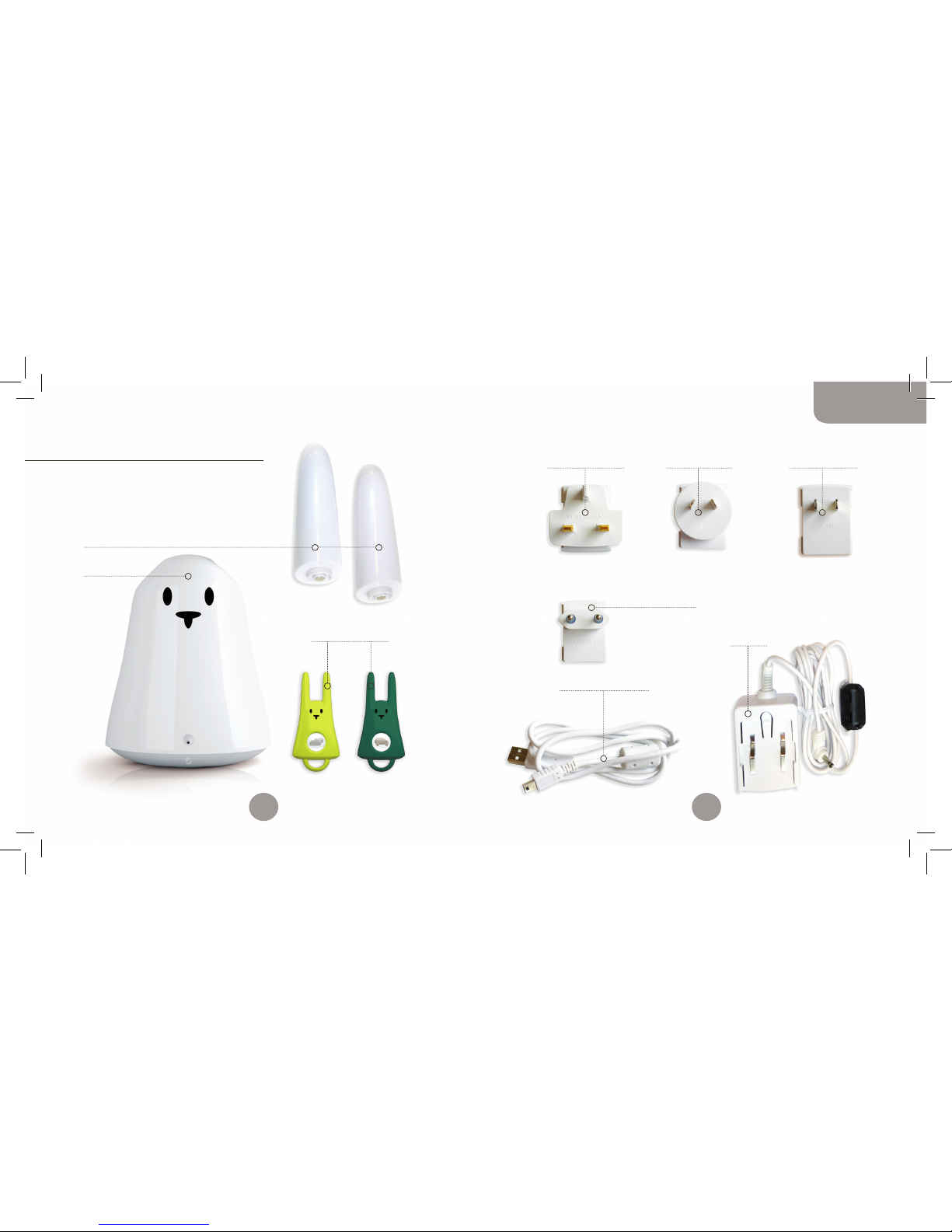
2 Ohren (Earz)
1 Karotz
1 Adapterstecker
für Europa
1-Mini-USB/USB-Kabel
1 Netzteil
1 Adapterstecker
für Großbritannien
2 Flatnanoz
1 Adapterstecker
für Nordamerika
1 Adapterstecker
für Asien
Verpackungsinhalt
Sie haben gerade ein Karotz erworben,
und es wird Ihr Leben verändern!
Die Verpackung enthält:
36
37
Deutsch
Booklet_MULTILINGUE-avril2011.indd 36-37 4/04/11 14:52:04
Page 20
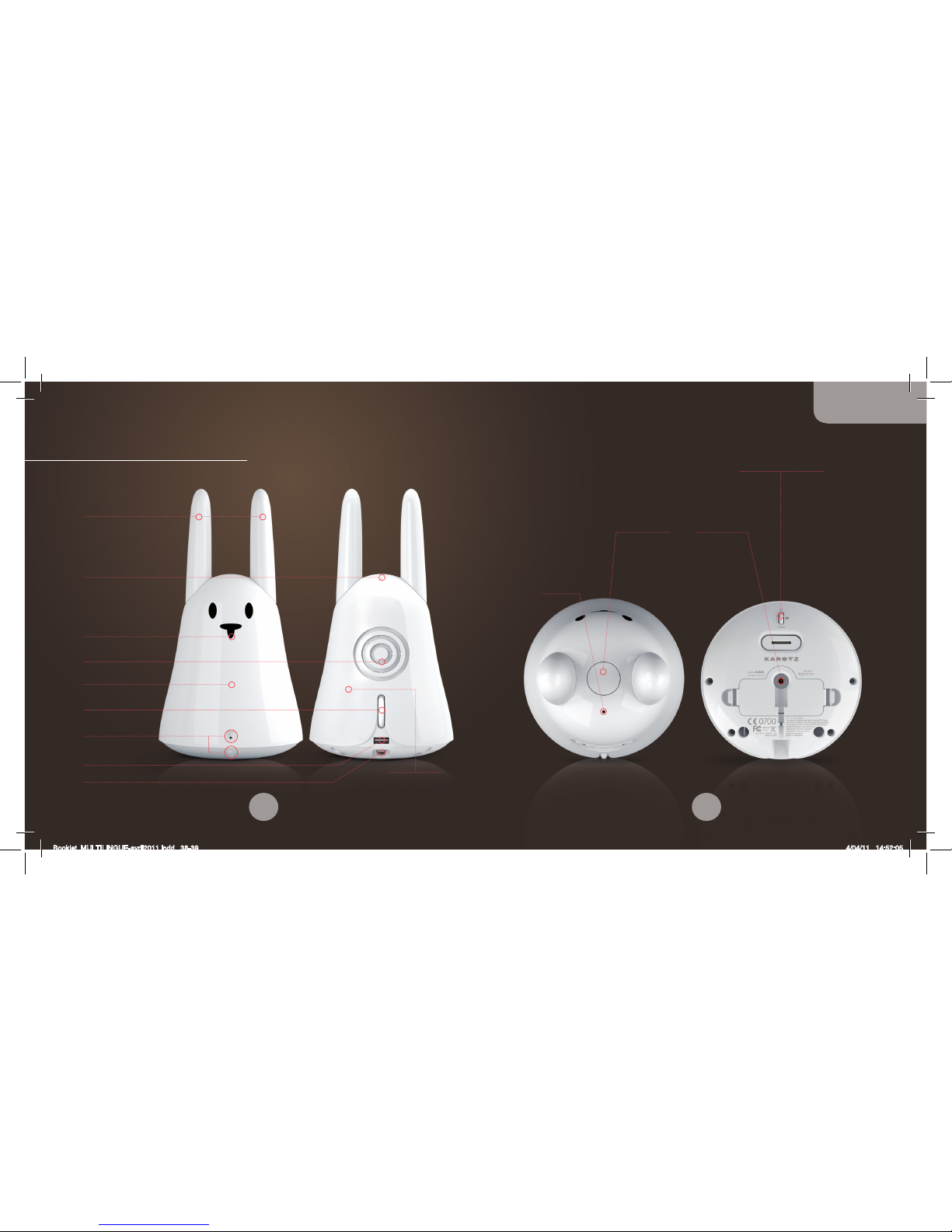
Nase
RFID-Leser
LED
Lautstärkeregler –
Karotz an/aus
Mikrofon
Lautsprecher
Ohren
USB 1.1-Anschluss
Mini-USB-Anschluss
Webcam
Karotz-Knopf
Stromquelle
Mikrofon
Einstellbare Webcam
Das ist Ihr Karotz
Wi-Fi-Antenne
38
39
Deutsch
Booklet_MULTILINGUE-avril2011.indd 38-39 4/04/11 14:52:05
Page 21

verbinden; dafür benötigen Sie jedoch einen USB-/Ethernet-Adapter
und ein Ethernet-Kabel (nicht im Lieferumfang enthalten, aber im
Store erhältlich: http://store.karotz.com).
• Normalerweise startet das Setup-Programm automatisch. Falls
dies nicht der Fall ist, können Sie es durch Doppelklick auf
das Karotz Configuration auf Ihrem Desktop starten oder über
Programme/Karotz/Karotz Configuration.
• Folgen Sie den Anweisungen Schritt für Schritt. WICHTIG:
Wenn Sie aufgefordert werden, Ihr Karotz an Ihren Computer
anzuschließen, schalten Sie es ein und warten Sie, bis die
LED nicht mehr rot leuchtet, bevor Sie es mit dem Mini-USBStecker/USB-Kabel anschließen.
• Wenn der Setup-Vorgang für Ihr Karotz abgeschlossen
ist, können die Updates aktiviert werden. Das kann einige
Minuten dauern (abhängig von der Geschwindigkeit Ihrer
Internetverbindung); die Karotz-LED zeigt dabei unterschiedliche
Farben: Orange, Lila, Blau, Rot. ACHTUNG: Unterbrechen Sie
während dieses Vorganges nicht die Verbindung mit Ihrem
Karotz.
• Wenn seine LED langsam grün blinkt, ist Karotz bereit.
Hinweis: Um Ihr Karotz mit Ihrem Computer zu verbinden, stecken
Sie den Mini-USB-Stecker in den Mini-USB-Anschluss an Ihrem
Karotz und den USB-Stecker in den USB-Anschluss Ihres Computers.
Falls während der Installation oder des Setup-Vorgangs Probleme
auftreten, finden Sie weitere Informationen auf http://support.karotz.com.
Karotz installieren
ACHTUNG!
Schließen Sie Ihr Karotz nicht ans Netz an und verbinden Sie es
nicht mit Ihrem Computer, bevor Sie dazu aufgefordert werden.
Rufen Sie zuerst von Ihrem Computer aus die folgende URL auf:
http://plug.karotz.com.
Befolgen Sie dann die Anweisungen, die auf Ihrem Computer
erscheinen. Sie werden Schritt für Schritt durch den Installationsund Einrichtungsvorgang für Ihr Karotz geführt. Befolgen Sie
sorgfältig die Anweisungen für jeden Schritt.
INSTALLATION:
• Zuerst müssen Sie sich durch Erstellen Ihres Karotz-Kontos
registrieren.
• Sie erhalten dann eine E-Mail mit einem Link zum
Herunterladen des Installationsprogramms.
• Klicken Sie auf diesen Link, um den Download zu starten.
• Wenn der Download beendet ist, aktivieren Sie ihn durch
Doppelklick.
• Folgen Sie den Anweisungen.
SETUP:
Jetzt können Sie Ihr Karotz konfigurieren.
Wenn Sie Karotz mit Ihrem Wi-Fi-Netzwerk verbinden möchten,
benötigen Sie den Code zu Ihrem Wi-Fi-Netzwerk (WEP, WPA, WPA2…).
Sie können Karotz auch über das Ethernet mit Ihrem Netzwerk
40
41
Deutsch
Booklet_MULTILINGUE-avril2011.indd 40-41 4/04/11 14:52:05
Page 22

zweimal schnell hintereinander drücken, um eine Anwendung zu
beenden. Sollte dies nicht funktionieren, lesen Sie bitte die Anleitung
der entsprechenden Anwendung.
DIE SPRACHSTEUERUNG
Wenn Sie Karotz etwas tun lassen wollen, müssen Sie es ihm einfach
nur sagen.
Um die Sprachsteuerung zu aktivieren, halten Sie den Knopf auf
dem Kopf des Karotz so lange gedrückt, bis die LED orange leuchtet.
Sagen Sie ihm dann, was es tun soll und lassen Sie den Knopf los.
Bitte beachten Sie, dass jeder Befehl, den Sie Ihrem Karotz geben,
mit einer Anwendung verbunden ist, die auf www.karotz.com, unter
der Überschrift „Appz“ zur Verfügung steht.
Um beispielsweise die Demo zu starten (die mit der Anwendung
„Demo“ verlinkt ist), halten Sie den Knopf gedrückt, bis die LED
orange leuchtet, sagen Sie deutlich das Wort „Demo“ und lassen
dann den Knopf los.
Hinweis: Gehen Sie dicht an das Mikrofon heran, um Ihrem Karotz
einen Befehl zu geben, sonst versteht es ihn möglicherweise nicht.
Die Anwendungen
Karotz ist so viel mehr als ein kleines Kaninchen, er ist auch ein
Schlaumeier! Es ist Karotz’ Mission, Ihnen in Ihrem täglichen Leben
zu helfen.
DER ANWENDUNGSSHOP: APPZ
Besuchen Sie den „Appz“-Bereich auf www.karotz.com, wo man eine
ganze Reihe von Anwendungen finden kann, die Karotz Kapazitäten
erhöhen.
Zum Beispiel die Anwendung „Music Player“ zum Hören Ihrer
Lieblingsmusik von einem USB-Stick. Oder die Anwendung „Karotz
Controller“ für die Steuerung Ihres Karotz’ von einem Smartphone
oder Tablet-PC aus.
Wie Anwendungen funktionieren, wird im Detail während ihrer
Installation auf der Konfigurationsfläche erklärt. Wenn Sie eine
Anwendung nach der Installation neu konfigurieren möchten, gehen
Sie zu „Mein Konto/Meine Objekte“.
Es gibt drei Möglichkeiten, einen Anwendungsstart zu konfigurieren:
• Auf Anfrage: Verwenden Sie ein Stichwort (das Ihnen bei der
Installation der Anwendung gegeben wird) oder einen RFID-Chip.
• Zu einem vorgegebenen Zeitpunkt: Programmieren Sie die Zeit
wie einen Wecker.
• Ständige Verfügbarkeit: Je nach Ihren Einstellungen wird Karotz
Ihnen sagen, was Sie wissen wollen, so oft wie Sie es wollen,
wenn es Nachrichten zu berichten gibt.
Hinweis: In den meisten Fällen müssen Sie den Karotz-Knopf
42
43
Deutsch
Booklet_MULTILINGUE-avril2011.indd 42-43 4/04/11 14:52:05
Page 23
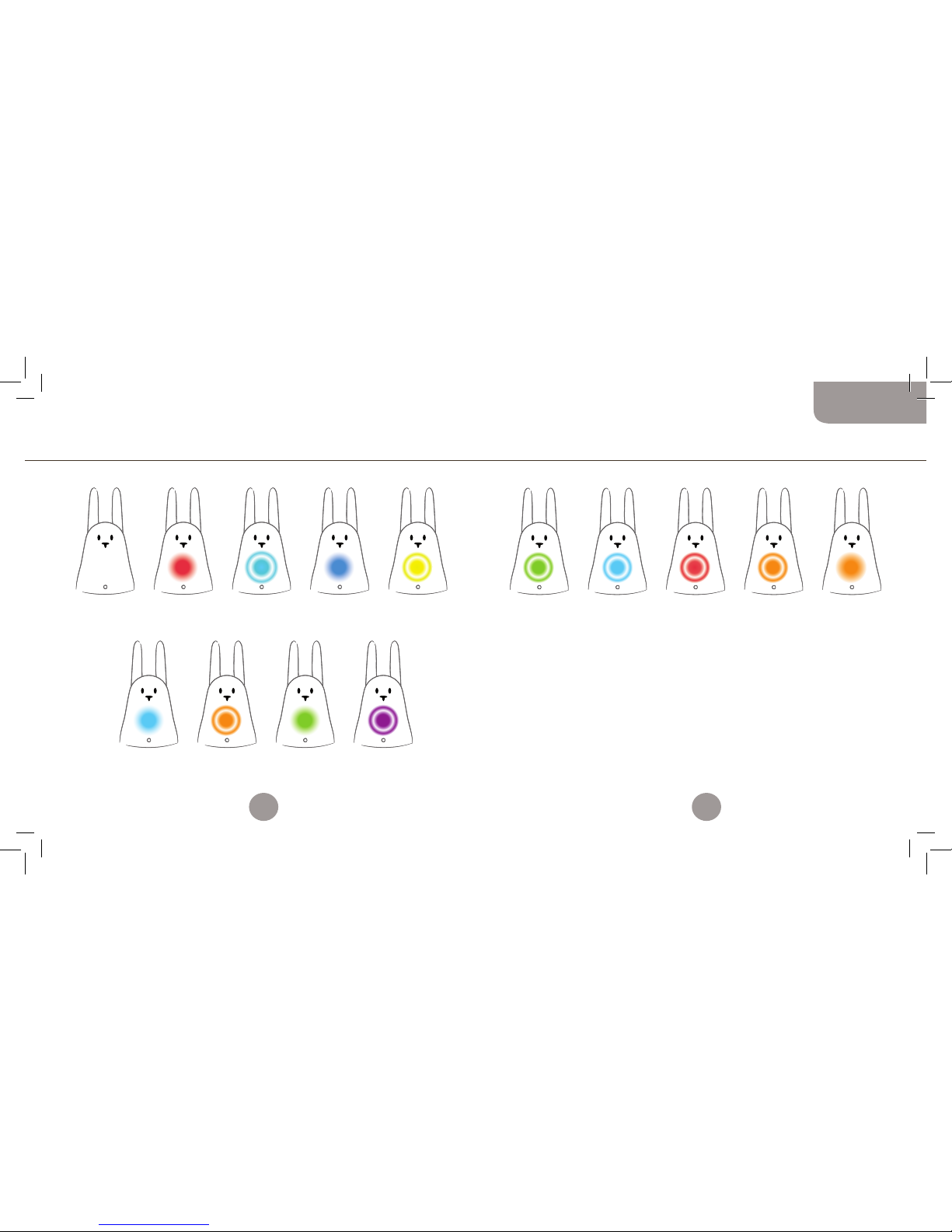
AUS:
Karotz steht auf
Standby oder ist
ausgesteckt.
LEUCHTET TÜRKIS:
Karotz ist nicht
konfiguriert. Verwenden
Sie Software von
http://plug.karotz.com,
um Karotz zu
konfigurieren.
LEUCHTET ROT:
Karotz startet. Bitte
nicht ausstecken.
BLINKT ORANGE:
Update in Arbeit. Bitte
nicht ausstecken. Bitte
Verbindung zum Internet
nicht trennen.
BLINKT TÜRKIS:
Karotz versucht eine
Internetverbindung
aufzubauen.
LEUCHTET GRÜN:
Das System startet
neu.
LEUCHTET BLAU:
Die Werkseinstellungen
werden wiederhergestellt.
Bitte nicht ausstecken.
BLINKT LILA:
Die Uhrzeit Ihres
Kartoz wurde
erfolgreich eingestellt.
BLINKT GRÜN:
Karotz ist bereit.
BLINKT TÜRKIS:
Nachricht wartet.
BLINKT ROT:
Technisches
Problem.
BLINKT ORANGE:
RFID-Chip erkannt.
BLINKT GELB:
Betriebssystemfehler
erkannt. Wiederherstellung
in Arbeit. Bitte nicht
ausstecken.
LEUCHTET ORANGE:
Spracherkennung
aktiviert.
Karotz spricht zu Ihnen Zusammenfassung der Lichtindikatoren
WÄHREND DER INBETRIEBNAHME NACH DER INBETRIEBNAHME
Wenn Ihr Karotz nicht mehr reagiert, drücken Sie dreimal schnell
hintereinander auf seinen Kopf, um ihn neu zu starten. Seine LED
blinkt dann grün.
44
45
Deutsch
Booklet_MULTILINGUE-avril2011.indd 44-45 4/04/11 14:52:05
Page 24

Flatnanoz und weiteres Zubehör
Ein Flatnanoz ist ein Mini-Karotz mit einem RFID-Chip-Leser als
Karotz-Schlüsselring. Er startet Ihre Anwendung, wenn Sie ihn
vor der Nase Ihres Karotz vorbeiziehen.
Sie haben 2 Flatnanoz: einen gelben und einen grünen.
Sie können die programmierte Anwendung auf einem Flatnanoz
beliebig oft ändern.
Gehen Sie zum Abschnitt „Mein Konto“ auf www.karotz.com.
Wenn Sie einmal da sind, können Sie auch den Store besuchen,
wo Sie das gesamte verfügbare Zubehör für Ihren Karotz finden:
http://store.karotz.com.
Flatnanoz, Nanoztag, Spiegel, Musikdock, Schlüsselringe, Ohren,
RFIDress, Batterie, USB-Schwanz…
Weitere Informationen auf www.karotz.com
Dies ist nur ein Einblick in das, was Karotz für Sie tun kann.
Es erwarten Sie viele weitere Überraschungen!
Bis bald auf www.karotz.com.
Hilfe und eine vollständige Anleitung für alles, was Sie mit Ihrem
Karotz tun können, finden Sie auf http://support.karotz.com.
Garantie
Die Aufgabe des vorliegenden Vertrages ist eine kommerzielle Garantie-Unterzeichnung unter den folgenden
Bedingungen, nachstehend als „Die Garantie“ bezeichnet.
Die vorliegende Garantie ist von der Firma Mindscape vergeben, einer Aktiengesellschaft mit einem
Verwaltungsrat mit einem Kapital von 2,525,840.50 €; Sitz: 73-77, rue de Sèvres 92514 Boulogne-Billancourt,
Frankreich; registriert unter der Nummer B 408 530 137 RCS Nanterre, nachstehend als der „Verkäufer“
bezeichnet.
Karotz (eingetragen Karotz v1), nachstehend als das „Produkt“ bezeichnet
1. UMFANG DER GARANTIE
Die Garantie setzt voraus, dass der Verkäufer eine Garantie für das Produkt gegen Fabrikationsfehler unter
normalen Nutzungsbedingungen gewährleistet, während einer (1) Jahresperiode ab dem Datum des Kaufs durch
den Einzelhandel-Käufer. Diese Frist wird nachfolgend als „Garantiezeit“ bezeichnet. Diese Bedingungen sind
weltweit gültig.
Diese Garantie deckt Herstellungsfehler und defekte Komponenten ab. Wenn das Produkt einen Materialmangel
aufweist und ein Anspruch während der Dauer der Gewährleistungsfrist erhalten wurde, liegt es ausschließlich
im Ermessen des Verkäufers (i), das Produkt kostenlos mit neuen oder überarbeiteten Ersatzteilen zu
reparieren, (ii) das Produkt gegen ein neues Produkt oder ein Produkt aus neuen oder wiederaufgearbeiteten
Komponenten, deren Verhalten dem des ursprünglichen Produkts entspricht, auszutauschen oder (iii) den
Kaufpreis des Produktes zu erstatten.
Der Verkäufer behält sich das Recht vor, zu verlangen, dass der Käufer die defekten Komponenten durch
neue oder wiederaufbereitete Teile ersetzt, mit denen er in Übereinstimmung mit der Garantie vom Verkäufer
ausgestattet wird und die er selbst installieren kann.
Wenn der Käufer während der Vertragslaufzeit der Garantie, der zum Zeitpunkt des Produkterwerbs
zugestimmt wurde, eine Überholung verlangt, die durch Garantie gedeckt ist, und das Produkt während eines
Zeitraums von mindestens sieben Tagen außer Betrieb ist, führt dies zu einer Verlängerung der verbleibenden
Garantiezeit, gezählt ab dem Zeitpunkt, an dem der Käufer um eine Intervention gebeten hat, oder ab dem
Zeitpunkt, an dem der Käufer das Produkt zum Reparieren beim Verkäufer abgegeben hat, wenn dieser
Zeitpunkt hinter dem der Interventionsanfrage liegt.
Wenn ein Produkt oder eine Komponente ausgetauscht wird, werden alle Ersatz-Komponenten Ihr Eigentum
und die ausgetauschten Komponenten werden Eigentum des Verkäufers. Die im Einklang mit der Garantie
verwendeten Komponenten des Verkäufers müssen für die Produkte verwendet werden, für die der GarantieService angefordert wurde. Wenn es zu einer Erstattung kommt, muss das Produkt, für das die Erstattung
läuft, dem Verkäufer zurückgegeben werden und wird somit Eigentum des Verkäufers.
2. GARANTIE-EINSCHRÄNKUNGEN UND -AUSSCHLÜSSE
2.1. DIE GARANTIE GI LT NICHT FÜR:
(a) Schäden durch Unfall, Missbrauch, unsachgemäßen Gebrauch, Überschwemmung, Feuer, Erdbeben
oder äußere Ursachen aufgrund höherer Gewalt;
(b) Schäden, die durch eine Verwendung des Produkts, welche nicht vorgeschrieben ist oder vom
Verkäufer angegeben wurde oder nicht in den Unterlagen über die Verwendung des Produktes
beschrieben ist, entstanden sind;
(c) Schäden, die beim Önen des Produkts verursacht wurden;
(d) Schäden, die durch den Eingri einer Person entstanden sind, die kein Vertreter des Verkäufers ist;
(e) ein Produkt oder eine Komponente, die ohne schriftliche Genehmigung des Verkäufers so modifiziert
wurden, dass die Funktion und die Kapazitäten deutlich verändert wurden;
46
47
Deutsch
Booklet_MULTILINGUE-avril2011.indd 46-47 4/04/11 14:52:05
Page 25

(f) Wartung und Pflege, die nicht in Übereinstimmung mit den Anweisungen des Verkäufers stehen, oder
eine Nachlässigkeit bei der Wartung des Produkts sind;
(g) unsachgemäße Handhabung oder Behandlung des Produkts (Fehlbedienung, Sturz, Schlag etc.) oder
eine ungeeignete Umgebung (schlechte Belüftung, Vibration, Einfluss von Feuchtigkeit oder übermäßiger
Hitze, Kontakt mit Sand oder anderen Stoen, unsachgemäßes Netzgerät etc.);
(h) Verbrauchsmaterial-Komponenten wie Batterien, sofern der Schaden auf Fabrikations-oder
Materialfehler zurückzuführen ist;
(i) Situationen, in denen eine Seriennummer des Produkts entfernt oder unleserlich gemacht wurde;
(j) Dienstleistungen und Senden von Nachrichten;
(k) Komponenten-Reparatur und -Ersatz durch normalen Verschleiß;
(l) jegliche Anpassungen des Produkts, die erforderlich sind, um das Produkt konform mit den technischen
und sicherheitsrelevanten Normen in einem Land zu machen, neben dem Land, für das das Produkt
ursprünglich konzipiert und hergestellt wurde;
(m) eine von einem Dienstleister vorgenommen Änderung oder eine Reparatur am Produkt, die nicht vom
Verkäufer autorisiert wurde;
(n) Compliance-Mängel, die aus der Nichteinhaltung der Montage-und Bedienungsanleitungen des
Produktes resultieren;
(o) den Fall, bei dem der Käufer es versäumt, den Nutzungsanweisungen zu folgen oder sich den
Verwendungsempfehlungen des Produktes verweigert.
2.2. FERNER HAT DER KÄUFER SI CH DAMIT EINVERSTANDEN GEGEBEN, DAS S, UM DAS PRODUKT ZU VERWENDEN, ER
ODER SIE MIT EINEM COMPUTER UND EINEM HIGH-SPEED-INTERNETZUGANG AUSG ESTATTET SEIN MUSS.
Der Verkäufer garantiert nicht, dass der Betrieb des Produkts nicht unterbrochen wird oder ohne Fehler
verläuft, und haftet nicht, wenn das Computer-Betriebssystem des Käufers für das Produkt unzureichend
ist. Der Verkäufer ist nicht für die Bereitstellung des Internetzuganges und insbesondere für jegliche
Unterbrechung des Zugangs verantwortlich. Der Verkäufer haftet daher nicht:
• für Unterbrechungen im Zusammenhang mit dem Zugri auf die Website für die Nutzung des Produktes,
im Folgenden als „Website“ bezeichnet, für Fehler, oder für jedes Ereignis, das die Website für den
Gebrauch ungeeignet macht,
• ganz allgemein für direkte oder indirekte Schäden, unabhängig von ihrer Art und Ursache, die aus der
Konsultation und der Nutzung der Website resultieren,
• im Falle einer Verletzung der Systemsicherheit.
Der Verkäufer ist nicht verantwortlich für eine Produktfehlfunktion, wenn der Käufer andere Produkte,
Materialien oder Software benutzt, die letztlich unzureichend sind und/oder mit dem Produkt unvereinbar sind
oder deren Nutzung nicht im Einklang mit dem normalen Gebrauch des Produktes steht und/oder unvereinbar
mit den Anweisungen aus der zur Verfügung gestellten Dokumentation sind. Der Verkäufer lehnt jede
Verantwortung in dem Falle ab, dass die erwarteten Ziele des Käufers nicht erfüllt sind, insbesondere in Bezug
auf technische Störungen, und dass eine Verletzung der Sicherheits-Indikationen durch den Käufer im Hinblick
auf die bereitgestellten Informationen für den Käufer über die Verwendung des Produktes eintritt.
2.3 INNERHALB DER G RENZEN, DIE DURCH GELTENDE RECH TSVORSCHRIFTEN ZULÄSSIG S IND, SIND DIE GARANTIE
UND DIE BEREITS ERWÄHNTE ENTSCHÄDIGUNG AUSSCH LIESSLICH VERTRAGSGARANTIE N ODER BEDINGUNGEN,
SCHRIFTLICH OD ER MÜNDLICH, RECHTLICH, AUSDRÜ CKLICH ODER STILLSCHWEIG END.
Soweit nach geltendem Recht befugt, schließt der Verkäufer ausdrücklich stillschweigende Gewährleistungen,
insbesondere auch Garantien in Bezug auf Vermarktung, Eignung für einen bestimmten Zweck und Garantien
gegen versteckte oder verborgene Mängel aus. Wenn der Verkäufer rechtlich nicht befugt ist, rechtliche oder
stillschweigende Garantien außer Kraft zu setzen, soweit gesetzlich zulässig, werden die besagten Garantien
für die Dauer der Garantie und die Erbringung von Reparatur- oder Ersatzleistungen durch das Ermessen des
Verkäufers bestimmt. Kein Händler, Vertreter oder Angestellter ist berechtigt, die Garantie zu modifizieren, zu
erweitern oder zu ergänzen. Vorbehaltlich der Bestimmungen der vorliegenden Garantie, und soweit gesetzlich
zulässig, ist der Verkäufer nicht verantwortlich für Schäden, die direkt oder indirekt, speziell, zufällig, oder
aufgrund einer Verletzung von Garantien oder von Bedingungen oder eines anderen juristischen Konzeptes
hervorgerufen wurden, aber nicht auf den Verlust der Nutzung limitiert sind, im Umsatz, bei real oder
absehbaren Verlusten von Gewinnen, einschließlich entgangenen Gewinnen aus Versicherungs-Berichten, aller
reduzierten Verfügbarkeiten von Finanzmitteln, von allen erwarteten Verlusten von Gespartem, durch Verlust
von Geschäften, Möglichkeiten, Kunden, Ansehen, durch den Schaden des Verlustes oder der Beschädigung von
Daten, welche indirekt oder als Folge auftreten können. Die derzeitige Beschränkung gilt nicht für Ansprüche
im Falle des Todes oder von Verletzung. Der Verkäufer gibt keine Erklärung in Bezug auf seine oder ihre
Möglichkeit ab, ein Produkt nach Abschluss der vorliegenden Garantie zu reparieren, oder ein Produkt ohne
Risiko auszutauschen.
3. VERBRAUCHERSCHUTZ
Die oben beschriebenen Bedingungen der Garantie werden nicht in Konflikt mit den erforderlichen
Bestimmungen der jeweils gültigen Gesetzgebung in den Ländern, in denen das Produkt erworben wurde,
oder im Land des Wohnsitzes des Käufers, insbesondere hinsichtlich der erforderlichen Vorschriften für den
Verbraucherschutz, stehen.
4. FEHLER UND VERSTECKTE MÄNGEL
Die folgenden Klauseln sind im Rahmen der geltenden Rechtsvorschriften zulässig. Der Käufer erhält
eine Garantie für die Fehler des gekauften Produktes und alle versteckten Mängel unter den folgenden
Voraussetzungen:
Es wird garantiert, dass das Produkt mit dem Vertrag übereinstimmt, und dass Fehler zum Zeitpunkt der
Anschaung des oben genannten Produktes nicht auftreten. Der Verkäufer haftet nicht für Fehler des
Produktes, welche sich aus Verpackung, Montageanleitungen oder Installation ergeben. Der Verkäufer
garantiert, dass das Produkt, welches durch diesen Vertrag gedeckt ist, für den normalen Gebrauch
funktionsfähig ist und den in diesem Vertrag erwähnten Beschreibungen und Eigenschaften entspricht. Jede
Klage, die aus einem Fehler des Produktes resultiert, muss innerhalb von zwei Jahren ab dem Zeitpunkt des
Produktkaufes eingeleitet werden. Eine Garantie wird hiermit für versteckte Mängel des gekauften Produktes
geboten, die es für seinen beabsichtigten Gebrauch untauglich machen oder die Verwendung zu solchem Maße
behindern, dass der Käufer das Produkt nicht gekauft hätte, oder einen niedrigeren Preis dafür bezahlt hätte,
wenn er Kenntnis von den Mängeln gehabt hätte. Jede Klage, die aus versteckten Mängeln resultiert, ist vom
Käufer innerhalb von zwei Jahren ab dem Zeitpunkt der Feststellung des Mangels einzuleiten.
5. ZUGANG ZUM GARANTIE-SERVICE
Es ist die Picht des Käufers, die Online-Hilfeleistungen in Übereinstimmung mit den begleitenden Dokumenten
des Produktes aufzurufen und diese durchzuarbeiten, bevor er die Gewährleistungs-Aktivierung in Anspruch
nimmt. Für den Fall, dass das Produkt nach dem Prüfen dieser Ressourcen nicht richtig funktioniert, wird
der Käufer gebeten, den Verkäufer, dessen Kontaktinformationen in dieser Dokumentation angegeben sind,
zu kontaktieren, im Folgenden als „Garantie-Service“ bezeichnet. Ein Vertreter des Verkäufers wird dem
Käufer dabei helfen, zu bestimmen, ob sein Produkt eine Garantie-Aktivierung benötigt und, falls erforderlich,
Letzteren darauf hinweisen, wie diese Prozedur zu starten ist. Der Verkäufer wird dem Käufer die Garantie
leisten, die die Gewährleistungsfrist angibt, soweit gesetzlich zulässig. Im Rahmen dieser Garantie-Aktivierung
ändert sich die Verfügbarkeit der Komponenten und die Bearbeitungszeit von Land zu Land. Der Käufer ist
verantwortlich für die Versand-und Transportkosten für das Produkt, wenn das Produkt nicht von einem
Garantie-Service im Land des Wohnsitzes profitiert. Im Einklang mit dem geltenden Recht kann der Verkäufer
vom Käufer verlangen, den Kaufbeleg und die Produkt-Referenznummer darzulegen, sowie bestimmte
Meldepflicht-Formalitäten vor Anmeldung des Garantie-Services zu erfüllen.
48
49
Deutsch
Booklet_MULTILINGUE-avril2011.indd 48-49 4/04/11 14:52:05
Page 26
2 orejas (Earz)
1 Karotz
1 adaptador
para Europa
1 cable mini-USB / USB
1 adaptador de alimentación
1 adaptador
para Reino Unido
2 Flatnanoz
1 adaptador
para América del Norte
1 adaptador
para Asia
Contenido de la caja
Acaba de comprar un Karotz,
¡y le va a cambiar la vida!
La caja contiene:
50
51
Español
Booklet_MULTILINGUE-avril2011.indd 50-51 4/04/11 14:52:06
Page 27
Nariz
lector de RFID
LED
Control de volumen Encender/apagar
el Karotz
Micrófono
Altavoces
Orejas
Puerto USB 1.1
Puerto mini-USB
Cámara web
Botón Karotz
Fuente
de alimentación
Micrófono
Cámara web ajustable
Le presentamos a su Karotz
Antena wifi
52
53
Español
Booklet_MULTILINGUE-avril2011.indd 52-53 4/04/11 14:52:07
Page 28

Ethernet (no está incluido en la caja, pero puede adquirirlo en la
tienda: http://store.karotz.com).
• Normalmente, el programa de conguración se inicia de forma
automática. Si no es así, haga doble clic en el icono
Karotz Configuration que hay en su escritorio para iniciarlo, o
en Programas/Karotz/Karotz Configuration.
• Sigue las instrucciones paso a paso. IMPORTANTE: cuando se le
pida que conecte el Karotz al ordenador, enciéndalo y espere a
que el LED rojo se apague antes de conectar el cable USB/miniUSB.
• Cuando se haya acabado el proceso de conguración del Karotz,
podrá activar las actualizaciones. Puede que tarde algunos
minutos (dependiendo de la velocidad de la conexión a Internet)
y el LED del Karotz se iluminará en diferentes colores: naranja,
morado, azul y rojo. ATENCIÓN: no desconecte ni desenchufe el
Karotz durante esta operación.
• Cuando el LED parpadee lentamente en verde, el Karotz estará
preparado.
Nota: para conectar el Karotz a su ordenador, inserte el conector
mini-USB en la ranura para mini-USB del Karotz y el conector USB en
la ranura para USB de su ordenador.
En caso de que ocurriese algún problema durante la instalación o
el proceso de configuración, podrá encontrar más información en
http://support.karotz.com.
Cómo instalar el Karotz
¡ATENCIÓN!
No enchufe el Karotz a la corriente o conéctelo a su ordenador
hasta que se le indique.
Para empezar, acceda a la siguiente dirección desde su ordenador:
http://plug.karotz.com.
Después, siga las instrucciones que se mostrarán en la pantalla
del ordenador y que le guiarán, paso a paso, por el proceso de
instalación y configuración de su Karotz. Siga atentamente las
instrucciones de cada paso.
INSTALACIÓN:
• Primero deberá crear una cuenta de Karotz para suscribirse.
• Después recibirá un correo electrónico con un enlace para que
descargue el programa de instalación.
• Haga clic en este enlace para iniciar la descarga.
• Una vez que se complete la descarga, haga doble clic para
activarla.
• Siga las instrucciones.
CONFIGURACIÓN:
Ahora ya está listo para configurar su Karotz.
Si quiere conectar el Karotz a la red inalámbrica, asegúrese de que
tiene el código de la red inalámbrica.
También podrá conectarlo a la red por medio de la conexión de
Ethernet, pero deberá tener un adaptador USB/Ethernet y un cable
54
55
Español
Booklet_MULTILINGUE-avril2011.indd 54-55 4/04/11 14:52:07
Page 29

COMANDO DE VOZ
Si quieres que Karotz haga algo, sólo tienes que decirlo.
Para activarlo, mantenga pulsado el botón que el Karotz tiene sobre
la cabeza y, cuando el LED se vuelva naranja, dígale lo que quiere
hacer y, después, deje de pulsar el botón.
Tenga en cuenta que cualquier orden que le dé al Karotz está
vinculada a una aplicación disponible en www.karotz.com, bajo el
título de «Appz».
Por ejemplo, para iniciar el demo (vinculado a la aplicación «demo»),
mantenga el botón pulsado hasta que el LED se vuelva naranja, diga
«demo» de forma clara y, después, suelte el botón.
Nota: acérquese al micrófono para dar una orden al Karotz; de lo
contrario, podría no entenderla.
Las aplicaciones
Karotz es mucho más que un conejito lindo: ¡también es un listillo!
La misión de Karotz es ayudarle en su vida diaria.
LA TIENDA DE APLICACIONES: APPZ
Visite la sección «Appz» en www.karotz.com, para disfrutar de
diversas aplicaciones que mejorarán las capacidades de Karotz.
Por ejemplo. La aplicación «Music Player», para escuchar su música
favorita desde una unidad ash USB. O la aplicación del «Karotz
Controller» para controlar su Karotz desde un teléfono inteligente o
tableta.
Se explica cómo funcionan las aplicaciones en la interfaz de
instalación. Si quiere configurar de nuevo una aplicación después de
haberla instalado, vaya a «Mi cuenta/Mis objetos».
Hay tres maneras de configurar una aplicación:
• Solicitándolo: utilize un teclado (se le proporcionará uno durante
la instalación), o un chip RFID.
• En un momento predenido: establece con antelación el
momento en que se llevará a cabo, como ocurre con una alarma.
• Con disponibilidad permanente: dependiendo de su
configuración, Karotz le dirá lo que quiera saber, tan
frecuentemente como quiera, cuando hay algo nuevo.
Nota: En la mayoría de los casos, tendrá que pulsar dos veces el
botón del Karotz para salir de una aplicación. En caso contrario,
consulte las instrucciones para cada aplicación.
56
57
Español
Booklet_MULTILINGUE-avril2011.indd 56-57 4/04/11 14:52:07
Page 30
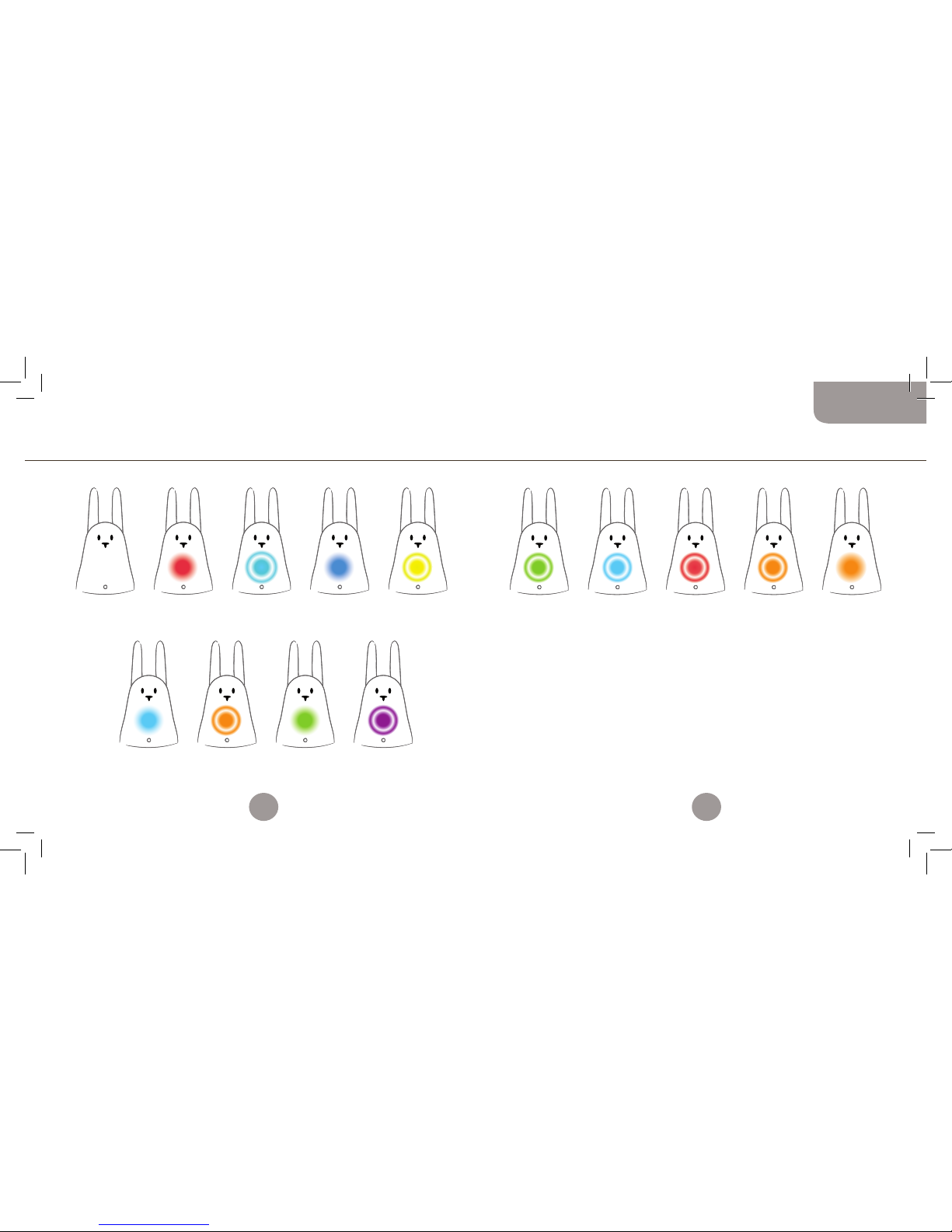
APAGADO:
Karotz
desconectado
o en espera.
CIAN:
Karotz no se encuentra
configurado. Utilizar
los programas de
http://plug.karotz.com
para configurar Karotz.
ROJO:
Karotz iniciándose.
No desconectar.
NARANJA PARPADEANTE:
Actualización en progreso.
No desconectar. Tampoco
desconectar de Internet.
CIAN PARPADEANTE:
Karotz intentando
conectarse a la red.
VERDE:
Reinicio inminente
de Karotz.
AZUL:
Se está restableciendo
la configuración de fábrica.
No desconectar.
MORADO
PARPADEANTE:
El ajuste horario
de tu Karotz
ha finalizado.
VERDE PARPADEANTE:
Karotz está listo.
CIAN PARPADEANTE:
Mensaje en espera.
ROJO PARPADEANTE:
Problema técnico.
NARANJA
PARPADEANTE:
Chip RFID reconocido.
AMARILLO PARPADEANTE:
Se ha detectado un error
en el sistema operativo.
Restauración en progreso.
No desconectar.
NARANJA:
Reconocimiento
de voz activado.
Karotz se comunica con usted esquema de los indicadores luminosos
DURANTE EL INICIO DESPUÉS DEL INICIO
Si el Karotz no responde, pulse rápidamente tres veces el botón de la
cabeza para que se reinicie. La luz LED parpadeará en verde.
58
59
Español
Booklet_MULTILINGUE-avril2011.indd 58-59 4/04/11 14:52:07
Page 31

Flatnanoz y otros accesorios
El Flatnanoz es un miniconejo con un lector chip de RFID para un
llavero de Karotz. Iniciará la aplicación cuando lo pase por delante de
la nariz del Karotz.
Tiene dos Flatnanoz: uno amarillo y uno verde.
Puede cambiar la aplicación programada en el Flatnanoz siempre que
quiera.
Vaya a la sección de Mi cuenta en www.karotz.com.
Mientras esté allí, podrá visitar la tienda para ver los accesorios
disponibles para su Karotz: http://store.karotz.com.
Flatnanoz, Nanoztag, Espejo, Base musical, llaveros, Orejas,
RFIDress, batería, Cola USB…
Más información en www.karotz.com
Esto es tan solo una muestra de lo que Karotz puede hacer por
usted.
¡Aún faltan muchas sorpresas!
Nos vemos pronto en www.karotz.com.
Para obtener más ayuda o para leer la guía completa sobre todo lo
que puede hacer con el Karotz, visite http://support.karotz.com.
Garantía comercial
El objeto del presente contrato es la inscripción a una garantía comercial bajo las siguientes condiciones,
llamadas de ahora en adelante “la garantía”.
La presente garantía es otorgada por la compañía Mindscape, una compañía limitada con una junta de
supervisión y un capital de 2 525 840,50 euros. Su sede principal se encuentra en 73-77, rue de Sèvres 92514
Boulogne-Billancourt, Francia, registrada con el número B 408 530 137 RCS NANTERRE, llamada en lo
sucesivo “el vendedor”.
Karotz (referencia Karotz v1), será llamado, de ahora en adelante, “el producto”.
1. EXTENSIÓN DE LA GARANTÍA
La garantía requiere que el vendedor garantice el producto contra los defectos de manufacturación,
bajo condiciones normales de uso durante un (1) año a partir de la fecha de compra realizada por el
comprador. Este período será conocido como el “período de garantía”. Estas condiciones son válidas en
todo el mundo.
Esta garantía solo cubre defectos de los componentes y la manufacturación.
Si el producto tiene un defecto material y se recibe una reclamación durante el período de garantía,
dependerá exclusivamente del vendedor el (i) reparar el producto mediante el uso de componentes de
repuesto nuevos o re-manufacturados, (ii) o cambiar el producto por uno nuevo o uno manufacturado a
partir de componentes nuevos o remanufacturados cuyo funcionamiento sea similar al del
producto original, o (iii) reembolsar el precio del producto.
El vendedor se reserva el derecho de solicitarle al comprador la sustitución de los componentes
defectuosos con componentes nuevos o remanufacturados que sean provistos por el vendedor de acuerdo con la
garantía y que el comprador pueda instalar.
Durante el período contractual de la garantía, acordado en el momento de la compra, si el comprador
solicita una condición cubierta por la garantía y el producto está averiado al menos durante siete días,
habrá una extensión en relación al tiempo restante de la garantía, contando a partir de la fecha en la cual
en comprador ha solicitado la intervención o a partir de la fecha en la cual el comprador entregó el producto para su
reparación, si esta fecha es posterior a la solicitud de intervención.
Cuando se cambia un producto o un componente, todos los componentes reemplazados se convierten en
propiedad del comprador, así como los componentes intercambiados. Los componentes provistos por el
vendedor de acuerdo a la garantía deben ser utilizados para los productos para los cuales fue solicitado el
servicio de garantía. Cuando hay un reembolso, el producto para el cual se produjo debe ser devuelto al
vendedor y se convierte en su propiedad.
2. LIMITES DE LA GARANTÍA Y EXCLUSIONES
2.1 LA GARANTÍA NO SE APLICARá EN CASO DE:
(a) Daños causados por accidente, abuso, uso inapropiado, inundación, fuego, terremoto o causas externas
debidas a causas de fuerza mayor;
(b) Daños causados por un uso del producto que no está recomendado ni indicado por el vendedor, o no está
descrito en la documentación relacionada al uso del producto;
(c) Daños causados al momento de abrir el producto;
(d) Daños causados por la intervención de una persona que no es representante del vendedor;
(e) Un producto o componente ha sido modificado de tal manera que sus capacidades han sido alteradas de
manera significativa, sin la autorización escrita del vendedor;
60
61
Español
Booklet_MULTILINGUE-avril2011.indd 60-61 4/04/11 14:52:08
Page 32

(f) Mantenimiento del producto que no está de acuerdo con las instrucciones del vendedor o negligencia en su
mantenimiento;
(g) Manejo o trato no recomendado del producto (mal manejo, caída, golpe, etc.) o un ambiente inapropiado
(poca ventilación, vibración, exposición a humedad o calor excesivos, contacto con arena o cualquier otra
sustancia, fuente de alimentación inadecuada, etc.);
(h) Componentes desechables como las baterías, a menos que el daño se deba a un defecto del material o la
fabricación;
(i) Situaciones en las cuales el número de serie del producto ha sido extraído o se ha vuelto ilegible; (j) Servicios
y envío de mensajes;
(k) Reparación y reemplazo de componentes debido al uso normal;
(l) Cualquiera adaptación del producto que haya sido necesaria para que el producto cumpla con las normas
técnicas y de seguridad de cualquier país que no sea el de su origen y manufacturación;
(m) Un cambio o reparación realizada al producto que no fue realizada por un proveedor de servicio autorizado
por el vendedor.
(n) Defectos como consecuencia de la falta de respeto de las instrucciones de uso y ensamblado del producto;
(o) En caso de que el comprador no haya seguido las instrucciones de uso o los consejos de uso del producto.
2.2. ADEMáS, EL COMPRADOR ACEPTA QUE PARA UTILIZAR EL PRODUCTO DEBE POSEER UN ORDENADOR Y UNA CONEXIÓN
DE ALTA VELOCIDAD A INTERNET.
El vendedor no garantiza que la operación del producto sea constante o esté libre de errores y no acepta la
responsabilidad si el sistema operativo del ordenador del comprador no es compatible con el producto. El vendedor
no es responsable de proveer acceso a Internet y, en particular, no es responsable por las interrupciones en el
acceso. El vendedor no acepta la responsabilidad en caso de:
• Por cualquier interrupción relacionada con el acceso a un sitio dedicado al uso del producto, referido de ahora en
adelante como “el sitio”, por errores informáticos, o cualquier otro evento que convierta en inutilizable al sitio,
• Y de manera más general, por cualquier daño, directo o indirecto, cualquiera que sea su naturaleza o causa,
que resulte de la consulta del sitio,
• En caso de un fallo en la seguridad del sistema.
El vendedor no es responsable por el mal funcionamiento del producto si el comprador utiliza otros productos,
materiales o programas que sean inadecuados o incompatibles con el producto, o cuya utilización no esté de acuerdo
con las instrucciones dadas en la documentación.
El vendedor no se hace responsable en el caso de que los objetivos esperados por parte del comprador no se logren,
en particular en relación a un mal funcionamiento técnico, un fallo en las indicaciones de seguridad provistas por el
comprador en relación a la información propuesta al comprador con respecto al uso del producto.
2.3. DENTRO DE LOS LÍMITES DE LA LEGISLACIÓN APLICABLE, LA GARANTÍA Y LA YA MENCIONADA SOLICITUD SON
EXCLUSIVAS CON RELACIÓN A CUALQUIER OTRA GARANTÍA, RECURSO O CONDICIÓN, ESCRITA O VERBAL, LEGAL, EXPRESA
O TáCITA.
Hasta donde se lo permite la legislación aplicable, el vendedor excluye de manera explícita cualquier garantía tácita,
principalmente garantías relacionadas con la comercialización, la adecuación a cierto uso y las garantías contra
defectos escondidos o latentes.
Si el vendedor no está legalmente autorizado a invalidar garantías legales o tácitas, hasta donde se lo permita la
legislación aplicable, las mencionadas garantías estarán limitadas a la duración de la garantía y la disposición de
reparaciones o reemplazos determinados exclusivamente a juicio del vendedor.
Ningún comerciante, agente o empleado está autorizado a modificar, extender o complementar la garantía. Con
excepción a las previsiones presentadas en la garantía, y hasta donde se lo permita la legislación aplicable, el
vendedor no es responsable por daños que sean directos o indirectos, especiales, accidentales o resultado de alguna
violación de cualquiera de las condiciones de la garantía o de los términos aquí establecidos o cualquier otro concepto
legal incluyendo, pero no limitado a, cualquier pérdida de uso, ganancia, perdida de ganancia, real o previsible,
incluyendo cualquier pérdida de ganancia relacionada con informes de seguro, cualquier disponibilidad financiera
reducida, cualquier pérdida en ahorros, cualquier pérdida en negocios, cualquier pérdida en oportunidades, cualquier
pérdida de clientes, cualquier pérdida en reputación, cualquier daño, cualquier pérdida, o cualquier daño a datos que
sea indirecta o consecuencia. La limitación actual no se aplica en caso de muerte o lesión.
El vendedor no menciona nada relacionado a su capacidad de reparar el producto al término de la presente
garantía, ni de cambiar el producto sin ningún riesgo.
3.PROTECCIÓN AL CONSUMIDOR
No obstante, los términos descritos con anterioridad en la garantía no entrarán en conflicto con las previsiones
requeridas por cualquier legislación aplicable de los países en los cuales el producto sea comprado o el país de
residencia del comprador, en especial en relación a las previsiones relacionadas con la protección del consumidor.
4.INCONFORMIDAD Y DEFECTOS LATENTES
Las cláusulas siguientes se aplican dentro de los límites de la legislación aplicable.
El comprador adquiere una garantía por inconformidad o defectos latentes del producto comprado bajo las siguientes
condiciones:
Aquí se garantiza que el producto cumple con el contrato y que la inconformidad no puede ocurrir al momento de la
compra del ya mencionado producto.
El vendedor no podrá ser responsable por la inconformidad con el producto debida al empaque, las instrucciones de
ensamblaje o la instalación.
El vendedor garantiza que el producto cubierto por este contracto se encuentra en condiciones para un uso normal y
que corresponde a la descripción y cualidades mencionadas en el presente contrato.
Cualquier queja debida a la inconformidad con el producto debe ser notificada en los dos primeros años a partir de la
compra del producto.
La garantía se ofrece por defectos ocultos del producto comprado que lo vuelvan inútil para el uso para el que fue
diseñado, o que impidan ese uso de tal manera que el comprador no habría comprado el producto o pagado un precio
menor por él si hubiese sabido que existían tales defectos.
Cualquier queja debida a defectos ocultos del producto debe ser notificada por el comprador en los dos
primeros años a partir de la compra del producto.
5. ACCESO AL SERVICIO DE GARANTÍA
Es obligación del comprador acceder a los servicios de ayuda en línea de acuerdo con la documentación
que acompaña al producto y de examinarla antes de solicitar la activación de su garantía.
En caso de que el producto no funcione bien tras haber utilizado estos recursos, se le pide al comprador
contactar al vendedor mediante la información otorgada en la documentación, llamada de ahora en adelante “el
servicio de garantía”.
Un representante del vendedor ayudará al comprador a determinar si su producto necesita de la activación de la
garantía, y si es así, le informará del procedimiento de activación.
El vendedor le suministrará al comprador la garantía que será dada o presentada durante el periodo de garantía
hasta donde se lo permita la legislación aplicable.
Tras la activación de esta garantía, los componentes disponibles y los tiempos de reparación variarán de país a país.
El vendedor es responsable del empaquetado y transporte del producto, así como de sus costos, si el producto no
puede beneficiarse de los servicios de garantía en el país de residencia del comprador.
De acuerdo con la legislación vigente, el vendedor puede solicitar al comprador que otorgue una prueba de su compra
y la referencia del producto, así como cumplir con ciertas formalidades relacionadas con
el registro antes de utilizar su servicio de garantía.
62
63
Español
Booklet_MULTILINGUE-avril2011.indd 62-63 4/04/11 14:52:08
Page 33
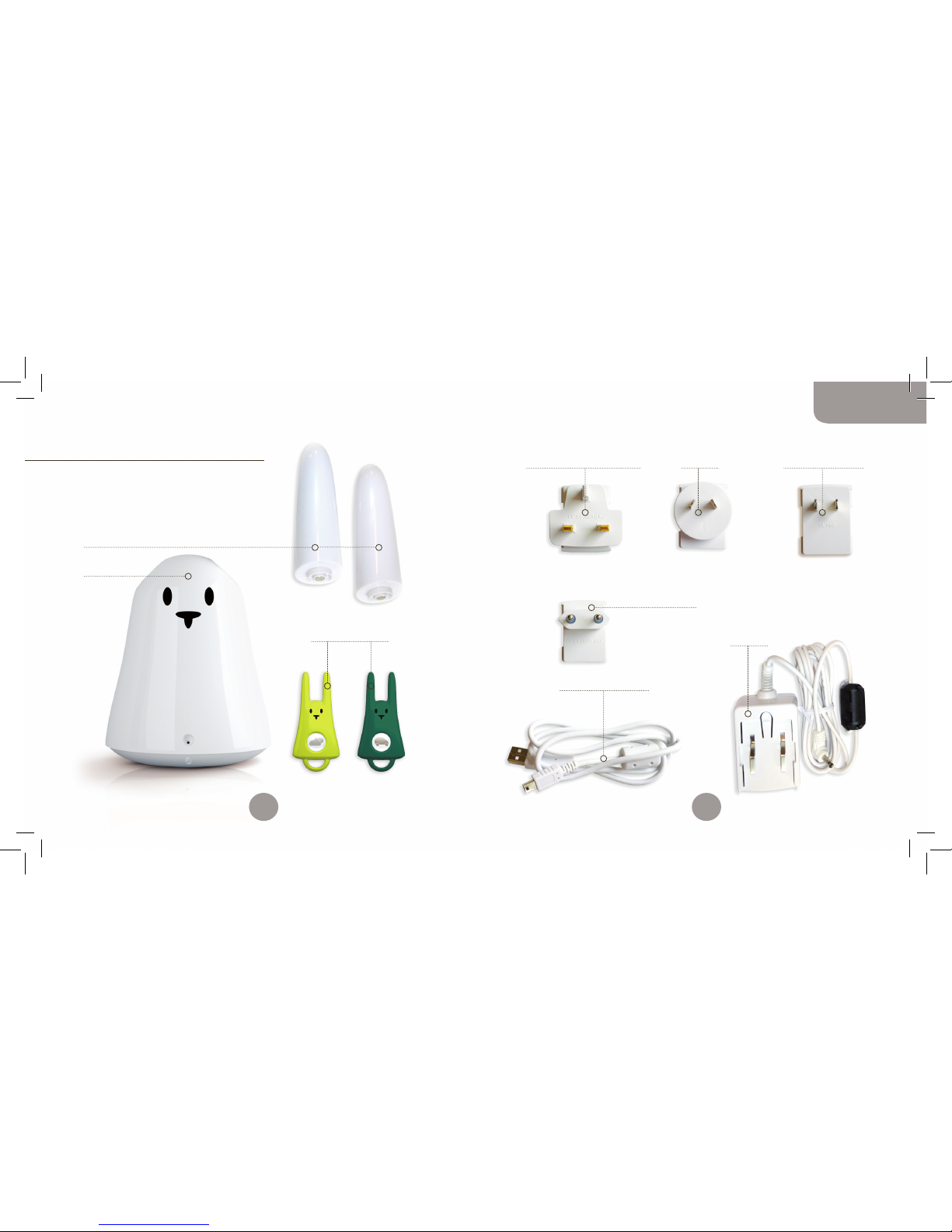
2 oren (Earz)
1 Karotz
1 stekker
voor Europa
1 mini-USB- / USB-kabel
1 adapter
1 stekker
voor het Verenigd Koninkrijk
2 Flatnanoz
1 stekker
voor Noord-Amerika
1 stekker
voor Azië
Inhoud van de doos
Je hebt een Karotz gekocht en hij
gaat je leven veranderen!
De doos bevat:
64
65
Nederlands
Booklet_MULTILINGUE-avril2011.indd 64-65 4/04/11 14:52:09
Page 34
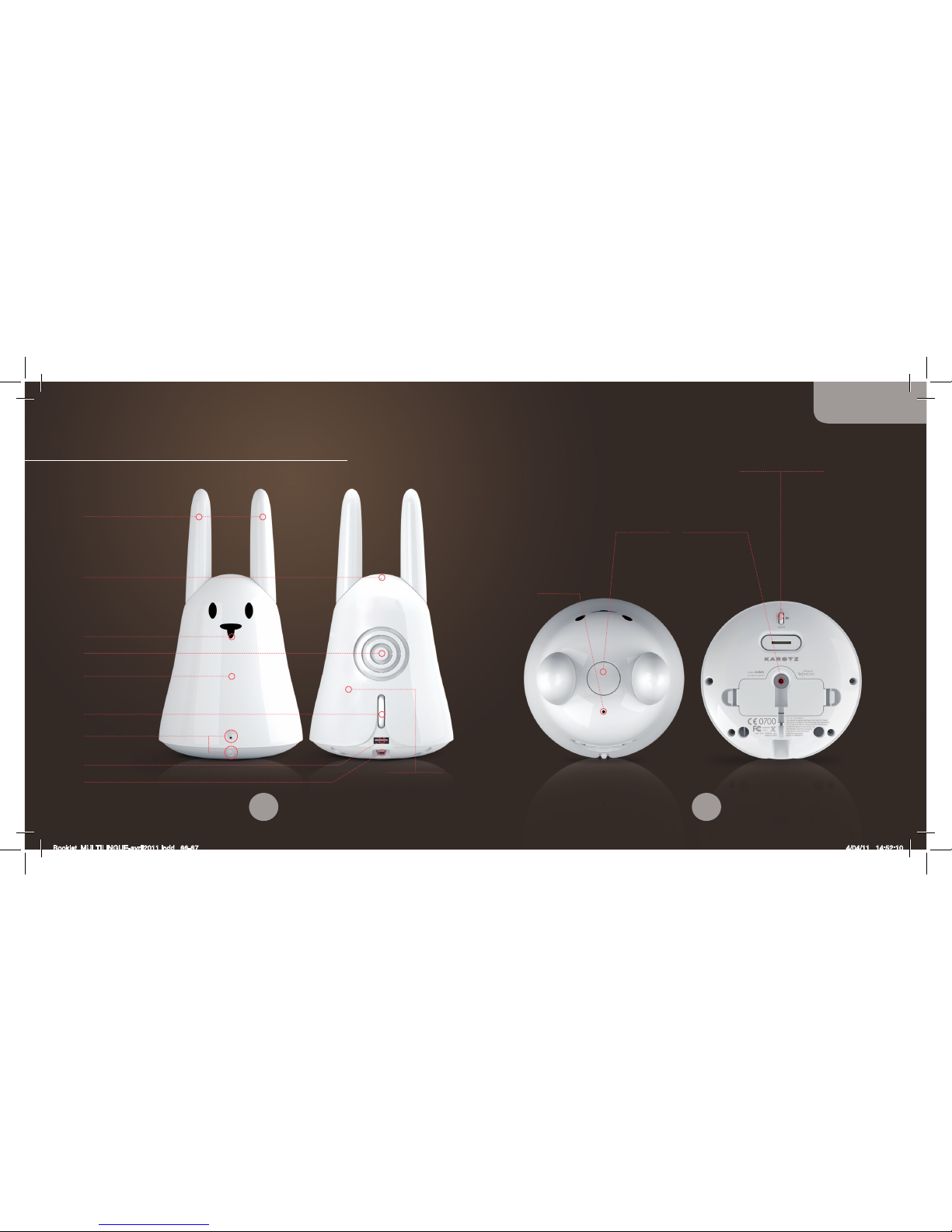
Neus
RFID-lezer
LED
Volumeregelaar Karotz
in-/uitschakelen
Microfoon
Speakers
Oren
USB 1.1 poort
Mini-USB-poort
Webcam
Karotz-knop Adapter
Microfoon
Verstelbare webcam
Kennismaking met je Karotz
Wi-Fi-antenne
66
67
Nederlands
Booklet_MULTILINGUE-avril2011.indd 66-67 4/04/11 14:52:10
Page 35

bijgesloten, maar wel verkrijgbaar via de winkel: http://store.karotz.com)
hebben.
• Meestal wordt de set-up automatisch gestart. Zo niet, dan kun
je het programma starten door te dubbelklikken op het icoon
Karotz Configuration op je bureaublad of vanuit Programma’s/
Karotz/Karotz Configuration.
• Volg de instructies stap voor stap. BELANGRIJK: als je wordt
gevraagd je Karotz aan te sluiten op je computer, schakel hem
dan in en wacht totdat de rode LED niet meer brandt voordat je
hem met de mini-USB-/USB-kabel aansluit.
• Als de set-up voor jouw Karotz is voltooid, kunnen de updates
geactiveerd worden. Dit kan een aantal minuten duren
(afhankelijk van de snelheid van je internetverbinding) en de
Karotz-LED zal oranje, paars, blauw, rood gaan branden. LET OP:
verbreek tijdens de set-up niet de verbinding en verwijder de
stekker niet uit het stopcontact.
• Als de LED langzaam groen knippert, is Karotz er klaar voor.
Opmerking: om je Karotz aan te sluiten op je computer, steek je de
mini-USB-stekker in de mini-USB-poort op je Karotz en de USBstekker in de USB-poort op je computer.
Mocht je problemen ondervinden tijdens de installatie of de set-up,
ga dan naar http://support.karotz.com voor meer informatie.
Installatie van je Karotz
LET OP! Sluit je Karotz niet aan op de netstroom en verbind hem niet
met je computer totdat dit wordt gevraagd.
Ga op je computer eerst naar de volgende website:
http://plug.karotz.com.
Volg hierna de instructies op je computer. Je wordt stap voor
stap door de installatie en de set-up van je Karotz geleid. Volg de
instructies steeds zorgvuldig op.
INSTALLATIE:
• Je moet je eerst aanmelden door je Karotz-account aan te
maken.
• Je ontvangt daarna een e-mail met een link om het
installatieprogramma te downloaden.
• Klik op deze link om de download te starten.
• Zodra de download is voltooid, kun je deze activeren door erop te
dubbelklikken.
• Volg de instructies.
SET-UP:
Je kunt nu je Karotz configureren.
Zorg ervoor dat je de code voor je Wi-Fi-netwerk (WEP, WPA, WPA2…)
hebt als je besluit je Karotz aan te sluiten op je Wi-Fi-netwerk.
Je kunt Karotz ook via het ethernet aansluiten op je netwerk, maar
dan moet je een USB-/ethernetadapter en een ethernetkabel (niet
68
69
Nederlands
Booklet_MULTILINGUE-avril2011.indd 68-69 4/04/11 14:52:10
Page 36

HET STEMCOMMANDO
Als je Karotz iets wilt laten doen, hoef je het maar te zeggen.
Houd hiervoor de knop op zijn kop ingedrukt. Zodra de LED oranje
gaat branden, vertel je hem wat hij moet doen en laat je de knop los.
Merk op dat ieder commando verbonden is met een toepassing die
beschikbaar is op www.karotz.com, bij “Appz”.
Als je bijvoorbeeld de demo wilt horen (verbonden met de toepassing
“Demo”), houd je de knop ingedrukt totdat de LED oranje gaat branden,
zeg je duidelijk het woord “demo” en laat je de knop weer los.
Opmerking: ga dicht bij de microfoon staan als je Karotz een
opdracht geeft want anders verstaat hij je misschien niet.
De toepassingen
Karotz is zoveel meer dan een schattig konijntje: hij is ook erg slim!
Het is Karotz’ missie om je te helpen in je dagelijkse leven.
DE TOEPASSINGENWINKEL: APPZ
Ga naar “Appz” op www.karotz.com, waar je veel verschillende
toepassingen vindt om de vaardigheden van Karotz uit te breiden.
Enkele voorbeelden zijn de toepassing de “Music Player” om te
luisteren naar je favoriete muziek vanaf een USB-stick, of de
toepassing “Karotz Controller” om je Karotz te besturen vanaf een
smartphone of tablet.
Hoe de toepassingen werken, wordt tijdens de installatie
gedetailleerd uitgelegd in de configuratie-interface. Als je een
toepassing na de installatie opnieuw wilt configureren, ga je naar
“Mijn account / Mijn apparaten”.
Je kunt een toepassing op drie manieren laten starten:
• Op verzoek: Gebruik een sleutelwoord (dit krijg je tijdens de
toepassingsinstallatie), of een RFID-chip
• Op een vooraf ingesteld moment: Stel de tijd vooraf in, net als
bij een wekker
• Permanente beschikbaarheid: Afhankelijk van je instellingen zal
Karotz je vertellen wat je wilt weten, zo vaak je wilt, zodra er
nieuws is
Opmerking: In de meeste gevallen kun je een toepassing afsluiten
door twee keer achter elkaar op Karotz’ knop te drukken. Raadpleeg
de instructies voor iedere toepassing.
70
71
Nederlands
Booklet_MULTILINGUE-avril2011.indd 70-71 4/04/11 14:52:10
Page 37
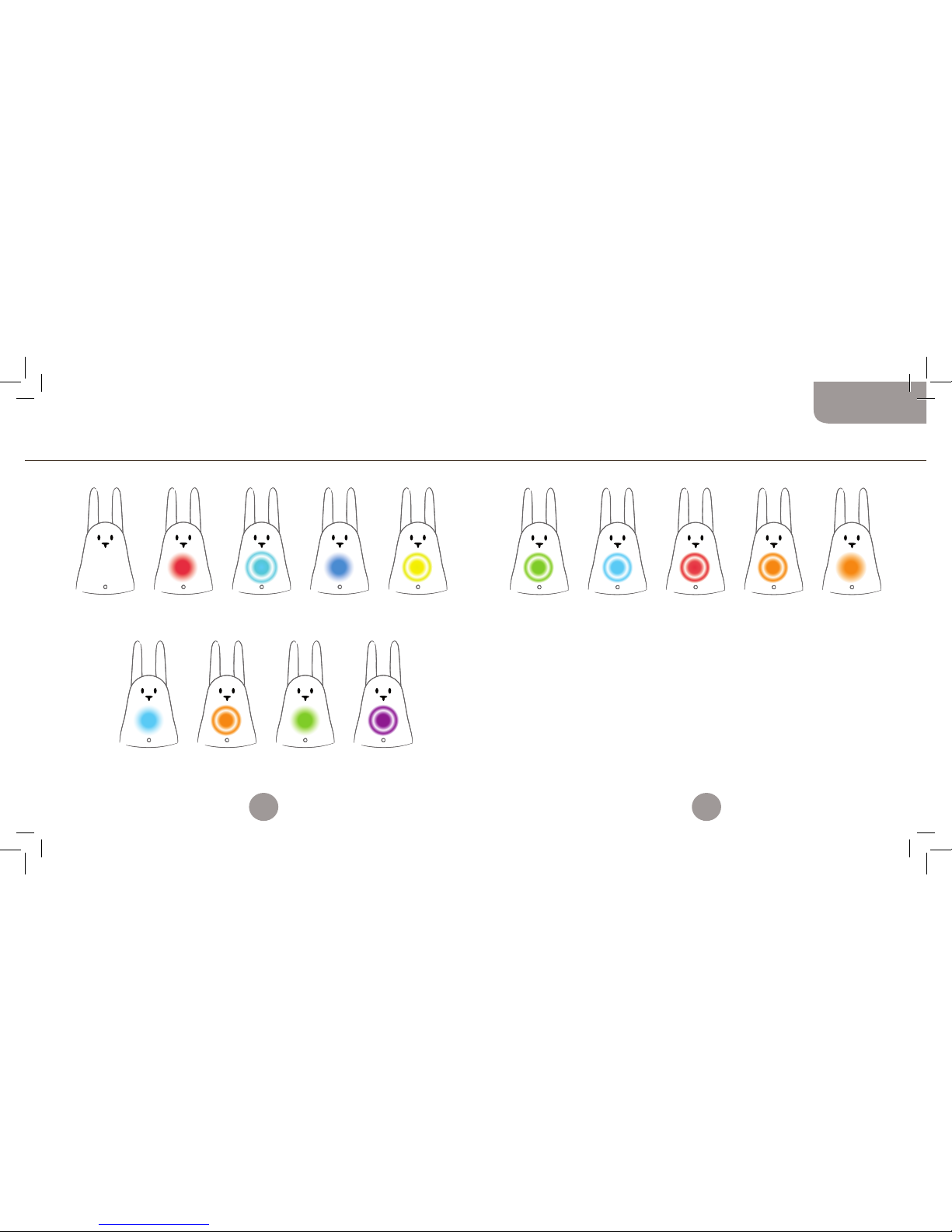
UIT:
Karotz op
stand-by of niet
aangesloten op
netstroom.
LICHTBLAUWE LED BRANDT:
Karotz is niet
geconfigureerd.
Gebruik software op
http://plug.karotz.com
om Karotz te configureren.
RODE LED BRANDT:
Karotz start op.
Verwijder stekker niet
uit het stopcontact.
ORANJE LED KNIPPERT:
Bezig met updaten.
Verwijder stekker niet uit
het stopcontact. Verbreek
de verbinding met het
internet niet.
LICHTBLAUWE
LED KNIPPERT:
Karotz probeert
verbinding te maken
met internet.
GROENE LED BRANDT:
Karotz gaat opnieuw
opstarten.
BLAUWE LED BRANDT:
Fabrieksinstellingen
worden hersteld. Verwijder
stekker niet uit het
stopcontact.
PAARSE LED KNIPPERT:
Het systeem wordt
gestart.
GROENE LED KNIPP ERT:
Karotz is klaar.
LICHTBLAUWE LED
KNIPPERT:
Bericht ontvangen.
RODE LED KNIPPERT:
Technisch probleem.
ORANJE LED KNIP PERT:
RFID-chip herkend.
GELE LED KNIPPERT:
Fout in besturingssysteem
ontdekt. Bezig met
herstellen. Verwijder stekker
niet uit het stopcontact.
ORANJE LED BRAN DT:
Spraakherkenning
geactiveerd.
Karotz praat met je overzicht van de lampjes
TIJDENS HET OPSTARTEN NA HET OPSTARTEN
Als je Karotz niet meer reageert, druk dan drie keer achter elkaar
op zijn kop om hem opnieuw op te starten. Zijn LED zal dan groen
knipperen.
72
73
Nederlands
Booklet_MULTILINGUE-avril2011.indd 72-73 4/04/11 14:52:10
Page 38

Flatnanoz en andere accessoires
Een Flatnanoz is een minikonijn met een RFID-chiplezer voor een
Karotz-sleutelhanger. Hiermee kun je je toepassing starten als je
hem voor Karotz’ neus beweegt.
Je hebt twee Flatnanoz: een gele en een groene.
Je kunt de geprogrammeerde toepassing op een Flatnanoz zo vaak
veranderen als je wilt. Ga naar het gedeelte Mijn Account\Mijn
apparaten op www.karotz.com.
Je kunt daar ook een bezoekje brengen aan de winkel om alle beschikbare
accessoires voor je Karotz te bekijken: http://store.karotz.com.
Flatnanoz, Nanoztag, Mirror, muziekdock, sleutelhangers, oren,
RFIDress, batterij, USB-staart...
Meer informatie op www.karotz.com
Dit is slechts een selectie van wat Karotz voor je kan doen. Er staan
je nog meer verrassingen te wachten!
Tot gauw op www.karotz.com.
Ga naar http://support.karotz.com voor hulp en de volledige
handleiding voor alle mogelijkheden van Karotz.
Garantie
The object of the present contract is a commercial warranty subscription under the following conditions,
henceforth referred to as “The Warranty”.
The present Warranty is conferred by the company Mindscape, a limited company with a supervisory board
with a capital of 2,525,840.50 euros; headquarters: 73-77, rue de Sèvres 92514 Boulogne-Billancourt, France;
registered under the number B 408 530 137 RCS NANTERRE, henceforth referred to as the “Seller”.
Karotz (referenced Karotz v1), henceforth referred to as the «Product».
1. EXTENT OF THE WARRANTY
The Warranty requires that the Seller guarantees the Product against manufacturing defects, under normal
conditions of use, during a one (1) year period from the date of purchase by the retail Buyer. This period is
henceforth referred to as the “Warranty period”. These conditions are valid worldwide.
This warranty only covers manufacturing and component defects.
If the Product has a material defect, and a claim is received during the period of the warranty, it is at the
Seller’s exclusive discretion to (i) repair the Product for free using new or remanufactured
replacement components, (ii) exchange the Product for a new Product or a Product manufactured from new or
remanufactured components whose operation is equivalent to that of the original Product, or (iii) reimburse
the purchase price of the product.
The Seller reserves the right to ask the Buyer to replace the faulty components with new or
remanufactured components that are furnished by the Seller in accordance with the Warranty, and that the
Buyer can install.
During the contractual period of the Warranty agreed at the time of product purchase, if the Buyer requests a
recondition covered by the Warranty, and the Product is out of service during a period of at least seven days,
there will be an extension to the remaining period of the Warranty counted from the date that the Buyer has
requested the intervention, or from the date that the Buyer dropped o the Product for repair, if this date is
subsequent to the intervention request.
When a Product or a component is exchanged, all replacement components become your property, and the
exchanged component will become the property of the Seller. The components furnished by the Seller in
accordance with the warranty must be used for the products for which the Warranty service is requested.
When there is a reimbursement, the Product for which the reimbursement is given must be returned to the
Seller and becomes the property of the Seller.
2. WARRANTY LIMITATIONS AND EXCLUSIONS
2.1 - THE WARRANTY DOES NOT APPLY TO:
(a) Damage caused by accident, abuse, improper use, flood, fire, earthquake, or external causes due to
force majeure;
(b) Damage caused by a use of the product that is not prescribed or indicated by the Seller, or that is not
described in the Documentation relating to the use of the Product;
(c) Damage caused at the time that the product was opened;
(d) Damage caused by the intervention of a person that is not a Seller representative;
(e) A Product or component that has been modified such that its functioning or capacities have been
significantly altered, without the Seller’s written authorization;
(f) Product maintenance that is not in accordance with the Seller’s instructions, or negligence in the
maintenance of the Product;
(g) Improper handling or treatment of the Product (mishandling, fall, shock, etc) or an inappropriate
74
75
Nederlands
Booklet_MULTILINGUE-avril2011.indd 74-75 4/04/11 14:52:10
Page 39

environment (poor ventilation, vibration, exposure to humidity or to excessive heat, contact with sand or any
other substance, improper power supply, etc);
(h) Consumable components such as batteries, unless the damage is due to manufacturing or material
defect;
(i) Situations where a serial number of the Product has been removed or rendered illegible;
(j) Services and message sending;
(k) Component repair and replacement due to normal wear and tear;
(l) Any adaptation of the product that would be necessary to make the product compliant with the
technical and safety norms in a country besides the country for which the product was originally
designed and manufactured;
(m) A change made to or a repair made on the Product that was not performed by a service provider
authorised by the Seller.
(n) Compliance defects resulting from the non respect of the assembly and product use instructions;
(o) In the event where the Buyer has failed to follow the usage instructions or has refused the Product
usage advice.
2.2. FURTHERMORE, THE BUYE R AGREES THAT IN ORDER TO USE THE PRODUCT, HE OR SHE MUST BE EQUI PPED WITH A
COMPUTER AND A HIGH-SPEED INTERNET CONNECTION.
The Seller does not guarantee that the operation of the Product will be uninterrupted or without error, and
declines responsibility if the Buyer’s computer operation system is inadequate for the Product.
The Seller is not responsible for providing internet access and in particular for any interruption in access. The
Seller thus declines all responsibility:
• for any interruption related to access to the website dedicated to the use of the Product,
hereafter referred to as the “Website”, for bugs, or for any event that renders the Website unfit for use,
• and more generally, for any direct or indirect damage, whatever its nature and cause, resulting from the
consultation and use of the Website,
• in the event of a breach to system security.
The Seller is not responsible for Product dysfunction if the Buyer uses other products, material, or software
that are ultimately inadequate and/or incompatible with the Product, or whose use is not in conformity with
the normal use of the Product and/or the instructions provided by the Documentation.
The Seller declines all responsibility in the event that the Buyer’s expected objectives are not met, notably
regarding technical dysfunction, a breach of the security indications provided by the Buyer in view of the
information provided to the Buyer regarding the use of the Product.
2.3. WITHIN THE LIMITS AUTHORI ZED BY APPLICABLE LEGISLATION, THE WARRANTY AND THE AFOREM ENTIONED
RECOURSE ARE EXCLUSI VE OF ANY OTHER CONTRACTUAL WARRANTY, RECOURSE OR CO NDITIONS, WRITTEN OR VERBAL,
LEGAL, EXPRESS OR TACIT.
To the extent authorized by applicable law, the Seller expressly excludes tacit guarantees, notably
including guarantees concerning commercialization, appropriateness for a specific use, and guarantees against
hidden or latent defects. If the Seller is not legally authorized to overrule legal or tacit guarantees, to the
extent authorized by law, the said guarantees will be limited to the duration of the Warranty and the provision
of repair or replacement service as determined by the sole discretion of the Seller.
No reseller, agent or employee is authorized to modify, extend, or supplement the Warranty.
Except for the provisions of the present warranty, and to the extent authorized by law, the Seller is not
responsible for damage that is direct or indirect, special, incidental, or a result of a violation of any guarantee
or condition of the terms or of any other legal concept including but not limited to any loss of use, revenue,
real or foreseeable loss of profits, including any loss of profit related to insurance reports, any reduced
financial availability, any expected loss in savings, any loss of business, any loss of opportunities, any loss of
clients, any loss in reputation, any damage, any loss, or any data damage that may be indirect or consecutive.
The present limitation is not applicable to claims in case of death or injury.
The Seller does not issue any statement pertaining to his or her capacity to repair a product at the
conclusion of the present Warranty, nor to exchange a product without any risk.
3. CONSUMER PROTECTION
However, the terms described above in the Warranty will not conflict with the required provisions of the
applicable legislation in the countries where the Product is purchased or in the country of residence of the
Buyer, notably regarding the required provisions governing consumer protection.
4. NON-CONFORMITY AND LATENT DEFECTS.
The following clauses apply within the limits authorized by applicable legislation.
The Buyer is given a warranty for non-conformity of the purchased product and any latent defects under the
following conditions:
It is hereby guaranteed that the product conforms to the contract and that non-conformity shall not occur at
the time of purchase of the aforementioned product.
The Seller shall not be held liable for non-conformity of the product resulting from packaging, assembling
instructions or installation.
The Seller guarantees that the product covered by this contract is fit for normal use and corresponds to the
description and qualities mentioned in the present contract.
Any action resulting from non-conformity of the product shall be initiated within two years from the time of
purchase of the product.
Warranty is hereby oered for hidden defects of the purchased product, which render it unfit for its
intended use, or that hinder such use to such extent that the buyer would not have purchased the product, or
would have paid a lower price for it, had the buyer been aware of the defects.
Any action resulting from latent defects shall be initiated by the buyer within two years from the time the
defect is discovered.
5. ACCESS TO WARRANTY SERVICE
It is the obligation of the Buyer to access the online help services in accordance with the
documentation accompanying the Product, and to examine this before requesting warranty
activation.
In the event that the Product doesn’t function properly after calling upon these resources, the Buyer is
requested to contact the Seller whose contact information is provided in this documentation, hereafter
referred to as the “Warranty service”.
A Seller’s representative will assist the Buyer in determining if his or her Product requires warranty activation,
and, if deemed necessary, will inform the latter on the activation procedure.
The Seller will provide the Buyer with the Warranty that will be given or presented during the Warranty Period,
to the extent allowed by law.
Under this warranty activation, the availability of components and the handling time varies from country to
country. The Buyer is responsible for the shipping and transportation costs for the Product if the Product
cannot benefit from a Warranty Service in the country of residence.
In accordance with applicable law, the Seller can request the Buyer to provide proof of purchase and the
Product reference, as well as to comply with certain registration formalities before appealing to the Warranty
Service.
76
77
Nederlands
Booklet_MULTILINGUE-avril2011.indd 76-77 4/04/11 14:52:10
Page 40

The information contained in this manual is subject to change due to product
development. You can read about the latest product updates at the following address:
http://support.karotz.com
Les informations contenues dans ce manuel sont sujettes à modification
en fonction de l’évolution du produit. Vous pouvez consulter
les dernières mises à jour à l’adresse suivante :
http://support.karotz.com.
Die in diesem Handbuch enthaltenen Informationen können durch die Weiterentwicklung
des Produkts bedingten Änderungen unterliegen. Unter folgender Adresse
erfahren Sie mehr über die neuesten Produktaktualisierungen:
http://support.karotz.com
La información que contiene este manual está sujeta a cambios debidos
al desarrollo del producto. Puedes leer sobre las últimas actualizaciones
del producto en la siguiente dirección:
http://support.karotz.com
Booklet_MULTILINGUE-avril2011.indd 78-79 4/04/11 14:52:10
Page 41

© 2011 Mindscape. All rights reserved. Violet is a subsidiary of Mindscape SA.
Karotz is a trademark of Mindscape SA, registered in the EU, USA and others countries.
All others trademarks are the properties of their respective owners.
Mindscape S.A.
73-77 rue de Sèvres,
92 514 Boulogne-Billancourt Cedex,
FRANCE.
Booklet_MULTILINGUE-avril2011.indd 80 4/04/11 14:52:11
 Loading...